

Queue the Future: 10 Top Queue Management Systems of 2026

Best Queue Management Systems Shortlist


Navigating the world of queue management systems can be daunting, but I've been in your shoes, seeking the best tool to streamline queues and enhance customer experience. A queue management system effectively orchestrates the order and efficiency of customer flow.
With such a system, businesses can drastically reduce wait times and foster a more satisfying customer environment. I've seen the strain of long lines and disgruntled customers; these tools are designed to alleviate those exact challenges. Dive in and explore the options; I believe you'll find the perfect fit for your needs.
Why Trust Our Software Recommendations
Our team has been testing and reviewing software since 2012. As CX leaders ourselves, we know how difficult—and important—it is to choose the right software.
For this guide, we evaluated tools using hands-on testing and independent research, scoring tools using our selection criteria.
Our reviews reflect our human editorial judgment, not a sales pitch.
Best Queue Management Systems Summary
| Tool | Best For | Trial Info | Price | ||
|---|---|---|---|---|---|
| 1 | Best for public sector institutions | Not available | Pricing upon request | Website | |
| 2 | Best for organizing multi channel support queues | Free plan available | From $25/user/month (billed annually) | Website | |
| 3 | Best for smart call routing and flow control | 14-day free trial | From $25/user/month (billed annually) | Website | |
| 4 | Best for appointment scheduling needs | Limited free plan available | From $25/user/month (billed annually) | Website | |
| 5 | Best for customer service insights | 14-day free trial | From $30/user/month (billed annually) | Website | |
| 6 | Best for online traffic control | Not available | From $25/user/month (billed annually) | Website | |
| 7 | Best for AI-driven ticket routing | 14-day free trial | From $9/seat/month (billed annually) | Website | |
| 8 | Best for combined appointment and queue management | Free demo available | Pricing upon request | Website | |
| 9 | Best for multi-platform queuing | 14-day free trial | Pricing upon request | Website | |
| 10 | Best for integration flexibility | Not available | From $15/user/month (billed annually) | Website |
Best Queue Management Systems Reviews

WaitWell
Best for public sector institutions

WaitWell is a queue management system designed for organizations that need digital waitlists, appointment scheduling, and customer flow analytics to manage in-person visits.
Who Is WaitWell Best For?
WaitWell is a strong fit for public sector institutions like government offices, health authorities, and universities that manage high volumes of in-person visitors.
Why I Picked WaitWell
I've included WaitWell in my top picks because it's one of the few queue management systems built with the specific demands of public sector service delivery in mind. I particularly like the service accessibility features—WaitWell supports multilingual service and accessibility accommodations, which is important when serving a diverse public at a DMV, municipal office, or university one-stop center. The multi-location dashboard lets administrators configure unique workflows, service types, and check-in methods per location while still monitoring wait times and service volumes across all sites from a single view. The ticket prioritization feature helps staff route citizens based on service urgency or appointment type, which is essential when managing a mix of walk-ins and pre-booked visits at a high-traffic government counter.
WaitWell Key Features
- Virtual queue management: Customers join the queue via QR code, website link, or onsite kiosk and receive SMS/email updates on their wait status.
- Two-way texting: Staff can message customers directly from the queue screen to answer questions or request documents before service.
- Pre-payment collection: Customers can pay for services before arrival when joining the queue or booking an appointment.
- Staff scheduling: Create and manage staff schedules with real-time syncing to appointment availability so booking slots update automatically when shifts change.
WaitWell Integrations
Native integrations include Salesforce, HubSpot, Medi EHR, Charmhealth, Oracle, Zoom, Teams, Google Calendar, and Twilio. WaitWell offers an API for custom integrations.
Pros and Cons
Pros:
- Specifically designed for public sector institutions
- Ability to handle large crowds efficiently
- Integrates well with other public sector software
Cons:
- May not be as suitable for private-sector businesses
- Potential over-reliance on third-party integrations

Best for organizing multi channel support queues

Help Scout is a customer service platform designed for managing multi-channel support queues, combining shared inboxes, live chat, and knowledge base tools for support teams.
Who Is Help Scout Best For?
Help Scout is a strong fit for small to mid-sized support teams that handle customer requests across email, chat, and social channels from a single workspace.
Why I Picked Help Scout
Help Scout earns its spot on my shortlist because of how well it consolidates email, live chat, phone, and social into a single shared inbox, making it one of the cleaner multi-channel queue setups I've worked with. I particularly like the custom Views feature, which lets my team filter the queue by conditions like "waiting over 24 hours" or "VIP customer" so we can prioritize without digging through a cluttered inbox. Collision detection is another feature I rely on daily—it flags when two agents are looking at the same conversation, which cuts down on duplicate replies across a busy queue.
Help Scout Key Features
- Workflow automation: Set up rule-based automations to tag, assign, or close conversations based on conditions like sender, subject line, or keyword.
- Saved replies: Store pre-written responses to common questions that agents can insert into replies with a single click.
- Customer profiles: Pull in contact details and conversation history from connected apps to give agents full context before they respond.
- AI Drafts: Generate suggested reply drafts automatically based on the content of an incoming conversation.
Help Scout Integrations
Help Scout offers native integrations with Slack, HubSpot, Salesforce, Jira, Shopify, Mailchimp, Google Workspace, Microsoft 365, and WooCommerce. It also connects with Zapier and provides an API for custom integrations.
Pros and Cons
Pros:
- Built-in AI tools for faster replies
- Comprehensive reporting and analytics
- Easy multi-channel message consolidation
Cons:
- Limited customization in lower tiers
- Some advanced features on higher plans
New Product Updates from Help Scout

Help Scout Adds Automatic Conversation Reassignment
Help Scout can now automatically unassign conversations when the assigned teammate has been away long enough, keeping replies moving so others can pick them up. For more information, visit Help Scout's official site.
 .
.
Best for smart call routing and flow control
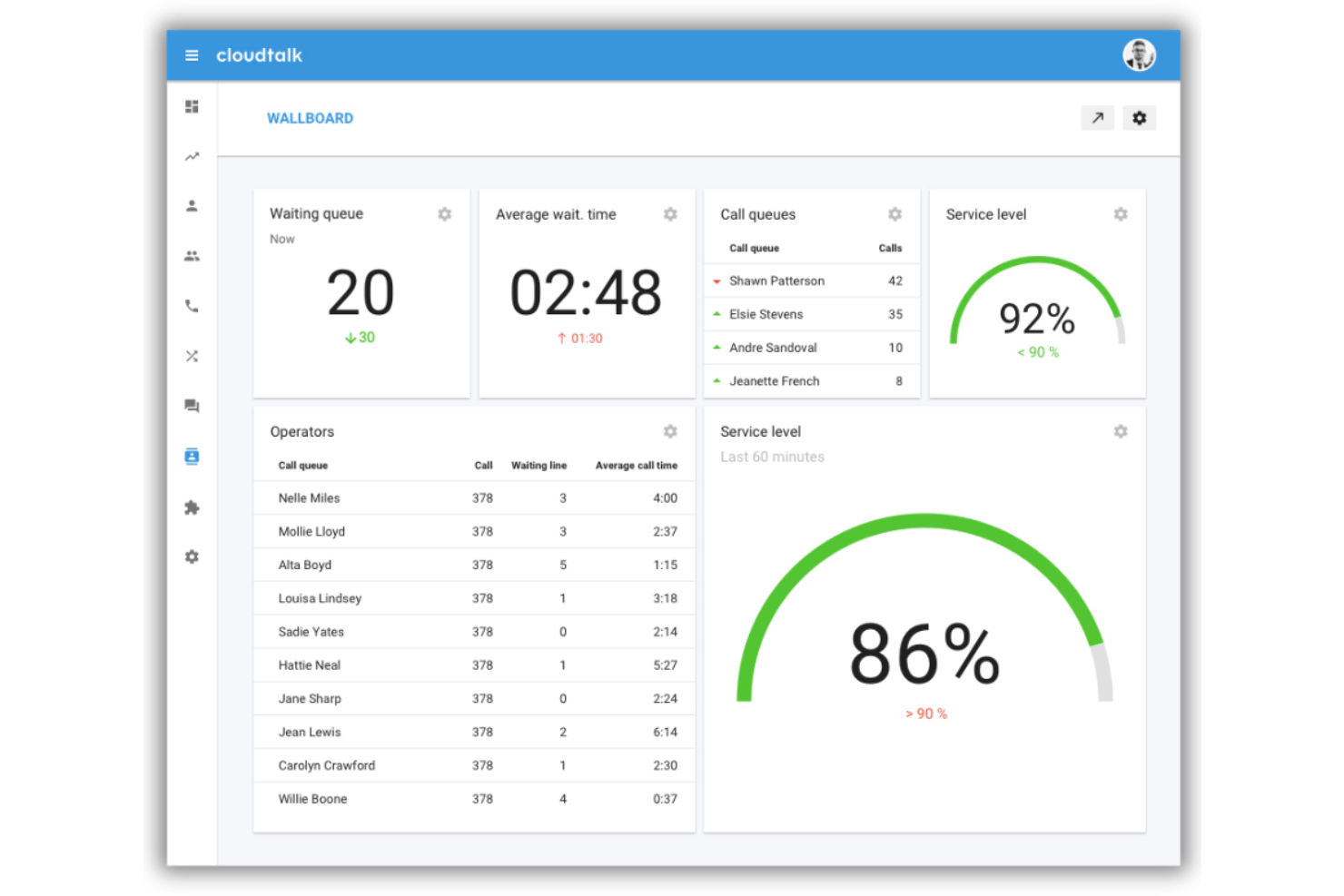
CloudTalk is a cloud-based call center platform that combines AI-powered call routing, visual call flow design, IVR, skills-based queue management, and real-time monitoring into a single system built for support and sales teams.
Who Is CloudTalk Best For?
CloudTalk is a strong fit for growing SMBs running inbound support or outbound sales teams that need structured call routing without enterprise-level complexity.
Why I Picked CloudTalk
CloudTalk earns its spot on my shortlist because of how much control it gives you over call routing logic, without needing a developer to set it up. I love the visual Call Flow Designer: you can build multi-branch IVR trees, configure business-hours conditions, and create VIP queue priority lanes all in one drag-and-drop canvas. Skills-based routing ensures callers land with the agent best equipped to handle them, not just whoever's free first.
CloudTalk Key Features
- Live call monitoring: Supervisors can listen, whisper, or barge into ongoing calls for real-time coaching and escalation.
- AI conversation intelligence: Calls are automatically transcribed with sentiment analysis and smart topic tagging.
- Real-time analytics and wallboards: Monitor queue performance, agent status, and missed calls with customizable dashboards.
- International SMS/MMS support: Send and receive messages globally, including WhatsApp and fax capabilities.
CloudTalk Integrations
CloudTalk offers 95+ native integrations, including Salesforce, HubSpot, Pipedrive, Slack, Microsoft Teams, Zendesk, Intercom, Freshdesk, and Zoho CRM, with an API available for custom integrations.
Pros and Cons
Pros:
- Offers real-time call monitoring and supervisor tools
- Queue prioritization based on agent skills
- Drag-and-drop IVR builder with advanced logic
Cons:
- Limited support for on-premise phone hardware
- Occasional delays in call audio connection

Best for appointment scheduling needs

Waitwhile is a queue management system that lets you set up virtual waitlists, manage customer check-ins, automate notifications, and handle appointment scheduling from a single platform.
Who Is Waitwhile Best For?
Waitwhile is a good fit for service-based businesses like retail, healthcare, and government offices that need to manage both walk-in queues and scheduled appointments.
Why I Picked Waitwhile
I picked Waitwhile as one of the best because its appointment scheduling tools go well beyond basic booking. I like how you can set up custom booking pages with service-specific time slots, staff assignments, and location routing—so customers always land with the right person. Waitwhile also lets you configure buffer times between appointments and send automated SMS or email reminders, which cuts down on no-shows without any manual follow-up.
Waitwhile Key Features
- LineSync: Merges walk-in waitlists and scheduled appointments into a single customer flow so your team manages both from one view.
- WaitIQ AI wait time estimation: Uses machine learning to predict wait times based on real-time and historical data signals.
- Occupancy tracking: Monitors the number of visitors in your location against your set capacity in real time.
- Self sign-up and check-in kiosk: Lets customers join a waitlist or register their arrival on a kiosk device without staff involvement.
Waitwhile Integrations
Waitwhile offers native integrations with Google Calendar, Outlook, Square, Shopify, and Salesforce. It also connects with Zapier and provides an API for custom integrations.
Pros and Cons
Pros:
- Easy-to-use interface simplifying the appointment process
- Comprehensive integrations with popular platforms
- Real-time insights for better queue management
Cons:
- Annual billing may not suit all businesses
- Might be over-featured for very small operations

Qminder
Best for customer service insights

Qminder is a queue management system that lets you handle digital check-ins, monitor real-time wait times, and track service activity across multiple locations.
Who Is Qminder Best For?
Qminder is a good fit for service-oriented businesses like retail, healthcare, and government offices that manage high volumes of in-person customer traffic.
Why I Picked Qminder
Qminder earns its spot on my shortlist because of how much visibility it gives you into service performance. I particularly like the real-time analytics dashboard, which shows wait times, service durations, and visitor flow as they happen—so my team can catch bottlenecks before they spiral. The service insights reports break down performance by location, staff member, and time of day, which makes it easy to identify exactly where slowdowns occur. I also find the visitor feedback feature useful for tying queue data directly to customer satisfaction scores.
Qminder Key Features
- Self-service check-in kiosk: Turn any iPad into a check-in station where visitors can sign themselves in and get automatically routed to the right service or department.
- Remote sign-in: Let customers join the queue before they arrive via QR code or a visitor website, so they can wait outside instead of crowding the lobby.
- Waiting room TV display: Show live queue updates on a waiting room screen to keep visitors informed of their position and expected wait time.
- Configurable service flows: Set up custom routing paths for walk-ins, appointments, and priority visitors based on service type or reason for visit.
Qminder Integrations
Qminder offers native integrations with Twilio, Zendesk, and Salesforce, and provides an API for custom integrations.
Pros and Cons
Pros:
- Comprehensive analytics on customer service experiences
- Easy integration with various CRM and feedback tools
- User-friendly interface, making it accessible even for those not tech-savvy
Cons:
- May be considered pricey for small businesses or startups
- Might be an overkill for businesses with limited customer interaction needs

Queue-it
Best for online traffic control

Queue-it is a virtual waiting room platform for managing online queues, offering real-time traffic control, queue customization, and analytics for high-demand digital environments.
Who Is Queue-it Best For?
Queue-it is a good fit for ecommerce, ticketing, and public sector organizations that experience predictable or sudden spikes in online traffic.
Why I Picked Queue-it
Queue-it is on my shortlist because it provides direct, real-time control over how traffic flows to your site during peak demand. The GO Queue-it Platform lets you throttle traffic up or down on the fly via API or dashboard—without touching your underlying infrastructure. The 24/7 peak-protected waiting room sits dormant until traffic hits a threshold you define, then activates automatically to prevent crashes before they happen. Queue-it also lets you protect specific bottlenecks—like "Add to Cart" actions or payment gateways—rather than queuing your entire site, which keeps the experience smooth for visitors who aren't hitting those protected endpoints.
Queue-it Key Features
- Invite-only waiting room: Gate access to exclusive sales or early-access events by verifying visitors via two-factor authentication before they enter the queue.
- Pre-queue countdown page: Collect early visitors on a branded countdown page before a scheduled sale goes live, then randomize them into the queue at launch.
- Multi-language waiting room support: Display the waiting room in 50+ languages to match the experience to your target markets.
- Mobile queue transfer: Let visitors who start queuing on desktop transfer their place in line to a mobile device without losing their position.
Queue-it Integrations
Queue-it offers connectors and supports integrations via API for custom setups.
Pros and Cons
Pros:
- Fair queueing for all visitors
- Customizable waiting room branding
- Handles sudden online traffic spikes
Cons:
- Requires clear traffic planning
- Setup may feel complex initially
Best for AI-driven ticket routing

monday service is a queue management system that lets teams organize, assign, and track customer requests using customizable workflows, ticket queues, and automation tools.
Who Is monday service Best For?
monday service suits mid-sized to enterprise customer support and service operations teams that need a flexible, customizable platform to manage high volumes of tickets.
Why I Picked monday service
I picked monday service as one of the best queue management systems because of how its AI handles the full triage cycle—not just routing. When a ticket arrives, monday service's auto-categorization classifies it by type, urgency, sentiment, and department before it reaches an agent. From there, smart assignment takes over, matching each ticket to the right agent based on their skills, current workload, and the ticket's priority or sentiment data. I especially like that these two features work together—AI-generated summaries and categories feed directly into the assignment logic, so tickets move from intake to the right person without manual sorting.
monday service Key Features
- Customer portal: A self-service portal where end users can submit requests, track ticket status, and access knowledge base resources without a monday account.
- Real-time service analytics: Customizable dashboards that track service performance, ticket volumes, and trends as they happen.
- Ticket boards and workflows: Team-specific workspaces with drag-and-drop workflow builders for managing escalations, approvals, and follow-ups.
- AI service agent: A built-in AI agent that draws on ticket history and your knowledge base to resolve repetitive requests automatically.
monday service Integrations
monday service offers native integrations with Slack, Salesforce, HubSpot, Zendesk, Gmail, Microsoft Teams, Google Drive, Outlook, Jira, and Zoom. It also supports Zapier and provides an API for custom integrations.
Pros and Cons
Pros:
- Visual boards help users easily track project progress
- Integration with various third-party applications
- Ability to tailor workflows and dashboards
Cons:
- Lacks some advanced reporting features
- Cost may be higher than other tools

Best for combined appointment and queue management

Engageware is a queue management system that combines real-time queue tracking, appointment scheduling, and customer flow analytics for businesses managing both walk-in and scheduled visits.
Who Is Engageware Best For?
Engageware is a good fit for retail banks, credit unions, and retail businesses that need to manage both scheduled appointments and walk-in customer queues across multiple locations.
Why I Picked Engageware
Engageware earns its spot on my shortlist because it's one of the few queue management systems that genuinely unifies walk-in lobby management and appointment scheduling in a single platform. What I find particularly compelling is the lobby management feature, which captures visitor intent at check-in via self-service kiosks or mobile, then routes customers to the right staff member based on need and real-time availability. That means a branch isn't just managing a line—it's actively converting walk-ins into structured, advisory-driven engagements. I also like that the analytics dashboard tracks the full customer journey from lobby arrival through to transaction or loan closing, so you can see exactly which walk-in interactions are generating revenue.
Engageware Key Features
- Skill-based routing: Matches each customer to the right staff member based on their specific need, service type, and real-time availability.
- Multi-channel scheduling: Lets customers book appointments via web, mobile app, Google search, QR codes, and SMS from a single scheduling system.
- Automated reminders: Sends SMS and email notifications to customers ahead of appointments to reduce no-shows and late cancellations.
- Peer benchmarking analytics: Compares walk-in traffic, appointment volume, and conversion rates against data from 400+ financial institutions.
Engageware Integrations
Engageware integrations include Salesforce, Zendesk, HubSpot, Freshworks, and Zoho. Engageware also offers an API for custom integrations.
Pros and Cons
Pros:
- Improves staff workload distribution
- Reduces wait times for walk-in customers
- Combines scheduling and queue in one place
Cons:
- Can depend heavily on internet reliability
- Requires training for first-time users
- Setup may take time for large teams

Qwaiting
Best for multi-platform queuing

Qwaiting is a queue management system that lets you manage customer flow across web, kiosk, and mobile channels, offering real-time queue tracking, virtual ticketing, and appointment scheduling.
Who Is Qwaiting Best For?
Qwaiting is a good fit for service-based businesses like retail, healthcare, and government offices that need to manage customer queues across multiple locations and touchpoints.
Why I Picked Qwaiting
I picked Qwaiting as one of the best because it genuinely covers multi-platform queuing in a way most tools don't. I like that customers can join a queue via a web browser, a physical kiosk, or a mobile app—all feeding into the same real-time dashboard. My team can monitor wait times and queue status across all those entry points without switching between systems. The virtual ticketing feature also lets customers hold their place in line remotely, which cuts down on physical crowding at the service location.
Qwaiting Key Features
- Appointment scheduling: Customers can book time slots in advance, reducing walk-in wait times and helping staff plan service capacity.
- SMS and email notifications: Automated alerts keep customers updated on their queue position and estimated wait time.
- Analytics and reporting: A built-in dashboard tracks service times, peak hours, and queue performance across locations.
- Multi-counter support: Assign customers to specific service counters based on request type, staff availability, or location.
Qwaiting Integrations
Native integrations include Google Calendar, Zendesk, Salesforce, Twilio, Paypal, Stripe, Whatsapp, and Slack. Qwaiting offers an API for custom integrations.
Pros and Cons
Pros:
- Supports both walk-ins and bookings
- Customizable for different industries
- Works across multiple service channels
Cons:
- Reporting options can overwhelm
- Advanced setup may need training

Best for integration flexibility

Awebstar Queue Management System is a queue management software platform that provides digital ticketing, real-time queue tracking, customizable workflows, and integration options for businesses managing customer flow.
Who Is Awebstar Queue Management System Best For?
Awebstar Queue Management System is a good fit for businesses in retail, healthcare, and government that need queue management software integrating with their existing tools and systems.
Why I Picked Awebstar Queue Management System
I included Awebstar Queue Management System in my top picks because of how well it connects with the systems businesses already rely on. I particularly like its SSO (Single Sign-On) integration, which lets staff access the queue platform without managing separate credentials—a useful feature in multi-system environments. Its HIS (Hospital Information System) integration is a real differentiator for healthcare settings, where patient data needs to flow between the queue and clinical systems without manual handoffs. The SMS/Notifications API lets you plug queue alerts directly into your existing communication stack instead of being locked into a single notification channel.
Awebstar Queue Management System Key Features
- QR code queue entry: Customers scan a QR code to join a queue remotely and receive their ticket number directly on their smartphone.
- Token display screen: A counter display shows current, called, and skipped token numbers alongside audio announcements for clear in-branch visibility.
- Ticket dispenser support: A physical kiosk-based ticket dispenser assigns unique numbers per customer across multiple departments and service types.
- Customizable display messaging: Admins can push promotional messages to all display screens across locations from within the system.
Awebstar Queue Management System Integrations
Awebstar Queue Management System offers native integrations with Hospital Information Systems (HIS) and supports Single Sign-On (SSO) providers. An API is available for custom integrations.
Pros and Cons
Pros:
- Cloud-based system offering easy accessibility
- Robust virtual queuing features
- Comprehensive integration possibilities
Cons:
- Might be overwhelming for small businesses
- Requires some technical know-how for full feature utilization
Other Noteworthy Queue Management Systems
Below is a list of additional queue management systems that I shortlisted, but did not make it to the top 15. Definitely worth checking them out.
- QLess
For minimizing physical lines
- Skiplino
For digital and in-person queues
- Wavetec
For virtual queue management
- NEMO-Q
For multi-industry adaptability
- Qsome
For straightforward queue setups
- Q-flow
For patient and customer journeys
- Tensator
For physical space management
- Verint
Good for large-scale operations
- Qtrac
Good for retail-specific needs
- Leyline
Good for interactive digital signage
- Advantech Queue Management System
Good for intelligent analytics
- Aurionpro
Good for banking and financial sectors


How I Evaluate Queue Management Systems
My evaluation splits into two layers: the baseline a tool must clear (real-time queuing, staff routing, customer alerts) and the differentiators that make it right for a hospital, bank, or retail floor.
Core Functionality (Table Stakes for This List)
These core capabilities serve as the acceptance criteria for inclusion on my list of queue management systems:
- Virtual Queuing & Check-In: I evaluate which check-in channels each platform supports (e.g. QR codes, mobile links, kiosks, SMS) and whether customers can join a queue before arriving on-site.
- Real-Time Queue Monitoring: Live dashboards for both staff and customers matter here, so I look for estimated wait times, position tracking, and multi-location visibility.
- Customer Notifications & Alerts: I check whether the platform sends automated SMS, email, or push alerts at key moments, like when a customer's turn is approaching or a counter opens up.
- Service & Staff Routing: Routing logic separates basic tools from useful ones. I look for rule-based assignment by service type, staff skill, priority level, or counter availability.
- Appointment Scheduling Integration: Walk-ins and pre-booked visits need to coexist in one queue. I evaluate how each tool blends scheduled appointments with live walk-in traffic.
- Analytics & Reporting Dashboard: Metrics like average wait time, service duration, and staff throughput should be accessible without manual exports. I look for filterable, real-time dashboards.
I rank each vendor on a scale from 0 (does not offer the functionality) to 5 (excels in this area) for each criterion.
Vendors need to achieve a minimum average score to be considered for inclusion on my list. From there, I consider what sets each platform apart.
Differentiating Factors (What Sets Vendors Apart)
Once I've curated my list, here's how I contrast and compare different vendors in the queue management system space:
Standout Features
Digital signage integration can make a major difference for teams looking to engage customers and keep lines moving in real time, while multi-location management is essential if you oversee queues across multiple branches or service centers from a central dashboard. I also consider how mobile staff apps help on-the-floor staff manage queues without returning to a workstation and whether the platform uses AI to predict wait times, which can drive staffing and operational decisions during peak periods.
Beyond Features
Security and compliance matter especially in healthcare and government settings, so I check for HIPAA readiness, GDPR compliance, and role-based access controls. Integration ecosystem is equally important. A queue system that connects to your CRM, EHR, or POS keeps customer data flowing without manual work. I also evaluate deployment flexibility, since some organizations need cloud-based SaaS while others require on-premise hosting to meet internal IT policies.
How to Choose a Queue Management System
It’s easy to get bogged down in long feature lists and complex pricing structures. To help you stay focused as you work through your unique software selection process, here’s a checklist of factors to keep in mind:
| Factor | What to Consider |
|---|---|
| Scalability | Can the system handle more locations, staff, or customers as you grow? Avoid tools with rigid limits or high per-user fees that add up quickly. |
| Integrations | Does it connect to your CRM, POS, or calendar tools? Manual workarounds eat up time. Check for pre-built or API-based options. |
| Customizability | Can you adjust queue flows, branding, or customer-facing screens without dev help? Some tools lock you into defaults. |
| Ease of use | Can frontline staff use it with little training? Look for drag-and-drop tools, clear labels, and mobile-friendly layouts. |
| Implementation and onboarding | How long will setup take and who needs to be involved? Ask if they offer templates, migration help, or onboarding support. |
| Cost | What’s included in each plan? Watch for limits on queues, users, or support. Ask if pricing changes with volume or traffic. |
| Security safeguards | Does it offer role-based access, encryption, and audit trails? If you’re collecting customer data, dig into compliance claims. |
| Support availability | Can you reach someone during peak hours? Ask about support channels, response times, and if onboarding help is included. |
What is a Queue Management System?
A queue management system is a set of tools and processes designed to control and organize the flow of customers or clients waiting in line, physically or virtually. Various sectors, including retail, healthcare, banks, and government offices, utilize these systems to streamline operations, reduce wait times, and improve customer experience.
By employing such systems, organizations aim to make the waiting process more efficient, transparent, and convenient for the service providers and the individuals in line.
Features of Queue Management Systems
When selecting a queue management system, keep an eye out for the following key features:
- Third-party integrations: Connects with CRM, POS, or messaging platforms to streamline workflows and reduce data silos.
- Virtual queuing: Lets customers join a queue remotely via mobile, web, or kiosk to reduce physical crowding and improve wait-time transparency.
- Real-time notifications: Sends SMS or app alerts to keep customers informed about their position in line and estimated wait time.
- Appointment scheduling: Allows customers to book time slots in advance to help manage flow and reduce walk-in wait times.
- Queue analytics and reporting: Tracks wait times, service duration, and staff performance to identify bottlenecks and improve operations.
- Multi-channel access: Supports customer check-in across various channels like in-store kiosks, websites, or mobile apps for added convenience.
- Staff management dashboard: Gives team members tools to manage queues, assign tasks, and monitor service metrics in real time.
- Customer feedback collection: Enables post-service surveys or ratings to gather insights into satisfaction and service quality.
- Multilingual support: Accommodates customers in different languages to ensure accessibility across diverse populations.
- Customizable interface: Allows branding and layout changes to align the look and feel with your customer experience strategy.
Benefits of Queue Management Systems
Implementing a queue management system provides several benefits for your team and your business. Here are a few you can look forward to:
- Easier feedback tracking: Built-in survey tools let you hear from customers right after service while it’s fresh.
- Shorter wait times: Virtual queuing and appointment booking help reduce crowding and keep lines moving.
- Better customer experience: Real-time updates and flexible check-in options make waiting less frustrating.
- More efficient staff: Dashboards and service insights let staff handle queues and tasks with less guesswork.
- Fewer no-shows: Reminder notifications and digital check-ins help keep customers on track.
- Smarter decisions: Reporting tools give you data on service times and traffic trends so you can adjust staffing and hours.
- Consistent service: Standard queue processes reduce confusion and help staff deliver the same experience every time.
Costs and Pricing of Queue Management Systems
Selecting queue management systems requires an understanding of the various pricing models and plans available. Costs vary based on features, team size, add-ons, and more. The table below summarizes common plans, their average prices, and typical features included in queue management systems:
Plan Comparison Table for Queue Management Systems
| Plan Type | Average Price | Common Features |
|---|---|---|
| Free Plan | $0 | Includes basic queue tracking, limited customer notifications, and one location. |
| Personal Plan | $10–$25/user/month | Includes virtual queuing, appointment booking, basic analytics, and email support. |
| Business Plan | $30–$60/user/month | Includes multi-location support, SMS notifications, advanced reporting, and integrations. |
| Enterprise Plan | $75–$150/user/month | Includes custom workflows, role-based permissions, API access, and dedicated support. |
Queue Management Systems FAQs
Here are some answers to common questions about queue management systems:
How do queue management systems work with appointment scheduling?
Most systems let you offer both walk-in queues and scheduled appointments. Customers can book time slots online or through a mobile app. The system adds them to the queue automatically when their appointment time approaches. It helps you balance pre-booked visits with real-time demand.
Can queue management systems integrate with my existing software?
Yes, many systems integrate with tools like CRMs, POS platforms, calendars, and messaging services. Some offer plug-and-play options, while others need API setup. Make sure to check if your current tools are supported or if you’ll need custom integration work.
How long does it take to set up a queue management system?
Setup time varies based on the tool and your internal resources. Some systems can be up and running in a few days with pre-built templates. Others may take weeks if you’re customizing workflows, connecting third-party apps, or rolling out to multiple locations. Ask vendors what onboarding support they provide.
Can you provide a typical range for the pricing of these systems?
The pricing can range from as low as $10 per month for basic solutions catering to small businesses, to upwards of $1,000 or more per month for enterprise-grade solutions with comprehensive features.
Are queue management systems suitable for small businesses?
Yes, plenty of systems offer free or low-cost plans for single-location teams. Look for tools with basic queue tracking, mobile check-ins, and simple dashboards. Just make sure you’re not locked into long-term contracts or pricey add-ons you won’t use.
Are there any free queue management system options available?
Some tools offer free versions, often called “freemium” models. These usually come with basic features; businesses can upgrade to unlock more advanced functionalities. Researching and ensuring that the free version meets your specific needs before integrating it into your operations is important.
What kind of hardware do I need for a queue management system?
It depends on how you want customers to check in. Some teams use tablets or kiosks at the entrance, while others rely on QR codes, SMS, or mobile apps. Most platforms are cloud-based, so you won’t need servers—just devices that can connect to the internet.
What do you think?
I've endeavored to provide a comprehensive list based on my experiences and research, but the tech landscape is vast and ever-evolving. If you've encountered a queue management system that's been invaluable to you and isn't on this list, I'd love to hear about it.
While you're here, subscribe to our newsletter for the latest CX insights, how-to guides, strategies, and resources from top experts in the CX field.