

The best omnichannel customer engagement software unifies customer data and coordinates personalized experiences across marketing, messaging, support, and contact center channels. This guide compares platforms for customer journey orchestration, AI-assisted decisioning, segmentation, automation, and agent support. Use it to assess channel coverage, integrations, reporting, governance, and scalability before choosing software that fits your customer experience operation.
Why Trust Our Software Recommendations
6,700+
Reviews
20
Industry experts
16+
Evaluation factors
14
Years
Our team has been testing and reviewing software since 2012. As CX leaders ourselves, we know how difficult—and important—it is to choose the right software.
For this guide, we evaluated tools using hands-on testing and independent research, scoring tools using our selection criteria.
Our reviews reflect our human editorial judgment, not a sales pitch.
 Gui DrusinaCreative Director
 Tim FisherVP of AI
Omnichannel Customer Engagement Software Comparison Table
Compare pricing and specs side by side for the best multi-channel customer engagement platforms:
| Tool | Best For | Trial Info | Price | ||
|---|---|---|---|---|---|
| 1 | Best for AI-driven multichannel journey building | 14-day free trial | Pricing upon request | Website | |
| 2 | Best for AI-driven journey and segment building | 30-day free trial | From $85/month | Website | |
| 3 | Best for marketing-led segmentation across 12+ channels | Free demo available | Pricing upon request | Website | |
| 4 | Best for per-user AI decisioning at lifecycle scale | Free demo available | Pricing upon request | Website | |
| 5 | Best for AI-driven lifecycle marketing at scale | 30-day free trial | From ₹12,000/month | Website | |
| 6 | Best for enterprise contact centers on 30+ channels | Free demo available | Pricing upon request | Website | |
| 7 | Best for AI-native omnichannel support | 14-day free trial and free demo available | From $19/user/month (billed annually) | Website | |
| 8 | Best for built-in carrier network and 15+ channels | 60-day free trial | From $530/month | Website | |
| 9 | Best for AI-driven marketing journey orchestration | Free demo available | Pricing upon request | Website | |
| 10 | Best for enterprise-scale contact center AI | Free trial available | From $75/user/month (billed annually) | Website |


Omnichannel Customer Engagement Software Reviews
Compare pricing and specs side by side for the best multi-channel customer engagement platforms that made it onto my shortlist.
 Best for AI-driven multichannel journey building
- 14-day free trial
- Pricing upon request
Visit WebsiteCustomer Rating:4.6/5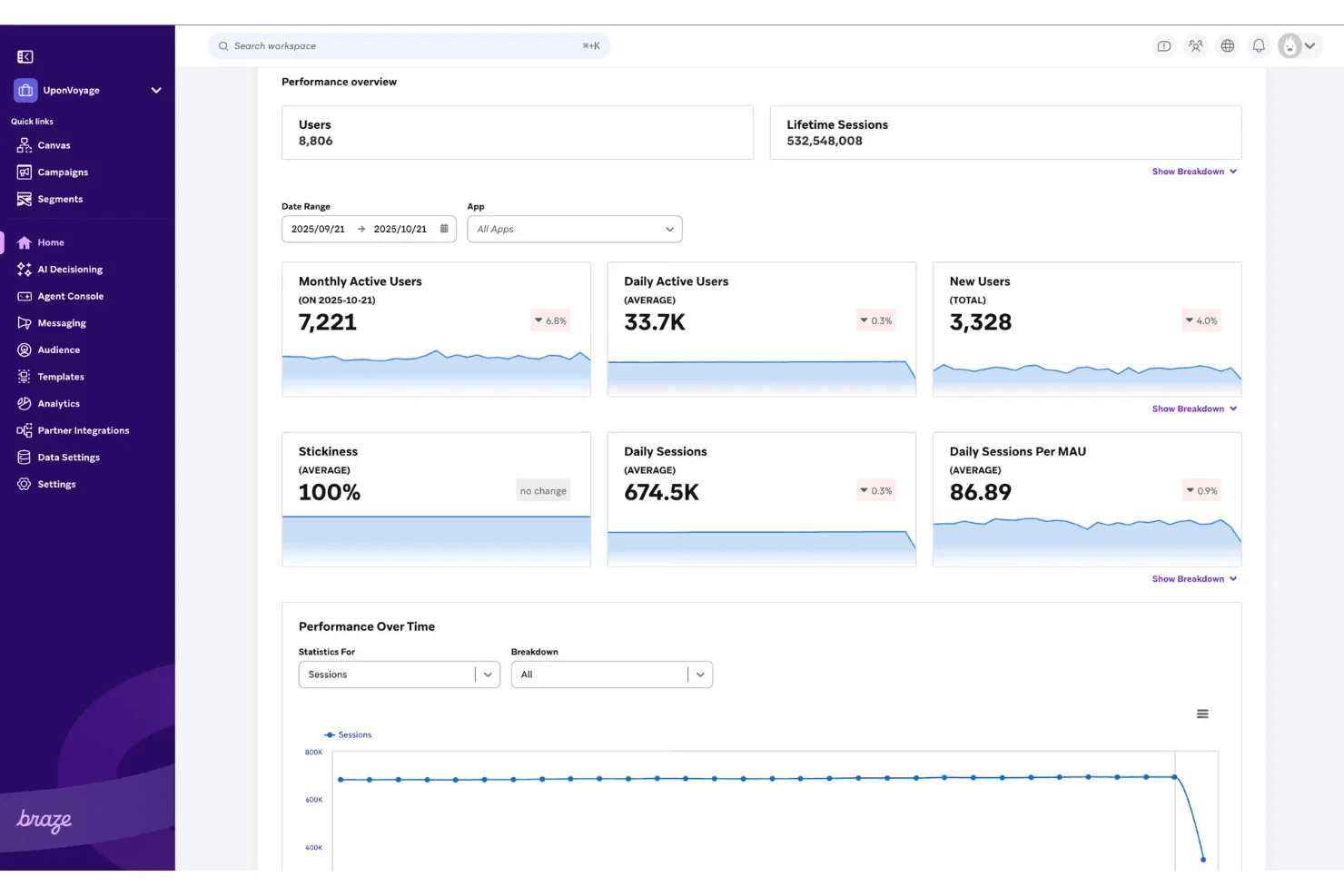
Braze tracks user engagement metrics like sessions and active users over time. Braze is a customer engagement platform built around multichannel messaging, visual journey orchestration, dynamic audience segmentation, and AI-driven personalization across email, push, SMS, WhatsApp, in-app, and more.
Who Is Braze Best For?
Braze is a strong fit for marketing and lifecycle teams at mid-market to enterprise companies who need to orchestrate complex, behavior-triggered campaigns across email, push, SMS, WhatsApp, and in-app channels from a single platform.
Why I Picked Braze
I've included Braze in my top picks because its Canvas journey builder is genuinely one of the best I've used for multichannel orchestration, letting you build branching, behavior-triggered flows across email, SMS, WhatsApp, push, and in-app from one visual workspace. What sets it apart is BrazeAI Decisioning Studio, which uses reinforcement learning to automatically determine the best channel, message, and timing for each individual customer. Layer in dynamic segmentation with SQL and CDI segments, and you get precise audience targeting that feeds directly into those journeys.
Braze Key Features
- Cross-channel customer profiles: Each user profile stores attribute data, custom events, purchase history, message interactions, and predictive scores across every connected channel.
- SQL and CDI segments: Build dynamic audience segments using SQL queries against Braze data or synced warehouse data, with no limit on how many segments you create.
- Experiment Paths in Canvas: Test multiple journey paths against each other and a control group to identify which flow drives the best outcomes before rolling it out fully.
- Braze Currents: Stream raw engagement and behavioral event data in real time to your data warehouse or BI tool for analysis outside the Braze dashboard.
Braze Integrations
Braze supports integrations through its Alloys partner ecosystem, including Zendesk, Front, Snowflake, BigQuery, Redshift, Databricks, Segment, and Regal. It also offers REST APIs, SDKs, webhooks, and Data Transformation for custom connections.
Pros and Cons
Pros:
- Segmentation combines events, purchases, and profiles
- AI selects channels, timing, and messages
- Branching journeys respond to real-time behavior
Cons:
- Reporting depth frustrates some reviewers
- No native agent inbox or voice
 Best for AI-driven journey and segment building
- 30-day free trial
- From $85/month
Visit WebsiteCustomer Rating:4.5/5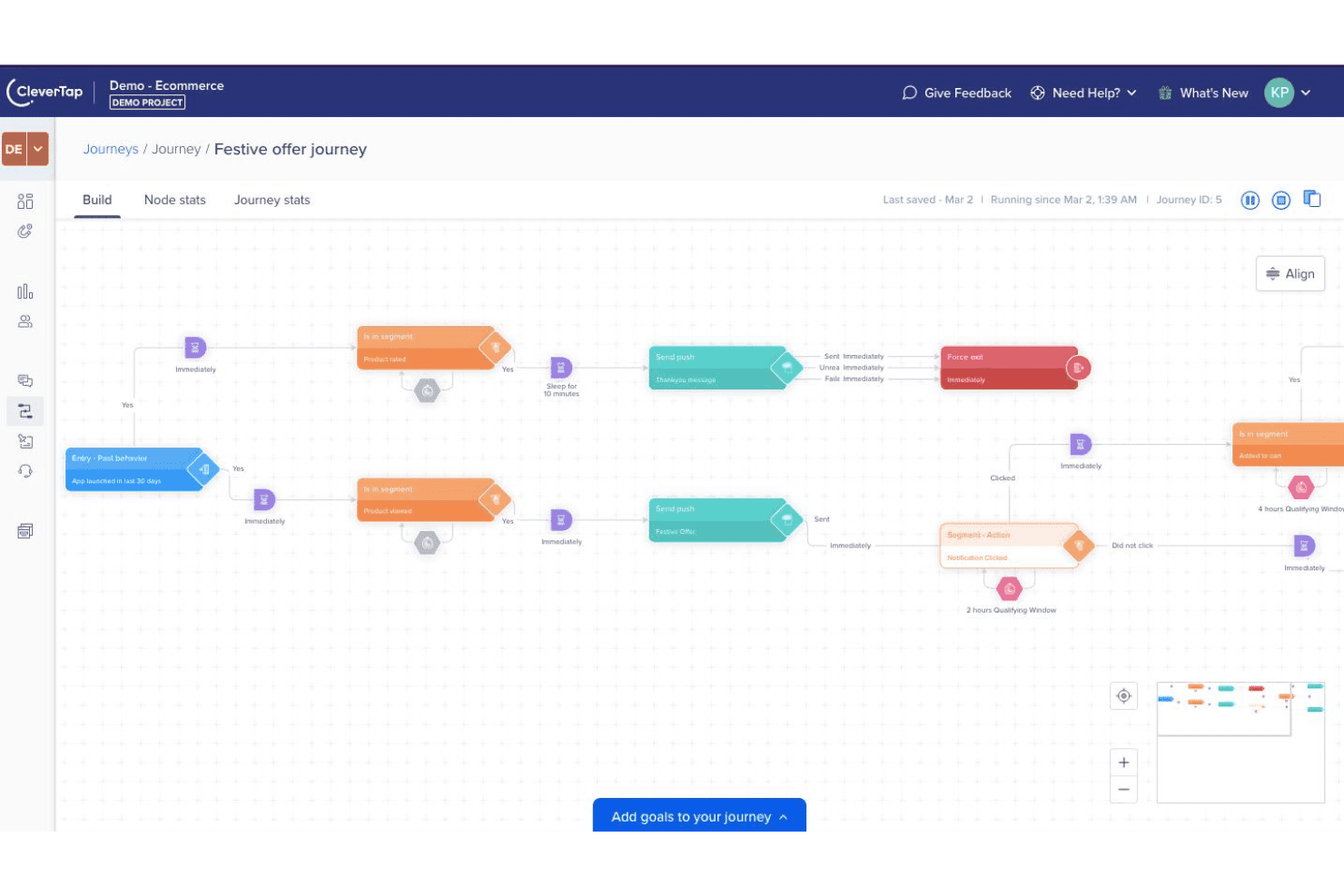
CleverTap lets users build automated multi-step customer journeys visually. CleverTap is a customer engagement platform that combines behavioral segmentation, journey orchestration, multichannel messaging, and AI-driven analytics across mobile, web, email, SMS, and WhatsApp.
Who Is CleverTap Best For?
CleverTap is a strong fit for mobile-first companies in e-commerce, fintech, gaming, and subscription businesses that need advanced behavioral segmentation and AI-driven journey orchestration.
Why I Picked CleverTap
I've included CleverTap in my top picks because its AI-driven segmentation and journey building are genuinely best-in-class. The Segment Builder Agent creates precise behavioral segments from plain-language prompts, and IntelliNODE automatically tests multiple journey paths, then routes each user down whichever one converts best. I also love that the Journey Builder Agent can spin up a full orchestrated journey from a single goal statement, cutting setup time without removing human approval at each step.
CleverTap Key Features
- TesseractDB unified user profile: Stores up to 10 years of behavioral and CRM data per user, pulling in web, app, and third-party sources for a single customer view.
- IntelliNODE path optimization: Tests multiple journey branches simultaneously and automatically routes each user toward the highest-converting path.
- Signed Call in-app voice: Lets brands initiate masked VoIP calls inside their own app, displaying the brand's name, logo, and call reason on the recipient's screen.
- Zero Copy Segments: Builds audience segments directly from your data warehouse without duplicating or moving the underlying data into CleverTap.
CleverTap Integrations
CleverTap has a native Salesforce integration and connects with Segment, mParticle, RudderStack, Tealium, Hightouch, Amplitude, Snowflake, S3, GCP, Azure, and AWS EventBridge. It supports APIs and webhooks, with Zendesk via webhooks and HubSpot via Zapier.
Pros and Cons
Pros:
- Real-time journey drop-off reporting
- Deep behavioral and RFM segmentation
- AI builds adaptive journey paths
Cons:
- Contact-center voice and IVR are absent
- No shared inbox beyond WhatsApp
Learn more about CleverTap: Best for marketing-led segmentation across 12+ channels
- Free demo available
- Pricing upon request
Visit WebsiteCustomer Rating:4.8/5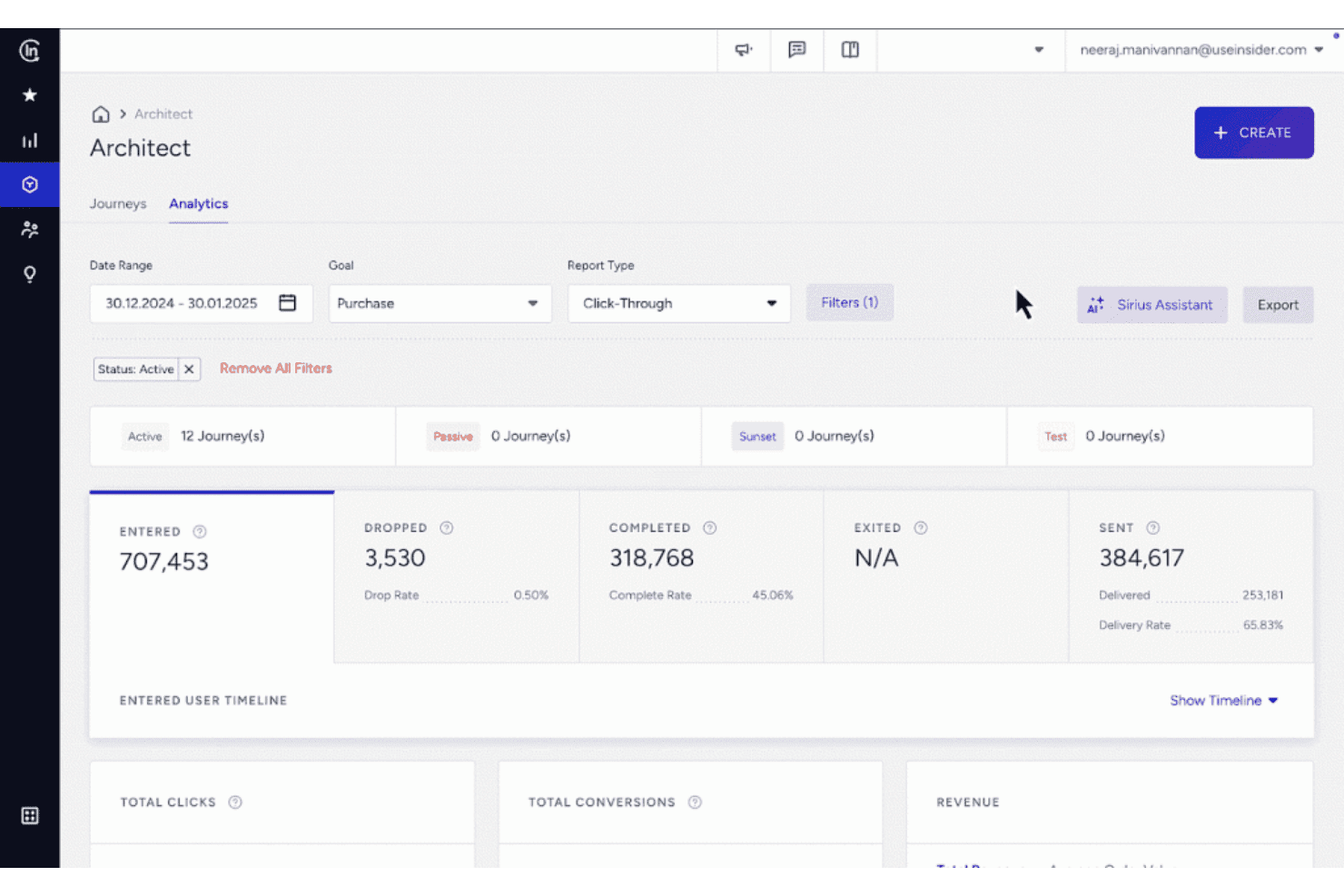
Insider One tracks journey analytics with completion and delivery metrics. Insider One is a customer engagement platform that brings together a customer data platform, AI-driven journey orchestration, audience segmentation, and two-way conversational messaging across 12+ digital channels.
Who Is Insider One Best For?
Insider One is a strong fit for marketing operations teams at mid-market to enterprise brands that run campaigns across messaging apps, email, and web and need advanced segmentation to drive them.
Why I Picked Insider One
I picked Insider One as one of the best because its segmentation engine is genuinely the most developed I've seen in this category. It lets you build dynamic audience segments using 120+ attributes, AI affinity models, and behavioral predictions, then feeds those segments directly into Architect, its visual journey builder, across 12+ channels. What really sets it apart is WhatsApp Commerce and Flows, which let customers browse, purchase, and complete forms without ever leaving WhatsApp, driven entirely by the same segmentation logic.
Insider One Key Features
- Architect journey builder: A drag-and-drop, no-code canvas for building multi-step, branching campaigns across 12+ channels with 100+ pre-built templates.
- WhatsApp Commerce and Flows: Lets customers browse products, complete purchases, fill forms, and book appointments without leaving WhatsApp.
- Bot-to-human handoff: Transfers live conversations from AI agents to human agents with full contextual data passed at the point of handover.
- Zero-copy segmentation: Runs audience segmentation directly on connected data warehouse data (Snowflake, BigQuery, Databricks) without duplicating it into the platform.
Insider One Integrations
Insider One lists 100+ integrations, including Salesforce, HubSpot, Zendesk, ServiceNow, Snowflake, BigQuery, Shopify, Google Ads, and Segment. It also supports unlimited APIs and webhooks for custom connections.
Pros and Cons
Pros:
- WhatsApp commerce and conversational handoffs
- Branching journeys across 12-plus channels
- Advanced segmentation across 120-plus attributes
Cons:
- Limited contact-center reporting and routing
- No native voice or IVR
Learn more about Insider One: Best for per-user AI decisioning at lifecycle scale
- Free demo available
- Pricing upon request
Visit WebsiteCustomer Rating:4.5/5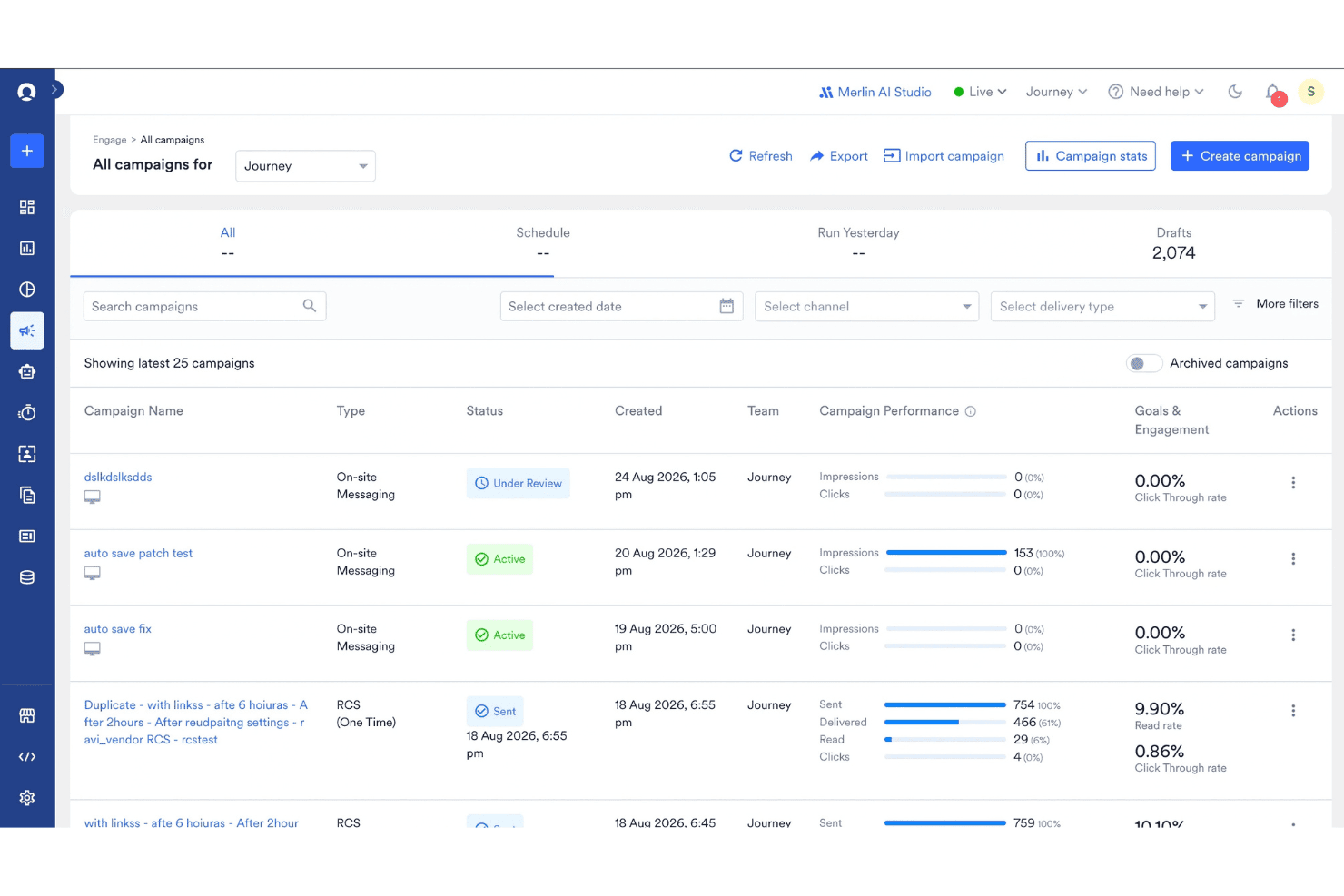
MoEngage lets users track and manage multi-channel campaigns in one view. MoEngage is an agentic customer engagement platform that lets marketing and lifecycle teams orchestrate cross-channel campaigns across 16+ channels, with AI-driven segmentation, journey building, and per-user decisioning.
Who Is MoEngage Best For?
MoEngage is a strong fit for B2C marketing and lifecycle teams at mid-market to enterprise consumer brands running high-volume, multi-channel engagement programs.
Why I Picked MoEngage
I picked MoEngage as one of the best because no other platform on my shortlist applies a dedicated AI agent to each individual user the way it does. Through its AI Decisioning engine (built on the Aampe acquisition), MoEngage runs reinforcement learning per customer to determine the right content, channel, timing, and frequency, without you having to manually configure rules for every segment. Paired with the visual Flows builder and predictive churn and conversion models, it handles lifecycle engagement at a scale most teams couldn't manage manually.
MoEngage Key Features
- Merlin AI agents: Native generative AI agents that write copy, generate images, build segments, and assist with journey design directly within the platform.
- MoEngage Inform: A transactional alert product that manages SMS, email, and other channel delivery across 30+ service providers, with channel fallback and centralized reporting.
- Predictive audience segments: Churn, uninstall, and conversion likelihood models that update dynamically in real time, with no minimum audience size required.
- Unified identity resolution: Merges duplicate customer profiles across devices and identifiers, with account-level parent/child profile management for one-to-many relationships.
MoEngage Integrations
MoEngage has documented integrations with Salesforce, Freshdesk, Zendesk, Segment, Snowflake, Twilio, Infobip, Gupshup, and Shopify, while its App Marketplace lists 300+ integrations. It also supports REST APIs, webhooks, SDKs, and Zapier.
Pros and Cons
Pros:
- Visual Flows support complex journey branching
- Dynamic segments update from live behavior
- Per-user AI optimizes channel timing
Cons:
- Large datasets can slow dashboards
- No native shared agent inbox
Learn more about MoEngage: Best for AI-driven lifecycle marketing at scale
- 30-day free trial
- From ₹12,000/month
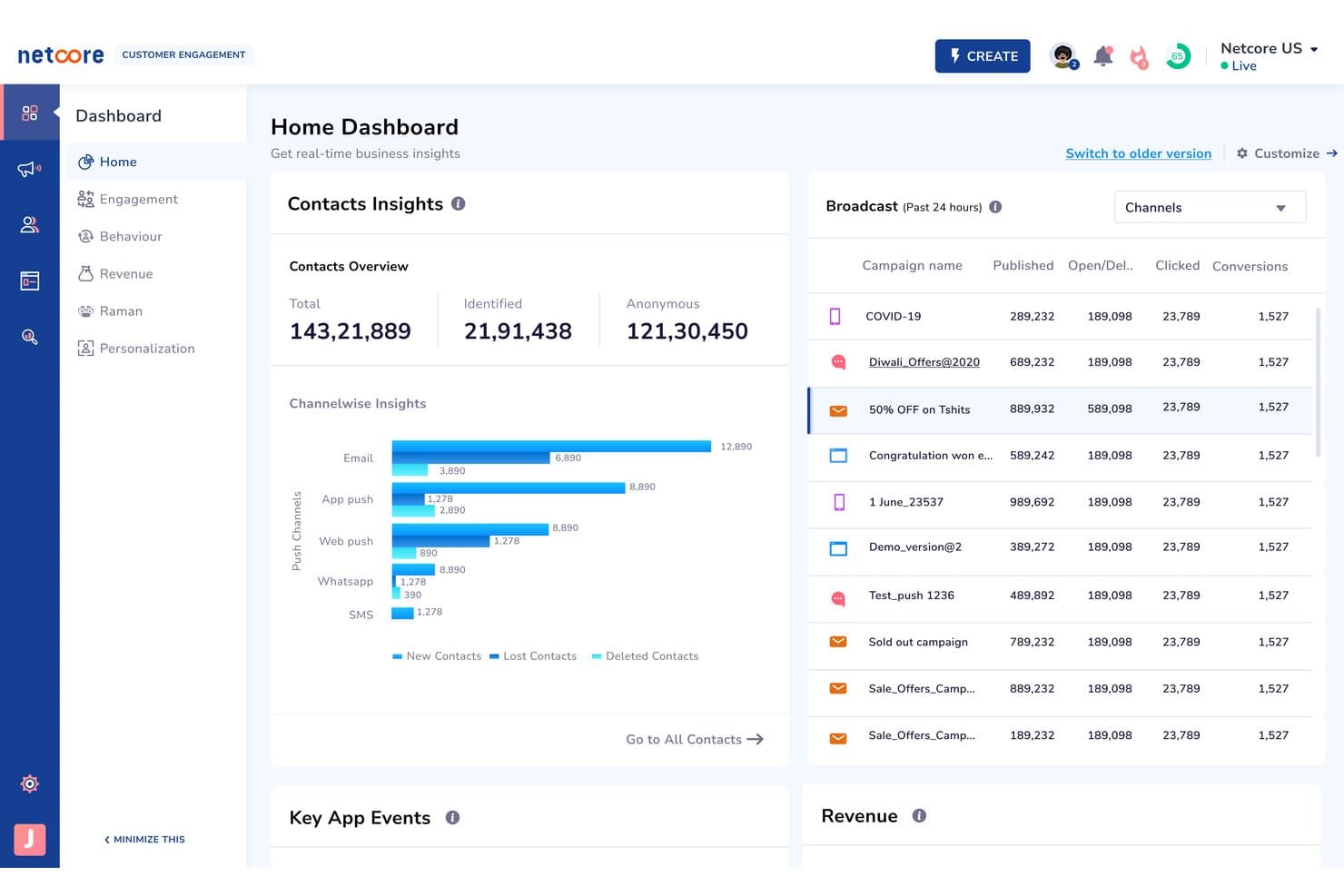
Netcore Cloud's home dashboard gives real-time contact and campaign insights. Netcore Cloud is an AI-driven customer engagement platform that runs lifecycle marketing campaigns across nine channels—email, SMS, WhatsApp, push, in-app, web, RCS, voice, and app inbox—with a built-in CDP, no-code journey builder, and behavioral segmentation tools.
Who Is Netcore Cloud Best For?
Netcore Cloud is a strong fit for B2C marketing teams in ecommerce, BFSI, and retail that need to run high-volume lifecycle campaigns across multiple channels from a single platform.
Why I Picked Netcore Cloud
I picked Netcore Cloud as one of the best because its AI-driven lifecycle marketing operates across nine channels under a single contract, with a Decisioning Agent that selects the channel each customer is most likely to engage with. I love how the Journey Path Optimizer automatically shifts users onto the highest-converting paths in real time, rather than relying on static sequences. The catalog-based triggers, which fire price-drop or back-in-stock alerts only to users who viewed or wishlisted a product, show the kind of behavioral precision that separates genuine lifecycle marketing from basic batch sends.
Netcore Cloud Key Features
- Audience Agent: Build audience segments by typing a plain-language prompt, no SQL or manual rule configuration needed.
- Product catalog triggers: Send price-drop, back-in-stock, and low-inventory alerts only to users who viewed or wishlisted the specific product.
- Frequency capping: Set limits on how many messages a customer receives across all channels within a defined time window.
- RFM scoring: Segment your customer base by recency, frequency, and monetary value to prioritize high-intent and at-risk groups.
Netcore Cloud Integrations
Netcore Cloud offers 100+ native integrations, including Salesforce, AppsFlyer, Adjust, Branch, Databricks, Snowflake, and Limechat. It also supports Shopify and Magento marketplace apps, open APIs, S3 and Google Cloud Storage exports, and Zapier.
Pros and Cons
Pros:
- Advanced segmentation uses predictive audience signals
- Real-time triggers react to customer behavior
- Nine channels support coordinated lifecycle messaging
Cons:
- Reporting can show inconsistent engagement data
- No shared inbox for service teams
Learn more about Netcore Cloud: Best for enterprise contact centers on 30+ channels
- Free demo available
- Pricing upon request
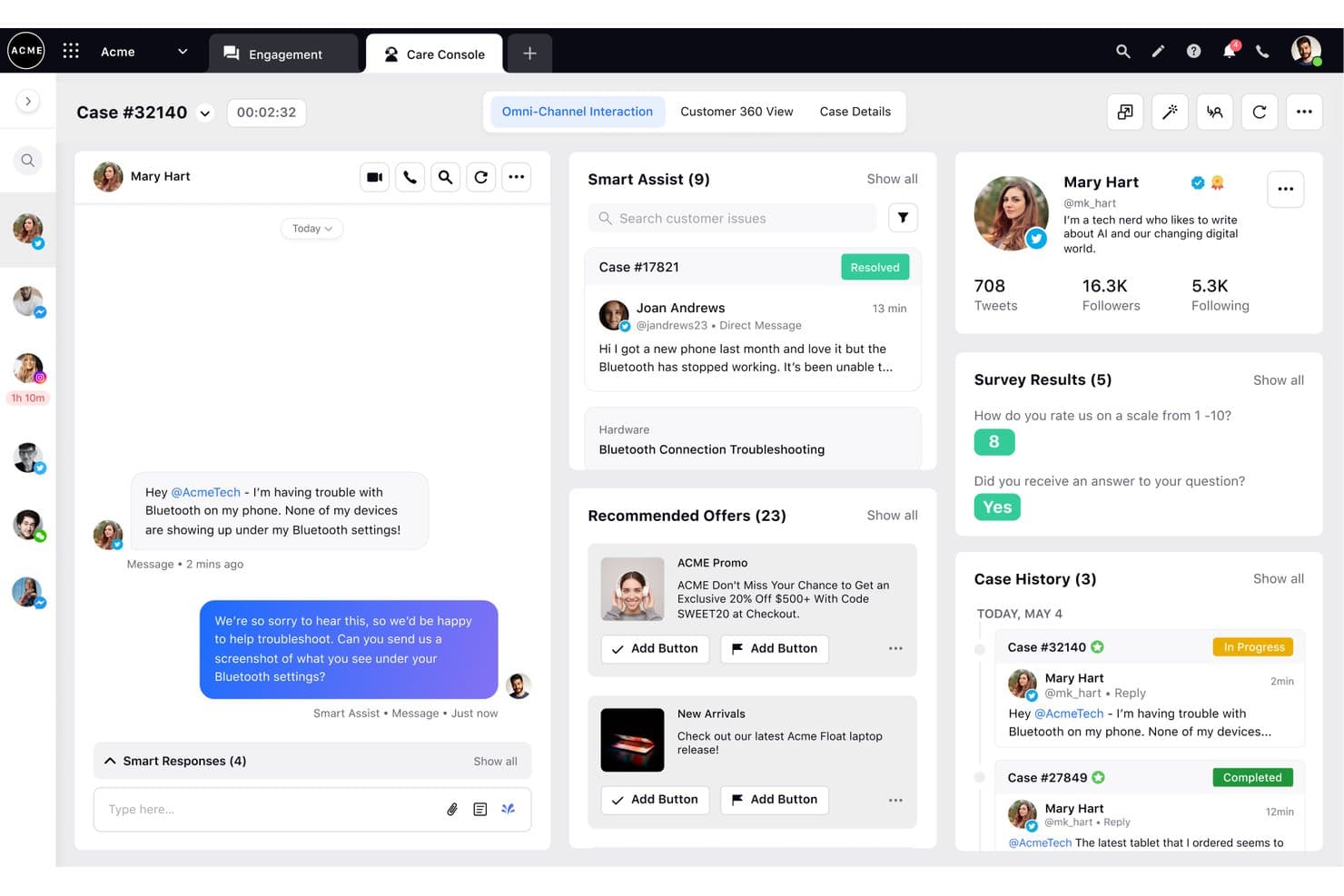
Sprinklr Service unifies chat, social, and customer data in one omnichannel console. Sprinklr Service is an AI-native contact center platform that unifies voice, social, messaging, email, and 30+ other channels into a single agent desktop, with built-in routing, conversational AI, workforce management, and cross-channel analytics.
Who Is Sprinklr Service Best For?
Sprinklr Service is built for enterprise contact centers that need to manage customer conversations across voice, social, messaging, and 30+ other channels from a single agent desktop.
Why I Picked Sprinklr Service
Sprinklr Service earns its spot on my shortlist because it genuinely consolidates 30+ channels, including voice, WhatsApp, social DMs, and email, into a single Care Console without forcing agents to switch between tools. I'm particularly impressed by the AI-powered routing, which tags each incoming case with intent and sentiment before assigning it based on agent skill, workload, and predicted CSAT. The built-in Agent Copilot then surfaces case summaries and reply suggestions in real time, so agents handling a WhatsApp inquiry carry the same context as one on a voice call.
Sprinklr Service Key Features
- Conversational IVR: Replaces touch-tone menu trees with natural speech recognition, letting customers describe their issue before being routed to an agent.
- AI-predicted CSAT: Scores each interaction in real time based on conversation signals, giving supervisors early warning before a case turns into a complaint.
- Sprinklr Sandbox: A mirrored copy of your production environment where you can test new configurations, integrations, and routing rules before pushing them live.
- Workforce management: Built-in scheduling, forecasting, and capacity planning tools that sit inside the same platform agents use for handling interactions.
Sprinklr Service Integrations
Sprinklr Service documents 100+ pre-integrated apps for AI Agents, including Salesforce, Zendesk, Microsoft Dynamics 365, Freshdesk, Jira, ServiceNow, Twilio, Amazon Connect, Slack, and Microsoft Teams. Open APIs support custom integrations.
Pros and Cons
Pros:
- Native voice supports complex contact centers
- AI routing matches skills and predicted CSAT
- Unifies 30-plus channels in one console
Cons:
- Journey features may require separate licensing
- Configuration requires substantial training and oversight
Learn more about Sprinklr Service: Best for AI-native omnichannel support
- 14-day free trial and free demo available
- From $19/user/month (billed annually)
Visit WebsiteCustomer Rating:4.4/5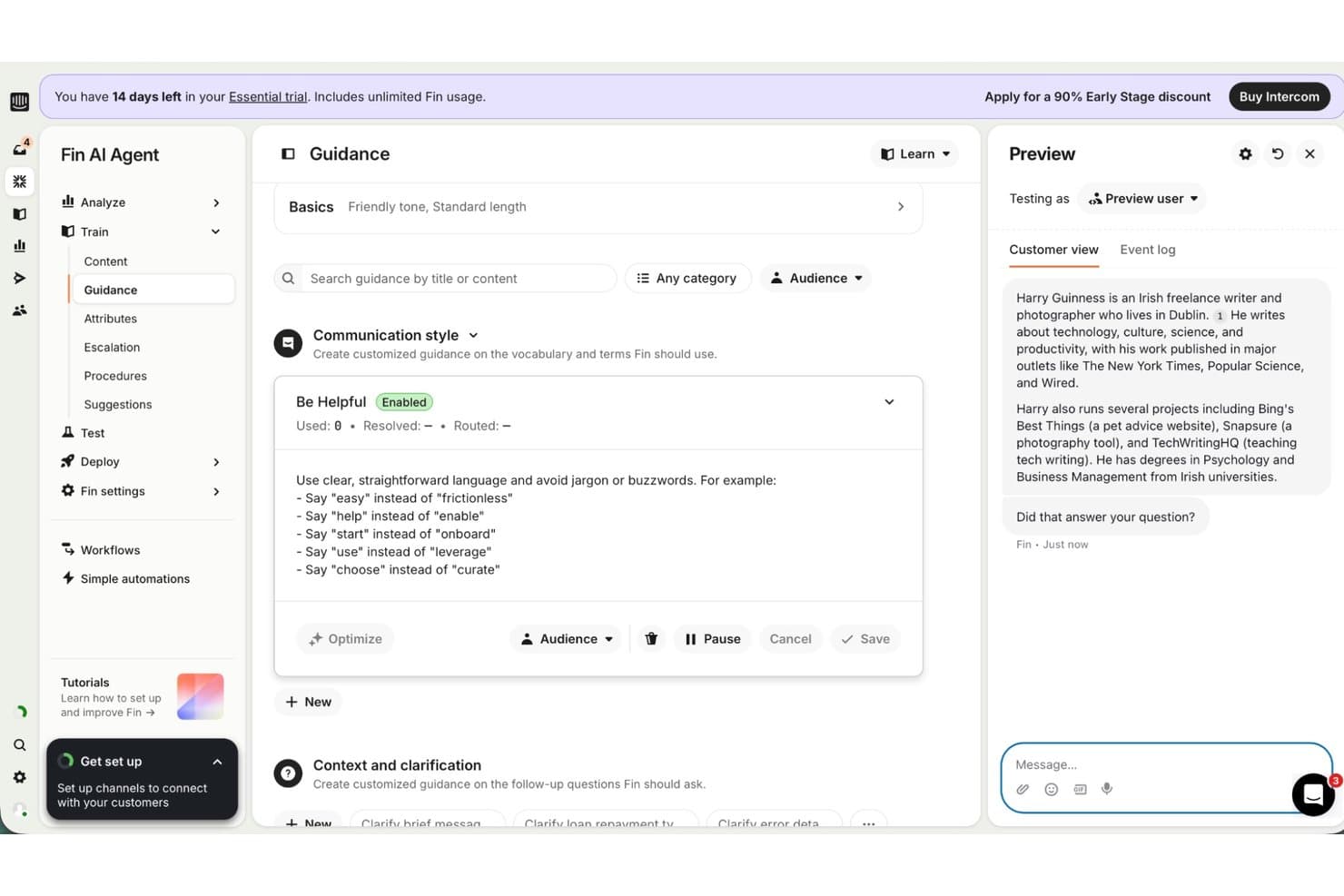
Intercom lets users customize Fin AI Agent's communication style with plain-language rules. Intercom is an AI-native customer support platform that unifies live chat, email, phone, SMS, WhatsApp, and social channels into a shared inbox, with built-in journey automation, an AI agent (Fin), and a human-agent copilot.
Who Is Intercom Best For?
Intercom is a strong fit for CX and support teams that want AI-driven conversation handling and human agent workflows running in a single, unified platform.
Why I Picked Intercom
Intercom earns its spot on my shortlist because it's one of the few platforms that was built AI-first rather than retrofitted with AI later. The Fin AI agent handles conversations across chat, email, WhatsApp, SMS, voice, and more from a single shared inbox, and I find the handoff to human agents genuinely clean because both work from the same customer record. Copilot pulls answers from help center content, PDFs, and tools like Notion and Confluence to draft responses in real time, which I think is where the AI-native approach really shows.
Intercom Key Features
- Series journey builder: A no-code, drag-and-drop campaign builder that chains emails, in-app messages, bots, and push notifications into multi-step journeys with branching paths, A/B testing, and goal tracking.
- Fin Voice: A native AI-powered phone channel that handles inbound calls, supports 28 languages, and escalates to a human agent with an AI-generated call summary.
- Skill-based routing: Automatically assigns conversations to agents based on defined skills like tier or region, with load-balanced fallback when no skilled agent is available.
- Quality Monitors: Automatically reviews 100% of conversations and flags quality issues across both AI and human interactions without requiring manual sampling.
Intercom Integrations
Intercom’s App Store lists 450+ apps, including Salesforce, HubSpot, Slack, Jira, Marketo, Discord, and Shopify. It also supports APIs, Data Connectors, and MCP for custom integrations.
Pros and Cons
Pros:
- Series builds branching customer journeys without code
- Broad channel coverage includes native voice
- Fin and agents share conversation context
Cons:
- Fin Voice access requires sales approval
- Usage-based costs make budgeting difficult
 Best for built-in carrier network and 15+ channels
- 60-day free trial
- From $530/month
Visit WebsiteCustomer Rating:4.4/5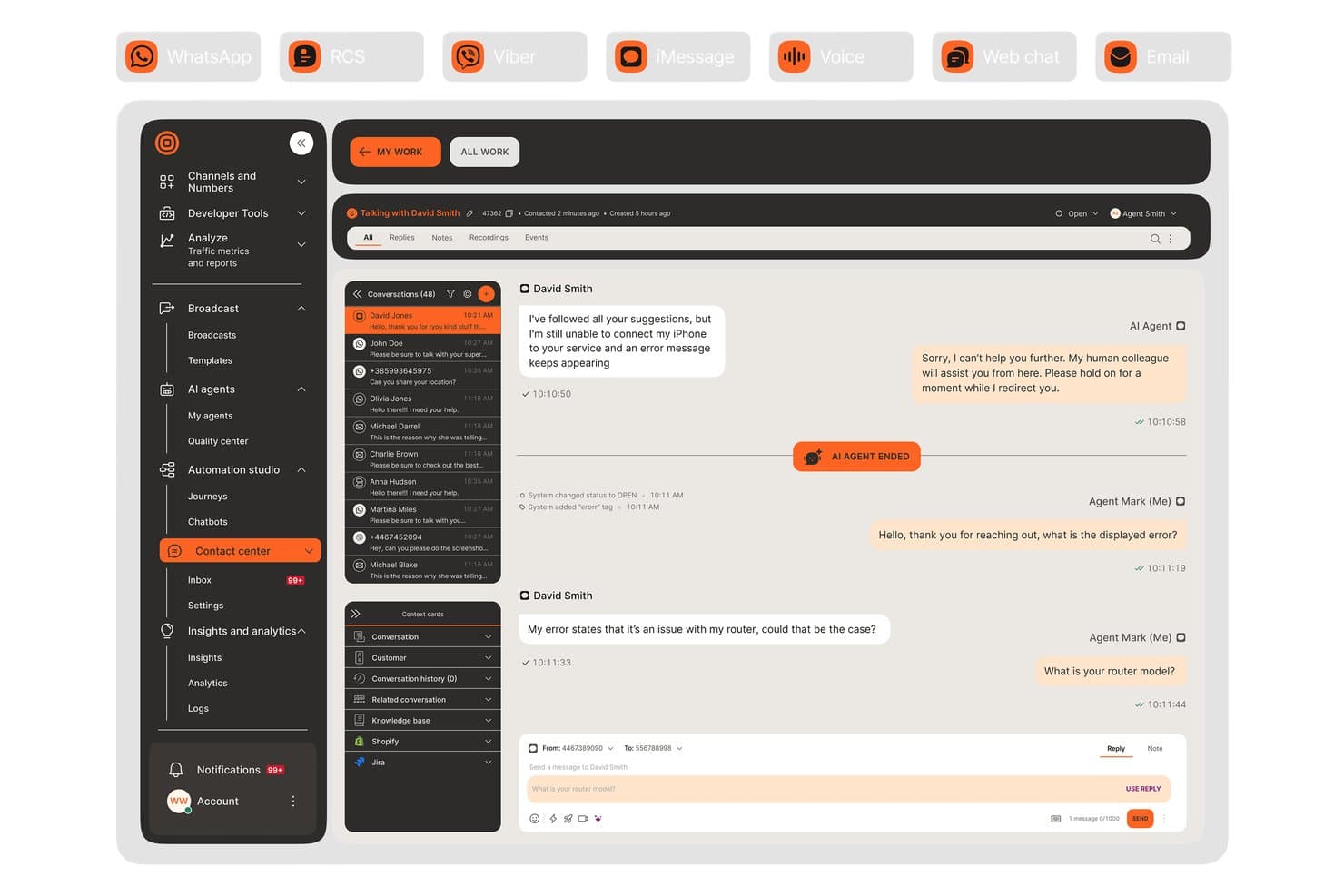
Infobip unifies agent and AI chat handling across channels in one view. Infobip AgentOS is a customer engagement platform that unifies a contact center inbox, CDP, journey orchestration, AI chatbot builder, and 15+ native messaging channels—including WhatsApp, RCS, voice, and regional chat apps—on a single carrier-owned network.
Who Is Infobip Best For?
Infobip AgentOS is a strong fit for enterprise CX and contact center teams that need to manage customer conversations across regional messaging apps, voice, and digital channels without stitching together third-party connectors.
Why I Picked Infobip
Infobip earns its spot on my shortlist because it runs 15+ messaging channels—WhatsApp, RCS, LINE, KakaoTalk, Viber, voice, and more—on its own carrier network with 800+ direct operator connections, meaning no third-party middleware between your messages and your customers. I particularly like that agents can escalate a chat to a live voice or video call without losing conversation context, which is genuinely rare at this level of channel coverage. The real-time CDP also pushes customer data directly to AI agents mid-conversation, so agents see purchase history and intent scoring as the chat unfolds.
Infobip Key Features
- AI chatbot builder: Build and deploy no-code chatbots with a real-time test simulator, API-call simulation, and handoff logic to human agents.
- Agent Copilot: Surfaces knowledge base matches, suggested replies, and AI writing assistance to agents during live conversations.
- Lifecycle journey triggers: Automatically places customers into lifecycle stages and fires multi-channel journeys based on behavior events like cart abandonment or form submissions.
- Real-time audience segmentation: Build dynamic segments using plain-language prompts or predictive models for churn risk and purchase likelihood, with segments updating continuously.
Infobip Integrations
Infobip offers 100+ pre-built integrations, including Salesforce, HubSpot, Microsoft Dynamics 365, Adobe, ServiceNow, Zendesk, Shopify, Snowflake, and Google BigQuery. It also supports REST APIs, SDKs, webhooks, and Zapier for custom connectivity.
Pros and Cons
Pros:
- Real-time CDP feeds live agent context
- Chat-to-voice handoffs retain conversation context
- Built-in carrier network supports 15+ channels
Cons:
- Support response times draw reviewer complaints
- Journey analytics remain in Early Access
Learn more about Infobip: Best for AI-driven marketing journey orchestration
- Free demo available
- Pricing upon request
Visit WebsiteCustomer Rating:4.4/5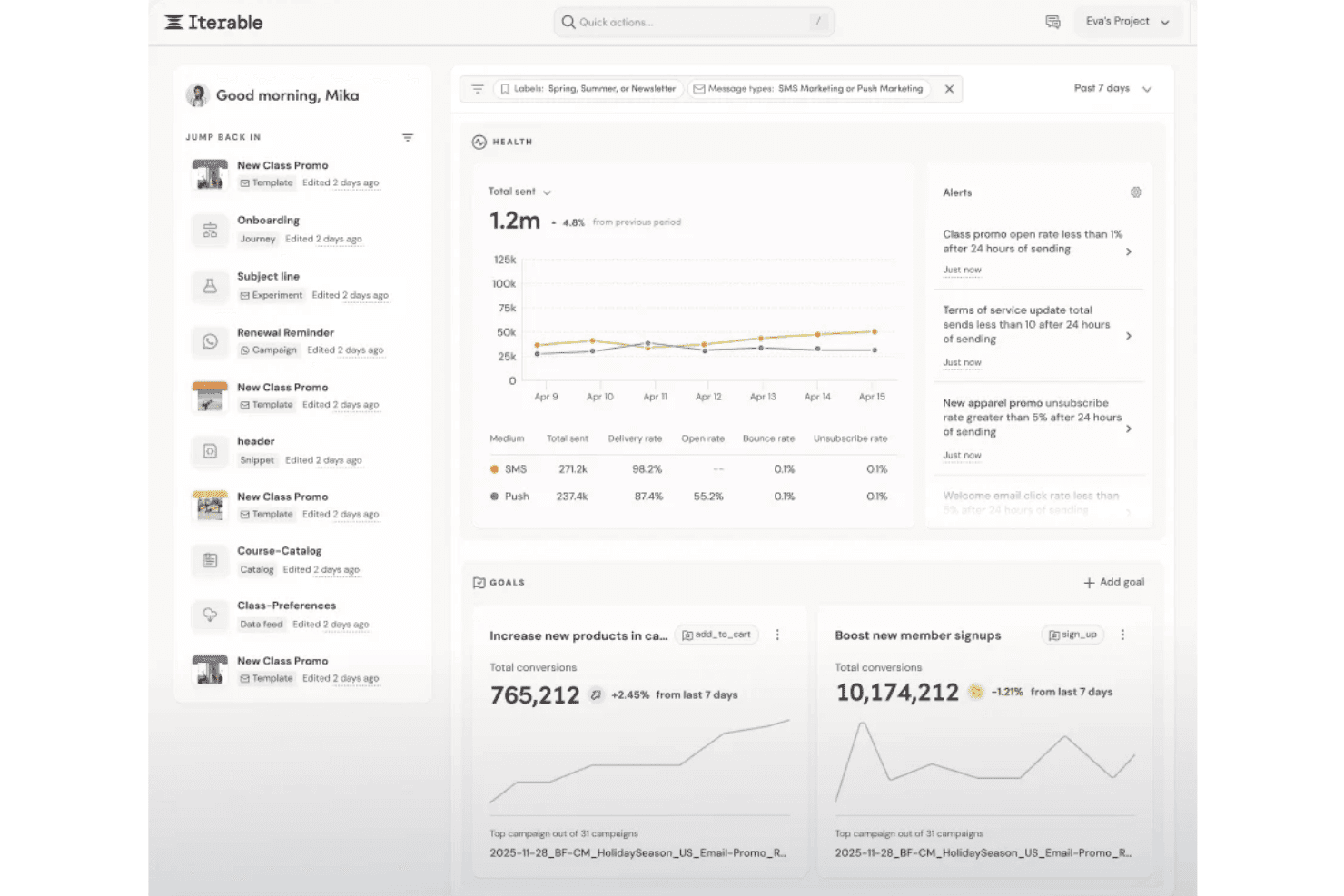
Iterable centralizes campaign health, alerts, and goal tracking in one dashboard. Iterable is an AI-powered customer engagement platform that lets marketing teams orchestrate multichannel campaigns and automated journeys across email, SMS, push, in-app, WhatsApp, RCS, and web push from a single interface.
Who Is Iterable Best For?
Iterable is a strong fit for marketing operations teams at mid-market and enterprise companies that run high-volume, behavior-triggered campaigns across email, SMS, push, and WhatsApp.
Why I Picked Iterable
Iterable earns its spot on my shortlist because of how Nova Decisioning handles real-time channel selection, choosing the best channel and send frequency for each person mid-journey rather than applying blanket rules across your entire list. I also love that Studio lets you build complex, branching journeys across email, SMS, push, WhatsApp, and RCS from a single canvas, with "Hold Until" steps that pause a journey until a customer actually responds. Predictive Audiences layer on top to flag churn risk before you'd ever catch it manually.
Iterable Key Features
- Nova Agent: An AI assistant that drafts templates, generates personalization code, builds journeys, runs experiments, and summarizes analytics with source footnotes.
- Live Data: Calls external APIs in real time during a journey and writes results directly to the user's profile for in-the-moment personalization.
- Global Suppression Lists: Automatically excludes specified users from all new campaigns and journeys across every channel.
- Data Sync: Exports engagement data to S3, BigQuery, Databricks, Redshift, and Snowflake so your BI tools can pull from Iterable's reporting.
Iterable Integrations
Iterable’s built-in Integrations Hub supports Salesforce, Google Ads, Meta Ads, and Movable Ink, with documented connections to Segment, Snowflake, Zendesk, and Kustomer. It also offers REST APIs, webhooks, SDKs, Workato, and Zapier.
Pros and Cons
Pros:
- Profiles combine events, consent, and engagement
- Branching journeys span seven outbound channels
- AI selects channels and frequency
Cons:
- Two-way SMS excludes MMS replies
- Inbound replies lack a shared agent inbox
Learn more about Iterable : Best for enterprise-scale contact center AI
- Free trial available
- From $75/user/month (billed annually)
Visit WebsiteCustomer Rating:4.4/5
Genesys Cloud CX centralizes chat history and customer segments in one view. Genesys Cloud CX is a cloud-based contact center and omnichannel customer engagement platform that brings together voice, digital messaging, AI-powered routing, virtual agents, workforce management, and journey orchestration in a single environment.
Who Is Genesys Cloud CX Best For?
Genesys Cloud CX is a strong fit for enterprise contact centers that need native voice, AI-powered routing, and digital messaging managed in one platform.
Why I Picked Genesys Cloud CX
Genesys Cloud CX earns its spot on my shortlist because no other platform I've used matches its depth of AI at enterprise contact center scale. I'm particularly impressed by Agent Copilot, which surfaces next-best-action guidance and auto-generates call summaries across 70+ languages in real time, and by predictive routing, which scores intent and behavior to connect customers to the right agent or virtual agent before a queue forms. Pair that with agentic virtual agents that hand off full conversation context to live agents, and you get AI that actually holds up under high interaction volume.
Genesys Cloud CX Key Features
- Architect flow builder: A no-code, drag-and-drop designer for building IVR flows, self-service journeys, and call routing logic.
- Workforce management: Built-in forecasting, scheduling, and performance management tools for contact center teams.
- Outbound campaign dialer: Supports predictive, power, preview, and progressive dialing modes across voice, SMS, and email channels.
- Speech and text analytics: Analyzes customer conversations for sentiment, intent, and trends across voice and digital interactions.
Genesys Cloud CX Integrations
Genesys Cloud CX offers 600+ marketplace apps from 300+ partners, including Salesforce, ServiceNow, Microsoft Dynamics, Zendesk, Microsoft Teams, Zoom, Amazon Lex, Google CCAI, and Okta. It also provides 3,000+ public APIs, webhooks, streaming APIs, SDKs, and Open Messaging.
Pros and Cons
Pros:
- Agent Copilot preserves conversation context
- Predictive routing matches customer intent
- Native voice and digital channel unification
Cons:
- Identity stitching leaves cross-channel gaps
- Journey orchestration requires top-tier licensing
Learn more about Genesys Cloud CX:
Other Omnichannel Customer Engagement Software
Here are a few additional options that didn’t make my top list, but can still be a good fit for your omnichannel marketing strategy:
- 11BloomreachBest for ecommerce brands using AI-led journeys
- 12KlaviyoBest for linking ecommerce marketing to service data
- 13WebEngageBest for ZeroPII and warehouse-native journeys
- 14TalkdeskBest for CCaaS-native generative AI copilot
- 15NiCE CXoneBest for native voice and 30+ channel contact centers
- 16HubSpot Service HubBest for CRM-connected multichannel support
- 17Pega Customer Decision HubBest for real-time NBA decisioning
- 18Comm100Best for higher education and government CX teams
- 19Adobe Journey OptimizerBest for Adobe-native marketing journey orchestration
- 20Webex Contact CenterBest for Cisco voice and contact center
How I Evaluate Omnichannel Customer Engagement Software
I split my evaluation into three parts. First, core functionality: can the tool unify conversations across channels and maintain a single customer profile that updates in real time? That carries the most weight. Then I look for standout features like no-code journey builders. Finally, I consider onboarding support and pricing transparency.
Core Functionality (Table Stakes For This List)
When I'm selecting tools for my list, I score each one on a scale from 0 (does not offer the functionality) to 5 (excels in this area) for each core functionality listed below. I then convert the total into a percentage to help assess each tool's overall fit, with extra weight on any functionalities I've deemed essential.
- Multichannel Message Unification (Essential): I check whether email, SMS, chat, social, voice, and in-app conversations appear in one interface without forcing agents to toggle between screens.
- Cross-Channel Customer Profile (Essential): Each tool needs a unified record that updates with behavioral, transactional, and conversational data as a customer moves between channels.
- Journey Orchestration: I evaluate how well multi-step flows branch across channels, looking for conditional logic that adjusts timing and content based on live customer actions.
- Two-Way Conversational Messaging: Real-time, bidirectional messaging matters. I look at how platforms handle bot-to-agent handoffs mid-conversation without losing context.
- Engagement Analytics & Reporting: Cross-channel dashboards with journey-level attribution get higher marks than siloed, per-channel delivery metrics.
- Audience Segmentation: I look for dynamic segments that update automatically from real-time behavior and feed directly into orchestration workflows.
Once I have a list of tools that meet the criteria, I consider what sets each platform apart.
Differentiating Factors (What Sets Vendors Apart)
Here's how I compare and contrast different vendors:
Standout Features
I look for a generative AI copilot that drafts replies, summarizes threads, and suggests next steps mid-conversation—this directly cuts handle time during peak volume. Native voice integration matters too; platforms like Genesys Cloud CX and Sprinklr Service embed IVR and telephony alongside digital channels, so agents aren't switching between bolted-on systems. I also evaluate no-code journey builders, checking whether CX teams can branch flows across channels without filing a dev ticket every time a campaign changes.
Beyond Features
I evaluate how each vendor handles data residency and compliance, since teams in regulated industries need GDPR or HIPAA support with role-based access controls and audit trails baked in. Pricing transparency matters just as much—some platforms bundle channels while others charge per message or per seat, and unexpected volume costs can derail a budget mid-contract. I also check onboarding support, looking for dedicated migration assistance and post-launch customer success resources that shorten time-to-value on complex multichannel rollouts.
How to Choose Omnichannel Customer Engagement Software
Choose the software by testing how each vendor handles identity, governance, costs, and implementation before you sign.
| If Your Priority Is | Look For |
|---|---|
| If Your Priority IsOne customer record | Look ForField-level data map and identity-resolution rules |
| If Your Priority IsPredictable billing | Look ForComplete rate card covering seats, messages, channels, and overages |
| If Your Priority IsData governance | Look ForData processing agreement, subprocessor list, retention policy, and deletion process |
| If Your Priority IsA controlled rollout | Look ForMigration plan with milestones, owners, dependencies, and acceptance criteria |
How to Vet Your Shortlist
- Test identity handling: Run a trial task with one customer appearing through three channels, then request the resulting record and event timeline.
- Audit data movement: Ask for a current data-flow diagram, field dictionary, and list of subprocessors within five business days.
- Validate billing assumptions: Request a written quote for your expected monthly contacts, message volume, seats, and channel mix, including overage rates.
- Verify implementation obligations: Ask the vendor to attach a migration plan, support scope, and service-level commitments to the proposal before approval.
- Choose your operating tradeoff: Decide whether you prefer a marketing-led platform with broader campaign control or a service-led platform with deeper contact-center governance.
What Is Omnichannel Customer Engagement Software?
Omnichannel customer engagement software connects customer interactions across marketing, messaging, support, and contact center channels. It combines customer data, conversation history, segmentation, automation, and analytics in one system.
Your teams can use it to coordinate consistent messages, transfer conversations between channels, and personalize outreach based on customer behavior and preferences.
Features
Here are the main features I look for in any great software to build a winning omnichannel customer engagement strategy:
- Multichannel inbox: Brings email, SMS, live chat, social messaging, voice, and in-app conversations into one workspace. Agents can respond without switching between separate systems.
- Unified customer profile: Combines contact details, purchases, support history, consent records, and behavioral events into one customer record. Teams can use this context during every interaction.
- Journey orchestration: Builds automated, multi-step customer journeys across several channels. Rules can adjust messages, timing, and next actions based on customer behavior.
- Audience segmentation: Groups customers using attributes, activity, preferences, lifecycle stages, or support history. Dynamic segments update as new customer data becomes available.
- Two-way messaging: Supports live conversations between customers and businesses through channels such as chat, SMS, and social messaging. Agents can take over from bots while preserving conversation history.
- Conversation routing: Directs interactions to the right team, agent, queue, or bot using skills, language, customer status, topic, or availability. Routing rules help assign work consistently.
- Automation builder: Uses triggers, conditions, and actions to handle tasks such as follow-ups, alerts, surveys, and message delivery. No-code controls let teams update workflows without writing software.
- Engagement analytics: Reports on delivery, response rates, resolution times, conversion events, satisfaction, and journey performance. Cross-channel reporting connects customer insights and activity with operational results.
- Consent and governance controls: Manages communication permissions, roles, audit trails, customer retention settings, and data access. These controls help teams apply internal policies and privacy requirements across channels.
Benefits
Here are a few common benefits you can expect from using an omnichannel customer engagement platform:
- Unified customer context: A cross-channel customer profile combines conversations, purchases, consent records, and behavioral events in one record.
- Consistent customer experiences: A multichannel inbox and shared conversation history help agents continue interactions across email, chat, SMS, social messaging, voice, social media, and in-app channels.
- More relevant engagement: Dynamic audience segments and behavioral triggers support personalized messages based on customer activity, preferences, and lifecycle stage.
- Faster response handling: Conversation routing, automation, and bot-to-agent handoffs direct each interaction to the right team while preserving context.
- Coordinated customer journeys: No-code journey builders connect conditional workflows across channels and adjust timing or content when customers take action.
- Clearer performance measurement: Cross-channel analytics connect delivery, response, resolution, satisfaction, conversion, and journey activity in shared reports.
- Stronger governance: Consent controls, role-based access, audit trails, retention settings, and data policies help teams manage customer information across touchpoints.
Costs and Pricing
Costs vary based on features, team size, add-ons, and more. Here are the pricing ranges you can typically expect from a multi-channel customer engagement tool:
Plan Comparison Table for Omnichannel Customer Engagement Software
| Plan Type | Average Price | Common Features |
|---|---|---|
| Plan TypeFree Plan | Average Price$0/user/month | Common FeaturesBasic inbox, limited channels, contact profiles, and standard reporting. |
| Plan TypePersonal Plan | Average Price$20–$75/user/month | Common FeaturesMultichannel messaging, customer profiles, basic automation, and audience segmentation. |
| Plan TypeBusiness Plan | Average Price$80–$200/user/month | Common FeaturesJourney orchestration, conversation routing, advanced analytics, and workflow automation. |
| Plan TypeEnterprise Plan | Average Price$200–$500+/user/month | Common FeaturesCustom data controls, native voice support, advanced governance, and dedicated onboarding. |
FAQs
Some answers to common questions about omnichannel customer engagement software:
How long does it take to implement omnichannel customer engagement software?
Implementation usually takes several weeks to several months, depending on scope. The timeline depends on data migration, channel connections, identity rules, and workflow complexity. Start with a limited rollout, such as email, chat, and one support queue. Define owners, milestones, test cases, and launch criteria before configuration begins. Ask vendors how they handle duplicate records, historical conversations, consent data, and failed imports. A pilot can expose routing and profile issues before they affect every customer-facing team.
Can omnichannel customer engagement software connect with a CRM?
Yes, many platforms connect with CRM systems through native integrations, APIs, or middleware. Confirm which records and events sync in each direction. For example, your CRM might send account status, while the engagement platform returns conversation history and campaign responses. Check sync frequency, field mapping, duplicate handling, error logs, and permission controls. Test the connection with sample customer records before launch. A simple integration that preserves identity and consent data is more useful than a long list of loosely connected applications.
Is omnichannel customer engagement software suitable for both support and marketing teams?
Yes, but suitability depends on how the platform separates permissions, workflows, and reporting. Support teams typically need routing, agent workspaces, conversation history, and service-level reporting. Marketing teams often need segmentation, consent controls, journey logic, and campaign attribution. Check whether both groups can share customer data without sharing every operational control. Also review ownership rules for customer records. A platform that serves both teams should prevent conflicting messages, duplicated outreach, and accidental changes to service workflows.
How should teams measure an omnichannel engagement program after launch?
Measure customer and operational outcomes across the full journey, not just channel activity. Track response time, resolution time, containment, transfer rate, satisfaction, conversion events, and opt-outs. Connect these measures to journey steps and customer segments. Review whether customers repeat information after changing channels. Also monitor profile matches, failed deliveries, routing errors, and consent violations. Set a baseline before launch, then compare results by channel and use case. This approach shows whether the platform supports better service without hiding problems inside aggregate averages.