

Are you struggling with Salesloft and looking for competitors that better fit your team's needs? You're not alone. Many customer experience managers face challenges with software that doesn't align perfectly with their goals. Whether it's the lack of specific features or scalability issues, finding the right tool is vital for success.
I've independently tested and reviewed various software solutions in the customer experience industry. My aim is to guide you through the best Salesloft Competitors on the market. In this article, I'll share my top picks, focusing on what makes each one unique. You'll get an unbiased look at options that could be the perfect match for your business challenges.
What is Salesloft?
Salesloft is a customer experience management platform that helps businesses improve their sales processes. It's typically used by sales professionals, managers, and teams who need to optimize their sales engagement strategies.
Salesloft offers features like email tracking, call logging, and workflow automation, which support efficient communication and productivity. Overall, Salesloft provides valuable tools to help you improve your team's sales performance and customer interactions.
Salesloft Competitors Comparison Table
This comparison table summarizes pricing details for my top Salesloft alternative selections:
Score legend (out of 5)
- Excellent4.5–5
- Good4–4.4
- Average3–3.9
- Below average2–2.9
- Poor1–1.9
Sorted by: Default
| Tool | Starting Price | Website | |||||||
|---|---|---|---|---|---|---|---|---|---|
Best for migrating active Salesloft cadences | 3.8 out of 5 | 4 | 4 | 5 | 2 | 4 | 4 | Pricing upon request Free demo available | Website |
Best for recipient-based outreach pricing | 3.5 out of 5 | 4 | 4 | 2 | 4 | 4 | 3 | $89/user/month Free 14-day trial | Website |
Best for live call coaching | 3.8 out of 5 | 4 | 3 | 5 | 4 | 4 | 3 | Pricing upon request Free demo available | Website |
Best for transitioning from Salesloft | 3.7 out of 5 | 4 | 4 | 4 | 3 | 3 | 4 | Pricing upon request Free demo available | Website |
Best for Salesloft migration support | 3.5 out of 5 | 4 | 4 | 4 | 2 | 3 | 4 | $50/month 14-day free trial + free demo available | Website |
Best for outreach tied to deal context | 3.8 out of 5 | 4 | 4 | 4 | 3 | 4 | 4 | $20/user/month Free plan + 14-day free trial + free demo available | Website |
Best for linking sales activity to forecasts | 4.3 out of 5 | 4 | 4 | 5 | 5 | 4 | 4 | Pricing upon request Free demo available | Website |
Best for territory-based sales oversight | 3.7 out of 5 | 4 | 2 | 4 | 4 | 4 | 4 | $25/user/month Free plan + 30-day free trial available | Website |
Best for guided Salesforce cadence workflows | 4.0 out of 5 | 4 | 3 | 5 | 4 | 4 | 4 | Pricing upon request Free demo available | Website |
Best for intent-led account prioritization | 3.8 out of 5 | 4 | 4 | 4 | 3 | 4 | 4 | $49/user/month Free plan + 14-day trial + demo available | Book Demo |


Why Trust Our Software Recommendations
6,700+
Reviews
20
Industry experts
16+
Evaluation factors
14
Years reviewing software
Our team has been testing and reviewing software since 2012. As CX leaders ourselves, we know how difficult—and important—it is to choose the right software.
For this guide, we evaluated tools using hands-on testing and independent research, scoring tools using our selection criteria.
Our reviews reflect our human editorial judgment, not a sales pitch.
 Gui DrusinaCreative Director
 Tim FisherVP of AI
Best Salesloft Competitors Reviews
Below are my detailed summaries of the best Salesloft Competitors that made it onto my shortlist. My reviews offer a detailed look at the key features, pros and cons, integrations, and ideal use cases of each tool to help you find the best one for you.
 1Best for migrating active Salesloft cadences
Gong
- Free demo available
- Pricing upon request
Visit WebsiteCustomer Rating:4.7/5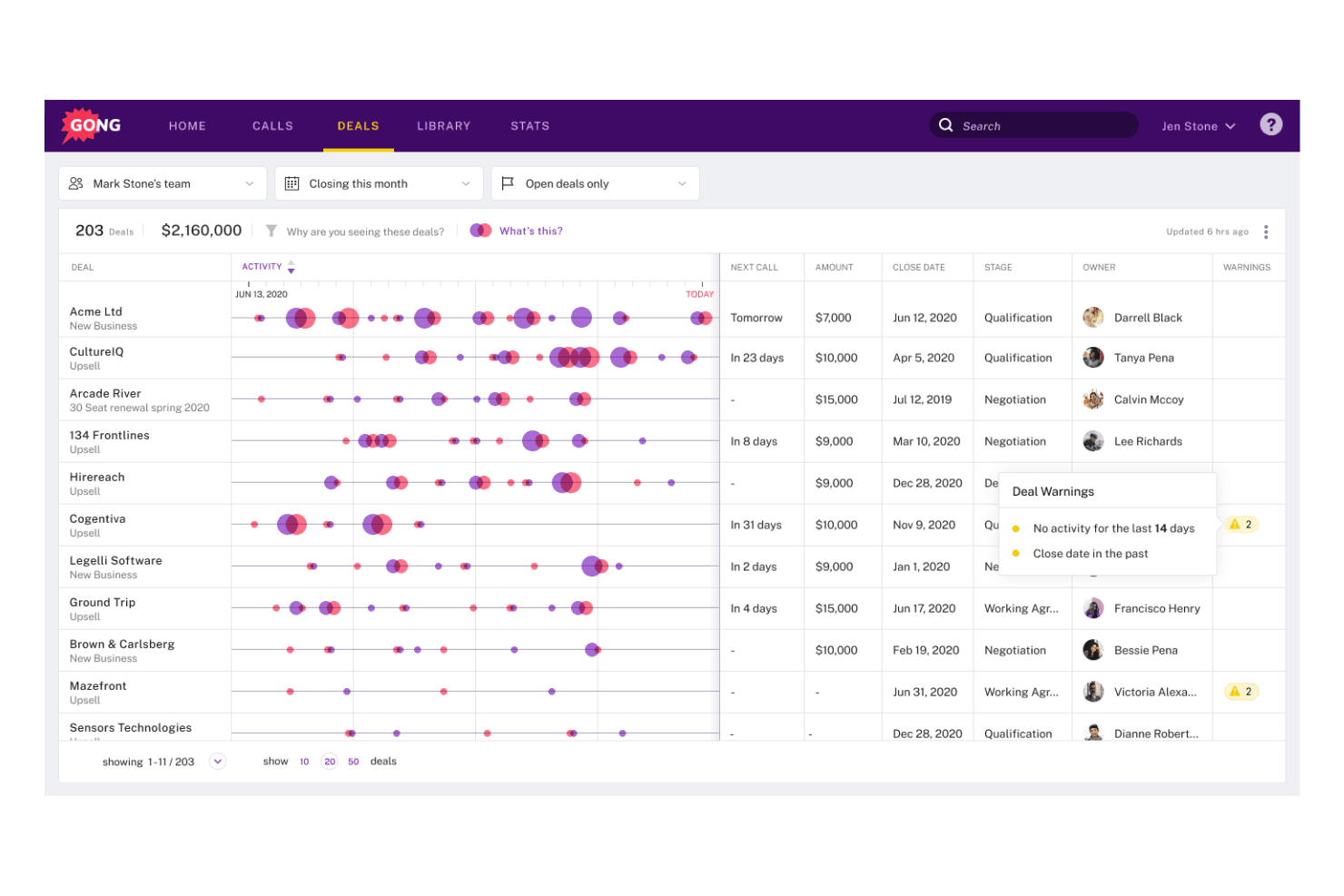
Gong analyzes calls and deal activity to improve sales conversations Gong Engage is a sales engagement platform that layers AI-powered conversation intelligence into outreach, making it a natural fit for sales teams who want call coaching, rep activity analytics, and multichannel sequencing in one place.
Who Is Gong Best For?
Gong Engage is a strong fit for sales teams already using Gong for conversation intelligence who want to bring sequencing and outreach into the same platform.
Why I Picked Gong
I picked Gong as one of the best because it's the only tool on this list with a dedicated, paid migration service that moves your active Salesloft cadences, templates, and snippets directly into Gong Engage Flows. In practice, that means personal cadences get assigned to matching Gong users and team cadences carry over using a migration tag, so your reps aren't rebuilding sequences from scratch. I also like that Gong Dialer records and transcribes calls natively, feeding that conversation data back into AI Tasker to surface prioritized next steps based on real buyer signals.
Gong Key Features
- AI Composer: Drafts personalized sales emails and follow-ups using context pulled directly from customer conversations.
- Gong Anywhere: Lets reps access contact insights, trigger flows, and compose emails from within their inbox or CRM without switching tools.
- Engage Analytics: Tracks email, call, LinkedIn, and flow performance metrics across reps and teams, with filtering and export options.
- Gong Enrich: Finds and fills missing contact and account details, including verified emails and phone numbers, as contacts enter Engage Flows.
Gong Integrations
Gong lists 472 integrations, including native integrations with Salesforce, HubSpot, Microsoft Dynamics 365, LinkedIn Sales Navigator, ZoomInfo, Nooks, and Chili Piper. An API is available for custom integrations.
Pros and Cons
Pros:
- Conversation context informs follow-up suggestions
- Migrate active cadences and snippets
- Call recordings support rep coaching
Cons:
- Flows can feel slow or buggy
- Cadence scheduling feels weaker than rivals
Learn more about Gong: Best for recipient-based outreach pricing
- Free 14-day trial
- From $89/user/month (billed annually)
Visit WebsiteCustomer Rating:4.6/5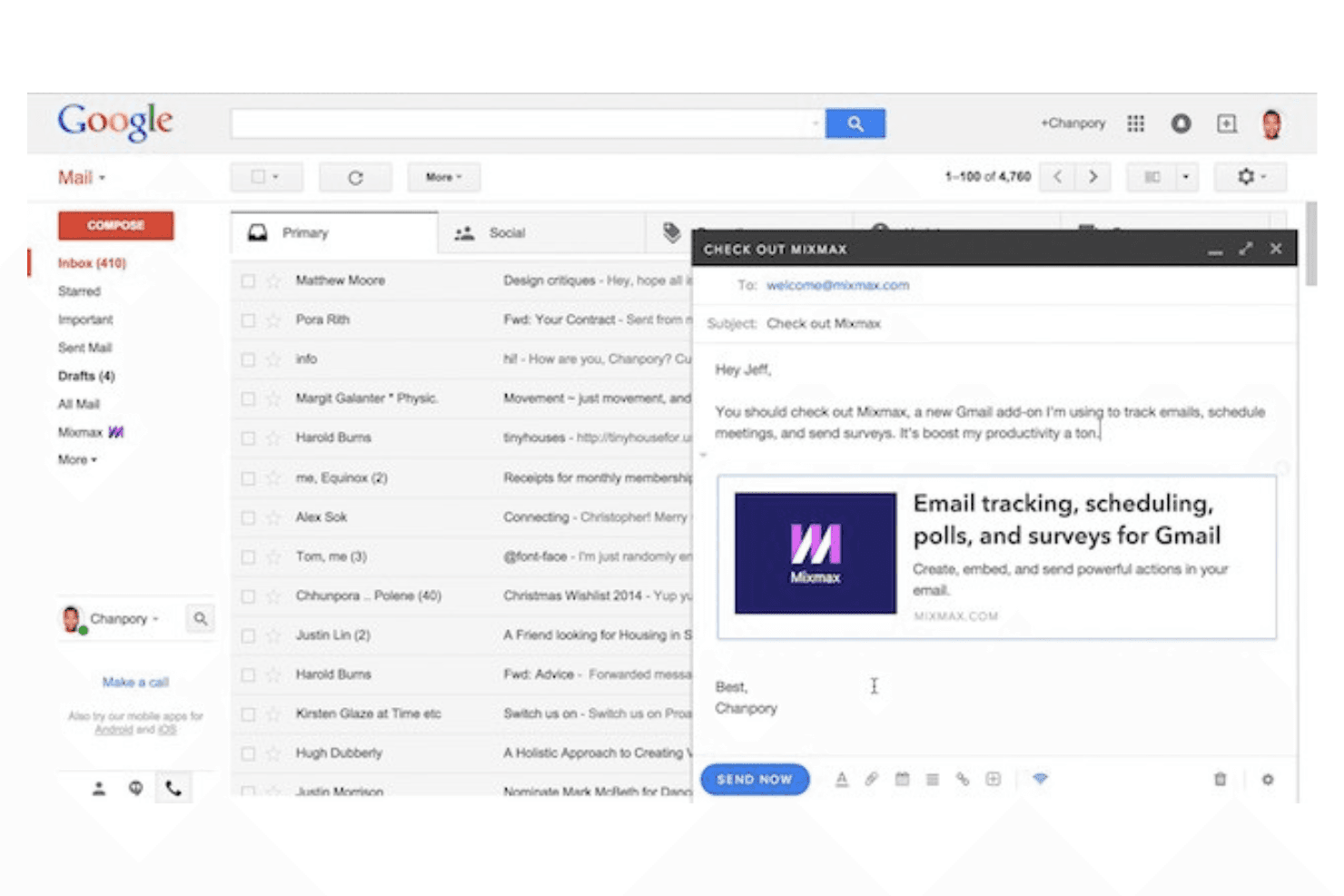
Mixmax helps users manage email workflows and track interactions Mixmax is a Gmail-native sales engagement platform built for SDRs and RevOps teams who want to run multichannel outreach, automate follow-ups, and sync activity to Salesforce—all without leaving their inbox.
Who Is Mixmax Best For?
Mixmax is a strong fit for SDR teams and RevOps managers who run outbound outreach entirely within Gmail and need Salesforce sync without maintaining a separate sales platform.
Why I Picked Mixmax
I picked Mixmax as one of the best because its pricing is built around recipient volume rather than a flat per-seat fee, which makes it one of the few tools where your cost actually reflects how hard your team is working. An SDR sending 100 emails a month pays far less than one running full-scale outreach at 1,500 or 3,000 recipients, and that tiered structure maps directly to real outbound workloads. I also appreciate that sequences run natively inside Gmail, so reps never leave their inbox to manage cadences, log Salesforce activity, or book meetings.
Mixmax Key Features
- AI deal review: Surfaces deal health signals, risk flags, and suggested action items by analyzing email opens, meeting frequency, response times, and CRM activity.
- Meeting Copilot for Zoom: Transcribes Zoom calls and generates summaries that include key points, pain points, next steps, and action items.
- Rules-based automation: Triggers multi-step actions—like task assignment, Slack alerts, or prospect reassignment—based on engagement events or Salesforce field changes.
- Salesforce sidebar: Displays a recipient's full Salesforce record directly in Gmail and lets reps update fields and statuses without leaving their inbox.
Mixmax Integrations
Mixmax offers 40+ native integrations, including Salesforce, HubSpot, Google Calendar, Zoom, Gong, LinkedIn Sales Navigator, Slack, ZoomInfo, and Seamless.AI. It also provides a REST API, Rules and webhooks, SDKs, and Zapier.
Pros and Cons
Pros:
- Scheduling cuts back-and-forth with prospects
- Engagement alerts guide timely prospect follow-ups
- Gmail-based sequences keep follow-ups visible
Cons:
- Meeting analysis is limited to Zoom
- Phone outreach depends on optional Dialer
Learn more about Mixmax: Best for live call coaching
- Free demo available
- Pricing upon request
Visit WebsiteCustomer Rating:4.7/5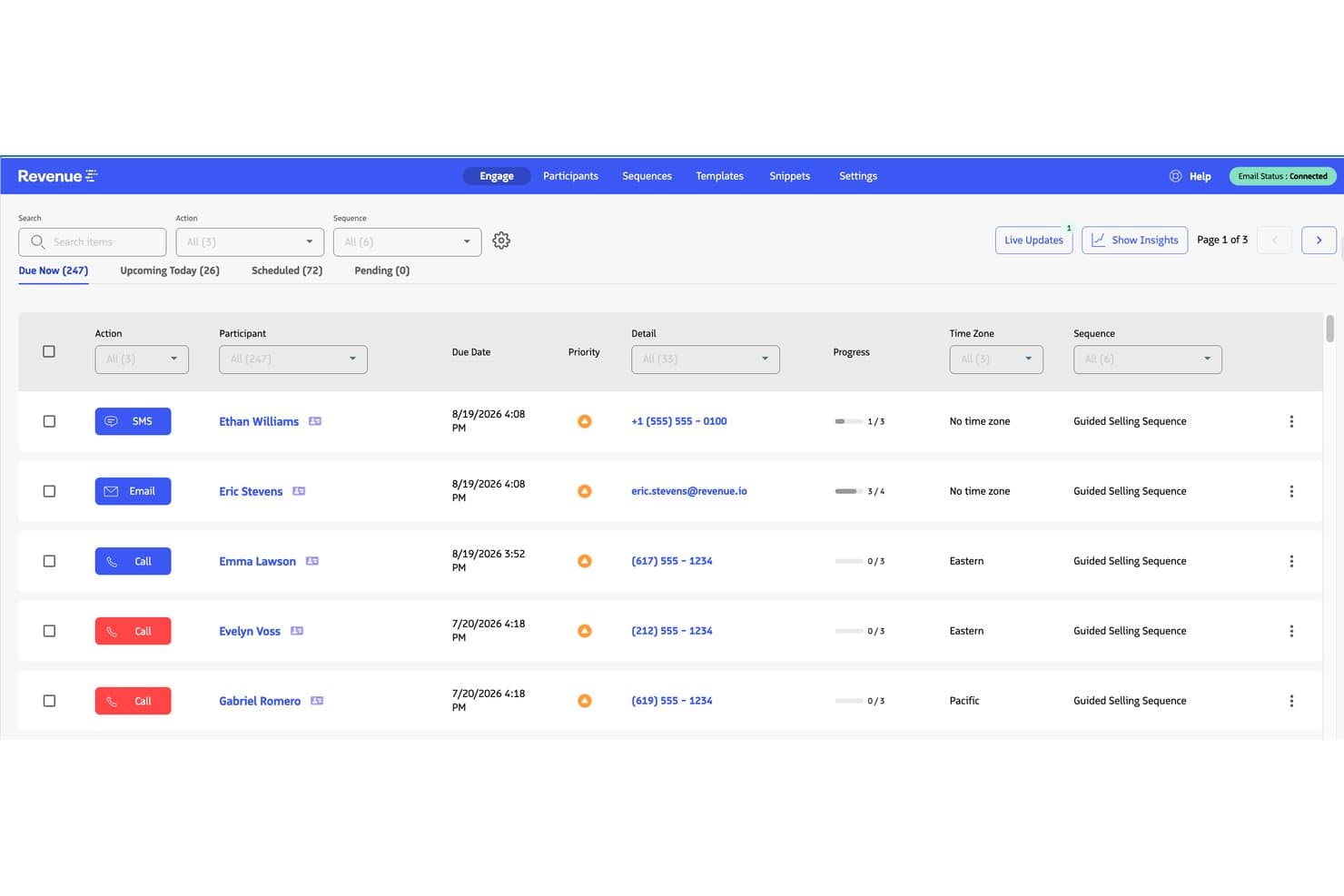
Revenue.io lets users manage and prioritize daily sales tasks in Engage. Revenue.io is a Salesforce-native revenue platform built for sales teams that want calling, sequencing, real-time rep guidance, and conversation intelligence all connected to their CRM data in one place.
Who Is Revenue.io Best For?
Revenue.io is a strong fit for Salesforce-native sales teams that want calling, real-time rep coaching, and conversation intelligence built directly into their CRM workflow.
Why I Picked Revenue.io
I've included Revenue.io in my top picks because its live call coaching through Moments is genuinely unlike what Salesloft offers. While a rep is mid-call, Moments surfaces real-time battlecards, objection responses, and talk-track reminders the moment it detects relevant phrases, without waiting for post-call review. I also appreciate the AI Conversation Scorecards, which automatically score calls against your chosen sales methodology so managers can deliver structured, evidence-based coaching feedback instead of relying on spot-checks.
Revenue.io Key Features
- Guided Selling cadences: Build multi-step sequences combining calls, SMS, email, and tasks, with Salesforce-based enrollment and exit logic controlling participant flow.
- Salesforce-native dialer: Place calls directly from Salesforce records using power, preview, or auto dialing, with activity logged to CRM in real time.
- Deal Health Scores: AI-generated scores flag at-risk opportunities by analyzing engagement signals, stakeholder activity, and deal progression across your pipeline.
- Revenue intelligence dashboards: Access 140+ prebuilt reports covering pipeline pacing, rep performance, sequence outcomes, and won/loss analysis inside Salesforce.
Revenue.io Integrations
Revenue.io offers native integrations with Salesforce, Zoom, and Microsoft Teams, plus integrations with HubSpot, Gmail, and Outlook. Its Salesforce-native architecture suits teams prioritizing CRM-connected sales engagement over broad CRM flexibility.
Pros and Cons
Pros:
- Searchable call libraries support coaching
- AI scorecards align reviews to methodology
- Live objection prompts coach reps mid-call
Cons:
- Salesforce-only design limits CRM flexibility
- Social outreach actions aren’t documented
Learn more about Revenue.io: Best for transitioning from Salesloft
- Free demo available
- Pricing upon request
Visit WebsiteCustomer Rating:4.8/5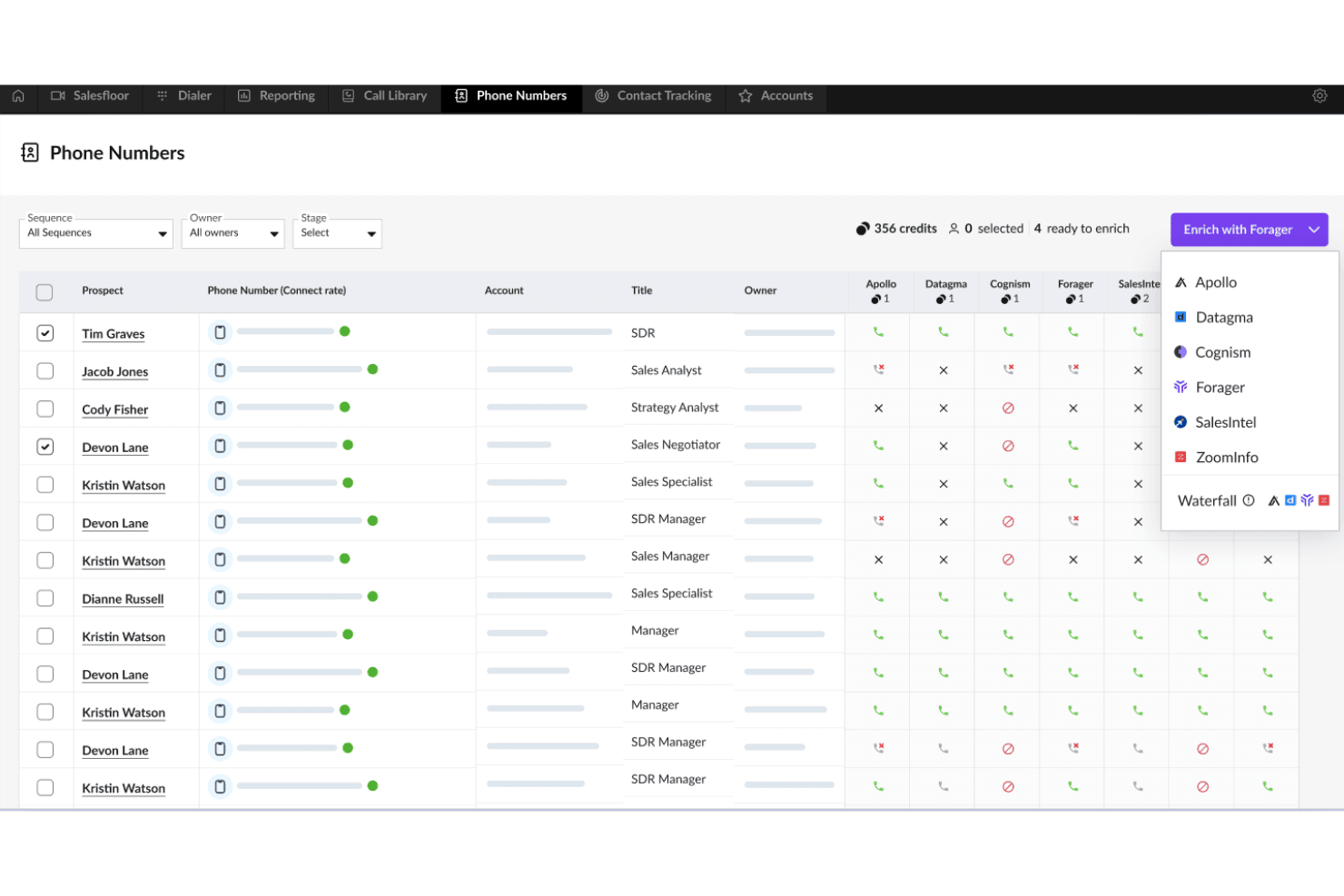
Nooks AI lets users enrich prospect phone numbers across multiple data providers. Nooks is an AI-powered revenue agent platform that helps sales teams run multichannel outbound sequences, automate parallel dialing, and coach reps—all from a single workspace that syncs with Salesforce and HubSpot.
Who Is Nooks AI Best For?
Nooks is a strong fit for SDR-heavy sales teams that run high-volume outbound and want to consolidate dialing, sequencing, and coaching into one AI-driven platform.
Why I Picked Nooks AI
I picked Nooks AI as one of the best because it's the only tool here with a dedicated Salesloft migration path that handles sequence and cadence imports, Salesforce field mapping, and deliverability warmup, with most teams live in three to four weeks. I particularly like the parallel-transition option, which lets your team run Nooks alongside Salesloft before fully cutting over. The AI parallel dialer and signal-based sequencing then pick up exactly where Salesloft left off, without rebuilding your outbound motion from scratch.
Nooks AI Key Features
- AI parallel dialer: Dials multiple prospects simultaneously and connects the rep only when a live person answers.
- AI roleplay and call scoring: Simulates prospect personas based on real calls so reps can practice objection handling and tone before live outreach.
- Signal-based prospect prioritization: Builds and refreshes account lists using first- and third-party buying signals, ranking contacts by their likelihood to engage.
- Virtual Salesfloor: Lets reps shadow live calls, receive manager whisper-coaching in real time, and share team wins across the workspace.
Nooks AI Integrations
Nooks offers native integrations with Salesforce and HubSpot, plus integrations with Salesloft, Outreach, Gong, ZoomInfo, Apollo.io, Cognism, Groove, and Datagma. It supports API and MCP connections for custom integrations.
Pros and Cons
Pros:
- Signal-based sequences prioritize timely outreach
- Parallel dialing reduces repetitive calling work
- Salesloft sequence imports support staged transitions
Cons:
- AI summaries sometimes misstate names or calls
- Reviewers report dialer lag and hangs
Learn more about Nooks AI: Best for Salesloft migration support
- 14-day free trial + free demo available
- From $50/month (billed annually)
Visit WebsiteCustomer Rating:4.6/5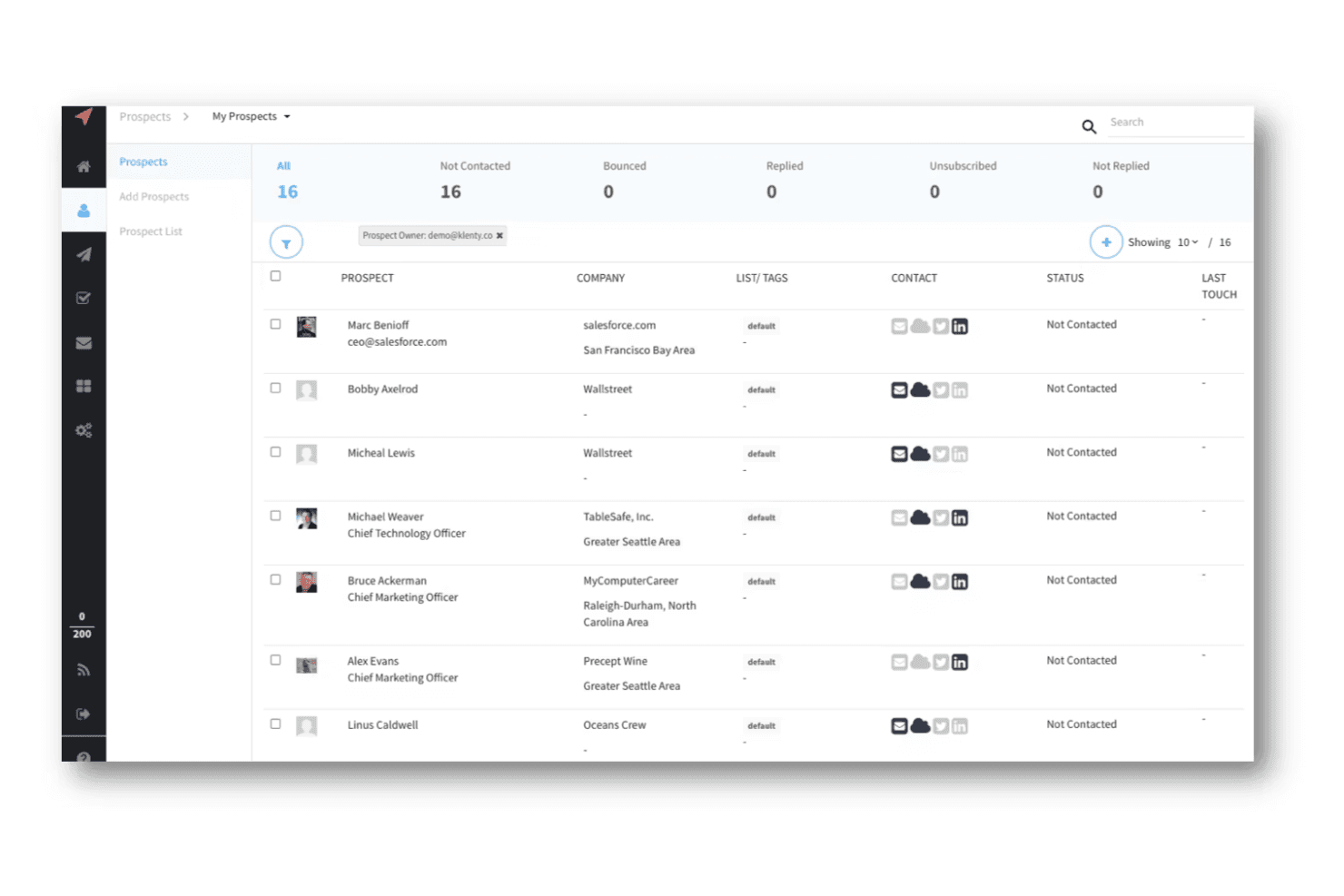
Klenty helps automate outreach, manage leads, and support sales workflows Klenty is a sales engagement platform built for SDR teams that want to run multichannel outreach cadences across email, calls, SMS, and social selling, with native CRM sync and AI-powered calling tools baked in.
Who Is Klenty Best For?
Klenty is a strong fit for SDR teams looking to run multichannel outreach cadences without the overhead of an enterprise platform.
Why I Picked Klenty
I've included Klenty in my top picks because it's one of the few tools that actively handles the migration work when you're leaving Salesloft. Its team moves your cadences, contacts, and workflows over for you, with a dedicated onboarding manager and voice, email, and chat support throughout. I also like that its white-glove migration pairs with ready-to-run multichannel cadences spanning email, calls, LinkedIn, WhatsApp, and SMS, so your team isn't starting from scratch post-switch.
Klenty Key Features
- Multichannel cadences: Build outreach sequences across email, calls, LinkedIn, WhatsApp, and SMS within a single workflow.
- AI call scorecards: Automatically score calls using AI-detected objections, talk patterns, and predefined coaching criteria.
- Bidirectional CRM field mapping: Sync standard and custom fields between Klenty and connected CRMs like Salesforce, HubSpot, Pipedrive, and Zoho CRM in both directions.
- Parallel dialer: Dial up to five prospects simultaneously and connect reps only when a live person answers.
Klenty Integrations
Klenty offers four documented native integrations: Salesforce, HubSpot, Pipedrive, and Zoho CRM. It also supports a REST API for custom integrations and Zapier.
Pros and Cons
Pros:
- Reviewers praise responsive setup support
- Cadences combine email, calls, social, and SMS
- White-glove Salesloft migration reduces switching work
Cons:
- No documented forecasting or deal-risk analysis
- Reporting offers less depth than enterprise suites
Learn more about Klenty: Best for outreach tied to deal context
- Free plan + 14-day free trial + free demo available
- From $20/user/month
Visit WebsiteCustomer Rating:4.4/5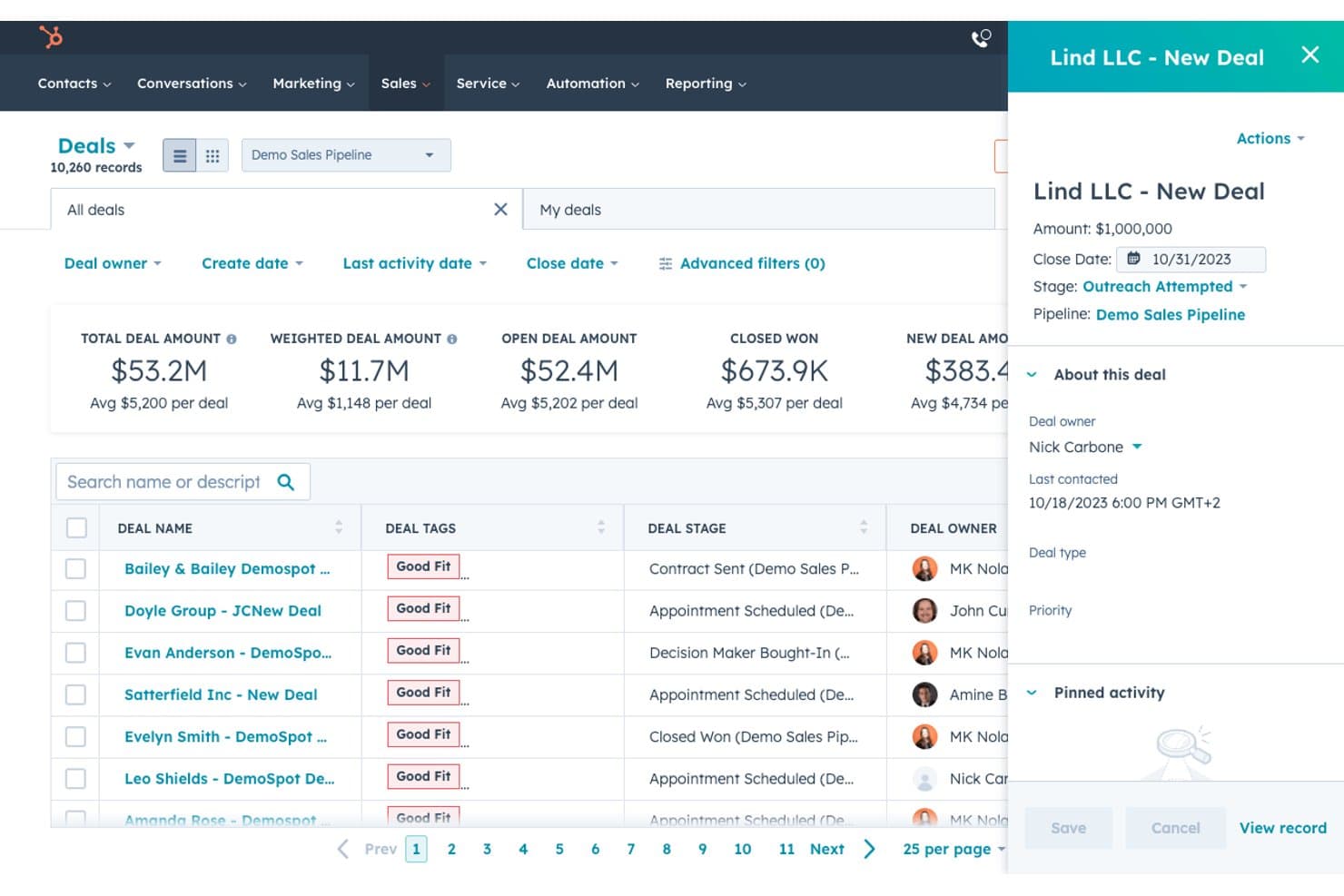
HubSpot Sales Hub organizes deals with stage and amount tracking. HubSpot Sales Hub is an all-in-one sales platform that combines CRM, sequences, pipeline management, and conversation intelligence—making it a natural fit for sales teams who want prospecting, deal tracking, and outreach automation in a single connected system.
Who Is HubSpot Sales Hub Best For?
Sales teams that already live in HubSpot's CRM will get the most out of Sales Hub, since sequences, deal scoring, and conversation intelligence all pull directly from the same contact and pipeline data.
Why I Picked HubSpot Sales Hub
I picked HubSpot Sales Hub because sequences, deal scoring, and conversation intelligence all pull from the same CRM data, so outreach is always tied to live deal context. When a rep opens a sequence, they're working from the same contact record, pipeline stage, and call history, not jumping between tools. I also like that AI deal progression analyzes transcripts and emails to suggest follow-up emails and CRM updates automatically.
HubSpot Sales Hub Key Features
- Multichannel sales sequences: Automates personalized outreach across email, calls, and manual tasks, with LinkedIn steps available via Sales Navigator integration.
- Conversation intelligence: Transcribes calls, tracks speaker metrics, and generates AI summaries with coaching insights tied directly to contact records.
- Buyer intent signals: Surfaces company-level visitor and research intent data that can trigger workflows, update records, and feed lead scoring.
- Pipeline forecasting: Delivers AI-powered pipeline projections with default and custom forecasting available on Professional and Enterprise plans.
HubSpot Sales Hub Integrations
HubSpot Sales Hub offers 2,000+ integrations, including Salesforce, Gmail, Outlook, Google Calendar, and Outlook Calendar, plus Salesloft CRM Sync through its marketplace. APIs, webhooks, and Zapier support custom connectivity.
Pros and Cons
Pros:
- Sequence reports track replies, meetings, and engagement
- Call summaries support coaching and deal review
- Outreach stays tied to live deal context
Cons:
- Dialer workflows feel less granular than Salesloft
- Sequences require Professional or Enterprise
Learn more about HubSpot Sales Hub: Best for linking sales activity to forecasts
- Free demo available
- Pricing upon request
Visit WebsiteCustomer Rating:4.3/5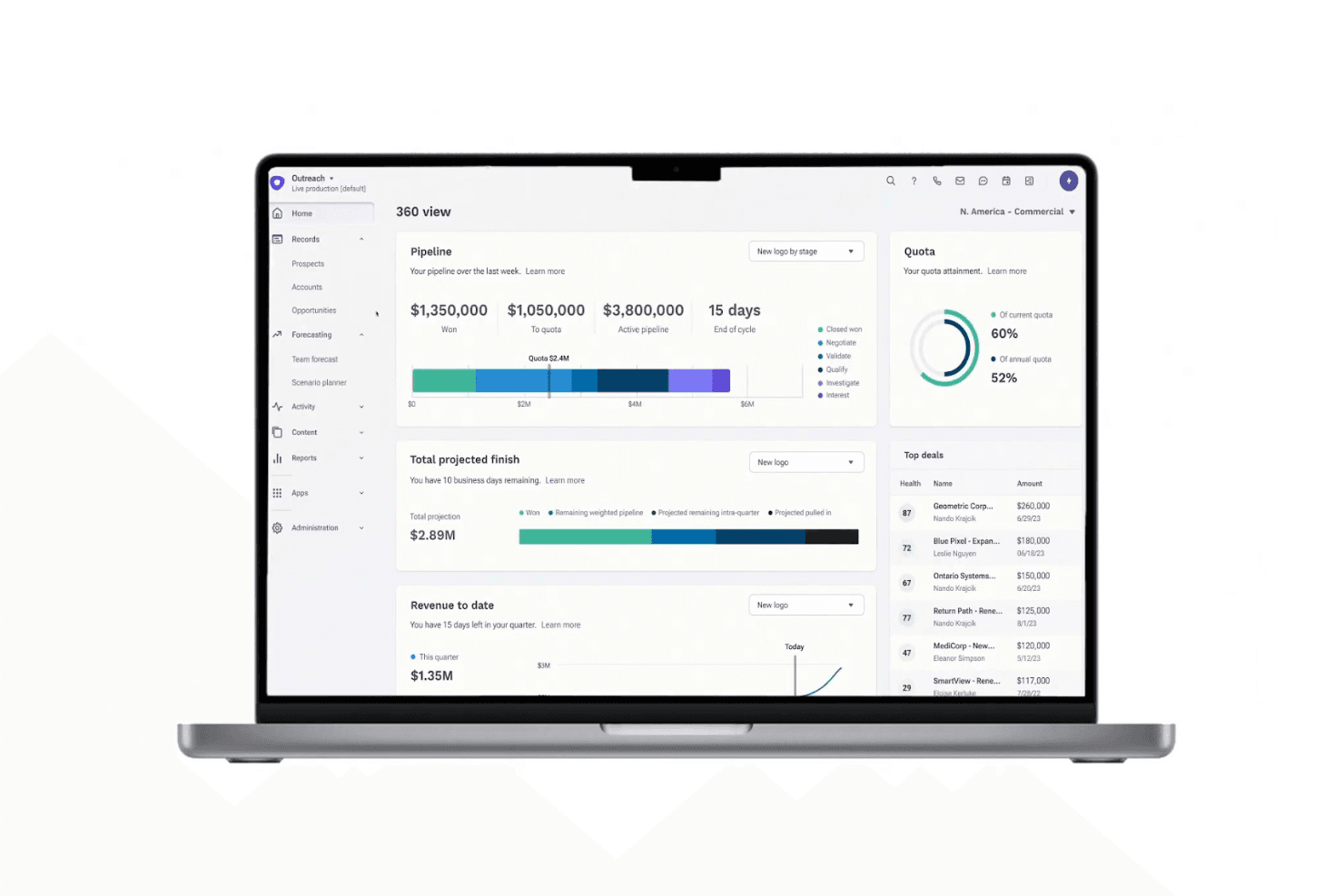
Outreach helps users automate their workflows and boosts communication Outreach is an AI-powered sales execution platform built for revenue teams that want to run multichannel sequences, coach reps with real-time call intelligence, and connect pipeline activity directly to forecasting.
Who Is Outreach Best For?
Outreach is a strong fit for revenue teams that need multichannel sequences, real-time call coaching, and pipeline forecasting managed from a single platform.
Why I Picked Outreach
I picked Outreach because it's one of the few platforms that pulls sales activity directly into forecasting, so your pipeline view reflects what reps are actually doing rather than what they've manually logged. I love how Deal Alerts flag real gaps, like no seller activity in 15 days or a close date quietly pushed out, before those deals go cold. Pair that with Amplify Pro's Scenario Planner and forecast rollups, and you can model quarter-end outcomes using live engagement signals.
Outreach Key Features
- Multichannel sequences: Build and run coordinated outreach across email, phone, and LinkedIn tasks from a single workflow.
- Kaia live coaching: Surfaces real-time content cards to guide reps during active calls and meetings.
- AI Topics and Topics Explorer: Analyzes conversation recordings to identify recurring themes and track topic trends across your team.
- Governance profiles: Lets admins control permissions and record visibility across sequences, calls, forecasting, and pipeline management.
Outreach Integrations
Outreach supports Salesforce and Microsoft Dynamics, plus Zoom, Microsoft Teams, Google Meet, Cisco Webex, and Slack. It claims over 90 integrations, including marketplace connections with ZoomInfo, 6sense, LeadIQ, SalesIntel, and Snowflake, and offers REST API and webhooks for custom integrations.
Pros and Cons
Pros:
- Live coaching cards guide active sales calls
- Sequences track prospect opens, clicks, and replies
- Forecasts reflect seller activity and deal signals
Cons:
- Deal-risk alerts can create noisy signals
- LinkedIn steps still require manual rep action
Learn more about Outreach: Best for territory-based sales oversight
- Free plan + 30-day free trial available
- From $25/user/month
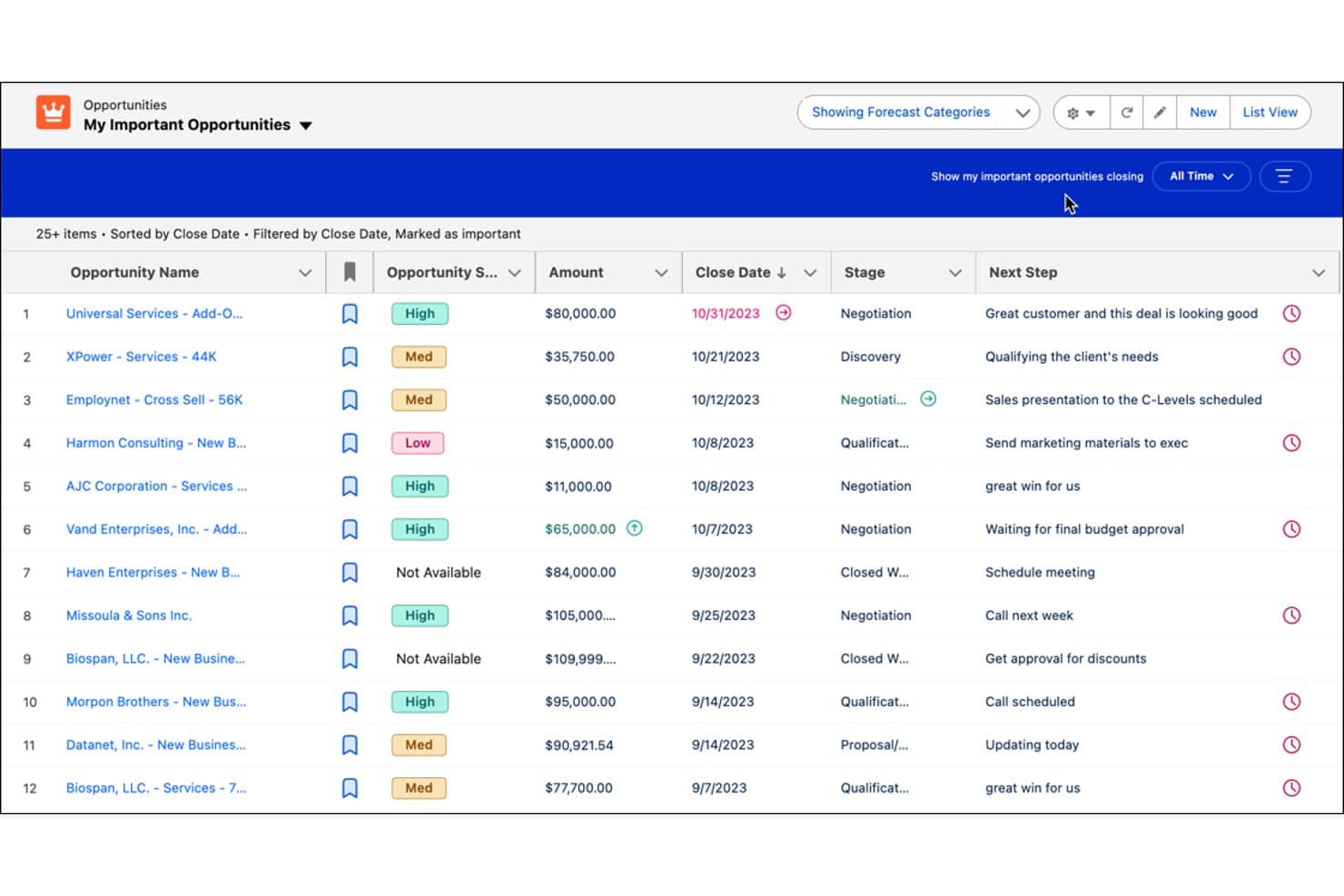
Salesforce Sales Cloud tracks prioritized deals in My Important Opportunities. Salesforce Sales Cloud is a CRM and sales engagement platform built for teams that need to manage pipelines, automate prospecting cadences, and get AI-driven deal insights—all without leaving their core sales system.
Who Is Salesforce Sales Cloud Best For?
Sales Cloud is a strong fit for sales operations teams that need territory management, AI-driven forecasting, and multichannel engagement built into a single CRM platform.
Why I Picked Salesforce Sales Cloud
I picked Salesforce Sales Cloud because territory-based oversight is genuinely baked into the platform, not bolted on as an afterthought. Pipeline Inspection filters by territory natively, so I can slice pipeline views and deal insights by region without building custom workarounds. Sales Engagement cadences run across email, phone, LinkedIn InMail, and connection requests, all while territory assignment automation handles routing in the background. That combination keeps distributed sales teams aligned without manual coordination.
Salesforce Sales Cloud Key Features
- Einstein Conversation Insights: Analyzes recorded sales calls to surface keyword mentions, talk patterns, and coaching signals across your team.
- Sales Dialer: A built-in telephony tool that lets reps make and log calls directly within Salesforce, with prioritized call lists and voicemail features.
- Automated actions: Triggers follow-up tasks or notifications based on changes to records owned by a rep or their subordinates, with configurable per-user execution limits.
- Pipeline Inspection: A consolidated deal view that tracks field changes across Amount, Stage, Close Date, and other metrics, filterable by territory, owner, or opportunity team.
Salesforce Sales Cloud Integrations
Salesforce Sales Cloud offers integrations with LinkedIn Sales Navigator, Slack, Google Workspace, Gmail, Outlook, DocuSign, Mailchimp, QuickBooks, Jira, Dropbox, and ActiveCampaign. REST, GraphQL, SOAP, web services, and platform-event APIs support custom integrations.
Pros and Cons
Pros:
- Call insights feed manager coaching signals
- Cadences coordinate email, calls, and LinkedIn
- Territory-filtered pipeline supports regional oversight
Cons:
- Engagement and insight features add licensing complexity
- Configuration can demand specialist time
Learn more about Salesforce Sales Cloud: Best for guided Salesforce cadence workflows
- Free demo available
- Pricing upon request
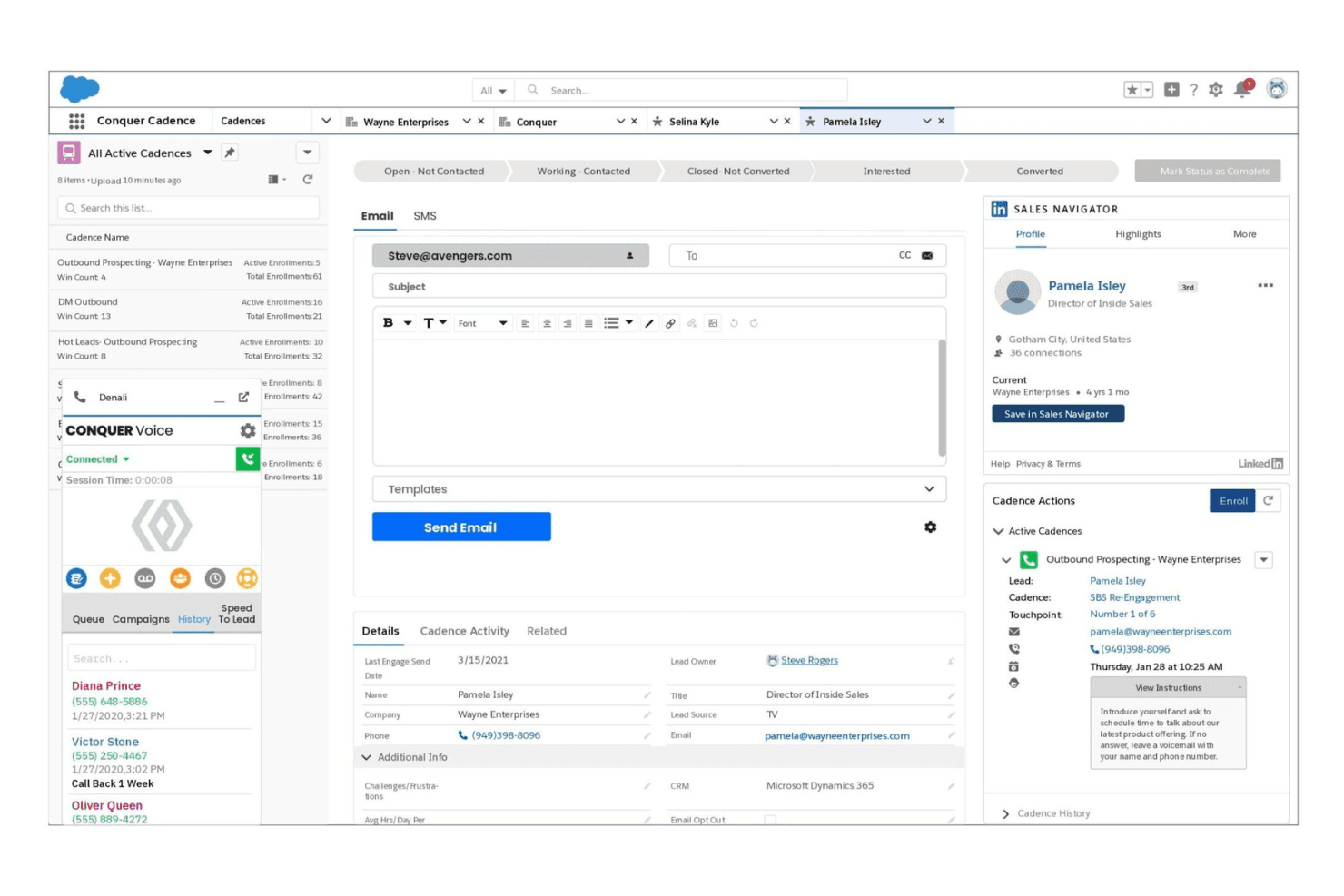
Conquer supports omni-channel communication to improve productivity Conquer is a Salesforce-native sales engagement platform built for revenue teams that live and work inside Salesforce, combining multichannel cadences, AI-powered call coaching, and conversation intelligence without ever leaving the CRM.
Who Is Conquer Best For?
Conquer is a strong fit for Salesforce-native sales teams where reps, managers, and RevOps leaders all work inside the CRM and want cadences, calling, and AI coaching in one place.
Why I Picked Conquer
I picked Conquer as one of the best because it's the only tool on this list where cadences, calling, and AI coaching all run directly inside Salesforce, with no external tab-switching required. I love how the Visual Cadence Builder lets reps build guided sequences with decision steps and Screen Flows that enforce data entry before moving forward. The speed-to-lead trigger and preview autodialer keep SDRs working from Salesforce call lists without breaking their rhythm.
Conquer Key Features
- AI call scoring: Conquer scores calls across communication, question handling, forward motion, and sales-process adherence after each conversation ends.
- Live call coaching: Managers can listen to active calls or whisper guidance to reps in real time without the prospect hearing.
- Batch and triggered SMS: Reps can send texts to a Salesforce report or campaign list and automate texts based on Salesforce triggers like new leads or stage changes.
- Team cadence queue distribution: Team Cadences use Salesforce Queues to auto-assign cadence members and touchpoints across users, roles, or public groups.
Conquer Integrations
Conquer’s documented native integration is Salesforce, where Cadence, Voice, Text, and Voice Mobile capture activities on CRM records. Conquer Email supports Gmail and Microsoft sign-in, but no public API or additional named integrations are documented.
Pros and Cons
Pros:
- Live coaching pairs with scored call summaries
- Dashboards track adherence and rep progress
- Custom cadences fit team sales processes
Cons:
- Implementation can take longer than expected
- Reviewers report recurring audio delays
Learn more about Conquer: Best for intent-led account prioritization
- Free plan + 14-day trial + demo available
- From $49/user/month (billed annually)
Customer Rating:4.5/5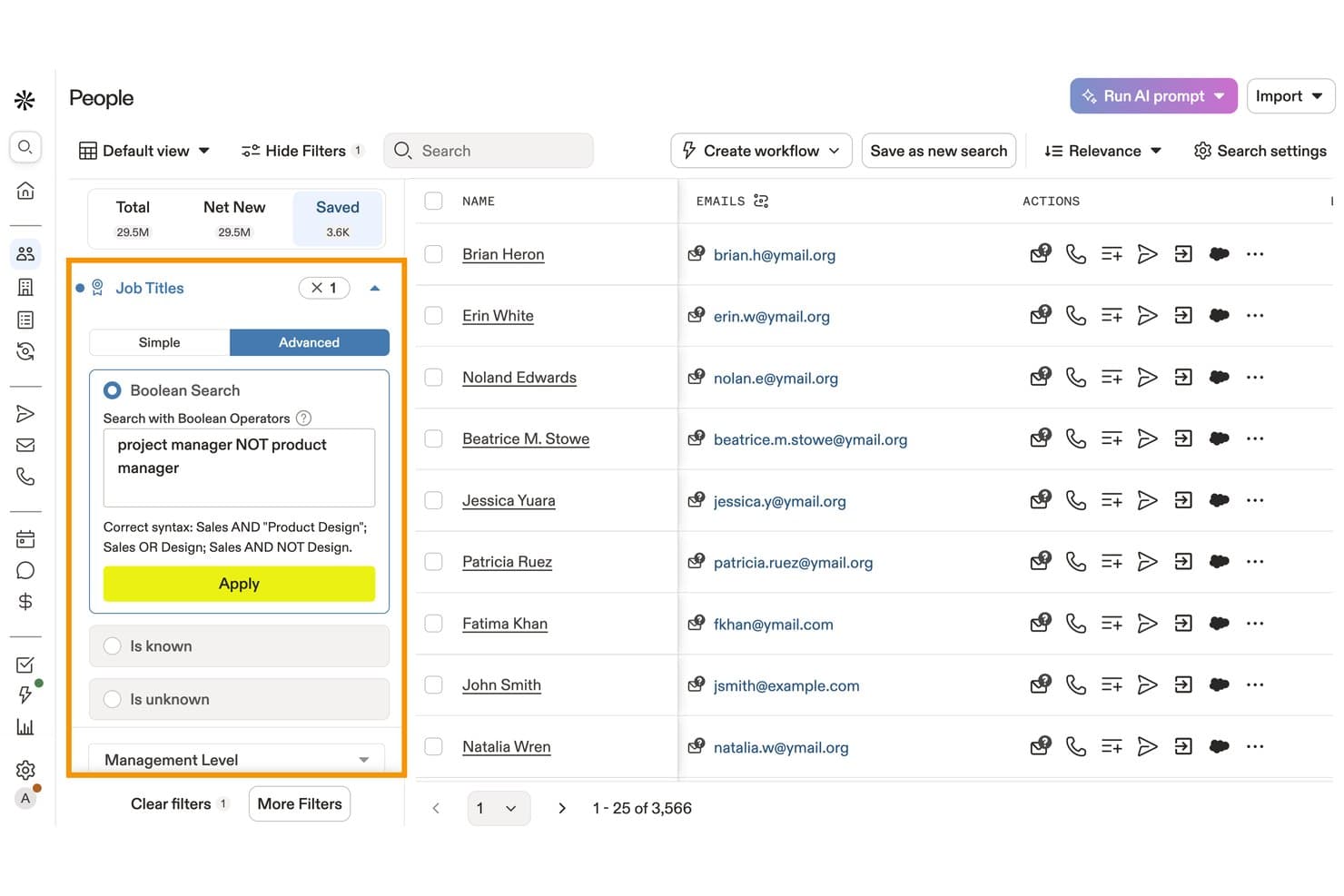
Apollo.io lets users filter job titles using Boolean search operators. Apollo.io is an AI-driven sales platform that combines a 240M+ contact database with multi-channel sequencing, conversation intelligence, and CRM sync—making it a strong fit for sales teams that want prospecting and outreach in one place.
Who Is Apollo.io Best For?
Apollo.io is a strong fit for sales teams that want to combine prospecting and outreach in a single platform, particularly those who rely on intent signals to decide which accounts to prioritize.
Why I Picked Apollo.io
I picked Apollo.io because its intent data layer genuinely changes how I prioritize accounts. Instead of working a flat list, I can filter by Bombora-powered buying intent scores across 15,000+ topics, so I'm focusing on companies already researching relevant solutions. When a target account hits a high-intent threshold, I can trigger an automated workflow that enrolls the right contacts into a sequence without any manual triage. That signal-to-sequence loop is what makes Apollo.io stand out as a Salesloft alternative.
Apollo.io Key Features
- Multi-channel sequences: Build outreach across email, phone calls, and LinkedIn tasks, with A/Z testing and reply-based rules to control what happens after a prospect responds.
- Conversation intelligence: Record, transcribe, and AI-summarize calls from Zoom, Google Meet, and Microsoft Teams, with custom coaching scorecards and playlists for team development.
- Bidirectional CRM sync: Connect Salesforce, HubSpot, or Pipedrive to sync contacts, accounts, deals, and activities in both directions, including support for custom CRM objects.
- Waterfall enrichment: Fill missing contact and company fields by checking Apollo's database first, then pulling from 20+ additional data providers automatically.
Apollo.io Integrations
Apollo.io lists 200+ integrations, including native Salesforce, HubSpot, and Pipedrive sync, plus a Salesloft connector and marketplace integrations such as Slack and Google Sheets. It also offers a REST API, CLI, MCP, and OpenAPI 3 specification for custom integrations.
Pros and Cons
Pros:
- Activity reports track replies and sequence results
- Prospecting and email sequences share one workspace
- Company-level intent guides account prioritization
Cons:
- Phone and LinkedIn steps require manual action
- Cadence branching is less advanced than Salesloft
Learn more about Apollo.io:
Other Salesloft Competitors
Here are some additional Salesloft competitors that didn’t make it onto my shortlist but are still worth checking out:
- 11ReplyBest for multichannel outbound tasks
- 12OutplayBest for guided Salesloft migrations
- 13SmartLeadBest for agency outbound operations
- 14VanillaSoftBest for campaign-based donor outreach
- 15Microsoft Dynamics 365 SalesBest for Microsoft CRM-led sales engagement
- 16ApolloBest for built-in prospect data and outreach
- 17CloseBest for sales calls logged with lead context
- 18AiSDRBest for outbound email infrastructure
- 19Snov.ioBest for sales tools priced by account
- 20ZoomInfo SalesOSBest for mapping intent to buying groups
- 21AmplemarketBest for outreach with mailbox health checks
- 22Salesforce Sales EngagementBest for CRM-triggered cadence control
How I Evaluate Salesloft Competitors
I split my evaluation into three parts. First, core functionality: a tool must support multichannel outreach cadences and sync bidirectionally with major CRMs—these carry the most weight. Second, standout features like AI deal signals and local presence dialing. Third, I consider pricing flexibility and onboarding support.
Core Functionality (Table Stakes For This List)
When I'm selecting tools for my list, I score each one on a scale from 0 (does not offer the functionality) to 5 (excels in this area) for each core functionality listed below. I then convert the total into a percentage to help assess each tool's overall fit, with extra weight on any functionalities I’ve deemed essential.
- Multichannel Engagement (Essential): I look for coordinated email, phone, and social cadences, with scheduling and personalization that keep outreach relevant across touchpoints.
- CRM Sync (Essential): I assess whether contact, activity, and deal updates sync both ways, so reps and other teams can rely on consistent customer context.
- Conversation Intelligence: I check for searchable call transcripts, topic or keyword tracking, and coaching insights that help teams act on what prospects say.
- Pipeline Visibility: I evaluate how clearly teams can track deals, forecast outcomes, and spot engagement or deal-risk signals before handoffs.
- Sales Analytics: I look for reports that compare rep activity, engagement, and cadence results to show which outreach needs adjustment.
- Workflow Automation: I consider whether rules can trigger timely follow-ups or tasks based on prospect actions, without encouraging excessive outreach.
Once I have a list of tools that meet the criteria, I consider what sets each platform apart.
Differentiating Factors (What Sets Vendors Apart)
Here's how I compare and contrast different vendors:
Standout Features
I look for AI deal signals that flag risk or buying intent by analyzing engagement across emails, calls, and CRM activity—useful when a prospect goes quiet mid-pipeline. Local presence dialing matters too, since matching a caller's area code directly affects answer rates. I also check whether a platform offers revenue attribution reporting that ties specific cadence steps to closed-won deals, giving CX and sales leaders clear proof of what's working.
Beyond Features
I evaluate whether a platform locks conversation intelligence or dialer access behind premium tiers, since that directly affects what your team can actually use at launch. Migration tooling matters too—switching from Salesloft is far easier when a vendor offers dedicated import paths for existing cadences and contact data. I also check integration depth beyond CRM, like native connections to marketing automation or data enrichment tools that extend the platform into your broader CX stack.
Why Look for A Salesloft Alternative?
While Salesloft is a good choice for customer experience management, there are a number of reasons why some users seek out alternative solutions. You might be looking for a Salesloft alternative because
- You need more customization options
- Your team requires better scalability
- You're seeking more affordable pricing
- You need support for global teams
- Your business demands advanced analytics
- You want better integration with existing tools
If any of these sound like you, you’ve come to the right place. My list contains several customer experience management options that are better suited for teams facing these challenges with Salesloft and looking for alternative solutions.
Features
Here are some of the key features of Salesloft to help you contrast and compare what alternative solutions offer:
- Cadence: Automates the building and nurturing of sales pipelines for your team.
- Rhythm: Guides your team to take appropriate actions based on insights.
- Conversations: Provide insights into and improve buyer and seller interactions and communications.
- Drift: Engages website visitors to capture leads.
- Deals: Manage and close sales opportunities for better results.
- Analytics: Transform data into actionable insights to drive decision-making.
- Forecast: Assists your team in confidently predicting sales outcomes.
What’s Next:
If you're in the process of researching customer experience management, connect with a SoftwareSelect advisor for free recommendations.
You fill out a form and have a quick chat where they get into the specifics of your needs. Then you'll get a shortlist of software to review. They'll even support you through the entire buying process, including price negotiations.