

Le 10 migliori alternative a Pendo per l’adozione del prodotto nel 2026

Selezione delle alternative a Pendo


Una valida alternativa a Pendo combina assistenza nell'app, analisi del prodotto e strumenti per raccogliere i feedback degli utenti, aiutando il tuo team a offrire esperienze di prodotto migliori. Se stai cercando opzioni alternative a Pendo, probabilmente desideri piattaforme che offrano un processo di inserimento flessibile, informazioni utili e personalizzazione per adattarsi alle esigenze del tuo prodotto.
Questo elenco ti aiuterà a confrontare le principali alternative a Pendo, così potrai trovare la soluzione giusta per favorire l'adozione, comprendere il comportamento degli utenti e migliorare la strategia relativa all'esperienza del tuo prodotto.
Che cos'è Pendo?
Pendo è una piattaforma completa per l'esperienza del prodotto che combina assistenza nell'app, analisi del prodotto e raccolta dei feedback degli utenti. I team utilizzano Pendo per assistere gli utenti durante la fase di inserimento, monitorare l'adozione delle funzionalità e raccogliere informazioni su come i clienti interagiscono con il loro software. Centralizzando questi strumenti, Pendo aiuta i team di prodotto, i responsabili del successo dei clienti e il personale di supporto a migliorare il coinvolgimento degli utenti e a prendere decisioni basate sui dati riguardo ai miglioramenti del prodotto.
Tabella di confronto delle alternative a Pendo
Questa tabella di confronto riassume i dettagli sui prezzi delle mie migliori alternative a Pendo:
| Tool | Best For | Trial Info | Price | ||
|---|---|---|---|---|---|
| 1 | Ideale per i casi d'uso di formazione dei dipendenti | Prova gratuita disponibile | Prezzi su richiesta | Website | |
| 2 | Ideale per approfondimenti tramite replay delle sessioni | Piano gratuito + demo gratuita disponibile | Prezzi su richiesta | Website | |
| 3 | Ottimo per l'analisi comportamentale delle coorti | Piano gratuito disponibile | Prezzo su richiesta | Website | |
| 4 | Ideale per la guida ai flussi di lavoro enterprise | Demo gratuita disponibile | Prezzo su richiesta | Website | |
| 5 | Ideale per il tracciamento automatico degli eventi | Piano gratuito + prova gratuita + demo gratuita disponibili | Prezzi su richiesta | Website | |
| 6 | Ideale per l’analisi dell’utilizzo del prodotto | Piano gratuito disponibile | Da $25/mese (fatturazione annuale) | Website | |
| 7 | Ideale per flussi di onboarding senza codice | Prova gratuita di 14 giorni + demo gratuita disponibile | A partire da $299/mese (fatturazione annuale) | Website | |
| 8 | Ideale per lo scoring della salute del cliente | Demo gratuita disponibile | Prezzo su richiesta | Website | |
| 9 | Ideale per messaggistica in-app personalizzata | Prova gratuita di 14 giorni | Da $750/mese (fatturazione annuale) | Website | |
| 10 | Ideale per segmentazione utenti avanzata | Prova gratuita di 14 giorni + demo gratuita disponibile | Da $279/mese | Website |
Perché fidarsi dei nostri consigli sui software
Il nostro team testa e recensisce software dal 2012. In quanto leader CX noi stessi, sappiamo quanto sia difficile — e importante — scegliere il software giusto.
Per questa guida, abbiamo valutato gli strumenti attraverso test pratici e ricerche indipendenti, assegnando un punteggio agli strumenti in base ai nostri criteri di selezione.
Le nostre recensioni riflettono il nostro giudizio editoriale umano, non un discorso di vendita.
Recensioni delle alternative a Pendo
\u003cspan style=\u0022font-weight: 400;\u0022\u003eDi seguito trovi i miei riepiloghi dettagliati delle migliori alternative a Pendo incluse nella mia selezione. Le mie recensioni offrono una panoramica approfondita delle funzionalità, dei casi d’uso ideali e delle integrazioni di ogni piattaforma, per aiutarti a trovare quella più adatta a te.\u003c/span\u003e

Whatfix
Ideale per i casi d'uso di formazione dei dipendenti
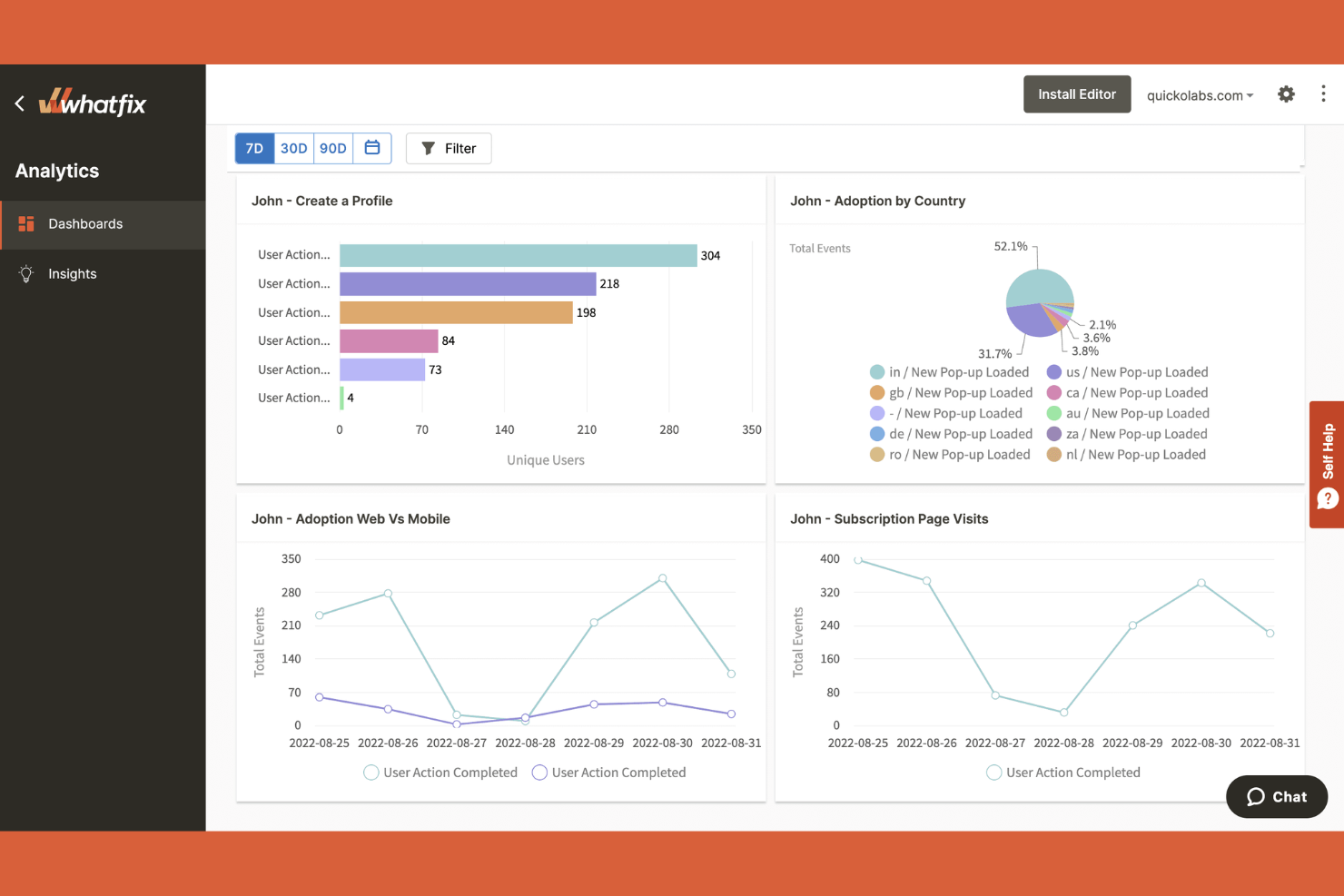
Whatfix è una piattaforma per l'adozione digitale che si distingue per le organizzazioni focalizzate sull'inserimento dei dipendenti, sulla formazione e sull'abilitazione continua all'interno di ambienti software complessi. Se hai bisogno di creare procedure guidate interattive, elenchi di attività e indicazioni all'interno dell'app personalizzate per i team interni, Whatfix offre funzionalità specializzate che vanno oltre le tipiche piattaforme per l'esperienza del prodotto come Pendo.
Perché Whatfix è una buona alternativa a Pendo
Per i team focalizzati sulla formazione dei dipendenti e sull'abilitazione interna, Whatfix offre punti di forza diversi da Pendo. Ho scelto Whatfix perché consente di creare procedure guidate interattive, flussi di inserimento e liste di attività specificamente per i dipendenti che utilizzano software complessi. I suoi strumenti di guida all'interno dell'app supportano l'apprendimento passo dopo passo e possono essere personalizzati per ruoli o dipartimenti diversi. Questo rende Whatfix particolarmente utile per i team delle risorse umane, IT e operativi che devono fornire una formazione coerente e scalabile in tutta l'organizzazione.
Funzionalità principali di Whatfix
Alcune altre funzionalità che rendono Whatfix interessante per la gestione dell'esperienza del prodotto includono:
- Aggregazione dei contenuti: Combina articoli della guida, video e documenti provenienti da più fonti in una risorsa unificata all'interno dell'app.
- Widget di autoassistenza: Aggiungi alla tua app un widget ricercabile che mostra contenuti di assistenza pertinenti in base al contesto dell'utente.
- Conformità SCORM: Esporta i moduli di formazione in formato SCORM per utilizzarli nei sistemi di gestione dell'apprendimento.
- Pannello di analisi: Monitora il coinvolgimento degli utenti, i tassi di completamento e le prestazioni dei contenuti con analisi integrate.
Integrazioni di Whatfix
Le integrazioni includono Salesforce, Microsoft Dynamics 365, SAP SuccessFactors, ServiceNow, Workday, SharePoint, NetSuite e altro.
Pros and Cons
Pros:
- L'esportazione SCORM supporta LMS esterni
- Offre supporto multipiattaforma
- Automatizza i processi a più fasi
Cons:
- Nessuna analisi nativa del prodotto per il comportamento degli utenti
- Richiede un'implementazione complessa

Ideale per approfondimenti tramite replay delle sessioni
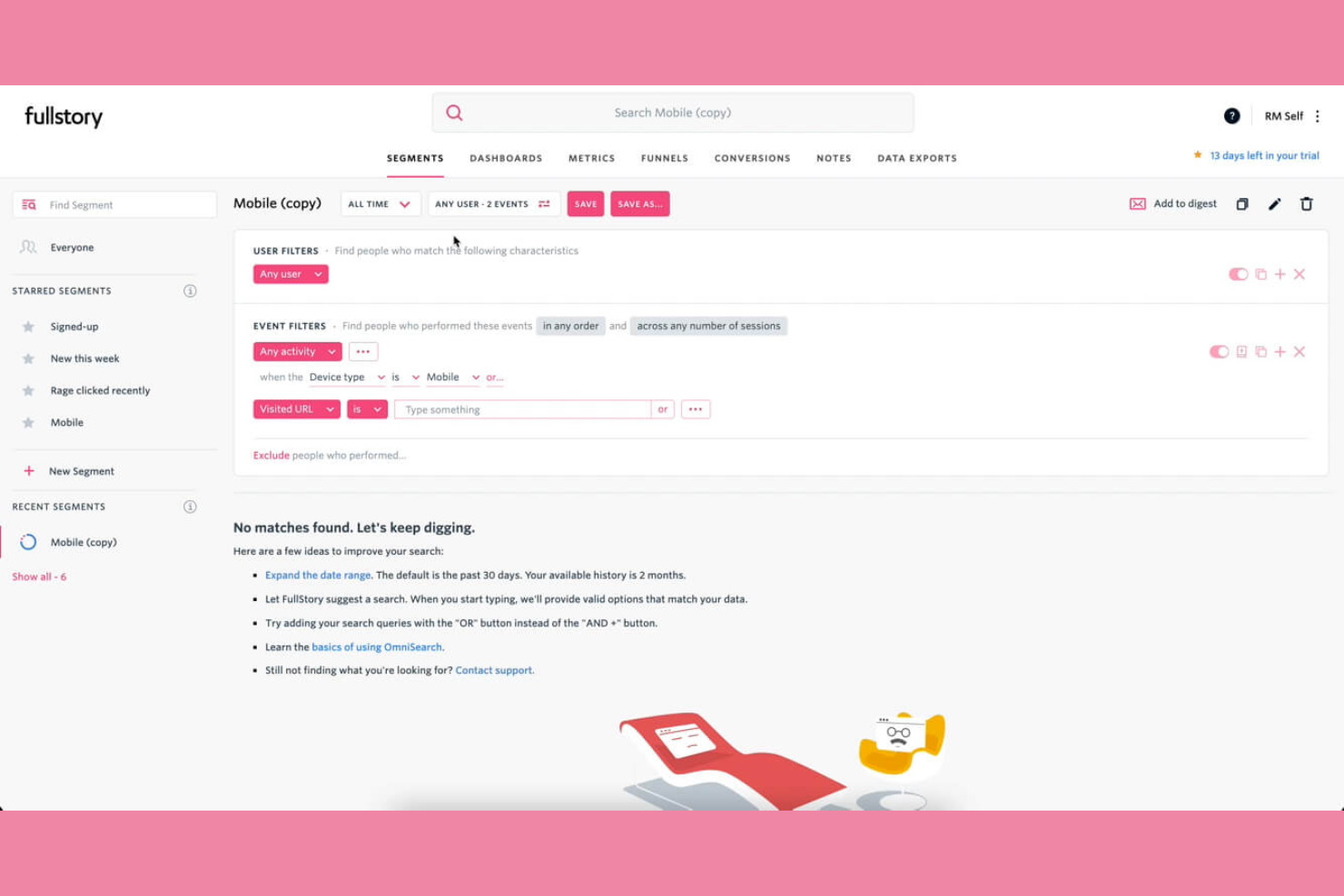
Se vuoi vedere esattamente come gli utenti interagiscono con il tuo prodotto, Fullstory ti offre registrazioni dettagliate delle sessioni e analisi dell'esperienza digitale. Questa piattaforma è particolarmente adatta per product manager, ricercatori UX e team digitali che hanno bisogno di individuare i punti di attrito e comprendere nel dettaglio i percorsi utente. A differenza di Pendo, il replay delle sessioni di Fullstory ti permette di osservare le sessioni reali degli utenti e scoprire problemi che le analisi tradizionali potrebbero non rilevare.
Perché Fullstory è una valida alternativa a Pendo
Fullstory si distingue per i team che vogliono andare oltre le analytics basate su eventi e osservare davvero l’esperienza cliente in tempo reale del loro prodotto. Ho scelto Fullstory perché la sua funzione di replay delle sessioni consente di visualizzare le sessioni reali degli utenti, così puoi vedere esattamente dove gli utenti si bloccano o abbandonano. Ottieni anche heatmap e click map che evidenziano le aree di maggiore coinvolgimento o confusione. Questo livello di visione visiva aiuta i team di prodotto e UX a identificare e risolvere rapidamente i punti di attrito che potrebbero non emergere nelle analytics di Pendo.
Funzionalità principali di Fullstory
Altre funzionalità che rendono Fullstory prezioso per i team di esperienza prodotto includono:
- Funnel di conversione: Monitora il progresso degli utenti nei flussi chiave per identificare dove si verificano abbandoni.
- Rilevamento errori: Individua automaticamente errori JavaScript e segnali di frustrazione dell’utente.
- Tracciamento eventi personalizzato: Definisci e monitora azioni utente specifiche rilevanti per gli obiettivi del tuo prodotto.
- Ricerca utenti segmentata: Filtra e trova sessioni basate su attributi o comportamenti degli utenti.
Integrazioni Fullstory
Le integrazioni includono Twilio Segment, Google Analytics, Zendesk, Salesforce, Slack, Adobe Analytics, Jira, Intercom, HubSpot e altri.
Pros and Cons
Pros:
- Replay delle sessioni ad alta fedeltà
- Mostra segnali di frustrazione per click ripetuti
- Offre autocattura senza tag
Cons:
- Il prezzo aumenta rapidamente all’aumentare delle sessioni
- Richiede gestione della privacy e dei dati personali

Ottimo per l'analisi comportamentale delle coorti
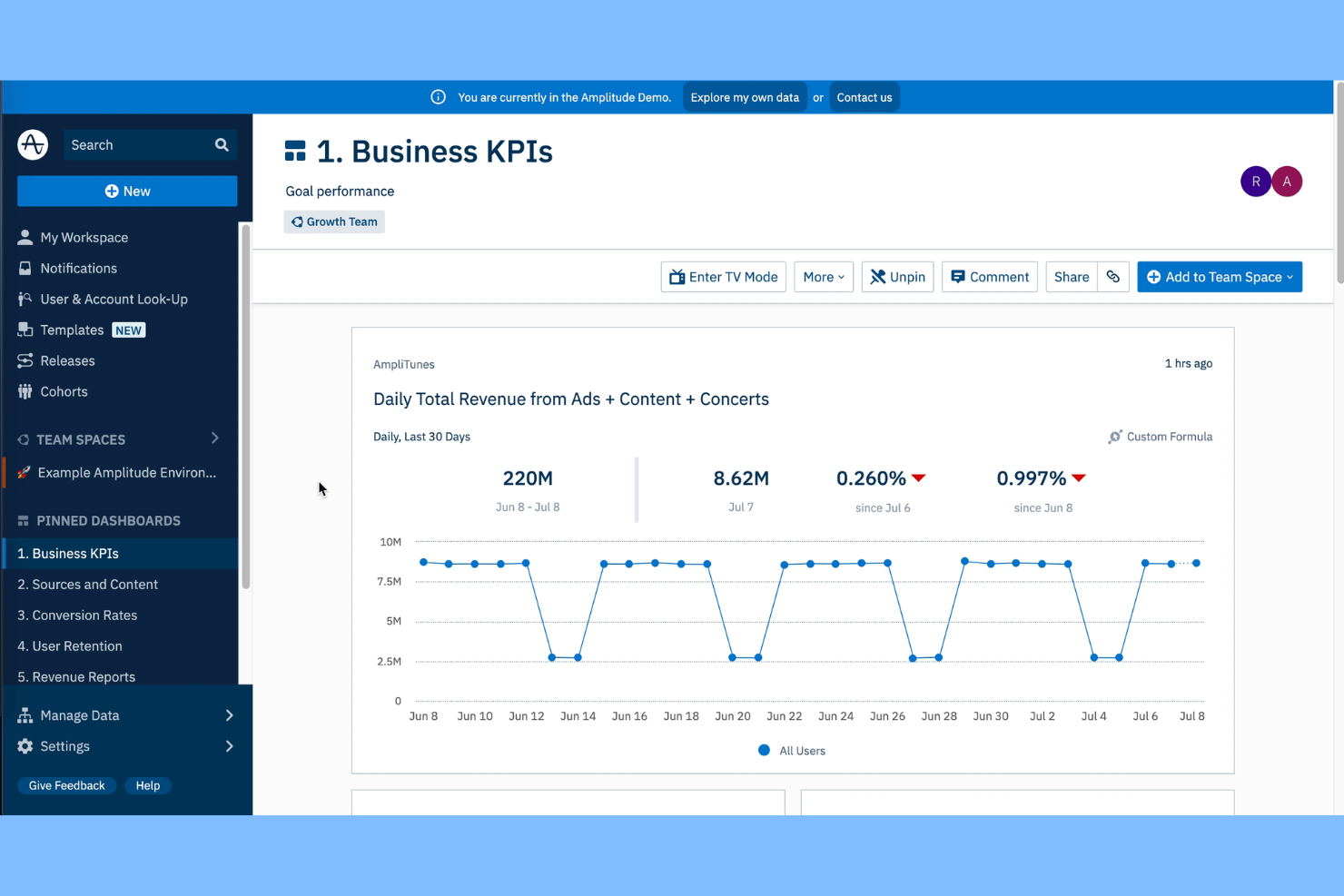
Amplitude offre analisi approfondite sugli utenti per i team che desiderano creare coorti attuabili per analisi mirate. È particolarmente utile per product manager, analisti di crescita e aziende digitali che hanno bisogno di comprendere come segmenti specifici di utenti interagiscono con le funzionalità nel tempo. A differenza di Pendo, l’analisi comportamentale delle coorti di Amplitude permette di tracciare, confrontare e agire su modelli utente dettagliati per guidare le decisioni di prodotto.
Perché Amplitude è una buona alternativa a Pendo
Quando serve analizzare il comportamento degli utenti a un livello dettagliato, Amplitude si distingue per le sue capacità di analisi comportamentale delle coorti. Ho scelto Amplitude perché permette di definire, monitorare e confrontare segmenti personalizzati di utenti in base ad azioni reali e schemi di coinvolgimento. Puoi visualizzare come diverse coorti avanzano nei funnel, identificare i fattori di mantenimento e misurare l’impatto delle modifiche del prodotto su gruppi specifici. Questo approccio offre ai team di prodotto una visione più chiara dei fattori che determinano i risultati degli utenti rispetto alle analisi più generali di Pendo.
Funzionalità principali di Amplitude
Altre funzionalità che rendono Amplitude utile per i team di prodotto includono:
- Segmentazione degli eventi: Suddividi le azioni degli utenti per proprietà dell’evento e scopri schemi dettagliati di utilizzo.
- Analisi dei percorsi (Pathfinder): Visualizza i percorsi più comuni che gli utenti intraprendono nel tuo prodotto.
- Strumenti di governance dei dati: Gestisci i piani di tracciamento, applica convenzioni di denominazione e monitora la qualità dei dati.
- Dashboard personalizzate: Crea e condividi dashboard personalizzate per team o metriche specifiche.
Integrazioni di Amplitude
Le integrazioni includono Twilio Segment, Braze, Amazon S3, HubSpot, Salesforce, Adobe Marketo Engage, Snowflake, Google Analytics 4, Slack e altri.
Pros and Cons
Pros:
- Coorti comportamentali per una segmentazione avanzata degli utenti
- L’analisi della retention traccia il coinvolgimento degli utenti
- A/B test integrato nativo
Cons:
- Curva di apprendimento più ripida
- Supporto limitato per il monitoraggio dell’adozione delle funzionalità

WalkMe
Ideale per la guida ai flussi di lavoro enterprise
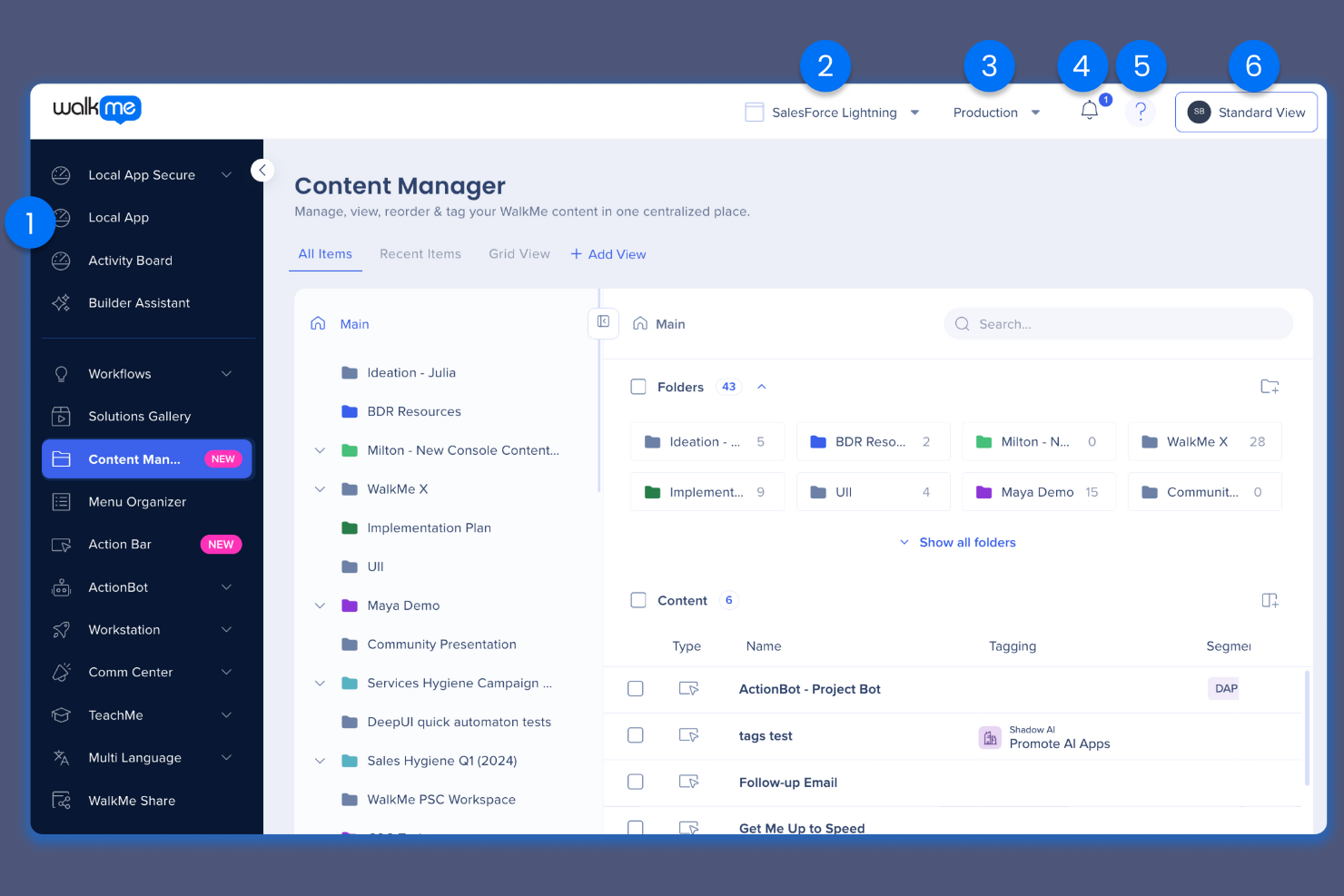
Per le organizzazioni che gestiscono flussi di lavoro digitali complessi, WalkMe offre avanzate funzionalità di guida e automazione su applicazioni aziendali. Questa piattaforma è particolarmente utile per grandi aziende e team IT che hanno bisogno di incrementare l'adozione da parte degli utenti e ridurre le richieste di supporto su larga scala. A differenza di Pendo, WalkMe è specializzato nell'integrare istruzioni passo-passo e automazioni direttamente sui software esistenti, aiutando gli utenti a completare le attività senza uscire dal loro flusso di lavoro.
Perché WalkMe è una valida alternativa a Pendo
Se il tuo team ha bisogno di guidare gli utenti attraverso flussi di lavoro aziendali complessi, WalkMe offre funzionalità che vanno oltre quelle di Pendo. Ho scelto WalkMe perché consente di creare walkthrough interattivi e tooltip passo-passo che si sovrappongono a qualsiasi applicazione web. È inoltre possibile automatizzare attività ripetitive e attivare aiuti contestuali in base alle azioni dell’utente, particolarmente utili per l’onboarding e la gestione del cambiamento nelle grandi organizzazioni. Queste funzioni rendono WalkMe una scelta solida per le aziende che desiderano incrementare l’adozione dei sistemi e ridurre le richieste di assistenza su più piattaforme business.
Funzionalità chiave di WalkMe
Alcune altre funzionalità che distinguono WalkMe per i team dedicati all’esperienza prodotto includono:
- Dashboard di Analisi: Monitora in tempo reale le interazioni e l’engagement degli utenti attraverso i vari flussi di lavoro.
- Centro Risorse: Centralizza articoli di supporto, video e risorse di assistenza all’interno dell’applicazione.
- Test A/B: Sperimenta diversi percorsi di guida per ottimizzare l’adozione da parte degli utenti.
- Targeting Basato sul Ruolo: Fornisci guide e contenuti specifici agli utenti in base al loro ruolo o reparto.
Integrazioni di WalkMe
Le integrazioni includono Salesforce, Workday, Microsoft Dynamics 365, ServiceNow, SAP SuccessFactors, Oracle Cloud, NetSuite, SharePoint e Jira.
Pros and Cons
Pros:
- Supporta ambienti software aziendali complessi
- Dispone di bot AI per completare attività al posto degli utenti
- Utilizza la tecnologia brevettata DeepUI
Cons:
- Costo di proprietà elevato
- Analisi della scoperta prodotto poco approfondite

Ideale per il tracciamento automatico degli eventi
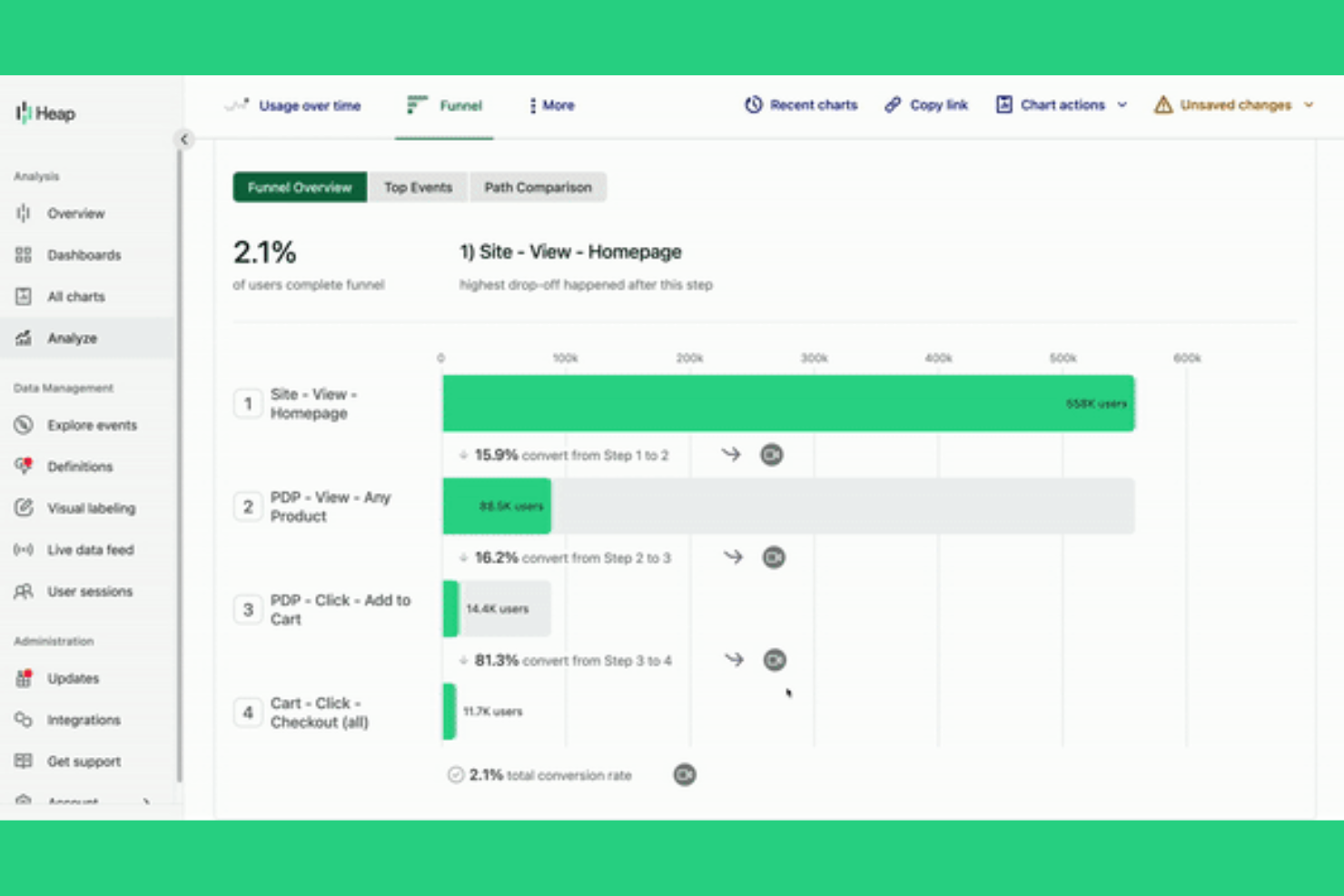
Heap adotta un approccio unico all’analisi dei prodotti registrando automaticamente ogni interazione degli utenti sui tuoi prodotti digitali. Questo lo rende particolarmente interessante per product manager, team UX e analisti che vogliono scoprire i modelli di comportamento degli utenti senza dover impostare manualmente gli eventi. Se cerchi una piattaforma che riduca le lacune di tracciamento e metta in evidenza insight che potresti altrimenti perdere, Heap offre un vantaggio distintivo rispetto a strumenti come Pendo.
Perché Heap è una buona alternativa a Pendo
A differenza della maggior parte delle piattaforme di esperienza prodotto, Heap traccia automaticamente ogni evento dell’utente senza richiedere tag manuali. Ho scelto Heap per i team che desiderano catturare una visione completa del comportamento degli utenti fin dal primo giorno, senza il rischio di perdere interazioni chiave. La sua funzione di autocattura registra clic, invii di moduli e visualizzazioni di pagina già pronti all’uso, quindi puoi analizzare retroattivamente i percorsi degli utenti e identificare i punti di attrito. Questo approccio è particolarmente prezioso per product manager e analisti che necessitano di dati affidabili e granulari per prendere decisioni informate sul prodotto.
Funzionalità principali di Heap
Altre funzionalità che rendono Heap utile per i team che si occupano dell’esperienza prodotto includono:
- Session Replay: Guarda le registrazioni delle sessioni reali degli utenti per vedere esattamente come interagiscono con il tuo prodotto.
- Arricchimento dei dati: Migliora automaticamente i profili degli utenti con dati firmografici e demografici provenienti da fonti terze.
- Analisi retroattiva: Definisci nuovi eventi in qualsiasi momento e analizza i dati storici senza dover riapplicare i tag.
- Segmentazione: Crea segmenti dinamici di utenti basati su comportamenti, attributi o criteri personalizzati.
Integrazioni di Heap
Le integrazioni includono Amazon Redshift, Snowflake, Amazon S3, Looker, Tableau, Salesforce, Adobe Marketo Engage, HubSpot e altri.
Pros and Cons
Pros:
- Tracciamento automatico degli eventi per ridurre i tag manuali
- Garantisce una migliore governance dei dati
- Utilizza l’IA per individuare attriti e abbandoni
Cons:
- Mancano sondaggi NPS nativi e raccolta feedback
- Non è possibile creare tooltip o modali in-app

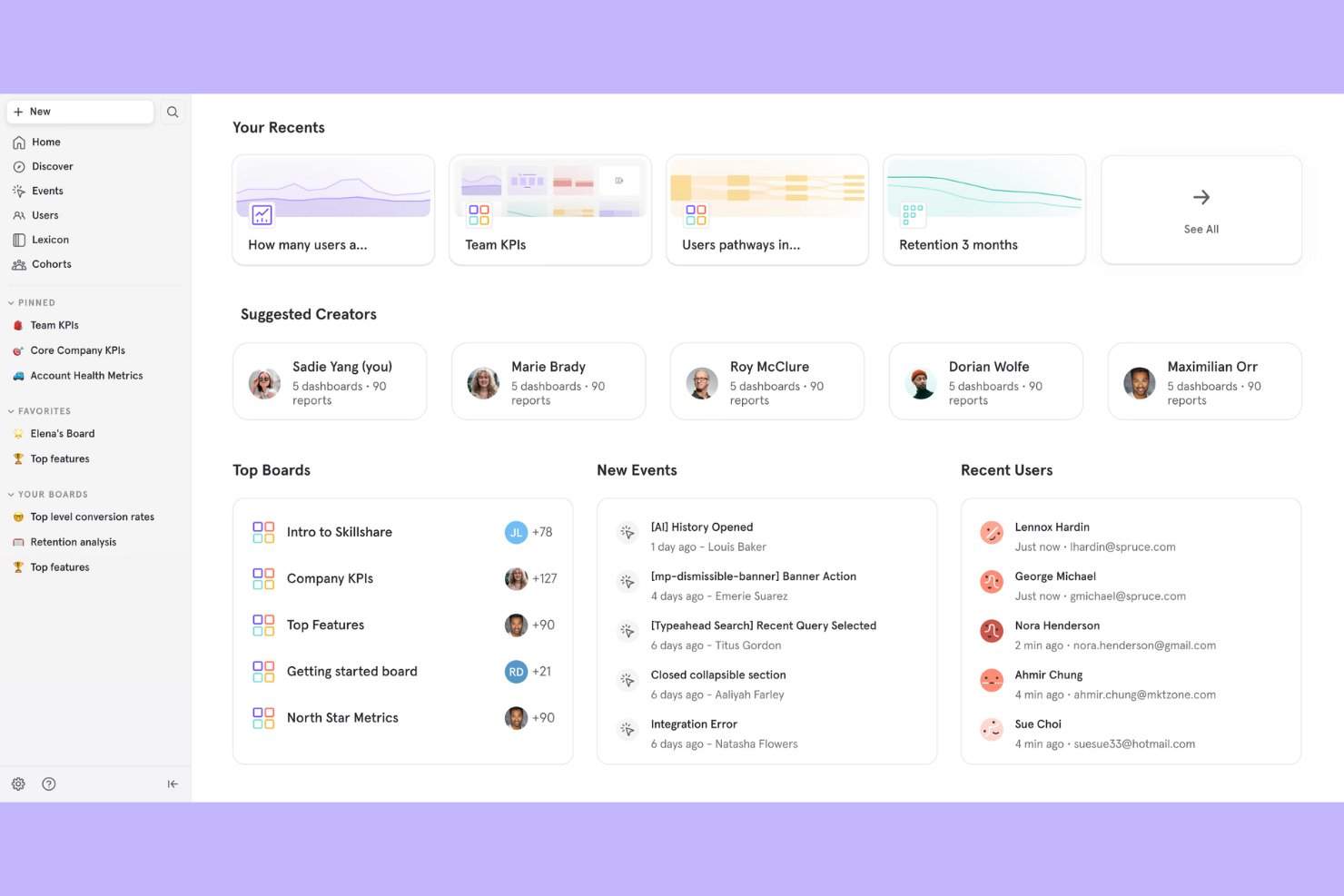
Mixpanel offre ai team di prodotto una visione dettagliata di come gli utenti interagiscono con i prodotti digitali in ogni fase rispetto ad altri strumenti di analytics. È particolarmente indicato per aziende SaaS, team di crescita e analisti che devono monitorare le tendenze di utilizzo del prodotto e misurare l’adozione delle funzionalità in tempo reale. Se desideri analizzare a fondo i gruppi di utenti, le analisi dei funnel e i dati sulla fidelizzazione andando oltre a quanto offre Pendo, Mixpanel si distingue per la sua analitica flessibile e il tracciamento basato su eventi.
Perché Mixpanel è una valida alternativa a Pendo
Per i team che vogliono comprendere in profondità l’utilizzo del prodotto, Mixpanel mette a disposizione funzionalità di analisi che vanno oltre quelle offerte dalla maggior parte delle piattaforme di esperienza prodotto. Ho scelto Mixpanel perché il suo tracciamento basato su eventi consente di misurare esattamente come gli utenti interagiscono con ogni singola funzionalità, non solo l’utilizzo complessivo. Puoi costruire funnel personalizzati, analizzare i gruppi di utenti e seguire le tendenze di fidelizzazione per vedere quali modifiche al prodotto generano un impatto reale. Questo livello di dettaglio è particolarmente utile per i team SaaS e di prodotti digitali che devono ottimizzare i percorsi utente e l’adozione delle funzionalità.
Funzionalità principali di Mixpanel
Altre funzionalità che rendono Mixpanel prezioso per i team di esperienza prodotto includono:
- Analisi A/B Test: Misura l’impatto degli esperimenti confrontando il comportamento degli utenti nei diversi gruppi di test.
- Dashboard personalizzate: Crea e condividi dashboard su misura per specifici indicatori o esigenze del team.
- Enrichment del profilo utente: Aggiungi proprietà e attributi personalizzati ai profili utente per segmentazioni più approfondite.
- Approfondimenti automatizzati: Individua tendenze e anomalie nei tuoi dati senza ricerche manuali.
Integrazioni Mixpanel
Le integrazioni includono Census, Branch, Apxor, Conduit, Plotline, Tealium, Mailchimp, Tenjin, Rivery e altre ancora.
Pros and Cons
Pros:
- Tracciamento granulare degli eventi per l’analisi di prodotto
- Elaborazione e reportistica dei dati in tempo reale
- Dati avanzati su funnel e fidelizzazione
Cons:
- Non supporta i nudge integrati nell’app
- Richiede la marcatura manuale di ogni evento

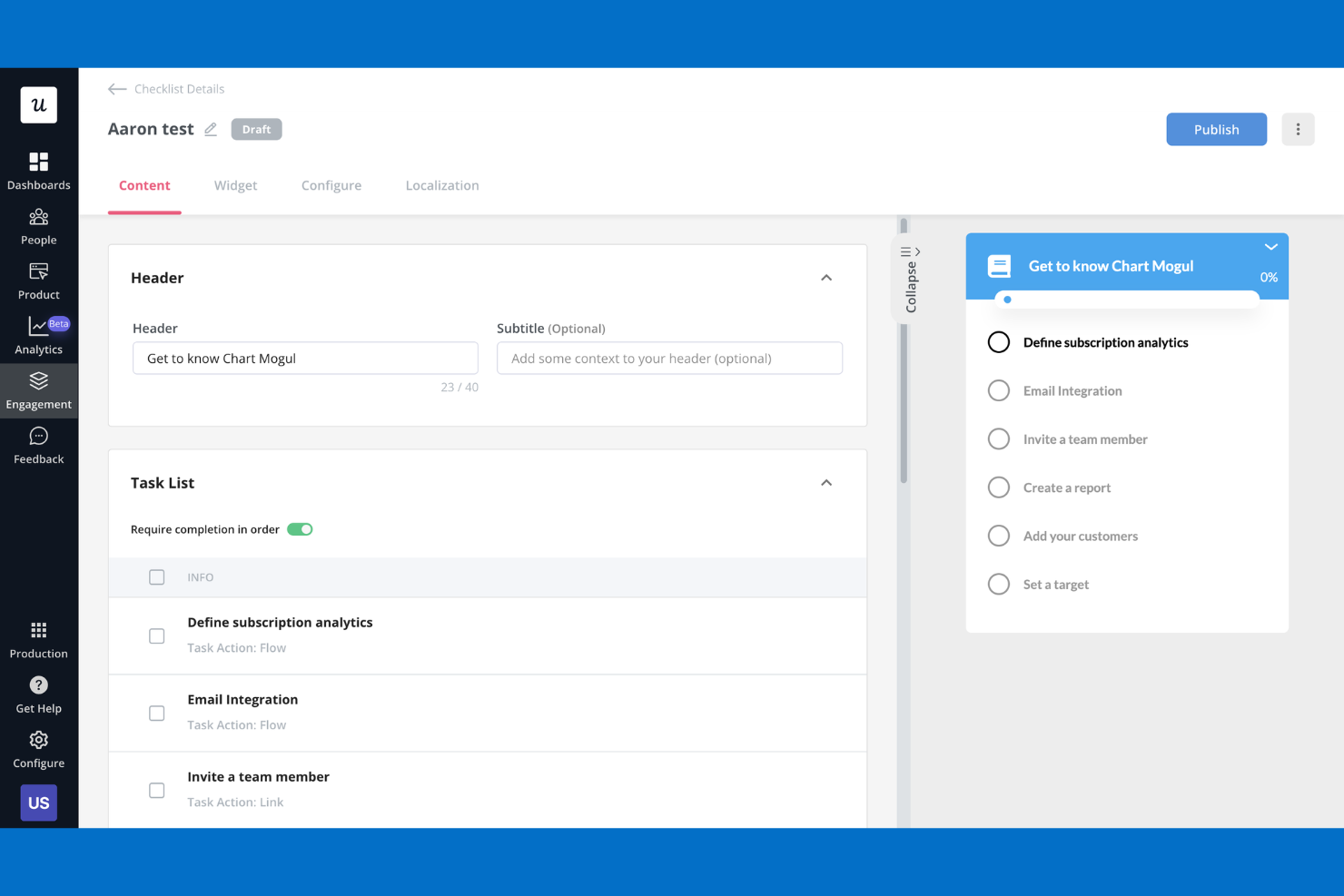
Se desideri creare flussi di onboarding no-code senza scrivere script manuali, Userpilot merita attenzione. Questa piattaforma è pensata per product manager di startup in rapida crescita o per team di customer success che hanno bisogno di lanciare esperienze in-app velocemente. Userpilot si distingue per il suo editor visuale e il targeting flessibile, rendendo più facile guidare gli utenti e promuovere l’adozione delle funzionalità rispetto a strumenti più focalizzati sugli sviluppatori.
Perché Userpilot è una valida alternativa a Pendo
Userpilot è ideale per i team che vogliono creare flussi di onboarding senza dipendere dagli sviluppatori. L’ho scelto come alternativa a Pendo perché il suo editor visuale ti consente di costruire tooltip, checklist e walkthrough direttamente nella tua app. Puoi anche indirizzare le esperienze a nuovi utenti o segmenti specifici in base al comportamento o alla fase del ciclo di vita. Questo rende Userpilot una scelta solida se hai bisogno di lanciare e testare rapidamente contenuti di onboarding.
Funzionalità principali di Userpilot
Altre funzionalità di Userpilot aiutano i team a gestire e ottimizzare l’intera piattaforma di esperienza prodotto:
- Test A/B: esegui esperimenti sulle esperienze in-app per confrontare le prestazioni e ottimizzare i flussi utente.
- Sondaggi NPS: raccogli feedback Net Promoter Score direttamente all’interno del tuo prodotto per misurare la soddisfazione degli utenti.
- Centro risorse: aggiungi un help center personalizzabile in-app così gli utenti possono accedere a guide, FAQ e risorse di supporto.
- Analisi basate su eventi: monitora eventi personalizzati e analizza come gli utenti interagiscono con funzionalità specifiche o passaggi dell’onboarding.
Integrazioni Userpilot
Le integrazioni includono HubSpot, Salesforce, Segment, Google Tag Manager, Zendesk, Google Analytics, Intercom, Amplitude, Mixpanel e molte altre.
Pros and Cons
Pros:
- Editor visuale per creare flussi di onboarding rapidi
- Supporta segmentazione avanzata degli utenti
- Strumenti integrati per NPS e sondaggi in-app
Cons:
- Non supporta la multi-lingua in-app
- Nessun modulo roadmap integrato

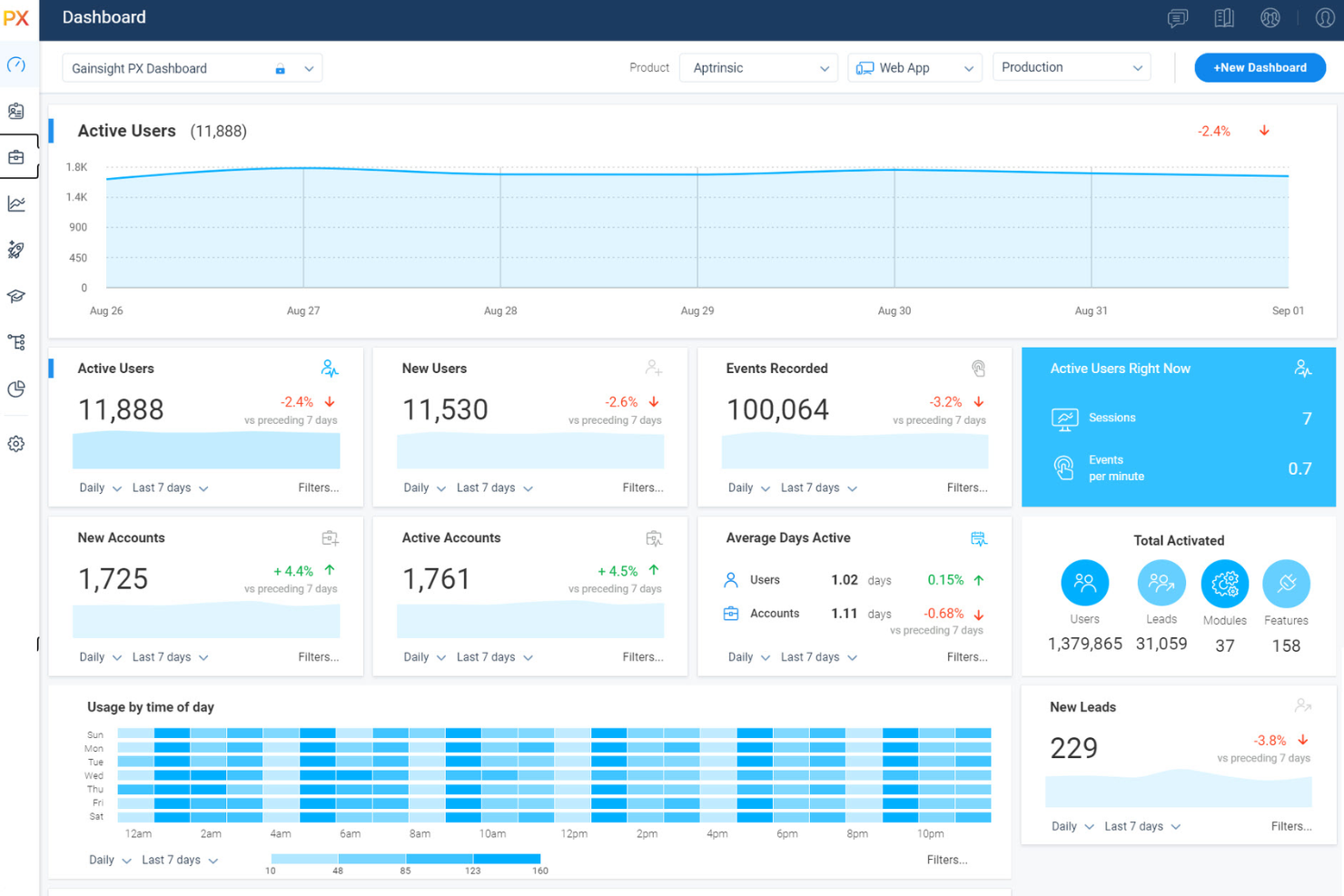
I team che desiderano misurare e migliorare la salute dei clienti spesso scelgono Gainsight PX per le sue avanzate funzionalità di scoring e analytics. Questa piattaforma è particolarmente utile per i customer success manager e le aziende SaaS che vogliono prevedere l'abbandono e affrontare proattivamente i rischi. A differenza di Pendo, Gainsight PX unisce i dati sull'utilizzo del prodotto, il feedback dei clienti e le informazioni sugli account per offrire una visione completa della salute del cliente.
Perché Gainsight PX è una valida alternativa a Pendo
Per i team che necessitano di una profonda comprensione della salute dei clienti, Gainsight PX offre strumenti specializzati che vanno oltre quanto proposto da Pendo. Ho scelto Gainsight PX perché combina analisi sull'utilizzo del prodotto, feedback dei clienti e dati sugli account per generare punteggi dinamici della salute di ciascun cliente. Puoi configurare modelli di scoring personalizzati, monitorare segnali di rischio e attivare playbook automatici quando gli account mostrano segnali di abbandono. Queste funzionalità rendono Gainsight PX una scelta solida per le organizzazioni che desiderano gestire proattivamente le relazioni e la fidelizzazione dei clienti.
Caratteristiche principali di Gainsight PX
Altre funzionalità che rendono Gainsight PX prezioso per i team di product experience includono:
- Orchestrazione dei Percorsi: Crea e automatizza i percorsi dei clienti attraverso molteplici touchpoint.
- Coinvolgimento In-App: Lancia sondaggi, tooltip e annunci direttamente all'interno del tuo prodotto.
- Motore di Segmentazione: Raggruppa gli utenti in base al comportamento, ai dati demografici o alla fase del ciclo di vita.
- Analytics sui Ricavi: Monitora le opportunità di espansione, rinnovo e upsell all'interno degli account dei clienti.
Integrazioni di Gainsight PX
Le integrazioni includono Salesforce, Zendesk, Jira, Slack, Intercom, ServiceNow, Snowflake, Google Analytics, Mixpanel e Segment.
Pros and Cons
Pros:
- Si integra nativamente con Gainsight CS
- Rileva automaticamente l'interfaccia utente del tuo prodotto
- Permette percorsi utente più sofisticati
Cons:
- Dashboard di reportistica da configurare manualmente
- SDK più pesante, che incide sui tempi di caricamento

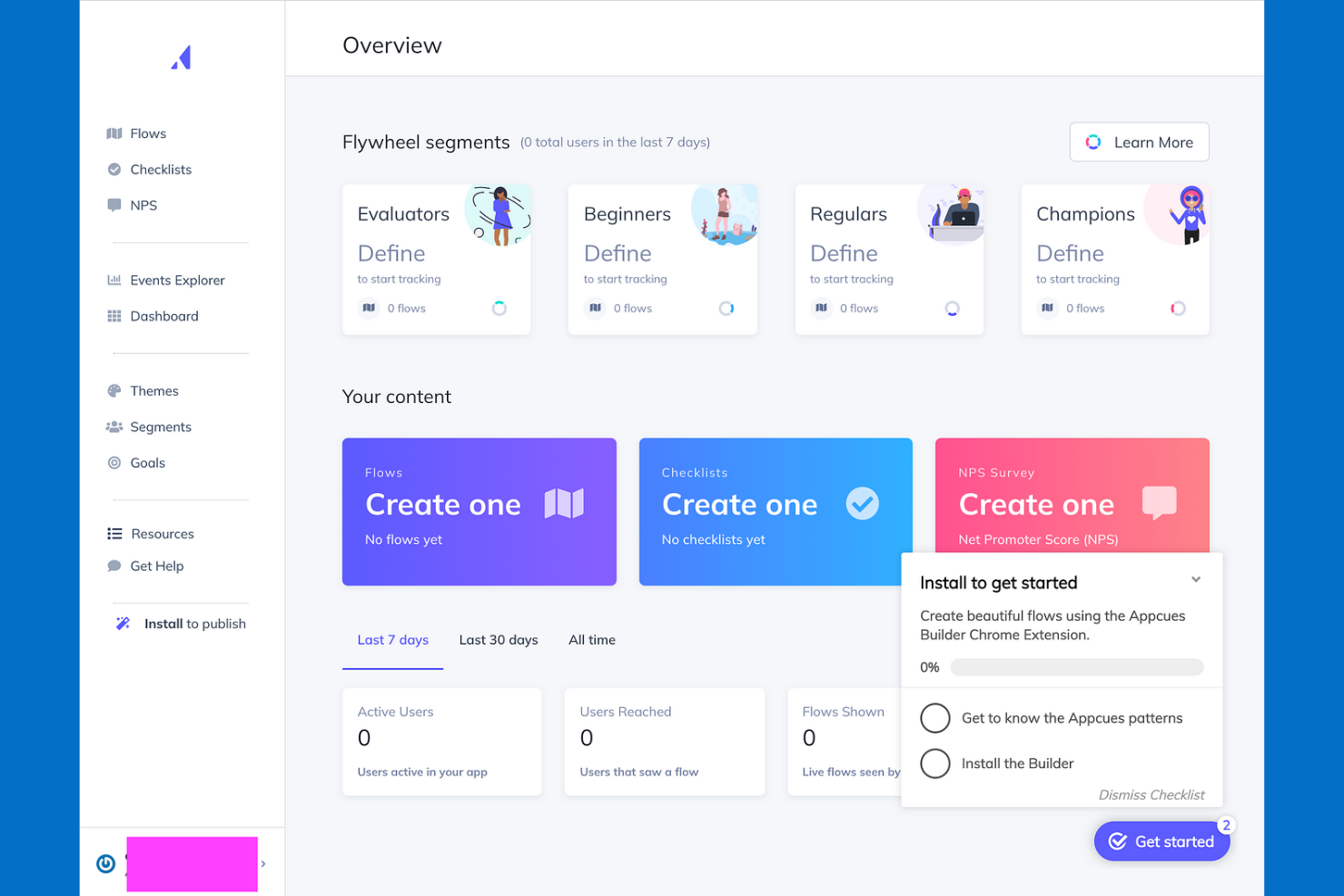
Come piattaforma di analisi, Appcues offre ai team di prodotto uno strumento per fornire messaggi altamente personalizzati all'interno dell'app e flussi di onboarding. Se hai bisogno di personalizzare le esperienze per diversi segmenti di utenti o promuovere l'adozione di nuove funzionalità, Appcues mette a disposizione opzioni di targeting e personalizzazione flessibili. Il suo focus su personalizzazione e coinvolgimento dell'utente la distingue da piattaforme più orientate all'analisi come Pendo.
Perché Appcues è una valida alternativa a Pendo
Per i team che vogliono inviare messaggi mirati all'interno dell'app, Appcues offre un livello di personalizzazione difficile da eguagliare. L'ho scelta come alternativa a Pendo perché permette di creare flussi di onboarding dinamici, annunci e segnalazioni di funzionalità su misura per segmenti di utenti specifici.
Le analisi comportamentali e il targeting dell’audience ti consentono di adattare i messaggi in base al comportamento dell’utente o alla fase del ciclo di vita. Questo rende Appcues una scelta ideale se la tua priorità è coinvolgere gli utenti con il messaggio giusto al momento giusto.
Funzionalità principali di Appcues
Altre funzionalità di Appcues aiutano i team a gestire e ottimizzare tutta la piattaforma di esperienza prodotto:
- Flow Builder: Progetta e lancia flussi di onboarding o coinvolgimento multi-step tramite un'interfaccia drag-and-drop.
- Checklist: Aggiungi checklist interattive per guidare gli utenti attraverso azioni o traguardi chiave nel tuo prodotto.
- Sondaggi in-app: Raccogli feedback dagli utenti direttamente nell'app utilizzando widget di sondaggio personalizzabili.
- Tracciamento eventi: Monitora le azioni degli utenti e attiva esperienze in base a eventi specifici all'interno dell'app.
Integrazioni di Appcues
Le integrazioni includono Segment, Mixpanel, Amplitude, HubSpot, Salesforce, Intercom, Zendesk, FullStory, Google Analytics e altre.
Pros and Cons
Pros:
- Supporta la messaggistica in-app multilingua
- Logica ramificata per flussi di onboarding personalizzati
- Si integra con i principali strumenti di analytics e CRM
Cons:
- Analisi native limitate
- Manca una knowledge base approfondita

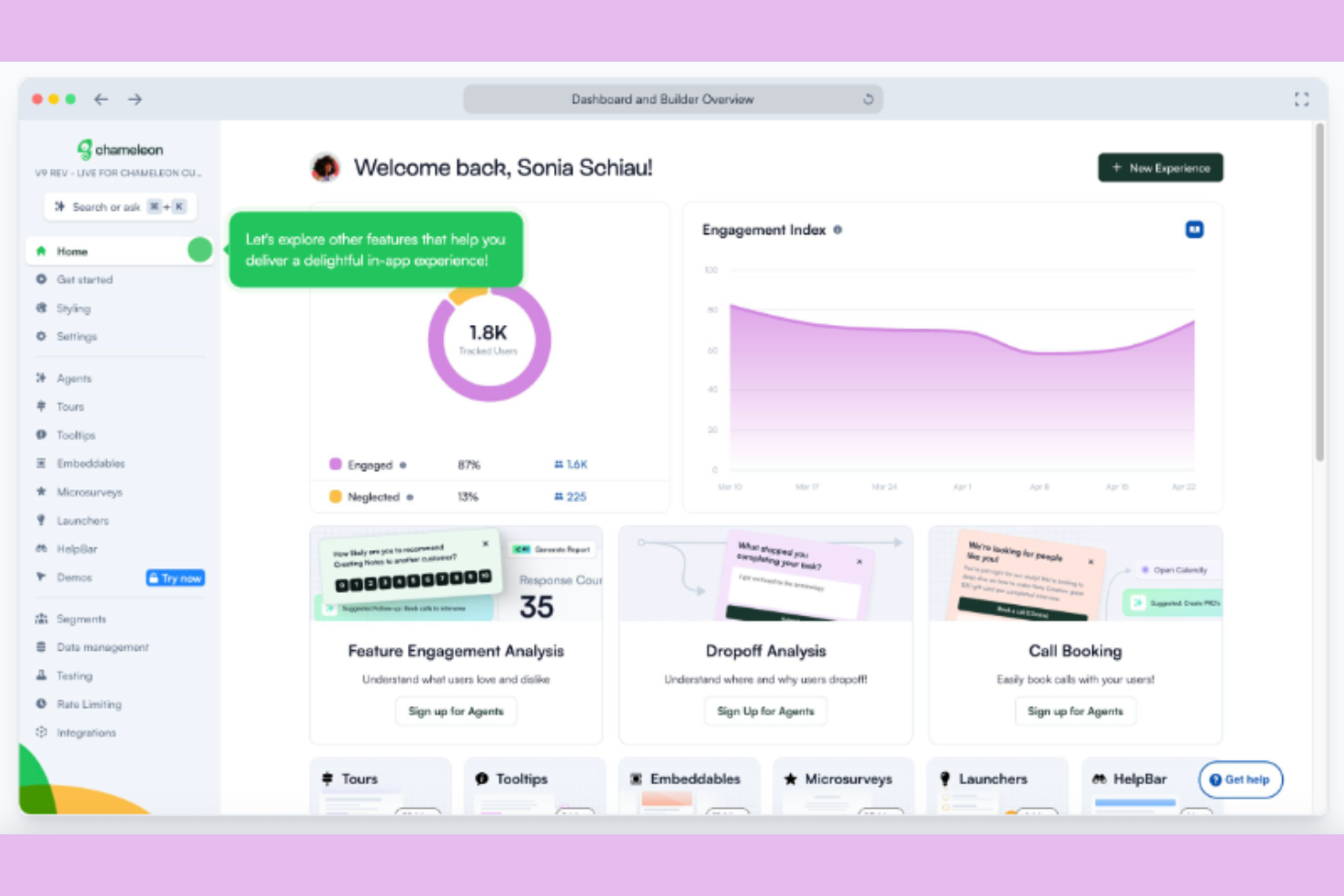
Chameleon è progettato per i team guidati dal prodotto che necessitano di un controllo preciso sulla segmentazione degli utenti e sulle esperienze in-app. Se desideri fornire onboarding, tour e annunci a gruppi di utenti altamente specifici, le opzioni di targeting avanzate di Chameleon si distinguono. I suoi strumenti di segmentazione flessibili aiutano product manager e team UX a creare percorsi su misura che vanno oltre ciò che è possibile con le opzioni predefinite di Pendo.
Perché Chameleon è una valida alternativa a Pendo
Quando hai bisogno di raggiungere segmenti di utenti molto specifici, Chameleon offre opzioni più avanzate rispetto alla maggior parte delle piattaforme di esperienza prodotto. L'ho scelto come alternativa a Pendo perché puoi costruire segmenti utilizzando proprietà personalizzate, dati comportamentali e trigger in tempo reale.
Il sistema intuitivo di targeting dell'audience di Chameleon ti permette di offrire tour di onboarding, tooltip e annunci esattamente agli utenti giusti, nel momento giusto. Questo livello di segmentazione è particolarmente utile per i team che gestiscono prodotti complessi o molteplici tipologie di utenti.
Funzionalità principali di Chameleon
Oltre alle sue avanzate capacità di segmentazione, Chameleon offre anche diverse altre funzionalità che aiutano i team a modellare l'esperienza in-app:
- Estensione Chrome Builder: Crea ed edita esperienze in-app direttamente sul tuo prodotto live utilizzando un'estensione Chrome.
- A/B Testing: Conduci esperimenti su tour e messaggi per confrontare le prestazioni e ottimizzare il coinvolgimento degli utenti.
- Microsurvey: Avvia brevi sondaggi mirati all'interno della tua app per raccogliere feedback contestuali dagli utenti.
- Limitazione della frequenza: Controlla quanto spesso gli utenti visualizzano le esperienze in-app per evitare di sovraccaricarli con troppi messaggi.
Integrazioni di Chameleon
Le integrazioni comprendono HubSpot, Salesforce, Mixpanel, Heap, Figma, Slack, Amplitude, Intercom e altri.
Pros and Cons
Pros:
- Filtri avanzati di targeting multi-condizione
- Estensione Chrome per editing live in-app
- Gestisce ambienti web complessi
Cons:
- Nessuna dashboard di analisi prodotto integrata
- Il Builder può entrare in conflitto con web app complesse
Altre alternative a Pendo
\u003cspan style=\u0022font-weight: 400;\u0022\u003eEcco alcuni altri concorrenti di Pendo che non sono entrati nella mia selezione, ma che vale comunque la pena prendere in considerazione:\u003c/span\u003e
- Product Fruits
Ideale per tour di onboarding multilingue
- Statsig
Ideale per la sperimentazione rapida di funzionalità
- Userlane
Ideale per la guida interattiva dei processi


Come valuto le alternative a Pendo
Esamino ogni strumento attraverso due prospettive: se copre le esigenze fondamentali dell'esperienza cliente, come le guide di avviamento senza codice e la raccolta dell'NPS, e ciò che lo distingue per i team che monitorano l'adozione lungo i percorsi degli utenti.
Funzionalità fondamentali (requisiti essenziali per questo elenco)
Quando seleziono gli strumenti da includere nel mio elenco, assegno a ciascuno un punteggio da 0 (non offre la funzionalità) a 5 (eccelle in quest'area) per ogni funzionalità fondamentale elencata di seguito. Successivamente, trasformo il punteggio totale dello strumento in una percentuale. Ogni strumento deve raggiungere un punteggio totale minimo del 65% per essere preso in considerazione.
- Analisi del prodotto: verifico se uno strumento monitora l'adozione delle funzionalità, gli imbuti di conversione e la fidelizzazione a un livello che aiuti i team CX a individuare i punti in cui gli utenti abbandonano il percorso durante l'avviamento o smettono di interagire con le funzionalità principali.
- Guide nell'app: qui è importante la possibilità di creare procedure guidate, suggerimenti e liste di controllo senza scrivere codice, soprattutto per i team che lanciano flussi di avviamento o annunciano nuove funzionalità in tempi brevi.
- Sondaggi e riscontri nell'app: valuto se NPS, CSAT o sondaggi personalizzati possono essere attivati contestualmente, ad esempio dopo che un utente completa un'attività o raggiunge un traguardo, invece di essere semplicemente inviati secondo una pianificazione.
- Segmentazione degli utenti: osservo attentamente la possibilità di segmentare gli utenti in base al comportamento, al tipo di piano o alla fase del ciclo di vita, poiché rivolgere una guida agli utenti in prova è molto diverso dal rivolgerla agli utenti avanzati.
- Analisi delle sessioni e dei percorsi: gli strumenti che offrono l'analisi dei percorsi, la riproduzione delle sessioni o la visualizzazione dei percorsi consentono ai team CX di vedere esattamente come i clienti si muovono all'interno di un prodotto, invece di affidarsi a supposizioni.
- Integrazioni e sincronizzazione dei dati: collegare i dati sull'utilizzo del prodotto a CRM come Salesforce o a strumenti di supporto come Zendesk è il punto in cui cerco funzionalità avanzate, tra cui accesso API, webhook e opzioni di sincronizzazione con il magazzino dati.
Una volta ottenuto un elenco di strumenti che soddisfano questi criteri, considero ciò che distingue ciascuna piattaforma.
Fattori distintivi (ciò che differenzia i fornitori)
Ecco come confronto i diversi fornitori:
Caratteristiche distintive
Le informazioni basate sull'intelligenza artificiale rappresentano un importante elemento di differenziazione. Cerco strumenti in grado di rilevare automaticamente i modelli di frizione o di riepilogare i temi emersi dai commenti a risposta aperta, facendo risparmiare ai team CX ore di analisi manuale. Anche il supporto per gli SDK mobili è importante quando l'esperienza cliente si estende sia alle applicazioni web sia a quelle native, poiché le lacune nella copertura mobile creano punti ciechi nei dati sui percorsi. Per i team che supportano una base di utenti globale, verifico se le guide e i sondaggi nell'app offrono la localizzazione integrata, così da poter rivolgersi agli utenti nella loro lingua preferita senza dover gestire campagne separate.
Oltre le funzionalità
La trasparenza dei prezzi è importante perché molti strumenti in questo settore nascondono i costi dietro una chiamata commerciale, rendendo difficile confrontare le opzioni su larga scala. Valuto se i fornitori pubblicano strutture tariffarie chiare e in che modo il loro modello di prezzo, basato sugli MAU anziché sulle licenze utente, influisca sul costo totale con la crescita della base utenti. La rapidità di implementazione è un altro fattore che considero: uno strumento che richiede settimane di lavoro degli ingegneri per essere implementato vanifica lo scopo di una piattaforma senza codice. Per i team che gestiscono dati sensibili dei clienti, verifico inoltre la presenza della certificazione SOC 2 di tipo II e delle opzioni di residenza dei dati, soprattutto quando servono utenti in più regioni.
Perché cercare un'alternativa a Pendo?
Sebbene Pendo sia una buona scelta come strumento di analisi del prodotto, ci sono diversi motivi per cui alcuni utenti cercano delle alternative. Potresti cercare un'alternativa a Pendo perché…
- Hai bisogno di una valutazione più avanzata dello stato di salute dei clienti
- Il tuo team desidera analisi dei ricavi più approfondite
- Hai bisogno di una segmentazione degli utenti più flessibile
- Hai bisogno di un supporto migliore per l'analisi su dispositivi mobili
- La tua organizzazione preferisce prezzi trasparenti
Se ti riconosci in una di queste situazioni, sei nel posto giusto. Il mio elenco contiene diverse opzioni di piattaforme per l'esperienza del prodotto più adatte ai team che affrontano queste difficoltà con Pendo e cercano delle alternative.
Funzionalità principali di Pendo
Ecco alcune delle funzionalità principali di Pendo, utili per mettere a confronto ciò che offrono le soluzioni alternative:
- Guide e procedure guidate nell'app
- Analisi dell'utilizzo del prodotto
- Raccolta dei feedback degli utenti
- Monitoraggio dell'adozione delle funzionalità
- Sondaggi Net Promoter Score (NPS)
- Segmentazione degli utenti in base al comportamento
- Condivisione e pianificazione della roadmap
- Analisi delle app mobili
- Centro risorse per l'assistenza autonoma
- Supporto multilingue per i team globali