

Il futuro delle code: i 10 migliori sistemi di gestione delle code del 2026

Elenco dei migliori sistemi di gestione delle code


Orientarsi nel mondo dei sistemi di gestione delle code può essere scoraggiante, ma ho vissuto la stessa situazione, cercando lo strumento migliore per ottimizzare le code e migliorare l'esperienza dei clienti. Un sistema di gestione delle code organizza efficacemente l'ordine e l'efficienza del flusso dei clienti.
Con un sistema di questo tipo, le aziende possono ridurre drasticamente i tempi di attesa e creare un ambiente più soddisfacente per i clienti. Ho visto in prima persona la tensione causata dalle lunghe code e dai clienti scontenti; questi strumenti sono progettati per alleviare proprio queste difficoltà. Esplora le opzioni e scopri quella più adatta: sono convinto che troverai la soluzione perfetta per le tue esigenze.
Perché fidarsi dei nostri consigli sui software
Il nostro team testa e recensisce software dal 2012. In quanto leader CX noi stessi, sappiamo quanto sia difficile — e importante — scegliere il software giusto.
Per questa guida, abbiamo valutato gli strumenti attraverso test pratici e ricerche indipendenti, assegnando un punteggio agli strumenti in base ai nostri criteri di selezione.
Le nostre recensioni riflettono il nostro giudizio editoriale umano, non un discorso di vendita.
Riepilogo dei migliori sistemi di gestione delle code
| Tool | Best For | Trial Info | Price | ||
|---|---|---|---|---|---|
| 1 | Ideale per istituzioni del settore pubblico | Not available | Prezzi su richiesta | Website | |
| 2 | Ideale per organizzare code di supporto multicanale | Prova gratuita disponibile | Da $25/utente/mese (fatturazione annuale) | Website | |
| 3 | Ideale per instradamento intelligente delle chiamate e controllo dei flussi | Prova gratuita di 14 giorni disponibile | Da $25/utente/mese (fatturazione annuale) | Website | |
| 4 | Ideale per esigenze di pianificazione appuntamenti | Disponibile un piano gratuito con limitazioni | Da $25/utente/mese (fatturazione annuale) | Website | |
| 5 | Ideale per gli approfondimenti sul servizio clienti | Prova gratuita di 14 giorni | Da $30/utente/mese (con fatturazione annuale) | Website | |
| 6 | Ideale per il controllo del traffico online | Not available | Da $25/utente/mese (fatturazione annuale) | Website | |
| 7 | Ideale per l'instradamento dei ticket guidato dall'IA | Prova gratuita di 14 giorni | A partire da $9/postazione/mese (fatturazione annuale) | Website | |
| 8 | Ideale per la gestione integrata di appuntamenti e code | Demo gratuita disponibile | Prezzo su richiesta | Website | |
| 9 | Ideale per la gestione delle code multicanale | Prova gratuita di 14 giorni | Prezzo su richiesta | Website | |
| 10 | La migliore per flessibilità di integrazione | Not available | Da $15/utente/mese (fatturato annualmente) | Website |
Recensioni dei migliori sistemi di gestione delle code

WaitWell
Ideale per istituzioni del settore pubblico
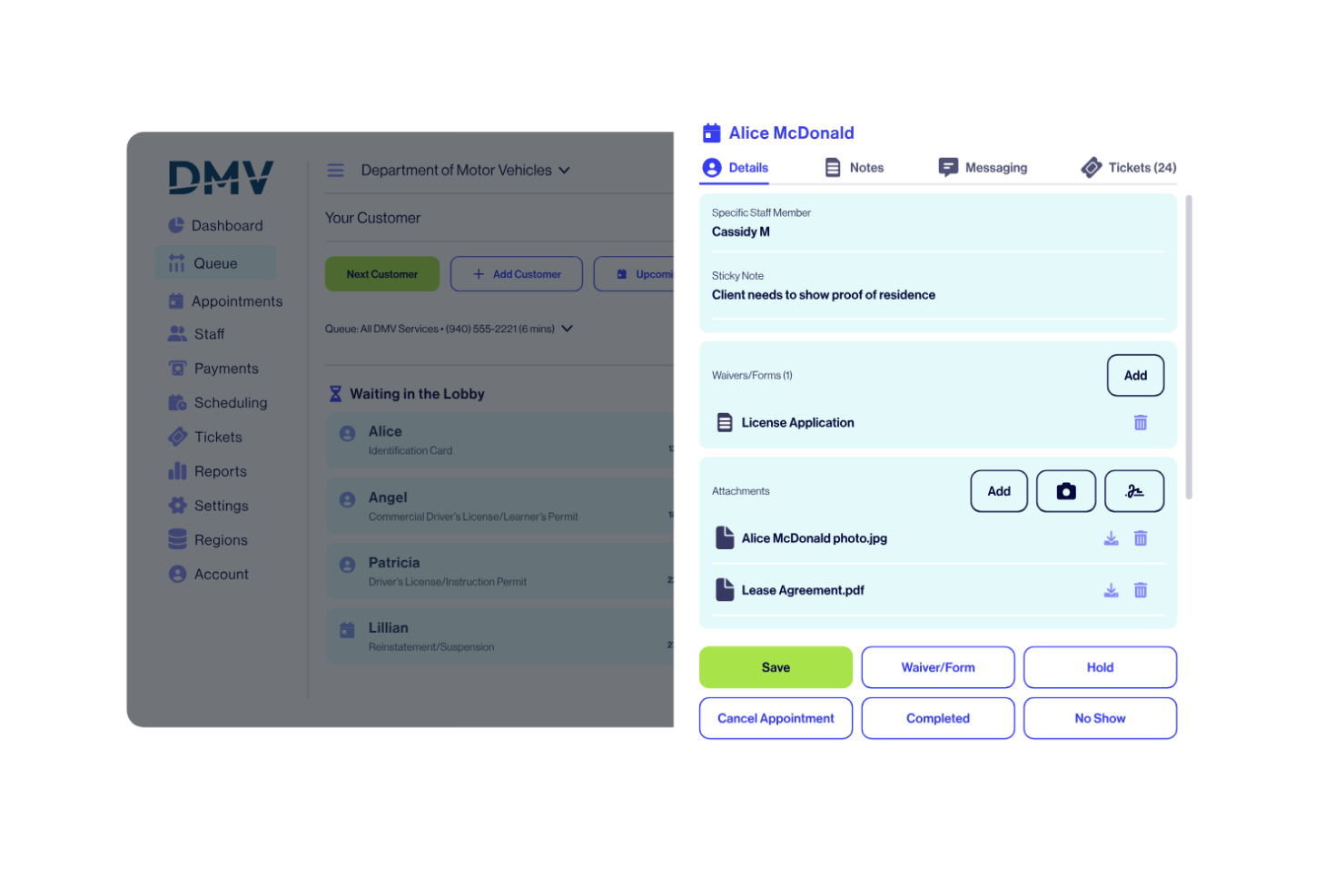
WaitWell è un sistema di gestione delle code progettato per organizzazioni che necessitano di liste d'attesa digitali, pianificazione degli appuntamenti e analisi dei flussi di clienti per gestire le visite in presenza.
Per chi è più adatto WaitWell?
WaitWell è particolarmente indicato per istituzioni del settore pubblico come uffici governativi, autorità sanitarie e università che gestiscono grandi volumi di visitatori in presenza.
Perché ho scelto WaitWell
Ho incluso WaitWell tra le mie migliori scelte perché è uno dei pochi sistemi di gestione delle code costruito appositamente per le esigenze del servizio pubblico. Apprezzo in particolare le funzionalità di accessibilità del servizio: WaitWell supporta servizi multilingue e accomodamenti per l’accessibilità, una caratteristica importante quando si serve un pubblico eterogeneo presso la motorizzazione civile, un ufficio municipale o uno sportello unico universitario. La dashboard multi-sede consente agli amministratori di configurare flussi di lavoro, tipologie di servizio e modalità di check-in uniche per ogni sede, pur monitorando da un'unica vista i tempi di attesa e i volumi di servizio di tutte le sedi. La funzione di prioritizzazione dei ticket aiuta il personale a indirizzare i cittadini in base all'urgenza del servizio o al tipo di appuntamento, una caratteristica essenziale per la gestione di un mix di accessi senza prenotazione e visite preordinate presso sportelli governativi ad alto traffico.
Caratteristiche principali di WaitWell
- Gestione delle code virtuali: I clienti si mettono in coda tramite QR code, link al sito web o chiosco in loco e ricevono aggiornamenti via SMS/email sullo stato dell'attesa.
- Messaggistica bidirezionale: Il personale può comunicare direttamente con i clienti dalla schermata della coda per rispondere a domande o richiedere documenti prima del servizio.
- Riscossione pre-pagamento: I clienti possono pagare i servizi prima di arrivare sia per la coda che per la prenotazione dell’appuntamento.
- Pianificazione del personale: Crea e gestisci i turni dello staff con sincronizzazione in tempo reale sulla disponibilità degli appuntamenti, così gli slot vengono aggiornati automaticamente quando cambiano i turni.
Integrazioni di WaitWell
Le integrazioni native includono Salesforce, HubSpot, Medi EHR, Charmhealth, Oracle, Zoom, Teams, Google Calendar e Twilio. WaitWell offre un’API per integrazioni personalizzate.
Pros and Cons
Pros:
- Buona integrazione con altri software del settore pubblico
- Capacità di gestire grandi affluenze in modo efficiente
- Progettato specificamente per istituzioni del settore pubblico
Cons:
- Possibile eccessiva dipendenza da integrazioni di terze parti
- Potrebbe non essere adatto per aziende del settore privato

Ideale per organizzare code di supporto multicanale
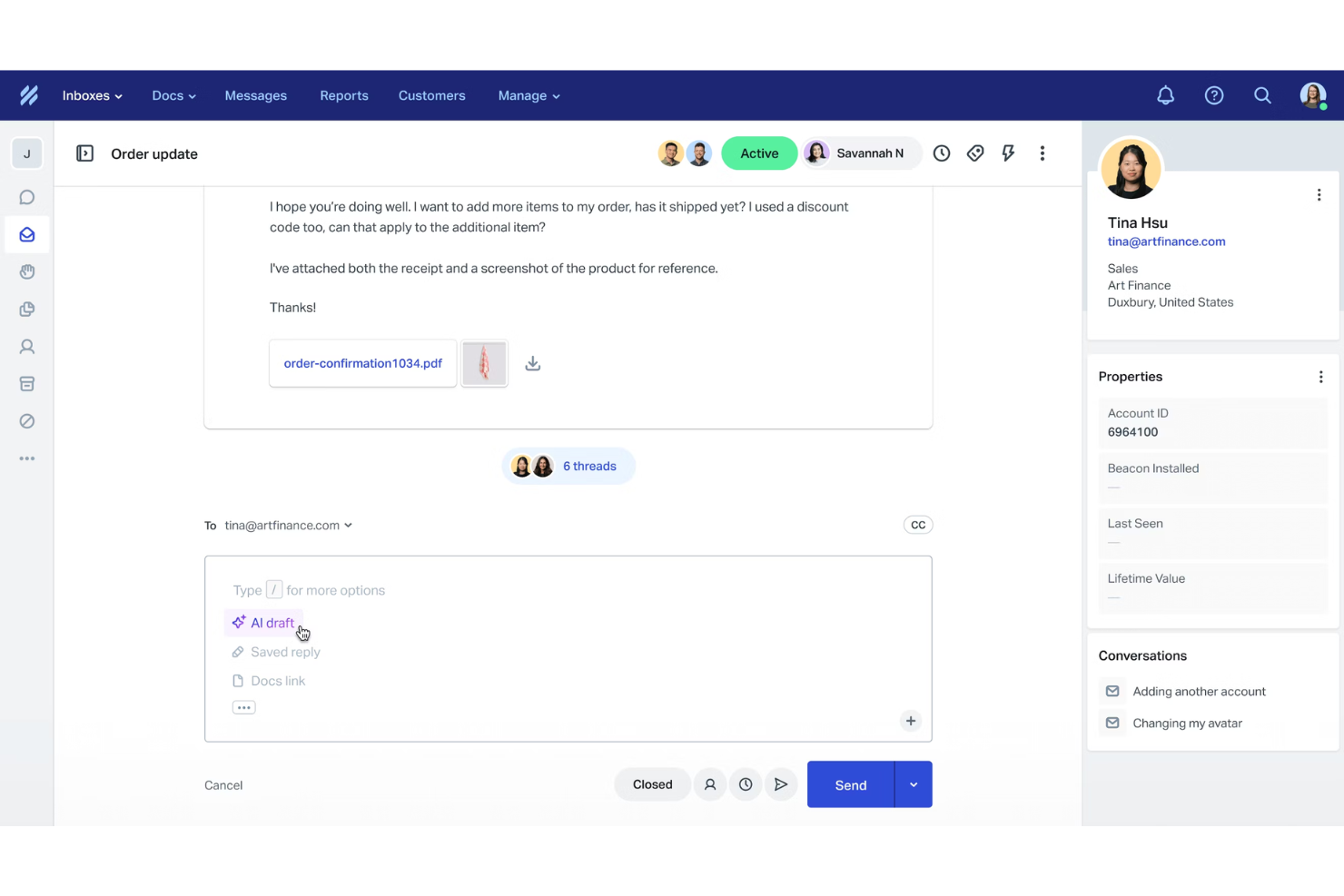
Help Scout è una piattaforma per il servizio clienti progettata per gestire code di supporto multicanale, combinando caselle di posta condivise, live chat e strumenti di knowledge base per i team di assistenza.
Per chi è ideale Help Scout?
Help Scout è una soluzione adatta a team di supporto piccoli e medi che gestiscono richieste dei clienti tramite email, chat e canali social da un'unica postazione di lavoro.
Perché ho scelto Help Scout
Help Scout merita un posto nella mia shortlist per come riesce a riunire email, live chat, telefono e social in un'unica casella condivisa, offrendo una delle gestioni di code multicanale più pulite con cui abbia mai lavorato. Apprezzo particolarmente la funzione Visualizzazioni personalizzate, che permette al mio team di filtrare la coda secondo condizioni come 'in attesa da oltre 24 ore' o 'cliente VIP', così possiamo dare priorità senza dover cercare in una casella disordinata. Anche il rilevamento delle collisioni è una funzione di cui mi avvalgo quotidianamente: segnala quando due operatori stanno visualizzando la stessa conversazione, aiutando a ridurre le risposte duplicate in una coda particolarmente attiva.
Funzionalità principali di Help Scout
- Automazione dei flussi di lavoro: Configura automazioni basate su regole per etichettare, assegnare o chiudere conversazioni in base a condizioni come mittente, oggetto o parola chiave.
- Risposte salvate: Archivia risposte predefinite alle domande più comuni, che gli operatori possono inserire nei messaggi con un solo clic.
- Profili clienti: Raccogli dettagli di contatto e cronologia delle conversazioni dalle app collegate per fornire agli operatori tutto il contesto prima di rispondere.
- Bozze AI: Genera automaticamente bozze di risposta suggerite in base al contenuto di una conversazione in arrivo.
Integrazioni Help Scout
Help Scout offre integrazioni native con Slack, HubSpot, Salesforce, Jira, Shopify, Mailchimp, Google Workspace, Microsoft 365 e WooCommerce. Si connette inoltre con Zapier e dispone di un'API per integrazioni personalizzate.
Pros and Cons
Pros:
- Facile consolidamento dei messaggi multicanale
- Reportistica e analisi complete
- Strumenti di intelligenza artificiale integrati per risposte più rapide
Cons:
- Alcune funzionalità avanzate solo nei piani superiori
- Personalizzazione limitata nei piani base
New Product Updates from Help Scout

Help Scout Adds Automatic Conversation Reassignment
Help Scout can now automatically unassign conversations when the assigned teammate has been away long enough, keeping replies moving so others can pick them up. For more information, visit Help Scout's official site.
 .
.
Ideale per instradamento intelligente delle chiamate e controllo dei flussi
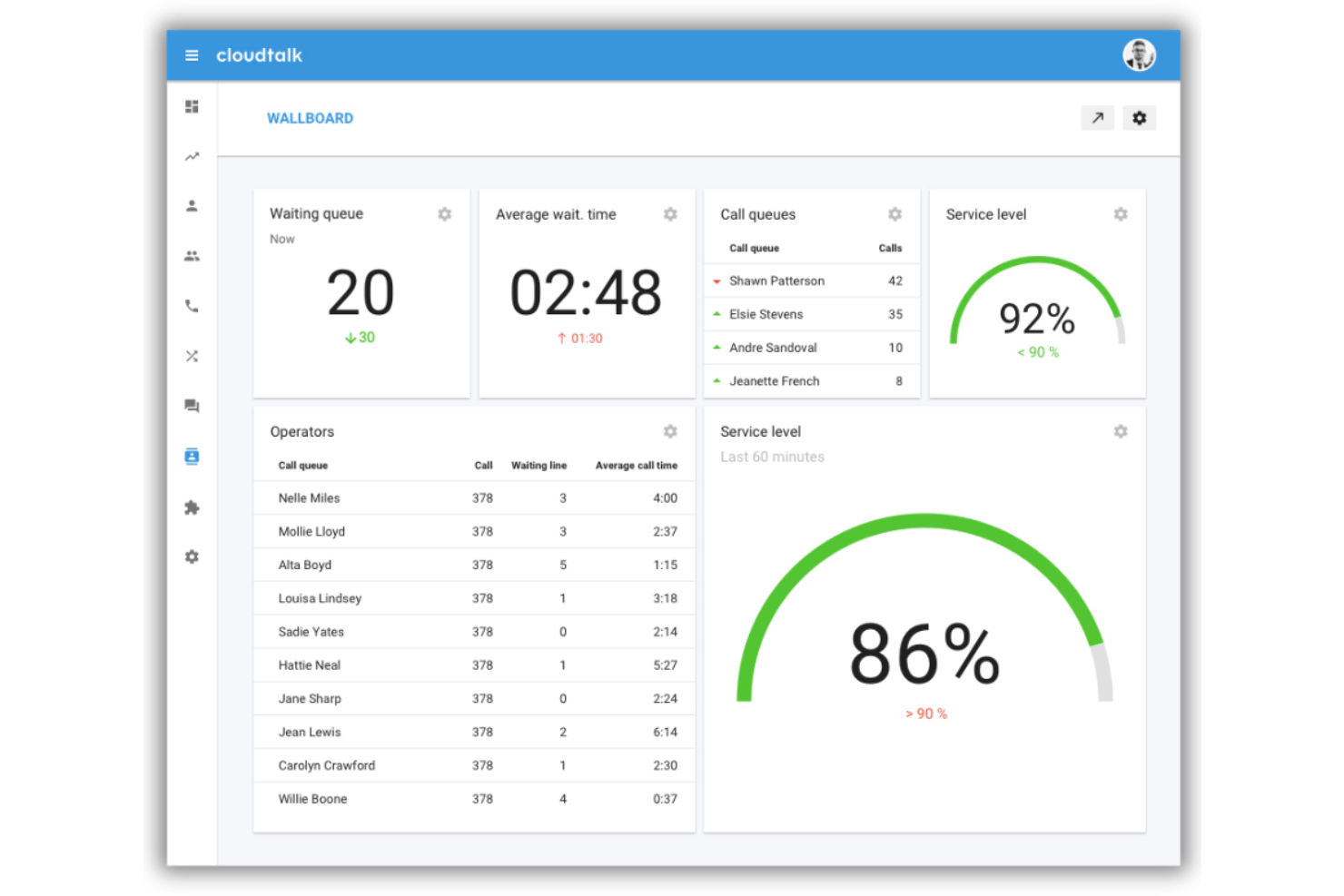
CloudTalk è una piattaforma di call center basata su cloud che combina instradamento delle chiamate potenziato dall'IA, progettazione visiva del flusso di chiamata, IVR, gestione delle code basata sulle competenze e monitoraggio in tempo reale in un unico sistema creato per team di supporto e vendita.
Per chi è ideale CloudTalk?
CloudTalk è particolarmente adatto a PMI in crescita che gestiscono team di supporto in entrata o vendite in uscita e che hanno bisogno di un instradamento strutturato delle chiamate senza la complessità tipica dei sistemi enterprise.
Perché ho scelto CloudTalk
CloudTalk si guadagna il suo posto nella mia shortlist per l'ampio livello di controllo che offre sulla logica di instradamento delle chiamate, senza bisogno di coinvolgere uno sviluppatore per la configurazione. Adoro il Designer visivo dei flussi chiamata: permette di creare IVR ad albero ramificato, impostare condizioni in base agli orari lavorativi e creare corsie prioritarie VIP tutto tramite un'interfaccia drag-and-drop. L'instradamento in base alle competenze garantisce che le chiamate vengano indirizzate all'agente più preparato per gestirle, non semplicemente a chi è disponibile per primo.
Funzionalità chiave di CloudTalk
- Monitoraggio delle chiamate in tempo reale: I supervisori possono ascoltare, sussurrare o intervenire nelle chiamate in corso per coaching e gestione delle escalation in tempo reale.
- Intelligenza conversazionale IA: Le chiamate vengono automaticamente trascritte con analisi del sentiment e tag intelligenti per gli argomenti trattati.
- Analisi e wallboard in tempo reale: Monitoraggio delle code, dello stato degli agenti e delle chiamate perse tramite dashboard personalizzabili.
- Supporto SMS/MMS internazionale: Invia e ricevi messaggi in tutto il mondo, inclusi WhatsApp e funzionalità fax.
Integrazioni di CloudTalk
CloudTalk offre oltre 95 integrazioni native, tra cui Salesforce, HubSpot, Pipedrive, Slack, Microsoft Teams, Zendesk, Intercom, Freshdesk e Zoho CRM, con API disponibile per integrazioni personalizzate.
Pros and Cons
Pros:
- Builder IVR drag-and-drop con logica avanzata
- Prioritizzazione delle code in base alle competenze degli agenti
- Offre monitoraggio delle chiamate in tempo reale e strumenti per supervisori
Cons:
- Occasionali ritardi nella connessione audio delle chiamate
- Supporto limitato per hardware telefonico on-premise

Ideale per esigenze di pianificazione appuntamenti
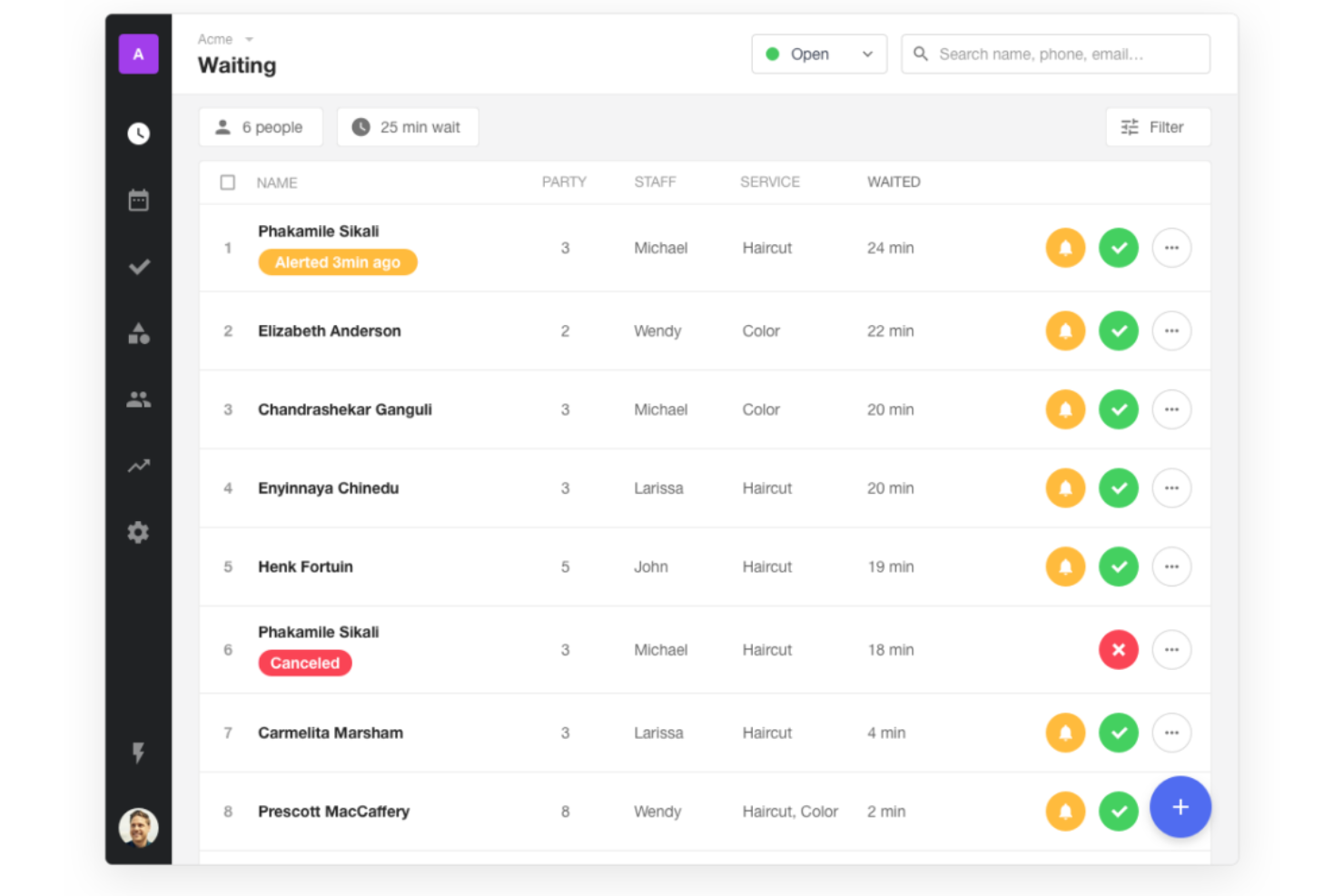
Waitwhile è un sistema di gestione delle code che consente di creare liste d'attesa virtuali, gestire i check-in dei clienti, automatizzare le notifiche e gestire la programmazione degli appuntamenti da un'unica piattaforma.
Per chi è ideale Waitwhile?
Waitwhile è indicato per aziende di servizi come negozi, strutture sanitarie e uffici pubblici che devono gestire sia l'afflusso senza prenotazione che gli appuntamenti programmati.
Perché ho scelto Waitwhile
Ho scelto Waitwhile tra i migliori perché i suoi strumenti di pianificazione degli appuntamenti vanno ben oltre la semplice prenotazione. Mi piace il fatto che tu possa creare pagine di prenotazione personalizzate con fasce orarie specifiche per ciascun servizio, assegnazioni del personale e gestione delle sedi—così i clienti saranno sempre affidati alla persona giusta. Waitwhile consente anche di configurare tempi di buffer tra gli appuntamenti e inviare promemoria automatici via SMS o email, riducendo le mancate presentazioni senza bisogno di interventi manuali.
Funzionalità principali di Waitwhile
- LineSync: Unisce le liste d’attesa degli arrivi senza prenotazione e degli appuntamenti programmati in un unico flusso clienti, gestibile da una sola vista dal tuo team.
- WaitIQ AI per la stima dei tempi di attesa: Utilizza il machine learning per prevedere i tempi di attesa in base a dati in tempo reale e storici.
- Monitoraggio dell’occupazione: Tiene traccia in tempo reale del numero di visitatori presenti nella tua sede rispetto alla capienza stabilita.
- Chiosco per auto-registrazione e check-in: Permette ai clienti di entrare in lista d'attesa o registrare il loro arrivo direttamente da un dispositivo chiosco senza l'intervento del personale.
Integrazioni di Waitwhile
Waitwhile offre integrazioni native con Google Calendar, Outlook, Square, Shopify e Salesforce. Si collega anche a Zapier e mette a disposizione un’API per integrazioni personalizzate.
Pros and Cons
Pros:
- Statistiche in tempo reale per una migliore gestione delle code
- Integrazioni complete con le piattaforme più popolari
- Interfaccia facile da usare che semplifica il processo di prenotazione degli appuntamenti
Cons:
- Potrebbe essere eccessivamente ricca di funzionalità per attività molto piccole
- La fatturazione annuale potrebbe non essere adatta a tutte le aziende

Qminder
Ideale per gli approfondimenti sul servizio clienti
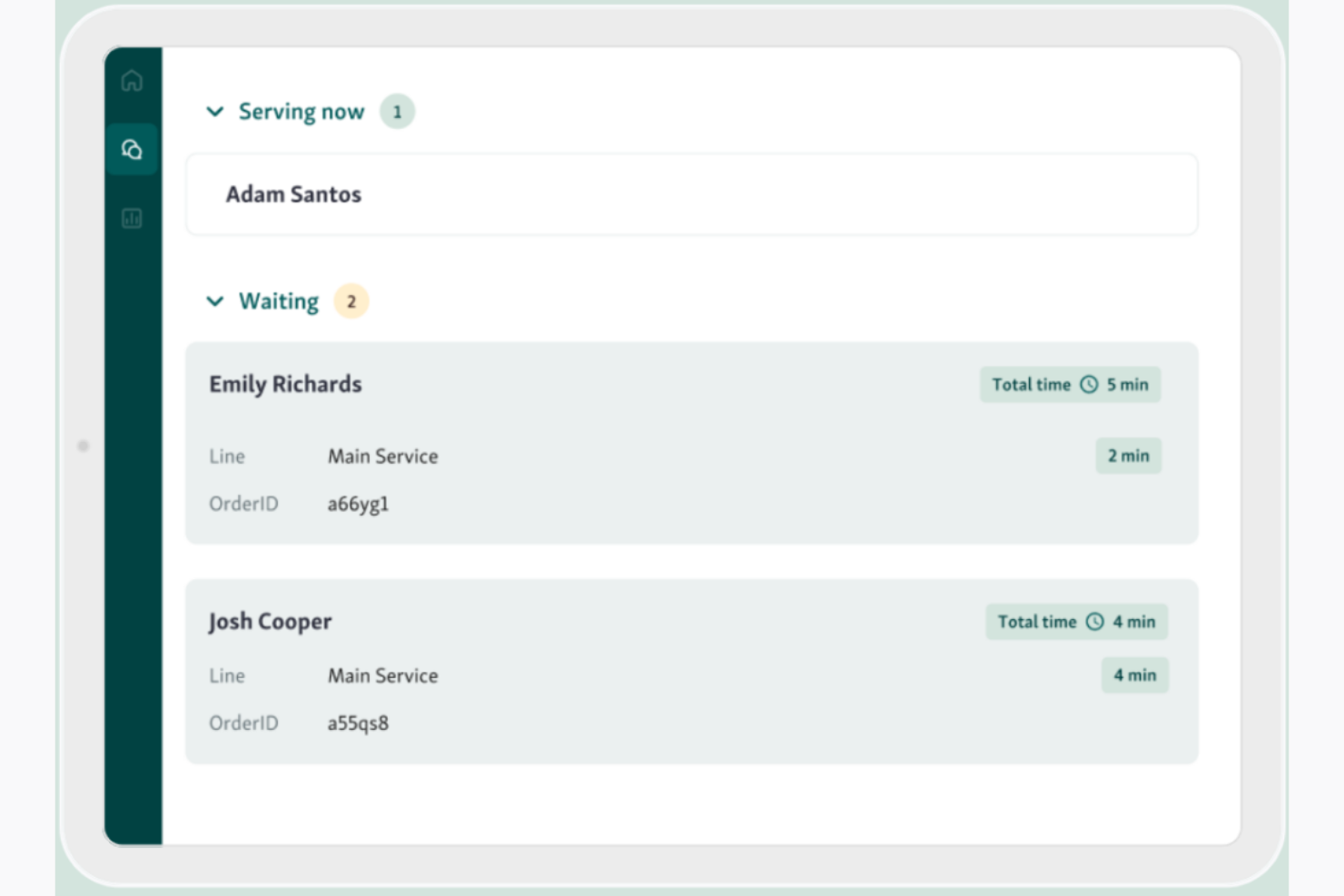
Qminder è un sistema di gestione delle code che consente di gestire gli accessi digitali, monitorare i tempi di attesa in tempo reale e tenere traccia dell'attività del servizio in più sedi.
Per chi è più adatto Qminder?
Qminder è una soluzione adatta ad aziende orientate ai servizi, come attività commerciali, strutture sanitarie e uffici pubblici, che gestiscono elevati volumi di clienti in presenza.
Perché ho scelto Qminder
Qminder si è guadagnato un posto nella mia lista ristretta soprattutto per la visibilità che offre sulle prestazioni del servizio. Apprezzo in particolare il pannello di analisi in tempo reale, che mostra i tempi di attesa, la durata dei servizi e il flusso dei visitatori man mano che si verificano, consentendo al mio team di individuare i colli di bottiglia prima che peggiorino. I report sugli approfondimenti del servizio suddividono le prestazioni per sede, membro del personale e fascia oraria, rendendo facile identificare esattamente dove si verificano i rallentamenti. Trovo inoltre utile la funzione di riscontro dei visitatori per collegare direttamente i dati sulle code ai punteggi di soddisfazione dei clienti.
Funzionalità principali di Qminder
- Chiosco per l'accesso autonomo: Trasforma qualsiasi iPad in una postazione per gli accessi, dove i visitatori possono registrarsi autonomamente e venire indirizzati automaticamente al servizio o reparto corretto.
- Accesso da remoto: Consente ai clienti di unirsi alla coda prima del loro arrivo tramite codice QR o un sito web per visitatori, così possono attendere all'esterno invece di affollare la hall.
- Schermo TV della sala d'attesa: Mostra gli aggiornamenti in tempo reale della coda su uno schermo nella sala d'attesa, per informare i visitatori sulla loro posizione e sul tempo di attesa previsto.
- Flussi di servizio configurabili: Configura percorsi personalizzati per accessi senza appuntamento, appuntamenti e visitatori prioritari in base al tipo di servizio o al motivo della visita.
Integrazioni di Qminder
Qminder offre integrazioni native con Twilio, Zendesk e Salesforce e mette a disposizione un'API per integrazioni personalizzate.
Pros and Cons
Pros:
- Interfaccia intuitiva, accessibile anche a chi non ha molta dimestichezza con la tecnologia
- Facile integrazione con vari strumenti CRM e di feedback
- Analisi complete sulle esperienze del servizio clienti
Cons:
- Potrebbe essere eccessivo per aziende con esigenze limitate di interazione con i clienti
- Potrebbe essere considerato costoso per piccole aziende o startup

Queue-it
Ideale per il controllo del traffico online
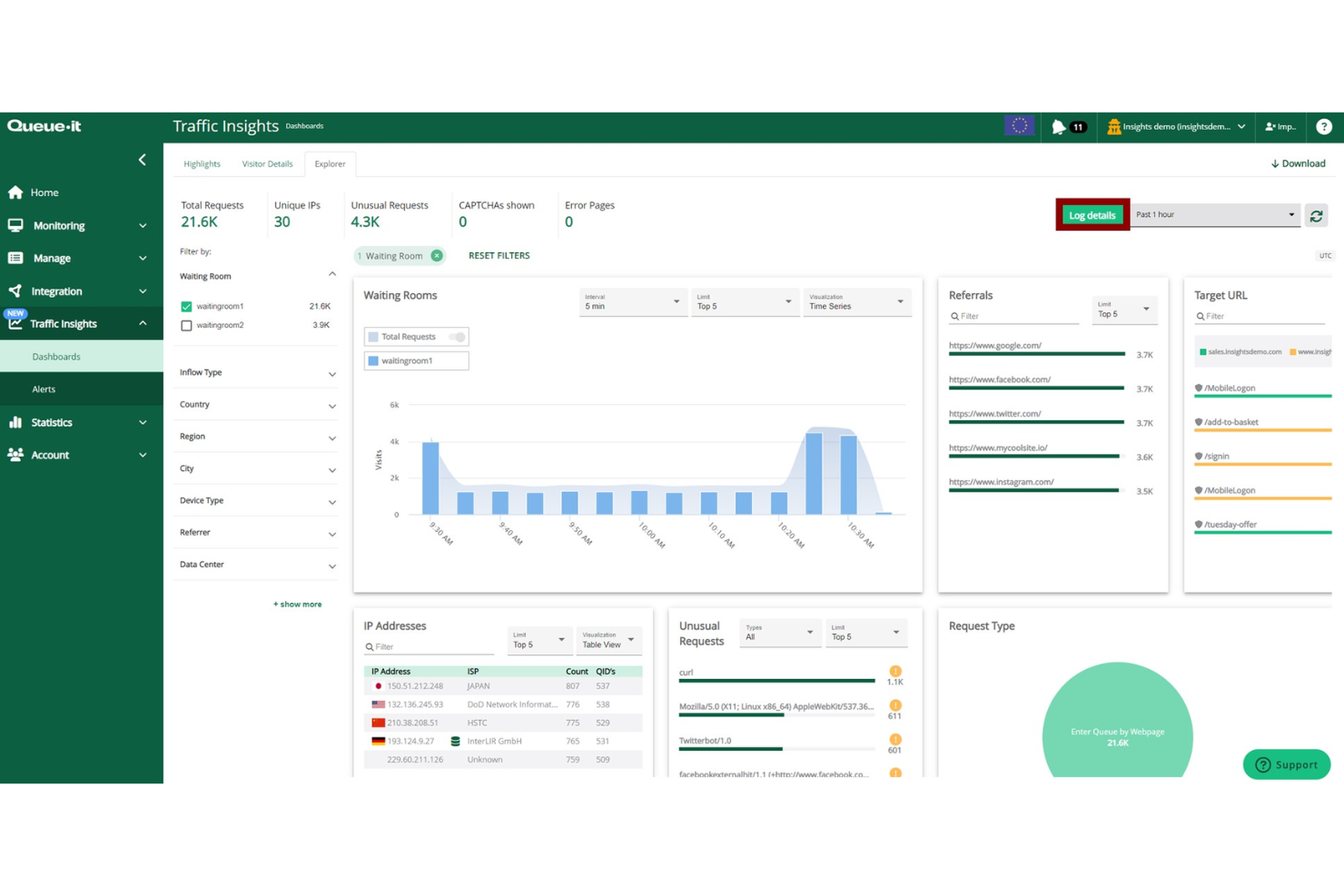
Queue-it è una piattaforma di sala d'attesa virtuale per la gestione delle code online, che offre controllo del traffico in tempo reale, personalizzazione delle code e analisi per ambienti digitali ad alta domanda.
Per chi è ideale Queue-it?
Queue-it è adatto per ecommerce, biglietterie e organizzazioni del settore pubblico che sperimentano picchi prevedibili o improvvisi di traffico online.
Perché ho scelto Queue-it
Queue-it è nella mia lista perché offre un controllo diretto e in tempo reale su come il traffico raggiunge il tuo sito durante i momenti di massima richiesta. La piattaforma GO Queue-it permette di modulare il traffico in tempo reale tramite API o dashboard, senza intervenire sull'infrastruttura di base. La sala d'attesa protetta 24/7 si attiva solo quando il traffico raggiunge una soglia definita, prevenendo così crash prima che si verifichino. Queue-it consente anche di proteggere solo colli di bottiglia specifici—come le azioni “Aggiungi al carrello” o le piattaforme di pagamento—invece di mettere in coda l'intero sito, mantenendo così un'esperienza fluida per i visitatori che non accedono a quei punti protetti.
Caratteristiche principali di Queue-it
- Sala d'attesa solo su invito: Limita l'accesso a vendite esclusive o eventi in anteprima verificando i visitatori tramite autenticazione a due fattori prima che entrino in coda.
- Pagina di conto alla rovescia pre-coda: Raccogli i visitatori in anticipo su una pagina brandizzata con conteggio, prima che una vendita programmata vada online, poi inseriscili casualmente nella coda al momento del lancio.
- Supporto multilingue in sala d'attesa: Mostra la sala d'attesa in oltre 50 lingue per adattare l'esperienza ai tuoi mercati di riferimento.
- Trasferimento della coda su mobile: Permetti ai visitatori che iniziano la coda da desktop di trasferire la loro posizione a un dispositivo mobile senza perdere il posto.
Integrazioni di Queue-it
Queue-it offre connettori e supporta integrazioni tramite API per configurazioni personalizzate.
Pros and Cons
Pros:
- Gestione dei picchi improvvisi di traffico online
- Personalizzazione del brand nella sala d'attesa
- Coda equa per tutti i visitatori
Cons:
- La configurazione può inizialmente sembrare complessa
- Richiede una pianificazione chiara del traffico
Ideale per l'instradamento dei ticket guidato dall'IA
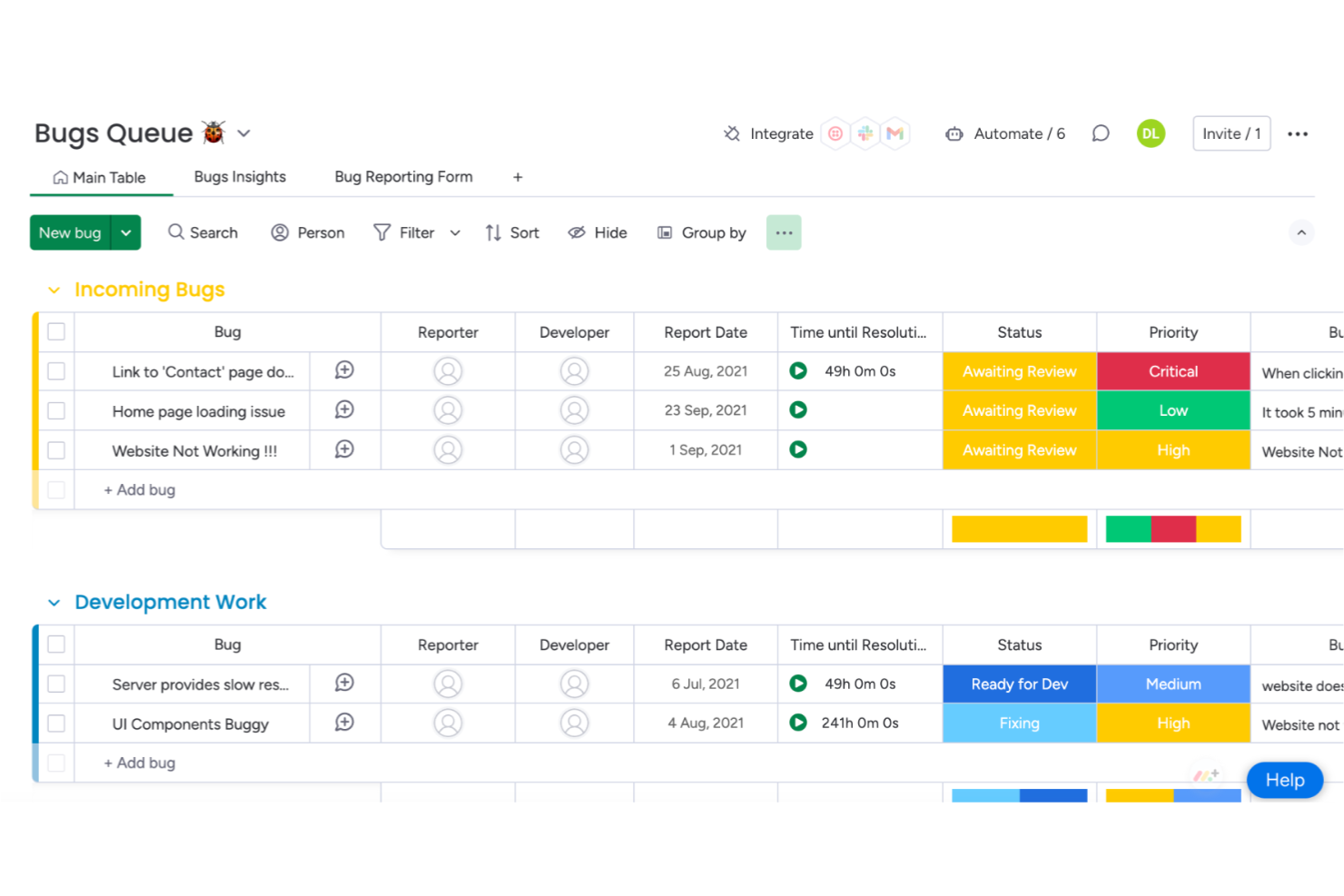
monday service è un sistema di gestione delle code che consente ai team di organizzare, assegnare e monitorare le richieste dei clienti utilizzando flussi di lavoro personalizzabili, code di ticket e strumenti di automazione.
A chi è destinato monday service?
monday service è adatto a team di assistenza e operazioni di supporto clienti di medie e grandi dimensioni che necessitano di una piattaforma flessibile e personalizzabile per gestire grandi volumi di ticket.
Perché ho scelto monday service
Ho scelto monday service come uno dei migliori sistemi di gestione delle code per come la sua IA gestisce l'intero ciclo di triage—non solo l'instradamento. Quando arriva un ticket, la classificazione automatica di monday service lo categorizza per tipo, urgenza, sentiment e dipartimento prima che raggiunga un operatore. Da qui parte l'assegnazione intelligente: ogni ticket viene inoltrato all'agente giusto in base alle sue competenze, carico di lavoro attuale e dati su priorità o sentiment. Mi piace particolarmente che queste due funzioni lavorino insieme: i riepiloghi e le categorie generati dall'IA alimentano direttamente la logica di assegnazione, così i ticket passano dalla ricezione alla persona giusta senza bisogno di smistamento manuale.
Caratteristiche principali di monday service
- Portale clienti: Un portale self-service in cui gli utenti finali possono inviare richieste, monitorare lo stato dei ticket e accedere alle risorse della knowledge base senza un account monday.
- Analisi dei servizi in tempo reale: Dashboard personalizzabili che monitorano le prestazioni del servizio, i volumi dei ticket e le tendenze in tempo reale.
- Bacheche e flussi di lavoro dei ticket: Spazi di lavoro specifici per team con costruttori di workflow drag-and-drop per gestire escalation, approvazioni e follow-up.
- Agente di servizio IA: Un agente IA integrato che attinge dalla cronologia dei ticket e dalla knowledge base per risolvere automaticamente le richieste ripetitive.
Integrazioni di monday service
monday service offre integrazioni native con Slack, Salesforce, HubSpot, Zendesk, Gmail, Microsoft Teams, Google Drive, Outlook, Jira e Zoom. Supporta inoltre Zapier e mette a disposizione un'API per integrazioni personalizzate.
Pros and Cons
Pros:
- Possibilità di personalizzare flussi di lavoro e dashboard
- Integrazione con numerose applicazioni di terze parti
- Le bacheche visive aiutano gli utenti a monitorare facilmente l'avanzamento dei progetti
Cons:
- Il costo può essere superiore rispetto ad altri strumenti
- Mancano alcune funzionalità avanzate di reportistica

Ideale per la gestione integrata di appuntamenti e code
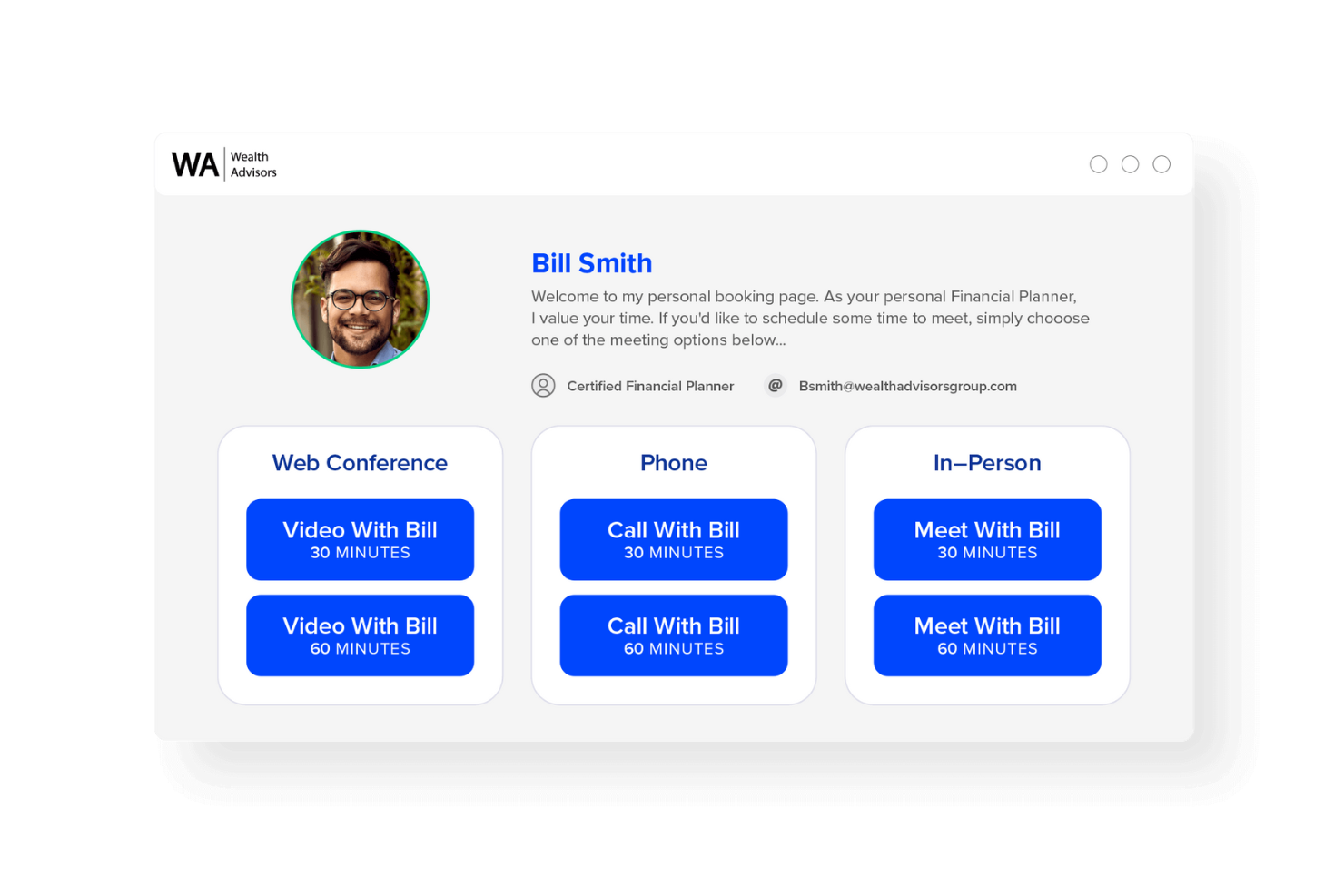
Engageware è un sistema di gestione delle code che combina il monitoraggio in tempo reale delle code, la programmazione degli appuntamenti e l'analisi del flusso clienti per le aziende che gestiscono sia visite senza appuntamento che prenotate.
Per chi è ideale Engageware?
Engageware è una soluzione adatta per banche al dettaglio, cooperative di credito e attività commerciali che devono gestire sia appuntamenti programmati sia code di clienti senza prenotazione su più sedi.
Perché ho scelto Engageware
Ho inserito Engageware nella mia lista perché è uno dei pochi sistemi di gestione delle code che unifica realmente la gestione della lobby per clienti senza prenotazione e la pianificazione degli appuntamenti in un'unica piattaforma. Trovo particolarmente interessante la funzione di gestione della lobby, che rileva l’intento dei visitatori al check-in tramite chioschi self-service o dispositivi mobili, indirizzando poi i clienti verso il membro dello staff giusto in base alle esigenze e alla disponibilità in tempo reale. Questo significa che una filiale non gestisce solo una fila, ma trasforma attivamente i clienti senza appuntamento in interazioni strutturate e di consulenza. Apprezzo anche che la dashboard di analytics segua l’intero percorso del cliente, dall’arrivo in lobby fino alla conclusione della transazione o del prestito, così puoi vedere esattamente quali interazioni con clienti senza appuntamento generano entrate.
Funzionalità principali di Engageware
- Instradamento basato sulle competenze: Abbina ogni cliente al membro dello staff più adatto in base alla specifica esigenza, tipo di servizio e disponibilità in tempo reale.
- Prenotazione multicanale: Consente ai clienti di fissare appuntamenti tramite web, app mobile, ricerca Google, codici QR e SMS da un unico sistema di prenotazione.
- Promemoria automatizzati: Invia notifiche SMS ed email ai clienti prima dell’appuntamento per ridurre le assenze e le cancellazioni tardive.
- Analytics di benchmarking tra pari: Confronta il traffico senza appuntamento, il volume di appuntamenti e i tassi di conversione con i dati di oltre 400 istituti finanziari.
Integrazioni di Engageware
Le integrazioni di Engageware includono Salesforce, Zendesk, HubSpot, Freshworks e Zoho. Engageware offre inoltre un’API per integrazioni personalizzate.
Pros and Cons
Pros:
- Unisce pianificazione e gestione delle code in un unico punto
- Riduce i tempi di attesa per i clienti senza prenotazione
- Migliora la distribuzione del carico di lavoro del personale
Cons:
- La configurazione può richiedere tempo per team numerosi
- Richiede formazione per i nuovi utenti
- Può dipendere molto dall'affidabilità della connessione internet

Qwaiting
Ideale per la gestione delle code multicanale
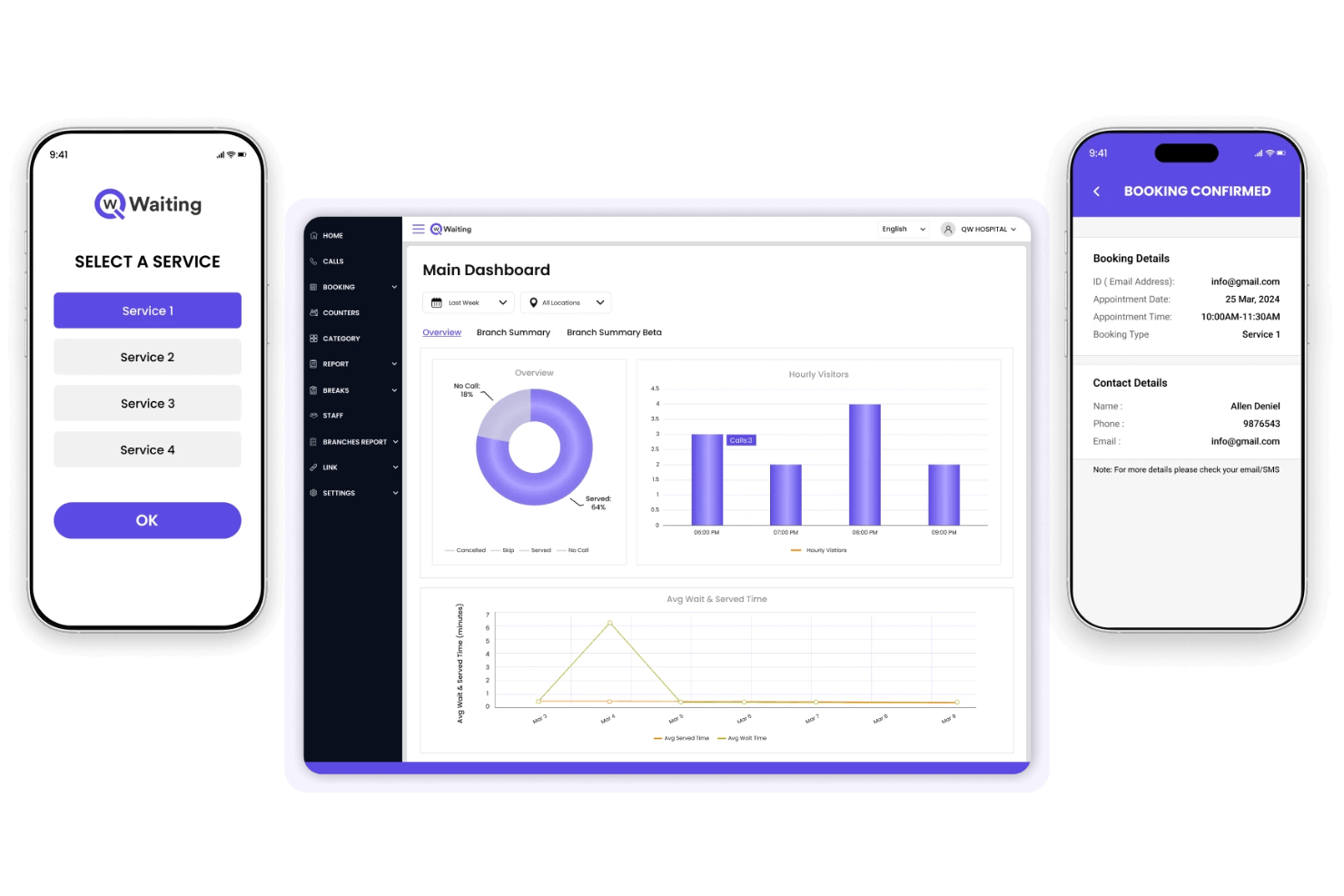
Qwaiting è un sistema di gestione delle code che ti permette di gestire il flusso dei clienti su web, chiosco e canali mobili, offrendo monitoraggio in tempo reale delle code, biglietteria virtuale e programmazione degli appuntamenti.
Per Chi è Ideale Qwaiting?
Qwaiting è adatto per aziende di servizi come il retail, la sanità e gli uffici pubblici che necessitano di gestire le code dei clienti in più sedi e punti di contatto.
Perché Ho Scelto Qwaiting
Ho scelto Qwaiting tra i migliori perché copre davvero il multicanale nelle code come pochi strumenti fanno. Mi piace che i clienti possano mettersi in coda tramite browser web, chiosco fisico o app mobile—tutto confluisce in un'unica dashboard in tempo reale. Il mio team può monitorare i tempi di attesa e lo stato delle code su tutti questi punti d'accesso senza dover cambiare sistema. La funzionalità di biglietto virtuale consente inoltre ai clienti di mantenere il loro posto in coda da remoto, riducendo così l'affollamento fisico nella sede di servizio.
Caratteristiche Principali di Qwaiting
- Prenotazione appuntamenti: I clienti possono prenotare una fascia oraria in anticipo, riducendo i tempi di attesa delle visite e aiutando lo staff a pianificare la capacità di servizio.
- Notifiche SMS ed email: Avvisi automatici tengono i clienti aggiornati sulla loro posizione in coda e sul tempo di attesa stimato.
- Analisi e reportistica: Una dashboard integrata monitora i tempi di servizio, le ore di punta e le performance delle code in tutte le sedi.
- Supporta più sportelli: Assegna i clienti a sportelli specifici in base al tipo di richiesta, disponibilità dello staff o sede.
Integrazioni di Qwaiting
Le integrazioni native includono Google Calendar, Zendesk, Salesforce, Twilio, Paypal, Stripe, Whatsapp e Slack. Qwaiting offre un'API per integrazioni personalizzate.
Pros and Cons
Pros:
- Funziona su più canali di servizio
- Personalizzabile per diversi settori
- Supporta sia le visite senza prenotazione sia su appuntamento
Cons:
- La configurazione avanzata potrebbe richiedere formazione
- Le opzioni di reportistica possono risultare eccessive

La migliore per flessibilità di integrazione
Awebstar Queue Management System è una piattaforma software per la gestione delle code che offre biglietteria digitale, monitoraggio delle code in tempo reale, flussi di lavoro personalizzabili e opzioni di integrazione per aziende che gestiscono il flusso di clienti.
Per chi è ideale Awebstar Queue Management System?
Awebstar Queue Management System è adatto a imprese nei settori retail, sanitario e pubblica amministrazione che necessitano di software per la gestione delle code in grado di integrarsi con i propri strumenti e sistemi esistenti.
Perché ho scelto Awebstar Queue Management System
Ho incluso Awebstar Queue Management System tra le mie migliori scelte per l'efficacia con cui si collega ai sistemi su cui le aziende fanno già affidamento. Apprezzo in particolare l'integrazione SSO (Single Sign-On), che consente al personale di accedere alla piattaforma delle code senza gestire credenziali separate—una funzionalità preziosa in ambienti con più sistemi. L'integrazione con HIS (Hospital Information System) è una vera differenziazione per gli scenari sanitari, dove i dati dei pazienti devono fluire senza passaggi manuali tra sistema di gestione delle code e sistemi clinici. L'API SMS/Notifiche permette di collegare direttamente gli avvisi delle code con il proprio stack di comunicazioni esistente, invece di vincolarsi a un singolo canale di notifica.
Caratteristiche principali di Awebstar Queue Management System
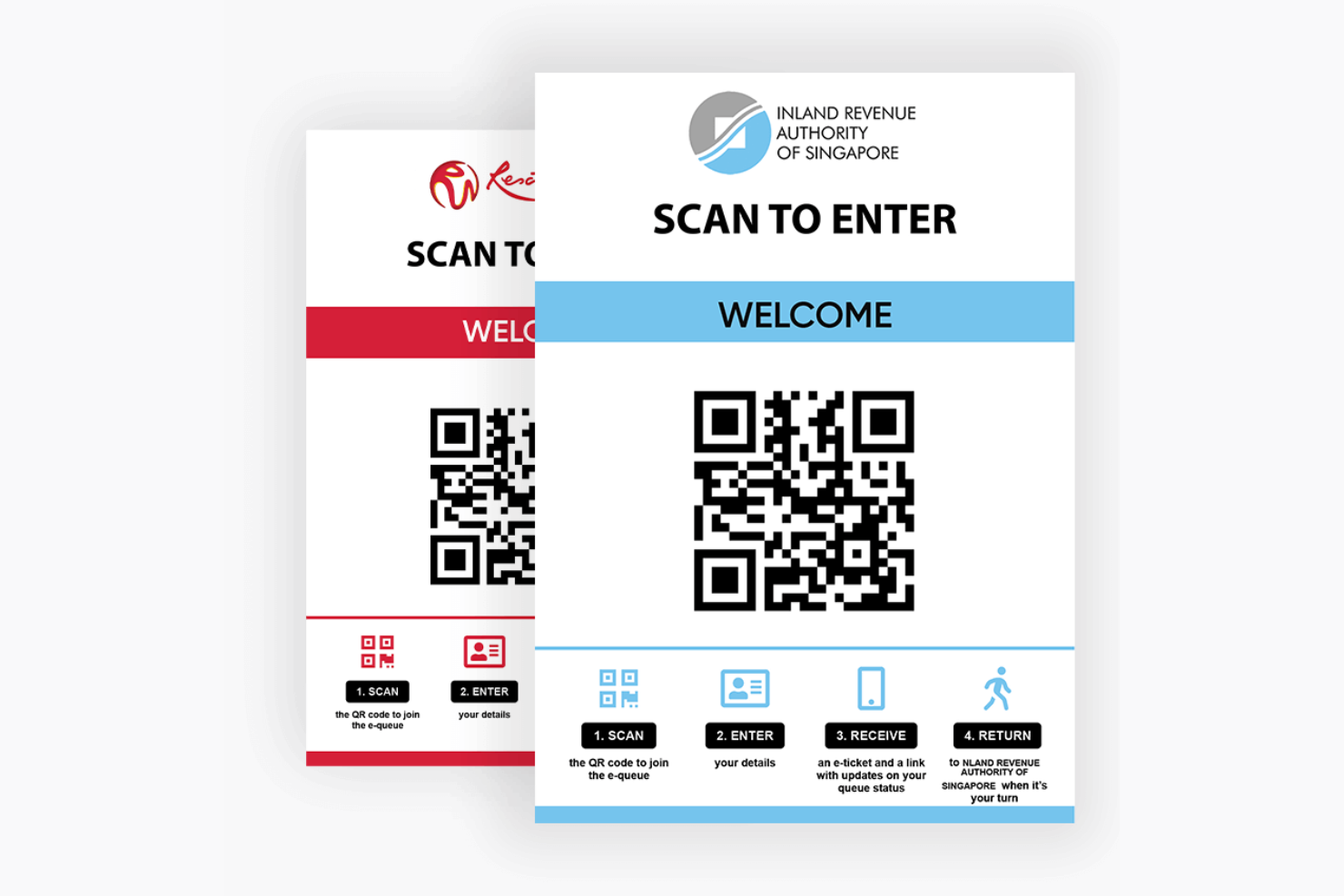
- Ingresso in coda tramite codice QR: I clienti scansionano un codice QR per unirsi da remoto a una coda e ricevono il proprio numero di ticket direttamente sullo smartphone.
- Schermo di visualizzazione dei token: Un display al banco mostra i numeri dei token attuali, chiamati e saltati insieme ad annunci vocali per una visibilità chiara in filiale.
- Supporto distributore di ticket: Un distributore fisico di ticket basato su chiosco assegna numeri unici a ogni cliente tra diversi reparti e tipologie di servizio.
- Messaggistica di visualizzazione personalizzabile: Gli amministratori possono inviare messaggi promozionali su tutti i display delle varie sedi direttamente dal sistema.
Integrazioni di Awebstar Queue Management System
Awebstar Queue Management System offre integrazioni native con Hospital Information Systems (HIS) e supporta provider Single Sign-On (SSO). È disponibile un'API per integrazioni personalizzate.
Pros and Cons
Pros:
- Ampie possibilità di integrazione
- Solide funzionalità di coda virtuale
- Sistema cloud-based che offre facile accessibilità
Cons:
- Richiede un certo know-how tecnico per utilizzare tutte le funzionalità
- Potrebbe risultare complesso per le piccole imprese
Altri sistemi di gestione delle code degni di nota
Di seguito è riportato un elenco di ulteriori sistemi di gestione delle code che ho selezionato, ma che non sono rientrati tra i primi 15. Vale sicuramente la pena dare loro un’occhiata.
- QLess
Ideale per minimizzare le code fisiche
- Skiplino
Ideale per code digitali e in presenza
- Wavetec
Ideale per la gestione delle code virtuali
- NEMO-Q
Ideale per l'adattabilità multi-settore
- Qsome
Ideale per configurazioni di code semplici
- Q-flow
Ideale per i percorsi di pazienti e clienti
- Tensator
Ideale per la gestione degli spazi fisici


Come valuto i sistemi di gestione delle code
La mia valutazione si suddivide in due livelli: la soglia minima che uno strumento deve superare (gestione delle code in tempo reale, instradamento del personale, notifiche ai clienti) e i fattori differenzianti che lo rendono adatto a un ospedale, una banca o un negozio al dettaglio.
Funzionalità principali (Requisiti fondamentali per questa lista)
Queste funzionalità di base rappresentano i criteri di accettazione per l'inclusione nella mia lista di sistemi di gestione code:
- Coda virtuale & Check-In: Valuto quali canali di check-in supporta ogni piattaforma (ad esempio codici QR, link mobili, chioschi, SMS) e se i clienti possono unirsi a una coda prima di arrivare in sede.
- Monitoraggio della coda in tempo reale: I cruscotti in tempo reale sono importanti sia per il personale che per i clienti, quindi cerco stime sui tempi di attesa, tracciamento della posizione e visibilità su più sedi.
- Notifiche & avvisi ai clienti: Controllo se la piattaforma invia SMS automatici, email o notifiche push in momenti chiave, come quando si avvicina il turno del cliente o si libera uno sportello.
- Instradamento dei servizi & del personale: La logica di instradamento distingue gli strumenti basilari da quelli utili. Cerco assegnazione basata su regole per tipologia di servizio, competenza del personale, livello di priorità o disponibilità allo sportello.
- Integrazione con la prenotazione appuntamenti: Le persone senza appuntamento e le visite prenotate devono poter coesistere nella stessa coda. Valuto come ogni strumento unisce gli appuntamenti programmati con il flusso dei clienti senza prenotazione.
- Dashboard di analisi & reportistica: Metriche come il tempo medio di attesa, la durata del servizio e la produttività del personale devono essere accessibili senza esportazioni manuali. Cerco dashboard filtrabili e in tempo reale.
Valuto ciascun fornitore su una scala da 0 (non offre la funzionalità) a 5 (eccelle in quest'area) per ogni criterio.
I fornitori devono raggiungere un punteggio medio minimo per essere presi in considerazione per l'inclusione nella mia lista. Da lì, considero ciò che distingue ciascuna piattaforma.
Fattori differenzianti (Cosa distingue i fornitori)
Dopo aver curato la mia lista, ecco come confronto i diversi fornitori nel settore dei sistemi di gestione delle code:
Caratteristiche distintive
L'integrazione con la segnaletica digitale può fare una grande differenza per i team che vogliono coinvolgere i clienti e mantenere il flusso della fila in tempo reale, mentre la gestione di più sedi è essenziale se supervisioni le code in varie filiali o centri di servizio da un'unica dashboard centrale. Considero anche come le app mobili per lo staff aiutino il personale sul campo a gestire le code senza dover tornare a una postazione di lavoro e se la piattaforma utilizza l'intelligenza artificiale per prevedere i tempi di attesa, fattore che può guidare le decisioni relative al personale e alle operazioni durante i periodi di punta.
Oltre le funzionalità
La sicurezza e la conformità sono particolarmente importanti in ambito sanitario e governativo, quindi verifico la conformità HIPAA, il rispetto del GDPR e i controlli di accesso basati sui ruoli. L'ecosistema d'integrazione è altrettanto importante. Un sistema di gestione delle code che si collega al tuo CRM, EHR o POS permette la condivisione dei dati clienti senza lavoro manuale. Valuto anche la flessibilità di implementazione, dato che alcune organizzazioni necessitano di una soluzione SaaS in cloud mentre altre richiedono un'installazione on-premise per rispondere alle policy interne IT.
Come scegliere un sistema di gestione delle code
È facile perdersi in lunghi elenchi di funzionalità e strutture tariffarie complesse. Per aiutarti a mantenere la concentrazione mentre affronti il tuo particolare processo di selezione del software, ecco un elenco di fattori da tenere a mente:
| Fattore | Cosa considerare |
|---|---|
| Scalabilità | Il sistema è in grado di gestire un numero maggiore di sedi, dipendenti o clienti con la crescita dell'attività? Evita gli strumenti con limiti rigidi o costi elevati per utente che aumentano rapidamente. |
| Integrazioni | Si collega al tuo CRM, POS o agli strumenti di calendario? Le soluzioni manuali richiedono molto tempo. Verifica la disponibilità di opzioni preconfigurate o basate su API. |
| Personalizzazione | Puoi modificare i flussi delle code, l'identità del marchio o le schermate rivolte ai clienti senza l'aiuto degli sviluppatori? Alcuni strumenti impongono le impostazioni predefinite. |
| Facilità d'uso | Il personale a contatto con i clienti può utilizzare il sistema con una formazione minima? Cerca strumenti con funzionalità di trascinamento, etichette chiare e disposizioni ottimizzate per dispositivi mobili. |
| Implementazione e inserimento | Quanto tempo richiederà la configurazione e chi dovrà essere coinvolto? Chiedi se sono disponibili modelli, assistenza per la migrazione o supporto per l'inserimento. |
| Costo | Cosa è incluso in ciascun piano? Fai attenzione ai limiti relativi a code, utenti o supporto. Chiedi se il prezzo cambia in base al volume o al traffico. |
| Misure di sicurezza | Offre accesso basato sui ruoli, crittografia e registri di controllo? Se raccogli dati dei clienti, approfondisci le dichiarazioni sulla conformità. |
| Disponibilità del supporto | Puoi contattare qualcuno nelle ore di punta? Chiedi informazioni sui canali di supporto, sui tempi di risposta e sull'eventuale inclusione dell'assistenza per l'inserimento. |
Che cos'è un sistema di gestione delle code?
Un sistema di gestione delle code è un insieme di strumenti e processi progettati per controllare e organizzare il flusso dei clienti o degli utenti in attesa in coda, fisicamente o virtualmente. Diversi settori, tra cui commercio al dettaglio, sanità, banche e uffici pubblici, utilizzano questi sistemi per ottimizzare le operazioni, ridurre i tempi di attesa e migliorare l'esperienza dei clienti.
Utilizzando sistemi di questo tipo, le organizzazioni puntano a rendere il processo di attesa più efficiente, trasparente e comodo sia per i fornitori di servizi sia per le persone in coda.
Funzionalità dei sistemi di gestione delle code
Quando selezioni un sistema di gestione delle code, presta attenzione alle seguenti caratteristiche principali:
- Integrazioni di terze parti: Si connette a piattaforme CRM, POS o di messaggistica per semplificare i flussi di lavoro e ridurre i silos di dati.
- Gestione virtuale delle code: Consente ai clienti di unirsi a una coda da remoto tramite dispositivo mobile, web o chiosco, per ridurre l'affollamento fisico e migliorare la trasparenza sui tempi di attesa.
- Notifiche in tempo reale: Invia avvisi tramite SMS o app per tenere i clienti informati sulla loro posizione in coda e sul tempo di attesa stimato.
- Programmazione degli appuntamenti: Consente ai clienti di prenotare in anticipo fasce orarie, contribuendo a gestire il flusso e a ridurre i tempi di attesa per chi si presenta senza appuntamento.
- Analisi e report delle code: Tiene traccia dei tempi di attesa, della durata del servizio e delle prestazioni del personale per identificare i colli di bottiglia e migliorare le operazioni.
- Accesso multicanale: Supporta il check-in dei clienti attraverso vari canali, come chioschi in sede, siti web o app mobili, per una maggiore comodità.
- Pannello di gestione del personale: Fornisce ai membri del team strumenti per gestire le code, assegnare attività e monitorare le metriche del servizio in tempo reale.
- Raccolta del feedback dei clienti: Consente di effettuare sondaggi o raccogliere valutazioni dopo il servizio per ottenere informazioni sulla soddisfazione e sulla qualità del servizio.
- Supporto multilingue: Permette di assistere i clienti in lingue diverse, garantendo l'accessibilità a popolazioni eterogenee.
- Interfaccia personalizzabile: Consente di modificare il branding e il layout per allineare l'aspetto e l'esperienza all'esperienza del cliente.
Vantaggi dei sistemi di gestione delle code
L'implementazione di un sistema di gestione delle code offre diversi vantaggi al tuo team e alla tua azienda. Ecco alcuni dei vantaggi che puoi aspettarti:
- Monitoraggio più semplice dei feedback: Gli strumenti di sondaggio integrati ti consentono di raccogliere il feedback dei clienti subito dopo il servizio, quando l'esperienza è ancora fresca.
- Tempi di attesa più brevi: La gestione virtuale delle code e la prenotazione degli appuntamenti contribuiscono a ridurre l'affollamento e a mantenere le code scorrevoli.
- Esperienza del cliente migliore: Gli aggiornamenti in tempo reale e le opzioni flessibili di check-in rendono l'attesa meno frustrante.
- Personale più efficiente: I pannelli di controllo e le informazioni sul servizio consentono al personale di gestire code e attività con meno congetture.
- Meno assenze: Le notifiche di promemoria e il check-in digitale aiutano i clienti a rispettare i propri appuntamenti.
- Decisioni più efficaci: Gli strumenti di report forniscono dati sui tempi del servizio e sulle tendenze del traffico, consentendo di adeguare il personale e gli orari.
- Servizio coerente: I processi standardizzati per la gestione delle code riducono la confusione e aiutano il personale a offrire la stessa esperienza ogni volta.
Costi e prezzi dei sistemi di gestione delle code
La scelta di un sistema di gestione delle code richiede la comprensione dei vari modelli di prezzo e dei piani disponibili. I costi variano in base alle funzionalità, alle dimensioni del team, agli elementi aggiuntivi e ad altro ancora. La tabella seguente riassume i piani più comuni, i relativi prezzi medi e le funzionalità generalmente incluse nei sistemi di gestione delle code:
Tabella comparativa dei piani per i sistemi di gestione delle code
| Tipo di piano | Prezzo medio | Funzionalità comuni |
|---|---|---|
| Piano gratuito | $0 | Include il monitoraggio di base delle code, notifiche limitate ai clienti e una sede. |
| Piano personale | $10–$25/utente/mese | Include la gestione virtuale delle code, la prenotazione degli appuntamenti, analisi di base e assistenza via e-mail. |
| Piano aziendale | $30–$60/utente/mese | Include il supporto per più sedi, notifiche SMS, report avanzati e integrazioni. |
| Piano per grandi aziende | $75–$150/utente/mese | Include flussi di lavoro personalizzati, autorizzazioni basate sui ruoli, accesso API e assistenza dedicata. |
Domande frequenti sui sistemi di gestione delle code
Ecco alcune risposte alle domande più comuni sui sistemi di gestione delle code:
Come funzionano i sistemi di gestione delle code con la programmazione degli appuntamenti?
La maggior parte dei sistemi consente di offrire sia code per accesso senza appuntamento sia appuntamenti programmati. I clienti possono prenotare fasce orarie online o tramite un’app mobile. Il sistema li aggiunge automaticamente alla coda quando si avvicina l’orario dell’appuntamento. Questo aiuta a bilanciare le visite prenotate in anticipo con la domanda in tempo reale.
I sistemi di gestione delle code possono integrarsi con i software che utilizzo già?
Sì, molti sistemi si integrano con strumenti come CRM, piattaforme POS, calendari e servizi di messaggistica. Alcuni offrono opzioni pronte all’uso, mentre altri richiedono la configurazione di API. Assicurati di verificare se gli strumenti che utilizzi attualmente sono supportati o se sarà necessario un intervento di integrazione personalizzato.
Quanto tempo occorre per configurare un sistema di gestione delle code?
Il tempo di configurazione varia in base allo strumento e alle risorse interne disponibili. Alcuni sistemi possono essere operativi in pochi giorni grazie a modelli preconfigurati. Altri possono richiedere settimane se personalizzi i flussi di lavoro, colleghi applicazioni di terze parti o implementi il sistema in più sedi. Chiedi ai fornitori quale supporto offrono durante l’avvio.
Qual è la fascia di prezzo tipica di questi sistemi?
I prezzi possono partire da appena $10 al mese per soluzioni di base rivolte alle piccole imprese e arrivare a oltre $1,000 al mese per soluzioni di livello aziendale con funzionalità complete.
I sistemi di gestione delle code sono adatti alle piccole imprese?
Sì, molti sistemi offrono piani gratuiti o a basso costo per i team che operano in un’unica sede. Cerca strumenti con monitoraggio di base delle code, registrazione tramite dispositivo mobile e dashboard semplici. Assicurati soltanto di non essere vincolato da contratti a lungo termine o da costosi componenti aggiuntivi che non utilizzerai.
Sono disponibili opzioni gratuite per i sistemi di gestione delle code?
Alcuni strumenti offrono versioni gratuite, spesso definite modelli “freemium”. Di solito includono funzionalità di base; le aziende possono passare a un piano superiore per sbloccare funzionalità più avanzate. È importante effettuare una ricerca e assicurarsi che la versione gratuita soddisfi le proprie esigenze specifiche prima di integrarla nelle attività aziendali.
Di quale hardware ho bisogno per un sistema di gestione delle code?
Dipende da come vuoi consentire ai clienti di effettuare il check-in. Alcuni team utilizzano tablet o chioschi all’ingresso, mentre altri si affidano a codici QR, SMS o applicazioni mobili. La maggior parte delle piattaforme è basata sul cloud, quindi non avrai bisogno di server: ti serviranno soltanto dispositivi in grado di connettersi a Internet.
Cosa ne pensi?
Ho cercato di fornire un elenco completo basato sulle mie esperienze e ricerche, ma il panorama tecnologico è vasto e in continua evoluzione. Se hai incontrato un sistema di gestione delle code che si è rivelato prezioso per te e non è incluso in questo elenco, mi farebbe piacere saperne di più.
Già che sei qui, iscriviti alla nostra newsletter per ricevere gli ultimi approfondimenti sulla CX, guide pratiche, strategie e risorse dai migliori esperti del settore della CX.