

I 10 migliori software per help desk del 2026: recensiti e confrontati

10 Elenco dei migliori software per l'assistenza


Il software per l'assistenza offre ai team di supporto gli strumenti per gestire in modo efficiente i problemi dei clienti, dalla ricezione alla risoluzione, tramite e-mail, chat e altri canali chiave. Che tu gestisca poche decine di ticket al giorno o coordini un'operazione di supporto globale, lo strumento di assistenza giusto può ottimizzare i flussi di lavoro, aumentare la produttività del team, migliorare i tempi di risposta e valorizzare l'esperienza del cliente.
Ho testato e recensito queste soluzioni per offrirti una guida imparziale ai migliori strumenti di assistenza disponibili. In questo articolo analizzerò le mie scelte principali, concentrandomi su come ciascuna soluzione può aiutare il tuo team a offrire un servizio eccezionale.
Perché fidarsi dei nostri consigli sui software
Il nostro team testa e recensisce software dal 2012. In quanto leader CX noi stessi, sappiamo quanto sia difficile — e importante — scegliere il software giusto.
Per questa guida, abbiamo valutato gli strumenti attraverso test pratici e ricerche indipendenti, assegnando un punteggio agli strumenti in base ai nostri criteri di selezione.
Le nostre recensioni riflettono il nostro giudizio editoriale umano, non un discorso di vendita.
Tabella comparativa dei software per l'assistenza
Questa tabella comparativa riassume i dettagli dei prezzi delle mie migliori selezioni di software per l’assistenza:
| Tool | Best For | Trial Info | Price | ||
|---|---|---|---|---|---|
| 1 | Ideale per un portale avanzato di self-service per i clienti | Prova gratuita di 14 giorni + demo gratuita disponibile | Da $19/agente/mese (fatturazione annuale) | Website | |
| 2 | Ideale per automatizzare le richieste IT ripetitive | Prova gratuita di 30 giorni disponibile | Da $209/mese/tecnico (fatturazione annuale) | Website | |
| 3 | Ideale per la gestione dei servizi IT guidata dall'IA | Prova gratuita di 14 giorni + demo gratuita disponibile | Da $19/utente/mese (fatturazione annuale) | Website | |
| 4 | Il miglior software di help desk per creare automazioni senza codice | Prova gratuita disponibile | Da $25/utente/mese (fatturato annualmente) | Website | |
| 5 | Ideale per supporto clienti guidato dall'IA | Prova gratuita disponibile | Da $16/utente/mese (fatturato annualmente) | Website | |
| 6 | Ideale per la gestione dell'help desk IT | Prova gratuita di 21 giorni + demo gratuita disponibile | Da $149/tecnico/mese (fatturazione annuale) | Website | |
| 7 | Ideale per la gestione dei ticket supportata dall’AI | Prova gratuita di 15 giorni + demo gratis disponibile | Da $7/utente/mese (fatturazione annuale) | Website | |
| 8 | Ideale per la gestione della casella di posta ecommerce potenziata dall'AI | Prova gratuita di 14 giorni | Da $39/agente/mese | Website | |
| 9 | Ideale per integrazioni estese con strumenti di terze parti | Nessuna prova gratuita disponibile | Da $24/mese | Website | |
| 10 | Il migliore help desk e knowledge base integrati | Prova gratuita di 30 giorni + demo gratuita disponibile | Da $15/mese (fatturazione annuale) | Website |


Recensioni dei migliori software per l'assistenza
Per aiutarti a trovare il miglior software per l’assistenza per le tue esigenze, ho fornito riepiloghi dettagliati delle mie 10 scelte principali e spiegato perché ho incluso ciascun sistema in questo elenco.
Inoltre, ho incluso di seguito altre opzioni per diversi casi d’uso, per aiutarti a trovare il software per l’assistenza più adatto a te.

Ideale per un portale avanzato di self-service per i clienti
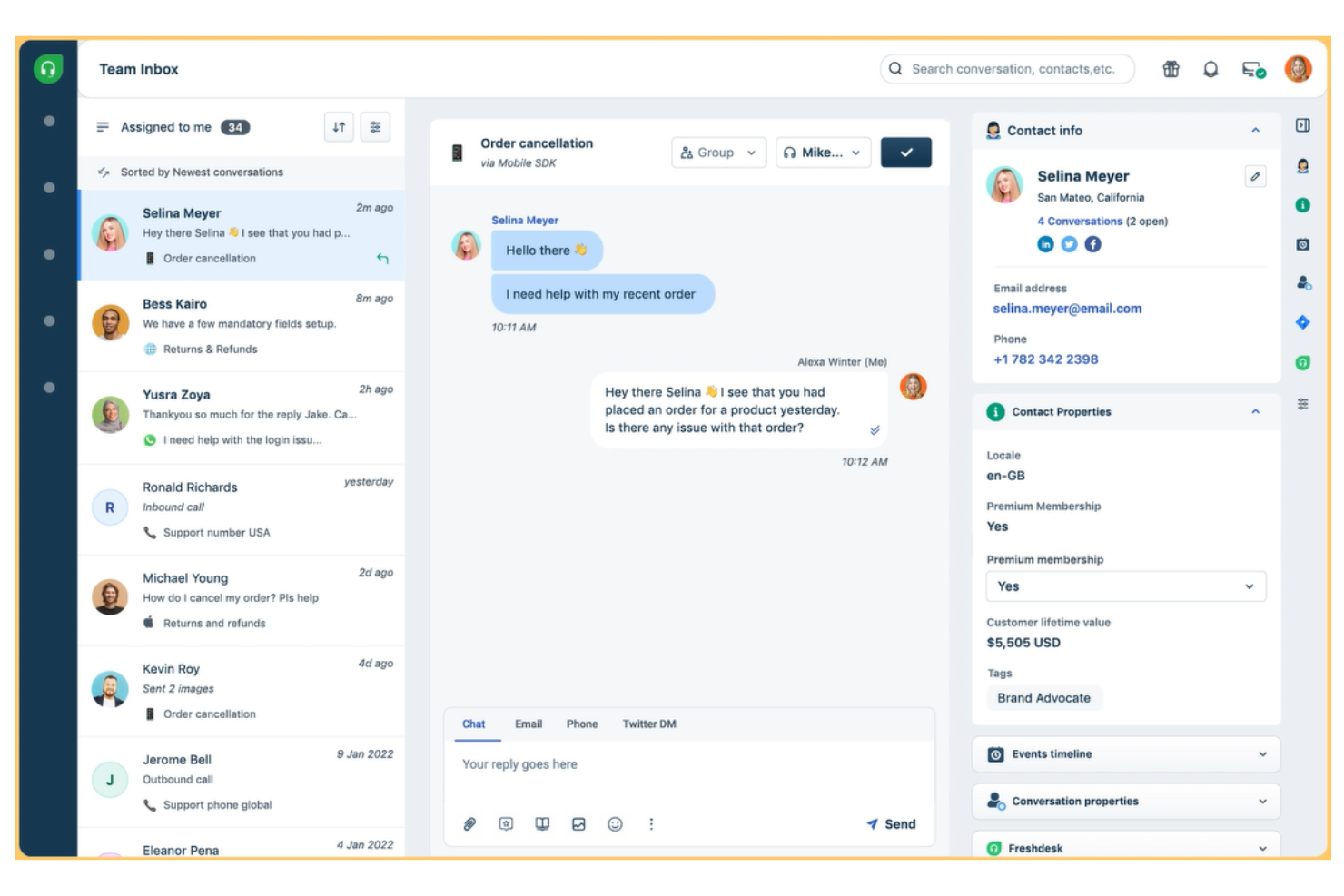
Freshdesk è una piattaforma di help desk basata su cloud progettata per i team di supporto di aziende di tutte le dimensioni che devono gestire richieste dei clienti su più canali e automatizzare attività ripetitive.
Per chi è meglio Freshdesk?
Freshdesk è adatto per i team di supporto in crescita che necessitano di un help desk scalabile con gestione dei ticket multicanale e strumenti di self-service integrati fin dall'inizio.
Perché ho scelto Freshdesk
Freshdesk si guadagna il suo posto tra i migliori della mia lista grazie all'ampiezza del suo portale di self-service, che va ben oltre una semplice base di conoscenza. Mi piace il fatto che sia possibile creare portali completamente personalizzati dove i clienti possono cercare articoli, navigare nei forum della community e inviare ticket—tutto in un unico posto. Il versionamento degli articoli e i flussi di lavoro di approvazione consentono al mio team di mantenere i contenuti accurati senza pubblicare risposte obsolete. Freddy AI Agent risponde automaticamente alle email in arrivo utilizzando i contenuti della base di conoscenza, così i clienti ricevono subito risposte citate senza dover creare un ticket.
Caratteristiche principali di Freshdesk
- Gestione dei ticket omnicanale: Raggruppa le conversazioni dei clienti provenienti da email, chat, telefono e social media in un'unica casella di posta condivisa.
- Regole di automazione: Imposta l'assegnazione dei ticket, la classificazione per priorità e le azioni di follow-up in base alle condizioni definite da te.
- Rilevamento delle collisioni: Ricevi avvisi in tempo reale quando più operatori stanno visualizzando o rispondendo allo stesso ticket contemporaneamente.
- Report e dashboard personalizzati: Crea report che monitorano il volume dei ticket, i tempi di risposta e le prestazioni degli agenti all'interno del tuo team di supporto.
Integrazioni di Freshdesk
Le integrazioni includono Playvox, Slack, MS Teams, Shopify, Salesforce, Jira e app connettori per integrazioni personalizzate tramite API e template preconfigurati.
Pros and Cons
Pros:
- Supporta risposte predefinite per offrire risposte uniformi alle domande frequenti
- Include uno strumento di rilevamento dei ringraziamenti che impedisce la riapertura dei ticket quando un cliente dice 'grazie'
- Supporta la gestione SLA
Cons:
- Le funzionalità multilingue sono disponibili solo nei piani Pro o Enterprise
- Le funzionalità intelligenti basate su AI e i chat-bot sono limitati al piano a pagamento di livello superiore (Enterprise)
Ideale per automatizzare le richieste IT ripetitive
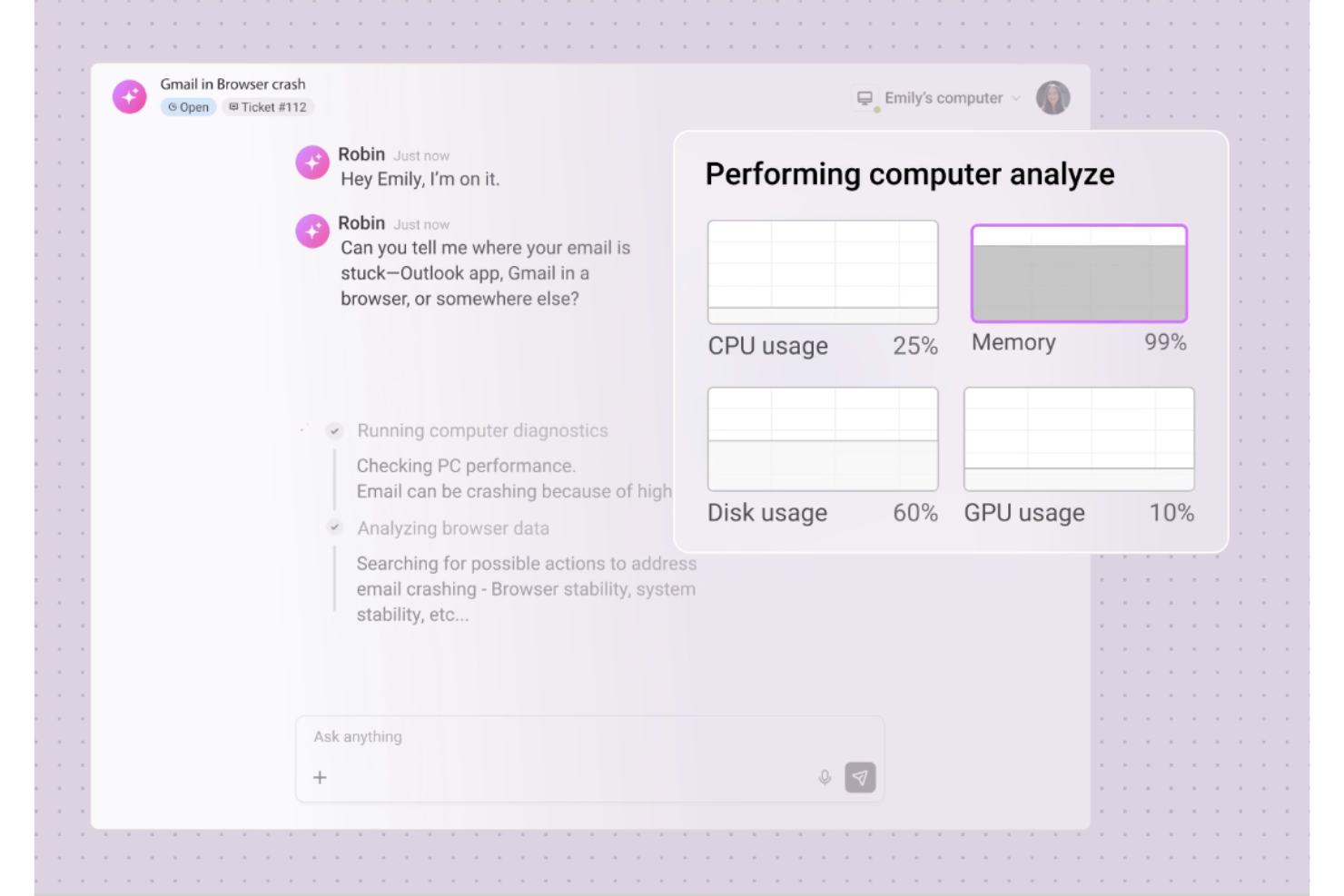
Robin Autonomous IT è l'agente di servizio guidato dall'IA di Atera che si occupa delle richieste IT dall'acquisizione fino alla risoluzione, gestendo in autonomia azioni sui dispositivi, flussi di lavoro cloud e gestione dei ticket.
Per chi è ideale Robin Autonomous IT?
Robin è una soluzione ideale per i team IT e i fornitori di servizi gestiti che utilizzano la piattaforma Atera e hanno l'esigenza di gestire un elevato volume di ticket con un numero ridotto di tecnici.
Perché ho scelto Robin Autonomous IT
Ho scelto Robin tra i migliori perché gestisce le richieste ad alto volume e ripetitive che affollano la maggior parte delle code degli help desk. Pensate al reset delle password, alle installazioni di app, al reset degli adattatori di rete e alla pulizia dei dischi—Robin esegue queste azioni direttamente sui dispositivi e nel cloud senza che un tecnico debba intervenire sul ticket. Quello che apprezzo particolarmente è l'automazione dei flussi di lavoro basata su playbook: quando si verifica una condizione di trigger, Robin esegue una sequenza predefinita di passi dall'inizio alla chiusura.
Funzionalità principali di Robin Autonomous IT
- Acquisizione richieste multicanale: Robin riceve richieste IT da Slack, Microsoft Teams ed email, le indirizza e le gestisce senza necessità di triage manuale.
- Verifica dell'identità dell'utente: Prima di eseguire qualsiasi azione, Robin conferma l'identità del richiedente e raccoglie il contesto del dispositivo per validare il problema.
- Classificazione automatica dei ticket tramite IA: Robin categorizza e tagga automaticamente i ticket in arrivo per mantenere le code organizzate senza intervento dei tecnici.
- Escalation verso tecnici specializzati: Quando Robin non può risolvere un problema in autonomia, inoltra il ticket al tecnico giusto includendo tutto il contesto diagnostico necessario.
Integrazioni di Robin Autonomous IT
Robin Autonomous IT fa parte della piattaforma Atera e si connette a provider di identità come Okta, Azure AD e Google Workspace per la verifica degli utenti. Riceve richieste tramite Microsoft Teams, Slack ed email, ed è integrato con strumenti ITSM di terze parti. L'ecosistema Atera offre integrazioni native con Acronis, Bitdefender, Splashtop, AnyDesk, ScreenConnect, TeamViewer, IT Glue, QuickBooks e Xero e si integra con Zapier. È disponibile un'API per integrazioni personalizzate, e Robin supporta connessioni basate su MCP per eseguire azioni cloud dinamiche basate su API verso sistemi interni.
Pros and Cons
Pros:
- Risolve ticket da inizio a fine senza intervento dei tecnici
- Supporta diverse opzioni di strumenti di accesso remoto
- L'IA genera script da prompt in linguaggio naturale
Cons:
- Le funzionalità IA richiedono un componente aggiuntivo a pagamento separato
- La gestione Mac è inferiore al supporto per Windows
Ideale per la gestione dei servizi IT guidata dall'IA
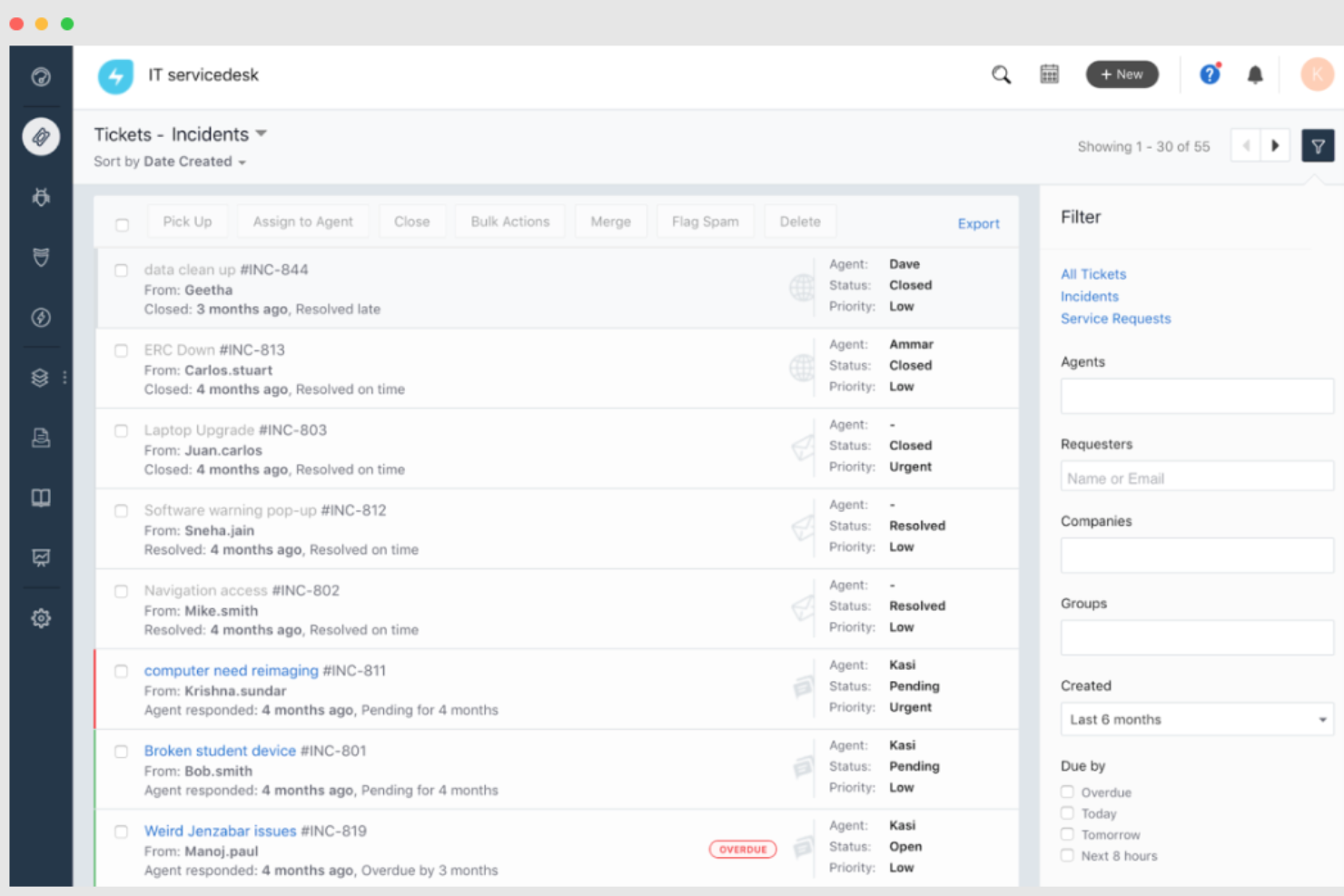
Freshservice è una piattaforma di help desk basata su cloud, progettata per team IT e dipartimenti di servizi che devono gestire richieste, automatizzare flussi di lavoro e offrire supporto rapido su più canali.
Per Chi È Ideale Freshservice?
Freshservice è particolarmente adatto a team IT di medie e grandi dimensioni che necessitano di una piattaforma strutturata e scalabile per la gestione di richieste e incidenti interni.
Perché Ho Scelto Freshservice
Freshservice si guadagna un posto nella mia lista perché l'IA è profondamente integrata nei flussi di lavoro dell'help desk, non semplicemente aggiunta. Apprezzo in particolare Freddy AI Copilot, che consente agli operatori di redigere risposte, riassumere lunghe conversazioni sui ticket e generare articoli della knowledge base senza uscire dalla schermata del ticket. Freddy AI Agent gestisce inoltre il self-service 24/7 su Slack e Microsoft Teams, quindi il mio team non deve gestire richieste ripetitive tutto il giorno. L’assegnazione automatica degli incidenti tramite IA garantisce che i ticket vengano indirizzati all’agente giusto in base a disponibilità e carico di lavoro, riducendo così la gestione manuale della priorità.
Caratteristiche Principali di Freshservice
- Gestione SLA: Imposta e monitora gli accordi sui livelli di servizio con escalation automatiche quando le scadenze di risposta o risoluzione sono a rischio.
- Portale self-service: Fornisce ai dipendenti un portale personalizzato per inviare ticket, monitorare lo stato delle richieste e consultare la knowledge base senza contattare un operatore.
- Gestione delle modifiche: Pianifica, revisiona e approva cambiamenti IT con flussi di lavoro integrati, valutazione del rischio e un calendario visivo dei cambiamenti.
- Gestione delle risorse: Scopri, monitora e gestisci hardware e software direttamente dall’help desk, collegandoli a ticket e incidenti correlati.
Integrazioni di Freshservice
Le integrazioni includono Microsoft Teams, SecPod, Slack, TeamViewer, Jira, Azure AD, Workato e oltre 1.200 applicazioni aziendali aggiuntive tramite il Marketplace di Freshservice.
Pros and Cons
Pros:
- Robuste capacità di automazione
- Funzionalità di gestione delle risorse
- Supporta strumenti self-service e directory di esperti per una risoluzione efficace dei problemi
Cons:
- Le funzionalità di reportistica sono un po' limitate
- Freddy copilot è un componente aggiuntivo a pagamento
New Product Updates from Freshservice
 Experience)
Freshservice Introduces a Reimagined IT Asset Management (ITAM) Experience
Freshservice introduces a reimagined IT Asset Management (ITAM) experience with continuous infrastructure discovery, dependency mapping, IPAM, and Software License Management. This update helps teams improve asset visibility and manage connected IT environments more effectively. For more information, visit Freshservice’s official site.

Il miglior software di help desk per creare automazioni senza codice
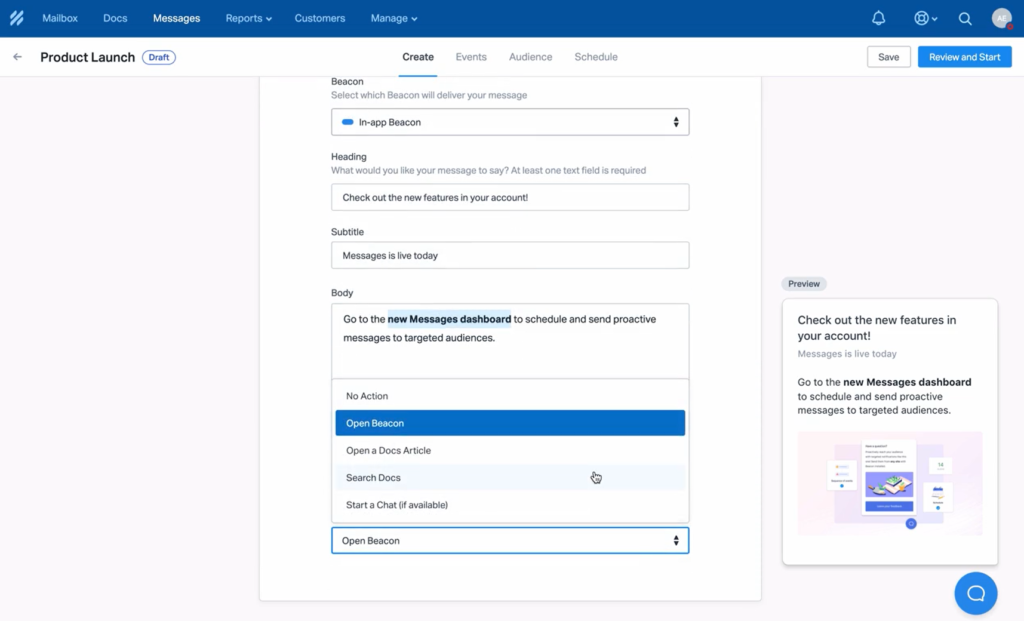
Help Scout offre ai team di assistenza clienti una casella di posta condivisa, chat dal vivo e strumenti per la gestione della knowledge base che aiutano le piccole imprese e le aziende in crescita a gestire le conversazioni con i clienti e a fornire un supporto veloce e personalizzato.
Per chi è ideale Help Scout?
Help Scout è perfetto per team di assistenza da piccoli a medi che desiderano una piattaforma di help desk semplice e facile da usare, senza una curva di apprendimento ripida.
Perché ho scelto Help Scout
Help Scout si guadagna un posto nella mia lista grazie all’efficacia dell’automazione dei flussi di lavoro senza codice nella gestione dei noiosi compiti di instradamento e assegnazione che sottraggono tempo prezioso ai team di assistenza. Mi piace che sia possibile creare flussi di lavoro utilizzando una logica semplice di tipo if/then—senza bisogno di uno sviluppatore—ad esempio assegnando automaticamente le richieste di rimborso a uno specialista di fatturazione o etichettando ed eseguendo l’escalation delle conversazioni in attesa da oltre 24 ore. Inoltre, le risposte salvate permettono al mio team di rispondere a domande frequenti con pochi clic invece di riscrivere ogni volta la stessa risposta. La combinazione dell’instradamento automatico e delle risposte predefinite consente al mio team di dedicare meno tempo alla gestione della casella di posta e più tempo alle conversazioni che necessitano realmente di un tocco umano.
Caratteristiche principali di Help Scout
- Casella condivisa: Gestisci tutte le conversazioni email dei clienti in un’unica casella collaborativa dove i colleghi possono assegnare, commentare e tracciare le conversazioni.
- Widget di chat dal vivo: Inserisci un widget di chat sul tuo sito per gestire conversazioni in tempo reale con i clienti direttamente dall’interfaccia di Help Scout.
- Knowledge base Docs: Crea e pubblica un help center self-service dove i clienti possono trovare risposte senza contattare il tuo team.
- Profili cliente: Visualizza la cronologia completa delle conversazioni e i dati del profilo di ciascun cliente accanto a ogni ticket di assistenza per un maggiore contesto.
Integrazioni Help Scout
Le integrazioni includono Salesforce, Shopify, Slack, HubSpot, Mailchimp, Jira, Google Apps, Segment, WhatsApp e SurveyMonkey.
Pros and Cons
Pros:
- Interfaccia intuitiva e facile da usare
- Buona copertura di funzionalità anche nel piano più economico
- Include app mobili per dispositivi iOS e Android
Cons:
- Le funzionalità di sicurezza aziendale e la conformità HIPPA sono disponibili solo come componenti aggiuntivi
- Si applicano costi aggiuntivi per inviare messaggi proattivi ai clienti
New Product Updates from Help Scout

Help Scout Adds Automatic Conversation Reassignment
Help Scout can now automatically unassign conversations when the assigned teammate has been away long enough, keeping replies moving so others can pick them up. For more information, visit Help Scout's official site.
 .
.
Ideale per supporto clienti guidato dall'IA
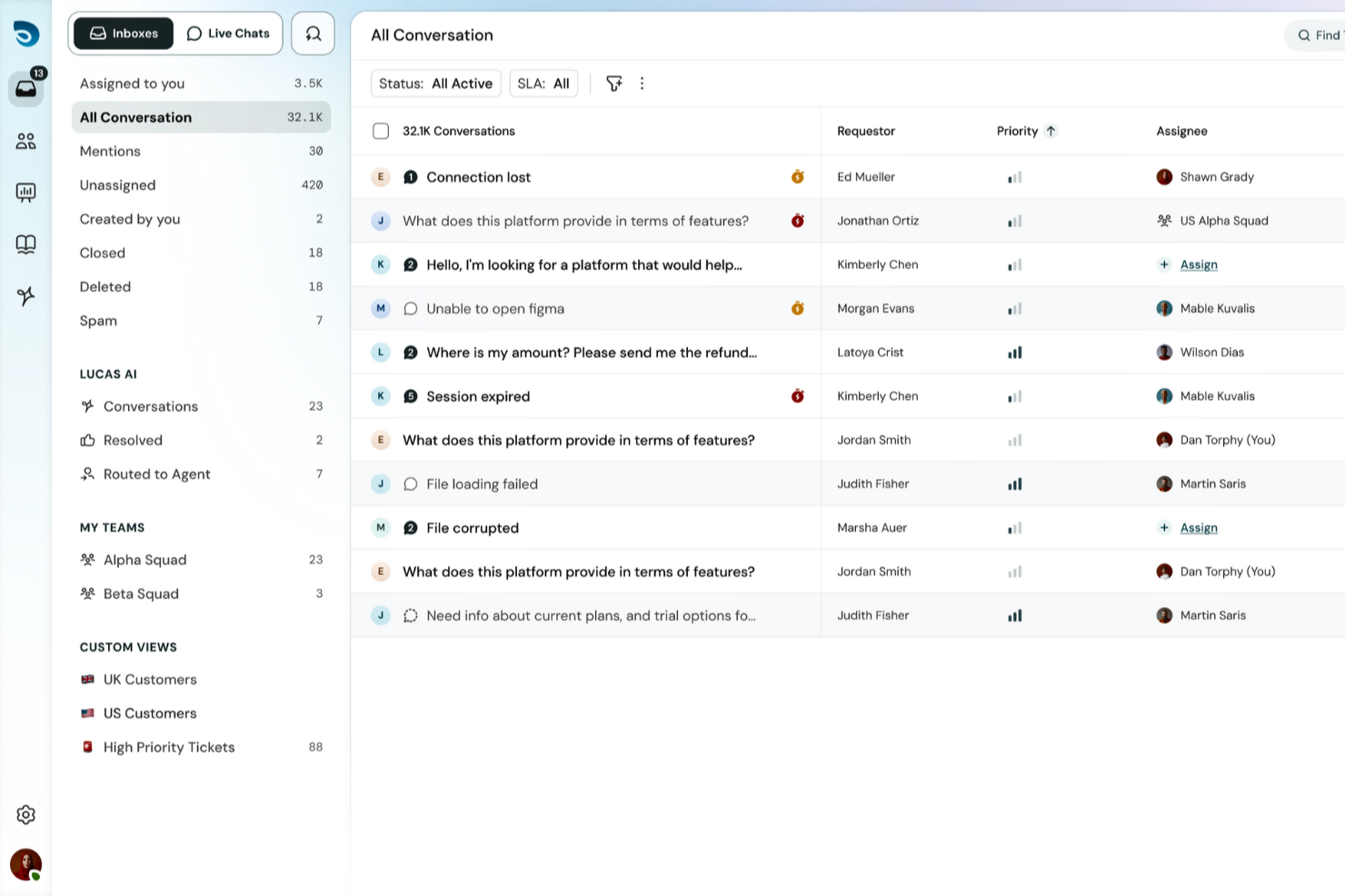
SparrowDesk è una piattaforma di help desk progettata per i team che desiderano gestire le richieste dei clienti su più canali e automatizzare le attività di supporto di routine utilizzando l'IA, rendendola una scelta solida per le aziende che vogliono offrire un servizio rapido e coerente.
A Chi È Più Indicato SparrowDesk?
SparrowDesk è adatto a team di supporto piccoli e medi che necessitano di un help desk centralizzato con strumenti potenziati dall'IA per gestire un crescente volume di ticket senza aumentare il numero di addetti.
Perché Ho Scelto SparrowDesk
SparrowDesk si è guadagnato un posto nella mia lista per l'efficacia con cui la sua IA gestisce gli aspetti ripetitivi e ad alto volume dell'assistenza clienti. L'IA categorizza e assegna automaticamente i ticket in base al contenuto, così il mio team non deve smistare manualmente ogni richiesta. Anche le risposte suggerite dall'IA sono utili—quando un cliente pone una domanda frequente sulla fatturazione, SparrowDesk propone una bozza pertinente che gli operatori possono inviare o modificare in pochi secondi. L'automazione dei ticket unita a una casella multicanale lo rende un'ottima scelta per un supporto clienti guidato dall'IA.
Funzionalità Chiave di SparrowDesk
- Base di conoscenza self-service: Crea e pubblica un centro assistenza ricercabile dove i clienti possono trovare risposte alle domande frequenti senza contattare il supporto.
- Gestione SLA: Imposta obiettivi di tempo per risposte e risoluzioni, con notifiche automatiche quando i ticket rischiano di superare i livelli di servizio concordati.
- Rilevamento delle collisioni: Avvisa gli operatori quando più membri del team stanno visualizzando o rispondendo allo stesso ticket per evitare risposte duplicate.
- Sondaggi CSAT (soddisfazione del cliente): Invia automaticamente sondaggi post-risoluzione per raccogliere feedback sulle singole interazioni di supporto.
Integrazioni di SparrowDesk
Le integrazioni includono Attio, Zapier, SurveySparrow, HubSpot e Okta.
Pros and Cons
Pros:
- Posta in arrivo omnicanale centralizza le conversazioni
- Monitoraggio SLA favorisce la responsabilità
- AI Copilot aumenta la produttività degli operatori
Cons:
- Integrazioni native limitate disponibili
- Il prezzo può essere impegnativo per i team più piccoli

SuperOps
Ideale per la gestione dell'help desk IT
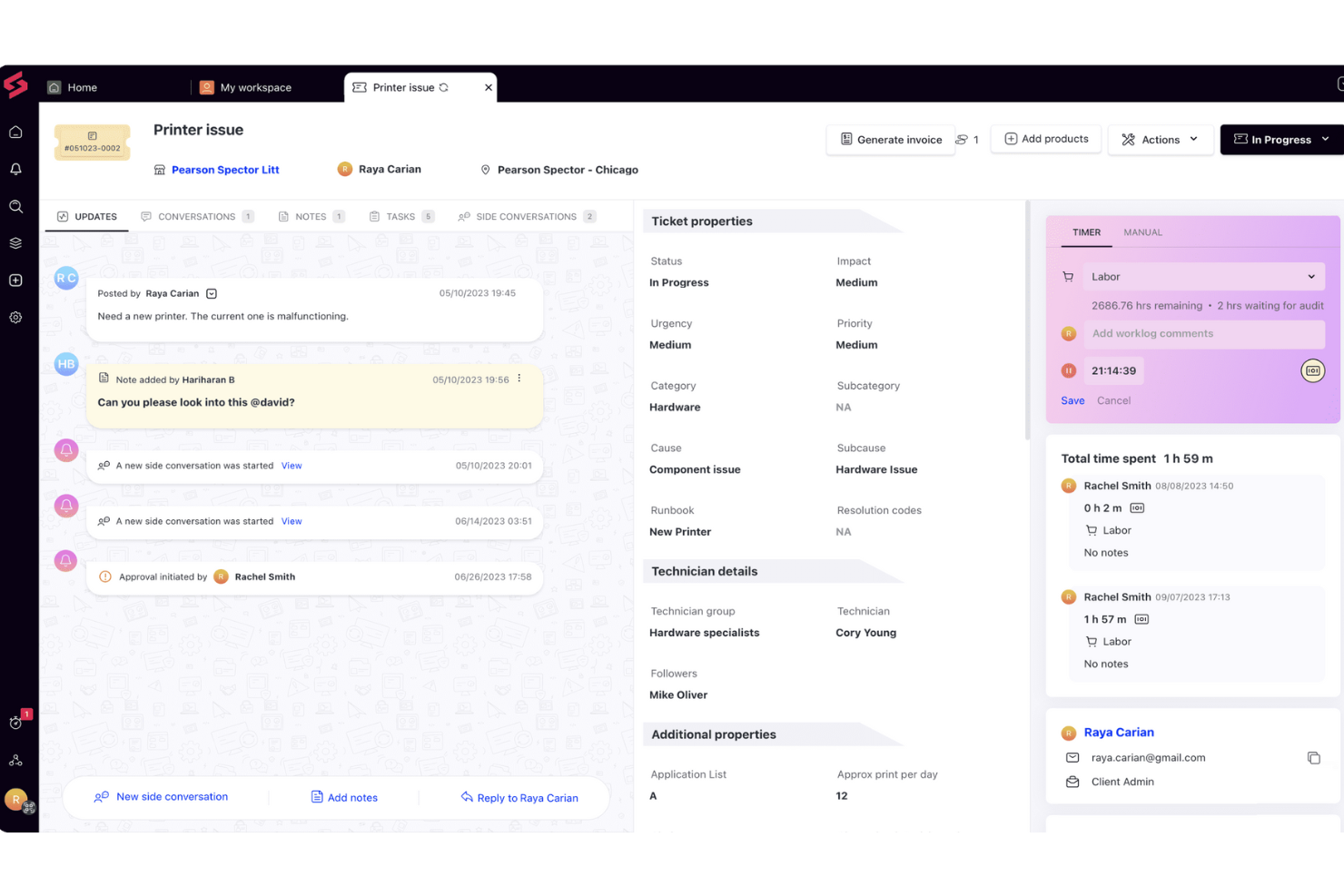
SuperOps è una piattaforma help desk basata su cloud creata per team IT e fornitori di servizi gestiti che hanno bisogno di gestire ticket, automatizzare flussi di lavoro e tracciare gli asset in un unico posto.
Per chi è ideale SuperOps?
SuperOps è particolarmente adatto per fornitori di servizi gestiti e team IT interni che necessitano di una piattaforma unificata per la gestione dei ticket, degli asset e il supporto agli utenti finali.
Perché ho scelto SuperOps
SuperOps è nella mia lista dei preferiti perché è una delle poche piattaforme help desk costruite specificamente per le operazioni IT, dove il contesto dei ticket e i dati dei dispositivi convivono. Mi piace il fatto che ogni ticket venga automaticamente arricchito con le informazioni sugli asset dal livello RMM collegato, così i tecnici non devono passare da uno strumento all'altro per capire cosa sta succedendo sul computer dell'utente. La funzione Monica AI suggerisce soluzioni rilevanti da ticket simili risolti in passato e genera automaticamente i report di lavoro dalle risposte dei tecnici, riducendo la documentazione manuale. Per i team IT che gestiscono grandi volumi di ticket, questa intelligenza integrata rappresenta una vera differenza operativa.
Funzionalità principali di SuperOps
- Gestione SLA: Imposta e monitora gli obiettivi di risposta e risoluzione in base alle priorità dei ticket e ai livelli di servizio dei clienti.
- Risposte preimpostate: Crea una libreria di risposte pre-scritte che i tecnici possono inserire nei ticket per gestire più rapidamente le richieste comuni.
- Portale clienti: Offri agli utenti finali un portale self-service per inviare ticket, controllare lo stato delle richieste e accedere agli articoli della knowledge base.
- Regole di automazione: Attiva assegnazioni dei ticket, cambi di priorità e notifiche in base a condizioni come tipo di ticket, fonte o parola chiave.
Integrazioni SuperOps
Le integrazioni includono TeamViewer, Splashtop, ConnectWise Control, Xero, QuickBooks Online, Bitdefender, Webroot, Stripe, Pax8 e Acronis.
Pros and Cons
Pros:
- Funzionalità RMM e PSA in un'unica soluzione
- Buone capacità di automazione
- Interfaccia intuitiva
Cons:
- Supporto limitato per altre lingue
- Il portale clienti potrebbe essere migliorato
New Product Updates from SuperOps

SuperOps Improves Ticket Visibility, Dynamic Forms, and Dashboard Views
SuperOps introduces improvements to ticket visibility, dynamic forms, and dashboard visualizations. These updates help technicians manage customer conversations, simplify ticket creation, and keep dashboard views consistent across teams. For more information, visit SuperOps' official site.
 .
.
Ideale per la gestione dei ticket supportata dall’AI
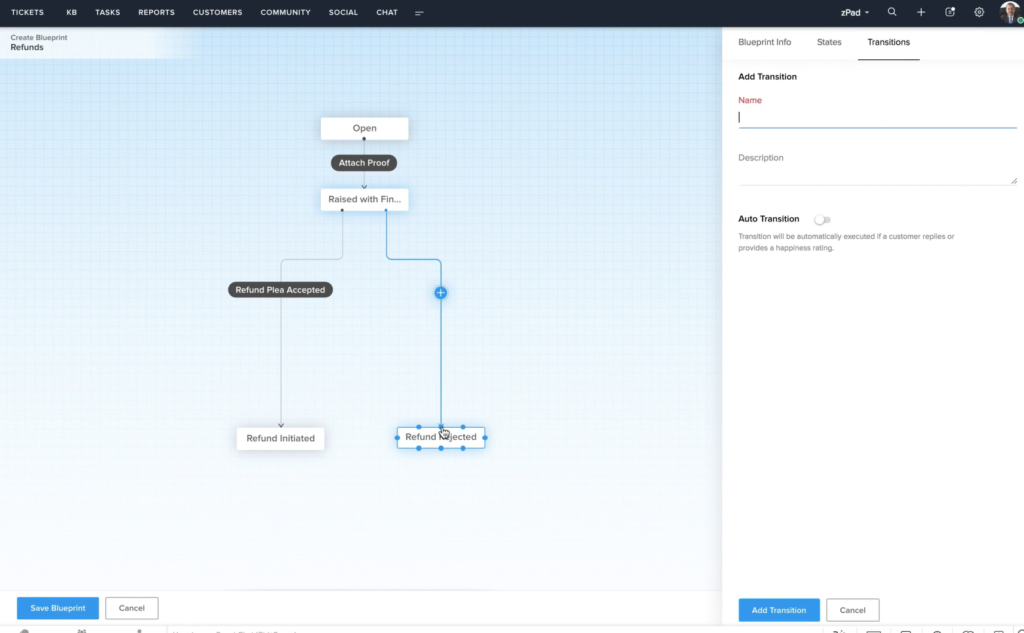
Zoho Desk è una piattaforma di help desk basata su cloud pensata per i team di assistenza clienti che devono gestire grandi volumi di ticket di supporto su più canali e automatizzare le attività ripetitive.
Per chi è ideale Zoho Desk?
Zoho Desk è adatto a piccole e medie imprese che necessitano di una piattaforma di supporto multicanale scalabile senza il costo di una soluzione enterprise.
Perché ho scelto Zoho Desk
Zoho Desk si è guadagnato il suo posto nella mia shortlist grazie alla capacità del suo assistente AI, Zia, di gestire con efficienza il lavoro cognitivo ripetitivo relativo alla gestione dei ticket. Apprezzo il fatto che Zia etichetti automaticamente i ticket in arrivo, rilevi il sentiment dei clienti e suggerisca in tempo reale agli operatori articoli pertinenti della knowledge base. Il mio team utilizza anche i suggerimenti di risposta supportati dall’AI per ridurre i tempi di risposta senza compromettere la qualità. Il solo auto-tagging fa risparmiare una notevole quantità di lavoro manuale di smistamento quando i volumi di ticket aumentano.
Caratteristiche principali di Zoho Desk
- Posta in arrivo omnicanale: Gestisci i ticket provenienti da email, telefono, live chat, social media e moduli web in un’unica interfaccia unificata.
- Costruttore di processi Blueprint: Progetta flussi di lavoro passo-passo che guidano gli operatori nella risoluzione dei ticket seguendo i flussi aziendali.
- Gestione SLA: Imposta obiettivi di tempo per risposte e risoluzioni, con escalation automatiche quando le scadenze sono a rischio.
- Knowledge base: Crea, organizza e pubblica articoli di aiuto a cui operatori e clienti possono accedere direttamente dal portale di supporto.
Integrazioni di Zoho Desk
Le integrazioni includono Zoho CRM, Zoho Voice, Zoho Analytics, Zoho SalesIQ, Zoho Books, Zoho BugTracker, Jira, Slack, Microsoft Teams e Trello.
Pros and Cons
Pros:
- Strumenti di automazione efficaci che aumentano la produttività
- Funzionalità complete di gestione dei ticket
- Ottime funzionalità di reportistica e analisi per il monitoraggio delle prestazioni
Cons:
- Flessibilità limitata nella personalizzazione delle regole
- Esperienza mobile meno rifinita

eDesk
Ideale per la gestione della casella di posta ecommerce potenziata dall'AI

eDesk è una piattaforma di help desk pensata per le aziende e i rivenditori online che operano nell'ecommerce, progettata per gestire messaggi dei clienti, ordini e ticket di assistenza provenienti da diversi canali di vendita in un unico luogo.
Per chi è ideale eDesk?
eDesk è particolarmente adatto alle aziende che vendono su più marketplace e negozi online e che hanno bisogno di una gestione centralizzata dell'assistenza clienti.
Perché ho scelto eDesk
eDesk merita un posto nella mia selezione grazie all'efficacia con cui il suo Agente AI gestisce le esigenze specifiche dell'assistenza ecommerce. L'ho scelto perché l'Agente AI non si limita a rispondere automaticamente: recupera le informazioni sugli ordini in tempo reale, verifica le politiche di reso e applica le tue regole prima di inviare una risposta, prendendo decisioni invece di limitarsi a riconoscere modelli. Apprezzo anche la classificazione automatica dei ticket nella casella di posta, che raggruppa quelli simili consentendo al mio team di gestire elevati volumi senza perdere il contesto. La combinazione di una casella di posta multicanale unificata e di uno strato AI che comprende le intenzioni specifiche dell'ecommerce—resi, cancellazioni, domande pre-vendita—distingue eDesk dagli strumenti di help desk generici.
Funzionalità principali di eDesk
- Regole di automazione: Imposta trigger personalizzati per assegnare automaticamente, taggare o inoltrare i ticket in base al canale, alla parola chiave o allo stato dell'ordine.
- Widget di chat dal vivo: Aggiungi un widget di chat al tuo negozio online per permettere ai clienti di contattare direttamente il tuo team durante la navigazione o il checkout.
- Vista cliente: Visualizza la cronologia completa degli ordini, dei ticket precedenti e delle interazioni di ogni cliente in un unico profilo.
- Cruscotto di report: Monitora il volume dei ticket, i tempi di risposta e le prestazioni degli agenti su tutti i canali in una sola schermata.
Integrazioni di eDesk
Le integrazioni includono Amazon, eBay, Walmart, Shopify, Magento, WooCommerce, BigCommerce, Facebook, Instagram e Klaviyo.
Pros and Cons
Pros:
- Le automazioni AI riducono le attività ripetitive di supporto
- La vista organizzata dei ticket migliora l'efficienza operativa quotidiana
- Centralizza i messaggi dei clienti da marketplace e negozi
Cons:
- Reportistica e analisi presenti ma meno personalizzabili rispetto alle dashboard più avanzate
- Pensato principalmente per l'ecommerce, meno flessibile per altri settori
New Product Updates from eDesk
eDesk Adds Galeria and Kaufland Support in Spain and Netherlands
eDesk adds support for Galeria, Kaufland Spain, and Kaufland Netherlands marketplaces. These integrations bring more European buyer messages into eDesk with routing, templates, AI insights, and automated translation. For more information, visit eDesk’s official site.
 .
.
Ideale per integrazioni estese con strumenti di terze parti
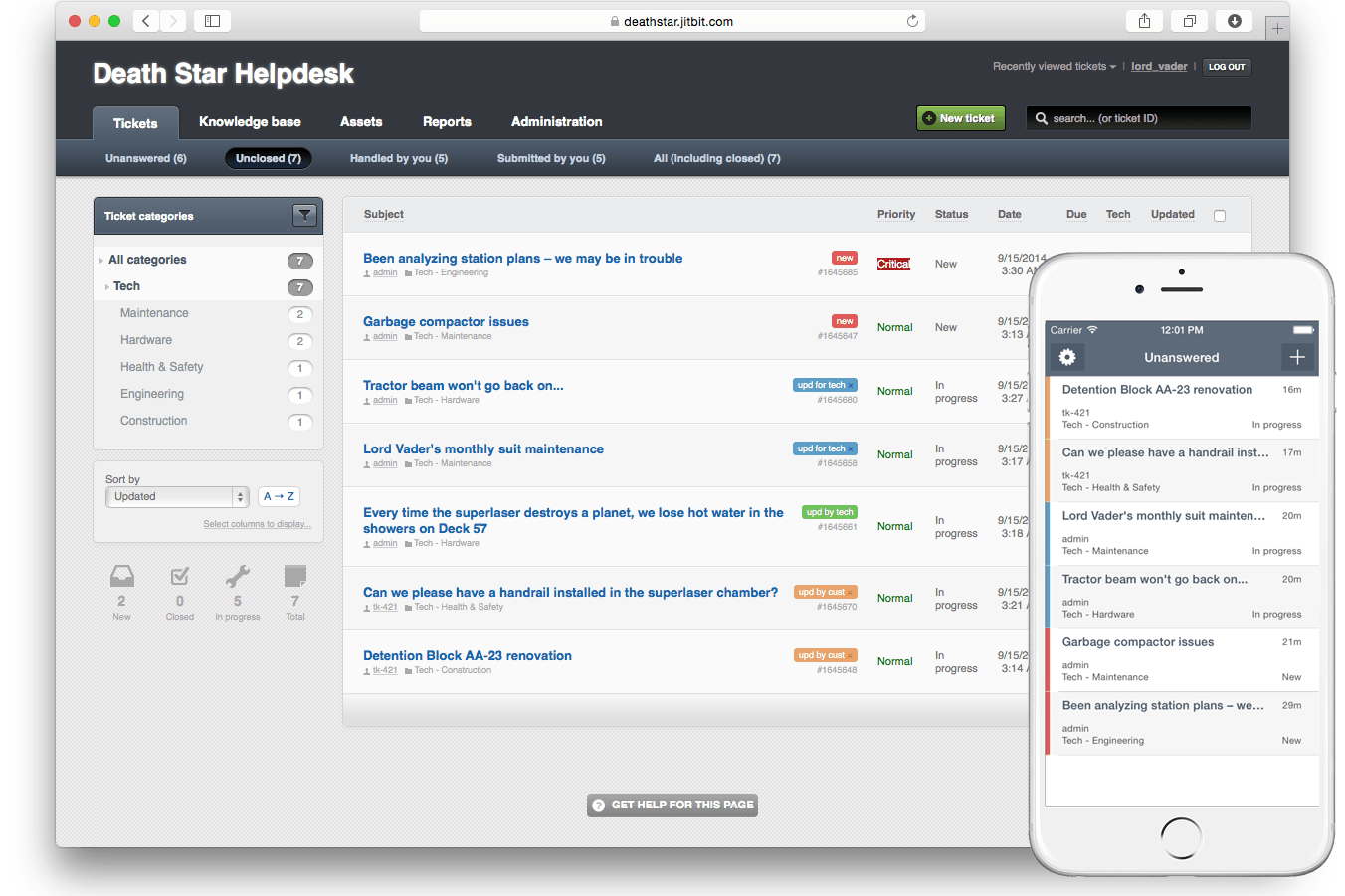
Jitbit Helpdesk è una piattaforma di ticketing e supporto per la gestione delle richieste dei clienti, l'automazione dei flussi di lavoro, la creazione di una knowledge base e la connessione con strumenti di terze parti tramite soluzioni cloud o on-premises.
Per chi è ideale Jitbit Helpdesk?
Team IT e reparti di assistenza clienti di piccole e medie imprese che hanno bisogno di opzioni di distribuzione e integrazione flessibili.
Perché ho scelto Jitbit Helpdesk
Ho scelto Jitbit Helpdesk come uno dei migliori perché posso collegarlo a un'ampia gamma di strumenti di terze parti, da Slack e Microsoft Teams ad Active Directory e Zapier. Il mio team utilizza queste integrazioni per automatizzare la creazione dei ticket da email e messaggi chat, e sincronizziamo i dati degli utenti direttamente dalla nostra directory. In pratica, questo significa che possiamo mantenere i nostri flussi di lavoro di supporto strettamente collegati al resto del nostro stack tecnologico.
Funzionalità principali di Jitbit Helpdesk
- Campi ticket personalizzati: Aggiungi e configura campi personalizzati per raccogliere esattamente le informazioni di cui il tuo team ha bisogno su ogni ticket.
- Knowledge base: Crea e mantieni una libreria ricercabile di articoli sia per gli agenti che per gli utenti finali.
- Assegnazione automatica dei ticket: Imposta regole per assegnare automaticamente i ticket all'agente o al team giusto in base a categoria o priorità.
- Gestione SLA: Definisci e monitora gli accordi sul livello di servizio per controllare i tempi di risposta e risoluzione.
Integrazioni di Jitbit Helpdesk
Jitbit Helpdesk offre integrazioni native con Slack, Jira, GitHub, Dropbox, Google Drive, Asana, Harvest, Visual Studio Online, Microsoft Teams, TeamViewer, Google Calendar, Basecamp, ChatGPT, OneDrive e WhatsApp. Si collega inoltre a Zapier e mette a disposizione un'API e webhooks per integrazioni personalizzate.
Pros and Cons
Pros:
- Integrazioni native con Slack, Jira e Teams
- Campi ticket personalizzati per flussi di lavoro su misura
- Knowledge base integrata per il self-service
Cons:
- Opzioni di automazione limitate per flussi di lavoro complessi
- La gestione SLA non offre opzioni di configurazione avanzate

LiveAgent
Il migliore help desk e knowledge base integrati

LiveAgent riunisce gestione dei ticket, chat dal vivo e un portale clienti per team di supporto e aziende che desiderano gestire le richieste dei clienti tramite email, chat, social e telefono da un unico posto.
A Chi È Rivolto LiveAgent?
LiveAgent è adatto a piccole e medie imprese che hanno bisogno di un sistema di supporto multicanale senza dover gestire diversi strumenti scollegati.
Perché Ho Scelto LiveAgent
LiveAgent merita il suo posto nella mia shortlist perché è uno dei pochi strumenti di help desk che integra una knowledge base completa direttamente nella piattaforma, invece di trattarla come un componente aggiuntivo. Mi piace il fatto che si possa creare un portale self-service personalizzato con articoli, FAQ e forum senza la necessità di uno strumento separato. Quando un cliente invia un ticket, gli operatori possono attingere dalla stessa knowledge base per rispondere più rapidamente e in modo coerente. I widget di feedback integrati permettono inoltre ai clienti di valutare gli articoli, così posso vedere cosa è realmente utile e cosa necessita di un aggiornamento.
Funzionalità Chiave di LiveAgent
- Distribuzione automatica dei ticket: Assegna i ticket in arrivo agli operatori in base a regole predefinite come carico di lavoro, priorità o reparto.
- Gestione SLA: Tiene traccia delle scadenze di risposta e risoluzione, con avvisi e pulsante 'Da Risolvere' che segnala i ticket a rischio di violazione degli obiettivi SLA.
- Flusso ibrido dei ticket: Consolida tutte le interazioni dei clienti attraverso i vari canali in un'unica conversazione di ticket, indipendentemente dal canale su cui il cliente si sposta.
- Report sulle prestazioni degli operatori: Genera report sull'attività dei singoli operatori, inclusi ticket gestiti, tempi di risposta e ore di lavoro registrate.
Integrazioni di LiveAgent
Le integrazioni includono ActiveCampaign, Agile CRM, BigCommerce, Braintree, ClickUp, Clockify, Facebook, Facebook Lead Ads, CloudApp ed Everhour.
Pros and Cons
Pros:
- Include la possibilità di unire o separare i ticket di assistenza all'occorrenza
- Servizi di implementazione personalizzati
- Numerose integrazioni con terze parti disponibili
Cons:
- È previsto un costo aggiuntivo se si desidera gestire più di una knowledge base (funzionalità multi-knowledge base)
- Alcune integrazioni social richiedono un costo aggiuntivo
Altri software per l'assistenza
Ecco alcune altre opzioni valide per la gestione dell’assistenza. Anche se non sono rientrate tra le mie 20 selezioni principali, vale comunque la pena valutarle se hai bisogno di più opzioni:
- Zendesk
La migliore soluzione di assistenza clienti con intelligenza artificiale per aziende di ogni dimensione
- Agentforce Service (formerly Service Cloud)
Ideale per creare esperienze personalizzate con l’IA
- Missive
Ideale per help desk collaborativi basati sulla posta elettronica
- Desk365
Ideale per ticketing alimentato dall'intelligenza artificiale
- 3CX
Ideale per gestire diversi metodi di comunicazione
- Tidio
Ideale per la combinazione tra supporto live e chatbot
- Front
Ideale per eliminare i silos con una casella di posta condivisa
- monday service
Ideale per la personalizzazione no-code
- Intercom
Miglior widget di chat per help desk su siti web e app
- Issuetrak
Ideale per l'invio di ticket omnicanale
- InvGate Service Management
Ideale per l'instradamento intelligente dei ticket
- Jira Service Management
Il miglior software help desk per i reparti interni
- SysAid
Miglior software di help desk per i servizi IT
- Gladly
Ideale per funzionalità di telefonia avanzate
- NinjaOne
Ideale per la gestione degli endpoint e degli avvisi
- Hiver
Ideale per la collaborazione in team basata su Gmail
- SAAS First
Ideale per chatbot alimentati dall'IA
- SolarWinds IT Service Desk Software
Ideale per CMDB completo
- 14.ai
Ideale per risposte sensibili all'intento
- Applied Labs AI
Ideale per automatizzare i ticket di supporto
- Creatio CRM
Ideale per il supporto omnicanale
- TeamSupport
Ideale per l'analisi del sentiment in tempo reale
- HelpDesk
Ideale per la collaborazione sui ticket
- Zoho Assist
Ideale per fornire supporto tramite accesso remoto


Come Valuto il Software di Help Desk
Scompongo la mia valutazione in due livelli: le capacità di base che ogni strumento deve avere—pensa all'acquisizione multicanale e all'automazione degli SLA—e i fattori differenzianti che distinguono una piattaforma dall'altra.
Funzionalità di Base (Requisiti Minimi per Questa Lista)
Queste funzionalità di base rappresentano i criteri di accettazione per l'inclusione nella mia lista di software di help desk:
- Gestione dei Ticket: Valuto come ogni strumento gestisce l'intero ciclo di vita del ticket—stati personalizzati, livelli di priorità, collegamento padre-figlio e se gli agenti possono unire richieste duplicate dallo stesso utente finale.
- Acquisizione Multicanale: Ogni canale tramite cui un utente finale ti contatta dovrebbe confluire in una sola coda, quindi verifico se email, chat, telefono, moduli web e social sono tutti unificati in una sola visuale dei ticket.
- Automazione & Smistamento: Cerco assegnazioni basate su regole, timer SLA con consapevolezza degli orari di lavoro e percorsi di escalation—come l'instradamento automatico dei ticket per il reset delle password a un gruppo specifico di primo livello.
- Knowledge Base & Self-Service: Un buon portale permette agli utenti di cercare articoli, inviare ticket e monitorare lo stato senza dover inviare email, quindi valuto la qualità della ricerca, l'organizzazione degli articoli e le opzioni di personalizzazione del portale.
- Reportistica & Analisi: Le dashboard dovrebbero coprire i parametri a cui tengono davvero i responsabili dell'assistenza—tempo di risoluzione, rispetto degli SLA, carico di lavoro degli agenti—e verifico se i report sono personalizzabili o solo statici.
- Collaborazione & Workspace degli Agenti: I team che condividono i ticket hanno bisogno di rilevamento delle collisioni, note interne e @menzioni, perciò valuto come ogni piattaforma supporta la collaborazione multi-agente su una singola richiesta.
Valuto ogni fornitore su una scala da 0 (non offre la funzionalità) a 5 (eccelle in quell'area) per ciascun criterio.
I fornitori devono ottenere un punteggio medio minimo per essere presi in considerazione per l'inclusione nella mia lista. Da lì considero ciò che distingue ogni piattaforma.
Fattori Differenzianti (Cosa Distingue i Fornitori)
Una volta creata la mia lista, ecco come confronto e metto a contrasto i diversi fornitori:
Caratteristiche Distintive
Cerco piattaforme che integrano la gestione automatica dei ticket e agenti virtuali alimentati dall'IA, poiché queste riducono il lavoro manuale gestendo automaticamente reset delle password o richieste di stato. La presenza di gestione delle risorse e delle configurazioni integrata è fondamentale per i team IT che devono collegare i ticket ai record hardware o software. Gli strumenti che offrono un'esperienza mobile per gli agenti consentono ai tecnici sul campo di rispondere e risolvere ticket senza essere alla scrivania, cosa essenziale per i team distribuiti. Controllo anche la presenza di strumenti per la soddisfazione dei clienti, come sondaggi CSAT o NPS integrati e collegati direttamente alle dashboard di performance degli agenti.
Oltre le Caratteristiche
La profondità dell'integrazione è importante—valuto se una piattaforma si connette nativamente a strumenti come Slack, Microsoft Teams, Salesforce e fornitori di identità come Okta, poiché queste integrazioni influenzano i flussi di lavoro quotidiani degli agenti. La struttura dei prezzi è un altro fattore chiave, soprattutto se le licenze per agente sono sostenibili man mano che il team cresce o se i modelli con agenti illimitati risultano più adatti. Considero anche l'aderenza verticale e la compatibilità con i casi d'uso, dato che una piattaforma costruita attorno a framework ITIL per il supporto IT interno appare spesso molto diversa rispetto a una progettata per team di assistenza a clienti esterni.
Come scegliere il software per l'assistenza
È facile perdersi tra le funzionalità complete dei software per l'assistenza e le strutture tariffarie complesse. Per aiutarti a rimanere concentrato mentre affronti il tuo particolare processo di selezione del software, ecco una lista di controllo su come scegliere il software per l'assistenza per la tua azienda o il tuo team:
| Fattore | Cosa considerare |
|---|---|
| Scalabilità | Assicurati che il software possa crescere insieme al tuo team. Cerca soluzioni che consentano di aggiungere utenti o funzionalità man mano che la tua azienda si espande. |
| Integrazioni | Verifica se si collega agli strumenti che già utilizzi, come i sistemi CRM o le piattaforme e-mail, per ottimizzare il flusso di lavoro. |
| Personalizzazione | Scegli un software che ti permetta di adattare i flussi di lavoro e le interfacce alle esigenze specifiche del tuo team. |
| Facilità d'uso | Scegli interfacce intuitive che riducano al minimo il tempo di formazione e aiutino il tuo team a diventare rapidamente operativo. |
| Budget | Considera sia i costi iniziali sia le spese ricorrenti. Assicurati che rientri nel tuo piano finanziario a lungo termine. |
| Misure di sicurezza | Cerca funzionalità di sicurezza solide, come la crittografia dei dati e l'autenticazione degli utenti, per proteggere le informazioni sensibili. |
| Assistenza clienti | Valuta il livello di assistenza offerto, come un servizio attivo 24 ore su 24, 7 giorni su 7, o responsabili di account dedicati, per ricevere aiuto quando si verificano problemi. |
| Strumenti di reportistica | Assicurati che il software offra funzionalità di analisi e reportistica per aiutarti a monitorare le prestazioni e individuare le aree di miglioramento. |
Tendenze nel software di help desk
Nella mia ricerca, ho raccolto innumerevoli aggiornamenti dei prodotti, comunicati stampa e registri delle versioni di diversi fornitori di software per help desk. Ecco alcune delle tendenze emergenti che sto tenendo d'occhio:
- Approfondimenti basati sull'IA: il software di help desk basato sull'IA utilizza l'IA per fornire approfondimenti più dettagliati sulle interazioni con i clienti. Questo può aiutare le aziende a prevedere le esigenze dei clienti e ad automatizzare le risposte, migliorando l'efficienza. L'integrazione di Zoho con ChatGPT potenzia il suo chatbot IA Zia, offrendo suggerimenti intelligenti per i contenuti.
- Supporto omnicanale: fornire supporto attraverso più canali, come chat, e-mail e telefono, sta diventando lo standard. Questa tendenza consente alle aziende di incontrare i clienti nei canali che utilizzano, assicurandosi che nessuna interazione venga trascurata. Molte piattaforme stanno ora semplificando l'integrazione di questi canali in un'interfaccia unificata.
- Portali per l'assistenza autonoma: sempre più soluzioni di help desk integrano opzioni per l'assistenza autonoma che consentono ai clienti di trovare risposte e soluzioni senza l'intervento diretto del personale. Questo riduce il carico di lavoro del team di supporto e permette agli utenti di risolvere autonomamente i problemi. Alcuni fornitori stanno integrando forum della community per favorire l'assistenza tra pari.
- Personalizzazione basata sui dati: gli strumenti di help desk sfruttano i dati dei clienti per personalizzare le esperienze di supporto. Analizzando le interazioni e le preferenze passate, i team di supporto possono offrire un'assistenza più personalizzata, aumentando la soddisfazione dei clienti. Questa tendenza è particolarmente forte nelle piattaforme che offrono integrazioni CRM.
- Scalabilità per le aziende in crescita: man mano che le aziende crescono, hanno bisogno di soluzioni di help desk in grado di crescere insieme a loro. I fornitori si concentrano sulla creazione di piani tariffari scalabili e funzionalità flessibili, adatti sia ai piccoli team sia alle grandi imprese. Questo garantisce che le aziende di qualsiasi dimensione possano beneficiare dello stesso livello di funzionalità di supporto.
Che cos'è il software di help desk?
Il software di help desk è una piattaforma che aiuta le aziende a gestire, monitorare e risolvere le richieste di assistenza dei clienti o dei dipendenti. Centralizza le comunicazioni, automatizza i flussi di lavoro dei ticket e consente ai team di supporto di rispondere in modo efficiente attraverso più canali.
Funzionalità del software di help desk
Quando scegli un software di help desk, presta attenzione alle seguenti funzionalità chiave:
- Gestione dei ticket: consente di acquisire, monitorare e organizzare tutte le richieste dei clienti come ticket. Puoi assegnarli ai membri del team, impostare le priorità e monitorare i progressi, così nulla viene trascurato.
- Supporto multicanale: connettiti con i tuoi clienti tramite e-mail, chat, telefono e persino social network, tutto in un unico luogo. In questo modo non devi passare da uno strumento all'altro per mantenere attive le conversazioni.
- Base di conoscenza: crea una raccolta consultabile di domande frequenti, guide pratiche e suggerimenti per la risoluzione dei problemi. Questo permette agli utenti di risolvere autonomamente i problemi più comuni, alleggerendo il carico di lavoro del team di supporto.
- Strumenti di automazione: utilizza flussi di lavoro, trigger e risposte automatiche per gestire le attività ripetitive. Ad esempio, puoi assegnare automaticamente i ticket o inviare e-mail di conferma della ricezione, velocizzando le operazioni e riducendo il lavoro manuale.
- Gestione degli accordi sul livello di servizio (SLA): imposta e monitora i tempi di risposta e di risoluzione, rendendo più facile rispettare gli impegni presi con i clienti e individuare i colli di bottiglia da risolvere.
- Report e analisi: ottieni informazioni su metriche come il volume dei ticket, i tempi di risposta e la soddisfazione dei clienti. Questo ti aiuta a identificare le tendenze e a migliorare continuamente il servizio.
- Possibilità di integrazione: collega il software di help desk ai sistemi CRM, agli strumenti di gestione dei progetti o ad altre applicazioni che utilizzi. In questo modo i flussi di lavoro rimangono fluidi e tutti dispongono delle stesse informazioni.
- Flussi di lavoro personalizzabili: adatta il software ai tuoi processi specifici, configurando campi personalizzati dei ticket, stati o fasi di approvazione.
- Controlli degli accessi degli utenti: decidi chi può vedere e fare cosa nel sistema, così puoi proteggere le informazioni sensibili e mantenere tutti concentrati sulle attività giuste.
- Portale clienti: offri agli utenti un centro per l'assistenza autonoma in cui possano inviare ticket, monitorare i progressi e trovare soluzioni, mantenendo il supporto disponibile 24 ore su 24, 7 giorni su 7.
Funzionalità comuni di IA del software di help desk
Oltre alle funzionalità standard del software di help desk elencate sopra, molte di queste soluzioni stanno integrando l'IA con funzionalità come:
- Instradamento dei ticket basato sull'IA: Assegna automaticamente i ticket all'agente più appropriato in base al tipo di problema, all'urgenza o alle competenze dell'agente. Questo significa risoluzioni più rapide e clienti più soddisfatti.
- Chatbot intelligenti: Utilizza chatbot basati sull'IA per gestire istantaneamente le richieste di routine, 24 ore su 24, 7 giorni su 7. Il tuo team di supporto avrà più tempo da dedicare ai problemi complessi e gli utenti riceveranno risposte rapide in qualsiasi momento.
- Suggerimenti automatici per le risposte: Il software può suggerire risposte ai ticket in arrivo sulla base degli articoli della base di conoscenza o delle soluzioni precedenti, accelerando i tempi di risposta e garantendo risposte coerenti.
- Analisi del sentiment: L'IA analizza il tono e l'urgenza dei messaggi, aiutandoti a dare priorità ai ticket che potrebbero richiedere immediatamente un intervento umano.
- Analisi predittiva: L'IA anticipa i problemi più comuni o i picchi nel volume dei ticket, avvisandoti in anticipo affinché tu possa preparare le risorse di supporto.
Vantaggi del software per l'assistenza
L'implementazione di un software per l'assistenza offre diversi vantaggi al tuo team e alla tua azienda. Ecco alcuni dei vantaggi che puoi aspettarti da un sistema di assistenza:
- Supporto clienti migliorato: Il software per l'assistenza consente una gestione efficiente dei ticket, garantendo che i problemi dei clienti vengano affrontati tempestivamente e in modo sistematico.
- Gestione centralizzata delle informazioni: Con tutte le interazioni e i dati dei clienti in un unico luogo, i team possono accedere rapidamente alle informazioni necessarie, riducendo i tempi di risposta e migliorando la qualità del servizio.
- Collaborazione del team potenziata: Funzionalità come le visualizzazioni condivise dei ticket e le note interne aiutano i membri del team a lavorare insieme in modo efficace, portando a una migliore risoluzione dei problemi.
- Approfondimenti basati sui dati: Le soluzioni per l'assistenza offrono strumenti di reportistica che forniscono informazioni preziose sulle interazioni con i clienti e sulle prestazioni del team, aiutando a identificare le aree di miglioramento.
- Integrazione con altri strumenti: Molti sistemi di assistenza si integrano con CRM e altri strumenti aziendali, semplificando i flussi di lavoro e garantendo coerenza tra le piattaforme.
Costi e prezzi dei software per l'assistenza
La scelta di un software per l'assistenza richiede la comprensione dei vari modelli e piani tariffari disponibili. I costi variano in base alle funzionalità, alle dimensioni del team, ai componenti aggiuntivi e ad altri fattori. La tabella seguente riassume i piani più comuni, i relativi prezzi medi e le funzionalità normalmente incluse nelle soluzioni per l'assistenza:
Tabella comparativa dei piani per i software di assistenza
| Tipo di piano | Prezzo medio | Funzionalità comuni |
|---|---|---|
| Piano gratuito | $0 | Sistema di gestione dei ticket di base, supporto clienti limitato e accesso al forum della community. |
| Piano personale | $5-$25/utente/mese | Supporto via e-mail, reportistica di base, accesso all'app mobile e integrazioni limitate. |
| Piano aziendale | $30-$60/utente/mese | Reportistica avanzata, integrazioni multiple, opzioni di personalizzazione e automazione. |
| Piano aziendale avanzato | $80-$150/utente/mese | Account manager dedicato, funzionalità di sicurezza personalizzate, analisi avanzate e supporto premium. |
Software per help desk: domande frequenti
Hai domande generali su ciò che offre il software per help desk o su come scegliere l’opzione migliore per la tua organizzazione? Queste risposte alle domande frequenti dovrebbero aiutarti a trovare la direzione giusta:
Cosa devo considerare quando eseguo la migrazione a un nuovo software per help desk?
Quando esegui la migrazione a un nuovo software per help desk, pianifica il trasferimento pulito dei dati, le esigenze di integrazione e la formazione del team. Verifica che il nuovo strumento supporti l’importazione dei ticket, dei dati degli utenti e dei campi personalizzati dal vecchio sistema. Testa le integrazioni con le piattaforme principali, come CRM, chat o e-mail, prima del passaggio. Crea un programma di implementazione e formazione per limitare i tempi di inattività.
In che modo il software per help desk può migliorare i tempi di risposta e la soddisfazione dei clienti?
Il software per help desk velocizza i tempi di risposta automatizzando l’instradamento dei ticket, dando priorità alle richieste urgenti e offrendo risposte predefinite. Funzionalità come gli SLA e le note interne mantengono il team organizzato e responsabile. Vedrai una maggiore soddisfazione dei clienti chiudendo i ticket più rapidamente e offrendo un servizio più coerente.
Quali integrazioni del software per help desk sono più utili per i team di assistenza clienti?
Le integrazioni con e-mail, chat dal vivo, CRM e base di conoscenza sono tra le scelte migliori per i team di assistenza. L’integrazione con il CRM consente agli operatori di visualizzare la cronologia del cliente senza cambiare scheda. Le app di chat e messaggistica supportano le risposte su più canali. L’integrazione con la base di conoscenza aiuta ad automatizzare l’autoassistenza, riducendo il volume dei ticket.
Come misuro le prestazioni del mio team di assistenza con il software per help desk?
La maggior parte delle piattaforme per help desk monitora metriche come il tempo di prima risposta, il tempo di risoluzione, il volume dei ticket e i punteggi di soddisfazione dei clienti. Configura dashboard con questi KPI per individuare le tendenze e supportare la crescita del team. Molti strumenti consentono inoltre di programmare i report e condividere i risultati con le parti interessate.
Qual è la differenza tra il software per help desk e il software per il servizio clienti?
Il software per help desk si concentra sulla gestione e sulla risoluzione dei problemi dei clienti tramite ticket. Il software per il servizio clienti può includere strumenti per help desk, ma offre anche funzionalità più ampie come chat dal vivo, sondaggi di riscontro e assistenza multicanale. Le soluzioni per help desk sono ideali se la principale esigenza del team è la gestione centralizzata dei ticket.
Quali sono i diversi tipi di software per help desk disponibili?
Ecco alcuni tipi di software per help desk che puoi valutare se cerchi una soluzione adatta a esigenze specifiche o a organizzazioni di dimensioni diverse:
- Software per help desk per piccole imprese: progettato per i team più piccoli, questo software è conveniente, facile da usare e aiuta a gestire le richieste dei clienti in modo efficiente.
- Software per help desk via e-mail: si concentra sull’organizzazione delle richieste dei clienti inviate tramite e-mail, trasformandole in ticket gestibili.
- Software per help desk interno: aiuta i dipendenti a ricevere assistenza IT o HR all’interno dell’azienda, monitorando e risolvendo le loro richieste.
- Software per help desk aziendale: pensato per le grandi organizzazioni, gestisce volumi elevati di ticket e supporta flussi di lavoro complessi.
- Basi di conoscenza del help desk per il servizio clienti: offre una raccolta centrale di articoli e guide per aiutare clienti e operatori a risolvere più rapidamente i problemi.
- Software semplice per help desk: offre strumenti di base con un’interfaccia facile da usare, perfetta per i team che si avvicinano per la prima volta agli help desk.
- Software per help desk online: accessibile da qualsiasi browser, questo strumento aiuta i team a gestire da remoto le richieste dei clienti.
- Software per help desk basato sul cloud: ospitato online, consente alle aziende di gestire l’assistenza clienti senza installare software sui propri dispositivi.
In che modo il software per help desk utilizza l'automazione e l'IA?
Il software per help desk utilizza l’automazione per semplificare il flusso di lavoro del team, instradando automaticamente i ticket ai reparti corretti, categorizzando e assegnando priorità alle richieste, inviando aggiornamenti sullo stato e attivando promemoria per i problemi irrisolti. Le funzionalità di IA possono suggerire ai clienti articoli di assistenza pertinenti, completare automaticamente le risposte degli operatori e analizzare il tono dei ticket per individuare i casi urgenti. Queste funzioni aiutano il team a concentrarsi sulle richieste complesse mentre le attività semplici vengono eseguite in background, aumentando la velocità e mantenendo soddisfatti i clienti.
Cosa sono la conformità ITIL e ITSM negli help desk?
La conformità a ITIL (Information Technology Infrastructure Library) e ITSM (IT Service Management) significa che il software per help desk è progettato per seguire le migliori pratiche globali nell’erogazione dell’assistenza IT. Ciò comprende processi strutturati per il monitoraggio degli incidenti, flussi di lavoro per la gestione delle modifiche, escalation dei problemi e gestione degli asset. Per i responsabili dei team di assistenza, la conformità ITIL/ITSM garantisce coerenza, una qualità del servizio superiore e audit più semplici, soprattutto quando si lavora con requisiti normativi o aziendali rigorosi.
Quali funzionalità di sicurezza offre il software per help desk?
Ecco un elenco delle funzionalità di sicurezza più comuni presenti nel software per help desk:
- Controllo degli accessi basato sui ruoli (RBAC): garantisce che gli utenti accedano solo alle informazioni e agli strumenti pertinenti al proprio ruolo.
- Crittografia dei dati: protegge i dati sensibili durante la trasmissione e l’archiviazione utilizzando protocolli di crittografia.
- Registri di audit: conserva registri dettagliati delle azioni eseguite nel sistema per monitorare le modifiche e rilevare attività non autorizzate.
- Autenticazione a due fattori (2FA): aggiunge un ulteriore livello di sicurezza richiedendo un secondo passaggio di verifica per gli accessi degli utenti.
- Integrazioni API sicure: garantisce che le connessioni di terze parti seguano gli standard di sicurezza per prevenire fughe o violazioni dei dati.
- Aggiornamenti di sicurezza regolari: fornisce patch e aggiornamenti frequenti per risolvere le vulnerabilità e migliorare la protezione.
- Inserimento di IP in whitelist: limita l’accesso al sistema di help desk a specifici indirizzi IP approvati, offrendo un maggiore controllo.
Cosa cercare nella personalizzazione e nell'interfaccia utente di un help desk?
Quando valuti la personalizzazione e l’interfaccia utente di un help desk, considera queste funzionalità chiave:
- Flussi di lavoro personalizzabili: possibilità di adattare i processi di gestione dei ticket e di assistenza alle esigenze specifiche del team.
- Interfaccia utente personalizzata: opzioni per personalizzare il portale con il logo, i colori e l’immagine coordinata dell’azienda.
- Strumenti di trascinamento: semplificano la modifica del layout di dashboard e report senza bisogno di programmazione.
- Campi dinamici: consentono di personalizzare moduli e ticket con campi pertinenti per richieste o problemi specifici.
- Lingua e localizzazione: supporto per più lingue e impostazioni regionali per team e clienti internazionali.
- Dashboard specifiche per ruolo: viste personalizzate in base al ruolo dell’utente, come operatore, responsabile o cliente.
- Facilità di navigazione: design intuitivo con menu chiari, pulsanti di accesso rapido e un’interfaccia poco affollata.