

I 10 migliori software di help desk per piccole imprese nel 2026

10 Selezione dei migliori software di assistenza clienti per piccole imprese


Gestire una piccola impresa spesso significa ricoprire molti ruoli, soprattutto quando si tratta di assistenza clienti. Vuoi mantenere soddisfatti i tuoi clienti, ma gestire le richieste può essere estenuante. È qui che entra in gioco il software per l'assistenza clienti, offrendo un supporto fondamentale al tuo team organizzando e dando priorità alle attività.
In base alla mia esperienza come recensore di software, ho visto come gli strumenti giusti possano trasformare le attività di assistenza clienti. Condividerò le migliori opzioni di software per l'assistenza clienti che, a mio avviso, possono fare davvero la differenza per la tua azienda.
Troverai informazioni sulle funzionalità, sui prezzi e su ciò che rende unico ogni strumento. Questa guida ha lo scopo di aiutarti a scegliere la soluzione giusta per semplificare le difficoltà legate all'assistenza e aumentare l'efficienza del tuo team.
Perché fidarsi dei nostri consigli sui software
Il nostro team testa e recensisce software dal 2012. In quanto leader CX noi stessi, sappiamo quanto sia difficile — e importante — scegliere il software giusto.
Per questa guida, abbiamo valutato gli strumenti attraverso test pratici e ricerche indipendenti, assegnando un punteggio agli strumenti in base ai nostri criteri di selezione.
Le nostre recensioni riflettono il nostro giudizio editoriale umano, non un discorso di vendita.
Tabella comparativa dei software di assistenza clienti per piccole imprese
Questa tabella comparativa riassume i dettagli sui prezzi delle mie migliori selezioni di software di assistenza clienti per piccole imprese:
| Tool | Best For | Trial Info | Price | ||
|---|---|---|---|---|---|
| 1 | Ideale per suggerimenti di troubleshooting automatizzati | Prova gratuita di 30 giorni disponibile | Da $209/mese/tecnico (fatturato annualmente) | Website | |
| 2 | Ideale per un setup rapido, senza formazione | Piano gratuito + prova gratuita di 7 giorni + demo gratuita disponibile | Da $25/utente/mese (fatturazione annuale) | Website | |
| 3 | Ideale per la gestione dei servizi IT | Prova gratuita di 21 giorni + demo gratuita disponibile | Da $149/tecnico/mese (fatturazione annuale) | Website | |
| 4 | Ideale per l’automazione dell’assistenza supportata dall’IA | Prova gratuita di 14 giorni + demo gratuita disponibile | Da $19/agente/mese (fatturazione annuale) | Website | |
| 5 | Il miglior software help desk per piccole aziende per il supporto ai ticket multicanale | Prova gratuita di 15 giorni + demo gratuita disponibile | A partire da $7/utente/mese (fatturazione annuale) | Website | |
| 6 | Ideale per programmare l'orario di invio | Prova gratuita disponibile | Da $25/utente/mese (fatturazione annuale) | Website | |
| 7 | Ideale per la gestione della casella di posta unificata per l'ecommerce | Prova gratuita di 14 giorni | Da $39/agente/mese | Website | |
| 8 | Ideale per la risoluzione automatica dei ticket basata sull'AI | Piano gratuito disponibile; prova gratuita di 14 giorni | A partire da $16/utente/mese | Website | |
| 9 | Ideale per gestire caselle di posta condivise | Prova gratuita di 30 giorni disponibile | A partire da $14/utente/mese (con fatturazione annuale) | Website | |
| 10 | Il miglior software di help desk alimentato dall'intelligenza artificiale per aziende in crescita | Prova gratuita di 14 giorni + demo gratuita disponibile | Da $19/agente/mese (fatturazione annuale) | Website |


Panoramica dei 20 migliori software di assistenza clienti per piccole imprese
Ecco una breve descrizione di ciascun software di assistenza clienti per piccole imprese, con il relativo caso d’uso migliore, le funzionalità più importanti e alcuni pro e contro. Ho incluso anche schermate per offrirti una panoramica della loro interfaccia utente.
Ideale per suggerimenti di troubleshooting automatizzati
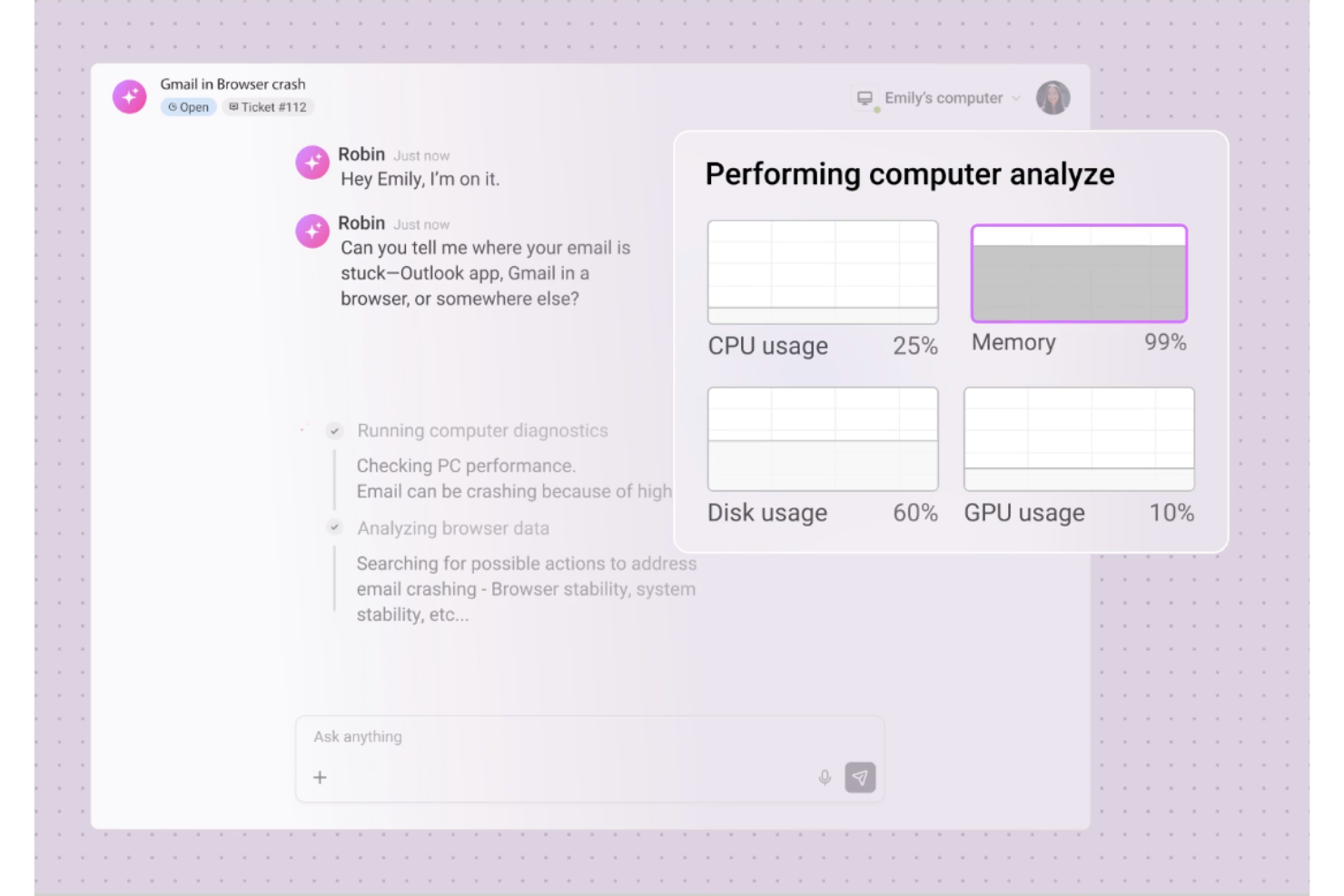
Robin Autonomous IT è un agente di help desk IT basato sull'intelligenza artificiale costruito sulla piattaforma Atera che gestisce autonomamente la presa in carico dei ticket, la diagnostica di troubleshooting e la risoluzione dei problemi attraverso conversazioni in linguaggio naturale via email, Slack e Microsoft Teams.
Per chi è consigliato Robin Autonomous IT?
Robin Autonomous IT è particolarmente indicato per piccoli team IT e MSP che devono gestire un elevato volume di richieste di supporto IT interne senza aumentare il numero di tecnici.
Perché ho scelto Robin Autonomous IT
Ho incluso Robin Autonomous IT nelle mie scelte principali perché il suo troubleshooting automatizzato va ben oltre la semplice proposizione di suggerimenti. Quando arriva un ticket, Robin analizza il problema come farebbe un tecnico umano, controlla l'utilizzo di CPU e memoria, testa la risoluzione DNS, reimposta gli adattatori di rete ed esegue una pulizia del disco in autonomia. Inoltre, rileva modelli tra i ticket esistenti e suggerisce la creazione di nuovi articoli della knowledge base e playbook, affinando così la logica di troubleshooting nel tempo senza interventi manuali.
Caratteristiche principali di Robin Autonomous IT
- Raccolta ticket multicanale: I dipendenti possono inviare richieste di supporto IT tramite email, Microsoft Teams, Slack o un portale self-service.
- Reset password autonomo: Robin gestisce in totale autonomia le richieste di reset password, compresi i passaggi di verifica dell'identità, senza il coinvolgimento dei tecnici.
- Classificazione e instradamento ticket tramite IA: I ticket in arrivo vengono classificati automaticamente in base al tipo di problema e indirizzati alla coda o al tecnico appropriato.
- Monitoraggio SLA: La gestione SLA integrata controlla i tempi obiettivo di risposta e risoluzione su tutti i ticket aperti.
Integrazioni di Robin Autonomous IT
Robin offre integrazioni integrate con provider di identità come Google, Azure AD e Okta, oltre a canali come Slack, Microsoft Teams, WhatsApp e HubSpot. Supporta inoltre la connettività tramite MCP, azioni cloud personalizzate basate su API e Zapier.
Pros and Cons
Pros:
- Risolve autonomamente i ticket direttamente sugli endpoint
- Prezzo per tecnico con copertura dispositivi illimitati
- L'intelligenza artificiale elabora risposte contestuali basate sulla cronologia
Cons:
- Le opzioni di reportistica sono limitate nei piani di livello inferiore
- Le funzioni non-AI più richieste dagli utenti non sono ancora disponibili

Hiver
Ideale per un setup rapido, senza formazione
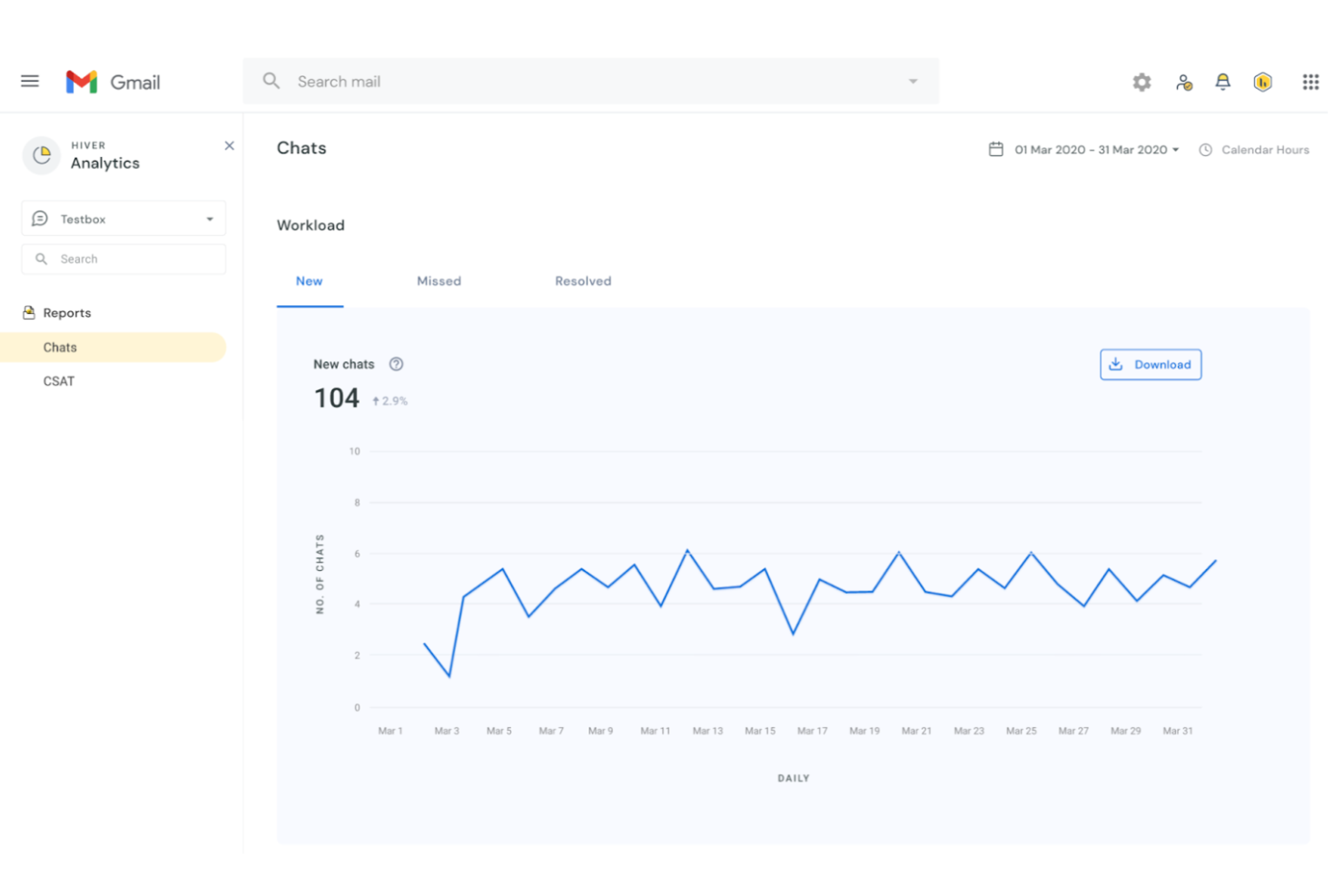
Hiver trasforma Gmail in una help desk condivisa, offrendo alle piccole imprese e ai team di supporto un modo per gestire le richieste dei clienti, assegnare email e tracciare le conversazioni senza uscire dalla loro casella di posta.
Per Chi È Ideale Hiver?
Hiver è particolarmente adatto a piccoli team di supporto che già utilizzano Google Workspace e desiderano una casella di posta condivisa senza dover passare a una nuova piattaforma.
Perché Ho Scelto Hiver
Hiver si merita un posto nella mia selezione perché è davvero la help desk più rapida da implementare: nessuna nuova interfaccia da imparare, nessun problema di migrazione. Poiché funziona come estensione di Chrome all'interno di Gmail, il mio team ha iniziato a gestire i ticket fin dal primo giorno, senza bisogno di alcuna formazione. Apprezzo particolarmente la funzione di avviso di collisione, che segnala quando due agenti stanno visualizzando la stessa email, evitando risposte duplicate. Le regole di assegnazione automatica assicurano inoltre che le richieste in arrivo vengano indirizzate alla persona giusta senza che nessuno debba gestire manualmente la coda. Per un piccolo team di supporto che non può permettersi tempi morti o lunghi periodi di avviamento, questa combinazione è difficile da battere.
Funzionalità Principali di Hiver
- Casella di posta condivisa: Gestisci le email dei clienti da un'unica casella Gmail a cui l'intero team di supporto può accedere e intervenire.
- Note nelle email: Lascia commenti interni sulle conversazioni con i clienti, così i colleghi possono condividere il contesto senza inviare risposte esterne.
- Avvisi SLA: Imposta obiettivi di tempo di risposta e ricevi notifiche quando le conversazioni rischiano di superare le scadenze.
- Dashboard di analytics: Monitora conversazioni aperte, tempi di risposta e carico di lavoro del team da una visualizzazione reportistica integrata.
Integrazioni di Hiver
Le integrazioni includono Salesforce, HubSpot, Slack, QuickBooks, Okta, Jira, Asana, Shopify, NetSuite e WhatsApp.
Pros and Cons
Pros:
- Funzionalità AI integrate in tutte le fasi dell'assistenza clienti
- Supporto clienti da veri operatori disponibile 24/7 via chat o email, su tutti i piani (anche gratuito)
- Ottime funzioni di collaborazione interna
Cons:
- Rispetto ad altre piattaforme, Hiver offre meno integrazioni di terze parti
- L'esperienza mobile non è all'altezza di quella desktop
New Product Updates from Hiver

Hiver Brings Chat Widget Support to Mobile Apps
Hiver now lets you embed the Hiver Chat Widget in iOS, Android, React Native, and Flutter apps so customers can start chats without leaving your app. For more information, visit Hiver's official site.

SuperOps
Ideale per la gestione dei servizi IT
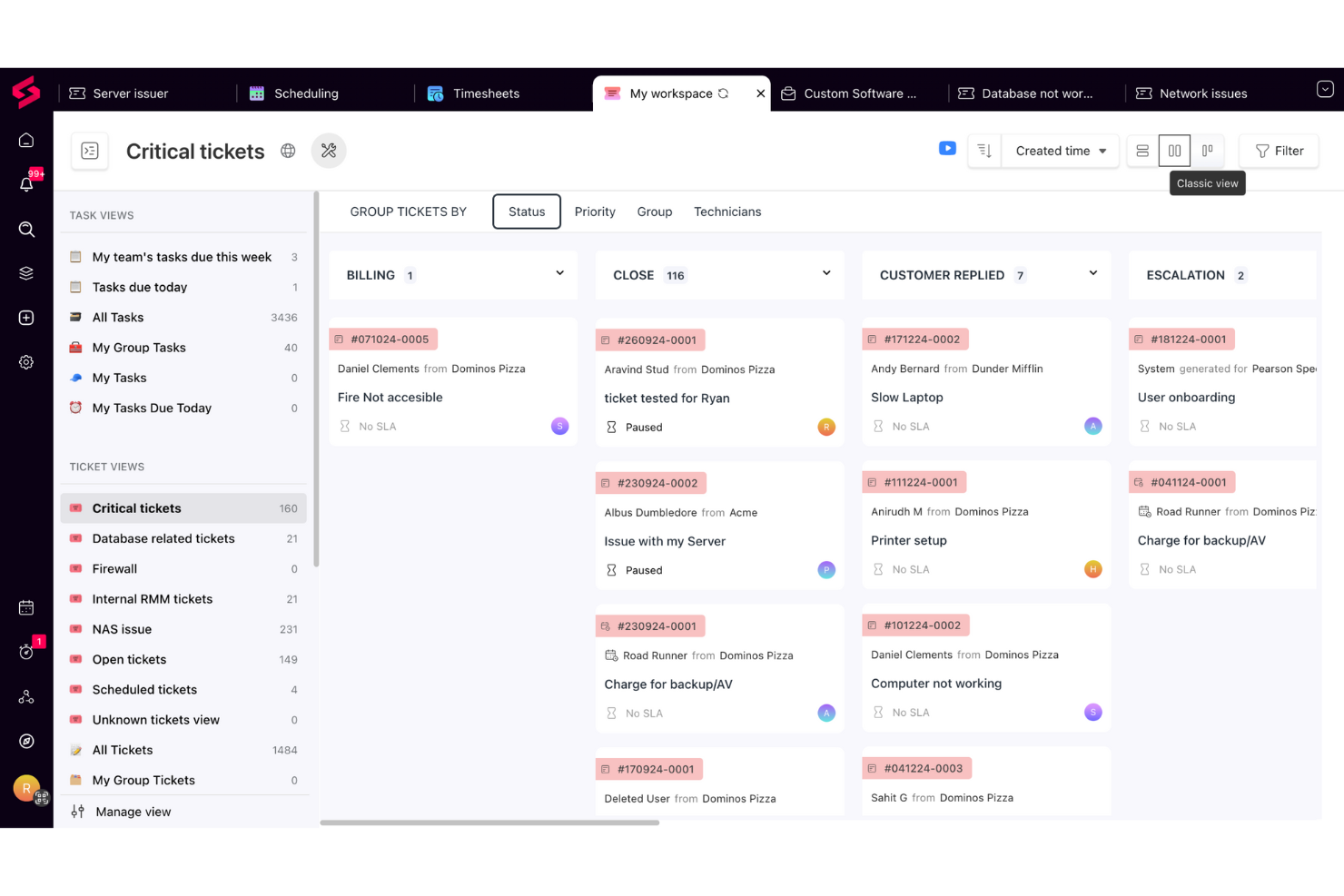
SuperOps è una piattaforma basata su cloud per l’assistenza tecnica pensata per piccoli team IT e fornitori di servizi gestiti che hanno bisogno di gestire i ticket, automatizzare i flussi di lavoro e mantenere le informazioni dei clienti organizzate in un unico posto.
Per chi è ideale SuperOps?
SuperOps è una scelta ideale per piccoli fornitori di servizi gestiti e team IT interni che si occupano del supporto multi-cliente e necessitano di una piattaforma unica per la gestione dei ticket e l’erogazione dei servizi.
Perché ho scelto SuperOps
SuperOps si guadagna il suo posto nella mia lista perché è una delle poche piattaforme di help desk che collega realmente la gestione dei ticket e la gestione dei servizi IT in un sistema unico e integrato. Mi piace come il service desk si colleghi direttamente ai dati di asset ed endpoint: così, quando arriva un ticket, i tecnici hanno già il contesto del dispositivo senza dover cambiare strumenti. La funzionalità dei runbook unificati è particolarmente utile: puoi trasformare le tue procedure operative standard in processi automatizzati passo dopo passo che si attivano su specifici tipi di ticket, accelerando i tempi di risoluzione dei problemi ricorrenti. Monica AI offre un valore aggiunto suggerendo soluzioni pertinenti da ticket passati simili direttamente nella vista del ticket in corso.
Funzionalità principali di SuperOps
- Gestione SLA: Imposta e monitora gli obiettivi di risposta e risoluzione dei ticket per rispettare le tempistiche di erogazione dei servizi.
- Portale clienti: Consenti agli utenti finali di accedere a un portale self-service personalizzato per inviare ticket, verificarne lo stato e consultare articoli della knowledge base.
- Risposte predefinite: Crea una libreria di risposte pre-scritte che i tecnici possono inserire rapidamente nei ticket per accelerare le interazioni più comuni.
- Report e analisi: Genera report su volume dei ticket, performance dei tecnici e rispetto degli SLA per monitorare il rendimento del team.
Integrazioni di SuperOps
Le integrazioni includono TeamViewer, Splashtop, ConnectWise Control, Xero, QuickBooks Online, Bitdefender, Webroot, Stripe, Entra ID e Pax8.
Pros and Cons
Pros:
- Gestisce l’allocazione delle risorse e la disponibilità dei tecnici
- Il time tracker integrato garantisce una registrazione accurata del tempo speso sui ticket
- Monica AI aiuta nella risoluzione dei ticket suggerendo soluzioni
Cons:
- Sebbene potenti, le opzioni di personalizzazione possono risultare complesse da gestire
- Rispetto ai concorrenti, SuperOps offre un numero inferiore di integrazioni di terze parti
New Product Updates from SuperOps

SuperOps Improves Ticket Visibility, Dynamic Forms, and Dashboard Views
SuperOps introduces improvements to ticket visibility, dynamic forms, and dashboard visualizations. These updates help technicians manage customer conversations, simplify ticket creation, and keep dashboard views consistent across teams. For more information, visit SuperOps' official site.
 .
.
Ideale per l’automazione dell’assistenza supportata dall’IA
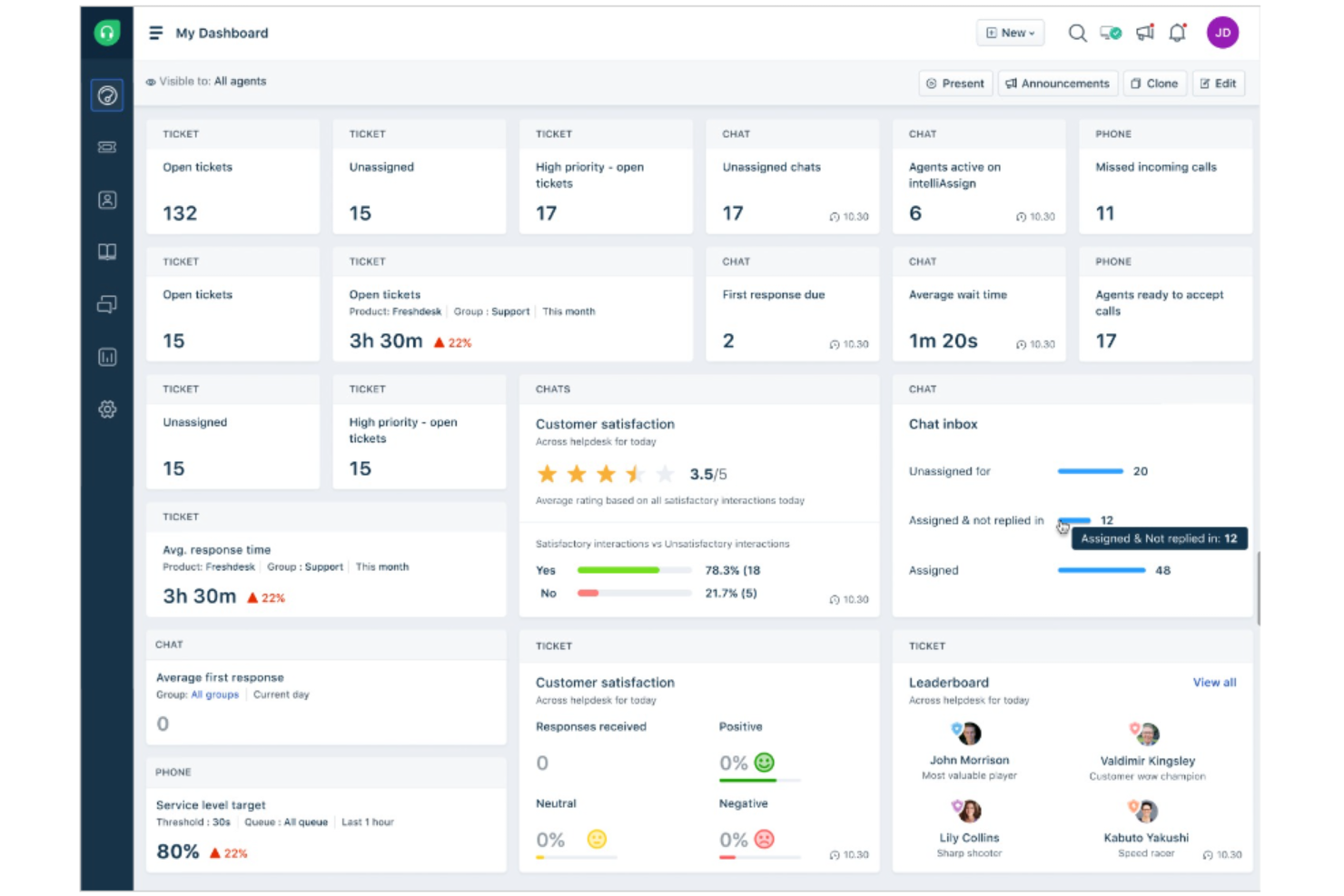
Freshdesk è una piattaforma di help desk basata su cloud progettata per le piccole imprese che devono gestire le richieste dei clienti provenienti da email, chat, telefono e canali social da un unico posto.
Per chi è ideale Freshdesk?
Freshdesk è adatto a piccoli team di assistenza che necessitano di un help desk multicanale semplice, senza una ripida curva di apprendimento o un grande budget IT.
Perché ho scelto Freshdesk
Freshdesk è una delle mie scelte principali perché adoro come la suite Freddy AI gestisce i compiti ripetitivi e ad alto volume che rallentano i piccoli team di assistenza. Freddy AI Agent utilizza flussi di lavoro agentici preconfigurati per risolvere automaticamente la maggior parte delle richieste in arrivo su chat, email e app di messaggistica—e diventa operativo in pochi minuti, un aspetto importante quando non si dispone di un team IT dedicato alla configurazione. Mi affido anche a Freddy AI Copilot ogni giorno: suggerisce risposte, riassume le conversazioni e traduce i messaggi in tempo reale, tutto all'interno dello spazio di lavoro dell'agente, così non serve cambiare contesto. Per un piccolo team che gestisce un grande volume di ticket, questo supporto immediato migliora in modo evidente la qualità e la velocità delle risposte.
Funzionalità principali di Freshdesk
- Posta in arrivo condivisa: Consolida le email dei clienti da vari indirizzi di assistenza in una sola coda, così gli agenti possono smistare e rispondere senza cambiare account.
- Assegnazione ticket basata sulle competenze: Indirizza i ticket in arrivo agli agenti in base alla loro specifica esperienza, così la persona giusta gestisce ogni problema sin dall'inizio.
- Knowledge base: Offre un portale self-service multilingue in cui i clienti possono trovare risposte alle domande più frequenti senza dover inviare un ticket.
- Policy SLA: Imposta obiettivi di risposta e risoluzione in base alla priorità del ticket, con escalation automatiche quando le scadenze sono a rischio.
Integrazioni di Freshdesk
Le integrazioni includono Slack, Microsoft Teams, Shopify, Salesforce, Jira, Playvox e app connettori per integrazioni personalizzate tramite API.
Pros and Cons
Pros:
- Interfaccia facile da usare
- Fornisce funzionalità personalizzabili
- Interfaccia facile da usare
- Offre sviluppo continuo di nuove funzionalità
- Progettato per scalare con aziende in crescita
Cons:
- La struttura dei prezzi può essere confusa
- Flessibilità limitata nella creazione di report personalizzati
New Product Updates from Freshdesk

Freshdesk Adds Voice AI Agents in Freshcaller
Freshdesk introduces Voice AI Agents available through Freshcaller Marketplace apps to handle routine calls and reduce queues. This feature enables automated call handling with real-time, conversational support. For more information, visit Freshdesk's official site.

Il miglior software help desk per piccole aziende per il supporto ai ticket multicanale
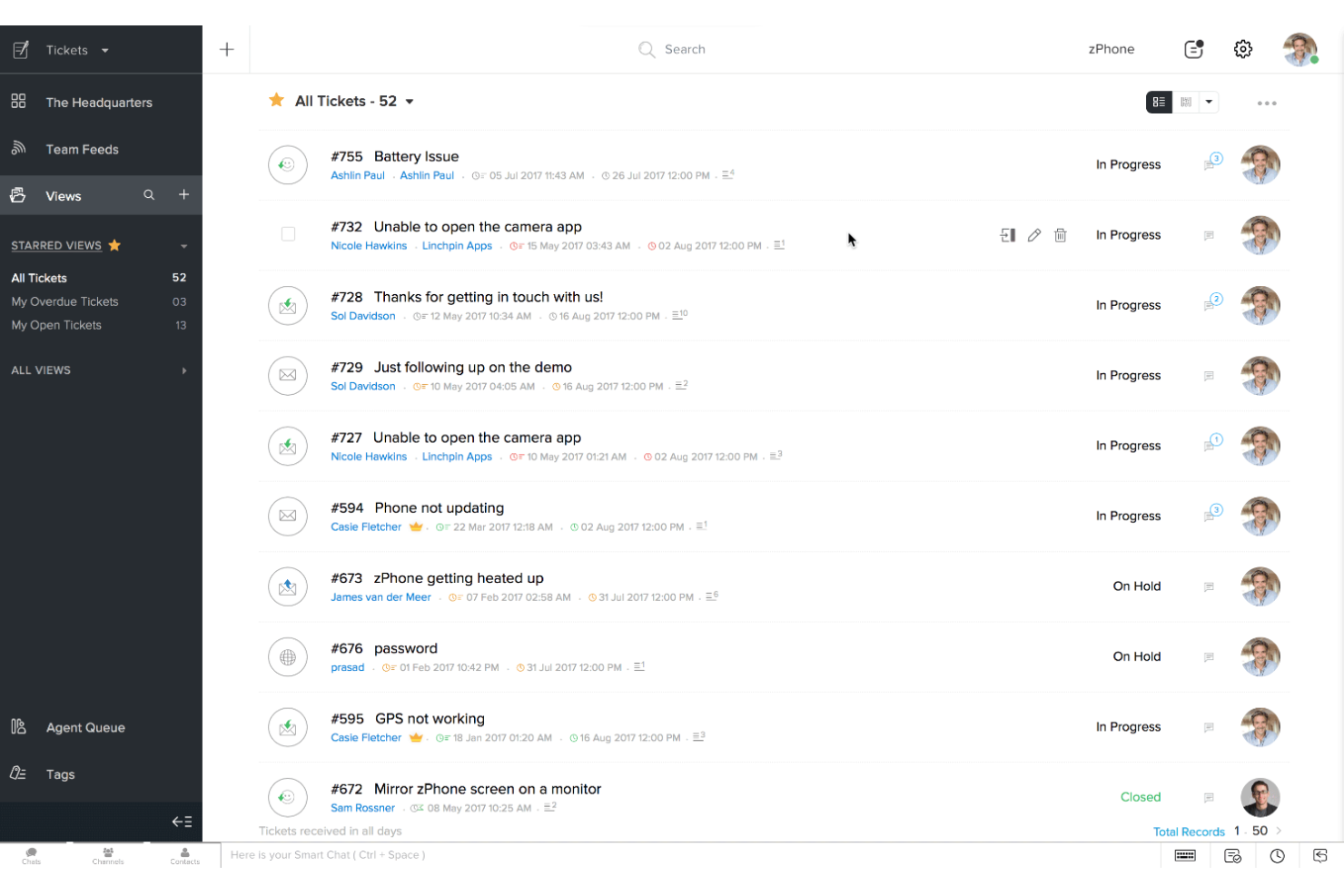
Zoho Desk è una piattaforma di help desk basata sul cloud per piccole imprese che gestiscono l'assistenza clienti su più canali e semplificano la risoluzione dei ticket.
Per Chi È Ideale Zoho Desk?
Zoho Desk è perfetto per piccoli team di supporto che gestiscono richieste dei clienti tramite email, chat, social media e telefono da un'unica piattaforma.
Perché Ho Scelto Zoho Desk
Zoho Desk si guadagna un posto nella mia lista ristretta per la capacità di gestire efficacemente il supporto ai ticket multicanale in un unico luogo. Mi piace che i ticket provenienti da email, live chat, social media e telefono arrivino tutti in una sola coda, in modo che il mio team non debba passare da uno strumento all'altro per seguire le conversazioni. Le visualizzazioni dei ticket specifiche per canale ci consentono di filtrare e dare priorità alla fonte, il che aiuta quando i ticket dai social richiedono risposte più rapide rispetto all'email. Faccio anche affidamento sulle regole SLA multicanale, che mi permettono di impostare regole sui tempi di risposta in base al canale da cui proviene il ticket.
Funzionalità Principali di Zoho Desk
- Assistente AI (Zia): Zia assegna automaticamente tag ai ticket in arrivo, suggerisce agli operatori articoli rilevanti dalla knowledge base e segnala i ticket con sentiment negativo.
- Automazione dei flussi di lavoro: Crea automazioni basate su regole per assegnare, escalare o aggiornare ticket in base a condizioni come origine del ticket, priorità o tipo di cliente.
- Portale self-service: Crea un centro assistenza personalizzato con una knowledge base e forum della community affinché i clienti trovino risposte senza dover aprire un ticket.
- Report e dashboard: Monitora il volume dei ticket, le prestazioni degli operatori e i tempi di risposta utilizzando report preconfigurati e personalizzabili.
Integrazioni di Zoho Desk
Le integrazioni includono Zoho CRM, Zoho Books, Zoho Analytics, Slack, Microsoft Teams, Jira, Trello, Shopify, Salesforce e Google Workspace.
Pros and Cons
Pros:
- Sistema di ticketing personalizzabile
- Funzionalità multicanale
- Dashboard dettagliata fornisce contesto
Cons:
- Curva di apprendimento ripida
- Personalizzazione limitata su alcuni moduli web

Ideale per programmare l'orario di invio

Help Scout offre alle piccole imprese e ai team di assistenza una casella di posta condivisa, strumenti di automazione e gestione clienti per organizzare le conversazioni, rispondere più velocemente e fornire un'esperienza clienti più personale.
Per chi è ideale Help Scout?
Help Scout è perfetto per piccoli team di supporto che desiderano una soluzione help desk semplice e collaborativa, senza una curva di apprendimento ripida.
Perché ho scelto Help Scout
Help Scout si è guadagnato un posto nella mia lista grazie all'eccellente gestione della funzione invio posticipato, ideale per team di supporto distribuiti. Posso scrivere una risposta in qualsiasi momento e programmarla perché arrivi nella casella del cliente al momento più opportuno—che si tratti del loro orario lavorativo, di una finestra di follow-up o semplicemente di quando è più probabile che rispondano. In abbinamento alla funzione posticipa, che mi consente di impostare un promemoria per ritornare su una conversazione in seguito, il mio team rimane aggiornato sulle conversazioni in sospeso senza perdere il filo di nulla. Per i piccoli team che lavorano su più fusi orari o fuori dal tradizionale orario 9-17, queste due funzioni cambiano radicalmente la gestione quotidiana della casella di posta.
Caratteristiche principali di Help Scout
- Casella di posta condivisa: Smista le email in arrivo su una casella di posta condivisa dove gli operatori possono assegnare, rispondere e collaborare alle conversazioni con i clienti.
- Risposte salvate: Conserva risposte predefinite alle domande più frequenti che gli operatori possono inserire nelle risposte con un solo click.
- Profili clienti: Visualizza lo storico completo delle conversazioni e i dati del profilo del cliente accanto a ogni ticket di supporto.
- Workflow: Imposta regole automatiche per assegnare, etichettare o dare priorità alle conversazioni in base a condizioni come mittente, oggetto o parola chiave.
Integrazioni di Help Scout
Le integrazioni includono Salesforce, Shopify, HubSpot, Jira, Slack, Stripe, Mailchimp, WhatsApp, FullStory e WooCommerce.
Pros and Cons
Pros:
- Consolidamento facile dei messaggi da più canali
- Reporting e analisi completi
- Strumenti di intelligenza artificiale integrati per risposte più rapide
Cons:
- Alcune funzionalità avanzate solo nei piani superiori
- Personalizzazione limitata nei piani base
New Product Updates from Help Scout

Help Scout Adds Automatic Conversation Reassignment
Help Scout can now automatically unassign conversations when the assigned teammate has been away long enough, keeping replies moving so others can pick them up. For more information, visit Help Scout's official site.
 .
.
eDesk
Ideale per la gestione della casella di posta unificata per l'ecommerce
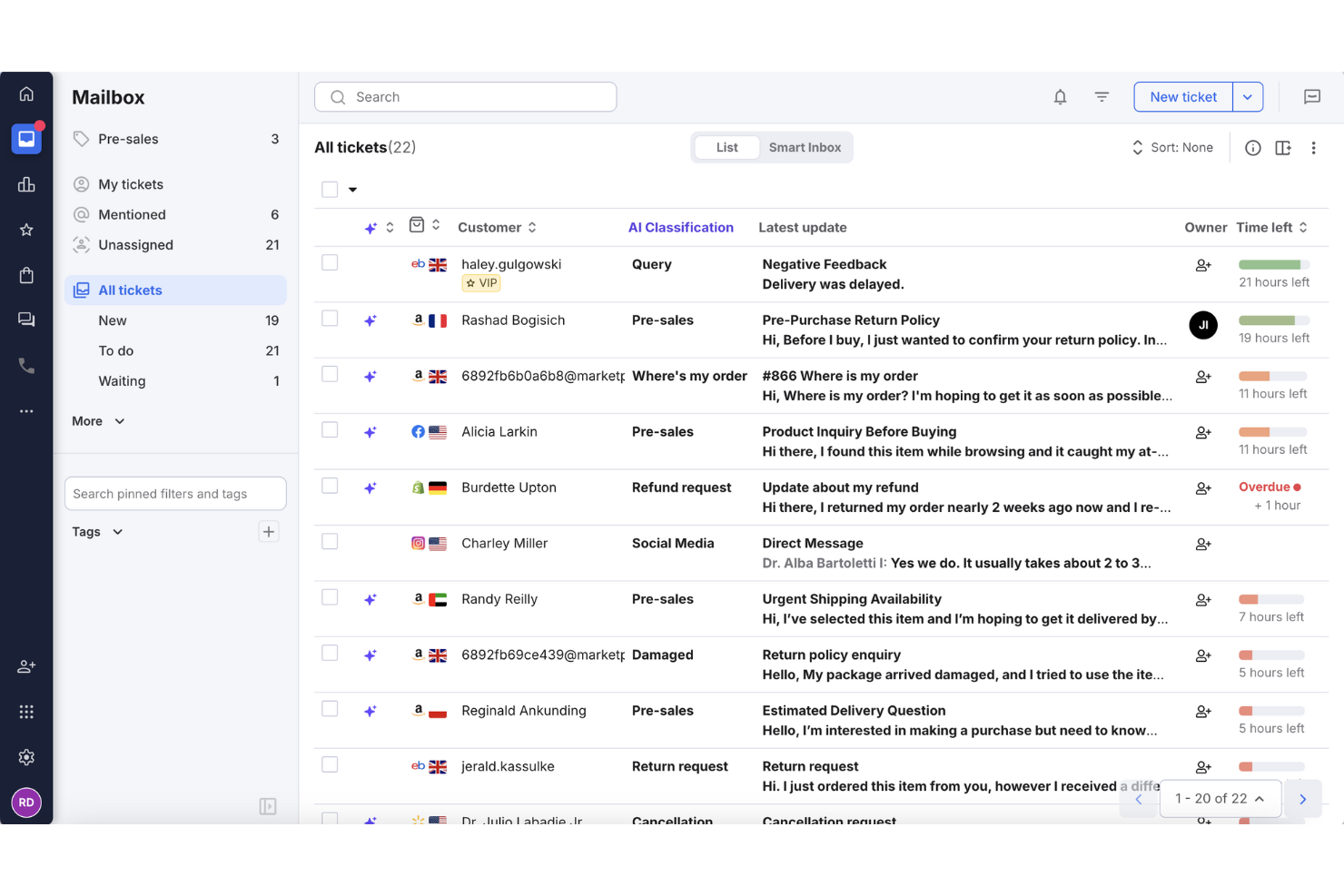
eDesk è una piattaforma di help desk progettata per aziende di e-commerce e rivenditori online che devono gestire conversazioni con i clienti, ordini e ticket di supporto attraverso molteplici canali di vendita da un'unica posizione.
Per chi è ideale eDesk?
eDesk è particolarmente adatto per le piccole imprese e-commerce che vendono su più marketplace come Amazon, eBay e Shopify e che hanno bisogno di un unico luogo per gestire tutto il supporto clienti.
Perché ho scelto eDesk
eDesk si guadagna un posto nella mia lista per l'efficacia della sua casella di posta unificata nella gestione della vendita su più canali e-commerce contemporaneamente. Mi piace il fatto che, quando arriva un ticket da Amazon, eBay o Shopify, la casella di posta recupera automaticamente i dettagli dell'ordine rilevanti, lo stato della spedizione e la cronologia del cliente accanto al messaggio—così il mio team non deve cambiare scheda o accedere a portali separati per ricostruire il contesto. Anche la classificazione automatica dei ticket tramite intelligenza artificiale offre un grande aiuto organizzativo, smistando e raggruppando automaticamente i messaggi in arrivo per evitare che qualcosa venga trascurato. Per un piccolo team che gestisce volumi elevati di messaggi su diversi negozi, questa struttura integrata fa davvero la differenza operativa.
Funzionalità principali di eDesk
- Monitoraggio SLA: Controlla gli obiettivi di tempo di risposta su tutti i canali, affinché il team individui e risolva eventuali problemi di conformità prima che influenzino i clienti.
- Chatbot IA: Risponde alle domande più comuni dei clienti su ordini, prodotti e spedizioni senza l'intervento di un operatore.
- Report CSAT: Raccoglie e visualizza i punteggi di soddisfazione dei clienti per misurare la qualità del supporto e identificare dove è necessario migliorare le prestazioni degli operatori.
- Knowledge base: Pubblica articoli di auto-aiuto sul sito web per ridurre il volume di ticket in arrivo.
Integrazioni di eDesk
Le integrazioni includono Amazon, eBay, Shopify, Walmart, WooCommerce, BigCommerce, Magento, Facebook, Instagram e Klaviyo.
Pros and Cons
Pros:
- Integra dati dettagliati degli ordini per un servizio clienti avanzato
- Automazioni basate su IA migliorano la rapidità delle risposte
- Progettato per gestire grandi volumi di richieste ecommerce
Cons:
- Sviluppato principalmente per l'ecommerce, meno flessibile per altri settori
- Personalizzazione limitata dei report per analisi complesse
New Product Updates from eDesk
eDesk Adds Galeria and Kaufland Support in Spain and Netherlands
eDesk adds support for Galeria, Kaufland Spain, and Kaufland Netherlands marketplaces. These integrations bring more European buyer messages into eDesk with routing, templates, AI insights, and automated translation. For more information, visit eDesk’s official site.
 .
.
Ideale per la risoluzione automatica dei ticket basata sull'AI
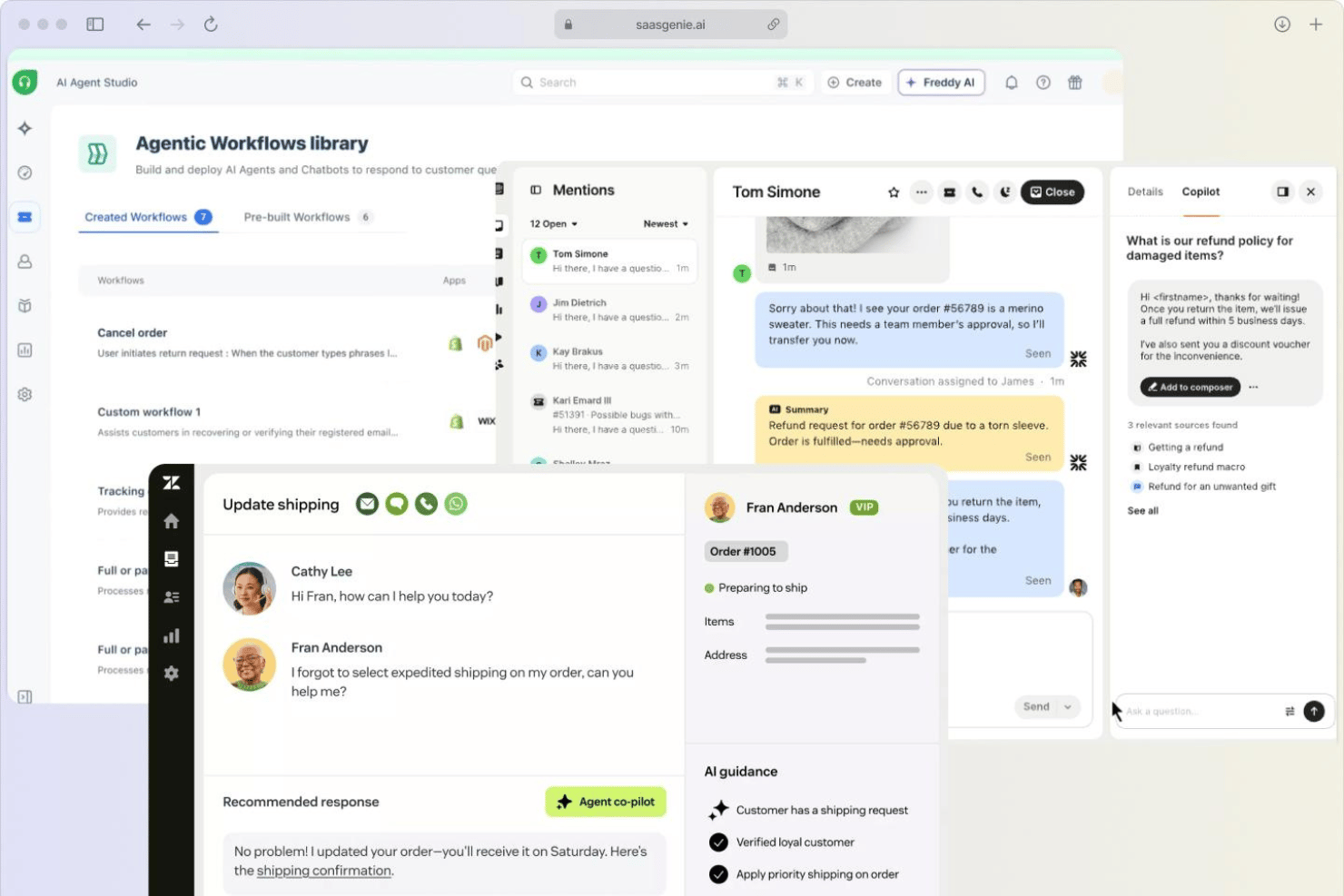
SparrowDesk è una piattaforma di assistenza nativa dell'AI per piccole imprese che unifica email, chat dal vivo, WhatsApp, Facebook Messenger e Slack in un'unica casella di posta, con automazione dei flussi di lavoro integrata, una base di conoscenza per l'autoassistenza e la risoluzione autonoma dei ticket.
Per chi è più adatto SparrowDesk?
SparrowDesk è particolarmente adatto ai piccoli team che vogliono che l'AI gestisca autonomamente i ticket di routine, consentendo agli agenti di concentrarsi sui problemi complessi senza aumentare il numero di dipendenti.
Perché ho scelto SparrowDesk
SparrowDesk è entrato nella mia rosa dei preferiti perché il suo agente AI Zoona non si limita a elaborare risposte: risolve completamente i ticket senza alcun intervento da parte degli agenti. Sono particolarmente colpito dal modo in cui Zoona si addestra sulle conversazioni reali già risolte, individua le lacune nella conoscenza e mette in coda gli articoli elaborati per l'approvazione con un solo clic. In pratica, un team di supporto di tre persone può gestire volumi di ticket che altrimenti richiederebbero nuove assunzioni, con utenti che segnalano tassi di risoluzione automatica del 60–67% per le richieste di routine.
Funzionalità principali di SparrowDesk
- Casella di posta omnicanale: Indirizza i ticket provenienti da email, chat dal vivo, WhatsApp, Facebook Messenger e Slack in un'unica coda condivisa, con regole unificate per i flussi di lavoro.
- Sondaggi CSAT: Invia automaticamente sondaggi personalizzabili sulla soddisfazione dopo ogni ticket risolto, con punteggi collegati alle singole conversazioni e suddivisibili per agente o canale.
- Politiche SLA: Consente di impostare obiettivi di risposta e risoluzione in base alla priorità, al canale o al tipo di cliente, con timer che tengono conto dell'orario lavorativo e si mettono automaticamente in pausa e riprendono.
- Copilota AI: Fornisce agli agenti che gestiscono ticket inoltrati risposte elaborate dall'AI, riepiloghi delle conversazioni e suggerimenti sui passaggi successivi direttamente nella vista del ticket.
Integrazioni di SparrowDesk
SparrowDesk offre integrazioni native con Gmail, Slack, WhatsApp, Facebook Messenger, HubSpot, Shopify, Notion, Jira e Linear. Offre inoltre un'API per sviluppatori e un'integrazione con Zapier per connettività personalizzata.
Pros and Cons
Pros:
- L'AI risolve autonomamente la maggior parte dei ticket di routine
- Articoli per l'autoassistenza elaborati a partire da conversazioni reali
- Configurazione rapida con un'interfaccia chiara e intuitiva
Cons:
- Il Copilota AI viene addebitato come componente aggiuntivo separato
- Le analisi avanzate sono disponibili solo nel piano aziendale

Missive
Ideale per gestire caselle di posta condivise
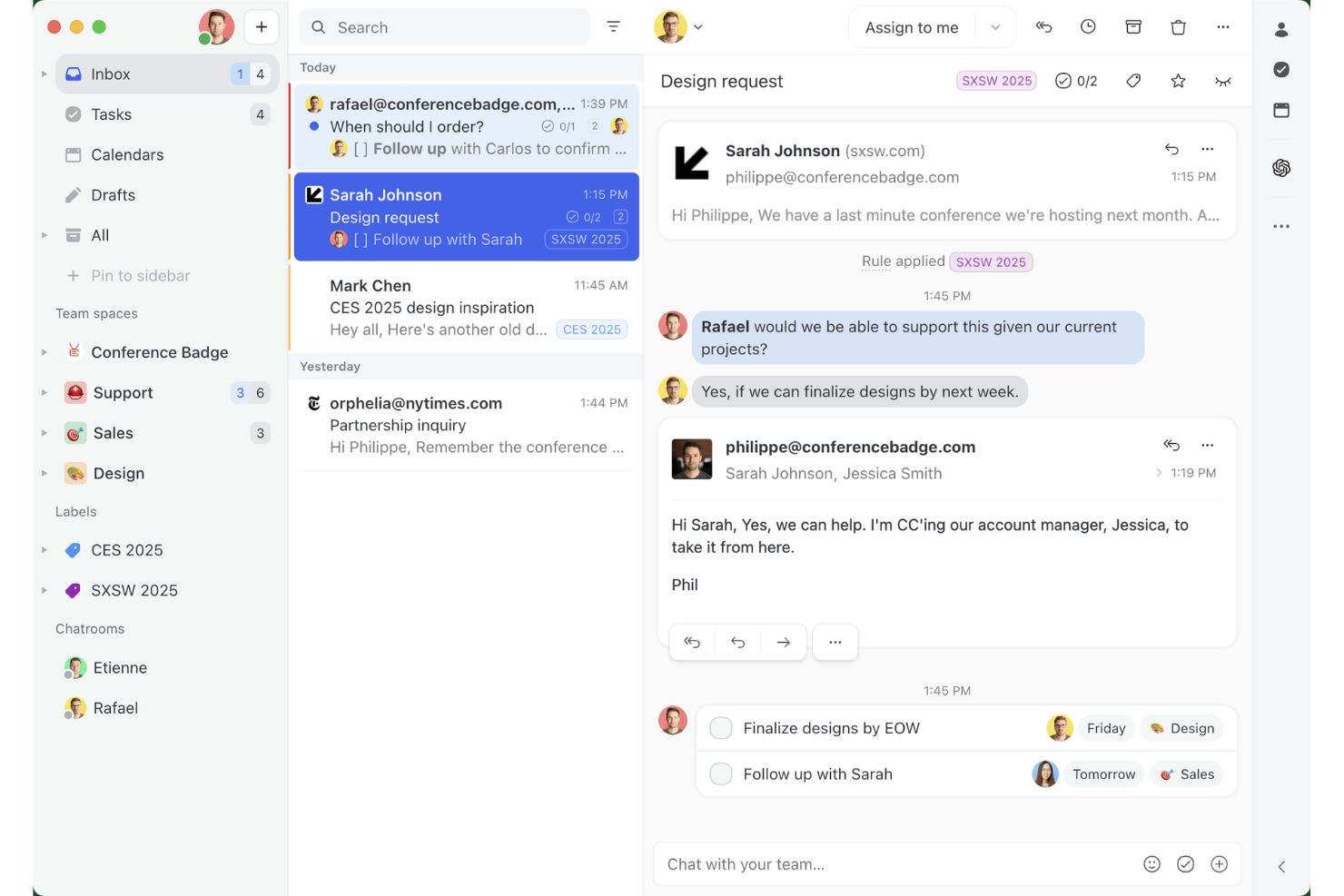
Missive è una piattaforma di posta in arrivo condivisa e messaggistica collaborativa che riunisce e-mail, SMS, WhatsApp, messaggi diretti di Instagram e chat dal vivo in un unico spazio di lavoro per il team.
Per chi è più adatto Missive?
Missive è ideale per piccoli team e fondatori indipendenti che gestiscono conversazioni con i clienti tramite e-mail, SMS e canali social e hanno bisogno di una posta in arrivo condivisa su cui più persone possano lavorare insieme.
Perché ho scelto Missive
Missive si è guadagnato un posto nella mia selezione perché la stesura collaborativa in tempo reale lo distingue da tutti gli altri strumenti di posta in arrivo condivisa che ho testato. Quando due operatori aprono la stessa conversazione, scrivono insieme la risposta simultaneamente, proprio come in un documento Google, mentre il rilevamento delle collisioni blocca automaticamente gli invii duplicati. Mi piace anche il fatto che i thread dei commenti interni siano integrati direttamente nella conversazione, così il mio team può discutere una risposta complessa senza intasare la posta in arrivo del cliente con messaggi accidentali del tipo 'rispondi a tutti'.
Caratteristiche principali di Missive
- Posta in arrivo multicanale: riunisce e-mail, SMS, WhatsApp, messaggi diretti di Instagram, Facebook Messenger e chat dal vivo in un unico spazio di lavoro condiviso.
- Motore di regole per l'automazione: supporta fino a 1.000 regole per l'assegnazione automatica, l'instradamento, l'etichettatura e i trigger di follow-up nei piani Productive e Business.
- Stesura assistita delle risposte tramite IA: genera bozze di risposta utilizzando il contesto completo della conversazione, con supporto per OpenAI, Anthropic e Google Gemini tramite la propria chiave API.
- Risposte predefinite: i modelli di risposta già pronti con campi variabili consentono agli operatori di inviare in pochi secondi risposte coerenti e personalizzate.
- Server MCP di Missive: collega strumenti di IA esterni, come Claude o ChatGPT, per consultare i thread dell'help desk, controllare i calendari e preparare risposte, mantenendo tuttavia obbligatoria la revisione dell'operatore prima dell'invio.
Integrazioni di Missive
Missive offre oltre 25 integrazioni native, tra cui HubSpot, Salesforce, Shopify, Asana, ClickUp, Trello e Aircall. I piani Productive e Business includono un'API aperta, la connettività Zapier e il nuovo server MCP, che richiede l'attivazione da parte dell'amministratore.
Pros and Cons
Pros:
- Stesura collaborativa in tempo reale per risposte più rapide
- Posta in arrivo multicanale inclusa nel piano base
- Le app mobili supportano la gestione completa della posta in arrivo
Cons:
- Nessuna base di conoscenza integrata per i clienti
- Nessun sondaggio CSAT o NPS nativo
New Product Updates from Missive
Missive Adds Conversation Pins
Missive now lets you pin key links, decisions, and notes inside a conversation, keeping them accessible in a dedicated Pins section in the Details sidebar. For more information, visit Missive's official site.
 .
.
Zendesk
Il miglior software di help desk alimentato dall'intelligenza artificiale per aziende in crescita
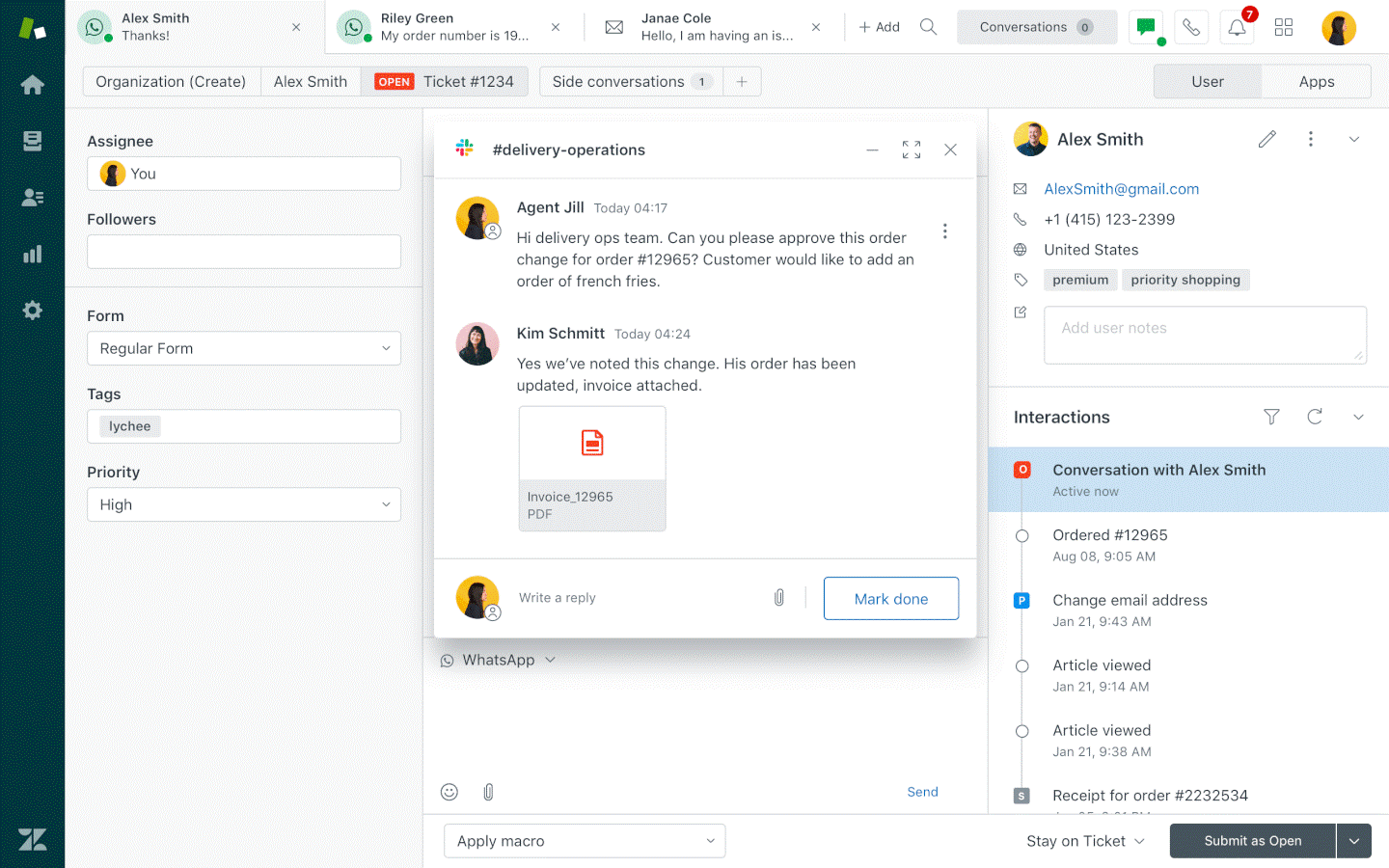
Zendesk offre alle piccole imprese una piattaforma di help desk flessibile che riunisce le conversazioni dei clienti provenienti da email, chat e canali social, rendendo più facile per i team di supporto gestire le richieste e fornire un servizio rapido e coerente.
Per chi è ideale Zendesk?
Zendesk è perfetto per le piccole imprese che prevedono di crescere e hanno bisogno di un help desk che possa scalare insieme al loro team di supporto senza dover cambiare piattaforma.
Perché ho scelto Zendesk
Ho scelto Zendesk perché le sue funzionalità di intelligenza artificiale sono integrate nel prodotto principale e non aggiunte successivamente. Mi piace in particolare la funzione di agente AI, che può risolvere autonomamente la maggior parte delle interazioni con i clienti provenienti da vari canali senza intervento umano. La funzione Copilot suggerisce risposte, rileva il sentimento del cliente e consiglia le prossime azioni direttamente nell'area di lavoro dell'agente, così il mio team non deve cercare informazioni durante la conversazione. Per una piccola impresa in rapida crescita, la gestione e l'instradamento assistiti dall'AI consentono di gestire un volume maggiore di ticket senza dover assumere subito nuovi operatori.
Funzionalità principali di Zendesk
- Gestione ticket omnicanale: Consolida le conversazioni con i clienti da email, chat, telefono e social media in un'unica casella di posta unificata.
- Costruttore di knowledge base: Crea e pubblica un help center self-service per permettere ai clienti di trovare risposte senza contattare il supporto.
- Workflow personalizzabili: Crea regole di instradamento dei ticket e trigger automatici per assegnare, prioritizzare ed eseguire l'escalation dei ticket secondo la logica del tuo team.
- Report e analytics: Monitora il volume dei ticket, i tempi di risposta e le prestazioni degli operatori tramite dashboard preconfigurati e personalizzati.
Integrazioni Zendesk
Le integrazioni includono Slack, Shopify, Google Play Reviews, Harvest, ChannelReply, Trustpilot, Pipedrive, Sprout Social, Amazon ed eBay.
Pros and Cons
Pros:
- Operazioni di assistenza clienti centralizzate
- Ottima gestione delle richieste
- Facile da usare
Cons:
- Curva di apprendimento ripida per la personalizzazione
- Il servizio chat è disponibile solo nei piani superiori
New Product Updates from Zendesk
Zendesk Adds Email AI Replies and Predictive Routing
Zendesk’s latest email AI agents update brings configurable knowledge and welcome replies and adds predictive routing for email tickets, so you can tailor your automated emails and get inquiries resolved faster. For more information, visit Zendesk’s official site.
Altre opzioni
Ecco alcune altre opzioni valide che non sono entrate nell’elenco dei migliori software di assistenza clienti per piccole imprese:
- Agentforce Service (formerly Service Cloud)
Ideale per la personalizzazione potenziata dall'IA
- Tidio
Il miglior software help desk per piccole imprese con monitoraggio in tempo reale dei visitatori
- EngageBay
Miglior software di help desk per piccole imprese in termini di scalabilità
- Front
Ideale per automatizzare attività ripetitive
- Halo
Il miglior software help desk per piccole imprese con portali self-service per i clienti
- monday service
Ideale per tracciare e gestire le richieste di supporto
- Gorgias
Il miglior software help desk per piccole imprese per monitorare le prestazioni degli agenti
- Issuetrak
Ideale per supporto help desk omnicanale
- Avochato
Miglior software help desk per piccole imprese per funzionalità mobile
- InvGate Service Management
Il miglior software di help desk per piccole imprese per l'allineamento con le migliori pratiche ITIL


Come Valuto il Software di Help Desk
Scompongo la mia valutazione in due livelli: le capacità di base che ogni strumento deve avere—pensa all'acquisizione multicanale e all'automazione degli SLA—e i fattori differenzianti che distinguono una piattaforma dall'altra.
Funzionalità di Base (Requisiti Minimi per Questa Lista)
Queste funzionalità di base rappresentano i criteri di accettazione per l'inclusione nella mia lista di software di help desk:
- Gestione dei Ticket: Valuto come ogni strumento gestisce l'intero ciclo di vita del ticket—stati personalizzati, livelli di priorità, collegamento padre-figlio e se gli agenti possono unire richieste duplicate dallo stesso utente finale.
- Acquisizione Multicanale: Ogni canale tramite cui un utente finale ti contatta dovrebbe confluire in una sola coda, quindi verifico se email, chat, telefono, moduli web e social sono tutti unificati in una sola visuale dei ticket.
- Automazione & Smistamento: Cerco assegnazioni basate su regole, timer SLA con consapevolezza degli orari di lavoro e percorsi di escalation—come l'instradamento automatico dei ticket per il reset delle password a un gruppo specifico di primo livello.
- Knowledge Base & Self-Service: Un buon portale permette agli utenti di cercare articoli, inviare ticket e monitorare lo stato senza dover inviare email, quindi valuto la qualità della ricerca, l'organizzazione degli articoli e le opzioni di personalizzazione del portale.
- Reportistica & Analisi: Le dashboard dovrebbero coprire i parametri a cui tengono davvero i responsabili dell'assistenza—tempo di risoluzione, rispetto degli SLA, carico di lavoro degli agenti—e verifico se i report sono personalizzabili o solo statici.
- Collaborazione & Workspace degli Agenti: I team che condividono i ticket hanno bisogno di rilevamento delle collisioni, note interne e @menzioni, perciò valuto come ogni piattaforma supporta la collaborazione multi-agente su una singola richiesta.
Valuto ogni fornitore su una scala da 0 (non offre la funzionalità) a 5 (eccelle in quell'area) per ciascun criterio.
I fornitori devono ottenere un punteggio medio minimo per essere presi in considerazione per l'inclusione nella mia lista. Da lì considero ciò che distingue ogni piattaforma.
Fattori Differenzianti (Cosa Distingue i Fornitori)
Una volta creata la mia lista, ecco come confronto e metto a contrasto i diversi fornitori:
Caratteristiche Distintive
Cerco piattaforme che integrano la gestione automatica dei ticket e agenti virtuali alimentati dall'IA, poiché queste riducono il lavoro manuale gestendo automaticamente reset delle password o richieste di stato. La presenza di gestione delle risorse e delle configurazioni integrata è fondamentale per i team IT che devono collegare i ticket ai record hardware o software. Gli strumenti che offrono un'esperienza mobile per gli agenti consentono ai tecnici sul campo di rispondere e risolvere ticket senza essere alla scrivania, cosa essenziale per i team distribuiti. Controllo anche la presenza di strumenti per la soddisfazione dei clienti, come sondaggi CSAT o NPS integrati e collegati direttamente alle dashboard di performance degli agenti.
Oltre le Caratteristiche
La profondità dell'integrazione è importante—valuto se una piattaforma si connette nativamente a strumenti come Slack, Microsoft Teams, Salesforce e fornitori di identità come Okta, poiché queste integrazioni influenzano i flussi di lavoro quotidiani degli agenti. La struttura dei prezzi è un altro fattore chiave, soprattutto se le licenze per agente sono sostenibili man mano che il team cresce o se i modelli con agenti illimitati risultano più adatti. Considero anche l'aderenza verticale e la compatibilità con i casi d'uso, dato che una piattaforma costruita attorno a framework ITIL per il supporto IT interno appare spesso molto diversa rispetto a una progettata per team di assistenza a clienti esterni.
Come scegliere un software di assistenza clienti per piccole imprese
È facile perdersi in lunghi elenchi di funzionalità e strutture di prezzo complesse. Per aiutarti a rimanere concentrato mentre affronti il tuo particolare processo di selezione del software, ecco un elenco di fattori da tenere a mente:
| Fattore | Cosa considerare |
|---|---|
| Scalabilità | Assicurati che il software possa crescere insieme alla tua azienda. Cerca opzioni che ti consentano di aggiungere utenti o funzionalità quando le tue esigenze aumentano, senza interruzioni significative. |
| Integrazioni | Verifica se il software si integra con gli strumenti già utilizzati dal tuo team, come CRM, piattaforme di posta elettronica o canali dei social network, per mantenere tutto collegato. |
| Personalizzazione | Valuta quanto puoi adattare il software al tuo flusso di lavoro. Impostazioni e opzioni flessibili possono renderlo più adatto alle tue esigenze specifiche. |
| Semplicità d'uso | Cerca un'interfaccia intuitiva che il tuo team possa utilizzare senza una formazione approfondita. Un design facile da usare farà risparmiare tempo e ridurrà la frustrazione. |
| Budget | Valuta il costo totale, comprese eventuali commissioni nascoste. Confronta le funzionalità e i livelli di prezzo per assicurarti di ottenere il miglior valore per il tuo investimento. |
| Misure di sicurezza | Assicurati che il software rispetti gli standard di settore per la protezione dei dati. Funzionalità come la crittografia e i controlli degli accessi sono essenziali per proteggere le informazioni. |
Tendenze nei software di assistenza clienti per piccole imprese
Nella mia ricerca, ho raccolto innumerevoli aggiornamenti sui prodotti, comunicati stampa e registri delle versioni di diversi fornitori di software per servizi di assistenza destinati alle piccole imprese. Ecco le tendenze emergenti che sto tenendo d'occhio:
- Strumenti di assistenza con IA: Il 70% delle organizzazioni ritiene che l'IA migliorerà significativamente le proprie attività di assistenza clienti. Un numero crescente di strumenti integra l'IA per analizzare le interazioni con i clienti e fornire informazioni utili. Ad esempio, alcuni fornitori offrono analisi basate sull'IA per evidenziare i problemi più comuni e suggerire soluzioni.
- Portali per il fai da te: Si sta diffondendo sempre più l'idea di mettere i clienti nelle condizioni di utilizzare opzioni autonome. Questi portali consentono agli utenti di trovare autonomamente le risposte, riducendo il carico di lavoro dei team di supporto. I fornitori li stanno potenziando con interfacce intuitive e basi di conoscenza complete.
- Supporto su più canali: Oggi ci si aspetta che le aziende gestiscano senza interruzioni le interazioni con i clienti attraverso più canali. Questa tendenza vede i fornitori proporre piattaforme integrate per gestire email, chat, social network e altro ancora, tutto da un'unica interfaccia.
- Funzionalità di supporto da remoto: Con la diffusione del lavoro da remoto, le soluzioni per i servizi di assistenza si concentrano sulle funzionalità che supportano la risoluzione dei problemi a distanza. Ciò include strumenti di assistenza virtuale e accesso al desktop remoto per risolvere i problemi in modo efficiente senza la presenza fisica.
- Personalizzazione basata sui dati: La personalizzazione dell'esperienza del cliente utilizzando informazioni ricavate dai dati sta diventando fondamentale. Gli strumenti offrono ora funzionalità per personalizzare le interazioni sulla base dei comportamenti e delle preferenze passati, migliorando la soddisfazione e la fidelizzazione degli utenti.
Che cos'è il software per servizi di assistenza destinati alle piccole imprese?
Il software per servizi di assistenza destinati alle piccole imprese è uno strumento progettato per gestire in modo efficiente le richieste dei clienti e le richieste di supporto. Questi strumenti sono generalmente utilizzati dai professionisti dell'assistenza clienti, dal personale IT e dai titolari di piccole imprese per migliorare la soddisfazione dei clienti e ottimizzare le attività di supporto.
Le funzionalità di gestione delle segnalazioni, i portali per il fai da te e il supporto su più canali aiutano a organizzare le richieste, mettere i clienti nelle condizioni di trovare autonomamente le risposte e gestire le interazioni attraverso diversi canali. Nel complesso, questi strumenti consentono alle aziende di offrire un'assistenza clienti migliore e più reattiva.
Funzionalità del software per servizi di assistenza destinati alle piccole imprese
Quando selezioni un software per servizi di assistenza destinati alle piccole imprese, presta attenzione alle seguenti funzionalità chiave:
- Gestione delle segnalazioni: Organizza le richieste dei clienti in segnalazioni gestibili, consentendo al team di stabilire le priorità e affrontare i problemi in modo efficiente.
- Portali per il fai da te: Consentono ai clienti di trovare autonomamente le risposte, riducendo il carico di lavoro del team di supporto e migliorando i tempi di risposta.
- Supporto su più canali: Consente di gestire le interazioni con i clienti attraverso più piattaforme, come email, chat e social network, da un'unica interfaccia.
- Strumenti di IA nei servizi di assistenza: Dall'analisi dei dati tramite IA ai chatbot basati sull'IA, fino all'assistenza dell'IA generativa per gli operatori, l'IA è uno strumento potente a supporto dell'assistenza clienti.
- Funzionalità di supporto da remoto: Offre strumenti come l'assistenza virtuale e l'accesso al desktop remoto per risolvere efficacemente i problemi degli utenti da remoto.
- Personalizzazione basata sui dati: Personalizza le interazioni con i clienti sulla base dei comportamenti passati, migliorando la soddisfazione degli utenti e favorendone la fidelizzazione.
- Cruscotti personalizzabili: Consentono ai team di adattare l'interfaccia alle proprie esigenze specifiche di flusso di lavoro, migliorando usabilità ed efficienza.
- Integrazione con i sistemi CRM: Garantisce un flusso di dati continuo tra il servizio di assistenza e gli strumenti di gestione delle relazioni con i clienti, migliorando le informazioni sui clienti.
- Reportistica e analisi: Fornisce informazioni dettagliate sulle metriche delle prestazioni, aiutando i team a monitorare l'efficienza e a individuare le aree di miglioramento.
- Funzionalità di automazione: Consentono di automatizzare le attività ripetitive e dispendiose in termini di tempo, lasciando al team più tempo da dedicare ad attività creative e strategiche.
Software per servizi di assistenza: considerazioni su sicurezza e conformità
Quando scegli un software per servizi di assistenza, la sicurezza e la conformità sono fondamentali per proteggere i dati sensibili e rispettare le normative di settore. Ecco le considerazioni principali:
- Crittografia dei dati: assicurati che i dati siano crittografati durante il trasferimento (SSL/TLS) e quando sono archiviati, per impedire gli accessi non autorizzati.
- Controlli degli accessi: utilizza autorizzazioni basate sui ruoli e l'autenticazione a più fattori (MFA) per limitare gli accessi.
- Registri di controllo: conserva registri dettagliati delle attività degli utenti per monitorare le modifiche e rilevare gli incidenti di sicurezza.
- Standard di conformità: verifica il rispetto delle normative di settore come GDPR, HIPAA o ISO 27001, a seconda della tua attività.
- Backup e ripristino dei dati: backup regolari e piani di ripristino in caso di emergenza proteggono dalla perdita di dati.
- Integrazioni sicure: assicurati che le integrazioni di terze parti seguano le migliori pratiche di sicurezza per prevenire le vulnerabilità.
- Protezione della privacy degli utenti: implementa politiche per salvaguardare i dati dei clienti e limitare la raccolta non necessaria di dati.
- Piano di risposta agli incidenti: definisci una strategia per rilevare, segnalare e gestire efficacemente le violazioni della sicurezza.
Queste misure aiutano a mantenere sicuro il tuo servizio di assistenza, garantendo al contempo la conformità ai requisiti legali e di settore.
Vantaggi del software per il servizio di assistenza per le piccole imprese
L'implementazione di un software per il servizio di assistenza per le piccole imprese offre numerosi vantaggi al tuo team e alla tua attività. Ecco alcuni dei vantaggi che puoi aspettarti:
- Maggiore efficienza: le funzionalità di gestione dei ticket e automazione aiutano il tuo team a stabilire le priorità e risolvere più rapidamente i problemi, risparmiando tempo e risorse.
- Maggiore soddisfazione dei clienti: i portali di autoassistenza e l'assistenza omnicanale assicurano che i clienti ricevano un supporto tempestivo e accurato sulle piattaforme che preferiscono.
- Decisioni basate sui dati: le analisi basate sull'IA e gli strumenti di reportistica forniscono dati preziosi per perfezionare le strategie di assistenza e migliorare la qualità del servizio.
- Riduzione dei costi: la gestione efficiente delle richieste e la riduzione del carico di lavoro dei team di assistenza possono portare a costi operativi inferiori nel tempo.
- Maggiore flessibilità: i pannelli di controllo personalizzabili e l'integrazione con i sistemi CRM consentono al tuo team di adattare il software alle esigenze specifiche dell'attività.
- Maggiore sicurezza: le misure di sicurezza proteggono i dati sensibili dei clienti, garantendo la conformità agli standard di settore e rafforzando la fiducia dei clienti.
- Scalabilità: con la crescita della tua attività, le soluzioni scalabili assicurano che il software per il servizio di assistenza possa espandersi insieme alle tue esigenze senza interruzioni.
Costi e prezzi del software per il servizio di assistenza per le piccole imprese
La scelta di un software per il servizio di assistenza per le piccole imprese richiede una conoscenza dei vari modelli e piani tariffari disponibili. I costi variano in base alle funzionalità, alle dimensioni del team, ai componenti aggiuntivi e ad altri fattori. La tabella seguente riassume i piani più comuni, i relativi prezzi medi e le funzionalità tipicamente incluse nelle soluzioni software per il servizio di assistenza per le piccole imprese:
Tabella comparativa dei piani del software per il servizio di assistenza per le piccole imprese
| Tipo di piano | Prezzo medio | Funzionalità comuni |
|---|---|---|
| Piano gratuito | $0/user/month | Gestione di base dei ticket, assistenza via e-mail e reportistica limitata. |
| Piano personale | $5-$25/user/month | Gestione avanzata dei ticket, portale di autoassistenza e analisi di base. |
| Piano aziendale | $30-$60/user/month | Assistenza multicanale, strumenti di automazione e integrazione con i sistemi CRM. |
| Piano per grandi imprese | $70-$120/user/month | Pannelli di controllo personalizzabili, analisi basate sull'IA e funzionalità di sicurezza avanzate. |
Domande frequenti
Se la tua piccola impresa ha appena iniziato a cercare una soluzione per l’assistenza clienti, probabilmente hai diverse domande sul software di help desk in generale. Ho raccolto qui alcune delle domande frequenti più comuni per fare chiarezza.
Quale tipo di software di help desk viene utilizzato in una piccola impresa?
Le piccole imprese e le startup hanno esigenze molto diverse da quelle di una grande azienda. Probabilmente non avrai bisogno di centinaia di agenti in tempo reale per rispondere a migliaia di ticket di assistenza in un determinato giorno. Potresti però aver bisogno di un modo per archiviare in modo sicuro i dati della cronologia dei clienti man mano che la tua attività cresce, oppure della possibilità di delegare all’IA le attività amministrative più ripetitive. Tutte le piattaforme software per l’assistenza clienti presenti in questo elenco soddisfano le esigenze specifiche delle piccole imprese con numerose funzionalità personalizzate.
Prima di immergerti nel processo di selezione, ti consiglio di consultare questi consigli su come scegliere innanzitutto il miglior software di help desk.
Come funziona il software di help desk?
Un help desk è uno spazio online in cui i clienti possono comunicare con la tua piccola impresa per affrontare problematiche come:
- Domande sui prodotti
- Assistenza nella navigazione della tua piattaforma
- Problemi informatici
L’interfaccia dell’help desk offre ai tuoi clienti un modo semplice per contattarti e ricevere assistenza rapidamente e può fare una grande differenza nell’aumentare la fedeltà e la soddisfazione dei clienti. Sapevi che l’80% dei consumatori sarebbe disposto a pagare di più per ricevere un’assistenza clienti migliore? Il software di help desk per piccole imprese può aiutarti a offrire un’esperienza cliente migliore.
In che modo il software di help desk può essere utile a una piccola impresa?
Il software di help desk può aiutare le piccole imprese a semplificare le attività di assistenza clienti, facilitando una comunicazione chiara tra il team e i clienti e consentendo di risolvere i loro problemi in modo efficiente.
Quando un cliente incontra un problema e riceve rapidamente e gentilmente una soluzione, la sua fiducia nel tuo marchio cresce. Certo, a prima vista, aiutare qualcuno a gestire un errore 404 può sembrare una cosa da poco. In realtà, però, significa gettare i semi della fedeltà al marchio, un fattore fondamentale per la crescita dei ricavi delle piccole imprese.
In questo senso, il software di help desk per piccole imprese non offre solo gli elementi pratici della comunicazione e dell’analisi. Offre anche l’opportunità più intangibile , ma estremamente vantaggiosa, di coltivare le relazioni con i clienti.
Come posso creare un sistema di help desk?
La buona notizia è che non devi farlo tu! Quando collabori con un software di help desk per piccole imprese, sarà il fornitore a creare il sistema di help desk per tuo conto. Devi solo installare il software e iniziare a utilizzare lo strumento. Dopo aver dedicato un po’ di tempo alla configurazione iniziale e alla personalizzazione dell’interfaccia, puoi iniziare a interagire con i clienti tramite il tuo nuovo sistema di help desk più velocemente di quanto tu possa dire “valutazione a 5 stelle”.
Quali tipi di report e analisi dovrebbe offrire il mio help desk?
Il tuo help desk dovrebbe offrire report e analisi che forniscano informazioni su prestazioni, efficienza e soddisfazione dei clienti. Ecco i tipi principali da includere:
- Report sul volume dei ticket: monitora il numero di ticket ricevuti, risolti e in attesa nel tempo.
- Tempo di risposta e risoluzione: misura la rapidità con cui gli agenti rispondono ai problemi e li risolvono.
- Prestazioni degli agenti: monitora il carico di lavoro, i tempi di risposta e le valutazioni dei clienti dei singoli agenti.
- Soddisfazione dei clienti (CSAT): raccogli feedback tramite sondaggi per valutare l’esperienza degli utenti.
- Risoluzione al primo contatto (FCR): verifica quanti ticket vengono risolti con la prima risposta.
- Problemi ricorrenti: identifica i problemi comuni per migliorare le soluzioni e ridurre i ticket ripetuti.
- Conformità all’accordo sul livello di servizio (SLA): assicurati che i ticket vengano risolti entro i tempi promessi.
- Efficacia dei canali: confronta le fonti dei ticket (e-mail, chat, telefono) per ottimizzare i metodi di assistenza.
- Orari di picco dei ticket: identifica i periodi di maggiore affluenza per allocare le risorse in modo efficace.
- Efficacia del self-service: misura la frequenza con cui gli utenti risolvono i problemi tramite gli articoli della base di conoscenza.
Queste informazioni aiutano a migliorare l’efficienza, l’esperienza dei clienti e le prestazioni complessive dell’help desk.
Cosa sono le funzionalità self-service in un help desk?
Le funzionalità self-service di un help desk consentono agli utenti di trovare risposte e risolvere i problemi autonomamente senza contattare l’assistenza. Ecco le funzionalità principali:
- Knowledge base: una raccolta di articoli, domande frequenti e guide che aiutano gli utenti a risolvere i problemi comuni.
- Chatbot basati sull’IA: assistenti automatizzati che forniscono risposte immediate e guidano gli utenti nelle soluzioni.
- Forum della community: uno spazio in cui gli utenti possono porre domande e condividere soluzioni tra loro.
- Flussi di lavoro automatizzati: processi predefiniti che aiutano gli utenti a reimpostare le password, richiedere l’accesso o inviare moduli.
- Portale self-service: un hub centrale in cui gli utenti possono monitorare lo stato dei ticket, trovare risorse e richiedere servizi.
- Procedure guidate per la risoluzione dei problemi: guide passo passo che aiutano a diagnosticare e risolvere i problemi.
- Catalogo dei servizi: un menu di servizi IT che gli utenti possono richiedere senza aver bisogno dell’assistenza diretta.
- Accesso da dispositivi mobili: strumenti self-service ottimizzati per i dispositivi mobili, che consentono agli utenti di trovare assistenza sempre e ovunque.
Queste funzionalità riducono il carico di lavoro dell’assistenza, migliorano i tempi di risposta e consentono agli utenti di risolvere i problemi in autonomia.
Cosa sono l'assistenza clienti e la formazione?
L’assistenza clienti e la formazione aiutano gli utenti a comprendere e utilizzare efficacemente un prodotto o un servizio. Ecco una panoramica di ciascun elemento:
- Assistenza clienti: aiuta gli utenti a risolvere i problemi, affrontare le difficoltà e trovare risposte alle domande tramite canali come telefono, chat, e-mail o portali self-service.
- Formazione: offre percorsi di apprendimento strutturati, come tutorial, webinar o sessioni in presenza, per aiutare gli utenti a massimizzare il valore del prodotto.
Entrambe garantiscono ai clienti un’esperienza fluida, aumentando la soddisfazione e l’adozione del prodotto.
Clienti soddisfatti = clienti che ritornano
Statisticamente parlando, è probabile che il 65% dei tuoi ricavi provenga dai clienti esistenti. Quando coltivi le relazioni con i tuoi clienti, aumenti naturalmente la loro fedeltà alla tua piccola impresa e, di conseguenza, generi più vendite.
Assicurarti che i tuoi punti di contatto siano caratterizzati da interazioni utili, chiare, cortesi ed efficienti farà capire ai tuoi clienti quanto li apprezzi. Investire in un software di assistenza clienti per piccole imprese può migliorare notevolmente la qualità delle tue interazioni in ogni punto di contatto. Quindi, cosa aspetti?