

I 10 migliori software gratuiti per prenotare postazioni flessibili nel 2026

Elenco dei migliori software gratuiti per la prenotazione delle postazioni condivise


Il software gratuito per la prenotazione delle postazioni condivise offre al tuo team un modo semplice per riservare gli spazi di lavoro senza pagare abbonamenti costosi. Se stai cercando una soluzione che aiuti a gestire la disponibilità dei posti, evitare le doppie prenotazioni e supportare il lavoro ibrido, il tutto senza gravare sul tuo budget, sei nel posto giusto.
Questo elenco va oltre le solite raccomandazioni e si concentra sulle piattaforme che offrono un piano gratuito o una prova gratuita, così puoi testare concretamente le soluzioni prima di prendere un impegno. Troverai opzioni adatte a team di qualsiasi dimensione, insieme ad approfondimenti su ciò che rende ogni strumento meritevole di considerazione.
Perché fidarsi dei nostri consigli sui software
Il nostro team testa e recensisce software dal 2012. In quanto leader CX noi stessi, sappiamo quanto sia difficile — e importante — scegliere il software giusto.
Per questa guida, abbiamo valutato gli strumenti attraverso test pratici e ricerche indipendenti, assegnando un punteggio agli strumenti in base ai nostri criteri di selezione.
Le nostre recensioni riflettono il nostro giudizio editoriale umano, non un discorso di vendita.
Riepilogo dei migliori software gratuiti per la prenotazione delle postazioni condivise
Questa tabella di confronto riassume i dettagli sui prezzi delle mie selezioni dei migliori software gratuiti per la prenotazione delle postazioni, per aiutarti a trovare quello più adatto al tuo budget e alle esigenze della tua azienda.
Recensioni dei software gratuiti per la prenotazione delle postazioni condivise
Di seguito trovi i miei riepiloghi dettagliati dei software gratuiti per la prenotazione delle postazioni condivise che sono entrati nel mio elenco. Le mie recensioni offrono una panoramica dettagliata delle funzionalità, dei casi d’uso migliori e delle integrazioni di ogni piattaforma, per aiutarti a trovare quella più adatta a te.
Envoy
Ideale per integrazioni intelligenti con strumenti per l'ufficio
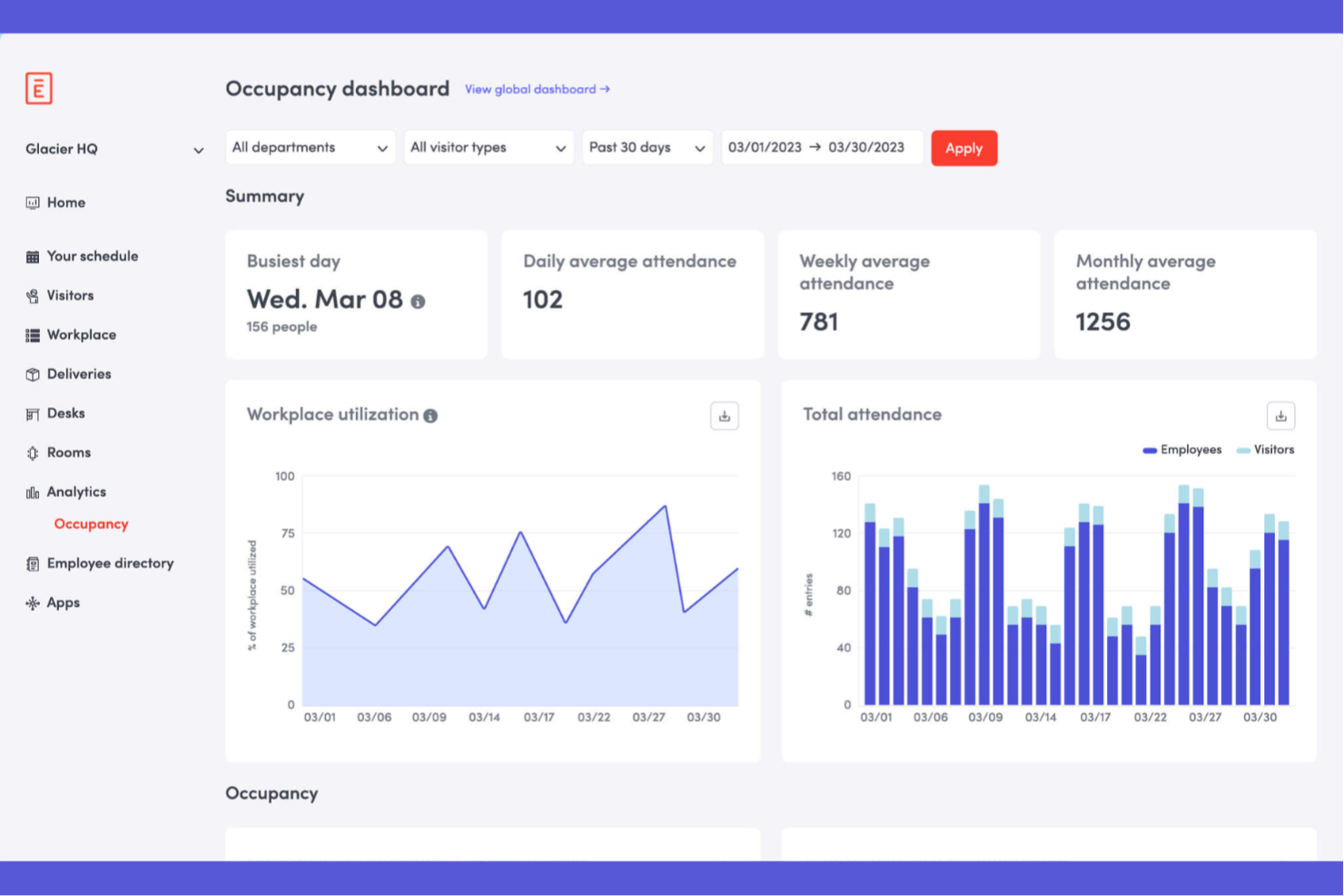

Envoy è una piattaforma di gestione del luogo di lavoro per la prenotazione di scrivanie, sale riunioni e parcheggi che riunisce pianificazione, gestione degli spazi e registrazione dei visitatori in un unico sistema.
Per chi è ideale Envoy?
Il piano gratuito di Envoy è perfetto per le piccole imprese con esigenze di accoglienza di base, o aziende con necessità di prenotazione minori e poco frequenti. I piani avanzati sono adatti a team operativi di aziende di medie e grandi dimensioni, con più sedi, che necessitano di una gestione unificata di spazi, scrivanie e visitatori.
Perché ho scelto Envoy
Ho scelto Envoy come uno dei migliori perché apprezzo la possibilità di utilizzare una sola app per prenotare scrivanie, sale riunioni e posti auto. Il mio team gestisce tutte le prenotazioni di lavoro da un'unica dashboard, facilitando la coordinazione di orari complessi negli uffici ibridi.
Funzionalità principali di Envoy
- Mappe interattive degli uffici: Gli utenti selezionano le scrivanie disponibili direttamente da una mappa dal vivo dell'ufficio.
- Controlli sanitari per i dipendenti: Automatizza i questionari di screening prima dell'accesso agli spazi ogni giorno.
- Conferma obbligatoria di check-in alla scrivania: Richiede allo staff di confermare la prenotazione all'arrivo per evitare assenze.
- Integrazione gestione visitatori: Collega la prenotazione hot desk con la registrazione degli ospiti per un ingresso facilitato.
Integrazioni di Envoy
Envoy offre integrazioni native con Slack, Microsoft Teams, Google Workspace, Okta, Microsoft Entra ID, Cisco Webex, Zoom, Salesforce, Rippling, Kisi e Zapier. È disponibile un'API per integrazioni personalizzate.
Cosa è gratuito?
Envoy offre un piano gratuito per sempre per la prenotazione di scrivanie in una sola sede. Il piano gratuito prevede limiti su integrazioni, gestione ospiti, analisi e opzioni di branding.
Pros and Cons
Pros:
- Combina la prenotazione di scrivanie, sale e parcheggi
- Mappe interattive degli uffici per prenotazioni
- Sistema di gestione visitatori integrato
Cons:
- Il piano gratuito è limitato a una sola sede
- La conferma di check-in alle scrivanie può risultare ridondante per alcuni
Come Valuto il Software Gratuito per la Prenotazione di Postazioni Hot Desk
Divido la mia valutazione tra requisiti di base—come la disponibilità in tempo reale delle postazioni e un piano realmente gratuito—e fattori differenzianti che separano gli strumenti davvero raccomandabili per i team CX ibridi.
Funzionalità Principali (Requisiti Minimi per Questa Lista)
Quando seleziono gli strumenti per la mia lista, valuto ciascuno su una scala da 0 (non offre la funzionalità) a 5 (eccelle in quest’area) per ciascuna delle funzionalità principali elencate di seguito. Poi, calcolo il punteggio totale dello strumento come percentuale. Ogni strumento deve ottenere un punteggio totale minimo del 65% per essere preso in considerazione.
- Prenotazione e Riserva della Postazione: Cerco funzionalità di prenotazione per data e fascia oraria, così gli agenti ibridi possono assicurarsi una postazione per un turno specifico, oltre a opzioni per prenotazioni ricorrenti o su più giorni.
- Piano Realmente Gratuito: Lo strumento deve offrire un livello gratuito permanente (non solo una prova) che includa le funzionalità base di prenotazione per un numero ragionevole di utenti e postazioni.
- Planimetrie Interattive: Mappe visive e cliccabili fanno davvero la differenza quando un team leader deve assegnare insieme i posti a un gruppo di coaching, quindi verifico la presenza di layout multi-piano con dettaglio a livello di postazione.
- Disponibilità della Postazione in Tempo Reale: Aggiornamenti sullo stato in diretta prevengono doppie prenotazioni nei cambi turno affollati e valuto la rapidità con cui la disponibilità si aggiorna tra utenti e dispositivi.
- Gestione di Utenti e Prenotazioni: Gli amministratori dovrebbero poter gestire l’accesso dei dipendenti, modificare o cancellare prenotazioni, e impostare regole di prenotazione—come il numero massimo di giorni prenotabili a settimana—da una dashboard centrale.
- Integrazione con Calendari e Orari: La sincronizzazione bidirezionale con Google Calendar o Outlook mantiene le prenotazioni delle postazioni visibili insieme alle riunioni di team e ai turni, senza inserimenti manuali.
Una volta che ho una lista di strumenti che soddisfano questi criteri, considero cosa distingue ogni piattaforma.
Fattori Differenzianti (Cosa Distingue i Fornitori)
Ecco come confronto e metto a paragone i diversi fornitori:
Funzionalità Distintive
Valuto sempre la suddivisione in zone per team—quando un gruppo di supporto deve sedersi insieme per un coaching dal vivo, i “quartieri” di postazioni facilitano l’organizzazione. Anche l’analisi sull’utilizzo è importante perché mostra se lo spazio fisico rispetta davvero i pattern di presenza degli agenti nei diversi turni. Cerco inoltre app mobili con check-in tramite QR, così gli agenti possono confermare velocemente l’arrivo e le postazioni libere vengono rilasciate subito per la rotazione successiva.
Oltre le Funzionalità
I limiti del piano gratuito meritano attenzione: verifico quanti utenti, postazioni e sedi sono inclusi prima che serva un upgrade, perché un team CX in crescita può raggiungere rapidamente il limite. Anche l’integrazione con strumenti come Slack o Microsoft Teams è importante per inviare notifiche di prenotazione che gli agenti vedranno davvero. Valuto quanto rapidamente un coordinatore può mettere in funzione lo strumento senza l’aiuto IT, perché uno strumento gratuito che richiede settimane per essere configurato perde il proprio vantaggio competitivo.
Come scegliere un software gratuito per la prenotazione delle postazioni condivise
È facile perdersi in lunghi elenchi di funzionalità e strutture di prezzo complesse. Per aiutarti a rimanere concentrato mentre affronti il tuo particolare processo di scelta del software, ecco una lista di fattori da tenere a mente:
| Fattore | Cosa considerare |
|---|---|
| Scalabilità | Lo strumento supporterà la tua organizzazione quando aggiungerai altri uffici, postazioni o utenti? Verifica eventuali limiti dichiarati per utenti o risorse. |
| Integrazioni | Si collega nativamente al calendario, ai sistemi di autenticazione o agli strumenti di collaborazione già in uso? Fai attenzione agli strumenti che offrono solo integrazioni native limitate. |
| Personalizzazione | Puoi adattare le regole di prenotazione degli spazi, i flussi di approvazione e le autorizzazioni degli utenti senza scrivere codice? Valuta quali controlli flessibili sono importanti per le tue politiche. |
| Semplicità d'uso | Sarà intuitivo per il personale con qualsiasi livello di competenza tecnologica? Verificalo tramite una demo o una prova per gli utenti prima di estenderne l'uso a tutta l'organizzazione. |
| Implementazione e avvio | Quanto velocemente puoi diventare operativo dopo la registrazione? Cerca soluzioni con importazione semplice, guide alla configurazione o assistenza all'avvio se non disponi di risorse IT dedicate. |
| Costo | Esistono opzioni realmente gratuite per sempre o si tratta di una prova? Fai attenzione ai costi per utente o per postazione che potrebbero sorprenderti dopo l'avvio. |
| Misure di sicurezza | Come vengono protetti i dati degli utenti e le informazioni sulle prenotazioni? Assicurati che il fornitore offra solidi controlli degli accessi e rispetti gli standard di privacy dei dati. |
| Disponibilità dell'assistenza | Quale aiuto viene fornito quando si verificano problemi? Cerca opzioni di contatto chiare e accessibili e risorse per l'autoassistenza adeguate alle tue esigenze. |
Che cos'è un software gratuito per la prenotazione delle postazioni condivise?
Il software gratuito per la prenotazione delle scrivanie condivise è uno strumento digitale che consente alle organizzazioni di prenotare scrivanie condivise in ufficio senza costi. Aiuta a gestire l'utilizzo degli spazi di lavoro, coordinare la pianificazione per i team ibridi e monitorare in tempo reale la disponibilità delle scrivanie. I team utilizzano questi strumenti per ridurre al minimo il sovraffollamento degli uffici, supportare le politiche di assegnazione flessibile dei posti e semplificare la gestione degli spazi senza dover sottoscrivere un abbonamento a pagamento.
Funzionalità del software gratuito per la prenotazione delle scrivanie condivise
Esaminiamo le funzionalità comunemente presenti nei software per la prenotazione delle scrivanie condivise e vediamo quali sono solitamente incluse nei piani gratuiti rispetto a quelli a pagamento.
Funzionalità tipiche dei software gratuiti per la prenotazione delle scrivanie condivise
- Calendario per la prenotazione delle scrivanie: consente agli utenti di prenotare le scrivanie disponibili tramite un calendario digitale, aiutando tutti a vedere i posti liberi ed evitare conflitti di pianificazione.
- Limiti di utilizzo di base: supporta un numero massimo di utenti, prenotazioni o scrivanie senza costi, offrendo ai piccoli team o ai programmi pilota la possibilità di provare la piattaforma senza rischi.
- Disponibilità in tempo reale: mostra quali scrivanie sono libere o occupate in un determinato giorno e orario, rendendo facile pianificare dove lavorare in ufficio.
- Prenotazione self-service: consente agli utenti di selezionare, prenotare o annullare autonomamente le scrivanie senza l'intervento di un amministratore, semplificando il processo di prenotazione quotidiano per tutti.
- Dashboard amministrativa semplice: consente agli amministratori di monitorare l'utilizzo delle scrivanie e gestire le prenotazioni da un'unica schermata, offrendo una visione rapida delle tendenze relative agli spazi di lavoro.
- Notifiche delle prenotazioni: invia conferme o promemoria di base via e-mail, così gli utenti ricordano le prenotazioni imminenti, riducendo le assenze e lo spreco di scrivanie.
- Visualizzazioni degli spazi o delle scrivanie: offre una panoramica visiva o un elenco di scrivanie e stanze per aiutare gli utenti a scegliere l'opzione più adatta alle proprie esigenze.
- Reportistica limitata: fornisce report semplici sull'occupazione delle scrivanie o sulla frequenza delle prenotazioni, offrendo agli amministratori alcuni dati per valutare la domanda di spazi di lavoro.
Funzionalità tipiche dei software a pagamento per la prenotazione delle scrivanie condivise
- Planimetrie personalizzate: consente di caricare mappe dettagliate dell'ufficio, così gli utenti possono scegliere una scrivania o un'area specifica da un'interfaccia visiva.
- Integrazione con gli strumenti per l'ufficio: si collega a Microsoft 365, Google Workspace o Slack per associare la prenotazione delle scrivanie alle piattaforme di calendario e messaggistica già in uso.
- Rilascio automatico delle scrivanie: rende nuovamente disponibili le scrivanie non occupate dopo le mancate presentazioni, utilizzando sensori o requisiti di check-in per massimizzare l'efficienza degli spazi.
- Dashboard di analisi avanzate: offre informazioni dettagliate sui modelli di utilizzo, sugli orari di punta e sull'occupazione dei team per orientare la pianificazione e le politiche dell'ufficio.
- Autorizzazioni basate sui ruoli: offre un controllo granulare su chi può prenotare o gestire determinate scrivanie, risultando particolarmente utile per le organizzazioni più grandi o con più sedi.
- App mobili per la prenotazione: offre app native con notifiche push, navigazione delle planimetrie e aggiornamenti in tempo reale per rendere la prenotazione ancora più accessibile.
- Gestione dei visitatori e degli ospiti: consente a clienti esterni, partner o collaboratori di prenotare scrivanie temporanee, semplificando le politiche di lavoro ibrido o flessibile.
- Integrazione con il servizio di assistenza: consente di collegare le prenotazioni delle scrivanie alle richieste informatiche o relative alle strutture, così i problemi e le riparazioni possono essere gestiti facilmente.
- Politiche di prenotazione personalizzate: supporta regole avanzate per stabilire con quanto anticipo o per quanto tempo è possibile prenotare le scrivanie, aiutando ad adeguare la disponibilità dell'ufficio alle esigenze del team.
Vantaggi del software gratuito per la prenotazione delle scrivanie condivise
L'implementazione di un software gratuito per la prenotazione delle scrivanie condivise offre diversi vantaggi al team e all'azienda. Eccone alcuni di cui potrai beneficiare:
- Riduzione del sovraffollamento in ufficio: La disponibilità in tempo reale e la prenotazione autonoma aiutano a evitare il sovraffollamento degli spazi di lavoro e favoriscono un'esperienza più fluida in ufficio.
- Riduzione dei costi degli spazi di lavoro: I piani gratuiti consentono di gestire le prenotazioni delle scrivanie senza pagare software o aggiungere costi di licenza.
- Maggiore flessibilità per i team ibridi: La possibilità di prenotare le scrivanie secondo necessità consente ai team di modificare i propri programmi o alternare il lavoro in ufficio a quello da remoto.
- Pianificazione più efficace basata sui dati: Le funzionalità di base per la reportistica mostrano la frequenza delle prenotazioni e le tendenze di utilizzo degli spazi, fornendo indicazioni per le decisioni relative alla gestione dell'ufficio.
- Flusso di lavoro che fa risparmiare tempo: I calendari di prenotazione automatizzati e le notifiche aiutano gli utenti a trovare e prenotare facilmente le scrivanie senza dover ricorrere a processi manuali.
- Gestione più semplice degli spazi: I pannelli di amministrazione offrono una panoramica immediata dell'utilizzo e consentono di apportare modifiche da un unico punto, riducendo il carico di lavoro dei responsabili dell'ufficio.
- Inserimento più rapido per i nuovi utenti: Un design intuitivo e una configurazione semplice aiutano i team a iniziare rapidamente senza richiedere un impegno significativo nella formazione.
Costi e prezzi dei software per la prenotazione delle scrivanie condivise
Capisco che tu sia arrivato a questo articolo cercando le migliori opzioni di software per la prenotazione delle scrivanie condivise disponibili gratuitamente. Tuttavia, poiché i piani gratuiti offrono solo funzionalità limitate, è molto probabile che in futuro dovrai passare a un piano superiore.
La tabella seguente riassume i piani più comuni, i relativi prezzi medi e le funzionalità tipicamente incluse nei software per la prenotazione delle scrivanie condivise:
Tabella comparativa dei piani per i software di prenotazione delle scrivanie condivise
| Tipo di piano | Prezzo medio | Funzionalità comuni |
|---|---|---|
| Piano gratuito | $0 | Calendario di base per la prenotazione delle scrivanie, prenotazioni autonome, numero limitato di utenti o scrivanie, reportistica di base e notifiche via e-mail. |
| Piano personale | $5–$10/utente/mese | Limiti di prenotazione più elevati, accesso all'app mobile, analisi semplici, visualizzazioni degli spazi e controlli di amministrazione di base. |
| Piano aziendale | $10–$25/utente/mese | Planimetrie personalizzate, integrazione con gli strumenti dell'ufficio, criteri di prenotazione avanzati, analisi dettagliate dell'utilizzo e supporto prioritario. |
| Piano aziendale avanzato | $25–$40/utente/mese | Autorizzazioni basate sui ruoli, rilascio automatico delle scrivanie, integrazioni personalizzate, gestione dei visitatori, inserimento dedicato, sicurezza avanzata e integrazione con l'assistenza tecnica. |
Domande frequenti sui software gratuiti per la prenotazione delle scrivanie condivise
Ecco alcune risposte alle domande comuni sui software gratuiti per la prenotazione delle scrivanie condivise:
I software gratuiti per la prenotazione delle scrivanie condivise sono sicuri?
Sì, la maggior parte dei software gratuiti per la prenotazione delle scrivanie condivise utilizza misure di sicurezza standard, come connessioni crittografate e controlli degli accessi. Tuttavia, le versioni gratuite potrebbero non offrire le protezioni più avanzate disponibili nei piani a pagamento; pertanto, prima dell’implementazione, consulta sempre l’informativa sulla privacy e la documentazione sulla sicurezza del fornitore.
Posso gestire più sedi dell'ufficio con un piano gratuito?
Alcuni strumenti gratuiti per la prenotazione delle scrivanie condivise supportano più sedi, ma molti limitano questa funzionalità ai piani a pagamento. Consulta la documentazione di ciascun fornitore per verificare il supporto a più sedi e assicurati che il piano gratuito corrisponda all’effettiva configurazione dei tuoi spazi di lavoro prima di procedere.
Quali sono le limitazioni tipiche dei piani gratuiti?
I piani gratuiti limitano solitamente il numero di utenti, scrivanie o prenotazioni che puoi gestire. Potrebbero inoltre limitare funzionalità come planimetrie, analisi o integrazioni. Con la crescita del team, presta attenzione ai costi aggiuntivi o agli eventuali requisiti per effettuare il passaggio a un piano superiore.
Gli strumenti gratuiti per la prenotazione delle scrivanie condivise offrono l'integrazione con le app di calendario?
No, la maggior parte dei piani gratuiti offre solo funzionalità di prenotazione di base. Le integrazioni con i calendari e gli strumenti di collaborazione sono generalmente disponibili nei piani a pagamento. Verifica sempre le opzioni e le limitazioni relative alle integrazioni prima di scegliere una soluzione.
Quanto è facile passare da un piano gratuito a uno a pagamento?
Il passaggio da un piano gratuito a uno a pagamento è generalmente semplice e spesso può essere effettuato con pochi clic dal pannello di amministrazione. Assicurati di esaminare il trasferimento dei dati, le autorizzazioni degli utenti e le eventuali funzionalità aggiuntive per garantire una transizione fluida.