

I 10 migliori software per call center in entrata del 2026

10 Elenco dei migliori software per call center per chiamate in entrata


Il software per call center per chiamate in entrata aiuta i team di assistenza e vendita a gestire le chiamate in entrata in modo efficiente, fornire risposte rapide e mantenere interazioni di alta qualità con i clienti. Le piattaforme migliori aiutano a gestire i volumi di chiamate, indirizzare le richieste e migliorare l’esperienza complessiva dei chiamanti.
Se i tuoi agenti devono destreggiarsi tra troppi strumenti o perdono chiamate nelle ore di punta, è il momento di ripensare al tuo insieme di tecnologie. Il software giusto non si limita a semplificare i flussi di lavoro: fornisce agli agenti il contesto e gli strumenti necessari per risolvere i problemi già durante la prima chiamata.
Ho valutato questi strumenti per call center per chiamate in entrata in base alle prestazioni nel mondo reale: instradamento delle chiamate, integrazioni con il CRM, reportistica e capacità di supportare un percorso del chiamante fluido e personalizzato.
Che cos’è il software per call center per chiamate in entrata?
Il software per call center per chiamate in entrata è una piattaforma che gestisce e semplifica le chiamate in entrata dei clienti per i team di assistenza e servizio. Instrada le chiamate in modo intelligente, supporta i flussi di lavoro degli agenti e aiuta i contact center a fornire risposte rapide e coerenti da un sistema centralizzato.
Perché fidarsi dei nostri consigli sui software
Il nostro team testa e recensisce software dal 2012. In quanto leader CX noi stessi, sappiamo quanto sia difficile — e importante — scegliere il software giusto.
Per questa guida, abbiamo valutato gli strumenti attraverso test pratici e ricerche indipendenti, assegnando un punteggio agli strumenti in base ai nostri criteri di selezione.
Le nostre recensioni riflettono il nostro giudizio editoriale umano, non un discorso di vendita.
Tabella comparativa dei software per call center per chiamate in entrata
| Tool | Best For | Trial Info | Price | ||
|---|---|---|---|---|---|
| 1 | Ideale per l'instradamento intelligente delle chiamate | Demo gratuita disponibile | Da $15/utente/mese (fatturazione annuale) | Website | |
| 2 | Ideale con oltre 250 integrazioni native | Prova gratuita di 7 giorni | A partire da $30/utente/mese (con fatturazione annuale) | Website | |
| 3 | Ideale per la guida comportamentale in tempo reale | Demo gratuita disponibile | Prezzo su richiesta | Website | |
| 4 | Ideale per il supporto omnicanale | Demo gratuita disponibile | Da $30/utente/mese (fatturazione annuale) | Website | |
| 5 | Ideale per l'attivazione rapida di numeri a livello globale | Prova gratuita di 14 giorni | A partire da $25/user/month (con fatturazione annuale) | Website | |
| 6 | Ideale per numerose integrazioni con CRM e app aziendali | Demo gratuita disponibile | A partire da $25/utente/mese | Website | |
| 7 | Ideale per una rapida implementazione di un sistema telefonico basato sul cloud | Demo gratuita disponibile | Prezzi su richiesta | Website | |
| 8 | Ideale per una gestione sicura e conforme delle chiamate | Demo gratuita disponibile | A partire da $79/mese | Website | |
| 9 | Ideale con agenti AI specifici per settore | Demo gratuita disponibile | Da $85/utente/mese | Website | |
| 10 | Ideale per l'orchestrazione delle conversazioni su più canali | Versione di prova gratuita disponibile | A partire da $35/utente/mese | Website |

Panoramica dei 20 migliori software per call center per chiamate in entrata
Ecco una breve descrizione di ciascun software per call center per chiamate in entrata, per mostrare il caso d’uso migliore di ogni strumento, alcune funzionalità degne di nota e schermate che offrono una panoramica dell’interfaccia utente.

Nextiva
Ideale per l'instradamento intelligente delle chiamate
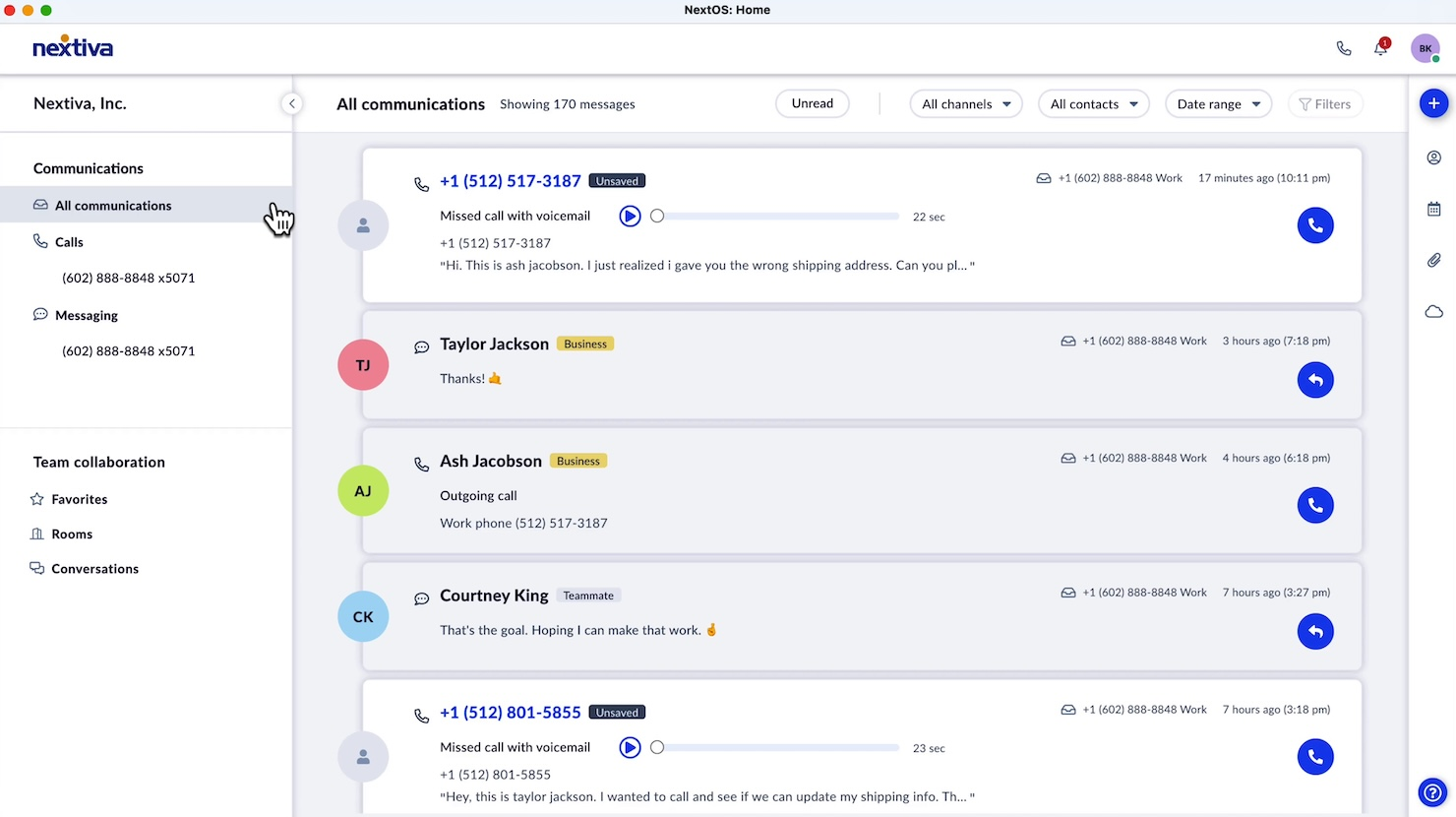
Nextiva è una piattaforma di comunicazione dinamica progettata per migliorare il modo in cui le aziende si connettono con i loro clienti. È pensata per supportare le operazioni dei call center in entrata, offrendo una suite di strumenti che facilitano interazioni efficienti e significative con i clienti.
Perché ho scelto Nextiva: Ho scelto Nextiva come una delle migliori soluzioni software per call center in entrata grazie alla sua funzione intelligente di instradamento delle chiamate. Questa caratteristica garantisce che le chiamate vengano indirizzate all’agente più adatto, migliorando così la soddisfazione del cliente grazie a una risoluzione più rapida dei problemi. Inoltre, le funzioni di registrazione delle chiamate e di analisi delle emozioni sono preziose per monitorare le prestazioni e comprendere meglio le esperienze dei clienti.
Un altro motivo per cui Nextiva si distingue sono le sue robuste funzionalità di reportistica e analisi. Questi strumenti aiutano a comprendere le tendenze delle chiamate e prendere decisioni basate sui dati per migliorare il servizio offerto. La distribuzione automatica delle chiamate riduce al minimo i tempi di attesa, aumentando così l’efficienza del team e la soddisfazione dei clienti.
Funzionalità distintive e integrazioni:
Le funzionalità comprendono dashboard in tempo reale che forniscono ai responsabili una visione immediata delle metriche di performance, consentendo loro di apportare modifiche al volo. La funzione di orchestrazione del percorso personalizza le interazioni con i clienti, favorendo una risoluzione più rapida dei problemi. Le automazioni intelligenti riducono le attività ripetitive, permettendo al team di concentrarsi sulle esigenze dei clienti più complesse.
Le integrazioni includono Salesforce, HubSpot, Slack, Microsoft Teams, Zendesk, Jira, monday.com, Twilio, Jotform, Lawmatics, ActiveCampaign e Pipedrive.
Pros and Cons
Pros:
- Gli utenti elogiano spesso la chiarezza e l'affidabilità della qualità delle chiamate
- Distribuzione automatica delle chiamate e instradamento intelligente
- Gli utenti apprezzano la possibilità di ricevere i messaggi vocali via email
Cons:
- Esistono limitazioni con alcune integrazioni di terze parti
- Problemi con l'affidabilità dell'app mobile
Aircall
Ideale con oltre 250 integrazioni native
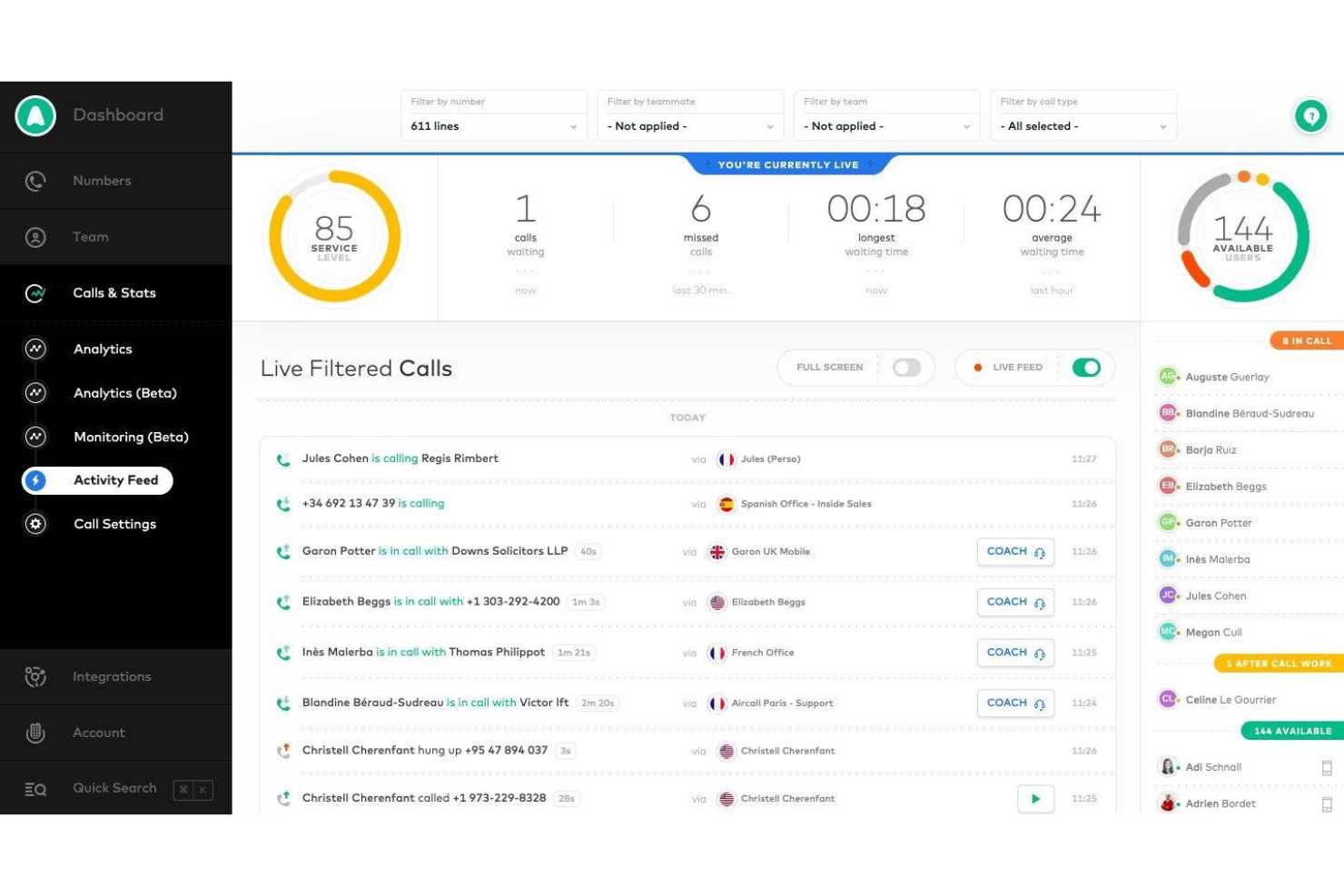
Aircall è una piattaforma telefonica aziendale e per contact center in entrata basata sul cloud, che combina ACD, IVR, accodamento delle chiamate, monitoraggio in tempo reale, gestione delle chiamate basata sull'intelligenza artificiale e profonde integrazioni CRM in un unico sistema basato su softphone.
Per chi è più adatto Aircall?
Aircall è adatto ai team di assistenza e vendita di piccole e medie imprese che gestiscono le proprie operazioni in entrata all'interno di un CRM o di un sistema di assistenza e hanno bisogno che il sistema telefonico funzioni nativamente all'interno dell'insieme di strumenti esistente.
Perché ho scelto Aircall
Aircall si è guadagnato un posto nella mia rosa di candidati perché nessun altro strumento per contact center in entrata gestisce la telefonia nativa per CRM in modo altrettanto fluido. Adoro il fatto che una scheda di HubSpot o Salesforce venga visualizzata automaticamente nel momento in cui arriva una chiamata, così gli agenti rispondono con il contesto completo prima ancora di pronunciare una parola. La sincronizzazione bidirezionale registra automaticamente ogni chiamata, esito ed etichetta senza che gli agenti debbano aggiornare manualmente il CRM. Mi affido anche al softphone CTI Salesforce integrato, che consente agli agenti di gestire le chiamate in entrata interamente all'interno dell'ambiente di lavoro esistente, senza cambiare scheda.
Funzionalità principali di Aircall
- Agente vocale basato sull'IA: gestisce automaticamente le chiamate in entrata in eccesso e risolve le richieste di routine dei clienti, con passaggio contestuale agli agenti in carne e ossa.
- Generatore IVR multilivello: consente di progettare menu di chiamata in più fasi usando un'interfaccia visiva intuitiva e l'inserimento DTMF.
- Modulo Analytics+: offre cronologia illimitata delle chiamate, filtri avanzati, dashboard in tempo reale e analisi dettagliate per code in entrata e agenti.
- Modalità di monitoraggio delle chiamate: i supervisori possono ascoltare, parlare in modalità sussurro o inserirsi nelle chiamate in corso per il controllo qualità e la formazione in tempo reale.
Integrazioni di Aircall
Aircall offre oltre 250 integrazioni native, tra cui Salesforce, HubSpot, Zendesk, Intercom, Slack, Microsoft Teams, Freshdesk, Pipedrive, Zoho CRM e Shopify. È disponibile un'API per le integrazioni personalizzate.
Pros and Cons
Pros:
- Configurazione rapida senza dipendenza dal reparto IT
- Monitoraggio delle chiamate in tempo reale con modalità sussurro per i supervisori
- Visualizzazione della schermata CRM per ogni chiamata in entrata
Cons:
- Nessuna gestione nativa della forza lavoro o della pianificazione
- La profondità dei report è inferiore rispetto alle piattaforme CCaaS dedicate

Cresta
Ideale per la guida comportamentale in tempo reale
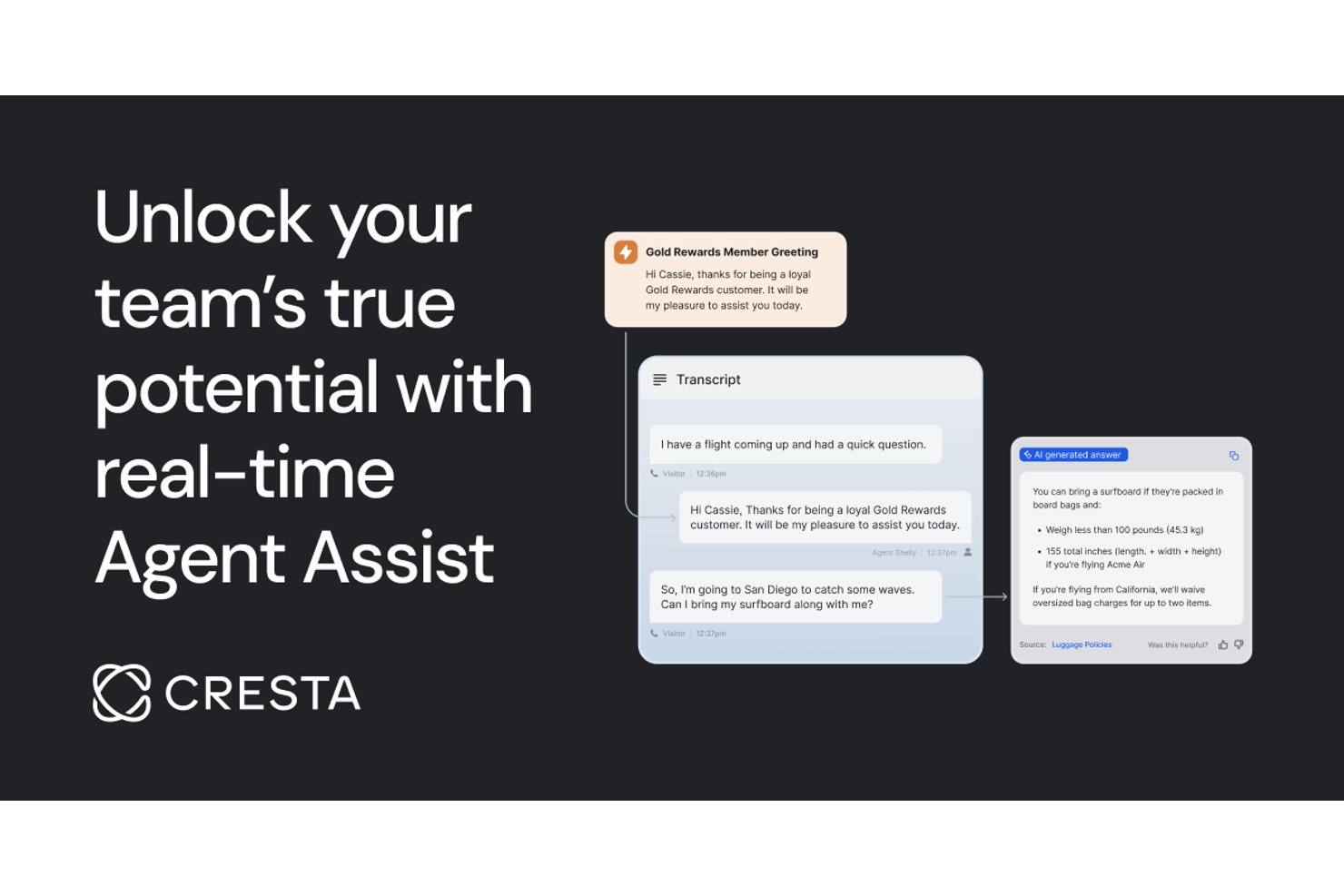
Cresta è una piattaforma software per call center inbound basata sull'intelligenza artificiale che offre analisi in tempo reale delle conversazioni, assistenza agli agenti, automazione e gestione della qualità in un'unica soluzione.
Per chi è Cresta?
Cresta è pensata per i team di contact center aziendali che desiderano utilizzare l'IA per migliorare le prestazioni degli agenti e garantire coerenza operativa su larga scala.
Perché ho scelto Cresta
Ho scelto Cresta come una delle migliori soluzioni perché utilizzo la sua guida comportamentale in tempo reale per mostrare suggerimenti di coaching e script personalizzati durante le chiamate, mentre la piattaforma analizza automaticamente le conversazioni in diretta per raccomandare le prossime azioni ottimali e migliorare la qualità.
Funzionalità principali di Cresta
- Gestione automatizzata della qualità: L'IA analizza e valuta le interazioni con i clienti per conformità e prestazioni.
- Supporto omnicanale: Gestisce interazioni vocali, chat ed email all'interno di una piattaforma unificata.
- Individuazione della conoscenza: Rende disponibili documenti e risposte rilevanti agli agenti durante le conversazioni in tempo reale.
- Automazione del flusso di lavoro post-chiamata: Genera automaticamente riepiloghi delle chiamate e prossimi passi dopo ogni interazione.
Integrazioni di Cresta
Cresta offre integrazioni native con Salesforce, Zendesk, ServiceNow, Twilio, Genesys, NICE, Five9, Amazon Connect, Slack e Microsoft Teams. È disponibile un'API per integrazioni personalizzate.
Pros and Cons
Pros:
- Coaching in tempo reale durante le interazioni con i clienti
- Monitoraggio e valutazione automatica della qualità delle chiamate
- Analisi approfondite basate sull’IA per i supervisori
Cons:
- Mancanza di recensioni trasparenti di utenti terzi
- Non adatto a implementazioni per piccole imprese
Ideale per il supporto omnicanale
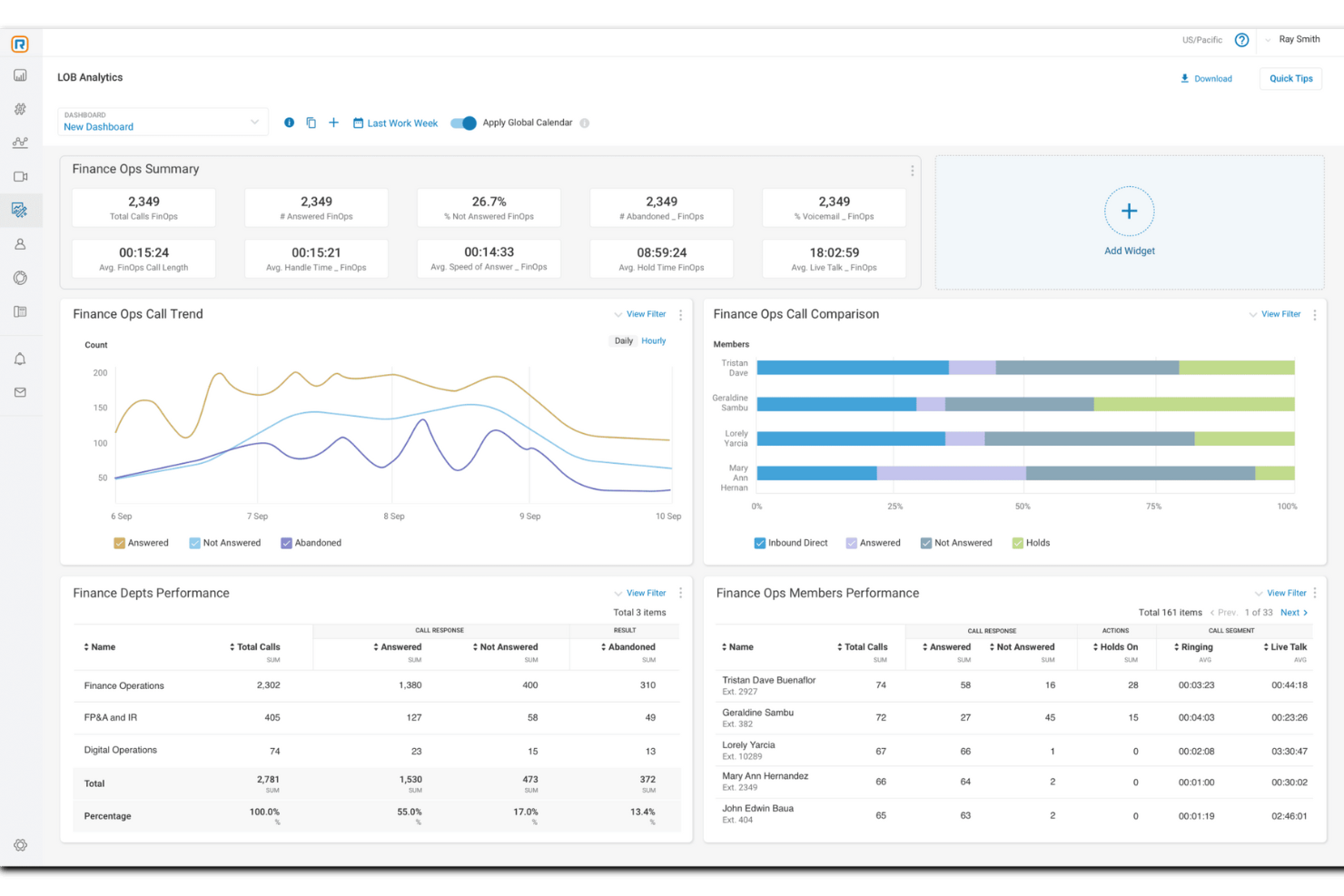
Per chi cerca una soluzione per call center inbound, RingCentral Contact Center integra approfondimenti guidati dall'IA e comunicazione omnicanale. Questa piattaforma basata su cloud è ideale per le aziende che vogliono elevare il servizio clienti, offrendo funzionalità come instradamento intelligente delle chiamate e analisi in tempo reale. Supportando molteplici canali di comunicazione, RingCentral assicura che il tuo team possa interagire efficacemente con i clienti, affrontando le sfide nelle interazioni con la clientela e nella produttività degli operatori.
Perché ho scelto RingCentral Contact Center
Ho scelto RingCentral Contact Center perché eccelle nel fornire un'esperienza di supporto omnicanale completa, fondamentale per i moderni call center inbound. Grazie alla capacità di collegarsi tramite voce e oltre 20 canali digitali, il tuo team può gestire facilmente le interazioni sia che i clienti si facciano sentire tramite social media, email o telefono. L'integrazione di agenti virtuali alimentati dall'IA non solo aumenta la soddisfazione del cliente fornendo risposte immediate, ma aiuta anche a ridurre i tempi di risposta. Inoltre, le API aperte della piattaforma permettono di integrarsi senza problemi con i sistemi CRM esistenti, garantendo che gli operatori dispongano degli strumenti necessari per fornire un servizio personalizzato ed efficace.
Caratteristiche principali di RingCentral Contact Center
Oltre al forte supporto omnicanale, RingCentral Contact Center offre una gamma di funzionalità che migliorano le operazioni del tuo call center inbound.
- Instradamento intelligente: Questa funzione indirizza chiamate e messaggi agli operatori più adatti in base alle esigenze del cliente e alle competenze degli addetti, assicurando una gestione efficiente delle richieste.
- Automazione: Sfrutta assistenti virtuali e opzioni self-service per gestire le interazioni e ridurre il carico di lavoro degli operatori, consentendo al tuo team di concentrarsi su compiti più complessi.
- Gestione della forza lavoro: Utilizza strumenti di pianificazione, monitoraggio delle prestazioni e supporto agli operatori per migliorare l’efficienza operativa e garantire che il team sia sempre preparato.
- Unione dei profili clienti: Fornisci ai tuoi operatori una visione completa delle interazioni precedenti unendo i profili dei clienti, garantendo un servizio clienti personalizzato e informato.
Integrazioni di RingCentral Contact Center
Le integrazioni includono Salesforce, HubSpot, Zendesk, Microsoft Teams, Slack, Zoho CRM, ServiceNow, Google Workspace, Microsoft 365 e Oracle.
Pros and Cons
Pros:
- Offre analisi del sentiment alimentate dall'IA per migliori approfondimenti sui clienti
- Include instradamento intelligente per una risoluzione efficiente dei problemi dei clienti
- Offre monitoraggio delle chiamate in tempo reale per migliorare la qualità del servizio
Cons:
- Supporto limitato per modelli specifici di telefoni da scrivania
- Non tutte le integrazioni desiderate potrebbero essere disponibili nativamente

Ideale per l'attivazione rapida di numeri a livello globale
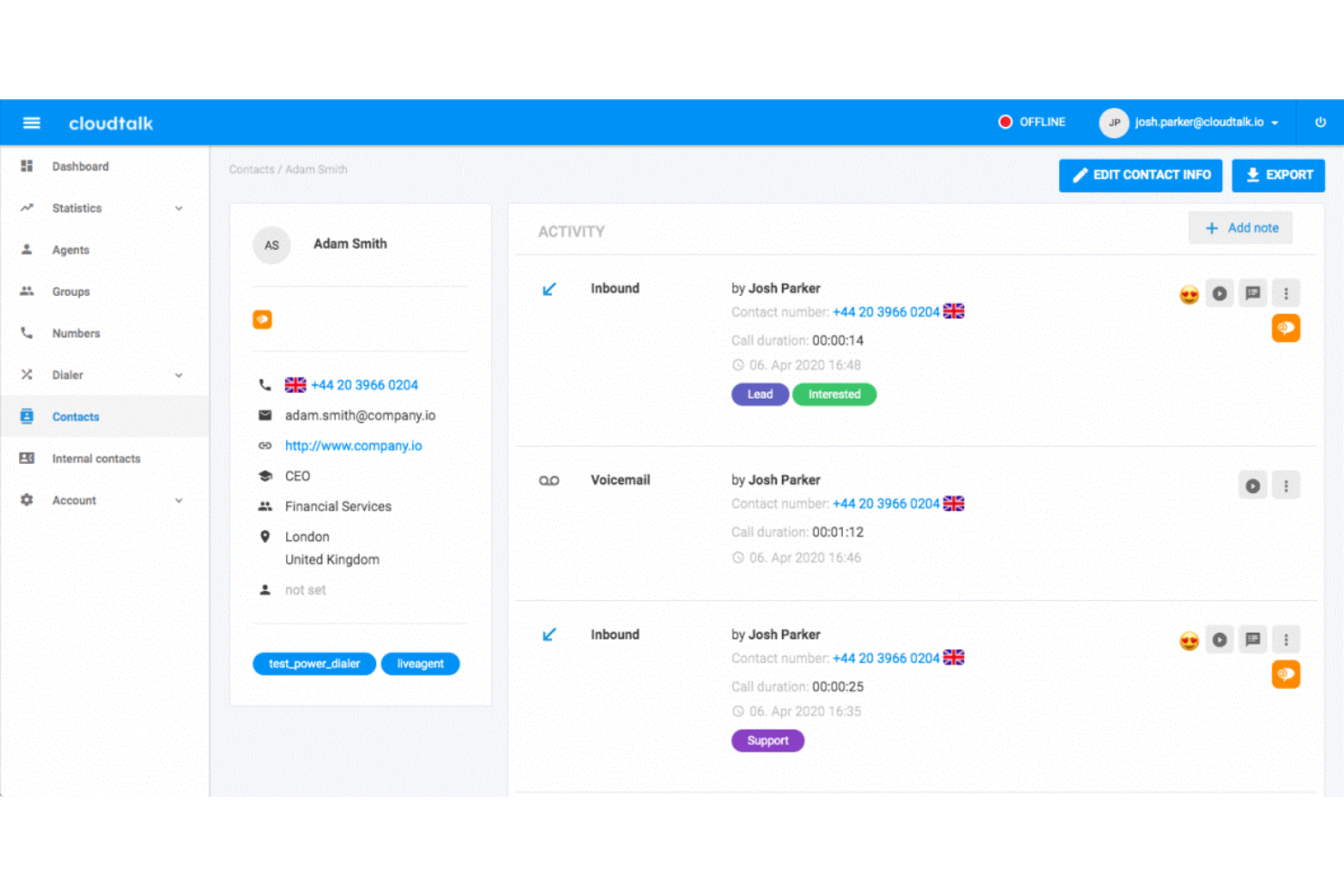
CloudTalk è una piattaforma per centri contatti in entrata basata sul cloud che combina IVR basato sull'intelligenza artificiale, instradamento basato sulle competenze, gestione delle code, monitoraggio in tempo reale e integrazioni CRM attraverso una rete globale di numeri di telefono che copre più di 160 Paesi.
Per chi è più adatto CloudTalk?
CloudTalk è una soluzione particolarmente adatta ai team di assistenza e vendita delle PMI e delle aziende di medie dimensioni che hanno bisogno di un sistema telefonico nativo del cloud, rapido da implementare e senza i costi di gestione dell'infrastruttura tradizionale dei centri contatti.
Perché ho scelto CloudTalk
CloudTalk è entrato nella mia rosa di candidati soprattutto per la rapidità con cui consente di creare una presenza locale per le chiamate in entrata ovunque si trovino i clienti. Attivare un numero locale in uno degli oltre 160 Paesi richiede pochi minuti, non settimane: posso quindi instradare le chiamate in entrata attraverso un numero locale in Germania, Brasile o Giappone prima del lancio in un nuovo mercato, senza presentare documenti o attendere gli operatori. Se a questo si aggiungono il progettista visivo dei flussi di chiamata e gli agenti vocali basati sull'intelligenza artificiale, che supportano più di 60 lingue, la copertura delle chiamate in entrata può crescere senza aumentare il personale.
Funzionalità principali di CloudTalk
- Monitoraggio e coaching degli agenti in tempo reale: i supervisori possono ascoltare, parlare in modalità sussurro o intervenire nelle chiamate in corso per garantire la qualità in tempo reale.
- Instradamento basato sulle competenze e sulle condizioni: le chiamate vengono instradate automaticamente agli agenti disponibili più appropriati in base a regole personalizzabili.
- Integrazioni con CRM e sistemi di assistenza: le integrazioni native collegano le chiamate in entrata alle piattaforme CRM e di gestione dei ticket per sincronizzare automaticamente il contesto.
- Reportistica in tempo reale e storica: pannelli di controllo e pannelli informativi forniscono dati in tempo reale e storici sul volume delle chiamate, sullo stato degli agenti e sulle prestazioni delle code.
Integrazioni di CloudTalk
CloudTalk offre oltre 100 integrazioni native, tra cui HubSpot, Salesforce, Zendesk, Pipedrive, Intercom, Zoho CRM, Freshdesk, Microsoft 365, Google Workspace, Slack e Zapier. È inoltre disponibile un'API per le integrazioni personalizzate.
Pros and Cons
Pros:
- Configurazione immediata di numeri locali in oltre 160 Paesi
- Gli agenti vocali basati sull'intelligenza artificiale gestiscono automaticamente il volume delle chiamate in entrata
- Il progettista visivo dei flussi semplifica la creazione di IVR complessi
Cons:
- In alcune regioni sono stati segnalati cali nella qualità delle chiamate
- La personalizzazione delle analisi è limitata rispetto ai concorrenti enterprise nel settore CCaaS

Ideale per numerose integrazioni con CRM e app aziendali
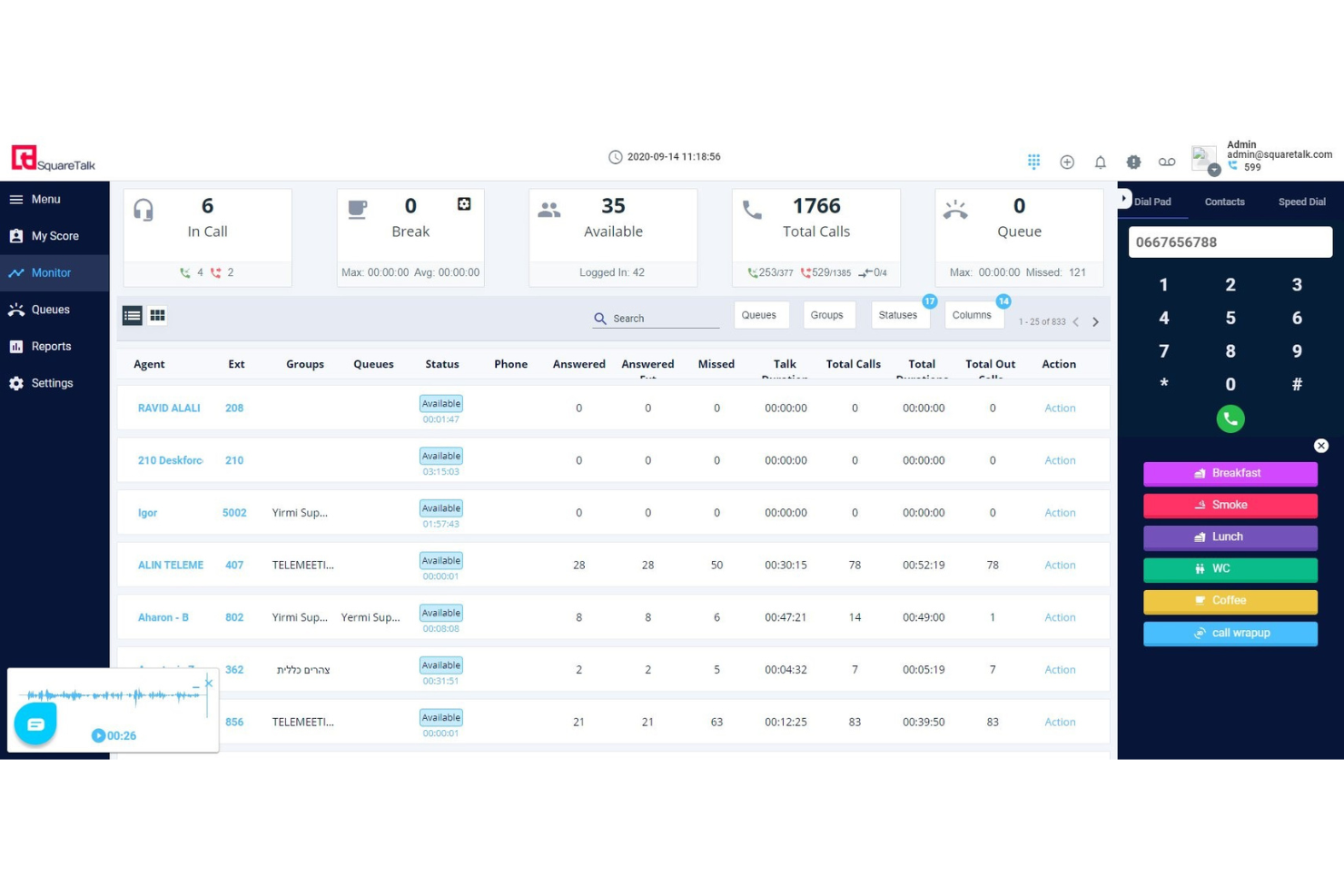
Squaretalk è una piattaforma per contact center cloud che combina ACD, IVR, instradamento intelligente delle chiamate, gestione delle code in entrata, monitoraggio in tempo reale e messaggistica omnicanale tramite voce, WhatsApp, e-mail e SMS.
Per chi è più indicato Squaretalk?
Squaretalk è particolarmente adatto ai team di assistenza clienti delle PMI e delle aziende di medie dimensioni, nonché alle attività BPO che necessitano di un contact center scalabile per le chiamate in entrata, connesso al CRM e senza infrastrutture complesse.
Perché ho scelto Squaretalk
Ho scelto Squaretalk come una delle migliori soluzioni perché la connettività con il CRM va ben oltre un semplice pulsante per effettuare chiamate con un clic. Le integrazioni native con Salesforce, HubSpot, Zendesk e Pipedrive mostrano il contesto completo del chiamante non appena si connette una chiamata in entrata. Apprezzo particolarmente la funzione di riepilogo delle chiamate basata sull'intelligenza artificiale, che registra automaticamente un riepilogo strutturato nella scheda del CRM dopo ogni interazione, senza richiedere alcun inserimento manuale da parte degli agenti.
Funzionalità principali di Squaretalk
- Creazione visiva dei flussi di chiamata IVR: Configura menu multilivello e logiche di instradamento tramite un'interfaccia con funzionalità di trascinamento.
- Funzionalità di richiamata dalla coda: Consente ai chiamanti di richiedere una richiamata invece di rimanere in attesa nelle code in entrata congestionate.
- Monitoraggio con modalità sussurro e ingresso nella chiamata: I supervisori possono fornire istruzioni agli agenti senza essere uditi oppure partecipare alle chiamate in corso per il controllo della qualità.
- Posta in arrivo unificata per gli agenti: Gestisci conversazioni vocali in entrata, WhatsApp, e-mail, SMS e chat in un unico spazio di lavoro.
Integrazioni di Squaretalk
Squaretalk offre integrazioni native con Salesforce, HubSpot, Zoho CRM, Zendesk, Pipedrive, Freshdesk e Microsoft Dynamics 365. È disponibile un'API per le integrazioni personalizzate.
Pros and Cons
Pros:
- Connettività avanzata con il CRM e visualizzazione nativa delle informazioni del chiamante
- La posta in arrivo omnicanale comprende voce, SMS e WhatsApp
- Il riepilogo automatico delle chiamate tramite intelligenza artificiale viene registrato dopo ogni interazione
Cons:
- Le opzioni di personalizzazione dei report sono relativamente limitate
- La configurazione diventa più complessa con impostazioni a più code
New Product Updates from Squaretalk
Squaretalk Adds TradeCore Integration for Brokerage Workflows
Squaretalk adds a TradeCore integration that connects customer conversations with BrokerIQ CRM workflows. This helps brokerage teams trigger AI-driven follow-ups, tasks, and other actions from calls and messages. For more information, visit Squaretalk’s official site.
 .
.
Ideale per una rapida implementazione di un sistema telefonico basato sul cloud

GoTo Connect è un sistema telefonico basato sul cloud e una piattaforma per contact center che combina ACD, instradamento delle chiamate basato sulle competenze, IVR, gestione multicanale delle code, registrazione delle chiamate, monitoraggio degli agenti in tempo reale e integrazioni CRM in un'unica interfaccia unificata.
Per chi è più adatto GoToConnect?
GoTo Connect è adatto alle piccole e medie imprese che necessitano di un contact center inbound completo e operativo rapidamente, senza un grande team IT che gestisca l'implementazione.
Perché ho scelto GoToConnect
GoTo Connect si è guadagnato un posto nella mia lista ristretta perché il livello Contact Center può essere attivato in appena un giorno, un risultato davvero raro considerando l'ampiezza delle funzionalità. Apprezzo il fatto che l'editor visivo dei piani di chiamata mi consenta di configurare assistenti automatici, code di chiamata e regole di instradamento illimitati senza scrivere una sola riga di codice. L'instradamento basato sulle competenze, gli annunci della posizione in coda e la richiamata automatica dalla coda sono tutti attivi fin dal primo giorno, senza essere nascosti dietro un lungo progetto di implementazione.
Funzionalità principali di GoToConnect
- Posta in arrivo multicanale: gli agenti gestiscono chiamate in entrata, chat, SMS e messaggi sui social da un unico spazio di lavoro unificato.
- Dashboard di supervisione in tempo reale: i supervisori monitorano lo stato degli agenti, l'attività delle code e i livelli di servizio in tempo reale.
- Analisi delle chat basata sull'intelligenza artificiale: l'analisi delle conversazioni identifica automaticamente tendenze e sentiment nelle interazioni di chat in tempo reale.
- Monitoraggio delle chiamate in tempo reale: i supervisori possono ascoltare, parlare in modalità sussurro o intervenire nelle chiamate attive per garantire la qualità e offrire coaching.
Integrazioni di GoToConnect
GoTo Connect offre integrazioni native con Salesforce, HubSpot, Zendesk, ServiceNow, Microsoft Teams, Google Workspace e Outlook. È disponibile un'API per le integrazioni personalizzate.
Pros and Cons
Pros:
- Implementazione rapida con un coinvolgimento minimo del reparto IT
- L'editor visivo dei piani di chiamata semplifica la configurazione dell'IVR
- Gestione multicanale delle code per voce e canali digitali
Cons:
- Le analisi avanzate richiedono piani di livello superiore
- Gestione della forza lavoro limitata rispetto alle piattaforme CCaaS dedicate

Ideale per una gestione sicura e conforme delle chiamate

CTM è una piattaforma di gestione delle chiamate in entrata basata sul cloud che combina il monitoraggio delle chiamate, l'instradamento ACD, i menu IVR, l'intelligenza delle conversazioni e controlli di conformità come HIPAA e l'oscuramento dei dati PCI in un unico sistema.
Per chi è più adatto CTM?
CTM è una soluzione particolarmente adatta ai team di settori regolamentati come quello sanitario, legale e dei servizi finanziari, che necessitano di una gestione conforme delle chiamate integrata nelle loro operazioni in entrata.
Perché ho scelto CTM
CTM si è guadagnato un posto tra i migliori della mia lista ristretta perché integra la conformità direttamente nel flusso delle chiamate, invece di aggiungerla in un secondo momento. Apprezzo in particolare la funzione di oscuramento automatico, che rimuove in tempo reale dai testi delle chiamate i dati sensibili come i numeri delle carte di credito e i numeri di previdenza sociale. Mi affido inoltre alle registrazioni delle chiamate crittografate e al SSO SAML, oltre alle certificazioni HIPAA e PCI integrate direttamente nella piattaforma.
Funzionalità principali di CTM
- Instradamento intelligente: indirizza dinamicamente le chiamate in entrata agli operatori in base a regole personalizzate se/allora e allo stato degli operatori in tempo reale.
- Menu IVR multilivello: consente ai chiamanti di gestire autonomamente le richieste o di raggiungere code specializzate utilizzando alberi personalizzabili di input vocale o da tastiera.
- Pannelli di controllo delle prestazioni degli operatori in tempo reale: i supervisori possono monitorare in diretta lo stato degli operatori, la durata delle chiamate e lo stato delle code.
- Integrazioni CRM native: si collega direttamente a Salesforce, HubSpot, Zoho e altri strumenti per sincronizzare automaticamente i dati delle chiamate e i dettagli dei contatti.
Integrazioni di CTM
CTM offre integrazioni native con Salesforce, HubSpot, Microsoft Dynamics 365, Pipedrive, Zoho CRM e Zendesk. Fornisce inoltre un'API per integrazioni personalizzate.
Pros and Cons
Pros:
- Controlli di conformità HIPAA e PCI integrati
- Funzioni per sussurrare e intervenire nelle chiamate in diretta
- Intelligenza delle conversazioni per la qualità delle chiamate in entrata
Cons:
- Nessuna gestione o pianificazione integrata della forza lavoro
- Il supporto omnicanale è meno avanzato rispetto alle piattaforme CCaaS dedicate

Talkdesk
Ideale con agenti AI specifici per settore

Talkdesk è una piattaforma di contact center cloud che combina instradamento delle chiamate basato sull'intelligenza artificiale, IVR, dashboard in tempo reale, gestione della forza lavoro e automazione specifica per settore in un'unica soluzione inbound e omnicanale.
Per chi è più adatto Talkdesk?
Talkdesk è particolarmente adatto ai team di supporto di aziende di medie e grandi dimensioni operanti in settori regolamentati o ad alta intensità di servizi, come sanità, servizi finanziari, commercio al dettaglio e assicurazioni.
Perché ho scelto Talkdesk
Talkdesk si è guadagnato un posto nella mia selezione perché nessun'altra piattaforma offre agenti AI progettati appositamente per specifici settori verticali con questo livello di profondità. Apprezzo molto il modo in cui Autopilot, implementato in un contesto sanitario, può gestire autonomamente l'instradamento degli appuntamenti o la verifica delle assicurazioni senza coinvolgere la coda degli agenti in tempo reale. Inoltre, Talkdesk Navigator interpreta l'intento del chiamante attraverso una conversazione naturale, prendendo decisioni di instradamento che un IVR basato su regole non sarebbe in grado di replicare.
Funzionalità principali di Talkdesk
- Progettista IVR Studio: Crea menu vocali multilivello con funzionalità di trascinamento e rilascio, DTMF e riconoscimento vocale.
- Suite di gestione della forza lavoro: Prevedi il volume delle chiamate, pianifica i turni degli agenti e monitora l'aderenza con gli strumenti WFM integrati.
- Coinvolgimento digitale omnicanale: Gestisci interazioni inbound vocali, chat, SMS, social ed e-mail da uno spazio di lavoro unificato.
- Monitoraggio e coaching in tempo reale: Tieni sotto controllo l'attività degli agenti in tempo reale e partecipa alle chiamate per supervisionarle in modalità ascolto, suggerimento o inserimento.
Integrazioni di Talkdesk
Talkdesk offre integrazioni native con Salesforce, HubSpot, Zendesk, Microsoft Teams, ServiceNow, Slack, Zoom, Microsoft 365 e Oracle Service Cloud. È disponibile un'API per le integrazioni personalizzate.
Pros and Cons
Pros:
- Agenti AI preconfigurati per i settori regolamentati
- L'instradamento basato sull'AI si adatta all'intento del chiamante in tempo reale
- La gestione nativa della forza lavoro include previsioni integrate
Cons:
- La configurazione iniziale da parte dell'amministratore richiede un impegno tecnico significativo
- Le opzioni di reportistica personalizzata sono limitate nella configurazione predefinita

Twilio
Ideale per l'orchestrazione delle conversazioni su più canali

Twilio Flex è una piattaforma programmabile per centri contatti nel cloud che gestisce l'instradamento delle chiamate in entrata, l'IVR, l'accodamento omnicanale, il monitoraggio degli agenti in tempo reale e l'orchestrazione delle conversazioni basata sull'IA tramite voce, SMS, WhatsApp e chat.
Per chi è più adatto Twilio?
Twilio Flex è una soluzione ideale per i team di medie e grandi imprese che dispongono di risorse interne per lo sviluppo e hanno bisogno di un centro contatti completamente personalizzabile, che possano adattare alla propria architettura tecnologica esistente.
Perché ho scelto Twilio
Ho scelto Twilio come una delle migliori soluzioni per il modo in cui gestisce il momento in cui un agente IA deve trasferire la conversazione a un operatore umano. Conversation Orchestrator e Conversation Relay collaborano affinché, quando l'intento di un chiamante supera ciò che l'autoservizio è in grado di risolvere, il trasferimento porti l'intero contesto della conversazione direttamente nell'interfaccia dell'agente. Agent Copilot propone quindi risposte pertinenti e automatizza il riepilogo post-chiamata in tempo reale, consentendo agli agenti di concentrarsi sulla conversazione invece di affrettarsi a prendere appunti durante la chiamata.
Funzionalità principali di Twilio
- Interfaccia omnicanale per gli agenti: Gli agenti gestiscono chiamate in entrata, SMS, WhatsApp e chat da un'unica interfaccia unificata.
- Creazione visiva dell'IVR: Gli strumenti con funzionalità di trascinamento in Twilio Studio consentono ai team di progettare e avviare flussi IVR personalizzati senza scrivere codice.
- Registrazione automatica delle chiamate: Flex registra automaticamente le chiamate dei clienti in entrata, con accesso sicuro e riproduzione per il controllo qualità.
- Pannello di analisi in tempo reale: I supervisori possono visualizzare istantaneamente il volume delle chiamate, lo stato delle code e l'attività degli agenti tramite pannelli configurabili.
Integrazioni di Twilio
Twilio Flex offre integrazioni native con Salesforce, Zendesk, Shopify, Google Dialogflow, Calabrio ONE e Segment. È disponibile un'API per le integrazioni personalizzate.
Pros and Cons
Pros:
- Instradamento delle chiamate e flussi IVR altamente personalizzabili
- Assistenza agli agenti basata sull'IA durante le chiamate in corso
- Si adatta facilmente ai team distribuiti di agenti da remoto
Cons:
- Richiede risorse per lo sviluppo per la configurazione e la manutenzione
- La complessità della configurazione rallenta i tempi di implementazione iniziali
Altri software per call center virtuali
- Dialpad
Ideale per la creazione e l'automazione di agenti IA senza codice
- Zoho Voice
Ideale per PMI con esigenze di chiamate internazionali
- Convoso
La migliore tecnologia AI per contact center
- Five9
Ideale per strumenti potenziati dall'AI
- Bitrix24
Ideale per la comunicazione omnicanale
- Zendesk Suite
Migliore piattaforma completa per call center
- Salesforce Service Cloud Voice
Ideale per informazioni approfondite sui clienti
- Kixie Powercall
Ideale per la gestione delle chiamate dei team remoti
- CallTools
Ideale per il monitoraggio in tempo reale
- LiveAgent
Ideale per menu IVR personalizzabili
- 3CX
Ideale per team di assistenza clienti da remoto


Come Valuto il Software per Call Center Inbound
Divido la mia valutazione in due livelli: i requisiti di base—IVR, ACD, gestione delle code—che uno strumento deve soddisfare per qualificarsi, e i fattori differenzianti che distinguono una piattaforma dall'altra.
Funzionalità Principali (Requisiti Fondamentali Per Questa Lista)
Quando seleziono gli strumenti per la mia lista, valuto ciascuno su una scala da 0 (non offre la funzionalità) a 5 (eccelle in quest'area) per ogni funzionalità chiave elencata di seguito. Poi calcolo il punteggio totale dello strumento e lo converto in una percentuale. Ogni strumento deve raggiungere un punteggio totale minimo del 65% per essere considerato per l'inclusione.
- ACD e Smistamento Chiamate: Valuto quanto sia flessibile ciascuno strumento nella distribuzione delle chiamate—se supporta lo smistamento basato sulle competenze, livelli di priorità e condizioni come la preferenza linguistica o lo stato VIP.
- Costruttore di Menu IVR: Un buon creatore di IVR consente di progettare menu multilivello in modo visuale. Cerco editor drag-and-drop, riconoscimento vocale e ricerche dinamiche di dati.
- Gestione delle Code Inbound: Controllo la presenza di opzioni di richiamata, regole di overflow e annunci dei tempi di attesa—le funzionalità che impediscono agli utenti di riagganciare durante i periodi di grande afflusso.
- Reportistica in Tempo Reale e Storica: Dashboard live che mostrano la profondità della coda e lo stato degli operatori sono importanti quanto i report storici. Cerco entrambi, più la possibilità di personalizzare gli indicatori di performance (KPI).
- Registrazione e Monitoraggio delle Chiamate: Oltre alla registrazione di base, valuto se i supervisori possono ascoltare, sussurrare e intervenire nelle chiamate live per coaching e assicurazione qualità.
- Integrazione con CRM/Helpdesk: I cosiddetti "screen pop" che mostrano la cronologia del chiamante da strumenti come Salesforce, HubSpot o Zendesk evitano agli agenti di dover chiedere ai clienti di ripetersi.
Una volta che ho una lista di strumenti che soddisfano i criteri, considero cosa rende ogni piattaforma unica.
Fattori di Differenziazione (Cosa Distingue i Fornitori)
Ecco come confronto e contrappongo i diversi fornitori:
Funzionalità Distintive
Gli strumenti di workforce management fanno davvero la differenza quando si organizza il personale per volumi inbound imprevedibili—cerco funzioni integrate di previsione e monitoraggio della conformità agli orari. L’assistenza tramite agenti AI è un altro elemento differenziante che valuto attentamente, poiché suggerimenti in tempo reale e la visualizzazione di conoscenze durante le chiamate possono ridurre i tempi di gestione. Controllo anche se una piattaforma offre voicebot self-service che risolvono richieste comuni come lo stato degli ordini o la conferma di appuntamenti senza coinvolgere un operatore.
Oltre le Funzionalità
La conformità normativa è fondamentale in questo settore—i team che gestiscono pagamenti o chiamate in ambito sanitario hanno bisogno della copertura PCI-DSS o HIPAA, quindi verifico le certificazioni e gli standard di crittografia di ciascun fornitore. Valuto anche la flessibilità della telefonia, in particolare se una piattaforma supporta BYOC o trunk SIP per i team che vogliono mantenere i contratti con i carrier esistenti. Considero inoltre la rapidità con cui una piattaforma può essere operativa, dato che alcuni fornitori propongono template IVR preconfigurati e onboarding guidato che riducono i tempi di implementazione da mesi a settimane.
Come scegliere il software per call center per chiamate in entrata
È facile perdersi in lunghi elenchi di funzionalità e strutture tariffarie complesse. Per aiutarti a rimanere concentrato mentre affronti il tuo processo unico di scelta del software, ecco una lista di fattori da tenere a mente:
| Fattore | Che cosa considerare |
|---|---|
| Scalabilità | Il software crescerà insieme alla tua azienda? Valuta se è in grado di gestire un numero maggiore di chiamate o utenti con l’espansione del team. Cerca soluzioni che offrano piani flessibili e supportino la crescita. |
| Integrazioni | Può collegarsi agli strumenti che già utilizzi? Assicurati che il software si integri senza problemi con il tuo CRM, il sistema di assistenza o altri sistemi essenziali per semplificare i flussi di lavoro. |
| Personalizzazione | Soddisfa le tue esigenze specifiche? Verifica se puoi adattare il software ai tuoi processi e alle tue preferenze. Evita i sistemi rigidi che limitano l’adattabilità. |
| Semplicità d’uso | È facile da usare per il tuo team? Scegli interfacce intuitive che richiedano una formazione minima. I sistemi complicati possono causare frustrazione e inefficienza. |
| Implementazione e inserimento iniziale | Quanto tempo richiederà la configurazione? Considera il tempo e le risorse necessari per implementare il sistema e formare il team. Cerca fornitori che offrano un supporto completo durante questa fase. |
| Costo | Rientra nel tuo budget? Confronta i modelli tariffari, comprese eventuali commissioni nascoste o piani a livelli. Assicurati di ottenere un buon valore senza spendere troppo. |
| Misure di sicurezza | Come protegge i tuoi dati? Verifica gli standard di crittografia del software e la conformità alle normative sulla protezione dei dati per salvaguardare le informazioni sensibili. |
| Disponibilità dell’assistenza | È possibile ricevere aiuto quando serve? Controlla se il fornitore offre assistenza 24 ore su 24, 7 giorni su 7, o responsabili di account dedicati per risolvere rapidamente i problemi e mantenere fluide le operazioni. |
Funzionalità del software per call center per chiamate in entrata
Quando scegli un software per call center per chiamate in entrata, presta attenzione alle seguenti funzionalità chiave:
- Distribuzione automatica delle chiamate: Questa funzione garantisce che le chiamate in arrivo vengano inoltrate all’agente giusto in base a competenze, disponibilità ed esigenze del chiamante. Ti aiuta a ridurre i tempi di attesa e a collegare i chiamanti alla persona più preparata per aiutarli.
- Risposta vocale interattiva: I sistemi IVR accolgono i chiamanti con un menu di opzioni, consentendo loro di indirizzarsi autonomamente al reparto o alla risorsa corretti. Questo non solo fa risparmiare tempo al tuo team, ma consente anche ai chiamanti di ottenere rapidamente le risposte, senza bisogno dell’intervento umano per le domande di routine.
- Registrazione delle chiamate: Con la registrazione delle chiamate, puoi acquisire ogni conversazione per esaminarla in un secondo momento. Questo ti aiuta a migliorare il servizio clienti, formare il tuo team e risolvere le controversie disponendo di una registrazione affidabile da consultare.
- Analisi e report in tempo reale: Accedi a pannelli di controllo e report che mostrano volumi delle chiamate, prestazioni degli agenti, tempi di attesa e altro ancora. In questo modo puoi individuare le tendenze, affrontare le criticità e formare il tuo team per ottenere risultati migliori.
- Integrazione con il CRM: Collega il software del tuo call center al sistema di gestione delle relazioni con i clienti. Quando arriva una chiamata, puoi visualizzare i dettagli del chiamante, la cronologia e le note, così da accogliere ogni cliente come un vecchio amico.
- Monitoraggio delle chiamate e coaching tramite sussurro: Ascolta le chiamate in corso e fornisci feedback o consigli agli agenti (senza che il cliente possa sentirli). È come avere un coach a bordo campo che aiuta gli agenti a gestire le situazioni difficili e a migliorare le proprie competenze.
- Supporto multicanale: Vai oltre le telefonate gestendo chat, email o messaggi di testo dalla stessa piattaforma. Puoi incontrare i clienti sul loro canale preferito e mantenere organizzata ogni conversazione.
- Accodamento delle chiamate: Quando tutti gli agenti sono occupati, i chiamanti non vengono persi o ignorati. L’accodamento delle chiamate li inserisce in coda, riproduce messaggi o musica d’attesa e li tiene informati sui tempi di attesa, così nessuno si sente dimenticato.
- Note ed etichette delle chiamate: Gli agenti possono aggiungere note ed etichette personalizzate a ogni chiamata. Questo semplifica il monitoraggio degli esiti delle chiamate, l’escalation dei ticket e le attività successive alle promesse fatte ai clienti.
Funzionalità comuni basate sull’intelligenza artificiale nei software per call center per chiamate in entrata
Oltre alle funzionalità standard dei software per call center per chiamate in entrata elencate sopra, molte di queste soluzioni stanno integrando l’intelligenza artificiale con funzionalità come:
- Instradamento delle chiamate basato sull’intelligenza artificiale: Gli algoritmi analizzano i dati dei clienti e il contesto della chiamata per abbinare ogni chiamante all’agente più qualificato, migliorando la velocità di risoluzione e la soddisfazione dei clienti.
- Assistenti virtuali intelligenti: I bot basati sull’intelligenza artificiale possono rispondere alle domande di routine, elaborare richieste semplici e guidare i chiamanti nei menu, lasciando agli agenti la gestione delle problematiche più complesse.
- Analisi del sentiment in tempo reale: L’intelligenza artificiale valuta il tono e le parole utilizzate durante una conversazione, segnalando i chiamanti frustrati o confusi, così puoi intervenire in modo proattivo e migliorare la situazione.
- Monitoraggio della qualità basato sull’intelligenza artificiale: L’intelligenza artificiale esamina automaticamente le chiamate per verificare conformità, tono e rispetto del copione, evidenziando le opportunità di coaching e garantendo standard elevati.
- Analisi predittiva: L’intelligenza artificiale individua gli schemi nel comportamento dei chiamanti, prevede i periodi di maggiore affluenza e ti aiuta a ottimizzare il personale per offrire un servizio costantemente reattivo.
Vantaggi dei software per call center per chiamate in entrata
L’implementazione di un software per call center per chiamate in entrata offre diversi vantaggi al tuo team e alla tua azienda. Ecco alcuni dei benefici che puoi aspettarti:
- Miglioramento dell’esperienza del cliente: Il software per call center aiuta a gestire e instradare le chiamate in modo efficiente, garantendo che i clienti vengano collegati rapidamente all’agente giusto.
- Collaborazione migliorata del team: L’integrazione con i sistemi CRM consente di condividere senza difficoltà le informazioni sui clienti tra i membri del team, migliorando la comunicazione e l’erogazione del servizio.
- Maggiore efficienza: Le funzionalità di distribuzione automatica delle chiamate e di risposta vocale interattiva (IVR) riducono i tempi di attesa e lasciano agli agenti più tempo per gestire le richieste complesse.
- Analisi in tempo reale: L’accesso ai dati delle chiamate e alle metriche delle prestazioni aiuta i responsabili a prendere decisioni informate per ottimizzare le operazioni e migliorare la qualità del servizio.
- Scalabilità: Il software può gestire facilmente volumi di chiamate in crescita, consentendo alle aziende di ampliare le proprie capacità di assistenza clienti senza modifiche significative all’infrastruttura.
- Risparmio sui costi: Automatizzando le attività di routine e ottimizzando l’allocazione delle risorse, il software per call center per chiamate in entrata può ridurre i costi operativi.
- Flessibilità: Le funzionalità di accesso remoto consentono agli agenti di lavorare da qualsiasi luogo, offrendo alle aziende un’opzione flessibile per la gestione della forza lavoro.
Costi e prezzi dei software per call center per chiamate in entrata
La selezione del software per call center in entrata richiede la comprensione dei vari modelli di prezzo e dei piani disponibili. I costi variano in base alle funzionalità, alle dimensioni del team, ai componenti aggiuntivi e ad altri fattori. La tabella seguente riassume i piani più comuni, i relativi prezzi medi e le funzionalità tipicamente incluse nelle soluzioni software per call center in entrata:
Tabella comparativa dei piani per software per call center in entrata
| Tipo di piano | Prezzo medio | Funzionalità comuni |
|---|---|---|
| Piano gratuito | $0 | Gestione di base delle chiamate, reportistica limitata e supporto della comunità. |
| Piano personale | $10-$30/utente/mese | Instradamento delle chiamate, segreteria telefonica, analisi di base e supporto via e-mail. |
| Piano aziendale | $40-$70/utente/mese | Reportistica avanzata, integrazione con il CRM, registrazione delle chiamate e assistenza clienti 24 ore su 24, 7 giorni su 7. |
| Piano per grandi aziende | $100+/utente/mese | Pannello di controllo personalizzabile, responsabile dell'account dedicato, accesso all'API e supporto di livello superiore. |
Domande frequenti
Ecco le risposte ad alcune delle domande frequenti sul software per call center inbound.
Esiste un software gratuito per call center inbound?
Sì, puoi trovare software per call center con piani gratuiti o versioni di prova, anche se queste opzioni spesso prevedono limiti sul numero di postazioni degli agenti, sui minuti o sulle funzionalità avanzate. Fornitori come Freshdesk, Bitrix24 e CloudTalk offrono piani di base o periodi dimostrativi, così puoi valutare se la piattaforma soddisfa le tue esigenze. I piani gratuiti includono generalmente la gestione di base delle chiamate, un sistema IVR semplice e funzionalità di reportistica limitate.
Man mano che il team cresce o le tue esigenze diventano più complesse, ad esempio quando hai bisogno di analisi approfondite, integrazioni CRM o funzionalità di conformità, probabilmente dovrai passare a un piano a pagamento. Prova diverse opzioni per capire quale versione gratuita supporta meglio le operazioni quotidiane del tuo call center prima di sottoscrivere un abbonamento.
Che cos'è il routing basato sulle competenze?
Il routing basato sulle competenze è una funzionalità presente nella maggior parte dei moderni sistemi per call center inbound, che abbina automaticamente le chiamate in arrivo all’agente più preparato per gestire il problema del cliente, in base alla sua esperienza, alla conoscenza delle lingue o alla competenza sul prodotto. Ad esempio, se un cliente ha bisogno di assistenza tecnica in spagnolo, il sistema indirizza la chiamata a una persona che possiede sia le competenze linguistiche sia quelle necessarie per la risoluzione dei problemi.
L’implementazione del routing basato sulle competenze riduce i trasferimenti di chiamata, accorcia i tempi di attesa e comporta un minor numero di clienti frustrati. Ti aiuta a utilizzare in modo più efficiente le competenze del team, ottenendo tassi più elevati di risoluzione alla prima chiamata e una maggiore soddisfazione complessiva dei clienti. Quando valuti le opzioni software, verifica quanto sia semplice configurare regole di routing personalizzate e aggiornare i profili degli agenti man mano che la tua attività evolve.
Come posso migliorare i tassi di risoluzione alla prima chiamata utilizzando un software per call center inbound?
Per aumentare i tassi di risoluzione alla prima chiamata (FCR), utilizza un software con routing intelligente delle chiamate, cronologia unificata dei clienti e strumenti di scripting contestuale. Assicurati che gli agenti abbiano accesso immediato alle interazioni precedenti, alle guide sui prodotti e alle FAQ per la risoluzione dei problemi tramite una knowledge base integrata. Usa le registrazioni delle chiamate e i pannelli di analisi per individuare schemi nelle chiamate non risolte e offrire formazione mirata.
Funzionalità proattive come il monitoraggio in tempo reale e il suggerimento discreto all’agente consentono ai supervisori di guidare le chiamate senza compromettere l’esperienza del cliente. Fornisci feedback regolari, abilita procedure di escalation semplici e crea un archivio per i problemi comuni, così il team può risolvere più chiamate al primo tentativo. Dare priorità all’FCR nelle valutazioni delle prestazioni incoraggia gli agenti a concentrarsi sulla risoluzione tempestiva dei problemi dei clienti.
Quali integrazioni dovrei privilegiare per un software per call center inbound?
Privilegia le integrazioni che colmano le lacune nei dati tra il call center e il resto dell’attività. Collega la piattaforma del call center al tuo CRM (Salesforce, HubSpot, Zoho), così gli agenti dispongono sempre di informazioni aggiornate sui clienti. Le integrazioni con i sistemi di assistenza (Zendesk, ServiceNow) semplificano la gestione dei casi e il monitoraggio dei ticket. Cerca componenti aggiuntivi omnicanale che permettano al team di gestire email, chat dal vivo e messaggi sui social dallo stesso pannello, mantenendo unificate tutte le comunicazioni. Se il tuo call center si basa sulle metriche, integra strumenti di analisi per la reportistica personalizzata e software per la gestione della forza lavoro, così da ottimizzare il personale. Le integrazioni giuste riducono l’inserimento manuale dei dati, evitano il passaggio da un contesto all’altro e offrono visibilità in tempo reale su ogni punto di contatto.
Come posso misurare le prestazioni degli agenti con gli strumenti per call center inbound?
Le prestazioni degli agenti si misurano al meglio combinando metriche quantitative e qualitative, tutte facilmente monitorabili nei moderni software per call center inbound. Concentrati sul tempo medio di gestione, sulla risoluzione alla prima chiamata, sul livello di servizio e sui punteggi di soddisfazione dei clienti (CSAT) come KPI principali. La maggior parte delle piattaforme offre pannelli in tempo reale in cui puoi monitorare queste statistiche, consentendo di fornire feedback rapidi e apportare correzioni. Esamina regolarmente le registrazioni delle chiamate per la formazione e riconosci i migliori risultati durante le riunioni del team per aumentare il morale. Analizza i registri delle chiamate per individuare colli di bottiglia frequenti o opportunità mancate. Stabilisci parametri di riferimento collegati ai risultati aziendali e fornisci agli agenti schede di valutazione o pannelli, in modo che possano monitorare i propri progressi e assumersi la responsabilità del proprio sviluppo.
Qual è la differenza tra il software per call center inbound e outbound?
Il software per call center inbound è progettato per gestire le richieste in arrivo, come assistenza, informazioni o gestione degli ordini, e offre funzionalità quali risposta vocale interattiva (IVR), routing basato sulle competenze, gestione delle code di attesa e monitoraggio dei casi. Il software per call center outbound si concentra sulle chiamate in uscita, utilizzate comunemente per vendite, generazione di lead o campagne di contatto con i clienti. Le piattaforme outbound includono funzionalità come composizione predittiva, scripting delle chiamate e monitoraggio delle campagne.
Alcune soluzioni sono ibride, ma, in qualità di responsabile del call center, dovrai assicurarti che il software scelto dia priorità alle funzionalità inbound rilevanti per il flusso di lavoro del team, come la reportistica in tempo reale e l’integrazione CRM, invece di concentrarsi soltanto sugli strumenti per effettuare numerose chiamate outbound.
Come dovrei affrontare il ridimensionamento del mio call center con un software basato sul cloud?
Ridimensionare il call center con un software basato sul cloud offre la flessibilità necessaria per aggiungere agenti, aprire nuove sedi o lavorare da remoto senza ingenti investimenti IT iniziali.
- Inizia scegliendo un provider noto per la disponibilità affidabile, solidi strumenti di gestione degli utenti e prezzi trasparenti.
- Man mano che il team cresce, le soluzioni cloud consentono di accogliere nuovi agenti da qualsiasi luogo, fornendo immediatamente accesso alle risorse condivise e agli script delle chiamate.
- Puoi ampliare la copertura nelle ore di punta, distribuire aggiornamenti e integrare nuovi canali di comunicazione, come la chat web, senza interrompere il servizio.
- Utilizza le funzionalità di ottimizzazione della forza lavoro per previsioni e pianificazioni accurate.
- Infine, sfrutta gli strumenti di analisi integrati per monitorare le prestazioni e apportare modifiche durante la crescita, assicurandoti che la piattaforma continui ad allinearsi agli obiettivi aziendali in evoluzione.