I 10 migliori software per call center recensiti per il 2026

10 Elenco dei migliori software per call center


Il software per call center aiuta i team di supporto a gestire grandi volumi di interazioni vocali con maggiore rapidità, struttura e controllo. È progettato per ridurre i tempi di attesa, migliorare l'instradamento delle chiamate e fornire agli operatori gli strumenti necessari per risolvere rapidamente i problemi.
Grazie alla mia vasta esperienza nella valutazione degli strumenti per l'esperienza del cliente in termini di funzionalità, usabilità e ROI, ho individuato i migliori software per call center per gestire chiamate in entrata e in uscita con continuità e su larga scala. Questo ti aiuterà a trovare il software per call center più adatto al tuo team, così potrai offrire un servizio clienti migliore senza aggiungere complessità.
Perché fidarsi dei nostri consigli sui software
Il nostro team testa e recensisce software dal 2012. In quanto leader CX noi stessi, sappiamo quanto sia difficile — e importante — scegliere il software giusto.
Per questa guida, abbiamo valutato gli strumenti attraverso test pratici e ricerche indipendenti, assegnando un punteggio agli strumenti in base ai nostri criteri di selezione.
Le nostre recensioni riflettono il nostro giudizio editoriale umano, non un discorso di vendita.
Tabella comparativa dei migliori software per call center
Ecco una tabella comparativa che riassume i dettagli di base di ciascuna delle mie migliori selezioni di software per call center. Puoi visualizzare fianco a fianco i dettagli sui prezzi e la disponibilità di prove gratuite o demo, per trovare il software migliore per il tuo budget e le tue esigenze aziendali.
| Tool | Best For | Trial Info | Price | ||
|---|---|---|---|---|---|
| 1 | Ideale per supporto clienti via telefono, SMS, video ed email | Dimostrazione gratuita disponibile | Da $15/utente/mese (fatturazione annuale) | Website | |
| 2 | Ideale per funzioni di monitoraggio delle chiamate | Demo gratuita | Da $30/licenza (fatturato annualmente) | Website | |
| 3 | Ideale per processi guidati dall'automazione | Demo gratuita disponibile | Da $30/utente/mese (fatturato annualmente) | Website | |
| 4 | Ideale per call center globali | Prova gratuita di 14 giorni | Da $25/utente/mese (fatturati annualmente) | Website | |
| 5 | Ideale per una soluzione scalabile e versatile | Demo gratuita disponibile | A partire da $15/mese (fatturazione annuale) | Website | |
| 6 | La soluzione migliore per sicurezza e conformità di livello aziendale | Demo gratuita disponibile | Da $110/utente/mese | Website | |
| 7 | Ideale per gestire alti volumi di chiamate | Demo gratuita | Da $119/utente/mese | Website | |
| 8 | Ideale per la gestione unificata del percorso del cliente | Demo gratuita disponibile | A partire da $75/utente/mese (con fatturazione annuale) | Website | |
| 9 | Ideale per una distribuzione e un'amministrazione semplici | Demo gratuita | Prezzi su richiesta | Website | |
| 10 | Ideale per funzionalità avanzate di integrazione CRM | Demo gratuita disponibile | Prezzi su richiesta | Website |

Recensioni dei migliori software per call center
Ho fornito riepiloghi dettagliati delle mie migliori scelte di software per call center e spiegato perché ho incluso ciascun sistema in questo elenco.

Nextiva
Ideale per supporto clienti via telefono, SMS, video ed email
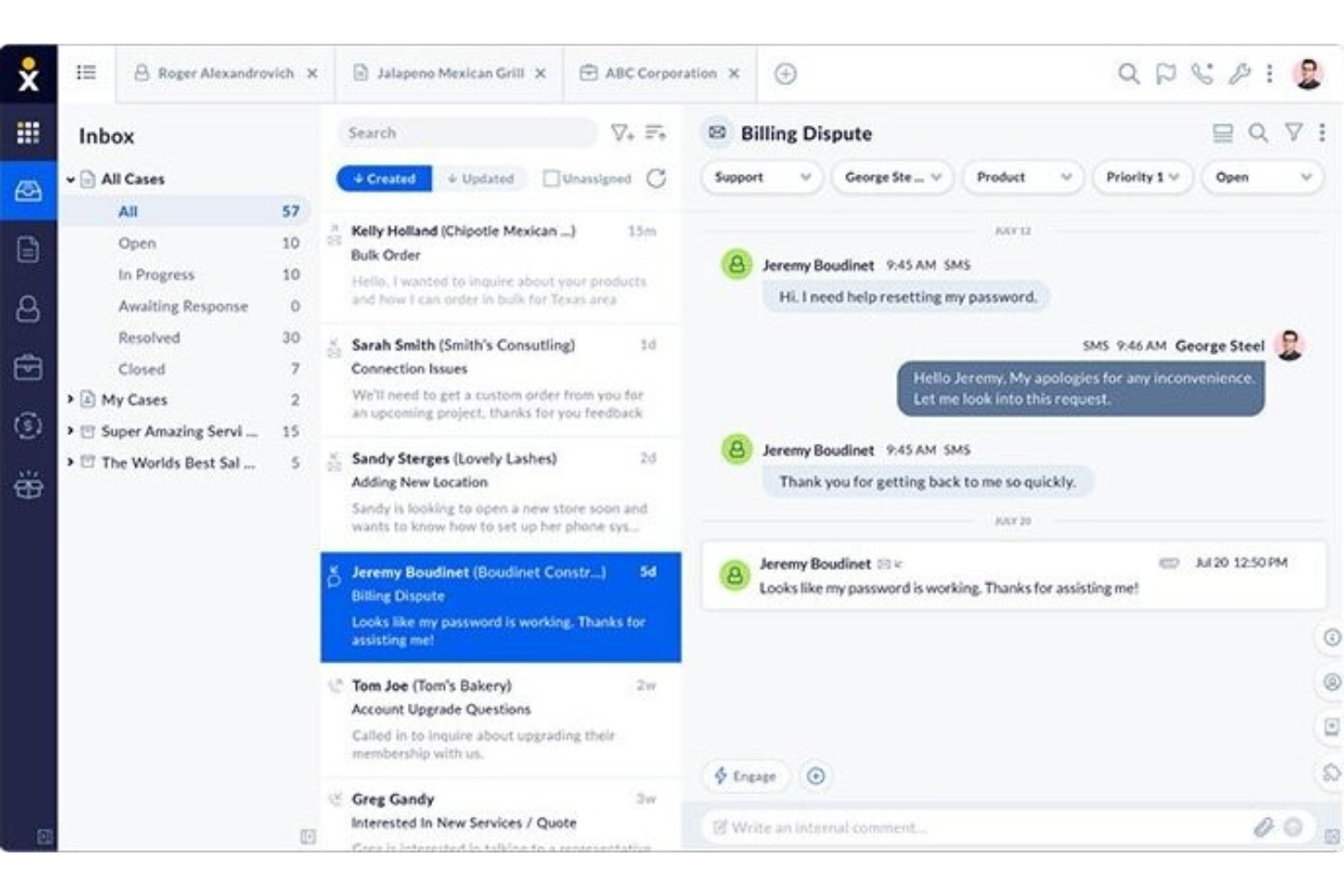
Se il tuo team ha bisogno di una piattaforma unificata per voce, video e operazioni di call center, Nextiva riunisce questi canali in un unico luogo. È una soluzione ideale per le aziende in crescita che desiderano gestire le chiamate dei clienti, la messaggistica del team e la collaborazione da un'unica dashboard. Nextiva ti aiuta a centralizzare le comunicazioni e semplificare le interazioni con i clienti senza dover gestire più strumenti.
Per chi è consigliato Nextiva?
Nextiva supporta i responsabili dell’esperienza cliente e dell’IT in piccole e medie imprese che vogliono gestire telefoni, SMS, video e supporto email in un unico sistema. Si adatta ad organizzazioni orientate al servizio in tutti gli Stati Uniti che necessitano di una piattaforma di comunicazione unificata per team distribuiti.
Perché ho scelto Nextiva
Nextiva si distingue per il suo approccio alle comunicazioni unificate, particolarmente prezioso per le aziende che desiderano gestire tutte le interazioni con i clienti in un unico luogo. La piattaforma combina voce, video, SMS e chat di gruppo, così i tuoi operatori possono passare da un canale all'altro senza perdere il contesto. Apprezzo il modo in cui la dashboard del call center di Nextiva integra instradamento delle chiamate, gestione delle code e monitoraggio in tempo reale. Questo sistema aiuta i team a gestire grandi volumi di richieste mantenendo una collaborazione interna senza interruzioni.
Funzionalità principali di Nextiva
Altre funzionalità di Nextiva particolarmente utili per i team dei call center includono:
- Risponditore automatico: Configura saluti automatici e instradamento delle chiamate in entrata.
- Registrazione delle chiamate: Registra e archivia le chiamate per controllo qualità e formazione.
- Analisi e reportistica: Accedi a metriche dettagliate delle chiamate e dashboard sulle prestazioni.
- Integrazione con CRM: Collega i dati dei clienti dal tuo CRM direttamente all'interfaccia del call center.
Integrazioni di Nextiva
Le integrazioni non sono elencate pubblicamente.
Pros and Cons
Pros:
- Trascrizione della segreteria disponibile per chiamate perse
- Messaggistica integrata per il team e videoconferenze
- Designer visivo del flusso delle chiamate per la configurazione dell'IVR
Cons:
- Le tariffe per chiamate internazionali possono essere imprevedibili
- Registrazione delle chiamate limitata al piano Enterprise
Aircall
Ideale per funzioni di monitoraggio delle chiamate
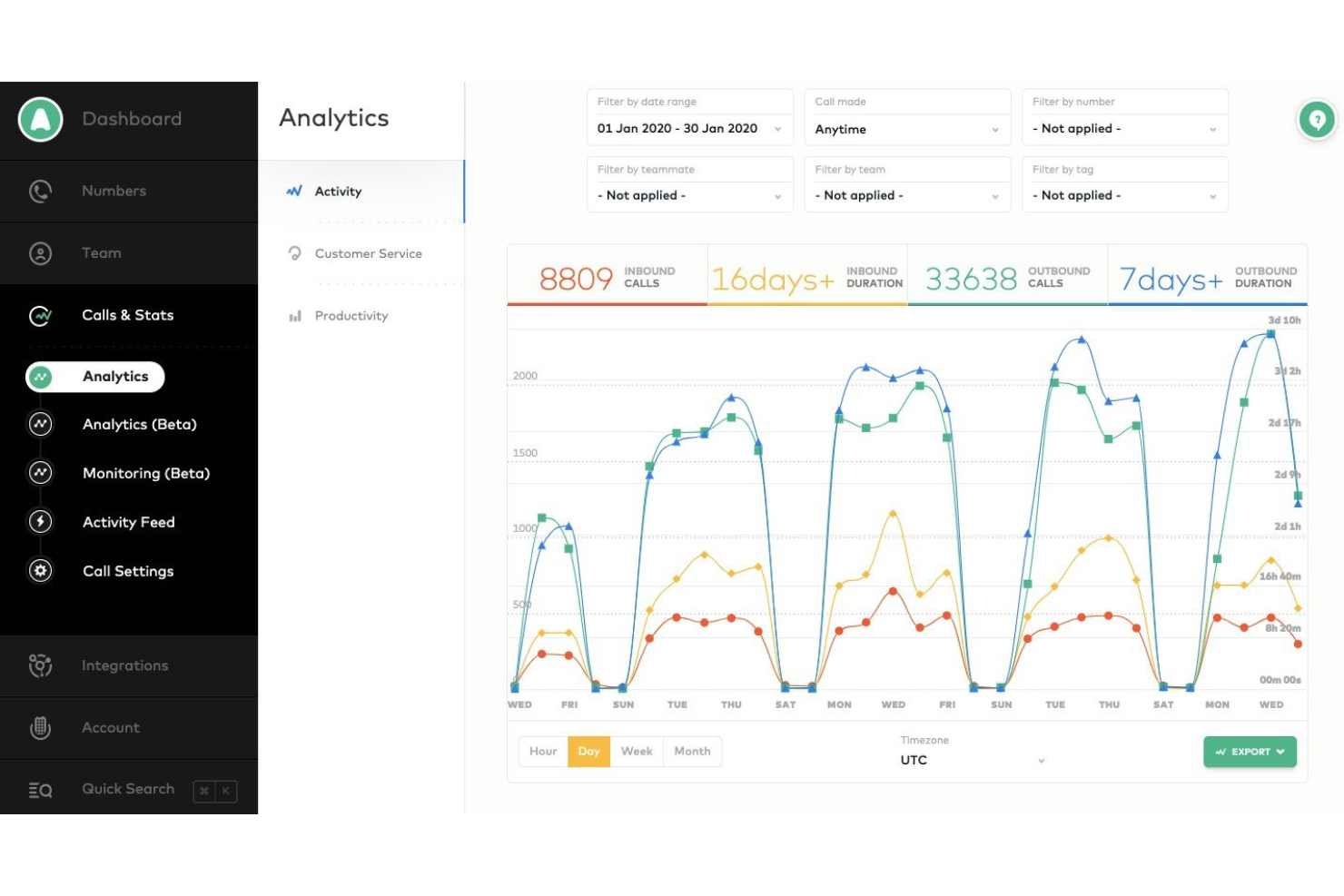
Se hai bisogno di una piattaforma call center che si integri rapidamente con i tuoi strumenti CRM e helpdesk esistenti, Aircall è da considerare. È pensata per team di vendita e assistenza che vogliono attivare nuove linee telefoniche e integrazioni senza ritardi IT. Aircall ti aiuta a centralizzare le conversazioni con i clienti e ad automatizzare la registrazione delle chiamate, così il tuo team può concentrarsi sulla prossima interazione.
Per chi è ideale Aircall?
Responsabili del supporto clienti, leader di contact center e team operativi di vendita in piccole e medie imprese che necessitano di monitoraggio e coaching delle chiamate in tempo reale come parte del loro sistema telefonico. È adatta ad aziende con team di supporto o vendita distribuiti che richiedono visibilità centralizzata sull’attività delle chiamate e supervisione in tempo reale attraverso vari canali.
Perché ho scelto Aircall
Ciò che colpisce di Aircall è la rapidità con cui è possibile avviare un nuovo call center, anche con team distribuiti o da remoto. Il processo di configurazione veloce permette di creare nuovi numeri e inserire agenti in pochi minuti, ideale per le aziende che devono scalare o cambiare rapidamente. Apprezzo il fatto che le profonde integrazioni CRM di Aircall sincronizzino automaticamente i dati e le note delle chiamate, così il team ha sempre a portata di mano le informazioni più aggiornate sul cliente. Queste caratteristiche rendono Aircall una scelta solida per i team che vogliono ridurre al minimo i tempi morti e mantenere i dati dei clienti unificati su tutti i canali.
Funzionalità principali di Aircall
Altre funzionalità particolarmente utili per i team di call center includono:
- Call Whispering: I supervisori possono ascoltare e fornire indicazioni agli agenti durante le chiamate dal vivo senza che il cliente senta.
- Posta in arrivo condivisa delle chiamate: I team possono visualizzare, assegnare e gestire chiamate perse e messaggi vocali da una dashboard centrale.
- Power Dialer: Composizione automatica di elenchi di numeri per accelerare le campagne di chiamate in uscita.
- Warm Transfer: Gli agenti possono parlare con un collega prima di trasferire la chiamata, garantendo un passaggio più fluido.
Integrazioni Aircall
Le integrazioni includono Salesforce, HubSpot, Intercom, Zendesk, Pipedrive, Microsoft Dynamics, Slack, Shopify, Freshdesk e Zoho CRM.
Pros and Cons
Pros:
- Eccellente assistenza clienti
- Accessibile su più dispositivi
- Approfondimenti dettagliati sulle comunicazioni
Cons:
- La funzionalità vivavoce è imprevedibile
- Mancanza di strumenti integrati per la gestione della forza lavoro
Ideale per processi guidati dall'automazione
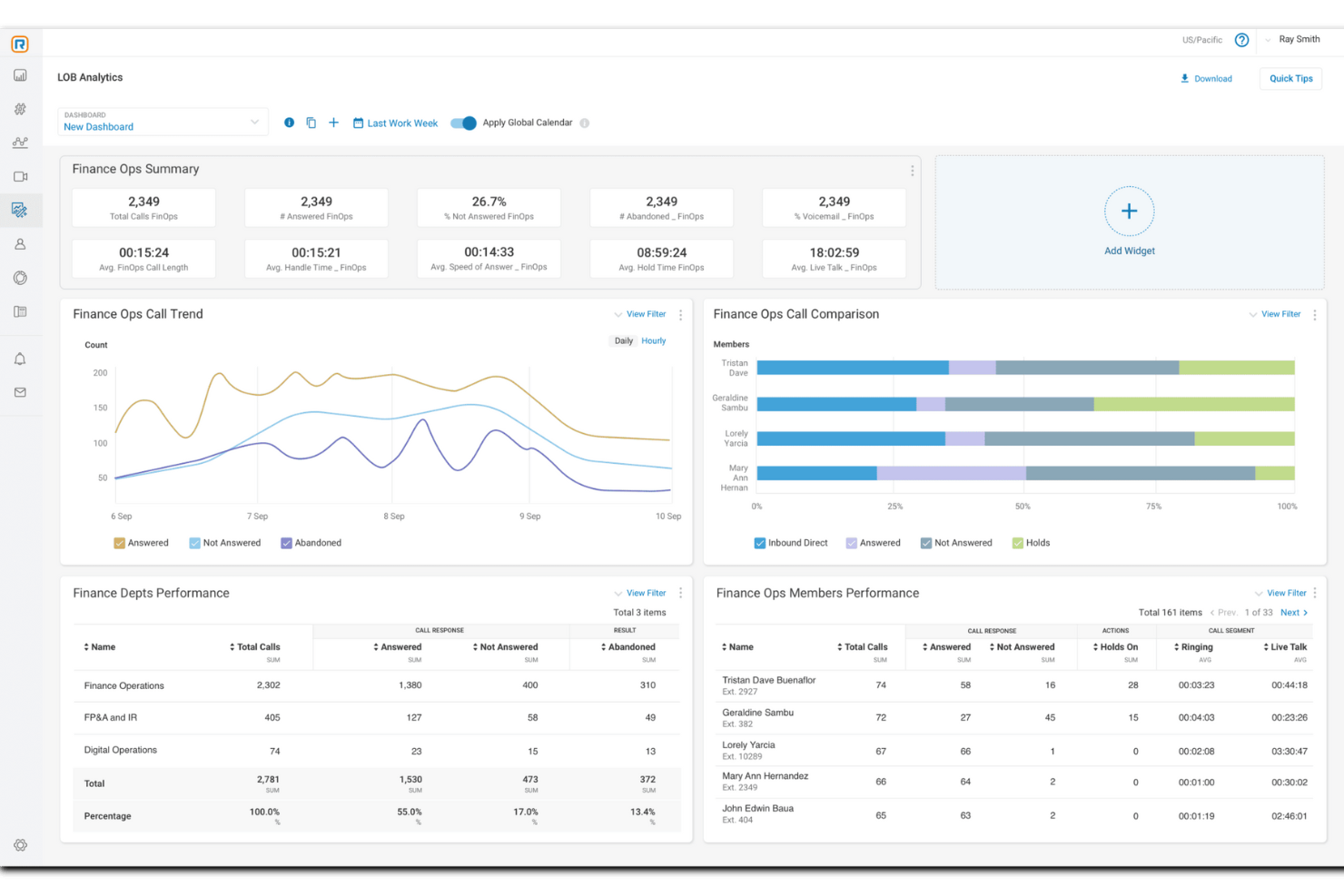
RingCentral Contact Center offre una piattaforma basata su cloud che integra approfondimenti guidati dall'IA e automazione per migliorare le interazioni con i clienti. È adatto a settori che spaziano dal retail alla sanità, dove un servizio clienti efficiente è fondamentale. Fornendo supporto omnicanale tramite voce, messaggistica e social media, RingCentral aiuta le aziende a semplificare la comunicazione e ottimizzare le prestazioni degli agenti, affrontando così sfide come la gestione di alti volumi di chiamate e il miglioramento della soddisfazione dei clienti.
Per chi è ideale RingCentral Contact Center?
Responsabili del servizio clienti e del supporto, leader dei contact center e team operativi di organizzazioni di medie e grandi dimensioni che necessitano di una piattaforma unificata per gestire interazioni omnicanale con i clienti tramite automazione, instradamento e analisi. È adatto alle aziende che gestiscono grandi volumi di attività di supporto o vendita sia in entrata che in uscita e richiedono un controllo centralizzato delle prestazioni, gestione del personale e flussi di lavoro integrati con CRM.
Perché ho scelto RingCentral Contact Center
Ho scelto RingCentral Contact Center per il suo forte focus sui processi guidati dall'automazione, essenziale per ogni moderna operazione di call center. Con funzionalità come la Risposta Vocale Interattiva (IVR) e gli Agenti Virtuali Intelligenti (IVA), puoi automatizzare le interazioni di routine con i clienti, riducendo i tempi di attesa e consentendo al tuo team di concentrarsi su questioni più complesse. Questo non solo aumenta la soddisfazione del cliente, ma ottimizza anche l'efficienza operativa, assicurando che il tuo call center funzioni senza intoppi. Inoltre, l'utilizzo dell'intelligenza conversazionale basata su IA fornisce approfondimenti in tempo reale, aiutando i tuoi agenti a offrire un supporto personalizzato e a migliorare la qualità complessiva del servizio.
Funzionalità principali di RingCentral Contact Center
Oltre ai processi guidati dall'automazione, RingCentral Contact Center offre una varietà di funzionalità chiave che ne aumentano l'utilità come software per call center.
- Supporto omnicanale: Interagisci con i clienti attraverso molteplici canali tra cui voce, chat, email e social media, garantendo un'esperienza cliente senza soluzione di continuità.
- Gestione del personale: Ottimizza gli orari del tuo team e monitora le prestazioni con strumenti progettati per aumentare produttività e qualità del servizio.
- Analisi e reportistica: Ottieni approfondimenti sulle prestazioni del tuo call center con strumenti di analisi e reportistica dettagliati, aiutandoti a prendere decisioni informate.
- Sicurezza e conformità: Proteggi i dati sensibili e garantisci il rispetto delle normative di settore tramite funzionalità di sicurezza avanzate.
Integrazioni di RingCentral Contact Center
Le integrazioni includono Salesforce, HubSpot, Zendesk, Slack, Microsoft Teams, Google Workspace, ServiceNow, Microsoft Dynamics 365, Oracle e SugarCRM.
Pros and Cons
Pros:
- Instradamento basato su IA per percorsi cliente complessi
- Supporto omnicanale su voce, chat e social
- Strumenti integrati per la gestione del personale e della qualità
Cons:
- Supporto limitato per telefoni Polycom
- La personalizzazione iniziale richiede notevoli sforzi e risorse

Ideale per call center globali
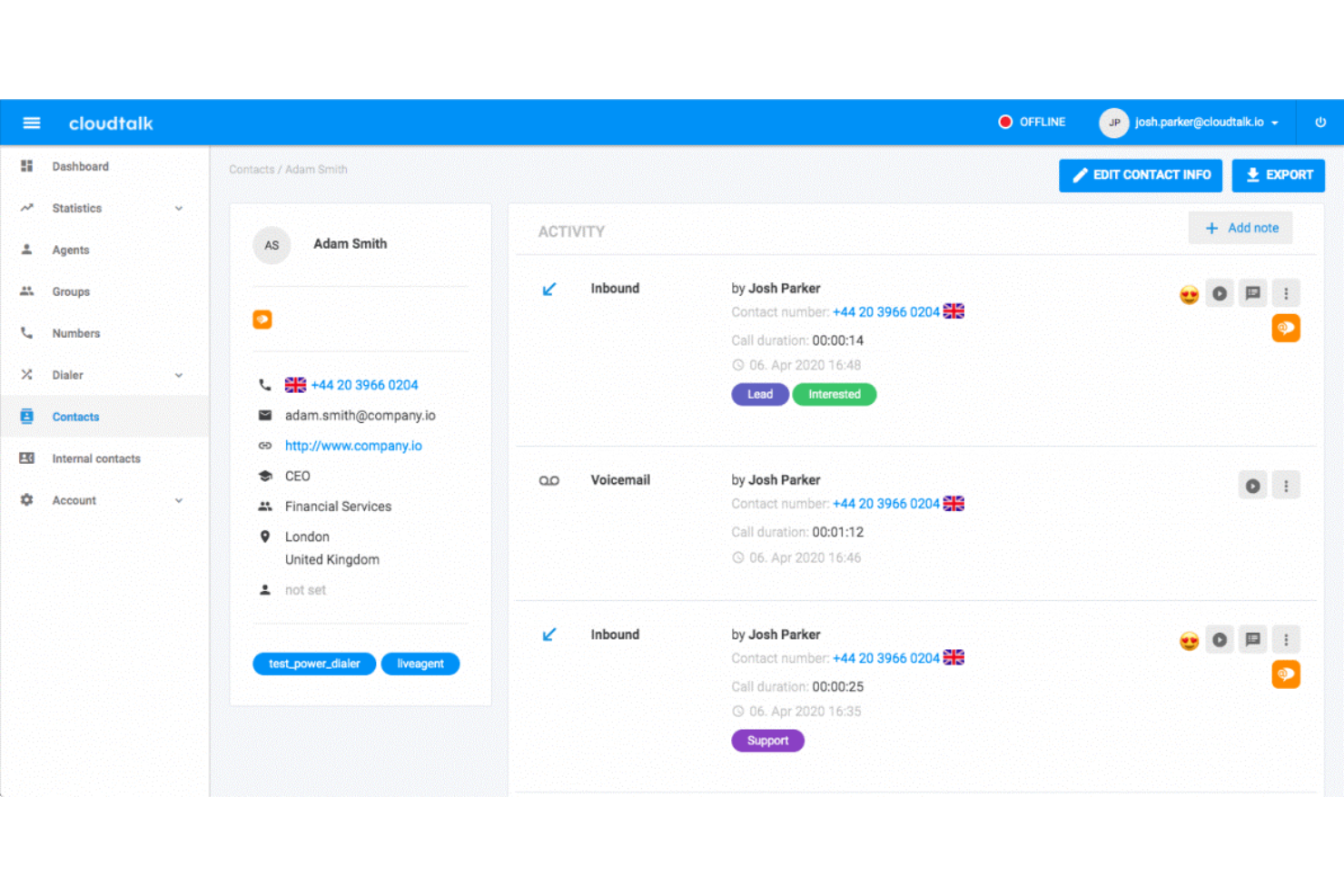
CloudTalk è progettato per i team che necessitano di un instradamento avanzato delle chiamate e di analisi dettagliate attraverso più sedi o configurazioni remote. È particolarmente adatto alle aziende che gestiscono team di supporto o vendita distribuiti e che desiderano monitorare le prestazioni e ottimizzare i flussi di lavoro. La piattaforma aiuta a gestire alti volumi di chiamate mantenendo ogni interazione organizzata e misurabile.
Per chi è CloudTalk?
CloudTalk supporta i responsabili operativi e i team IT di organizzazioni di medie e grandi dimensioni che gestiscono call center globali. È particolarmente adatto alle aziende con team di vendita e supporto distribuiti che richiedono una gestione centralizzata delle chiamate attraverso più paesi e regioni.
Perché ho scelto CloudTalk
Ho scelto CloudTalk perché il suo instradamento avanzato delle chiamate e le sue analisi sono particolarmente utili per i team che lavorano in sedi o fusi orari diversi. La piattaforma offre l’instradamento basato sulle competenze, così le chiamate raggiungono l’agente più qualificato, e dashboard di analisi in tempo reale che permettono di monitorare l’attività delle chiamate mentre avviene. Apprezzo anche la possibilità di creare flussi di chiamata personalizzati adattati alla struttura del team, il che aiuta a mantenere fluide le operazioni distribuite. Queste funzionalità rendono CloudTalk un’opzione solida per le aziende che devono coordinare e misurare le prestazioni di call center remoti o multisede.
Funzionalità principali di CloudTalk
Altre funzionalità di CloudTalk che spiccano per i team di call center includono:
- Messaggio in segreteria: Gli agenti possono lasciare messaggi vocali preregistrati con un solo clic, risparmiando tempo nei follow-up ripetitivi.
- Registrazione delle chiamate: Registra automaticamente le chiamate per fini di controllo qualità, formazione e conformità.
- Risposta vocale interattiva (IVR): Crea menù IVR multilivello per guidare i chiamanti verso il reparto o le informazioni desiderate.
- Click-to-Call: Avvia le chiamate direttamente dal tuo CRM o helpdesk con un solo clic, riducendo gli errori dovuti alla composizione manuale.
Integrazioni di CloudTalk
Le integrazioni includono Salesforce, HubSpot, Zendesk, Pipedrive, Zoho CRM, Intercom, Freshdesk, Microsoft Teams, Monday e Shopify.
Pros and Cons
Pros:
- Qualità delle chiamate stabile
- Interfaccia intuitiva
- Gestione semplice degli agenti
Cons:
- Serve un migliore supporto API
- Gli aggiornamenti possono causare problemi

Ideale per una soluzione scalabile e versatile
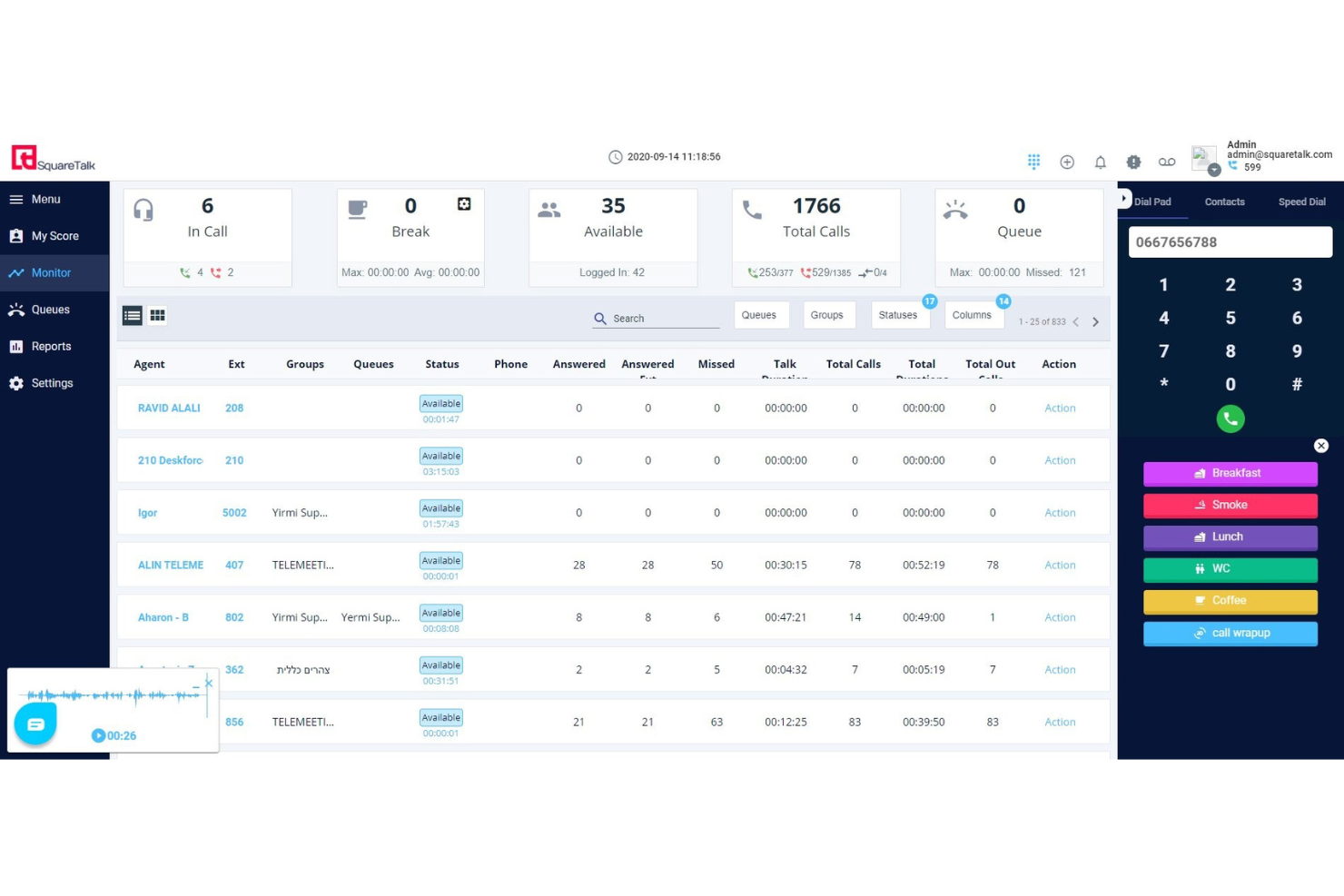
Se la tua squadra ha bisogno di gestire chiamate internazionali e messaggistica da un'unica piattaforma, Squaretalk è stata creata per te. Questo software per call center basato su cloud è particolarmente utile per le aziende con agenti remoti o distribuiti che necessitano di numeri locali e flussi di lavoro automatizzati in più paesi. Squaretalk aiuta a semplificare la comunicazione globale e la conformità per i team di assistenza clienti e vendite che operano su larga scala.
Per chi è più adatto Squaretalk?
Squaretalk si adatta ai team di assistenza clienti e vendite di piccole e medie imprese in crescita che necessitano di una piattaforma di comunicazione scalabile. Funziona bene per le organizzazioni che operano in più regioni e richiedono un'infrastruttura vocale flessibile e una gestione centralizzata dei team distribuiti.
Perché ho scelto Squaretalk
Squaretalk ha attirato la mia attenzione perché è progettato per i team che necessitano di capacità vocali e di messaggistica globali da un'unica piattaforma. L'ho scelto per questa lista perché offre numeri di telefono locali in oltre 100 paesi e supporta la distribuzione automatica delle chiamate, essenziale per gestire agenti remoti o distribuiti. L'infrastruttura di telefonia cloud della piattaforma aiuta le aziende a semplificare le chiamate internazionali e a rimanere conformi alle normative locali. Se il tuo call center ha bisogno di raggiungere clienti in tutto il mondo senza dover gestire più sistemi, l'approccio unificato di Squaretalk è un'ottima scelta.
Caratteristiche principali di Squaretalk
Ho inoltre trovato diverse altre funzionalità che supportano le operazioni di un call center:
- Smart Dialer: Composizione automatica dei numeri dalle liste di chiamata e salto delle chiamate occupate o senza risposta, per mantenere gli agenti concentrati sulle conversazioni in corso.
- Registrazione delle chiamate: Registra le chiamate in ingresso e in uscita per assicurare la qualità e la conformità.
- IVR Designer: Permette di creare menu personalizzati di risposta vocale interattiva tramite un'interfaccia drag-and-drop.
- Dashboard di analisi in tempo reale: Mostra metriche delle chiamate in tempo reale e dati sulle performance degli agenti per consentire ai supervisori di monitorare l'attività.
Integrazioni con Squaretalk
Le integrazioni includono Zoho, Salesforce, Freshworks, Pipedrive, Lynx, Programmable Messaging, Programmable Voice Access e il widget Call Me Back.
Pros and Cons
Pros:
- Standard di sicurezza elevati
- Ampie funzionalità di reportistica e analisi
- Interfaccia intuitiva e facile da usare
Cons:
- Opzioni di personalizzazione limitate
- Nessuna applicazione mobile
New Product Updates from Squaretalk
Squaretalk Adds TradeCore Integration for Brokerage Workflows
Squaretalk adds a TradeCore integration that connects customer conversations with BrokerIQ CRM workflows. This helps brokerage teams trigger AI-driven follow-ups, tasks, and other actions from calls and messages. For more information, visit Squaretalk’s official site.
 .
.
La soluzione migliore per sicurezza e conformità di livello aziendale
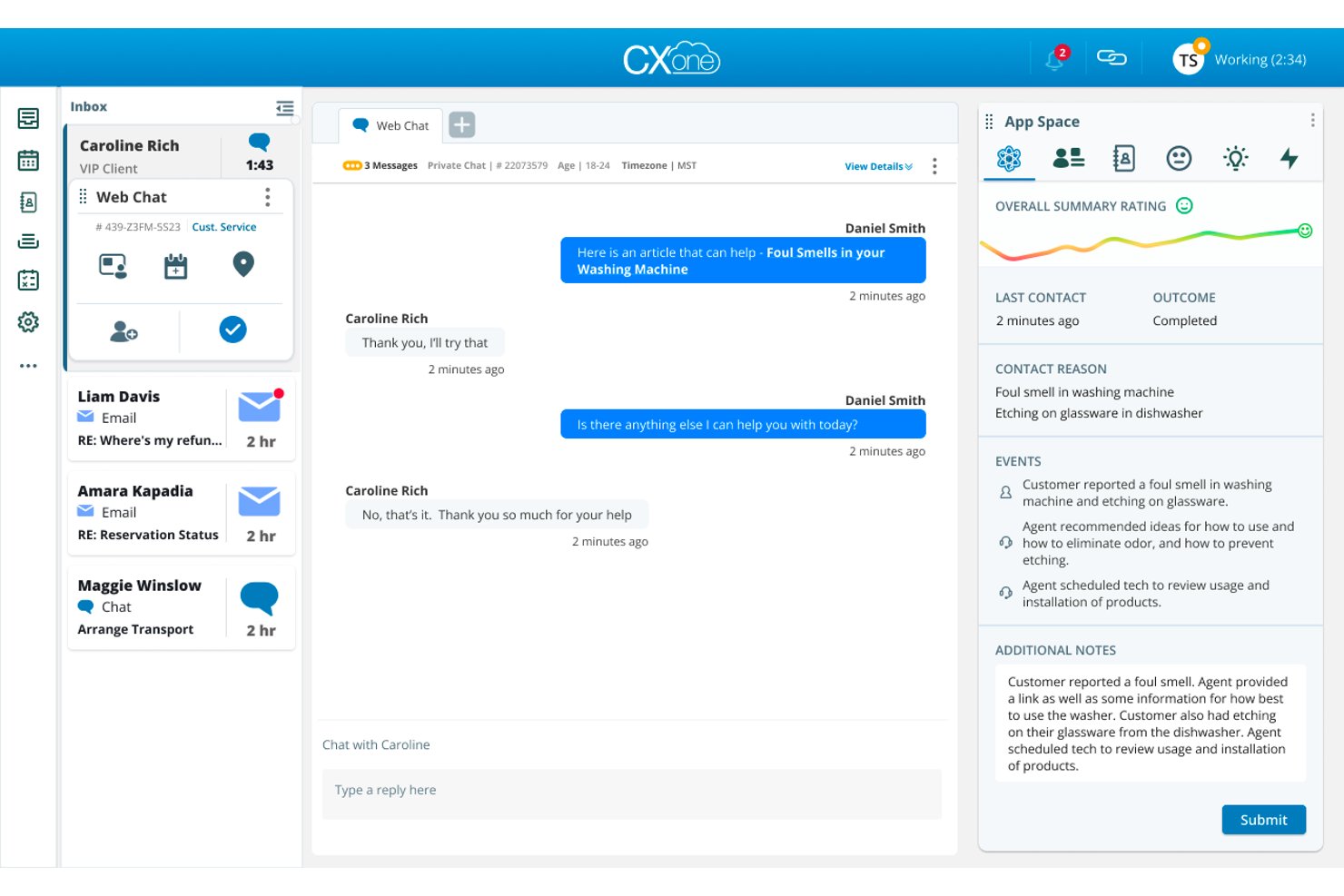
NiCE CXone è una piattaforma cloud per contact center basata sull'intelligenza artificiale che unifica voce in entrata e in uscita, canali digitali, gestione del coinvolgimento della forza lavoro e analisi delle interazioni su un'unica piattaforma.
Per chi è più adatto NiCE CXone?
È una soluzione particolarmente adatta ai contact center aziendali di settori regolamentati come sanità, banche, assicurazioni e pubblica amministrazione, che necessitano di una rigorosa conformità integrata nella piattaforma.
Perché ho scelto NiCE CXone
NiCE CXone si guadagna un posto tra le migliori soluzioni della mia selezione grazie alla profondità con cui la conformità è integrata nella piattaforma stessa. Apprezzo il fatto che gli strumenti di registrazione e conformità non siano componenti aggiuntivi, ma siano inclusi in ogni livello tariffario, un aspetto importante nei settori regolamentati, dove le tracce di audit sono imprescindibili. Funzionalità come la copertura completa della registrazione di Teams e un'infrastruttura pronta per HIPAA fanno sì che non sia necessario assemblare uno stack di conformità ricorrendo a strumenti di terze parti.
Funzionalità principali di NiCE CXone
- Desktop omnicanale per gli agenti: Gestisci voce, chat, e-mail, SMS e messaggi social da un'unica interfaccia unificata.
- IVR basato sull'intelligenza artificiale: Implementa flussi IVR conversazionali utilizzando la comprensione del linguaggio naturale e l'automazione.
- Gestione del coinvolgimento della forza lavoro: Prevedi il fabbisogno, pianifica i turni, registra e gestisci le prestazioni degli agenti su un'unica piattaforma cloud.
- Dashboard di analisi in tempo reale: Monitora l'attività delle code in tempo reale, lo stato degli agenti e i KPI del contact center con strumenti di reportistica personalizzati.
Integrazioni di NiCE CXone
NiCE CXone offre integrazioni native con Salesforce, Zendesk, Microsoft Dynamics 365, ServiceNow, Microsoft Teams, Oracle Service Cloud e Zoom. È disponibile un'API per le integrazioni personalizzate.
Pros and Cons
Pros:
- Instradamento basato sull'intelligenza artificiale su tutti i canali digitali
- Strumenti integrati per la gestione e la pianificazione della forza lavoro
- Ampia gamma di certificazioni per i settori regolamentati
Cons:
- L'implementazione complessa richiede il coinvolgimento del reparto IT
- La personalizzazione dei report richiede competenze tecniche
Five9
Ideale per gestire alti volumi di chiamate
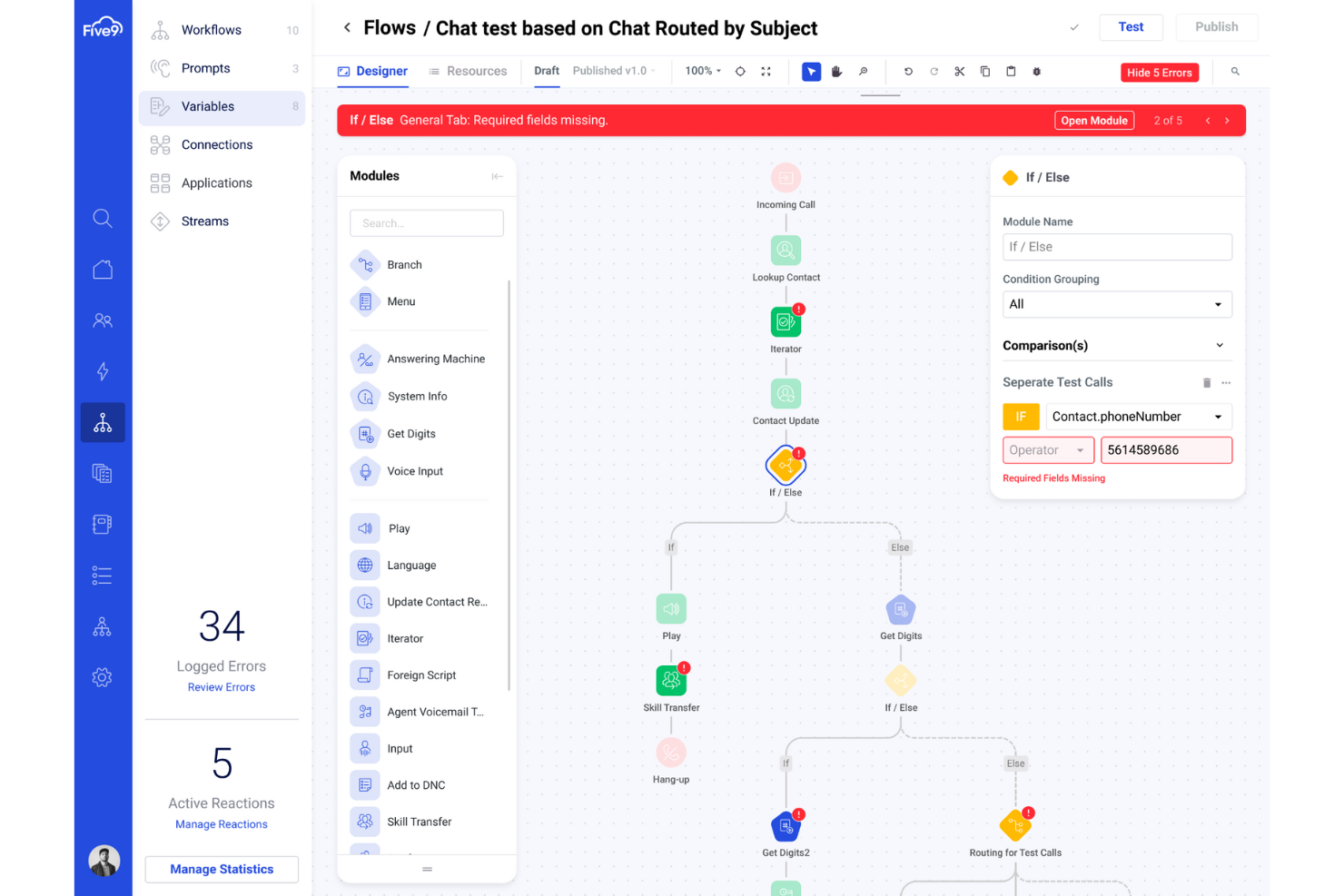
Five9 offre una piattaforma per contact center basata su cloud progettata per organizzazioni che desiderano combinare l'automazione tramite intelligenza artificiale con il supporto di agenti umani. È una scelta solida per i team che vogliono unificare voce, chat, email e canali social utilizzando l'analisi dei dati per ottimizzare le prestazioni. Five9 aiuta le aziende ad automatizzare le interazioni di routine e a fornire un servizio più personalizzato su larga scala.
Per chi è ideale Five9?
Five9 supporta i responsabili dei contact center e delle operazioni in aziende di medie e grandi dimensioni che gestiscono alti volumi di chiamate in entrata e in uscita. Si adatta ad aziende nei settori orientati al servizio e regolamentati che necessitano di supervisione centralizzata e gestione della forza lavoro attraverso operazioni regionali o globali.
Perché ho scelto Five9
Ciò che mi ha colpito di Five9 è l'accento sulla combinazione tra automazione basata su intelligenza artificiale e analisi approfondite per i contact center. Gli agenti virtuali intelligenti della piattaforma gestiscono le richieste di routine dei clienti, consentendo agli agenti umani di occuparsi di questioni più complesse. Apprezzo anche che la suite analitica di Five9 offra approfondimenti in tempo reale e storici sulle prestazioni degli agenti e sulle interazioni con i clienti. Questo approccio aiuta i team a migliorare continuamente la qualità e l'efficienza del servizio, pur gestendo alti volumi su più canali.
Caratteristiche principali di Five9
Altre funzionalità che rendono Five9 una valida opzione per i team dei call center includono:
- Compositore predittivo: Compone automaticamente numeri e collega le chiamate risposte agli agenti disponibili.
- Instradamento omnicanale: Instrada le interazioni dei clienti provenienti da voce, chat, email e social media all'agente più adatto.
- Integrazioni CRM: Si collega nativamente con Salesforce, ServiceNow, Microsoft Dynamics e altri importanti CRM.
- Registrazione e monitoraggio delle chiamate: Registra le chiamate e consente ai supervisori di monitorare le interazioni dal vivo per il controllo di qualità.
Integrazioni Five9
Le integrazioni includono Salesforce, ServiceNow, Microsoft Dynamics 365, Oracle, Zendesk, Oracle NetSuite, Zoom, Microsoft Teams, Slack e Mitel.
Pros and Cons
Pros:
- Include la gamification per migliorare le prestazioni degli agenti
- Documentazione approfondita
- Il compositore predittivo aumenta l'efficienza delle chiamate in uscita
Cons:
- Le funzionalità aggiuntive possono essere costose
- L'analisi delle integrazioni è limitata al piano a pagamento di livello superiore

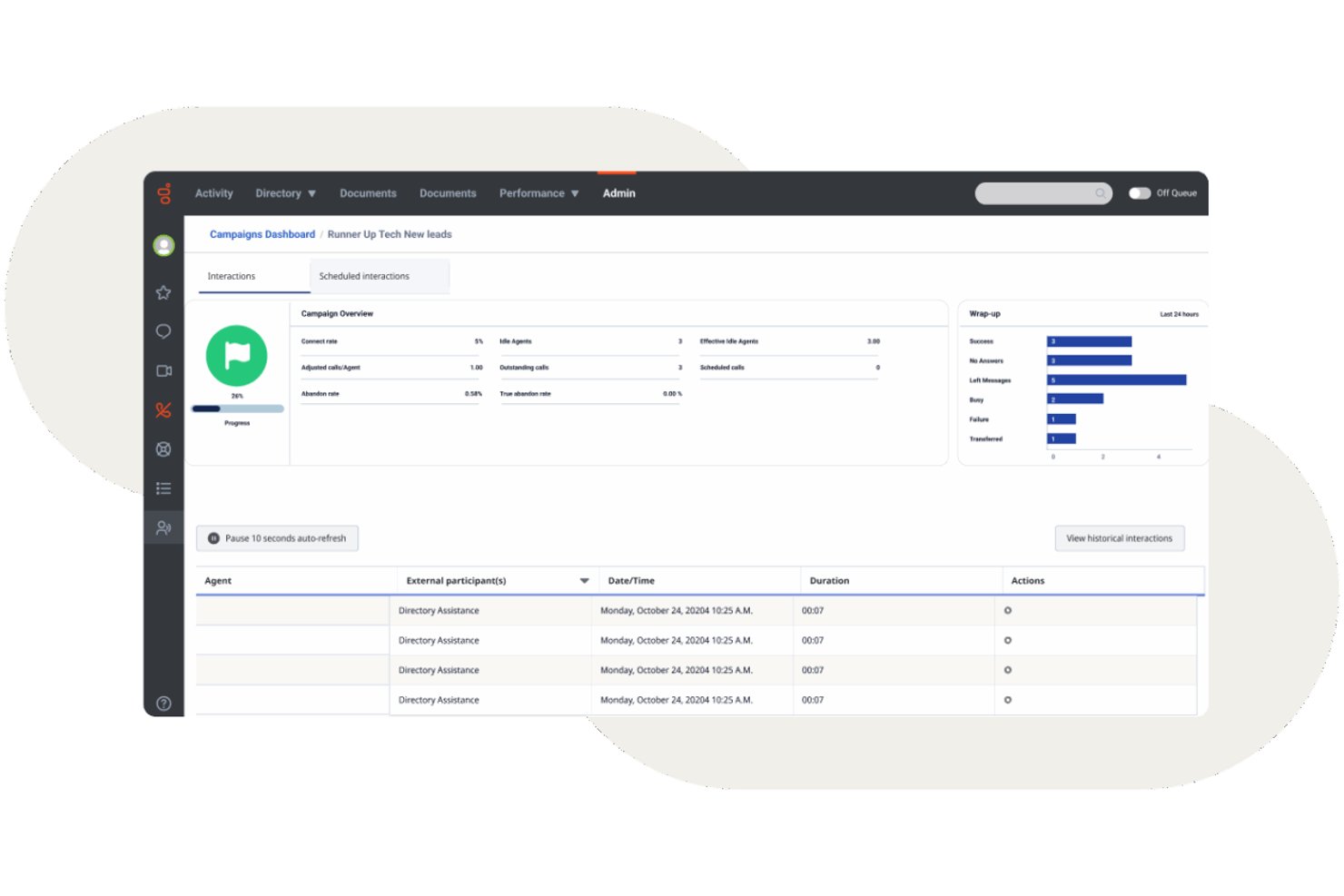
Genesys Cloud CX è una piattaforma per centri di contatto nativa per il cloud che combina instradamento omnicanale, IVR basato sull'intelligenza artificiale, composizione delle chiamate in uscita, gestione del coinvolgimento della forza lavoro e analisi in tempo reale attraverso i canali vocali e digitali.
Per chi è più adatto Genesys Cloud CX?
Genesys Cloud CX è una soluzione ideale per i centri di contatto di medie e grandi dimensioni che necessitano di un'unica piattaforma per gestire elevati volumi di interazioni attraverso i canali vocali e digitali.
Perché ho scelto Genesys Cloud CX
Ho incluso Genesys Cloud CX tra le mie scelte principali perché le sue funzionalità di gestione del percorso del cliente vanno oltre il semplice instradamento. I flussi del percorso della piattaforma mi offrono una mappa visiva in tempo reale di come i clienti si spostano tra ogni punto di contatto, permettendomi di individuare i punti di abbandono e reindirizzare le interazioni prima che si aggravino. In combinazione con il coinvolgimento predittivo, identifica attivamente i clienti a rischio durante la sessione web e attiva una chat proattiva o una richiamata prima che abbandonino.
Funzionalità principali di Genesys Cloud CX
- Instradamento omnicanale: Instrada le interazioni vocali, le chat, le email, gli SMS e i social network agli agenti in un unico spazio di lavoro.
- Gestione del coinvolgimento della forza lavoro: Gestisci le previsioni, la pianificazione e i permessi con strumenti WEM basati sull'intelligenza artificiale.
- Analisi vocale e del sentiment: Analizza le trascrizioni, le parole chiave e il sentiment del 100% delle conversazioni tra agenti e clienti.
- Ecossistema di integrazioni CRM: Collegati in modo nativo a Salesforce, ServiceNow, Microsoft Dynamics e centinaia di altri strumenti aziendali.
Integrazioni di Genesys Cloud CX
Genesys Cloud CX offre integrazioni native con Salesforce, ServiceNow, Zendesk, Microsoft Teams, Microsoft Dynamics 365, Zoom, Jira, Slack, Active Directory e Google Workspace. È disponibile un'API per le integrazioni personalizzate.
Pros and Cons
Pros:
- Instradamento predittivo basato sull'intelligenza artificiale su tutti i canali
- Gestione della forza lavoro integrata con previsioni native
- L'analisi vocale assegna un punteggio al 100% delle interazioni telefoniche
Cons:
- La configurazione iniziale richiede spesso assistenza professionale
- La reportistica avanzata richiede tempi di configurazione significativi

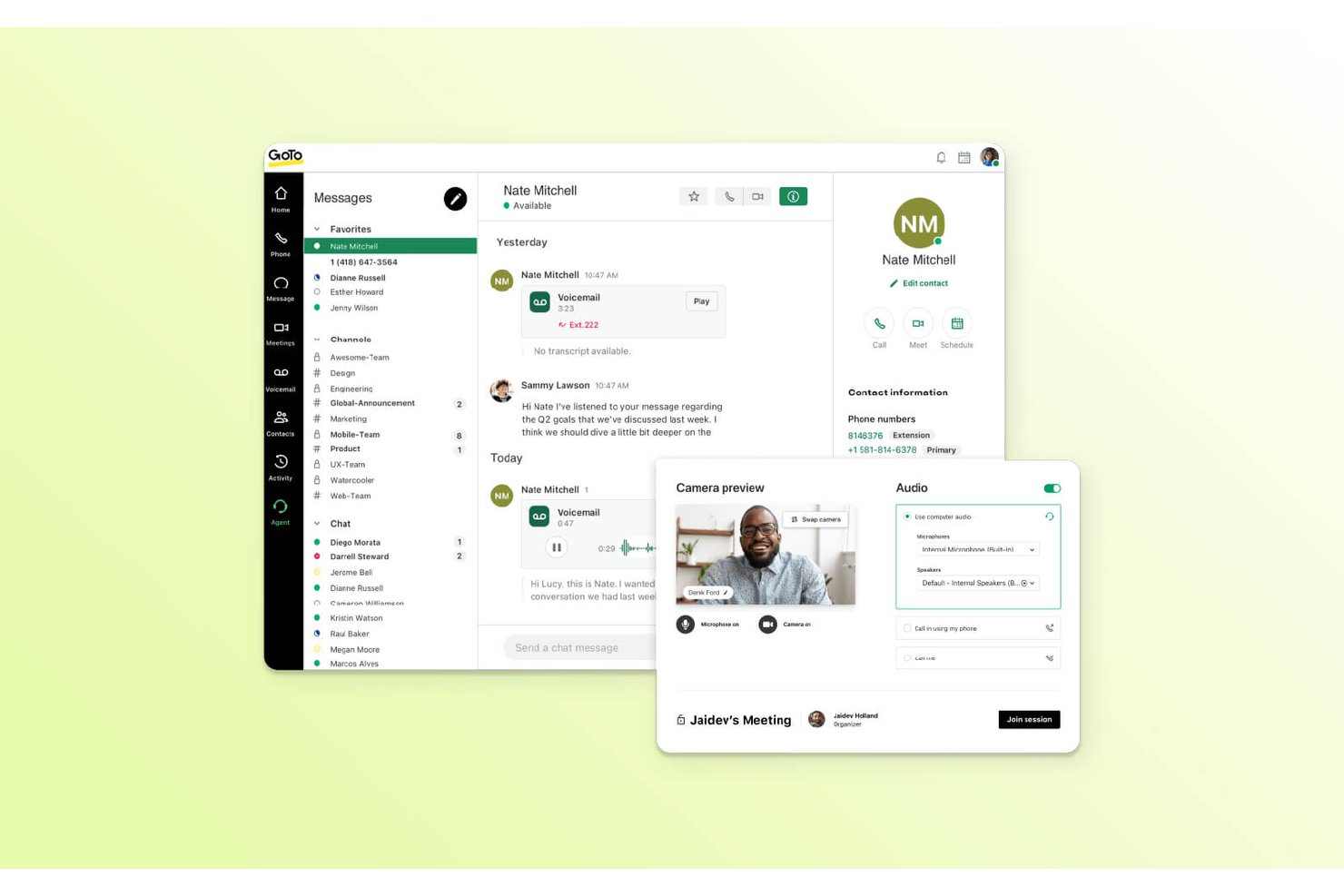
GoTo Connect è un centro contatti e un sistema telefonico basato sul cloud che combina chiamate VoIP, coinvolgimento omnicanale dei clienti, instradamento intelligente delle chiamate e monitoraggio degli operatori in tempo reale in un'unica piattaforma.
Per chi è più adatto GoTo Connect?
GoTo Connect è una soluzione ideale per le piccole e medie imprese che necessitano di un centro contatti completo senza disporre di un ampio team IT incaricato della gestione.
Perché ho scelto GoTo Connect
GoTo Connect è entrato nella mia lista ristretta grazie alla rapidità con cui una squadra può passare dalla registrazione alle chiamate attive. Il centro di amministrazione unificato mi consente di gestire utenti, piani di composizione e code di chiamata da un'unica interfaccia, mentre il generatore visivo dei piani di composizione rende possibile configurare flussi di chiamata complessi senza scrivere una sola riga di codice. Ho inoltre trovato Admin GoPilot davvero utile per segnalare i problemi di configurazione prima che raggiungano i chiamanti.
Funzionalità principali di GoTo Connect
- Piattaforma omnicanale: Connettiti con i clienti tramite voce, SMS, chat, e-mail, WhatsApp e social network da un unico pannello di controllo.
- Analisi in tempo reale: Monitora le code di chiamata, l'attività degli operatori e i dati sulle prestazioni con pannelli di controllo configurabili in tempo reale.
- Classificazione e chiusura delle chiamate: Assegna esiti alle chiamate e gestisci le note post-chiamata obbligatorie direttamente nell'interfaccia dell'operatore.
- Riepiloghi delle chiamate basati sull'IA: Genera automaticamente riepiloghi delle interazioni e analisi del sentimento dopo le chiamate con i clienti.
Integrazioni di GoTo Connect
GoTo Connect offre integrazioni native con Salesforce, Zendesk, ServiceNow, Microsoft Teams, Miro e Gmail. È disponibile un'API per le integrazioni personalizzate.
Pros and Cons
Pros:
- Configurazione rapida senza supporto IT dedicato
- L'editor visivo dei piani di composizione semplifica l'instradamento delle chiamate
- Il centro di amministrazione unificato gestisce utenti e code
Cons:
- Compositore predittivo limitato per le campagne in uscita
- La reportistica è meno personalizzabile rispetto alle piattaforme aziendali
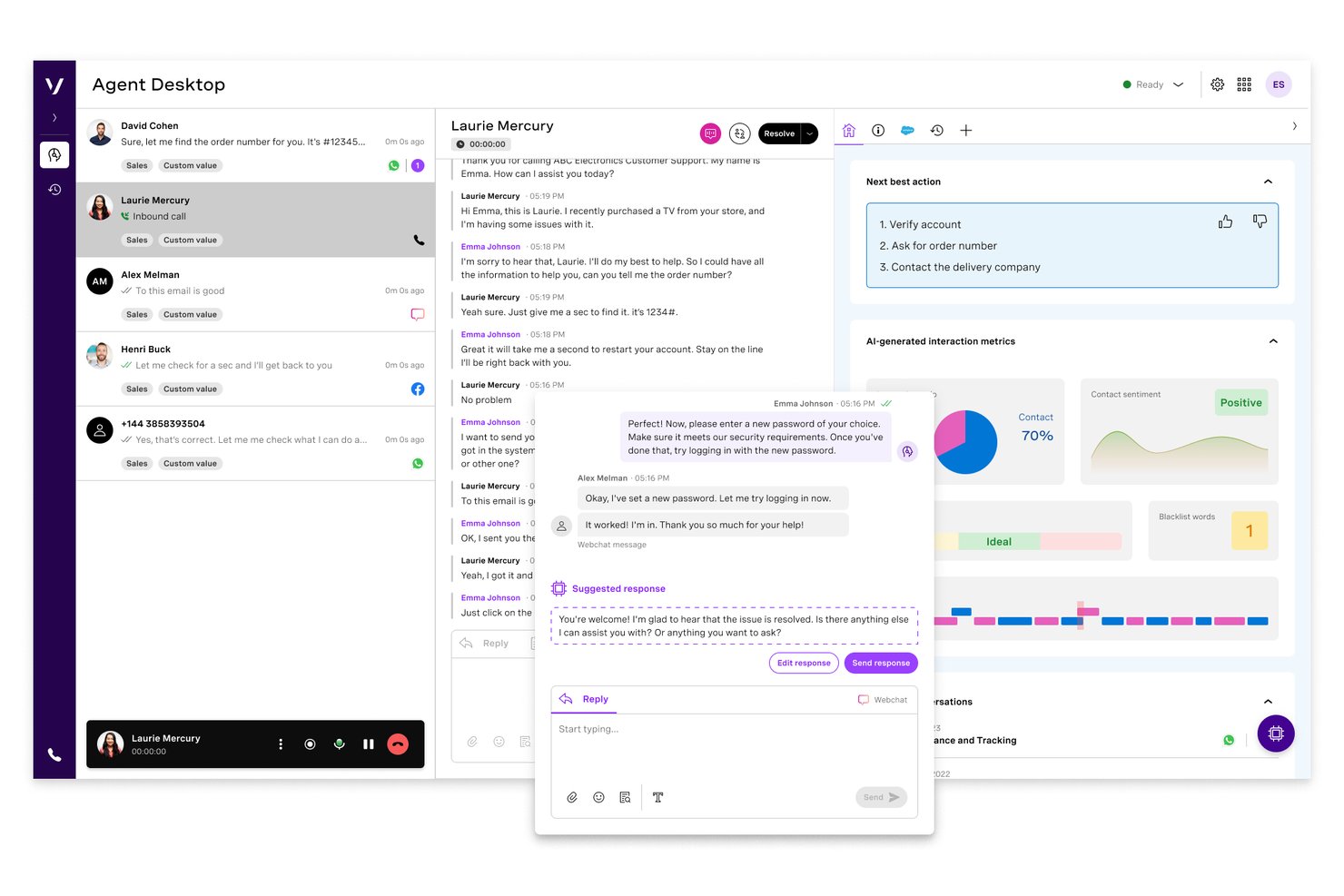
Il Centro di contatto Vonage è una piattaforma per contact center basata sul cloud che combina chiamate in entrata e in uscita, IVR, instradamento basato sulle competenze, registrazione delle chiamate, supporto omnicanale e analisi in tempo reale con integrazioni CRM native.
Per chi è più adatto il Centro di contatto Vonage?
Team di medie e grandi aziende già standardizzati su Salesforce, ServiceNow o Microsoft Dynamics 365 che necessitano di un contact center connesso direttamente al proprio CRM.
Perché ho scelto il Centro di contatto Vonage
Il Centro di contatto Vonage si è guadagnato un posto nella mia lista ristretta grazie alla profondità della sua integrazione con Salesforce, ServiceNow e Microsoft Dynamics 365. Apprezzo il fatto che, quando un agente risponde a una chiamata, la cronologia del cliente venga visualizzata istantaneamente tramite finestre a comparsa sullo schermo, mentre la sincronizzazione CRM bidirezionale registra automaticamente l'interazione. Vonage ha persino aderito al programma pilota BYOC per CCaaS di Salesforce, il che significa che le sue funzionalità omnicanale e di intelligenza artificiale vengono eseguite nativamente all'interno di Service Cloud Voice.
Funzionalità principali del Centro di contatto Vonage
- Instradamento basato sulle competenze: Instrada le chiamate in entrata agli agenti in base alle competenze, alla disponibilità o alle regole di priorità.
- Ripristino di emergenza e instradamento delle chiamate di emergenza: Reindirizza automaticamente le chiamate in caso di interruzioni o emergenze per garantire la continuità operativa.
- Coinvolgimento omnicanale: Gestisci voce, chat web, SMS e altro ancora da un'unica interfaccia per tutti gli agenti.
- Componente aggiuntivo per l'analisi vocale: Ottieni informazioni dalle trascrizioni delle chiamate, dal rilevamento delle parole chiave e dall'analisi del sentiment nelle interazioni.
Integrazioni del Centro di contatto Vonage
Il Centro di contatto Vonage offre integrazioni native con Salesforce, ServiceNow, Microsoft Dynamics 365, Zendesk e Microsoft Teams. È disponibile un'API per le integrazioni personalizzate.
Pros and Cons
Pros:
- Integrazione nativa avanzata con Salesforce per gli agenti
- Le code omnicanale unificano i canali vocali e digitali
- Le finestre a comparsa in tempo reale mostrano il contesto completo del chiamante
Cons:
- Le funzionalità di personalizzazione dei report storici sono limitate
- La configurazione iniziale complessa richiede il supporto di servizi professionali
Altri software per call center
Ecco alcune altre opzioni che non sono state incluse nell’elenco dei migliori software per call center:
- TalkRoute
Ideale per gestire più chiamate
- Bright Pattern
Ideale per la comunicazione omnicanale
- Talkdesk
Ideale per rispondere alle domande dei clienti
- Twilio
Ideale per contact center altamente personalizzabili
- Dialpad
Migliore soluzione multicanale con funzionalità avanzate di intelligenza artificiale
- Zoho Voice
Ideale per la telefonia integrata nel CRM
- CallHippo
Ideale per interazioni con i clienti potenziate dall'IA
- Freshdesk Contact Center
Ideale per un contact center virtuale economico
- Webex Contact Center
Ideale per l'affiancamento e gli approfondimenti sugli agenti basati sull'IA integrata
- Creatio CRM
Ideale per la personalizzazione della comunicazione
- LiveAgent
Ideale per helpdesk integrato e strumenti di gestione ticket
- Zendesk
Ideale per unificare i canali di comunicazione
- 8x8
Ideale per la comunicazione omnicanale


Come Valuto i Software per Call Center
Valuto ogni piattaforma rispetto a una base comune—routing basato sulle competenze, IVR, registrazione delle chiamate, monitoraggio in tempo reale—prima di considerare i fattori differenzianti che determinano se uno strumento si adatta alla tua operazione.
Funzionalità di Base (Requisiti Fondamentali per questa Lista)
Quando seleziono gli strumenti per la mia lista, li classifico ciascuno su una scala da 0 (non offre la funzionalità) a 5 (eccelle in quest'area) per ogni funzionalità di base elencata di seguito. Poi, calcolo il punteggio totale dello strumento in percentuale. Ogni strumento deve raggiungere un punteggio minimo totale del 75% per essere considerato per l'inclusione.
- Distribuzione Automatica delle Chiamate: Controllo se la piattaforma supporta il routing basato sulle competenze e sulle priorità, poiché una semplice coda round-robin non funziona quando si gestiscono assistenza tecnica e fatturazione con lo stesso numero.
- Sistema IVR: Un buon IVR consente ai chiamanti di gestire autonomamente lo stato degli ordini o dei saldi prima ancora di raggiungere un operatore, quindi cerco menu multilivello con editor visuale dei flussi di chiamata.
- Chiamate in Entrata e in Uscita: Valuto se la piattaforma gestisce entrambe le direzioni nativamente—i team che svolgono campagne di rinnovo e gestiscono chiamate di assistenza hanno bisogno di code miste, non di due strumenti separati.
- Registrazione e Monitoraggio delle Chiamate: I supervisori hanno bisogno di più della sola riproduzione; cerco ascolto in diretta, whisper e barge affinché i responsabili possano aiutare gli operatori durante le chiamate difficili in tempo reale.
- Analisi in Tempo Reale e Storiche: Dashboard che mostrano profondità della coda, tempi di attesa e stato degli operatori in tempo reale sono importanti quanto i report storici su SLA e CSAT per le revisioni post-turno.
- Integrazione con CRM e Strumenti Aziendali: Valuto se la piattaforma si collega a sistemi come Salesforce, HubSpot o Zendesk per mostrare il contesto del chiamante tramite pop-up e registrare le interazioni automaticamente.
Dopo aver individuato gli strumenti che soddisfano questi criteri, considero cosa differenzia ciascuna piattaforma.
Fattori Differenzianti (Cosa Distingue i Fornitori)
Ecco come confronto e metto a confronto i diversi fornitori:
Caratteristiche Distintive
L'assistenza agli operatori tramite IA è un fattore distintivo importante. Cerco piattaforme che propongano articoli della knowledge base e risposte suggerite durante la chiamata, riducendo i tempi di gestione nei casi complessi. La gestione della forza lavoro è altrettanto cruciale per i team che affrontano picchi stagionali, dove previsioni e monitoraggio della conformità integrati sostituiscono la gestione su foglio di calcolo. Analisi vocali e di sentiment completano il quadro—la valutazione automatica di tutte le interazioni offre ai responsabili QA una visione molto più completa rispetto al controllo casuale dei campioni.
Oltre le Caratteristiche
Conformità e sicurezza sono priorità assolute—verifico la presenza di certificazioni PCI DSS e SOC 2, specialmente quando gli operatori gestiscono informazioni di pagamento telefonicamente. Anche la trasparenza dei prezzi è importante, poiché costi telefonici nascosti o addebiti extra possono far lievitare il budget dopo il lancio. Valuto anche SLA di uptime e ridondanza dei carrier, perché anche brevi interruzioni nelle ore di punta significano chiamate perse e mancati ricavi. Infine, i tempi di implementazione variano molto tra i fornitori, e un tempo di attivazione più rapido rappresenta un vero vantaggio per i team che migrano da un sistema legacy.
Come scegliere un software per call center
Stai cercando di scegliere il software per call center più adatto? Inizia collegando le tue principali priorità relative all'esperienza del cliente alle funzionalità che affrontano le sfide concrete dei centri di contatto:
| Se la tua priorità è... | Cerca... |
|---|---|
| Rispondere rapidamente su tutti i canali | Una casella di posta unificata che includa telefono, chat ed e-mail |
| Un instradamento preciso per i problemi complessi | Una distribuzione basata sulle competenze e guidata dai dati |
| Visibilità sulle prestazioni degli operatori | Pannelli di controllo in tempo reale e monitoraggio dettagliato |
| Accesso flessibile ai dati dei clienti | Integrazioni profonde con CRM e strumenti aziendali |
| Operazioni globali o regolamentate | Conformità integrata per PCI DSS, GDPR, HIPAA |
Come valutare il tuo elenco
- Verifica le dichiarazioni sull'omnicanalità reale: Esegui una prova di un giorno instradando tre tipi di ticket (telefono, chat, email) per verificare che gli agenti dispongano ogni volta di tutte le informazioni necessarie.
- Convalida la profondità dell'integrazione: Programma una demo dal vivo che mostri le schermate contestuali di Salesforce o HubSpot e la sincronizzazione bidirezionale; richiedi un video da esaminare in seguito.
- Valuta l'accuratezza delle analisi: Esporta un report del dashboard relativo a 48 ore e confronta le metriche con i risultati della tua piattaforma precedente per volume delle chiamate, sentiment e tempo di gestione.
- Conferma la copertura della conformità: Chiedi al fornitore le lettere di attestazione PCI DSS, HIPAA e GDPR aggiornate o la documentazione sulla sicurezza.
- Scegli tra flessibilità e vincolo: Decidi se le funzionalità predefinite avanzate (personalizzazione limitata) o le API aperte (integrazione fai da te, maggiore impegno) si adattano meglio alle competenze e alle esigenze del tuo team.
Che cos'è il software per i centri assistenza?
Il software per i centri assistenza è una piattaforma digitale che gestisce le comunicazioni con i clienti tramite telefono, chat, email e altri canali in un'unica interfaccia. Aiuta i team a gestire le interazioni in entrata e in uscita, a instradare le conversazioni agli agenti appropriati e a monitorare la qualità del servizio. Queste piattaforme spesso includono strumenti per la distribuzione delle chiamate, la risposta vocale interattiva (IVR), la registrazione delle chiamate, le analisi e le integrazioni con i sistemi CRM per supportare esperienze cliente efficienti e coerenti.
Software per centri assistenza e software per centri di contatto: qual è la differenza?
In base alla mia esperienza, la scelta tra questi due sistemi dipende dal fatto che tu gestisca un team incentrato sul telefono oppure che unifichi i percorsi dei clienti su più canali per evitare la compartimentazione dei dati.
- Software per centri assistenza: si concentra principalmente sulle comunicazioni vocali (chiamate in entrata e in uscita, VoIP, IVR, instradamento delle chiamate, assistenza telefonica). È ideale per i team che si affidano alla voce come canale principale e necessitano di un'elevata qualità audio.
- Software per centri di contatto (CCaaS): offre un'unica piattaforma che unifica l'assistenza telefonica con canali digitali come chat dal vivo, email, SMS, app di messaggistica e social media. È ideale per le aziende SaaS in crescita che desiderano consolidare la cronologia delle interazioni tra i vari canali e la programmazione degli agenti.
In questa recensione, esamino sia i sistemi per centri assistenza incentrati sulla voce sia le piattaforme aziendali per centri di contatto, per offrirti opzioni indipendentemente dalle dimensioni delle tue attività.
Tipi di software per centri assistenza
- Software per centri assistenza basato sul cloud: opera su un'infrastruttura cloud ospitata dal fornitore e supporta team remoti o distribuiti con costi iniziali contenuti.
- Software per centri assistenza installato localmente: funziona su hardware fisico installato presso la tua sede e offre un controllo dedicato sulla sicurezza dei server e sull'archiviazione dei dati.
- Software per centri assistenza per chiamate in entrata: gestisce le richieste dei clienti in entrata utilizzando menu di risposta vocale interattiva, distribuzione automatica delle chiamate e regole di instradamento basate sulle competenze.
- Software per centri assistenza per chiamate in uscita: supporta le campagne di contatto commerciale e i follow-up degli account utilizzando sistemi di composizione automatica predittivi, avanzati e progressivi.
- Software per centri assistenza misto: unifica le code in entrata e i sistemi di composizione in uscita in un'unica interfaccia, riassegnando dinamicamente gli agenti in base al volume delle chiamate in tempo reale.
- Software omnicanale per centri di contatto: centralizza le chiamate vocali, le chat dal vivo, i messaggi di testo e le conversazioni via email in un'unica cronologia continua del cliente.
Tendenze nel software per centri assistenza
- IA agentica e flussi di lavoro automatizzati: I fornitori di software stanno superando i semplici bot conversazionali per passare all'implementazione di agenti IA autonomi. Questi sistemi valutano il contesto, eseguono attività in più fasi, aggiornano i record CRM e completano i flussi di lavoro di routine senza intervento umano.
- Assistenza agli agenti in tempo reale: Le applicazioni software ascoltano le chiamate in corso per trascrivere l'audio, analizzare il sentimento dei clienti e recuperare istantaneamente gli articoli della base di conoscenza. Questa guida in tempo reale aiuta gli operatori a risolvere più rapidamente i problemi complessi dei clienti.
- Garanzia della qualità automatizzata: Le piattaforme utilizzano ora modelli di apprendimento automatico per analizzare il 100 percento delle interazioni con i clienti. La valutazione automatica del rispetto degli script, delle regole di conformità e del tono sostituisce il campionamento manuale per la formazione da parte dei responsabili.
- Personalizzazione a basso codice: Gli strumenti offrono sistemi di creazione con funzionalità di trascinamento per flussi di chiamata, regole di instradamento e integrazioni. I team operativi possono modificare rapidamente le regole delle code e le automazioni senza l'assistenza degli sviluppatori.
- Livelli di dati unificati: I sistemi unificano la cronologia delle conversazioni vocali, delle chat, dei messaggi di testo e delle email in un'unica sequenza temporale del cliente. Questa struttura unificata offre ai team di assistenza ibridi e da remoto una visibilità completa su tutti i punti di interazione.
- Omnicanale e pronto per il lavoro da remoto per impostazione predefinita: Con l'aumento delle aspettative dei clienti, le piattaforme per call center continuano a unificare voce, chat, email e social media in un'unica interfaccia, offrendo al contempo piena accessibilità da remoto, affidabilità del cloud e strumenti integrati per la gestione della forza lavoro.
Funzionalità dei software per call center
Quando scegli un software per call center, presta attenzione alle seguenti funzionalità chiave:
- Distribuzione automatica delle chiamate: Instrada le chiamate in arrivo all'operatore o al reparto più appropriato, garantendo tempi di attesa più brevi per chi chiama e una maggiore produttività degli operatori.
- Risposta vocale interattiva: Consente a chi chiama di interagire con un menu autonomo tramite voce o tastierino, aiutandolo ad accedere rapidamente al reparto corretto o a risolvere semplici richieste senza coinvolgere un operatore.
- Registrazione delle chiamate: Registra automaticamente le chiamate per la formazione, il controllo della qualità e la risoluzione delle controversie, consentendo di esaminare le interazioni, formare gli operatori e garantire la conformità.
- Report e analisi in tempo reale: Offre pannelli di controllo e report dettagliati sulle metriche chiave, come il volume delle chiamate, le prestazioni degli operatori e la soddisfazione dei clienti, semplificando il miglioramento delle operazioni.
- Supporto omnicanale: Consente ai clienti di contattarti per telefono, email, chat o social media, così il tuo team può gestire tutte le conversazioni in un unico luogo e offrire un'assistenza coerente.
- Integrazione CRM: Si collega agli strumenti di gestione delle relazioni con i clienti, permettendo agli operatori di accedere durante le chiamate alle informazioni e alla cronologia importanti dei clienti per offrire un'assistenza più personalizzata.
- Monitoraggio delle chiamate: Permette ai supervisori di ascoltare le chiamate in corso, fornire indicazioni agli operatori senza che il cliente le senta o subentrare nelle conversazioni quando necessario, risultando ideale per la formazione e la garanzia della qualità.
- Gestione delle code: Inserisce chi chiama in code virtuali con tempi di attesa stimati e aggiornamenti, riducendo la frustrazione e gestendo meglio i periodi di picco delle chiamate.
- Gestione della forza lavoro: Aiuta a pianificare i turni, prevedere la domanda e monitorare la disponibilità degli operatori, mantenendo i livelli di personale in linea con i volumi delle chiamate.
- Composizione delle chiamate in uscita: Automatizza attività come i ricontatti, i sondaggi o le chiamate commerciali, così gli operatori dedicano meno tempo alla composizione dei numeri e più tempo a parlare con i clienti.
Funzionalità comuni dell'IA nei software per call center
Oltre alle funzionalità standard dei software per call center elencate sopra, molte di queste soluzioni stanno integrando l'IA con funzionalità come:
- Assistenza IA agli operatori: Fornisce suggerimenti in tempo reale, articoli della base di conoscenza e indicazioni sulle azioni migliori da intraprendere durante le chiamate in corso, aiutando gli operatori a rispondere alle domande dei clienti più rapidamente e con maggiore precisione.
- Analisi vocale e del sentimento: Utilizza l'IA per analizzare le registrazioni delle chiamate e le conversazioni in corso in relazione a tono, emozioni e parole chiave, offrendo ai supervisori informazioni sulla soddisfazione dei clienti e sulle tendenze delle prestazioni degli operatori.
- Instradamento predittivo delle chiamate: Sfrutta l'IA per abbinare chi chiama all'operatore disponibile più adatto sulla base dei risultati storici, delle competenze e dei profili dei clienti, con l'obiettivo di migliorare i tassi di risoluzione al primo contatto.
- Garanzia della qualità automatizzata: Applica l'IA per esaminare e valutare le chiamate in base alla conformità, al rispetto degli script e alle competenze relazionali, riducendo la necessità di campionamenti manuali per il controllo della qualità e accelerando i cicli di feedback.
- Agenti virtuali e bot conversazionali: Gestiscono richieste e attività di routine utilizzando l'IA conversazionale, lasciando agli operatori umani i problemi più complessi e offrendo assistenza 24 ore su 24, 7 giorni su 7 attraverso tutti i canali.
Vantaggi dei software per call center
L'implementazione di un software per centro assistenza telefonica offre diversi vantaggi al tuo team e alla tua azienda. Eccone alcuni che puoi aspettarti:
- Maggiore soddisfazione dei clienti: Il routing efficiente delle chiamate e il supporto omnicanale assicurano che i clienti vengano collegati rapidamente all'agente giusto.
- Maggiore produttività del team: Gli approfondimenti basati sull'IA, funzionalità come i compositori automatici intelligenti o la chiamata con un clic e la gestione avanzata della forza lavoro aiutano il tuo team a concentrarsi sulle attività prioritarie e a ottimizzare il flusso di lavoro.
- Gestione dei dati migliorata: L'integrazione con gli strumenti esistenti mantiene le informazioni sui clienti organizzate e accessibili, riducendo gli errori nella gestione dei dati.
- Maggiore flessibilità: Le funzionalità per il lavoro da remoto consentono al tuo team di fornire un servizio uniforme da qualsiasi luogo, adattandosi ai cambiamenti degli ambienti di lavoro.
- Approfondimenti utili: Le analisi in tempo reale e i cruscotti personalizzabili offrono dati preziosi per guidare il processo decisionale e migliorare le operazioni.
- Risparmio sui costi: La pianificazione automatizzata e l'allocazione efficiente delle risorse aiutano a ridurre i costi operativi mantenendo la qualità del servizio.
- Maggiore sicurezza dei dati: Le misure di sicurezza proteggono le informazioni sensibili dei clienti, garantendo la conformità alle normative e rafforzando la fiducia.
Costi e prezzi dei software per centri di assistenza telefonica
La scelta di un software per centro assistenza telefonica richiede la comprensione dei vari modelli e piani tariffari disponibili. I costi variano in base alle funzionalità, alle dimensioni del team, agli eventuali componenti aggiuntivi e ad altri fattori. La tabella seguente riassume i piani più comuni, i relativi prezzi medi e le funzionalità generalmente incluse nelle soluzioni software per centri di assistenza telefonica:
Tabella comparativa dei piani per software per centri di assistenza telefonica
| Tipo di piano | Prezzo medio | Funzionalità comuni |
|---|---|---|
| Piano gratuito | $0-$15/utente/mese | Include il routing di base delle chiamate, opzioni IVR limitate, reportistica di base e una semplice integrazione CRM. |
| Piano personale | $15-$35/utente/mese | Aggiunge chiamate illimitate, registrazione delle chiamate, cruscotti di analisi migliorati e integrazioni con i CRM più diffusi. |
| Piano aziendale | $35-$70/utente/mese | Offre IVR avanzato, routing basato sulle competenze, assistenza dell'agente basata sull'IA, monitoraggio delle chiamate, reportistica personalizzata e messaggistica omnicanale. |
| Piano per grandi imprese | $70-$150/utente/mese | Fornisce gestione della forza lavoro, analisi predittive, assistenza 24 ore su 24, 7 giorni su 7, rigorosi controlli di conformità e SLA personalizzati. |
Domande frequenti sul software per call center
Ecco alcune risposte alle domande comuni sul software per call center:
Quali sono i costi continuativi del software per call center?
I costi continuativi per il software per cloud centri di contatto o per un VoIP sistema telefonico dipendono dalle dimensioni e dalle esigenze del team. Le spese includono abbonamenti, licenze per gli operatori e componenti aggiuntivi come la gestione della forza lavoro, la registrazione delle chiamate, la gestione delle prestazioni, l’analisi vocale e la gestione della qualità. Considerare anche r report e analisi, la gestione delle code, gli aggiornamenti e l’assistenza garantisce che il tuo call center outbound rimanga sicuro nel tempo.
Il software per call center supporta team di call center remoti o distribuiti?
Le moderne piattaforme di software per call center basate sul cloud software per call center e centri di contatto come servizio (CCaaS) offrono ai team distribuiti un accesso sicuro tramite le comunicazioni unificate. Ideali per un call center virtuale, questi strumenti aumentano la produttività degli operatori grazie al routing intelligente, alla gestione delle code di chiamata, al monitoraggio delle chiamate e ai trasferimenti assistiti. La gestione del coinvolgimento della forza lavoro integrata aiuta i responsabili a supportare gli operatori ovunque si trovino.
Come posso integrare il software per call center con il mio CRM o help desk esistente?
Di solito puoi integrare il software per call center con il tuo CRM o help desk utilizzando connettori integrati, API o piattaforme di integrazione di terze parti come Zapier. Inizia verificando se la tua soluzione per call center offre integrazioni dirette con CRM popolari come Salesforce, monday CRM o HubSpot. In caso contrario, cerca la documentazione delle API o soluzioni middleware. L’integrazione consente di sincronizzare automaticamente i dati dei clienti e i ticket di assistenza, offrendo agli operatori un contesto più completo e riducendo l’inserimento manuale dei dati.
Come può il software per call center migliorare la risoluzione al primo contatto (FCR) per il mio team?
Il software per call center migliora la risoluzione al primo contatto offrendo agli operatori accesso in tempo reale alla cronologia dei clienti, alle basi di conoscenza e agli script delle chiamate. Funzionalità come il routing intelligente delle chiamate o il routing basato sulle competenze indirizzano i chiamanti verso l’operatore disponibile più adatto. Gli strumenti di monitoraggio consentono di individuare i problemi ricorrenti e le lacune nelle conoscenze, così puoi formare il tuo team. Cerca di sfruttare la creazione automatica dei ticket, la presa di note e persino i suggerimenti basati sull’intelligenza artificiale per aiutare gli operatori a risolvere i problemi già alla prima chiamata.
Qual è la differenza tra software per call center omnicanale e multicanale?
Il software per call center omnicanale collega tutti i tuoi canali di comunicazione — telefono, e-mail, chat e social media — in modo che gli operatori possano vedere l’intera cronologia del cliente in un unico luogo. Le soluzioni multicanale consentono di offrire assistenza su diversi canali, ma gestiscono ciascuno di essi separatamente. Con l’approccio omnicanale, i clienti usufruiscono di un’esperienza più fluida e gli operatori possono passare da un canale all’altro senza perdere il contesto. Questo porta a un’assistenza più rapida e personalizzata.
Quali KPI di monitoraggio e analisi delle chiamate dovrei monitorare?
Concentrati sulle metriche che collegano l’efficienza operativa al sentiment dei clienti. Tra i KPI principali rientrano i punteggi del sentiment basati sull’intelligenza artificiale, la risoluzione al primo contatto (FCR), i tassi di contenimento tramite self-service e il costo per interazione. Il monitoraggio di questi indicatori garantisce un’elevata qualità del servizio e dimostra al vertice aziendale un ROI chiaro.
In che modo le soluzioni software per call center gestiscono la sicurezza e la privacy dei dati?
Le soluzioni moderne proteggono i dati aziendali tramite la crittografia end-to-end, la rimozione automatica dei dati PII/PCI dalle registrazioni e dalle trascrizioni e rigorosi controlli degli accessi basati sui ruoli. Le piattaforme principali mantengono inoltre rigorose certificazioni di conformità, tra cui SOC 2 Type II, ISO 27001, GDPR e HIPAA.