

Met VoIP-softphone-apps kunt u zakelijke gesprekken rechtstreeks vanaf uw computer of mobiele apparaat voeren en ontvangen met behulp van een headset, waardoor elk scherm in uw bedrijfstelefoonlijn verandert. Voor leiders op het gebied van support en klantervaring betekent dit flexibele, kosteneffectieve communicatie zonder dat u hardware of ingewikkelde configuraties hoeft te beheren.
Als u op zoek bent naar de beste oplossingen om klantgesprekken te verbeteren, uw team verbonden te houden en u aan te passen naarmate uw bedrijf zich ontwikkelt, helpt deze gids u de beste opties te vergelijken en vol vertrouwen de juiste tool te kiezen.
Waarom u onze softwareaanbevelingen kunt vertrouwen
6,700+
Reviews
20
Industry experts
16+
Evaluation factors
14
Years
Ons team test en beoordeelt software sinds 2012. Als CX-leiders weten we zelf hoe moeilijk — en belangrijk — het is om de juiste software te kiezen.
Voor deze gids hebben we tools geëvalueerd met behulp van praktijktests en onafhankelijk onderzoek, waarbij we tools beoordeelden aan de hand van onze selectiecriteria.
Onze reviews weerspiegelen ons menselijke redactionele oordeel, geen verkooppraatje.
 Gui DrusinaCreative Director
 Tim FisherVP of AI
Vergelijkingstabel voor VoIP-softphone-apps
| Tool | Best For | Trial Info | Price | ||
|---|---|---|---|---|---|
| 1 | Het beste voor analyses van internationale gesprekken | Gratis proefperiode van 14 dagen | Vanaf €19/gebruiker/maand (jaarlijks gefactureerd) | Website | |
| 2 | Het beste voor wereldwijde virtuele telefoonnummers | Gratis proefperiode van 10 dagen | Vanaf $18/gebruiker/maand (jaarlijks gefactureerd) | Website | |
| 3 | Ideaal voor gespreksroutering op basis van Freshworks | 14 dagen gratis proberen | Vanaf $15/gebruiker/maand (jaarlijks gefactureerd) | Website | |
| 4 | Het beste voor zakelijk bellen op basis van Workspace | Gratis abonnement beschikbaar | Vanaf $10/gebruiker/maand | Website | |
| 5 | Beste voor communicatie binnen klantgerichte teams | Gratis demo beschikbaar | Vanaf $15/user/month (jaarlijks gefactureerd) | Website | |
| 6 | Ideaal voor door AI aangedreven gespreksnotities | 14 dagen gratis proberen | Vanaf $15/gebruiker/maand (jaarlijks gefactureerd) | Website | |
| 7 | Ideaal voor zakelijke communicatie op meerdere apparaten | Gratis demo beschikbaar | Prijs op aanvraag | Website | |
| 8 | Beste voor verkoopkiezers en sms-werkstromen | 14 dagen gratis proberen | Vanaf $29/gebruiker/maand (jaarlijks gefactureerd) | Website | |
| 9 | Het beste voor bellen en vaste telefoons voor kleine bedrijven | Niet beschikbaar | Vanaf $19.95/gebruiker/maand | Website | |
| 10 | Het beste voor zakelijk bellen via Zoom | Gratis demo beschikbaar | Vanaf $10.50/gebruiker/maand | Website |


Beoordelingen van VoIP-softphone-apps
Hieronder vindt u mijn gedetailleerde samenvattingen van de beste VoIP-softphone-apps die op mijn shortlist zijn terechtgekomen. In mijn beoordelingen bespreek ik uitgebreid de functies, integraties en beste gebruiksscenario’s van elk platform, zodat u de beste optie voor u kunt vinden.
 Het beste voor analyses van internationale gesprekken
- Gratis proefperiode van 14 dagen
- Vanaf €19/gebruiker/maand (jaarlijks gefactureerd)
Visit WebsiteCustomer Rating:4.4/5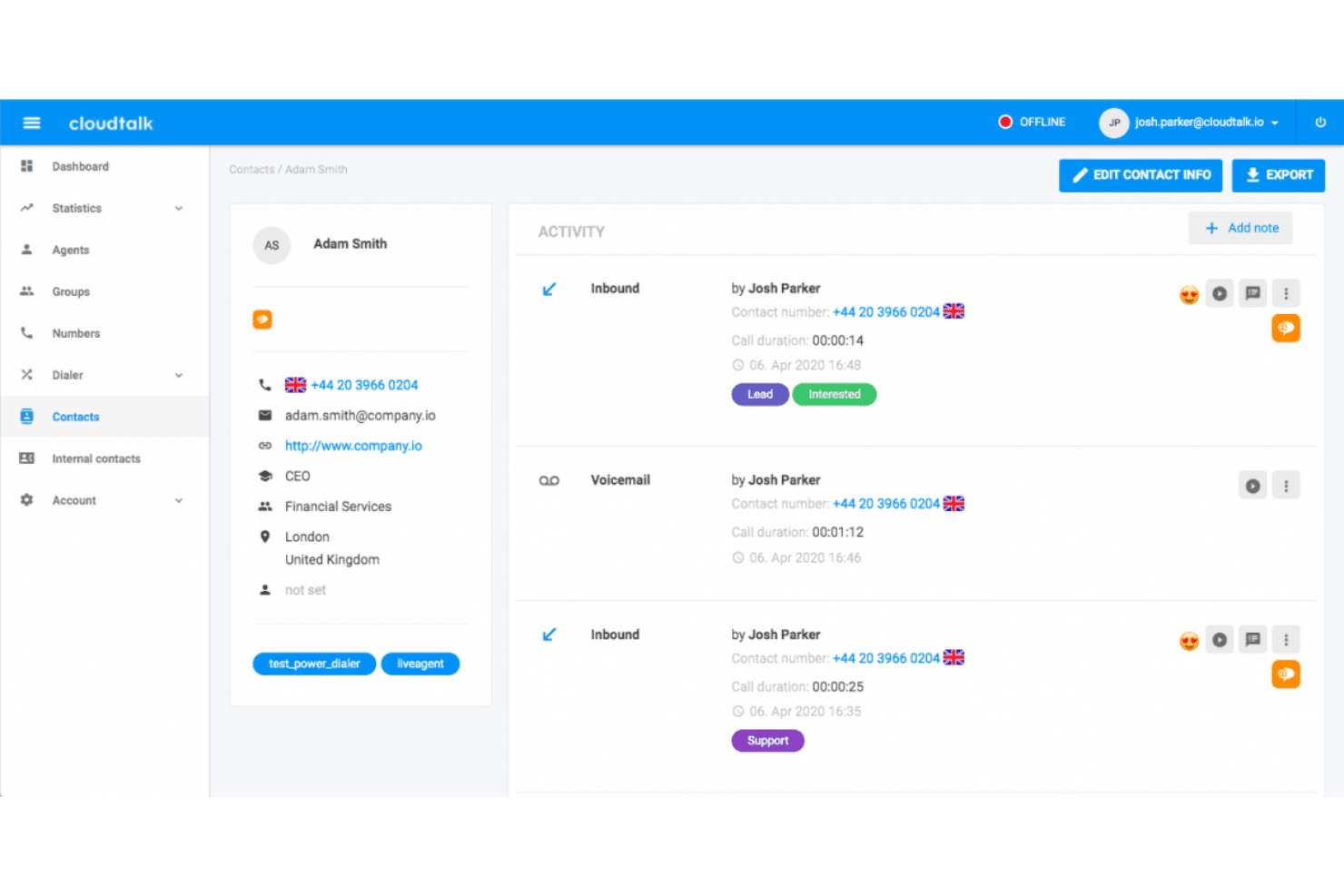
CloudTalk toont een gedetailleerd contactprofiel met een geschiedenis van belactiviteiten, tags, voicemailregistraties en interactieregistraties van medewerkers. CloudTalk is een cloudgebaseerd VoIP-platform voor softphones dat door AI aangedreven kiesfuncties, wereldwijd bellen naar meer dan 160 landen, CRM-integraties, realtime gespreksanalyses en berichtenuitwisseling via meerdere kanalen combineert in één interface.
Voor wie is CloudTalk het meest geschikt?
CloudTalk is geschikt voor groeiende verkoop- en ondersteuningsteams die grote belvolumes in meerdere landen beheren en behoefte hebben aan gedetailleerd inzicht in de prestaties van medewerkers.
Waarom ik voor CloudTalk heb gekozen
Ik heb CloudTalk opgenomen in mijn topkeuzes omdat de realtime analyses dieper gaan dan die van de meeste softphones wanneer gesprekken meerdere landen omvatten. De aangepaste dashboards splitsen het belvolume, de gespreksduur en de activiteit van medewerkers uit per regio, wachtrij of periode, allemaal zonder handmatige exports. De door AI aangedreven laag voor gespreksintelligentie voegt daar sentimentbeoordelingen en doorzoekbare transcripties aan toe, zodat ik kan bekijken hoe specifieke medewerkers presteren in verschillende internationale markten.
Belangrijkste functies van CloudTalk
- Slimme kiezer: Zet meerdere gesprekken uit lijsten en contactpersonen in de wachtrij om uitgaande belworkflows te automatiseren.
- Routering op basis van vaardigheden: Wijs inkomende gesprekken toe aan beschikbare medewerkers op basis van expertise- of taalcriteria.
- Ontwerper voor IVR-gespreksstromen: Bouw interactieve menu's met meerdere niveaus met behulp van slepen-en-neerzetten voor zelfbediening of routering.
- Softphone-apps voor alle apparaten: Gebruik de softphone via Mac, Windows, browser, iOS en Android zonder extra hardware.
CloudTalk-integraties
CloudTalk biedt meer dan 100 rechtstreekse integraties, waaronder Salesforce, HubSpot, Zendesk, Pipedrive, Intercom, Zoho CRM, Freshdesk, Gorgias, Slack, Microsoft Teams en Zapier. Er is een API beschikbaar voor aangepaste integraties.
Pros and Cons
Pros:
- Uitgebreide analyses voor internationale gesprekswachtrijen
- AI-transcriptie beschikbaar bij alle betaalde abonnementen
- Hoge beschikbaarheid dankzij wereldwijde redundantie van telecomproviders
Cons:
- De mobiele app is minder betrouwbaar dan de desktopversie
- De gesprekskwaliteit neemt af bij slechte netwerkverbindingen
 Het beste voor wereldwijde virtuele telefoonnummers
- Gratis proefperiode van 10 dagen
- Vanaf $18/gebruiker/maand (jaarlijks gefactureerd)
Visit WebsiteCustomer Rating:4.4/5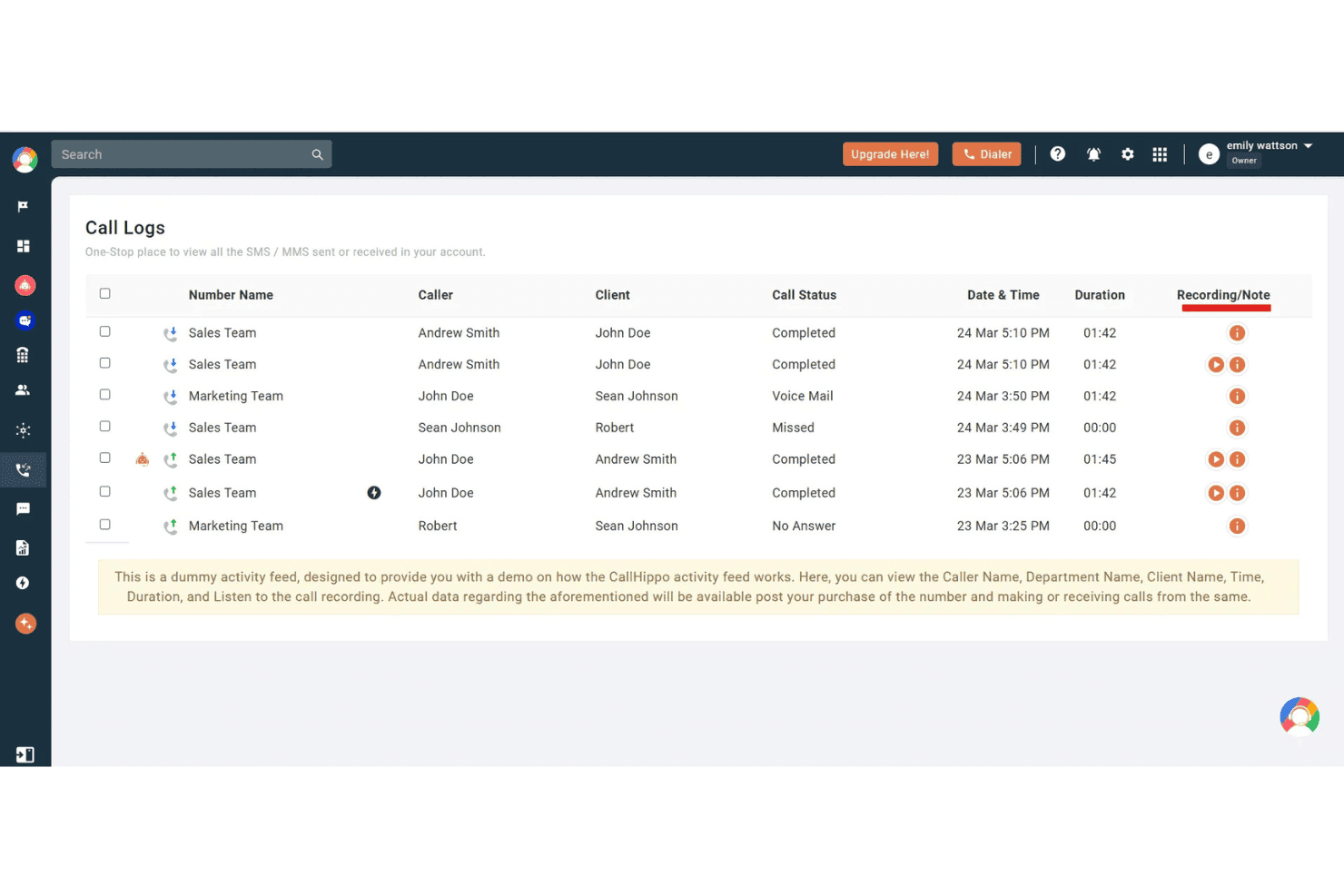
CallHippo toont een dashboard met gesprekslogboeken waarin bellergegevens, gespreksstatus, duur en opnameopties voor teamactiviteiten worden weergegeven. CallHippo is een cloudtelefonieplatform met softphone-apps voor web, desktop en mobiel. Het biedt virtuele telefoonnummers in meer dan 150 landen, naast bellen met AI-ondersteuning, omnichannel-berichten en routering voor contactcenters.
Voor wie is CallHippo het meest geschikt?
Het is een uitstekende keuze voor kleine tot middelgrote verkoop- en supportteams die in meerdere landen lokaal telefonisch aanwezig willen zijn zonder complexe infrastructuur.
Waarom ik voor CallHippo heb gekozen
Ik heb CallHippo opgenomen in mijn topkeuzes omdat de wereldwijde dekking van telefoonnummers uitgebreider is dan die van de meeste softphone-apps. Je kunt binnen enkele minuten lokale, gratis of mobiele nummers activeren in meer dan 150 landen, en Smart DID Routing toont automatisch de juiste lokale nummerherkenning op basis van het land van bestemming. Ook de functie AI Global Connect spreekt me aan: deze detecteert de lokale tijdzone van een contact voordat er wordt gebeld, zodat gesprekken buiten kantooruren worden voorkomen.
Belangrijkste functies van CallHippo
- Inbox voor alle kanalen: Beheer gesprekken, sms-berichten, WhatsApp, Telegram, e-mail en chatberichten vanuit één uniform dashboard.
- Callcenterfuncties: Gebruik IVR-menu's, slimme gespreksroutering, wachtrijen, inbreken in gesprekken, fluisteren en monitoring voor live coaching van medewerkers.
- CRM- en helpdeskintegraties: Maak rechtstreeks verbinding met Salesforce, HubSpot, Zoho, Zendesk, Freshdesk en meer om gespreksactiviteiten vast te leggen.
- Realtime analysedashboards: Monitor gespreksstatistieken van teams en medewerkers, prestatie-KPI's en historische trends in een aanpasbaar dashboard.
Integraties van CallHippo
CallHippo biedt standaardintegraties met Salesforce, HubSpot, Zoho CRM, Zendesk, Freshdesk, Pipedrive, Intercom, Shopify, Slack en Microsoft Teams. Er is een API beschikbaar voor aangepaste integraties.
Pros and Cons
Pros:
- Virtuele nummers beschikbaar in meer dan 150 landen
- AI-transcriptie en samenvattingen na gesprekken inbegrepen
- Live gespreksmonitoring met fluisteren en inbreken
Cons:
- Meldingen van problemen met de gesprekskwaliteit bij beperkte bandbreedte
- Mobiele app minder stabiel dan webclient
 Ideaal voor gespreksroutering op basis van Freshworks
- 14 dagen gratis proberen
- Vanaf $15/gebruiker/maand (jaarlijks gefactureerd)
Visit WebsiteCustomer Rating:4.1/5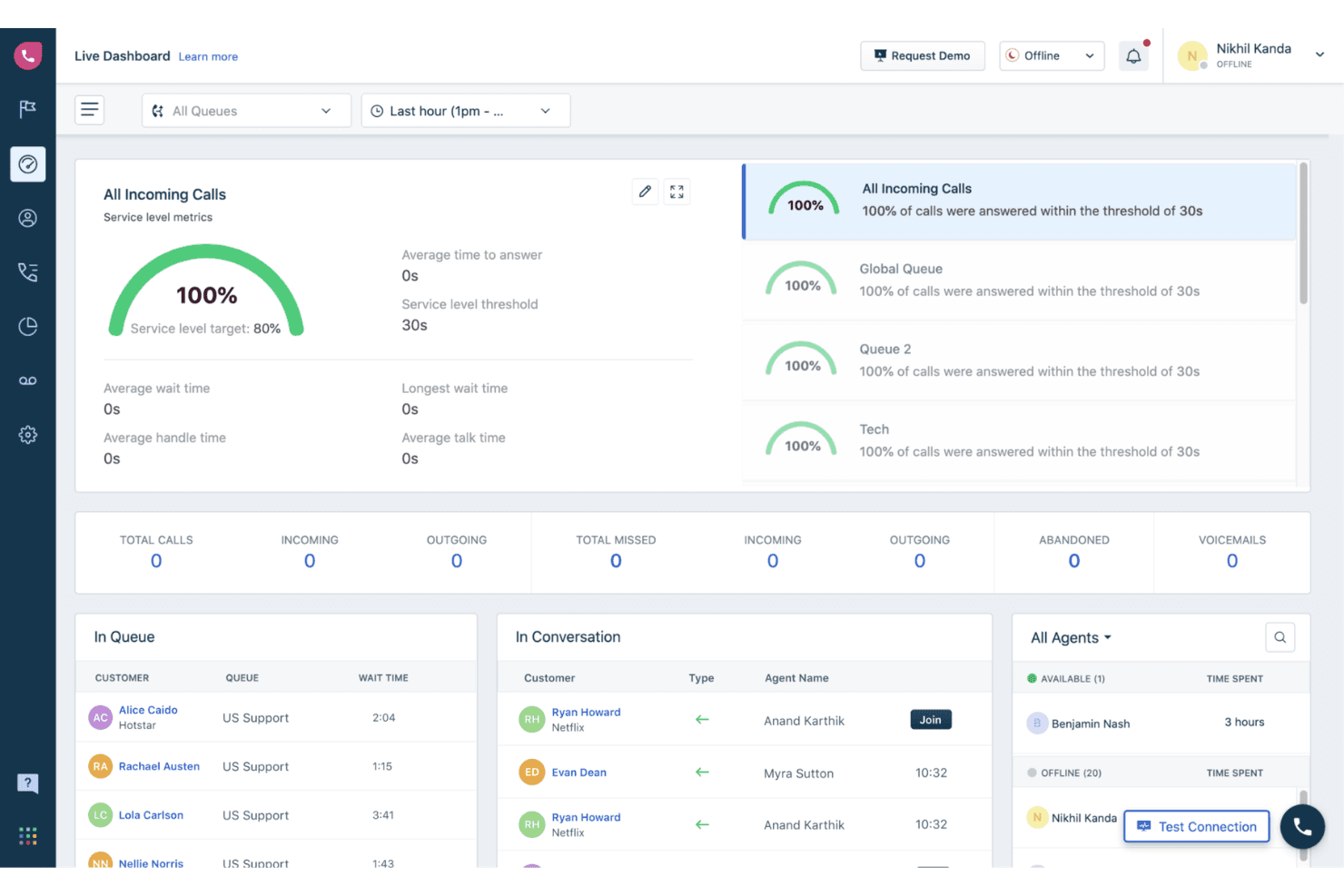
Freshcaller biedt een realtime dashboard met statistieken, waaronder het bijhouden van het serviceniveau, gesprekswachtrijen, agentstatus en actieve gesprekken. Freshcaller is een cloudgebaseerde VoIP-contactcenteroplossing waarmee agenten via een browser, mobiele app of SIP-telefoon kunnen bellen en gesprekken kunnen aannemen, met ingebouwde IVR op meerdere niveaus, gespreksroutering, opname en realtimeanalyses.
Voor wie is Freshcaller het meest geschikt?
Freshcaller is zeer geschikt voor ondersteuningsteams die het Freshworks-ecosysteem al gebruiken en behoefte hebben aan een nauw geïntegreerde combinatie van contactcenter en helpdesk.
Waarom ik voor Freshcaller heb gekozen
Ik heb Freshcaller aan mijn topkeuzes toegevoegd omdat de gespreksroutering speciaal is ontworpen voor teams die op Freshworks werken. Inkomende gesprekken kunnen worden gerouteerd op basis van voorwaarden die rechtstreeks zijn gekoppeld aan gegevens uit Freshdesk of Freshsales, zodat de juiste agent het juiste gesprek krijgt op basis van de CRM-context. Ik maak ook gebruik van de slimme escalatieregels en de functie om in realtime mee te luisteren en gesprekken over te nemen, waarmee leidinggevenden kunnen deelnemen aan actieve gesprekken en agenten in realtime kunnen coachen zonder de klant te storen.
Belangrijkste functies van Freshcaller
- IVR-systeem met meerdere niveaus: Maak aangepaste keuzemenu's met geneste opties om bellers naar de juiste bestemming te leiden.
- Gespreksopname met opslag: Neem gesprekken automatisch op en open opnamen rechtstreeks vanuit het gesprekslogboek.
- Realtime agentstatus: Bekijk de actuele beschikbaarheid van agenten, waaronder beschikbaar, bezet en niet storen, voor effectievere routering.
- Dekking van telefoonnummers wereldwijd: Gebruik lokale en gratis telefoonnummers uit meer dan 90 landen voor een internationale aanwezigheid.
Integraties van Freshcaller
Freshcaller biedt ingebouwde integraties met Freshdesk, Freshsales, Salesforce, HubSpot en Slack. Er is een API beschikbaar voor aangepaste integraties.
Pros and Cons
Pros:
- Voor IVR-routering is geen programmeerkennis nodig
- Meeluisteren en fluisteren tijdens actieve gesprekken
- Realtimebeschikbaarheid van agenten zichtbaar voor alle teams
Cons:
- Rapportagedashboards bieden weinig mogelijkheden voor diepgaande aanpassing
- Minder geschikt voor technische ecosystemen zonder Freshworks
Learn more about Freshcaller: Het beste voor zakelijk bellen op basis van Workspace
- Gratis abonnement beschikbaar
- Vanaf $10/gebruiker/maand
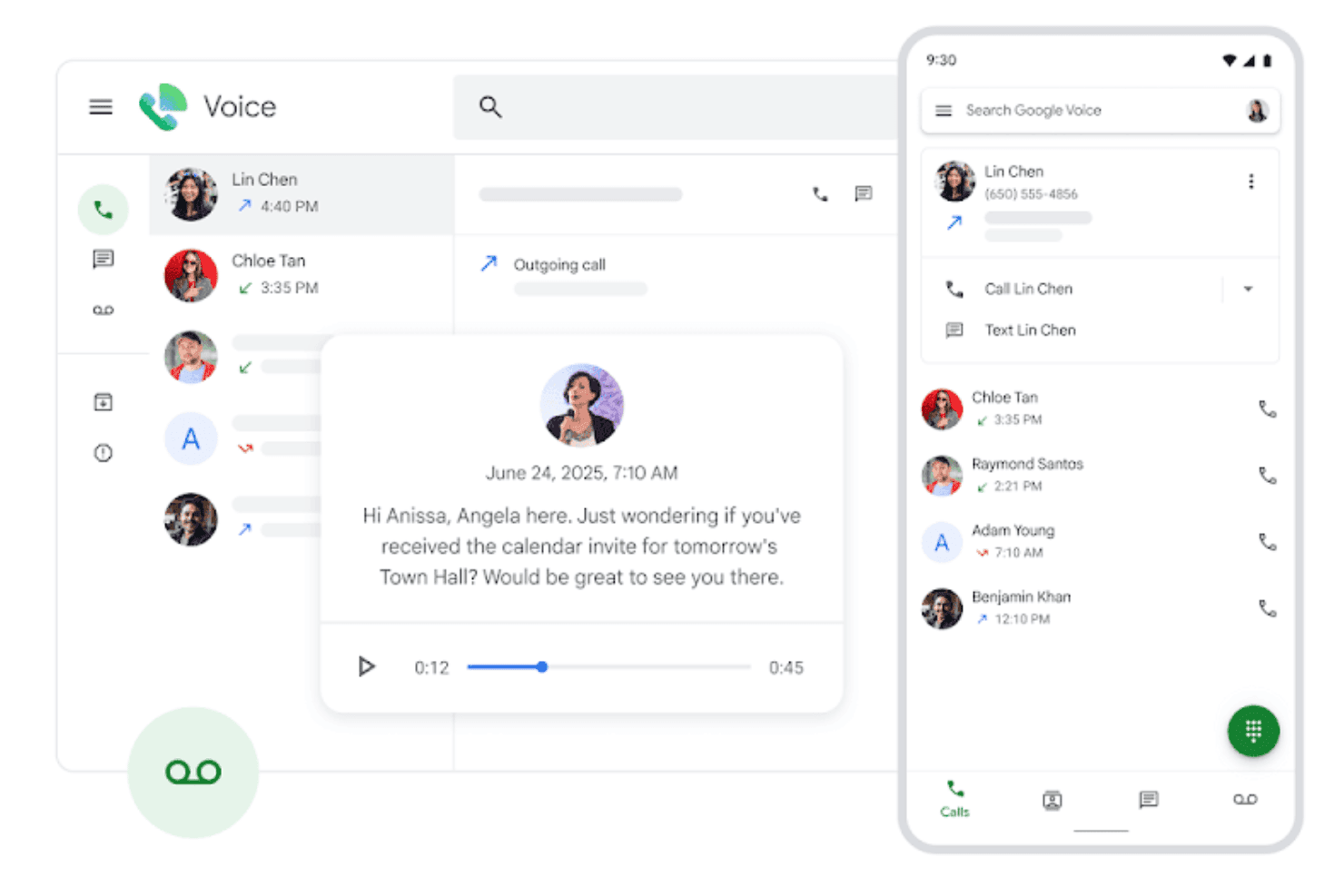
Google Voice toont een uniforme interface voor het beheren van gesprekken, voicemails en contactinteracties in desktop- en mobiele weergaven. Google Voice is een cloudgebaseerde VoIP-softwaretelefoon die is ingebouwd in het Google Workspace-ecosysteem en bellen, videogesprekken, sms-berichten, voicemailtranscriptie en door AI aangestuurde spamfiltering biedt op mobiele apparaten, desktops en bureautelefoons.
Voor wie is Google Voice het meest geschikt?
Google Voice is een natuurlijke keuze voor kleine bedrijven en verspreid werkende teams die al met Google Workspace werken en een lichtgewicht zakelijk telefoonsysteem nodig hebben zonder extra infrastructuur.
Waarom ik voor Google Voice heb gekozen
Ik heb Google Voice opgenomen in mijn topkeuzes omdat het de enige VoIP-softwaretelefoon is die volledig eigen is aan Google Workspace. Gesprekken worden rechtstreeks via Gmail gerouteerd, voicemails worden automatisch naar tekst omgezet in je inbox en de automatische telefoniste met meerdere niveaus verzorgt de gespreksroutering zonder afzonderlijk beheerplatform. Mijn team gebruikt de Vault-integratie om gespreksgegevens in hetzelfde systeem voor eDiscovery en bewaarbeleid te bewaren als e-mails.
Belangrijkste functies van Google Voice
- Bellen op meerdere apparaten: Bel met en ontvang gesprekken op mobiele apparaten, laptops of ondersteunde bureautelefoons met één nummer.
- Spamoproepen blokkeren: Gebruikt Google AI om spambellers te detecteren en te blokkeren voordat de telefoon overgaat.
- SIP Link-integratie: Verbind bestaande PSTN-diensten en bureautelefoons met Google Voice via gecertificeerde sessiegrenscontrollers.
- Routering via Google Agenda: Routeert inkomende gesprekken op basis van de instellingen voor werktijden in je Google Agenda.
Integraties van Google Voice
Google Voice biedt eigen integraties met Google Workspace-apps, waaronder Google Meet en Google Agenda, en biedt een API voor aangepaste integraties.
Pros and Cons
Pros:
- Eigen synchronisatie met Google Workspace in alle apps
- AI-aangestuurde voicemailtranscriptie inbegrepen
- Werkt op mobiele apparaten, desktops en bureautelefoons
Cons:
- Beperkte gespreksanalyses voor contactcenterteams
- Geen ingebouwde gespreksopname bij het basisabonnement
Learn more about Google Voice: Beste voor communicatie binnen klantgerichte teams
- Gratis demo beschikbaar
- Vanaf $15/user/month (jaarlijks gefactureerd)
Visit WebsiteCustomer Rating:4.5/5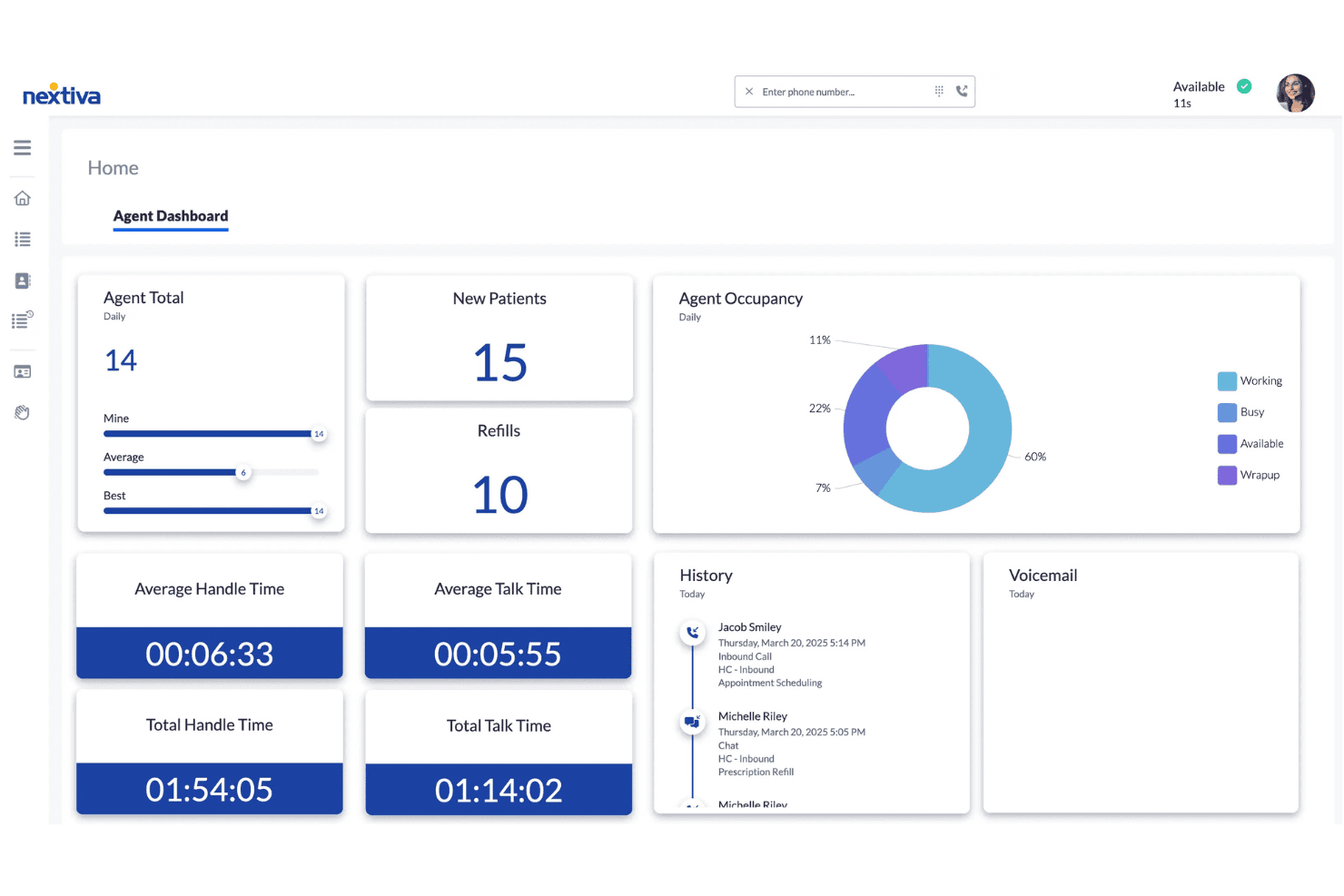
Het agentdashboard van Nextiva toont realtime oproepstatistieken, bezettingsgrafieken, afhandeltijden en interactiegeschiedenis voor contactcenteragents. Nextiva is een cloudgebaseerd VoIP- en uniformcommunicatieplatform dat softwaretelefoongesprekken, sms, videovergaderingen, teamchat en AI-aangedreven oproepbeheer combineert in desktop- en mobiele apps.
Voor wie is Nextiva het meest geschikt?
Nextiva is zeer geschikt voor klantenservice- en contactcenterteams die één platform nodig hebben voor spraak, berichten en AI-ondersteunde oproepafhandeling.
Waarom ik voor Nextiva koos
Ik koos Nextiva als een van de beste opties omdat de NextivaONE-app mijn volledige klantgerichte team verbonden houdt via spraak, sms en chat, zonder tussen verschillende tools te hoeven schakelen. De AI-spraakagent handelt inkomende gesprekken 24/7 af, leidt vragen naar de juiste bestemming en beantwoordt veelgestelde vragen voordat een live medewerker het gesprek overneemt. Ik vertrouw ook op AI-transcripties en samenvattingen van gesprekken om klantinteracties snel te beoordelen, zonder volledige opnamen opnieuw te hoeven beluisteren.
Belangrijkste functies van Nextiva
- Automatische telefoniste met meerdere niveaus: Stel geavanceerde menu's voor oproeproutering in voor verschillende afdelingen of roosters.
- Beschikbaarheid en status van teamleden: Bekijk in realtime de beschikbaarheid van collega's voor eenvoudigere oproepdoorschakeling en coördinatie.
- Analyses voor contactcenters: Krijg toegang tot dashboards met live- en historische statistieken over agentprestaties en oproepactiviteit.
- Softwaretelefoonapps voor browsers en mobiele apparaten: Voer gesprekken vanaf webbrowsers, Windows-, macOS-, iOS- en Android-apparaten en ontvang ze daarop.
Integraties van Nextiva
Nextiva biedt native integraties met Salesforce, HubSpot, Microsoft Teams, Google Workspace, Outlook en Microsoft Dynamics, en biedt een API voor aangepaste integraties.
Pros and Cons
Pros:
- AI-samenvattingen van gesprekken verminderen handmatige documentatie na gesprekken
- Spraak, sms en chat verenigd in één app
- Betrouwbare HD-audio op desktop- en mobiele apparaten
Cons:
- De mobiele app verbreekt soms gesprekken bij slechte verbindingen
- Rapportagedashboards hebben aanvankelijk een steile leercurve
 Ideaal voor door AI aangedreven gespreksnotities
- 14 dagen gratis proberen
- Vanaf $15/gebruiker/maand (jaarlijks gefactureerd)
Visit WebsiteCustomer Rating:4.3/5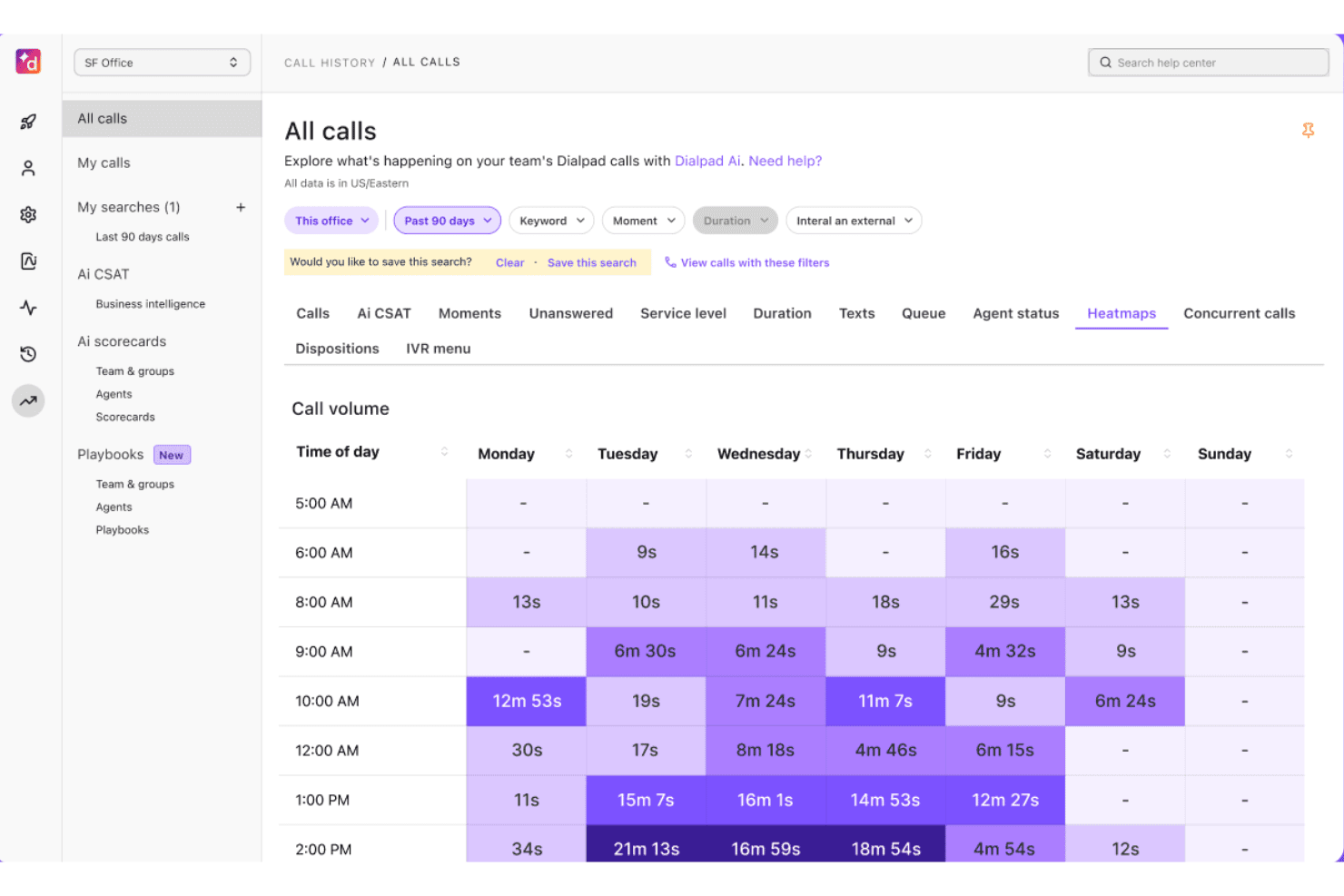
Dialpad biedt een heatmapweergave van het belvolume met de gespreksduur per dag en tijdstip over een periode van 90 dagen. Dialpad is een cloudcommunicatieplatform met AI als kern dat spraakoproepen, sms, berichten en videogesprekken samenbrengt in één app voor internettelefonie, gebouwd op het eigen grote taalmodel DialpadGPT.
Voor wie is Dialpad het meest geschikt?
Dialpad is geschikt voor kleine tot middelgrote klantenservice- en verkoopteams—vooral teams die Google Workspace gebruiken—die een cloudtelefoonsysteem met ingebouwde AI-ondersteunde gespreksdocumentatie nodig hebben.
Waarom ik voor Dialpad koos
Dialpad staat op mijn shortlist omdat de functie AI-samenvattingen na elk gesprek automatisch gestructureerde gesprekssamenvattingen en actiepunten genereert, aangedreven door het eigen DialpadGPT-model. Realtime transcriptie wordt tijdens gesprekken live uitgevoerd, zodat er niets wordt gemist, zelfs niet bij snel verlopende interacties met de klantenservice. Ik vind het ook prettig dat de AI-CSAT-score automatisch wordt berekend voor 91% van de gesprekken, waardoor mijn team consistente prestatiegegevens na gesprekken krijgt zonder handmatig beoordelingsproces.
Belangrijkste functies van Dialpad
- App voor internettelefonie op meerdere apparaten: Voer gesprekken op een computer, mobiel, tablet of via het internet.
- Geïntegreerde teamberichten: Chat en deel bestanden met collega's in dezelfde app als waarin je belt.
- Ingebouwde CRM-integraties: Maakt rechtstreeks verbinding met platforms zoals Salesforce, HubSpot en Zendesk.
- Realtime aanwezigheid: Bekijk direct de beschikbaarheid en status van medewerkers om het doorverbinden van gesprekken en de samenwerking te stroomlijnen.
Dialpad-integraties
Dialpad biedt ingebouwde integraties met Salesforce, HubSpot, Zendesk, Google Workspace, Microsoft 365, ServiceNow, Zoho CRM, Okta, Bullhorn en Clio. Er is een API beschikbaar voor aangepaste integraties.
Pros and Cons
Pros:
- Door AI gegenereerde gesprekssamenvattingen na elk gesprek
- Realtime transcriptie tijdens livegesprekken
- Werkt op een computer, mobiel en in de internetbrowser
Cons:
- AI-functies zijn alleen beschikbaar bij abonnementen van hogere niveaus
- De gesprekskwaliteit kan afnemen bij zwakke verbindingen
 Ideaal voor zakelijke communicatie op meerdere apparaten
- Gratis demo beschikbaar
- Prijs op aanvraag
Visit WebsiteCustomer Rating:4.2/5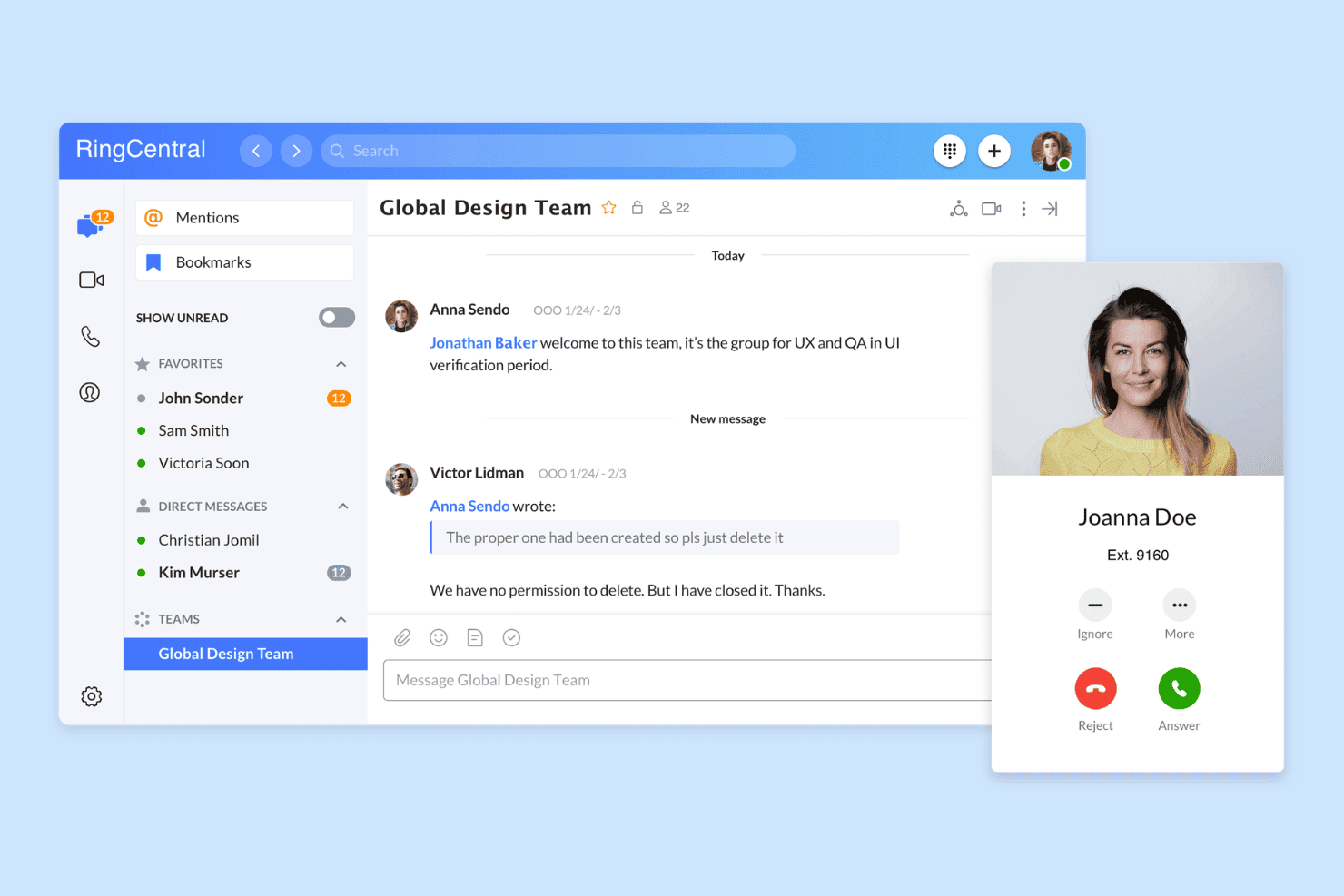
RingCentral biedt een uniforme interface voor berichten en bellen, met teamchat, directe berichten en meldingen van inkomende gesprekken in één platform. RingCentral is een cloudgebaseerd UCaaS-platform dat VoIP-bellen, videovergaderingen, zakelijke sms en teamberichten combineert in één softphone-app voor desktop, mobiel en web.
Voor wie is RingCentral het meest geschikt?
Het is een sterke keuze voor middelgrote bedrijven met verspreide of externe teams die één platform nodig hebben om spraakcommunicatie op meerdere apparaten en locaties te beheren.
Waarom ik voor RingCentral koos
RingCentral staat op mijn shortlist omdat het spraakcommunicatie op elk apparaat in mijn configuratie zo consistent afhandelt. Ik ben vooral te spreken over de functie voor het doorschakelen van gesprekken, waarmee je een lopend gesprek tijdens het gesprek zonder onderbreking van je softphone op desktop naar je mobiele app kunt overzetten. De aanwezigheidsstatus wordt ook in realtime gesynchroniseerd tussen desktop, mobiel en web, zodat mijn team altijd de juiste beschikbaarheid ziet, ongeacht vanaf welk apparaat iemand werkt.
Belangrijkste functies van RingCentral
- Door AI aangedreven gesprekssamenvattingen: Genereert automatisch doorzoekbare, door AI aangestuurde samenvattingen voor elk gesprek om beoordeling en kwaliteitscontrole te versnellen.
- Geïntegreerde teamberichten: Biedt ingebouwde chat en groepsberichten direct naast de belfuncties in de softphone-app.
- Omnichannelcontactcenter: Ondersteunt spraak, sms, webchat en sociale berichten in één dashboard voor teams die zich bezighouden met klantervaring.
- Native CRM-integraties: Maakt verbinding met Salesforce, HubSpot en Zendesk om klantgegevens op te halen en activiteiten automatisch te registreren.
Integraties van RingCentral
RingCentral biedt native integraties met Salesforce, HubSpot, Zendesk, Microsoft Teams, Google Workspace, Slack en ServiceNow, en biedt een API voor aangepaste integraties.
Pros and Cons
Pros:
- Gesprekken kunnen tijdens een gesprek direct worden doorgeschakeld
- Realtime aanwezigheid gesynchroniseerd op alle platforms
- AI-transcriptie voor elk opgenomen gesprek
Cons:
- De mobiele app laat de batterij vaak sneller leeglopen
- De interface voelt onoverzichtelijk aan voor gebruikers die alleen bellen
Learn more about RingCentral: Beste voor verkoopkiezers en sms-werkstromen
- 14 dagen gratis proberen
- Vanaf $29/gebruiker/maand (jaarlijks gefactureerd)
Visit WebsiteCustomer Rating:4.1/5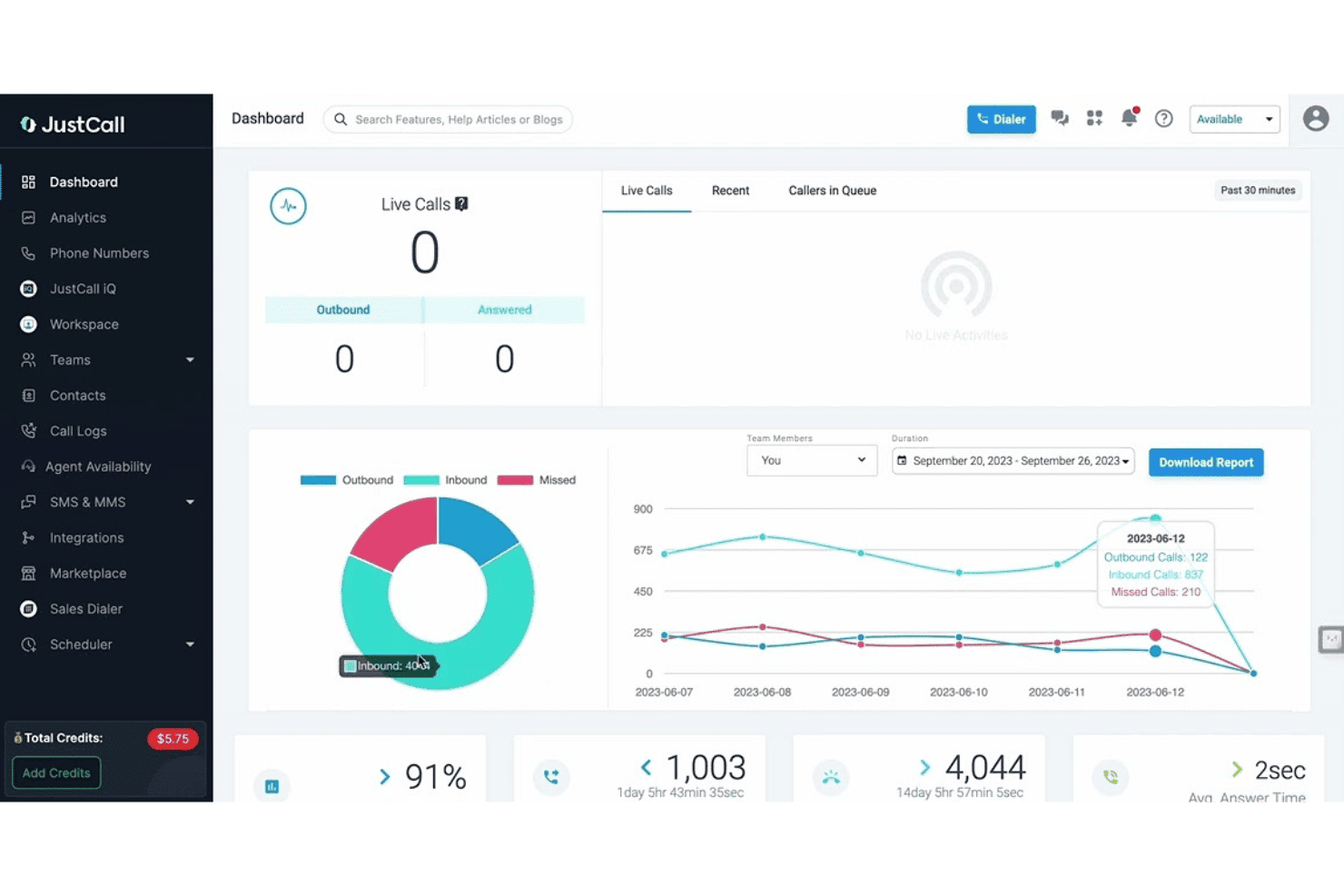
JustCall biedt een realtime dashboard met livegespreksmonitoring, grafieken voor gespreksanalyses en prestatiestatistieken van het team, waaronder uitsplitsingen van inkomende, uitgaande en gemiste gesprekken. JustCall is een cloudgebaseerd platform voor softwarematige VoIP-telefonie dat spraakoproepen, sms- en mms-berichten, AI-gespreksintelligentie en mogelijkheden voor automatisch bellen met meerdere lijnen combineert op desktop, mobiel en web.
Voor wie is JustCall het meest geschikt?
JustCall is zeer geschikt voor uitgaande verkoopteams en klantenserviceactiviteiten van kleine tot middelgrote bedrijven die spraak-, sms- en beltools op één plek nodig hebben.
Waarom ik voor JustCall heb gekozen
Ik heb JustCall als een van de beste opties gekozen omdat de voorspellende kiezer met meerdere lijnen (tot 10 gelijktijdige lijnen) en de dynamische kiezer zich echt onderscheiden van de meeste softwarematige telefonie-apps die alleen eenvoudig klikken om te bellen aanbieden. Ik vind het ook prettig dat sms-werkstromen en bots standaard binnen hetzelfde platform werken, zodat mijn team geautomatiseerde opvolgsequenties kan activeren zonder van tool te wisselen. De functie voor lokaal bellen, waarbij een nummer wordt weergegeven dat overeenkomt met het netnummer van de prospect, voegt een functionaliteitslaag toe die de meeste zelfstandige softwarematige telefonie-apps volledig overslaan.
Belangrijkste functies van JustCall
- Aanwezigheid van medewerkers in realtime: Toont de beschikbaarheidsstatus van medewerkers op web, desktop en mobiel voor efficiënte routering.
- Ingebouwde CRM-integraties: Maakt rechtstreeks verbinding met Salesforce, HubSpot, Zoho en Zendesk voor klikken om te bellen en automatische registratie van gesprekken.
- Automatische gespreksopname: Neemt elk gesprek op en slaat het op voor eenvoudig terugluisteren en kwaliteitsborging.
- Livegespreksmonitoring: Stelt supervisors in staat om mee te luisteren, in te fluisteren of deel te nemen aan lopende gesprekken voor coaching en toezicht.
Integraties van JustCall
JustCall biedt meer dan 100 ingebouwde integraties, waaronder Salesforce, HubSpot, Zoho CRM, Pipedrive, Zendesk, Freshdesk, Intercom, Help Scout, Slack en Microsoft Teams. Er is een API beschikbaar voor aangepaste integraties.
Pros and Cons
Pros:
- Voorspellende kiezer ondersteunt tot 10 lijnen
- Sms-werkstromen en bots werken standaard binnen het platform
- AI-transcriptie bij elk opgenomen gesprek
Cons:
- De gesprekskwaliteit van de mobiele app kan wisselend zijn
- Dashboards voor rapportage bieden beperkte aanpassingsmogelijkheden
 Het beste voor bellen en vaste telefoons voor kleine bedrijven
- Niet beschikbaar
- Vanaf $19.95/gebruiker/maand
Visit WebsiteCustomer Rating:3/5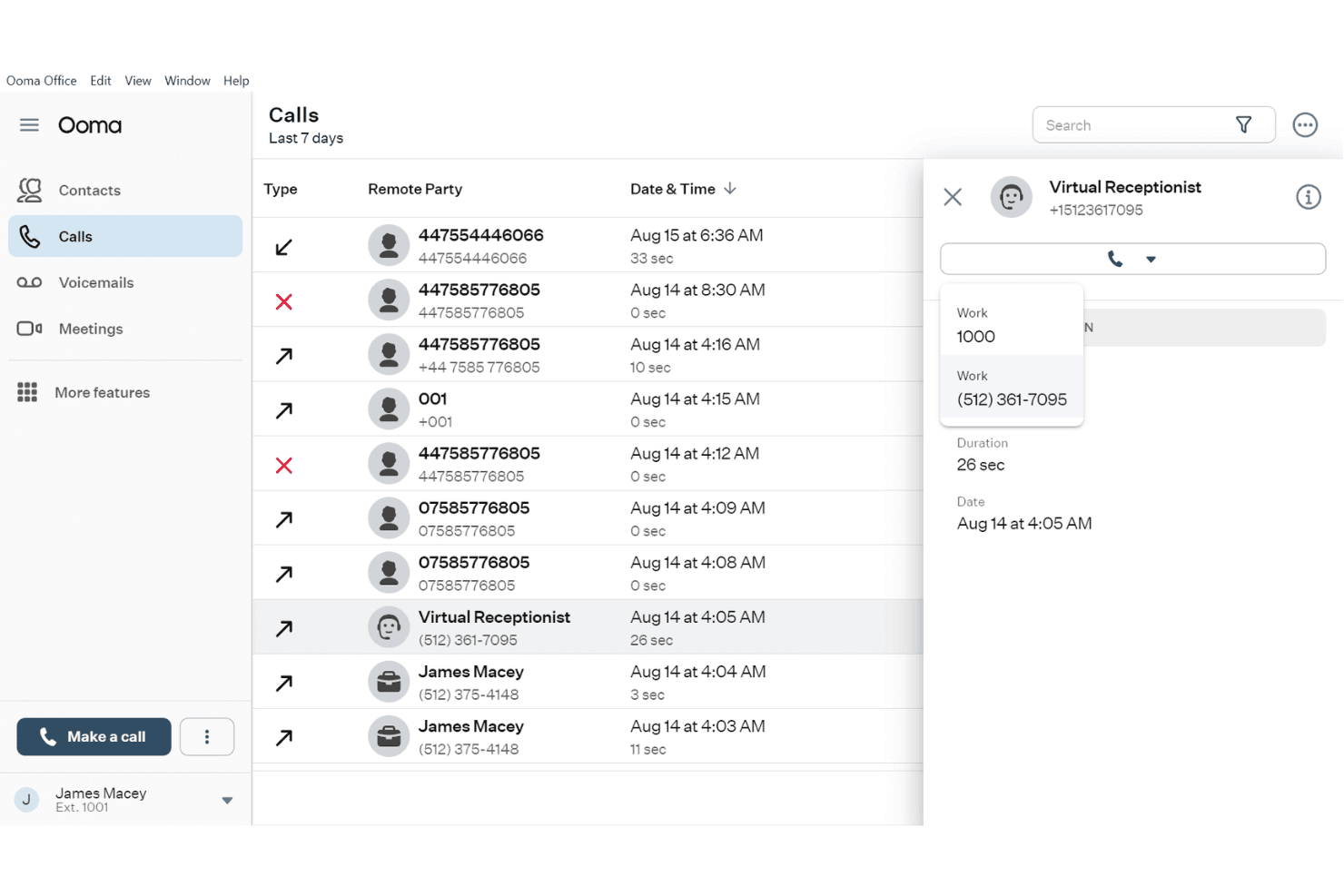
Ooma Office toont een gedetailleerd logboek van de oproepgeschiedenis met contactgegevens, oproepduur en een uitklapbaar paneel voor de virtuele receptionist. Ooma Office is een cloudgebaseerd VoIP-telefoonsysteem voor kleine bedrijven dat een desktop- en mobiele softphone, functies voor oproepbeheer, sms, videoconferenties en CRM-integraties in één platform combineert.
Voor wie is Ooma Office het meest geschikt?
Ooma Office is een uitstekende keuze voor kleine en middelgrote bedrijven die een volledig uitgerust telefoonsysteem willen zonder de complexiteit of kosten van zakelijke VoIP-platforms.
Waarom ik voor Ooma Office heb gekozen
Ik heb Ooma Office gekozen als een van de beste opties, omdat het vaste telefoons en softphone-apps op een manier met elkaar verbindt die maar weinig op het mkb gerichte platforms bieden. Met Oproep overschakelen kan ik een actief gesprek tijdens het gesprek van mijn vaste telefoon naar de mobiele softphone overzetten zonder de verbinding te verbreken. Bij gelijktijdig overgaan komen inkomende oproepen tegelijkertijd binnen op zowel de vaste telefoon als de softphone-app, zodat mijn teamleden nooit een oproep missen wanneer ze zich tussen verschillende ruimtes bewegen.
Belangrijkste functies van Ooma Office
- AI-transcriptie en samenvattingen van oproepen: Door AI aangedreven transcripties en automatische samenvattingen van oproepen bij het Pro Plus-abonnement.
- CRM-integratie: Maakt verbinding met platforms zoals Salesforce, HubSpot en Zoho om contacten en oproeplogboeken te synchroniseren.
- Teamchat en aanwezigheidsstatus: Ingebouwde teamberichten en realtime aanwezigheidsindicatoren voor betere coördinatie.
- Dashboard voor oproepanalyses: Gedetailleerde oproepstatistieken en ranglijsten helpen je de activiteit van medewerkers en teams bij te houden.
Integraties van Ooma Office
Ooma Office biedt rechtstreekse integraties met Salesforce, HubSpot, Zendesk, Zoho, Pipedrive, Microsoft Dynamics 365, SugarCRM en Google en Microsoft 365. Het maakt ook verbinding met Zapier en biedt een API voor aangepaste integraties.
Pros and Cons
Pros:
- Ondersteunt fysieke vaste telefoons naast softphones
- Oproep overschakelen verplaatst live gesprekken tussen apparaten
- Inclusief ingebouwde videoconferenties op mobiel
Cons:
- De stabiliteit van de mobiele app heeft sommige gebruikers gefrustreerd
- AI-transcriptie vereist het duurdere Pro Plus-abonnement
Learn more about Ooma Office: Het beste voor zakelijk bellen via Zoom
- Gratis demo beschikbaar
- Vanaf $10.50/gebruiker/maand
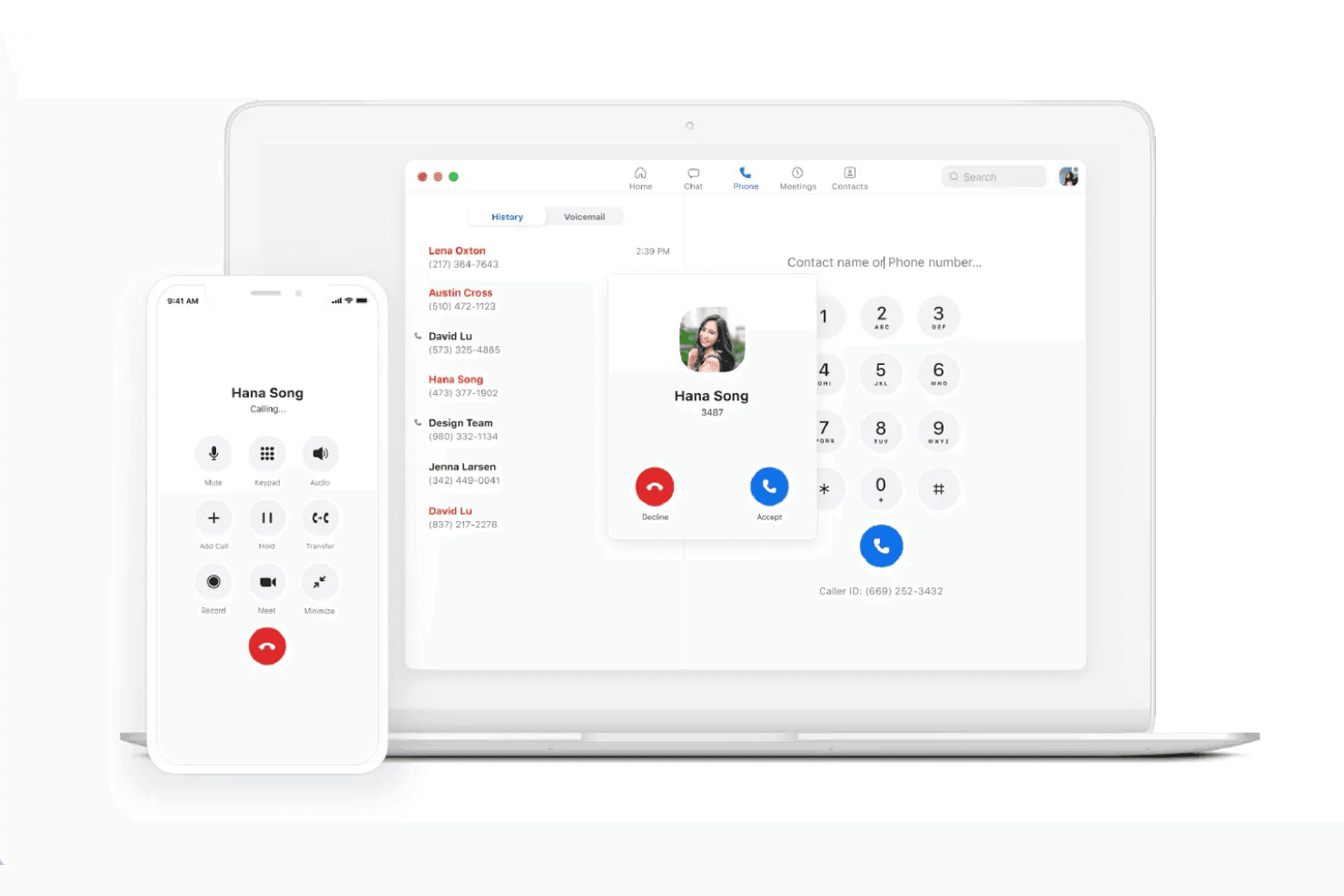
Zoom Phone toont een interface voor een inkomend gesprek van Hana Song in zowel bureaublad- als mobiele apps, met zichtbare belgeschiedenis, een numeriek toetsenblok en gespreksbedieningen. Zoom Phone is een cloudgebaseerde VoIP-softwaretelefoon die inkomende en uitgaande PSTN-gesprekken, SMS/MMS, voicemailtranscriptie, gespreksroutering en door AI gegenereerde gesprekssamenvattingen samenbrengt in bureaublad-, mobiele en bureauclienttoepassingen.
Voor wie is Zoom Phone het meest geschikt?
Het is een natuurlijke keuze voor teams die al met Zoom Workplace werken en telefonie ingebouwd willen hebben in hetzelfde platform als hun vergaderingen en chat.
Waarom ik voor Zoom Phone heb gekozen
Zoom Phone verdient een plek als een van de beste opties op mijn selectie vanwege de hechte integratie met de rest van de Zoom Workplace-suite. Ik vind het prettig dat mijn team een actief gesprek van bureaublad naar mobiel kan overschakelen zonder dat de verbinding wordt verbroken. Dat is belangrijk op dagen waarop iemand tijdens een gesprek even van zijn bureau moet weglopen. De AI Companion voegt ook echt waarde toe: deze functie genereert samenvattingen na gesprekken en haalt actiepunten rechtstreeks uit opgenomen gesprekken.
Belangrijkste functies van Zoom Phone
- Integraties met CRM- en helpdesksystemen: Maakt rechtstreeks verbinding met Salesforce, HubSpot, Zendesk en Microsoft Teams voor klikken om te bellen en automatisch vastgelegde gespreksactiviteiten.
- Beschikbaarheid en teamberichten: Met realtime beschikbaarheidsstatus en directe chat kunnen teams naadloos samenwerken binnen de Zoom-app.
- Beheer van gesprekswachtrijen: Hiermee kunnen beheerders gesprekswachtrijen en routeringsregels instellen om inkomende gesprekken over medewerkers of afdelingen te verdelen.
- Automatische gespreksopname: Legt gesprekken vast en slaat ze op voor kwaliteitscontrole, naleving van regelgeving of prestatiebeheer.
Integraties van Zoom Phone
Zoom Phone biedt rechtstreekse integraties met Salesforce, HubSpot, Zendesk, Microsoft Teams, Google Workspace, Slack, ServiceNow en Okta, en biedt een API voor aangepaste integraties.
Pros and Cons
Pros:
- Overschakelen van bureaublad naar mobiel tijdens een gesprek
- AI-samenvattingen van gesprekken standaard inbegrepen
- Geïntegreerd met Zoom-vergaderingen en chat
Cons:
- Vereist een bestaand Zoom Workplace-abonnement
- Beperkte monitoring voor leidinggevenden zonder de contactcenteruitbreiding
Learn more about Zoom Phone:
Andere VoIP-softphone-apps
Hier zijn enkele aanvullende VoIP-softphone-apps die mijn shortlist niet hebben gehaald, maar die toch het overwegen waard zijn:
- 113CXBeste voor zelf gehoste telefoonsystemen voor bedrijven
- 12AircallIdeaal voor verkoopgesprekken die met een CRM zijn geïntegreerd
- 13Five9Beste voor uitgaande contactcentercampagnes
- 14TalkdeskIdeaal voor automatisering van AI-contactcenters
- 15CloudCallHet beste voor verkoopgesprekken op basis van CRM
- 16Genesys Cloud CXIdeaal voor orkestratie van bedrijfservaringen
- 178x8 Contact CenterIdeaal voor veilige omnichannelcontactcenters
- 18Vonage Contact CenterIdeaal voor workflows van Salesforce-contactcenters
Hoe ik VoIP-apps voor softwaretelefoons beoordeel
Ik deel mijn beoordeling op in essentiële vereisten—zoals bellen op verschillende apparaten en CRM-integraties—en onderscheidende factoren die een basisapp voor bellen onderscheiden van een hulpmiddel waarop medewerkers daadwerkelijk zullen vertrouwen.
Basisfunctionaliteit (basisvereisten voor deze lijst)
Bij het selecteren van hulpmiddelen voor mijn lijst beoordeel ik elk hulpmiddel op een schaal van 0 (biedt de functionaliteit niet) tot 5 (blink hierin uit) voor elke hieronder vermelde basisfunctionaliteit. Vervolgens reken ik de totaalscore van het hulpmiddel om naar een percentage, waarbij ik 65% als referentie gebruik om de algehele geschiktheid voor de lijst te beoordelen.
- VoIP-bellen: Ik controleer of medewerkers HD-gesprekken kunnen voeren en ontvangen via desktop, mobiel en het web, zodat teams op afstand niet aan één apparaat gebonden zijn.
- Regelaars voor gespreksafhandeling: In de wacht zetten, warm doorverbinden, vergaderen en gesprekken doorschakelen tussen apparaten zijn allemaal van belang. Ik beoordeel hoe soepel medewerkers gesprekken tijdens een gesprek kunnen doorsturen of escaleren.
- CRM-/helpdesk-integraties: Ingebouwde koppelingen met platforms zoals Salesforce of Zendesk moeten schermmeldingen tonen en activiteiten automatisch registreren zonder handmatige invoer.
- Gespreksopname en voicemail: Ik let op automatische opname met doorzoekbare opslag, omdat kwaliteitscontroles en coachingssessies afhankelijk zijn van het eenvoudig terugvinden van eerdere gesprekken.
- Aanwezigheid en beschikbaarheid: Realtime statusindicatoren helpen gesprekken naar beschikbare medewerkers te routeren. Ik controleer of de aanwezigheidsstatus tussen teams wordt gesynchroniseerd en automatisch wordt bijgewerkt.
- Gespreksanalyse en rapportage: Dashboards moeten het gespreksvolume, gemiste gesprekken en statistieken op medewerkerniveau omvatten, zodat teamleiders trends kunnen signaleren en prestatieproblemen kunnen aanpakken.
Zodra ik een lijst heb met hulpmiddelen die aan de criteria voldoen, kijk ik naar wat elk platform onderscheidt.
Onderscheidende factoren (waarmee leveranciers zich onderscheiden)
Zo vergelijk ik verschillende leveranciers met elkaar:
Onderscheidende functies
AI-transcriptie van gesprekken bespaart medewerkers het handmatig maken van aantekeningen en geeft leidinggevenden doorzoekbare samenvattingen na het gesprek, die ze tijdens kwaliteitscontroles kunnen raadplegen. Ik beoordeel ook coachingshulpmiddelen zoals de fluisterfunctie en de inbreekfunctie, waarmee teamleiders medewerkers tijdens livegesprekken kunnen begeleiden zonder dat de klant dit hoort. Schermmeldingen vanuit het CRM zijn een andere onderscheidende factor: wanneer de geschiedenis van een klant verschijnt zodra een gesprek tot stand komt, kunnen medewerkers de herhaaldelijke verificatiestap volledig overslaan.
Meer dan functies
Spraakkwaliteit is belangrijker dan de meeste kopers beseffen. Ik controleer bijvoorbeeld op ondersteuning voor HD-codecs en opties voor overschakeling bij storingen, omdat een verbroken ondersteuningsgesprek het vertrouwen van klanten snel kan aantasten. Naast gesprekskwaliteit is beveiliging een andere belangrijke factor. Ik let op TLS/SRTP-versleuteling en nalevingscertificeringen zoals HIPAA of SOC 2. Tot slot vergelijk ik prijsmodellen, omdat sommige leveranciers per gebruiker kosten in rekening brengen, terwijl andere licenties per gelijktijdig gesprek aanbieden.
Zo kiest u VoIP-softphone-apps
Probeert u te bepalen welke VoIP-softphone-app waardevol zal zijn voor uw team? Begin met na te gaan wat uw belangrijkste behoeften op het gebied van communicatie, integratie of toezicht zijn:
| Als uw prioriteit ligt bij... | Geef dan prioriteit aan... |
|---|---|
| Als uw prioriteit ligt bij...Minder handmatige notities maken | Geef dan prioriteit aan...Door AI aangedreven gesprekstranscriptie |
| Als uw prioriteit ligt bij...Gesprekken integreren met uw CRM | Geef dan prioriteit aan...Ingebouwde CRM-koppelingen en schermpop-ups |
| Als uw prioriteit ligt bij...Flexibiliteit voor medewerkers op meerdere apparaten | Geef dan prioriteit aan...Platformonafhankelijk gebruik (desktop, web, mobiel) |
| Als uw prioriteit ligt bij...Realtime monitoring van medewerkers | Geef dan prioriteit aan...Functies voor supervisors (meeluisteren, overnemen) |
| Als uw prioriteit ligt bij...Beveiliging en naleving | Geef dan prioriteit aan...End-to-end-versleuteling, SOC 2, HIPAA |
Zo beoordeelt u uw shortlist
- Vraag om een demonstratie van de AI-transcriptie: Vraag om een voorbeeld of voer zelf een live transcriptie uit om de nauwkeurigheid te controleren door binnen één week minstens twee echte gesprekken van medewerkers te vergelijken.
- Verbind uw CRM tijdens de proefperiode: Gebruik de testomgeving van uw systeem om de schermpop-up- en automatische logfuncties te controleren voordat u de oplossing met live klantgegevens implementeert.
- Test werkstromen voor het doorverbinden van gesprekken: Voer oefeningen met medewerkers naast elkaar uit (gesprek doorschakelen, warme overdracht, conferentiegesprek) en documenteer de wachttijden op verschillende apparaten.
- Vraag om schriftelijke nalevingsdocumentatie: Vraag de beveiligingsteams van leveranciers om documentatie van TLS/SRTP-versleuteling en bewijs van certificeringen zoals SOC 2 of HIPAA.
- Gebruik afwegingen om je lijst te filteren: Bepaal of flexibiliteit (platformonafhankelijkheid, BYOD) belangrijker is voor je team dan geavanceerde analyses/rapportage—weinigen blinken zelden in beide uit.
Wat zijn VoIP-softphone-apps?
Met VoIP-softphone-apps kun je via internet telefoongesprekken voeren en ontvangen vanaf een desktop, webbrowser of mobiel apparaat. Daardoor kunnen teams zakelijke gesprekken voeren zonder afhankelijk te zijn van fysieke bureautoestellen. Deze apps bieden ook functies zoals gespreksbeheer, voicemail en integraties met CRM- of helpdesksystemen. Hierdoor hebben medewerkers tijdens gesprekken vanaf verschillende locaties toegang tot klantcontext.
Functies van VoIP-softphone-apps
Let bij het selecteren van VoIP-softphone-apps op de volgende belangrijke functies:
- Bellen via VoIP: Voer gesprekken via internet vanaf elke desktop of elk mobiel apparaat en ontvang ze daar ook, zodat een fysieke telefoon niet nodig is.
- Functies voor oproepbeheer: Gebruik essentiële functies zoals in de wacht zetten, dempen, doorverbinden, doorschakelen en telefonische vergaderingen voor een soepel beheer van elk inkomend of uitgaand gesprek.
- CRM-integratie: Maak verbinding met CRM-systemen om bellergegevens weer te geven, activiteiten automatisch te registreren en medewerkers tijdens elke interactie direct van context te voorzien.
- Gespreksopname en voicemail: Archiveer gesprekken en voicemails voor training, kwaliteitsborging en naleving, met eenvoudige opties om ze terug te vinden en af te spelen.
- Aanwezigheid en beschikbaarheid: Toon de realtime status van medewerkers, zoals beschikbaar, bezet of in gesprek, om inkomende contacten effectiever te routeren en mislukte overdrachten te voorkomen.
- Teamcommunicatie: Maak chat en directe berichten in de app mogelijk, zodat medewerkers en supervisors snel kunnen afstemmen zonder de softphone-omgeving te verlaten.
- Gespreksanalyse en rapportage: Houd statistieken zoals gespreksvolume, wachttijden en gemiste gesprekken bij via dashboards en rapporten, zodat managers de teamprestaties kunnen volgen.
- Beveiliging en versleuteling: Bescherm spraakgegevens tijdens de overdracht en in rust met TLS- of SRTP-versleuteling, ter ondersteuning van branchenormen voor naleving bij gevoelige communicatie.
- Ondersteuning voor meerdere apparaten: Laat gebruikers eenvoudig wisselen tussen desktop, mobiel en web, voor een flexibele ervaring voor teams die op afstand of hybride werken.
- Functies voor supervisors: Bied functies zoals gespreksmonitoring, fluisteren en inbreken, zodat teamleiders tijdens livegesprekken kunnen coachen of ingrijpen zonder dat de klant hiervan op de hoogte is.
Voordelen van VoIP-softphone-apps
De implementatie van VoIP-softphone-apps biedt verschillende voordelen voor je team en je bedrijf. Dit zijn enkele voordelen waar je naar kunt uitkijken:
- Meer flexibiliteit: Medewerkers kunnen overal gesprekken beantwoorden via een desktop, mobiel apparaat of browser, waardoor ondersteuning op afstand en hybride ondersteuning mogelijk wordt.
- Geconsolideerde communicatie: Beheer spraak, voicemail en teamchat op één platform, zodat medewerkers nooit tussen verschillende tools hoeven te wisselen.
- Meer klantcontext: Integraties met CRM- en helpdeskplatforms tonen direct bellergegevens, zodat medewerkers vanaf het eerste moment persoonlijke service kunnen bieden.
- Betere coaching en kwaliteitsborging: Ingebouwde functies voor gespreksopname, monitoring en fluisteren stellen supervisors in staat gesprekken te beoordelen en medewerkers in realtime te coachen.
- Beter overzicht: Live dashboards en analyses geven managers op één plek inzicht in de status van medewerkers, oproepwachtrijen en teamprestaties.
- Betere gegevensbeveiliging: TLS/SRTP-versleuteling en functies die naleving ondersteunen helpen gevoelige gesprekken en klantgegevens te beschermen.
- Besparing op kosten en hardware: Softphone-apps maken bureautoestellen en dure PBX-systemen overbodig, waardoor zowel de voorafgaande als de doorlopende kosten dalen.
Kosten en prijzen van VoIP-softphone-apps
Bij het selecteren van VoIP-softphone-apps is inzicht nodig in de verschillende beschikbare prijsmodellen en abonnementen. De kosten variëren op basis van functies, teamgrootte, extra's en meer. De onderstaande tabel vat veelvoorkomende abonnementen, hun gemiddelde prijzen en de gebruikelijke inbegrepen functies van VoIP-softphone-oplossingen samen:
Vergelijkingstabel van abonnementen voor VoIP-softphone-apps
| Type abonnement | Gemiddelde prijs | Veelvoorkomende functies |
|---|---|---|
| Type abonnementGratis abonnement | Gemiddelde prijs$0 | Veelvoorkomende functiesOndersteunt basisgesprekken, biedt voicemail en voorziet in beperkte chatberichten voor teams. |
| Type abonnementPersoonlijk abonnement | Gemiddelde prijs$5-$15/gebruiker/maand | Veelvoorkomende functiesVoegt ondersteuning voor mobiele en desktopapps, eenvoudige gespreksafhandeling en basale CRM-integratie toe. |
| Type abonnementZakelijk abonnement | Gemiddelde prijs$15-$35/gebruiker/maand | Veelvoorkomende functiesOmvat gespreksopname, native integraties, analysedashboards en instellingen voor de beschikbaarheid van teamleden. |
| Type abonnementOndernemingsabonnement | Gemiddelde prijs$35-$60/gebruiker/maand | Veelvoorkomende functiesBiedt geavanceerde beveiliging, beheerdersfuncties voor supervisors, toegang tot een open API en certificeringen voor naleving. |
Veelgestelde vragen over VoIP-softphoneapps
Hier vindt u antwoorden op veelgestelde vragen over VoIP-softphoneapps:
Kunt u VoIP-softphoneapps op elk apparaat gebruiken?
Ja, de meeste VoIP-softphoneapps ondersteunen Windows, macOS, iOS, Android en browsertoegang met pushmeldingen voor inkomende gesprekken. Hierdoor kunnen medewerkers en supervisors gesprekken voeren en ontvangen vanaf desktops, laptops, tablets of smartphones, zonder extra hardware.
Zijn VoIP-softphoneapps veilig genoeg voor gevoelige gegevens?
Ja, toonaangevende oplossingen gebruiken versleutelingsprotocollen zoals TLS en SRTP om gesprekken en berichten te beschermen. Kijk voor sectoren met strenge nalevingsvereisten naar certificeringen zoals HIPAA, SOC 2 of ondersteuning voor GDPR.
Hoe integreren VoIP-softphoneapps met CRM- of helpdeskhulpmiddelen?
De meeste apps bieden kant-en-klare integraties of open API’s voor populaire CRM- en helpdeskplatforms. Hierdoor kunnen klantgegevens en gespreksactiviteiten automatisch worden gesynchroniseerd, zodat medewerkers de geschiedenis van de beller kunnen bekijken en elk gesprek kunnen registreren.
Welke internetsnelheid hebt u nodig voor betrouwbare VoIP-gesprekken?
Een stabiele breedbandverbinding met ten minste 100 kbps per gelijktijdig gesprek is doorgaans vereist. Lagere snelheden of onbetrouwbare netwerken kunnen leiden tot verbroken gesprekken, haperend geluid of latentieproblemen.
Kunnen VoIP-softphoneapps traditionele bureautoestellen vervangen?
Ja, ze zijn precies daarvoor ontworpen en stellen teams in staat alle inkomende en uitgaande gesprekken digitaal te beheren. Dit verlaagt de hardwarekosten en biedt teams meer flexibiliteit voor werken op afstand of hybride werken.