

O melhor software empresarial de inquéritos ajuda as grandes organizações a enfrentar desafios como feedback disperso, pouca visibilidade das respostas e a complexidade de gerir programas de inquéritos seguros e destinados a várias equipas em grande escala. Estas ferramentas simplificam a recolha de dados, reforçam a governação e apoiam ciclos de feedback fiáveis em todos os pontos de contacto com clientes e colaboradores.
Com base na minha experiência com plataformas tecnológicas e de CX, testei estas ferramentas quanto à flexibilidade na conceção de inquéritos, segurança, profundidade das análises, integrações e facilidade de utilização. Neste guia, analiso o melhor software empresarial de inquéritos, os aspetos que o distinguem e como escolher a opção mais adequada à dimensão da sua organização, ao seu conjunto de tecnologias e à sua estratégia de feedback.
O que é o software empresarial de inquéritos?
O software empresarial de inquéritos é uma plataforma que permite às grandes organizações recolher, gerir e analisar feedback em grande escala, suportando tanto informações sobre clientes como sobre colaboradores. Desempenha um papel fundamental nos programas de voz do cliente (VoC), ao captar contributos estruturados em vários pontos de contacto e convertê-los em dados acionáveis para as equipas de CX, RH e operações.
Why Trust Our Software Recommendations
6,700+
Reviews
20
Industry experts
16+
Evaluation factors
14
Years
Our team has been testing and reviewing software since 2012. As CX leaders ourselves, we know how difficult—and important—it is to choose the right software.
For this guide, we evaluated tools using hands-on testing and independent research, scoring tools using our selection criteria.
Our reviews reflect our human editorial judgment, not a sales pitch.
 Gui DrusinaCreative Director
 Tim FisherVP of AI
Tabela comparativa de software empresarial de inquéritos
Esta tabela comparativa resume os detalhes básicos de cada uma das minhas principais seleções de software empresarial de inquéritos.
| Tool | Best For | Trial Info | Price | ||
|---|---|---|---|---|---|
| 1 | Best for recurring feedback loops | Free plan available | From $19/user/month (billed annually) | Website | |
| 2 | Best for multi-location reputation management | Free demo available | Pricing upon request | Website | |
| 3 | Best for collecting customer insights across the journey | 10-day free trial | From $114/month (billed annually) | Website | |
| 4 | Best for open-source survey customization | Free plan available | From $74/month | Website | |
| 5 | Best for mobile-ready surveys | Free plan available | From $19/month | Website | |
| 6 | Best for rapid enterprise-grade implementation | 7-day free trial | From $55/user/month | Website | |
| 7 | Best for understanding user experience on an enterprise's website | Free plan available | From $25/month | Website | |
| 8 | Best for AI-driven feedback analysis | 14-day free trial available | Pricing upon request | Website | |
| 9 | Best for crowd-sourced feedback | Free demo available | Pricing upon request | Website | |
| 10 | Best for data-driven decision-making | 30-day free trial + free plan available | Pricing upon request | Website |


Visão geral dos 10 melhores softwares empresariais de inquéritos
Abaixo, encontrará os meus resumos detalhados das 10 melhores soluções de software empresarial de inquéritos atualmente disponíveis. Cada análise inclui uma descrição das funcionalidades essenciais da plataforma e uma explicação do motivo pelo qual foi selecionada.
Também encontrará capturas de ecrã para uma visão geral visual, bem como informações sobre períodos de teste e preços, tudo resumido num prático quadro comparativo. Além disso, adicionei opções extra no final para quem pretende considerar uma gama mais ampla de alternativas.
Eis a minha perspetiva sobre cada uma das melhores opções de software empresarial de inquéritos:
 Best for recurring feedback loops
- Free plan available
- From $19/user/month (billed annually)
Visit WebsiteCustomer Rating:4.4/5
SurveySparrow gives you color-coded graphs for interpreting data. SurveySparrow made my list because it excels at multi-channel data collection. This helps you gather feedback through various means such as email, web, mobile, and even social media. Its distribution versatility makes it a top choice for companies seeking to gather diverse feedback.
Why I picked SurveySparrow: I love the way this tool specializes in facilitating recurring feedback loops, so you can schedule and send out surveys at regular intervals. This is great for businesses interested in continuous improvement. Thanks to its multi-channel collection capabilities, SurveySparrow helps you track changes over time, making it an excellent fit for ongoing feedback mechanisms and longitudinal studies.
SurveySparrow Standout Features and Integrations:
Standout features include a friendly, conversational interface, which makes the experience enjoyable for respondents. SurveySparrow also provides solid reporting tools, including NPS tracking and real-time analytics to help you understand feedback. You can also white-label SurveySparrow, customizing the look and feel of surveys to match your brand identity.
Integrations are available with popular software such as Slack, Stripe, Google Sheets, and Rybbon. The software also supports integration with marketing automation tools like Mailchimp and Facebook Pixel, allowing for automated survey distribution and the ability to embed surveys easily. SurveySparrow also offers API and webhook support, providing the versatility to build tailored integrations that fit this tool into your tech stack.
Pros and Cons
Pros:
- Longitudinal study support
- Conditional logic
- Audience segmentation
Cons:
- No native mobile app
- No built-in sentiment analysis
Learn more about SurveySparrow: Best for multi-location reputation management
- Free demo available
- Pricing upon request
Visit WebsiteCustomer Rating:4.8/5
The software offers AI-powered analytics tools to help you draw insights from your survey responses. Birdeye is a software designed to assist multi-location businesses in managing their online reputation. It has tools to oversee your brand's online reviews, listings, referrals, and more, as well as customer survey features for gathering and analyzing feedback.
Why I picked Birdeye: A core feature in the platform is customer surveys, which can be used to solicit and analyze customer feedback to inform your CX, marketing, and product development strategies. Surveys can be templated, automated, added to campaigns, and sent through multiple channels. Plus, AI analytics tools help you make sense of the results.
But beyond the platform's survey tools are its comprehensive reputation management abilities. You can keep tabs on your company's online reviews across multiple sites, track social media trends relevant to your business, and manage customer communications all in the same place. This is great for enterprise businesses that want to alleviate the complexity of their CX toolkit.
Birdeye Standout Features & integrations
Standout features include the platform's security standards. The software is rated as Enterprise-Ready by the Skyhigh Networks CloudTrust™ program, which means it satisfies the most stringent Cloud Security Alliance (CSA) requirements for data protection, identity verification, service security, business practices and legal protection.
Additionally, the company's data centers run on Amazon Web Services, and thereby meet various security standards and regulations including HIPAA; SOC I, II, and III; ISO 27001; and others.
Integrations include QuickBooks, Square, Zoho CRM, Zoho Books, Zoho Invoice, Pipedrive, Thryv, Keap, HubSpot, Lightspeed, and hundreds of other SaaS tools.
Pros and Cons
Pros:
- AI-powered analytics and reporting capabilities
- Competitive benchmarking included
- Customizable surveys and review requests
Cons:
- Limited customization options
- Limited API capabilities
 Best for collecting customer insights across the journey
- 10-day free trial
- From $114/month (billed annually)
Visit WebsiteCustomer Rating:4.6/5
Survicate gives you full control over survey logic. Survicate is a great tool for customer journey mapping, with specialized tools designed to help you track and analyze customer interactions. Consequently, it’s a great fit for companies focused on improving the customer experience, from initial contact through to post-purchase engagement.
Why I picked Survicate: This tool excels at gathering customer insights in-app. You can collect real-time feedback within any app, capturing the user experience in context. As a result, digital marketers and app developers get a better understanding of users preferences, behaviors, and pain points — all without disrupting the customer journey.
Survicate Standout Features and Integrations:
Standout features include a range of survey distribution methods, encompassing link sharing, email, and embedded forms. In addition, Survicate offers question-branching logic that helps to create a personalized, targeted survey experience.
The software also includes a Feedback Hub where all collected feedback can be viewed in a single location, helping team members analyze the data and draw actionable conclusions.
Integrations include ActiveCampaign, Amplitude, Drip, FullStory, Intercom, Klaviyo, Microsoft Teams, and Zendesk. A large number of native integrations are available, making it easy to connect with any tech platforms you are already using. Large organizations using data warehouses may appreciate the integration with Google BigQuery and Redshift.
Pros and Cons
Pros:
- Customizable survey designs
- Question branching logic
- Multiple distribution methods
Cons:
- Restricted multi-user collaboration
- Lacks sentiment analysis
Learn more about Survicate: Best for open-source survey customization
- Free plan available
- From $74/month
Visit WebsiteCustomer Rating:5/5
Formbricks gives teams full control over survey customization and deployment. Formbricks is an open-source enterprise survey platform that lets you deploy in-app, website, link, and email surveys with full access to the source code for custom configuration and integration.
Who Is Formbricks Best For?
Formbricks is a strong fit for growing and enterprise organizations that need greater control over their survey infrastructure, customer data, and deployment environment.
Why I Picked Formbricks
I picked Formbricks as one of the best because its AGPLv3 open-source codebase gives teams direct access to the survey platform for deeper customization. Unlike closed-source survey tools, you can self-host, review the code, and adapt parts of the survey experience to fit specific workflows. I also like that Docker-based self-hosting gives organizations greater control over where survey data is stored and how it's managed.
Formbricks Key Features
- Multi-channel survey distribution: Run surveys across in-app, website, link, and email channels from a single platform.
- Conditional logic: Show or hide questions based on prior answers to create branching survey paths.
- Attribute-based user targeting: Trigger surveys for specific user segments based on custom attributes or behavior.
- AI-powered analytics dashboard: Summarize open-text feedback and identify patterns across survey responses using built-in AI insights.
Formbricks Integrations
Formbricks integrates with tools such as Airtable, Google Sheets, Notion, Slack, and WordPress, and supports workflow automation through platforms like Activepieces, Make, n8n, and Zapier. It also provides webhooks and an API for building custom integrations.
Pros and Cons
Pros:
- SOC 2 Type II certified cloud offering
- Event-based in-app survey targeting
- Full self-hosting and source code access
Cons:
- Built primarily for experience and product feedback surveys
- Requires technical expertise for self-hosting
Learn more about Formbricks:

SurveyLegend allows you to drag and drop a multitude of question types into an attractive template. SurveyLegend is a web-based platform designed to create, distribute, and analyze surveys, forms, and polls. Its mobile-ready surveys are a key feature, ensuring that the surveys are easily accessible and user-friendly on any mobile device.
Why I picked SurveyLegend: With SurveyLegend, you can customize your surveys to match your company's branding by changing the theme, colors, fonts, and backgrounds. Logic flows make the surveys more interactive, allowing the system to identify relevant respondents and improve data quality. The platform also has an auto-saving feature that saves changes as you work, so you don't have to worry about losing your progress and can focus on creating effective surveys.
SurveyLegend Standout Features and Integrations:
Standout features include the ability to create custom surveys on different devices through a user-friendly interface. It also allows for logic and branching, which creates a personalized survey path that enhances respondent engagement. To optimize readability across different screens, Survey Legend provides a selection of professional themes for aesthetic survey designs.
Integrations include Google Drive, Dropbox, Mailchimp, and Salesforce, as well as social media platforms like Facebook and Twitter for survey sharing.
Pros and Cons
Pros:
- Supports over 50 languages
- Mobile friendly
- Spam bot protetction
Cons:
- No live chat on free plan
- No free integrations
Learn more about SurveyLegend: Best for rapid enterprise-grade implementation
- 7-day free trial
- From $55/user/month
Visit WebsiteCustomer Rating:4.4/5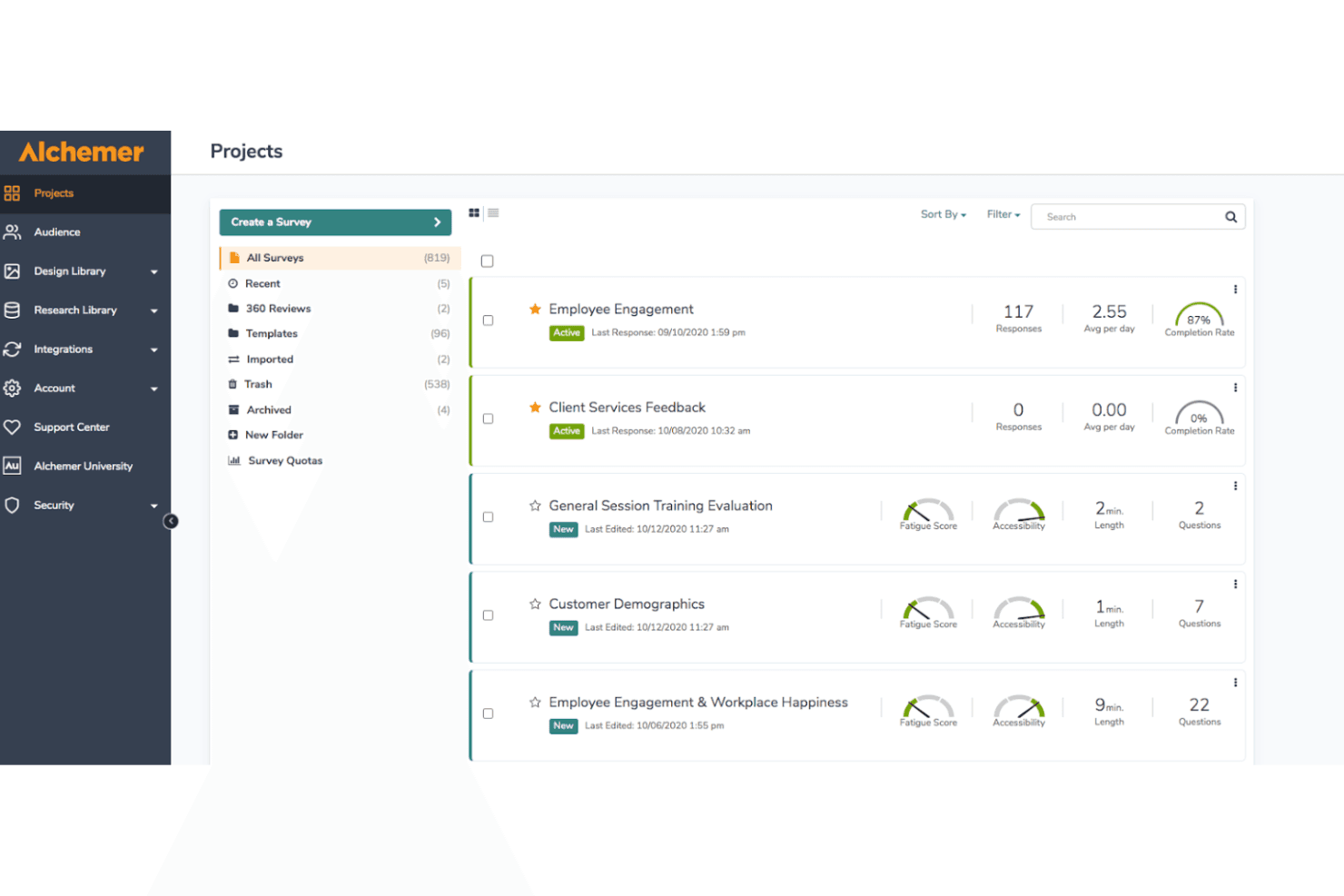
Alchemer helps enterprises manage multiple survey projects while tracking responses, completion rates, accessibility, and survey complexity. Alchemer is an enterprise survey and VoC platform that combines omnichannel feedback collection, advanced survey logic, AI-powered analytics, and closed-loop workflow automation across the full customer journey.
Who Is Alchemer Best For?
Alchemer suits mid-market and enterprise teams that need sophisticated VoC capabilities without the lengthy deployment timelines typical of larger platforms.
Why I Picked Alchemer
Alchemer earns its spot as one of the best on my shortlist because most enterprise platforms take months to deploy, and Alchemer gets teams collecting and acting on feedback within days. I particularly like its AI-powered theme and sentiment detection, which surfaces patterns from open-text responses at scale without manual coding. Its conditional logic engine (branching, piping, randomization) also lets my team build sophisticated multi-touchpoint VoC programs without leaning on professional services.
Alchemer Key Features
- Omnichannel distribution: Deploys surveys via email, SMS, web, in-app, QR, and more for broad reach.
- Customizable CX metric frameworks: Supports native NPS, CSAT, CES, and configurable composite scoring templates.
- Role-based analytics dashboards: Offers segmented, real-time dashboards with role-specific permissions and filtering options.
- Enterprise-grade compliance and security: Provides SOC 2, GDPR, HIPAA, ISO 27001, SSO, and granular access controls.
Alchemer Integrations
Alchemer offers over 400 native integrations, including Salesforce, HubSpot, Microsoft Teams, Google Sheets, Slack, Tableau, Zendesk, Microsoft Dynamics 365, and ServiceNow. An open API is also available for custom integrations.
Pros and Cons
Pros:
- AI sentiment analysis on open-ended responses
- Strong conditional logic for complex surveys
- Fast deployment with pre-built CX templates
Cons:
- Text analytics accuracy varies for niche industries
- Dashboard customization limited without technical support
Learn more about Alchemer: Best for understanding user experience on an enterprise's website
- Free plan available
- From $25/month
Visit WebsiteCustomer Rating:4.7/5
Mouseflow lets you collect feedback from your website users based on event-based triggers. Mouseflow is a comprehensive website analytics tool designed to offer deep insights into user behavior and interactions. By utilizing advanced features such as heatmaps, session replays, and feedback tools, Mouseflow enables enterprises to gain a detailed understanding of how visitors engage with their websites.
Why I picked Mouseflow: While it may not offer the extensive survey capabilities of dedicated survey platforms, its strengths lie in providing contextual feedback tied to actual user behavior. Enterprises seeking to evaluate the effectiveness of their site content and user journey will find Mouseflow particularly valuable. The tool’s ability to trigger surveys based on specific user actions ensures feedback is relevant and timely, offering a deeper insight into user experience than traditional survey methods.
Mouseflow Standout Features and Integrations:
Standout features include heatmaps that provide a visual representation of user interactions, highlighting areas of high engagement and potential issues. It also offers session replays that allow businesses to watch real-time recordings of user sessions, offering insights into user behavior and website performance. Furthermore, its funnel analysis feature helps enterprises track the user journey and identify where users drop off.
Integrations include BigCommerce, WooCommerce, Google Analytics, Google Tag Manager, Zendesk, Omniconvert, Adobe Target, Shopify, Intercom, WordPress, HubSpot, AB Tasty, Convert Experiences, and others.
Pros and Cons
Pros:
- Form analytics to help improve lead generation
- Useful in-the-moment feedback collection
- Provides detailed insights into how users interact with websites
Cons:
- Could benefit from more advanced filtering options
- Some users may find it difficult to understand the data presented
Learn more about Mouseflow: Best for AI-driven feedback analysis
- 14-day free trial available
- Pricing upon request
Visit WebsiteCustomer Rating:4.7/5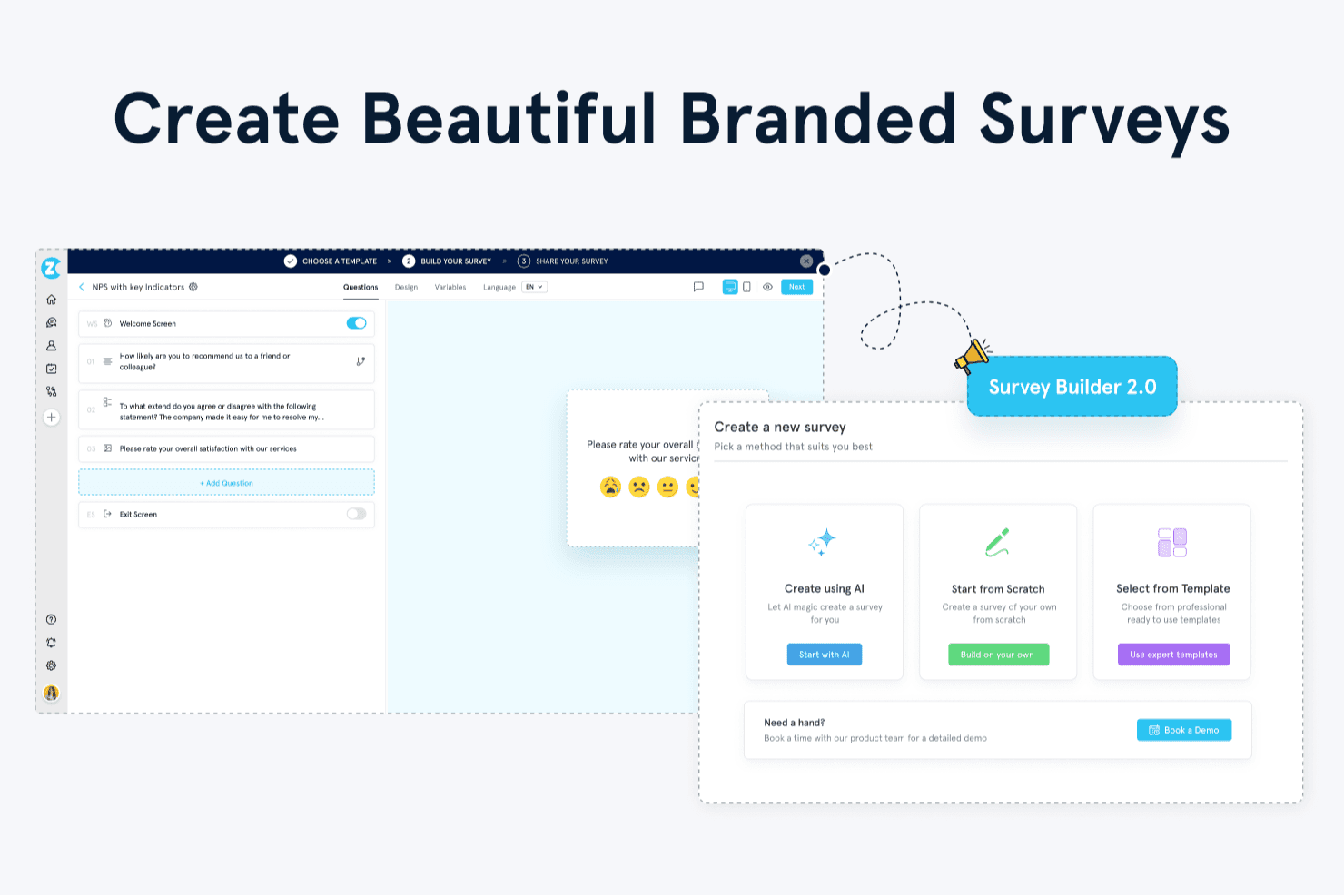
Zonka Feedback offers a Survey Builder 2.0 with options to create surveys using AI, start from scratch, or select from professional templates. Zonka Feedback is an omnichannel feedback and survey platform that combines multi-channel survey distribution, CX metric tracking (NPS, CSAT, CES), closed-loop workflow automation, and AI-powered feedback intelligence in a single system.
Who Is Zonka Feedback Best For?
It's a strong fit for CX and VoC teams in retail, healthcare, and fintech who need to unify feedback across physical and digital touchpoints.
Why I Picked Zonka Feedback
Zonka Feedback earns its spot on my shortlist because of how it handles unstructured feedback at scale. I love the AI Impact Analysis feature, which automatically links recurring themes in open-text responses to NPS, CSAT, and CES scores, so I can see exactly which issues are driving changes in scores. The Ask AI co-pilot lets me conversationally query feedback data, pulling insights from surveys, support tickets, and reviews without building a single report manually.
Zonka Feedback Key Features
- Omnichannel survey distribution: Create and share surveys via email, SMS, WhatsApp, web, in-app, kiosk, and offline channels.
- Role-based dashboards: Assign custom dashboards with permissions for CX leaders, department heads, and frontline teams.
- Advanced case management: Route issues, assign tickets, and manage closed-loop workflows from survey responses in one system.
- Data residency controls: Choose data hosting regions including US, EU, Australia, or India for compliance and governance.
Zonka Feedback Integrations
Zonka Feedback offers over 50 native integrations, including Salesforce, HubSpot, Zendesk, Intercom, Freshdesk, Jira, Slack, Microsoft Teams, Google Sheets, and Mailchimp. Zapier and an open API are available for custom integrations.
Pros and Cons
Pros:
- Tracks NPS, CSAT, and CES within the platform
- Advanced case management and alerts
- AI-powered open-text feedback analysis
Cons:
- Lower plans limit response volumes
- Lacks built-in A/B testing for surveys
Learn more about Zonka Feedback: Best for crowd-sourced feedback
- Free demo available
- Pricing upon request
Visit WebsiteCustomer Rating:4.7/5
ThoughtExchange offers AI generated themes. ThoughtExchange is an innovative tool that’s designed to gather crowdsourced insights, allowing you to tap into collective intelligence through large-scale, interactive discussions. It’s a great tool for businesses looking to drive customer or employee engagement and acquire nuanced feedback.
Why I picked ThoughtExchange: This tool got my attention thanks to its customizable privacy settings, which allow for anonymous contributions that encourage honest, open feedback. The software is also scalable, so it’s suitable for both small team discussions and large community projects. I also liked the way ThoughtExchange is applicable in many settings, from internal team assessments to stakeholder consultations.
ThoughtExchange Standout Features and Integrations:
Standout features include a system that allows participants to rate ideas, so key insights can be pinpointed easily. Other notable features include heat maps and sentiment analysis. ThoughtExchange supports the upload of images and videos to enrich discussions. In addition, the dashboard offers advanced filtering options, so you can sift through data and identify key themes.
Integrations include Google Calendar, Microsoft Teams, Outlook Calendar, and Slack. For organizations who use Learning Management Systems, ThoughtExchange is a great choice. Integrations with platforms like Moodle facilitate discussions within training or academic environments.
Pros and Cons
Pros:
- Facilitates democratic decision-making
- Dynamic interaction features
- Supports multimedia content
Cons:
- Lacks offline data collection
- Limited question types
Learn more about Thoughtexchange: Best for data-driven decision-making
- 30-day free trial + free plan available
- Pricing upon request

Qualtrics CoreXM helps you track the most important survey metrics. I picked Qualtrics CoreXM for its focus on experience management. The platform extends beyond surveys to cover employee, customer, product, and brand experiences. Thanks to its XM platform and specialized modules, it's a great choice for companies seeking a 360-degree understanding of feedback.
Why I picked Qualtrics CoreXM: This tool is a solid Experience Management platform for measuring and improving stakeholder experiences. Qualtrics CoreXM offers a single, centralized platform for gathering, analyzing, and acting on important data.
Sophisticated analytics and insights make Qualtrics the ‘go-to’ platform for growing businesses focused on data-driven decision-making. This makes it perfect for companies that need to both collect data and understand its context.
Qualtrics CoreXM Standout Features and Integrations:
Standout features include sentiment analysis and advanced text analytics, helping you delve deeper into open-ended responses. Qualtrics also supports advanced survey functions such as skip logic and conditional branching, creating more relevant, personalized surveys for respondents.
Qualtrics offers a range of question libraries and pre-built templates that conform to industry best practices. This helps you save time and build high-quality surveys easily.
Integrations include connections with many CRM systems, including Salesforce, together with data visualization tools such as Tableau. If you’re looking to combine survey data with other metrics, you’ll be happy to know Qualtrics integrates with web platforms such as Google Analytics and Adobe Analytics.
You can also create custom integrations through the API. This gives you the flexibility to connect Qualtrics with your existing corporate solutions, ensuring a unified data approach.
Pros and Cons
Pros:
- Conditional branching support
- Advanced text analytics
- Comprehensive XM platform
Cons:
- Limited customization in reporting
- Requires training for full utilization
Learn more about Qualtrics CoreXM:
Outras opções
Também selecionei várias outras ferramentas durante a minha pesquisa. Embora não tenham entrado na minha lista das 10 melhores opções de software empresarial de inquéritos, continuam a merecer ser exploradas, pois podem adequar-se melhor às suas necessidades:
- 11SurveyMonkey Enterprise Best for large-scale survey deployment
- 12Typeform EnterpriseBest for a conversational user experience
- 13Zoho SurveyBest for enterprise-level scalability
- 14AttestBest for market research agility
- 15Suzy InsightsBest for real-time consumer insights
- 16JotformBest for data-secure surveys
- 17SogolyticsBest for enterprise-grade survey customization
- 18QuestionProBest for advanced survey analytics
- 19VoxcoBest for multi-channel survey distribution
- 20Forstaest for comprehensive CX insights
- 21Google FormsBest for fast, cost-effective surveys
- 22User InterviewsBest for qualitative user research
How I Evaluate Enterprise Survey Software
I evaluate these tools on two levels: the baseline features a VoC program demands, and the differentiators that set the best platforms apart from generic survey builders.
Core Functionality (Table Stakes For This List)
When I'm selecting tools for my list, I rank each one on a scale from 0 (does not offer the functionality) to 5 (excels in this area) for each core functionality listed below. Then, I calculate the tool's total score into a percentage. Each tool needs to achieve a minimum total score of 65% to be considered for inclusion.
- Multi-Channel Survey Distribution: I check how many channels a platform supports for sending surveys—email, SMS, web intercept, in-app, QR codes—and whether it handles enterprise volume without throttling.
- Built-In CX Metric Frameworks: Platforms should offer native NPS, CSAT, and CES templates with scoring logic already configured, so your team isn't building metric calculations from scratch.
- Advanced Survey Logic & Design: I evaluate branching, piping, skip logic, and multilingual support—things you'll need when running post-purchase surveys across multiple regions and customer segments.
- Real-Time Analytics & Dashboards: Role-based dashboards matter here. A VoC program manager and a regional ops lead need different views of the same data, with filtering and trend tracking built in.
- Closed-Loop Workflow Automation: I look for the ability to trigger alerts, assign follow-up tasks, and route cases when a detractor response comes in—moving from insight to action inside the platform.
- Enterprise Integrations & Security: The platform should connect to your CRM, CDP, and BI stack through pre-built connectors or open APIs, while meeting compliance standards like SOC 2 and GDPR.
Once I have a list of tools that meet this criteria, I consider what sets each platform apart.
Differentiating Factors (What Sets Vendors Apart)
Here's how I compare and contrast different vendors:
Standout Features
AI-driven text analytics is a major differentiator—I evaluate whether a platform can auto-categorize thousands of open-ended responses into actionable themes without manual tagging. Journey-based feedback orchestration also matters. Strong platforms let you map surveys to specific touchpoints and throttle frequency so customers aren't getting hit with three surveys in a week. I also look for industry benchmarking that puts your NPS or CSAT scores in context against peers in your vertical.
Beyond Features
Integration depth is one of the first things I check—your survey platform needs to push data into Salesforce, Genesys, or whatever CRM and contact center stack you're running, not just export CSVs. Compliance matters just as much, especially if your VoC program collects feedback across regulated industries where HIPAA or SOC 2 Type II certification is required. I also evaluate pricing transparency, since enterprise survey contracts vary widely between per-response, per-seat, and unlimited models that affect total cost as your program scales.
Principais funcionalidades do software empresarial de inquéritos
Para satisfazer os requisitos fundamentais acima descritos, estas são as principais funcionalidades que considero essenciais num software de inquéritos de nível empresarial:
- Personalização das perguntas: Deve permitir adaptar as perguntas do inquérito e os tipos de resposta, possibilitando obter feedback mais preciso.
- Lógica e ramificação dos inquéritos: A lógica condicional avançada permite criar fluxos de inquérito personalizados, melhorando a experiência dos inquiridos e garantindo a relevância dos dados.
- Análise de dados e relatórios: O software deve disponibilizar ferramentas analíticas robustas para interpretar os resultados dos inquéritos e gerar relatórios detalhados.
- Monitorização das respostas em tempo real: Os painéis em tempo real ajudam as equipas empresariais a acompanhar o desempenho dos inquéritos à medida que este acontece — ideal para fluxos de resposta ágeis ou de escalamento.
- Distribuição multicanal: Todo o bom software de inquéritos deve permitir distribuir inquéritos através de várias plataformas, como a Web, o e-mail, SMS e as redes sociais.
- Otimização para dispositivos móveis: Mesmo em contextos B2B, uma parte significativa dos inquéritos é preenchida em dispositivos móveis. Uma experiência móvel nativa aumenta as taxas de resposta e reduz os obstáculos.
- Segurança e conformidade: A segurança dos dados é fundamental para as grandes empresas, pelo que o software deve cumprir as normas de conformidade relevantes.
- Controlo de acesso baseado em funções: Diferentes equipas (por exemplo, RH, marketing e produto) podem necessitar de diferentes níveis de acesso. Esta funcionalidade garante a segurança e a governação dos dados, permitindo aos administradores controlar quem pode consultar, editar ou distribuir inquéritos e relatórios.
- Fluxos de trabalho automatizados: A ferramenta deve incluir funcionalidades que desencadeiem ações com base nas respostas aos inquéritos, como atualizar o registo de um cliente ou enviar um e-mail de acompanhamento.
- Integrações empresariais: A integração conveniente com outras soluções, como sistemas CRM, plataformas de comércio eletrónico e serviços de assistência, é um requisito essencial.
Facilidade de utilização
Ao elaborar a minha lista, dei preferência às plataformas fáceis de utilizar e que também oferecem uma boa experiência de utilização. Naturalmente, dominar qualquer software novo implica uma curva de aprendizagem. No entanto, a sua equipa de experiência do cliente não deveria perder tempo a tentar compreender o essencial.
Escolhi ferramentas com interfaces modernas e fáceis de utilizar, bem como menus e opções cuidadosamente concebidos. Os profissionais de experiência do cliente da sua equipa devem conseguir encontrar e utilizar as funcionalidades sem dificuldade.
Análise
Concentrei-me em ferramentas de software com capacidades detalhadas de análise e elaboração de relatórios. Em particular, procurei ferramentas que recolham dados e os transformem em informações úteis. Desta forma, os seus gestores podem tomar decisões baseadas em dados, identificar tendências emergentes e avaliar alterações na perceção dos clientes.
Integrações de software
Todas as ferramentas da minha lista oferecem integrações com as plataformas empresariais mais populares. Ao nível empresarial, é essencial que cada componente de software funcione bem com os restantes elementos do ecossistema tecnológico. A maioria das ferramentas de nível empresarial também inclui acesso à API para integrações especializadas.
Preços
O custo é sempre um fator importante, especialmente quando se desenvolvem atividades à escala empresarial. As ferramentas de software desta lista vão desde soluções de menor custo com boas funcionalidades até soluções premium que oferecem funcionalidades avançadas e amplas possibilidades de personalização. Estas ferramentas têm normalmente preços por escalões ou disponibilizam serviços às empresas com base em orçamentos personalizados. O software de nível empresarial normalmente não oferece uma versão gratuita nem uma opção de inquérito online gratuita, mas alguns disponibilizam períodos de teste.
Tendências no software de inquéritos empresariais
O software de inquéritos empresariais evoluiu muito para além dos criadores de formulários básicos. Atualmente, as principais plataformas estão a integrar tecnologia de ponta e estratégias de experiência do cliente para proporcionar informações mais aprofundadas, respostas mais rápidas e uma automatização mais inteligente. Eis algumas das principais tendências que estão a transformar este setor:
1. Análise de texto baseada em IA
À medida que as respostas de texto livre se tornam mais comuns (e mais valiosas), a IA está a intervir para as tornar escaláveis. As plataformas mais recentes utilizam agora processamento de linguagem natural (NLP) e aprendizagem automática para:
- Detetar o sentimento nos comentários de clientes ou colaboradores
- Categorizar automaticamente as respostas por temas
- Identificar problemas emergentes ou tendências no feedback sobre produtos em tempo real. Isto poupa tempo e garante que o feedback não estruturado não se perde no meio do ruído.
2. Painéis e alertas em tempo real
As ferramentas empresariais modernas estão a dar prioridade à visibilidade em tempo real. Os painéis são atualizados à medida que as respostas chegam e as equipas podem configurar alertas instantâneos com base em determinadas palavras-chave, pontuações baixas (como o NPS) ou feedback prioritário, permitindo um acompanhamento mais rápido e estratégias de resposta mais ágeis.
3. Integrações perfeitas em toda a pilha tecnológica
Atualmente, os utilizadores empresariais esperam que o software de inquéritos se ligue diretamente a CRMs, ferramentas de análise, serviços de apoio e plataformas de marketing. Muitos fornecedores oferecem agora integrações nativas e APIs abertas para garantir que os dados dos inquéritos possam desencadear fluxos de trabalho, preencher relatórios e enriquecer automaticamente os registos dos clientes.
4. Inquéritos incorporados e contextuais
Em vez de dependerem exclusivamente de campanhas de e-mail ou de ligações genéricas para inquéritos, as plataformas suportam agora inquéritos integrados nas aplicações, janelas pop-up e pedidos de feedback contextuais que aparecem em momentos-chave da jornada do cliente. Isto resulta em taxas de resposta mais elevadas e feedback mais relevante.
5. Maior ênfase na privacidade e na governação dos dados
À medida que os regulamentos de privacidade se tornam mais rigorosos (GDPR, CCPA, HIPAA, etc.), as ferramentas de inquéritos empresariais investem fortemente em funcionalidades de conformidade, monitorização do consentimento dos utilizadores, encriptação e controlos de acesso baseados em funções. As plataformas que não conseguem demonstrar uma sólida postura de conformidade estão a ser cada vez mais excluídas das listas restritas das empresas.
6. Lógica avançada de inquéritos e personalização
As ferramentas de nível empresarial oferecem agora caminhos de perguntas adaptativos, lógica de salto e fluxos de inquérito personalizados baseados em dados do CRM ou em respostas anteriores. Isto melhora a qualidade das respostas e reduz a fadiga causada pelos inquéritos—um aspeto fundamental ao inquirir clientes de elevado valor ou equipas internas ocupadas.
Perguntas frequentes sobre software de inquéritos empresariais
Ainda está a tentar compreender como o software de inquéritos empresariais pode melhorar a gestão da experiência do cliente? Eis algumas respostas a perguntas frequentes que deverão ajudar a esclarecer a questão:
Porque são importantes os inquéritos aos clientes?
Os inquéritos de satisfação do cliente são uma ferramenta importante para compreender a voz do cliente. Podem fornecer uma grande quantidade de informação que ajuda a tomar melhores decisões empresariais. Os inquéritos fornecem conhecimentos acionáveis que ajudam as organizações a prestar um melhor serviço a todas as partes interessadas.
Estes conhecimentos podem ser utilizados para orientar o desenvolvimento de melhores produtos, aperfeiçoar estratégias de marketing e melhorar experiências.
Que tipo de opinião deve pedir aos seus clientes?
Ao criar o seu inquérito, é boa ideia incluir uma combinação de perguntas qualitativas e quantitativas. As perguntas qualitativas são normalmente abertas, permitindo aprofundar as motivações, os sentimentos e as experiências dos clientes. As perguntas quantitativas podem ser de escolha múltipla ou baseadas em escalas. O objetivo é fornecer dados estatísticos fáceis de analisar e compreender.
Ao combinar estes dois tipos de perguntas, pode obter uma compreensão abrangente do que pensa o seu público-alvo — e de como se sente. Isto facilita a definição de melhorias eficazes.
Qual é a diferença entre um inquérito NPS e um inquérito CES?
O Net Promoter Score (NPS) e a Pontuação de Esforço do Cliente (CES) são métricas úteis, mas são utilizados de formas muito diferentes. Os inquéritos NPS procuram medir a lealdade dos clientes através de uma única pergunta, como: “Qual é a probabilidade de recomendar o nosso produto/serviço a um amigo ou colega?”
Normalmente medidas numa escala de 0 a 10, estas respostas podem fornecer uma indicação clara do sentimento em relação à sua marca. Podem também ajudar a prever o potencial de crescimento.
Por outro lado, os inquéritos CES centram-se normalmente em medir a facilidade de interação com o seu produto ou serviço. Podem incluir perguntas como “Até que ponto foi fácil resolver o seu problema utilizando o nosso serviço?” Neste caso, o objetivo é obter opiniões que identifiquem pontos de fricção durante a experiência do cliente, para que possam ser eliminados no futuro.
Qual é a diferença entre software de inquéritos empresariais e ferramentas básicas de inquéritos?
O software de inquéritos empresariais distingue-se das ferramentas de inquéritos padrão tanto em escala como em sofisticação. Embora as plataformas básicas possam ser adequadas para recolher opiniões simples, as soluções de nível empresarial foram concebidas para organizações que necessitam de análises robustas, automatização, governação de dados e integração entre departamentos.
As principais diferenças incluem:
-
Lógica avançada e ramificação para experiências de inquérito personalizadas
-
Controlos de acesso baseados em funções para apoiar a colaboração da equipa em segurança
-
Funcionalidades de conformidade integradas para o RGPD, a HIPAA e outros regulamentos de dados
-
Ferramentas de análise e elaboração de relatórios mais aprofundadas para gerar conhecimento, não apenas recolher dados
-
Capacidades de integração que ligam os dados dos inquéritos a CRM, ERP e plataformas de análise
Em última análise, o software de inquéritos empresariais foi concebido para servir grandes organizações com necessidades complexas — garantindo que as opiniões podem ser recolhidas em escala, segmentadas de forma relevante e transformadas em ações em toda a empresa.
Como é que as integrações melhoram a funcionalidade do software de inquéritos empresariais?
As integrações são essenciais para tornar o software de inquéritos empresariais verdadeiramente acionável. Em vez de manter as opiniões isoladas em painéis de controlo, as integrações ligam os dados dos inquéritos às ferramentas que as suas equipas já utilizam — criando fluxos de trabalho mais inteligentes e conhecimentos mais completos.
Por exemplo, a integração com um CRM permite-lhe:
-
Acionar inquéritos automaticamente após interações importantes com os clientes
-
Atualizar os perfis dos clientes com base nas respostas aos inquéritos
-
Encaminhar opiniões negativas para gestores de contas ou equipas de suporte em tempo real
A ligação a ferramentas de análise, plataformas de automatização de marketing ou software de assistência técnica acrescenta ainda mais valor, transformando as respostas aos inquéritos em pontos de ativação para marketing ao longo do ciclo de vida, melhorias de produto ou contacto proativo com o serviço.
Quanto mais ligada estiver a sua plataforma de inquéritos ao ecossistema tecnológico, mais rápida e eficazmente poderá a sua organização responder às opiniões.
Como pode melhorar as taxas de resposta aos inquéritos empresariais?
Obter taxas de resposta elevadas ao nível empresarial exige uma combinação de momento, relevância, confiança e desenho da experiência do utilizador. Eis algumas práticas fundamentais que aumentam consistentemente o envolvimento:
-
Personalize o pedido. Utilize o nome e o contexto do respondente (“Gostaríamos de conhecer a sua opinião sobre a recente experiência com o nosso suporte”).
-
Mantenha-o curto e focado. Normalmente, menos de 10 perguntas produz os melhores resultados. As opções de seleção ou as perguntas de escolha múltipla são mais fáceis do que as perguntas abertas.
-
Otimize para dispositivos móveis. Atualmente, a maioria dos inquéritos é preenchida em smartphones, muitas vezes através de uma aplicação móvel.
-
Envie no momento certo. Acione os inquéritos próximo da experiência (após a compra, depois de uma interação com o suporte, etc.).
-
Explique o “porquê”. Informe os respondentes sobre a forma como as suas respostas aos inquéritos de opinião serão utilizadas.
-
Ofereça anonimato opcional. Isto pode aumentar a honestidade e a conclusão, especialmente em inquéritos internos.
-
Teste as linhas de assunto e os horários de envio. Mesmo pequenas alterações podem gerar melhorias significativas nas taxas de abertura e de cliques.
Quais são as principais métricas para medir a eficácia dos inquéritos?
Para avaliar se os seus esforços de inquérito empresarial estão realmente a funcionar, olhe para além do número de respostas. Concentre-se em KPI que demonstrem tanto o envolvimento como o impacto:
-
Taxa de resposta: percentagem de inquéritos concluídos relativamente aos enviados. Essencial para o alcance.
-
Taxa de conclusão: percentagem de pessoas que iniciam e terminam o inquérito. Indica a facilidade de utilização.
-
Tempo de conclusão: Ajuda a identificar fricção ou fadiga.
-
Taxa de resposta de texto aberto: percentagem de respondentes que deixam comentários qualitativos. Demonstra a profundidade do envolvimento.
-
Desempenho específico por segmento: Os principais perfis ou clientes estão a responder?
-
Taxa de ações de seguimento: percentagem de conhecimentos que conduzem a acionadores de fluxos de trabalho, atualizações da CX ou ações de seguimento.
Além disso, relacione as métricas dos inquéritos com KPI empresariais mais abrangentes. Por exemplo:
-
As melhorias no NPS ou no CSAT estão correlacionadas com a retenção?
-
Os inquéritos de envolvimento dos colaboradores estão associados a ganhos de produtividade?
Outras análises de software de inquéritos
Com o software de inquéritos já em mente, eis alguns tipos adicionais de software de inquéritos que poderá considerar interessantes:
- Melhor software de inquéritos online
- Melhor software de Net Promoter Score e ferramentas de inquéritos NPS
- Melhores ferramentas para criar inquéritos de feedback dos clientes
- Melhor software de análise de inquéritos
- Melhor software de análise de dados qualitativos
- Melhores ferramentas gratuitas para inquéritos