

As equipas de atendimento ao cliente estão sob pressão para fazer mais com menos—responder mais depressa, prestar suporte através de mais canais e manter uma experiência do cliente consistente sem ver os custos do software subirem juntamente com o volume de pedidos. O software gratuito de atendimento ao cliente adequado pode ajudá-lo a manter a eficiência sem acrescentar outra despesa ao conjunto de ferramentas.
Mas “gratuito” não significa automaticamente útil—ou gratuito para sempre. Algumas ferramentas oferecem planos gratuitos contínuos, enquanto outras disponibilizam um período experimental limitado de funcionalidades pagas. Analisei as principais ferramentas para o ajudar a comparar as suas opções, perceber o que é realmente gratuito e encontrar a solução mais adequada para a sua equipa.
Why Trust Our Software Recommendations
6,700+
Reviews
20
Industry experts
16+
Evaluation factors
14
Years
Our team has been testing and reviewing software since 2012. As CX leaders ourselves, we know how difficult—and important—it is to choose the right software.
For this guide, we evaluated tools using hands-on testing and independent research, scoring tools using our selection criteria.
Our reviews reflect our human editorial judgment, not a sales pitch.
 Gui DrusinaCreative Director
 Tim FisherVP of AI
Tabela comparativa de softwares gratuitos de atendimento ao cliente
| Tool | Best For | Trial Info | Price | ||
|---|---|---|---|---|---|
| 1 | Best for Microsoft, Slack, & WhatsApp integrations | Free trial available | From $19/user/month (billed annually) | Website | |
| 2 | Best for automated response drafts | Free plan available | From $25/user/month | Website | |
| 3 | Best for omnichannel communication | 15-day free trial | Pricing upon request | Website | |
| 4 | Best for AI-powered customer support | Free trial available | From $25/agent/month (billed annually) | Website | |
| 5 | Best for AI support agents | 7-day free trial + free plan + free demo available | From $32/month (billed annually) | Website | |
| 6 | Best for multi-deal pipelines | Free plan + free demo available | From $11.04/user/month (billed annually) | Website | |
| 7 | Best for GPL-licensed ticketing with no agent caps | Free plan available | From $12/user/month | Website | |
| 8 | Best with unlimited free agents | Free plan available | From $29/month | Website | |
| 9 | Best for dev and ops team ticket workflows | Free plan + 14-day trial available | From $21.50/user/month | Website | |
| 10 | Best for self-hosted ticket management | 30-day free trial | From €7/user/month | Website |


Análises dos melhores softwares gratuitos de atendimento ao cliente
Eis uma breve descrição de cada um dos melhores softwares gratuitos de atendimento ao cliente da minha lista, mostrando aquilo que fazem melhor, além de capturas de ecrã para destacar algumas das funcionalidades.
 Best for Microsoft, Slack, & WhatsApp integrations
- Free trial available
- From $19/user/month (billed annually)
Visit WebsiteCustomer Rating:4.4/5
Freshdesk offers an AI-powered inbox with bot conversation summaries, contact details, and order history to streamline customer support workflows. Freshdesk (a product of Freshworks Inc.) is an omnichannel helpdesk platform that brings customer conversations from email, chat, social media, and messaging apps into a unified inbox alongside built-in ticketing, knowledge base, and AI-assisted support tools.
Who Is Freshdesk Best For?
Freshdesk suits support teams at small to mid-sized businesses that handle customer inquiries across multiple channels and need structured ticketing without a complex setup.
Why I Picked Freshdesk
Freshdesk earns its spot on my shortlist because of how it turns the tools support teams already live in into active support channels. I love that WhatsApp conversations convert directly into trackable tickets inside the unified inbox, with channel-specific SLAs and Freddy AI responses applied automatically. The Microsoft Teams and Slack connections surface ticket alerts and let agents collaborate on resolutions without ever leaving those platforms.
Freshdesk Key Features
- Knowledge base and customer portal: Create public self-service articles and FAQs for faster issue resolution.
- Custom ticket fields: Add unique data fields to tickets for advanced tracking and reporting.
- Automated ticket assignment: Define rules that auto-assign incoming tickets to the right agents or groups.
- Analytics dashboard: Monitor ticket trends, response times, and agent workload with built-in reporting tools.
Freshdesk Integrations
Freshdesk provides native integrations with Slack, Microsoft Teams, WhatsApp, Salesforce, HubSpot, Shopify, Jira, Facebook Messenger, Instagram, and Zapier. An API is also available for custom integrations.
What's Free?
Freshdesk offers a free program that includes up to 2 agents for 6 months, with email and social media ticketing, a knowledge base, ticket dispatch, team collaboration, and basic reporting. After 6 months, you'll need to upgrade to a paid plan to continue using Freshdesk. Freshdesk also offers a 14-day free trial with access to more advanced features.
Pros and Cons
Pros:
- Knowledge base available on the free tier
- Intuitive shared inbox for multi-agent teams
- Freddy AI assists with ticket responses
Cons:
- Free program limited to two agents for 6 months only
- Automation locked behind paid plan tiers
Learn more about Freshdesk: Best for automated response drafts
- Free plan available
- From $25/user/month
Visit WebsiteCustomer Rating:4.5/5
Help Scout offers a unified inbox interface with AI draft replies, customer profile details, and conversation threading for efficient support management. Help Scout is a shared inbox customer service platform that combines email, live chat, and knowledge base tools with AI-assisted reply drafting in a single, conversation-centric workspace.
Who Is Help Scout Best For?
Help Scout is a strong fit for small support teams and growing SaaS companies that need a clean, email-first help desk without enterprise-level complexity.
Why I Picked Help Scout
Help Scout earns its spot as one of the best on my shortlist because of how it handles AI Drafts. When a new conversation comes in, Help Scout pulls from past replies and your Docs knowledge base to generate a suggested response my team can review and send in seconds. AI Summarize also cuts down on context-switching by condensing long threads into quick bullet points, so agents aren't re-reading 20 messages before they reply.
Help Scout Key Features
- Shared inbox with collision detection: Lets multiple agents work together in real time and prevents duplicate replies to customers.
- Docs self-service knowledge base: Allows you to create and organize help articles with searchable categories and branding.
- Live chat via Beacon widget: Offers embedded chat support on your website, connecting customers instantly to your team.
- Basic workflow automation: Enables auto-tagging, simple rules, and response assignments to streamline ticket handling for small teams.
Help Scout Integrations
Help Scout offers native integrations with HubSpot, Jira, Slack, Shopify, Mailchimp, Salesforce, Trello, and Aircall. It also connects with Zapier and provides an API for custom integrations.
What's Free?
Help Scout's free plan is a free-forever tier that includes up to 5 users, 1 shared inbox, 1 Docs site, and support for up to 100 contacts per month. Once you hit that contact cap, you can still receive customer inquiries, but you can't reply until the next monthly cycle unless you upgrade, making it best suited to very small teams with low inquiry volumes.
Pros and Cons
Pros:
- Docs knowledge base included on free plan
- Clean conversation-based inbox reduces agent confusion
- AI Drafts speeds up first replies significantly
Cons:
- No social channel support on any plan
- Contact cap of 100 pauses replies abruptly
Learn more about Help Scout: Best for omnichannel communication
- 15-day free trial
- Pricing upon request
Visit WebsiteCustomer Rating:4.4/5
Zoho Desk offers a ticket management dashboard with categorized views. Zoho Desk is a context-aware help desk platform that consolidates ticket management, multi-channel support, AI-assisted workflows, and self-service tools—including a knowledge base and customer portal—into a single agent workspace.
Who Is Zoho Desk Best For?
It's a strong fit for small to mid-sized businesses that need structured, multi-channel support operations but aren't ready to commit to enterprise-tier pricing.
Why I Picked Zoho Desk
Zoho Desk is one of my top picks because I love how it pulls every channel, email, WhatsApp, live chat, and social media, into one ticket view without losing context. I particularly like the Agent Collision Detection feature, which flags when two agents are viewing the same ticket simultaneously, preventing duplicate replies in busy queues. The customer's full interaction history travels with every ticket, so my team can see a chat conversation from last week when someone follows up by email today.
Zoho Desk Key Features
- Blueprint workflow designer: Lets you create structured, multi-step ticket workflows with drag-and-drop controls.
- Knowledge base management: Supports multi-brand and multilingual help centers with article categorization and search.
- Customizable dashboards: Offers agent, department, and channel-specific reporting with export options.
- Native mobile apps: Enables agents to manage, assign, and resolve tickets from iOS or Android devices.
Zoho Desk Integrations
Zoho Desk offers native integrations with Zoho CRM, Salesforce, Slack, Jira, Trello, Shopify, Microsoft Teams, Google Workspace, Zendesk, and WhatsApp. It connects with Zapier and provides an API for custom integrations.
What's Free?
Zoho Desk offers a free-forever plan for up to 3 agents, covering basic email ticketing, a help center, and a customer portal. Advanced features like live chat, automation, multi-channel support, and detailed analytics are locked behind paid tiers.
Pros and Cons
Pros:
- Blueprint tool maps structured multi-step ticket workflows
- Omnichannel ticketing across email, chat, and social
- Free plan supports up to 3 agents
Cons:
- Automation rules locked behind paid tiers
- Live chat unavailable on the free plan
Learn more about Zoho Desk: Best for AI-powered customer support
- Free trial available
- From $25/agent/month (billed annually)
Visit WebsiteCustomer Rating:4.3/5
Zendesk offers a unified customer service interface with live messaging, ticket management, customer profile details, and interaction history all in one view. Zendesk is an AI-powered customer service platform that unifies ticketing, omnichannel messaging, live chat, voice, and a self-service knowledge base into a single agent workspace.
Who Is Zendesk Best For?
Zendesk suits mid-size to enterprise support teams that handle high ticket volumes across multiple channels and need AI to automate resolution at scale.
Why I Picked Zendesk
Zendesk earns its spot as one of the best on my shortlist because of how far its AI actually goes in autonomous resolution. I love that AI Agents can resolve customer tickets across 80+ languages without ever escalating to a human, and Intelligent Triage classifies and routes incoming requests automatically the moment they arrive. I also rely on AI Copilot, which surfaces next-step suggestions mid-conversation so agents spend less time deciding and more time resolving.
Zendesk Key Features
- Omnichannel agent workspace: Agents can handle email, chat, social, and voice conversations from one interface.
- Shared team inbox: Multiple agents view, assign, and comment on incoming tickets, improving collaboration.
- Customizable branded help center: Easily publish FAQs and self-service articles in a knowledge base tailored to your brand.
- Prebuilt analytics dashboards: Track ticket volume, agent performance, and key support metrics with built-in reports.
Zendesk Integrations
Zendesk offers 100+ native integrations, including Salesforce, Slack, Shopify, Jira, Mailchimp, HubSpot, Google Analytics, Trello, Facebook, and WhatsApp. It connects with Zapier and has an API for custom integrations.
What's Free?
Zendesk offers a 14-day free trial with access to all features in its Professional plan, with no credit card required. There is no free-forever plan, so you'll need to upgrade to a paid subscription to continue using the platform after the trial ends, making it best suited to teams that want to thoroughly test Zendesk before committing to a paid customer service platform.
Pros and Cons
Pros:
- Reporting dashboards are detailed and highly customizable
- Omnichannel inbox unifies email, chat, and social
- AI automation handles tickets without human input
Cons:
- Setup complexity overwhelms small solo operators
- No permanent free plan available
Learn more about Zendesk: Best for AI support agents
- 7-day free trial + free plan + free demo available
- From $32/month (billed annually)
Visit WebsiteCustomer Rating:4.4/5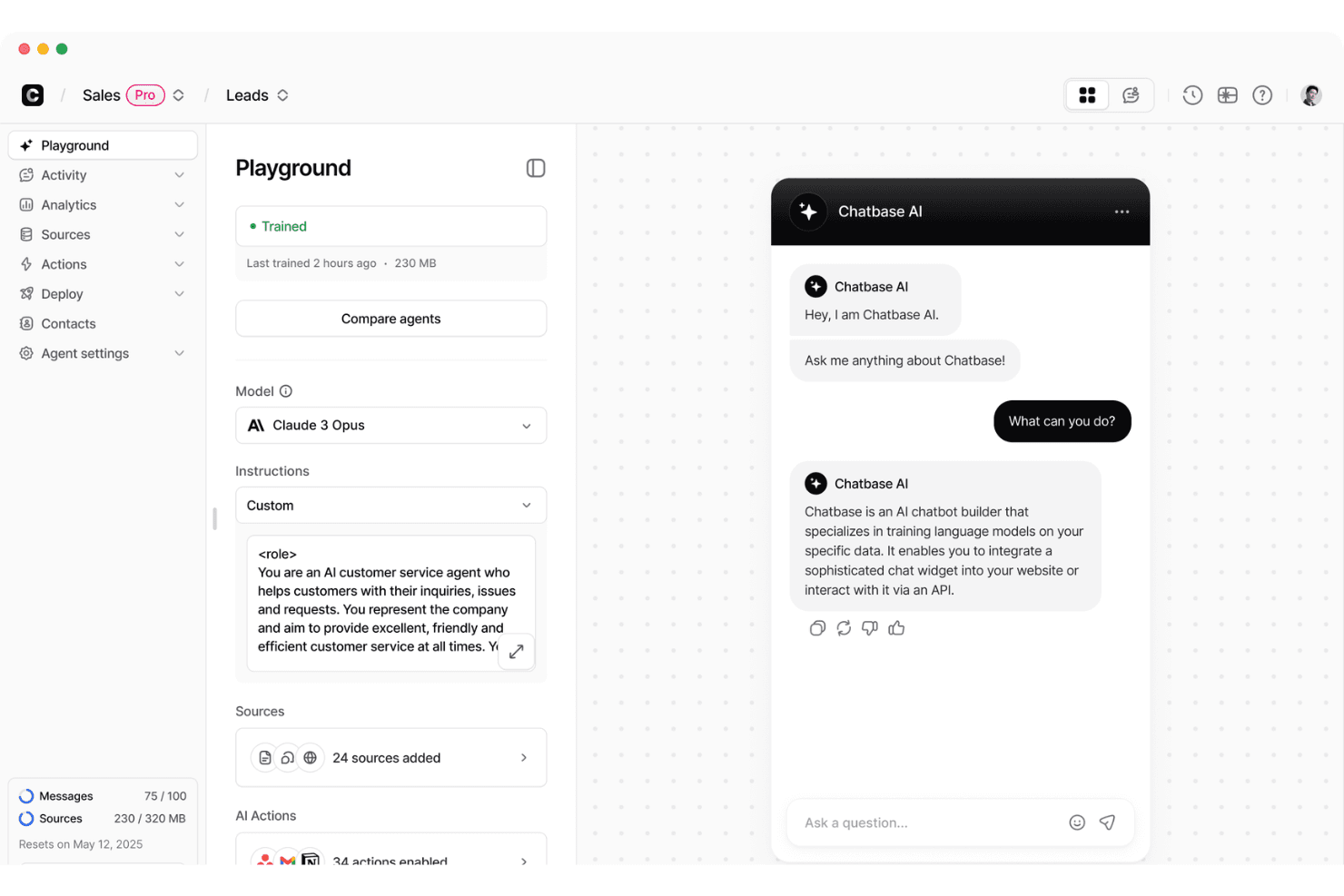
Chatbase offers an AI chatbot playground where users can configure models, instructions, and sources while previewing live chat interactions. Chatbase is an AI chatbot platform designed to help businesses automate customer support by turning existing knowledge—like help docs, PDFs, and website content—into conversational agents. It fits squarely in the AI support chatbot category, especially for teams that want a fast way to deploy self-service support without building models from scratch. Chatbase works best as a front-line automation layer that handles common questions and routes more complex issues.
Who Is Chatbase Best For?
Chatbase is best for startups, SMBs, and support teams that want to deflect repetitive support tickets using AI without investing in a full custom solution. It’s particularly useful for companies with well-documented knowledge bases (help centers, onboarding docs, product FAQs) that can be used to train a chatbot quickly.
Why I Picked Chatbase
I picked Chatbase because it lowers the barrier to deploying AI support agents by letting teams train bots directly on their own content and deploy them via a simple widget or API. The standout factor is how quickly teams can go from static documentation to a working chatbot, which helps reduce repetitive support volume without requiring major implementation effort.
Chatbase Key Features
- Custom chatbot builder: Create and configure chatbots using your own data, documents, or website content.
- Widget for websites: Add a customizable chat widget to your website for instant customer support.
- Conversation analytics: Review chats, identify unanswered questions, and refine bot responses over time
- API access: Integrate Chatbase bots with your existing systems using API endpoints.
Chatbase Integrations
Chatbase provides API access for custom integrations and supports automation through third-party tools.
What's Free?
Chatbase offers a free plan with no credit card required, allowing you to build and deploy a basic AI agent. The plan includes limited access to AI models, 50 message credits per month, 1 AI agent, 1 user, and up to 1 MB of training content. Free agents are also deleted after 14 days of inactivity, making the plan best suited for testing or small-scale use.
Pros and Cons
Pros:
- Useful for deflecting repetitive support questions and reducing ticket volume
- Fast setup using existing content like help docs and websites
- Supports over 90 languages for AI agents
Cons:
- Not a full customer support platform (no built-in ticketing)
- Free plan limits monthly chatbot messages
Learn more about Chatbase: Best for multi-deal pipelines
- Free plan + free demo available
- From $11.04/user/month (billed annually)
Visit WebsiteCustomer Rating:4.6/5
EngageBay lets users manage and filter contacts with star ratings. EngageBay is an all-in-one customer service software platform offering free ticket management, live chat, omnichannel support, a knowledge base, and CRM integration for small teams and startups.
Who Is EngageBay Best For?
Small businesses or startups that want a free, all-in-one help desk, live chat, and CRM to manage customer conversations across multiple channels.
Why I Picked EngageBay
I picked EngageBay as one of the best because I can run multiple parallel sales and support pipelines in the same workspace, thanks to multi-deal pipeline support and CRM integration. My team manages tickets, live chats, and customer records in real time, switching between sales, support, and onboarding workflows without missing a beat.
EngageBay Key Features
- Live chat widget: Chat with website visitors in real time with proactive messaging, visitor tracking, agent collaboration, and co-browsing.
- Knowledge base editor: Build a branded help center using a rich-text editor, organized collections, custom CNAME, and draft/publish controls.
- Mobile apps: Manage tickets, respond to chats, and update support records on the go with native Android and iOS apps.
- Helpdesk reporting: Access visual dashboards showing ticket volumes, response times, agent workloads, and customer satisfaction metrics.
EngageBay Integrations
EngageBay has native integrations with Shopify, Xero, QuickBooks, SendGrid, Mailgun, Postmark, JotForm, Digioh, BulkSMS, AfricasTalking, and WordPress. Zapier, Integrately, and PieSync are supported for additional connectivity, and its API is available for custom integrations.
What's Free?
EngageBay offers a free-forever plan that includes help desk, live chat, and basic CRM functionality. The free plan supports up to 250 contacts, 1,000 branded emails per month, and basic integrations, but limits automation features and excludes advanced reporting.
Pros and Cons
Pros:
- Free tier includes branded knowledge base
- Live chat and CRM integrated in one
- Unlimited free agents and tickets supported
Cons:
- Free plan emails display vendor branding
- Contact database capped at 250 records
Learn more about EngageBay: Best for GPL-licensed ticketing with no agent caps
- Free plan available
- From $12/user/month
Visit WebsiteCustomer Rating:4.3/5
osTicket organizes support tickets into customizable queues by priority. osTicket is an open-source customer support ticketing system that offers customizable workflows, rule-based automation, and a built-in knowledge base for managing inquiries from email, web forms, and API.
Who Is osTicket Best For?
osTicket is a strong fit for technically capable small businesses or support teams needing customizable, self-hosted ticketing with advanced automation and no per-agent fees.
Why I Picked osTicket
I picked osTicket as one of the best because it’s the only genuinely free, GPL-licensed ticketing tool with no agent caps. I’ve set up its custom queues, unlimited SLA plans, and help-topic-driven forms for teams needing flexible routing and workflow—all while owning our data fully on our own server.
osTicket Key Features
- Custom ticket filters: Build rule-based automations to route, assign, or reject tickets using custom criteria and fields.
- Unlimited knowledge base articles: Create rich text FAQs with nested categories, public or private visibility, and file attachments.
- Agent collision avoidance: Lock tickets to a single agent for a set time to prevent duplicate replies or conflicting actions.
- Advanced CSV exports: Download filtered ticket data, queue results, and dashboard metrics for custom reporting or backup.
osTicket Integrations
osTicket offers native integrations with Microsoft 365 and Google email via OAuth2 authentication. It includes a documented API for custom integrations and supports LDAP/Active Directory authentication through official plugins. Integrations with Slack and Discord are available through community plugins.
What's Free?
osTicket’s core open-source software is completely free forever, with no user or ticket limits. You’ll need to host and manage it yourself, but all core features are included—there’s no cap on agents, tickets, or customers.
Pros and Cons
Pros:
- Full data ownership with self-hosting option
- Customizable ticket forms and workflow automations
- Unlimited agents and tickets without restrictions
Cons:
- Requires technical setup and maintenance skills
- No built-in live chat or chatbot


Tawk.to centralizes live chat, visitor analytics, and team history in one dashboard. Tawk.to is a free customer service platform that brings together live chat, ticket management, a shared inbox for multiple channels, a knowledge base, and CRM features—all in one dashboard.
Who Is Tawk.to Best For?
Teams and businesses of any size that need a free, unified customer messaging platform with unlimited agents and broad multi-channel support.
Why I Picked Tawk.to
I picked Tawk.to because I’ve seen how rare it is to get unlimited free agents on a single platform. My team can run live chat, email, WhatsApp, Messenger, SMS, and a help center for free, with no per-seat limits. The instant shared inbox and full-featured knowledge base are both available to all agents, so we never worry about hidden headcount costs.
Tawk.to Key Features
- Shared inbox: Route and manage chats, emails, and messages from multiple channels in a single dashboard.
- Knowledge base builder: Create a branded, multi-language help center with categories, internal articles, and search.
- Live visitor monitoring: Track visitors in real time, see browsing activity, and initiate proactive chats based on behavior.
- Automated canned responses: Store and access shortcuts with attachments, ticket forms, or actions for quicker, more consistent replies.
Tawk.to Integrations
Tawk.to offers native integrations with Shopify, WordPress, Wix, Squarespace, WhatsApp Business, Facebook Messenger, Telegram, Twilio SMS, Gmail, Outlook, Google RCS, and Zapier. It also provides an API and JavaScript SDK for custom integrations.
What's Free?
Tawk.to offers a completely free-forever plan with unlimited agents and chat volume. You get access to all key features—including live chat, shared inbox, and a knowledge base—without user or seat restrictions. Paid add-ons are optional, but core functionality remains free.
Pros and Cons
Pros:
- Free knowledge base with custom domain
- Shared inbox unifies all messaging channels
- Unlimited agents on the free plan
Cons:
- Limited automation and no advanced routing
- Widget and help center include tawk.to branding
Learn more about Tawk.to: Best for dev and ops team ticket workflows
- Free plan + 14-day trial available
- From $21.50/user/month
Visit WebsiteCustomer Rating:4/5
Easily deploy changes and communicate between teams to accelerate development work. From medicine and space travel to disaster response and pizza deliveries, Jira Service Desk has a mission ”to unleash the potential of every team”. Jira Service Desk is a high-velocity service management software that aligns well with agile product management methods.
The tool assists small teams with capturing and organizing issues with managing requests, incidents, problems, changes, and assets. Another cool thing that Jira offers is a free bug management tool that captures, tracks, and resolves bugs.
Jira Service Desk offers a great plan for small teams to start off, which allows up to 10 users, and includes integrations and automated workflow options.
Learn more about Jira Service Management: 10Best for self-hosted ticket management
Zammad
- 30-day free trial
- From €7/user/month
Visit WebsiteCustomer Rating:4.5/5
Zammad's dashboard gives agents a real-time view of ticket stats and activity. Zammad is an open-source customer service platform that brings together ticket management, multi-channel support, automation tools, live chat, and knowledge base features in a single, self-hosted solution.
Who Is Zammad Best For?
Zammad is a strong fit for support teams with IT resources who want full control over a customizable, self-hosted ticketing platform.
Why I Picked Zammad
I picked Zammad because I can self-host a full-featured ticketing platform without spending a cent, gaining total control over data and configuration. With unified omnichannel ticketing and a built-in multi-language knowledge base, my team covers every customer support scenario on our own terms.
Zammad Key Features
- Omnichannel inbox: Consolidate email, chat, SMS, social media, and phone tickets into one unified workspace.
- Custom field management: Add and configure custom fields and objects to tailor tickets to your support process.
- Role-based access control: Assign granular permissions and roles to agents, groups, or categories across your support organization.
- Audit-proof ticket history: Maintain immutable logs of all ticket changes and conversations for secure, compliant recordkeeping.
Zammad Integrations
Zammad offers native integrations with Microsoft 365, Exchange, Microsoft Teams, GitHub, GitLab, Telegram, Facebook, WhatsApp Business, Sipgate, Placetel, Checkmk, Monit, Nagios, Icinga, Clearbit, and supports custom integrations via a REST API and webhooks.
What's Free?
Zammad offers a 30-day free trial of an open source, self-hosted plan with unlimited users and core features. You’ll need your own server and IT resources, but you don’t pay anything unless you want managed hosting or advanced support.
Pros and Cons
Pros:
- All channels unified in one inbox
- Unlimited users on self-hosted version
- Full ticket history and audit tracking
Cons:
- Advanced reporting needs extra software configuration
- Requires technical setup and server maintenance
Learn more about Zammad:
Outros softwares gratuitos de atendimento ao cliente
Eis mais algumas opções que não entraram na lista principal, caso esteja à procura de algo específico.
- 11FrontBest for automating repetitive tasks
- 12TidioBest for customizable AI chat widgets
- 13SogolyticsBest for analyzing customer service experiences
- 14LiveAgentBest with integrated knowledge base
- 15SmartsuppBest for e-commerce live chat on a free plan
- 16RaiseaticketBest for permanent free SLA and CSAT tracking
- 17Bitrix24Best for solo entrepreneurs
- 18HubSpot Service HubBest with integrated CRM
- 19HeskBest for self-hosting on a tight budget
- 20UvdeskBest for open source customization options
How I Evaluate Free Customer Service Software
I evaluate free customer service tools on two layers: whether a tool covers the basics like ticketing, shared inboxes, and multi-channel support, and what actually differentiates the best options.
Core Functionality (Table Stakes For This List)
When I'm selecting tools for my list, I rank each one on a scale from 0 (does not offer the functionality) to 5 (excels in this area) for each core functionality listed below. Then, I calculate the tool's total score into a percentage. Each tool needs to achieve a minimum total score of 65% to be considered for inclusion.
- (Essential) Ticket Management: I make sure each platform can receive, organize, and resolve customer support requests as trackable tickets.
- (Essential) Multi-Channel Support: I look for tools that consolidate customer inquiries from at least two channels, such as email, chat, or social media, into a single workspace.
- Live Chat Widget: I prioritize tools where you can embed a chat tool on their website to communicate with customers in real time.
- Knowledge Base Creation: When I evaluate, I give preference to software that lets you easily build a self-service help center or FAQ page for customers.
- Basic Automation Rules: I prioritize tools that have at least some simple automated actions, such as auto-assigning tickets or sending canned responses.
- Reporting Dashboard: I give preference to tools that have access to basic analytics on ticket volume, response times, or resolution rates.
Once I have a list of tools that meet this criteria, I consider what sets each platform apart.
Differentiating Factors (What Sets Vendors Apart)
Here's how I compare and contrast different vendors:
Standout Features
Automation is a big differentiator on free tiers. I look at whether a tool lets you auto-route tickets by topic or set up canned responses for common questions like order status updates. AI features are increasingly showing up in free plans too—tools like Freshdesk and Tidio offer chatbots or reply suggestions that help small teams handle volume. I also check for an embeddable live chat widget, since real-time messaging on your site can resolve issues before they become tickets.
Beyond Features
Free plan limits vary wildly, so I evaluate how many agents and tickets a tool supports before you're forced to upgrade. Integrations matter just as much—if your team uses a CRM like HubSpot or Salesforce, a help desk that connects natively saves hours of manual data entry. I also consider the upgrade path. A tool like Zoho Desk or Freshdesk makes it easy to scale from free to paid without migrating data or retraining your team, which is a real advantage when your support volume starts growing.
Como escolher software gratuito de atendimento ao cliente
Para escolher um software gratuito de atendimento ao cliente, comece por verificar os limites práticos de cada plano gratuito—como o número de agentes, pedidos, conversas e canais de suporte incluídos. Depois, compare as integrações, os relatórios, a automatização e os custos de atualização para encontrar uma ferramenta capaz de gerir o seu volume atual de suporte sem o obrigar a aderir demasiado depressa a um plano pago.
- Identifique o problema de atendimento ao cliente que precisa de resolver. Decida se precisa de gestão de pedidos, conversação em direto, uma caixa de entrada partilhada, autoatendimento ou uma combinação destas opções.
- Verifique os limites relativos a agentes, pedidos e conversas. Os planos gratuitos limitam frequentemente o número de agentes, pedidos, contactos, conversas ou respostas de IA que pode ter. Compare estes limites com o seu volume atual de suporte para garantir que são adequados.
- Certifique-se de que o plano gratuito é compatível com o tamanho da sua equipa. Verifique quantos lugares de agente obtém gratuitamente e quem precisa de acesso. Se o limite for inferior ao tamanho da sua equipa, terá de fazer uma atualização ou escolher outra ferramenta.
- Verifique se as suas ferramentas existentes se integram gratuitamente. Certifique-se de que o plano gratuito se liga ao CRM, ao comércio eletrónico e às outras ferramentas que utiliza.
- Verifique os canais de suporte. Procure os canais que já utiliza para prestar suporte, como o correio eletrónico, a conversação em direto, as redes sociais ou o WhatsApp. Verifique especificamente o plano gratuito, uma vez que alguns canais podem estar disponíveis apenas nos níveis pagos.
- Verifique o custo da atualização. Saiba quanto pagará quando precisar de mais agentes, limites de utilização superiores ou funcionalidades adicionais. Comparar agora os planos pagos pode evitar um aumento inesperado do preço mais tarde.
Quando atualizar de um plano gratuito para um plano pago
O software gratuito de atendimento ao cliente pode levá-lo bastante longe. Se tiver uma equipa pequena e um volume de suporte gerível, não há razão para pagar por funcionalidades de que ainda não precisa. No entanto, à medida que a sua base de clientes e o volume de suporte crescem, as limitações de um plano gratuito podem começar a afetar os tempos de resposta, a eficiência e a experiência do cliente.
A altura certa para fazer a atualização é quando o plano gratuito começa a dificultar o trabalho. Eis alguns sinais de que chegou a esse ponto:
- Está constantemente a atingir os seus limites. Se fica regularmente sem tickets, conversas, contactos, créditos de IA ou lugares de agente, é provável que um plano gratuito não esteja a dar à sua equipa espaço suficiente para trabalhar.
- Continua a haver demasiado trabalho manual. À medida que o volume de tickets aumenta, atribuir pedidos manualmente, enviar respostas repetitivas e fazer o acompanhamento dos clientes torna-se mais difícil de gerir. A automatização paga pode retirar grande parte desse trabalho à sua equipa.
- Os clientes estão a contactá-lo por todo o lado. O e-mail e o chat em direto podem ser suficientes no início, mas prestar apoio aos clientes através das redes sociais, aplicações de mensagens e outros canais requer frequentemente um plano pago.
- Precisa de saber como está a sua equipa a trabalhar. Os relatórios básicos podem indicar o que está a acontecer, mas as equipas em crescimento podem precisar de informações mais detalhadas sobre os tempos de resposta, as taxas de resolução, a satisfação dos clientes e o desempenho individual dos agentes.
- Os clientes poderiam encontrar mais respostas por si próprios. Uma base de conhecimento, um chatbot mais avançado ou um agente de IA podem reduzir os tickets repetitivos, mas estas funcionalidades são frequentemente limitadas nos planos gratuitos.
- Está a depender de soluções alternativas. Copiar dados entre ferramentas, partilhar credenciais de acesso, encaminhar tickets manualmente ou contornar restrições de funcionalidades pode rapidamente anular o dinheiro que está a poupar.
Não precisa de fazer uma atualização apenas porque um plano pago tem mais funcionalidades. Faça a atualização quando continuar no plano gratuito começar a custar à sua equipa mais tempo, eficiência ou qualidade da experiência do cliente do que o plano pago lhe custaria em dinheiro.
Tendências do software gratuito de atendimento ao cliente
O software gratuito de atendimento ao cliente está a tornar-se mais avançado, especialmente à medida que os fornecedores adicionam funcionalidades de IA e de autosserviço às suas plataformas. Eis algumas das principais tendências a acompanhar:
- Chatbots com processamento avançado de linguagem natural (NLP): As ferramentas gratuitas estão a incorporar um processamento de linguagem natural mais sofisticado nos chatbots, ajudando a gerir as interações com os clientes em grande escala.
- Fóruns da comunidade e portais de autosserviço: As bases de conhecimento, os centros de ajuda e os fóruns da comunidade oferecem aos clientes mais formas de encontrar respostas sem contactar o suporte.
- Maior foco na segurança: Os fornecedores estão a dar mais importância à encriptação de dados, à privacidade e à conformidade, à medida que as equipas de atendimento ao cliente lidam com quantidades cada vez maiores de dados dos clientes.
- Mapeamento da jornada do cliente e interações contextuais: O histórico e o contexto do cliente podem ajudar os agentes a compreender as interações anteriores e a prestar um suporte mais relevante.
- Novas funcionalidades de suporte: Funcionalidades como a navegação partilhada, a análise de sentimentos e as respostas assistidas por IA estão a tornar-se mais comuns, embora o acesso possa ser limitado nos planos gratuitos.
Estas tendências significam que as ferramentas gratuitas conseguem gerir mais do que tickets básicos e chat em direto. No entanto, as funcionalidades mais recentes — especialmente a IA, a automatização e a análise avançada — incluem frequentemente limites de utilização mais rigorosos ou exigem um plano pago.
O que é o software gratuito de atendimento ao cliente?
O software gratuito de atendimento ao cliente é uma ferramenta digital que oferece funcionalidades básicas para ajudar as equipas de suporte ao cliente a resolver os problemas dos clientes de forma atempada e precisa, sem uma mensalidade. Organiza os pedidos dos clientes através de um sistema de tickets, automatiza tarefas de rotina, centraliza a comunicação com os clientes e acompanha o desempenho dos agentes.
É uma excelente forma de as startups e pequenas empresas melhorarem o suporte ao cliente, mantendo-se dentro de um orçamento limitado.
Funcionalidades
O software gratuito de atendimento ao cliente inclui normalmente ferramentas para gerir pedidos de informação, comunicar com os clientes e acompanhar o desempenho do suporte. As funcionalidades variam consoante o fornecedor, mas estas são as principais a procurar:
- Sistema de pedidos e caixa de entrada partilhada: Organiza os pedidos dos clientes num só lugar, para que os agentes possam atribuí-los, dar-lhes prioridade, acompanhá-los e resolvê-los.
- Suporte multicanal: Reúne pedidos provenientes de canais como o e-mail, o chat em direto, as redes sociais e as aplicações de mensagens num único sistema.
- Chat em direto: Permite que os agentes comuniquem com os clientes em tempo real através de um widget de software de chat em direto no seu site ou aplicação.
- Automatização: Trata de tarefas repetitivas, como enviar respostas automáticas, atribuir pedidos e encaminhar solicitações para o agente adequado.
- Base de conhecimento e autoatendimento: Dá aos clientes acesso a perguntas frequentes, artigos de ajuda e outros recursos, para que possam encontrar respostas sem contactar um agente.
- Relatórios e feedback dos clientes: Acompanha métricas como o volume de pedidos, os tempos de resposta, os tempos de resolução e a satisfação dos clientes, ajudando-o a avaliar o desempenho do suporte.
- Colaboração entre equipas: Ajuda os agentes a trabalharem em conjunto através de funcionalidades como notas internas, atribuição de pedidos e conversas partilhadas.
- Suporte móvel: Permite que os agentes consultem e respondam aos pedidos dos clientes a partir de um dispositivo móvel.
- Suporte multilingue: Ajuda as equipas a prestar suporte em vários idiomas, através de conteúdos localizados ou de funcionalidades de tradução.
Tenha em conta que os planos gratuitos raramente incluem todas estas funcionalidades sem restrições. Alguns fornecedores limitam o número de agentes, pedidos, conversas, canais, automatizações ou relatórios, enquanto outros reservam determinadas funcionalidades para os planos pagos. Ao comparar ferramentas, verifique exatamente o que está incluído no nível gratuito, em vez de considerar a lista geral de funcionalidades da plataforma.
Vantagens do software gratuito de atendimento ao cliente
O software gratuito de atendimento ao cliente permite que as equipas pequenas organizem e melhorem o suporte ao cliente sem acrescentar outra despesa de software. As principais vantagens incluem:
- Custos de suporte mais baixos: Pode aceder às ferramentas essenciais de atendimento ao cliente sem pagar uma subscrição mensal.
- Suporte mais organizado: Os sistemas de pedidos e as caixas de entrada partilhadas mantêm os pedidos dos clientes num só lugar, tornando-os mais fáceis de acompanhar e gerir.
- Melhor colaboração entre equipas: As caixas de entrada partilhadas, as atribuições e as notas internas ajudam os agentes a coordenar-se e a evitar trabalho duplicado.
- Maior visibilidade sobre o desempenho: As ferramentas de relatórios podem apresentar o volume de pedidos, os tempos de resposta, a satisfação dos clientes e outras métricas de suporte.
- Uma forma de testar uma plataforma sem riscos: Os planos gratuitos permitem perceber de que forma uma ferramenta se adapta aos seus fluxos de trabalho antes de decidir se um plano pago justifica o custo.
Para equipas mais pequenas, oferecem funcionalidades suficientes para gerir o suporte básico ao cliente sem pagar por funcionalidades de que ainda não necessitam.
Custos e preços
Compreendo que procura um software de atendimento ao cliente que possa utilizar gratuitamente, mas os planos gratuitos costumam impor limites ao número de agentes, pedidos, conversas ou funcionalidades. À medida que a sua equipa e o volume de suporte aumentam, poderá eventualmente ter de passar para um plano pago.
A tabela abaixo apresenta os intervalos de preços típicos do software de atendimento ao cliente e aquilo que geralmente pode esperar de cada nível. Os preços atuais das plataformas de suporte variam consideravelmente consoante o fornecedor, mas os planos pagos começam normalmente nos $7–$29 por agente por mês e podem ultrapassar os $100 nos planos mais avançados.
| Tipo de plano | Preço médio | Funcionalidades comuns |
|---|---|---|
| Tipo de planoGratuito | Preço médio$0 | Funcionalidades comunsSistema básico de pedidos ou caixa de entrada partilhada, número limitado de agentes e de utilização, chat em direto básico ou autoatendimento |
| Tipo de planoBásico | Preço médio$10 - $30/ utilizador/mês | Funcionalidades comunsLimites de utilização mais elevados, mais integrações, automatização básica, relatórios e canais de suporte adicionais |
| Tipo de planoProfissional | Preço médio$30 - $90/ utilizador/mês | Funcionalidades comunsAutomatização avançada, gestão de SLA, suporte omnicanal, relatórios personalizados e mais integrações |
| Tipo de planoEmpresarial | Preço médio$90+/utilizador/ mês | Funcionalidades comunsEncaminhamento avançado, permissões, segurança, personalização, capacidades de IA e suporte empresarial |
Estes são intervalos gerais e não preços fixos. Algumas plataformas cobram por utilizador ou agente, enquanto outras cobram com base no número de pedidos, conversas, contactos ou na utilização de IA, pelo que o custo real pode variar significativamente consoante a forma como utiliza o software.
Perguntas frequentes
Se a sua equipa de apoio ao cliente procura um sistema gratuito de atendimento ao cliente online, poderá ter algumas perguntas antes de começar a utilizá-lo. Vejamos algumas perguntas frequentes sobre as soluções gratuitas de software de atendimento ao cliente incluídas nesta lista.
O software de atendimento ao cliente é realmente gratuito?
Sim. Alguns fornecedores oferecem planos gratuitos que não exigem uma subscrição paga para continuar a utilizar o software. No entanto, “gratuito para sempre” não significa necessariamente ilimitado—estes planos podem ainda impor limites ao número de utilizadores, pedidos de suporte, conversas, canais ou funcionalidades.
Como funciona o software gratuito de atendimento ao cliente?
O software gratuito de atendimento ao cliente permite que os clientes contactem a sua empresa através da Internet. Os clientes podem utilizar um chatbot de conversação em direto diretamente no seu site ou contactá-lo através das redes sociais.
As melhores soluções de apoio ao cliente oferecem suporte omnicanal, o que significa que todos os problemas dos clientes são reunidos numa única interface, independentemente de terem origem no seu site, no Facebook, no Instagram ou no Twitter.
Quando um cliente envia um pedido, o sistema de atendimento ao cliente online encaminha-o para a sua equipa de acordo com as regras de encaminhamento que definiu. A partir daí, os problemas dos clientes podem ser acompanhados à medida que são encaminhados para níveis superiores e, por fim, resolvidos.
Qual é a diferença entre um plano “gratuito para sempre” e um período experimental gratuito?
Um plano gratuito permite-lhe continuar a utilizar o software de atendimento ao cliente sem uma subscrição, mas normalmente terá de lidar com limites relativos a agentes, pedidos de suporte, conversas, canais ou funcionalidades. Um período experimental gratuito dá-lhe acesso temporário a funcionalidades pagas, normalmente durante 7 a 30 dias, após os quais terá de pagar para continuar a utilizar o software.
Quais são as limitações do software gratuito de atendimento ao cliente?
As limitações comuns incluem menos lugares para agentes, limites inferiores de pedidos de suporte ou conversas, menos canais de suporte, automatização limitada, relatórios básicos e integrações restritas. Alguns planos gratuitos também incluem a marca do fornecedor ou impõem limites às funcionalidades de IA.
O software gratuito de atendimento ao cliente é suficiente para uma pequena empresa?
Sim. O software gratuito de atendimento ao cliente pode funcionar bem para pequenas empresas com uma equipa de suporte reduzida e um volume de pedidos relativamente baixo. Provavelmente terá de fazer uma atualização se adicionar mais agentes, tratar mais pedidos de clientes ou precisar de automatização e relatórios avançados.
O software gratuito de atendimento ao cliente pode acompanhar o crescimento da minha empresa?
Sim, mas normalmente terá de mudar para um plano pago mais cedo ou mais tarde. Antes de escolher uma plataforma, verifique quanto custa adicionar agentes, aumentar os limites de utilização e desbloquear funcionalidades como a automatização e canais adicionais.
O software gratuito de atendimento ao cliente consegue gerir e-mails, conversação em direto e redes sociais?
Alguns conseguem. O e-mail e a conversação em direto estão normalmente incluídos, enquanto as redes sociais, o WhatsApp, o SMS e outros canais podem exigir um plano pago. Verifique especificamente o nível gratuito, uma vez que uma plataforma pode anunciar canais que não estão incluídos gratuitamente.
É possível obter funcionalidades de IA com software gratuito de atendimento ao cliente?
Sim, algumas ferramentas gratuitas de atendimento ao cliente incluem chatbots de IA, agentes de IA, respostas sugeridas ou funcionalidades semelhantes. A utilização gratuita de IA é normalmente limitada pelo número de conversas, créditos ou outros limites de utilização.