

The best OpenPhone (now Quo) alternatives offer a reliable virtual phone system, flexible integrations, and easy number management to support your communication solutions. If you’re searching for OpenPhone alternatives, like grasshopper or google voice, you likely need a VoIP service that fits your workflow, scales with your team, and delivers tools OpenPhone might lack.
Choosing the right software can help you handle high call volumes, connect with customers across channels, and keep your operations running smoothly. In this guide, you’ll find a carefully selected list of top alternatives, with clear comparisons to help you make an informed decision for your business in 2026.
What Is OpenPhone?
OpenPhone is a user-friendly VoIP software solution that provides business phone numbers, call management, and messaging features through a cloud-based platform. It allows teams to make and receive calls, send texts, and manage contacts from any device. OpenPhone is designed for businesses that need flexible phone service, easy setup, and integration with other business software. It’s popular with entrepreneurs, solopreneurs, and remote teams looking for modern capabilities.
OpenPhone Alternatives Comparison Table
This comparison table summarizes pricing details for my top OpenPhone alternative selections:
| Tool | Best For | Trial Info | Price | ||
|---|---|---|---|---|---|
| 1 | Best for analytics and reporting tools | Free demo available | From $15/user/month (billed annually) | Website | |
| 2 | Best for Shopify support teams on one phone hub | Free trial available | From $60/month | Website | |
| 3 | Best with 24/7 live human support | 14-day free trial | From $25/user/month (billed annually) | Website | |
| 4 | Best for international number availability | 7-day free trial + free demo available | From $15/user/month (billed annually) | Website | |
| 5 | Best for AI-powered call transcription | 14-day free trial + free demo available | Pricing upon request | Website | |
| 6 | Best for enterprise-grade scalability | 14-day free trial | From £18/user/month | Website | |
| 7 | Best for SMS and voice automation | 14-day free trial | From $29/user/month (billed annually) | Website | |
| 8 | Best for unified workspace management | Free demo available | From $15/user/month | Website | |
| 9 | Best for omnichannel ticketing support | 14-day free trial available | From $19/agent/month (billed annually) | Website | |
| 10 | Best for AI-driven conversation insights | Not available | From $59.99/month | Website |




Why Trust Our Software Recommendations
6,700+
Reviews
20
Industry experts
16+
Evaluation factors
14
Years
Our team has been testing and reviewing software since 2012. As CX leaders ourselves, we know how difficult—and important—it is to choose the right software.
For this guide, we evaluated tools using hands-on testing and independent research, scoring tools using our selection criteria.
Our reviews reflect our human editorial judgment, not a sales pitch.
 Gui DrusinaCreative Director
 Tim FisherVP of AI
OpenPhone Alternatives Reviews
Below are my detailed summaries of the best OpenPhone alternatives that made it onto my shortlist. My reviews offer a detailed look at the features, integrations, and best use cases of each software to help you find the best one for you.
 Best for analytics and reporting tools
- Free demo available
- From $15/user/month (billed annually)
Visit WebsiteCustomer Rating:4.5/5
Nextiva upgrades business communication and engagement workflows. Nextiva is a cloud-based VoIP platform built for businesses that need advanced communication and collaboration tools. It’s a strong choice for teams seeking unified calling, messaging, and customer engagement features in one solution.
Who Is Nextiva Best For?
Mid-sized and enterprise businesses that need robust call management and detailed analytics across multiple locations or departments.
Why Nextiva Is a Good OpenPhone Alternative
I picked Nextiva for its analytics and reporting depth, which goes well beyond what most VoIP tools offer. I use the built-in call analytics dashboard to track call volume, agent performance, and response times across departments in real time. My team also relies on the customer journey tracking feature to see how contacts move through different communication touchpoints. In practice, that means we can make data-backed decisions about staffing, routing, and service quality without pulling reports from a separate tool.
Nextiva Key Features
- Auto attendant: Greets incoming callers and routes them to the right person or department without a live receptionist.
- Voicemail-to-email: Delivers voicemail messages directly to a user's email inbox as audio files for easy review.
- Call queues: Holds incoming callers in a waiting line and connects them to the next available agent.
- Online faxing: Sends and receives faxes digitally without physical hardware, using the same platform as calls and messages.
Nextiva Integrations
Integrations include Salesforce, HubSpot, Zendesk, Microsoft Teams, Google Workspace, Zoho, Oracle NetSuite, ServiceNow, Microsoft Outlook, and Bullhorn.
Pros and Cons
Pros:
- Great hardware desk phones
- Excellent video conferencing
- Built-in team chat tools
Cons:
- Weak shared SMS inbox
- Expensive for small teams
 Best for Shopify support teams on one phone hub
- Free trial available
- From $60/month
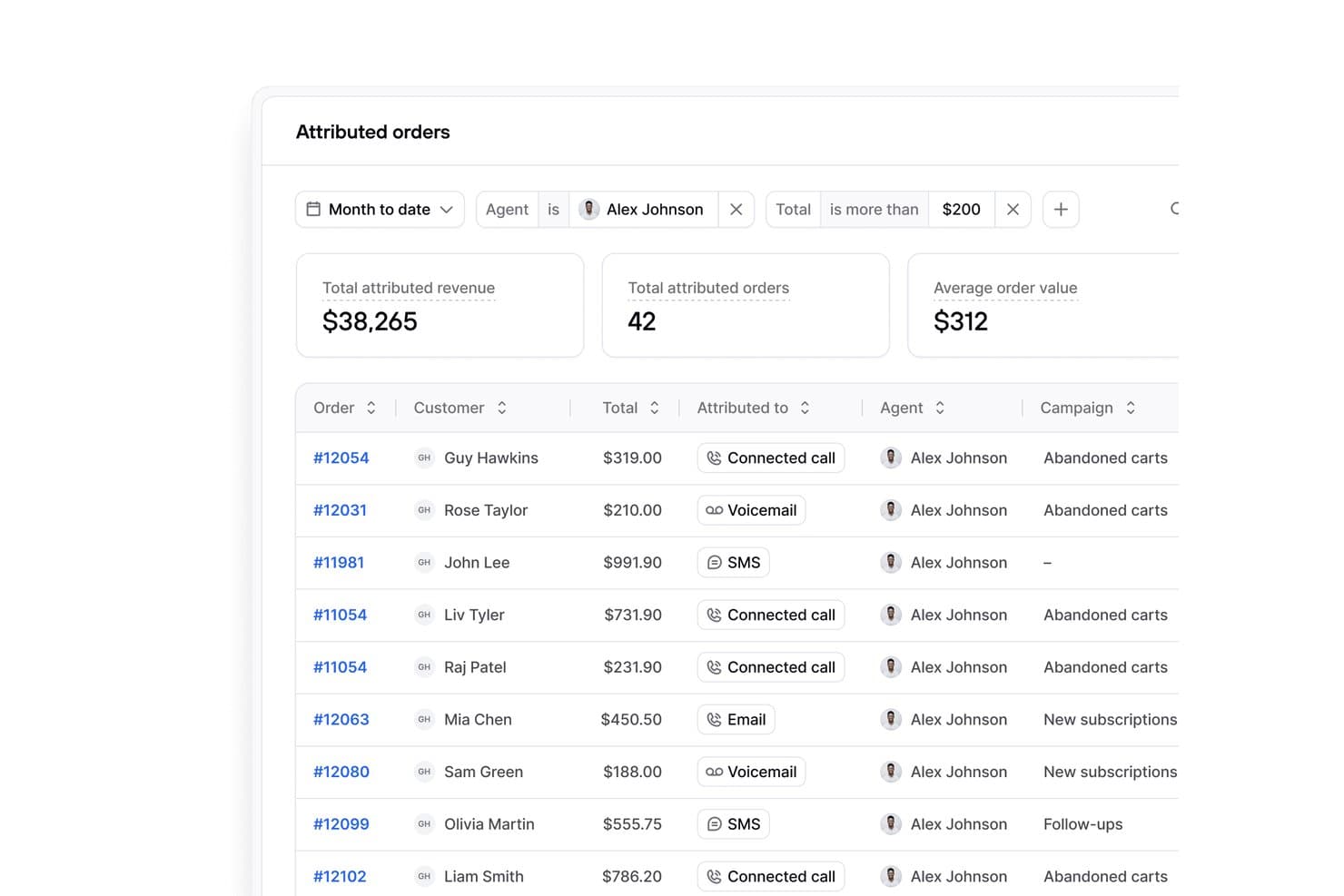
Consio AI tracks attributed orders, revenue, and agent performance. For Shopify merchants, Consio AI is a business phone system that brings customer calls, support workflows, and team communication into one shared hub, helping ecommerce teams manage inquiries without juggling separate tools.
Who Is Consio AI Best For?
Consio AI suits Shopify customer service teams that want shared phone coverage and coordinated support without juggling separate communication tools.
Why Consio AI Is a Good OpenPhone Alternatives
I picked Consio AI because it gives Shopify support teams one phone hub for customer calls, support workflows, and team communication. My team can manage ecommerce inquiries in a shared workspace instead of splitting coverage across separate communication tools. That shared setup helps us coordinate responses when several agents handle the same customer issue.
Consio AI Key Features
- AI voice agent: Answers inbound questions about orders, returns, and product policies.
- Call recording: Saves recordings, transcripts, summaries, and speaker labels.
- Shopify data sync: Displays customer profiles, products, carts, and order history.
- Helpdesk integrations: Connects call records with Gorgias, Zendesk, Kustomer, and Richpanel.
Consio AI Integrations
Consio AI integrates with Shopify and helpdesk platforms including Gorgias, Zendesk, Kustomer, and Richpanel.
Pros and Cons
Pros:
- Clear visibility across team calls
- Natural AI handles routine questions
- Shopify-native order context during calls
Cons:
- Reporting depth may limit complex teams
- Call-flow setup requires initial configuration
Learn more about Consio AI: Best with 24/7 live human support
- 14-day free trial
- From $25/user/month (billed annually)
Visit WebsiteCustomer Rating:4.4/5
CloudTalk’s call analytics dashboard and live call interface showing detailed reporting, CRM integrations, and call management features. CloudTalk is a cloud-based phone system built for teams who need reliable business calling and SMS with advanced call center features. If you’re looking for a flexible alternative to OpenPhone that supports global numbers, call routing, and CRM integrations, CloudTalk is worth a look.
Who Is CloudTalk Best For?
CloudTalk is a good fit for global teams that need reliable access to live human support at any hour.
Why CloudTalk Is a Good openphone alternatives
I like that CloudTalk gives my team access to live human support 24/7, no matter when issues come up. When we run late-night campaigns or support customers in different time zones, we always reach a real person for help. I rely on their around-the-clock support for troubleshooting urgent call quality or routing problems. This level of availability makes CloudTalk a strong alternative to OpenPhone for teams that can’t afford downtime.
CloudTalk Key Features
- Skill-based routing: Route calls to agents based on their expertise or language skills.
- Call queuing: Place incoming calls in a queue with custom hold music and messages.
- Click-to-call extension: Initiate calls directly from your CRM or helpdesk with one click.
- Conference calling: Host multi-participant calls for team meetings or customer discussions.
CloudTalk Integrations
CloudTalk offers native integrations with Salesforce, HubSpot, Zendesk, Pipedrive, Intercom, Freshdesk, Zoho CRM, Microsoft Dynamics 365, Slack, and Shopify. It also provides an API for custom integrations.
Pros and Cons
Pros:
- Integrates natively with major CRMs
- Advanced call routing and IVR options
- 24/7 live human customer support
Cons:
- Call recording is not available on all plans
- No shared inbox for team texting
 Best for international number availability
- 7-day free trial + free demo available
- From $15/user/month (billed annually)
Visit WebsiteCustomer Rating:4.7/5
Ringover improves call workflows for distributed teams. Ringover is a cloud-based VoIP platform designed for businesses that need flexible calling features and easy management of global communications. It appeals to teams looking for advanced call controls, analytics, and integrations to support distributed or remote workforces.
Who Is Ringover Best For?
Ringover suits multinational teams or businesses that need to manage and scale phone numbers across multiple countries from a single platform.
Why Ringover Is a Good OpenPhone Alternative
I picked Ringover specifically for its international number availability—it offers local numbers in over 65 countries, which means my team can establish a local presence in new markets without setting up physical offices. The geo-routing feature is something I rely on heavily; it automatically directs incoming calls to the right agent based on the caller's location. I also appreciate the unlimited calls to 110+ destinations included in the base plan, which removes the unpredictability of per-minute billing when my team is handling high call volumes across borders.
Ringover Key Features
- Power dialer: Runs automated outbound call campaigns, letting sales reps move through contact lists without manually dialing each number.
- Call whisper: Lets supervisors speak to agents during live calls without the customer hearing, useful for real-time coaching.
- Voicemail drop: Automatically leaves a pre-recorded message when a call goes unanswered during outbound campaigns.
- CTI screen pop: Displays caller information and CRM history on screen the moment an inbound call connects.
Ringover Integrations
Integrations include Salesforce, HubSpot, Pipedrive, Bullhorn, Zoho, Zendesk, Microsoft Dynamics, Freshdesk, Slack, and Google Workspace.
Pros and Cons
Pros:
- Built-in video meetings
- Easy CRM screen pops
- Strong virtual switchboard
Cons:
- Aimed at large call centers
- Interface is very cluttered
 Best for AI-powered call transcription
- 14-day free trial + free demo available
- Pricing upon request
Visit WebsiteCustomer Rating:4.3/5
Dialpad organizes conversations with AI-driven communication tools. Dialpad is a cloud-based VoIP platform designed for teams that want modern calling, messaging, and video features in one place. It’s a strong fit for businesses seeking flexible communication tools with built-in AI to help manage conversations and streamline workflows.
Who Is Dialpad Best For?
Dialpad suits small to midsize businesses and remote teams that need unified voice, video, and messaging in a single platform.
Why Dialpad Is a Good OpenPhone Alternative
I picked Dialpad for this list because of its built-in AI transcription, which automatically captures call notes in real time without needing a third-party tool. I appreciate how Dialpad's AI also surfaces action items and key moments from calls, so my team can review conversations without listening to full recordings. In practice, that means my team can focus on the conversation itself rather than taking manual notes. For teams handling high call volumes, this makes a real difference in how quickly we can follow up with customers.
Dialpad Key Features
- Business text messaging: Send and receive SMS and MMS messages directly within the Dialpad app alongside calls.
- IVR (interactive voice response): Set up automated call routing menus to direct callers to the right team or department.
- Call recording: Record inbound and outbound calls for quality review, compliance, or team training purposes.
- Voicemail transcription: Automatically convert voicemail messages to text so your team can read and respond without listening to recordings.
Dialpad Integrations
Integrations include Salesforce, Zendesk, Microsoft Teams, Google Workspace, and Slack.
Pros and Cons
Pros:
- Highly reliable call quality
- More enterprise integrations
- Excellent call routing tools
Cons:
- Texting is not the main focus
- UI is less startup-friendly
 Best for enterprise-grade scalability
- 14-day free trial
- From £18/user/month
Visit WebsiteCustomer Rating:4.2/5
RingCentral integrates calls, chat, and video in one platform. RingCentral is a unified communications platform designed for businesses that need advanced calling, messaging, and video features in one place. It’s a strong fit for organizations with distributed teams or complex communication needs seeking reliable, all-in-one VoIP software.
Who Is RingCentral Best For?
Large organizations and enterprises with distributed teams that require secure, scalable communication across multiple locations or departments.
Why RingCentral Is a Good OpenPhone Alternative
I picked RingCentral for its enterprise-grade scalability, which makes it easy to add users, phone numbers, and locations without rebuilding your setup. My team uses the multi-site management feature to configure call routing, hours, and IVR menus independently for each office location. I also rely on RingCentral's advanced call handling rules to automatically direct calls based on time of day, caller ID, or department—something that's hard to replicate in lighter VoIP tools. In practice, that means my team can support growth across regions without outgrowing the platform.
RingCentral Key Features
- Visual voicemail: Displays voicemail messages as text previews so you can read and prioritize them without listening.
- Live call queue monitoring: Tracks queue and agent performance through real-time, customizable dashboards.
- Background noise cancellation: Automatically removes unwanted background noise from calls and video meetings.
- SMS autoresponder: Sends automatic replies to inbound texts for after-hours, vacation, or common questions.
RingCentral Integrations
Integrations include Salesforce, Zendesk, Microsoft Teams, Google Workspace, and ServiceNow.
Pros and Cons
Pros:
- Rock-solid call stability
- Advanced call queue tools
- Built-in digital faxing
Cons:
- Horrible onboarding process
- Hard to manage shared SMS
Learn more about RingCentral: Best for SMS and voice automation
- 14-day free trial
- From $29/user/month (billed annually)
Visit WebsiteCustomer Rating:4.1/5
JustCall automates workflows for calls and messaging. JustCall is a cloud-based phone system designed for teams that want to manage calls and texts from one platform. It’s a strong fit for customer support and sales teams looking to automate communication workflows and centralize interactions.
Who Is JustCall Best For?
JustCall suits distributed sales and support teams that need to automate both SMS and voice communications across multiple channels.
Why JustCall Is a Good OpenPhone Alternative
I picked JustCall specifically for its SMS workflows feature, which lets you trigger automated text messages based on conditions like missed calls, form submissions, or call outcomes. For a support team handling high inbound volume, that means a customer who hits a busy queue can automatically receive a follow-up text—no manual intervention needed. I also appreciate the SMS bots, which handle routine inbound text queries around the clock using rule-based auto-responses. OpenPhone doesn't offer that level of SMS automation depth, making JustCall a stronger fit for teams that rely heavily on text-based customer communication.
JustCall Key Features
- Call transcription: AI generates summaries and transcriptions of completed calls for post-call review and note-taking.
- IVR / call menus: Set up an interactive voice menu that routes callers through options before connecting them to an agent.
- Post-call survey: Automatically send customers a survey after a call ends to collect feedback on agent performance.
- Predictive dialer: Dials multiple numbers simultaneously and connects agents only to answered calls, reducing idle time between connections.
JustCall Integrations
Integrations include Salesforce, HubSpot, Pipedrive, ActiveCampaign, Slack, Intercom, Help Scout, Freshdesk, Zendesk, and Zoho CRM.
Pros and Cons
Pros:
- Good bulk texting features
- Easy WhatsApp integration
- Deep CRM workflow triggers
Cons:
- Clunky mobile application
- Higher base subscription cost
 Best for unified workspace management
- Free demo available
- From $15/user/month
Visit WebsiteCustomer Rating:3.9/5
KrispCall optimizes collaboration with advanced call features. KrispCall offers a cloud-based phone system designed for teams that need advanced call management and collaboration in one place. It’s a strong fit for businesses seeking centralized control over multiple numbers, users, and communication channels.
Who Is KrispCall Best For?
Small to mid-sized businesses that need to manage multiple phone numbers and users across distributed teams.
Why KrispCall Is a Good OpenPhone Alternative
I picked KrispCall because its unified workspace brings calls, messages, and contact activity into a single interface rather than scattering them across tools. My team uses the shared number feature to manage multiple lines from one dashboard, which makes it easy to assign numbers to specific agents or departments. I also rely on the call notes and activity feed to keep context on every customer interaction without switching between apps. In practice, that means my team stays coordinated across time zones without losing track of conversations.
KrispCall Key Features
- IVR (phone tree): Routes incoming callers through a multi-level menu to direct them to the right agent or department.
- Call recording: Records inbound and outbound calls for documentation, quality review, and agent performance analysis.
- Bulk SMS: Sends mass text messages to large contact lists from your VoIP number in a single action.
- Simultaneous ringing: Rings multiple agents at the same time so incoming calls are answered as quickly as possible.
KrispCall Integrations
Integrations include HubSpot, Pipedrive, Zendesk, ActiveCampaign, and Keap.
Pros and Cons
Pros:
- Easy call box monitoring
- Shared workspace layout
- Affordable startup pricing
Cons:
- SMS deliverability issues
- Slower customer support
Learn more about KrispCall: Best for omnichannel ticketing support
- 14-day free trial available
- From $19/agent/month (billed annually)

Freshdesk boosts team efficiency in managing customer queries. Freshdesk is a cloud-based customer support platform built for teams that need to manage conversations across multiple channels from one place. It’s a strong choice for businesses that want to unify email, chat, phone, and social support while keeping ticket management organized.
Who Is Freshdesk Best For?
Freshdesk suits customer support teams in growing businesses that need to centralize and track tickets from multiple communication channels.
Why Freshdesk Is a Good OpenPhone Alternative
I picked Freshdesk because it goes well beyond basic phone support by centralizing tickets from email, chat, phone, and social into a single agent workspace. What I find most useful is the skill-based ticket assignment, which routes incoming tickets to agents based on their specific expertise—so a billing issue never lands with a technical specialist. I also rely on the multiple SLA policies feature, which lets my team set different response time rules for different customer segments or issue types. For teams outgrowing a voice-only tool like OpenPhone, Freshdesk fills the gap with structured, trackable support across every channel.
Freshdesk Key Features
- Freddy AI copilot: Assists agents in real time by suggesting responses and summarizing ticket history during active conversations.
- Round-robin and load-balanced assignment: Distributes incoming tickets evenly across available agents to prevent workload imbalances.
- Community forums: Lets customers post questions and find peer-sourced answers through a branded, public-facing discussion space.
- Audit logs: Records a timestamped history of all account activity, including changes to settings, tickets, and agent permissions.
Freshdesk Integrations
Integrations include Salesforce, Jira, Slack, Shopify, and Mailchimp.
Pros and Cons
Pros:
- Strong SLA tracking tools
- Seamless email integration
- Built-in knowledge base
Cons:
- Heavy helpdesk interface
- Terrible for casual texting
Learn more about Freshdesk :

Trellus summarizes conversations for quick team decision-making. Trellus uses AI to analyze and summarize customer conversations, making it a strong fit for teams that want deeper insights from their calls. It’s especially useful for sales, support, and service leaders who need to quickly identify trends and actionable topics from high volumes of interactions.
Who Is Trellus Best For?
Sales and support leaders at mid-sized or enterprise companies who need AI-powered analysis of customer call transcripts and trends.
Why Trellus Is a Good OpenPhone Alternative
I picked Trellus because it goes beyond call logging to actually surface what's happening in conversations. The AI automatically generates call summaries and highlights key topics, objections, and action items from every interaction—so my team doesn't have to manually review recordings to find what matters. I also rely on the real-time coaching feature, which surfaces relevant talk tracks and prompts during live calls based on what the customer is saying. In practice, that means my reps are getting in-the-moment guidance without needing a manager on the line.
Trellus Key Features
- Parallel dialing: Dials up to five lines simultaneously from within your existing sales engagement platform.
- Automated voicemail drop: Drops pre-recorded voicemails automatically when a call goes unanswered.
- Number health monitoring: Runs automated number health checks and rotates numbers to avoid spam flagging.
- Virtual sales floor: Creates a shared live calling environment where remote teams can listen to calls and collaborate in real time.
Trellus Integrations
Integrations include HubSpot, Salesforce, Salesloft, Outreach, and Apollo.io.
Pros and Cons
Pros:
- Seamless auto-dialing
- Great for cold outreach
- Deep conversation analytics
Cons:
- Steep pricing for startups
- No lightweight shared inbox
Learn more about Trellus.AI:
Other OpenPhone Alternatives
Here are some additional OpenPhone alternatives options that didn’t make it onto my shortlist, but are still worth checking out:
- 11BesideBest for collaborative call notes
- 12AircallBest for CRM integration options
- 13GoToConnectBest for hybrid teams needing unified communications
- 14Five9Best for outbound call campaign management
- 15TalkdeskBest for AI-powered contact center automation
- 16VonageBest with advanced API integrations for developers
- 17Cisco WebexBest with enterprise-grade security features
How I Evaluate OpenPhone Alternatives
My evaluation has two layers—baseline requirements a tool must meet to qualify, and differentiators that matter when your support team needs shared inboxes, CRM sync, and real call routing.
Core Functionality (Table Stakes For This List)
When I'm selecting tools for my list, I rank each one on a scale from 0 (does not offer the functionality) to 5 (excels in this area) for each core functionality listed below. Then, I calculate the tool's total score into a percentage. Each tool needs to achieve a minimum total score of 65% to be considered for inclusion.
- Business VoIP Calling: I check whether the platform supports local, toll-free, and international numbers so your team can serve customers without juggling separate carriers.
- Shared Team Inboxes: Support teams need to collaborate on calls and texts from shared numbers, so I look for assignment, internal threads, and real-time visibility.
- Business SMS/MMS: I evaluate whether agents can send and receive texts from the same numbers they call from, including template and snippet support for common replies.
- Call Routing & IVR: Ring groups, business-hours rules, and multi-level menus determine how quickly a customer reaches the right agent, so I look at the depth of call flow options.
- CRM/Helpdesk Integrations: Tools like HubSpot, Salesforce, and Zendesk are central to most CX stacks, so I check for native integrations that sync contacts and log calls automatically.
- Call Monitoring & Analytics: I look for recording, transcription, and agent-level reporting that help team leads review conversations and track metrics like missed call rates.
Once I have a list of tools that meet this criteria, I consider what sets each platform apart.
Differentiating Factors (What Sets Vendors Apart)
Here's how I compare and contrast different vendors:
Standout Features
AI call summaries make a real difference when agents handle dozens of conversations a day—automatic post-call notes and action items mean less time documenting and faster handoffs between shifts. I also look for workflow automations that trigger follow-up texts or tag conversations based on call outcomes, which cuts down on repetitive manual work. For teams supporting customers across regions, international number provisioning is worth evaluating so agents can offer local presence without separate carriers.
Beyond Features
Pricing transparency matters because support teams grow fast—I evaluate whether per-user costs stay predictable as you add agents and numbers. Compliance is another area I check closely, especially call recording consent controls and data retention settings that teams in regulated industries depend on. Reliability rounds it out: I look at published uptime commitments and carrier-grade call quality, because a dropped call during a live support interaction erodes customer trust immediately.
Why Look For An OpenPhone Alternative?
While OpenPhone is a good choice of VoIP software, there are a number of reasons why some users seek out alternative solutions. You might be looking for an OpenPhone alternative because…
- You need advanced call routing for multiple departments
- Your organization requires enterprise-level security features
- You want built-in video conferencing alongside calling
- You need support for international phone numbers and users
- Your team has outgrown basic SMS and voicemail capabilities
If any of these sound like you, you’ve come to the right place. My list contains several VoIP software options that are better suited for teams facing these challenges with OpenPhone and looking for alternative solutions.
OpenPhone Key Features
Here are some of the key features of OpenPhone, to help you contrast and compare what alternative solutions offer:
- Shared inbox: Lets multiple team members manage calls, texts, and voicemails from a single business number, making it easy to collaborate and respond quickly.
- Dedicated business numbers: Assigns unique phone numbers to individuals or teams, keeping personal and business communications separate.
- Call recording: Automatically records inbound and outbound calls, allowing you to review conversations for quality assurance or training.
- Voicemail transcription: Converts voicemail messages to text, so you can read messages at a glance and prioritize follow-up.
- Contact management: Centralizes customer and contact information within the app, making it easy to reference details during calls or texts.
- Auto-replies: Sends automated text responses to missed calls or messages, ensuring customers receive timely updates even when you’re unavailable.
- Integrations with CRM tools: Connects with platforms like HubSpot and Salesforce to sync call activity and contact data for better workflow alignment.
- Number porting: Allows you to transfer existing business numbers into OpenPhone, so you don’t lose continuity when switching providers.
- International calling: Supports making and receiving calls to and from international numbers, expanding your reach beyond local markets.
- Team directories: Provides a searchable list of team members and their extensions, making internal communication faster and more organized.