

En iyi hizmet tasarımı araçları CX, ürün ve operasyon ekiplerinin hizmetleri uçtan uca haritalandırmasına, sorunlu noktaları ortaya çıkarmasına ve hem müşteriler hem de bu hizmetleri sunan ekipler için işe yarayan deneyimleri yeniden tasarlamasına yardımcı olur. Doğru platform, özellikle karmaşık ve farklı işlevleri kapsayan ortamlarda yolculukları görselleştirmeyi, süreçleri standartlaştırmayı ve paydaşları aynı hedef doğrultusunda bir araya getirmeyi kolaylaştırır.
CX ve dijital dönüşümün kesişimindeki deneyimimden yararlanarak kullanılabilirlik, iş birliği özellikleri, yolculuk haritalama kapsamı, prototip oluşturma yetenekleri ve uygulanabilir değişimi destekleme kapasitesi açısından düzinelerce hizmet tasarımı aracını test edip inceledim. Aşağıda, en iyi seçimlerimi ve kuruluşunuz için en uygun seçeneği belirlerken göz önünde bulundurmanız gerekenleri bulabilirsiniz.
Why Trust Our Software Recommendations
6,700+
Reviews
20
Industry experts
16+
Evaluation factors
14
Years
Our team has been testing and reviewing software since 2012. As CX leaders ourselves, we know how difficult—and important—it is to choose the right software.
For this guide, we evaluated tools using hands-on testing and independent research, scoring tools using our selection criteria.
Our reviews reflect our human editorial judgment, not a sales pitch.
 Gui DrusinaCreative Director
 Tim FisherVP of AI
Hizmet Tasarımı Yazılımları Karşılaştırma Tablosu
Aşağıdaki tabloda, en iyi hizmet tasarımı yazılımı seçimlerimin fiyatlandırma ayrıntıları karşılaştırılmaktadır.
Score legend (out of 5)
- Excellent4.5–5
- Good4–4.4
- Average3–3.9
- Below average2–2.9
- Poor1–1.9
Sorted by: Default
| Tool | Starting Price | Website | |||||||
|---|---|---|---|---|---|---|---|---|---|
Best for design-to-prototype in one shared workspace | 4.2 out of 5 | 3 | 5 | 4 | 5 | 5 | 3 | $3/user/month Free plan available | Website |
Best for Figma teams running co-design workshops | 4.0 out of 5 | 3 | 5 | 4 | 5 | 4 | 3 | $3/user/month Free plan available | Website |
Best for AI-generated service blueprints | 4.2 out of 5 | 4 | 4 | 4 | 5 | 5 | 3 | $8/user/month Free plan + 30-day free trial available | Website |
Best for journey mapping with unlimited users | 3.8 out of 5 | 4 | 4 | 4 | 4 | 4 | 3 | $199/month Free plan available | Website |
Best for data-driven service blueprinting at scale | 4.0 out of 5 | 5 | 3 | 5 | 3 | 4 | 4 | Pricing upon request 21-day free trial + free demo available | Website |
Best for co-designing services in live workshops | 4.3 out of 5 | 4 | 5 | 4 | 5 | 5 | 3 | $8/user/month Free plan + 14-day trial available | Book Demo |
Best for linking CX metrics to journey maps | 4.3 out of 5 | 4 | 4 | 5 | 3 | 5 | 5 | $36/user/month Free plan available | Website |
Best for evidence-based journey management | 4.5 out of 5 | 5 | 4 | 5 | 3 | 5 | 5 | $38/user/month Free plan + 14-day free trial available | Website |
Best for HCD-method workshops on service blueprints | 4.5 out of 5 | 4 | 5 | 4 | 5 | 5 | 4 | $9.99/user/month Free plan available | Website |
Best for live tracking of journey progress with CX data | 4.5 out of 5 | 5 | 4 | 5 | 3 | 5 | 5 | Pricing upon request Free demo + 30-day free trial available | Website |


En İyi Hizmet Tasarımı Araçları İncelemeleri
 Best for design-to-prototype in one shared workspace
- Free plan available
- From $3/user/month
Visit WebsiteCustomer Rating:4.7/5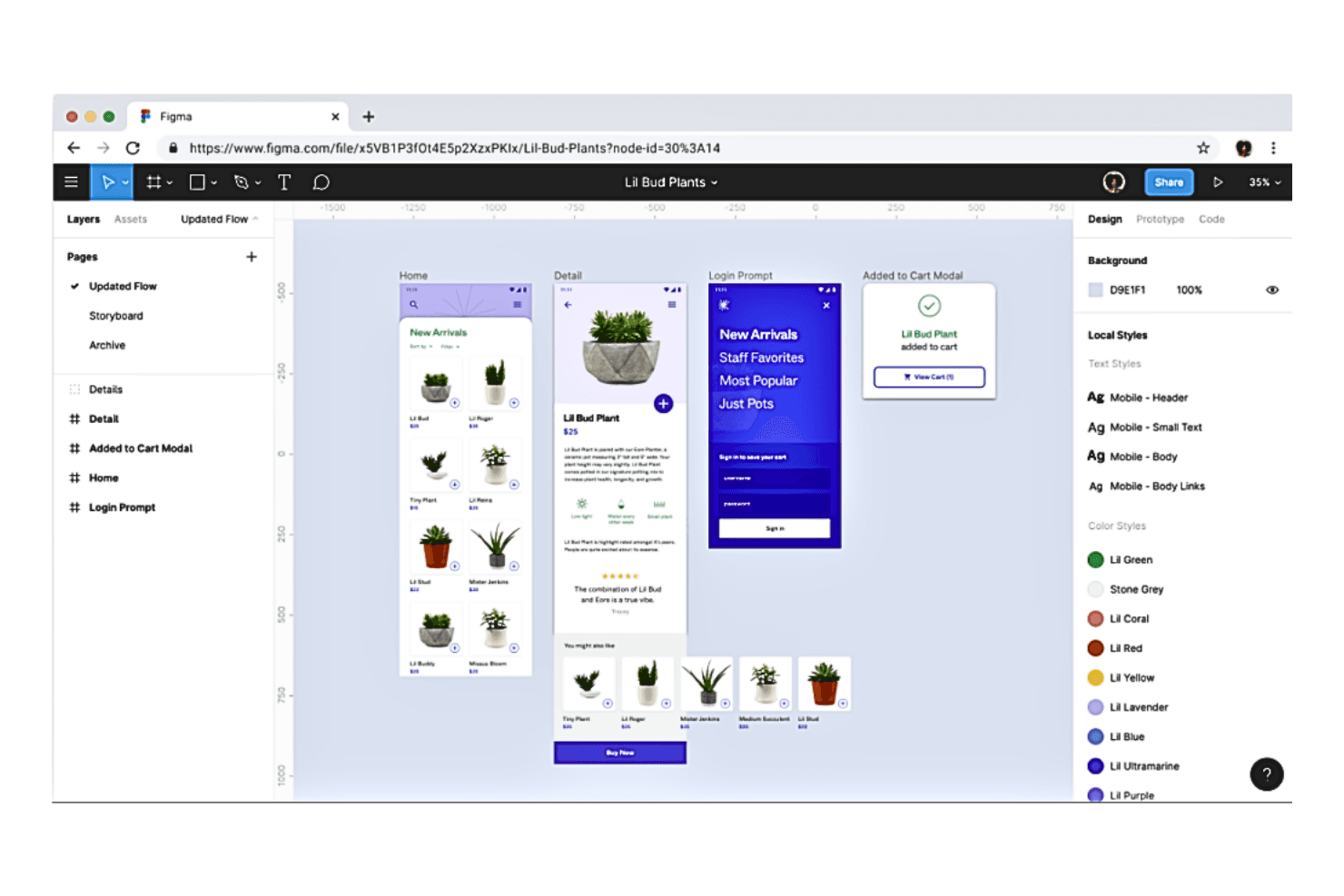
With Figma it helps teams create, test, and ship better designs from start to finish. Figma is a collaborative design platform that combines whiteboarding, UI design, and prototyping—with FigJam offering native service blueprint and customer journey map templates alongside real-time workshop facilitation tools.
Who Is Figma Best For?
Figma is a strong fit for cross-functional teams—UX designers, product managers, and CX leads—who need to move from collaborative ideation and journey mapping through to interactive prototyping without leaving a single platform.
Why I Picked Figma
Figma earns its spot on my shortlist because it's the only tool that takes you from a FigJam service blueprint workshop straight into an interactive prototype without ever switching platforms. I love that FigJam's native service blueprint template already maps frontstage actions, backstage processes, and lines of visibility, so my team isn't building structure from scratch. Real-time co-editing with live cursors and built-in workshop tools like timers, voting, and spotlight mode means I can run a cross-functional blueprint session and move directly into design, all in one shared workspace.
Figma Key Features
- FigJam AI template generation: Create custom workshop templates from a text prompt, so your team can start a service design session without building structure from scratch.
- Unlimited free viewer seats: Share Figma files with any stakeholder at no extra cost, letting them view, comment, and export without a paid license.
- Interactive prototyping: Link design frames into clickable, navigable prototypes that stakeholders can experience as if they were a live product.
- Dev Mode: Inspect design files for specs, measurements, and code snippets, giving developers a clear handoff directly from the same workspace where the service experience was designed.
Figma Integrations
Figma offers native integrations with Jira, Confluence, Asana, Linear, Productboard, Maze, UserTesting, Sprig, Mixpanel, and Contentsquare. It also supports Zapier and an MCP server for custom AI-connected workflows.
Pros and Cons
Pros:
- Unlimited free viewer seats for stakeholders
- Wide range of community service templates
- Real-time co-editing in workshops and mapping
Cons:
- Not purpose-built for complex blueprint editing
- No structured research repository or persona library
Learn more about Figma: Best for Figma teams running co-design workshops
- Free plan available
- From $3/user/month
Visit WebsiteCustomer Rating:4.7/5
FigJam lets users map full service blueprints visually. FigJam is a collaborative whiteboard tool built into the Figma ecosystem that supports service blueprinting, customer journey mapping, diagramming, and real-time co-design workshops.
Who Is FigJam Best For?
FigJam is a natural fit for UX and CX teams already working in Figma who need a shared space for running live co-design workshops and mapping service journeys together.
Why I Picked FigJam
FigJam earns its spot on my shortlist because it's the only whiteboard tool that lives inside Figma, making it a natural home for UX and CX teams who already design there. When I run co-design workshops, Spotlight mode lets me guide every participant through the board in real time, while built-in voting sessions surface team priorities without switching tools. The service blueprint template covers frontstage, backstage, and support processes in a structured swimlane layout that gets cross-functional teams aligned fast.
FigJam Key Features
- AI sticky note sorting: FigJam AI automatically groups sticky notes into thematic clusters after brainstorming or workshop sessions, reducing manual synthesis time.
- Guest access without login: External stakeholders can join and contribute to a FigJam board for up to 24 hours without creating a Figma account.
- Figma component import: Teams can pull existing Figma design components directly into FigJam boards to ground service design artifacts in live design assets.
- Community template library: Over 1,000 community-contributed templates—including ecosystem maps, stakeholder maps, and empathy maps—are available to extend native service design capabilities.
FigJam Integrations
FigJam offers native integrations with Jira, Confluence, Notion, Linear, Productboard, Slack, Zoom, Microsoft Teams, and Google Workspace. It also supports Zapier for additional connections.
Pros and Cons
Pros:
- Large template library for service artifacts
- Workshop facilitation features for live collaboration
- Smooth Figma ecosystem integration for designers
Cons:
- No CX data overlay or research repository integration
- Lacks advanced blueprinting and journey features
Learn more about FigJam: Best for AI-generated service blueprints
- Free plan + 30-day free trial available
- From $8/user/month
Visit WebsiteCustomer Rating:4.4/5
Creately lets users build and collaborate on flowcharts in real time. Creately is a visual collaboration and diagramming platform that combines service blueprinting, customer journey mapping, persona creation, and real-time co-editing on an infinite canvas.
Who Is Creately Best For?
Creately is a strong fit for cross-functional service design teams that need to move quickly from idea to structured blueprint without starting from scratch.
Why I Picked Creately
I've included Creately in my top picks because its AI blueprint generator genuinely shortens the distance between a blank canvas and a structured, stakeholder-ready service blueprint. I type in a prompt describing a service, and Creately returns a properly layered swimlane diagram with customer actions, frontstage, backstage, and support systems already separated. The multi-diagram linking then lets me connect that blueprint directly to related journey maps and personas within the same workspace, keeping everything in sync as the service evolves.
Creately Key Features
- Real-time multiplayer editing: Multiple team members can co-edit canvases simultaneously with live cursors and Follow-the-Facilitator navigation to keep everyone aligned during workshops.
- Presentation mode: Teams can walk stakeholders through blueprints and journey maps directly from the canvas without switching to an external tool.
- Persona-to-journey linking: User personas created in Creately can be linked directly to journey maps and empathy maps within the same workspace.
- Timed voting: Team members can vote anonymously or publicly on canvas elements using a built-in timed voting feature to support quick group decisions.
Creately Integrations
Creately offers native integrations with Confluence, Microsoft Teams, Slack, Google Drive, Jira, Azure DevOps, GitHub, Zoom, Excel, and Google Sheets. Enterprise customers can use its advanced API for custom integrations; Zapier is listed as coming soon.
Pros and Cons
Pros:
- Presentation mode supports in-canvas stakeholder walkthroughs
- Industry-specific blueprint templates accelerate project setup
- AI generates structured service blueprints automatically
Cons:
- Research repository integration is not supported
- No native CX data overlays available
Learn more about Creately: Best for journey mapping with unlimited users
- Free plan available
- From $199/month
Visit WebsiteCustomer Rating:4.3/5
Custellence maps customer journeys with emotional states and touchpoints. Custellence is a purpose-built customer journey mapping and service blueprinting tool that supports end-to-end journey visualization, front-stage and back-stage service mapping, real-time collaboration, and stakeholder presentation—all within a structured, CX-specific canvas.
Who Is Custellence Best For?
Custellence is a strong fit for CX teams in mid-to-large organizations that need a dedicated journey mapping and service blueprinting tool without paying per seat.
Why I Picked Custellence
Custellence earns its spot on my shortlist because it's the only dedicated journey mapping and service blueprinting tool I've found that doesn't charge per seat. The Collaborate plan gives you unlimited users and unlimited maps for a flat $199/month, which matters when you're aligning cross-functional teams across service design, operations, and CX. I also love the built-in Presentation Mode, which lets you walk stakeholders through a live, editable blueprint without ever exporting to slides.
Custellence Key Features
- AI-powered template generator: Answer five guided questions about your customer segment and channels, and the tool auto-generates a tailored, editable journey map with touchpoints, goals, and suggested opportunities.
- Status labels for AS-IS and TO-BE mapping: Assign in-progress, planned, or to-be-removed labels directly to cards so one map serves as both your current-state and future-state artifact.
- Passcode-protected shareable links: Share live journey maps and blueprints with external stakeholders using password-protected links, no account required to view.
- Role-based permissions at workspace and map level: Control editing, viewing, and commenting access separately at both the workspace level and the individual map level.
Custellence Integrations
Custellence has one documented marketplace integration, Salesforce AppExchange, plus Microsoft Entra SSO and URL-based links to Google Workspace, Microsoft 365, Slack, Jira, Trello, HubSpot, and Asana. It has no documented native API.
Pros and Cons
Pros:
- Purpose-built service blueprinting features and templates
- Built-in presentation mode for live walkthroughs
- Unlimited users and journey maps included
Cons:
- No persona repository or research integrations
- No workshop facilitation tools for co-design
Learn more about Custellence: Best for data-driven service blueprinting at scale
- 21-day free trial + free demo available
- Pricing upon request

Cemantica maps service blueprints with stages, systems, and issues. Cemantica is a purpose-built CX and service design platform that combines AI-powered journey mapping, service blueprinting, persona management, and VoC data overlays in a single structured environment.
Who Is Cemantica Best For?
Cemantica is a strong fit for CX strategists and service designers at mid-to-large organizations who need to manage multiple journey maps and service blueprints with real data—not just static diagrams.
Why I Picked Cemantica
Cemantica earns its spot on my shortlist because it treats service blueprinting as a first-class feature, not an afterthought. I love that the blueprint canvas includes all five standard layers (physical evidence, customer actions, frontstage, backstage, and support processes) and connects directly to live VoC data like NPS and CSAT scores overlaid onto each stage. That combination means pain points in your blueprint are backed by real numbers, not assumptions. Alex AI can also auto-generate opportunities straight from that data, which closes the gap between diagnosis and action fast.
Cemantica Key Features
- Alex AI persona generation: Alex AI builds complete persona profiles from natural language prompts or uploaded files, pulling in demographic, psychographic, and behavioral details automatically.
- Journey Atlas portfolio management: A macro-to-micro journey hierarchy lets you organize and govern multiple journey maps across products, regions, and customer segments in one structured view.
- Opportunity management module: Pain points captured in journey maps can be converted directly into trackable opportunities with task assignments, timelines, and owner accountability.
- Integration Center: 70+ pre-built connectors link Cemantica to VoC platforms like Qualtrics and Medallia, CRMs like Salesforce, and delivery tools like Jira and Trello.
Cemantica Integrations
Cemantica’s Integration Center provides 70+ pre-built integrations, including Qualtrics, Medallia, Salesforce, Jira, Trello, Power BI, and Snowflake. It also offers a REST API and self-service connectors for custom data connections.
Pros and Cons
Pros:
- Overlays real CX data onto journey stages
- AI auto-generates journey maps and personas
- Native service blueprinting with five standard layers
Cons:
- External sharing relies mainly on exports
- Real-time co-editing not clearly supported
Learn more about Cemantica: 6Best for co-designing services in live workshops
Miro
- Free plan + 14-day trial available
- From $8/user/month (billed annually)
Visit WebsiteCustomer Rating:4.8/5
With Miro's Agile Workflows dashboard it is the definitive tool for Agile teams. Users can supercharge their agile process with collaborative retrospectives, sprint planning, and huddle boards. Miro is a collaborative whiteboard platform built for service design work, offering an infinite canvas with service blueprint templates, customer journey mapping, real-time co-editing, and AI-generated artifacts.
Who Is Miro Best For?
Miro is a strong fit for service design teams and cross-functional groups that run regular co-design workshops and need a shared space to brainstorm, map, and iterate together in real time.
Why I Picked Miro
Miro earns its spot on my shortlist because no other whiteboard platform comes close to its live workshop experience for service design teams. I love that Miro Engage lets participants vote, rank, and respond to prompts directly from their phones, while Private Mode prevents anchoring bias during brainstorming. Pair that with the AI Service Blueprint generator, which turns raw research inputs into a structured front-stage/back-stage blueprint in one session, and you've got a genuinely complete co-design environment.
Miro Key Features
- AI-powered journey map generation: Synthesizes interview transcripts and survey feedback into structured customer journey maps, including stage suggestions and recurring pain points.
- Miroverse template library: Provides 7,000+ community-contributed templates, including 48+ service blueprint and 63+ customer journey map formats built for service design work.
- Bi-directional Jira and Azure DevOps sync: Connects service design artifacts directly to delivery workflows, keeping blueprint-linked issues updated in real time across both platforms.
- Layers feature: Lets teams stack and organize content on dense service blueprints to reduce visual clutter and improve board legibility during and after workshops.
Miro Integrations
Miro supports 250+ integrations, including Jira, Azure DevOps, Salesforce, Slack, Microsoft Teams, Google Workspace, Confluence, Notion, and Productboard. Its REST API, SDK, and Live Embed support custom integrations.
Pros and Cons
Pros:
- Excellent live co-design and facilitation tools
- AI generates blueprints from research inputs
- Market-leading collection of service design templates
Cons:
- No native CX data overlays for maps
- Boards become cluttered on large blueprints
 Best for linking CX metrics to journey maps
- Free plan available
- From $36/user/month
Visit WebsiteCustomer Rating:4.7/5
UXPressia centralizes service blueprints with touchpoint details and CSAT metrics. UXPressia is a purpose-built CX artifact platform that combines customer journey mapping, service blueprinting, persona building, and research management in one connected workspace.
Who Is UXPressia Best For?
UXPressia fits CX strategists and service designers who need to tie real metrics—NPS, CSAT, churn—directly to specific journey stages rather than keeping data and maps in separate tools.
Why I Picked UXPressia
UXPressia earns its spot on my shortlist because of how it handles CX metrics directly within journey maps. I love that you can overlay NPS, CSAT, CES, and churn rate onto specific journey stages using the Metrics section, so pain points are backed by real data rather than assumptions. The CX Chunks feature then converts those evidence-based findings into prioritized, assigned action tasks without leaving the platform.
UXPressia Key Features
- AI persona simulator: Lets you run text-based conversations with AI-generated personas to test messaging, service concepts, or journey assumptions before committing to a design direction.
- Multi-persona comparison view: Displays multiple customer segments side-by-side within a single journey map, so you can spot where experiences diverge across different user groups.
- Presentation mode: Guides stakeholders through live, real-time journey map walkthroughs directly inside the platform without exporting to a separate tool.
- Service blueprint builder: Structures blueprints across Physical Evidence, Customer Actions, Front-Stage, Back-Stage, and Support Processes rows, linking each layer back to connected journey maps.
UXPressia Integrations
UXPressia offers seven native integrations, including Google Sheets, Jira, Azure DevOps, Google Analytics, Mixpanel, Slack, and Microsoft Teams. Enterprise plans add Qualtrics integration for automated CX metrics.
Pros and Cons
Pros:
- CX Chunks turn research into actionable tasks
- AI persona simulator for audience testing
- Direct CX metrics overlays on journey maps
Cons:
- No built-in workshop facilitation features
- Section-based editor feels rigid for some
Learn more about UXPressia: Best for evidence-based journey management
- Free plan + 14-day free trial available
- From $38/user/month (billed annually)
Visit WebsiteCustomer Rating:4.4/5
This is a screenshot of Smaply's editor in-application view. Smaply is a service design platform built around structured journey mapping and service blueprinting, with dedicated modules for research synthesis, portfolio prioritization, and live CX data overlays.
Who Is Smaply Best For?
Smaply fits service designers and CX strategists who need journey maps backed by real research data, not just visual artifacts.
Why I Picked Smaply
Smaply earns its spot on my shortlist because it treats journey maps as living, evidence-backed management tools rather than static deliverables. I'm particularly drawn to the Research Hub, which pulls in interview transcripts and NPS verbatims, uses AI to extract themes and sentiment, and converts findings directly into tagged pain points on the map. Pair that with the Metrics module, which lets you place live NPS scores and Google Analytics data on the exact journey step they measure, and you get a genuinely grounded picture of where service breaks down.
Smaply Key Features
- Service blueprinting editor: A dedicated blueprint view with a labeled line of visibility that separates front-stage, back-stage, and supporting system lanes, with connector arrows for hand-offs.
- Journey hierarchy linking: Parent journeys can link to sub-journeys, giving teams navigable end-to-end visibility across complex, multi-stage service experiences.
- Portfolio prioritization matrix: Pain points and opportunities can be scored on impact, reach, and cost dimensions, then plotted in a matrix for live comparison and decision-making.
- Delivery tool integrations: Journey insights link directly to tasks in Jira, Asana, Linear, Azure DevOps, and Monday.com, so teams can track delivery status without leaving the map.
Smaply Integrations
Smaply supports 20+ integrations, including Jira, Asana, Linear, Azure DevOps, Monday.com, Miro, Figma, Qualtrics, Google Analytics, and Power BI. It also connects with Tableau, Google Sheets, Excel 365, and SharePoint for research, journey metrics, and stakeholder collaboration.
Pros and Cons
Pros:
- Blueprint editor separates front-stage and back-stage
- Research Hub links insights to journey steps
- Built for evidence-based journey management
Cons:
- Structured canvas limits freeform diagramming
- No workshop facilitation or voting features
Learn more about Smaply: Best for HCD-method workshops on service blueprints
- Free plan available
- From $9.99/user/month (billed annually)

Mural's service blueprint template maps experience, interactions, and behind-the-scenes steps. Mural is a visual collaboration platform built around an infinite canvas that combines service blueprinting, customer journey mapping, facilitation tools, and human-centered design frameworks into a single workspace for cross-functional teams.
Who Is Mural Best For?
Mural is a strong fit for service designers and CX teams who run cross-functional workshops and need a structured, method-backed space to build service blueprints together.
Why I Picked Mural
Mural earns its spot on my shortlist because it's the only visual collaboration platform that pairs purpose-built service blueprinting with a built-in facilitation suite and a structured HCD methodology. The Service Blueprint template, co-developed with Intuit, maps front-stage and back-stage processes, actors, systems, and touchpoints out of the box. Layered on top, Facilitation Superpowers like dot-voting, private mode, and follow-the-facilitator let you run live, cross-functional blueprint workshops without ever switching tools.
Mural Key Features
- LUMA System methods: Access to 36 structured human-centered design methods—including affinity clustering, stakeholder mapping, and concept posters—built directly into the platform on Business and Enterprise plans.
- AI clustering and sentiment classification: Mural AI automatically groups sticky notes by theme and runs sentiment analysis to categorize emotional tone across research inputs.
- Unlimited visitors on all plans: Anyone can view a specific mural via a shareable link without needing an account, making executive and client reviews easy to arrange.
- Two-way Jira and Azure DevOps sync: Service design opportunities identified on the canvas can be pushed directly to development backlogs and updated in both directions without leaving Mural.
Mural Integrations
Mural offers native integrations with Jira Cloud, Azure DevOps, Productboard, Microsoft Teams, Confluence, Notion, Google Workspace, and Figma. It also provides a public API for custom integrations and supports Zapier.
Pros and Cons
Pros:
- Unlimited visitors enable easy stakeholder reviews
- Built-in LUMA System human-centered design methods
- Facilitation Superpowers for remote blueprint workshops
Cons:
- Lacks dynamic linking across blueprint layers
- No native integration with research repositories
Learn more about Mural: 10Best for live tracking of journey progress with CX data
TheyDo
- Free demo + 30-day free trial available
- Pricing upon request
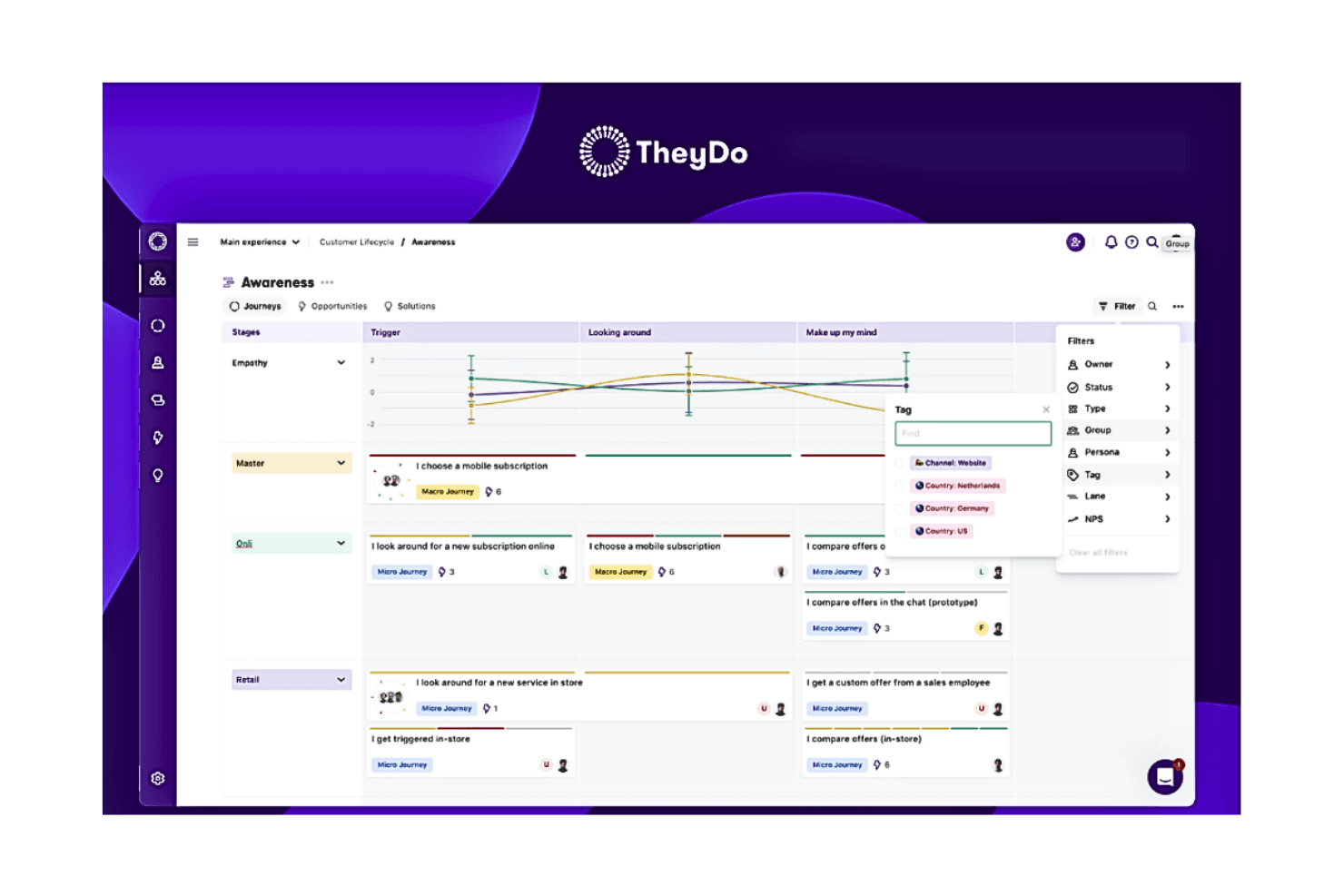
This is a screenshot of TheyDo's create a journey framework where users can unify all customer journeys in a hierarchy that everyone can understand. TheyDo is a journey management platform that lets service design and CX teams build structured customer journey maps, service blueprints, and experience frameworks with live CX data overlays, AI-powered insight mining, and direct integration to product delivery tools.
Who Is TheyDo Best For?
TheyDo is a strong fit for enterprise CX and service design teams that need to keep journey maps alive with real-time data rather than treating them as one-time deliverables.
Why I Picked TheyDo
TheyDo earns its spot on my shortlist because it treats journey maps as living data rather than static deliverables. I'm particularly drawn to the Data Hub, which pulls NPS, CSAT, and CES scores from Qualtrics or Medallia and pins them directly to the journey steps where friction actually happens. The TheyDo Agent then mines transcripts and tickets to surface opportunities mapped to those same steps, so you're never guessing where service gaps exist.
TheyDo Key Features
- Service blueprint templates: Pre-built templates with dedicated lanes for customer actions, front-stage, back-stage, and supporting processes in a single structured view.
- Opportunity scoring: Insights and opportunities are tagged and scored by impact, urgency, effort, and business alignment to support evidence-based prioritization.
- Jira and Azure DevOps sync: Solution cards created in TheyDo push directly to engineering backlogs, closing the gap between journey insights and product delivery.
- Persona library: Workspace-level persona records store behavioral traits, needs, and jobs-to-be-done, and can be filtered and compared across all journeys.
TheyDo Integrations
TheyDo offers eight documented native integrations, including Jira, Azure DevOps, Qualtrics, Medallia, Snowflake, Databricks, Amazon S3, and Condens. It also embeds content from Miro, Figma, Mural, FigJam, and more than 1,900 external sources.
Pros and Cons
Pros:
- AI agent surfaces journey pain points fast
- Dedicated service blueprint templates for designers
- Journey maps show live customer experience data
Cons:
- Stakeholder sharing difficult for occasional users
- No native freeform whiteboarding features
Learn more about TheyDo:
Dikkate Değer Diğer Hizmet Tasarımı Araçları
Aşağıda, kısa listeme aldığım ancak ilk 12’ye giremeyen ek hizmet tasarımı araçlarının bir listesi yer almaktadır. Bunlara kesinlikle göz atmaya değer.
- 11JourneyTrackBest for live VoC data layered on journey maps
- 12LucidchartBest for diagramming-first service design teams
- 13XtensioBest for living documents shared with stakeholders
İlgili CX Yazılımı İncelemeleri
Burada aradığınızı hâlâ bulamadıysanız, test edip değerlendirdiğimiz ilgili müşteri deneyimi yönetimi araçlarına göz atın.
- Müşteri Hizmetleri Yazılımı
- Yardım Masası Yazılımı
- Çağrı Merkezi Yazılımı
- Müşteri Mesajlaşma Platformu
- Dijital Deneyim Platformu
- Duygu Analizi Araçları
How I Evaluate Service Design Tools
I split my evaluation into baseline criteria, such as whether a tool can support service blueprinting and journey mapping, and differentiators that set the strongest options apart for different service design teams.
Core Functionality (Table Stakes For This List)
When I'm selecting tools for my list, I rank each one on a scale from 0 (does not offer the functionality) to 5 (excels in this area) for each core functionality listed below. Then, I calculate the tool's total score into a percentage. Each tool needs to achieve a minimum total score of 65% to be considered for inclusion.
- Service Blueprinting: I evaluate whether the tool can map front-stage actions, back-stage processes, customer actions, and supporting systems in a single service blueprint.
- Customer Journey Mapping: I look for the ability to create end-to-end journey maps with stages, touchpoints, and emotions so teams can understand the customer experience across a service.
- Visual Canvas & Diagramming: I assess whether the tool provides a flexible visual canvas with shapes, connectors, swimlanes, and templates that can support common service design artifacts.
- Real-Time Collaboration: I check whether multiple stakeholders can co-create, comment on, and edit service design artifacts at the same time, particularly during cross-functional workshops.
- Personas & Research Integration: I evaluate whether teams can attach personas, research insights, or qualitative data to their service maps and blueprints to provide context for design decisions.
- Sharing & Stakeholder Handoff: I look for ways to export, present, or share service design artifacts with stakeholders so teams can gather feedback and align on service concepts.
Once I have a list of tools that meet this criteria, I consider what sets each platform apart.
Differentiating Factors (What Sets Vendors Apart)
Here's how I compare and contrast different vendors:
Standout Features
I look for service design template libraries that go beyond basic diagramming with ready-made blueprints, journey maps, ecosystem maps, and workshop canvases. Workshop facilitation features, such as timers, voting, private modes, and facilitator controls, can also help teams run structured co-design sessions.
I also consider whether teams can overlay CX data, such as NPS, CSAT, customer feedback, or support metrics, onto journey stages and service touchpoints. Opportunity and insight tagging can help teams organize and prioritize pain points and hypotheses, while presentation and storytelling modes make complex service designs easier to communicate to stakeholders.
Beyond Features
I consider how closely each platform supports established service design methods and artifacts, including blueprints, journey maps, ecosystem maps, personas, and stakeholder maps. I also look at stakeholder accessibility, including guest access, view and comment permissions, and presentation options for people who aren't creating the artifacts themselves.
Integrations with research repositories, VoC platforms, analytics tools, and project management systems can help connect service design work with customer research and delivery workflows. For larger organizations, I also consider governance capabilities such as centralized artifact libraries, role-based access, SSO, audit trails, and relevant security and compliance controls.
Finally, I consider implementation and support resources, including onboarding, service design training, templates, practitioner communities, and customer support for teams rolling out service design practices at scale.
Hizmet Tasarımı Araçları Nedir?
Hizmet tasarımı araçları hizmet temas noktaları genelinde müşteri deneyimlerini haritalandırmak, analiz etmek ve iyileştirmek için kullanılan platformlardır. Ekiplerin çözümler için prototip oluşturmasına, yolculukları görselleştirmesine ve iç süreçleri gerçek kullanıcı ihtiyaçları doğrultusunda uyumlu hâle getirmesine yardımcı olurlar.
Hizmet Tasarımı Araçları Nasıl Seçilir?
Doğru hizmet tasarımı araçlarını seçmek karmaşık süreçleri basitleştirmeye, kullanıcı araştırmasını iyileştirmeye ve doğru test sonuçları sağlamaya yardımcı olabilir.
Hizmet tasarımı araçlarını kısa listenize alırken, denerken ve seçerken aşağıdakileri göz önünde bulundurun:
- Hangi sorunu çözmeye çalışıyorsunuz - Sağlamanız gereken özellikleri ve işlevleri netleştirmek için doldurmaya çalıştığınız hizmet tasarımı boşluğunu belirleyerek başlayın.
- Kimlerin kullanması gerekecek - Kaç lisansa ihtiyacınız olacak? Erişim yalnızca müşteri hizmetleri ekibi için mi gerekli olacak, yoksa tüm kuruluşun mu erişmesi gerekecek? Herkes için kullanım kolaylığına mı, yoksa hizmet tasarımı araçlarını ileri düzeyde kullananlar için hıza mı öncelik vereceksiniz?
- Hangi diğer araçlarla birlikte çalışması gerekiyor - Hangi araçların yerine yenilerini koyacağınızı, hangi araçların kalacağını ve muhasebe, CRM veya İK yazılımı gibi hangi araçlarla entegrasyon sağlamanız gerekeceğini netleştirin. Araçların birbiriyle entegre olması mı gerekecek, yoksa birden fazla aracı tek bir bütünleşik hizmet tasarımı aracıyla değiştirebilir misiniz?
- Hangi sonuçlar önemli - Hangi yetkinliği kazanmak veya neyi geliştirmek istediğinizi ve başarıyı nasıl ölçeceğinizi değerlendirin. Örneğin bir sonuç, performans hakkında daha fazla görünürlük elde etme becerisi olabilir.
- Kuruluşunuz içinde nasıl çalışacağı - Yazılım seçimini iş akışlarınız ve hizmet sunma metodolojinizle birlikte değerlendirin. Nelerin iyi çalıştığını ve ele alınması gereken sorunlara yol açan alanları inceleyin. Her işletmenin farklı olduğunu unutmayın — bir aracın popüler olması, kuruluşunuzda da işe yarayacağı anlamına gelmez.
Hizmet Tasarımı Aracı Trendleri
En popüler ve hızla gelişen araçlara ilişkin ürün güncellemelerinin, basın bültenlerinin ve sürüm günlüklerinin incelenmesi, hizmet tasarımı ve teknolojisindeki mevcut trendler hakkında değerli bilgiler sağlar.
- Gelişmiş Analitik ve Yapay Zekâ ile Entegrasyon: Bu trend, müşteri davranışı ve hizmet performansı hakkında daha derin içgörülere yönelik talebi vurgular ve tahmine dayalı hizmet tasarımına ve kişiselleştirilmiş müşteri deneyimlerine olanak tanır.
- İş Birliği Özellikleri: Bu gelişim, hizmet tasarımı süreçlerinin giderek daha iş birlikçi hâle gelen doğasını yansıtarak, farklı işlevlerden oluşan ekiplerin gerçek zamanlı olarak sorunsuz biçimde birlikte çalışmasına duyulan ihtiyacın arttığına işaret eder.
- Kullanıcı Dostu ve Özelleştirilebilir Arayüzler: Özelleştirme ve kullanım kolaylığına odaklanılarak kullanıcı arayüzlerinin hızla geliştirilmesi, kullanıcıların farklı beceri setlerine sahip olduğunun kabul edildiğini gösterir. Araçlar, farklı düzeylerde teknik uzmanlığa sahip profesyoneller için daha erişilebilir hâle geliyor; böylece daha fazla ekip üyesi tasarım sürecine katkıda bulunabiliyor.
- Sanal Gerçeklik (VR) ve Artırılmış Gerçeklik (AR) ile Entegrasyon: Bazı araçlar, hizmet prototipleme ve müşteri deneyimi simülasyonları için VR ve AR kullanımını keşfetmeye başlıyor. Bu yeni yaklaşım, hizmet konseptlerinin sürükleyici bir şekilde test edilmesine ve yinelenmesine olanak tanıyarak kullanıcı deneyimi tasarımına benzersiz bir bakış açısı sunuyor.
- Gerçek Zamanlı Müşteri Geri Bildirimi Entegrasyonu: Bu işlev, işletmelerin doğrudan kullanıcı girdilerine dayanarak hizmetleri hızla yinelemesini ve geliştirmesini sağlayarak müşteri odaklı tasarım ilkeleriyle yakından örtüşür.
Hizmet tasarımı araçlarının gelişimi, daha otomatik, entegre ve akıllı çözümlere doğru net bir yönelimi ortaya koyuyor. Bu trendler, hizmet tasarımı araçlarının olağanüstü hizmet deneyimleri oluşturma, yeniliği teşvik etme ve rekabet avantajını koruma açısından giderek daha önemli hâle geleceği bir geleceğe işaret ediyor.
Özellikler
Doğru hizmet tasarımı araçlarını seçmek, hizmet deneyimini geliştirmek ve standartlaştırmak açısından kritik öneme sahiptir. Burada, hizmet tasarımı araçlarında aranması gereken en önemli özellikleri sıralıyorum.
- Kullanıcı dostu tasarım düzenleyicisi: Haritaların kolayca oluşturulmasını ve özelleştirilmesini sağlar. Bu özellik, ekipteki herkesin kapsamlı bir eğitim almadan tasarım sürecine katkıda bulunabilmesini garanti eder.
- İş birliği olanakları: Ekip üyelerinin haritaları aynı anda görüntüleyip düzenlemesini sağlar; böylece fikirler gerçek zamanlı olarak paylaşılabilir ve uygulanabilir.
- Analiz araçlarıyla entegrasyon: Müşterinin yolculuğu hakkında gerçek zamanlı veriler ve içgörüler sağlar. Müşteri davranışlarını ve tercihlerini anlayarak hizmet deneyimini iyileştirmek için veriye dayalı kararlar alabilirsiniz.
- Şablonlar ve örnekler: Haritalama sürecini sektörde standart kabul edilen biçimlerle başlatır. Bu, zamandan tasarruf sağlar ve hizmet deneyiminin standartlaştırılmasını kolaylaştırır.
- Geri bildirim mekanizmaları: Kullanıcı geri bildirimlerinin doğrudan araç üzerinden toplanmasına olanak tanır; böylece sürekli iyileştirme yapılabilir ve hizmetin müşteri beklentilerini karşılaması sağlanabilir.
- Sürüm denetimi: Değişikliklerin geçmişini korumak için hayati önem taşır; hizmet tasarımının nasıl geliştiğini anlamanıza ve gerektiğinde değişiklikleri geri almanıza olanak tanır.
- Özelleştirilebilir panolar: Ölçümlere ve proje durumlarına ilişkin kişiselleştirilmiş bir genel bakış sunar.
- Otomatik iş akışları: Tekrarlanan görevleri ve süreçleri kolaylaştırır. Bu verimlilik artırıcı özellik, hizmet tasarımının yaratıcı yönlerine daha fazla odaklanmanızı sağlar.
- Erişim denetimi: Hizmet tasarımının belirli yönlerini kimlerin görüntüleyebileceğini veya düzenleyebileceğini yönetir. Hassas bilgilerin korunmasını ve düzenlemelerin yalnızca yetkili ekip üyeleri tarafından yapılmasını sağlar.
- Mobil uyumluluk: Hizmet tasarımı aracına her yerden ve her zaman erişilmesini sağlar.
İş birliğine, veri entegrasyonuna, müşteri yolculuğu haritalamasına ve kullanıcı geri bildirimlerine odaklanarak hizmet tasarımlarınızın hem yenilikçi hem de müşteri ihtiyaçlarıyla uyumlu olmasını sağlayabilirsiniz.
Faydalar
Hizmet tasarımı araçları, kuruluşların hizmet sunma yöntemlerini iyileştirmesine ve geliştirmesine olanak tanıyan dönüştürücü teknolojilerdir. İşletmeler bu araçlardan yararlanarak rekabet avantajı elde edebilir ve yalnızca müşteri beklentilerini karşılamakla kalmayıp bu beklentileri aşabilir. Bu araçların sunduğu beş temel fayda şunlardır:
- Süreçleri Kolaylaştırma: Hizmet tasarımı yazılımı, verimsizlikleri ve iyileştirme gerektiren alanları belirleyerek işletmelerin operasyonlarını geliştirmesine olanak tanır. Bu kolaylaştırma etkisi, hizmet sunumunun daha verimli olmasını sağlayarak maliyetleri azaltabilir ve zamandan tasarruf ettirebilir.
- Müşteri Deneyimini Geliştirme: Müşteri yolculuklarının ve temas noktalarının haritalanmasına olanak tanıyan araçlar, müşteri ihtiyaçları hakkında değerli içgörüler sunar. İşletmeler bu unsurları anlayarak müşteri memnuniyetini ve bağlılığını artırmak için hizmetlerini uyarlayabilir.
- İş Birliğini Kolaylaştırma: Birçok hizmet tasarımı aracının iş birliğine dayalı özellikleri, kuruluşlardaki departmanlar arasındaki kopuklukları ortadan kaldırır. Birden fazla ekip üyesinin sorunsuz bir şekilde birlikte çalışmasını sağlayan bu araçlar, iletişim ve ortak problem çözme kültürünü teşvik eder.
- Değerli İçgörüler Sağlama: Analiz platformlarıyla entegrasyon, bilinçli karar alma açısından büyük önem taşıyan gerçek zamanlı veriler ve içgörüler sunar. Bu içgörüler, işletmelerin sürekli değişen pazarlara uyum sağlamasına ve bu pazarlarda başarılı olmasına yardımcı olarak stratejik planlamaya yön verebilir.
- Hizmet Sunumunu İyileştirme: Müşteri yolculuğunun ve hizmet süreçlerinin kapsamlı biçimde anlaşılması, iyileştirme alanlarının belirlenmesini sağlar. Bu anlayış, hizmet sunumunun optimize edilmesine ve işletmelerin müşteri beklentilerini yalnızca karşılamakla kalmayıp aşmasına yardımcı olur.
Hizmet tasarımı araçlarını benimsemek, kuruluşunuzun çalışma ve müşterilerle etkileşim kurma biçimini önemli ölçüde dönüştürebilir. Bu araçlar yalnızca operasyonel verimliliği artırmakla kalmayıp unutulmaz müşteri deneyimleri oluşturmanız için de bir yol sunar. Geliştirilmiş iş birliği, anlamlı veri analizi ve optimize edilmiş hizmet sunumu süreçleri sayesinde işletmeler, kendi sektörlerinde yenilik yapmaya ve liderlik etmeye fazlasıyla hazır hale gelir.
Maliyet ve Fiyatlandırma
Hizmet tasarımı araçları, çeşitli işletme ihtiyaçlarını ve bütçelerini karşılayacak şekilde hazırlanmış farklı plan ve fiyatlandırma seçenekleri sunar. Bir yazılım uzmanı olarak bu alandaki farklı teklifleri araştırdım ve bu yazılımın fiyatlandırma ve planlarını incelerken neler bekleyebileceğinize dair bilgiler derledim.
Aşağıda, karşılaşacağınız tipik plan seçeneklerinin yanı sıra bunların ortalama fiyatlandırmasını ve yaygın özelliklerini bulabilirsiniz.
| Plan Türü | Ortalama Fiyat | Yaygın Özellikler |
|---|---|---|
| Plan TürüÜcretsiz | Ortalama Fiyat$0 | Yaygın ÖzelliklerTemel tasarım araçlarına erişim, sınırlı iş birliği seçenekleri, belirli sayıda proje veya harita oluşturma olanağı, topluluk desteğine erişim |
| Plan TürüTemel | Ortalama Fiyat$10 - $30 kullanıcı başına/aylık | Yaygın ÖzelliklerGelişmiş tasarım özellikleri, sınırsız proje, temel iş birliği araçları, e-posta desteği |
| Plan TürüProfesyonel | Ortalama Fiyat$30 - $60 kullanıcı başına/aylık | Yaygın ÖzelliklerGelişmiş tasarım yetenekleri, tüm iş birliği özellikleri, analiz araçlarıyla entegrasyon, öncelikli destek |
| Plan TürüKurumsal | Ortalama FiyatÖzel Fiyatlandırma | Yaygın ÖzelliklerÖzelleştirilebilir özellikler, gelişmiş analiz ve entegrasyon seçenekleri, özel hesap yöneticisi, 7/24 destek, eğitim ve işe alım hizmetleri |
Hangi planı seçeceğinizi değerlendirirken ekibinizin büyüklüğünü, projelerinizin karmaşıklığını ve ihtiyaç duyacağınızı öngördüğünüz destek düzeyini göz önünde bulundurun. Her plan, büyümenin ve proje gereksinimlerinin farklı aşamalarına uyacak şekilde tasarlanmıştır. Bu nedenle mevcut ve yakın gelecekteki ihtiyaçlarınızla örtüşen bir plan seçmek, yatırımınızdan en yüksek değeri elde etmenizi sağlayacaktır.
Hizmet Tasarımı Araçları Hakkında SSS
Hizmet tasarımı araçları genellikle ne kadar maliyetlidir?
Hizmet tasarımı araçlarının fiyatları; işlevselliğe, kullanıcı sayısına ve sunulan müşteri desteğinin düzeyine bağlı olarak önemli ölçüde değişebilir. Fiyatlar kullanıcı başına aylık 10 ABD dolarından başlayıp kullanıcı başına aylık 100 ABD dolarının üzerine çıkabilir.
Hizmet tasarımı araçları için standart fiyatlandırma modelleri nelerdir?
Hizmet tasarımı araçlarının çoğu, erişim için aylık veya yıllık ücret ödediğiniz abonelik tabanlı bir fiyatlandırma modeli izler. Bu ücret kullanıcı başına veya belirli sayıda kullanıcı için olabilir. Bazı sağlayıcılar, maliyetin plana dahil edilen özelliklere göre değiştiği kademeli fiyatlandırma da sunar.
En ucuz ve en pahalı hizmet tasarımı araçlarından bazıları hangileridir?
Lean Service Creation gibi en ucuz hizmet tasarımı araçlarının fiyatları kullanıcı başına aylık 10 ABD dolarından başlayabilir. Öte yandan UXPressia gibi daha üst düzey araçların gelişmiş planları kullanıcı başına aylık 100 ABD dolarının üzerinde maliyete sahip olabilir.
Ücretsiz hizmet tasarımı araçları var mı?
Ücretsiz seçenekler mevcuttur, ancak bunlar genellikle sınırlı özelliklerle gelir. Örneğin Miro, bireyler veya küçük ekipler için uygun temel özelliklere sahip ücretsiz bir plan sunar. Ancak daha gelişmiş özellikler veya daha büyük ekipler için ücretli bir plan gerekir.
Hizmet tasarımı araçlarını mevcut tasarım ve geliştirme iş akışlarıma nasıl entegre edebilirim?
Önemli olan, proje yönetimi uygulamaları, tasarım programları ve iletişim platformları gibi mevcut yazılım yığınınızla esnek entegrasyon özellikleri sunan araçları aramaktır. Verilerin çeşitli biçimlerde içe ve dışa aktarılmasını destekleyen, özel entegrasyonlar için API’ler sunan ve günlük olarak kullandığınız diğer yazılımlarla doğrudan etkileşim için eklentiler veya uzantılar sağlayan araçları değerlendirin.
Başarılı entegrasyon, aracın ekibinizin iş akışıyla uyumlu hâle getirilmesini de gerektirir. Bu, fikir oluşturma aşamasından prototipleme ve test aşamalarına kadar projenizin aşamalarını destekleyen ve sürecinizi karmaşıklaştırmak yerine tamamlayan araçları seçmek anlamına gelir. Eğitim ve işe alıştırma da aynı derecede önemlidir; seçtiğiniz aracın ekibinizin hızlı bir şekilde yetkinleşmesini sağlayacak yeterli kaynak ve desteğe sahip olduğundan emin olun.
Bu araçlar veri güvenliğini ve kullanıcı gizliliğini nasıl ele alıyor?
Bu araçların çoğu, küresel veri koruma standartlarına uygun, güvenli ve bulut tabanlı altyapılar kullanır. Ayrıca genellikle yöneticilerin belirli veri parçalarını kimlerin görebileceğini ve bunlarla kimlerin etkileşim kurabileceğini tanımlamasına olanak tanıyan özelleştirilebilir erişim denetimleri sunarlar; böylece veri sızıntısı veya kötüye kullanım riski en aza indirilir. Erişim ve veri değişikliklerini izlemek ve kaydetmek için denetim günlükleri ile veri izleme özellikleri yaygın olarak entegre edilir; bu da ek bir güvenlik ve hesap verebilirlik katmanı sağlar. Düzenli güvenlik değerlendirmeleri ve güncellemeler, araçların yeni güvenlik açıklarına karşı korunmasını sağlayarak kullanıcı verilerinin ortaya çıkan tehditlere karşı güvence altına alınmasına yardımcı olur.
Diğer hizmet tasarımı araçları hakkında kapsamlı incelemeleri nerede bulabilirim?
Aşağıda, her biri hizmet tasarımı sürecinin farklı yönlerine hitap eden çeşitli hizmet tasarımı araçları hakkında kapsamlı incelemeler bulabileceğiniz kategori listesi yer almaktadır.