

10 Best Miro Alternatives for Visual Collaboration in 2026

Best Miro Alternatives Shortlist


A strong Miro alternative combines interactive whiteboarding, easy collaboration, and flexible integrations to support the way your team works. If you’re searching for Miro alternatives, you likely want tools that can handle everything from live brainstorming to ongoing project mapping—with the right mix of usability and features for your team’s style. With so many options out there, it’s tough to tell which solutions will actually boost engagement and teamwork. In this guide, you’ll find tried-and-tested alternatives that can help your team collaborate visually, keep ideas organized, and stay productive, no matter where everyone’s working.
What Is Miro?
Miro is an online collaborative whiteboard platform used for brainstorming, diagramming, meetings, and project planning. Teams use Miro to share ideas visually, manage workflows, and work together in real time—even when they’re remote. Its flexible canvas and variety of templates support everything from strategic mapping to creative workshops, making it a go-to solution for teams who need a shared, interactive space.
Why Trust Our Software Recommendations
Our team has been testing and reviewing software since 2012. As CX leaders ourselves, we know how difficult—and important—it is to choose the right software.
For this guide, we evaluated tools using hands-on testing and independent research, scoring tools using our selection criteria.
Our reviews reflect our human editorial judgment, not a sales pitch.
Miro Alternatives Comparison Table
This comparison table summarizes pricing details for my top Miro alternative selections:
| Tool | Best For | Trial Info | Price | ||
|---|---|---|---|---|---|
| 1 | Best for real-time interactive workshops | Free plan available | From $16/user/month | Website | |
| 2 | Best for GDPR-compliant online whiteboarding | Free plan + free trial available | From €5/user/month | Website | |
| 3 | Best for diagramming with advanced process flows | Free trial + free plan available | From $15/month (billed annually) | Website | |
| 4 | Best for visualizing team brainstorming outcomes | 30-day free trial | Pricing upon request | Website | |
| 5 | Best for native Microsoft 365 integration | Free plan + 30-day free trial available | From $9.99/month | Website | |
| 6 | Best for hand-drawn style collaborative sketches | 14-day free trial + free plan available | From $6/user/month (billed annually) | Website | |
| 7 | Best for collaborating during Zoom meetings | Free plan available | Pricing upon request | Website | |
| 8 | Best for enterprise-grade visual collaboration | Free plan available | From $9.99/user/month (billed annually) | Website | |
| 9 | Best for remote team project review | 30-day free trial + free plan available | From €5/user/month | Website | |
| 10 | Best for interactive meeting engagement | Free plan available | From $24.90/user/month (billed annually) | Website |

Best Miro Alternatives Reviews
Below are my detailed summaries of the best Miro alternatives that made it onto my shortlist. My reviews offer a detailed look at the features, best use cases, and integrations of each platform to help you find the best one for you.

FigJam
Best for real-time interactive workshops

FigJam is a collaborative whiteboard platform built by Figma that supports brainstorming, diagramming, agile workflows, and strategy sessions—making it a natural fit for cross-functional product and design teams who need a shared visual space beyond just sticky notes.
Who Is FigJam Best For?
FigJam is a strong fit for product and design teams at mid-size to enterprise companies who already work within the Figma ecosystem.
Why FigJam Is a Good Miro Alternative
FigJam earns its spot on my shortlist because it's genuinely built for running live workshops, not just storing the outputs from them. I love the built-in timer, voting widgets, and cursor chat that let facilitators run structured sessions without switching tabs. In practice, my team can run a full sprint retrospective or design critique entirely within FigJam, with real-time reactions and structured templates keeping everything on track.
FigJam Key Features
- Figma file embedding: Embed live Figma design files directly into your FigJam board for design review sessions.
- AI-powered diagramming: Use FigJam AI to auto-generate diagrams, sort sticky notes, and summarize board content.
- Connector lines and shapes: Build flowcharts, org charts, and process maps using a built-in library of connectors and shapes.
- Widget plugins: Extend your board with third-party widgets like polls, Asana cards, and GitHub issue trackers.
FigJam Integrations
FigJam benefits from Figma's broad integration ecosystem, with native integrations including Slack, Microsoft Teams, Zoom, Google Workspace, Jira, Confluence, Notion, Asana, Trello, and Dropbox. It also connects with Zapier and offers an API for custom integrations.
Pros and Cons
Pros:
- Extensive template library for creative workflows
- Real-time collaboration with interactive widgets
- Deep integration with Figma for design handoff
Cons:
- No built-in video chat on boards
- Fewer diagramming shapes available

Best for GDPR-compliant online whiteboarding
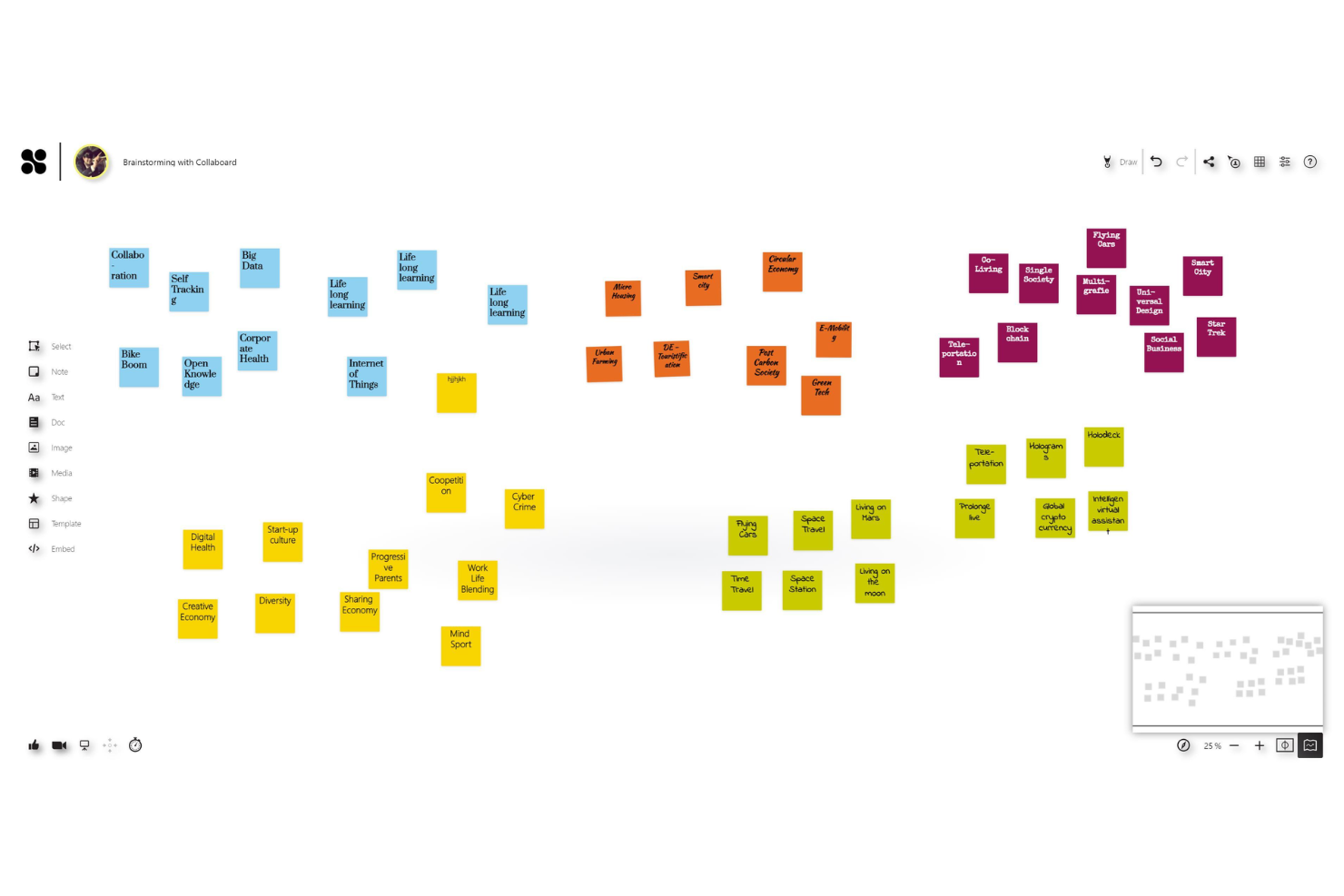
Teams that need a digital whiteboard with strict data residency controls will find Collaboard purpose-built for secure visual collaboration, offering a canvas-based workspace for workshops, brainstorming, and project planning.
Who Is Collaboard Best For?
Collaboard is a strong fit for European organizations and compliance-driven teams that can't risk storing whiteboard data outside approved data centers.
Why Collaboard Is a Good Miro Alternative
I've included Collaboard in my top picks because data residency is rarely a first-class feature in whiteboard tools, and Collaboard makes it central. You choose exactly where your data lives: Germany via Open Telekom Cloud, Switzerland via Microsoft Azure, or your own on-premises infrastructure. I also appreciate the confidential cloud option, which keeps data encrypted end-to-end even during active processing, meaning no third party can access session content at any point.
Collaboard Key Features
- PDF import from other whiteboards: Import boards directly from Miro, Mural, and other tools, where the content becomes editable elements in Collaboard.
- Voting and rating: Gather anonymous votes and ratings from participants directly on the whiteboard to support group decisions.
- Activity logbook: Track every action and change made on a board, giving admins a full record of user contributions.
- Versioning: Save and restore previous board states at any point, so your team can roll back to an earlier version of any whiteboard.
Collaboard Integrations
Collaboard offers native integrations with Microsoft Teams, Jira, Cisco Webex, Pexip, Nextcloud, and Rocket.Chat. An API is available for custom integrations. Zapier support is not clearly documented.
Pros and Cons
Pros:
- Built-in video conferencing for remote sessions
- Handwriting recognition for digital whiteboarding
- On-premises and EU-based cloud hosting options
Cons:
- Lacks specialized diagramming tools
- Limited third-party integrations compared to Miro

Lucid
Best for diagramming with advanced process flows

Lucid is a visual workspace suite that combines diagramming, whiteboarding, and data visualization in one platform, making it a natural fit for engineers, architects, and business analysts who need to map complex systems, processes, and org structures.
Who Is Lucid Best For?
Lucid is a strong fit for technical and operations teams that need structured diagramming tools beyond what a general whiteboard canvas can offer.
Why Lucid Is a Good Miro Alternative
I've included Lucid in my top picks because its diagramming depth goes well beyond what Miro's canvas offers. Lucidchart supports BPMN, UML, ERD, and network diagram shape libraries natively, so my team can build technically precise process flows without workarounds. I also rely on its data linking feature, which lets us connect live data from external sources directly into diagrams so they stay accurate as processes change.
Lucid Key Features
- Intelligent diagramming: Automatically generate diagrams from imported data sources like CSVs or connected cloud apps.
- Smart containers: Organize diagram elements into dynamic groupings that update automatically when content is rearranged.
- Lucidspark canvas: A dedicated virtual whiteboard for freeform brainstorming and team collaboration, separate from Lucidchart's structured diagramming environment.
- Version history: Access and restore previous versions of any diagram or board to track changes over time.
Lucid Integrations
Lucid offers 100+ integrations through its marketplace, including Confluence, Jira, Google Drive, Google Docs, Slack, Salesforce, Microsoft Teams, Figma, Asana, and AWS. It also connects with Azure, Google Cloud, and BambooHR. An API and developer platform are available for custom integrations.
Pros and Cons
Pros:
- Revision history allows restoring previous diagram versions
- Conditional formatting highlights project status visually
- Advanced diagramming supports technical process mapping
Cons:
- Real-time collaboration can lag with large diagrams
- Limited whiteboarding tools for freehand sketching
Best for visualizing team brainstorming outcomes
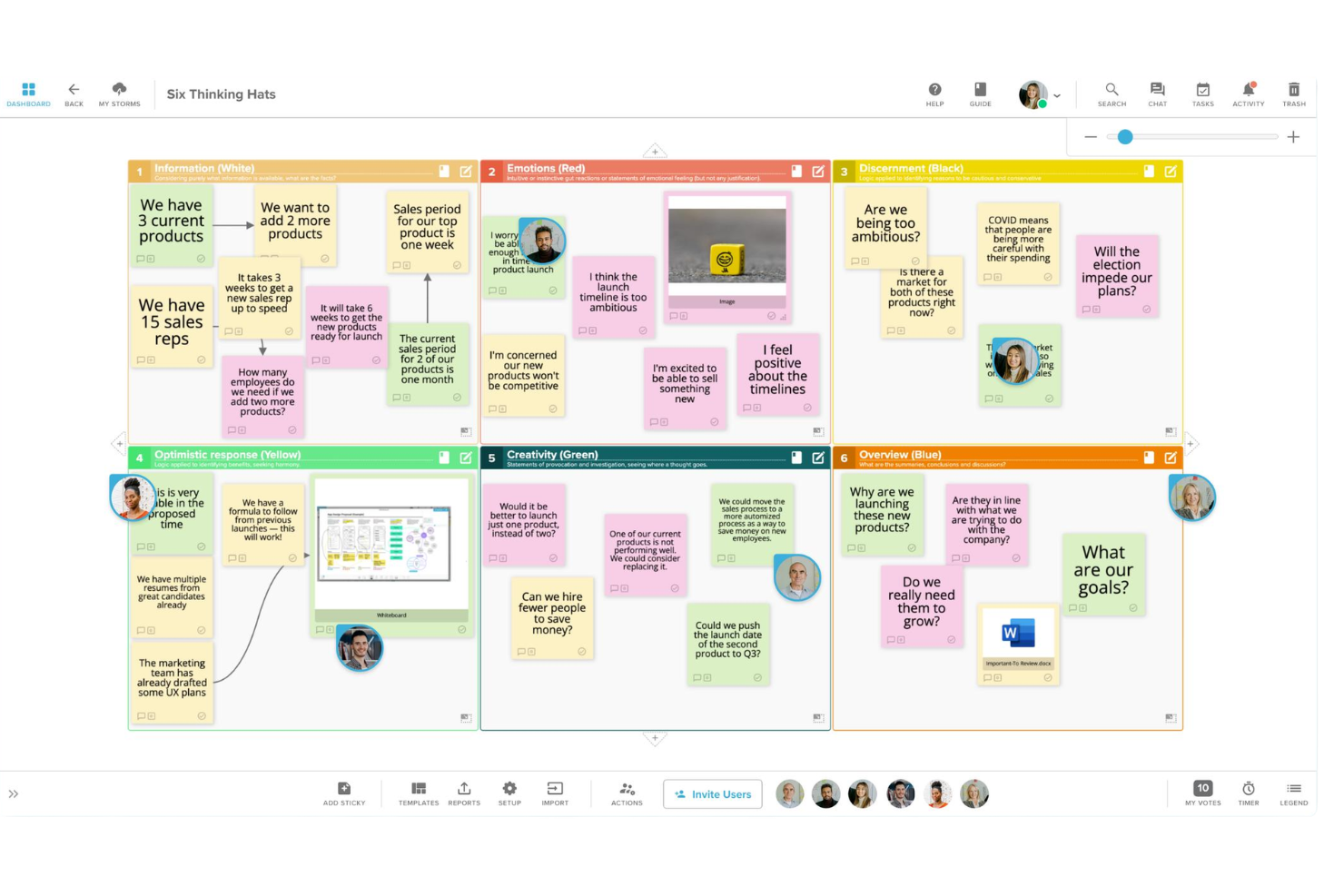
Built around turning raw brainstorming into organized outcomes, Stormboard gives teams a structured digital workspace with sticky notes, voting tools, and auto-generated reports that capture what was discussed and decided.
Who Is Stormboard Best For?
Stormboard is a good fit for facilitators and team leads at mid-sized businesses who run recurring workshops and need session outputs documented automatically.
Why Stormboard Is a Good Miro Alternative
I've included Stormboard in my top picks because it goes further than most whiteboard tools when it comes to capturing what actually came out of a session. The feature I come back to most is the one-click export to editable presentations, task reports, and spreadsheet analytics, which means brainstorm outputs don't die on the board. I also like the built-in voting and grouping tools that let my team prioritize ideas during the session itself, so we're walking away with ranked outcomes, not just a wall of sticky notes.
Stormboard Key Features
- 250+ templates: Choose from a library of purpose-built templates covering workshops, retrospectives, PI planning, and more.
- Substorms: Nest index card sticky notes inside a main board to create layered sessions without cluttering the primary canvas.
- Magnetic sections: Automatically sort section content by vote count, story points, or creation date to surface priorities instantly.
- Built-in timer: Run time-boxed activities directly inside a session to keep meetings on schedule.
Stormboard Integrations
Stormboard offers native integrations with Microsoft Teams, Microsoft 365, Google Drive, Jira, Rally, Azure DevOps, Webex, Zoom, Slack, Dropbox, and Box. It connects with Zapier and provides an API for custom integrations.
Pros and Cons
Pros:
- Exports boards to Word, Excel, and PDF
- Voting and polling tools for group decisions
- Built-in meeting templates for structured sessions
Cons:
- No offline access for boards
- Limited drawing and diagramming tools

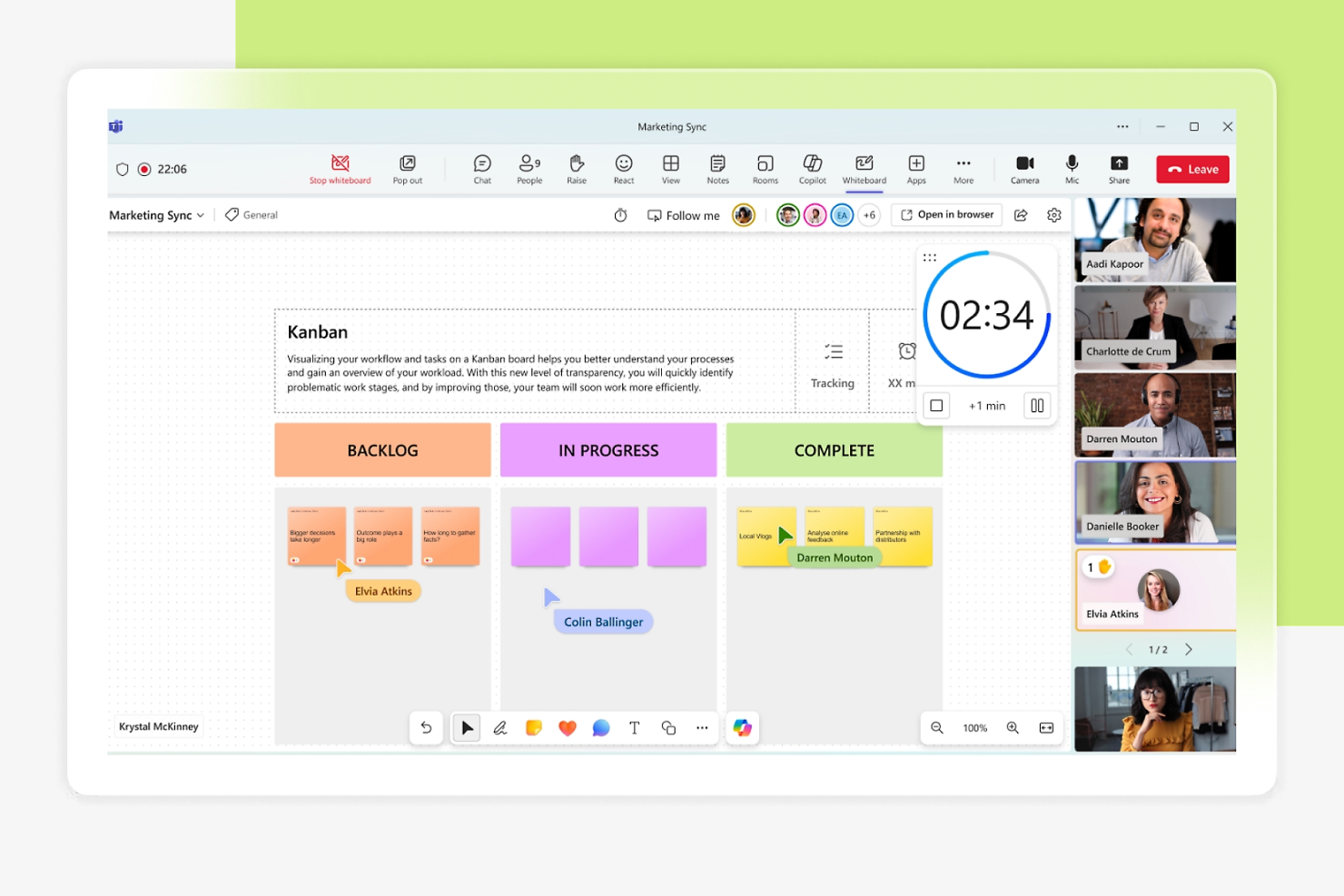
Teams already running on Microsoft 365 will find Microsoft Whiteboard a natural fit for collaborative sketching, brainstorming, and visual planning directly within their existing workflow.
Who Is Microsoft Whiteboard Best For?
Microsoft Whiteboard is a natural fit for enterprise teams and organizations that have standardized on Microsoft 365 across departments.
Why Microsoft Whiteboard Is a Good Miro Alternative
I've included Microsoft Whiteboard in my top picks because it's the only whiteboard tool that lives natively inside Microsoft 365, with no separate login or setup required. It's automatically enabled for applicable Microsoft 365 tenants, including in Teams. I also rely on its Loop components feature, which syncs across chats, meetings, emails, and documents so boards stay connected to live conversations. Annotations let everyone in a Teams meeting mark up content while screen sharing, with collaborative cursors showing changes from all participants in real time.
Microsoft Whiteboard Key Features
- Sticky notes: Add color-coded digital sticky notes to the canvas for capturing and grouping ideas during live sessions.
- Intelligent ink: Automatically converts hand-drawn shapes into clean geometric shapes as you sketch freehand.
- Template library: Access pre-built templates for brainstorming, retrospectives, and planning to start boards without building from scratch.
- Follow mode: Lets participants follow a presenter's view in real time, keeping everyone on the same section of the canvas.
Microsoft Whiteboard Integrations
Microsoft Whiteboard integrates natively across the Microsoft ecosystem, including Microsoft Teams, OneDrive, SharePoint, and Microsoft 365 apps like Word, Excel, and PowerPoint. It also supports Microsoft Loop components for syncing content across chats, meetings, and documents. A Microsoft Graph API is available for managing whiteboard resources programmatically.
Pros and Cons
Pros:
- Sticky notes and templates for structured planning
- Real-time co-authoring with Microsoft 365 users
- Direct integration with Microsoft Teams meetings
Cons:
- No built-in voting or polling tools
- Limited export formats beyond image and PDF

Excalidraw is an open-source virtual whiteboard that gives teams a hand-drawn aesthetic for sketching diagrams, wireframes, and ideas—making it a natural fit for developers and designers who want a lightweight, distraction-free alternative to feature-heavy whiteboard tools.
Who Is Excalidraw Best For?
Excalidraw suits small technical teams and indie developers who need a lightweight sketching tool without the overhead of a full whiteboarding platform.
Why Excalidraw Is a Good Miro alternatives
I picked Excalidraw as one of the best because the hand-drawn sketch aesthetic is genuinely unique in this space. Every shape, arrow, and label renders with a slightly imprecise look that keeps diagrams feeling exploratory. I've used the shared live canvas alongside the built-in shape library to rough out system architecture and user flows with my team in real time, without anyone feeling locked into a polished layout too early in the process.
Excalidraw Key Features
- Read-only shareable link: Share your canvas with viewers using a link that grants content access without editing permissions.
- Text to diagram (AI): Generate diagrams from a text prompt using the built-in AI chat interface, without drawing anything manually.
- Frames-based presentations: Organize sections of your canvas into frames and present them as slides directly within the tool.
- PNG and SVG export: Export your drawings to PNG, SVG, or clipboard for use in docs, specs, or design handoffs.
Excalidraw Integrations
Excalidraw can be embedded into Notion and is available as a macro for Confluence through the Atlassian Marketplace. It also has a native integration with Webex Meetings for in-call collaboration. Excalidraw Plus offers a RESTful API (currently in public beta) for programmatically managing scenes, collections, and workspaces.
Pros and Cons
Pros:
- Real-time collaboration without an account requirement
- Open source with a self-hosting option available
- Hand-drawn style supports informal brainstorming sessions
Cons:
- Lacks automatic cloud saving for free boards
- Limits templates to user-generated options

Zoom Whiteboard is a visual collaboration tool built into the Zoom platform that lets teams sketch, brainstorm, and present ideas on a shared canvas during or outside of video meetings.
Who Is Zoom Whiteboard Best For?
Zoom Whiteboard is a natural fit for teams that already run meetings on Zoom and want whiteboarding built into their existing workflow.
Why Zoom Whiteboard Is a Good Miro Alternative
I've included Zoom Whiteboard in my top picks because it's the only whiteboard tool that launches directly inside an active Zoom meeting with one click, with no tab switching or separate link sharing needed. I like that whiteboards persist after the call ends, so the canvas stays editable and shareable as a living document. Smart Connectors let me build flowcharts and diagrams mid-meeting, which keeps visual work tied to the conversation in real time.
Zoom Whiteboard Key Features
- Template library: Access pre-built templates for brainstorming, planning, and retrospectives to start sessions without building a board from scratch.
- Sticky notes: Add, color-code, and group digital sticky notes directly on the canvas to organize ideas during collaborative sessions.
- Presenter spotlight: Pin your view so all participants follow the same section of the canvas during structured presentations.
- AI Companion for whiteboards: Generate mind maps, summarize sticky notes, and create content on the canvas using Zoom's built-in AI Companion.
Zoom Whiteboard Integrations
Zoom Whiteboard connects with third-party task management tools directly within the whiteboard canvas, including Jira, Asana, and Azure DevOps, to keep project data aligned without context switching. It also works across the Zoom ecosystem, including Zoom Meetings, Rooms, Zoom Chat, Mail, Calendar, and Docs. An API and webhooks are available for custom integrations, and Zoom connects with Zapier.
Pros and Cons
Pros:
- Supports drawing, sticky notes, and templates
- Persistent boards save content between sessions
- Whiteboards launch instantly during Zoom meetings
Cons:
- Fewer advanced diagramming tools than Miro
- Limited offline access for whiteboards
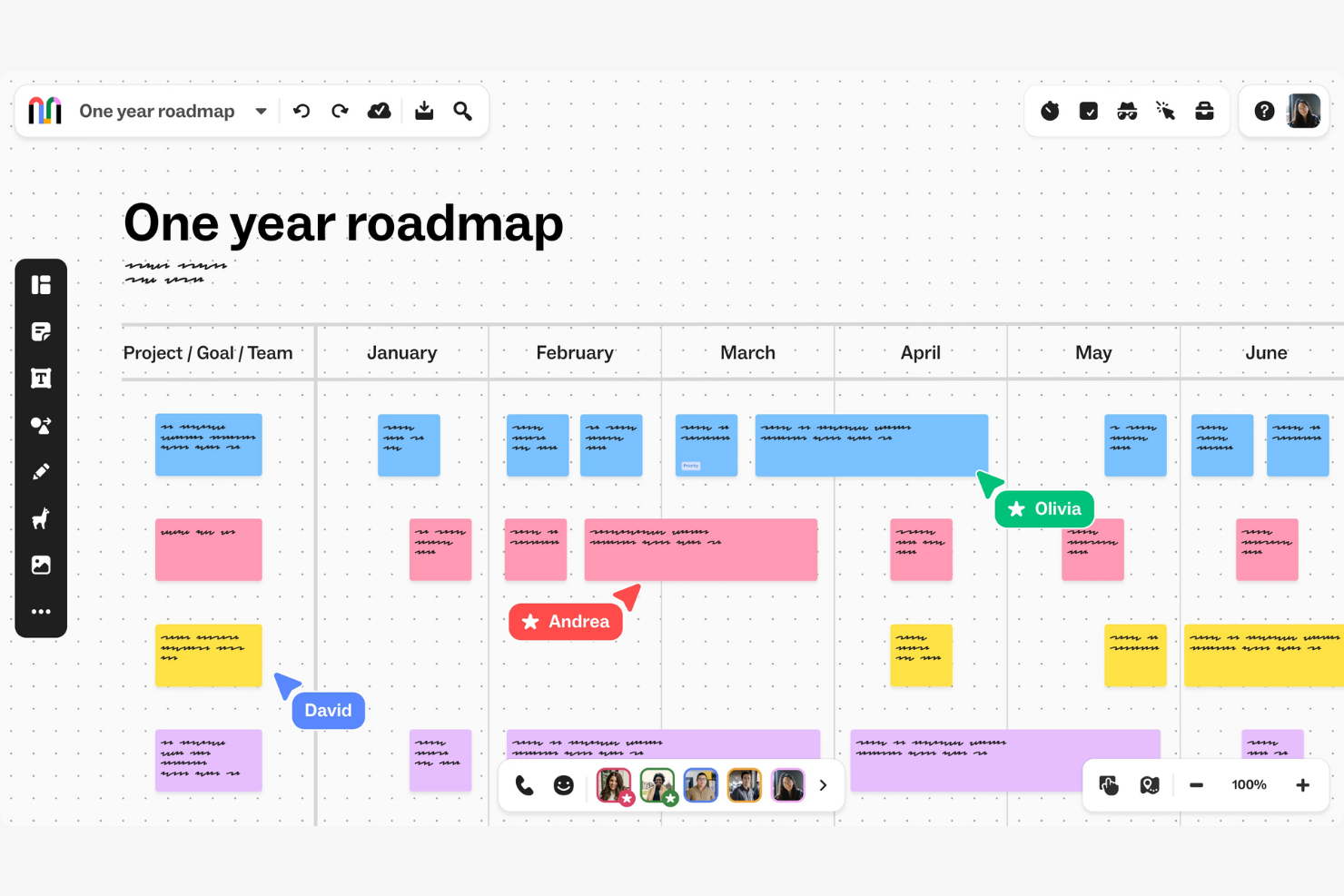
Mural is a visual collaboration platform designed for large organizations that need structured, scalable ways to run design thinking, agile ceremonies, and cross-functional workshops across distributed teams.
Who Is Mural Best For?
Mural is a strong fit for enterprise teams in consulting, technology, and financial services that run frequent cross-functional workshops at scale.
Why Mural Is a Good Miro Alternative
I've included Mural in my top picks because it handles the organizational complexity that comes with enterprise-scale collaboration. I rely on its Rooms feature to separate workspaces by team, client, or project, keeping content organized across a large org. Its SCIM provisioning and SSO support make managing access across hundreds of users straightforward, with no manual overhead slowing things down.
Mural Key Features
- Facilitation superpowers: A built-in toolkit with a timer, private mode, participant summoning, and super lock to run structured workshops without losing control of the room.
- Custom template publishing: Create, save, and publish templates across your workspace so teams can reuse proven methods at scale.
- Outline feature: Guide participants step-by-step through a session by revealing content progressively, keeping focus where you need it.
- Flexible canvas permissions: Set view-only, edit, or facilitator-level access per mural to control exactly who can change what during a session.
Mural Integrations
Mural offers 40+ native integrations, including Slack, Jira, Asana, Confluence, Figma, GitHub, Salesforce, Zoom, Webex, and deep connectivity across the Microsoft ecosystem with Microsoft Teams, Microsoft 365, Microsoft Entra ID, and Microsoft Copilot. It connects with Zapier and provides an API for custom integrations.
Pros and Cons
Pros:
- Outline panel helps organize complex workshops
- Multiple facilitators can manage a single board
- Private mode supports confidential brainstorming sessions
Cons:
- Exported board quality can be inconsistent
- Lacks complex data relationship diagramming
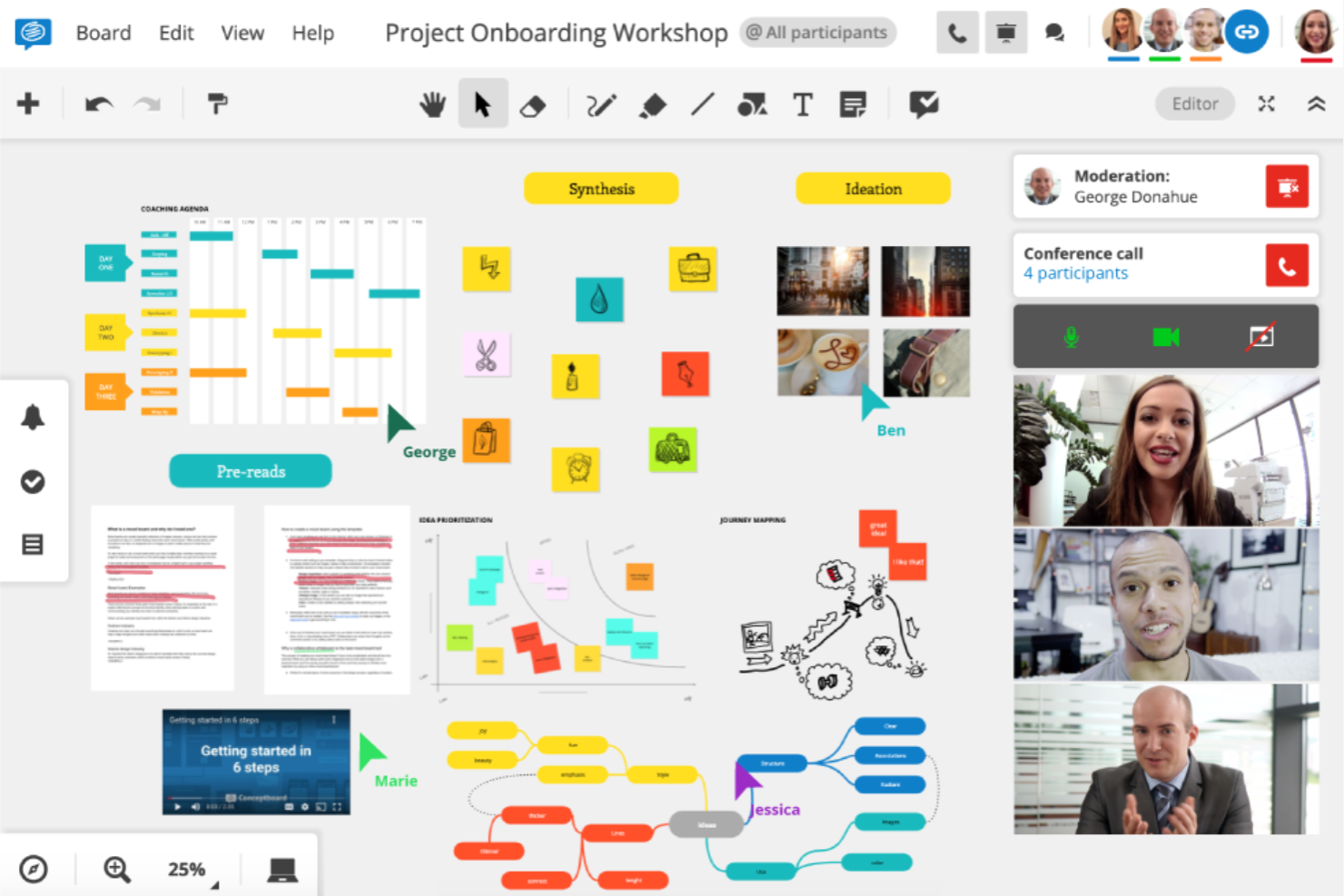
Conceptboard is an online whiteboard that combines visual brainstorming with built-in task management, letting distributed teams move from idea generation to project execution without switching tools.
Who Is Conceptboard Best For?
Conceptboard is a strong fit for creative and design teams at mid-sized companies that need a shared visual space for structured project review and feedback.
Why Conceptboard Is a Good Miro Alternative
I've included Conceptboard in my top picks because it's one of the few whiteboard tools built specifically around structured project review workflows. The commenting and annotation system lets my team pin threaded feedback directly to designs or documents on the canvas, so review rounds stay organized by context rather than scattered across email. I also like that cursor tracking shows exactly where each collaborator is on the board in real time, which keeps async review sessions from feeling disconnected.
Conceptboard Key Features
- Kanban task board: Build Kanban-style task structures directly on the canvas to manage and track work without leaving the board.
- Infinite canvas with browser-based access: Work on an unlimited visual space from any browser, with no installation required on any device.
- Template library: Start workshops, retrospectives, and planning sessions from pre-built templates rather than a blank board.
- Guest access via link: Invite external collaborators to a board using a shareable link, with no account required for participants.
Conceptboard Integrations
Conceptboard offers a smaller set of native integrations compared to tools like Miro, including Microsoft Teams, Jira, Azure DevOps, Webex, Confluence, Google Drive, OneDrive, and Dropbox.
Pros and Cons
Pros:
- Infinite canvas handles large, complex boards
- Threaded comments support detailed project discussions
- Real-time cursors show team member activity
Cons:
- No built-in video conferencing feature
- Limited integrations compared to Miro
Klaxoon
Best for interactive meeting engagement
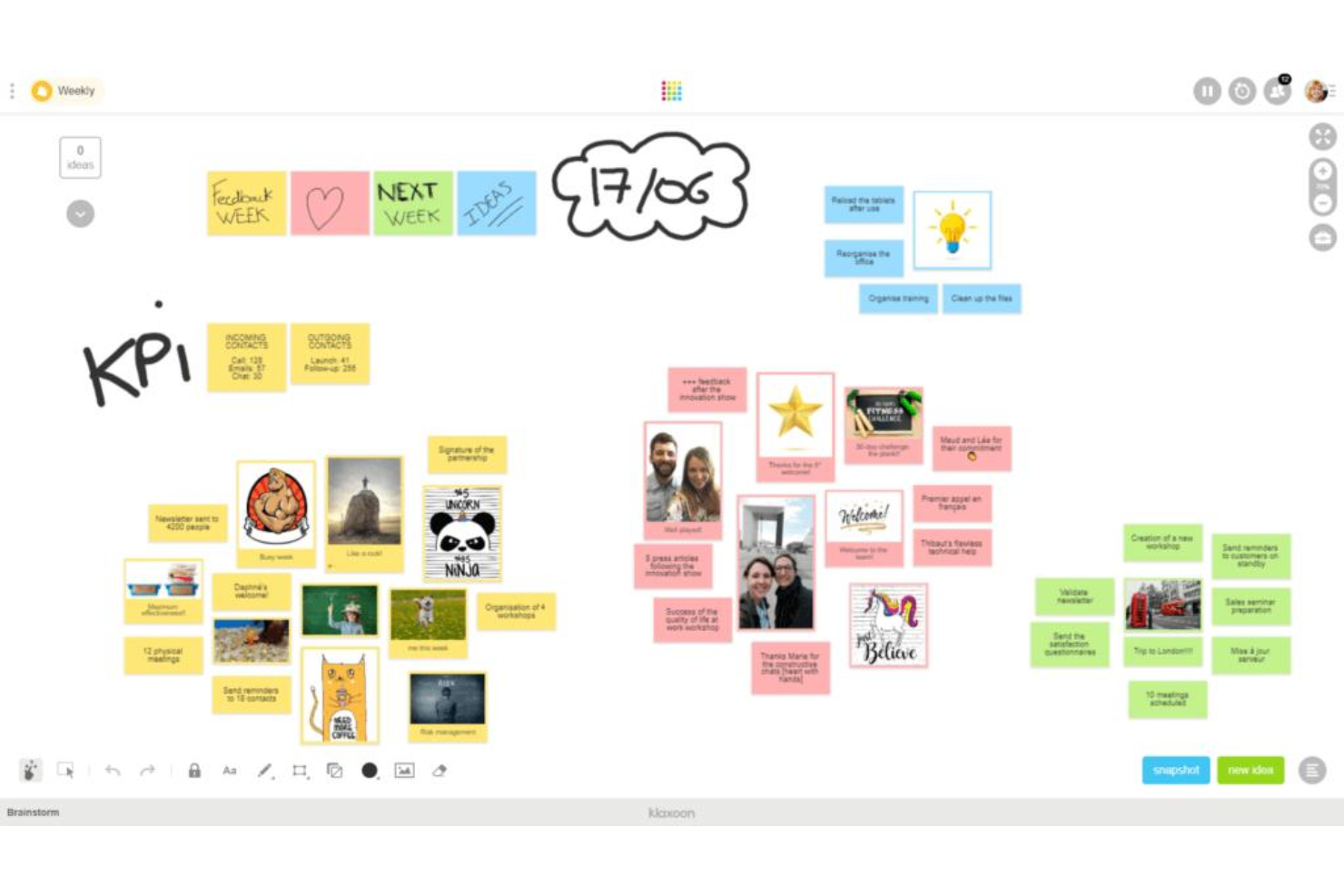
Klaxoon is a visual collaboration and meeting facilitation platform that combines interactive whiteboards, polls, quizzes, and AI-assisted idea organization to help teams run more engaging workshops, retrospectives, and training sessions.
Who Is Klaxoon Best For?
Klaxoon is a strong fit for learning and development teams, facilitators, and HR professionals who regularly run structured workshops, training sessions, or large-group meetings.
Why Klaxoon Is a Good Miro Alternative
I picked Klaxoon because it goes further than a standard whiteboard by building participant engagement directly into the meeting experience. I especially like the built-in polls, quizzes, and live Q&A tools that let every participant contribute in real time, not just the loudest voices in the room. The real-time engagement statistics dashboard is a feature I haven't seen matched elsewhere: it tracks individual participation levels so facilitators can spot disengaged attendees mid-session and adjust on the fly.
Klaxoon Key Features
- AI-assisted idea organization: Summarize, classify, and translate sticky notes and whiteboard content into organized clusters with a single click.
- Ready-to-use workshop templates: Access pre-built templates for sprint retrospectives, project launches, brainstorming, and more, all based on established methods.
- Visual mind mapping and roadmapping: Build visual mind maps and project roadmaps directly on the whiteboard canvas to plan and align teams around shared priorities.
- Action plan generation: Convert ideas captured on whiteboards directly into action plans or task lists, without switching to a separate project management tool.
Klaxoon Integrations
Klaxoon offers native integrations with Microsoft Teams, OneDrive, Entra ID, MS Intune, Google Drive, Google Calendar, Google Docs, Jira, Wrike, Confluence, Adobe CC, Okta, Dropbox, and Moodle. It's available on Zapier and has an API for custom integrations.
Pros and Cons
Pros:
- Guests access boards without an account
- Built-in video conferencing on the board
- Smart sorting auto-clusters brainstorm ideas
Cons:
- Overlapping features with Zoom and Teams
- Detailed board setups get complex quickly
Other Miro Alternatives
Here are some additional Miro alternatives that didn’t make it onto my shortlist, but are still worth checking out:
- Ziteboard
For lightweight browser-based whiteboarding
- Canva Whiteboard
For ready-made visual layout blueprints


How I Evaluate Miro Alternatives
For CX teams running journey mapping workshops or synthesizing VoC research, I split my evaluation into baseline requirements every tool must clear and differentiators that separate the standouts.
Core Functionality (Table Stakes For This List)
When I'm selecting tools for my list, I rank each one on a scale from 0 (does not offer the functionality) to 5 (excels in this area) for each core functionality listed below. Then, I calculate the tool's total score into a percentage. Each tool needs to achieve a minimum total score of 65% to be considered for inclusion.
- Infinite Visual Canvas: I look for an unbounded, zoomable workspace where CX teams can lay out full end-to-end journey maps without running into page boundaries or performance issues.
- Real-Time Collaboration: Multiple facilitators and stakeholders should be able to co-edit a board simultaneously with live cursors, comments, and presence indicators during workshops.
- CX-Relevant Templates: I check whether the tool ships with pre-built templates for journey maps, empathy maps, personas, and service blueprints rather than just generic brainstorming boards.
- Sticky Notes & Diagramming: The platform needs solid sticky notes, shapes, connectors, and freeform drawing so teams can cluster research findings and diagram touchpoint flows.
- Workshop Facilitation Tools: Features like voting, timers, private mode, and guided frame navigation matter because they shape how well a remote design sprint or CX workshop actually runs.
- Integrations & Export: I evaluate connections to tools CX teams already use daily—Slack, Zoom, Jira, Figma—plus export options like PDF and PNG for sharing insights with leadership.
Once I have a list of tools that meet this criteria, I consider what sets each platform apart.
Differentiating Factors (What Sets Vendors Apart)
Here's how I compare and contrast different vendors:
Standout Features
AI-powered synthesis is a big differentiator—I look for tools that auto-cluster sticky notes and surface themes, which saves hours of sorting after a large workshop. Advanced journey mapping features like swimlanes and sentiment overlays also matter because they let teams visualize emotional highs and lows across touchpoints. I evaluate presentation modes too, since the ability to convert a working board into a polished walkthrough makes it far easier to share CX findings with leadership.
Beyond Features
Security and compliance certifications like SOC 2 and GDPR matter when boards contain real customer data from research sessions or VoC programs. I also evaluate scalability—whether a platform stays responsive when 50+ participants join a live workshop on a board packed with hundreds of sticky notes. Pricing structure deserves attention too, especially how a vendor handles editor-versus-viewer licensing, since CX workshops often involve many guest contributors who only need temporary access.
Why Look For a Miro Alternative?
While Miro is a good choice of visual task management tool, there are a number of reasons why some users seek out alternative solutions. You might be looking for a Miro alternative because…
- You need a tool with no login or registration required
- Your team wants more advanced integrations with other software to facilitate better teamwork across departments
- You require offline access to your boards and docs
- Your organization has strict data residency requirements
- You prefer a simpler, less feature-heavy interface with a shorter learning curve and greater ease of use
If any of these sound like you, you’ve come to the right place. My list contains several visual task management tool options that are better suited for startups and remote teams facing these challenges with Miro and looking for alternative solutions.
Miro Key Features
Here are some of the key features of Miro, to help you contrast and compare what alternative solutions offer:
- Collaborative whiteboard: Multiple users can draw, add notes, and edit content in real time for brainstorming or planning.
- Template library: Access a large selection of templates for agile boards, design sprints, user story mapping, and more.
- Infinite canvas: Use a limitless workspace that expands as ideas, diagrams, and workflows grow.
- Integrated video chat: Start video meetings directly within your whiteboard to discuss changes or ideas live.
- Sticky notes and shapes: Drag and drop visual elements like sticky notes, arrows, and shapes to sketch out workflows and strategies.
- Presentation mode: Guide participants through boards step by step for workshops, meetings, or team updates.
- Export and sharing options: Download boards as images, PDFs, or presentations and control access for team members and guests.
- Third-party integrations: Connect Miro with platforms like Slack, Jira, Google Drive, Microsoft Teams, and more to keep work in sync.
- Comments and @mentions: Add feedback and tag teammates to keep conversations organized and contextually linked to board content.
- Access controls and permissions: Define who can view, edit, or comment on boards for secure collaboration with internal and external users.