

Yardım masası talep yönetimi yazılımı, ekibinizin tüm kanallardaki müşteri destek taleplerini izlemek, yönetmek ve çözmek için kullandığı dijital bir platformdur. En iyi yardım masası araçlarını karşılaştırıyorsanız, muhtemelen ekibinizin denetimini kaybetmeden veya tükenmişlik yaşamasına neden olmadan daha hızlı ve kişiselleştirilmiş destek sunma baskısını dengeliyorsunuzdur. Bu kılavuz, farklı çözümlerin çok kanallı iş akışları, otomasyon, ekip iş birliği ve daha geniş müşteri operasyonlarıyla entegrasyon açısından nasıl karşılaştırıldığını tam olarak göstererek karmaşayı aşmanıza yardımcı olur; böylece destek stratejinize gerçekten uyan seçeneği bulabilirsiniz.
Why Trust Our Software Recommendations
6,700+
Reviews
20
Industry experts
16+
Evaluation factors
14
Years
Our team has been testing and reviewing software since 2012. As CX leaders ourselves, we know how difficult—and important—it is to choose the right software.
For this guide, we evaluated tools using hands-on testing and independent research, scoring tools using our selection criteria.
Our reviews reflect our human editorial judgment, not a sales pitch.
 Gui DrusinaCreative Director
 Tim FisherVP of AI
Yardım Masası Talep Yönetimi Yazılımları Karşılaştırma Tablosu
Bu karşılaştırma tablosu, en iyi yardım masası talep yönetimi yazılımı seçimlerim için fiyatlandırma ayrıntılarını özetlemektedir.
Sorted by: Default
| Tool | Starting Price | Website | |
|---|---|---|---|
Best for AI-native escalation and deflection | 4.5 out of 5 | $150/month Free plan + free trial + free demo available | Website |
Best for outcome-based AI ticket resolution | 4.6 out of 5 | $16/agent/month Free plan + 14-day trial + free demo available | Website |
Best for unified customer data and insights | 4.5 out of 5 | Pricing upon request Free demo available | Website |
Best for Gmail-based multichannel support | 4.7 out of 5 | $25/user/month 7-day free trial + free demo available | Book Demo |
Best for intuitive team collaboration tools | 4.5 out of 5 | $25/user/month Free plan + 15-day free trial + free demo available | Website |
Best for fast multi-department implementation | 4.5 out of 5 | $29/user/month 14-day free trial + free demo available | Website |
Best for native AI agent and human collaboration | 4.4 out of 5 | $19/user/month 14-day free trial + demo available | Website |
Best for CRM service integration | 4.4 out of 5 | $20/user/month 14-day free trial | Website |
Best for open source ticketing flexibility | 4.3 out of 5 | $12/user/month Free plan available | Website |
Best for cross-team customer operations management | 4.6 out of 5 | $25/user/month 14-day free trial | Website |


Yardım Masası Talep Yönetimi Yazılımı İncelemeleri
Aşağıda, kısa listeme giren en iyi yardım masası talep yönetimi yazılımlarına ilişkin ayrıntılı özetlerimi bulabilirsiniz. İncelemelerim, size en uygun seçeneği bulmanıza yardımcı olmak için her platformun özelliklerini, entegrasyonlarını ve en uygun kullanım alanlarını ayrıntılı biçimde ele almaktadır.
 Best for AI-native escalation and deflection
- Free plan + free trial + free demo available
- From $150/month (billed annually)
Visit WebsiteCustomer Rating:4.5/5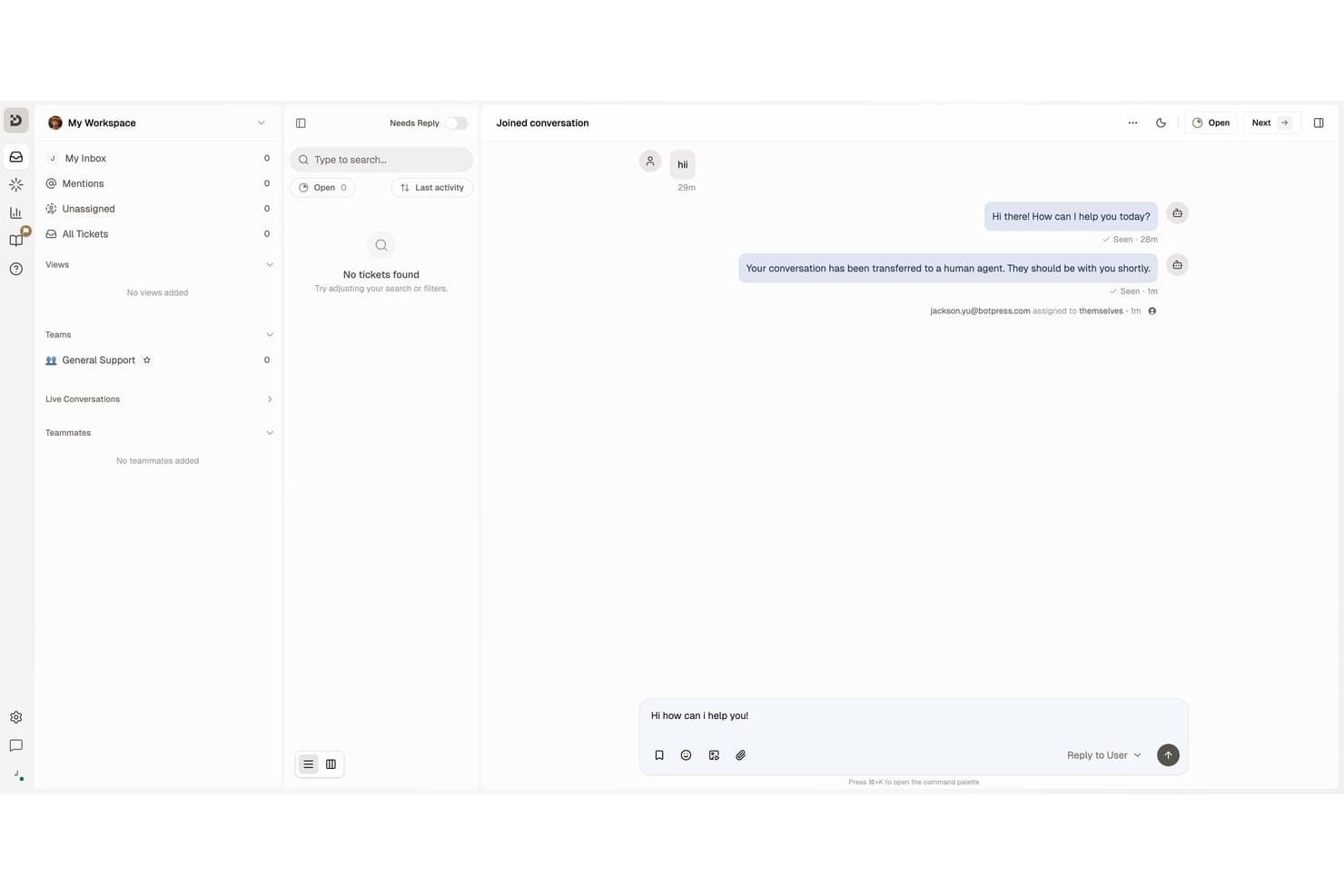
Botpress lets agents manage live conversations and reply to users in one inbox. Botpress Desk is an AI-native help desk ticketing platform that handles support tickets across webchat, email, WhatsApp, and voice, with built-in escalation routing, SLA tracking, and a self-service Help Center.
Who Is Botpress Best For?
Botpress Desk is a strong fit for customer support teams that want AI to handle deflection and escalation automatically before a human agent ever gets involved.
Why I Picked Botpress
I've included Botpress in my top picks because it's one of the few help desk platforms where AI handles deflection and escalation as core functions, not add-ons. Before a ticket ever reaches an agent, Botpress can answer questions from your existing knowledge base and hand off only when its confidence drops below a threshold you set. When escalation does happen, the agent receives an AI-generated summary of what was asked, what was tried, and a suggested next step.
Botpress Key Features
- Multi-channel intake: Desk captures conversations from webchat, email, WhatsApp, Slack, Discord, Telegram, Instagram, and Facebook Messenger into a single ticketing workspace.
- SLA timers and breach notifications: Configurable SLA clocks track first-response and follow-up targets, with alerts at personal, team, and workspace levels when deadlines approach or are missed.
- Capacity-based routing: Conversations are automatically assigned to agents based on capacity and business hours, with teams, routing rules, and RBAC available on the Team plan.
- CSAT surveys: Localized satisfaction surveys are sent automatically after ticket resolution, with rating labels and reminders adapted to the ticket's language.
Botpress Integrations
Botpress Desk offers two documented native integrations, Zendesk and Intercom, with OAuth connections, synced customer data, and pre-enriched handoffs. Botpress also provides HTTP Chat, Admin, Files, Tables, and Runtime APIs for custom integrations.
Pros and Cons
Pros:
- SLA alerts track human response targets
- Escalations carry summaries and conversation context
- AI answers deflect routine support tickets
Cons:
- Agent collaboration workflows are thinly documented
- Advanced bot setup can burden support teams
Learn more about Botpress: Best for outcome-based AI ticket resolution
- Free plan + 14-day trial + free demo available
- From $16/agent/month (billed annually)
Visit WebsiteCustomer Rating:4.6/5
SparrowDesk uses AI copilot and agentic workflows to handle customer support. SparrowDesk is an AI-native help desk ticketing platform that unifies email, live chat, WhatsApp, Facebook Messenger, and Slack into a shared inbox alongside automated routing, SLA management, a self-service knowledge base, and built-in AI ticket resolution.
Who Is SparrowDesk Best For?
SparrowDesk is a strong fit for growing support teams that want AI to handle a significant portion of ticket resolution without heavy setup or maintenance overhead.
Why I Picked SparrowDesk
SparrowDesk earns its spot on my shortlist because of how it approaches AI resolution differently from every other tool here. Zoona AI doesn't just suggest replies, it closes tickets autonomously across email, chat, and messaging, and you only pay $0.49 when it actually resolves something. I also like that Zoona trains directly from your existing knowledge base and past conversations, then flags gaps and proposes new articles when it hits a question it can't answer.
SparrowDesk Key Features
- Omnichannel shared inbox: Consolidates email, live chat, WhatsApp, Facebook Messenger, and Slack into a single unified queue for your team.
- SLA breach alerts: Sends real-time alerts before SLA deadlines are missed, with pause and resume controls for pending tickets.
- Round robin assignment: Automatically distributes incoming tickets across available agents on the Professional plan and above.
- CSAT surveys: Triggers post-ticket satisfaction surveys automatically at ticket close, with scores tied to individual conversations.
SparrowDesk Integrations
SparrowDesk offers native integrations with Salesforce, HubSpot, Shopify, Slack, WhatsApp, Facebook Messenger, Gmail, Jira, Linear, and Notion. It also supports custom integrations through its developer API and Zapier.
Pros and Cons
Pros:
- SLA breach alerts are proactive and configurable
- Ticket linking and parent-child relationships supported
- AI resolves tickets without agent intervention
Cons:
- AI performance depends on knowledge base quality
- No voice or SMS channel options
Learn more about SparrowDesk: Best for unified customer data and insights
- Free demo available
- Pricing upon request
Visit WebsiteCustomer Rating:4.5/5
Kustomer centralizes customer conversations with real-time ticket insights. Kustomer is an AI-native customer service CRM that replaces traditional ticket queues with a unified customer timeline, combining omnichannel inbox management, workflow automation, AI agents, and real-time reporting in one platform.
Who Is Kustomer Best For?
Kustomer is a strong fit for mid-market and enterprise B2C brands running high-volume, omnichannel support operations across multiple teams and channels.
Why I Picked Kustomer
I've included Kustomer in my top picks because its unified customer timeline is unlike anything a traditional ticket-based system offers. Instead of treating each inquiry as an isolated ticket, every email, chat, call, and social message appears in one chronological view per customer. I also like that sentiment tracking and CSAT data surface directly in that same view, so agents aren't digging through separate dashboards to understand how a customer feels before responding.
Kustomer Key Features
- Multichannel intake: Consolidates customer messages from email, chat, voice, SMS, and social media into a single workspace.
- Automated workflow builder: Lets you automate repetitive tasks with customizable, no-code rules and macros.
- Knowledge base portal: Provides both internal and customer-facing help center tools with multilingual support.
- SLA and escalation management: Supports setting and tracking SLA policies with automated breach alerts and escalation triggers.
Kustomer Integrations
Kustomer offers native integrations with Salesforce, Shopify, Jira, Slack, Magento, Microsoft Teams, Facebook, Instagram, WhatsApp Business, and Twilio. An API is available for custom integrations.
Pros and Cons
Pros:
- Sentiment and CSAT surfaced in agent view
- AI triage routes tickets without manual rules
- Full conversation history per customer, not ticket
Cons:
- Reporting dashboards limited without custom development
- Complex to configure without dedicated admin support
Learn more about Kustomer: Best for Gmail-based multichannel support
- 7-day free trial + free demo available
- From $25/user/month (billed annually)
Visit WebsiteCustomer Rating:4.7/5
Hiver lets teams collaborate on support tickets via Slack-style threads. Hiver is a help desk ticketing platform built around Gmail and Outlook, combining shared inboxes, ticket management, omnichannel intake, automated routing, and AI-driven support workflows.
Who Is Hiver Best For?
Hiver is a strong fit for small and mid-sized support teams already running on Google Workspace who want ticketing without leaving Gmail.
Why I Picked Hiver
Hiver earns its spot on my shortlist because it's the only help desk that runs inside Gmail rather than alongside it. I like how shared inboxes, ticket assignment, and internal notes all appear directly in the Gmail interface, so my team never has to context-switch into a separate tool. The omnichannel layer pulls live chat and WhatsApp threads into the same queue, and the AI Copilot drafts replies by drawing from connected help docs in real time.
Hiver Key Features
- Omnichannel queue: Collects support requests from email, live chat, WhatsApp, and voice into one unified workspace.
- SLA management: Lets teams define, track, and escalate tickets based on response and resolution targets.
- Knowledge base builder: Provides a public help center for customers to search articles and resolve common issues.
- Advanced analytics: Offers dashboards for monitoring ticket trends, agent metrics, and customer satisfaction scores.
Hiver Integrations
Hiver offers native integrations with Aircall, Slack, WhatsApp Business, and Google Workspace. An API is available for custom integrations.
Pros and Cons
Pros:
- Shared inboxes with threaded collision detection
- AI Copilot drafts replies from help docs
- Lives entirely inside Gmail's interface
Cons:
- Not viable for teams outside Google Workspace
- Thin reporting compared to standalone help desks
Learn more about Hiver: Best for intuitive team collaboration tools
- Free plan + 15-day free trial + free demo available
- From $25/user/month (billed annually)
Visit WebsiteCustomer Rating:4.5/5
Help Scout offers all customer conversations in a shared team inbox. Help Scout is a shared inbox and help desk platform that combines email-based ticket management, live chat, a knowledge base, AI-assisted replies, and team collaboration tools into a single support workspace.
Who Is Help Scout Best For?
Help Scout is a strong fit for small to mid-sized support teams that run email-first operations and want a clean, collaborative workspace without the complexity of enterprise ticketing systems.
Why I Picked Help Scout
Help Scout earns its spot on my shortlist because of how naturally it handles team collaboration inside a live support queue. Collision detection flags when two agents open the same conversation, which prevents duplicate replies before they happen. Internal lets me pull in a subject matter expert without leaving the thread, and conversations can be grouped by company, so my team always has full account context before responding.
Help Scout Key Features
- Multi-channel inbox: Collects customer inquiries from email, chat, social media, and SMS in a unified workspace.
- Beacon widget: Lets you embed chat, contact forms, and knowledge base content directly into your site or app.
- Configurable SLA policies: Enables you to set, track, and escalate support tickets based on response and resolution commitments.
- Docs knowledge base: Offers a public help center with search, categories, analytics, and multi-site management.
Help Scout Integrations
Help Scout offers native integrations with Slack, HubSpot, Salesforce, Jira, Shopify, Mailchimp, Zapier, and provides an API for custom integrations.
Pros and Cons
Pros:
- Built-in CSAT surveys on every conversation
- AI drafts replies directly within conversations
- Collision detection prevents duplicate agent replies
Cons:
- No native voice or phone channel
- Weak reporting depth for high-volume teams
Learn more about Help Scout: Best for fast multi-department implementation
- 14-day free trial + free demo available
- From $29/user/month
Visit WebsiteCustomer Rating:4.5/5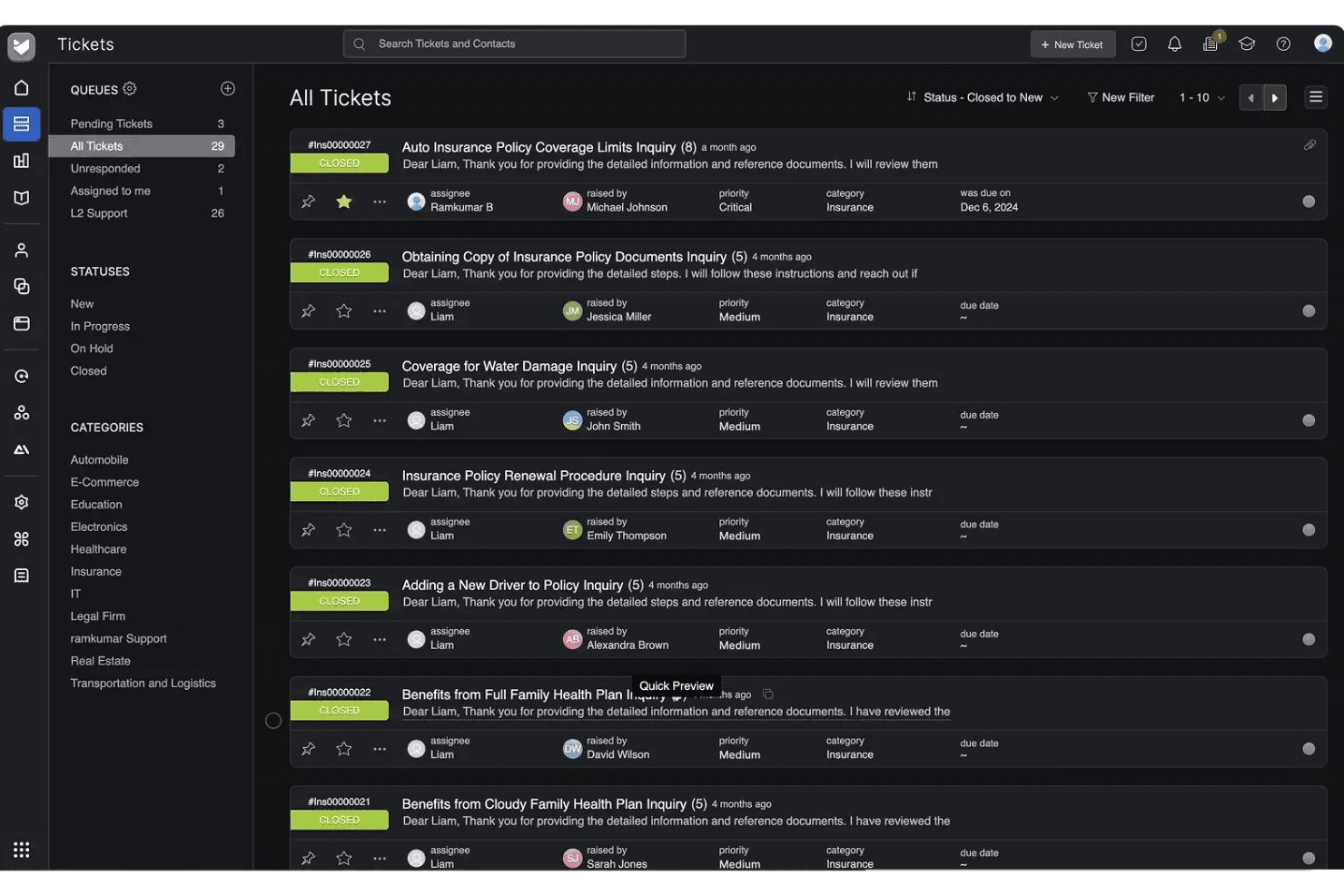
HappyFox organizes all support tickets in a centralized queue view. HappyFox is a cloud-based help desk ticketing platform that centralizes customer inquiries from email, chat, phone, social media, and web forms into a unified queue with SLA management, automation rules, and a self-service knowledge base.
Who Is HappyFox Best For?
HappyFox is a strong fit for small to mid-sized businesses running support across multiple departments, like IT, HR, and customer service, from a single platform.
Why I Picked HappyFox
HappyFox earns its spot on my shortlist because of how quickly you can stand up separate support queues for distinct departments. I love that IT, HR, and customer service teams each get their own ticket queues, SLA policies, and canned responses without any overlap or configuration conflict. The multi-brand helpdesk feature also lets each department run its own branded support portal and knowledge base from day one.
HappyFox Key Features
- AI-powered ticket triage: Uses machine learning to categorize, prioritize, and route incoming tickets automatically.
- Omnichannel ticket capture: Consolidates tickets from email, web forms, chat, phone, and social media into a single queue.
- SLA management and escalation: Lets you define custom SLAs, trigger automated escalations, and track business hours for compliance.
- Custom workflow automation: Offers rule builders and macros to automate assignment, status changes, and follow-up notifications.
HappyFox Integrations
HappyFox offers native integrations with Slack, Salesforce, Jira, Microsoft Teams, Zoom, Aircall, RingCentral, Shopify, Microsoft 365, and Google Workspace. An API is available for custom integrations.
Pros and Cons
Pros:
- Built-in knowledge base per department
- Configurable SLA policies with breach alerts
- Fast multi-department queue setup
Cons:
- Mobile app lacks full desktop functionality
- Advanced reporting requires manual workarounds
 Best for native AI agent and human collaboration
- 14-day free trial + demo available
- From $19/user/month (billed annually)
Visit WebsiteCustomer Rating:4.4/5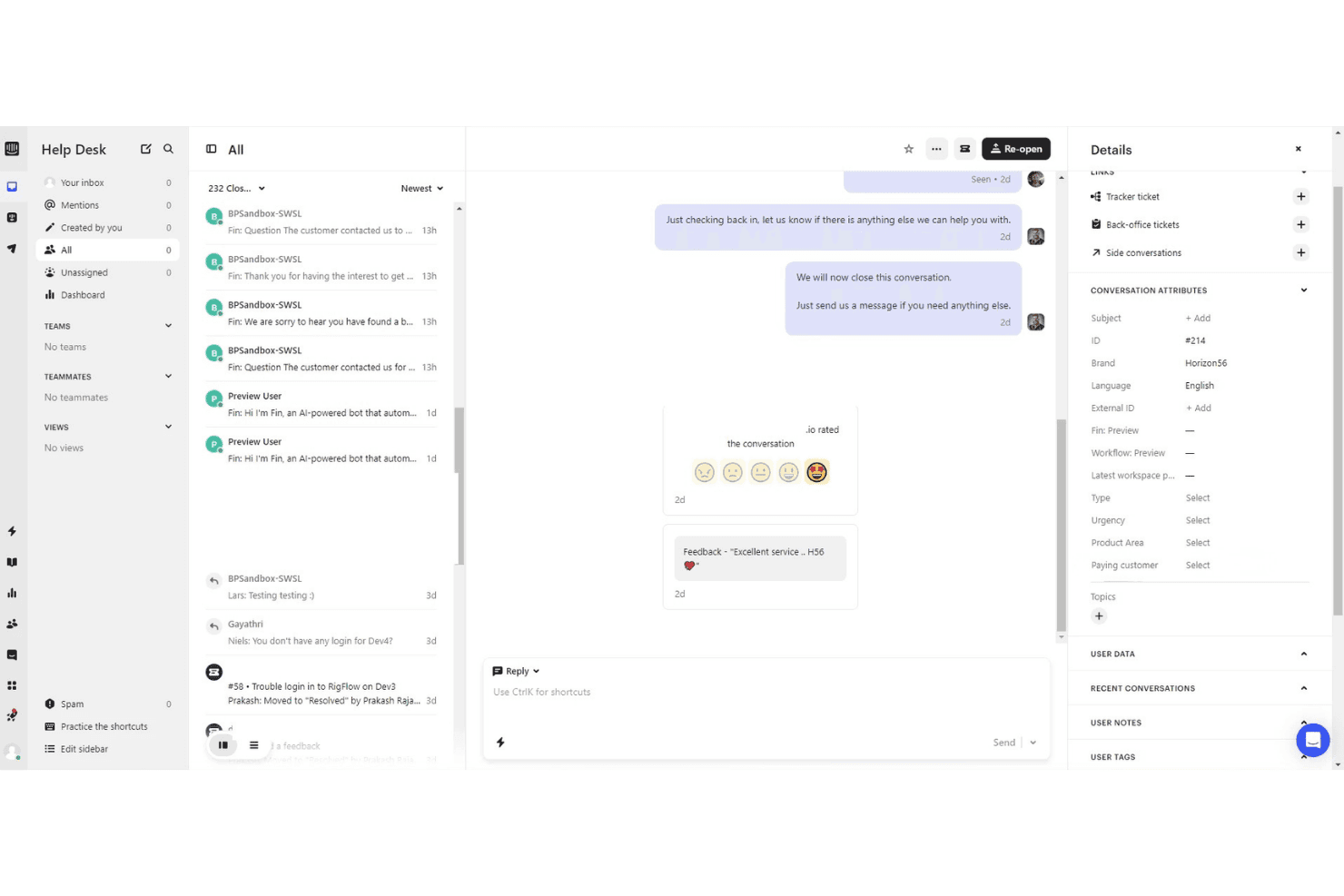
Intercom centralizes customer conversations with details and CSAT ratings. Intercom is an AI-native customer service platform that unifies omnichannel ticketing, a built-in AI agent, no-code workflow automation, knowledge base management, and agent-facing AI assistance in one workspace.
Who Is Intercom Best For?
Intercom is a strong fit for mid-market and enterprise support teams that want to automate a significant share of customer interactions through AI before routing to human agents.
Why I Picked Intercom
I've included Intercom in my top picks because the collaboration between its Fin AI Agent and human agents is genuinely native, not a bolt-on. Fin resolves conversations autonomously and, when it can't, hands off to a human agent with the full conversation context already attached. I also like Copilot, which sits inside the agent inbox and drafts replies and surfaces relevant knowledge base articles in real time, so agents aren't context-switching to find answers mid-conversation.
Intercom Key Features
- Omnichannel inbox: Combine email, chat, phone, WhatsApp, SMS, and social messages in a single agent view.
- Workflow automation: Use no-code tools to automate ticket routing, prioritization, and repetitive actions.
- Integrated knowledge base: Manage a searchable public or private help center with support for multiple brands and languages.
- Advanced reporting and insights: Access dashboards for ticket volume, resolution times, CSAT, and agent performance metrics.
Intercom Integrations
Intercom offers native integrations with Salesforce, HubSpot, Slack, Zendesk, WhatsApp, Facebook, Google Analytics, Shopify, Stripe, Zapier, and provides an API for custom integrations.
Pros and Cons
Pros:
- Omnichannel inbox unifies email, chat, and social
- Copilot surfaces answers inside the agent inbox
- Fin AI agent resolves tickets autonomously
Cons:
- Custom report building limited on lower plans
- Costs scale steeply with added seats
 Best for CRM service integration
- 14-day free trial
- From $20/user/month
Visit WebsiteCustomer Rating:4.4/5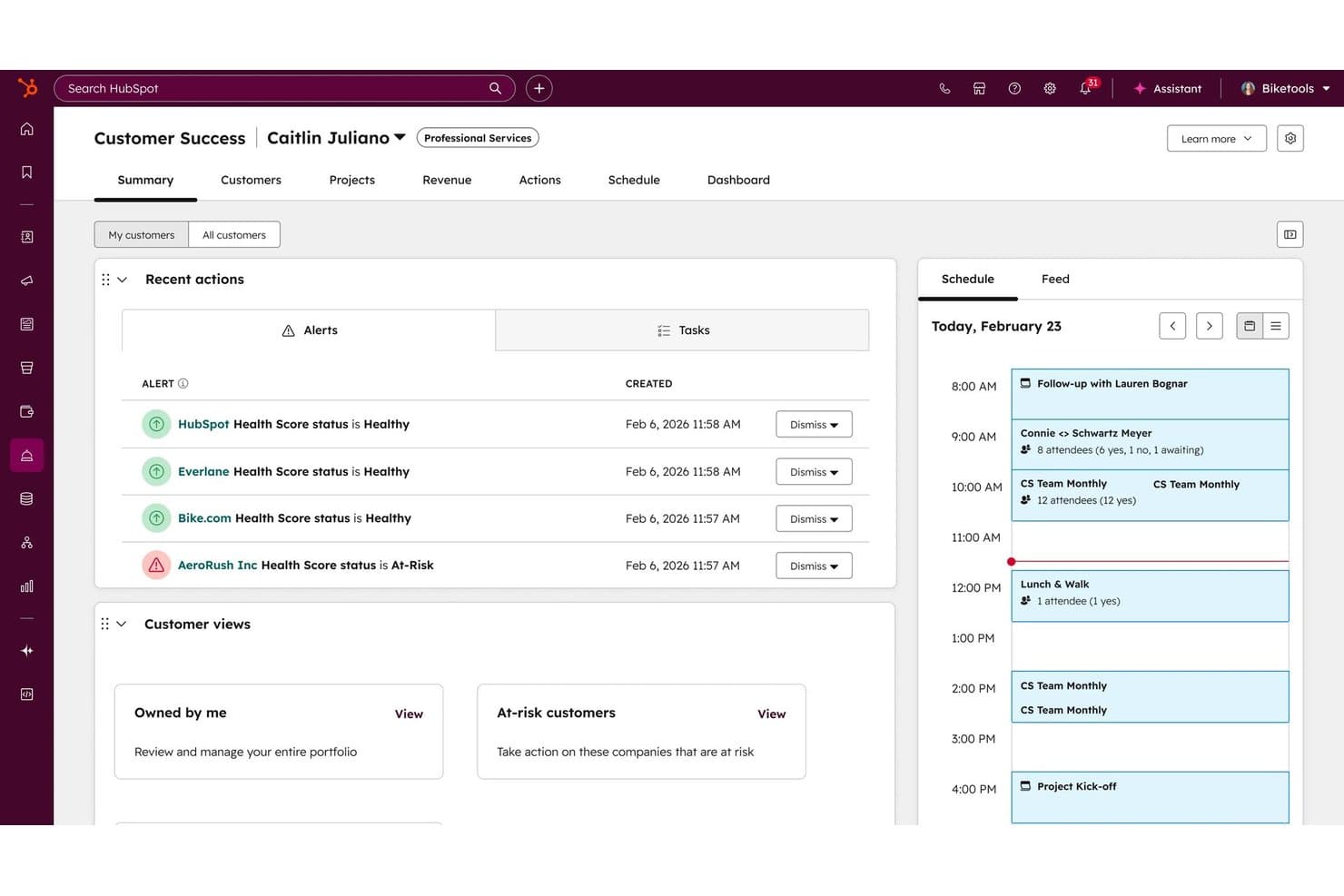
HubSpot Service Hub centralizes customer health alerts and daily schedules in one workspace. HubSpot Service Hub is an AI-powered help desk and ticketing platform that combines omni-channel support, SLA management, a knowledge base, and customer success tools within HubSpot's native CRM.
Who Is HubSpot Service Hub Best For?
It's a natural fit for mid-market teams already running sales and marketing on HubSpot who want support operations on the same platform.
Why I Picked HubSpot Service Hub
I've included HubSpot Service Hub in my top picks because the CRM integration isn't a bolt-on connector. Every ticket opens with the customer's full deal history, marketing touchpoints, and lifecycle stage already visible. I love how the Customer Success Workspace pulls health scoring and account data directly from the CRM, so my team can prioritize high-risk accounts without switching tools. The Customer Agent uses that same CRM context to personalize AI responses for email ticketing and live chat.
HubSpot Service Hub Key Features
- Omnichannel messaging: Manage customer inquiries from email, chat, social, phone, and SMS in a single agent workspace.
- Knowledge base management: Create, organize, and analyze a public-facing help center to deflect repetitive tickets.
- SLA management: Set custom SLA targets, automate escalation, and receive alerts if tickets approach breach.
- Service analytics dashboard: Track ticket volume, agent workload, and satisfaction metrics with prebuilt and customizable reports.
HubSpot Service Hub Integrations
HubSpot Service Hub offers native integrations with Salesforce, Slack, Jira, Zoom, Microsoft Teams, Shopify, Facebook Messenger, WhatsApp, and Mailchimp, plus Zapier and an API for custom integrations.
Pros and Cons
Pros:
- Customer health scores tied to open tickets
- AI agent handles chat and email replies
- Native CRM data visible on every ticket
Cons:
- Setup complexity grows with CRM data volume
- Advanced reporting locked behind higher tiers
Learn more about HubSpot Service Hub: Best for open source ticketing flexibility
- Free plan available
- From $12/user/month
Visit WebsiteCustomer Rating:4.3/5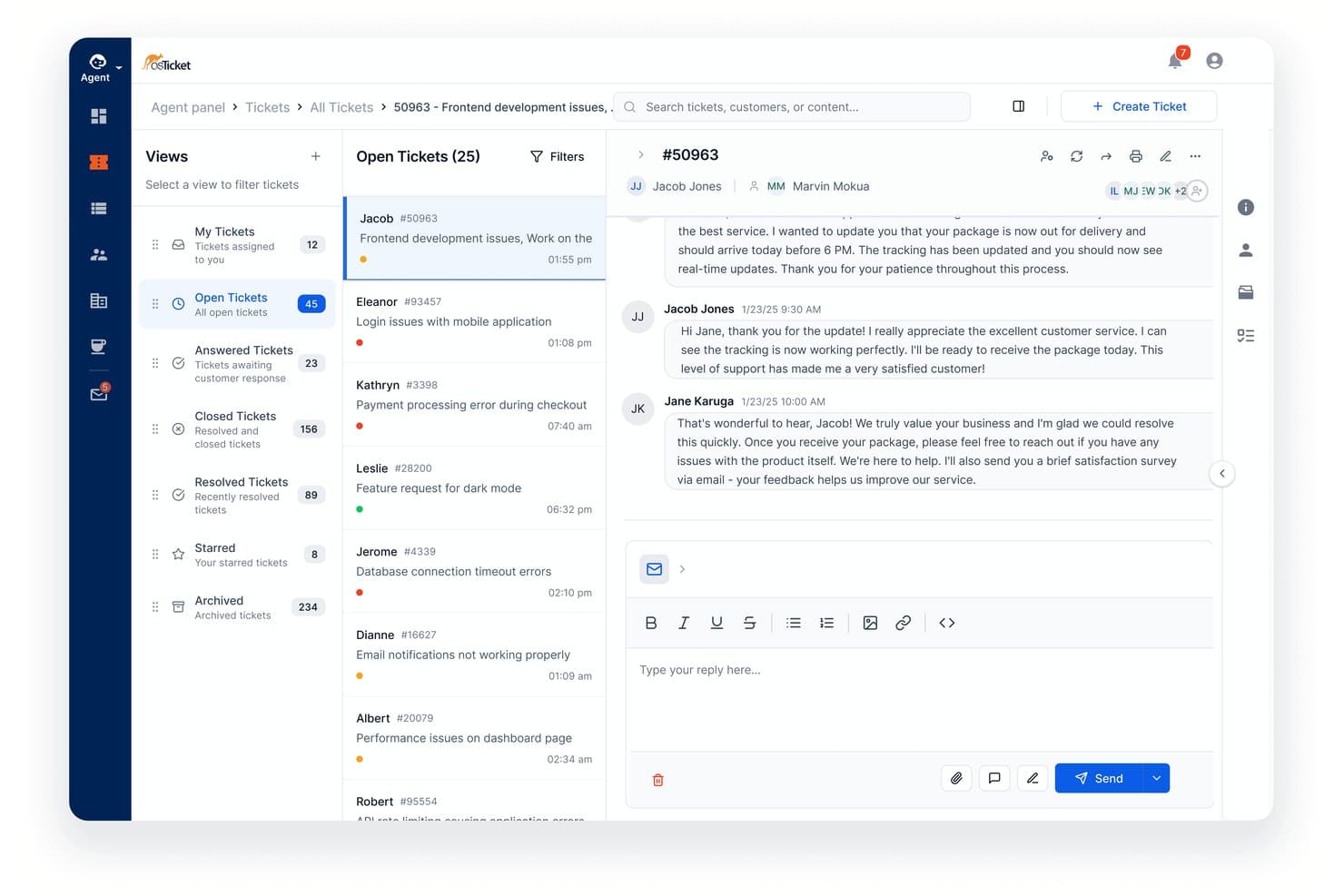
osTicket allows agents manage and reply to support tickets in one view. osTicket is an open-source ticketing system that consolidates email, web form, and API-based support requests into a unified queue with configurable routing, SLA tracking, and a customer-facing portal.
Who Is osTicket Best For?
It's a strong fit for small to mid-sized support teams with technical resources to self-host and a need for a fully customizable, zero-licensing-cost ticketing setup.
Why I Picked osTicket
I've included osTicket in my top picks because the level of structural customization it offers is rare in a free ticketing system. I like that you can build custom intake forms tied to specific help topics, so a billing ticket and a technical issue never share the same fields or queue. Ticket filters then let you define granular routing rules across multiple attributes, and since the source code is fully open, my team is able to modify behavior at the code level when built-in options fall short.
osTicket Key Features
- Agent collision avoidance: Locks tickets while an agent is replying to prevent simultaneous responses.
- Custom columns and queues: Lets you design views with fields and filters tailored to each team's process.
- Thread actions: Supports creating a new ticket or task directly from an entry within a ticket thread.
- Advanced search and export: Enables saving custom searches and exporting selected ticket data to CSV.
osTicket Integrations
Native integrations are not clearly documented. osTicket provides an API for custom integrations.
Pros and Cons
Pros:
- Ticket filters support granular multi-attribute routing
- Custom intake forms per help topic
- Self-hosted with full source code access
Cons:
- Reporting lacks customizable dashboards and CSAT tracking
- No native live chat channel support
 10Best for cross-team customer operations management
Front
- 14-day free trial
- From $25/user/month (billed annually)
Visit WebsiteCustomer Rating:4.6/5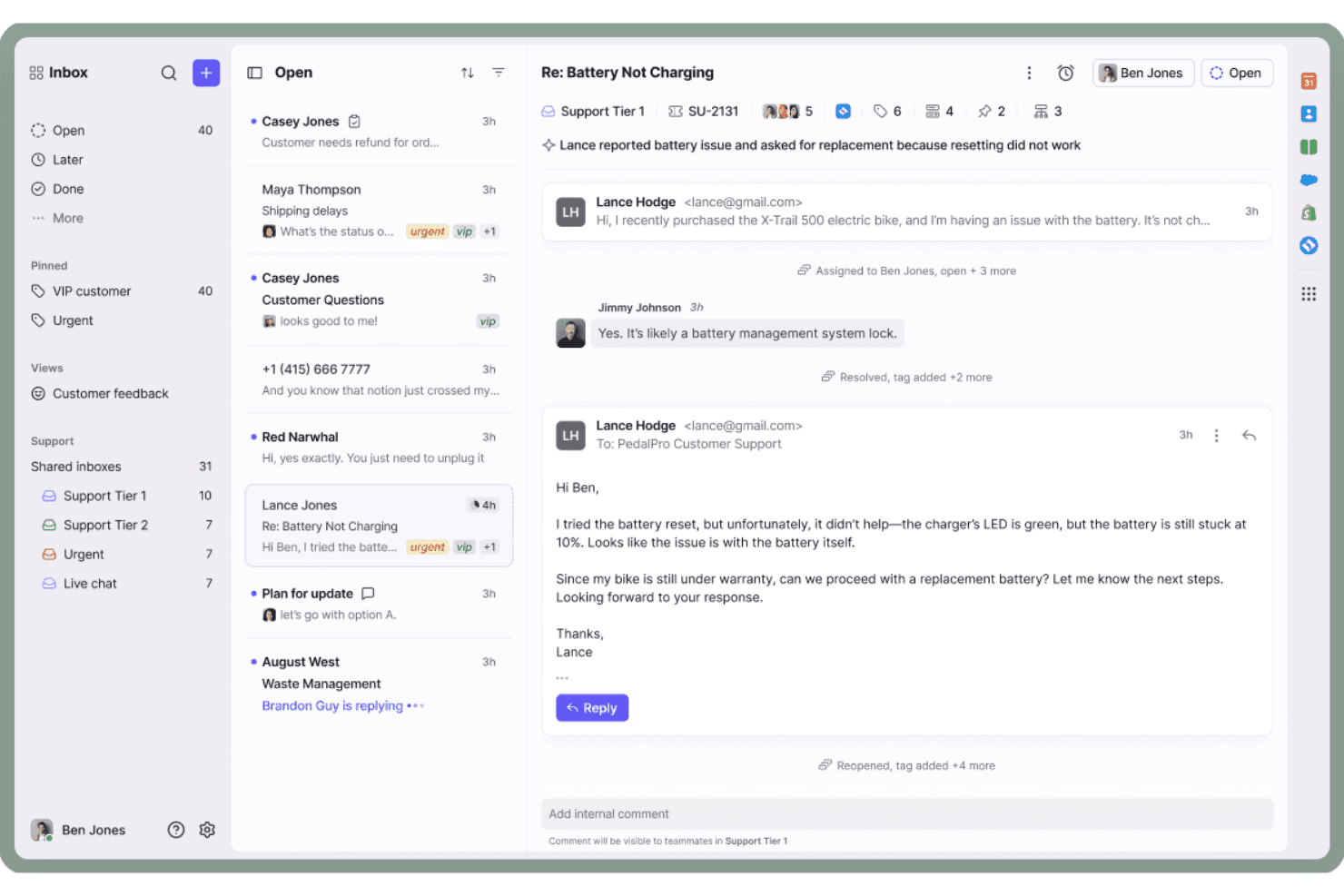
Front centralizes customer emails with threaded replies and team assignments. Front is a customer operations platform that combines shared inbox management, omnichannel ticketing, workflow automation, live chat, and a built-in knowledge base into a single collaborative workspace.
Who Is Front Best For?
Front is a strong fit for mid-sized teams where support, operations, and customer success work across the same conversations and need more than a traditional ticket queue.
Why I Picked Front
Front earns its spot as one of the best on my shortlist because of how it handles cross-team ticket ownership. I love that support, ops, and success agents can all work inside the same conversation thread using internal comments and assignments, without creating duplicate replies or losing context mid-resolution. Front's AI Topics automatically categorize incoming conversations, so my team can route and prioritize without relying on manual tagging across a high-volume shared inbox.
Front Key Features
- Omnichannel inbox: Consolidates email, chat, social, SMS, WhatsApp, and voice channels in one platform.
- Configurable SLAs: Lets you set, track, and escalate tickets against custom service level agreements.
- No-code knowledge base: Publishes public self-service help sites with article search and feedback collection.
- Real-time CX analytics: Provides dashboards for ticket volume, resolution times, CSAT, and team performance.
Front Integrations
Front offers 100+ native integrations, including Salesforce, HubSpot, Jira, Slack, Microsoft Teams, Aircall, Dialpad, WhatsApp, Shopify, and Asana. It connects with Zapier and provides an API for custom integrations.
Pros and Cons
Pros:
- Built-in CSAT tracking per conversation thread
- AI Topics auto-categorizes incoming conversations
- Shared inbox keeps all teams in sync
Cons:
- Not built for IT help desk workflows
- Search across archived conversations can be slow
Learn more about Front:
Diğer Yardım Masası Talep Yönetimi Yazılımları
Kısa listeme giremeyen ancak yine de göz atmaya değer bazı ek yardım masası talep yönetimi yazılımı seçenekleri şunlardır:
- 11ZendeskBest for AI-powered omnichannel automation
- 12FreshdeskBest for guided AI onboarding support
- 13Zoho DeskBest for fast self-service help center setup
- 14Agentforce Service (formerly Service Cloud)Best for complex enterprise service needs
- 15KayakoBest for unified customer journey views
- 16Jitbit HelpdeskBest for quick on-premise deployment
- 17Re:amazeBest for integrated live chat and ticketing
- 18ProProfs Help DeskBest for simple ticketing with shared inboxes
- 19GorgiasBest for ecommerce platform integration
- 20TidioBest for chatbot-driven ticket automation
How I Evaluate Help Desk Ticketing Software
I evaluate help desk platforms on two layers: baseline capabilities like SLA management, multi-channel intake, and ticket workflows, plus differentiators like AI triage and automation depth.
Core Functionality (Table Stakes For This List)
When I'm selecting tools for my list, I rank each one on a scale from 0 (does not offer the functionality) to 5 (excels in this area) for each core functionality listed below. I then calculate the tool's total score into a percentage, using 75% as a benchmark to help assess its overall fit for the list.
- Ticket Management: I look for full lifecycle tracking with status workflows, conversation threading, and custom fields so agents can handle anything from a simple password reset to a multi-touch billing dispute without losing context.
- Multi-Channel Intake: Every tool should consolidate inquiries from email, chat, social media, phone, and web forms into a single queue rather than forcing agents to jump between disconnected dashboards.
- Automated Routing & Assignment: I evaluate how the platform assigns incoming tickets—whether it uses round-robin, skill-based matching, or AI-driven intent detection to get the right issue to the right agent fast.
- SLA Management: Configurable SLA policies with escalation rules and breach alerts matter here, especially for teams juggling different response targets across customer tiers or regions.
- Knowledge Base & Self-Service: I check whether the platform offers a public-facing help center with search, categorization, and ideally AI-suggested articles so customers can resolve common questions before ever creating a ticket.
- Reporting & CX Analytics: Dashboards covering ticket volume, resolution times, CSAT, and agent performance give support leaders the visibility they need to spot bottlenecks and justify staffing decisions.
Once I have a list of tools that meet the criteria, I consider what sets each platform apart.
Differentiating Factors (What Sets Vendors Apart)
Here's how I compare and contrast different vendors:
Standout Features
AI-powered ticket triage is a major differentiator. I look for platforms where machine learning auto-categorizes and prioritizes incoming tickets, so a billing complaint gets flagged as urgent and routed to a specialist without manual sorting. Custom workflow automation also separates strong tools from basic ones. No-code rule builders that handle tagging, status updates, and follow-up notifications save agents from repetitive clicks they'd otherwise repeat hundreds of times a day.
Beyond Features
Integrations carry a lot of weight in my evaluation. I check whether a platform connects natively to CRMs like Salesforce or HubSpot and collaboration tools like Slack, plus whether it offers open APIs for custom builds. Pricing structure matters too—per-agent models can get expensive as your team scales, so I look at whether tiered or volume-based plans are available. Implementation speed is the other factor I focus on, especially whether migration tools exist to move tickets from a legacy system without losing history.
Yardım Masası Talep Yönetimi Yazılımı Nasıl Seçilir?
Hangi yardım masası talep yönetimi yazılımı ekibinizin destek önceliklerine ve iş akışı gereksinimlerine gerçekten uyuyor? Seçiminizi operasyonunuz için en önemli sonuçlarla uyumlu hâle getirmek üzere bu tabloyu kullanın:
| Önceliğiniz … ise | Şunları arayın … |
|---|---|
| Önceliğiniz … iseKanal boşlukları olmadan çok kanallı destek | Şunları arayın …E-posta, sohbet ve sosyal medya talepleri için birleşik gelen kutusu |
| Önceliğiniz … iseYanıt/çözüm sürelerini hedefte tutmak | Şunları arayın …Otomatik SLA uyarıları ve eskalasyon iş akışları |
| Önceliğiniz … iseTekrarlanan soruları yönlendirmek | Şunları arayın …Self servis bilgi tabanı ve yardım merkezi |
| Önceliğiniz … iseZamandan tasarruf sağlayan otomasyon | Şunları arayın …Kodsuz iş akışı oluşturucuları ve kural motorları |
| Önceliğiniz … iseCRM'nizle veya iş birliği araçları grubunuzla entegrasyon | Şunları arayın …Önceden oluşturulmuş bağlayıcılar ve açık API desteği |
Kısa Listeniz Nasıl Değerlendirilir?
- Çok kanallı bir test talebi oluşturun: En az üç kanaldan talep gönderin ve bunların kişi bazında konu akışı korunarak tek bir kuyruğa düşüp düşmediğini kontrol edin.
- SLA takibini ve eskalasyon kurulumunu inceleyin: Destek ekibinden sizi gerçek SLA ihlali uyarıları ve eskalasyon işlemleri üzerinden geçirmesini isteyin.
- Bilgi tabanının kullanılabilirliğini denetleyin: Bir yardım makalesi oluşturup yayımlayın, ardından bir iş arkadaşınızdan son kullanıcı olarak arama yoluyla bu makaleyi bulmasını isteyin.
- Entegrasyon belgelerini isteyin: Güncel API belgelerini veya yerel üçüncü taraf bağlayıcılarının listesini talep edin; kapsamını ve anlaşılabilirliğini inceleyin.
- Takas—Basitlik ve özelleştirme: Platformlar nadiren her ikisini de eşit ölçüde sunduğundan, kullanıma hazır kurulumu kapsamlı özelleştirmeye tercih edip etmediğinize karar verin.
Yardım Masası Talep Yönetimi Yazılımı Nedir?
Yardım masası biletleme yazılımı, ekibinizin tüm destek kanallarından gelen müşteri taleplerini tek bir merkezi çalışma alanında toplamak, düzenlemek ve çözmek için kullandığı platformdur. Her destek talebinin durumunu takip eder, atama ve eskalasyon süreçlerini otomatikleştirir ve her sorunla ilgili etkileşimlerin eksiksiz kaydını tutar. Bu sayede destek ekipleri daha hızlı yanıt verir, SLA'lara tutarlı biçimde uyar ve geçmiş görüşmelerden oluşan aranabilir bir arşiv oluşturur.
Özellikler
Yardım masası biletleme yazılımı seçerken aşağıdaki temel özelliklere dikkat edin:
- Destek talebi yönetimi: Her olayı, soruyu veya isteği bir destek talebi olarak takip eder, güncellemeleri kaydeder, durumu atar ve ilk alımdan çözüme kadar tüm müşteri etkileşimlerinin geçmişini oluşturur.
- Çok kanallı destek: E-posta, sohbet, web formları, telefon ve sosyal medyadan gelen mesajları birleştirerek temsilcilerin tek ve birleşik bir gelen kutusundan çalışmasını sağlar.
- Otomatik yönlendirme: Destek taleplerini temsilcilerin becerilerine, iş yüküne veya talebin aciliyetine göre atamak ve önceliklendirmek için kuralları veya yapay zekâyı kullanır; böylece müşterilerin hızla doğru kişiye ulaşmasını sağlar.
- SLA takibi: Yanıt ve çözüm sürelerini izler, hizmet düzeyi anlaşmalarının riske girdiği veya ihlal edildiği durumlarda uyarıları ve eskalasyonları tetikler.
- Self servis portalı: Müşterilere sık sorulan sorulara, yardım makalelerine ve aranabilir bir bilgi tabanına erişim sağlayarak yaygın sorunları temsilci desteği olmadan çözmelerine yardımcı olur.
- Raporlama ve analiz: Destek talebi hacmi, çözüm süresi, CSAT ve müşteri sorunlarındaki eğilimler gibi ekip ölçümlerini görselleştirerek yöneticilerin verilere dayalı kararlar almasına yardımcı olur.
- Dahili iş birliği araçları: Temsilcilerin özel notlar eklemesini, iş arkadaşlarından bahsetmesini veya bağlam paylaşmak ve sorunları ekip olarak çözmek için destek talepleri içinde yan görüşmeler başlatmasını sağlar.
- Özel iş akışı otomasyonu: Yöneticilerin daha iyi tutarlılık ve hız için etiketleme, bildirimler veya destek talebi eskalasyonu gibi tekrarlayan süreçleri otomatikleştirecek kurallar oluşturmasına olanak tanır.
- Entegrasyon özellikleri: CRM, iş birliği ve işletme araçlarına bağlanarak temsilcilerin müşteri bağlamına erişmesini, platformlar arası işlemleri tetiklemesini veya hizmet verileriyle ilgili raporlar oluşturmasını sağlar.
- Özelleştirilebilir alanlar ve formlar: Ekiplerin işletme ihtiyaçlarına özgü bilgileri toplamak için özel veri alanları, destek talebi türleri ve başvuru formları oluşturmasına olanak tanır.
Faydalar
Yardım masası biletleme yazılımını uygulamak, ekibiniz ve işletmeniz için çeşitli faydalar sağlar. Yararlanabileceğiniz avantajlardan bazıları şunlardır:
- Daha hızlı yanıt süreleri: Otomatik yönlendirme ve birleşik destek talebi kuyruğu, temsilcilerin acil sorunları gözden kaçırmadan herhangi bir kanaldan gelen talepleri ele almasına yardımcı olur.
- Tutarlı müşteri deneyimleri: İş akışı otomasyonu, SLA takibi ve görüşme geçmişi, destek süreçlerinin izlenmesini ve her müşterinin güvenilir hizmet almasını sağlar.
- Daha yüksek ekip verimliliği: Self servis seçenekleri, dahili iş birliği özellikleri ve özel iş akışları temsilcilerin zamanını boşa çıkarır ve tekrarlayan manuel işleri azaltır.
- Verilere dayalı iyileştirmeler: Raporlama ve analiz, yöneticilere performans eğilimleri, destek talebi hacmi ve müşteri memnuniyeti hakkında görünürlük sağlayarak operasyonları optimize etmelerine yardımcı olur.
- Daha kolay ölçeklenebilirlik: Çok kanallı talep alımı, entegrasyon özellikleri ve esnek kullanıcı yönetimi, işletmeniz büyüdükçe destek operasyonunuzu genişletmenizi veya uyarlamanızı kolaylaştırır.
- Daha yüksek müşteri memnuniyeti: Hızlı çözümler, kendi kendine yardım seçenekleri ve kişiselleştirilmiş destek, geri dönme olasılığı daha yüksek olan daha memnun müşteriler sağlar.
- Merkezi bilgi yönetimi: Bilgi tabanları ve aranabilir destek talebi arşivleri, temsilci uzmanlığını kaydeder ve yeni ekip üyelerinin hızla işe uyum sağlamasını kolaylaştırır.
Maliyetler ve Fiyatlandırma
Yardım masası biletleme yazılımı seçmek, mevcut çeşitli fiyatlandırma modellerini ve planları anlamayı gerektirir. Maliyetler özelliklere, ekip büyüklüğüne, eklentilere ve daha fazlasına göre değişir. Aşağıdaki tabloda yaygın planlar, ortalama fiyatları ve yardım masası biletleme yazılımı çözümlerinde genellikle bulunan özellikler özetlenmiştir:
Plan Karşılaştırma Tablosu
| Plan Türü | Ortalama Fiyat | Yaygın Özellikler |
|---|---|---|
| Plan TürüÜcretsiz Plan | Ortalama Fiyat$0 | Yaygın ÖzelliklerTemel destek talebi yönetimi, sınırlı kanallar, e-posta desteği ve basit bir bilgi tabanı. |
| Plan TürüKişisel Plan | Ortalama Fiyat$5-$25/kullanıcı/ay | Yaygın ÖzelliklerÇok kanallı talep alımı, temel otomasyon, SLA takibi, raporlama ve diğer yazılımlarla entegrasyonlar. |
| Plan Türüİşletme Planı | Ortalama Fiyat$25-$60/kullanıcı/ay | Yaygın ÖzelliklerGelişmiş iş akışı otomasyonu, özel alanlar, performans panoları, dahili iş birliği ve API erişimi. |
| Plan TürüKurumsal Plan | Ortalama Fiyat$60-$150/kullanıcı/ay | Yaygın ÖzelliklerÖzel SLA'lar, güvenlik seçenekleri, denetim günlükleri, premium destek, özel işe alıştırma ve gelişmiş entegrasyonlar. |
Yardım Masası Taleplerini Yönetme Yazılımı SSS
Yardım masası taleplerini yönetme yazılımı hakkında sık sorulan soruların bazı yanıtları:
Yardım masası yazılımıyla hangi kanalları yönetebilirim?
E-posta, canlı sohbet, web formları, sosyal medya ve bazen telefon ya da mesajlaşma uygulamalarından gelen müşteri taleplerini tek bir birleşik gelen kutusunda yönetebilirsiniz.
Yardım masası taleplerini yönetme yazılımı, talepleri otomatik olarak atayabilir mi?
Evet, çoğu sistem; öncelik, beceriler veya iş yüküne göre talepleri doğru temsilciye ya da ekibe otomatik olarak atayan, kurallara dayalı veya yapay zekâ destekli yönlendirme sunar.
Yardım masası taleplerini yönetme yazılımında SLA takibi nasıl çalışır?
SLA takibi, yanıt ve çözüm son tarihlerini belirlemenize olanak tanır; ardından talepleri bu kurallara uygunluk açısından izler ve hedeflerin karşılanamama riski varsa uyarılar veya üst kademeye aktarımlar gönderir.
Müşterilerin sorunlarını kendi başlarına çözmesinin bir yolu var mı?
Evet, birçok platformda müşterilerin istedikleri zaman yanıt bulabileceği, talep gönderebileceği ve talep durumunu kontrol edebileceği bir self servis portalı veya bilgi bankası bulunur.
Yardım masası taleplerini yönetme yazılımından hangi entegrasyonları beklemeliyim?
Popüler CRM platformları, ekip sohbeti araçları ve üretkenlik uygulamalarının yanı sıra özel bağlantılar için API erişimiyle entegrasyonlar beklemelisiniz.