

10 alternativas a Power BI para la visualización de datos en 2026

10 Lista de las mejores alternativas a Power BI


Una alternativa sólida a Power BI ofrece a tu equipo un modelado de datos flexible, paneles interactivos y una integración fiable con tus fuentes de datos actuales. Si buscas opciones más allá de Power BI, probablemente necesites una plataforma de inteligencia empresarial que se adapte a tus necesidades de generación de informes, sea compatible con tus flujos de trabajo y encaje con la escala de tu organización.
Esta lista te ayudará a comparar las principales alternativas a Power BI y destaca lo que cada herramienta hace mejor para que puedas tomar una decisión informada sobre tu estrategia de análisis.
¿Qué es Power BI?
Power BI es una herramienta de inteligencia empresarial de Microsoft que ayuda a las organizaciones a visualizar, analizar y compartir información obtenida de los datos. Se conecta con diversas fuentes de datos, lo que permite a los usuarios crear paneles e informes que respaldan la toma de decisiones basada en la nube. Power BI es ampliamente utilizado por analistas, equipos de datos y responsables empresariales que necesitan sólidas capacidades de análisis e información en tiempo real para supervisar el rendimiento e identificar tendencias.
La plataforma incluye funciones avanzadas para el modelado y la transformación de datos, pero algunos usuarios pueden enfrentarse a una curva de aprendizaje pronunciada al trabajar con flujos de trabajo más complejos. Aunque ofrece una interfaz fácil de usar para la generación de informes básicos, determinados casos de uso siguen requiriendo conocimientos técnicos, especialmente en los niveles empresariales del análisis de datos.
Tabla comparativa de alternativas a Power BI
Esta tabla comparativa resume los detalles de precios de mis principales alternativas seleccionadas a Power BI:
| Tool | Best For | Trial Info | Price | ||
|---|---|---|---|---|---|
| 1 | Ideal para análisis y arquitectura de lakehouse de datos | Prueba gratuita de 14 días + plan gratuito disponible | Precios bajo solicitud | Website | |
| 2 | La mejor para exploración visual interactiva | Prueba gratuita + plan gratuito disponible | Desde $15/usuario/mes (facturado anualmente) | Website | |
| 3 | Ideal para la personalización de analítica embebida | Plan gratuito disponible | Desde $9/usuario/proyecto/mes | Website | |
| 4 | Ideal para compartir paneles en tiempo real | Prueba gratuita de 30 días + demo gratis disponible | Precios a solicitud | Website | |
| 5 | Ideal para integración de datos compleja | Prueba gratuita de 7 días + demostración gratuita disponible | Precio a consultar | Website | |
| 6 | Ideal para la alineación de la planificación empresarial | Demo gratuita disponible | Precios disponibles bajo solicitud | Website | |
| 7 | Ideal para información de datos impulsada por IA | Prueba gratuita de 30 días disponible | Desde $11.25/usuario/mes | Website | |
| 8 | Ideal para personalización de analítica embebida | Plan gratuito disponible | Precio bajo solicitud | Website | |
| 9 | Ideal para el seguimiento de clientes en múltiples canales | Plan gratuito + demo gratuita disponible | Precio a consultar | Website | |
| 10 | Ideal para modelado de datos asociativo | Prueba gratuita disponible | Desde $300/10 usuarios/mes (facturado anualmente) | Website |

Por qué confiar en nuestras recomendaciones de software
Nuestro equipo lleva probando y evaluando software desde 2012. Como líderes de CX, sabemos lo difícil —y lo importante— que es elegir el software adecuado.
Para esta guía, evaluamos las herramientas mediante pruebas prácticas e investigación independiente, puntuando las herramientas según nuestros criterios de selección.
Nuestras reseñas reflejan nuestro criterio editorial humano, no un discurso de ventas.
Análisis de alternativas a Power BI
A continuación se muestran mis resúmenes detallados de las mejores alternativas a Power BI que llegaron a mi lista. Mis análisis ofrecen una visión detallada de las funciones, integraciones y mejores casos de uso de cada plataforma para ayudarte a encontrar la más adecuada para ti.
Ideal para análisis y arquitectura de lakehouse de datos
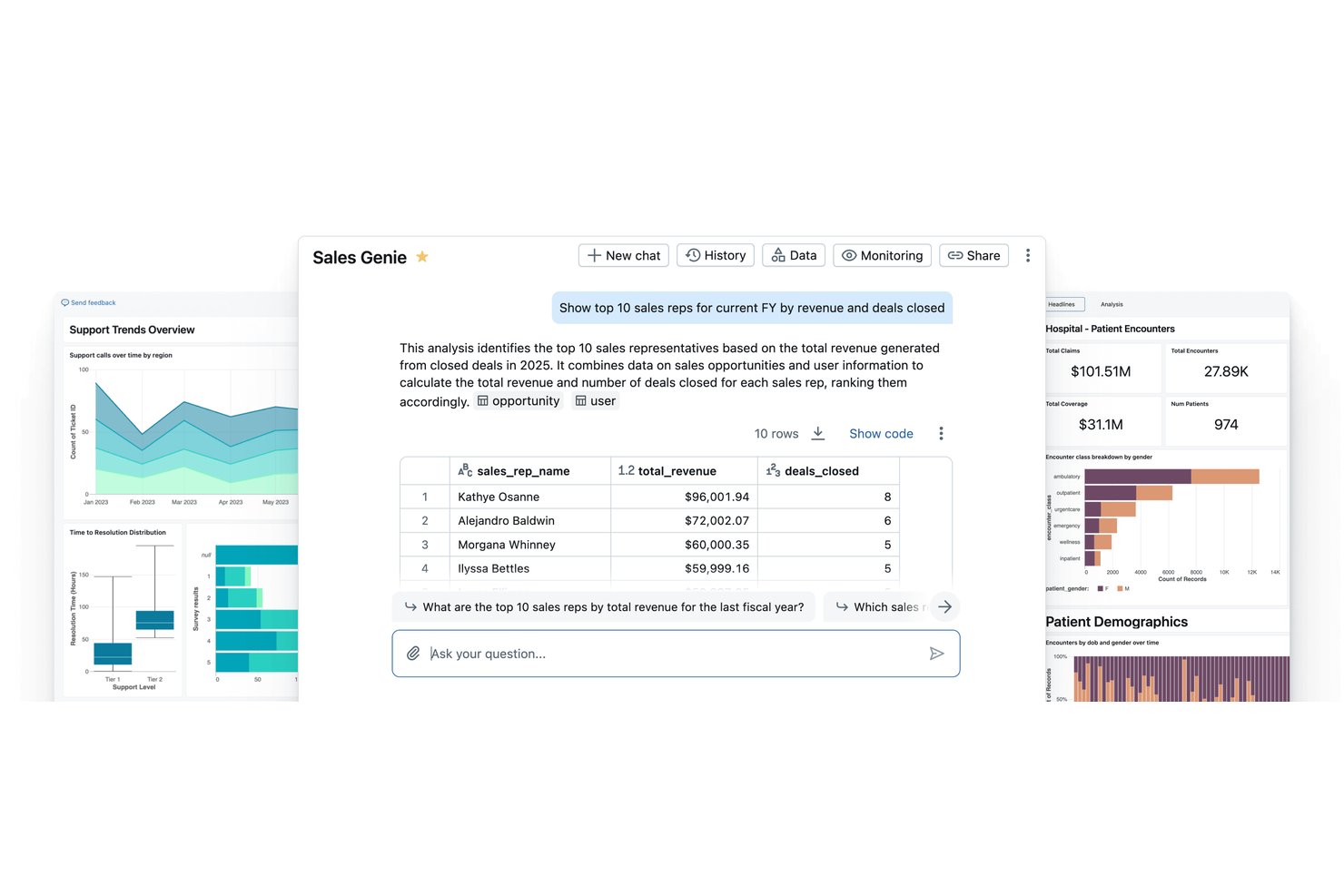
Databricks es una plataforma de lakehouse de datos diseñada para equipos de ingeniería de datos e IA que necesitan unificar canalizaciones de datos a gran escala, análisis y aprendizaje automático en un único entorno gobernado.
¿Para quién es más adecuado Databricks?
Databricks es una opción muy adecuada para equipos empresariales de datos e IA que gestionan canalizaciones de datos complejas y de gran volumen en distintos entornos de nube.
Por qué elegí Databricks como una buena alternativa a Power BI
Elegí Databricks como una de las mejores opciones porque reúne en un único lakehouse gobernado lo que Power BI requiere dos plataformas para hacer: procesamiento de datos e inteligencia empresarial. Me gusta que Unity Catalog aplique simultáneamente una única capa de gobernanza a los datos, los paneles y los modelos de IA, de modo que mi equipo no tenga que gestionar permisos en herramientas desconectadas. Genie, la interfaz de lenguaje natural integrada en los paneles de IA/BI, permite a mi equipo consultar de forma conversacional los datos activos del lakehouse sin escribir SQL.
Características principales de Databricks
- Orquestación de Lakeflow: Orquesta canalizaciones complejas de ETL y datos en streaming en múltiples fuentes y destinos.
- Control de versiones de Delta Lake: Mantén versiones históricas de los conjuntos de datos para obtener un linaje de datos completo, realizar reversiones y facilitar las auditorías.
- Integraciones de Partner Connect: Conecta rápidamente herramientas externas de BI, ML y datos mediante el ecosistema de integraciones de Databricks.
- Gobernanza de Unity Catalog: Aplica políticas unificadas de seguridad, auditoría y gobernanza de datos a todos los activos analíticos de la plataforma.
Integraciones de Databricks
Databricks ofrece integraciones nativas con Salesforce, Google BigQuery, Amazon Redshift, Snowflake, Google Sheets y Tableau, además de proporcionar una API para integraciones personalizadas.
Pros and Cons
Pros:
- Unifica de forma nativa la ingeniería de datos y la BI
- Gestiona conjuntos de datos masivos a escala empresarial
- Los paneles de IA/BI admiten consultas en lenguaje natural
Cons:
- Requiere conocimientos de SQL para la mayoría de los análisis
- No está diseñado para usuarios empresariales no técnicos

Tableau
La mejor para exploración visual interactiva
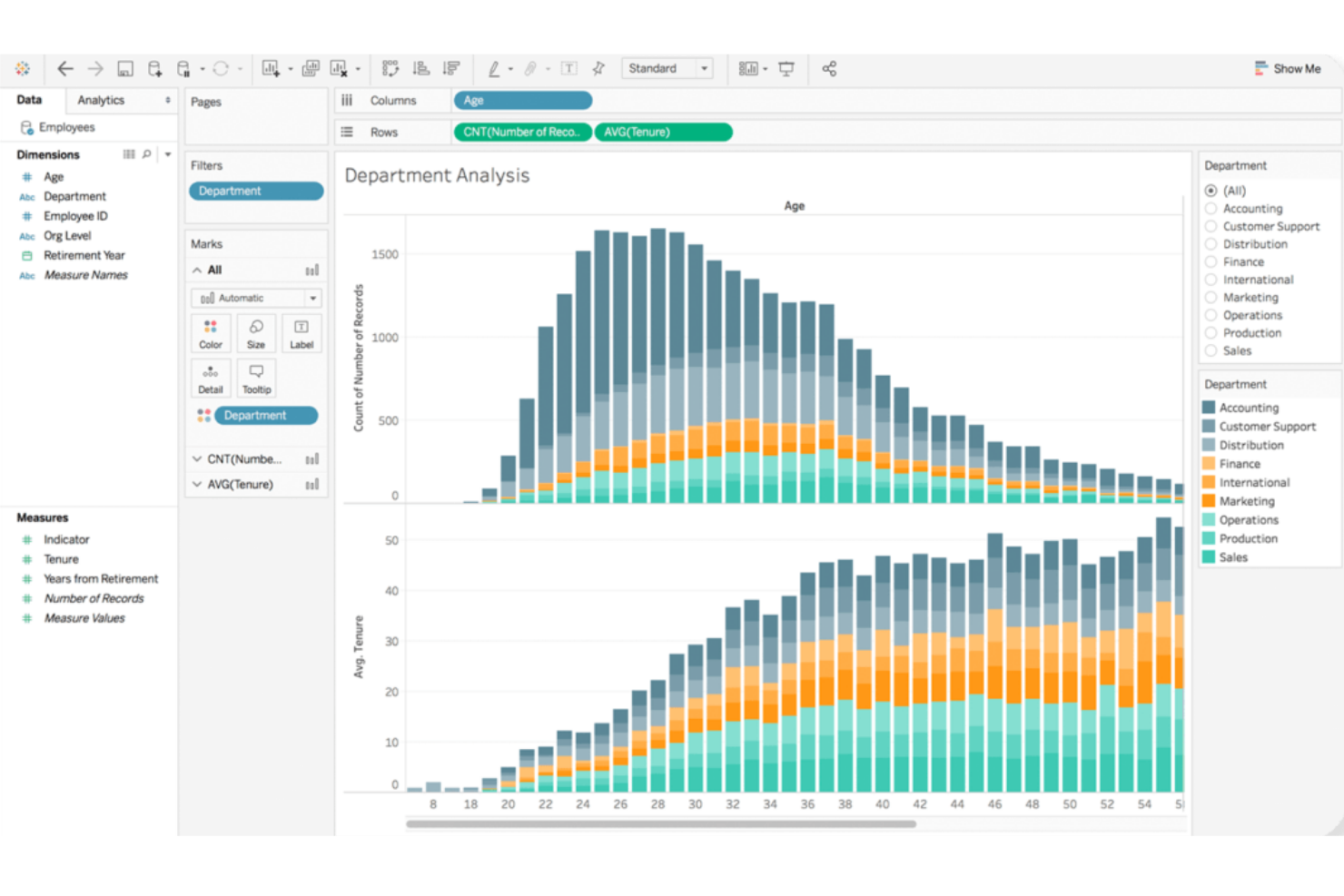
Tableau destaca para equipos que necesitan una exploración de datos altamente interactiva y visual. Es una excelente opción para analistas y usuarios de negocio que quieren profundizar en conjuntos de datos complejos y descubrir información a través de paneles intuitivos de arrastrar y soltar. Si tu organización valora narrativas flexibles y visuales con datos, Tableau ofrece un enfoque diferente al estilo de reporteo más estructurado de Power BI.
Por qué Tableau es una buena alternativa a Power BI
La fortaleza de Tableau en la exploración visual e interactiva lo convierte en una de las mejores opciones para equipos que quieren ir más allá de paneles estáticos. Elegí Tableau por su capacidad para permitir a los usuarios profundizar en los datos, filtrar de manera instantánea y crear visualizaciones personalizadas con simples acciones de arrastrar y soltar. El motor VizQL de la plataforma traduce las acciones del usuario en consultas, por lo que puedes ver los cambios reflejados al instante en tus gráficos y tablas. Este nivel de interactividad ayuda a detectar tendencias y atípicos que podrían pasarse por alto con herramientas de reporteo más rígidas como Power BI.
Características clave de Tableau
Otras características de Tableau que pueden interesar a tu equipo incluyen:
- Preparación de datos con Tableau Prep: Prepara, limpia y da forma a tus datos visualmente antes del análisis usando la interfaz dedicada de Tableau Prep.
- Conexiones de datos en tiempo real y en memoria: Conéctate a los datos en tiempo real o utiliza extractos en memoria para un mejor rendimiento, según tus necesidades.
- Colaboración y compartición: Comparte paneles de manera segura con colegas o partes interesadas a través de Tableau Server o Tableau Cloud.
- Paneles optimizados para móviles: Diseña paneles que se ajustan automáticamente para dispositivos móviles, facilitando el acceso a la información desde cualquier lugar.
Integraciones de Tableau
Las integraciones incluyen Salesforce CRM, Google Analytics, Amazon Redshift, Snowflake, Microsoft SQL Server, Oracle, SAP HANA, Google BigQuery, Dropbox y ServiceNow.
Pros and Cons
Pros:
- Creación de paneles altamente flexible mediante arrastrar y soltar
- Fuerte soporte para visualizaciones de datos avanzadas
- Maneja grandes y complejos conjuntos de datos sin problemas
Cons:
- Mayores requerimientos de recursos para implementaciones locales
- Los cálculos personalizados pueden ser complejos de implementar

Looker
Ideal para la personalización de analítica embebida

Si tu equipo necesita entregar análisis altamente personalizados dentro de tus propios productos o portales, Looker está diseñado para ofrecer flexibilidad en la analítica embebida. Resulta atractivo para proveedores de SaaS, responsables de producto y equipos de datos que desean controlar la apariencia, experiencia e interactividad de los análisis para los usuarios finales. A diferencia de Power BI, la capa de modelado de Looker y su enfoque basado en API permiten personalizar las experiencias de datos e integrar el análisis directamente en tus flujos de trabajo.
Por qué Looker es una buena alternativa a Power BI
Looker destaca para equipos que necesitan integrar analítica directamente en sus propios productos o portales orientados al cliente. Elegí Looker porque su capa semántica de modelado (LookML) permite definir y reutilizar la lógica de negocio, lo que facilita mantener análisis coherentes en diferentes entornos.
Las API y herramientas para desarrolladores te permiten personalizar paneles, visualizaciones y experiencias de usuario mucho más allá de lo que Power BI usualmente ofrece para casos de uso embebidos. Esto convierte a Looker en una opción sólida si quieres ofrecer análisis personalizados que se adapten a tu marca y requisitos de flujo de trabajo.
Características clave de Looker
Otras características de Looker que pueden ser valiosas para tu equipo incluyen:
- Reportes programados: Automatiza la entrega de informes a usuarios o grupos de acuerdo a una agenda definida.
- Interfaz de exploración de datos: Los usuarios pueden profundizar, filtrar y pivotar datos directamente desde los paneles.
- Seguridad a nivel de fila: Controla el acceso a los datos a nivel granular para distintos usuarios o grupos.
- Integración con control de versiones: Gestiona modelos LookML y recursos analíticos usando control de versiones basado en Git.
Integraciones de Looker
Entre las integraciones se incluyen BigQuery, Snowflake, Redshift, Databricks, Microsoft SQL Server, PostgreSQL, MySQL, Oracle, Google Sheets y Salesforce.
Pros and Cons
Pros:
- LookML permite modelar lógica de negocio reutilizable
- Opciones de integración permiten una integración profunda en productos
- Entrega programada de informes y paneles
Cons:
- Sin soporte nativo para despliegue local
- Requiere conocimientos de SQL para modelado avanzado
Domo
Ideal para compartir paneles en tiempo real
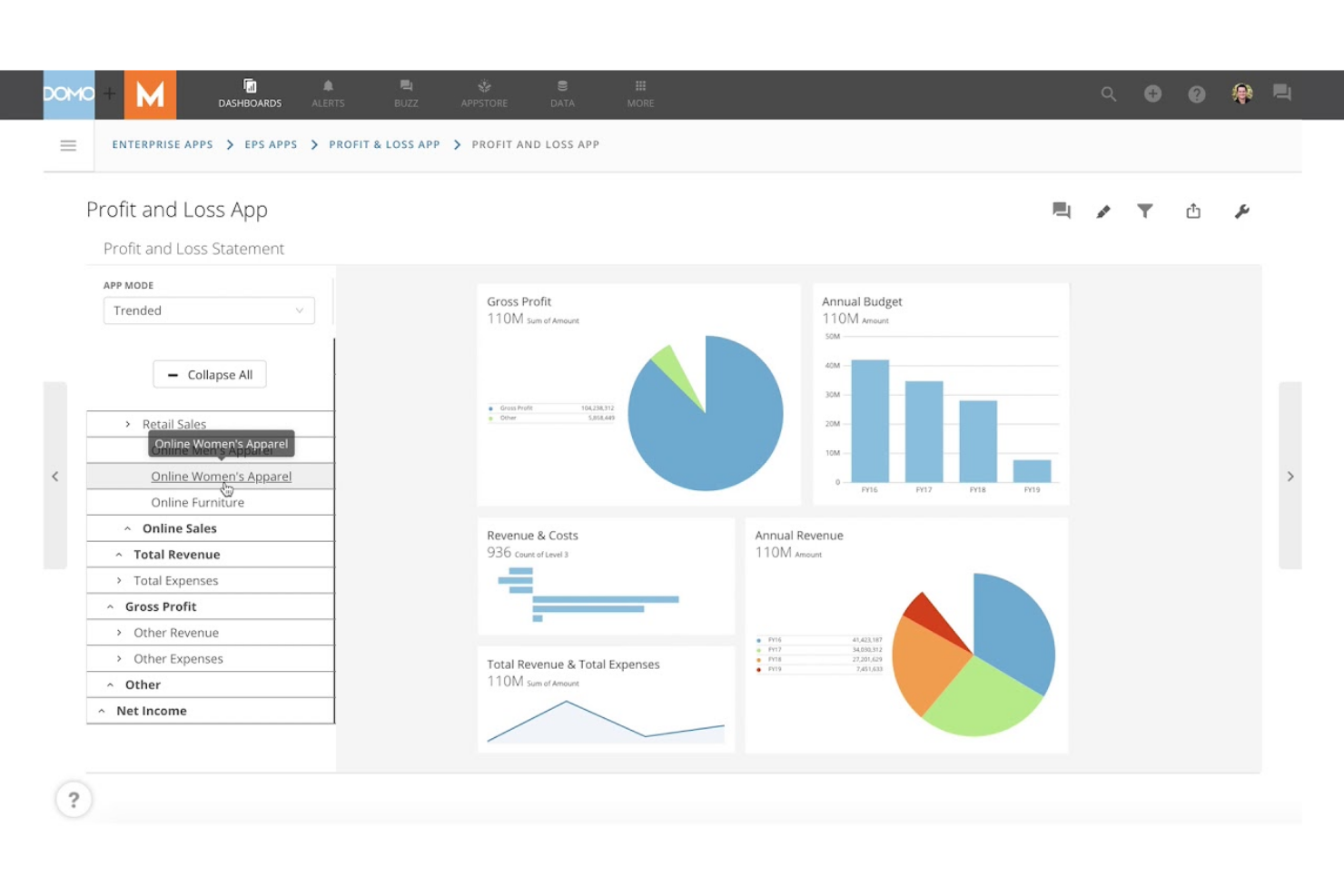
Domo está diseñado para equipos que necesitan compartir paneles en vivo y actualizaciones de datos entre departamentos o ubicaciones. Es especialmente útil para líderes de operaciones, analistas y ejecutivos que dependen de información actualizada al minuto para tomar decisiones rápidas. A diferencia de Power BI, Domo enfatiza la colaboración y el intercambio de datos en tiempo real, para que todos estén alineados tan pronto como haya nueva información disponible.
Por qué Domo es una buena alternativa a Power BI
Si tu equipo necesita compartir paneles y datos en tiempo real, Domo está hecho para exactamente ese propósito. Elegí Domo porque permite publicar paneles en vivo que se actualizan al instante a medida que llegan nuevos datos, por lo que todos ven los mismos números al mismo tiempo.
Domo también ofrece funciones interactivas de intercambio, incluyendo alertas personalizables y acceso móvil, lo que ayuda a mantener a los equipos distribuidos conectados con los últimos datos. Este enfoque en la colaboración en tiempo real convierte a Domo en una sólida alternativa a Power BI para organizaciones que no pueden esperar los refrescos programados.
Características clave de Domo
Otras características de Domo que pueden ser valiosas para tu equipo incluyen:
- Kit de herramientas para crear aplicaciones: Crea aplicaciones de datos personalizadas usando herramientas de arrastrar y soltar y plantillas preconstruidas.
- Transformación de datos (Magic ETL): Limpia, une y transforma datos de forma visual sin necesidad de programar código.
- Controles de gobernanza de datos: Establece permisos detallados y monitorea el uso de datos en toda tu organización.
- Conectores de datos preconstruidos: Conéctate a cientos de fuentes de datos, incluyendo aplicaciones en la nube, bases de datos y hojas de cálculo.
Integraciones de Domo
Las integraciones incluyen Salesforce, Google Analytics, Facebook Ads, Twitter, Instagram, Shopify, HubSpot, Marketo, LinkedIn y Microsoft Dynamics.
Pros and Cons
Pros:
- Actualizaciones en tiempo real en los paneles para visibilidad instantánea
- Magic ETL permite la transformación visual de datos
- La aplicación móvil permite acceso a los datos en cualquier lugar
Cons:
- Los precios no son transparentes ni están publicados públicamente
- Las analíticas avanzadas requieren complementos adicionales
Sisense
Ideal para integración de datos compleja

Para equipos que manejan datos de muchas fuentes y formatos, Sisense ofrece capacidades avanzadas para una integración de datos compleja. Es una excelente opción para ingenieros de datos, líderes de analítica y equipos de TI que necesitan combinar, transformar y analizar conjuntos de datos grandes o dispares. A diferencia de Power BI, la tecnología in-chip de Sisense y su modelado de datos flexible te ayudan a unificar y consultar datos en la nube, en local y en entornos híbridos sin necesidad de un preprocesamiento intensivo.
Por Qué Sisense Es una Buena Alternativa a Power BI
Si tu empresa necesita reunir datos de un amplio rango de fuentes, Sisense está diseñado para escenarios complejos de integración de datos. Elegí Sisense porque su tecnología Elasticube te permite combinar y modelar datos de entornos en la nube, locales e híbridos sin una preparación de datos pesada.
El motor de análisis in-chip procesa rápidamente grandes volúmenes de datos, soportando análisis en tiempo real incluso cuando los datos están muy fragmentados. Esto convierte a Sisense en una excelente elección para organizaciones que necesitan unificar y analizar datos de sistemas múltiples que, a menudo, son incompatibles entre sí.
Características Clave de Sisense
Otras características de Sisense que pueden ser útiles para tu equipo incluyen:
- Etiquetado blanco (White-Labeling): Personaliza paneles y análisis con tu propia marca e identidad visual.
- Información Impulsada por IA: Utiliza funciones integradas de IA para detectar automáticamente tendencias y anomalías en tus datos.
- Constructor de Dashboards con Arrastrar y Soltar: Crea paneles interactivos sin escribir código.
- Controles de Acceso Basados en Roles: Configura permisos detallados para usuarios y grupos para gestionar la visibilidad y acciones sobre los datos.
Integraciones de Sisense
Las integraciones incluyen Snowflake, Amazon Redshift, Google BigQuery, Databricks, Azure Synapse, MySQL, PostgreSQL, Oracle, Microsoft SQL Server y Salesforce.
Pros and Cons
Pros:
- Maneja conjuntos de datos grandes y complejos sin demoras
- El etiquetado blanco permite portales analíticos personalizados
- El procesamiento in-chip acelera el rendimiento de los paneles
Cons:
- Los cambios en el modelo de datos requieren un reindexado completo
- Tipos de visualización limitados en comparación con la competencia

Ideal para la alineación de la planificación empresarial
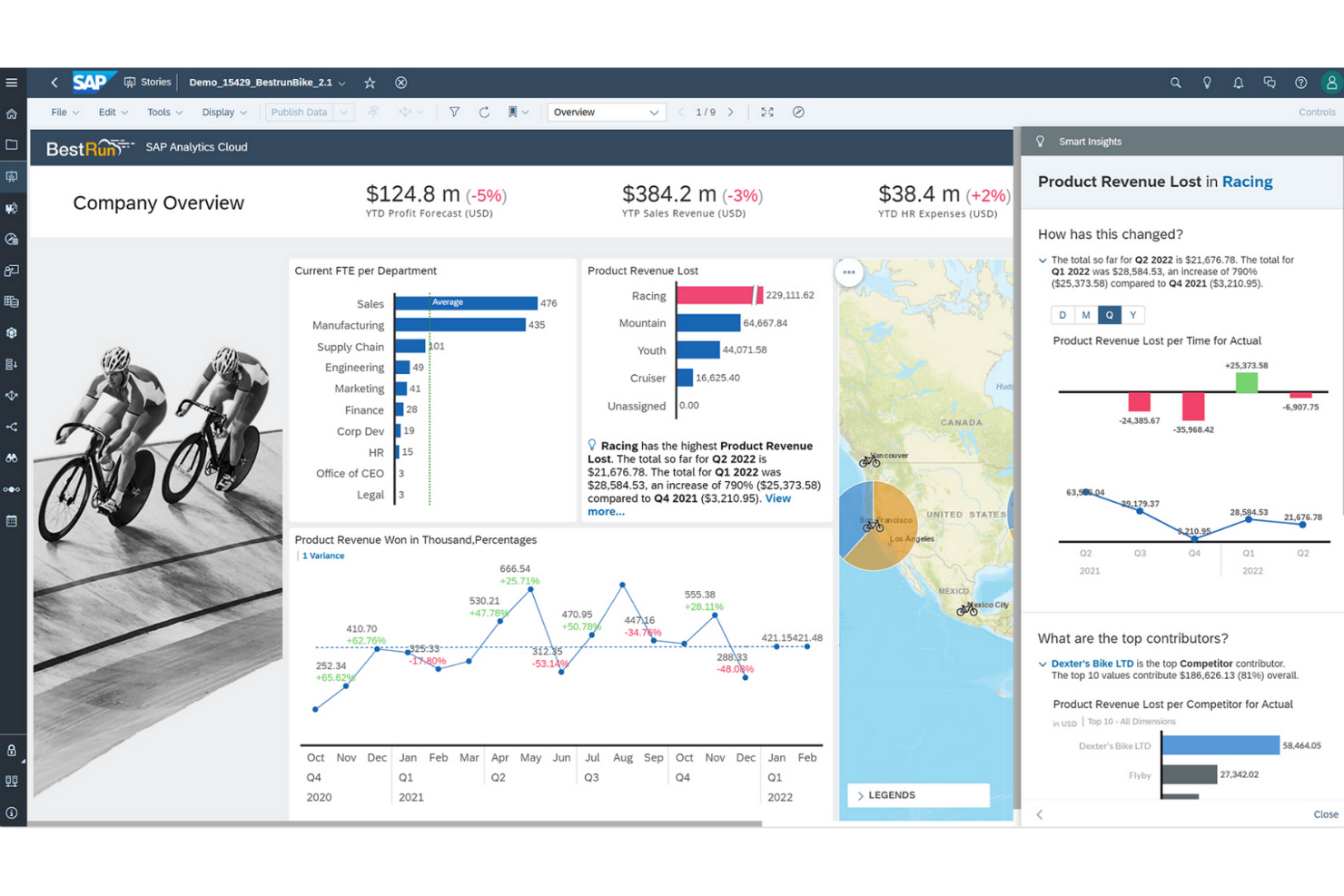
Para las organizaciones que necesitan conectar análisis con la planificación empresarial, SAP Analytics Cloud ofrece un enfoque unificado. Las grandes empresas y los equipos financieros suelen elegirlo para alinear la previsión, el presupuesto y la elaboración de informes en una sola plataforma. A diferencia de Power BI, SAP Analytics Cloud reúne la planificación, el análisis predictivo y la inteligencia empresarial para brindar soporte integral a la toma de decisiones.
Por qué SAP Analytics Cloud es una buena alternativa a Power BI
Lo que diferencia a SAP Analytics Cloud es su profunda integración del análisis y la planificación empresarial en una sola plataforma. Lo elegí para los equipos que necesitan conectar la planificación financiera, la previsión y los informes sin cambiar entre varias herramientas. Los flujos de trabajo de planificación integrados y el análisis predictivo de la plataforma ayudan a las organizaciones a alinear la estrategia y la ejecución entre departamentos. Esto convierte a SAP Analytics Cloud en una excelente opción para las empresas que desean unificar la inteligencia empresarial y la planificación en un solo entorno.
Características clave de SAP Analytics Cloud
Otras funciones de SAP Analytics Cloud que pueden ser útiles para tu equipo incluyen:
- Smart Insights: Genera automáticamente explicaciones sobre tendencias y valores atípicos en los datos.
- Conectividad de datos en vivo: Conéctate directamente a fuentes de datos SAP y no SAP sin replicación de datos.
- Herramientas de colaboración: Comenta, comparte y asigna tareas dentro de informes y paneles.
- Acceso móvil: Visualiza e interactúa con los paneles en dispositivos iOS y Android.
Integraciones de SAP Analytics Cloud
Las integraciones incluyen SAP HANA, SAP S/4HANA, SAP BW/4HANA, las soluciones SAP BusinessObjects, SAP Business Planning and Consolidation, OData y Google BigQuery.
Pros and Cons
Pros:
- Herramientas de planificación y previsión integradas
- Integración nativa con sistemas SAP ERP
- Funciones de análisis predictivo para usuarios empresariales
Cons:
- Personalización limitada de visualizaciones en comparación con
- Problemas de rendimiento con grandes volúmenes de datos en comparación con Power BI

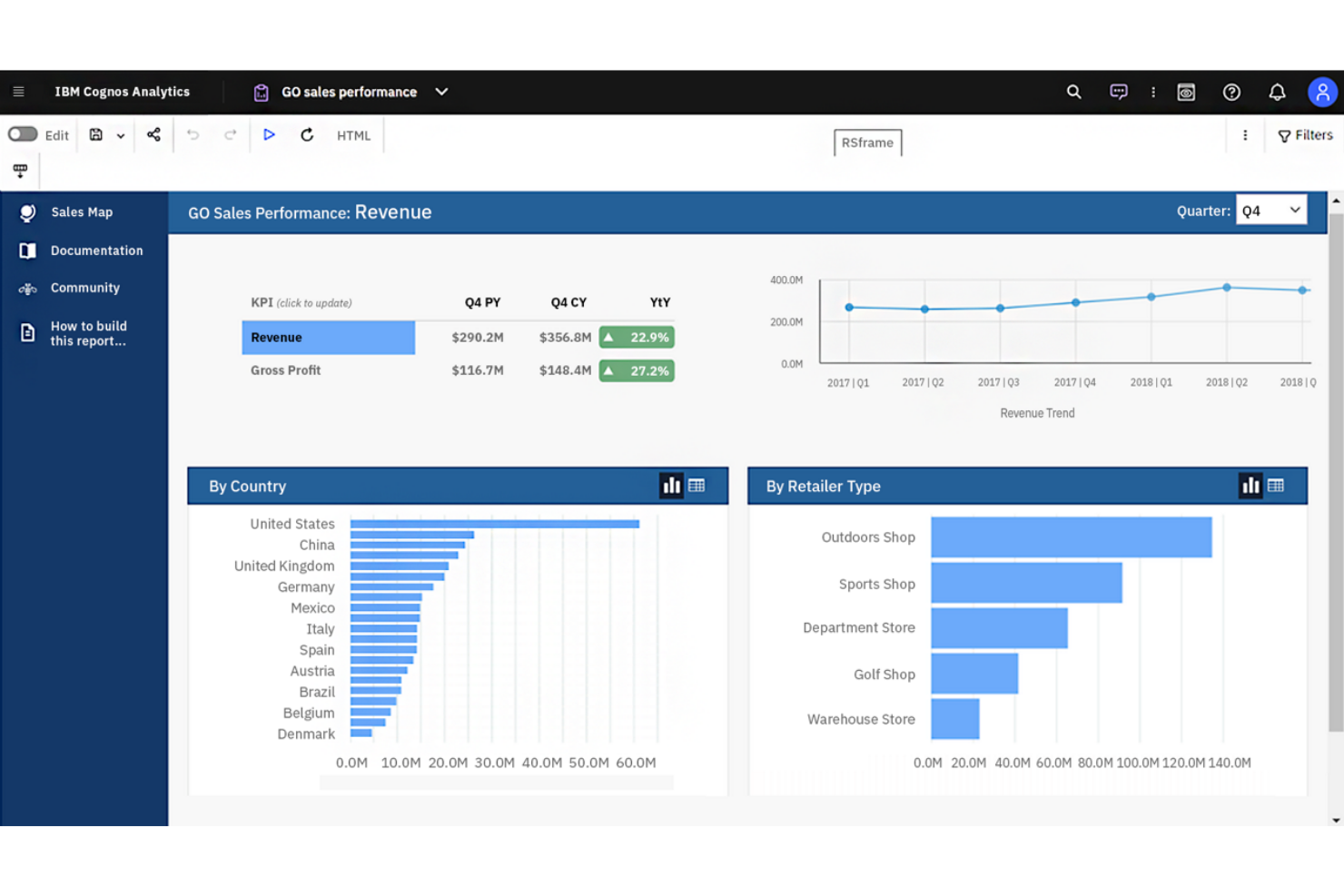
Si buscas una plataforma de inteligencia empresarial con análisis avanzados impulsados por IA, IBM Cognos Analytics vale la pena considerar. Está diseñada para organizaciones que desean descubrir conocimientos más profundos de sus datos utilizando preparación de datos automatizada y consultas en lenguaje natural. A diferencia de Power BI, IBM Cognos Analytics enfatiza el descubrimiento de datos con IA y el análisis guiado para usuarios en todas las áreas del negocio.
Por qué IBM Cognos Analytics es una buena alternativa a Power BI
IBM Cognos Analytics se destaca por sus análisis de datos impulsados por IA, que van más allá de lo que encontrarás en la mayoría de las plataformas de inteligencia empresarial. Lo elegí para equipos que desean preparación de datos automatizada y consultas en lenguaje natural para ayudar a los usuarios de cualquier nivel a detectar tendencias y patrones.
El Asistente de IA de la plataforma puede generar visualizaciones y sugerir conocimientos en función de tus preguntas, facilitando la exploración de datos. Este enfoque en IA integrada y análisis guiado convierte a IBM Cognos Analytics en una sólida alternativa a Power BI para organizaciones que quieren aprovechar análisis avanzados sin esfuerzo manual intensivo.
Características clave de IBM Cognos Analytics
Otras características de IBM Cognos Analytics que pueden ser valiosas para tu equipo incluyen:
- Herramientas de modelado de datos: Crea y gestiona modelos de datos directamente en la plataforma.
- Creación personalizada de paneles: Diseña paneles interactivos con componentes de arrastrar y soltar.
- Informes programados: Automatiza la generación y entrega de informes con una programación definida.
- Análisis geoespacial: Visualiza y analiza datos utilizando herramientas de mapeo integradas.
Integraciones de IBM Cognos Analytics
Las integraciones incluyen IBM Planning Analytics, IBM SPSS Statistics, IBM watsonx, Microsoft Fabric, SAP BW/4HANA, Amazon Web Services, Microsoft Azure, Google Cloud Platform y Slack.
Pros and Cons
Pros:
- El Asistente de IA genera conocimientos a partir de lenguaje natural
- Modelado de datos integrado para conjuntos de datos complejos
- La generación de informes programados automatiza la entrega recurrente de reportes
Cons:
- Las opciones de diseño de paneles son menos flexibles
- Las herramientas de preparación de datos requieren conocimientos técnicos


Si tu equipo necesita ofrecer análisis altamente personalizados dentro de tus propios productos o portales, Looker está diseñado para brindar flexibilidad en la analítica embebida. Es ideal para proveedores SaaS, gerentes de producto y equipos de datos que desean controlar el aspecto, la sensación e interactividad de los análisis para los usuarios finales. A diferencia de Power BI, la capa de modelado de Looker y su enfoque basado en API te permiten personalizar las experiencias de datos e integrar la analítica directamente en tus flujos de trabajo.
Por qué Looker es una buena alternativa a Power BI
Looker se destaca para equipos que necesitan incrustar análisis directamente en sus propios productos o portales de cara al cliente. Elegí Looker porque su capa semántica de modelado (LookML) te permite definir y reutilizar lógica de negocio, facilitando el mantenimiento de análisis consistentes en diferentes entornos.
Las herramientas para desarrolladores y la API permiten personalizar tableros, visualizaciones y experiencias de usuario mucho más allá de lo que Power BI suele ofrecer para escenarios embebidos. Esto convierte a Looker en una excelente opción si deseas entregar analítica adaptada a tu marca y a los requisitos de tus flujos de trabajo.
Funciones clave de Looker
Otras funciones de Looker que pueden ser valiosas para tu equipo incluyen:
- Informes programados: Automatiza la entrega de informes a usuarios o grupos en un horario definido.
- Interfaz para exploración de datos: Los usuarios pueden profundizar, filtrar y hacer tablas dinámicas directamente en los tableros.
- Seguridad a nivel de fila: Controla el acceso a los datos de forma granular para diferentes usuarios o grupos.
- Integración con control de versiones: Administra modelos LookML y activos analíticos usando control de versiones basado en Git.
Integraciones de Looker
Las integraciones incluyen BigQuery, Snowflake, Redshift, Databricks, Microsoft SQL Server, PostgreSQL, MySQL, Oracle, Google Sheets y Salesforce.
Pros and Cons
Pros:
- LookML permite modelar lógica de negocio reutilizable
- Opciones de integración embebida que soportan integración profunda en productos
- Entrega programada de informes y tableros
Cons:
- Sin soporte nativo para despliegues locales
- Requiere conocimientos de SQL para modelado avanzado

Ideal para el seguimiento de clientes en múltiples canales
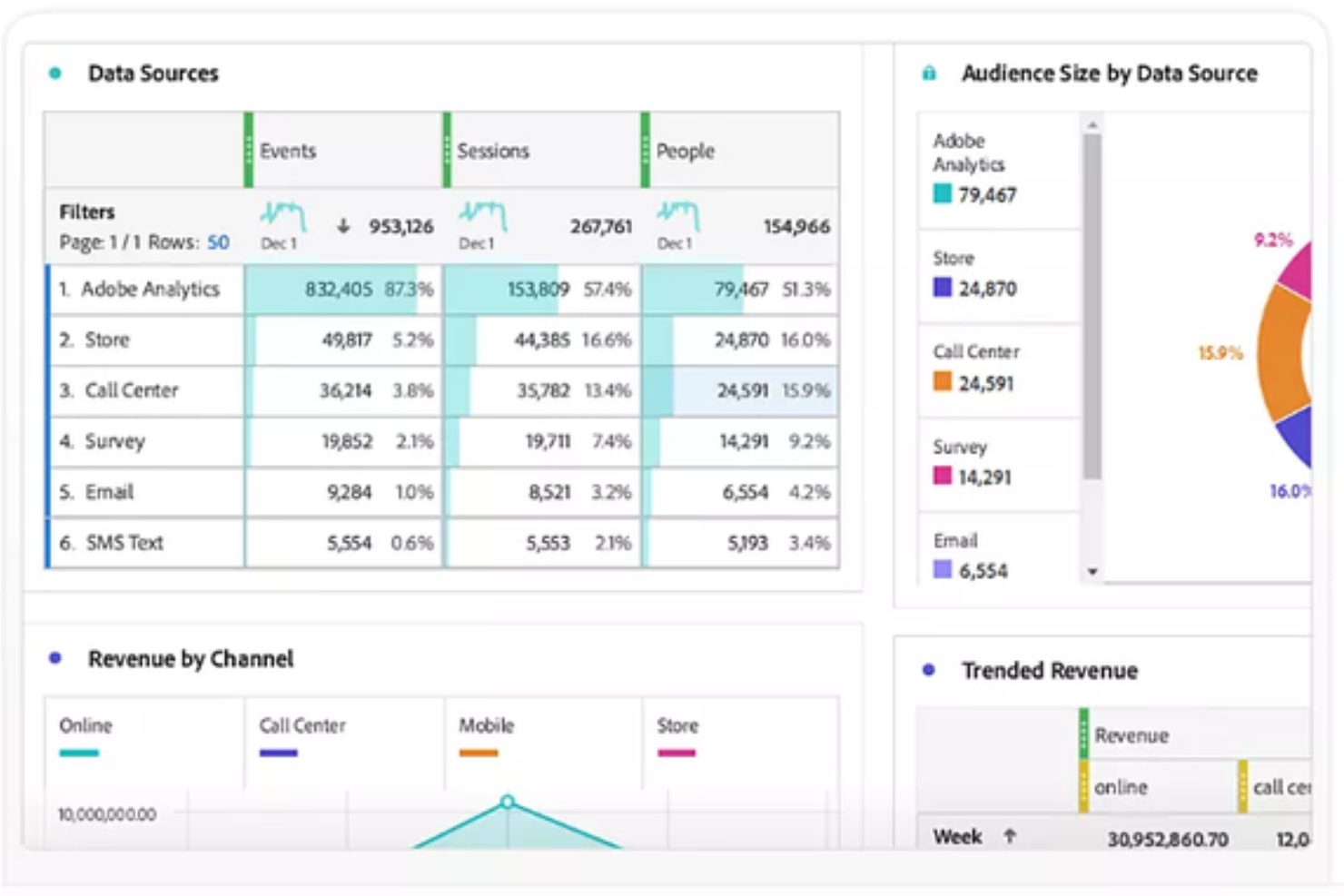
Adobe Customer Journey Analytics (CJA) es una plataforma de análisis especializada que unifica conjuntos de datos de la web, dispositivos móviles y fuentes offline en una sola interfaz. Ofrece a los equipos empresariales una forma de unificar y analizar las interacciones de los clientes a través de todos los canales. Si necesitas conocimientos más profundos sobre el recorrido del cliente y una modelización de datos más flexible de la que obtienes con Power BI, esta plataforma está diseñada para ti.
¿Para quién es Adobe Customer Journey Analytics?
Equipos de análisis empresarial en retail, finanzas o viajes que necesiten unificar y analizar los recorridos de clientes a través de múltiples canales digitales y offline.
Por qué Adobe Customer Journey Analytics es una buena alternativa a Power BI
Elegí Adobe Customer Journey Analytics porque me permite a mi equipo mapear y analizar los recorridos de clientes en todos los canales, no solo en puntos digitales. Con su unificación de datos omnicanal, puedo ver cómo los usuarios pasan de la web a la tienda física o al centro de llamadas en una sola vista. Valoro mucho la manera en que visualiza recorridos complejos y de múltiples pasos que Power BI no puede manejar de forma nativa. Esto nos brinda una imagen mucho más clara del comportamiento del cliente en todo nuestro negocio.
Características clave de Adobe Customer Journey Analytics
- Unificación de identidades: Fusiona automáticamente diferentes ID, como cookies y direcciones de correo electrónico, en un único perfil centrado en la persona.
- Analysis Workspace: Un espacio de trabajo flexible para crear informes de abandono y de flujo utilizando acciones de arrastrar y soltar en lugar de SQL.
- Procesamiento de datos retroactivo: Permite cambiar definiciones de datos o corregir errores de seguimiento sin tener que reingestar ni actualizar el conjunto de datos original.
- Subtítulos inteligentes: Usa inteligencia artificial para redactar resúmenes en texto sencillo sobre tendencias y anomalías, ayudando a usuarios no técnicos a comprender sus datos.
Integraciones de Adobe Customer Journey Analytics
Adobe Customer Journey Analytics ofrece integraciones nativas en todo el ecosistema de Adobe Experience Cloud, incluyendo Adobe Analytics, Adobe Audience Manager y Adobe Target. También proporciona una API para integraciones personalizadas y admite conexiones con fuentes de datos externas a través de Adobe Experience Platform.
Pros and Cons
Pros:
- Segmentación avanzada para análisis detallados de recorridos
- Controles de acceso basados en roles para la gobernanza de datos
- Integración nativa con Adobe Experience Cloud
Cons:
- Configuración e implementación más complejas que en Power BI
- Menos visualizaciones prediseñadas que Power BI

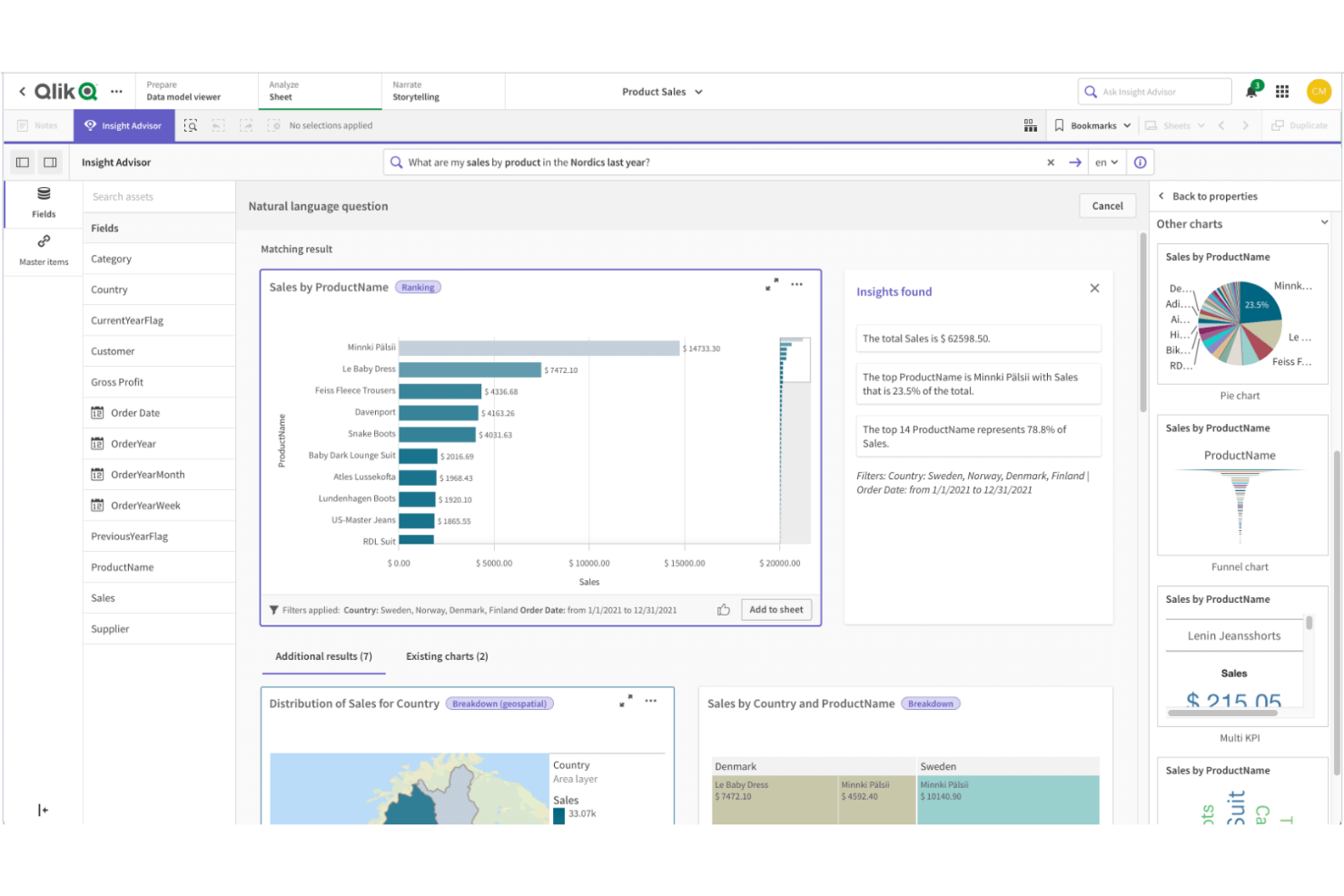
Qlik Sense está diseñado para equipos que necesitan explorar datos complejos e interconectados de múltiples fuentes. Su motor de modelado de datos asociativo permite a los usuarios navegar libremente por las relaciones en sus datos, facilitando la identificación de patrones y conexiones ocultas. Si tu empresa depende de análisis flexibles y profundos sobre conjuntos de datos diversos, Qlik Sense ofrece un enfoque único en comparación con la exploración de datos más lineal de Power BI.
Por qué Qlik Sense es una buena alternativa a Power BI
Lo que distingue a Qlik Sense es su modelado de datos asociativo, que te permite explorar las relaciones de los datos sin estar limitado a jerarquías predefinidas. Elegí Qlik Sense porque su motor permite a los usuarios hacer clic en cualquier punto de datos y ver al instante datos relacionados y no relacionados, facilitando el descubrimiento de información que podría pasar desapercibida en herramientas más lineales como Power BI.
Las funciones interactivas de selección y filtrado de la plataforma ayudan a que sigas tu propio camino de análisis, en lugar de ceñirte a una estructura de desglose fija. Este enfoque es especialmente valioso para los equipos que necesitan analizar datos complejos de múltiples fuentes y desean la libertad de investigar las conexiones a medida que avanzan.
Funciones clave de Qlik Sense
Algunas otras funciones de Qlik Sense que pueden ser útiles para tu equipo incluyen:
- Visualización de datos de autoservicio: Los usuarios pueden crear y personalizar sus propios paneles y reportes sin depender del soporte de TI.
- Analítica aumentada: Capacidades integradas de IA y aprendizaje automático que ayudan con sugerencias y análisis de datos.
- Implementación multinube: Implementa Qlik Sense localmente, en una nube privada o a través de Qlik Cloud para opciones de infraestructura flexibles.
- Alertas de datos: Configura alertas automáticas para notificar a los usuarios cuando los datos cumplen condiciones o umbrales específicos.
Integraciones de Qlik Sense
Las integraciones incluyen Amazon Web Services, Google Cloud, Microsoft Azure, Snowflake, SAP, Databricks, Cloudera, Salesforce, Oracle y Dropbox.
Pros and Cons
Pros:
- IA incorporada que ayuda con análisis de datos
- Opciones de despliegue multinube para alojamiento flexible
- Sólidos controles de gobierno y seguridad de datos
Cons:
- El lenguaje de programación difiere de los estándares SQL
- Menos plantillas predefinidas que Power BI
Otras alternativas a Power BI
Estas son algunas alternativas adicionales a Power BI que no llegaron a mi lista, pero que merece la pena conocer:
- Metabase
Ideal para flexibilidad en despliegue de código abierto
- Zoho Analytics
Ideal para la programación automatizada de informes
- Strategy
Mejor para informes empresariales escalables
- Infor Birst
Mejor para arquitectura de datos en red


Cómo evalúo las alternativas a Power BI
Divido mi evaluación en dos niveles: las capacidades básicas que una herramienta necesita para cumplir los requisitos y los factores diferenciadores que busco cuando los equipos de CX necesitan realizar un seguimiento del NPS, el CSAT y los datos de clientes de múltiples fuentes.
Funcionalidad principal (requisitos básicos de esta lista)
Al seleccionar herramientas para mi lista, clasifico cada una en una escala del 0 (no ofrece la funcionalidad) al 5 (sobresale en esta área) para cada una de las funcionalidades principales que se indican a continuación. Después, convierto la puntuación total de la herramienta en un porcentaje. Cada herramienta debe alcanzar una puntuación total mínima del 65 % para que se considere su inclusión.
- Paneles interactivos: Busco filtrado cruzado, desgloses y actualizaciones en tiempo real que permitan a los equipos de CX supervisar las tendencias del NPS o los cambios en el CSAT sin tener que volver a crear informes.
- Conectores de datos de múltiples fuentes: Cada herramienta necesita conectores nativos para CRM, herramientas de encuestas y plataformas de centros de contacto, de modo que los equipos puedan unificar datos de Salesforce, Zendesk o Qualtrics en una sola vista.
- Creación de informes mediante autoservicio: Evalúo si un analista de CX puede crear un panel de abandono o segmentar los comentarios de los clientes mediante la función de arrastrar y soltar, sin escribir SQL ni esperar al equipo de datos.
- Modelado y transformación de datos: Combinar datos de tickets con puntuaciones de encuestas requiere combinaciones, campos calculados y preparación de datos; compruebo cómo gestiona visualmente cada herramienta estas transformaciones.
- Uso compartido y colaboración: Analizo con qué facilidad los equipos pueden programar resúmenes semanales de CSAT para los directivos, insertar paneles en portales internos y controlar el acceso mediante permisos basados en roles.
- IA y análisis avanzado: Las herramientas que ofrecen consultas en lenguaje natural, detección automatizada de anomalías o puntuación predictiva del abandono proporcionan a los equipos de CX vías más rápidas para obtener información útil, por lo que evalúo qué funciones están integradas.
Una vez que tengo una lista de herramientas que cumplen estos criterios, considero qué distingue a cada plataforma.
Factores diferenciadores (qué distingue a los proveedores)
Así es como comparo y contrasto distintos proveedores:
Funciones destacadas
La analítica de texto y sentimiento es un factor diferenciador importante: busco herramientas que puedan analizar respuestas abiertas de encuestas y etiquetar temas automáticamente, lo que ahorra horas de codificación manual. Las plantillas de CX prediseñadas para paneles de NPS, CSAT y abandono también son importantes porque reducen el tiempo de configuración para los equipos que no cuentan con ingenieros de BI dedicados. También vale la pena evaluar la compatibilidad multiplataforma, ya que la aplicación de escritorio de Power BI solo está disponible para Windows y muchos equipos de CX trabajan en macOS o necesitan acceso completo basado en navegador.
Más allá de las funciones
La estructura de precios es muy importante cuando los equipos de CX incluyen directivos y agentes que solo consultan paneles. Compruebo si un proveedor ofrece licencias gratuitas para usuarios con permisos de visualización o acceso de solo lectura, para no tener que pagar el precio completo por usuarios pasivos. La profundidad de integración con la pila tecnológica de CX es otro factor importante: los conectores nativos para herramientas como Salesforce, Zendesk y Qualtrics deben ir más allá de las importaciones básicas y admitir sincronizaciones programadas. También evalúo el nivel de seguridad, especialmente la seguridad a nivel de fila para segmentar los datos de clientes por región o equipo al gestionar información de identificación personal (PII).
¿Por qué buscar una alternativa a Power BI?
Aunque Power BI es una de las herramientas de análisis más utilizadas, algunos compradores de software buscan alternativas que se adapten mejor a sus flujos de trabajo, necesidades técnicas o presupuesto. Puede que estés considerando otras opciones porque…
- Quieres una interfaz más fácil de usar, con un análisis de datos más sólido y mayor facilidad de uso para usuarios sin conocimientos técnicos
- Necesitas una interfaz más sencilla de arrastrar y soltar para crear paneles más rápidamente
- Tu equipo quiere funciones avanzadas y opciones de personalización sin necesitar tantos conocimientos técnicos
- Buscas herramientas de análisis más rentables para equipos en crecimiento
- Necesitas una mejor compatibilidad para conectar y analizar datos de diversas fuentes
- Quieres acceder más rápidamente a información en tiempo real sin una configuración compleja
- Tu organización necesita una solución que se amplíe con mayor facilidad en entornos empresariales
Si alguna de estas situaciones te resulta familiar, esta lista destaca varias alternativas sólidas que ofrecen capacidades de análisis flexibles, flujos de trabajo más sencillos y una mejor adaptación a distintas necesidades empresariales.
Características principales de Power BI
Estas son algunas de las características principales de Power BI, que te ayudarán a contrastar y comparar lo que ofrecen las soluciones alternativas:
- Creación de paneles e informes interactivos
- Integración con Microsoft 365 y los servicios de Azure
- Herramientas de modelado y transformación de datos
- Transmisión y supervisión de datos en tiempo real
- Consultas en lenguaje natural con la función de preguntas y respuestas
- Entrega programada y automatizada de informes
- Mercado de visualizaciones personalizadas
- Aplicación móvil para acceder desde cualquier lugar
- Seguridad a nivel de fila para la gobernanza de datos
- Colaboración y uso compartido dentro de Microsoft Teams
Qué viene después:
Si estás investigando alternativas a Power BI, ponte en contacto con un asesor de SoftwareSelect para recibir recomendaciones gratuitas.
Rellenas un formulario y mantienes una breve conversación en la que se profundiza en los detalles de tus necesidades. Después, recibirás una lista reducida de programas que podrás revisar. Incluso te ayudarán durante todo el proceso de compra, incluidas las negociaciones de precios.