El software para centros de llamadas ayuda a los equipos de soporte a gestionar grandes volúmenes de interacciones de voz con mayor rapidez, estructura y control. Está diseñado para reducir los tiempos de espera, mejorar el enrutamiento de llamadas y proporcionar a los agentes las herramientas que necesitan para resolver problemas rápidamente.
Gracias a mi amplia experiencia en la evaluación de herramientas de CX en cuanto a funcionalidad, usabilidad y ROI, he identificado el mejor software para centros de llamadas para gestionar llamadas entrantes y salientes de forma uniforme y a gran escala. Esto te ayudará a encontrar el software para centros de llamadas adecuado para tu equipo, para que puedas ofrecer un mejor servicio al cliente sin añadir complejidad.
Por qué confiar en nuestras recomendaciones de software
6,700+
Reviews
20
Industry experts
16+
Evaluation factors
14
Years
Nuestro equipo lleva probando y evaluando software desde 2012. Como líderes de CX, sabemos lo difícil —y lo importante— que es elegir el software adecuado.
Para esta guía, evaluamos las herramientas mediante pruebas prácticas e investigación independiente, puntuando las herramientas según nuestros criterios de selección.
Nuestras reseñas reflejan nuestro criterio editorial humano, no un discurso de ventas.
 Gui DrusinaCreative Director
 Tim FisherVP of AI
Tabla comparativa de software para centros de llamadas
Esta tabla comparativa resume los detalles de precios de mis principales selecciones de software para centros de llamadas:
| Tool | Best For | Trial Info | Price | ||
|---|---|---|---|---|---|
| 1 | Mejor para soporte al cliente por teléfono, SMS, video y correo electrónico | Demo gratuita disponible | Desde $15/usuario/mes (facturado anualmente) | Website | |
| 2 | Ideal para funciones de monitoreo de llamadas | Demostración gratuita | Desde $30/licencia (facturación anual) | Website | |
| 3 | Ideal para procesos impulsados por automatización | Demostración gratuita disponible | Desde $30/usuario/mes (facturado anualmente) | Website | |
| 4 | Mejor para centros de llamadas globales | Prueba gratuita de 14 días | Desde $25/usuario/mes (facturado anualmente) | Website | |
| 5 | Ideal para una solución escalable y versátil | Demo gratuita disponible | Desde $15/mes (facturado anualmente) | Website | |
| 6 | La mejor opción para seguridad y cumplimiento normativo de nivel empresarial | Demostración gratuita disponible | Desde $110/usuario/mes | Website | |
| 7 | Ideal para gestionar altos volúmenes de llamadas | Demostración gratuita | Desde $119/usuario/mes | Website | |
| 8 | Ideal para una gestión unificada del recorrido del cliente | Demostración gratuita disponible | Desde $75/usuario/mes (facturado anualmente) | Website | |
| 9 | Ideal para una implementación y administración sencillas | Demostración gratuita | Precios bajo solicitud | Website | |
| 10 | Ideal para quienes necesitan capacidades avanzadas de integración con CRM | Demostración gratuita disponible | Precios bajo petición | Website |


Reseñas de los mejores programas para centros de llamadas
He proporcionado resúmenes detallados de mis principales opciones de software para centros de llamadas y he explicado por qué incluí cada sistema en esta lista.
 Mejor para soporte al cliente por teléfono, SMS, video y correo electrónico
- Demo gratuita disponible
- Desde $15/usuario/mes (facturado anualmente)
Visit WebsiteCustomer Rating:4.5/5
Haz seguimiento, gestiona y prioriza los tickets de clientes en el software de soporte de Nextiva. Si tu equipo necesita una plataforma unificada para voz, video y operaciones de centro de llamadas, Nextiva reúne estos canales en un solo lugar. Es una excelente opción para empresas en crecimiento que desean gestionar llamadas de clientes, mensajería interna y colaboración desde un único panel de control. Nextiva te ayuda a centralizar las comunicaciones y agilizar las interacciones con los clientes sin tener que usar varias herramientas a la vez.
¿Para quién es mejor Nextiva?
Nextiva apoya a los líderes de experiencia del cliente y TI en pequeñas y medianas empresas que desean gestionar teléfono, SMS, video y soporte por correo electrónico en un solo sistema. Es ideal para organizaciones orientadas al servicio que operan en los EE. UU. y necesitan una plataforma de comunicaciones unificadas para equipos distribuidos.
Por qué elegí Nextiva
Nextiva destaca por su enfoque de comunicaciones unificadas, lo cual es especialmente valioso para empresas que desean gestionar todas las interacciones con los clientes en un solo lugar. La plataforma combina voz, video, SMS y chat de equipo, para que tus agentes puedan cambiar de canal sin perder el contexto. Valoro cómo el panel de control del centro de llamadas de Nextiva integra en un solo lugar el enrutamiento de llamadas, la gestión de colas y el monitoreo en tiempo real. Esta configuración ayuda a los equipos a manejar grandes volúmenes de consultas de clientes mientras mantienen una colaboración interna fluida.
Características clave de Nextiva
Otras funciones en Nextiva que resultan especialmente útiles para los equipos de centro de llamadas incluyen:
- Operador automático: Configura saludos automatizados y enrutamiento de llamadas entrantes.
- Grabación de llamadas: Graba y almacena llamadas para control de calidad y capacitación.
- Analíticas e informes: Acceso a métricas detalladas de llamadas y paneles de rendimiento.
- Integración con CRM: Conecta los datos de tus clientes desde tu CRM directamente a la interfaz del centro de llamadas.
Integraciones de Nextiva
Las integraciones no se encuentran listadas públicamente.
Pros and Cons
Pros:
- Transcripción de mensajes de voz disponible para llamadas perdidas
- Mensajería interna y videollamadas integradas
- Diseñador visual de flujo de llamadas para configuración IVR
Cons:
- Las tarifas de llamadas internacionales pueden ser impredecibles
- Grabación de llamadas limitada al plan Enterprise
 Ideal para funciones de monitoreo de llamadas
- Demostración gratuita
- Desde $30/licencia (facturación anual)
Visit WebsiteCustomer Rating:4.3/5
Supervisa el rendimiento de las llamadas en tiempo real a través del panel de análisis de Aircall. Si necesitas una plataforma de call center que se conecte rápidamente con tus herramientas de CRM y mesa de ayuda existentes, Aircall merece tu atención. Está diseñada para equipos de ventas y soporte que requieren lanzar nuevas líneas telefónicas e integraciones sin retrasos de IT. Aircall te ayuda a centralizar las conversaciones con clientes y a automatizar el registro de llamadas, permitiendo que tu equipo se enfoque en la siguiente interacción.
¿Para quién es mejor Aircall?
Gerentes de soporte al cliente, líderes de centros de contacto y equipos de operaciones de ventas en organizaciones pequeñas y medianas que necesiten monitoreo de llamadas en vivo y funciones de coaching como parte de su sistema telefónico. Es ideal para empresas con equipos de soporte o ventas distribuidos que requieren visibilidad centralizada de la actividad de llamadas y supervisión en tiempo real a través de diferentes canales.
Por qué elegí Aircall
Lo que destaca de Aircall es lo rápido que puedes tener un nuevo call center operativo, incluso si tu equipo es distribuido o remoto. El proceso de configuración rápida de la plataforma te permite crear nuevos números y dar de alta agentes en minutos, lo cual es ideal para negocios que necesitan escalar o adaptarse velozmente. Valoro que las integraciones profundas de Aircall con CRM sincronicen automáticamente los datos y notas de llamadas, de modo que tu equipo siempre tenga a mano el contexto más actualizado del cliente. Estas características hacen de Aircall una opción sólida para equipos que buscan minimizar tiempos muertos y mantener un registro unificado del cliente a través de todos los canales.
Características clave de Aircall
Otras funciones de Aircall especialmente útiles para los equipos de call center incluyen:
- Susurro de llamada: Los supervisores pueden escuchar y guiar a los agentes durante llamadas en vivo sin que el cliente lo perciba.
- Bandeja de entrada compartida: Los equipos pueden ver, asignar y gestionar llamadas perdidas y mensajes de voz desde un panel centralizado.
- Marcador automático o power dialer: Marca automáticamente listas de números para acelerar campañas de llamadas salientes.
- Transferencia cálida: Los agentes pueden hablar primero con un colega antes de transferir una llamada, asegurando una transición más fluida.
Integraciones de Aircall
Las integraciones incluyen Salesforce, HubSpot, Intercom, Zendesk, Pipedrive, Microsoft Dynamics, Slack, Shopify, Freshdesk y Zoho CRM.
Pros and Cons
Pros:
- Excelente soporte al cliente
- Accesible desde varios dispositivos
- Análisis detallados de las comunicaciones
Cons:
- La funcionalidad del altavoz es impredecible
- No cuenta con herramientas de gestión de personal integradas
 Ideal para procesos impulsados por automatización
- Demostración gratuita disponible
- Desde $30/usuario/mes (facturado anualmente)
Visit WebsiteCustomer Rating:5/5
Visualiza el rendimiento del centro de llamadas en un panel centralizado. RingCentral Contact Center ofrece una plataforma basada en la nube que integra análisis impulsados por IA y automatización para mejorar las interacciones con los clientes. Es atractiva para sectores que van desde el comercio minorista hasta la atención sanitaria, donde un servicio de atención al cliente eficiente es fundamental. Al proporcionar soporte omnicanal en voz, mensajería y redes sociales, RingCentral ayuda a las empresas a agilizar la comunicación y optimizar el rendimiento de los agentes, abordando desafíos como la gestión de altos volúmenes de llamadas y la mejora de la satisfacción del cliente.
¿Para quién es mejor RingCentral Contact Center?
Gerentes de servicio y soporte al cliente, líderes de centros de contacto y equipos de operaciones en organizaciones medianas y grandes que necesitan una plataforma unificada para gestionar interacciones omnicanal con los clientes mediante automatización, enrutamiento y análisis. Es adecuada para empresas que manejan altos volúmenes de soporte o ventas entrantes y salientes y que requieren supervisión centralizada del rendimiento, gestión de personal y flujos de trabajo integrados con CRM.
Por qué elegí RingCentral Contact Center
Elegí RingCentral Contact Center por su fuerte enfoque en procesos impulsados por automatización, lo cual es esencial para cualquier operación moderna de call center. Con funciones como Respuesta de Voz Interactiva (IVR) y Agentes Virtuales Inteligentes (IVA), puedes automatizar interacciones rutinarias con los clientes, reduciendo los tiempos de espera y permitiendo que tu equipo se concentre en asuntos más complejos. Esto no solo mejora la satisfacción del cliente, sino que también optimiza la eficiencia operativa, asegurando que tu centro de llamadas funcione de manera fluida. Además, el uso de inteligencia conversacional potenciada por IA proporciona información en tiempo real, ayudando a tus agentes a ofrecer soporte personalizado y mejorando la calidad general del servicio.
Características clave de RingCentral Contact Center
Además de sus procesos impulsados por automatización, RingCentral Contact Center ofrece una variedad de características clave que mejoran su utilidad como software para call center.
- Soporte omnicanal: Interactúa con los clientes a través de múltiples canales, incluidos voz, chat, correo electrónico y redes sociales, asegurando una experiencia sin fisuras para el cliente.
- Gestión de personal: Optimiza los horarios de tu equipo y monitorea el desempeño con herramientas diseñadas para mejorar la productividad y la calidad del servicio.
- Análisis e informes: Obtén información sobre el rendimiento de tu centro de llamadas con herramientas de análisis detalladas e informes, ayudándote a tomar decisiones informadas.
- Seguridad y cumplimiento: Protege datos sensibles y asegura el cumplimiento de normativas del sector mediante funciones avanzadas de seguridad.
Integraciones de RingCentral Contact Center
Las integraciones incluyen Salesforce, HubSpot, Zendesk, Slack, Microsoft Teams, Google Workspace, ServiceNow, Microsoft Dynamics 365, Oracle y SugarCRM.
Pros and Cons
Pros:
- Enrutamiento impulsado por IA para recorridos complejos del cliente
- Soporte omnicanal en voz, chat y redes sociales
- Herramientas integradas de gestión de personal y calidad
Cons:
- Soporte limitado para teléfonos Polycom
- La personalización inicial requiere un esfuerzo y recursos significativos
Learn more about RingCentral Contact Center: Mejor para centros de llamadas globales
- Prueba gratuita de 14 días
- Desde $25/usuario/mes (facturado anualmente)
Visit WebsiteCustomer Rating:4.4/5
Monitorea la actividad de los representantes de atención al cliente desde el panel de CloudTalk. CloudTalk está diseñado para equipos que necesitan un enrutamiento de llamadas avanzado y análisis detallados en múltiples ubicaciones o configuraciones remotas. Es una excelente opción para empresas que gestionan equipos de soporte o ventas distribuidos y desean supervisar el desempeño y optimizar los flujos de trabajo. La plataforma te ayuda a manejar grandes volúmenes de llamadas mientras mantiene cada interacción organizada y medible.
¿Para quién es mejor CloudTalk?
CloudTalk respalda a líderes de operaciones y equipos de TI en organizaciones medianas y grandes que gestionan centros de llamadas globales. Es ideal para empresas con equipos de ventas y soporte distribuidos que requieren una gestión centralizada de llamadas en varios países y regiones.
Por qué elegí CloudTalk
Elegí CloudTalk porque su enrutamiento avanzado de llamadas y sus análisis son especialmente útiles para equipos que trabajan en diferentes ubicaciones o zonas horarias. La plataforma ofrece enrutamiento basado en habilidades, por lo que las llamadas llegan al agente adecuado según su experiencia, y tableros de análisis en tiempo real que te permiten monitorear la actividad de llamadas a medida que ocurre. También me gusta que se puedan configurar flujos de llamadas personalizados que se ajustan a la estructura del equipo, lo que ayuda a mantener las operaciones distribuidas funcionando sin problemas. Estas características hacen que CloudTalk sea una opción sólida para empresas que necesitan coordinar y medir el desempeño en centros de llamadas remotos o de múltiples sedes.
Funciones clave de CloudTalk
Otras características de CloudTalk que destacan para equipos de centros de llamadas incluyen:
- Dejar mensaje en buzón: Los agentes pueden dejar mensajes pregrabados en el buzón de voz con un solo clic, ahorrando tiempo en seguimientos repetitivos.
- Grabación de llamadas: Graba automáticamente las llamadas para control de calidad, formación y cumplimiento.
- Respuesta de voz interactiva (IVR): Configura menús IVR multinivel para guiar a los llamantes al departamento o información correctos.
- Clic para llamar: Inicia llamadas directamente desde tu CRM o mesa de ayuda con un solo clic, reduciendo errores al marcar manualmente.
Integraciones de CloudTalk
Las integraciones incluyen Salesforce, HubSpot, Zendesk, Pipedrive, Zoho CRM, Intercom, Freshdesk, Microsoft Teams, Monday y Shopify.
Pros and Cons
Pros:
- Calidad de llamada estable
- Interfaz fácil de usar
- Gestión simple de representantes
Cons:
- Necesita mejor soporte para API
- Las actualizaciones pueden causar problemas
 Ideal para una solución escalable y versátil
- Demo gratuita disponible
- Desde $15/mes (facturado anualmente)
Visit WebsiteCustomer Rating:4.8/5
Haz un seguimiento del tiempo y las tareas de tu equipo para asegurar que tu centro de llamadas esté funcionando de la manera más eficiente posible a través del sistema. Si tu equipo necesita gestionar llamadas y mensajes internacionales desde una sola plataforma, Squaretalk está hecho para ti. Este software de centro de llamadas en la nube es especialmente útil para empresas con agentes remotos o distribuidos que requieren números locales y flujos de trabajo automatizados en varios países. Squaretalk ayuda a simplificar la comunicación global y el cumplimiento normativo para equipos de soporte al cliente y ventas que trabajan a escala.
¿Para quién es mejor Squaretalk?
Squaretalk es ideal para equipos de soporte al cliente y ventas en pequeñas y medianas empresas en crecimiento que necesitan una plataforma de comunicaciones escalable. Funciona bien para organizaciones que operan en varias regiones y requieren una infraestructura de voz flexible y una gestión centralizada de equipos distribuidos.
Por qué elegí Squaretalk
Squaretalk llamó mi atención porque está diseñado para equipos que necesitan capacidades globales de voz y mensajería desde una sola plataforma. Lo elegí para esta lista ya que ofrece números telefónicos locales en más de 100 países y es compatible con la distribución automática de llamadas, lo cual es esencial para gestionar agentes remotos o distribuidos. La infraestructura de telefonía en la nube de la plataforma ayuda a las empresas a simplificar las llamadas internacionales y mantener el cumplimiento de las normativas locales. Si tu centro de llamadas necesita contactar a clientes en todo el mundo sin tener que gestionar múltiples sistemas, el enfoque unificado de Squaretalk es una excelente opción.
Características clave de Squaretalk
También encontré varias otras funciones que apoyan las operaciones del centro de llamadas:
- Marcador inteligente: Marca automáticamente los números de las listas de llamadas y omite las llamadas ocupadas o no contestadas para mantener a los agentes enfocados en conversaciones en vivo.
- Grabación de llamadas: Graba llamadas entrantes y salientes para fines de aseguramiento de calidad y cumplimiento normativo.
- Diseñador de IVR: Permite crear menús personalizados de respuesta de voz interactiva mediante una interfaz de arrastrar y soltar.
- Panel de análisis en tiempo real: Muestra métricas de llamadas en vivo y datos de rendimiento de los agentes para que los supervisores supervisen la actividad.
Integraciones de Squaretalk
Las integraciones incluyen Zoho, Salesforce, Freshworks, Pipedrive, Lynx, Mensajería Programable, Acceso de Voz Programable y el widget Call Me Back.
Pros and Cons
Pros:
- Altos estándares de seguridad
- Amplias funciones de informes y análisis
- Interfaz fácil de usar e intuitiva
Cons:
- Opciones de personalización limitadas
- Sin aplicación móvil
Learn more about Squaretalk: La mejor opción para seguridad y cumplimiento normativo de nivel empresarial
- Demostración gratuita disponible
- Desde $110/usuario/mes
Visit WebsiteCustomer Rating:4.3/5
NiCE CXone ofrece un espacio de trabajo para agentes impulsado por IA con resúmenes de chat en tiempo real, seguimiento del sentimiento y notas de contacto automatizadas para agilizar las interacciones con los clientes. NiCE CXone es una plataforma de centro de contacto en la nube impulsada por IA que unifica la voz entrante y saliente, los canales digitales, la gestión del compromiso de la fuerza laboral y el análisis de interacciones en una sola plataforma.
¿Para quién es más adecuado NiCE CXone?
Es una opción sólida para centros de contacto empresariales de sectores regulados como la atención sanitaria, la banca, los seguros y la administración pública que necesitan un cumplimiento normativo riguroso integrado en su plataforma.
Por qué elegí NiCE CXone
NiCE CXone se gana un lugar como una de las mejores opciones de mi lista debido a la profundidad con la que el cumplimiento normativo está integrado en la propia plataforma. Me gusta que las herramientas de grabación y cumplimiento no sean un complemento; están incluidas en todos los niveles de precios, algo importante en sectores regulados donde los registros de auditoría son imprescindibles. Funciones como la cobertura completa de grabación de Teams y la infraestructura preparada para HIPAA significan que no tengo que ensamblar una estructura de cumplimiento con herramientas de terceros.
Funciones principales de NiCE CXone
- Escritorio omnicanal para agentes: Gestiona voz, chat, correo electrónico, SMS y mensajes de redes sociales en una interfaz unificada.
- IVR impulsado por IA: Implementa flujos de IVR conversacionales mediante comprensión del lenguaje natural y automatización.
- Gestión del compromiso de la fuerza laboral: Pronostica, programa, graba y gestiona el rendimiento de los agentes en una única plataforma en la nube.
- Panel de análisis en tiempo real: Supervisa la actividad de las colas en directo, el estado de los agentes y los indicadores clave de rendimiento del centro de contacto con herramientas de informes personalizadas.
Integraciones de NiCE CXone
NiCE CXone ofrece integraciones nativas con Salesforce, Zendesk, Microsoft Dynamics 365, ServiceNow, Microsoft Teams, Oracle Service Cloud y Zoom. También hay una API disponible para integraciones personalizadas.
Pros and Cons
Pros:
- Enrutamiento impulsado por IA en todos los canales digitales
- Herramientas integradas de gestión y programación de la fuerza laboral
- Amplias certificaciones para sectores regulados
Cons:
- La implementación compleja requiere la participación del departamento de TI
- La personalización de informes requiere conocimientos técnicos
Learn more about NiCE CXone: Ideal para gestionar altos volúmenes de llamadas
- Demostración gratuita
- Desde $119/usuario/mes
Visit WebsiteCustomer Rating:4.1/5
Crea flujos de llamadas personalizados desde el panel de administración. Five9 ofrece una plataforma de centro de contacto basada en la nube, diseñada para organizaciones que buscan combinar la automatización mediante IA con el soporte de agentes en vivo. Es una opción sólida para equipos que desean unificar voz, chat, correo electrónico y canales sociales mientras utilizan analítica para optimizar el rendimiento. Five9 ayuda a las empresas a automatizar interacciones rutinarias y ofrecer un servicio más personalizado a escala.
¿Para quién es mejor Five9?
Five9 respalda a líderes de centros de contacto y operaciones en organizaciones medianas a grandes que gestionan altos volúmenes de llamadas entrantes y salientes. Se adapta a empresas de sectores enfocados en el servicio y regulados que requieren supervisión centralizada y gestión de personal en operaciones regionales o globales.
Por qué elegí Five9
Lo que me atrajo de Five9 es su enfoque en combinar la automatización impulsada por IA con analítica avanzada para centros de contacto. Los agentes virtuales inteligentes de la plataforma gestionan preguntas rutinarias de los clientes, permitiendo que los agentes en vivo se ocupen de temas más complejos. También me gusta que el paquete de analíticas de Five9 proporciona información en tiempo real y datos históricos sobre el rendimiento de los agentes y las interacciones con los clientes. Este enfoque ayuda a los equipos a mejorar de forma continua la calidad y eficiencia del servicio, mientras gestionan altos volúmenes en múltiples canales.
Funciones clave de Five9
Otras funcionalidades que hacen de Five9 una opción destacada para equipos de call center incluyen:
- Marcador predictivo: Marca automáticamente números y conecta las llamadas contestadas con los agentes disponibles.
- Enrutamiento omnicanal: Dirige las interacciones de clientes desde voz, chat, correo electrónico y redes sociales al agente adecuado.
- Integraciones con CRM: Se conecta de forma nativa con Salesforce, ServiceNow, Microsoft Dynamics y otros CRM líderes.
- Grabación y monitoreo de llamadas: Graba llamadas y permite a los supervisores monitorear interacciones en vivo para garantizar la calidad.
Integraciones de Five9
Las integraciones incluyen Salesforce, ServiceNow, Microsoft Dynamics 365, Oracle, Zendesk, Oracle NetSuite, Zoom, Microsoft Teams, Slack y Mitel.
Pros and Cons
Pros:
- Incluye gamificación para mejorar el rendimiento de los agentes
- Documentación extensa
- El marcador predictivo aumenta la eficiencia de las llamadas salientes
Cons:
- Las funciones adicionales pueden ser costosas
- La analítica de integraciones está limitada a su plan de pago más alto
Learn more about Five9: Ideal para una gestión unificada del recorrido del cliente
- Demostración gratuita disponible
- Desde $75/usuario/mes (facturado anualmente)
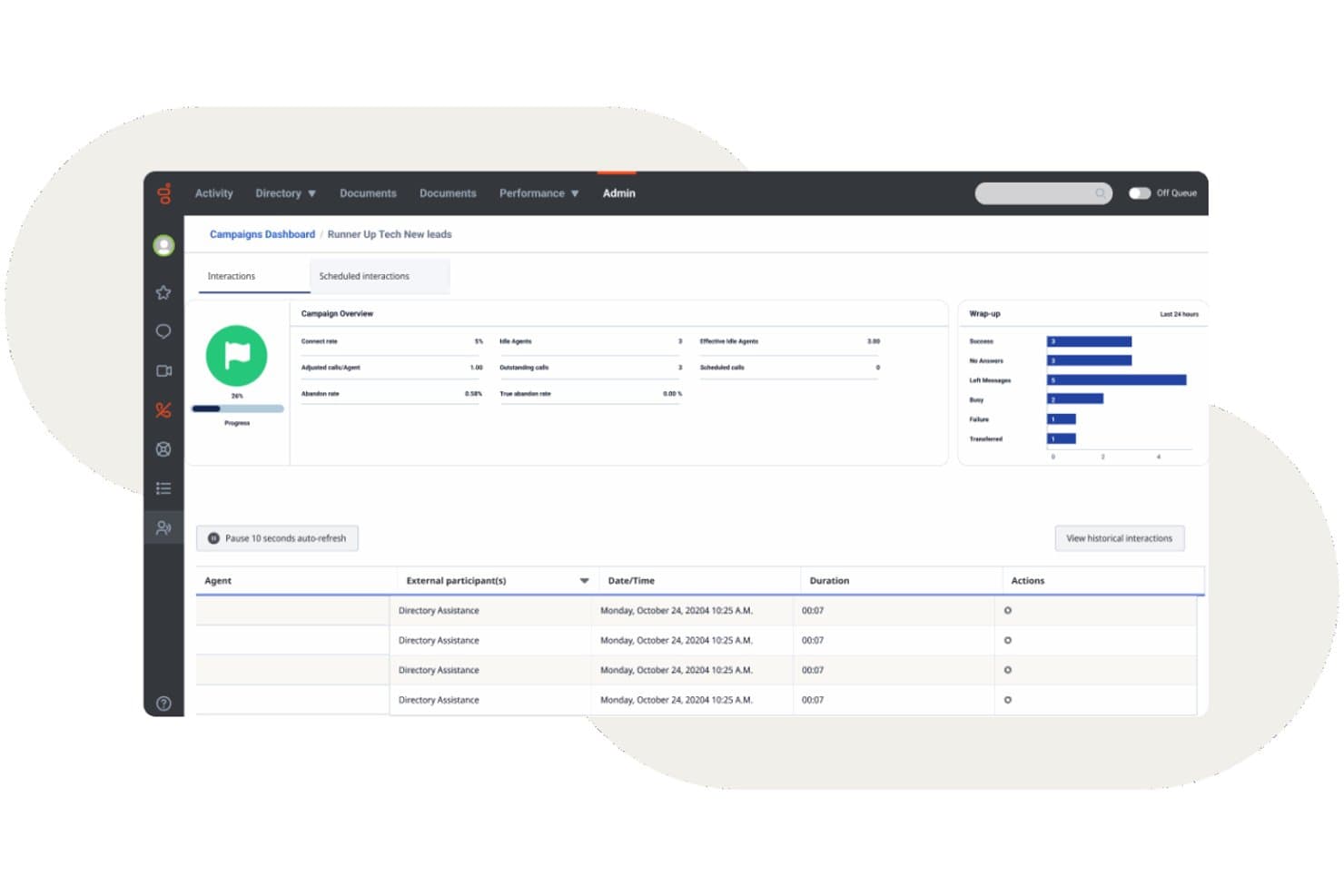
Genesys Cloud CX ofrece un panel de campañas salientes con seguimiento de interacciones en tiempo real, métricas de gestión posterior a la interacción y registros de actividad de los agentes. Genesys Cloud CX es una plataforma de centro de contacto nativa de la nube que combina el enrutamiento omnicanal, la respuesta de voz interactiva (IVR) basada en IA, la marcación saliente, la gestión de la participación de la fuerza laboral y el análisis en tiempo real en canales de voz y digitales.
¿Para quién es más adecuada Genesys Cloud CX?
Genesys Cloud CX es una opción adecuada para centros de contacto medianos y empresariales que necesitan una única plataforma para gestionar grandes volúmenes de interacciones en canales de voz y digitales.
Por qué elegí Genesys Cloud CX
He incluido Genesys Cloud CX entre mis principales opciones porque sus capacidades de gestión del recorrido del cliente van más allá del enrutamiento estándar. Los flujos de recorrido de la plataforma me ofrecen un mapa visual en tiempo real de cómo se desplazan los clientes por cada punto de contacto, por lo que puedo detectar los puntos de abandono y redirigir las interacciones antes de que se intensifiquen. Junto con la participación predictiva, identifica activamente a los clientes en riesgo durante una sesión web y activa un chat o una devolución de llamada proactivos antes de que abandonen.
Características principales de Genesys Cloud CX
- Enrutamiento omnicanal: Dirige las interacciones de voz, chat, correo electrónico, SMS y redes sociales a los agentes en un único espacio de trabajo.
- Gestión de la participación de la fuerza laboral: Gestiona las previsiones, la programación y los permisos con herramientas de gestión de la fuerza laboral basadas en IA.
- Análisis de voz y sentimiento: Analiza las transcripciones, las palabras clave y el sentimiento del 100 % de las conversaciones entre agentes y clientes.
- Ecosistema de integraciones con CRM: Conecta de forma nativa con Salesforce, ServiceNow, Microsoft Dynamics y cientos de otras herramientas empresariales.
Integraciones de Genesys Cloud CX
Genesys Cloud CX ofrece integraciones nativas con Salesforce, ServiceNow, Zendesk, Microsoft Teams, Microsoft Dynamics 365, Zoom, Jira, Slack, Active Directory y Google Workspace. Hay una API disponible para integraciones personalizadas.
Pros and Cons
Pros:
- Enrutamiento predictivo basado en IA en todos los canales
- Gestión de la fuerza laboral integrada con previsiones nativas
- El análisis de voz puntúa el 100 % de las interacciones de llamadas
Cons:
- La configuración inicial suele requerir asistencia profesional
- Los informes avanzados requieren un tiempo considerable de configuración
Learn more about Genesys Cloud CX: Ideal para una implementación y administración sencillas
- Demostración gratuita
- Precios bajo solicitud

GoTo Connect ofrece una interfaz unificada que combina mensajería, correo de voz, vista previa de la cámara y funciones para unirse a reuniones para los agentes del centro de llamadas. GoTo Connect es un centro de contacto y sistema telefónico basado en la nube que combina llamadas VoIP, interacción omnicanal con clientes, enrutamiento inteligente de llamadas y supervisión de agentes en tiempo real en una sola plataforma.
¿Para quién es más adecuado GoTo Connect?
GoTo Connect es una excelente opción para pequeñas y medianas empresas que necesitan un centro de contacto completo sin contar con un equipo de TI grande que lo gestione.
Por qué elegí GoTo Connect
GoTo Connect ocupa un lugar en mi lista de favoritos por la rapidez con la que un equipo puede pasar del registro a realizar llamadas activas. El centro de administración unificado me permite gestionar usuarios, planes de marcación y colas de llamadas desde una sola interfaz, y el creador visual de planes de marcación facilita la configuración de flujos de llamadas complejos sin escribir una sola línea de código. También he comprobado que Admin GoPilot es realmente útil para señalar problemas de configuración antes de que lleguen a los usuarios que llaman.
Funciones principales de GoTo Connect
- Plataforma omnicanal: Conecta con los clientes mediante voz, SMS, chat, correo electrónico, WhatsApp y redes sociales desde un único panel.
- Análisis en tiempo real: Supervisa las colas de llamadas, la actividad de los agentes y los datos de rendimiento con paneles en vivo configurables.
- Clasificación y cierre de llamadas: Asigna resultados a las llamadas y gestiona las notas posteriores obligatorias directamente en la interfaz del agente.
- Resúmenes de llamadas basados en IA: Genera automáticamente resúmenes de las interacciones y análisis de sentimiento después de las llamadas de los clientes.
Integraciones de GoTo Connect
GoTo Connect ofrece integraciones nativas con Salesforce, Zendesk, ServiceNow, Microsoft Teams, Miro y Gmail. También hay una API disponible para integraciones personalizadas.
Pros and Cons
Pros:
- Configuración rápida sin soporte de TI especializado
- El editor visual de planes de marcación simplifica el enrutamiento de llamadas
- El centro de administración unificado gestiona usuarios y colas
Cons:
- Marcador predictivo limitado para campañas salientes
- Los informes son menos personalizables que en las plataformas empresariales
Learn more about GoTo Connect: Ideal para quienes necesitan capacidades avanzadas de integración con CRM
- Demostración gratuita disponible
- Precios bajo petición

Vonage Contact Center ofrece un escritorio omnicanal para agentes con respuestas sugeridas por AI, orientación sobre la siguiente mejor acción y métricas de interacción en tiempo real para voz y chat. Vonage Contact Center es una plataforma de centro de contacto basada en la nube que combina llamadas entrantes y salientes, IVR, enrutamiento basado en habilidades, grabación de llamadas, compatibilidad omnicanal y análisis en tiempo real con integraciones nativas de CRM.
¿Para quién es más adecuado Vonage Contact Center?
Equipos de empresas medianas y grandes que ya han estandarizado Salesforce, ServiceNow o Microsoft Dynamics 365 y necesitan un centro de contacto que se conecte directamente con su CRM.
Por qué elegí Vonage Contact Center
Vonage Contact Center ocupa un lugar en mi lista final por la profundidad con la que se integra en Salesforce, ServiceNow y Microsoft Dynamics 365. Me encanta que, cuando un agente responde una llamada, el historial del cliente aparezca al instante mediante ventanas emergentes en pantalla, mientras que la sincronización bidireccional con el CRM registra automáticamente la interacción. Vonage incluso se incorporó al programa piloto BYOC para CCaaS de Salesforce, lo que significa que sus capacidades omnicanal y de AI se ejecutan de forma nativa dentro de Service Cloud Voice.
Características principales de Vonage Contact Center
- Enrutamiento basado en habilidades: Enruta las llamadas entrantes a los agentes según sus conjuntos de habilidades, disponibilidad o reglas de prioridad.
- Recuperación ante desastres y enrutamiento de llamadas de emergencia: Redirige automáticamente las llamadas en caso de interrupciones o emergencias para mantener la continuidad del negocio.
- Interacción omnicanal: Gestiona voz, chat web, SMS y otros canales desde una sola interfaz para todos los agentes.
- Complemento de análisis de voz: Obtén información a partir de las transcripciones de llamadas, la detección de palabras clave y el análisis de sentimientos en todas las interacciones.
Integraciones de Vonage Contact Center
Vonage Contact Center ofrece integraciones nativas con Salesforce, ServiceNow, Microsoft Dynamics 365, Zendesk y Microsoft Teams. También hay una API disponible para integraciones personalizadas.
Pros and Cons
Pros:
- Integración nativa profunda con Salesforce para los agentes
- Las colas omnicanal unifican los canales de voz y digitales
- Las ventanas emergentes en tiempo real muestran todo el contexto de la persona que llama
Cons:
- Los informes históricos ofrecen opciones de personalización limitadas
- La configuración inicial compleja requiere asistencia de servicios profesionales
Learn more about Vonage Contact Center:
Otros programas para centros de llamadas
Estas son algunas opciones más que no llegaron a formar parte de la lista de los mejores programas para centros de llamadas:
- 11TalkRouteIdeal para gestionar múltiples llamadas
- 12Bright PatternIdeal para comunicación omnicanal
- 13TalkdeskLa mejor opción para responder a las preguntas de los clientes
- 14TwilioIdeal para centros de contacto altamente personalizables
- 15DialpadLa mejor solución multicanal con funcionalidad avanzada de IA
- 16Zoho VoiceMejor para telefonía integrada en CRM
- 17CallHippoIdeal para interacciones con clientes potenciadas por IA
- 18Freshdesk Contact CenterIdeal para un centro de contacto virtual asequible
- 19Webex Contact CenterMejor opción para capacitación y análisis de agentes integrados con IA
- 20Creatio CRMIdeal para personalizar la comunicación
- 21LiveAgentLa mejor opción para herramientas integradas de helpdesk y gestión de tickets
- 22ZendeskIdeal para unificar canales de comunicación
- 238x8Mejor para comunicación omnicanal
Cómo Evalúo el Software de Call Center
Evalúo cada plataforma utilizando una base estándar: enrutamiento basado en habilidades, IVR, grabación de llamadas, monitoreo en vivo, antes de considerar los diferenciadores que determinan si una herramienta se adapta a tu operación.
Funcionalidad Principal (Requisitos Esenciales para Esta Lista)
Cuando selecciono herramientas para mi lista, califico cada una en una escala de 0 (no ofrece la funcionalidad) a 5 (sobresale en esta área) para cada funcionalidad principal que aparece a continuación. Luego, calculo la puntuación total de la herramienta en porcentaje. Cada herramienta debe obtener una puntuación total mínima del 75% para ser considerada para su inclusión.
- Distribución Automática de Llamadas: Compruebo si la plataforma admite enrutamiento por habilidades y prioridades, ya que una simple cola redonda se desmorona rápidamente cuando manejas soporte técnico y facturación en el mismo número.
- Sistema IVR: Un buen IVR permite que los llamantes se autogestionen para consultar el estado de una orden o el saldo de cuentas antes de llegar a un agente, por lo que busco menús de varios niveles con un editor visual de flujo de llamadas.
- Llamadas Entrantes y Salientes: Evalúo si la plataforma gestiona ambos sentidos de manera nativa; los equipos que realizan campañas de renovación y reciben llamadas de soporte necesitan colas mixtas, no dos herramientas separadas.
- Grabación y Monitoreo de Llamadas: Los supervisores necesitan más que solo la reproducción; busco funciones de escucha en vivo, susurro y participación directa para que los líderes de equipo puedan orientar a los agentes durante llamadas difíciles en tiempo real.
- Analítica en Tiempo Real e Histórica: Los paneles que muestran la profundidad de la cola, los tiempos de espera y el estado de los agentes en tiempo real son tan importantes como los reportes históricos de SLA y CSAT para revisiones después del turno.
- Integración con CRM y Herramientas Empresariales: Evalúo si la plataforma se conecta con sistemas como Salesforce, HubSpot o Zendesk para mostrar contexto del llamante mediante ventanas emergentes y registrar interacciones automáticamente.
Una vez tengo una lista de herramientas que cumplen este criterio, considero qué distingue a cada plataforma.
Factores Diferenciadores (Qué Distingue a los Proveedores)
Así es como comparo y contrasto diferentes proveedores:
Funciones Destacadas
La asistencia de agentes por IA es un diferenciador importante. Busco plataformas que muestren artículos de conocimiento y respuestas sugeridas durante la llamada, reduciendo el tiempo de gestión en la resolución de problemas complejos. La gestión de la fuerza laboral es igual de importante para equipos que afrontan picos estacionales, donde la previsión y el seguimiento del cumplimiento integrados sustituyen las suposiciones en hojas de cálculo. El análisis de voz y sentimiento completa el panorama: la puntuación automatizada para todas las interacciones ofrece a los responsables de control de calidad una visión mucho más completa que las revisiones de muestras al azar.
Más Allá de las Funciones
El cumplimiento normativo y la seguridad son prioritarios; verifico certificaciones PCI DSS y SOC 2, especialmente cuando los agentes manejan información de pagos por teléfono. La transparencia en los precios también es importante, ya que los cargos ocultos por telefonía o excesos pueden disparar el presupuesto tras la puesta en marcha. También evalúo los SLAs de tiempo de actividad y la redundancia de operadores, porque incluso breves caídas durante horas pico implican llamadas perdidas e ingresos desaprovechados. Por último, los plazos de implementación varían mucho entre proveedores y un tiempo hasta el valor más rápido es una auténtica ventaja para equipos que migran de un sistema heredado.
Cómo elegir un software para centros de llamadas
¿Intentas elegir el software adecuado para centros de llamadas? Empieza por vincular tus principales prioridades de CX con funciones que aborden los desafíos reales de los centros de contacto:
| Si tu prioridad es... | Busca... |
|---|---|
| Si tu prioridad es...Respuesta omnicanal rápida | Busca...Bandeja de entrada unificada que cubra teléfono, chat y correo electrónico |
| Si tu prioridad es...Enrutamiento preciso para problemas complejos | Busca...Distribución basada en habilidades y datos |
| Si tu prioridad es...Visibilidad del rendimiento de los agentes | Busca...Paneles en tiempo real y supervisión detallada |
| Si tu prioridad es...Acceso flexible a los datos de los clientes | Busca...Integraciones avanzadas con CRM y herramientas empresariales |
| Si tu prioridad es...Operaciones globales o reguladas | Busca...Cumplimiento normativo integrado para PCI DSS, GDPR e HIPAA |
Cómo evaluar tu selección
- Comprueba las afirmaciones de omnicanalidad real: Realiza una prueba de un día enrutando tres tipos de tickets (teléfono, chat, correo electrónico) para comprobar si los agentes reciben todo el contexto en cada ocasión.
- Valida la profundidad de la integración: Programa una demostración en directo que muestre las ventanas emergentes de Salesforce o HubSpot y la sincronización bidireccional; solicita un vídeo para revisarlo más adelante.
- Evalúa la precisión de los análisis: Exporta un informe del panel de 48 horas y compara las métricas con los resultados de tu plataforma anterior en cuanto a volumen de llamadas, sentimiento y tiempo de gestión.
- Confirma la cobertura de cumplimiento: Solicita al proveedor las cartas de certificación PCI DSS, HIPAA y GDPR vigentes, o la documentación de seguridad correspondiente.
- Elige entre flexibilidad o dependencia: Decide si las funciones prediseñadas avanzadas (personalización limitada) o las API abiertas (integración propia, mayor esfuerzo) se adaptan mejor a las capacidades y necesidades de tu equipo.
¿Qué es el software para centros de llamadas?
El software para centros de llamadas es una plataforma digital que gestiona las comunicaciones con los clientes a través del teléfono, el chat, el correo electrónico y otros canales desde una única interfaz. Ayuda a los equipos a gestionar las interacciones entrantes y salientes, enrutar las conversaciones a los agentes adecuados y supervisar la calidad del servicio. Estas plataformas suelen incluir herramientas para la distribución de llamadas, la respuesta de voz interactiva (IVR), la grabación de llamadas, los análisis y las integraciones con sistemas CRM para ofrecer experiencias de cliente eficientes y coherentes.
Software para centros de llamadas frente a software para centros de contacto: ¿cuál es la diferencia?
Según mi experiencia, elegir entre estos dos sistemas depende de si gestionas un equipo centrado en el teléfono o si unificas los recorridos del cliente multicanal para evitar los silos de datos.
- Software para centros de llamadas: Se centra principalmente en la comunicación basada en voz (llamadas entrantes y salientes, VoIP, IVR, enrutamiento de llamadas y asistencia telefónica). Funciona mejor para equipos que utilizan la voz como canal principal y necesitan una alta calidad de audio.
- Software para centros de contacto (CCaaS): Proporciona una única plataforma que unifica la asistencia telefónica con canales digitales como el chat en directo, el correo electrónico, los SMS, las aplicaciones de mensajería y las redes sociales. Funciona mejor para empresas SaaS en crecimiento que necesitan consolidar los historiales de interacciones entre canales y la planificación de los agentes.
En este análisis, cubro tanto los sistemas de centros de llamadas centrados en la voz como las plataformas empresariales de centros de contacto para ofrecerte opciones independientemente de la escala de tus operaciones.
Tipos de software para centros de llamadas
- Software para centros de llamadas basado en la nube: Funciona en una infraestructura en la nube alojada por el proveedor y permite trabajar a equipos remotos o distribuidos con unos costes iniciales reducidos.
- Software para centros de llamadas local: Se ejecuta en hardware físico instalado en tus instalaciones y ofrece un control específico sobre la seguridad de los servidores y el almacenamiento de datos.
- Software para centros de llamadas entrantes: Gestiona las consultas entrantes de los clientes mediante menús de respuesta de voz interactiva, distribución automática de llamadas y reglas de enrutamiento basadas en competencias.
- Software para centros de llamadas salientes: Permite realizar campañas de contacto comercial y seguimientos de cuentas mediante marcadores automáticos predictivos, progresivos y de alta velocidad.
- Software para centros de llamadas combinado: Unifica las colas entrantes y los marcadores salientes en una única interfaz y redistribuye dinámicamente a los agentes según el volumen de llamadas en tiempo real.
- Software omnicanal para centros de contacto: Centraliza las llamadas de voz, el chat en directo, los mensajes de texto y los hilos de correo electrónico en una única línea temporal continua del cliente.
Tendencias del software para centros de llamadas
- IA autónoma y flujos de trabajo automatizados: Los proveedores de software están dejando atrás los bots conversacionales básicos para implementar agentes de IA autónomos. Estos sistemas evalúan el contexto, ejecutan tareas de varios pasos, actualizan los registros del CRM y completan flujos de trabajo rutinarios sin intervención humana.
- Asistencia de agentes en tiempo real: Las aplicaciones de software escuchan las llamadas en directo para transcribir el audio, analizar el sentimiento de los clientes y consultar artículos de la base de conocimientos al instante. Esta orientación en tiempo real ayuda a los representantes a resolver más rápidamente los problemas complejos de los clientes.
- Garantía de calidad automatizada: Las plataformas utilizan ahora modelos de aprendizaje automático para analizar el 100 % de las interacciones con los clientes. La puntuación automática del cumplimiento de los guiones, las normas de conformidad y el tono sustituye al muestreo manual para la formación de los responsables.
- Personalización con poco código: Las herramientas incorporan editores de arrastrar y soltar para flujos de llamadas, reglas de enrutamiento e integraciones. Los equipos de operaciones pueden modificar rápidamente las reglas de las colas y las automatizaciones sin la ayuda de desarrolladores.
- Capas de datos unificadas: Los sistemas unifican los historiales de voz, chat, mensajes de texto y correo electrónico en una única cronología del cliente. Esta estructura unificada proporciona a los equipos de asistencia híbridos y remotos una visibilidad completa de todos los puntos de interacción.
- Omnicanal y preparado para el trabajo remoto de forma predeterminada: A medida que aumentan las expectativas de los clientes, las plataformas de centros de llamadas siguen unificando la voz, el chat, el correo electrónico y las redes sociales en una sola interfaz, al tiempo que ofrecen accesibilidad remota completa, fiabilidad en la nube y herramientas integradas de gestión de la plantilla.
Características del software para centros de llamadas
Al seleccionar un software para centros de llamadas, presta atención a las siguientes características clave:
- Distribución automática de llamadas: Dirige las llamadas entrantes al agente o departamento más adecuado, lo que garantiza tiempos de espera más cortos para quienes llaman y una mayor productividad de los agentes.
- Respuesta de voz interactiva: Permite a quienes llaman interactuar con un menú de autoservicio mediante la voz o el teclado numérico, ayudándoles a acceder rápidamente al departamento adecuado o a resolver solicitudes sencillas sin la intervención de un agente.
- Grabación de llamadas: Graba automáticamente las llamadas para la formación, el control de calidad y la resolución de disputas, de modo que puedas revisar las interacciones, formar a los agentes y mantener el cumplimiento de la normativa.
- Informes y análisis en tiempo real: Proporciona paneles e informes detallados sobre métricas clave como el volumen de llamadas, el rendimiento de los agentes y la satisfacción de los clientes, lo que facilita la mejora de tus operaciones.
- Asistencia omnicanal: Permite a los clientes ponerse en contacto contigo por teléfono, correo electrónico, chat o redes sociales, para que tu equipo pueda gestionar todas las conversaciones en un solo lugar y ofrecer una asistencia coherente.
- Integración con el CRM: Se conecta con tus herramientas de gestión de relaciones con los clientes, lo que permite a los agentes acceder a información importante y al historial del cliente durante las llamadas para ofrecer una asistencia más personalizada.
- Supervisión de llamadas: Permite a los supervisores escuchar las llamadas en directo, susurrar indicaciones a los agentes o hacerse cargo de las conversaciones si es necesario, por lo que resulta ideal para la formación y la garantía de calidad.
- Colas de llamadas: Coloca a quienes llaman en colas virtuales con tiempos de espera estimados y actualizaciones, lo que reduce la frustración y suaviza los periodos de máxima actividad.
- Gestión de la plantilla: Ayuda a programar turnos, prever la demanda y hacer un seguimiento de la disponibilidad de los agentes para mantener los niveles de personal en consonancia con el volumen de llamadas.
- Marcación saliente: Automatiza tareas como seguimientos, encuestas o llamadas de ventas, de modo que los agentes dediquen menos tiempo a marcar números y más tiempo a hablar con los clientes.
Funciones habituales de IA del software para centros de llamadas
Además de las funciones estándar del software para centros de llamadas mencionadas anteriormente, muchas de estas soluciones incorporan IA con funciones como:
- Asistencia de IA para agentes: Muestra sugerencias en tiempo real, artículos de la base de conocimientos y las siguientes mejores acciones durante las llamadas en directo, ayudando a los agentes a responder con mayor rapidez y precisión a las preguntas de los clientes.
- Análisis del habla y del sentimiento: Utiliza la IA para analizar las grabaciones de llamadas y las conversaciones en directo en busca de tono, emociones y palabras clave, proporcionando a los supervisores información sobre la satisfacción de los clientes y las tendencias del rendimiento de los agentes.
- Enrutamiento predictivo de llamadas: Utiliza la IA para poner en contacto a quienes llaman con el mejor agente disponible según los resultados históricos, las habilidades y los perfiles de los clientes, con el objetivo de mejorar los índices de resolución en la primera llamada.
- Garantía de calidad automatizada: Aplica la IA para revisar y puntuar las llamadas según el cumplimiento de la normativa, la aplicación del guion y las habilidades interpersonales, reduciendo la necesidad de realizar muestreos manuales de garantía de calidad y acelerando los ciclos de comentarios.
- Agentes virtuales y chatbots: Gestionan consultas y tareas rutinarias mediante IA conversacional, liberando a los agentes humanos para cuestiones más complejas y proporcionando asistencia las 24 horas del día, los 7 días de la semana, en todos los canales.
Ventajas del software para centros de llamadas
La implementación de un software para centros de llamadas ofrece varias ventajas para tu equipo y tu empresa. Estas son algunas de las que puedes esperar:
- Mayor satisfacción del cliente: El enrutamiento eficiente de llamadas y la asistencia omnicanal garantizan que los clientes se conecten rápidamente con el agente adecuado.
- Mayor productividad del equipo: Los análisis basados en IA, las funciones como los marcadores inteligentes o las llamadas con un clic y la gestión avanzada de la plantilla ayudan a tu equipo a centrarse en las tareas prioritarias y a optimizar su flujo de trabajo.
- Mejor gestión de datos: La integración con las herramientas existentes mantiene la información de los clientes organizada y accesible, reduciendo los errores en la gestión de datos.
- Mayor flexibilidad: Las capacidades de trabajo remoto permiten a tu equipo ofrecer un servicio uniforme desde cualquier ubicación, adaptándose a los entornos de trabajo cambiantes.
- Información práctica: Los análisis en tiempo real y los paneles personalizables ofrecen datos valiosos para orientar la toma de decisiones y mejorar las operaciones.
- Ahorro de costes: La programación automatizada y la asignación eficiente de recursos ayudan a reducir los costes operativos manteniendo la calidad del servicio.
- Mayor seguridad de los datos: Las medidas de seguridad protegen la información confidencial de los clientes, garantizando el cumplimiento de las normativas y generando confianza.
Costes y precios del software para centros de llamadas
La selección de un software para centros de llamadas requiere comprender los diversos modelos de precios y planes disponibles. Los costes varían en función de las funciones, el tamaño del equipo, los complementos y otros factores. La siguiente tabla resume los planes habituales, sus precios medios y las funciones que suelen incluir las soluciones de software para centros de llamadas:
Tabla comparativa de planes de software para centros de llamadas
| Tipo de plan | Precio medio | Funciones habituales |
|---|---|---|
| Tipo de planPlan gratuito | Precio medio$0-$15/user/month | Funciones habitualesIncluye enrutamiento básico de llamadas, opciones de IVR limitadas, informes básicos y una integración sencilla con CRM. |
| Tipo de planPlan personal | Precio medio$15-$35/user/month | Funciones habitualesAñade llamadas ilimitadas, grabación de llamadas, paneles de análisis mejorados e integraciones con CRM populares. |
| Tipo de planPlan empresarial | Precio medio$35-$70/user/month | Funciones habitualesOfrece IVR avanzado, enrutamiento basado en habilidades, asistencia de agentes mediante IA, supervisión de llamadas, informes personalizados y mensajería omnicanal. |
| Tipo de planPlan corporativo | Precio medio$70-$150/user/month | Funciones habitualesProporciona gestión de la plantilla, análisis predictivo, asistencia 24/7, controles estrictos de cumplimiento y SLA personalizados. |
Preguntas frecuentes sobre el software de centro de llamadas
\u003cspan data-slate-fragment=\u0022JTVCJTdCJTIyY2hpbGRyZW4lMjIlM0ElNUIlN0IlMjJ0ZXh0JTIyJTNBJTIySGVyZSUyMGFyZSUyMHNvbWUlMjBhbnN3ZXJzJTIwdG8lMjBjb21tb24lMjBxdWVzdGlvbnMlMjBhYm91dCUyMGVjb21tZXJjZSUyMGN1c3RvbWVyJTIwc2VydmljZSUyMHNvZnR3YXJlJTNBJTIyJTdEJTVEJTJDJTIydHlwZSUyMiUzQSUyMnAlMjIlMkMlMjJpZCUyMiUzQSUyMmQ5UlZLQzFSTzMlMjIlN0QlNUQ=\u0022\u003eAquí encontrarás respuestas a algunas preguntas frecuentes sobre el software de centros de llamadas:\u003c/span\u003e
¿Cuáles son los costes continuos del software de centros de llamadas?
Los costes continuos del \u003cspan data-term-id=\u002259766844\u0022\u003enube \u003c/span\u003e\u003cspan data-term-id=\u002259766798\u0022\u003esoftware de centros de contacto\u003c/span\u003e o de un \u003cspan data-term-id=\u002259766801\u0022\u003esistema telefónico\u003c/span\u003e \u003cspan data-term-id=\u002259766805\u0022\u003eVoIP\u003c/span\u003e dependen del tamaño y las necesidades del equipo. Los gastos incluyen suscripciones, licencias de agentes y complementos como la \u003cspan data-term-id=\u002259766799\u0022\u003egestión de la plantilla\u003c/span\u003e, la \u003cspan data-term-id=\u002259766808\u0022\u003egrabación de llamadas\u003c/span\u003e, la \u003cspan data-term-id=\u002259766833\u0022\u003egestión del rendimiento\u003c/span\u003e, el \u003cspan data-term-id=\u002259766835\u0022\u003eanálisis del habla\u003c/span\u003e y la \u003cspan data-term-id=\u002259766810\u0022\u003egestión de la calidad\u003c/span\u003e. Tener en cuenta los \u003cspan data-term-id=\u002259766845\u0022\u003einformes y análisis\u003c/span\u003e, la \u003cspan data-term-id=\u002259766836\u0022\u003egestión de colas\u003c/span\u003e, las actualizaciones y el soporte garantiza que tu \u003cspan data-term-id=\u002259766846\u0022\u003ecentro de llamadas salientes\u003c/span\u003e siga siendo seguro con el tiempo.
¿Puede el software de centros de llamadas admitir equipos remotos o distribuidos?
Las plataformas modernas de \u003cspan data-term-id=\u002259766830\u0022\u003esoftware basado en la nube \u003c/span\u003e\u003cspan data-term-id=\u002259766794\u0022\u003ecentros de llamadas\u003c/span\u003e y de \u003cspan data-term-id=\u002259766838\u0022\u003ecentros de contacto como servicio\u003c/span\u003e (\u003cspan data-term-id=\u002259766812\u0022\u003eCCaaS\u003c/span\u003e) proporcionan a los equipos distribuidos un acceso seguro mediante \u003cspan data-term-id=\u002259766829\u0022\u003ecomunicaciones unificadas\u003c/span\u003e. Ideales para un \u003cspan data-term-id=\u002259766815\u0022\u003ecentro de llamadas virtual\u003c/span\u003e, estas herramientas aumentan la \u003cspan data-term-id=\u002259766814\u0022\u003eproductividad de los agentes\u003c/span\u003e mediante el \u003cspan data-term-id=\u002259766842\u0022\u003eenrutamiento inteligente\u003c/span\u003e, la \u003cspan data-term-id=\u002259766834\u0022\u003egestión de colas de llamadas\u003c/span\u003e, la \u003cspan data-term-id=\u002259766831\u0022\u003esupervisión de llamadas\u003c/span\u003e y las \u003cspan data-term-id=\u002259766839\u0022\u003etransferencias asistidas\u003c/span\u003e. La \u003cspan data-term-id=\u002259766853\u0022\u003egestión integrada de la implicación de la plantilla\u003c/span\u003e ayuda a los responsables a prestar apoyo a los agentes desde cualquier lugar.
¿Cómo puedo integrar el software de centros de llamadas con mi CRM o mesa de ayuda actuales?
Normalmente puedes integrar el software de centros de llamadas con tu CRM o mesa de ayuda mediante conectores integrados, API o plataformas de integración de terceros como Zapier. Empieza comprobando si tu solución de centro de llamadas ofrece integraciones directas con CRM populares como Salesforce, monday CRM o HubSpot. Si no es así, busca documentación de API o soluciones de middleware. La integración permite sincronizar automáticamente los datos de los clientes y los tickets de soporte, lo que proporciona a tus agentes un contexto más completo y reduce la introducción manual de datos.
¿Cómo puede el software de centros de llamadas mejorar la resolución en la primera llamada (FCR) de mi equipo?
El software de centros de llamadas mejora la resolución en la primera llamada al proporcionar a los agentes acceso en tiempo real al historial de los clientes, las bases de conocimiento y los guiones de llamadas. Funciones como el enrutamiento inteligente de llamadas o el enrutamiento basado en habilidades dirigen a los interlocutores al agente disponible más adecuado. Las herramientas de supervisión permiten detectar problemas habituales y carencias de conocimiento para poder formar a tu equipo. Procura aprovechar la creación automática de tickets, la toma de notas e incluso las indicaciones basadas en IA para ayudar a los agentes a resolver los problemas en la primera llamada.
¿Cuál es la diferencia entre el software de centros de llamadas omnicanal y multicanal?
El software omnicanal de centros de llamadas conecta todos tus canales de comunicación —teléfono, correo electrónico, chat y redes sociales— para que tus agentes vean todo el historial del cliente en un solo lugar. Las soluciones multicanal te permiten ofrecer soporte en varios canales, pero gestionan cada uno por separado. Con el enfoque omnicanal, los clientes disfrutan de una experiencia más fluida y los agentes pueden cambiar de canal sin perder el contexto. Esto se traduce en un soporte más rápido y personalizado.
¿Qué KPI de supervisión y análisis de llamadas debería seguir?
Concéntrate en las métricas que relacionan la eficiencia operativa con la percepción del cliente. Entre los KPI clave se incluyen las puntuaciones de sentimiento basadas en IA, la resolución en el primer contacto (FCR), las tasas de contención mediante autoservicio y el coste por interacción. El seguimiento de estos indicadores garantiza una alta calidad del servicio y demuestra un ROI claro a la alta dirección.
¿Cómo gestionan las soluciones de software de centros de llamadas la seguridad y la privacidad de los datos?
Las soluciones modernas protegen los datos empresariales mediante cifrado de extremo a extremo, ocultación automática de información de identificación personal (PII) y datos de tarjetas de pago (PCI) en grabaciones y transcripciones, y estrictos controles de acceso basados en roles. Las principales plataformas también mantienen rigurosas certificaciones de cumplimiento, incluidas SOC 2 Type II, ISO 27001, GDPR y HIPAA.