

10 CRM para pequeñas empresas en 2026

10 Lista de CRM para pequeñas empresas


Un CRM para pequeñas empresas es una plataforma de gestión de relaciones con los clientes y un software de CRM diseñado para ayudarte a organizar contactos, hacer seguimiento de las ventas y gestionar las interacciones con los clientes a medida que crece tu negocio. Si estás buscando el mejor CRM para una pequeña empresa o el mejor software de CRM, probablemente buscas un sistema de CRM que se adapte al tamaño, presupuesto y flujo de trabajo de tu equipo, sin añadir complejidad ni costes generales.
Elegir el CRM adecuado ayuda a mejorar la experiencia del cliente, agilizar la gestión de datos y respaldar cada etapa del ciclo de ventas. Muchas plataformas modernas son fáciles de usar, lo que facilita que los equipos utilicen las herramientas de CRM para gestionar clientes potenciales, hacer seguimiento de posibles clientes y mantener relaciones sólidas con los clientes. En esta lista encontrarás varias opciones de CRM adaptadas a pequeñas empresas, con detalles sobre sus funciones y casos de uso para ayudarte a tomar una decisión informada.
Por qué confiar en nuestras recomendaciones de software
Nuestro equipo lleva probando y evaluando software desde 2012. Como líderes de CX, sabemos lo difícil —y lo importante— que es elegir el software adecuado.
Para esta guía, evaluamos las herramientas mediante pruebas prácticas e investigación independiente, puntuando las herramientas según nuestros criterios de selección.
Nuestras reseñas reflejan nuestro criterio editorial humano, no un discurso de ventas.
Resumen de CRM para pequeñas empresas
| Tool | Best For | Trial Info | Price | ||
|---|---|---|---|---|---|
| 1 | Ideal para una configuración rápida y curva de aprendizaje mínima | Prueba gratuita de 30 días disponible | Desde $15/usuario/mes | Website | |
| 2 | Ideale per il monitoraggio degli errori in tempo reale | Piano gratuito + prova gratuita + demo gratuita disponibili | A partire da $26/mese (fatturati annualmente) | Website | |
| 3 | Ideal para herramientas de marketing y ventas integradas | Plan gratuito + demo gratis disponible | Desde $7/usuario/mes (facturado anualmente) | Website | |
| 4 | Ideal para el seguimiento visual de oportunidades | Disponible prueba gratuita de 14 días | Desde $14/asiento/mes (facturado anualmente) | Website | |
| 5 | Ideal para funciones integradas de email y pagos | Prueba gratuita de 14 días + demo gratis disponible | Desde $299/mes (facturación anual) | Website | |
| 6 | Lo mejor para gestionar embudos de ventas sencillos | Prueba gratuita de 15 días + plan gratuito disponible | Desde $7/usuario/mes (facturado anualmente) | Website | |
| 7 | Mejor para integración con Microsoft 365 | Prueba gratuita de 30 días disponible | Desde $65/usuario/mes (facturado anualmente) | Website | |
| 8 | Ideal para la calificación de clientes potenciales con IA | Prueba gratuita de 21 días + demo gratuita disponible | Desde $9/usuario/mes (facturado anualmente) | Website | |
| 9 | Mejor para opciones avanzadas de escalabilidad | Prueba gratuita de 30 días + demo gratis disponible | Desde $25/usuario/mes (facturación mensual o anual) | Website | |
| 10 | Ideal para flujos de trabajo de automatización personalizables | Prueba gratuita de 15 días + plan gratis disponible | Desde $14/usuario/mes (facturación anual) | Website |
Análisis de CRM para pequeñas empresas
A continuación encontrarás mis resúmenes detallados de los CRM para pequeñas empresas que llegaron a mi lista de opciones seleccionadas. Mis análisis ofrecen una visión detallada de las funciones, los mejores casos de uso y las integraciones de cada plataforma para ayudarte a encontrar la mejor opción para ti.

Ideal para una configuración rápida y curva de aprendizaje mínima
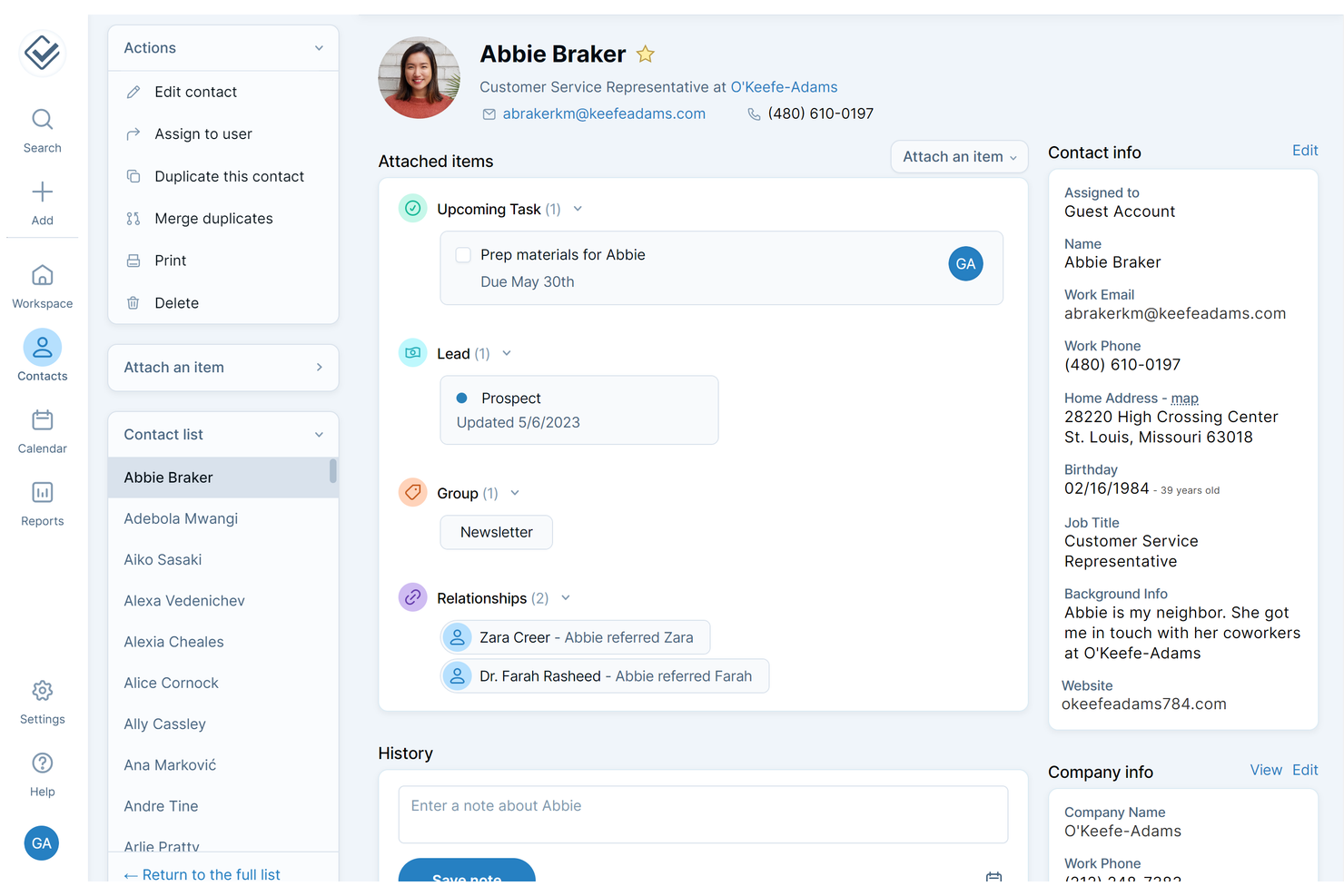
Si buscas un CRM fácil de configurar y sencillo de usar, deberías considerar Less Annoying CRM. Esta plataforma está pensada para propietarios de pequeñas empresas y equipos que no tienen tiempo para procesos de incorporación complicados o curvas de aprendizaje pronunciadas. Te ayuda a organizar contactos, hacer seguimiento de seguimientos y gestionar ventas sin abrumarte con funciones innecesarias.
Por qué elegí Less Annoying CRM
Para pequeñas empresas que necesitan ponerse en marcha rápidamente, Less Annoying CRM destaca por su configuración directa y curva de aprendizaje mínima. Elegí esta herramienta porque te permite importar contactos con solo unos clics y comenzar a rastrear clientes potenciales de inmediato, sin un proceso de incorporación prolongado. El panel mantiene tus tareas y seguimientos en primer plano, para que siempre sepas qué necesita atención. Su sencilla vista de canalización también facilita ver en qué estado se encuentra cada oportunidad, lo cual es útil para equipos que quieren claridad sin complejidad adicional.
Principales características de Less Annoying CRM
Otras características hacen de Less Annoying CRM una opción práctica para equipos de pequeñas empresas:
- Integración con calendario: Sincroniza tus eventos y tareas del CRM con Google Calendar para mantener los horarios coordinados.
- Campos personalizados: Agrega campos a los registros de contacto para que puedas seguir información única de tu negocio.
- Permisos de usuario: Controla lo que cada miembro del equipo puede ver o editar dentro del CRM.
- Correos electrónicos de agenda diaria: Recibe cada mañana en tu bandeja de entrada un resumen de tus tareas y citas.
Integraciones de Less Annoying CRM
Las integraciones incluyen Zapier, Mailchimp, Google Calendar, Google Contacts, Outlook Calendar, QuickBooks Sync, Google Forms Canvass y más.
Pros and Cons
Pros:
- Precio mensual fijo que simplifica el presupuesto
- La gestión de contactos permite campos personalizados
- Correos electrónicos de agenda diaria para seguimiento de tareas
Cons:
- Los informes carecen de análisis avanzados de ventas
- No incluye herramientas de email marketing integradas
Ideale per il monitoraggio degli errori in tempo reale
Sentry offre un monitoraggio degli errori in tempo reale pensato per i team che necessitano di una visibilità immediata sui problemi delle applicazioni. È particolarmente utile per sviluppatori e responsabili tecnici che vogliono identificare, valutare e risolvere rapidamente gli errori prima che abbiano impatto sugli utenti. A differenza di molte alternative a New Relic, Sentry si concentra su diagnosi degli errori attuabili e un contesto dettagliato per ogni incidente.
Perché Sentry è una valida alternativa a New Relic
Per i team che devono individuare e risolvere gli errori man mano che si verificano, il monitoraggio in tempo reale di Sentry si distingue. Ho scelto Sentry perché ti notifica istantaneamente sui nuovi problemi e fornisce stack trace dettagliati, contesto utente e tracciamento delle release per ogni errore. Il raggruppamento degli eventi e il flusso di lavoro per la risoluzione delle problematiche di Sentry aiutano gli sviluppatori a dare priorità e a correggere rapidamente i problemi più rilevanti. Questo approccio mirato a una diagnostica attuabile e in tempo reale rende Sentry un'alternativa solida a New Relic per le organizzazioni che vogliono minimizzare downtime e disagi per gli utenti.
Caratteristiche principali di Sentry
Altre funzionalità che rendono Sentry interessante includono:
- Monitoraggio delle prestazioni: tiene traccia dei tempi delle transazioni e dei colli di bottiglia nello stack applicativo.
- Monitoraggio della salute delle release: controlla la stabilità e l'adozione di ogni versione del software.
- Registrazione delle sessioni: cattura le sessioni utente per aiutare a visualizzare i passaggi che portano a un errore.
- Regole di allerta personalizzate: consente di definire condizioni specifiche per l'attivazione delle notifiche.
Integrazioni Sentry
Le integrazioni includono GitHub, Slack, Jira, GitLab, Azure DevOps, PagerDuty, Datadog, Microsoft Teams, Vercel e altri.
Pros and Cons
Pros:
- Avvisi di errore in tempo reale con contesto dettagliato
- Profonda integrazione con la toolchain degli sviluppatori
- Regole di allerta personalizzate e flessibili
Cons:
- Capacità limitate di monitoraggio dell'infrastruttura
- Nessuna funzionalità di monitoraggio delle transazioni sintetiche

HubSpot
Ideal para herramientas de marketing y ventas integradas
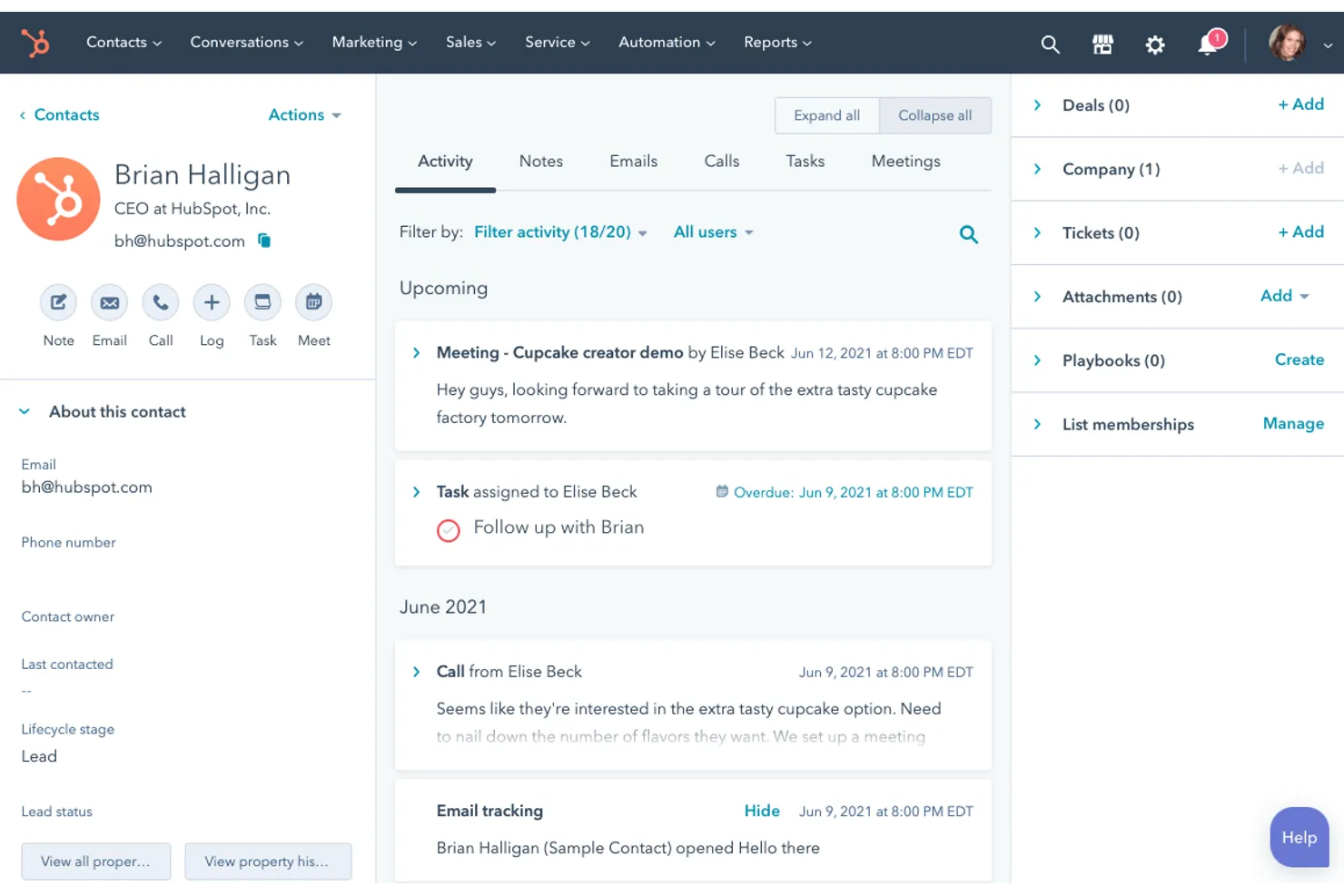
Si tu pequeña empresa necesita un CRM que reúna marketing y ventas en un solo lugar, HubSpot merece una mirada de cerca. Es un software CRM popular para pequeñas empresas, diseñado para equipos que quieren gestionar contactos, automatizar campañas de marketing y hacer seguimiento de oportunidades sin la necesidad de múltiples herramientas. HubSpot también incluye sólidas funciones de gestión de prospectos que ayudan a los equipos a captar, organizar y nutrir oportunidades a lo largo del proceso de ventas. HubSpot destaca por su plataforma unificada, lo que facilita alinear tus esfuerzos de marketing y ventas a medida que creces.
Por qué elegí HubSpot
Lo que hace que HubSpot sea una buena elección para un CRM de pequeñas empresas es cómo combina herramientas de marketing y ventas en una sola plataforma. Puedes gestionar email marketing, formularios de captación de prospectos y tus embudos de ventas desde un solo panel, lo que ayuda a los equipos a evitar la fragmentación de datos. Me gusta que las funciones de automatización de HubSpot te permitan configurar flujos de trabajo que nutran a los prospectos y avancen las oportunidades sin esfuerzo manual. Este enfoque integrado da soporte a empresas pequeñas que desean alinear sus actividades de marketing y ventas mientras crecen.
Funciones clave de HubSpot
Otras características convierten a HubSpot en una opción flexible para las necesidades CRM de las pequeñas empresas:
- Gestión de contactos: Guarda, organiza y segmenta toda la información de tus clientes y prospectos en un solo lugar.
- Chat en vivo: Agrega chat en tiempo real a tu sitio web para conectar con visitantes y responder dudas al instante.
- Reportes personalizados: Crea y comparte reportes de ventas, marketing y métricas de servicio mediante herramientas de arrastrar y soltar.
- Seguimiento de documentos: Sube documentos de ventas y ve cuándo los prospectos los abren o interactúan con ellos.
Integraciones de HubSpot
Las integraciones incluyen Salesforce, Shopify, WordPress, Slack, Zoom, Microsoft Teams, Gmail, Outlook, Facebook Ads, Google Ads y más. HubSpot también ofrece una API para integraciones personalizadas.
Pros and Cons
Pros:
- Automatización de marketing integrada al CRM
- El embudo utiliza oportunidades con función de arrastrar y soltar
- Las plantillas de email permiten rastrear campañas de alcance
Cons:
- El aumento de contactos incrementa los costos a medida que creces
- La personalización de etapas de oportunidad está limitada en los planes básicos

Ideal para el seguimiento visual de oportunidades
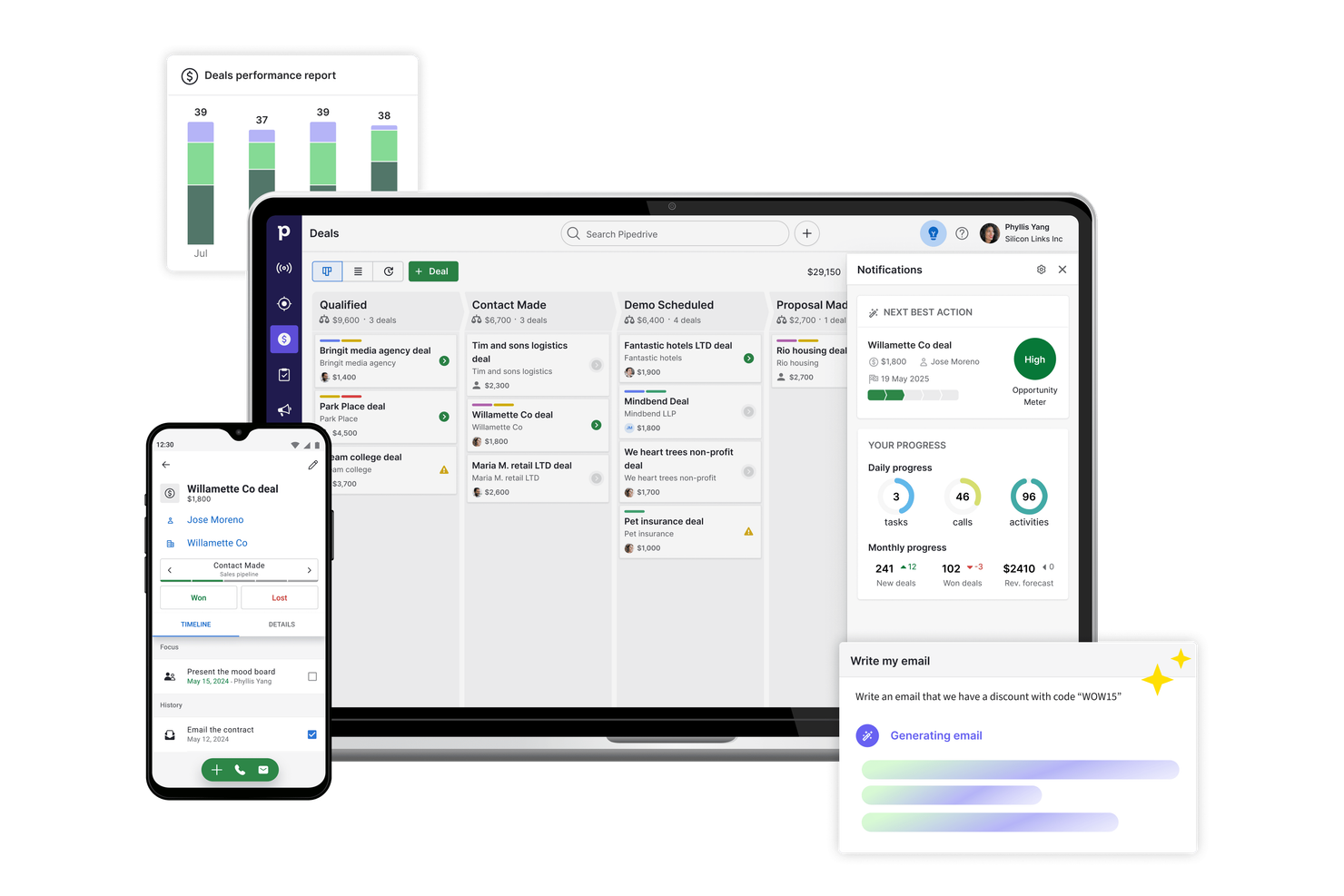
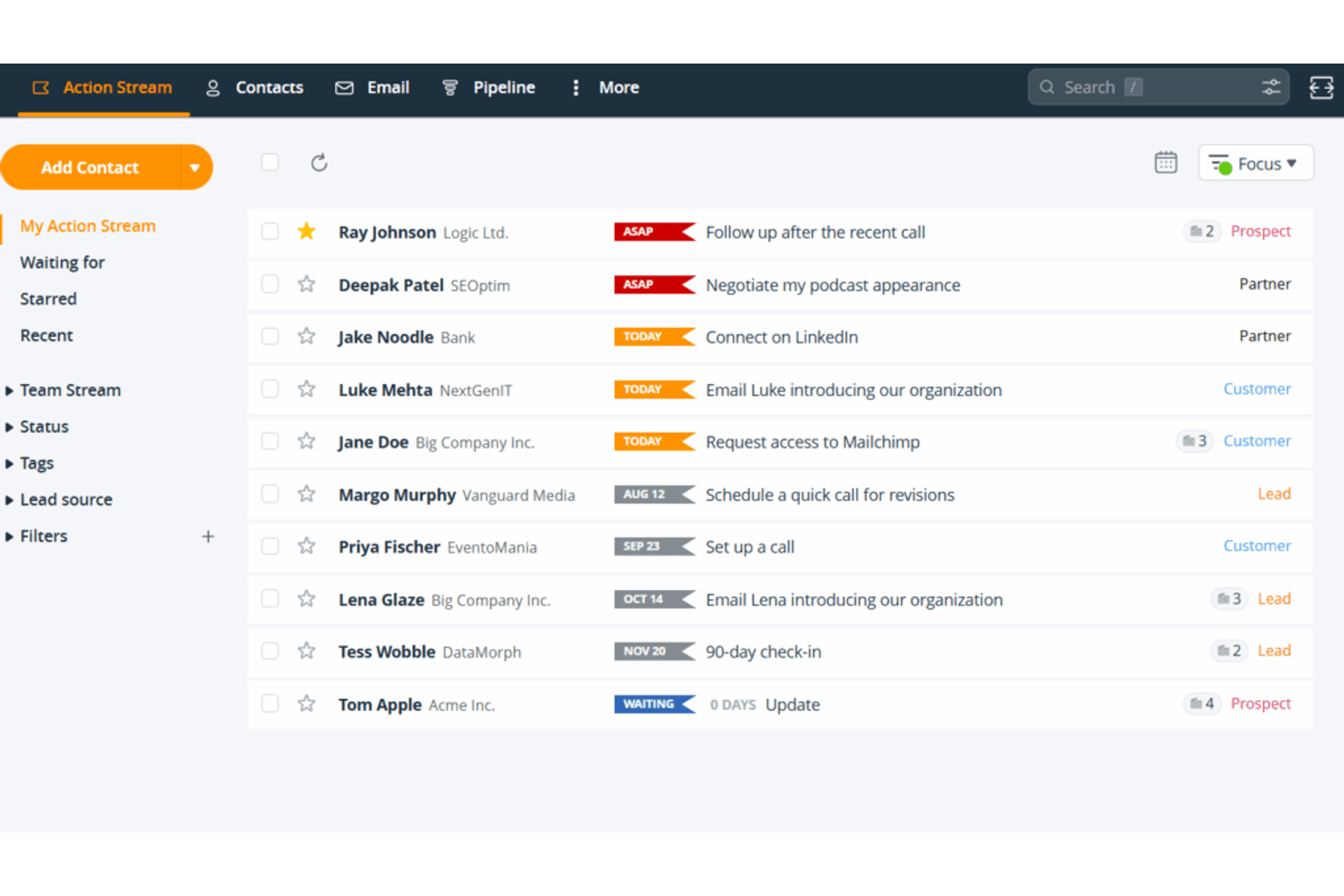
Si buscas un CRM que priorice la visibilidad de tus negocios, Pipedrive está hecho para ti. Los equipos de ventas y los pequeños empresarios que desean hacer un seguimiento visual de las oportunidades pueden utilizar sus pipelines de arrastrar y soltar para mantener cada trato en movimiento. Pipedrive es especialmente útil para empresas que necesitan gestionar múltiples etapas de ventas y priorizar seguimientos sin perder de vista lo que viene después.
Por qué elegí Pipedrive
Lo que distingue a Pipedrive para pequeñas empresas es su enfoque altamente visual para el seguimiento de acuerdos. El pipeline estilo kanban te permite mover los negocios por las etapas con solo arrastrar y soltar, para que siempre sepas qué está en progreso y qué necesita atención. Me gusta que puedas personalizar las etapas del pipeline para que se adapten a tu propio proceso de ventas, lo que facilita la adaptación a medida que crece tu empresa. Los recordatorios de actividades de Pipedrive también te ayudan a mantenerte al día con los seguimientos, para que ningún acuerdo se quede olvidado.
Características clave de Pipedrive
Otras funciones hacen de Pipedrive una excelente opción para las necesidades de CRM de pequeñas empresas:
- Integración de correo electrónico: Conecta tu cuenta de correo para enviar, recibir y gestionar mensajes directamente desde Pipedrive.
- Informes de ventas: Accede a informes personalizables para analizar el rendimiento de ventas y la salud del pipeline.
- Catálogo de productos: Almacena y gestiona una lista de productos o servicios para agregar a las oportunidades.
- Aplicación móvil: Gestiona negocios, contactos y actividades desde cualquier lugar usando la app móvil dedicada.
Integraciones de Pipedrive
Las integraciones incluyen Gmail, Outlook, Mailchimp, Trello, Slack, Zapier, Google Calendar, HubSpot, Zoom y Microsoft Teams. Pipedrive también ofrece una API abierta para integraciones personalizadas.
Pros and Cons
Pros:
- Pipelines visuales para monitorear el avance de las oportunidades
- Los recordatorios de actividades apoyan los seguimientos
- La sincronización de emails rastrea las conversaciones de las oportunidades
Cons:
- Las importaciones masivas requieren limpieza manual
- No tiene soporte de tickets integrado

Keap CRM
Ideal para funciones integradas de email y pagos
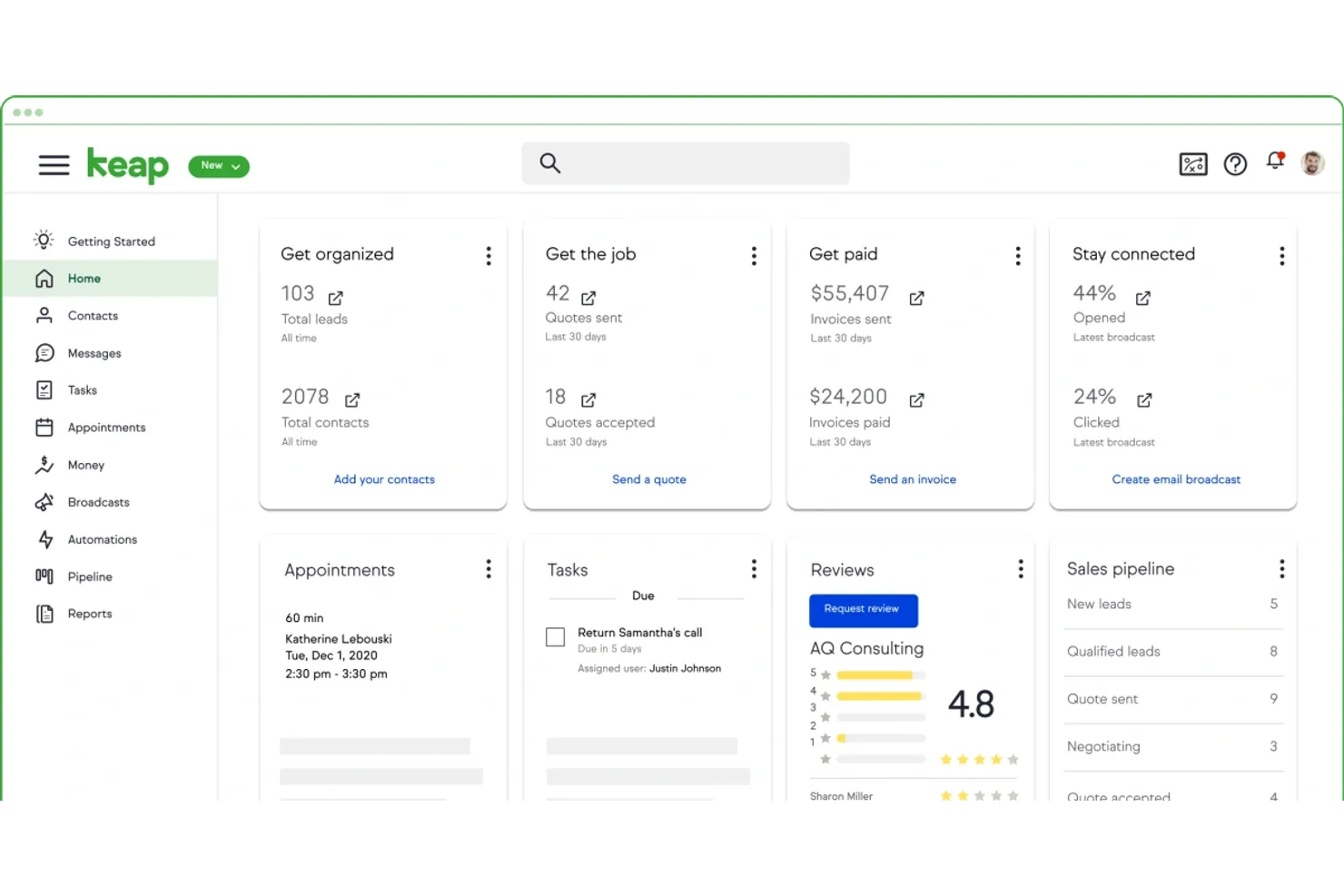
Keap CRM está diseñado para pequeñas empresas que desean gestionar las relaciones con los clientes, el marketing por correo electrónico y los pagos en un solo lugar. Si buscas un CRM que combine la automatización de ventas con facturación integrada y cobro de pagos, esta plataforma merece consideración. Es especialmente útil para negocios basados en servicios y emprendedores que quieren simplificar la comunicación con los clientes y cobrar más rápido.
Por qué elegí Keap CRM
Lo que me llamó la atención de Keap CRM para pequeñas empresas es su enfoque en combinar el email marketing y el procesamiento de pagos en una misma plataforma. Lo elegí porque puedes enviar campañas de correo electrónico segmentadas y automatizar seguimientos directamente desde tu CRM, lo que ayuda a mantener organizada la comunicación con los clientes. Las funciones integradas de facturación y cobro te permiten crear, enviar y hacer seguimiento de facturas sin cambiar de herramientas. Esto hace que Keap CRM sea adecuado para pequeñas empresas que desean gestionar ventas, marketing y pagos en un solo lugar.
Funciones clave de Keap CRM
Otras funciones que pueden resultar útiles a los usuarios de pequeñas empresas incluyen:
- Programación de citas: Permite a los clientes reservar reuniones directamente a través de tu enlace de calendario.
- Formularios de captación de prospectos: Crea formularios personalizables para captar prospectos desde tu sitio web o páginas de destino.
- Automatización de tareas: Configura recordatorios automáticos y tareas de seguimiento para tu equipo.
- Segmentación de contactos: Organiza los contactos en listas según etiquetas, comportamientos o campos personalizados.
Integraciones de Keap CRM
Las integraciones incluyen QuickBooks, Gmail, Outlook, Zapier, WordPress, Shopify, PayPal, Stripe, Google Calendar y más.
Pros and Cons
Pros:
- Facturación integrada para cobros más rápidos
- Email marketing incluido sin complementos
- Enlaces para agendar citas de clientes
Cons:
- Los reportes carecen de análisis avanzados
- La automatización requiere múltiples pasos de configuración
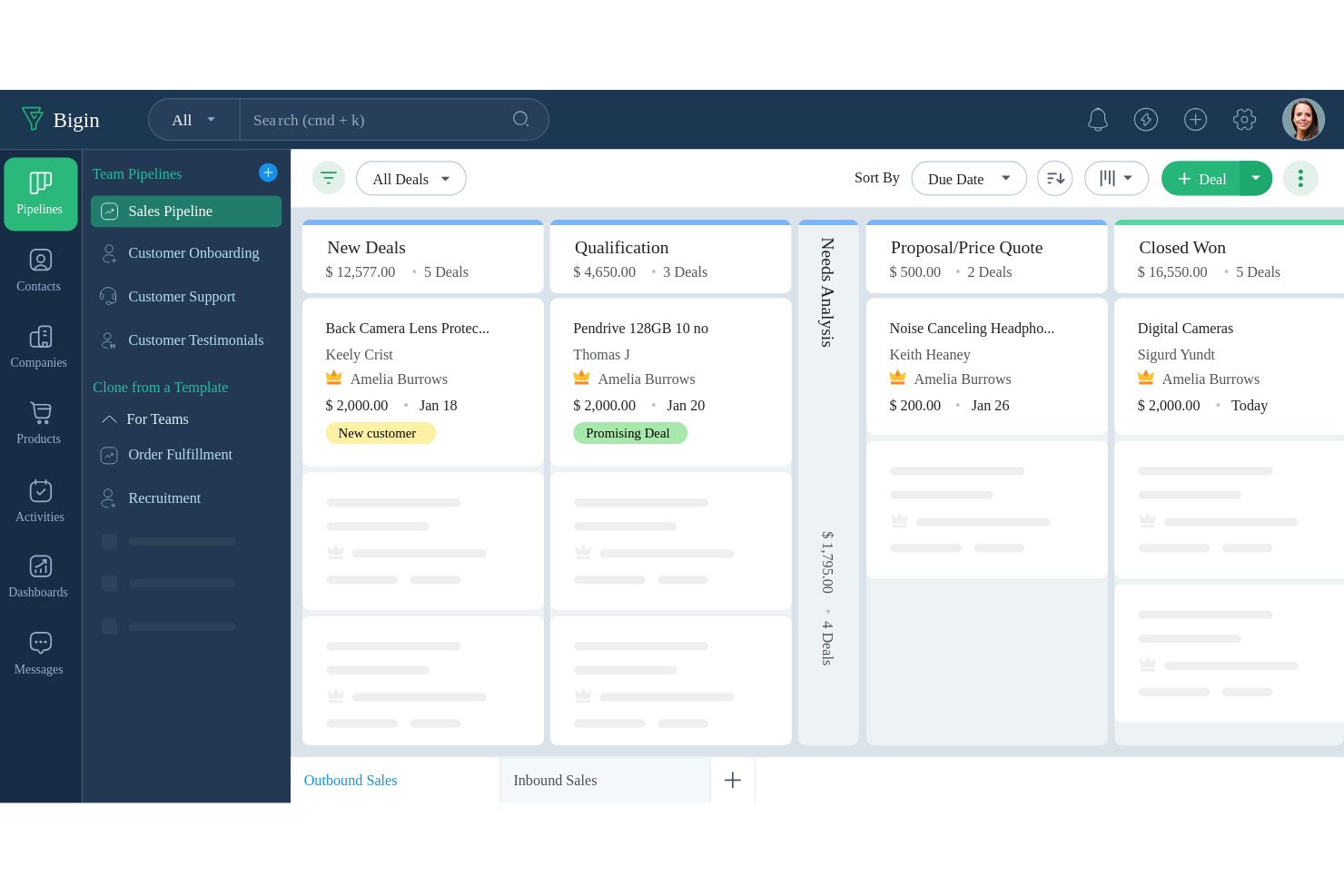
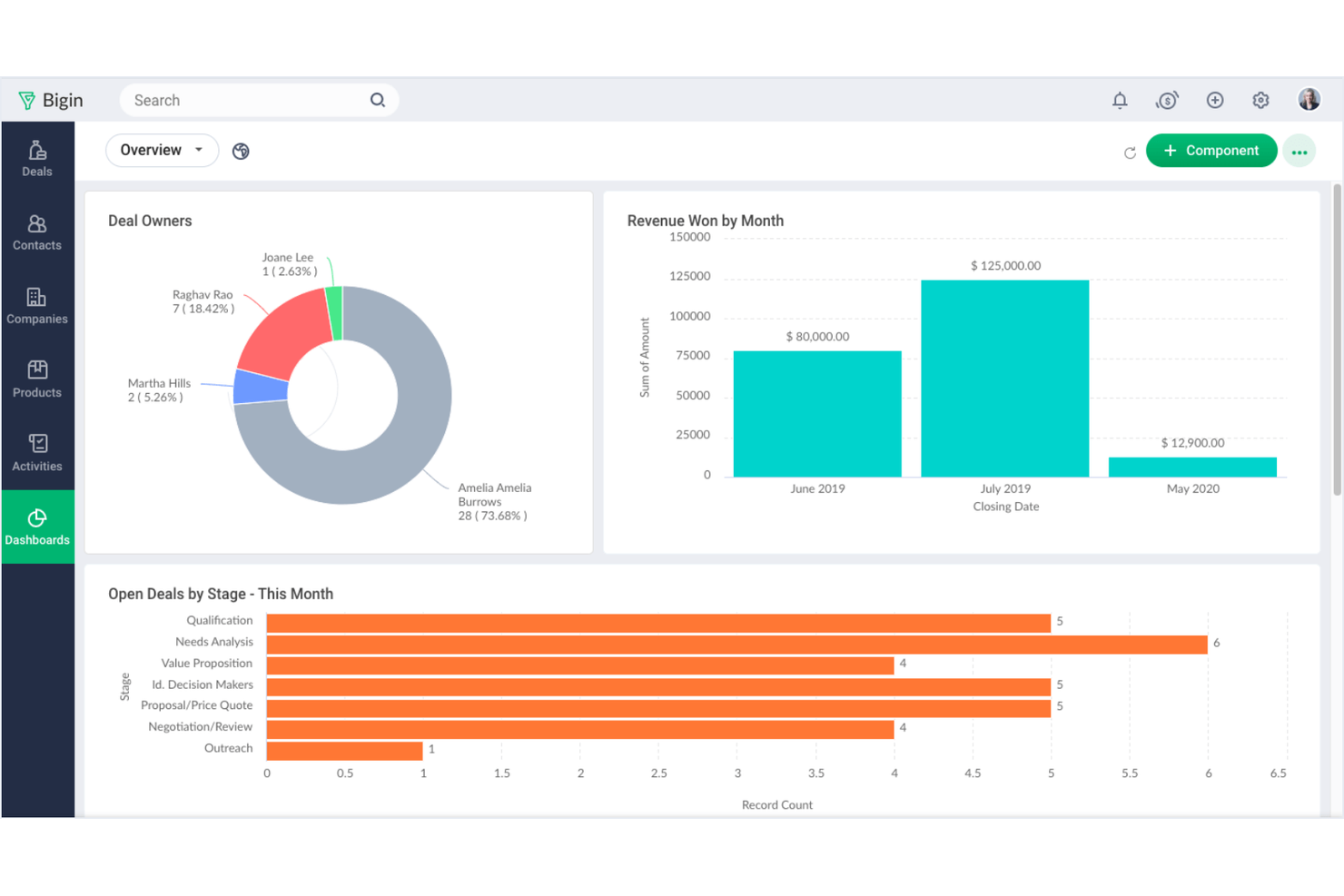
Bigin está diseñado para pequeñas empresas que buscan una plataforma CRM sencilla para gestionar sus embudos de ventas sin complicaciones adicionales. Es ideal para equipos o profesionales independientes que necesitan hacer seguimiento de acuerdos, contactos y actividades en un formato visual y fácil de usar. Bigin destaca por su enfoque en mantener la gestión de embudos clara y simple, para que dediques menos tiempo a la configuración y más a cerrar acuerdos.
Por qué elegí Bigin
Para pequeñas empresas que desean mantener sencillos los procesos de ventas, Bigin ofrece un enfoque centrado en la gestión de embudos. El embudo visual permite arrastrar y soltar acuerdos entre etapas, facilitando ver en qué punto se encuentra cada oportunidad. Me gusta que Bigin incluya registro de llamadas integrado y seguimiento de correos electrónicos, para que puedas tener todas tus comunicaciones de ventas organizadas en un solo lugar. Esta herramienta es perfecta si deseas evitar la complejidad de otros CRM más avanzados y solo necesitas gestionar acuerdos de principio a fin.
Funciones clave de Bigin
Otras características hacen de Bigin una opción práctica para las necesidades CRM de pequeñas empresas:
- Campos personalizables: Personaliza los registros de acuerdos, contactos y empresas con los campos que se adapten a tu proceso de ventas.
- Automatización de flujos de trabajo: Configura automatizaciones simples para asignar tareas o actualizar registros en función de desencadenantes.
- Aplicación móvil: Accede a tus embudos, contactos y actividades desde cualquier lugar usando la app móvil dedicada.
- Formularios web: Captura clientes potenciales directamente desde tu sitio web y pásalos directamente a tu embudo.
Integraciones de Bigin
Las integraciones incluyen Zoho CRM, Zoho Desk, Zoho Campaigns, Zoho Books, Zoho Projects, Google Workspace, Mailchimp, QuickBooks, Microsoft Outlook y Zapier.
Pros and Cons
Pros:
- El embudo visual simplifica el seguimiento de acuerdos
- La telefonía integrada registra llamadas en el CRM
- Los formularios web capturan prospectos automáticamente
Cons:
- No cuenta con herramientas avanzadas de automatización de marketing
- Los roles y permisos de usuario son básicos

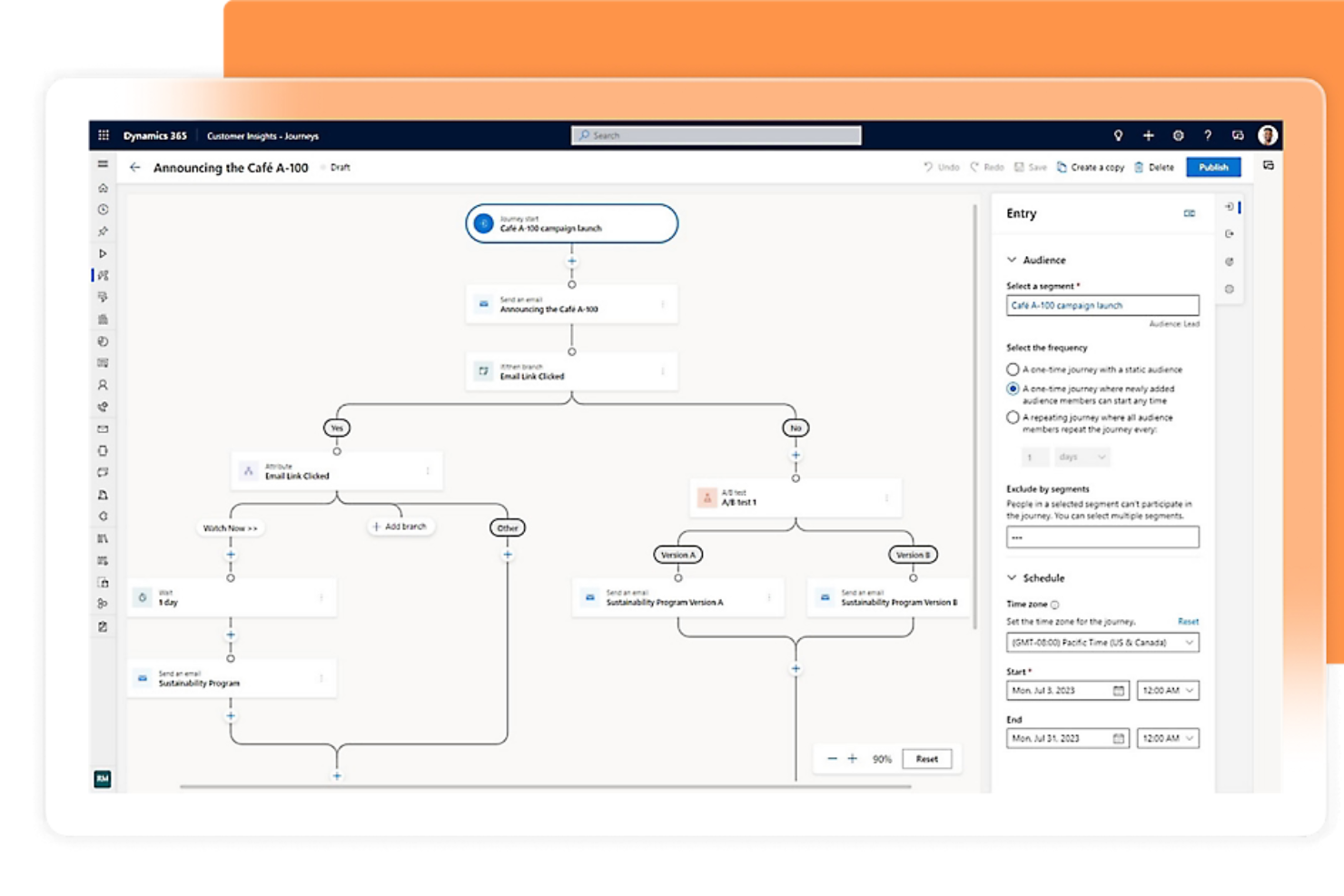
Si tu empresa ya utiliza herramientas de Microsoft 365, Microsoft Dynamics 365 CRM ofrece una experiencia familiar y profundamente integrada. Este CRM es ideal para pequeñas empresas que desean conectar ventas, servicio al cliente y marketing con Outlook, Teams y Excel. Es especialmente útil para equipos que buscan automatizar procesos y mantener todos los datos de clientes dentro del ecosistema de Microsoft.
Por qué elegí Microsoft Dynamics 365 CRM
Para las pequeñas empresas que ya usan Microsoft 365, este CRM destaca porque se conecta directamente con herramientas familiares como Outlook, Teams y Excel. Elegí Microsoft Dynamics 365 CRM porque te permite rastrear correos electrónicos, programar reuniones y gestionar datos de clientes sin salir de tus aplicaciones de Microsoft. La plataforma también permite automatizar flujos de trabajo de ventas y servicio utilizando Power Automate, lo que ayuda a los equipos a ahorrar tiempo en tareas repetitivas. Este nivel de integración facilita que las pequeñas empresas mantengan todas sus interacciones y procesos de clientes en un único entorno conectado.
Funciones clave de Microsoft Dynamics 365 CRM
Otras funciones que los equipos de pequeñas empresas pueden encontrar valiosas son:
- Tableros personalizados: Crea tableros visuales para seguir en tiempo real las métricas de ventas, servicio o marketing.
- Gestión de casos: Gestiona los casos de atención al cliente desde su creación hasta la resolución dentro del CRM.
- Puntuación de prospectos: Prioriza los prospectos usando modelos de puntuación personalizables basados en la interacción y los datos.
- Acceso desde aplicación móvil: Usa la app móvil dedicada para ver y actualizar registros de clientes sobre la marcha.
Integraciones de Microsoft Dynamics 365 CRM
Las integraciones incluyen Microsoft 365, LinkedIn Sales Navigator, Power BI, Azure DevOps, Outlook, SharePoint y más. Microsoft Dynamics 365 CRM también ofrece una API para integraciones personalizadas.
Pros and Cons
Pros:
- Los tableros personalizados rastrean métricas de ventas
- La puntuación de prospectos prioriza los seguimientos
- La gestión de casos rastrea solicitudes de servicio
Cons:
- Las actualizaciones de la interfaz interrumpen los flujos de trabajo del equipo
- Las herramientas de reportes requieren capacitación adicional

Ideal para la calificación de clientes potenciales con IA
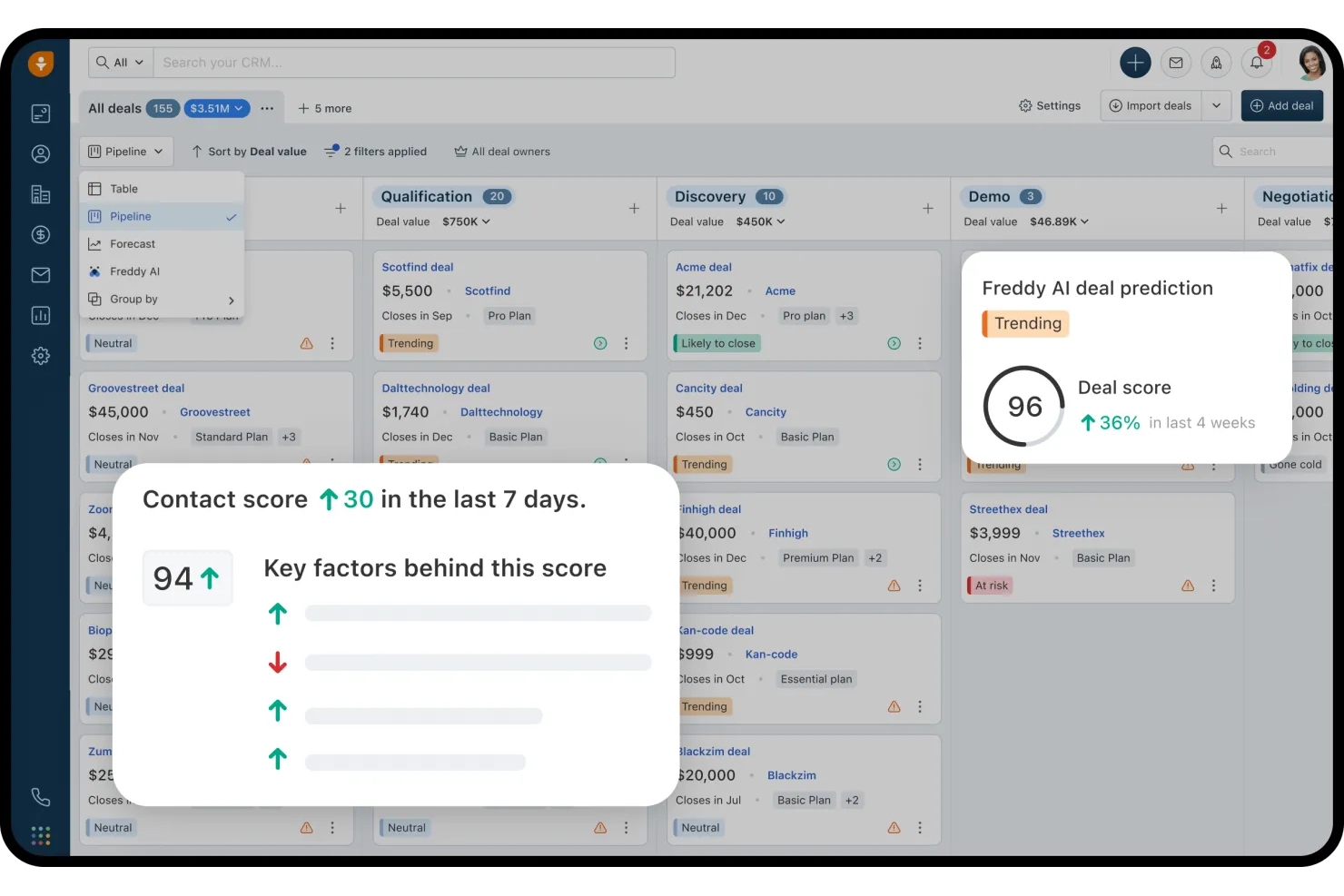
Freshsales está diseñado para pequeñas empresas que desean usar IA para calificar y priorizar clientes potenciales. Los equipos de ventas que buscan formas más inteligentes de enfocar su alcance encontrarán especialmente útil la calificación de clientes potenciales impulsada por IA. La plataforma te ayuda a identificar prospectos con alto potencial y gestionar tu embudo de ventas con menos conjeturas.
Por qué elegí Freshsales
Lo que diferencia a Freshsales como CRM para pequeñas empresas es su enfoque en la calificación de clientes potenciales basada en IA. Elegí esta herramienta porque analiza automáticamente el comportamiento y la interacción de los prospectos, luego asigna puntuaciones para ayudar a tu equipo a centrarse en los más prometedores. El asistente integrado Freddy AI también sugiere próximos pasos y destaca los acuerdos que necesitan atención, para que puedas actuar rápidamente. Este enfoque ayuda a los pequeños equipos de ventas a priorizar su tiempo y recursos donde más importa.
Características clave de Freshsales
Otras funciones que pueden resultar útiles para los equipos de pequeñas empresas incluyen:
- Teléfono y correo electrónico integrados: Realiza llamadas y envía correos directamente desde el CRM sin cambiar de herramienta.
- Embudo de ventas visual: Arrastra y suelta acuerdos a través de etapas personalizables del embudo para un seguimiento sencillo.
- Automatización de flujos de trabajo: Configura acciones automáticas para tareas de ventas repetitivas y seguimientos.
- Gestión de contactos y cuentas: Almacena, organiza y visualiza toda la información del cliente en un solo lugar.
Integraciones de Freshsales
Las integraciones incluyen Gmail, Outlook, Mailchimp, Zapier, QuickBooks, Shopify, Slack, Google Calendar y más. Freshsales también ofrece una API abierta para integraciones personalizadas.
Pros and Cons
Pros:
- Herramientas integradas de teléfono y correo electrónico
- El embudo visual simplifica el seguimiento de acuerdos
- La automatización gestiona tareas repetitivas de ventas
Cons:
- Las plantillas de correo tienen formato limitado
- Problemas de sincronización con el calendario y correo electrónico
Mejor para opciones avanzadas de escalabilidad
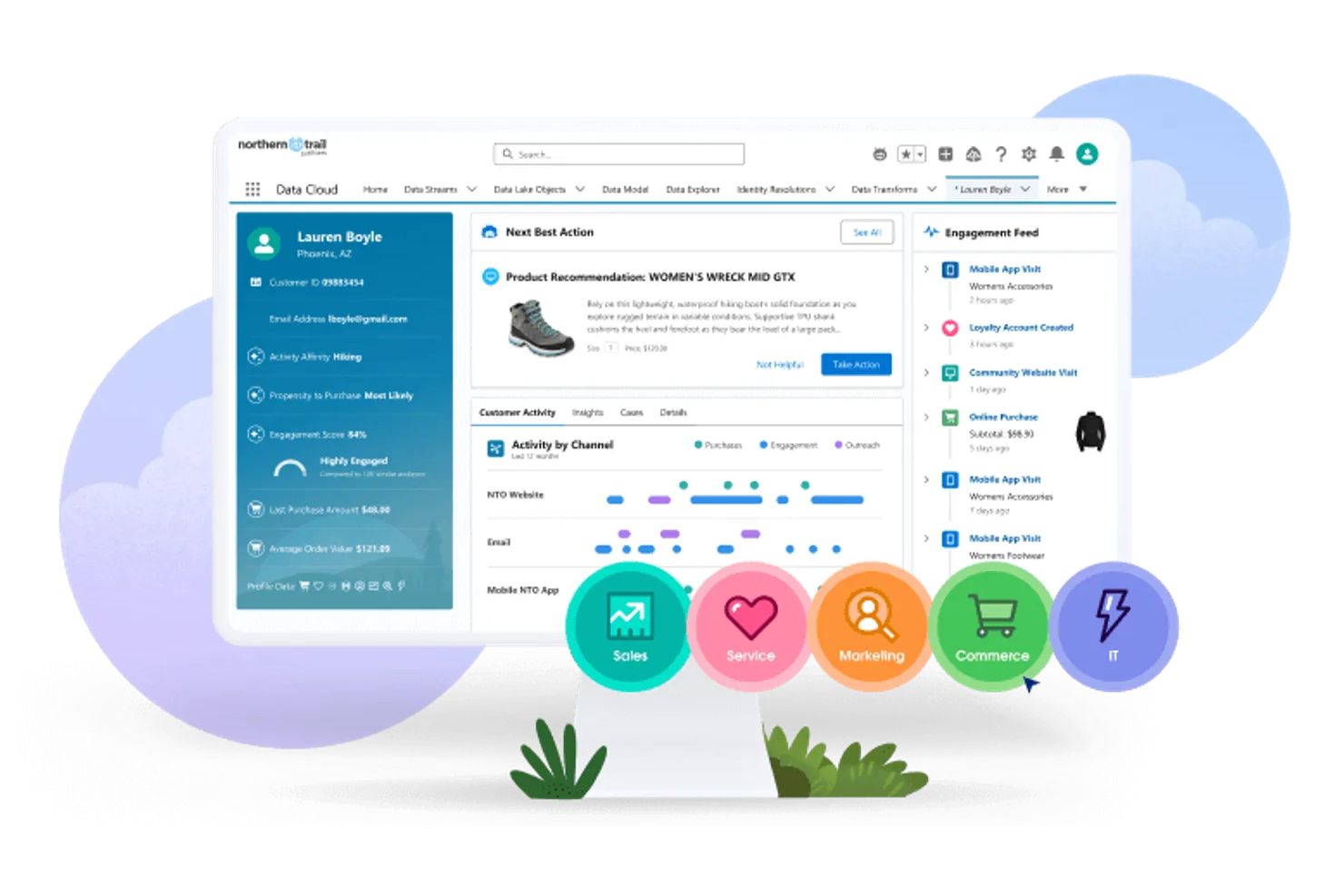
Salesforce CRM ofrece a las pequeñas empresas una plataforma que puede crecer y adaptarse a medida que cambian sus necesidades. Si tu equipo busca personalización avanzada, automatización y la capacidad de agregar nuevas funciones a medida que aumentas de tamaño, esta herramienta destaca. Es especialmente útil para empresas que planifican un crecimiento a largo plazo y necesitan un CRM que no limite sus opciones en el futuro.
Por qué elegí Salesforce CRM
Lo que distingue a Salesforce CRM para pequeñas empresas es su capacidad para escalar a medida que tu compañía crece. Lo elegí porque puedes comenzar con la gestión básica de ventas y contactos, y después agregar automatización avanzada, análisis y flujos de trabajo personalizados conforme evolucionan tus necesidades. El mercado AppExchange de la plataforma permite ampliar la funcionalidad con aplicaciones y integraciones específicas para cada industria. Esta flexibilidad convierte a Salesforce CRM en una opción sólida si quieres una solución que no te limite cuando tu negocio se vuelva más complejo.
Funciones clave de Salesforce CRM
Otras funciones que los equipos de pequeñas empresas pueden encontrar valiosas incluyen:
- Gestión de oportunidades: Realiza el seguimiento de oportunidades de ventas, pronostica ingresos y gestiona fases de negociaciones en un solo lugar.
- Gestión de casos: Organiza y resuelve solicitudes de servicio al cliente con herramientas de tickets integradas.
- Paneles personalizables: Crea paneles visuales para monitorizar métricas de ventas, servicios y marketing.
- Aplicación móvil: Accede a los datos del CRM, actualiza registros y gestiona tareas desde tu teléfono o tableta.
Integraciones de Salesforce CRM
Las integraciones incluyen Outlook, Gmail, Slack, Mailchimp, HubSpot, QuickBooks, DocuSign, Google Analytics, LinkedIn Sales Navigator y Zoom.
Pros and Cons
Pros:
- AppExchange ofrece miles de integraciones
- Permisos basados en roles para controlar el acceso de los usuarios
- Informes avanzados para analizar la actividad de ventas
Cons:
- Los costos mensuales son más altos que los de otros CRM pequeños
- Las actualizaciones pueden requerir capacitación adicional
New Product Updates from Salesforce CRM

Salesforce CRM Adds Automated CMS Access Expiration
Salesforce CRM adds automated access expiration and a new view-only support role for Point of Sale CMS users. These controls reduce manual access cleanup and help teams limit unnecessary permissions. For more information, visit Salesforce CRM’s official site.
 .
.
Zoho CRM
Ideal para flujos de trabajo de automatización personalizables
Zoho CRM ofrece a las pequeñas empresas una manera de crear flujos de trabajo de automatización personalizados que se adaptan a sus propios procesos de ventas y servicio. Es una excelente opción para equipos que desean automatizar tareas repetitivas, gestionar clientes potenciales y personalizar las experiencias de los clientes sin una gran intervención de TI. Si necesitas un CRM que se adapte a las reglas de tu negocio y te ayude a escalar tus operaciones, Zoho CRM brinda la flexibilidad para lograrlo.
Por qué elegí Zoho CRM
Lo que me atrajo de Zoho CRM para pequeñas empresas es su capacidad para permitirte diseñar flujos de trabajo automatizados exactamente conformes a tus propios procesos de ventas y soporte. Puedes usar el generador de flujos de trabajo con función de arrastrar y soltar para automatizar la asignación de clientes potenciales, seguimientos y notificaciones según tus propias reglas. Destaco que Zoho CRM también permite automatizaciones de múltiples pasos, lo que facilita configurar secuencias que se activan en diferentes módulos como contactos, oportunidades y tareas. Este nivel de personalización ayuda a los equipos pequeños a ahorrar tiempo y reducir el trabajo manual a medida que crecen.
Funciones clave de Zoho CRM
Otras funciones hacen de Zoho CRM una opción flexible para equipos de pequeñas empresas:
- Pronóstico de ventas: Genera proyecciones de ventas basadas en tu embudo de ventas y datos históricos.
- Integración de correo electrónico: Conecta tus cuentas de correo para enviar, recibir y rastrear mensajes desde el propio CRM.
- Tableros personalizados: Crea tableros visuales para monitorear métricas clave y el desempeño del equipo.
- App móvil: Accede a información de clientes, actualiza registros y gestiona tareas desde tu teléfono o tableta.
Integraciones de Zoho CRM
Las integraciones incluyen Zoho Mail, Zoho Books, Zoho Desk, Zoho Campaigns, Google Workspace, Microsoft Office 365, Mailchimp, QuickBooks, Slack y Zapier. Zoho CRM también ofrece una API para integraciones personalizadas.
Pros and Cons
Pros:
- El generador de automatizaciones permite flujos de trabajo de varios pasos
- Los módulos personalizados adaptan los campos de datos del negocio
- El seguimiento de correos electrónicos muestra aperturas y clics
Cons:
- Las respuestas de soporte son inconsistentes en horas pico
- Las funciones avanzadas requieren planes de nivel superior
New Product Updates from Zoho CRM

Zoho CRM Adds Reusable Canvas Templates for Forms
Zoho CRM now supports Canvas templates in the Forms view, so you can design a form layout once and reuse it across records for a consistent, faster experience. For more information, visit Zoho CRM's official site.
 .
.Otros CRM para pequeñas empresas
Estas son algunas opciones adicionales de CRM para pequeñas empresas que no llegaron a mi lista de opciones seleccionadas, pero que aun así merece la pena consultar:
- Insightly
Mejor para la integración de gestión de proyectos
- Apptivo CRM
Ideal para módulos de aplicaciones personalizables
- Bitrix24 CRM
Mejor para herramientas de colaboración en equipo


Cómo Evalúo un CRM para Pequeñas Empresas
Divido mi evaluación en dos niveles: la funcionalidad básica—como la gestión de contactos y el seguimiento de oportunidades—que todo CRM debe cumplir, y los diferenciadores que separan la opción ideal del resto.
Funcionalidad Básica (Requisitos Indispensables para Esta Lista)
Cuando selecciono herramientas para mi lista, califico cada una en una escala del 0 (no ofrece la funcionalidad) al 5 (destaca en esta área) para cada función esencial detallada a continuación. Luego, calculo el puntaje total de la herramienta en porcentaje. Cada herramienta debe lograr una puntuación mínima total del 65% para ser considerada.
- Gestión de Contactos y Cuentas: Busco registros de clientes organizados con historial de interacción, campos personalizados y segmentación, para que un equipo de cinco personas pueda consultar toda la información de un cliente en segundos.
- Seguimiento del Proceso de Ventas: Cada herramienta debe permitir visualizar negocios por etapas, personalizar los procesos y pronosticar ingresos sin tener que alternar entre hojas de cálculo y el CRM.
- Integración de Email y Comunicaciones: Verifico la sincronización bidireccional con proveedores como Gmail y Outlook, además de la capacidad de registrar llamadas y mensajes para que nada se pierda.
- Automatización de Flujos de Trabajo: Aquí son importantes las automatizaciones basadas en acciones, como asignar clientes potenciales automáticamente por región, enviar emails de seguimiento tras demostraciones o actualizar el estado de un trato al recibir formularios.
- Informes y Paneles de Control: El CRM debe ofrecer informes personalizables sobre la salud del embudo de ventas, actividad de los representantes y tendencias de clientes, no sólo gráficos prediseñados que no se pueden adaptar a tus objetivos.
- Precios Accesibles y Escalables para PYMES: Evalúo si los precios son transparentes y escalonados para equipos pequeños, con un plan gratuito o punto de entrada asequible que no limite las funciones esenciales.
Después de tener una lista de herramientas que cumplen estos criterios, considero lo que hace a cada plataforma diferente.
Factores Diferenciadores (Lo Que Distingue a los Proveedores)
Así es como comparo y contrasto diferentes proveedores:
Funciones Destacadas
La automatización de marketing integrada es un gran diferenciador. Herramientas como HubSpot y Freshsales incluyen campañas de email y formularios de captación de clientes potenciales, lo que permite a los equipos pequeños evitar gestionar una plataforma aparte. También valoro si un CRM incluye gestión de tickets de soporte. Una bandeja de entrada compartida vinculada al mismo registro de contacto da a tu equipo una visión completa de cada cliente. Una aplicación móvil con funciones completas también es importante, especialmente para propietarios y representantes en terreno que necesitan actualizar negocios sobre la marcha.
Más Allá de las Funciones
La rapidez de implementación es importante para equipos pequeños. Busco asistentes de configuración guiados y herramientas para importar desde CSV que permitan a un equipo de tres personas estar funcionando en un día, no semanas. La compatibilidad con el ecosistema es igualmente relevante—las integraciones nativas con herramientas como QuickBooks, Mailchimp y Slack significan menos soluciones alternativas y menos necesidad de ingresar datos manualmente. También evalúo el costo total de propiedad, revisando si funciones como la sincronización de email o la automatización están reservadas para planes superiores, lo que podría presionar el presupuesto de un equipo en crecimiento.
Cómo elegir un CRM para una pequeña empresa
Es fácil perderse entre largas listas de funciones y estructuras de precios complejas. Para ayudarte a mantener la concentración mientras avanzas en tu proceso particular de selección de software, aquí tienes una lista de factores que debes tener en cuenta:
| Factor | Qué debes considerar |
| Escalabilidad | ¿Podrá el CRM gestionar más usuarios, contactos y datos a medida que crezca tu empresa? Comprueba los límites de usuarios y registros de cada plan. |
| Integraciones | ¿Se conecta el CRM de forma nativa con tus herramientas actuales (correo electrónico, calendario, contabilidad, marketing)? Haz una lista de las integraciones imprescindibles antes de comparar opciones. |
| Personalización | ¿Puedes adaptar los campos, las canalizaciones y los flujos de trabajo para que coincidan con tu proceso de ventas? Evita las herramientas que te obliguen a utilizar estructuras rígidas. |
| Facilidad de uso | ¿Adoptará tu equipo el CRM rápidamente o necesitará una formación exhaustiva? Prueba la interfaz con usuarios reales antes de comprometerte. |
| Implementación y puesta en marcha | ¿Cuánto tiempo tardarás en ponerlo en funcionamiento? Busca asistencia para la migración, guías de configuración y recursos de puesta en marcha que se adapten al nivel de comodidad técnica de tu equipo. |
| Coste | ¿Son claros y predecibles los niveles de precios a medida que añades usuarios o funciones? Presta atención a las tarifas ocultas, los complementos obligatorios o los grandes saltos de precio entre planes. |
| Medidas de seguridad | ¿Ofrece el CRM permisos basados en roles, cifrado de datos y copias de seguridad periódicas? Asegúrate de que cumple las normas de protección de datos de tu sector. |
| Disponibilidad del soporte | ¿Puedes contactar con el soporte cuando lo necesites (chat, teléfono, correo electrónico)? Comprueba el horario de soporte, los tiempos de respuesta y si se incluye ayuda para la puesta en marcha. |
¿Qué es un CRM para pequeñas empresas?
Un CRM para pequeñas empresas es una plataforma de software que ayuda a las pequeñas empresas a organizar la información de los clientes, hacer un seguimiento de las actividades de ventas y gestionar las relaciones en un solo lugar. Estos sistemas están diseñados para ser accesibles y asequibles para equipos pequeños, y ofrecen herramientas para gestionar contactos, hacer un seguimiento de las oportunidades y consultar el historial de comunicaciones. Usar un CRM para pequeñas empresas ayuda a los equipos a mantenerse organizados, hacer seguimiento de los clientes potenciales y construir relaciones más sólidas con los clientes con el tiempo.
Características de un CRM para pequeñas empresas
Al seleccionar un CRM para una pequeña empresa, presta atención a las siguientes características clave:
- Gestión de contactos: Almacena, organiza y actualiza la información de clientes y clientes potenciales en una base de datos centralizada, lo que facilita el acceso a los detalles y el seguimiento de las interacciones.
- Seguimiento del embudo de ventas: Visualiza y gestiona las oportunidades a medida que avanzan por las diferentes etapas de ventas, ayudando a tu equipo a priorizar y supervisar el progreso.
- Gestión de tareas y actividades: Asigna, programa y realiza un seguimiento de las tareas de seguimiento, llamadas y reuniones para asegurarte de que nada quede pendiente.
- Integración del correo electrónico: Conecta tu cuenta de correo electrónico para enviar, recibir y registrar mensajes directamente dentro del CRM, manteniendo todas las comunicaciones en un solo lugar.
- Integración del calendario: Sincroniza reuniones, llamadas y recordatorios con tu calendario para coordinar los horarios y evitar reservas duplicadas.
- Informes y análisis: Genera informes de ventas, actividades y rendimiento para supervisar la productividad del equipo e identificar tendencias o cuellos de botella.
- Automatización de flujos de trabajo: Configura reglas para automatizar tareas repetitivas, como enviar correos electrónicos de seguimiento o actualizar las etapas de las oportunidades, ahorrando tiempo y reduciendo el trabajo manual.
- Acceso móvil: Usa aplicaciones móviles para consultar y actualizar los datos del CRM, gestionar tareas y comunicarte con los clientes mientras estás lejos de tu escritorio.
- Permisos basados en roles: Controla el acceso a la información confidencial asignando roles y permisos de usuario, para asegurarte de que los miembros del equipo solo vean lo que necesitan.
- Almacenamiento de documentos: Sube, organiza y comparte archivos como propuestas, contratos y presentaciones dentro del CRM para facilitar su consulta y colaboración.
Beneficios de un CRM para pequeñas empresas
Implementar un CRM para una pequeña empresa proporciona varios beneficios para tu equipo y tu negocio. Estos son algunos de los que puedes esperar:
- Datos de clientes centralizados: Mantén todos los datos de contacto, el historial de comunicaciones y las actividades de ventas en un solo lugar para facilitar el acceso y mejorar la organización.
- Mejor seguimiento: Usa la gestión de tareas y los recordatorios para asegurarte de que cada cliente potencial y cliente reciba atención oportuna y de que nada se pase por alto.
- Mayor visibilidad de las ventas: Haz un seguimiento visual de las oportunidades y los embudos de ventas, ayudando a tu equipo a priorizar oportunidades y prever los ingresos con mayor precisión.
- Colaboración mejorada del equipo: Comparte notas, documentos y actualizaciones dentro del CRM para que todos estén informados y alineados sobre las interacciones con los clientes.
- Ahorro de tiempo mediante la automatización: Automatiza tareas repetitivas, como los correos electrónicos de seguimiento y las actualizaciones de oportunidades, liberando a tu equipo para que se concentre en trabajos de mayor valor.
- Mejores informes y perspectivas: Genera informes sobre el rendimiento de las ventas y las actividades del equipo para identificar tendencias, medir el éxito y orientar la toma de decisiones.
- Mayor seguridad de los datos: Controla el acceso a la información confidencial mediante permisos basados en roles, protegiendo los datos de los clientes y ayudando a cumplir los requisitos normativos.
Costes y precios de un CRM para pequeñas empresas
Seleccionar un CRM para una pequeña empresa requiere comprender los diversos modelos de precios y planes disponibles. Los costes varían según las características, el tamaño del equipo, los complementos y otros factores. La siguiente tabla resume los planes habituales, sus precios medios y las características típicas incluidas en las soluciones de CRM para pequeñas empresas:
Tabla comparativa de planes de CRM para pequeñas empresas
| Tipo de plan | Precio promedio | Funciones comunes |
| Plan gratuito | $0 | Gestión básica de contactos, embudo de ventas limitado, seguimiento sencillo de tareas e informes básicos. |
| Plan personal | $5-$25/por usuario/mes | Gestión de contactos y negocios, integración de correo electrónico, sincronización de calendarios y automatización básica de flujos de trabajo. |
| Plan empresarial | $25-$50/por usuario/mes | Informes avanzados, embudos personalizables, automatización de flujos de trabajo, integraciones y acceso móvil. |
| Plan empresarial avanzado | $50-$100/por usuario/mes | Seguridad avanzada, permisos basados en roles, soporte prioritario, módulos personalizados y acceso a la API. |
Preguntas frecuentes sobre CRM para pequeñas empresas
Estas son algunas respuestas a preguntas frecuentes sobre CRM para pequeñas empresas:
¿Cómo sé si mi pequeña empresa necesita un CRM?
Si tienes dificultades para realizar un seguimiento de la información de los clientes, los seguimientos o las actividades de ventas en hojas de cálculo o correos electrónicos, es hora de considerar un CRM. Incluso los equipos pequeños se benefician de tener un único lugar para organizar contactos, gestionar negocios y supervisar el historial de comunicaciones.
¿Puedo migrar los datos de mis clientes actuales a un CRM para pequeñas empresas?
Sí, la mayoría de las soluciones de CRM para pequeñas empresas ofrecen herramientas de importación para hojas de cálculo u otros sistemas. Busca plataformas con guías de migración paso a paso, archivos de plantilla y recursos de soporte que te ayuden a transferir tus datos de forma precisa y segura.
¿Qué debo buscar en un CRM para un equipo pequeño con recursos técnicos limitados?
Prioriza la facilidad de uso, una incorporación sencilla y un servicio de atención al cliente receptivo. Elige un CRM con una interfaz intuitiva, instrucciones de configuración claras y acceso a materiales de formación, para que tu equipo pueda empezar rápidamente sin necesitar conocimientos de TI.
¿Existen opciones de CRM gratuitas adecuadas para pequeñas empresas?
Sí, muchos proveedores de CRM ofrecen planes gratuitos con funciones básicas, como la gestión de contactos y el seguimiento de negocios. Estos planes suelen tener límites de usuarios o funciones, así que revisa qué incluyen y asegúrate de que cubran tus necesidades esenciales antes de comprometerte.
¿Qué tan seguros están los datos de los clientes en un CRM para pequeñas empresas?
La mayoría de las plataformas de CRM para pequeñas empresas con buena reputación utilizan cifrado, copias de seguridad periódicas y permisos basados en roles para proteger tus datos. Revisa siempre la documentación de seguridad del proveedor y confirma que sus medidas de protección cumplan los requisitos de tu sector.