

Reseña de Freshdesk: ventajas, desventajas, funciones y precios explicados
Freshdesk ofrece atención al cliente con tecnología de inteligencia artificial, fácil de implementar y escalable para equipos en crecimiento. Descubre si proporciona la eficiencia y flexibilidad que necesitan los equipos modernos de atención al cliente.

Revisamos las herramientas de manera independiente, y las comisiones ayudan a financiar nuestras pruebas. Consulta nuestra política de transparencia, nuestra metodología o sugiere una herramienta.
Freshdesk is an AI-powered customer support software designed to help teams manage tickets, automate workflows, and deliver consistent service across channels. For customer support managers juggling high ticket volumes, shifting priorities, and the need for clear reporting, Freshdesk offers a balance of usability and flexibility. This review covers Freshdesk’s features, use cases, pros and cons, and pricing to help you decide if it fits your team’s support needs.
Freshdesk Evaluation Summary

4.4/5
- From $19/user/month (billed annually)
- 14-day free trial
Por qué confiar en nuestras recomendaciones de software
6,700+
Reviews
20
Industry experts
16+
Evaluation factors
14
Years
Nuestro equipo lleva probando y evaluando software desde 2012. Como líderes de CX, sabemos lo difícil —y lo importante— que es elegir el software adecuado.
Para esta guía, evaluamos las herramientas mediante pruebas prácticas e investigación independiente, puntuando las herramientas según nuestros criterios de selección.
Nuestras reseñas reflejan nuestro criterio editorial humano, no un discurso de ventas.
 Gui DrusinaCreative Director
 Tim FisherVP of AI
Freshdesk Overview
When judging customer support software, Freshdesk stands out for its approachable user interface, quick onboarding, and strong ticket automation. It centralizes conversations from multiple channels into a single workspace, allowing teams to manage tickets, collaborate through internal notes and threads, and resolve issues faster. It includes automation tools for routing tickets, prioritizing requests, enforcing SLAs, and streamlining repetitive support workflows.
One of Freshdesk’s most distinctive features is Freddy AI, which includes AI agents that can automatically resolve routine support requests and an AI Copilot that assists human agents with summaries, reply suggestions, and insights to improve resolution speed.
Pros
- Omnichannel ticketing includes email, chat, phone, and social.
- AI tools assist agents with suggestions and insights.
- Easy-to-use interface with minimal training required.
Cons
- Reporting dashboards offer limited customization options.
- Mobile app lacks features available on desktop.
- Most AI features are limited to higher-tier plans.
Is Freshdesk Right For Your Needs?
Who Would be a Good Fit for Freshdesk?
Freshdesk is a strong choice for teams that need help desk software with multichannel ticketing, straightforward automation, and quick onboarding without heavy IT involvement. Its flexible pricing and day-pass model make it accessible for seasonal or growing teams, while its AI features help support agents manage high ticket volumes. Industries and roles that rely on fast, consistent customer communication and easy-to-deploy support tools will find Freshdesk especially useful.
- Ecommerce Support TeamsFreshdesk’s omnichannel ticketing helps manage inquiries from multiple sales channels, marketplaces, and order-related customer requests efficiently.
- SaaS StartupsAffordable plans (including a free one), AI tools, and easy setup suit fast-growing, resource-limited teams needing scalable customer support infrastructure.
- Retail Customer ServicePhone, chat, and messaging integrations through the Freshworks platform support high-volume customer requests across multiple locations.
- Managed Service Providers (MSPs)MSPs can track client issues, prioritize requests, and automate routing across different technical support teams.
- IT Help DesksAutomated ticket routing, SLAs, and knowledge base features streamline internal service requests and improve resolution times.
- Travel and Hospitality Support TeamsHotels, airlines, and travel agencies can manage booking questions, cancellations, and service requests across multiple communication channels.
Who Would be a Bad Fit for Freshdesk?
Freshdesk may not suit organizations with highly complex operational workflows, specialized industry requirements, or extensive customization needs. Teams requiring deep enterprise configuration, heavy reporting customization, or industry-specific compliance features may prefer more specialized service platforms.
- Very Large EnterprisesOrganizations with highly complex workflow requirements may need more customizable enterprise platforms.
- Financial ServicesHighly regulated environments may require additional compliance validation and advanced governance capabilities.
- Healthcare ProvidersOrganizations managing protected health information should confirm HIPAA compliance requirements and configuration options.
- Field Service OperationsFreshdesk does not include built-in field technician dispatch functionality or on-site service management tools.
- B2B Account ManagementCompanies requiring deep account-level case management may prefer platforms with integrated CRM-centric workflows.
- Government AgenciesPublic sector organizations may require specific security certifications, data residency options, or procurement frameworks that should be verified before deployment.
Cómo Probamos y Evaluamos Herramientas
Hemos pasado años construyendo, refinando y perfeccionando nuestro sistema de evaluación y puntuación de software. La rúbrica está diseñada para capturar los matices de la selección de software y lo que hace que una herramienta sea eficaz, centrándose en los aspectos críticos del proceso de toma de decisiones. A continuación, puedes ver exactamente cómo funcionan nuestras pruebas y puntuaciones en siete criterios. Esto nos permite ofrecer una evaluación imparcial del software basada en funcionalidad principal, características destacadas, facilidad de uso, incorporación, soporte al cliente, integraciones, opiniones de clientes y la relación calidad-precio.
Funcionalidad Principal (25% de la puntuación final)
El punto de partida de nuestra evaluación siempre es la funcionalidad principal de la herramienta. ¿Tiene las funciones básicas que un usuario esperaría? ¿Alguna de esas funciones principales está bloqueada en planes de precios más altos? Consideramos que una herramienta debe estar a la par de las capacidades básicas de sus competidores.
Características Destacadas (25% de la puntuación final)
A continuación, evaluamos aquellas características poco comunes y destacadas que superan la funcionalidad principal típica de herramientas de ese tipo. Una puntuación alta refleja funciones especializadas o únicas que hacen que el producto sea más rápido, eficiente o que aporte un valor adicional al usuario. También evaluamos lo fácil que es integrar la herramienta con otras que típicamente se utilizan en el ecosistema tecnológico para ampliar la funcionalidad y utilidad del software. Las herramientas que ofrecen abundantes integraciones nativas, conexiones de terceros y acceso a API para integraciones personalizadas obtienen la mejor puntuación.
Facilidad de Uso (10% de la puntuación final)
Consideramos lo rápido y sencillo que es ejecutar las tareas definidas en la funcionalidad principal usando la herramienta. El software que puntúa alto está bien diseñado, es intuitivo, ofrece aplicaciones móviles, proporciona plantillas y hace que tareas relativamente complejas parezcan sencillas.
Incorporación (10% de la puntuación final)
Sabemos lo importante que es la rápida adopción del equipo en una nueva plataforma, así que evaluamos lo fácil que es aprender y usar una herramienta con poca formación. Evaluamos cuán rápido un miembro del equipo puede configurarse y comenzar a usar la herramienta sin experiencia. Las soluciones mejor puntuadas requieren poco o ningún soporte.
Soporte al Cliente (10% de la puntuación final)
Revisamos lo rápido y sencillo que es salir de un atasco y encontrar ayuda por teléfono, chat en vivo o una base de conocimientos. Las herramientas y empresas que brindan soporte en tiempo real obtienen la mejor puntuación, mientras que los chatbots obtienen la peor.
Opiniones de Clientes (10% de la puntuación final)
Más allá de nuestras propias pruebas, consideramos el puntaje neto del promotor de los clientes actuales y anteriores. Revisamos la probabilidad de que elijan la herramienta nuevamente para la funcionalidad principal. Un software con alta puntuación refleja un alto puntaje neto del promotor por parte de clientes actuales o anteriores.
Relación Calidad-Precio (10% de la puntuación final)
Por último, considerando todos los demás criterios, analizamos el precio promedio de los planes de nivel inicial frente a las funciones principales y valoramos el resto de los criterios de evaluación. El software que ofrece más por menos obtiene una mayor puntuación.
Core Features
Omnichannel Ticketing:
Manage customer inquiries from email, chat, phone, and social channels in one unified inbox. This ticketing system centralizes conversations and reduces missed or duplicate tickets.
AI-Powered Automations:
Automate repetitive tasks like ticket assignment, categorization, and follow-ups using Freshdesk’s Freddy AI. This helps teams respond faster and maintain consistent workflows.
Self-Service Portal:
Create a branded knowledge base and community forums for customers to find answers independently. This reduces ticket volume and empowers users to resolve common issues.
SLA Management:
Set and track service level agreements for response and resolution times. Freshdesk automatically flags tickets at risk of breaching SLAs, helping teams prioritize urgent issues.
Collision Detection:
See when another agent is viewing or responding to the same ticket in real time. This prevents duplicate replies and improves team coordination.
Custom Ticket Fields:
Add custom fields to tickets to capture industry- or business-specific information. This allows for more tailored reporting and workflow automation.

Standout Features
Day Passes
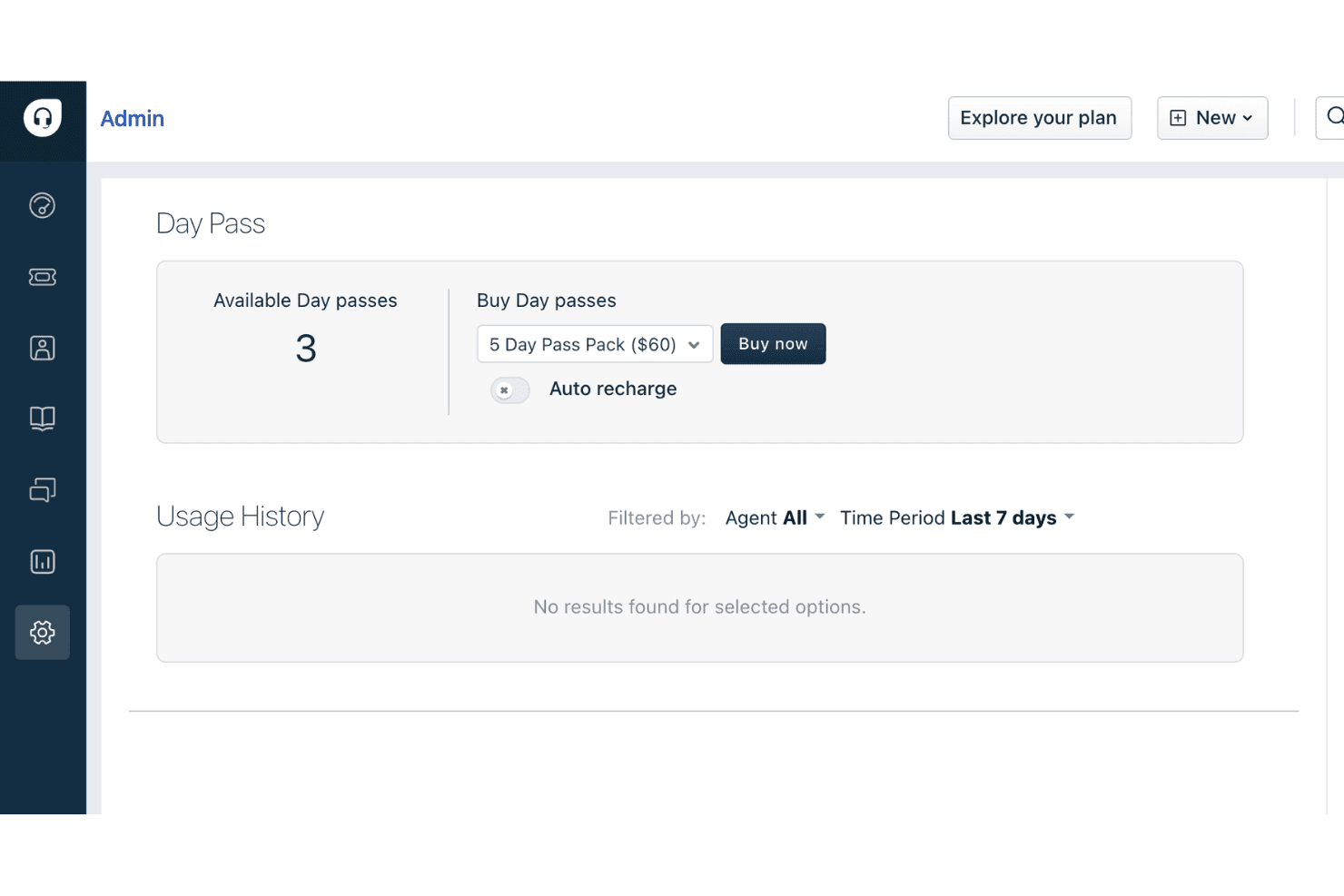
Day passes let you add temporary agents for short-term spikes in support demand without upgrading your plan. This is especially useful for seasonal businesses or special events that need extra help only occasionally.
Canned Forms
Canned forms allow you to create pre-filled response templates for common customer queries. This speeds up agent replies and ensures consistent, accurate information is shared with customers.
Ease of Use
Freshdesk is widely recognized for its user-friendly, clean interface and intuitive navigation, making it easy for new agents to get started with minimal training. Users often highlight the clear ticket views, drag-and-drop workflow automations, and straightforward setup process. The platform’s guided onboarding and in-app tips help teams configure features quickly, while the logical layout reduces confusion even as ticket volumes grow. This focus on usability makes Freshdesk accessible for teams with varying technical backgrounds.

Onboarding
Freshdesk offers a smooth onboarding experience with step-by-step setup guides, interactive product tours, and a robust knowledge base. Many users mention that the initial configuration is straightforward, with helpful prompts and clear documentation. Live chat support and community forums are available for troubleshooting, which helps new teams resolve questions quickly. This combination of in-app guidance and accessible resources allows most teams to start handling tickets and customizing workflows within days, not weeks.

Customer Support
Freshdesk provides multiple support channels, including email, live chat, and a detailed help center. Some users note that response times can vary, especially on lower-tier plans. Despite this, many appreciate the thorough documentation and active community forum for self-service troubleshooting.

Integrations
Freshdesk integrates with Slack, Shopify, Salesforce, WhatsApp, Mailchimp, Jira, Microsoft Teams, Google Workspace, Zoom, and Trello, among others.
Freshdesk also offers a robust API and connects with third-party integration tools like Zapier for expanded automation and connectivity.

Value for Money
Freshdesk is often praised for its flexible pricing plans, offering a free plan and affordable entry-level tiers that include essential features. Users find the day pass option and scalable plans cost-effective, especially for small businesses or teams with fluctuating support needs. Higher tiers add advanced automation and reporting, justifying the increased cost for growing organizations.
- Free Version: Ticketing, knowledge base, and prebuilt reports for 1–2 agents for up to six months.
- Growth: Adds automation tools, expanded help desk capabilities, and additional collaboration features.
- Pro: Adds advanced features like analytics, multiple SLA policies, skill-based routing, and enhanced workflow automation.
- Enterprise: Adds advanced security, sandbox testing, audit logs, and deeper customization for large teams.

New Product Updates from Freshdesk
Freshdesk Adds Analytics Charts to Team Dashboards
Freshdesk now lets teams add existing Analytics report charts to custom team dashboards from the same configuration pane used for live widgets. Embedded charts keep their original formatting and data-access controls and appear as view-only widgets. Highlights include:
- Analytics Chart Widgets: Add existing report charts to custom team dashboards.
- Unified Configuration: Add Analytics charts from the same pane used for live widgets.
- Formatting Retention: Preserve the chart’s original formatting when embedded.
- Access Controls: Keep the report’s existing data-access permissions.
- View-Only Dashboards: Display Analytics charts without enabling edits from the dashboard.
Visit Freshdesk’s official site for more details.
Freshdesk Adds Outlook Priority Sync
Freshdesk now syncs Outlook email importance with ticket priority so urgent requests are prioritized automatically. This reduces manual triage and helps agents spot critical issues faster. Highlights include:
- Outlook Priority Sync: Set Freshdesk ticket priority from High Importance emails.
- Automatic Triage: Route urgent requests without requiring agents to update priority manually.
- SLA Alignment: Help high-priority tickets follow the appropriate service-level workflow.
Visit Freshdesk’s official site for more details.
Freshdesk Specs
- Analytics: Yes
- API: Yes
- Batch Permissions & Access: No
- Call Integration: Yes
- Chat: Yes
- Contact Management: Yes
- Contact Sharing: Yes
- CRM Integration: Yes
- Customer Management: Yes
- Customer Service: Yes
- Dashboard: Yes
- Data Export: Yes
- Data Import: Yes
- Data Visualization: Yes
- Email Integration: Yes
- Escalation Management: No
- External Integrations: Yes
- Instant Chat Integration: Yes
- Knowledge Base: Yes
- Lead Management: No
- Lead Scoring: No
- Multi-User: Yes
- Notifications: Yes
- Real-time Alerts: Yes
- Scheduling: Yes
- Self-service Portal: Yes
- Social Media Integration: Yes
- Support Forum: Yes
- Third-Party Plugins/Add-Ons: Yes
- Ticket Management: Yes
- Workflow Management: Yes
Freshdesk FAQs
Freshdesk Company Overview & History
Freshdesk is a flagship product of Freshworks Inc., a global software company headquartered in San Mateo, California. Freshworks employs thousands worldwide and offers a suite of business software, including Freshservice, Freshsales, and Freshchat. Freshdesk is trusted by over 74,000 businesses, with notable clients like Bridgestone, Tata Digital, S&P Global, Klarna, Forbes, PepsiCo, and Pearson. Freshworks went public in 2021 and reported $838.8 million in revenue for 2025, with a net income of $183.7 million.
Freshdesk Major Milestones
- 2010: Freshdesk founded in Chennai, India.
- 2011: Freshdesk product officially launched.
- 2018: Freshworks surpasses $100 million in annual recurring revenue.
- 2021: Freshworks goes public on NASDAQ, raising over $1 billion in its IPO.
- 2025: Freshworks reports $838.8 million in annual revenue and achieves profitability.