
Reseña de monday CRM: Ventajas, desventajas, funciones y precios
monday CRM ofrece una interfaz flexible e intuitiva que permite a tu equipo gestionar las relaciones con los clientes de forma más eficaz que muchas herramientas CRM tradicionales.

Revisamos las herramientas de manera independiente, y las comisiones ayudan a financiar nuestras pruebas. Consulta nuestra política de transparencia, nuestra metodología o sugiere una herramienta.
monday CRM is a customer relationship management (CRM) software that helps teams manage contacts, pipelines, and customer touchpoints in one place. It’s best suited for customer-facing teams in service, success, or account management roles, especially in fast-moving SaaS, tech, or B2B environments. Its biggest value is helping your team stay on top of follow-ups, handoffs, and ongoing customer relationships.
In this review, I’ll walk through monday CRM's key features, pros and cons, best and worst use cases, pricing, and more. Whether you're looking to improve your team's productivity or better understand customer needs, this review has the insights you need.
monday CRM Evaluation Summary

4.6/5
- From $18/user/month
- 14-day free trial; Free demo available
Por qué confiar en nuestras recomendaciones de software
6,700+
Reviews
20
Industry experts
16+
Evaluation factors
14
Years
Nuestro equipo lleva probando y evaluando software desde 2012. Como líderes de CX, sabemos lo difícil —y lo importante— que es elegir el software adecuado.
Para esta guía, evaluamos las herramientas mediante pruebas prácticas e investigación independiente, puntuando las herramientas según nuestros criterios de selección.
Nuestras reseñas reflejan nuestro criterio editorial humano, no un discurso de ventas.
 Gui DrusinaCreative Director
 Tim FisherVP of AI
monday CRM Overview
Pros
- You can build and adjust pipelines without needing technical help.
- It’s easy to track tasks, emails, and contact history in one place.
- Automation features save your team time on repetitive tasks and streamline daily work.
Cons
- It can feel overwhelming with too many features for new users.
- Reporting feels limited if your team needs deeper performance or trend analysis.
- You can't manage complex sales territories or multi-layered account hierarchies.
Is monday CRM Right For Your Needs?
Who Would be a Good Fit for monday CRM?
\u003cspan style=\u0022font-weight: 400;\u0022\u003eSi tu equipo trabaja en un entorno dinámico y de cara al cliente, y necesita algo sencillo, visual y personalizable, monday CRM es una excelente opción. Es ideal para equipos de servicios, ventas o cuentas que quieren hacer seguimiento de contactos, conversaciones y acciones de seguimiento sin una curva de aprendizaje pronunciada. Obtendrás resultados rápidamente sin necesitar un administrador a tiempo completo para gestionar el sistema, y las plantillas prediseñadas facilitan aún más la configuración.\u003c/span\u003e\r\n\u003ch3\u003e\u003cb\u003eMejores casos de uso de monday CRM\u003c/b\u003e\u003c/h3\u003e
- Customer Support TeamsYou can track tickets, manage handoffs, and log follow-ups all in one easy-to-navigate board.
- Sales Operations TeamsYou can build lightweight sales pipelines and reporting without relying on complex CRM tools.
- Small BusinessesSetup is quick, and you won’t need IT to change your workflows or customize fields.
- Account ManagementIt helps your team stay on top of renewals, upsells, and check-ins without switching tools.
- SaaS CompaniesYou can manage leads, onboard customers, and monitor ongoing relationships without bloated features.
- Marketing AgenciesIt’s easy to track client requests, campaign status, and deliverables across multiple accounts.
Who Would be a Bad Fit for monday CRM?
\u003cspan style=\u0022font-weight: 400;\u0022\u003eSi tu equipo necesita informes complejos, previsiones detalladas o funciones avanzadas de operaciones de ventas, monday CRM no será suficiente. No está diseñado para grandes equipos de ventas empresariales, sectores regulados o empresas que dependen del seguimiento de acuerdos en varios niveles. Te sentirás limitado si tus flujos de trabajo dependen de modelos de ingresos personalizados, gestión territorial o integraciones profundas con sistemas heredados.\u003c/span\u003e\r\n\u003ch3\u003e\u003cb\u003ePeores casos de uso de monday CRM\u003c/b\u003e\u003c/h3\u003e
- Enterprise Sales TeamsIt doesn’t support layered pipelines, custom quote logic, or robust forecasting out of the box.
- Financial Services FirmsYou can’t enforce the strict compliance controls needed for sensitive customer data.
- Call CentersThere’s no native telephony, queueing, or call activity tracking built in.
- Healthcare ProvidersIt lacks HIPAA compliance and patient-specific tracking features.
- Franchise OperationsYou can’t segment and report across multiple locations or sales territories easily.
- Manufacturing FirmsIts features aren't tailored for supply chain and production management.
Cómo Probamos y Evaluamos Herramientas
Hemos pasado años construyendo, refinando y perfeccionando nuestro sistema de evaluación y puntuación de software. La rúbrica está diseñada para capturar los matices de la selección de software y lo que hace que una herramienta sea eficaz, centrándose en los aspectos críticos del proceso de toma de decisiones. A continuación, puedes ver exactamente cómo funcionan nuestras pruebas y puntuaciones en siete criterios. Esto nos permite ofrecer una evaluación imparcial del software basada en funcionalidad principal, características destacadas, facilidad de uso, incorporación, soporte al cliente, integraciones, opiniones de clientes y la relación calidad-precio.
Funcionalidad Principal (25% de la puntuación final)
El punto de partida de nuestra evaluación siempre es la funcionalidad principal de la herramienta. ¿Tiene las funciones básicas que un usuario esperaría? ¿Alguna de esas funciones principales está bloqueada en planes de precios más altos? Consideramos que una herramienta debe estar a la par de las capacidades básicas de sus competidores.
Características Destacadas (25% de la puntuación final)
A continuación, evaluamos aquellas características poco comunes y destacadas que superan la funcionalidad principal típica de herramientas de ese tipo. Una puntuación alta refleja funciones especializadas o únicas que hacen que el producto sea más rápido, eficiente o que aporte un valor adicional al usuario. También evaluamos lo fácil que es integrar la herramienta con otras que típicamente se utilizan en el ecosistema tecnológico para ampliar la funcionalidad y utilidad del software. Las herramientas que ofrecen abundantes integraciones nativas, conexiones de terceros y acceso a API para integraciones personalizadas obtienen la mejor puntuación.
Facilidad de Uso (10% de la puntuación final)
Consideramos lo rápido y sencillo que es ejecutar las tareas definidas en la funcionalidad principal usando la herramienta. El software que puntúa alto está bien diseñado, es intuitivo, ofrece aplicaciones móviles, proporciona plantillas y hace que tareas relativamente complejas parezcan sencillas.
Incorporación (10% de la puntuación final)
Sabemos lo importante que es la rápida adopción del equipo en una nueva plataforma, así que evaluamos lo fácil que es aprender y usar una herramienta con poca formación. Evaluamos cuán rápido un miembro del equipo puede configurarse y comenzar a usar la herramienta sin experiencia. Las soluciones mejor puntuadas requieren poco o ningún soporte.
Soporte al Cliente (10% de la puntuación final)
Revisamos lo rápido y sencillo que es salir de un atasco y encontrar ayuda por teléfono, chat en vivo o una base de conocimientos. Las herramientas y empresas que brindan soporte en tiempo real obtienen la mejor puntuación, mientras que los chatbots obtienen la peor.
Opiniones de Clientes (10% de la puntuación final)
Más allá de nuestras propias pruebas, consideramos el puntaje neto del promotor de los clientes actuales y anteriores. Revisamos la probabilidad de que elijan la herramienta nuevamente para la funcionalidad principal. Un software con alta puntuación refleja un alto puntaje neto del promotor por parte de clientes actuales o anteriores.
Relación Calidad-Precio (10% de la puntuación final)
Por último, considerando todos los demás criterios, analizamos el precio promedio de los planes de nivel inicial frente a las funciones principales y valoramos el resto de los criterios de evaluación. El software que ofrece más por menos obtiene una mayor puntuación.
Core Features
Contact Management: You can store and manage all your customer information in one place, making it easy to access and update. This feature helps your team keep track of interactions and build better customer relationships.
Pipeline Management: Track your sales process with visual pipelines that show where each deal stands. This helps your team prioritize tasks and focus on closing deals efficiently.
Task Management: Assign and manage tasks within your team to ensure everyone knows what needs doing and when. It keeps your projects on track and ensures accountability.
Automation: Automate repetitive tasks like follow-up emails and reminders, saving your team time for more important work. This feature boosts productivity and reduces errors.
Reporting and Analytics: Generate reports to analyze your team's performance and make data-driven decisions. It helps you understand your sales trends and improve strategies.
Customizable Dashboards: Create dashboards that fit your team's specific needs, displaying relevant data at a glance. This enhances your team's ability to monitor and react to key metrics quickly.

Standout Features
Visual Workflow Builder: Design and customize workflows with an intuitive drag-and-drop interface. This allows your team to create processes that fit your unique business needs without any coding.
Time Tracking: Monitor how much time your team spends on different tasks and projects. This feature helps you understand productivity levels and manage resources effectively.
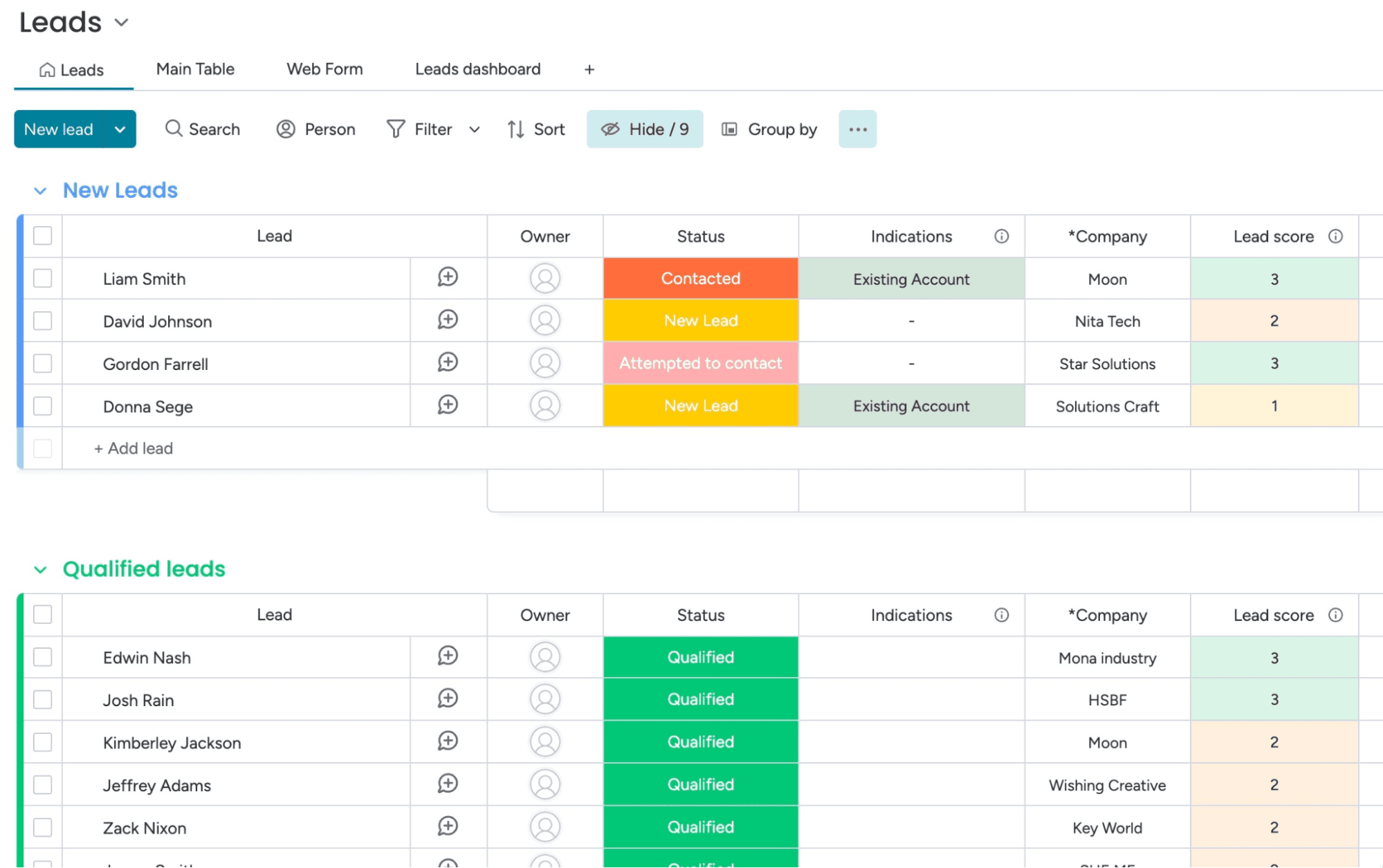
Ease of Use
monday CRM is known for its intuitive and user-friendly interface, making it easy for your team to get started without extensive training. The visual layout and drag-and-drop workflow builder simplify complex processes, allowing you to customize your workspace effortlessly.
Its responsive design ensures a smooth experience across devices, so your team can manage tasks on the go. Users often appreciate the straightforward navigation and clear organization of features, which enhances productivity and reduces the learning curve.

Onboarding
monday CRM offers a straightforward onboarding process, with guided tutorials and helpful resources that make it easy for your team to get started. The platform provides a wealth of documentation and video guides that walk you through setting up your workspace.
Users often find value in the responsive support team, which is available to assist with any questions or issues. While some users may find the initial setup a bit complex, the available resources help smooth the transition and ensure a quicker time to value.

Customer Support
monday CRM provides a range of support options that help your team resolve issues quickly. Users appreciate the responsive email and chat support, which often addresses questions efficiently.
The platform also offers a comprehensive help center with articles and FAQs that guide you through common challenges. While some users feel response times could be faster, the quality of support and available resources generally meet the needs of most teams, ensuring you can keep your work on track. Plus, monday.com has an active community for those who like to find their own answers or get tips from power-users.

Integrations
monday CRM integrates natively with Slack, Google Workspace, Gmail, Microsoft Teams, Zoom, Outlook, Zoom, HubSpot, LinkedIn, Stripe, PandaDoc, Trello, and Salesforce. monday CRM also offers an API and connects with third-party integration tools like Zapier.
Value for Money
monday CRM pricing offers strong value, especially if your team wants something easy to use without sacrificing flexibility. Although there is no free plan, monday CRM does offer a 14-day free trial.
You get a lot at the lower tiers, including automation and reporting tools that work well for small to midsize teams. Higher plans add more control, but smaller teams won’t need Enterprise to get full use out of it.
- Basic Plan: Contact management, boards, and limited automations
- Standard Plan: Activity tracking, custom pipelines, and calendar view
- Pro Plan: Sales forecasting, advanced reporting, and higher automation limits
- Enterprise Plan: Admin controls, multi-level permissions, and enterprise-grade security features

New Product Updates from monday CRM
 Opens new window
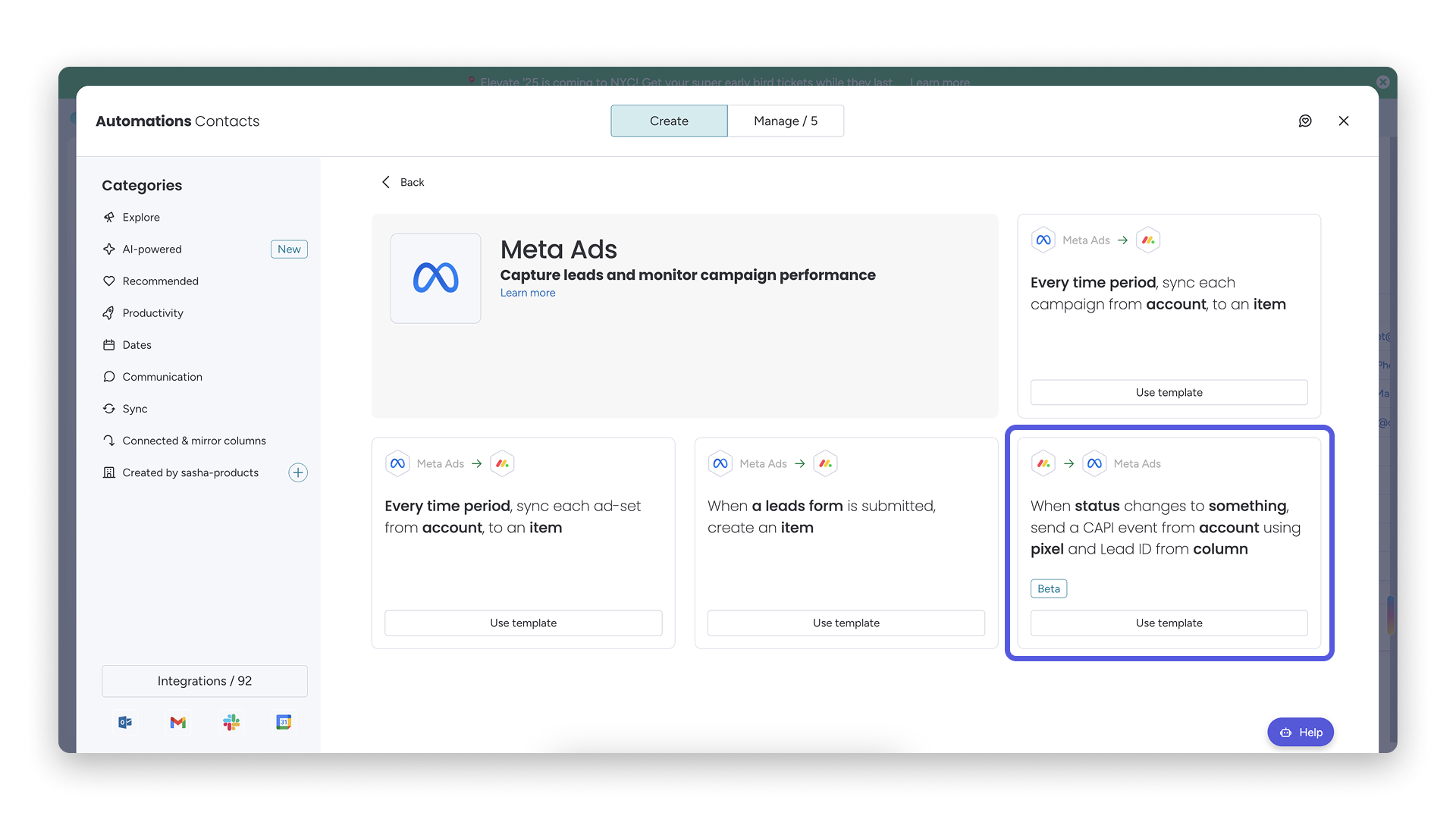
monday CRM Adds Meta Conversions API Integration
monday CRM has added an easier way to connect Meta Conversions API so you can sync lead status back to Meta. This helps you improve targeting and conversion performance with minimal setup effort. Highlights include:
- Meta Conversions API Integration: Connect monday CRM with Meta to share lead status updates automatically.
- Lead Status Sync: Send CRM lead status changes back to Meta to improve campaign targeting and conversion tracking.
- Automation Recipe: Configure the integration quickly using the new built-in Meta automation recipe.
Visit monday CRM's official site for more details.
monday CRM Specs
- 2-Factor Authentication: No
- API: Yes
- Calendar Management: Yes
- Call Tracking: No
- Campaign Management: No
- Click-to-Dial: No
- Contact Management: Yes
- Contact Sharing: No
- Custom Data Forms: Yes
- Customer Management: Yes
- Dashboard: Yes
- Data Export: Yes
- Data Import: Yes
- Data Visualization: Yes
- Email Integration: Yes
- External Integrations: Yes
- File Sharing: Yes
- File Transfer: Yes
- Google Apps Integration: Yes
- Lead Management: Yes
- Lead Scoring: Yes
- Marketing Automation: Yes
- Mobile App: No
- Multi-User: Yes
- Notifications: Yes
- Pipeline Management: Yes
- Sales Automation: Yes
- Scheduling: Yes
- Social-Media Integration: Yes
- Task Scheduling/Tracking: Yes
- Third-Party Plugins/Add-Ons: Yes
monday CRM FAQs
monday CRM Company Overview & History
monday.com, founded by Roy Mann, Eran Zinman, and Eran Kampf, is headquartered in Tel Aviv, Israel. It operates monday work management (for project management), monday CRM, monday service (a help desk and service management tool), and monday dev (for product development and engineering teams).
Founded in 2012, it went public on Nasdaq in June 2021, rapidly grew to over 1,850 employees, and surpassed US $1 billion in ARR by 2024. The company is known for its customizable no-code tools and supports more than 225,000 customers worldwide.
monday CRM Major Milestones
- 2012: Founded as dapulse in Tel Aviv after spinning off from Wix.
- 2014: Platform launched to the public.
- 2017: Rebranded from dapulse to monday.com
- 2019: Raised US $150 million in Series D funding; valued at US $1.9 billion. Achieved unicorn status.
- 2021: Became publicly traded on Nasdaq.
- 2022: Launch of monday Sales CRM, offering fully customizable no-code CRM workflows.
- 2023: Released monday CRM integration in Microsoft Teams for in-app pipeline access
- 2024: monday.com reached over $1 billion in annual recurring revenue.
¿Qué sigue?
Suscríbete a nuestro boletín para conocer las últimas novedades sobre experiencia del cliente, guías prácticas, estrategias y recursos de los principales expertos en el ámbito de la experiencia del cliente.