

Una piattaforma di esperienza del cliente basata sull'intelligenza artificiale è un software che utilizza l'intelligenza artificiale per automatizzare, personalizzare e ottimizzare le interazioni con i clienti attraverso i canali digitali. Se stai cercando la migliore piattaforma di esperienza del cliente basata sull'intelligenza artificiale, probabilmente vuoi migliorare la qualità dell'assistenza, ridurre il lavoro manuale e offrire un servizio più rapido e coerente.
Con così tante opzioni disponibili, è difficile capire quali strumenti siano davvero adatti alle esigenze del tuo team e si integrino con i flussi di lavoro esistenti.
Questa guida analizza le principali piattaforme, evidenziandone caratteristiche e punti di forza distintivi, così potrai scegliere con sicurezza la soluzione giusta per migliorare l'esperienza dei tuoi clienti.
Perché fidarsi dei nostri consigli sui software
6,700+
Reviews
20
Industry experts
16+
Evaluation factors
14
Years
Il nostro team testa e recensisce software dal 2012. In quanto leader CX noi stessi, sappiamo quanto sia difficile — e importante — scegliere il software giusto.
Per questa guida, abbiamo valutato gli strumenti attraverso test pratici e ricerche indipendenti, assegnando un punteggio agli strumenti in base ai nostri criteri di selezione.
Le nostre recensioni riflettono il nostro giudizio editoriale umano, non un discorso di vendita.
 Gui DrusinaCreative Director
 Tim FisherVP of AI
Tabella comparativa delle piattaforme di esperienza del cliente basate sull'intelligenza artificiale
Questa tabella comparativa riassume i dettagli sui prezzi delle mie migliori selezioni di piattaforme di esperienza del cliente basate sull’intelligenza artificiale:
| Tool | Best For | Trial Info | Price | ||
|---|---|---|---|---|---|
| 1 | Ideale per fissare rapidamente appuntamenti con l'IA | Demo gratuita disponibile | A partire da $15/utente/mese (fatturato annualmente) | Website | |
| 2 | Ideale per la categorizzazione dei feedback tramite IA | Demo gratuita disponibile | Prezzo su richiesta | Website | |
| 3 | Ideale per il coaching in tempo reale degli agenti con insight IA | Demo gratuita disponibile | Prezzo su richiesta | Website | |
| 4 | Migliore per dashboard AI basate sui ruoli | Demo gratuita disponibile | Prezzo su richiesta | Website | |
| 5 | Ideale con flussi di lavoro predefiniti dal feedback all'azione | Prova gratuita di 7 giorni + demo gratuita disponibile | A partire da $55/utente/mese | Website | |
| 6 | Ideale per le integrazioni con app dal marketplace | Prova gratuita di 14 giorni + demo gratuita disponibile | Da $19/agente/mese (fatturazione annuale) | Website | |
| 7 | Ideale per la distribuzione white label di chatbot | Piano gratuito disponibile | Da $32/mese (fatturazione annuale) | Website | |
| 8 | Ideale per messaggistica di supporto proattivo | Prova gratuita di 14 giorni + demo gratuita disponibile | Da $29/utente/mese (fatturazione annuale) | Website | |
| 9 | Il migliore per l'engagement omnicanale | Demo gratuita | Da $110/utente/mese | Website | |
| 10 | Ideale per agenti di supporto guidati da IA generativa | Demo gratuita disponibile | Prezzo su richiesta | Website |


Recensioni delle piattaforme di esperienza del cliente basate sull'intelligenza artificiale
Di seguito trovi i miei riepiloghi dettagliati delle migliori piattaforme di esperienza del cliente basate sull’intelligenza artificiale incluse nel mio elenco ristretto. Le mie recensioni offrono un’analisi approfondita delle caratteristiche, delle funzionalità e delle integrazioni di ogni piattaforma, per aiutarti a trovare quella più adatta al tuo team.
 Ideale per fissare rapidamente appuntamenti con l'IA
- Demo gratuita disponibile
- A partire da $15/utente/mese (fatturato annualmente)
Visit WebsiteCustomer Rating:4.5/5
Nextiva offre informazioni dettagliate sul sentiment dei clienti basate sull'IA, trascrizione delle chiamate e uno storico unificato delle comunicazioni all'interno della sua piattaforma di esperienza del cliente. Nextiva è una piattaforma di esperienza del cliente basata sull'IA che unifica le interazioni vocali, in chat, via SMS, email e social, implementando al contempo agenti IA autonomi per gestire le conversazioni con i clienti, fissare appuntamenti e assistere gli agenti in tempo reale su ogni canale.
Per chi è più indicata Nextiva?
Nextiva è particolarmente adatta alle piccole e medie imprese in settori basati sugli appuntamenti, come sanità, immobiliare e commercio al dettaglio, che necessitano di un coinvolgimento dei clienti basato sull'IA 24 ore su 24, 7 giorni su 7, senza un ampio team di assistenza.
Perché ho scelto Nextiva
Ho scelto Nextiva come una delle migliori soluzioni perché Nextiva fissa gli appuntamenti autonomamente durante le conversazioni vocali e via SMS in tempo reale, recuperando la disponibilità dai calendari collegati come Google Calendar, Calendly e Outlook. Mi piace anche il fatto che confermi le prenotazioni e invii promemoria tramite SMS senza il coinvolgimento di un agente umano. Una chiamata in entrata può concludersi con una fascia oraria confermata nel calendario del cliente prima che riagganci.
Funzionalità principali di Nextiva
- Posta in arrivo omnicanale unificata: gestisci le conversazioni vocali, via SMS, in chat, tramite email e sui social da un'unica interfaccia centralizzata.
- Assistenza agli agenti basata sull'IA: ricevi risposte suggerite dall'IA, visualizzazione delle informazioni rilevanti e segnalazioni del sentiment in tempo reale durante le interazioni dal vivo.
- Strumenti di orchestrazione del percorso: crea e automatizza percorsi personalizzati per i clienti attivati dai dati sul comportamento e sulle interazioni.
- Integrazioni native con CRM e servizi di assistenza: collegati direttamente a Salesforce, HubSpot, Zendesk e altri strumenti per unificare i dati dei clienti nei flussi di lavoro dell'IA.
Integrazioni di Nextiva
Nextiva offre oltre 30 integrazioni native, tra cui Salesforce, HubSpot, Zoho CRM, Zendesk, ServiceNow, Microsoft 365, Google Workspace, NetSuite, Pipedrive e Calendly. È disponibile un'API per le integrazioni personalizzate.
Pros and Cons
Pros:
- Nextiva fissa autonomamente gli appuntamenti durante le chiamate dal vivo
- La posta in arrivo unificata include voce, SMS, chat ed email
- L'assistenza dell'agente IA funziona su tutti i canali
Cons:
- Le analisi avanzate sono inferiori a quelle delle piattaforme VoC dedicate
- La complessità della configurazione aumenta per le implementazioni aziendali di grandi dimensioni
 Ideale per la categorizzazione dei feedback tramite IA
- Demo gratuita disponibile
- Prezzo su richiesta
Visit WebsiteCustomer Rating:4.4/5
La funzionalità IA di Chattermill raggruppa i feedback dei clienti in temi significativi Chattermill porta l’analisi guidata dall’IA ai team di customer experience che hanno bisogno di comprendere i feedback provenienti da più canali. La piattaforma è progettata per le organizzazioni che desiderano unificare, categorizzare e agire su grandi volumi di input dei clienti. Se desideri collegare i feedback ai risultati aziendali e prendere decisioni più intelligenti, Chattermill offre una soluzione mirata.
Per Chi È Ideale Chattermill?
Chattermill è adatto ai team di customer experience e insights di organizzazioni di medie e grandi dimensioni che necessitano di analizzare e agire sui feedback provenienti da diversi canali.
Perché Ho Scelto Chattermill
Per i team che devono gestire grandi volumi di feedback dei clienti, la categorizzazione dei feedback guidata dall’IA di Chattermill si distingue. Ho scelto questa piattaforma perché utilizza il machine learning per raggruppare e taggare automaticamente i feedback da sondaggi, recensioni e ticket di assistenza, facilitando molto l’individuazione delle tendenze e delle problematiche ricorrenti. Le capacità di elaborazione del linguaggio naturale della piattaforma fanno emergere temi e sentiment senza necessità di ordinamento manuale. Questo approccio fa risparmiare tempo e garantisce che gli insight siano sia accurati che attuabili per i team di customer experience.
Funzionalità Chiave di Chattermill
Altre funzionalità che rendono Chattermill utile per i team di customer experience includono:
- Dashboard personalizzabili: Crea dashboard su misura per i KPI e le esigenze di reporting del tuo team.
- Raccolta unificata dei feedback: Raccogli e unifica i feedback da sondaggi, recensioni, ticket di assistenza e social media in un unico luogo.
- Strumenti di collaborazione: Condividi insight, tagga i membri del team e aggiungi commenti direttamente nella piattaforma per mantenere tutti allineati.
- Avvisi automatici: Imposta notifiche per l’emergere di nuove tendenze o cambiamenti improvvisi del sentiment dei clienti in modo da poter rispondere rapidamente.
Integrazioni Chattermill
Le integrazioni includono Zendesk, Salesforce, Intercom, Qualtrics, SurveyMonkey, Trustpilot, Medallia, Dixa, Alchemer e Slack.
Pros and Cons
Pros:
- Unifica insight da ticket di assistenza e recensioni
- Collega gli insight dei clienti direttamente ai KPI aziendali
- Costruttore di tassonomie personalizzate per analisi su misura
Cons:
- Le analisi avanzate possono richiedere supporto all’onboarding
- Manca di strumenti integrati per la creazione di sondaggi
Learn more about Chattermill: Ideale per il coaching in tempo reale degli agenti con insight IA
- Demo gratuita disponibile
- Prezzo su richiesta
Visit WebsiteCustomer Rating:5/5
La piattaforma di Cresta alimentata dall’IA per gestire le interazioni con i clienti tramite agenti umani e virtuali. Cresta unifica il coaching in tempo reale per gli agenti, la gestione della qualità guidata dall'IA, l'intelligenza conversazionale e agenti virtuali autonomi in un'unica piattaforma di IA per i contact center.
Per chi è ideale Cresta?
Cresta è ideale per i contact center aziendali nei settori dei servizi finanziari, assicurativi e delle telecomunicazioni che gestiscono ampi team di agenti su canali vocali e digitali.
Perché ho scelto Cresta
Ho incluso Cresta tra le mie migliori scelte perché il suo coaching in tempo reale per gli agenti va ben oltre la semplice proposta di script. Durante le chiamate attive, il motore di guida comportamentale di Cresta invia suggerimenti, promemoria e flussi di lavoro specifici per la conversazione direttamente agli agenti. Apprezzo anche il Knowledge Agent, che monitora sia ciò che viene detto sia il contesto a schermo per fornire risposte supportate da fonti all'istante, così gli agenti non devono mettere in pausa una chiamata per cercare nella knowledge base. Insieme, queste funzionalità rendono il coaching in tempo reale meno simile a un controllo e più simile a un co-pilota esperto seduto accanto a ogni agente.
Funzionalità principali di Cresta
- Agente IA: Implementa agenti virtuali autonomi che gestiscono intere conversazioni con i clienti su voce, chat e SMS senza l'intervento di un agente umano.
- Riepiloghi automatici delle conversazioni: Genera sintesi post-chiamata così gli agenti passano meno tempo sulla documentazione di chiusura.
- Analista IA: Interroga i dati delle conversazioni usando il linguaggio naturale per individuare tendenze, pattern di argomenti e approfondimenti sulle prestazioni in tutto il contact center.
- Motore di orchestrazione Opera AI: Crea, configura e affina flussi di lavoro e modelli AI tramite un'interfaccia senza codice senza coinvolgere risorse di ingegneria.
Integrazioni di Cresta
Cresta si integra con piattaforme di telefonia e chat come Five9, Amazon Connect e Genesys; sistemi CRM e di engagement clienti, tra cui Salesforce e Zendesk; Twilio; strumenti di marketing come HubSpot e Marketo; e piattaforme dati come Databricks. Cresta si connette inoltre con NICE e Talkdesk. Un'API consente integrazioni personalizzate, mentre il supporto a Zapier non è documentato.
Pros and Cons
Pros:
- Valuta tutte le conversazioni senza input manuale
- Fornisce suggerimenti di coaching durante le chiamate dal vivo
- Analista IA permette agli utenti di interrogare i dati in linguaggio naturale
Cons:
- L’assistente alla conoscenza interpreta a volte erroneamente le intenzioni del chiamante
- La trascrizione fatica con accenti marcati
Learn more about Cresta: Migliore per dashboard AI basate sui ruoli
- Demo gratuita disponibile
- Prezzo su richiesta
Visit WebsiteCustomer Rating:4.7/5
Zonka Feedback offre una dashboard Reputation Hub che mostra le recensioni dei clienti, statistiche chiave, valutazioni medie e la distribuzione delle recensioni tra più sedi. Zonka Feedback è una piattaforma di intelligenza artificiale per la gestione del feedback che unifica sondaggi, ticket di helpdesk, chat dal vivo e recensioni in un unico hub per l'analisi tematica, la valutazione del sentiment e le intuizioni CX guidate da AI generativa.
Per chi è più indicato Zonka Feedback?
Zonka Feedback è adatto a responsabili dell'analisi dell'esperienza cliente e team di insight in aziende di medie e grandi dimensioni che hanno necessità di analizzare grandi volumi di feedback provenienti da più fonti, sedi o unità aziendali.
Perché ho scelto Zonka Feedback
Zonka Feedback si è guadagnato un posto nella mia shortlist perché i suoi dashboard AI basati sui ruoli offrono viste personalizzate a CXO, responsabili di reparto e operatori di prima linea senza sovrapposizioni o rumore. Apprezzo particolarmente come la funzione di Analisi dell'Impatto colleghi temi specifici del feedback direttamente ai punteggi NPS e CSAT, così il mio team può vedere quali problematiche influenzano realmente i dati. La funzione Chiedi all'AI consente di interrogare l'intero dataset di feedback con un linguaggio naturale, risparmiando ore nelle indagini sulle cause alla radice.
Caratteristiche principali di Zonka Feedback
- Raccolta sondaggi omnicanale: Raccogli feedback tramite email, SMS, WhatsApp, web, in-app, chioschi e sondaggi offline.
- Supporto multilingue per i sondaggi: Progetta e lancia sondaggi in più lingue per una clientela diversificata.
- Targeting avanzato dei sondaggi: Richiedi feedback in base a segmenti di utenti, eventi o trigger comportamentali.
- Gestione della reputazione online: Monitora, richiedi e rispondi alle recensioni su Google, App Store e Play Store.
Integrazioni di Zonka Feedback
Zonka Feedback offre integrazioni native con Salesforce, HubSpot, Zendesk, Intercom, Freshdesk, HelpScout, Jira, Slack, Google Sheets e Mailchimp. Si collega anche con Zapier e offre un'API per integrazioni personalizzate.
Pros and Cons
Pros:
- Sintesi AI evidenzia automaticamente i pattern
- Analisi dettagliata del sentiment legata ai temi del feedback
- Raccoglie feedback su oltre 10 tipi di canali
Cons:
- Nessuna funzionalità chatbot o voicebot nativa
- L'assegnazione predittiva della perdita clienti è limitata
Learn more about Zonka Feedback: Ideale con flussi di lavoro predefiniti dal feedback all'azione
- Prova gratuita di 7 giorni + demo gratuita disponibile
- A partire da $55/utente/mese
Visit WebsiteCustomer Rating:4.4/5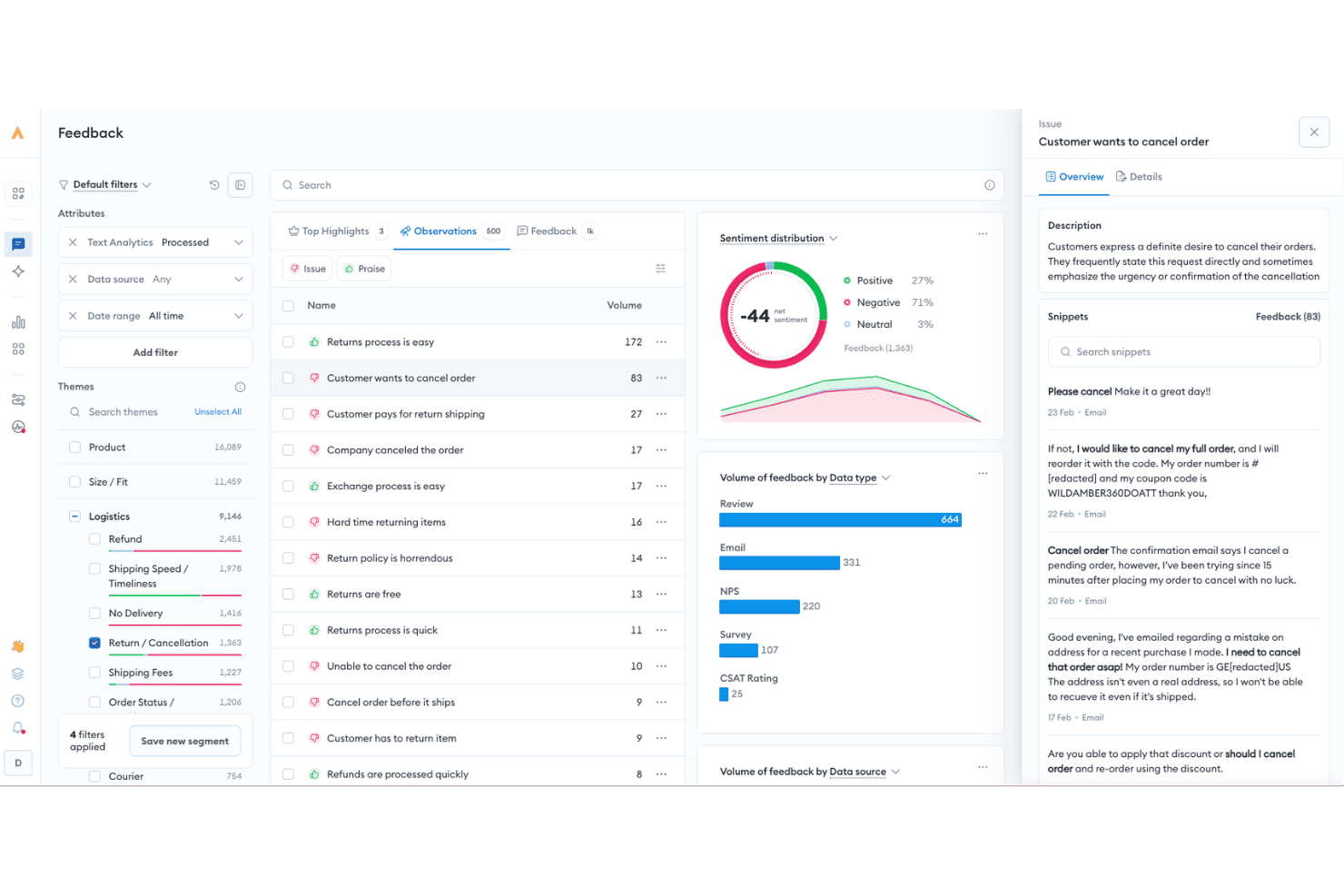
Alchemer utilizza l'IA per analizzare i feedback dei clienti, identificare i problemi ricorrenti e monitorare il sentiment tra recensioni, e-mail, sondaggi e altre fonti. Alchemer è una piattaforma di voce del cliente che combina la raccolta di feedback omnicanale, l'analisi del sentiment e dei temi basata sull'IA e flussi di lavoro automatizzati dal feedback all'azione attraverso sondaggi, applicazioni, canali digitali e recensioni.
Per chi è più indicato Alchemer?
Alchemer è particolarmente adatto ai team di analisi e insight sull'esperienza del cliente (CX) delle organizzazioni di medie e grandi dimensioni che devono trasformare i feedback dei clienti provenienti da più fonti in azioni aziendali automatizzate.
Perché ho scelto Alchemer
Ho scelto Alchemer come una delle soluzioni migliori per il modo in cui la sua automazione dei flussi di lavoro collega strettamente i segnali del feedback alle azioni aziendali. Alchemer Workflow attiva sondaggi in tempo reale in base a eventi chiave, come la chiusura di un ticket o la restituzione di un prodotto, quindi invia immediatamente i risultati a Salesforce, Zendesk o un altro strumento a valle. Alchemer Pulse aggiunge quindi la classificazione basata sull'IA del sentiment e dei temi sugli stessi dati, evidenziando ciò che sta effettivamente causando insoddisfazione prima che diventi una tendenza.
Funzionalità principali di Alchemer
- Analisi del testo basata sull'IA: Classifica automaticamente i feedback a risposta libera in base a temi, sentiment e criticità dei clienti attraverso tutti i canali.
- Oltre 400 integrazioni predefinite: Si collega a Salesforce, Zendesk, Braze, BigQuery e altri strumenti per arricchire i profili dei clienti e i dati dei feedback.
- Logica personalizzata dei sondaggi: Supporta logiche di esclusione, convalida e ramificazione avanzate per rivolgersi al pubblico giusto con domande personalizzate.
- Supporto multilingua e multi-brand: Consente di gestire programmi di feedback per più marchi e lingue da un'unica piattaforma.
Integrazioni di Alchemer
Alchemer offre integrazioni native con Salesforce, Zendesk, Braze, Bloomreach, BigQuery, HubSpot e Microsoft Teams, oltre a connettersi con Zapier. È disponibile un'API per le integrazioni personalizzate.
Pros and Cons
Pros:
- Automazione efficace dal feedback all'azione
- Rilevamento dei temi tramite IA nelle risposte a testo libero
- Logica e targeting dei sondaggi altamente configurabili
Cons:
- IA conversazionale meno efficace rispetto alle piattaforme dedicate
- La configurazione dei report può richiedere molto tempo
Learn more about Alchemer: Ideale per le integrazioni con app dal marketplace
- Prova gratuita di 14 giorni + demo gratuita disponibile
- Da $19/agente/mese (fatturazione annuale)
Visit WebsiteCustomer Rating:4.4/5
Dashboard amministratore di Freshdesk che mostra un elenco di notifiche evento configurate, con indicatori di stato, tipi di notifica e un pannello laterale. Freshdesk è una piattaforma di supporto clienti potenziata dall'IA che combina ticketing omnicanale, automazione Freddy AI, portali self-service e una knowledge base integrata per aiutare i team di supporto a gestire le interazioni con i clienti su larga scala.
Per chi è più indicato Freshdesk?
Freshdesk è ideale per team di supporto di medie e grandi dimensioni che gestiscono volumi elevati di interazioni con i clienti su più canali.
Perché ho scelto Freshdesk
Ho incluso Freshdesk tra le mie migliori scelte perché il suo marketplace è uno dei più sviluppati che abbia visto nell'ambito del supporto clienti. Con oltre 1.200 app disponibili, puoi collegare strumenti come Jira, Slack, Shopify e Salesforce direttamente al tuo spazio di lavoro di supporto. Apprezzo in particolare l'integrazione Atlassian Jira Plus, che sincronizza i ticket Freshdesk con le segnalazioni Jira così che i team di ingegneria e supporto possano tracciare i bug senza cambiare piattaforma.
Caratteristiche principali di Freshdesk
- Agente Freddy AI: Un agente AI che risolve automaticamente le richieste dei clienti su email e live chat senza coinvolgimento degli operatori.
- Posta in arrivo omnicanale: Un ambiente di lavoro unificato che raccoglie i ticket da email, chat, WhatsApp, Instagram e telefono in una sola coda.
- Gestione SLA: Accordi sul livello di servizio configurabili con regole di escalation automatica e priorità ai ticket in base alle scadenze.
- Sondaggi CSAT: Sondaggi incorporati sulla soddisfazione del cliente inviati automaticamente dopo la risoluzione del ticket per raccogliere feedback.
Integrazioni di Freshdesk
Freshdesk offre oltre 1.200 integrazioni attraverso il Freshworks Marketplace, tra cui Slack, Microsoft Teams, Google Calendar, Salesforce, Atlassian Jira Plus, Shopify e Google Analytics. È disponibile su Zapier e fornisce un'API per integrazioni personalizzate.
Pros and Cons
Pros:
- Copre email, chat, telefono, social e web
- Nessuna unione automatica di ticket simili
- Flussi di lavoro agentici predefiniti per agenti AI verticali
Cons:
- I report personalizzati richiedono competenze tecniche o upgrade
- L'app mobile non offre le funzionalità avanzate della versione desktop
Learn more about Freshdesk: Ideale per la distribuzione white label di chatbot
- Piano gratuito disponibile
- Da $32/mese (fatturazione annuale)
Visit WebsiteCustomer Rating:4.4/5
Chatbase aiuta le aziende ad automatizzare il supporto clienti con chatbot AI addestrati sui propri contenuti e sistemi. Chatbase è una piattaforma di automazione conversazionale che aiuta le aziende a gestire le interazioni con i clienti senza dipendere interamente da agenti in tempo reale. Permette ai team di distribuire chatbot addestrati sui propri contenuti e collegarli ai sistemi aziendali, così le risposte automatiche riflettono le informazioni più aggiornate. Per le aziende che vogliono automatizzare alcune parti del percorso cliente, Chatbase rappresenta un punto di partenza flessibile.
Per chi è ideale Chatbase?
Chatbase è particolarmente adatto ai team CX e di supporto di aziende in crescita che desiderano automatizzare le richieste ripetitive dei clienti mantenendo le risposte collegate ai sistemi interni.
Perché ho scelto Chatbase
Ho scelto Chatbase per la sua capacità di collegare le conversazioni del chatbot direttamente ai dati aziendali tramite API e webhook. Questo consente ai team di automatizzare risposte che dipendono da informazioni in continuo cambiamento, come aggiornamenti sugli ordini o dettagli dell'account. Invece di gestire script statici, i team possono collegare le conversazioni automatiche a fonti di dati in tempo reale. Questo rende più semplice scalare le interazioni con i clienti senza sacrificare l'accuratezza.
Caratteristiche principali di Chatbase
- Costruttore di chatbot AI: Crea e distribuisci chatbot addestrati su tuoi documenti, URL e dati.
- Connessioni a dati in tempo reale: Sincronizza le risposte con i sistemi connessi tramite API e webhook.
- Distribuzione cross-channel: Pubblica chatbot su siti web e piattaforme di messaggistica supportate.
- Report delle interazioni: Esamina i log delle conversazioni e analizza le tendenze di utilizzo del chatbot.
Integrazioni di Chatbase
Le integrazioni includono Slack, WhatsApp, Facebook Messenger e piattaforme di automazione come Make. L'accesso ad API e webhook consente il collegamento ad altri sistemi.
Pros and Cons
Pros:
- Collega le risposte dei chatbot a dati aziendali in tempo reale
- Supporta la distribuzione su web e app di messaggistica
- Permette distribuzioni brandizzate per agenzie e partner
Cons:
- Non include il supporto integrato per voce o telefonia
- Le integrazioni avanzate possono richiedere piani di livello superiore
Learn more about Chatbase: Ideale per messaggistica di supporto proattivo
- Prova gratuita di 14 giorni + demo gratuita disponibile
- Da $29/utente/mese (fatturazione annuale)
Visit WebsiteCustomer Rating:4.4/5
Intercom unifica supporto, coinvolgimento e automazione AI in un’unica piattaforma. Intercom è una piattaforma di customer experience alimentata dall'IA pensata per i team che desiderano unificare assistenza, coinvolgimento e automazione in un unico luogo. È una soluzione ideale per aziende SaaS, marchi di ecommerce e imprese digitali che vogliono gestire le conversazioni con i clienti attraverso web e mobile. Intercom aiuta i team a gestire grandi volumi di richieste, automatizzare le attività ripetitive e offrire un supporto più personalizzato su larga scala.
Per chi è ideale Intercom?
Intercom è una scelta eccellente per aziende SaaS e digitali che hanno bisogno di gestire conversazioni con i clienti e automatizzare l'assistenza su larga scala.
Perché ho scelto Intercom
Ho scelto Intercom perché offre alcuni tra i più avanzati strumenti di messaggistica proattiva disponibili nel settore delle piattaforme AI per la customer experience. La piattaforma consente di impostare messaggi mirati in uscita, notifiche in-app e chat automatizzate basate sul comportamento e sulla fase del ciclo di vita dell’utente. Mi piace anche che l'IA di Intercom possa attivare messaggi personalizzati per guidare gli utenti, rispondere alle domande o prevenire l’abbandono prima ancora che il cliente si metta in contatto. Queste capacità proattive aiutano i team a passare da un supporto reattivo a creare esperienze clienti più coinvolgenti e tempestive.
Funzionalità principali di Intercom
Altre funzionalità che rendono Intercom prezioso per i team di customer experience AI includono:
- Instradamento delle conversazioni tramite IA: indirizza automaticamente le richieste dei clienti al team o agente giusto in base all'argomento e all’urgenza.
- Costruttore di centri assistenza: ti permette di creare e gestire una knowledge base self-service affinché i clienti possano trovare risposte in autonomia.
- Bot personalizzabili: consente di progettare e distribuire chatbot che gestiscono domande e attività comuni senza interventi umani.
- Cronologia e contesto delle conversazioni: offre agli agenti piena visibilità sulle interazioni precedenti e sui dati dei clienti all'interno di ogni conversazione.
Integrazioni di Intercom
Le integrazioni includono HubSpot, Salesforce, Slack, Zendesk, Shopify, Mailchimp, Stripe, Pipedrive, Aircall e Jira.
Pros and Cons
Pros:
- Ottima messaggistica proattiva
- Facile trasferimento tra agente AI e umano
- Valore rapidamente percepibile
Cons:
- Diventa molto costoso rapidamente
- Il sistema di gestione ticket è troppo basilare
 Il migliore per l'engagement omnicanale
- Demo gratuita
- Da $110/utente/mese
Visit WebsiteCustomer Rating:4.3/5
NICE CXone unifica il supporto vocale e digitale per team di assistenza ad alto volume. NICE CXone è una piattaforma cloud per l'esperienza del cliente progettata per le organizzazioni che devono gestire interazioni complesse e ad alto volume con i clienti. Si rivolge a leader CX e team di supporto in settori come retail, finanza e sanità che desiderano unificare i canali digitali e vocali.
La piattaforma aiuta le aziende a coordinare i percorsi cliente, automatizzare le attività di routine e mantenere la qualità del servizio su molteplici punti di contatto.
Per chi è ideale NICE CXone?
NICE CXone è particolarmente adatto a grandi imprese e contact center che devono gestire il coinvolgimento dei clienti su più canali digitali e vocali.
Perché ho scelto NICE CXone
Ho scelto NICE CXone perché riunisce canali digitali, vocali e social in un'unica piattaforma, semplificando per i team la creazione di esperienze cliente coerenti. Il suo instradamento omnicanale garantisce che le richieste dei clienti siano indirizzate all'agente giusto, indipendentemente dal canale utilizzato.
Apprezzo anche le analisi alimentate dall'intelligenza artificiale della piattaforma, che aiutano i team a monitorare le interazioni e a individuare tendenze su tutti i punti di contatto. Queste capacità rendono NICE CXone una scelta eccellente per le organizzazioni che devono coordinare percorsi cliente complessi e mantenere alti standard di servizio.
Funzionalità chiave di NICE CXone
Altre funzionalità che rendono NICE CXone utile per i team customer experience includono:
- Strumenti di gestione della forza lavoro: Pianifica, prevedi e monitora le prestazioni degli agenti per ottimizzare organico e produttività.
- Suite di gestione della qualità: Valuta le interazioni degli agenti e fornisci formazione mirata con strumenti di assicurazione qualità integrati.
- Automazione self-service: Implementa agenti virtuali e chatbot basati su AI per gestire richieste clienti di routine.
- Sistema di gestione della conoscenza: Centralizza e fornisci informazioni aggiornate ad agenti e clienti tramite una knowledge base integrata.
Integrazioni NICE CXone
Le integrazioni includono Salesforce, Zendesk, Microsoft Dynamics, Oracle, ServiceNow e HubSpot.
Pros and Cons
Pros:
- Grande scalabilità enterprise
- Eccellente AI per la gestione della forza lavoro
- Funzioni di conformità robuste
Cons:
- L'interfaccia utente può risultare complessa
- Richiede un notevole supporto di sviluppo
Learn more about NiCE CXone: 10Ideale per agenti di supporto guidati da IA generativa
Sierra
- Demo gratuita disponibile
- Prezzo su richiesta
Visit WebsiteCustomer Rating:4.8/5
Sierra automatizza il supporto complesso con IA generativa per un servizio più rapido. Sierra offre agenti di supporto alimentati dall'intelligenza artificiale, pensati per le aziende che desiderano automatizzare interazioni complesse con i clienti. È particolarmente indicato per team nel settore ecommerce, SaaS e servizi digitali che vogliono fornire risposte rapide e accurate su larga scala. Grazie alla sua focalizzazione sull'IA generativa, Sierra aiuta le organizzazioni a gestire richieste sfumate e a ridurre il carico di lavoro manuale dei team di supporto.
Per chi è più indicato Sierra?
Sierra è una soluzione ideale per team di assistenza clienti di medie e grandi dimensioni in settori come ecommerce, SaaS e aziende digitali che cercano un'automazione avanzata basata sull'intelligenza artificiale.
Perché ho scelto Sierra
Ciò che mi ha colpito di Sierra è la sua attenzione agli agenti di supporto guidati da IA generativa, in grado di gestire conversazioni complesse e articolate. Gli agenti Sierra usano modelli linguistici avanzati per interpretare l'intento del cliente, generare risposte personalizzate e risolvere le problematiche senza l'intervento umano.
Ritengo che questo sia particolarmente prezioso per le organizzazioni che desiderano automatizzare un supporto ad alto volume, pur offrendo un servizio attento e contestualizzato. La capacità della piattaforma di apprendere dalle interazioni passate e migliorare costantemente le risposte la rende una scelta valida per i team che danno priorità all'esperienza cliente basata sull'intelligenza artificiale.
Funzionalità chiave di Sierra
Altre funzionalità che rendono Sierra una risorsa preziosa per i team di customer experience basata su IA includono:
- Supporto messaggistica omnicanale: Si integra con canali come email, SMS e chat per gestire tutte le conversazioni in un unico luogo.
- Escalation automatica dei ticket: Instrada problematiche complesse o non risolte agli operatori umani secondo regole predefinite.
- Integrazione con base di conoscenza: Attrae informazioni dalla documentazione interna per fornire risposte accurate e aggiornate.
- Dashboard di analisi conversazionali: Monitora in tempo reale le prestazioni degli agenti, il sentiment dei clienti e le tendenze nelle conversazioni.
Integrazioni Sierra
Le integrazioni comprendono Google Cloud, Databricks, Snowflake, Redis, AWS ed è disponibile una API per integrazioni personalizzate.
Pros and Cons
Pros:
- Comprende profondamente l'intento
- Esegue azioni complesse
- Personalizzazione del tono del brand
Cons:
- Meno integrazioni con sistemi legacy
- Prezzi elevati per le imprese
Learn more about Sierra:
Altre piattaforme di esperienza del cliente basate sull'intelligenza artificiale
Ecco alcune ulteriori opzioni di piattaforme di esperienza del cliente basate sull’intelligenza artificiale che non sono state incluse nel mio elenco ristretto, ma che vale comunque la pena prendere in considerazione:
- 11ZendeskIdeale per ticketing integrato e help desk
- 12AdaIdeale per automatizzare interazioni personalizzate con i clienti
- 13Yellow.aiIdeale per l’automazione conversazionale multilingue
- 14QuidgetIdeale per i suggerimenti di risposta in chat assistiti dall’AI
- 15ForethoughtIdeale per flussi di lavoro di risoluzione dei casi potenziati dall'IA
- 16Boost.aiIdeale per la distribuzione scalabile di agenti virtuali
- 17DecagonIdeale per insight in tempo reale sui customer journey
- 18Ultimate CXIdeale per l’automazione dei flussi di lavoro nei team di supporto
- 19Crescendo.aiIl migliore per l’analisi delle chiamate con intelligenza artificiale
- 20Salesforce Service Cloud EinsteinIdeale per l'integrazione nativa dell'IA nel CRM
- 21HiverIdeale per i team che gestiscono caselle e-mail condivise
Come valuto le piattaforme di customer experience AI
Ogni strumento qui deve offrire reale valore tramite l'AI—come risolvere ticket in modo autonomo o individuare il rischio di abbandono prima di una chiamata di rinnovo, non semplicemente integrare un chatbot su una pagina di assistenza. Suddivido la mia valutazione in funzionalità di base che una piattaforma deve possedere per essere inserita in elenco e nei fattori differenzianti che separano una soluzione valida da una eccezionale.
Funzionalità di base (Requisiti fondamentali per questa lista)
Quando seleziono gli strumenti per il mio elenco, valuto ciascuno su una scala da 0 (non offre la funzionalità) a 5 (eccelle in quest'area) per ognuna delle funzionalità di base elencate di seguito. Poi, calcolo il punteggio totale dello strumento in percentuale. Ogni soluzione deve ottenere un punteggio minimo totale del 75% per essere presa in considerazione per l'inclusione.
- Automazione conversazionale AI: Verifico se i bot della piattaforma possono gestire richieste multi-turno—come elaborare un reso e suggerire una sostituzione—senza passare l'interazione a un umano.
- Coinvolgimento omnicanale: Ogni strumento dovrebbe unificare le conversazioni su chat, email, voce, social e SMS in modo che gli agenti abbiano il contesto completo a prescindere da dove inizi il cliente.
- Insight clienti guidati dall'AI: Cerco intelligenze artificiali che vadano oltre le dashboard di base per individuare cambiamenti di sentimento, temi ricorrenti di reclami o nuovi punti critici rilevati dai dati delle interazioni.
- Assistenza & potenziamento dell'agente: Qui contano i suggerimenti AI in tempo reale—come proporre articoli di knowledge base rilevanti durante una conversazione o generare automaticamente i riepiloghi post-chiamata per gli agenti.
- Personalizzazione & intelligenza predittiva: La piattaforma dovrebbe utilizzare il machine learning per anticipare le necessità dei clienti, ad esempio segnalando il rischio di abbandono prima di una scadenza o raccomandando le prossime azioni migliori.
- Dati cliente unificati & integrazioni: Valuto quanto efficacemente la piattaforma importa dati da CRM, helpdesk e altri strumenti per costruire un profilo cliente unico che alimenti le sue funzionalità AI.
Una volta formata una lista di strumenti che rispettano questi criteri, considero cosa distingue ogni piattaforma dall'altra.
Fattori differenzianti (Cosa distingue i fornitori)
Ecco come confronto e metto a paragone i diversi fornitori:
Caratteristiche distintive
I copiloti AI generativi sono un fattore chiave di differenziazione—cerco piattaforme in cui gli agenti ottengono bozze di risposte in tempo reale e riepiloghi delle conversazioni che riducono il lavoro di chiusura pratica dopo ogni interazione. Anche i builder AI low-code sono importanti perché consentono ai team CX di creare rapidamente nuovi flussi di bot senza dover attendere lo sviluppo da parte dell'ingegneria. Presto molta attenzione anche alla gestione automatizzata della qualità, poiché valutare il 100% delle interazioni tramite AI rappresenta un salto avanti rispetto al campionamento manuale di poche chiamate ogni settimana.
Oltre le funzionalità
La fiducia e la governance dell'AI sono aspetti cui do molto peso—verifico se le piattaforme offrono meccanismi di controllo contro le allucinazioni e permettono di gestire come vengono usati i dati dei clienti per l'addestramento dei modelli. Anche l'ecosistema di integrazione incide sulla mia valutazione, poiché una piattaforma che si collega nativamente al tuo CRM e stack CCaaS porta valore molto più rapidamente rispetto a una che richiede soluzioni personalizzate. Valuto inoltre il time-to-value, cercando template preimpostati per settore e modelli preaddestrati che riducono il tempo dal deployment al raggiungimento di risultati misurabili.
Come scegliere una piattaforma di esperienza del cliente basata sull'intelligenza artificiale
È facile perdersi tra lunghi elenchi di funzionalità e strutture tariffarie complesse. Per aiutarti a rimanere concentrato mentre affronti il tuo specifico processo di selezione del software, ecco una lista di controllo dei fattori da tenere presenti:
| Fattore | Cosa considerare |
|---|---|
| FattoreScalabilità | Cosa considerareLa piattaforma sarà in grado di gestire i volumi di assistenza attuali e previsti con la crescita della tua azienda? Valuta i limiti relativi a utenti, canali e dati. |
| FattoreIntegrazioni | Cosa considerareLo strumento si collega nativamente al tuo CRM, al sistema di assistenza, alle piattaforme di analisi e di comunicazione? Verifica la compatibilità con il tuo ecosistema esistente. |
| FattorePersonalizzazione | Cosa considerarePuoi adattare flussi di lavoro, automazioni e modelli di intelligenza artificiale ai tuoi processi e alla tua terminologia specifici? Evita i sistemi rigidi che ti costringono ad adattarti. |
| FattoreSemplicità d'uso | Cosa considerareIl tuo team adotterà rapidamente la piattaforma? Cerca una navigazione intuitiva, etichette chiare e requisiti formativi minimi. |
| FattoreImplementazione e avvio | Cosa considerareQuanto tempo ci vorrà per essere operativi? Considera il supporto alla migrazione, le risorse per l'avvio e la necessità del coinvolgimento del reparto IT. |
| FattoreCosti | Cosa considerareI livelli di prezzo sono trasparenti e prevedibili con l'aumento dell'utilizzo? Fai attenzione ai costi nascosti, agli addebiti per interazione o ai componenti aggiuntivi costosi. |
| FattoreMisure di sicurezza | Cosa considerareLa piattaforma soddisfa i tuoi standard di privacy e sicurezza dei dati? Verifica la crittografia, i controlli degli accessi e le certificazioni di conformità. |
| FattoreDisponibilità dell'assistenza | Cosa considerareQuali canali e orari di assistenza sono disponibili? Assicurati di poter ricevere aiuto quando ne hai bisogno, soprattutto durante gli incidenti critici. |
Cosa sono le piattaforme di esperienza del cliente basate sull'IA?
Una piattaforma di esperienza del cliente basata sull'IA è una soluzione software che utilizza l'intelligenza artificiale per automatizzare, analizzare e migliorare le interazioni con i clienti attraverso i canali digitali. Queste piattaforme aiutano i team a gestire le richieste di assistenza, personalizzare le comunicazioni e ottenere informazioni utili dai dati dei clienti.
Sfruttando l'IA, le aziende possono fornire risposte più rapide, prevedere le esigenze dei clienti e migliorare la soddisfazione complessiva per favorire la fidelizzazione, agendo come un copilota affidabile e riducendo al contempo il carico di lavoro manuale dei team responsabili dell'esperienza del cliente.
Funzionalità
Quando scegli una piattaforma di esperienza del cliente basata sull'IA, presta attenzione alle seguenti funzionalità principali:
- Instradamento dei ticket basato sull'IA: Utilizza l'apprendimento automatico per assegnare le richieste in arrivo all'agente o al team più appropriato in base alle competenze, al carico di lavoro e ai dati storici.
- Chatbot automatizzati: Forniscono risposte immediate alle domande frequenti dei clienti e possono gestire attività di routine come il monitoraggio degli ordini o la reimpostazione delle password senza l'intervento umano.
- Analisi del sentiment: Analizza i messaggi dei clienti in tempo reale per rilevare tono, urgenza e soddisfazione, aiutando i team a stabilire le priorità e a personalizzare le risposte.
- Consigli dalla base di conoscenza: Suggerisce articoli di assistenza o risorse pertinenti sia agli agenti sia ai clienti durante le interazioni, riducendo i tempi di risoluzione.
- Assistenza omnicanale: Centralizza le conversazioni provenienti da e-mail, chat, social media e app di messaggistica in un'unica interfaccia per una gestione unificata.
- Analisi predittiva: Identifica le tendenze, prevede le esigenze dei clienti ed evidenzia i potenziali problemi prima che si aggravino, favorendo un'assistenza proattiva.
- Automazione dei flussi di lavoro: Automatizza attività ripetitive come i follow-up, le escalation e la distribuzione dei sondaggi per aumentare l'efficienza e la coerenza.
- Dashboard personalizzabili: Consentono agli utenti di visualizzare le metriche principali, monitorare le prestazioni del team e tenere sotto controllo la soddisfazione dei clienti in tempo reale.
- Funzionalità di integrazione: Si collegano a CRM, strumenti di assistenza e altre soluzioni aziendali per garantire un flusso continuo dei dati e una visione completa del percorso del cliente.
Vantaggi
L'implementazione di una piattaforma di esperienza del cliente basata sull'IA offre diversi vantaggi al tuo team e alla tua azienda. Ecco alcuni dei benefici che puoi aspettarti:
- Tempi di risposta più rapidi: L'instradamento automatico dei ticket e i chatbot garantiscono ai clienti risposte e assistenza immediate, anche nei periodi di maggiore affluenza.
- Interazioni personalizzate con i clienti: L'IA analizza i dati e il sentiment per adattare le risposte e i consigli a ciascun cliente.
- Fornitura proattiva dell'assistenza: L'analisi predittiva aiuta il tuo team a identificare e risolvere i problemi prima che si aggravino, migliorando la soddisfazione dei clienti.
- Comunicazione centralizzata: L'assistenza omnicanale riunisce tutte le conversazioni con i clienti in un unico spazio, semplificando la gestione e il monitoraggio delle interazioni.
- Riduzione del carico di lavoro manuale: L'automazione dei flussi di lavoro e i consigli dalla base di conoscenza riducono al minimo le attività ripetitive per il tuo team, lasciando più tempo da dedicare ai problemi complessi.
- Processo decisionale basato sui dati: Le dashboard personalizzabili e l'analisi forniscono informazioni utili per intervenire sulle tendenze dei clienti e sulle prestazioni del team.
- Operazioni di assistenza scalabili: Gli strumenti basati sull'IA consentono alla tua azienda di gestire volumi maggiori di interazioni senza sacrificare la qualità o la coerenza.
Costi e prezzi
La scelta di una piattaforma di esperienza del cliente basata sull'IA richiede la comprensione dei vari modelli e piani tariffari disponibili. I costi variano in base alle funzionalità, alle dimensioni del team, ai componenti aggiuntivi e ad altri fattori. La tabella seguente riassume i piani più comuni, i relativi prezzi medi e le funzionalità tipicamente incluse nelle soluzioni di piattaforma di esperienza del cliente basate sull'IA:
Tabella di confronto dei piani per le piattaforme di esperienza del cliente basate sull'IA
| Tipo di piano | Prezzo medio | Funzionalità comuni |
|---|---|---|
| Tipo di pianoPiano gratuito | Prezzo medio$0 | Funzionalità comuniGestione di base dei ticket, funzionalità limitate del chatbot, supporto per un singolo canale e analisi di base. |
| Tipo di pianoPiano personale | Prezzo medio$25-$55/utente/mese | Funzionalità comuniSupporto multicanale, instradamento basato sull'IA, automazione di base e report standard. |
| Tipo di pianoPiano aziendale | Prezzo medio$75-$120/utente/mese | Funzionalità comuniChatbot avanzati, analisi del sentiment, automazione dei flussi di lavoro, integrazioni e cruscotti personalizzabili. |
| Tipo di pianoPiano per grandi aziende | Prezzo medio$150+/utente/mese | Funzionalità comuniAnalisi predittiva, gestione omnicanale, sicurezza avanzata, supporto dedicato e strumenti per la conformità. |
Domande frequenti sulle piattaforme di esperienza cliente basate sull'IA
Ecco alcune risposte alle domande comuni sulle piattaforme di esperienza cliente basate sull’IA:
In che modo una piattaforma di esperienza cliente basata sull'IA migliora la produttività del team di supporto?
Le piattaforme di esperienza cliente basate sull’IA automatizzano attività ripetitive come l’instradamento dei ticket, le risposte alle domande frequenti e i suggerimenti della knowledge base. In questo modo, i team di supporto possono concentrarsi sui problemi complessi e ridurre il tempo dedicato ai processi manuali, gestendo volumi maggiori senza sacrificare la qualità.
Le piattaforme di esperienza cliente basate sull'IA possono integrarsi con gli strumenti CRM o di assistenza esistenti?
Sì, la maggior parte delle piattaforme di esperienza cliente basate sull’IA offre integrazioni con strumenti CRM, di assistenza e di comunicazione diffusi. Questo garantisce che i dati dei clienti rimangano collegati tra i sistemi e consente ai team di gestire le interazioni da un’unica interfaccia.
Quali tipi di aziende traggono maggiori vantaggi dalle piattaforme di esperienza cliente basate sull'IA?
Traggono i maggiori vantaggi le aziende che gestiscono volumi elevati di interazioni con i clienti, più canali di supporto o che necessitano di un servizio attivo 24 ore su 24, 7 giorni su 7. Queste piattaforme sono particolarmente utili per i team dell’e-commerce, del SaaS, delle telecomunicazioni e dei servizi finanziari che desiderano ampliare il supporto e personalizzare le esperienze.
Esistono problemi di privacy dei dati legati all'utilizzo delle piattaforme di esperienza cliente basate sull'IA?
Sì, la privacy dei dati è importante quando si utilizzano piattaforme basate sull’IA. Verifica sempre la presenza di crittografia, controlli degli accessi e conformità a normative come il GDPR o il CCPA. Scegli fornitori trasparenti riguardo alla gestione dei dati e alle pratiche di sicurezza.
Quanto tempo occorre per implementare una piattaforma di esperienza cliente basata sull'IA?
I tempi di implementazione variano in base alla piattaforma e alle dimensioni dell’azienda. I team più piccoli possono essere operativi in pochi giorni, mentre le organizzazioni più grandi con flussi di lavoro o integrazioni complessi possono aver bisogno di diverse settimane. Cerca risorse per l’inserimento e supporto alla migrazione per accelerare il processo.