

10 migliori software di analisi del percorso cliente per il 2026

10 Migliori Software di Customer Journey Analytics: Shortlist


Con così tante soluzioni diverse per il monitoraggio della customer experience disponibili, capire quale sia quella giusta per te può essere difficile. Sai di voler monitorare e analizzare il percorso dei tuoi clienti in modo più efficiente, ma devi capire qual è lo strumento migliore. Ci penso io! In questo articolo ti aiuterò a scegliere facilmente, condividendo le mie esperienze personali con decine di diversi strumenti di customer journey utilizzati in grandi team e progetti, con i miei consigli sui migliori software di customer journey analytics.
Perché fidarsi dei nostri consigli sui software
Il nostro team testa e recensisce software dal 2012. In quanto leader CX noi stessi, sappiamo quanto sia difficile — e importante — scegliere il software giusto.
Per questa guida, abbiamo valutato gli strumenti attraverso test pratici e ricerche indipendenti, assegnando un punteggio agli strumenti in base ai nostri criteri di selezione.
Le nostre recensioni riflettono il nostro giudizio editoriale umano, non un discorso di vendita.
I Migliori Software di Customer Journey Analytics: Tabella Comparativa dei Prezzi
Questa tabella comparativa riassume i dettagli di base di ciascuna delle mie migliori scelte di software di customer journey analytics. Puoi confrontare i prezzi e la disponibilità di prove gratuite o demo fianco a fianco per aiutarti a trovare il software di customer journey analytics più adatto al tuo budget e alle tue esigenze aziendali.
| Tool | Best For | Trial Info | Price | ||
|---|---|---|---|---|---|
| 1 | Il migliore per individuare i punti di abbandono | Piano gratuito disponibile | A partire da $25/mese (fatturazione annuale) | Website | |
| 2 | Ideale per Prevedere e Ridurre l'Abbandono dei Clienti | Demo gratuita disponibile | Prezzo su richiesta | Website | |
| 3 | Ideale per analisi cross-platform in tempo reale | Demo gratuita disponibile | Prezzo su richiesta | Website | |
| 4 | Ideale per ottimizzare la raccolta dati su più canali | Piano gratuito disponibile | Da $120/mese | Website | |
| 5 | Ideale per la mappatura del customer journey | Piano gratuito + demo gratuita disponibile | Prezzo su richiesta | Website | |
| 6 | Ideale per il replay delle sessioni utente web e mobile | Demo gratuita disponibile | Prezzo su richiesta | Website | |
| 7 | Ideale per interazioni personalizzate con i clienti basate sull'IA | Demo gratuita disponibile | Prezzo su richiesta | Website | |
| 8 | Ideale per il monitoraggio del coinvolgimento degli utenti in-app | Prova gratuita di 30 giorni + piano gratuito + demo gratuita disponibile | Prezzi su richiesta | Website | |
| 9 | Ideale per il coinvolgimento clienti mobile-first | Demo gratuita disponibile | Prezzi su richiesta | Website | |
| 10 | Ideale per integrare CRM, SEO e gestione dei contenuti | Piano gratuito disponibile | Prezzi su richiesta | Website |
Recensioni dei Migliori Software di Customer Journey Analytics

Il migliore per individuare i punti di abbandono
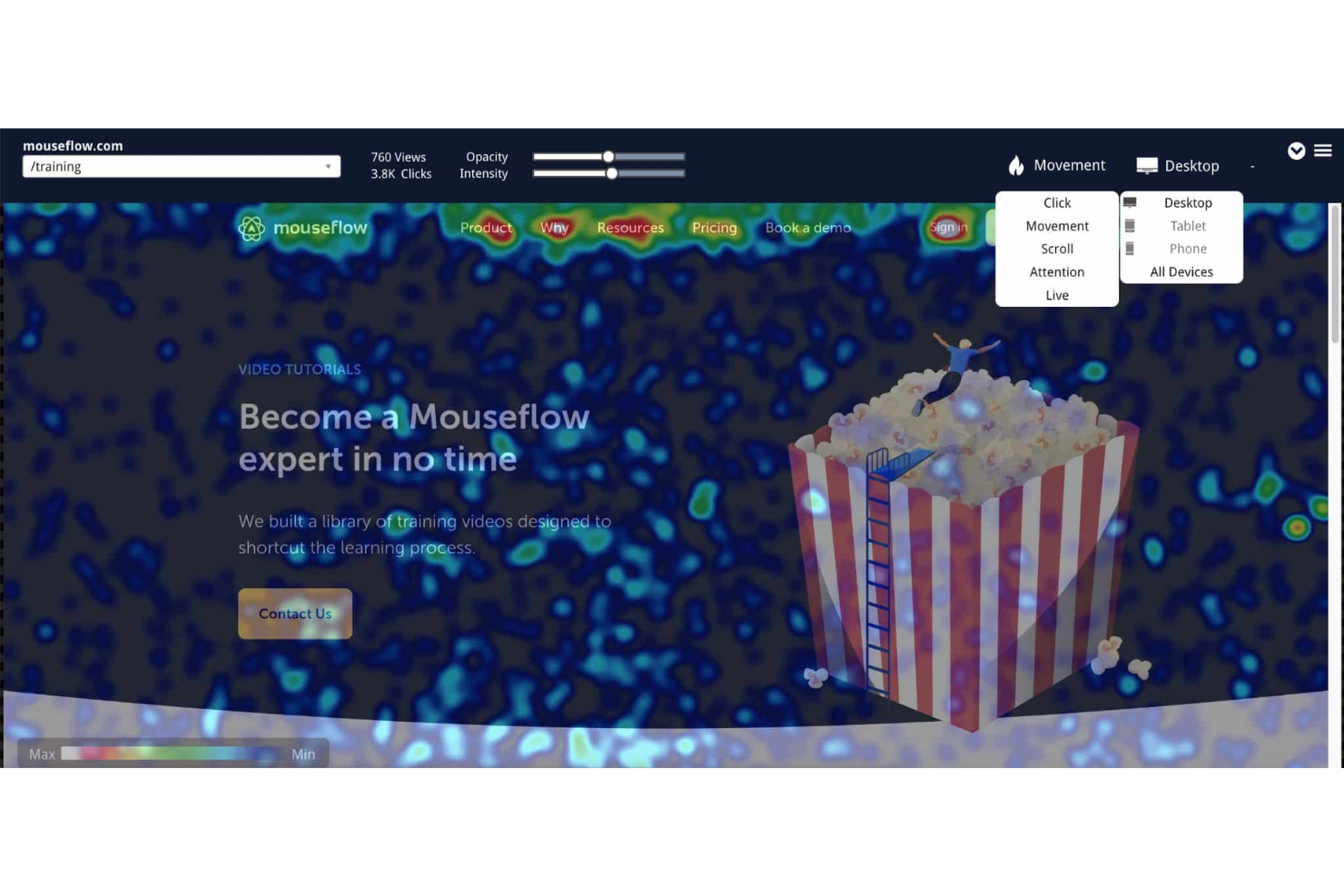
Mouseflow è uno strumento di analisi del comportamento che aiuta a comprendere come i visitatori interagiscono con il tuo sito web. Fornendo approfondimenti sul comportamento degli utenti, ti consente di individuare aree da migliorare e di arricchire l'esperienza complessiva dell'utente.
Perché ho scelto Mouseflow:
Uno dei motivi per cui mi piace Mouseflow è la sua analisi dei punti di abbandono. Puoi vedere esattamente dove gli utenti interrompono il loro percorso e individuare le aree problematiche che possono causare frustrazione. Questa funzione è particolarmente utile per identificare distrazioni o punti di attrito che impediscono agli utenti di completare azioni chiave come l'iscrizione o l'acquisto. Offre anche la possibilità di mappare l'intero percorso dei visitatori del sito. Puoi seguire tutte le strade percorse dagli utenti da e verso qualsiasi pagina, ottenendo così una visione completa di come interagiscono con il tuo sito.
Caratteristiche distintive e integrazioni:
Altre funzionalità includono il confronto dei percorsi, che ti permette di vedere se gli itinerari degli utenti corrispondono al design previsto, aiutandoti a ottimizzare la struttura del sito. Lo strumento fornisce anche informazioni su come gli utenti arrivano su pagine specifiche, consentendoti di valutare se tali pagine soddisfano le aspettative dei visitatori. Alcune delle integrazioni di Mouseflow includono Google Analytics, HubSpot, Shopify, WordPress, Wix, Squarespace, Slack, Segment, Optimizely e Sitejet.
Pros and Cons
Pros:
- Consente di raggruppare pagine simili per approfondimenti comportamentali più accurati
- Traccia automaticamente i percorsi dei visitatori
- Fornisce un'analisi dettagliata dei punti di abbandono per ottimizzare i tassi di conversione
Cons:
- Non include funzionalità di A/B testing integrate
- Le funzionalità di mappatura completa dei percorsi sono riservate al piano enterprise

Ideale per Prevedere e Ridurre l'Abbandono dei Clienti
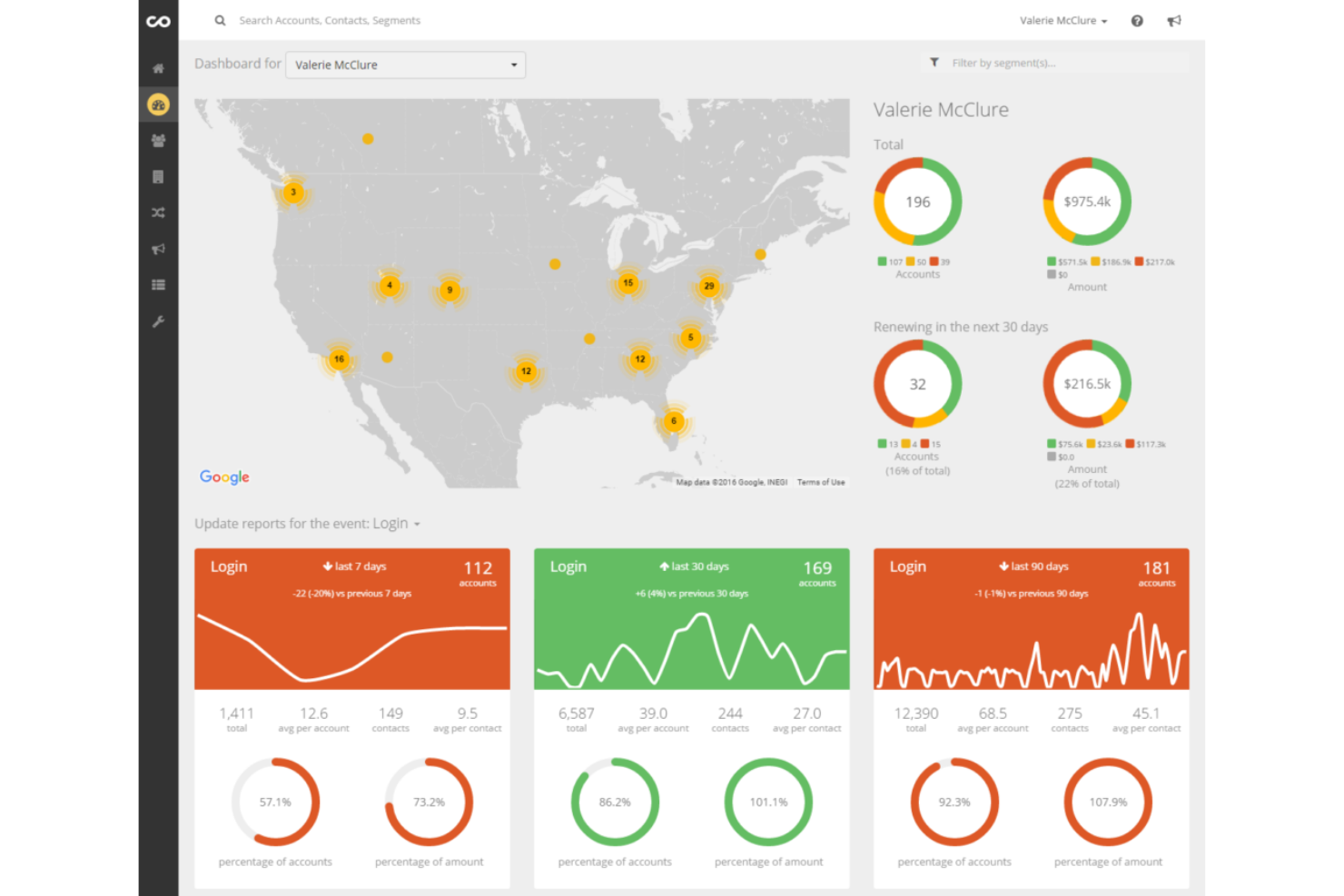
ChurnZero è una potente piattaforma di customer success che si concentra sulla riduzione del tasso di abbandono dei clienti aiutando le aziende a comprendere meglio i loro clienti. Utilizza dati in tempo reale, attività automatizzate e segmentazione dei clienti per prevedere e prevenire l'abbandono, allineandosi così al suo riconoscimento come la migliore soluzione per prevedere e ridurre il churn dei clienti.
Perché ho scelto ChurnZero:
Ho selezionato ChurnZero per la sua dedizione nella previsione e prevenzione dell'abbandono. Questo strumento va oltre la semplice gestione dei dati dei clienti, offrendo funzionalità progettate per mantenere i clienti coinvolti e diminuire la probabilità di abbandono. La sua analisi approfondita dei clienti e le attività automatizzate lo rendono diverso rispetto ad altri strumenti.
Caratteristiche distintive & integrazioni:
ChurnZero si distingue per funzioni come la valutazione della salute del cliente, azioni automatiche basate sul comportamento dei clienti e report dettagliati che aiutano a comprendere l'abbandono. Offre inoltre importanti integrazioni con piattaforme come Salesforce, HubSpot e Zendesk, aiutando le aziende a collegare i dati dei clienti provenienti da più canali.
Pros and Cons
Pros:
- Funzionalità specializzate per prevedere e ridurre l'abbandono dei clienti.
- Sistema completo di valutazione della salute dei clienti.
- Integrazioni preziose con le principali piattaforme.
Cons:
- L'alto costo potrebbe essere proibitivo per le piccole imprese.
- Può esserci una curva di apprendimento per alcune funzionalità avanzate.
- Utilizzare solo se l'azienda ha un basso tasso di abbandono.
Ideale per analisi cross-platform in tempo reale
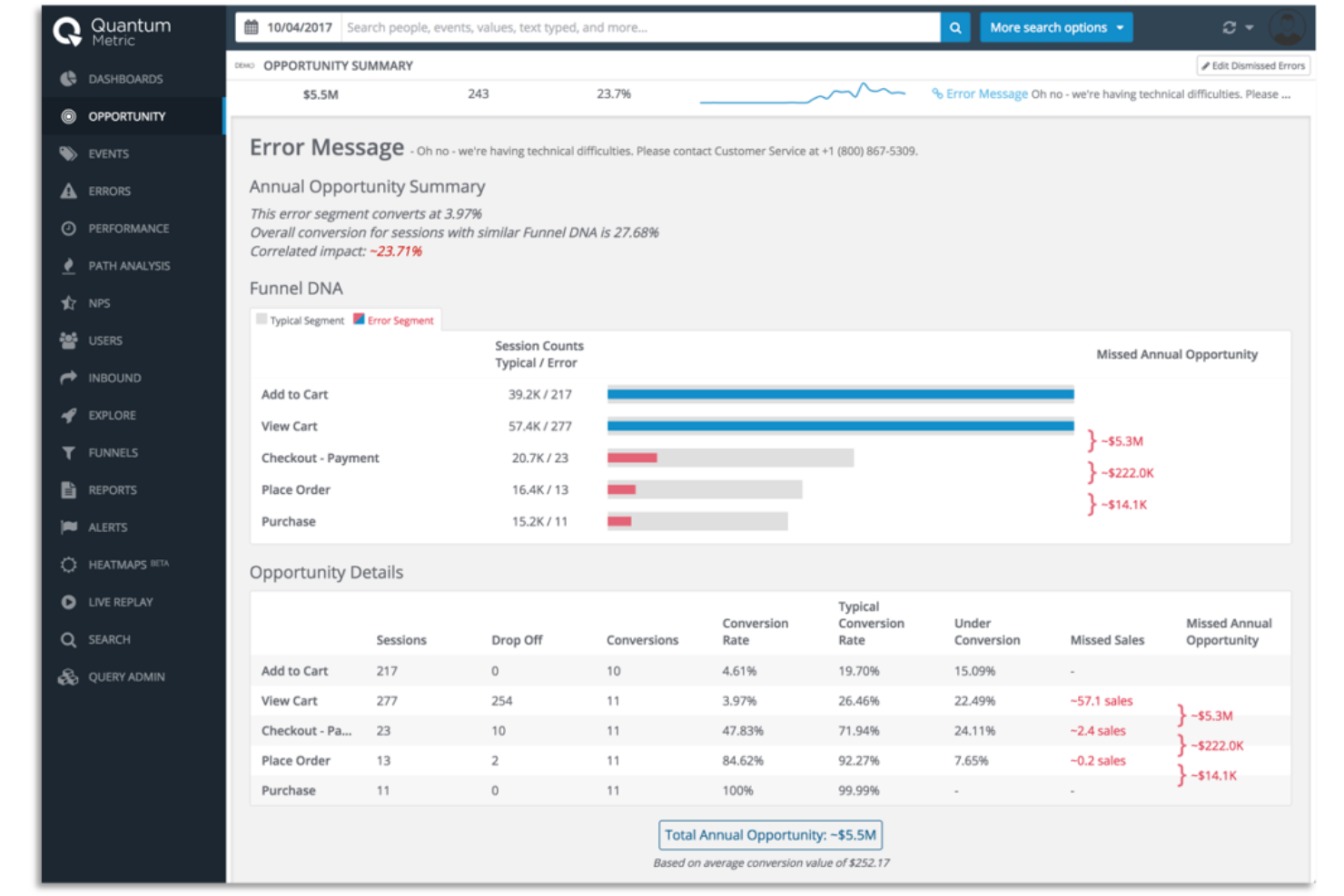
Quantum Metric è una piattaforma di intelligenza digitale che aiuta le aziende ad approfondire la comprensione del comportamento online dei propri clienti. Permette di tracciare e analizzare in tempo reale le interazioni dei clienti su diversi canali, offrendo una comprensione completa del customer journey.
Perché ho scelto Quantum Metric:
Ho selezionato Quantum Metric per il suo approccio unico nell'offrire analisi in tempo reale e cross-platform. È una soluzione innovativa e fondamentale in un mondo in cui i clienti interagiscono con le aziende su molteplici piattaforme. È la migliore per l’analisi cross-platform in tempo reale grazie alla rapidità nell’elaborazione dei dati e alla compatibilità con diversi ambienti digitali.
Caratteristiche principali & integrazioni:
Quantum Metric unisce dati dell’esperienza cliente e analisi avanzate per consentire agli utenti di capire il 'perché' dietro i comportamenti e le preferenze dei clienti. Il suo approccio 'Continuous Product Design' supporta inoltre i team nello sviluppo di prodotti digitali migliori. Quantum Metric si integra perfettamente con Google Marketing Platform, Adobe Experience Cloud e altri strumenti di marketing e visualizzazione dati.
Pros and Cons
Pros:
- Le analisi in tempo reale offrono una visione immediata del comportamento dei clienti.
- Compatibile con diverse piattaforme per un'analisi completa.
- Approccio unico al 'Continuous Product Design'.
Cons:
- I prezzi non sono pubblici: è necessario richiedere un preventivo.
- Potrebbe essere complicato per i nuovi utenti senza un'adeguata formazione.
- A seconda della scala, la gestione dei dati può risultare complessa.

Segment
Ideale per ottimizzare la raccolta dati su più canali
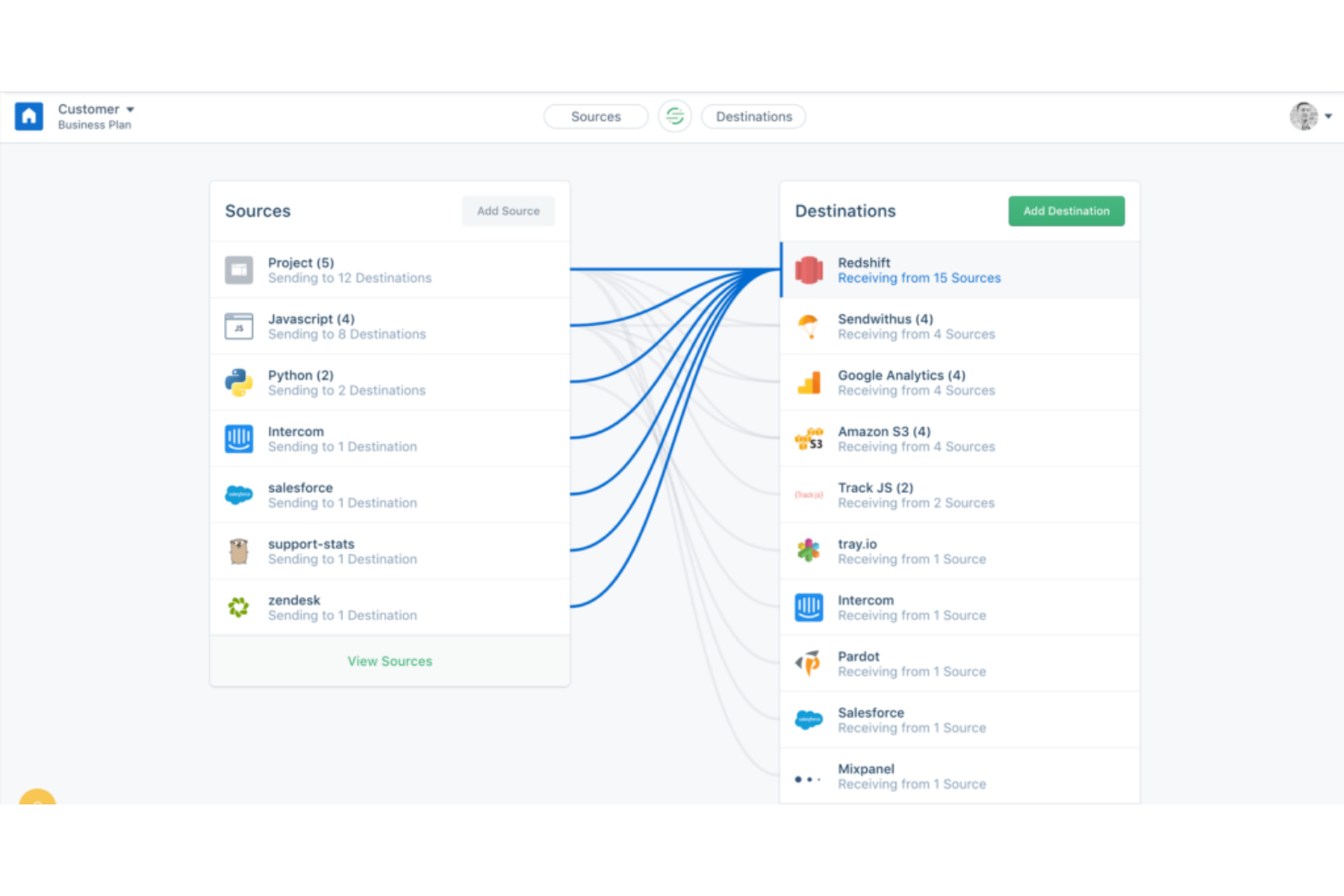
Segment è uno strumento versatile che aiuta le aziende ad aggregare i dati provenienti da più canali e a presentarli in un formato di facile comprensione. Gestendo in modo efficiente il delicato compito di raccolta e aggregazione dei dati, è particolarmente adatto alle aziende che desiderano ottimizzare il processo di raccolta dati multicanale.
Perché ho scelto Segment:
Ho selezionato Segment per la sua capacità di consolidare dati provenienti da fonti diverse. Nell'era del marketing multicanale, raccogliere dati da ogni fonte può essere impegnativo. Segment semplifica questo processo, diventando così la soluzione ideale per le aziende che hanno bisogno di ottimizzare la raccolta dei dati su più canali.
Funzionalità e integrazioni distintive:
Segment fornisce un'API unificata per la raccolta dei dati, che può aiutare le aziende a semplificare la propria infrastruttura dati. Inoltre, offre un protocollo per garantire la qualità dei dati. È altamente compatibile con altri software, con integrazioni che si estendono su piattaforme, strumenti di marketing, data warehouse e altro ancora.
Pros and Cons
Pros:
- Semplifica la raccolta di dati da più fonti.
- Garantisce la qualità dei dati con un protocollo unificato.
- Offre una vasta gamma di integrazioni.
Cons:
- Il costo potrebbe risultare elevato per le piccole imprese.
- Il modello di fatturazione annuale potrebbe non adattarsi a tutte le aziende.
- Potrebbe avere una curva di apprendimento ripida per gli utenti non tecnici.

Ideale per la mappatura del customer journey
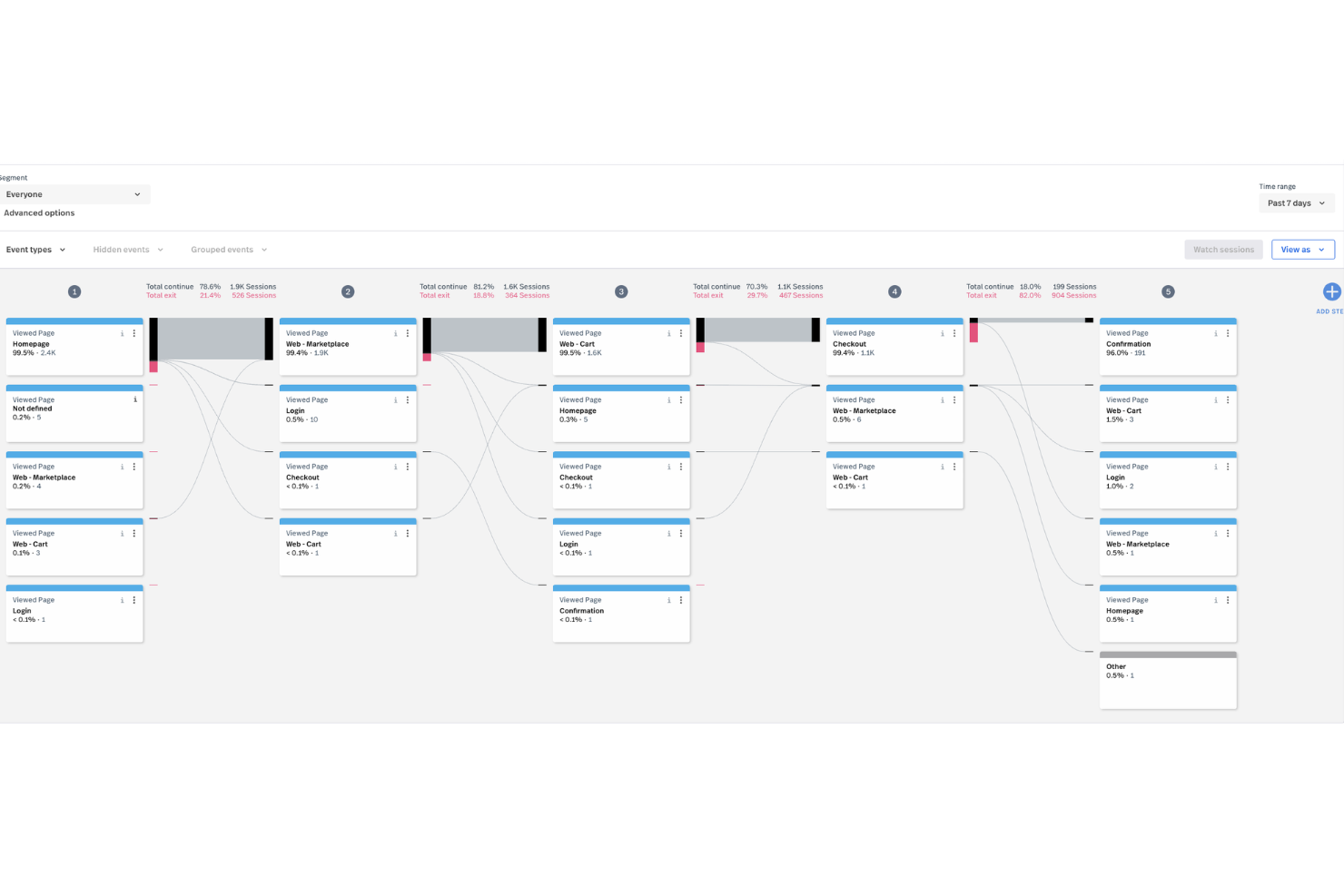
Fullstory è una piattaforma di dati comportamentali che aiuta te e il tuo team a comprendere come gli utenti interagiscono con il tuo sito web o app. Registra e analizza le interazioni dei clienti per mostrare dove si verifica attrito, come gli utenti navigano sul tuo sito e cosa potrebbe causare frustrazione. Sfruttando l’analisi comportamentale, Fullstory consente ai responsabili tecnologici di prendere decisioni più informate grazie a insight azionabili provenienti da ogni clic.
Perché ho scelto Fullstory:
Ciò che rende Fullstory una scelta solida per l’analisi del customer journey è la sua funzione di session replay, che consente di guardare registrazioni in tempo reale su come gli utenti interagiscono con il sito. Puoi vedere ogni clic, scroll e interazione esattamente come sono avvenuti, aiutandoti a individuare aree specifiche di frustrazione o confusione dell’utente. Il software offre anche le heatmap, che ti forniscono una rappresentazione visiva delle aree di maggiore interazione degli utenti sulle pagine. Inoltre, la funzione di journey mapping ti permette di tracciare il percorso esatto che gli utenti compiono su più pagine. Questo livello di comprensione aiuta le aziende ad adottare un approccio più incentrato sul cliente, aumentare la conversione del funnel, rilevare comportamenti fraudolenti e identificare i clienti di alto valore in modo più efficiente.
Funzionalità principali e integrazioni:
Inoltre, le esportazioni di dati ti permettono di sincronizzare gli insight di Fullstory con gli altri tuoi sistemi, consentendo un’analisi più approfondita al di fuori della piattaforma. Il supporto per app mobile estende le funzionalità di Fullstory anche alla tua app, così puoi monitorare il comportamento degli utenti sia sul web che su mobile. Fullstory si integra anche con una vasta gamma di strumenti come Google Analytics, Salesforce e Slack.
Pros and Cons
Pros:
- Replay dettagliato delle sessioni
- Fornisce analisi in tempo reale
- Offre la funzione heatmap
Cons:
- Le analisi mobile sono un componente aggiuntivo a pagamento
- Personalizzazione limitata della dashboard

Glassbox
Ideale per il replay delle sessioni utente web e mobile
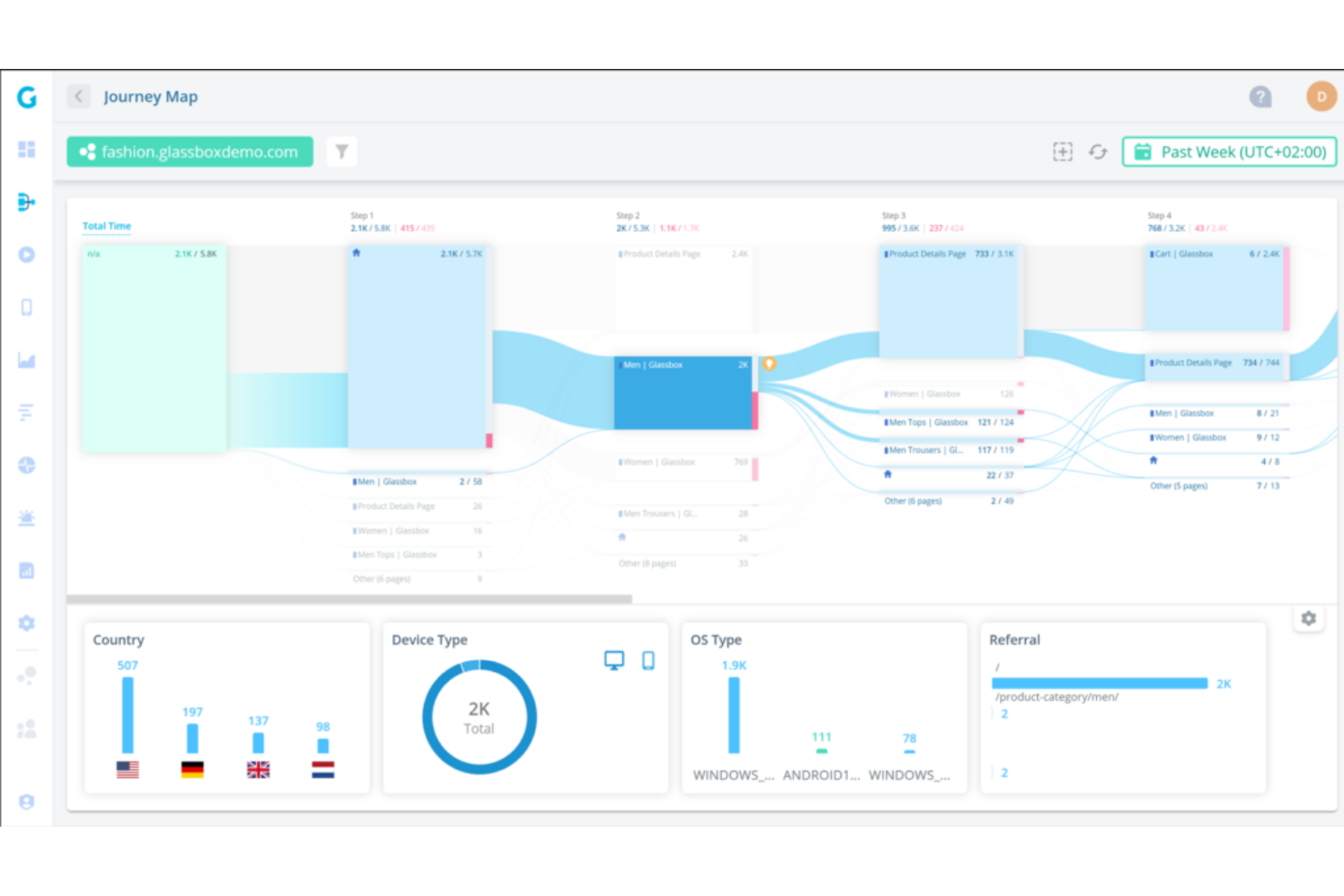
Glassbox è una piattaforma di analisi che offre una comprensione approfondita delle interazioni degli utenti sul tuo sito web e sulle applicazioni mobili. La sua potente funzione di replay delle sessioni permette alle aziende di visualizzare e analizzare i percorsi dei clienti nei minimi dettagli.
Perché ho scelto Glassbox:
Ho scelto Glassbox per le sue capacità impareggiabili nel replay delle sessioni. Osservare in dettaglio le interazioni dei clienti è un cambiamento radicale e Glassbox eccelle proprio in questo. L'eccezionale funzionalità di session replay sia per il web che per le app mobili lo rende il migliore in questo ambito.
Funzionalità principali & integrazioni:
Le caratteristiche principali di Glassbox includono il replay delle sessioni, la mappatura del percorso cliente e analisi accurate. L'efficace funzione di session replay offre una riproduzione in stile 'video' del percorso dell'utente. Per quanto riguarda le integrazioni, Glassbox è compatibile con una vasta gamma di piattaforme di marketing, CRM e dati, tra cui Salesforce, Adobe Marketing Cloud e Google BigQuery.
Pros and Cons
Pros:
- Potenti capacità di session replay.
- Disponiamo di una mappatura dettagliata del percorso cliente.
- Ampie possibilità di integrazione.
Cons:
- Il prezzo non è dichiarato sul sito web.
- L'enorme quantità di dati raccolti può risultare travolgente.
- L'interfaccia utente può richiedere un periodo di apprendimento per i nuovi utenti.

Ideale per interazioni personalizzate con i clienti basate sull'IA
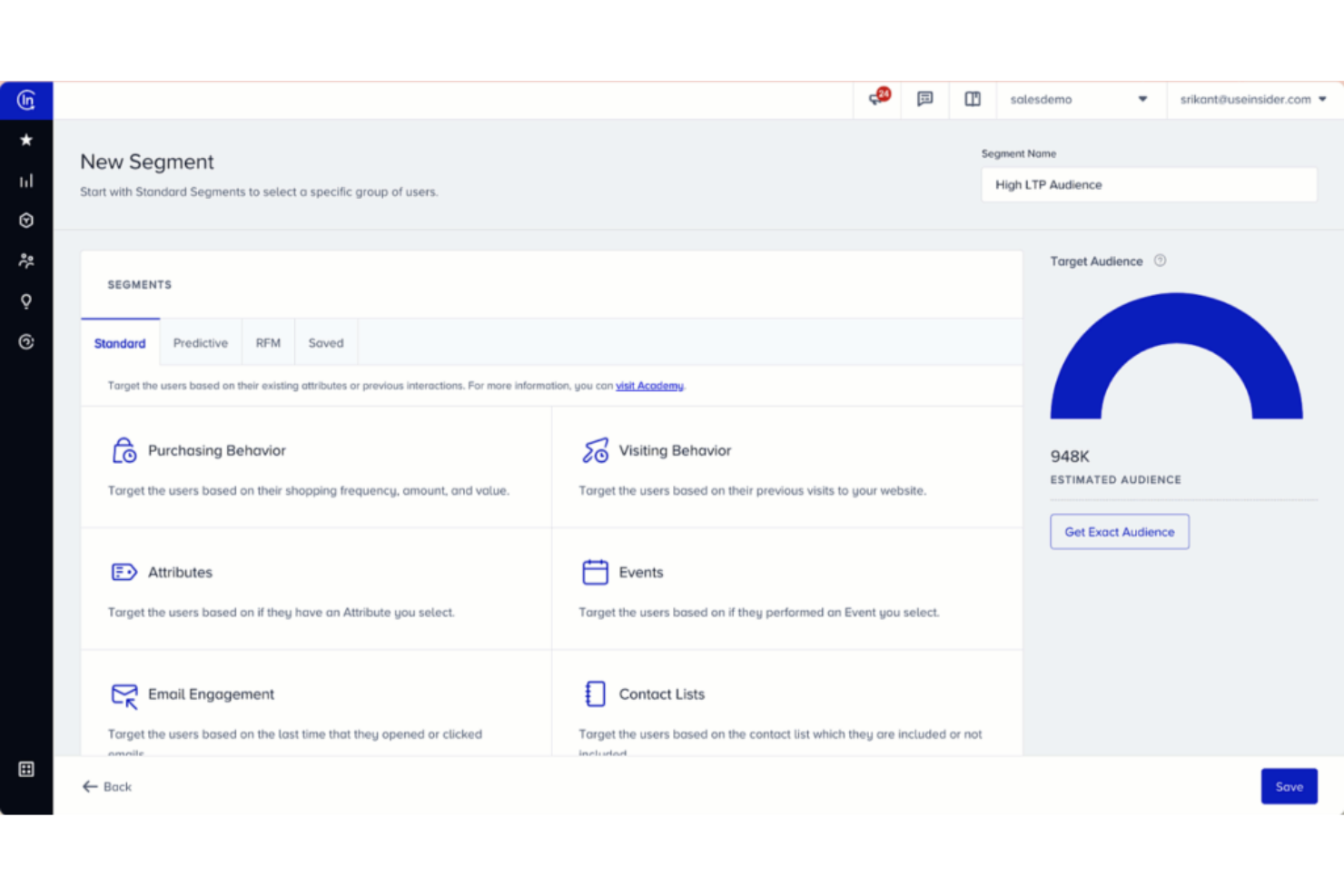
Insider è una piattaforma alimentata dall'intelligenza artificiale che eccelle nell'offrire esperienze personalizzate ai clienti. Utilizza il machine learning per analizzare i comportamenti dei clienti e personalizzare le interazioni, rendendola una delle migliori scelte per le aziende che desiderano aumentare il coinvolgimento tramite la personalizzazione.
Perché ho scelto Insider:
Insider si è distinto per me nel settore degli strumenti di analisi dei percorsi dei clienti basati sull'IA. Le sue capacità di machine learning e l'enfasi sulla personalizzazione la rendono unica rispetto alle altre. Ho scelto Insider perché è perfettamente attrezzato per mantenere la promessa di interazioni personalizzate con i clienti guidate dall'intelligenza artificiale.
Funzionalità e integrazioni che spiccano:
Le caratteristiche più interessanti di Insider sono le sue solide capacità di IA e machine learning, che alimentano esperienze clienti su misura. Offre anche analisi in tempo reale e modelli predittivi per anticipare il comportamento dei clienti. Per quanto riguarda le integrazioni, Insider si integra senza problemi con altri strumenti e piattaforme di marketing come Shopify, Magento e Google Analytics, ampliando le sue potenzialità e garantendo un flusso di dati omogeneo.
Pros and Cons
Pros:
- Potenti capacità di IA e machine learning.
- Fornisce analisi in tempo reale e modellazione predittiva.
- Integrazione fluida con molti strumenti e piattaforme di marketing popolari.
Cons:
- Le informazioni sui prezzi non sono facilmente reperibili.
- L'interfaccia utente potrebbe richiedere un periodo di apprendimento per i principianti.
- Alcuni utenti potrebbero trovare la profondità delle analisi dei dati complessa.

Pendo
Ideale per il monitoraggio del coinvolgimento degli utenti in-app
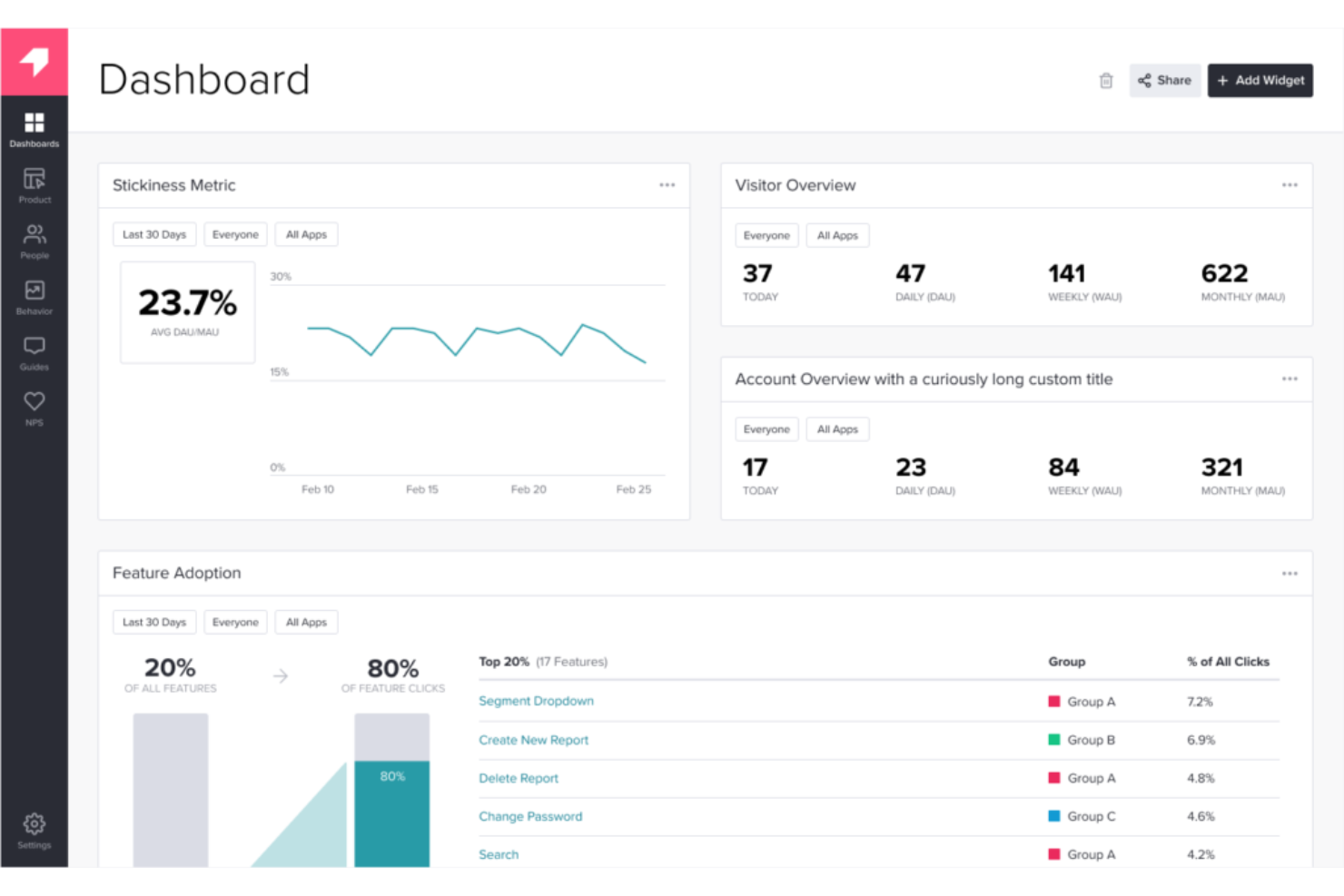
Pendo.io è una solida piattaforma per l’esperienza prodotto che offre preziose informazioni sull’interazione degli utenti direttamente all’interno delle applicazioni. Questo strumento è particolarmente ben attrezzato per comprendere il comportamento degli utenti nelle app, risultando quindi una scelta ideale per le aziende che vogliono monitorare e migliorare il coinvolgimento degli utenti nell’applicazione.
Perché ho scelto Pendo.io:
Ho scelto Pendo.io per le sue capacità focalizzate sul monitoraggio del coinvolgimento degli utenti in-app. Il suo set unico di funzionalità consente alle aziende di ottenere approfondimenti dettagliati sul comportamento degli utenti nelle loro applicazioni. Questa specializzazione lo rende una scelta di spicco per le aziende che intendono comprendere e migliorare l’interazione degli utenti in-app.
Funzionalità e integrazioni principali:
Pendo.io offre ampie funzionalità per il tracciamento del comportamento degli utenti, come heatmap, funnel, analisi e attribuzione dei percorsi utente. Include anche strumenti per guidare gli utenti durante l’utilizzo dell’app, migliorando così la loro esperienza. In termini di integrazioni, Pendo.io si collega in modo fluido con diversi strumenti di CRM, analisi dati e gestione progetti.
Pros and Cons
Pros:
- Funzionalità complete per il monitoraggio del coinvolgimento degli utenti in-app.
- Offre funzionalità per guidare gli utenti all’interno dell’app.
- Ampia gamma di integrazioni con altri strumenti aziendali.
Cons:
- I costi elevati potrebbero rappresentare una barriera per le piccole imprese.
- Potrebbe essere eccessivo per aziende che non sono focalizzate principalmente sul coinvolgimento in-app.
- Alcuni utenti potrebbero avere bisogno di aiuto inizialmente per utilizzarlo.

MoEngage
Ideale per il coinvolgimento clienti mobile-first
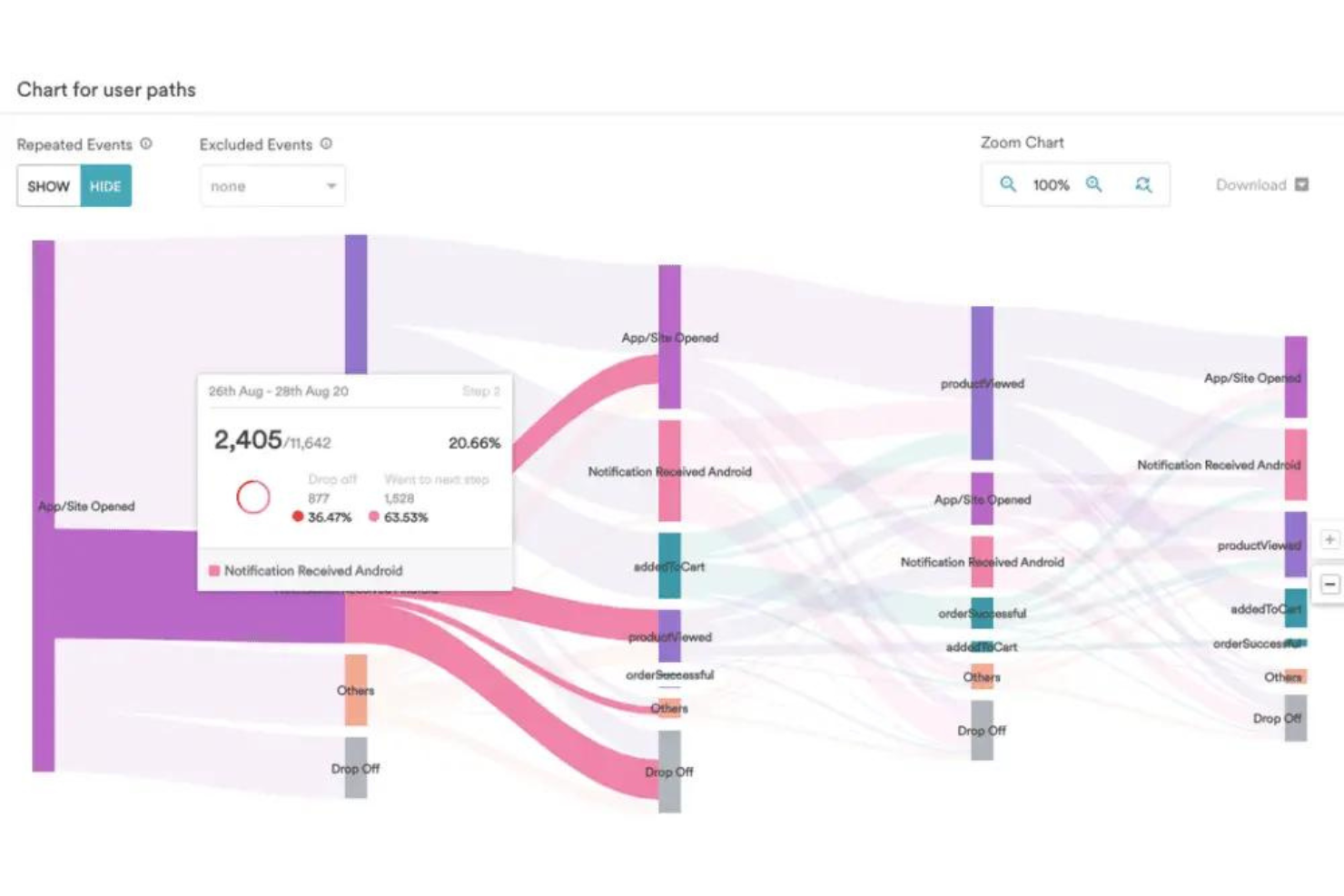
MoEngage è una piattaforma robusta di coinvolgimento clienti e analisi focalizzata sul mobile. Fornisce alle aziende gli strumenti per connettersi con i clienti sui dispositivi mobili, consentendo interazioni personalizzate basate sul comportamento e sulle preferenze dei clienti.
Perché ho scelto MoEngage:
Ho scelto MoEngage per le sue solide funzionalità orientate al mobile. In un'epoca in cui i clienti fanno sempre più affidamento sui dispositivi mobili, avere uno strumento come MoEngage mi è sembrata una scelta ovvia. Il suo focus deciso è quello di permettere alle aziende di raggiungere i clienti direttamente sui dispositivi che usano di più. È il migliore per il coinvolgimento clienti mobile-first grazie alla sua suite completa di strumenti di engagement specifici per mobile.
Funzionalità e integrazioni principali:
MoEngage offre messaggistica personalizzata, automazione e campagne basate sul comportamento che rendono l'engagement mobile più efficace. Funzionalità come Sherpa, il loro motore di ottimizzazione basato su intelligenza artificiale, e Flows, il loro visual builder dei percorsi cliente, offrono capacità avanzate di coinvolgimento. Per quanto riguarda le integrazioni, MoEngage funziona bene con principali piattaforme come Shopify, WordPress e Magento, oltre a numerose integrazioni con piattaforme di analisi, CRM e dati.
Pros and Cons
Pros:
- Forte attenzione al coinvolgimento del cliente su mobile.
- Piattaforma ricca di funzionalità con ottimizzazione basata su intelligenza artificiale.
- Offre numerose integrazioni con piattaforme popolari.
Cons:
- Le informazioni sui prezzi non sono prontamente disponibili.
- Potrebbe essere eccessivo per aziende senza una solida presenza mobile.
- Potrebbe essere eccessivo per aziende senza una solida presenza mobile..
Ideale per integrare CRM, SEO e gestione dei contenuti
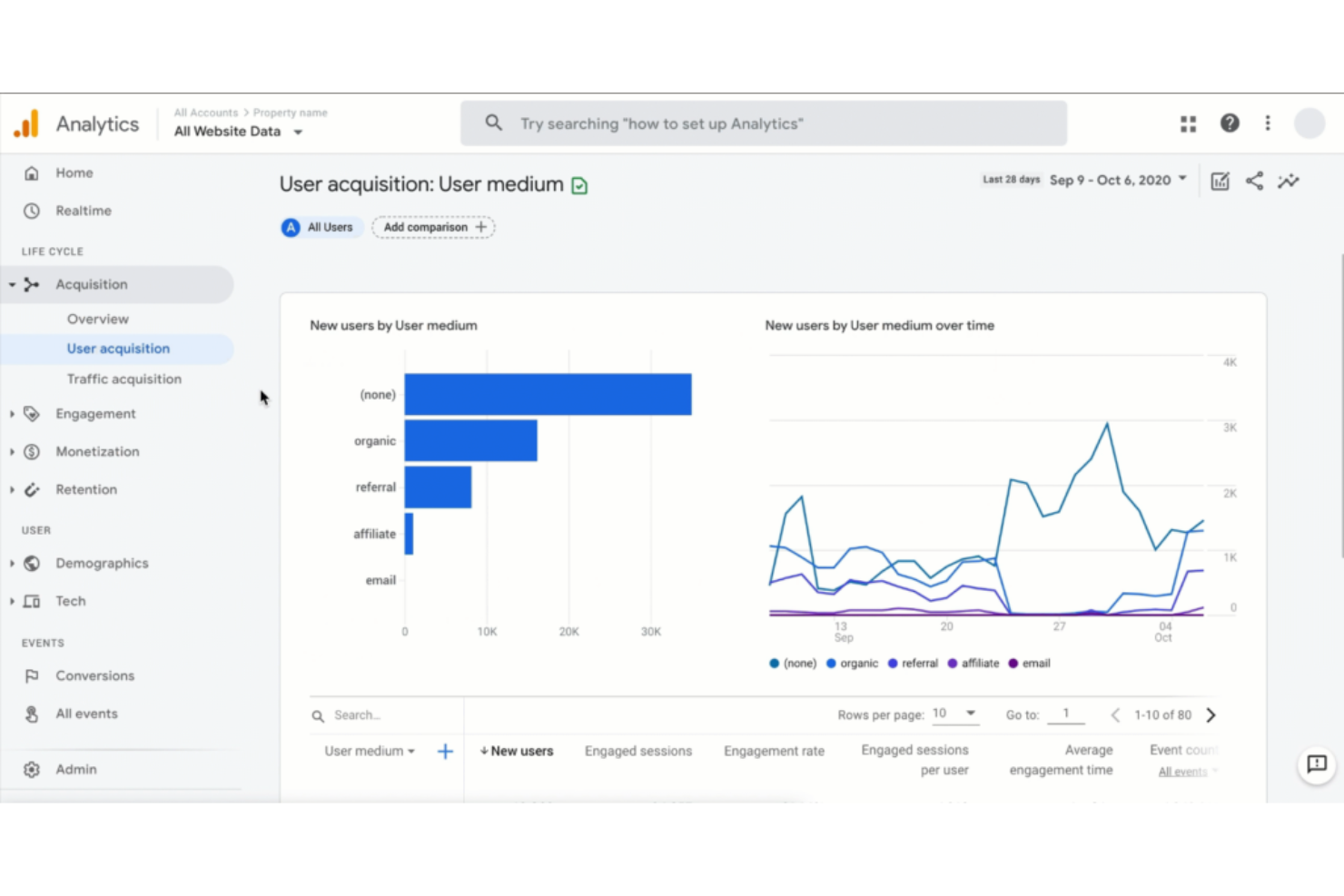
HubSpot Marketing Hub è una suite di marketing completa che combina gestione delle relazioni con i clienti (CRM), SEO e gestione dei contenuti in un unico luogo. È la scelta ideale per le aziende che vogliono un approccio unificato e snello per gestire e ottimizzare la propria presenza online.
Perché ho scelto HubSpot Marketing Hub:
Ho scelto HubSpot Marketing Hub per il suo approccio olistico al marketing. Sotto un unico tetto, è lo strumento ideale per le aziende che desiderano gestire diversi aspetti del marketing, dalla SEO ai contenuti fino al CRM. L'ampiezza di questa integrazione distingue HubSpot, rendendolo la scelta migliore per aziende con queste esigenze.
Funzionalità principali e integrazioni:
Le funzionalità critiche di HubSpot includono un sistema CRM robusto, strumenti SEO intuitivi e una gestione dei contenuti dinamica. Questi elementi lavorano in armonia, offrendo agli utenti un set di strumenti di marketing completo. HubSpot si integra perfettamente con molti dispositivi, compresi nomi noti come Salesforce, Slack, Woopra e WordPress, per estenderne funzionalità ed efficienza.
Pros and Cons
Pros:
- Set di funzionalità completo che combina CRM, SEO e gestione dei contenuti.
- Ampie possibilità di integrazione con una vasta gamma di altri strumenti.
- Interfaccia e esperienza utente intuitive.
Cons:
- Può essere costoso per le piccole imprese.
- Le funzionalità possono risultare opprimenti per chi cerca una soluzione semplice.
- Il livello di personalizzazione potrebbe essere migliorato.
Altri Software di Customer Journey Analytics
Di seguito trovi una lista aggiuntiva di software di customer journey analytics che avevo selezionato ma che non hanno raggiunto la top 10. Vale comunque la pena darci un’occhiata.
- Heap (by Contentsquare)
Ideale per acquisizione e monitoraggio automatico dei dati
- Contentsquare
Ideale per visualizzare il comportamento degli utenti sui siti web
- Treasure Data Customer Data Platform
Ideale per la gestione unificata dei dati dei clienti
- HCL Software
Ideale per un'analisi dei dati versatile e approfondimenti


Recensioni Correlate
Se non hai ancora trovato quello che cerchi qui, dai un'occhiata a questi strumenti di gestione dell'esperienza cliente correlati che abbiamo testato e valutato.
- Software per il Servizio Clienti
- Software Help Desk
- Software per Call Center
- Piattaforme di Messaggistica per Clienti
- Piattaforma di Digital Experience
- Strumenti di Analisi del Sentiment
Come Valuto i Software di Customer Journey Analytics
Divido la mia valutazione su due livelli: le funzionalità di base che uno strumento deve avere—come l'unificazione dei dati da più fonti e l'analisi dei percorsi—e i fattori differenzianti che distinguono un fornitore dall'altro.
Funzionalità Core (Requisiti Fondamentali per Questa Lista)
Quando seleziono gli strumenti per la mia lista, valuto ciascuno su una scala da 0 (non offre la funzionalità) a 5 (eccelle in quest'area) per ogni funzionalità chiave elencata di seguito. Quindi, calcolo il punteggio totale dello strumento come percentuale. Ogni strumento deve raggiungere un punteggio totale minimo del 65% per essere considerato per l'inclusione.
- Mappatura del Customer Journey Cross-Canale: Verifico se lo strumento è in grado di collegare le interazioni attraverso web, mobile, email e touchpoint offline in un unico percorso visivo invece che in report separati per canale.
- Unificazione dei Dati da Più Fonti: La piattaforma deve unificare dati comportamentali, CRM, VoC e transazionali a livello individuale, affinché l’analisi dei percorsi rifletta i clienti reali e non sessioni frammentate.
- Analisi e Metriche a Livello di Journey: Valuto se gli strumenti forniscono KPI specifici del percorso, come tassi di conversione tra le fasi, tempo tra i passaggi e punti di abbandono, anziché solo metriche a livello di pagina.
- Segmentazione e Analisi dei Gruppi: Cerco una segmentazione dinamica e guidata dal comportamento, che consenta di raggruppare i clienti per fase del percorso o modello di interazione, non solo con filtri demografici statici.
- Analisi dei Funnel e dei Percorsi: Uno strumento dovrebbe consentire di esplorare i percorsi reali dei clienti e confrontarli con i percorsi ideali, mettendo in evidenza i loop e i punti di abbandono nei flussi di checkout o di onboarding.
- Approfondimenti Predittivi e di Attribuzione: Valuto se la piattaforma offre attribuzione multi-touch o modelli predittivi come la propensione all’abbandono, collegando i risultati aziendali a specifiche fasi del percorso.
Una volta che ho un elenco di strumenti che soddisfano questi criteri, considero ciò che distingue ciascuna piattaforma.
Fattori Differenzianti (Cosa Distingue i Fornitori)
Ecco come confronto e metto a confronto i diversi fornitori:
Funzionalità Distintive
La scoperta del journey guidata dall’IA è un importante fattore distintivo. Cerco piattaforme che individuano automaticamente percorsi nascosti e anomalie comportamentali, invece di richiedere agli analisti di costruire ipotesi manualmente. Anche l’attivazione in tempo reale del journey è importante, soprattutto quando uno strumento può attivare un intervento di supporto o un’offerta personalizzata nel momento in cui un cliente si blocca durante l’onboarding. Valuto anche se la piattaforma comprende un builder del journey senza codice che consente ai responsabili CX di creare e modificare mappe dei percorsi senza dover attendere il supporto dell’ingegneria.
Oltre le Funzionalità
Il livello di integrazione è un aspetto che valuto attentamente. Uno strumento di customer journey analytics che non può attingere dai dati CRM, dalla piattaforma di supporto e dal marketing lascia dei vuoti nel percorso. Anche il time-to-value conta. Verifico se il fornitore offre template di journey preconfigurati o acceleratori di settore che accorciano il percorso dall’implementazione al primo insight. La trasparenza sui prezzi è un altro fattore che considero, in particolare come i costi crescono quando aumenta il volume degli eventi tra i canali.
Come Scegliere un Software di Customer Journey Analytics
È facile perdersi tra lunghi elenchi di funzionalità e strutture di prezzo complesse. Per aiutarti a restare focalizzato mentre attraversi il tuo processo di selezione del software, ecco una checklist di fattori da tenere a mente:
| Fattore | Cosa considerare |
|---|---|
| Scalabilità | Il software crescerà insieme alla tua azienda? Valuta se è in grado di gestire un aumento di volume dei dati e del numero di utenti senza problemi. Scegli strumenti che possano supportare i tuoi piani di crescita futura. |
| Integrazioni | Si collega con gli strumenti che già utilizzi? Assicurati che il software possa integrarsi con il tuo CRM, le piattaforme di marketing e altri sistemi. La mancanza di integrazione può portare a silos di dati. |
| Personalizzazione | Puoi adattarlo alle tue esigenze? Controlla se il software ti consente di personalizzare dashboard e report. Strumenti che non si adattano ai tuoi flussi di lavoro possono limitarne l'usabilità. |
| Facilità d'uso | Lo strumento è intuitivo? Valuta se il tuo team può utilizzare il software senza formazione approfondita. Un'interfaccia complessa può rallentare l'adozione e la produttività. |
| Implementazione e onboarding | Quanto rapidamente puoi iniziare? Considera tempo e risorse necessari per implementare il software. Strumenti con configurazioni lunghe possono ritardare la possibilità di ottenere valore. |
| Costo | Rientra nel tuo budget? Confronta i piani tariffari e valuta i costi totali, inclusi eventuali costi nascosti. Assicurati che le funzionalità di cui hai bisogno siano disponibili a un prezzo ragionevole. |
| Misure di sicurezza | I tuoi dati sono protetti? Verifica le misure di sicurezza del software, come la crittografia e i controlli di accesso. Una sicurezza carente può esporre le informazioni sensibili dei clienti a rischi. |
| Requisiti di conformità | Rispetta gli standard di settore? Assicurati che il software sia conforme alle normative rilevanti per la tua azienda, come GDPR o CCPA. La non conformità può comportare problemi legali e sanzioni. |
Che cos'è un software di Customer Journey Analytics?
Il software di customer journey analytics è uno strumento digitale che ti consente di catturare, tracciare, analizzare e comprendere le interazioni dei clienti attraverso vari touchpoint. Questo può includere interazioni con il tuo sito web, app mobile, help desk, piattaforme di marketing automation, ecc.
Questa tipologia di software offre insight su bisogni, comportamenti, schemi e preferenze dei clienti durante il loro percorso. Queste informazioni aiutano a migliorare l'esperienza complessiva del cliente, a promuovere lo sviluppo dei prodotti e, in ultima analisi, ad aumentare la fidelizzazione e il fatturato aziendale. Puoi eseguire test A/B, analisi web e segmentazione demografica, consentendo alle tue squadre di prendere decisioni basate sui dati.
Funzionalità
Quando scegli un software di customer journey analytics, presta attenzione alle seguenti caratteristiche fondamentali:
- Misure di sicurezza: Garantisce la protezione dei dati tramite crittografia e controlli di accesso, mantenendo la fiducia del cliente e la conformità alle normative.
- Integrazione dei dati: Si collega senza problemi agli strumenti già utilizzati come CRM e piattaforme di marketing per offrire una visione unificata delle interazioni dei clienti.
- Analisi in tempo reale: Offre insight immediati sul comportamento dei clienti, consentendo ai team di reagire rapidamente a trend e problematiche.
- Mappatura del percorso: Visualizza il customer journey attraverso i diversi touchpoint, aiutando a individuare criticità e opportunità di miglioramento.
- Segmentazione dei clienti: Raggruppa gli utenti in base a comportamenti e preferenze, abilitando marketing mirato ed esperienze personalizzate.
- Analisi predittiva: Sfrutta i dati storici per prevedere i comportamenti futuri dei clienti, supportando decisioni proattive.
- Heatmap: Mostra visivamente i dati sulle interazioni degli utenti, evidenziando le aree di un sito o di un'app che ricevono maggiore attenzione.
- Messaggistica in-app: Permette la comunicazione diretta con gli utenti all’interno del prodotto, migliorando l’engagement e il supporto.
- Raccolta feedback utenti: Raccoglie opinioni direttamente dai clienti aiutando i team a comprendere le esigenze e migliorare l’offerta dei prodotti.
- Workflow automatizzati: Snellisce le attività ripetitive, consentendo ai team di concentrarsi su iniziative strategiche.
Vantaggi
L’implementazione di un software di customer journey analytics offre numerosi vantaggi per il tuo team e la tua azienda. Eccone alcuni a cui puoi ambire:
- Migliore comprensione dei clienti: Ottieni una conoscenza approfondita di comportamenti e preferenze grazie ad analisi dettagliate e integrazione dei dati.
- Miglioramento nelle decisioni: Prendi decisioni informate grazie ad analisi in tempo reale e intuizioni predittive che evidenziano tendenze e potenziali criticità.
- Maggiore coinvolgimento: Aumenta l'interazione con i clienti offrendo esperienze personalizzate e comunicazioni mirate, favorite dalla segmentazione e dalla messaggistica in-app.
- Allocazione efficiente delle risorse: Ottimizza tempo e risorse automatizzando le attività ripetitive e concentrandoti su iniziative strategiche.
- Migliore fidelizzazione dei clienti: Individua i clienti a rischio e rispondi proattivamente ai loro bisogni con il mapping del percorso cliente e i punteggi sulla salute del cliente.
- Tassi di conversione più elevati: Usa il journey mapping e le heatmap per individuare e migliorare le aree che guidano le conversioni.
- Sicurezza dei dati: Proteggi le informazioni sensibili dei clienti con misure di sicurezza, assicurando la conformità e mantenendo la fiducia.
Costi e prezzi
Selezionare un software di customer journey analytics richiede una comprensione dei vari modelli e piani tariffari disponibili. I costi variano in base alle funzionalità, alla dimensione del team, agli extra e altro ancora. La tabella seguente riassume i piani più comuni, i loro prezzi medi e le caratteristiche tipiche incluse nelle soluzioni di customer journey analytics:
Tabella di confronto dei piani per il software di Customer Journey Analytics
| Tipo di piano | Prezzo medio | Caratteristiche comuni |
|---|---|---|
| Piano gratuito | $0 | Analisi di base, integrazione dati limitata e raccolta dei feedback degli utenti. |
| Piano personale | $10-$30/user/month | Analisi avanzata, reportistica in tempo reale, messaggistica in-app e segmentazione clienti di base. |
| Piano business | $50-$100/user/month | Analisi avanzata, journey mapping, intuizioni predittive e integrazione dati completa. |
| Piano enterprise | $150-$300/user/month | Dashboard personalizzabili, integrazione dati completa, supporto dedicato e funzionalità avanzate di sicurezza. |
Domande frequenti sul software Customer Journey Analytics
Trova risposte alle domande più comuni su questo argomento.
In cosa si differenziano le customer journey analytics dal normale tracciamento di un sito web?
Il normale tracciamento di un sito web osserva click e visite alle pagine. Le customer journey analytics vanno oltre, mostrandoti come le persone si spostano da un passaggio all’altro — dalla visualizzazione di un annuncio, alla visita al sito, all’iscrizione, fino a diventare clienti fedeli. Ti aiutano a vedere tutta la storia che c’è dietro le loro azioni.
Questo software può tracciare sia le attività online che offline dei clienti?
Sì. Molti strumenti possono combinare dati da azioni online come visite al sito o uso di app, e azioni offline come visite in negozio o chiamate telefoniche. Questo offre al tuo team una visione più chiara di come le persone si connettano con la tua azienda sia online che nella vita reale.
Come aiuta questo software a trattenere i clienti?
Mostra dove le persone perdono interesse o smettono di interagire con il tuo brand. Individuando questi punti deboli, il tuo team può risolvere problemi, migliorare il servizio e rendere l’esperienza più fluida perché i clienti rimangano più a lungo.
Serve un esperto tecnologico per usare questo tipo di software?
No. La maggior parte degli strumenti è pensata per essere sufficientemente semplice per i team di marketing o di assistenza clienti. Spesso includono dashboard chiare e report pronti all’uso, così puoi capire i risultati anche senza esperienza tecnica o conoscenze di programmazione.
Quanto sono affidabili i risultati di questo software?
I risultati sono affidabili nella misura in cui sono completi e aggiornati i dati inseriti. Se i dati provenienti da siti web, email o vendite sono organizzati e recenti, otterrai intuizioni più accurate e utili. La chiave è mantenere le informazioni ordinate e aggiornate.
Cosa fare dopo:
Se stai valutando un software di customer journey analytics, collegati gratuitamente con un consulente SoftwareSelect per ricevere raccomandazioni.
Compila un modulo e fai una breve chiacchierata in cui vengono approfondite le tue esigenze specifiche. Riceverai quindi una shortlist di software da analizzare. Ti supporteranno anche durante tutto il processo di acquisto, incluse le negoziazioni dei prezzi.