

AI customer service software helps support teams automate routine interactions, speed up response times, and scale personalized service without burning out your agents. The best AI-powered tools can help you deliver faster, smarter customer experiences, whether you’re handling high ticket volume, expanding channels, or optimizing for leaner operations.
In this article, I leverage my years of experience in researching and testing a wide array of CX platforms to present a curated list of the top AI customer service software.
Why Trust Our Software Recommendations
6,700+
Reviews
20
Industry experts
16+
Evaluation factors
14
Years
Our team has been testing and reviewing software since 2012. As CX leaders ourselves, we know how difficult—and important—it is to choose the right software.
For this guide, we evaluated tools using hands-on testing and independent research, scoring tools using our selection criteria.
Our reviews reflect our human editorial judgment, not a sales pitch.
 Gui DrusinaCreative Director
 Tim FisherVP of AI
AI Customer Service Software Comparison Table
This comparison table summarizes pricing details for my top AI customer service software selections:
| Tool | Best For | Trial Info | Price | ||
|---|---|---|---|---|---|
| 1 | Best for AI-powered customer insights | Free trial available | From $15/user/month (billed annually) | Website | |
| 2 | Best with real-time multilingual chat translation | 30-day free trial | From $31/agent/month (billed annually) | Website | |
| 3 | Best for generative AI support agents | Free demo available | Pricing upon request | Website | |
| 4 | Best for rapid AI deployment without code | 30-day free trial | From $199/month | Website | |
| 5 | Best for AI-powered workflow automation | Free demo available | From $40/user/month (billed annually) | Website | |
| 6 | Best for AI-powered omnichannel service | Free plan available | From $35/user/month | Website | |
| 7 | Best for contextual conversation routing | Free trial available | From $19/user/month (billed annually) | Website | |
| 8 | Best for ecommerce unified inbox management | Free trial available | From $39/user/month (billed annually) | Website | |
| 9 | Best for AI assisted customer replies | Free plan available | From $25/user/month | Website | |
| 10 | Best with AI-powered ticket summaries | Free plan available; 14-day free trial | From $16/user/month | Website |


Best AI Customer Service Software Reviews
Here’s a brief description of each of the AI customer service apps on my list, showing what it does best, plus screenshots to showcase some of the features.
 Best for AI-powered customer insights
- Free trial available
- From $15/user/month (billed annually)
Visit WebsiteCustomer Rating:4.5/5
Nextiva uses AI for a wide range of functions, like providing agents with information about customers before a call is answered. Nextiva is a cloud-based customer experience management platform that provides businesses with a unified solution for voice, video, messaging, and collaboration. Known for its reliability and robust feature set, Nextiva is designed to streamline business communication and enhance customer engagement across a wide range of channels.
As an AI-powered software, Nextiva offers intelligent bots designed to handle routine customer inquiries and provide instant, personalized support. Another key AI feature is Nextiva's call pop functionality, which provides agents with critical customer information and context before they even pick up the call. This includes customer sentiment, past interactions, and account value, enabling agents to deliver highly personalized service.
The platform also has voice analytics to analyze call data to provide insights into customer sentiment and agent performance. This is complemented by Nextiva’s AI-driven customer journey orchestration, which tracks and analyzes customer interactions across all touchpoints to predict customer needs and optimize engagement strategies. Additionally, Nextiva’s intelligent virtual assistants and AI bots can automate routine tasks, such as appointment scheduling and order processing.
Integrations include HubSpot, Microsoft Teams, Zoho CRM, Zendesk, G Suite, Microsoft Outlook, Slack, ServiceNow, QuickBooks, SugarCRM, and NetSuite.
 Best with real-time multilingual chat translation
- 30-day free trial
- From $31/agent/month (billed annually)
Visit WebsiteCustomer Rating:4.4/5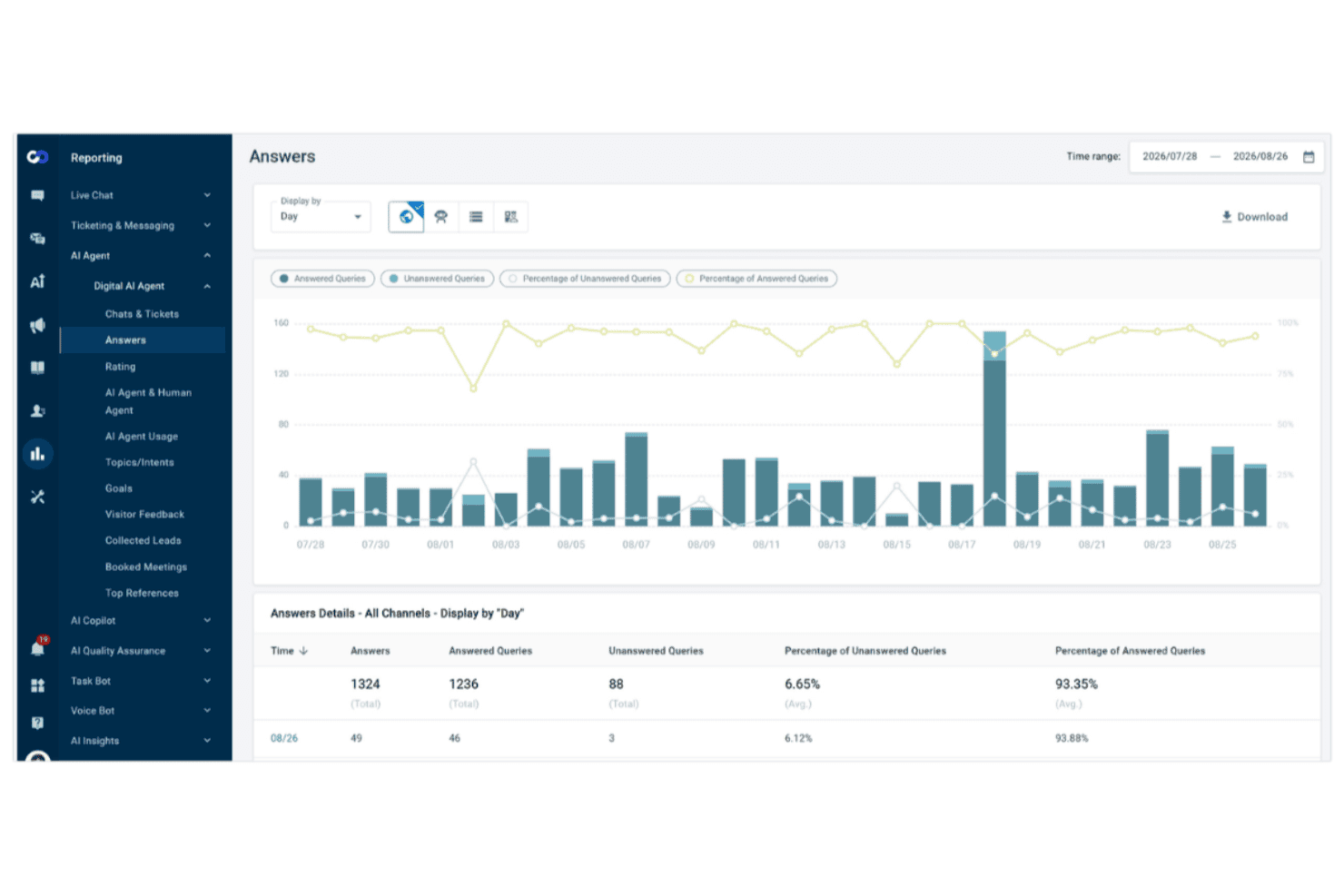
Comm100 tracks AI agent answer rates and query trends over time. Comm100 is an AI-powered customer engagement platform built for support teams in higher education, gaming, financial services, healthcare, and government, where an automated answer has to be accurate, traceable to an approved source, and deployable inside the organization's own infrastructure if required.
Who Is Comm100 Best For?
Comm100 fits mid-size to enterprise support teams in regulated sectors: universities absorbing admissions and advising volume, iGaming operators running 24/7 player support, credit unions, healthcare providers, and public agencies. The common thread is a governance requirement that a general-purpose bot cannot meet, whether that is HIPAA, PCI DSS, accessibility standards, or data residency.
Why I Picked Comm100
Comm100 earns a spot on my shortlist because of how well it handles unified communication channels, but also just how accurate it is. The AI Agent answers from knowledge sources that you connect, whether that’s a website URL, policy documents, a SharePoint or Google Drive folder, or Confluence directly. The AI Agent, along with live chat and ticketing & messaging, work seamlessly together to bring all channels (live chat, social messaging apps, Signal, and SMS) in one platform. The AI Agent layer sits across those channels, so automated responses and escalation logic apply consistently whether a customer reaches out via web chat or a messaging app.
Comm100 Key Features
- AI Agent: Uses natural language processing to answer questions, and answers from sources that you connect to ensure accuracy in responses.
- Custom actions: You can configure the Comm100 AI Agent to complete tasks in conversations, such as booking appointments, checking balance, or creating custom workflows.
- On-premises deployment: One of the only solutions on this list that offers on-premises deployment, meeting data residency rules for regulated businesses.
- Detailed reporting dashboard: Track chatbot resolution rates, agent response times, and customer satisfaction scores in one view.
Comm100 Integrations
Comm100 offers native integrations with Salesforce, Zendesk, Microsoft Teams, Google Analytics, Shopify, and Slack. It also provides an API for custom integrations.
Pros and Cons
Pros:
- Native coverage of Telegram, X, LINE, and WeChat alongside the mainstream channels
- SOC 2 Type II, HIPAA, ISO 27001, and GDPR compliant
- Adapts tone and language from plain-text instructions
Cons:
- Answer quality depends on the state of your existing knowledge base
- Users report mapping challenges during CRM integration
Learn more about Comm100: Best for generative AI support agents
- Free demo available
- Pricing upon request

Gradient Labs lets you build and manage AI agents for customer service, with specialized agents for tasks like lending, onboarding, and dispute resolution from a single dashboard. Gradient Labs is an AI customer service platform built for financial services teams, offering a suite of specialist AI agents to handle customer support, disputes, collections, onboarding, and KYC across voice, chat, email, and SMS.
Who is Gradient Labs Best For?
Gradient Labs suits customer service teams in regulated financial services companies, including fintechs, banks, and lenders that handle large volumes of sensitive customer interactions.
Why I Picked Gradient Labs
I picked Gradient Labs as one of the best because its generative AI support agents go well beyond scripted responses. Each agent remembers past conversations and takes real actions, like freezing a lost card or tracing a missing payment, without handing off to a human. What I also like is that the agents are trained on your SOPs and real conversation history, not just a help center, so they mirror how your best agents actually operate.
Gradient Labs Key Features
- Omnichannel agent deployment: Deploy AI agents across voice, chat, email, SMS, and social media from a single platform.
- Built-in compliance guardrails: More than 20 automated safety checks run on every conversation turn to meet regulatory requirements.
- Automated quality assurance: Every customer interaction is reviewed and scored, with no manual sampling required.
- Proactive outreach: AI agents initiate outbound conversations for collections, renewals, and follow-ups without human prompting.
Gradient Labs Integrations
Gradient Labs offers native integrations with Intercom, Zendesk, Salesforce, Freshdesk, Twilio, RingCentral, Genesys, NICE, and LoanPro, along with connections to payment networks like Visa, Mastercard, and PayPal. An API is also available for custom integrations, and you can connect via CSV upload or directly within your existing tools. Zapier support lacks clear documentation.
Pros and Cons
Pros:
- Reports CSAT scores rivaling human agents
- Handles regulated financial service queries well
- Trains agents on real conversation history
Cons:
- Very few third-party reviews available yet
- Primarily focused on financial services verticals
Learn more about Gradient Labs: Best for rapid AI deployment without code
- 30-day free trial
- From $199/month
Visit WebsiteCustomer Rating:4.5/5
My AskAI offers a Self-learning feature that auto-generates AI articles and lets users control tone of voice and publish status from a single settings panel. My AskAI is an AI customer service agent platform that deploys generative AI chatbots trained on your knowledge base to autonomously handle support tickets, execute customer actions, and surface conversation insights across your existing helpdesk tools.
Who Is My AskAI Best For?
It's a strong fit for SaaS, eCommerce, and marketplace support teams already running Zendesk, Intercom, Freshdesk, or Gorgias who want to add AI without switching platforms.
Why I Picked My AskAI
I picked My AskAI as one of the best because getting an AI agent live takes hours, not months. Connecting knowledge sources from Confluence, Notion, or Google Drive auto-syncs your content so the AI answers accurately from day one. I also like that AI Actions (like processing refunds or address changes) are defined in plain natural language, which means my team configures automated workflows without writing any code.
My AskAI Key Features
- QA testing dashboard: Run AI-scored evaluations of agent responses, including sendability checks and improvement suggestions.
- Multilingual knowledge ingestion: Sync and auto-update documentation sources in over 95 languages for global support coverage.
- Helpdesk ticket tagging: Automatically tag tickets by sentiment, topic, or urgency using AI-driven analysis.
- Internal Slack and Teams mode: Deploy AI agents internally to answer employee questions directly in popular team chat apps.
My AskAI Integrations
My AskAI offers native integrations with Zendesk, Intercom, Gorgias, Freshdesk, HubSpot, and Freshchat.
Pros and Cons
Pros:
- Auto-surfaces knowledge gaps from conversations
- Accurately cites sources in every response
- AI agent goes live in hours
Cons:
- Analytics depth lags behind enterprise platforms
- Voice channel support is not available
Learn more about My AskAI: Best for AI-powered workflow automation
- Free demo available
- From $40/user/month (billed annually)
Visit WebsiteCustomer Rating:4.7/5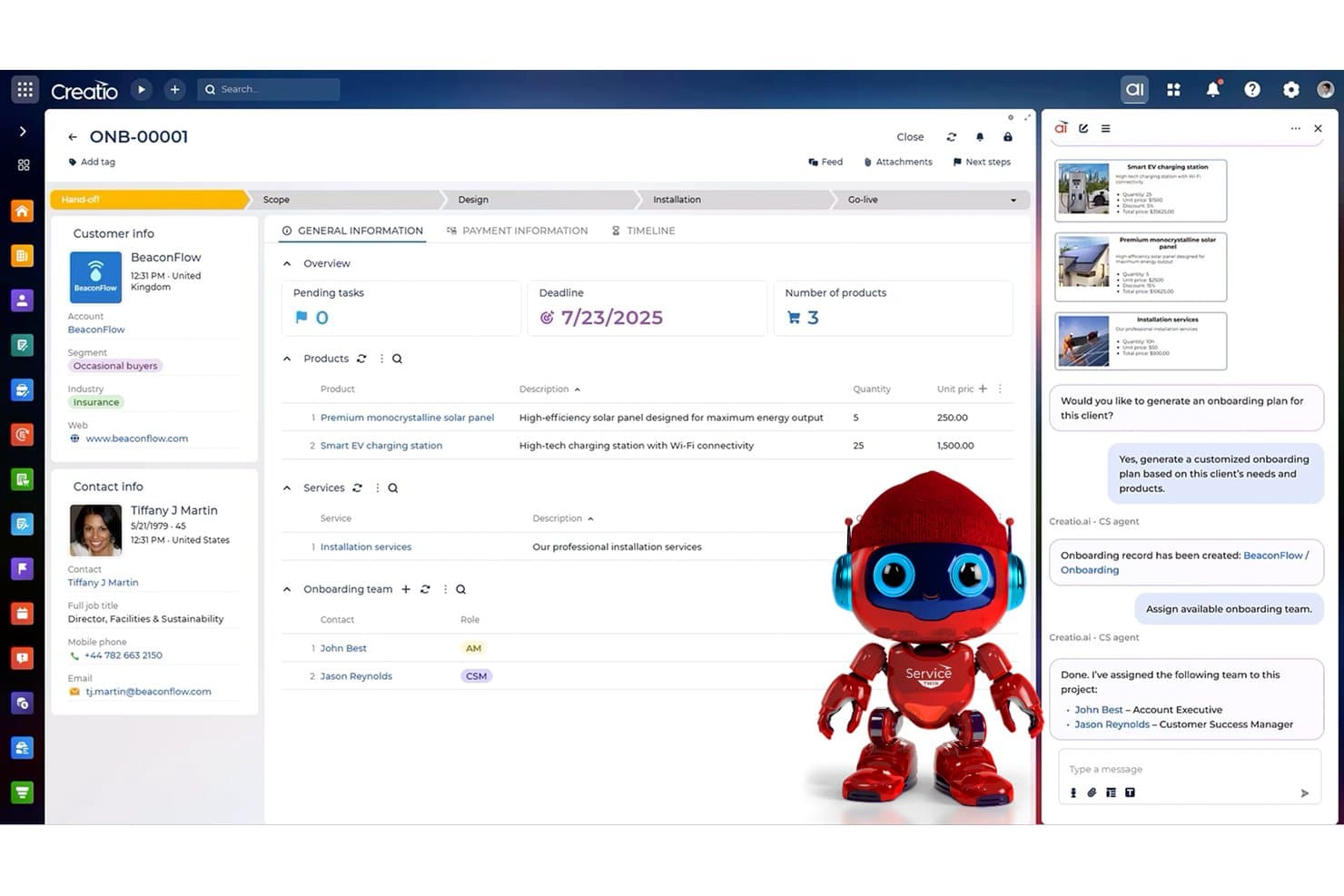
Creatio CRM offers an AI-powered CS agent that automatically generates onboarding plans and assigns customer service teams based on client data. Creatio CRM is a no-code, AI-native CRM and service platform that combines case management, omnichannel support, AI agent building, and workflow automation for customer service teams.
Who Is Creatio CRM Best For?
Creatio CRM is a strong fit for mid-to-large enterprises that need highly customizable service workflows without heavy reliance on engineering resources.
Why I Picked Creatio CRM
I've included Creatio CRM in my top picks because its no-code AI agent builder lets service teams build and deploy custom AI agents without writing a single line of code. I like that you can connect your preferred LLM (OpenAI, Anthropic, or Gemini) directly to those agents, so the automation feels purpose-built rather than generic. The AI-powered case routing also automatically assigns incoming cases to the right service group and category, cutting manual triage out of the picture entirely.
Creatio CRM Key Features
- Omnichannel agent desktop: Combines chat, email, phone, and portal interactions in a unified workspace for service reps.
- Process design studio: Lets teams build and update service workflows visually with no-code tools.
- ITIL-based service management: Supports ITIL processes, including SLA tracking, escalation, and queue management.
- Marketplace integrations: Expands functionality with pre-built connectors for CTI, e-commerce, document signing, and marketing apps.
Creatio CRM Integrations
Creatio CRM offers native integrations with Salesforce, DocuSign, Twilio, OpenAI, Microsoft 365, and Zapier. An API is available for custom integrations, and additional apps can be added from the Creatio Marketplace.
Pros and Cons
Pros:
- ITIL-aligned case management built in
- Supports multiple LLM connections natively
- No-code AI agent builder included
Cons:
- AI features lag behind dedicated chatbot platforms
- Complex initial platform configuration required
Learn more about Creatio CRM: Best for AI-powered omnichannel service
- Free plan available
- From $35/user/month
Visit WebsiteCustomer Rating:4.7/5
Hiver offers an AI agent workflow that automatically diagnoses login errors, calls APIs, creates Jira tickets, and hands off to a human agent seamlessly. Hiver is an AI-powered customer service platform that unifies email, chat, voice, SMS, and social channels in a single inbox, with autonomous AI Agents, an AI Copilot for agent assist, and built-in knowledge management and conversation QA.
Who Is Hiver Best For?
Hiver is a strong fit for SMB and mid-market support, finance, and IT teams that run their operations out of Gmail or Outlook and want a helpdesk without switching tools.
Why I Picked Hiver
Hiver earns its spot on my shortlist because of how its AI Agents actually execute actions, not just answer questions. I like that when a customer requests a refund, an AI Agent can pull the order from Shopify, check the return policy, and process it in Stripe without a human handoff. The AI Knowledge Builder auto-updates from resolved tickets, keeping the knowledge base current without anyone manually maintaining it.
Hiver Key Features
- Omnichannel inbox: Combines email, chat, voice, SMS, WhatsApp, and social channels into a single view for agents.
- AI QA and analytics: Grades every agent response against quality standards and provides actionable conversation insights.
- Skill-based routing: Routes incoming tickets automatically based on agent expertise and workload.
- API and native integrations: Connects directly with tools like Salesforce, Jira, Slack, NetSuite, and others for seamless workflows.
Hiver Integrations
Hiver offers native integrations with Salesforce, Jira, Slack, NetSuite, WhatsApp, and HubSpot, and provides an API for custom integrations.
Pros and Cons
Pros:
- True omnichannel AI across voice and chat
- Runs inside Gmail without switching tools
- AI agents execute actions across connected systems
Cons:
- Less suited for large enterprise contact centers
- Reporting depth lags behind dedicated analytics tools
Learn more about Hiver: Best for contextual conversation routing
- Free trial available
- From $19/user/month (billed annually)
Visit WebsiteCustomer Rating:4.4/5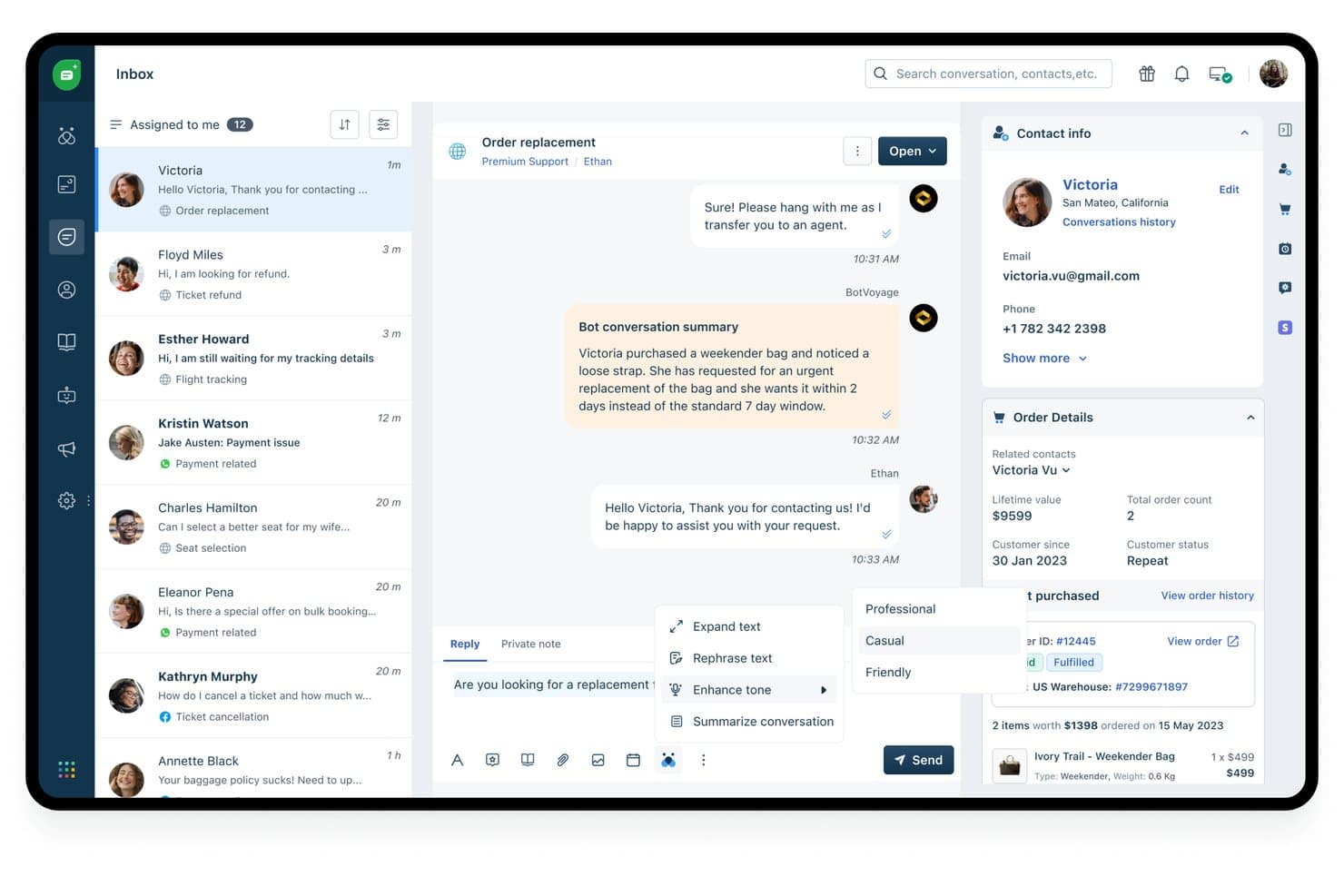
Freshdesk offers AI-powered features like bot conversation summaries, tone enhancement, and smart reply suggestions within its customer support inbox. Freshdesk is an AI-powered customer service platform from Freshworks that unifies ticketing, omnichannel conversations, autonomous AI agents, and agent copilot assistance across email, chat, voice, and social channels.
Who Is Freshdesk Best For?
Freshdesk is a strong fit for mid-market support teams that need scalable AI-powered service without the setup complexity of enterprise contact center platforms.
Why I Picked Freshdesk
Freshdesk earns its spot on my shortlist because of how precisely Freddy AI handles contextual conversation routing. At the Enterprise tier, skill-based routing matches incoming conversations to agents based on expertise, conversation history, and customer context, not just channel or keyword. I also like that round-robin and load-balanced assignment work alongside these rules, so my team's workload stays balanced even during high-volume periods without manual intervention.
Freshdesk Key Features
- Freddy AI Copilot: Gives agents real-time response suggestions, summarization, and live translation directly inside the conversation window.
- Omnichannel command center: Unifies customer interactions from email, chat, voice, social, and messaging apps in a single ticketing view.
- Custom analytics and dashboards: Provides ticket trends, CSAT reporting, and performance analytics across all channels.
- No-code AI workflow builder: Lets teams design and manage automations, bot flows, and escalations without engineering support.
Freshdesk Integrations
Freshdesk offers native integrations with Salesforce, HubSpot, Slack, Microsoft Teams, Shopify, Jira, Google Workspace, Mailchimp, WhatsApp, and Zoom. An API is available for custom integrations.
Pros and Cons
Pros:
- Unified omnichannel inbox across voice, chat, email
- Skill-based routing uses live conversation context
- Freddy AI handles complex multi-turn conversations autonomously
Cons:
- Reporting customization limited on lower-tier plans
- Advanced AI features locked behind Enterprise tier
Learn more about Freshdesk: Best for ecommerce unified inbox management
- Free trial available
- From $39/user/month (billed annually)
Visit WebsiteCustomer Rating:4.4/5
eDesk centralizes ecommerce messages and order context in a unified support inbox. eDesk is a solution tailored for ecommerce businesses seeking to improve customer service with AI-supported tools, including ecommerce unified inbox management for handling customer messages and order context together. It is suited for online sellers across major marketplaces who need to manage high support volume and maintain timely responses. With features such as a unified inbox and a 24/7 AI chatbot, eDesk helps teams keep customer communication organized and respond more consistently across channels.
Why I Picked eDesk
I picked eDesk for its ecommerce unified inbox management, which helps teams handle customer messages together with order context across sales channels. The platform also supports ticket routing so inquiries reach the appropriate agent, helping reduce resolution time. Its automation features handle common customer questions, allowing teams to focus on more complex support needs while managing high support volume more consistently.
eDesk Key Features
In addition to iecommerce unified inbox management, eDesk offers:
- 24/7 AI Chatbot: Provides round-the-clock support to customers, handling inquiries when your team is unavailable.
- Real-Time Insights: Offers analytics and reporting tools to track performance and customer satisfaction metrics.
- Sentiment Analysis: Automatically evaluates customer messages to gauge sentiment and prioritize responses accordingly.
eDesk Integrations
Integrations include Brightpearl, Klaviyo, ChannelAdvisor, StoreFeeder, VoloCommerce, Veeqo, Linnworks, ShipStation, and Aftership.
Pros and Cons
Pros:
- Seamless order data synchronization with major marketplaces
- AI-powered automations improve response efficiency
- Integrates rich order data for enhanced customer service
Cons:
- Reporting customization is limited for complex analysis
- Primarily built for ecommerce, less flexible for other industries
Learn more about eDesk: Best for AI assisted customer replies
- Free plan available
- From $25/user/month
Visit WebsiteCustomer Rating:4.5/5
Help Scout offers a live chat interface where agents can view customer profiles, browsing history, and product inquiries alongside real-time messaging. Help Scout is a customer support platform that combines a shared inbox, AI-powered reply drafting, conversation summarization, and an embedded AI chat agent capable of autonomously resolving customer inquiries across a knowledge base.
Who Is Help Scout Best For?
Help Scout is a strong fit for small to mid-sized support teams that handle high email volume and want AI to reduce manual drafting and response time.
Why I Picked Help Scout
I picked Help Scout as one of the best because AI Drafts genuinely changes how agents handle email volume. It generates a full reply from scratch using past conversations and help content, so agents aren't starting from a blank page. AI Assist then lets you shorten, expand, or shift the tone before sending. When a thread runs long, AI Summarize condenses the history into bullets so the next agent picks up context instantly.
Help Scout Key Features
- Unified multichannel inbox: Manage email, live chat, SMS, WhatsApp, Instagram, and Messenger conversations in one place.
- Docs knowledge base: Create, brand, and publish self-service support articles for customers to resolve issues independently.
- Custom workflows and automation: Automate routine tasks, assign tickets based on rules, and manage SLAs with built-in workflow tools.
- Proactive in-app messaging: Send targeted messages, announcements, or NPS surveys to users directly within your product or website.
Help Scout Integrations
Help Scout offers native integrations with HubSpot, Salesforce, Jira, Slack, Shopify, Mailchimp, Aircall, and Zapier, and provides an API for custom integrations.
Pros and Cons
Pros:
- Supports proactive in-product messaging alongside email AI
- AI Summarize condenses long threads into bullets
- AI Drafts generates context-aware replies automatically
Cons:
- AI chatbot restricted to knowledge base content
- No native voice or phone channel support
Learn more about Help Scout: Best with AI-powered ticket summaries
- Free plan available; 14-day free trial
- From $16/user/month
Visit WebsiteCustomer Rating:4.6/5
AI-powered customer service dashboard in SparrowDesk showing a unified inbox with conversation routing, priority tagging, SLA tracking, and team assignments for CX professionals. SparrowDesk is an AI customer service software platform that combines AI-driven ticket management, automated replies, and multi-channel support tools for handling customer inquiries.
Who Is SparrowDesk Best For?
SparrowDesk suits customer support teams at growing businesses that want to automate and organize multi-channel customer inquiries with AI.
Why I Picked SparrowDesk
I picked SparrowDesk as one of the best because its AI-powered instant ticket summaries save my team time when reviewing new support requests. I like how the platform automatically condenses long customer messages into clear, actionable overviews. This feature helps us quickly prioritize and assign tickets without missing important context.
SparrowDesk Key Features
- Multi-channel inbox: Manage customer messages from email, chat, and social media in one place.
- Custom ticket fields: Add and organize ticket details with fields tailored to your workflow.
- Automated ticket routing: Assign tickets to the right team members based on rules you set.
- Internal notes: Collaborate with your team by adding private notes to support tickets.
SparrowDesk Integrations
Native integrations are not clearly documented. The tool supports integrations via API for custom connections.
Pros and Cons
Pros:
- Supports bulk ticket actions for faster management
- SLA tracking and reporting built into dashboard
- Customizable automated replies match brand voice
Cons:
- Limited marketplace or third-party app ecosystem
- AI features require paid add-ons
Learn more about SparrowDesk:
Other AI Customer Service Software
Here are a few more that didn’t make the top list.
- 11WeavBest for deploying AI agents across channels
- 12ChatbaseBest for creating AI-driven agents
- 13GrammarlyBest for enhancing response quality
- 14Zoho DeskBest for AI-driven sentiment analysis
- 15ZendeskBest AI-powered customer service solution for companies of all sizes
- 16CloudTalkBest for custom call routing
- 17CustifyBest for SaaS companies
- 18TidioBest customer service platform for small businesses
- 19GuiddeBest for creating how-to video guides
- 20HappyFoxBest customizable customer portal
- 21FrontBest for cross-team customer request handling
- 22KustomerBest visual chatbot builder software
- 23CoSupport AIBest for customer support automation and business intelligence in one
- 24BaltoBest for live call center agents
- 25LiveHelpNowBest for omnichannel customer support
- 26KayakoBest for SMBs
- 27CrescendoBest for AI coaching of support teams
- 28TrueLarkBest for appointment booking
- 29SolvvyBest wiki reader
- 30QuidgetBest for AI-human collaboration in chat
Related CX Software Reviews
If you still haven't found what you're looking for here, check out these related customer experience management tools that we've tested and evaluated.
- Customer Service Software
- Help Desk Software
- Call Center Software
- Customer Messaging Platform
- Digital Experience Platform
- Sentiment Analysis Tools
- Customer Tracking Software
- Social Customer Service Software
What is AI Customer Service Software?
AI customer service software is a tool that uses artificial intelligence to automate and enhance customer support interactions across digital channels. It helps teams deliver faster, more scalable service through features like chatbots, natural language processing, intent recognition, and real-time analytics.
How I Evaluate AI Customer Service Software
Every tool on this list needs to deliver real AI value—like resolving tickets autonomously or surfacing answers for agents in real time, not just adding a chatbot badge to a basic helpdesk. I split my evaluation into core functionality a platform must have to qualify and differentiating factors that separate good options from great ones.
Core Functionality (Table Stakes For This List)
When I'm selecting tools for my list, I rank each one on a scale from 0 (does not offer the functionality) to 5 (excels in this area) for each core functionality listed below. Then, I calculate the tool's total score into a percentage. Each tool needs to achieve a minimum total score of 75% to be considered for inclusion.
- AI Chatbots & Virtual Agents: I evaluate whether a platform's bots can handle multi-turn conversations autonomously—like processing a return or updating an address without handing off to a human.
- Agent Assist & Copilot: Real-time AI support for live agents matters here. I look for features like auto-drafted replies, conversation summaries, and in-line knowledge suggestions during active chats.
- Omnichannel Support: Each tool should unify AI-powered interactions across chat, email, voice, social, and messaging apps so customers carry context when they switch channels.
- Intent Detection & Smart Routing: I check how well the platform classifies what a customer needs and routes them accordingly—for example, escalating a billing dispute to a senior agent based on sentiment.
- AI Knowledge Management: Strong platforms pull answers from your knowledge base using semantic search or retrieval-augmented generation, serving them to both customers and agents in real time.
- Conversation Analytics & QA: I look for AI-driven QA scoring across interactions, automated sentiment tagging, and summary dashboards that help managers spot coaching opportunities and trending issues.
Once I have a list of tools that meet the criteria, I consider what sets each platform apart.
Differentiating Factors (What Sets Vendors Apart)
Here's how I compare and contrast different vendors:
Standout Features
I pay close attention to whether a platform's AI agents can take real actions—like processing a refund or canceling a subscription—rather than just answering questions. No-code bot builders also matter because CX teams need to launch and iterate on AI workflows without waiting on engineering. AI guardrails round this out: I evaluate hallucination controls, sensitive topic filters, and approval workflows that keep outputs brand-safe in production.
Beyond Features
Integration depth is one of the first things I check—AI customer service tools need tight connections to your CRM, helpdesk, and ecommerce platform to pull order data or customer history into conversations. Pricing models also vary widely in this space, from per-agent to per-resolution, and I evaluate how predictable costs stay during volume spikes. Data security and AI compliance round things out, especially transparent policies on model training opt-outs and PII handling for teams in regulated industries.
How to Choose AI Customer Service Software
Choosing the right AI customer service software can help enhance customer satisfaction, streamline workflows, and ensure that human agents focus on more complex queries.
As you're shortlisting, trialing, and selecting AI customer service software consider the following:
- What problem are you trying to solve - Identify the customer service gap you're trying to fill to clarify the features and functionality the AI customer service software needs to provide.
- Who will need to use it - Who will be using the software and how many licenses will you need? Will it just be the customer service team or the whole organization that will require access? Do you want to prioritize ease of use for all, or speed for your software power users?
- What other tools it needs to work with - Clarify what tools you're replacing, what tools are staying, and the tools you'll need to integrate with, such as accounting, CRM or HR software.
- What outcomes are important - Consider what capability you want to gain, or what you want to improve, and how you will be measuring success. For example, an outcome could be the ability to get greater visibility into performance.
- How it would work within your organization - Consider the software selection alongside your workflows and delivery methodology. Evaluate what's working well, and the areas that are causing issues that need to be addressed.
Trends in AI Customer Service Software
AI customer service software is seeing significant evolution, driven by the need to scale operations and address a growing number of customer issues efficiently. This evolution is marked by several trends, each pointing toward more sophisticated, user-friendly, and efficient customer service solutions.
Rapidly Evolving Features
- Intent Prediction and Proactivity: Tools are increasingly capable of anticipating customer needs and initiating support interactions, evidenced by more sophisticated machine learning models that analyze user behavior and predict future actions.
- Seamless Multi-Channel Support: The integration of support across various platforms (e.g., social media, chat, email) is becoming smoother, with AI managing to maintain context across channels, showing the industry's push towards truly omnichannel experiences.
Most Novel and Unusual Functionality
- Emotion Recognition: Some platforms are beginning to incorporate emotion recognition technologies, analyzing voice tones or text sentiment to tailor responses more effectively to the customer's emotional state.
- AI-Driven Personalization at Scale: Customizing the customer experience based on past interactions, preferences, and behavior, making each engagement feel uniquely tailored to the individual, without manual segmentation.
Most Important and In-Demand Features
- Advanced Natural Language Processing (NLP): This is crucial for understanding and processing complex customer queries, making it a backbone for any AI customer service tool.
- Automated Resolution of Complex Queries: Moving beyond FAQ-based support, AI systems are now resolving intricate issues, reducing the need for human intervention and speeding up response times.
Features Becoming Less Important
- Scripted Chatbots: As AI becomes more sophisticated, the need for rigid, script-based chatbots is diminishing, with a preference for more dynamic, learning-based AI interactions.
- Single-Language Support: In an increasingly global marketplace, tools that only support one language are losing favor compared to multilingual solutions.
These trends reflect the ongoing challenges and opportunities within AI customer service software, emphasizing the importance of adaptability, personalization, and efficiency in modern customer support operations.
Features
Scaling customer service operations effectively involves leveraging AI customer service software to handle an increasing volume of customer interactions without overburdening the team. Below are the key features to look out for:
- Natural Language Processing (NLP): Understanding customer inquiries in a human-like manner is crucial for interpreting and processing customer requests accurately, ensuring that responses feel personal and relevant.
- Intent Prediction: Anticipates customers' needs by analyzing behaviors like clicks, views, and purchases. This predictive capability enables suggesting next best actions to customers proactively.
- Contextual Routing of Conversations: Directs complex queries to appropriate agents while simpler questions are resolved by the AI chatbot, saving time and resources.
- Multi-channel Support: Enables consistent and efficient customer service across email, chat, social media, and other communication platforms through seamless integration.
- Self-service Options: AI-powered FAQs and knowledge bases reduce the load on human agents and allows customers to find answers quickly.
- Multi-Language Support: Makes your service accessible to a global audience. This is essential for international businesses seeking to provide localized support.
- Scalable Cloud-based Infrastructure: Supports the ability to scale operations up or down based on demand without significant infrastructure changes. This flexibility is vital for managing peak periods and growing customer bases efficiently.
- AI-driven Insights and Analytics: Provides detailed analytics on customer interactions, service performance, and issue resolution metrics, helping you make informed decisions to continually improve service quality.
- Integration Capabilities: Facilitates seamless integration with existing CRM, ERP, and other business systems. This integration ensures a unified view of customer interactions across all touchpoints, enhancing service continuity and personalization.
- Personalization Engine: Customizes interactions based on customer history, preferences, and past issues. Personalized responses increase customer satisfaction and loyalty by making customers feel valued and understood.
Benefits
By integrating AI into customer service, businesses can meet and exceed the ever-increasing expectations of their customers. This technology empowers your team to concentrate on nuanced customer needs and relationship building while minimizing repetitive tasks and enhancing response accuracy. Here are five primary advantages of deploying AI customer service software within your organization:
- Enhanced Customer Satisfaction: Delivers personalized and efficient support around the clock. AI customer service software enables instant responses to inquiries and support requests, significantly reducing wait times and improving the overall customer experience.
- Increased Operational Efficiency: Automates routine tasks and inquiries. This allows human agents to focus on more complex and nuanced customer needs, thereby optimizing the use of human resources and reducing operational costs.
- Scalability: Easily handles high volumes of interactions without the need for proportional increases in staff. AI software can scale up or down based on demand, ensuring businesses can efficiently manage peak times or rapid growth without compromising service quality.
- Data-driven Insights: Offers valuable analytics and insights into customer behavior and service performance. These insights enable businesses to make informed decisions, tailor their services to meet customer needs better, and identify opportunities for improvement.
- Improved Resolution Times: Ensures quick and accurate resolution of customer issues. By leveraging AI to understand and prioritize inquiries, businesses can resolve issues faster, often without human intervention, leading to higher customer satisfaction levels.
Cost and Pricing
With a variety of plan options available, understanding the pricing and features of each can help you make an informed choice that aligns with your needs and budget.
These plans typically range from free versions designed for small businesses or those just starting out, to more advanced, feature-rich packages tailored to larger organizations with complex customer service requirements. Let's explore the common plan options and what they offer.
| Plan Type | Average Price | Common Features |
|---|---|---|
| Plan TypeFree | Average Price$0 | Common FeaturesBasic AI chatbots, Limited ticket handling, Email support, Access to community forums |
| Plan TypeBasic | Average Price$10 - $50/user/month | Common FeaturesEnhanced AI chatbots, Multi-channel support, Basic reporting, Integration with CRM systems |
| Plan TypeProfessional | Average Price$50 - $100/user/month | Common FeaturesAdvanced AI capabilities, Full multi-channel support, Custom reporting, API access, 24/7 support |
| Plan TypeEnterprise | Average Price$100+/user/month | Common FeaturesCustom AI solutions, Unlimited ticket handling, Personalized customer support plans, Dedicated manager |
When considering which plan to choose, you should assess the volume of customer inquiries they receive, the complexity of support needed, and the integration capabilities with their existing systems. Each plan offers a different level of support and features, so it's important to align your choice with your organizational needs and growth plans.
FAQs
Below I’ve provided answers to some FAQs about AI customer service software.
What are the best AI customer service platforms?
The best AI customer service platforms include tools that combine AI agents, automation, agent assistance, omnichannel support, and human handoff. The right choice depends on whether you want autonomous support or AI to assist your existing team.
Can you use AI for customer service?
Yes. AI can answer common questions, route and summarize tickets, draft responses, retrieve knowledge, analyze conversations, and automate customer service workflows.
Is AI replacing customer service?
AI is automating many routine customer service tasks, but it typically works alongside human agents who handle complex, sensitive, or high-value interactions.
What are the best AI tools for customer success?
The best AI tools for customer success help teams analyze customer health, identify churn risk, summarize interactions, automate outreach, and surface next-best actions; the right tool depends on your customer success platform and workflow.
What are the ethical considerations in using AI for customer service?
The ethical considerations in using AI for customer service revolve around transparency, data privacy, and ensuring unbiased, fair treatment of customers. This means being clear with customers when they are interacting with AI and ensuring the AI’s decisions do not discriminate against any group. Ethical AI use also involves regularly reviewing AI decisions for biases and accuracy, maintaining a balance between automation and human touch in customer service to preserve empathy and understanding in more sensitive situations.
AI Chatbot vs. AI Agent vs. AI Copilot: What's the Difference?
AI chatbot: Answers customer questions using conversational AI and approved knowledge sources.
AI agent: Goes beyond answering questions to take actions and complete customer service workflows autonomously.
AI copilot: Assists human agents by summarizing conversations, retrieving information, drafting responses, and recommending next steps.
Which should you choose? Choose a chatbot for self-service, an AI agent for autonomous resolution, or a copilot to help human agents work faster.
What Can AI Customer Service Software Automate?
AI customer service software can automate common questions, ticket routing, conversation summaries, response drafting, knowledge retrieval, account updates, order inquiries, and other repetitive support workflows. More advanced AI agents can also take actions in connected systems and complete customer requests without human intervention.