

Müşteri hizmetleri ekipleri daha az kaynakla daha fazlasını yapma baskısı altında: daha hızlı yanıt vermek, daha fazla kanalı desteklemek ve destek taleplerinin hacmiyle birlikte yazılım maliyetlerinin de artmasını önlerken tutarlı bir müşteri deneyimi sunmak. Doğru ücretsiz müşteri hizmetleri yazılımı, teknoloji yığınına yeni bir masraf eklemeden verimli kalmanıza yardımcı olabilir.
Ancak “ücretsiz” olması otomatik olarak kullanışlı olduğu veya sonsuza kadar ücretsiz kalacağı anlamına gelmez. Bazı araçlar sürekli kullanılabilen ücretsiz planlar sunarken bazıları ücretli özellikler için sınırlı bir deneme süresi sağlar. Seçeneklerinizi karşılaştırmanıza, gerçekte nelerin ücretsiz olduğunu anlamanıza ve ekibiniz için en uygun çözümü bulmanıza yardımcı olmak amacıyla en iyi araçları inceledim.
Why Trust Our Software Recommendations
6,700+
Reviews
20
Industry experts
16+
Evaluation factors
14
Years
Our team has been testing and reviewing software since 2012. As CX leaders ourselves, we know how difficult—and important—it is to choose the right software.
For this guide, we evaluated tools using hands-on testing and independent research, scoring tools using our selection criteria.
Our reviews reflect our human editorial judgment, not a sales pitch.
 Gui DrusinaCreative Director
 Tim FisherVP of AI
Ücretsiz Müşteri Hizmetleri Yazılımları Karşılaştırma Tablosu
Sorted by: Default
| Tool | Starting Price | Website | |
|---|---|---|---|
Best for Microsoft, Slack, & WhatsApp integrations | 4.4 out of 5 | $19/agent/month 14-day free trial + free demo available | Book Demo |
Best for automated response drafts | 4.5 out of 5 | $25/user/month Free plan + 15-day free trial + free demo available | Website |
Best for analyzing customer service experiences | 4.5 out of 5 | Pricing upon request Free demo available | Website |
Best for omnichannel communication | 4.4 out of 5 | $7/user/month Free plan + 15-day trial + demo available | Website |
Best for AI-powered customer support | 4.3 out of 5 | $19/agent/month 14-day free trial + demo available | Book Demo |
Best for AI support agents | 4.4 out of 5 | $32/month 7-day free trial + demo available | Website |
Best for multi-deal pipelines | 4.6 out of 5 | Pricing upon request Free plan + free demo available | Website |
Best for GPL-licensed ticketing with no agent caps | 4.3 out of 5 | $12/user/month Free plan available | Website |
Best with unlimited free agents | 4.2 out of 5 | $29/month Free plan available | Website |
Best for dev and ops team ticket workflows | 4.0 out of 5 | $21.50/user/month Free plan + 14-day trial available | Website |


En İyi Ücretsiz Müşteri Hizmetleri Yazılımları İncelemeleri
Listemde yer alan en iyi ücretsiz müşteri hizmetleri yazılımlarının her birinin en iyi yaptığı işi açıklayan kısa bilgiler ve bazı özellikleri gösteren ekran görüntüleri burada yer alıyor.
 Best for Microsoft, Slack, & WhatsApp integrations
- 14-day free trial + free demo available
- From $19/agent/month (billed annually)
Visit WebsiteCustomer Rating:4.4/5
Freshdesk offers an AI-powered inbox with bot conversation summaries, contact details, and order history to streamline customer support workflows. Freshdesk (a product of Freshworks Inc.) is an omnichannel helpdesk platform that brings customer conversations from email, chat, social media, and messaging apps into a unified inbox alongside built-in ticketing, knowledge base, and AI-assisted support tools.
Who Is Freshdesk Best For?
Freshdesk suits support teams at small to mid-sized businesses that handle customer inquiries across multiple channels and need structured ticketing without a complex setup.
Why I Picked Freshdesk
Freshdesk earns its spot on my shortlist because of how it turns the tools support teams already live in into active support channels. I love that WhatsApp conversations convert directly into trackable tickets inside the unified inbox, with channel-specific SLAs and Freddy AI responses applied automatically. The Microsoft Teams and Slack connections surface ticket alerts and let agents collaborate on resolutions without ever leaving those platforms.
Freshdesk Key Features
- Knowledge base and customer portal: Create public self-service articles and FAQs for faster issue resolution.
- Custom ticket fields: Add unique data fields to tickets for advanced tracking and reporting.
- Automated ticket assignment: Define rules that auto-assign incoming tickets to the right agents or groups.
- Analytics dashboard: Monitor ticket trends, response times, and agent workload with built-in reporting tools.
Freshdesk Integrations
Freshdesk provides native integrations with Slack, Microsoft Teams, WhatsApp, Salesforce, HubSpot, Shopify, Jira, Facebook Messenger, Instagram, and Zapier. An API is also available for custom integrations.
What's Free?
Freshdesk offers a free program that includes up to 2 agents for 6 months, with email and social media ticketing, a knowledge base, ticket dispatch, team collaboration, and basic reporting. After 6 months, you'll need to upgrade to a paid plan to continue using Freshdesk. Freshdesk also offers a 14-day free trial with access to more advanced features.
Pros and Cons
Pros:
- Knowledge base available on the free tier
- Intuitive shared inbox for multi-agent teams
- Freddy AI assists with ticket responses
Cons:
- Free program limited to two agents for 6 months only
- Automation locked behind paid plan tiers
Learn more about Freshdesk: Best for automated response drafts
- Free plan + 15-day free trial + free demo available
- From $25/user/month (billed annually)
Visit WebsiteCustomer Rating:4.5/5
Help Scout offers a unified inbox interface with AI draft replies, customer profile details, and conversation threading for efficient support management. Help Scout is a shared inbox customer service platform that combines email, live chat, and knowledge base tools with AI-assisted reply drafting in a single, conversation-centric workspace.
Who Is Help Scout Best For?
Help Scout is a strong fit for small support teams and growing SaaS companies that need a clean, email-first help desk without enterprise-level complexity.
Why I Picked Help Scout
Help Scout earns its spot as one of the best on my shortlist because of how it handles AI Drafts. When a new conversation comes in, Help Scout pulls from past replies and your Docs knowledge base to generate a suggested response my team can review and send in seconds. AI Summarize also cuts down on context-switching by condensing long threads into quick bullet points, so agents aren't re-reading 20 messages before they reply.
Help Scout Key Features
- Shared inbox with collision detection: Lets multiple agents work together in real time and prevents duplicate replies to customers.
- Docs self-service knowledge base: Allows you to create and organize help articles with searchable categories and branding.
- Live chat via Beacon widget: Offers embedded chat support on your website, connecting customers instantly to your team.
- Basic workflow automation: Enables auto-tagging, simple rules, and response assignments to streamline ticket handling for small teams.
Help Scout Integrations
Help Scout offers native integrations with HubSpot, Jira, Slack, Shopify, Mailchimp, Salesforce, Trello, and Aircall. It also connects with Zapier and provides an API for custom integrations.
What's Free?
Help Scout's free plan is a free-forever tier that includes up to 5 users, 1 shared inbox, 1 Docs site, and support for up to 100 contacts per month. Once you hit that contact cap, you can still receive customer inquiries, but you can't reply until the next monthly cycle unless you upgrade, making it best suited to very small teams with low inquiry volumes.
Pros and Cons
Pros:
- Docs knowledge base included on free plan
- Clean conversation-based inbox reduces agent confusion
- AI Drafts speeds up first replies significantly
Cons:
- No social channel support on any plan
- Contact cap of 100 pauses replies abruptly
Learn more about Help Scout: Best for analyzing customer service experiences
- Free demo available
- Pricing upon request
Visit WebsiteCustomer Rating:4.5/5
Sogolytics offers a CX analytics dashboard displaying NPS, CSAT, and CES scores alongside trend graphs and response distribution insights. Sogolytics is a customer experience feedback platform that combines survey creation, CSAT tracking, AI sentiment analysis, and real-time reporting to help teams capture and measure customer service feedback across channels.
Who Is Sogolytics Best For?
Sogolytics is a strong fit for CX operations managers and enterprise teams in healthcare, education, or financial services who need structured feedback analysis programs.
Why I Picked Sogolytics
I picked Sogolytics because its Key Driver Analysis pinpoints exactly which support interactions are hurting CSAT scores, rather than just reporting the scores themselves. I also like that it auto-triggers CSAT surveys the moment a Salesforce case closes, so feedback is tied to a specific ticket and agent. Its AI sentiment analysis then clusters open-ended responses by theme, so I can spot patterns without reading every comment individually.
Sogolytics Key Features
- Omnichannel feedback collection: Gather customer feedback via email, app, SMS, social, and web channels.
- Real-time reporting dashboards: Visualize response data and monitor metrics as feedback comes in.
- Branching and skip logic: Design surveys that adapt based on customer responses for more targeted insights.
- Multilingual survey capabilities: Create and distribute surveys in multiple languages without separate builds.
Sogolytics Integrations
Sogolytics offers native integrations with Salesforce and Zapier. An API is available for custom integrations.
What's Free?
Sogolytics offers a free-forever plan with access to the same survey features available in its Pro and Pro Max plans, but with much lower usage limits. The free plan supports up to 15 projects per year, 100 responses per project, and 200 responses and email invitations per year, making it best suited to one-off surveys and small research projects. Enterprise capabilities, such as Salesforce integration, require a paid Enterprise plan.
Pros and Cons
Pros:
- Branching logic enables targeted post-support surveys
- AI-driven feedback categorization saves manual review
- Deep CSAT and sentiment analysis capabilities
Cons:
- Not a traditional ticketing or help desk
- Free tier caps responses at 200 yearly
Learn more about Sogolytics: Best for omnichannel communication
- Free plan + 15-day trial + demo available
- From $7/user/month (billed annually)
Visit WebsiteCustomer Rating:4.4/5
Zoho Desk offers a ticket management dashboard with categorized views. Zoho Desk is a context-aware help desk platform that consolidates ticket management, multi-channel support, AI-assisted workflows, and self-service tools—including a knowledge base and customer portal—into a single agent workspace.
Who Is Zoho Desk Best For?
It's a strong fit for small to mid-sized businesses that need structured, multi-channel support operations but aren't ready to commit to enterprise-tier pricing.
Why I Picked Zoho Desk
Zoho Desk is one of my top picks because I love how it pulls every channel, email, WhatsApp, live chat, and social media, into one ticket view without losing context. I particularly like the Agent Collision Detection feature, which flags when two agents are viewing the same ticket simultaneously, preventing duplicate replies in busy queues. The customer's full interaction history travels with every ticket, so my team can see a chat conversation from last week when someone follows up by email today.
Zoho Desk Key Features
- Blueprint workflow designer: Lets you create structured, multi-step ticket workflows with drag-and-drop controls.
- Knowledge base management: Supports multi-brand and multilingual help centers with article categorization and search.
- Customizable dashboards: Offers agent, department, and channel-specific reporting with export options.
- Native mobile apps: Enables agents to manage, assign, and resolve tickets from iOS or Android devices.
Zoho Desk Integrations
Zoho Desk offers native integrations with Zoho CRM, Salesforce, Slack, Jira, Trello, Shopify, Microsoft Teams, Google Workspace, Zendesk, and WhatsApp. It connects with Zapier and provides an API for custom integrations.
What's Free?
Zoho Desk offers a free-forever plan for up to 3 agents, covering basic email ticketing, a help center, and a customer portal. Advanced features like live chat, automation, multi-channel support, and detailed analytics are locked behind paid tiers.
Pros and Cons
Pros:
- Blueprint tool maps structured multi-step ticket workflows
- Omnichannel ticketing across email, chat, and social
- Free plan supports up to 3 agents
Cons:
- Automation rules locked behind paid tiers
- Live chat unavailable on the free plan
Learn more about Zoho Desk: Best for AI-powered customer support
- 14-day free trial + demo available
- From $19/agent/month (billed annually)
Visit WebsiteCustomer Rating:4.3/5
Zendesk offers a unified customer service interface with live messaging, ticket management, customer profile details, and interaction history all in one view. Zendesk is an AI-powered customer service platform that unifies ticketing, omnichannel messaging, live chat, voice, and a self-service knowledge base into a single agent workspace.
Who Is Zendesk Best For?
Zendesk suits mid-size to enterprise support teams that handle high ticket volumes across multiple channels and need AI to automate resolution at scale.
Why I Picked Zendesk
Zendesk earns its spot as one of the best on my shortlist because of how far its AI actually goes in autonomous resolution. I love that AI Agents can resolve customer tickets across 80+ languages without ever escalating to a human, and Intelligent Triage classifies and routes incoming requests automatically the moment they arrive. I also rely on AI Copilot, which surfaces next-step suggestions mid-conversation so agents spend less time deciding and more time resolving.
Zendesk Key Features
- Omnichannel agent workspace: Agents can handle email, chat, social, and voice conversations from one interface.
- Shared team inbox: Multiple agents view, assign, and comment on incoming tickets, improving collaboration.
- Customizable branded help center: Easily publish FAQs and self-service articles in a knowledge base tailored to your brand.
- Prebuilt analytics dashboards: Track ticket volume, agent performance, and key support metrics with built-in reports.
Zendesk Integrations
Zendesk offers 100+ native integrations, including Salesforce, Slack, Shopify, Jira, Mailchimp, HubSpot, Google Analytics, Trello, Facebook, and WhatsApp. It connects with Zapier and has an API for custom integrations.
What's Free?
Zendesk offers a 14-day free trial with access to all features in its Professional plan, with no credit card required. There is no free-forever plan, so you'll need to upgrade to a paid subscription to continue using the platform after the trial ends, making it best suited to teams that want to thoroughly test Zendesk before committing to a paid customer service platform.
Pros and Cons
Pros:
- Reporting dashboards are detailed and highly customizable
- Omnichannel inbox unifies email, chat, and social
- AI automation handles tickets without human input
Cons:
- Setup complexity overwhelms small solo operators
- No permanent free plan available
Learn more about Zendesk: Best for AI support agents
- 7-day free trial + demo available
- From $32/month (billed annually)
Visit WebsiteCustomer Rating:4.4/5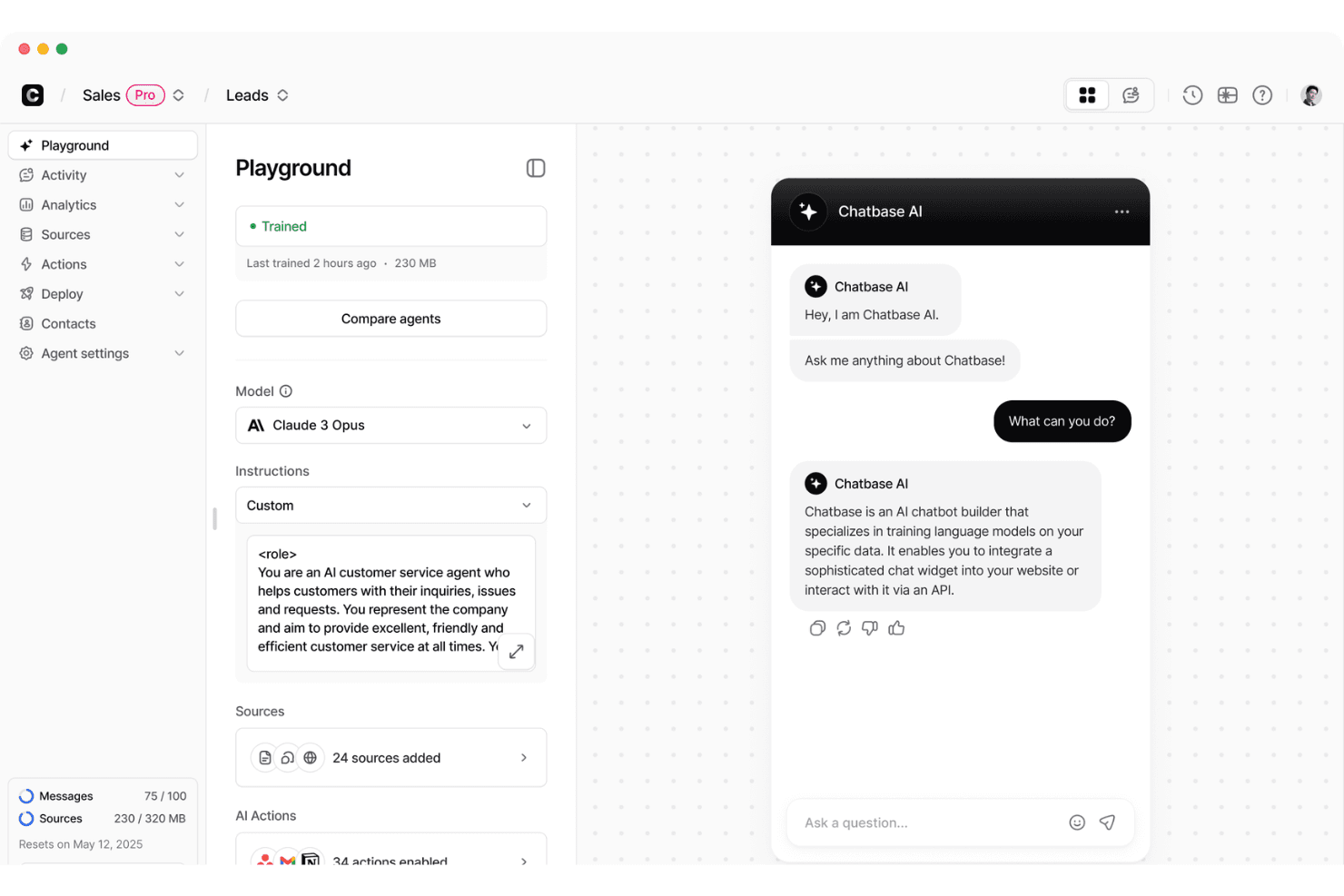
Chatbase offers an AI chatbot playground where users can configure models, instructions, and sources while previewing live chat interactions. Chatbase is an AI chatbot platform designed to help businesses automate customer support by turning existing knowledge—like help docs, PDFs, and website content—into conversational agents. It fits squarely in the AI support chatbot category, especially for teams that want a fast way to deploy self-service support without building models from scratch. Chatbase works best as a front-line automation layer that handles common questions and routes more complex issues.
Who Is Chatbase Best For?
Chatbase is best for startups, SMBs, and support teams that want to deflect repetitive support tickets using AI without investing in a full custom solution. It’s particularly useful for companies with well-documented knowledge bases (help centers, onboarding docs, product FAQs) that can be used to train a chatbot quickly.
Why I Picked Chatbase
I picked Chatbase because it lowers the barrier to deploying AI support agents by letting teams train bots directly on their own content and deploy them via a simple widget or API. The standout factor is how quickly teams can go from static documentation to a working chatbot, which helps reduce repetitive support volume without requiring major implementation effort.
Chatbase Key Features
- Custom chatbot builder: Create and configure chatbots using your own data, documents, or website content.
- Widget for websites: Add a customizable chat widget to your website for instant customer support.
- Conversation analytics: Review chats, identify unanswered questions, and refine bot responses over time
- API access: Integrate Chatbase bots with your existing systems using API endpoints.
Chatbase Integrations
Chatbase provides API access for custom integrations and supports automation through third-party tools.
What's Free?
Chatbase offers a free plan with no credit card required, allowing you to build and deploy a basic AI agent. The plan includes limited access to AI models, 50 message credits per month, 1 AI agent, 1 user, and up to 1 MB of training content. Free agents are also deleted after 14 days of inactivity, making the plan best suited for testing or small-scale use.
Pros and Cons
Pros:
- Useful for deflecting repetitive support questions and reducing ticket volume
- Fast setup using existing content like help docs and websites
- Supports over 90 languages for AI agents
Cons:
- Not a full customer support platform (no built-in ticketing)
- Free plan limits monthly chatbot messages
Learn more about Chatbase: Best for multi-deal pipelines
- Free plan + free demo available
- Pricing upon request
Visit WebsiteCustomer Rating:4.6/5
EngageBay lets users manage and filter contacts with star ratings. EngageBay is an all-in-one customer service software platform offering free ticket management, live chat, omnichannel support, a knowledge base, and CRM integration for small teams and startups.
Who Is EngageBay Best For?
Small businesses or startups that want a free, all-in-one help desk, live chat, and CRM to manage customer conversations across multiple channels.
Why I Picked EngageBay
I picked EngageBay as one of the best because I can run multiple parallel sales and support pipelines in the same workspace, thanks to multi-deal pipeline support and CRM integration. My team manages tickets, live chats, and customer records in real time, switching between sales, support, and onboarding workflows without missing a beat.
EngageBay Key Features
- Live chat widget: Chat with website visitors in real time with proactive messaging, visitor tracking, agent collaboration, and co-browsing.
- Knowledge base editor: Build a branded help center using a rich-text editor, organized collections, custom CNAME, and draft/publish controls.
- Mobile apps: Manage tickets, respond to chats, and update support records on the go with native Android and iOS apps.
- Helpdesk reporting: Access visual dashboards showing ticket volumes, response times, agent workloads, and customer satisfaction metrics.
EngageBay Integrations
EngageBay has native integrations with Shopify, Xero, QuickBooks, SendGrid, Mailgun, Postmark, JotForm, Digioh, BulkSMS, AfricasTalking, and WordPress. Zapier, Integrately, and PieSync are supported for additional connectivity, and its API is available for custom integrations.
What's Free?
EngageBay offers a free-forever plan that includes help desk, live chat, and basic CRM functionality. The free plan supports up to 250 contacts, 1,000 branded emails per month, and basic integrations, but limits automation features and excludes advanced reporting.
Pros and Cons
Pros:
- Free tier includes branded knowledge base
- Live chat and CRM integrated in one
- Unlimited free agents and tickets supported
Cons:
- Free plan emails display vendor branding
- Contact database capped at 250 records
Learn more about EngageBay: Best for GPL-licensed ticketing with no agent caps
- Free plan available
- From $12/user/month
Visit WebsiteCustomer Rating:4.3/5
osTicket organizes support tickets into customizable queues by priority. osTicket is an open-source customer support ticketing system that offers customizable workflows, rule-based automation, and a built-in knowledge base for managing inquiries from email, web forms, and API.
Who Is osTicket Best For?
osTicket is a strong fit for technically capable small businesses or support teams needing customizable, self-hosted ticketing with advanced automation and no per-agent fees.
Why I Picked osTicket
I picked osTicket as one of the best because it’s the only genuinely free, GPL-licensed ticketing tool with no agent caps. I’ve set up its custom queues, unlimited SLA plans, and help-topic-driven forms for teams needing flexible routing and workflow—all while owning our data fully on our own server.
osTicket Key Features
- Custom ticket filters: Build rule-based automations to route, assign, or reject tickets using custom criteria and fields.
- Unlimited knowledge base articles: Create rich text FAQs with nested categories, public or private visibility, and file attachments.
- Agent collision avoidance: Lock tickets to a single agent for a set time to prevent duplicate replies or conflicting actions.
- Advanced CSV exports: Download filtered ticket data, queue results, and dashboard metrics for custom reporting or backup.
osTicket Integrations
osTicket offers native integrations with Microsoft 365 and Google email via OAuth2 authentication. It includes a documented API for custom integrations and supports LDAP/Active Directory authentication through official plugins. Integrations with Slack and Discord are available through community plugins.
What's Free?
osTicket’s core open-source software is completely free forever, with no user or ticket limits. You’ll need to host and manage it yourself, but all core features are included—there’s no cap on agents, tickets, or customers.
Pros and Cons
Pros:
- Full data ownership with self-hosting option
- Customizable ticket forms and workflow automations
- Unlimited agents and tickets without restrictions
Cons:
- Requires technical setup and maintenance skills
- No built-in live chat or chatbot


Tawk.to centralizes live chat, visitor analytics, and team history in one dashboard. Tawk.to is a free customer service platform that brings together live chat, ticket management, a shared inbox for multiple channels, a knowledge base, and CRM features—all in one dashboard.
Who Is Tawk.to Best For?
Teams and businesses of any size that need a free, unified customer messaging platform with unlimited agents and broad multi-channel support.
Why I Picked Tawk.to
I picked Tawk.to because I’ve seen how rare it is to get unlimited free agents on a single platform. My team can run live chat, email, WhatsApp, Messenger, SMS, and a help center for free, with no per-seat limits. The instant shared inbox and full-featured knowledge base are both available to all agents, so we never worry about hidden headcount costs.
Tawk.to Key Features
- Shared inbox: Route and manage chats, emails, and messages from multiple channels in a single dashboard.
- Knowledge base builder: Create a branded, multi-language help center with categories, internal articles, and search.
- Live visitor monitoring: Track visitors in real time, see browsing activity, and initiate proactive chats based on behavior.
- Automated canned responses: Store and access shortcuts with attachments, ticket forms, or actions for quicker, more consistent replies.
Tawk.to Integrations
Tawk.to offers native integrations with Shopify, WordPress, Wix, Squarespace, WhatsApp Business, Facebook Messenger, Telegram, Twilio SMS, Gmail, Outlook, Google RCS, and Zapier. It also provides an API and JavaScript SDK for custom integrations.
What's Free?
Tawk.to offers a completely free-forever plan with unlimited agents and chat volume. You get access to all key features—including live chat, shared inbox, and a knowledge base—without user or seat restrictions. Paid add-ons are optional, but core functionality remains free.
Pros and Cons
Pros:
- Free knowledge base with custom domain
- Shared inbox unifies all messaging channels
- Unlimited agents on the free plan
Cons:
- Limited automation and no advanced routing
- Widget and help center include tawk.to branding
Learn more about Tawk.to: Best for dev and ops team ticket workflows
- Free plan + 14-day trial available
- From $21.50/user/month
Visit WebsiteCustomer Rating:4/5
Easily deploy changes and communicate between teams to accelerate development work. From medicine and space travel to disaster response and pizza deliveries, Jira Service Desk has a mission ”to unleash the potential of every team”. Jira Service Desk is a high-velocity service management software that aligns well with agile product management methods.
The tool assists small teams with capturing and organizing issues with managing requests, incidents, problems, changes, and assets. Another cool thing that Jira offers is a free bug management tool that captures, tracks, and resolves bugs.
Jira Service Desk offers a great plan for small teams to start off, which allows up to 10 users, and includes integrations and automated workflow options.
Learn more about Jira Service Management:
Diğer Ücretsiz Müşteri Hizmetleri Yazılımları
Belirli bir şey arıyorsanız diye, en iyi listesine giremeyen birkaç yazılımı daha burada bulabilirsiniz.
- 11ZammadBest for self-hosted ticket management
- 12FrontBest for automating repetitive tasks
- 13TidioBest for customizable AI chat widgets
- 14LiveAgentBest with integrated knowledge base
- 15SmartsuppBest for e-commerce live chat on a free plan
- 16RaiseaticketBest for permanent free SLA and CSAT tracking
- 17Bitrix24Best for solo entrepreneurs
- 18HubSpot Service HubBest with integrated CRM
- 19HeskBest for self-hosting on a tight budget
- 20UvdeskBest for open source customization options
How I Evaluate Free Customer Service Software
I evaluate free customer service tools on two layers: whether a tool covers the basics like ticketing, shared inboxes, and multi-channel support, and what actually differentiates the best options.
Core Functionality (Table Stakes For This List)
When I'm selecting tools for my list, I rank each one on a scale from 0 (does not offer the functionality) to 5 (excels in this area) for each core functionality listed below. Then, I calculate the tool's total score into a percentage. Each tool needs to achieve a minimum total score of 65% to be considered for inclusion.
- (Essential) Ticket Management: I make sure each platform can receive, organize, and resolve customer support requests as trackable tickets.
- (Essential) Multi-Channel Support: I look for tools that consolidate customer inquiries from at least two channels, such as email, chat, or social media, into a single workspace.
- Live Chat Widget: I prioritize tools where you can embed a chat tool on their website to communicate with customers in real time.
- Knowledge Base Creation: When I evaluate, I give preference to software that lets you easily build a self-service help center or FAQ page for customers.
- Basic Automation Rules: I prioritize tools that have at least some simple automated actions, such as auto-assigning tickets or sending canned responses.
- Reporting Dashboard: I give preference to tools that have access to basic analytics on ticket volume, response times, or resolution rates.
Once I have a list of tools that meet this criteria, I consider what sets each platform apart.
Differentiating Factors (What Sets Vendors Apart)
Here's how I compare and contrast different vendors:
Standout Features
Automation is a big differentiator on free tiers. I look at whether a tool lets you auto-route tickets by topic or set up canned responses for common questions like order status updates. AI features are increasingly showing up in free plans too—tools like Freshdesk and Tidio offer chatbots or reply suggestions that help small teams handle volume. I also check for an embeddable live chat widget, since real-time messaging on your site can resolve issues before they become tickets.
Beyond Features
Free plan limits vary wildly, so I evaluate how many agents and tickets a tool supports before you're forced to upgrade. Integrations matter just as much—if your team uses a CRM like HubSpot or Salesforce, a help desk that connects natively saves hours of manual data entry. I also consider the upgrade path. A tool like Zoho Desk or Freshdesk makes it easy to scale from free to paid without migrating data or retraining your team, which is a real advantage when your support volume starts growing.
Ücretsiz Müşteri Hizmetleri Yazılımı Nasıl Seçilir
Ücretsiz müşteri hizmetleri yazılımı seçerken, öncelikle her ücretsiz planın pratik sınırlarını (kaç temsilciye, destek talebine, görüşmeye ve destek kanalına sahip olduğunuz gibi) kontrol edin. Ardından mevcut destek hacminizi ücretli bir plana çok hızlı geçmek zorunda kalmadan karşılayabilecek bir araç bulmak için entegrasyonları, raporlamayı, otomasyonu ve yükseltme maliyetlerini karşılaştırın.
- Çözmeniz gereken müşteri hizmetleri sorununu belirleyin. Destek taleplerini yönetmeye, canlı sohbete, ortak gelen kutusuna, self servis hizmetine veya bunların bir kombinasyonuna ihtiyacınız olup olmadığına karar verin.
- Temsilci, destek talebi ve görüşme sınırlarını kontrol edin. Ücretsiz planlar genellikle sahip olabileceğiniz temsilci, destek talebi, kişi, görüşme veya yapay zekâ yanıtı sayısını sınırlar. Kullanılabilir olduklarından emin olmak için bu sınırları mevcut destek hacminizle karşılaştırın.
- Ücretsiz planın ekip büyüklüğünüzü desteklediğinden emin olun. Ücretsiz olarak kaç temsilci koltuğu elde ettiğinizi ve kimlerin erişime ihtiyaç duyduğunu kontrol edin. Sınır ekip büyüklüğünüzden düşükse yükseltme yapmanız veya başka bir araç seçmeniz gerekir.
- Mevcut araçlarınızın ücretsiz olarak entegre olup olmadığını kontrol edin. Ücretsiz planın kullandığınız CRM, e-ticaret ve diğer araçlara bağlandığından emin olun.
- Destek kanallarını kontrol edin. E-posta, canlı sohbet, sosyal medya veya WhatsApp gibi destek sunmak için hâlihazırda kullandığınız kanalları arayın. Bazı kanallar yalnızca ücretli katmanlarda kullanılabildiğinden özellikle ücretsiz planı kontrol edin.
- Yükseltme maliyetini kontrol edin. Daha fazla temsilciye, daha yüksek kullanım sınırlarına veya ek özelliklere ihtiyaç duyduğunuzda ne kadar ödeyeceğinizi öğrenin. Ücretli planları şimdiden karşılaştırmak, ileride beklenmedik bir fiyat artışını önleyebilir.
Ücretsiz Plandan Ücretli Plana Ne Zaman Geçilmeli?
Ücretsiz müşteri hizmetleri yazılımı sizi şaşırtıcı derecede ileriye taşıyabilir. Küçük bir ekibiniz ve yönetilebilir bir destek hacminiz varsa henüz ihtiyaç duymadığınız özellikler için ödeme yapmanızın bir nedeni yoktur. Ancak müşteri tabanınız ve destek hacminiz büyüdükçe ücretsiz bir planın sınırlamaları yanıt sürelerini, verimliliği ve müşteri deneyimini etkilemeye başlayabilir.
Ücretsiz plan işinizi aksatmaya başladığında yükseltme zamanı gelmiştir. Bu noktaya ulaştığınızı gösteren bazı işaretler şunlardır:
- Sınırlarınıza sürekli takılıyorsunuz. Düzenli olarak bilet, konuşma, kişi, yapay zekâ kredisi veya temsilci koltuğu sınırlarını dolduruyorsanız ücretsiz plan muhtemelen ekibinize çalışmak için yeterli alanı sunmuyordur.
- Çok fazla iş hâlâ manuel yapılıyor. Bilet hacmi arttıkça talepleri manuel olarak atamak, tekrarlayan yanıtlar göndermek ve müşterilerle takip iletişimi kurmak daha zor hale gelir. Ücretli otomasyon, bu işlerin büyük bölümünü ekibinizin üzerinden alabilir.
- Müşteriler sizinle her yerden iletişime geçiyor. E-posta ve canlı sohbet başlangıçta yeterli olabilir, ancak müşterileri sosyal medya, mesajlaşma uygulamaları ve diğer kanallarda desteklemek genellikle ücretli bir plan gerektirir.
- Ekibinizin nasıl performans gösterdiğini bilmeniz gerekiyor. Temel raporlar neler olduğunu gösterebilir, ancak büyüyen ekiplerin yanıt süreleri, çözüm oranları, müşteri memnuniyeti ve bireysel temsilci performansı hakkında daha derin içgörülere ihtiyacı olabilir.
- Müşteriler daha fazla soruyu kendi başlarına yanıtlayabilir. Bir bilgi tabanı, daha yetenekli bir sohbet robotu veya yapay zekâ temsilcisi, tekrarlayan biletleri azaltabilir; ancak bu özellikler ücretsiz planlarda genellikle sınırlıdır.
- Geçici çözümlere güveniyorsunuz. Verileri araçlar arasında kopyalamak, giriş bilgilerini paylaşmak, biletleri manuel olarak yönlendirmek veya özellik kısıtlamalarını aşmaya çalışmak, tasarruf ettiğiniz paranın avantajını kısa sürede ortadan kaldırabilir.
Ücretli bir planın daha fazla özelliği var diye yükseltme yapmanız gerekmez. Ücretsiz planda kalmak ekibinize zaman, verimlilik veya müşteri deneyimi açısından ücretli planın parasal maliyetinden daha fazlasına mal olmaya başladığında yükseltme yapın.
Ücretsiz Müşteri Hizmetleri Yazılımındaki Eğilimler
Satıcılar platformlarına yapay zekâ ve self servis özellikleri ekledikçe, özellikle ücretsiz müşteri hizmetleri yazılımları daha yetenekli hale geliyor. İzlenmesi gereken başlıca eğilimlerden bazıları şunlardır:
- Gelişmiş doğal dil işleme (NLP) özellikli sohbet robotları: Ücretsiz araçlar, sohbet robotlarına daha gelişmiş NLP özellikleri ekleyerek müşteri etkileşimlerini yönetmeye yardımcı oluyor.
- Topluluk forumları ve self servis portalları: Bilgi tabanları, yardım merkezleri ve topluluk forumları, müşterilere destek ekibiyle iletişime geçmeden yanıt bulmaları için daha fazla yol sunar.
- Güvenliğe daha fazla odaklanma: Müşteri hizmetleri ekipleri giderek daha fazla müşteri verisi işlediğinden, satıcılar veri şifreleme, gizlilik ve uyumluluk konularına daha fazla önem veriyor.
- Müşteri yolculuğu haritalama ve bağlamsal etkileşimler: Müşteri geçmişi ve bağlamı, temsilcilerin önceki etkileşimleri anlamasına ve daha ilgili destek sunmasına yardımcı olabilir.
- Yeni destek özellikleri: Ortak tarama, duygu analizi ve yapay zekâ destekli yanıtlar gibi özellikler daha yaygın hale geliyor, ancak bunlara erişim ücretsiz planlarda sınırlı olabilir.
Bu eğilimler, ücretsiz araçların temel bilet yönetimi ve canlı sohbetten daha fazlasını gerçekleştirebileceği anlamına gelir. Ancak daha yeni özellikler—özellikle yapay zekâ, otomasyon ve gelişmiş analiz—genellikle daha sıkı kullanım sınırlarıyla birlikte sunulur veya ücretli bir plan gerektirir.
Ücretsiz Müşteri Hizmetleri Yazılımı Nedir?
Ücretsiz müşteri hizmetleri yazılımı, müşteri destek ekiplerinin aylık ücret ödemeden müşteri sorunlarını zamanında ve doğru bir şekilde çözmesine yardımcı olan temel özellikler sunan dijital bir araçtır. Müşteri taleplerini bir bilet yönetim sistemi aracılığıyla düzenler, rutin görevleri otomatikleştirir, müşteri iletişimini merkezileştirir ve temsilci performansını izler.
Ücretsiz müşteri hizmetleri yazılımları, yeni kurulan şirketlerin ve küçük işletmelerin bütçelerini aşmadan müşteri desteğini geliştirmeleri için mükemmel bir yoldur.
Özellikler
Ücretsiz müşteri hizmetleri yazılımları genellikle talepleri yönetmek, müşterilerle iletişim kurmak ve destek performansını izlemek için araçlar içerir. Özellikler sağlayıcıya göre değişir, ancak aranması gereken başlıca özellikler şunlardır:
- Biletleme ve paylaşılan gelen kutusu: Müşteri taleplerini tek bir yerde düzenleyerek temsilcilerin bunları atamasına, önceliklendirmesine, takip etmesine ve çözüme kavuşturmasına yardımcı olur.
- Çok kanallı destek: E-posta, canlı sohbet, sosyal medya ve mesajlaşma uygulamaları gibi kanallardan gelen talepleri tek bir sistemde bir araya getirir.
- Canlı sohbet: Temsilcilerin web sitenizde veya uygulamanızda bulunan bir canlı sohbet yazılımı widget'ı aracılığıyla müşterilerle gerçek zamanlı iletişim kurmasını sağlar.
- Otomasyon: Otomatik yanıt gönderme, bilet atama ve talepleri doğru temsilciye yönlendirme gibi tekrarlayan görevleri yerine getirir.
- Bilgi tabanı ve self servis: Müşterilere sık sorulan sorulara, yardım makalelerine ve diğer kaynaklara erişim sağlayarak bir temsilciyle iletişime geçmeden yanıt bulmalarına yardımcı olur.
- Raporlama ve müşteri geri bildirimleri: Destek performansını ölçmenize yardımcı olmak için bilet hacmi, yanıt süreleri, çözüm süreleri ve müşteri memnuniyeti gibi metrikleri takip eder.
- Ekip iş birliği: Temsilcilerin dahili notlar, bilet atamaları ve paylaşılan görüşmeler gibi özellikler aracılığıyla birlikte çalışmasına yardımcı olur.
- Mobil destek: Temsilcilerin müşteri taleplerini bir mobil cihazdan görüntülemesine ve yanıtlamasına olanak tanır.
- Çok dilli destek: Ekiplerin yerelleştirilmiş içerik veya çeviri özellikleri aracılığıyla birden fazla dilde destek sunmasına yardımcı olur.
Ücretsiz planların tüm bu özellikleri kısıtlama olmadan nadiren içerdiğini unutmayın. Bazı sağlayıcılar temsilci koltuklarını, biletleri, görüşmeleri, kanalları, otomasyonu veya raporlamayı sınırlandırırken, diğerleri belirli özellikleri ücretli planlara ayırır. Araçları karşılaştırırken platformun genel özellik listesi yerine ücretsiz pakete tam olarak nelerin dahil olduğunu kontrol edin.
Ücretsiz Müşteri Hizmetleri Yazılımının Faydaları
Ücretsiz müşteri hizmetleri yazılımı, küçük ekiplere ek bir yazılım maliyeti oluşturmadan müşteri desteğini düzenleme ve geliştirme olanağı sunar. Başlıca faydaları şunlardır:
- Daha düşük destek maliyetleri: Aylık abonelik ücreti ödemeden temel müşteri hizmetleri araçlarına erişebilirsiniz.
- Daha düzenli destek: Biletleme ve paylaşılan gelen kutuları, müşteri taleplerini tek bir yerde tutarak bunların takip edilmesini ve yönetilmesini kolaylaştırır.
- Daha iyi ekip iş birliği: Paylaşılan gelen kutuları, atamalar ve dahili notlar, temsilcilerin koordinasyon sağlamasına ve aynı işin tekrarlanmasını önlemesine yardımcı olur.
- Performansa ilişkin daha iyi görünürlük: Raporlama araçları bilet hacmini, yanıt sürelerini, müşteri memnuniyetini ve diğer destek metriklerini gösterebilir.
- Bir platformu test etmenin düşük riskli bir yolu: Ücretsiz planlar, ücretli bir planın maliyetine değip değmeyeceğine karar vermeden önce bir aracın iş akışlarınıza nasıl uyduğunu görmenizi sağlar.
Daha küçük ekipler için bu planlar, henüz ihtiyaç duymadıkları özellikler için ödeme yapmadan temel müşteri desteğini yürütmeye yetecek işlevselliği sağlar.
Maliyetler ve Fiyatlandırma
Ücretsiz kullanabileceğiniz müşteri hizmetleri yazılımını aradığınızı biliyorum, ancak ücretsiz planlar genellikle temsilci, bilet, görüşme veya özellik sayısı konusunda sınırlamalarla birlikte gelir. Ekibiniz ve destek hacminiz büyüdükçe sonunda ücretli bir plana geçmeniz gerekebilir.
Aşağıdaki tablo, müşteri hizmetleri yazılımları için tipik fiyat aralıklarını ve her düzeyde genel olarak neler bekleyebileceğinizi ayrıntılı olarak gösterir. Güncel yardım masası fiyatları sağlayıcıya göre önemli ölçüde değişir, ancak ücretli planlar genellikle temsilci başına aylık yaklaşık $7–$29'dan başlar ve daha gelişmiş planlarda $100+ seviyesine çıkar.
| Plan Türü | Ortalama Fiyat | Yaygın Özellikler |
|---|---|---|
| Plan TürüÜcretsiz | Ortalama Fiyat$0 | Yaygın ÖzelliklerTemel biletleme veya paylaşılan gelen kutusu, sınırlı temsilci koltukları ve kullanım, temel canlı sohbet veya self servis |
| Plan TürüTemel | Ortalama Fiyat$10 - $30/ kullanıcı/ay | Yaygın ÖzelliklerDaha yüksek kullanım limitleri, daha fazla entegrasyon, temel otomasyon, raporlama ve ek destek kanalları |
| Plan TürüProfesyonel | Ortalama Fiyat$30 - $90/ kullanıcı/ay | Yaygın ÖzelliklerGelişmiş otomasyon, hizmet düzeyi sözleşmesi yönetimi, çok kanallı destek, özel raporlama ve daha fazla entegrasyon |
| Plan TürüKurumsal | Ortalama Fiyat$90+/kullanıcı/ ay | Yaygın ÖzelliklerGelişmiş yönlendirme, izinler, güvenlik, özelleştirme, yapay zekâ yetenekleri ve kurumsal destek |
Bunlar sabit fiyatlar değil, genel aralıklardır. Bazı platformlar kullanıcı veya temsilci başına ücret alırken, diğerleri ücretlendirmeyi bilet, görüşme, kişi veya yapay zekâ kullanımına göre yapar. Bu nedenle gerçek maliyet, yazılımı nasıl kullandığınıza bağlı olarak önemli ölçüde değişebilir.
SSS
Müşteri hizmetleri ekibiniz ücretsiz bir çevrim içi müşteri hizmetleri sistemi arıyorsa, kaydolmadan önce birkaç sorunuz olabilir. Bu listede yer alan ücretsiz müşteri hizmetleri yazılımı çözümleriyle ilgili bazı SSS’lere göz atalım.
Müşteri hizmetleri yazılımı gerçekten ücretsiz mi?
Evet. Bazı sağlayıcılar, yazılımı kullanmaya devam etmek için ücretli abonelik gerektirmeyen ücretsiz planlar sunar. Ancak, “sonsuza kadar ücretsiz” mutlaka sınırsız anlamına gelmez—bu planlar yine de kullanıcı, bilet, görüşme, kanal veya özellik sayısını kısıtlayabilir.
Ücretsiz müşteri hizmetleri yazılımı nasıl çalışır?
Ücretsiz müşteri hizmetleri yazılımı, müşterilerin web üzerinden şirketinizle iletişim kurmasını sağlar. Müşteriler doğrudan web sitenizdeki canlı sohbet botunu kullanabilir veya sosyal medyada sizinle iletişime geçebilirler.
En iyi müşteri destek çözümleri çok kanallı destek sunar. Bu, tüm müşteri sorunlarının web sitenizden, Facebook’tan, Instagram’dan veya Twitter’dan gelmesine bakılmaksızın tek bir arayüzde toplandığı anlamına gelir.
Bir müşteri talep gönderdiğinde, çevrim içi müşteri hizmetleri sistemi bu talebi belirlediğiniz yönlendirme kurallarına göre ekibinize iletir. Buradan sonra müşteri sorunları, üst makamlara aktarılırken ve sonunda çözüme kavuşturulurken takip edilebilir.
“Sonsuza kadar ücretsiz” plan ile ücretsiz deneme arasındaki fark nedir?
Ücretsiz plan, müşteri hizmetleri yazılımını abonelik olmadan kullanmaya devam etmenizi sağlar; ancak genellikle temsilci, bilet, görüşme, kanal veya özellik sayısında sınırlarla karşılaşırsınız. Ücretsiz deneme, ücretli özelliklere genellikle 7 ila 30 gün boyunca geçici erişim sunar; bu sürenin ardından yazılımı kullanmaya devam etmek için ödeme yapmanız gerekir.
Ücretsiz müşteri hizmetleri yazılımının sınırlamaları nelerdir?
Yaygın sınırlamalar arasında daha az temsilci koltuğu, daha düşük bilet veya görüşme limitleri, daha az destek kanalı, sınırlı otomasyon, temel raporlama ve kısıtlı entegrasyonlar bulunur. Bazı ücretsiz planlar ayrıca sağlayıcı markalaması içerir veya yapay zekâ özelliklerine sınırlamalar getirir.
Ücretsiz müşteri hizmetleri yazılımı küçük bir işletme için yeterince iyi mi?
Evet. Ücretsiz müşteri hizmetleri yazılımı, küçük bir destek ekibine ve nispeten düşük talep hacmine sahip küçük işletmeler için iyi çalışabilir. Daha fazla temsilci eklediğinizde, daha fazla müşteri talebiyle ilgilendiğinizde veya gelişmiş otomasyon ve raporlamaya ihtiyaç duyduğunuzda muhtemelen yükseltme yapmanız gerekir.
Ücretsiz müşteri hizmetleri yazılımı işletmemle birlikte büyüyebilir mi?
Evet, ancak genellikle sonunda ücretli bir plana geçmeniz gerekir. Bir platform seçmeden önce temsilci eklemenin, kullanım limitlerini artırmanın ve otomasyon ile ek kanallar gibi özelliklerin kilidini açmanın ne kadara mal olduğunu kontrol edin.
Ücretsiz müşteri hizmetleri yazılımı e-posta, canlı sohbet ve sosyal medyayı yönetebilir mi?
Bazıları yönetebilir. E-posta ve canlı sohbet genellikle dahildir; sosyal medya, WhatsApp, SMS ve diğer kanallar ise ücretli bir plan gerektirebilir. Ücretsiz katmanı özellikle kontrol edin; çünkü bir platform ücretsiz olarak sunulmayan kanalların reklamını yapabilir.
Ücretsiz müşteri hizmetleri yazılımıyla yapay zekâ özelliklerine sahip olabilir misiniz?
Evet, bazı ücretsiz müşteri hizmetleri araçları yapay zekâ sohbet botları, yapay zekâ temsilcileri, önerilen yanıtlar veya benzer özellikler içerir. Ücretsiz yapay zekâ kullanımı genellikle görüşme, kredi veya diğer kullanım sınırlarıyla kısıtlanır.