

10 beste Formular-Ersteller von 2026: Bewertet & verglichen

10 Auswahl der besten Formular-Tools


Bei der großen Auswahl an verschiedenen Formular-Tools ist es schwierig herauszufinden, welches am besten zu Ihren Anforderungen passt. Sie wissen, dass Sie ein Tool benötigen, mit dem Sie schnell und einfach digitale Formulare erstellen können, ohne programmieren zu müssen, aber Sie müssen noch herausfinden, welche Option die beste ist. In diesem Artikel helfe ich Ihnen dabei, Ihre Auswahl zu vereinfachen, indem ich meine Erkenntnisse zu den besten Formular-Tools teile, mit denen Sie digitale Formulare mühelos entwerfen, anpassen und veröffentlichen können – basierend auf meiner eigenen Erfahrung mit genau diesen Aufgaben.
Was sind Formular-Tools?
Formular-Tools ermöglichen es Benutzern, individuelle Formulare zur Datenerfassung zu erstellen. Sie bieten in der Regel eine Drag-and-Drop-Oberfläche, über die Benutzer ganz einfach Formularfelder hinzufügen, das Design des Formulars anpassen und Einstellungen wie Validierungsregeln und E-Mail-Benachrichtigungen konfigurieren können. Einige Formular-Tools bieten außerdem erweiterte Funktionen wie die Integration mit Apps und Diensten von Drittanbietern, Analyse- und Berichtstools sowie bedingte Logik, mit der sich Formulare abhängig von den Antworten der Benutzer anpassen lassen.
Mit Formular-Tools können Sie alles erstellen – von einfachen Kontaktformularen bis hin zu komplexen mehrseitigen Umfragen. Sie eignen sich für zahlreiche Zwecke, darunter das Sammeln von Kundenfeedback, die Bearbeitung von Bestellungen oder die Durchführung von Marktforschung. Mit einem Formular-Tool können Sie Zeit sparen, Ihre Datenerfassung verbessern und schnell Feedback von Ihren Kunden erhalten.
Warum Sie unseren Software-Empfehlungen vertrauen können
Unser Team testet und bewertet Software seit 2012. Als CX-Führungskräfte selbst wissen wir, wie schwierig – und wichtig – es ist, die richtige Software auszuwählen.
Für diesen Leitfaden haben wir Tools mithilfe von praktischen Tests und unabhängiger Recherche bewertet und dabei unsere Bewertungskriterien angewendet.
Unsere Bewertungen spiegeln unser menschliches redaktionelles Urteilsvermögen wider, keine Verkaufsstrategie.
Vergleichstabelle der Formular-Tools
Diese Vergleichstabelle fasst die Preisinformationen meiner Auswahl der besten Formular-Tools zusammen:
| Tool | Best For | Trial Info | Price | ||
|---|---|---|---|---|---|
| 1 | Am besten für individuelle und gebrandete Formulare | 30-tägige kostenlose Testphase + kostenloser Tarif + kostenlose Demo verfügbar | Ab $10/Monat | Website | |
| 2 | Am besten geeignet für KI-gestützte konversationelle Formulare | Kostenlose Demo verfügbar | Ab $18/Monat | Website | |
| 3 | Am besten für mobilfreundliche Umfragen und Formulare | Kostenloser Plan verfügbar | Ab $19/Monat | Website | |
| 4 | Bestes Formular-Tool für detaillierte Berichte und Analysen | Kostenloser Plan verfügbar | Ab $30/Nutzer/Monat (jährliche Abrechnung) | Website | |
| 5 | Bester Formularersteller für einen dialogorientierten Ansatz beim Formularbau | Kostenloser Plan verfügbar | Ab $25/Nutzer/Monat (jährliche Abrechnung) | Website | |
| 6 | Bester Formular-Builder mit intuitiver Drag-and-Drop-Oberfläche | Kostenlose Version verfügbar | Ab $149.50/Jahr | Website | |
| 7 | Bester Formular-Builder mit fortschrittlicher bedingter Logik | Kostenlose Demo verfügbar | Ab $59/Jahr | Website | |
| 8 | Bester Formularersteller mit großer Vorlagenauswahl | Kostenlose 14-tägige Testversion verfügbar | Ab $83/Monat (jährliche Abrechnung) | Website | |
| 9 | Bester Formulargenerator für Unternehmen zur Kunden-Onboarding | Kostenlose Testversion verfügbar | Ab $49/Monat | Website | |
| 10 | Bester Formularersteller für sichere Datenspeicherung | 14-tägige kostenlose Testversion verfügbar | Ab $21/Monat (jährlich abgerechnet) | Website |

Übersicht über die 10 besten Formular-Tools
Mithilfe der kurzen Übersichten zu den einzelnen Tools weiter unten können Sie nachvollziehen, wodurch sich jedes Tool von anderen Formular-Tools unterscheidet.

Am besten für individuelle und gebrandete Formulare
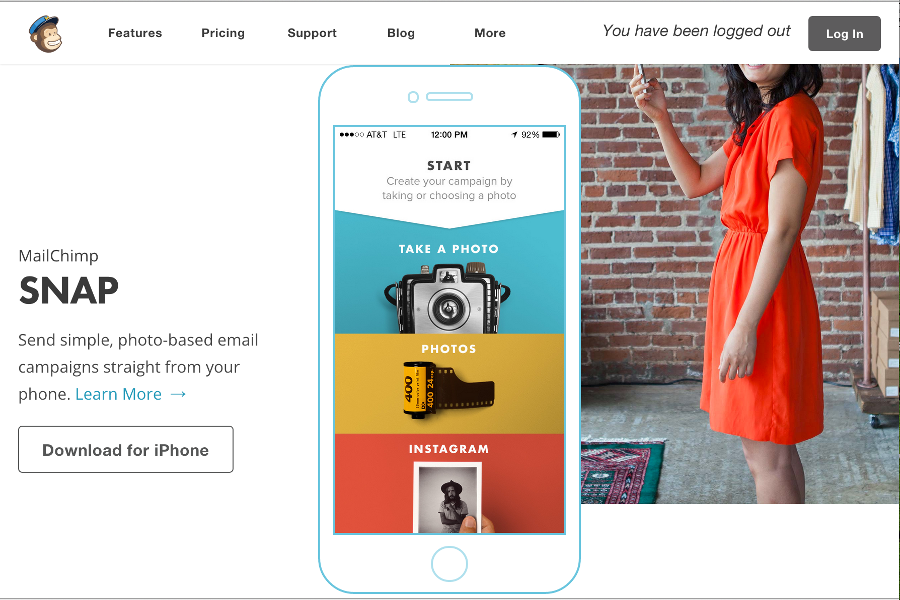
Für Unternehmen, die einen vielseitigen Formular-Builder suchen, bietet Mailchimp eine leistungsstarke Lösung, die auf verschiedene Branchen wie den E-Commerce und gemeinnützige Organisationen zugeschnitten ist. Die benutzerfreundliche Plattform ermöglicht es Ihnen, individuelle Formulare zu erstellen, die die Lead-Generierung und das Engagement Ihrer Zielgruppe fördern. Ob Sie Marketingaufgaben automatisieren oder Kampagnen personalisieren möchten: Mailchimp erfüllt diese Anforderungen mit seinen umfangreichen Funktionen und Integrationen.
Warum ich Mailchimp gewählt habe
Ich habe Mailchimp wegen der nahtlosen Integration von Formularerstellung und Marketing-Automatisierung ausgewählt, was für Unternehmen, die sich auf Leadgenerierung konzentrieren, entscheidend ist. Der Formular-Builder der Plattform ermöglicht es, individuelle und gebrandete Formulare unkompliziert zu gestalten – wichtig für ein einheitliches Markenbild. Außerdem erlauben es die Automatisierungsfunktionen von Mailchimp, komplexe Workflows einzurichten, mit denen sich Leads ohne manuellen Aufwand pflegen lassen. Diese Kombination aus Formular-Anpassung und Automatisierung macht Mailchimp zu einer überzeugenden Wahl für Marketer, die ihre Arbeit vereinfachen und das Engagement ihrer Zielgruppe erhöhen wollen.
Mailchimp Hauptfunktionen
Neben den Funktionen zur Formularerstellung bietet Mailchimp weitere Features, die Ihre Marketingaktivitäten unterstützen:
- Drag-and-Drop-Editor: Mit dieser Funktion können Sie Formulare und E-Mails einfach gestalten und individuell anpassen, ganz ohne Programmierkenntnisse – für alle Nutzer zugänglich.
- Vordefinierte Vorlagen: Mailchimp stellt zahlreiche Vorlagen bereit, die Ihnen helfen, Formulare und Kampagnen schnell einzurichten und so Zeit und Aufwand sparen.
- Analysen und Berichte: Ausführliche Analysen helfen Ihnen, die Leistung Ihrer Formulare und Kampagnen nachzuverfolgen, um datenbasierte Entscheidungen treffen zu können.
- A/B-Tests: Mit dieser Funktion testen Sie verschiedene Formulardesigns oder E-Mail-Kampagnen, um herauszufinden, welche besser abschneiden – so optimieren Sie Ihre Marketingstrategie.
Mailchimp-Integrationen
Zu den Integrationen gehören Shopify, WooCommerce, Canva, Zapier, QuickBooks, Stripe, Facebook, Instagram, Google Analytics und Slack.
Pros and Cons
Pros:
- Starke E-Commerce-Integrationen, einschließlich Shopify und WooCommerce
- Integrierte Werkzeuge für E-Mail-, SMS- und Marketing-Automatisierung
- Ausführliche Analysen und Berichte zu Kampagnen und Umsätzen
Cons:
- Preise steigen mit wachsender Kontaktliste
- Eingeschränkte Supportoptionen bei günstigeren Tarifen

Am besten geeignet für KI-gestützte konversationelle Formulare

Formsuite ist ein KI-gestützter, No-Code-Formular-Builder, mit dem Sie konversationelle Formulare mit bedingter Logik und Echtzeit-Analyse erstellen können. Sie können Formulare erstellen, anpassen und in Websites und Apps einbetten, ohne zu programmieren. Es kombiniert KI-unterstützte Erstellung mit integriertem Antwort-Tracking, um Ihnen zu helfen, Engagement- und Abschlussquoten zu verbessern.
Für wen ist Formsuite am besten geeignet?
Formsuite eignet sich gut für kleine bis mittelgroße Teams und Einzelanwender, die Formulare ohne Programmierkenntnisse erstellen und bereitstellen müssen.
Warum habe ich Formsuite ausgewählt?
Ich habe Formsuite gewählt, weil der KI-Assistent die Formularerstellung in einen geführten, dialogorientierten Prozess verwandelt. Sie können das gewünschte Formular in Alltagssprache beschreiben, und die Plattform generiert automatisch Struktur, Fragetypen und Logik. Der konversationelle Formularmodus zeigt jeweils nur eine Frage im Chat-Stil an, was Abbrüche reduziert und die Konzentration der Befragten fördert. Außerdem gefällt mir, dass es Echtzeitanalysen mit visuellen Einblicken bietet, sodass Sie Trends schnell erkennen und die Leistung optimieren können, ohne Daten in ein anderes Tool exportieren zu müssen.
Wichtige Funktionen von Formsuite
- KI-Formular-Generator: Komplettformulare durch Beschreibung Ihrer Ziele in natürlicher Sprache erstellen.
- Konversationeller Formularmodus: Zeigt jeweils nur eine Frage in einem Chat-Layout an.
- Bedingte Logik: Zeigt Fragen dynamisch an oder blendet sie aus, je nach Antwort.
- Echtzeit-Analyse-Dashboard: Verfolgen Sie Einreichungen, Abschlussquoten und Antworttrends sofort.
Formsuite-Integrationen
Formsuite integriert sich mit Google, cal.com und Calendly.
Pros and Cons
Pros:
- Eine KI-Konversationsfrage pro Formular
- Integriertes CRM mit Kontaktprofilen
- Unbegrenzte Antworten in jedem Tarif
Cons:
- Weniger Vorlagen als etablierte Wettbewerber
- Weniger native Integrationen von Drittanbietern

Am besten für mobilfreundliche Umfragen und Formulare
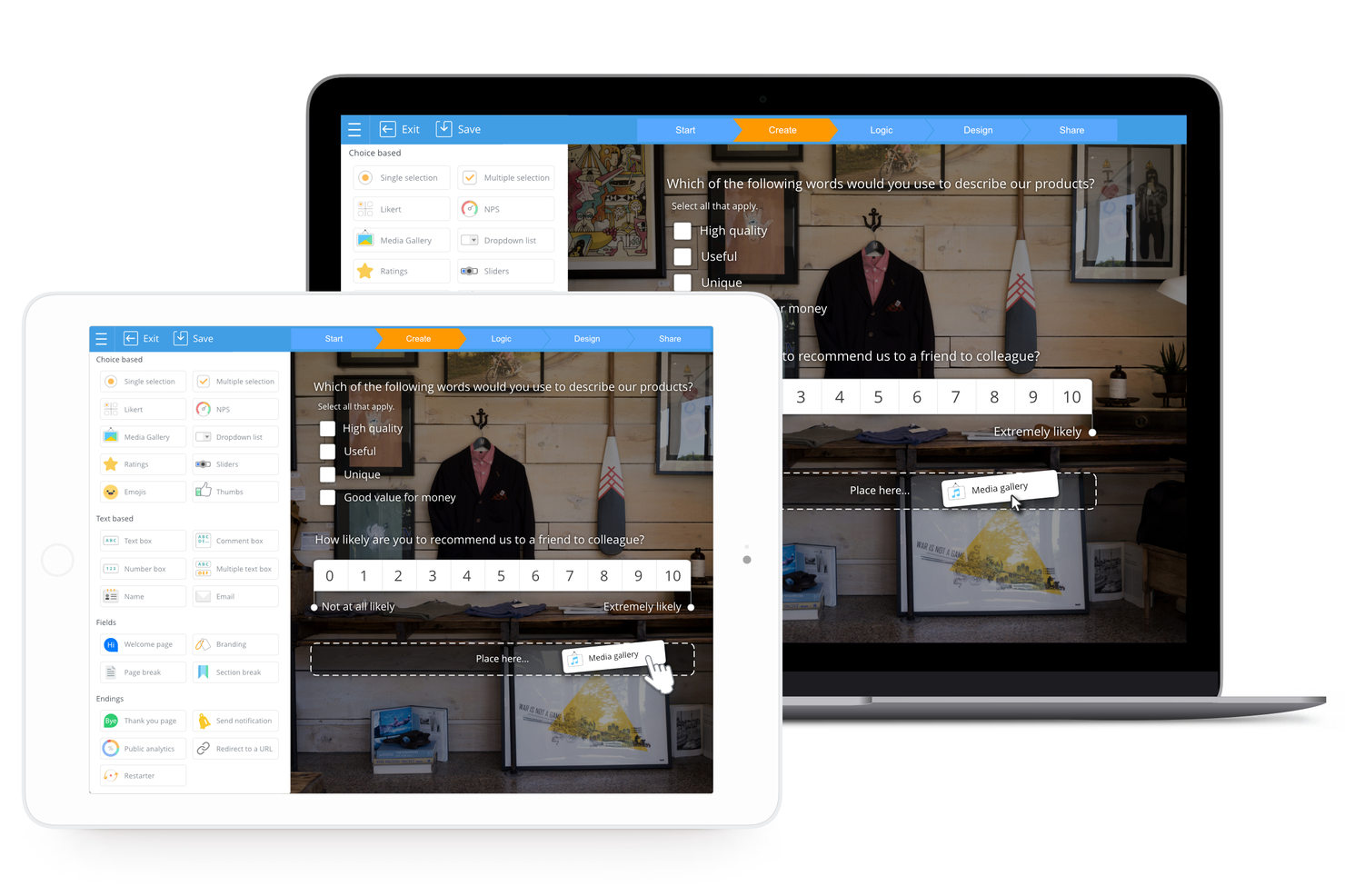
SurveyLegend ist eine webbasierte Plattform, die darauf ausgelegt ist, die Erstellung von individuellen Umfragen, Formularen, Fragebögen und Abstimmungen zu erleichtern. Sie legt besonderen Wert auf mobile Optimierung, sodass Umfragen auf mobilen Geräten einfach zugänglich und benutzerfreundlich sind – ein wichtiger Aspekt angesichts der zunehmenden Nutzung des mobilen Internets.
Warum ich SurveyLegend gewählt habe: Ich habe mich nach sorgfältiger Überlegung aufgrund der benutzerfreundlichen Oberfläche und der ansprechenden Designoptionen für SurveyLegend als Tool für Formulargeneratoren entschieden. Was SurveyLegend unterscheidet, ist die Betonung darauf, Umfragen zu erstellen, die nicht nur funktional, sondern auch optisch ansprechend sind, mit einer Vielzahl an Vorlagen, Medienoptionen und Fragetypen für unterschiedliche Bedürfnisse. Ich finde, das Tool eignet sich am besten für mobilfreundliche Umfragen, weil es speziell auf mobile Nutzer zugeschnittene Funktionen bietet.
Herausragende Funktionen und Integrationen von SurveyLegend
Funktionen: SurveyLegend bietet eine benutzerfreundliche Plattform zur Formularerstellung mit Drag-and-drop-Oberfläche, die das Hinzufügen verschiedenster Elemente ganz ohne Programmierkenntnisse ermöglicht. Es unterstützt mehrsprachige Umfragen und Formulare für eine größere Reichweite und bietet White-Label-Optionen für individuelle Anpassungen. Das Tool umfasst verschiedene Fragetypen, mediale Erweiterungen sowie Live-Analysen für eine sofortige Datenübersicht.
Integrationen: SurveyLegend lässt sich mit Google Sheets verbinden, sodass Nutzende Umfragedaten automatisch in eine Tabelle übertragen können. Ebenfalls ist eine Integration mit Mailchimp möglich, wodurch E-Mail-Listen direkt aus Umfrageantworten generiert werden können. Zusätzlich kann SurveyLegend Leads in Salesforce aus Umfrage-Einträgen erstellen, was das Management von Kundeninformationen und Interaktionen erleichtert.
Pros and Cons
Pros:
- Unterstützt über 50 Sprachen
- Schnelle und einfache Einrichtung
- Umfrageoberfläche ist für Touch-Bedienung optimiert
Cons:
- Keine API für individuelle Integrationen
- Erweiterte Funktionen nur in kostenpflichtigen Tarifen verfügbar

Bestes Formular-Tool für detaillierte Berichte und Analysen

SurveyMonkey ist ein Online-Umfragetool, das sich an viele Nutzer richtet, darunter Unternehmen, Forscher und Privatpersonen. Es bietet eine leistungsstarke Funktionsausstattung und robuste Berichtsmöglichkeiten.
Warum ich SurveyMonkey ausgewählt habe: Der Kioskmodus von SurveyMonkey ist eine leistungsstarke Funktion, mit der Nutzer Umfrageantworten sowohl offline als auch online erfassen können. Dadurch ist die Anwendung ideal für den Einsatz auf Veranstaltungen, Messen und anderen Orten, an denen die Internetverbindung möglicherweise eingeschränkt ist.
Mit dem Kioskmodus können Nutzer ein eigenes Gerät oder einen Computer einrichten, um ihre Umfrage kontinuierlich laufen zu lassen und so einen stetigen Zustrom an Antworten sicherzustellen. Zusätzlich zeigt diese Funktion nach Abschluss einer Umfrage automatisch eine neue an, was das Sammeln von Feedback und Insights schnell und effizient macht.
Eine weitere Stärke von SurveyMonkey ist das Berichts-Dashboard und die Analysefunktion. Nutzer können damit Umfragedaten visualisieren und analysieren, unterstützt durch eine breite Palette an anpassbaren Grafiken, Diagrammen und weiteren Visualisierungshilfen.
Mit Echtzeitergebnissen und individuell anpassbaren Dashboards können Nutzer den Fortschritt ihrer Umfrage nachverfolgen und fundierte Entscheidungen auf Basis der gesammelten Daten treffen. Die Analysefunktion bietet außerdem erweiterte Möglichkeiten wie Kreuztabellen und Trendanalysen, die den Nutzern ein tieferes Verständnis ihrer Daten verschaffen und helfen, wertvolle Erkenntnisse zu gewinnen.
Herausragende Funktionen und Integrationen von SurveyMonkey
Funktionen umfassen bedingte Logik, anpassbares Branding, anpassbare Felder, anpassbare Formulare, anpassbare Fragen, Werkzeuge zur Datenanalyse, Datenimport oder -export, E-Mail-Management, Feedbackmanagement, mobile Umfragen, NPS-Umfragestruktur und Leistungsmetriken.
Integrationen umfassen Salesforce, Marketo, Eloqua, HubSpot, Microsoft Teams, Google Drive, Zapier, Google Forms, Zoom, Zendesk und weitere Softwareoptionen.
Pros and Cons
Pros:
- Ermöglicht sicheres Teilen
- Gute Anpassungsmöglichkeiten
- Geeignet für Marktforschung
Cons:
- Begrenzte Umfragelayouts
- Keine kostenlose Testversion

Typeform
Bester Formularersteller für einen dialogorientierten Ansatz beim Formularbau

Typeform ist ein leistungsstarker Formularersteller, mit dem Benutzer ansprechende und optisch ansprechende Formulare, Fragebögen, Umfragen, Quizze usw. erstellen können.
„Als mir klar wurde, dass wir mit Typeform ein Quiz erstellen und Benutzer bewerten können, führten wir tatsächlich Wettbewerbe in großem Maßstab auf der Plattform durch“, berichtet Ritika Dubash, CEO & Gründerin, HowToDigital. „Die Tatsache, dass es sich mit vielen Tools zur Datenerfassung und -analyse integrieren lässt, macht es besonders nützlich für Automatisierungen. Das Tüpfelchen auf dem i war, als Marketingexperten erkannten, dass sie ganze Landingpages darauf erstellen können, um ihre Leads zu qualifizieren.“
Warum ich Typeform gewählt habe: Eines der besten Features von Typeform ist die bedingte Logik. Benutzer können die Fragen des Formulars basierend auf den Antworten des Nutzers anpassen und so eine individuellere und ansprechendere Nutzererfahrung schaffen.
Nehmen wir an, Sie erstellen eine Umfrage, um Feedback zu einem Produkt zu sammeln. Wenn der Benutzer das Produkt als 'zufrieden' oder 'sehr zufrieden' bewertet, möchten Sie vielleicht fragen, welche spezifischen Funktionen ihm gefallen haben. Bewertet der Nutzer das Produkt jedoch als 'unzufrieden' oder 'sehr unzufrieden', möchten Sie hingegen nach Bereichen fragen, die aus seiner Sicht verbessert werden sollten.
Typeform eignet sich hervorragend für Unternehmen und Organisationen, die Informationen von Kunden, Mitarbeitenden oder Interessengruppen sammeln möchten. Weitere wichtige Plattformfunktionen sind bedingte Logik, Integration mit Drittanbieter-Anwendungen und die Möglichkeit, Multimedia-Elemente zu Formularen hinzuzufügen.
Typeform-Hauptfunktionen und Integrationen
Funktionen beinhalten Fragenverzweigung, Rechner, E-Mail-Benachrichtigungen an Antwortende, Webhooks, eigene Subdomain, eigene Meta-Beschreibung, Brand Kit und Live-Chat.
Integrationen umfassen Slack, Google Sheets, Mailchimp, Zapier, Airtable, Google Analytics, ActiveCampaign, Hubspot und Salesforce. Sie können außerdem über Zapier weitere Integrationen freischalten, was ggf. einen separaten kostenpflichtigen Plan erfordert.
Pros and Cons
Pros:
- Integriert sich mit beliebten Tools
- Dialogorientierter Ansatz
- Das Interface ist einfach und übersichtlich
Cons:
- Eingeschränkte Analysen
- Bildplatzierung könnte verbessert werden

WPForms
Bester Formular-Builder mit intuitiver Drag-and-Drop-Oberfläche
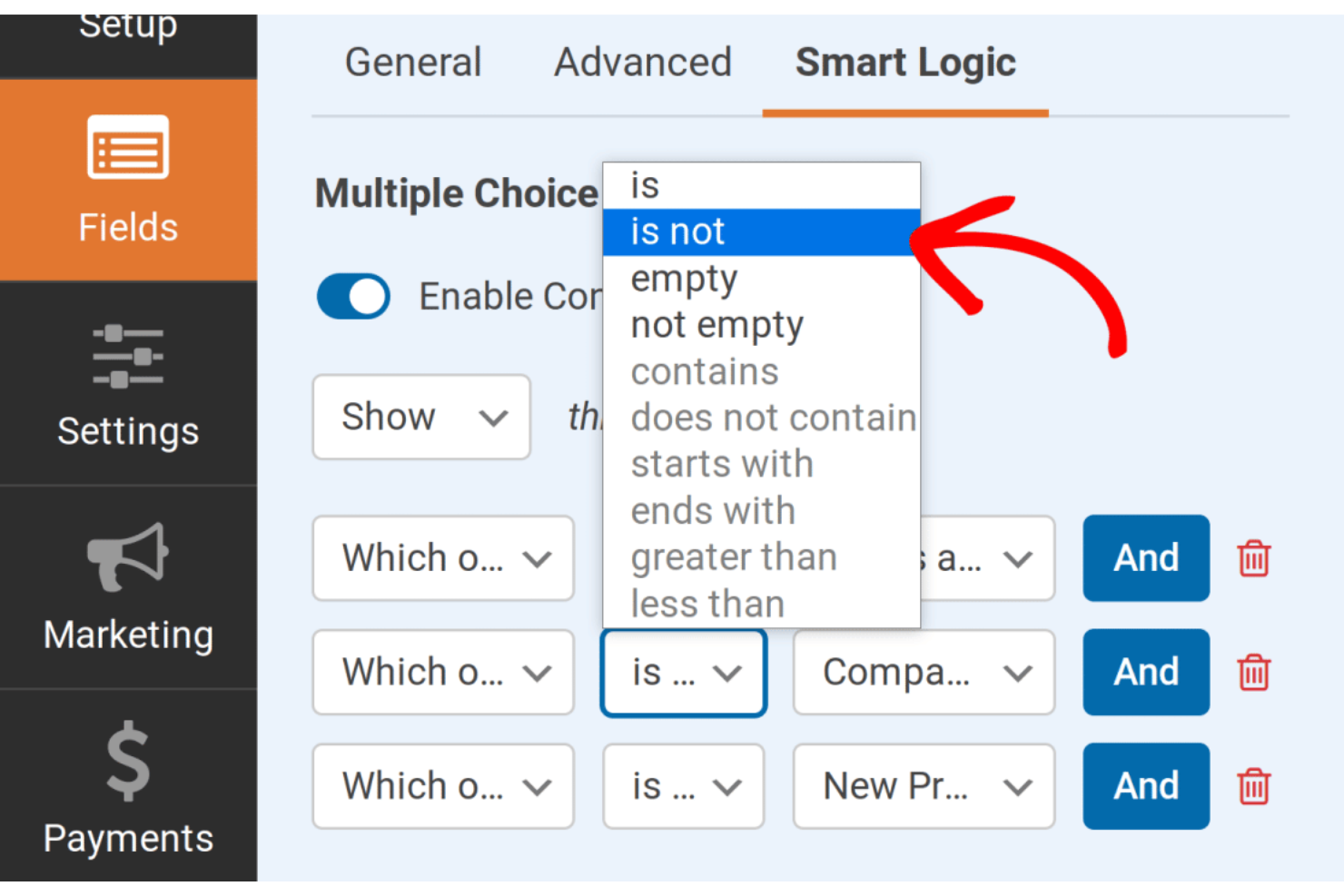
WPForms ist ein Formular-Builder-Plugin für WordPress-Websites. Es ermöglicht Nutzern, verschiedene Formulare wie Kontaktformulare, Zahlungsformulare, Umfragen, Anmeldeformulare und mehr ganz einfach zu erstellen – ohne Programmierkenntnisse.
Warum ich WPForms gewählt habe: WPForms bietet eine große Auswahl an vorgefertigten Vorlagen für unterschiedliche Formulartypen wie Kontaktformulare, Zahlungsformulare, Anmeldeformulare, Umfragen und mehr. Zudem sind die Vorlagen professionell gestaltet und individuell anpassbar, sodass Benutzer mühelos ein Formular erstellen können, das genau ihren Anforderungen entspricht, ohne bei null anfangen zu müssen.
Die Vorlagen sind vollständig anpassbar, das heißt, Nutzer können das Layout, die Schriftarten, Farben ändern sowie Felder nach Bedarf hinzufügen oder entfernen. Da WPForms eine breite Zielgruppe ohne technischen Hintergrund anspricht, ist die Benutzeroberfläche zudem besonders einfach und übersichtlich gehalten. Außerdem verfügt WPForms über integrierte Spam-Schutzfunktionen, die Formulare absichern und Spam-Einsendungen verhindern.
Besonderheiten und Integrationen von WPForms
Funktionen umfassen einen Drag-and-Drop-Formulargenerator, Formularvorlagen, intelligente bedingte Logik, Sofortbenachrichtigungen, Eintragsverwaltung, Marketing und Abonnements, Spamschutz, Datei-Upload und Benutzerregistrierung.
Integrationen beinhalten Stripe, Constant Contact, AWeber, Mailchimp, GetResponse, Campaign Monitor, ActiveCampaign, HubSpot, Salesforce, Drip und weitere Softwareoptionen.
Pros and Cons
Pros:
- Hilfreiche Support-Dokumentation
- Viele Formularvorlagen
- Einfache Benutzeroberfläche
Cons:
- Das Hochladen mehrerer Dateien ist schwierig
- Support kann verbessert werden

Bester Formular-Builder mit fortschrittlicher bedingter Logik
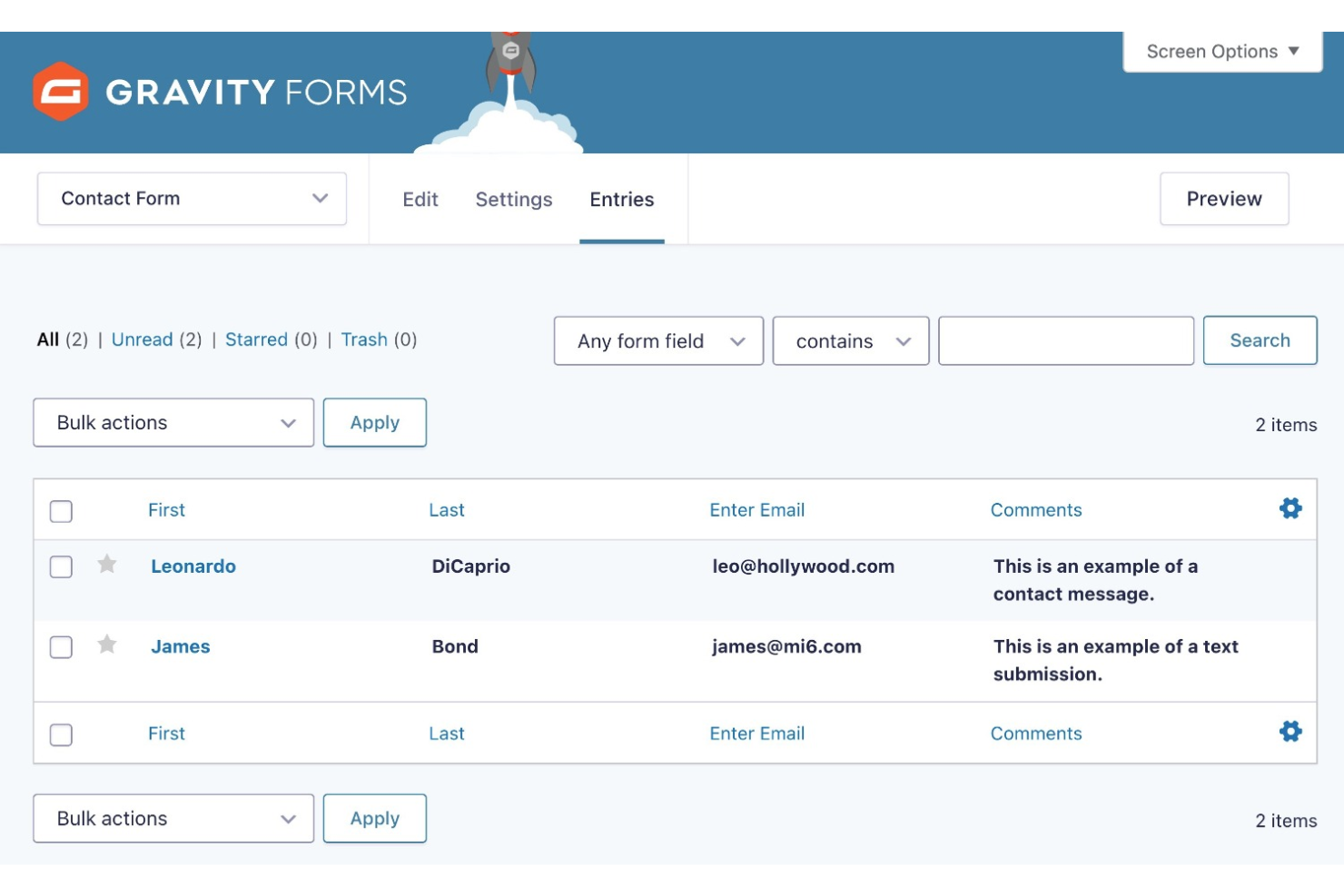
Gravity Forms ist ein leistungsstarkes WordPress-Plugin, das für Unternehmen und Website-Betreiber entwickelt wurde, die eine flexible und benutzerfreundliche Lösung zur Erstellung individueller Formulare und zur Datenerhebung von Website-Besuchern benötigen. Sie können es auch zur Zahlungsabwicklung oder zur Erstellung von Umfragen nutzen.
Warum ich Gravity Forms ausgewählt habe: Eines der herausragenden Merkmale von Gravity Forms ist die fortschrittliche bedingte Logik, die es ermöglicht, hochgradig angepasste und dynamische Formulare zu erstellen, die sich abhängig von den Antworten der Nutzer verändern. Das bedeutet, dass Sie komplexe Formulare mit bedingten Feldern, Abschnitten und Seiten erstellen können, die sich je nach Benutzereingabe verändern und somit das Formular persönlicher gestalten.
Sie können aus verschiedenen Vorlagen wählen oder ein Formular von Grund auf neu gestalten. Darüber hinaus lassen sich mit Gravity Forms Formulare ganz einfach per Shortcode oder Widget in Ihre WordPress-Beiträge und -Seiten sowie auf anderen Websites einbinden. Das Plugin verfügt außerdem über ein umfassendes Verwaltungssystem für Formulareinträge, mit dem Nutzer Einreichungen einsehen, filtern und exportieren können, um sie leicht auszuwerten und Berichte zu erstellen.
Hervorstechende Funktionen und Integrationen von Gravity Forms
Funktionen umfassen Drag-and-Drop-Builder, Formular-Import, mehrspaltige Layouts, stufenweise Formulare, responsive Formulare, bedingte Logik, individuelles Formular-CSS, Feldvalidierung, API & Webhooks, Datenrouting, dynamische Feldwerte, Umfragen und Integration von Zahlungsabwicklern.
Integrationen sind unter anderem Hubspot, 2Checkout, ActiveCampaign, Agile CRM, Akismet, AWeber, Breeze, Campaign Monitor, Capsule CRM, Chained Selects und weitere Softwareoptionen.
Pros and Cons
Pros:
- Ausführliche Dokumentation
- Umfangreiche Integrationen
- Guter Kundensupport
Cons:
- Abhängigkeit von WordPress
- Dokumentation ohne Videos
Bester Formularersteller mit großer Vorlagenauswahl
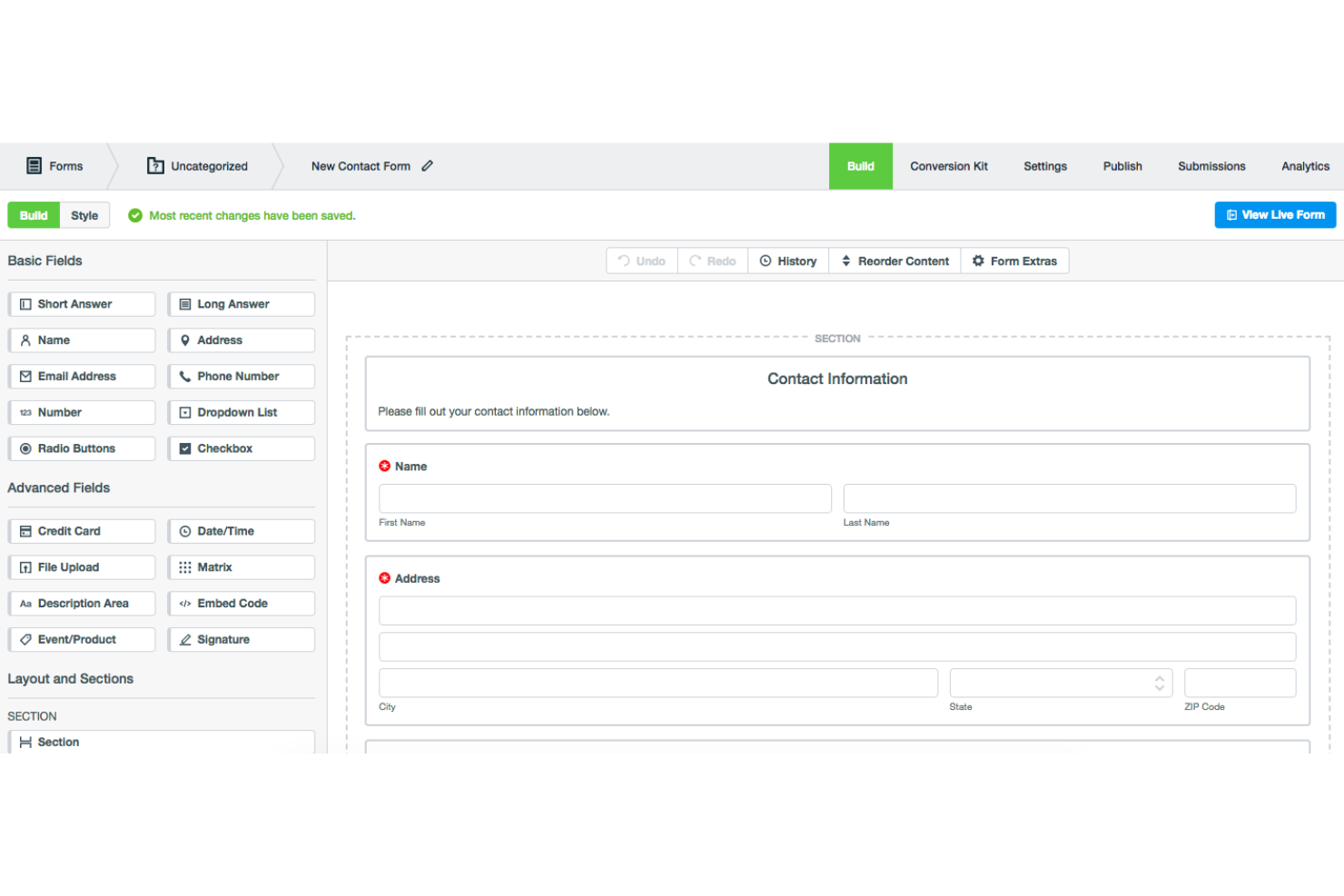
Formstack ist eine Software zur Datenerfassung, die Benutzern hilft, fortschrittliche Formulare und Umfragen zu erstellen.
Warum ich Formstack gewählt habe: Die beeindruckende Auswahl an mobilfreundlichen Vorlagen von Formstack, sortiert nach Branche, ermöglicht eine schnelle und einfache Formularerstellung. Es gibt Vorlagen in mehreren Kategorien wie Bildung, Gesundheitswesen, Vertrieb usw. Sie können Felder hinzufügen, löschen und neu anordnen sowie die Stilthemen der Vorlagen ändern.
Die Sharing-Optionen sind vielfältig: Formulare können per Link, QR-Code, WordPress-Plugin, benutzerdefinierten Subdomains oder durch Einbettung in eine Website geteilt werden. Darüber hinaus ermöglichen die fortschrittlichen Datenanalyse- und Berichtsfunktionen der Software, Daten zu visualisieren und Engpässe beim Ausfüllen von Formularen zu identifizieren, um Konversionsraten zu optimieren.
Herausragende Funktionen und Integrationen von Formstack
Funktionen beinhalten einen Drag-and-Drop-Formularersteller, individuelles Branding, bedingte Logik, Datenverschlüsselung, intelligente Listen, Single Sign-On, SSO-gestützte Feldvorbefüllung, HTML-Formulare und Datenverschlüsselung.
Integrationen umfassen AWeber, Act-On, Active Campaign, Adobe Sign, Airtable, Bamboo HR, BigCommerce, Campaign Monitor, Chargebee, Chargify und weitere Softwareoptionen.
Pros and Cons
Pros:
- Ermöglicht A/B-Tests
- Benutzerfreundliche Oberfläche
- Hilfreiches Community-Forum und Ressourcencenter
Cons:
- Hoher Preis
- Erstellung nur einer begrenzten Anzahl an Formularen möglich

Under.io
Bester Formulargenerator für Unternehmen zur Kunden-Onboarding
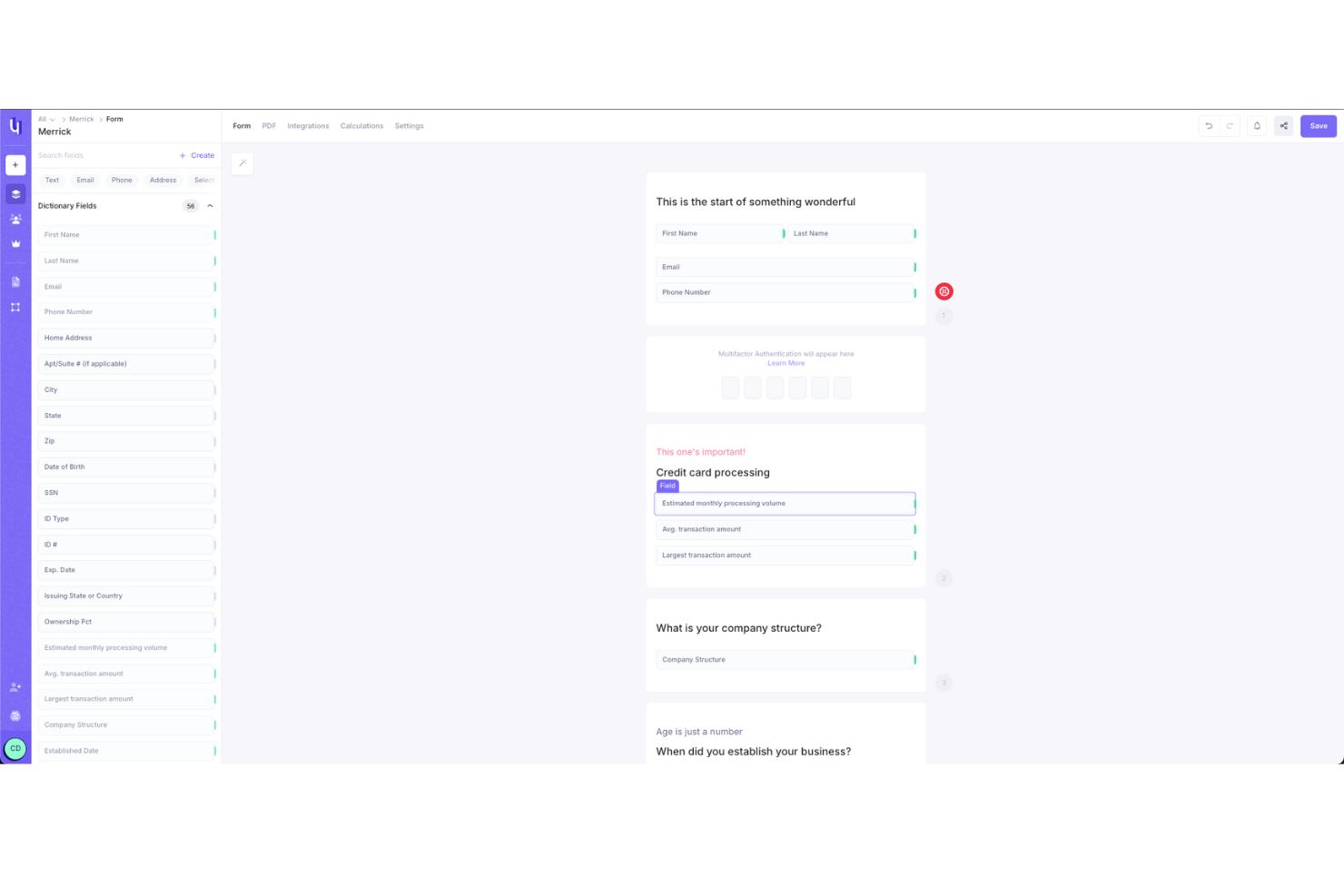
Under.io ist eine E-Signatur- und Formularerstellungssoftware, die darauf ausgelegt ist, Unternehmen jeder Größe die Erstellung von Formularen und das Sammeln von Unterschriften zu erleichtern. Die Plattform konzentriert sich darauf, komplexe Dokumenten-Workflows zu vereinfachen, indem sie es Nutzern ermöglicht, Formulare zu erstellen, die Antworten und Unterschriften nahtlos an einem Ort erfassen.
Warum ich Under.io ausgewählt habe: Was Under.io zu einem guten Formulargenerator macht, ist sein Funktionsumfang, der speziell auf die Erstellung flexibler und anpassbarer Formulare ausgerichtet ist. Mir gefällt, dass die Plattform es ermöglicht, bedingte Logik ohne Programmierkenntnisse in Ihre Formulare einzubinden, sodass Sie Fragen je nach vorherigen Antworten anpassen können. So führen Sie Nutzer mühelos durch komplexe Formulare, ohne sie zu überfordern, insbesondere beim Onboarding von Kunden.
Besondere Funktionen und Integrationen von Under.io
Funktionen umfassen Vorlagen, die Sie nach Ihren Anforderungen anpassen können, sodass Sie keine Zeit mit der Erstellung von Grund auf verschwenden. Es werden mehrsprachige Formulare unterstützt, sodass Sie problemlos Dokumente für ein internationales Publikum erstellen können, ohne sich um Übersetzungsfehler sorgen zu müssen. Eine weitere hilfreiche Funktion ist das Analytics-Dashboard, das Ihnen einen klaren Überblick über die Leistung Ihrer Formulare liefert.
Integrationen sind möglich mit mehr als 20 CRM-Systemen, darunter HubSpot und Salesforce. Nutzer können zudem Daten aus dem System exportieren und eigene Integrationen erstellen.
Pros and Cons
Pros:
- Anpassbare, codefreie Logikformularerstellung
- Dokumentenprüfung gewährleistet rechtliche Konformität
- Vorlagen helfen bei häufig genutzten Verträgen, Formularen und Anträgen
Cons:
- Begrenzte Offline-Funktionalität
- Keine mobile App für das Unterzeichnen unterwegs

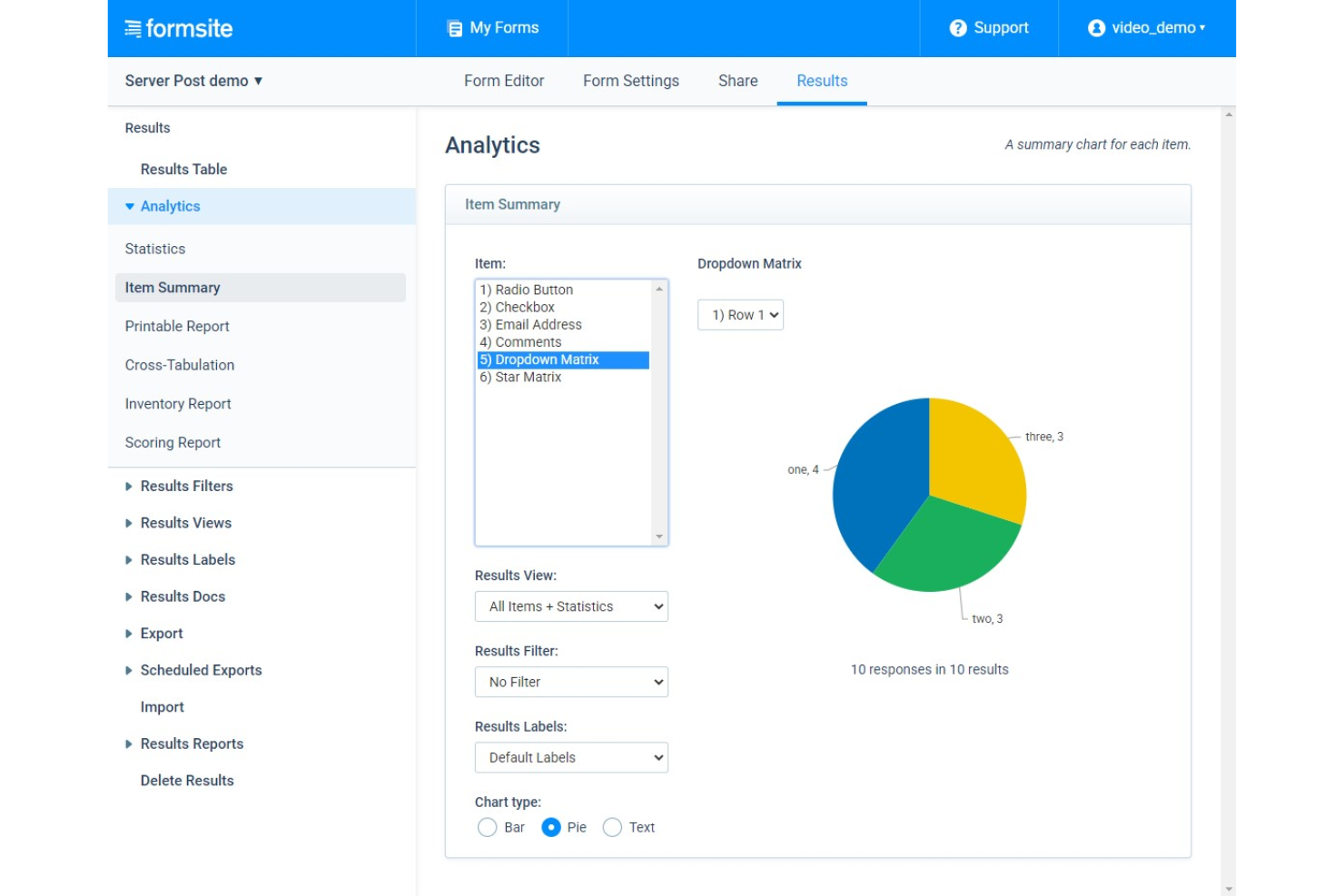
Formsite ist ein Online-Formularersteller für kleine bis mittelgroße Unternehmen, gemeinnützige Organisationen, Bildungseinrichtungen und Einzelpersonen, die DSGVO-konforme Formulare für ihre Organisationen erstellen müssen.
Warum ich Formsite gewählt habe: Einer der besten Aspekte von Formsite ist seine Fähigkeit, Daten basierend auf den Antworten der Nutzer zu segmentieren. Dadurch wird die Analyse von Daten anhand von Variablen wie demografischen Informationen oder bestimmten Fragen erleichtert. Außerdem bietet das Analyse-Dashboard von Formsite Echtzeitdaten zur Formularleistung, sodass Unternehmen schnell Bereiche identifizieren können, die möglicherweise verbessert werden müssen.
Formsite ist ein ideales Tool für Unternehmen, die erweiterte Funktionen beim Erstellen von Formularen benötigen, wie z. B. bedingte Logik, Berechnungen und mehrseitige Formulare. Es eignet sich besonders gut für Unternehmen in den Bereichen Gesundheitswesen, Finanzen und Bildung, die sensible Daten erheben und eine sichere Formularverarbeitung und Datenspeicherung benötigen.
Herausragende Funktionen und Integrationen von Formsite
Funktionen umfassen Workflow-Management, Webformulare, visuelle Analysen, URL-Anpassung, Umfrage-Erstellung, Suche oder Filter, SSL-Sicherheit, regelbasierte Workflows, Berichterstattung oder Analysen, Benachrichtigungen in Echtzeit, Workflow-Automatisierung, Multi-Channel-Verteilung, Dateispeicherung und Feedback-Management.
Integrationen umfassen PayPal, Stripe, Braintree, Google Kalender, Constant Contact, DocuSign, Zapier, OneDrive, Box, Slack und weitere Softwareoptionen.
Pros and Cons
Pros:
- Gute Auswahl an Formularfeldern
- Erweiterte Formular-Workflows
- Erweiterte Formularsicherheit
Cons:
- Begrenzte Auswahl an Formularvorlagen
- Steile Lernkurve
Weitere Optionen
Hier sind einige weitere Optionen, die es nicht in die Liste der besten Formular-Tools geschafft haben:
- Google Forms
Er Formularersteller mit nativer Integration in andere G Suite Produkte
- Microsoft Forms
Er Formularersteller mit integrierter KI und intelligenten Empfehlungen
- Hubspot Form Builder
Er Formular-Builder für Leadgenerierung und Marketing
- Mailchimp Form Builder
Er Formularersteller mit großer Vorlagenauswahl
- FastFieldForms
Er Formularersteller für mobile Datenerfassung
- Jotform
Er Formular-Builder zur Automatisierung Ihres Umfrageprozesses


Weitere Arten von Software für das Kundenerlebnis
Wenn Sie zu einem Team gehören, das für die Verbesserung des Kundenerlebnisses verantwortlich ist, könnten die folgenden Ressourcen hilfreich für Sie sein:
- Software für das Kundenerlebnismanagement
- Software für Kundenfeedback
- Die besten A/B-Test-Tools
- Software für Big-Data-Kundenanalysen
- Software für das Beta-Testmanagement
Wie ich die besten Formular-Tools ausgewählt habe
Vielleicht fragen Sie sich, wie ich die besten Formular-Tools für diese Liste ausgewählt habe? Für die Erstellung dieser Top-10-Liste habe ich eine große Auswahl an Formular-Tools mit positiven Benutzerbewertungen bewertet und verglichen.
Nachdem ich meine lange Liste der besten Optionen zusammengestellt hatte, habe ich sie mithilfe der unten aufgeführten Auswahlkriterien weiter verfeinert, um zu sehen, wie die einzelnen Plattformen im Vergleich zueinander abschneiden. Außerdem habe ich meine langjährige Erfahrung im Bereich CX genutzt, um die Funktionen zu ermitteln, die einen hohen Mehrwert bieten.
Wenn Sie allgemeine Fragen zur Nutzung von Formular-Tools oder zur Auswahl des besten Formular-Tools für Ihre Organisation haben, werfen Sie einen Blick auf den Abschnitt mit den häufig gestellten Fragen weiter unten. Oder springen Sie direkt zu meinen ausführlichen Software-Zusammenfassungen, wenn Sie diese am dringendsten benötigen.
Wie ich Formular-Builder bewerte
Ich bewerte Formular-Builder auf zwei Ebenen: die grundlegenden CX-Funktionen, die ein Tool haben muss – wie NPS-Felder und bedingte Logik – und die Merkmale, durch die sich ein Anbieter von den anderen abhebt.
Kernfunktionen (Grundvoraussetzung für diese Liste)
Wenn ich Tools für meine Liste auswähle, bewerte ich jedes auf einer Skala von 0 (diese Funktion fehlt) bis 5 (überragt in diesem Bereich) für jede der unten aufgeführten Kernfunktionen. Anschließend berechne ich die Gesamtpunktzahl des Tools in Prozent. Jedes Tool muss mindestens eine Gesamtpunktzahl von 65 % erreichen, um für die Aufnahme berücksichtigt zu werden.
- Drag-and-Drop-Formular-Builder: Ich prüfe, ob ein visueller Editor mit einer gut ausgestatteten Feldtypen-Bibliothek vorhanden ist, sodass Teams Intake-Formulare oder Umfragen nach einer Interaktion ohne Entwickler-Support erstellen können.
- Bedingte Logik & Verzweigungen: Intelligentes Routing ist entscheidend – ich achte darauf, dass Tools das Überspringen irrelevanter Seiten oder das Stellen zusätzlicher Fragen ermöglichen, je nach Antwort eines Kunden.
- CX-spezifische Fragetypen: Jedes Tool sollte über native NPS-, CSAT-, CES- und Bewertungsfelder verfügen, anstatt Sie dazu zu zwingen, Bewertungssysteme umständlich mit generischen Feldern zu bauen.
- Multi-Channel-Verteilung: Ich bewerte, ob Formulare optimal per Linkfreigabe, E-Mail-Einbettung, Website-Widgets und in mobilen Ansichten dargestellt werden, sodass Kunden überall antworten können.
- CX-Stack-Integrationen: Der Formular-Builder sollte sich mit CRM- und Helpdesk-Systemen wie Salesforce, HubSpot, Zendesk oder Intercom verbinden, um Einsendungen dorthin weiterzuleiten, wo Ihr Team ohnehin arbeitet.
- Antwortmanagement & Analysen: Ich suche nach Dashboards, mit denen Sie Antworten filtern, segmentieren und Trends visualisieren können – statt nur eine Rohdatei (CSV) zu exportieren und alles manuell auszuwerten.
Wenn ich eine Liste von Tools habe, die diese Kriterien erfüllen, schaue ich, was jede Plattform besonders macht.
Unterscheidungsmerkmale (Was Anbieter abhebt)
So vergleiche und kontrastiere ich verschiedene Anbieter:
Herausragende Funktionen
Automatisierte Antwort-Workflows sind ein wichtiges Unterscheidungsmerkmal – ich suche Tools, die zum Beispiel einen Slack-Alarm auslösen oder ein Support-Ticket erstellen, sobald ein Kunde eine kritische NPS-Bewertung abgibt. Vorgefüllte und versteckte Felder sind ebenfalls nützlich, da sie bekannte Kundendaten ins Formular übernehmen, Friktionen reduzieren und Ihrem Team mehr Kontext für jede Einsendung liefern. White-Label-Branding ist relevant, besonders wenn Formulare in Kundenportalen oder Nachkaufprozessen eingebettet sind, bei denen fremde Markenelemente das Vertrauen negativ beeinflussen könnten.
Über die Funktionen hinaus
Compliance und Datensicherheit stehen an oberster Stelle – ich prüfe, ob ein Anbieter die Anforderungen der DSGVO und HIPAA unterstützt, da CX-Teams regelmäßig personenbezogene Daten über Feedback- und Intake-Formulare erheben. Die Preisstruktur ist ein weiterer wichtiger Faktor, insbesondere wie sich das Antwortvolumen auf die Kosten auswirkt; manche Anbieter rechnen pro Einsendung ab, was bei großem Traffic schnell teuer werden kann. Ich berücksichtige auch die Time-to-Value, indem ich schaue, wie umfangreich fertige CX-Templates wie Nachkaufumfragen und Churn-Feedback-Formulare ausfallen, sodass Teams schnell Erhebungsprogramme starten können, ohne alles neu entwickeln zu müssen.
Häufig gestellte Fragen
Hier finden Sie einige häufig gestellte Fragen bequem beantwortet!
Wie kann ich Formularersteller für das Kundenerlebnis (CX) nutzen?
Teams für das Kundenerlebnis können Formularersteller nutzen, um das gesamte Kundenerlebnis zu verbessern. Sie können Formularersteller verwenden, um Feedbackformulare zu erstellen, über die Kunden Rückmeldungen zu ihren Erfahrungen geben können. Dies kann dem Team helfen, Verbesserungsbereiche zu erkennen und datengestützte Entscheidungen zur Optimierung des gesamten Kundenerlebnisses zu treffen.
Formulare können verwendet werden, um Daten von Kunden zu erfassen, etwa Präferenzen, demografische Merkmale oder Nutzungsmuster, oder um Kundeninterviews durchzuführen. Teams für das Kundenerlebnis können diese Daten nutzen, um Kundeninteraktionen zu personalisieren und gezielte Empfehlungen bereitzustellen.
Welche Vorteile bietet die Verwendung eines Formularerstellers?
Die Verwendung eines Formularerstellers kann eine Strategie für den Kundenerfolg auf verschiedene Weise unterstützen. Hier sind einige der wichtigsten Vorteile:
\u003cul\u003e
\u003cli\u003e\u003cstrong\u003eStandardisierung\u003c/strong\u003e: Mit einem Formularersteller können Sie standardisierte Formulare erstellen, über die Kunden ihre Anfragen, Rückmeldungen und Anliegen einreichen können. Dadurch stellen Sie sicher, dass alle Kunden dieselben Informationen bereitstellen und das Kundenerfolgsteam Anfragen problemlos kategorisieren und priorisieren kann.\u003c/li\u003e
\u003cli\u003e\u003cstrong\u003eEffizienz\u003c/strong\u003e: Mit einem Formularersteller können Kunden ihre Anfragen und Anliegen schneller und einfacher einreichen. Das spart sowohl dem Kunden als auch dem Kundenerfolgsteam Zeit und ermöglicht es dem Team, schneller zu antworten und Probleme effizienter zu lösen.\u003c/li\u003e
\u003cli\u003e\u003cstrong\u003eVerbessertes Kundenerlebnis\u003c/strong\u003e: Indem Sie Kunden ein einfach zu verwendendes Formular zur Verfügung stellen, mit dem sie ihre Anfragen und Anliegen einreichen können, verbessern Sie das gesamte Kundenerlebnis. Kunden sind eher zufrieden, wenn sie schnell und unkompliziert die benötigte Unterstützung erhalten.\u003c/li\u003e
\u003cli\u003e\u003cstrong\u003eBessere Datenerfassung\u003c/strong\u003e: Ein Formularersteller ermöglicht es Ihnen, strukturierte Daten von Kunden zu erfassen, wodurch sich Kundenfeedback leichter analysieren und interpretieren lässt. Diese Daten können Ihnen helfen, Trends zu erkennen, Probleme zu priorisieren und datengestützte Entscheidungen über Ihre Strategie für den Kundenerfolg zu treffen.\u003c/li\u003e
\u003cli\u003e\u003cstrong\u003eAnpassung\u003c/strong\u003e: Formularersteller bieten häufig Anpassungsoptionen wie Branding, benutzerdefinierte Felder und bedingte Logik. Dadurch können Sie Formulare erstellen, die auf Ihre spezifischen geschäftlichen Anforderungen und die Bedürfnisse Ihrer Kunden zugeschnitten sind.\u003c/li\u003e
\u003c/ul\u003e
Die Verwendung eines Formularerstellers kann dazu beitragen, Ihre Strategie für den Kundenerfolg zu optimieren und das Kundenerlebnis zu verbessern.
Wie viel kosten Formularersteller?
Wie Sie dieser Liste entnehmen können, unterscheiden sich die Preise von Formularerstellern je nach Art der enthaltenen Funktionen, der Anzahl der benötigten Administrationsbenutzer und der Größe Ihrer Kontaktliste. Einige Formularersteller wie Google Forms und Mailchimp sind kostenlos erhältlich. Im oberen Preissegment können Formularersteller bis zu $39.95/Monat kosten. Insgesamt sind Formularersteller für SaaS-Produkte sehr preisgünstig.
Einige Formularersteller sind in andere Dienste integriert, etwa das E-Mail-Marketing von Mailchimp oder das CRM-Paket von Hubspot. Diese können teurer sein, wenn Sie einen Tarif mit höherer Leistungsstufe benötigen. Sie können sich jedoch lohnen, wenn Sie die zusätzliche Funktionalität ohnehin für Ihre Kundenservice-Strategie benötigen.