

10 mejores aplicaciones de telefonía virtual VoIP en 2026

Lista de las mejores aplicaciones de teléfono VoIP


Las aplicaciones de teléfono VoIP te permiten realizar y recibir llamadas empresariales directamente desde tu ordenador o dispositivo móvil mediante unos auriculares, convirtiendo cualquier pantalla en la línea telefónica de tu empresa. Para los responsables de soporte y experiencia del cliente, esto significa una comunicación flexible y rentable sin tener que gestionar hardware ni configuraciones complejas.
Si buscas las mejores soluciones para mejorar las conversaciones con los clientes, mantener conectado a tu equipo y adaptarte a medida que evoluciona tu empresa, esta guía te ayudará a comparar las principales opciones y elegir la herramienta adecuada con confianza.
Por qué confiar en nuestras recomendaciones de software
Nuestro equipo lleva probando y evaluando software desde 2012. Como líderes de CX, sabemos lo difícil —y lo importante— que es elegir el software adecuado.
Para esta guía, evaluamos las herramientas mediante pruebas prácticas e investigación independiente, puntuando las herramientas según nuestros criterios de selección.
Nuestras reseñas reflejan nuestro criterio editorial humano, no un discurso de ventas.
| Tool | Best For | Trial Info | Price | ||
|---|---|---|---|---|---|
| 1 | Best for international calling analytics | 14-day free trial | From $25/user/month (billed annually) | Website | |
| 2 | Best for global virtual phone numbers | 10-day free trial | From $18/user/month (billed annually) | Website | |
| 3 | Best for Freshworks-based call routing | 14-day free trial | From $15/user/month (billed annually) | Website | |
| 4 | Best for Workspace-based business calling | Free plan available | From $10/user/month | Website | |
| 5 | Best for customer-facing team communications | Free demo available | From $15/user/month (billed annually) | Website | |
| 6 | Best for AI-powered call notes | 14-day free trial + free demo available | Pricing upon request | Website | |
| 7 | Best for multi-device business communications | 14-day free trial | From £18/user/month | Website | |
| 8 | Best for sales dialers and SMS workflows | 14-day free trial | From $29/user/month (billed annually) | Website | |
| 9 | Best for small-business calling and desk phones | Not available | From $19.95/user/month | Website | |
| 10 | Best for Zoom-based business calling | Free demo available | From $10.50/user/month | Website |
Reseñas de aplicaciones de teléfono VoIP
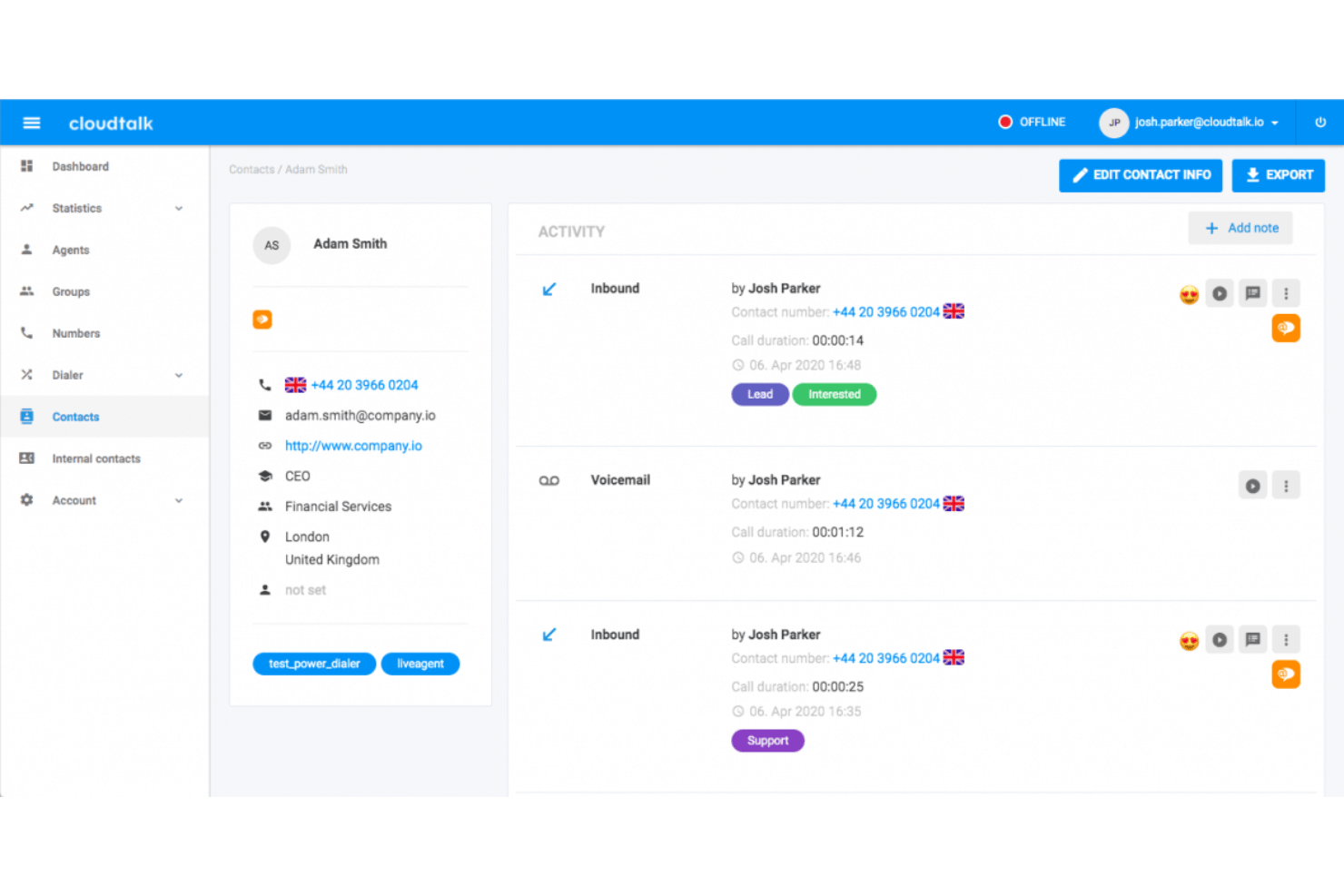
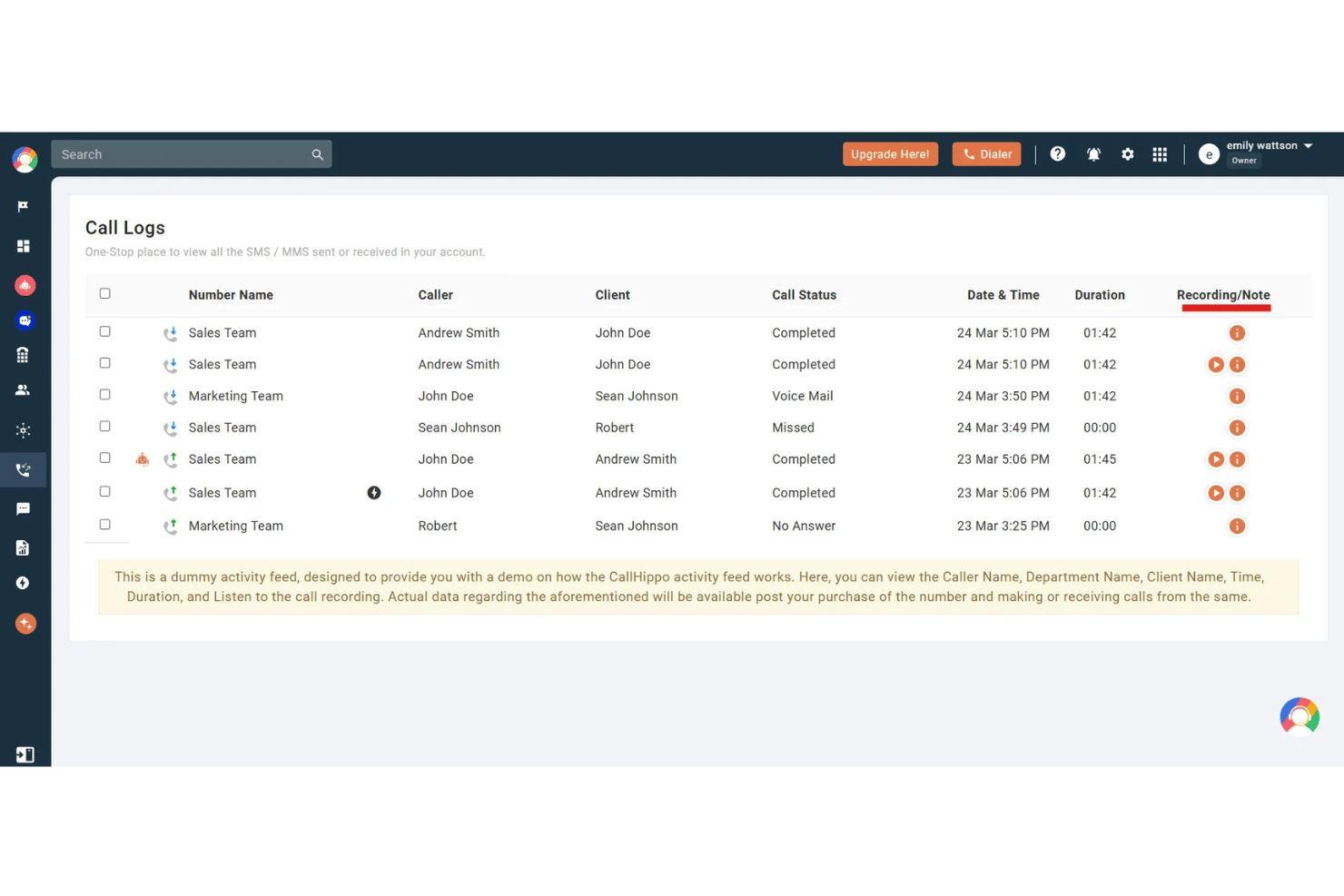
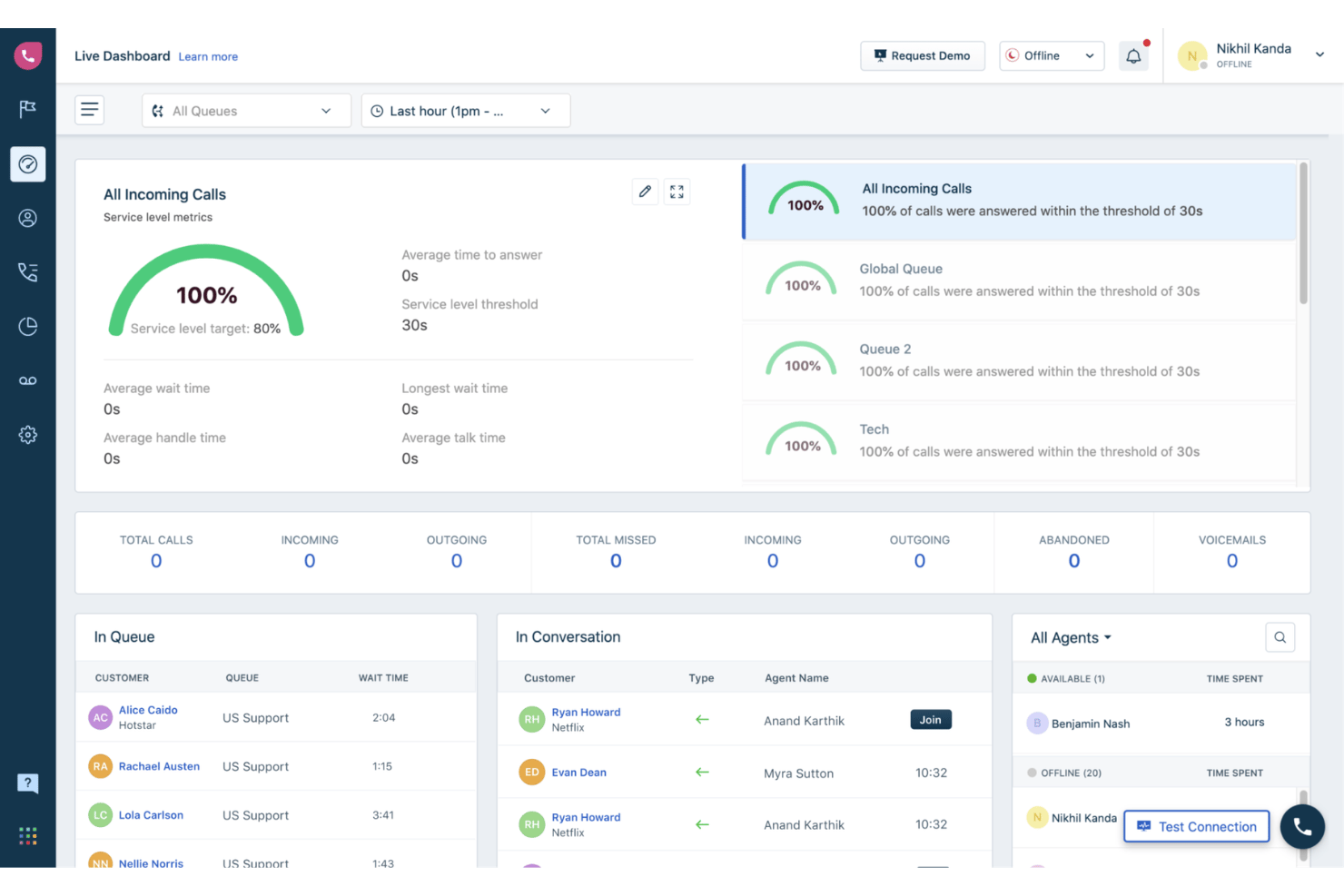
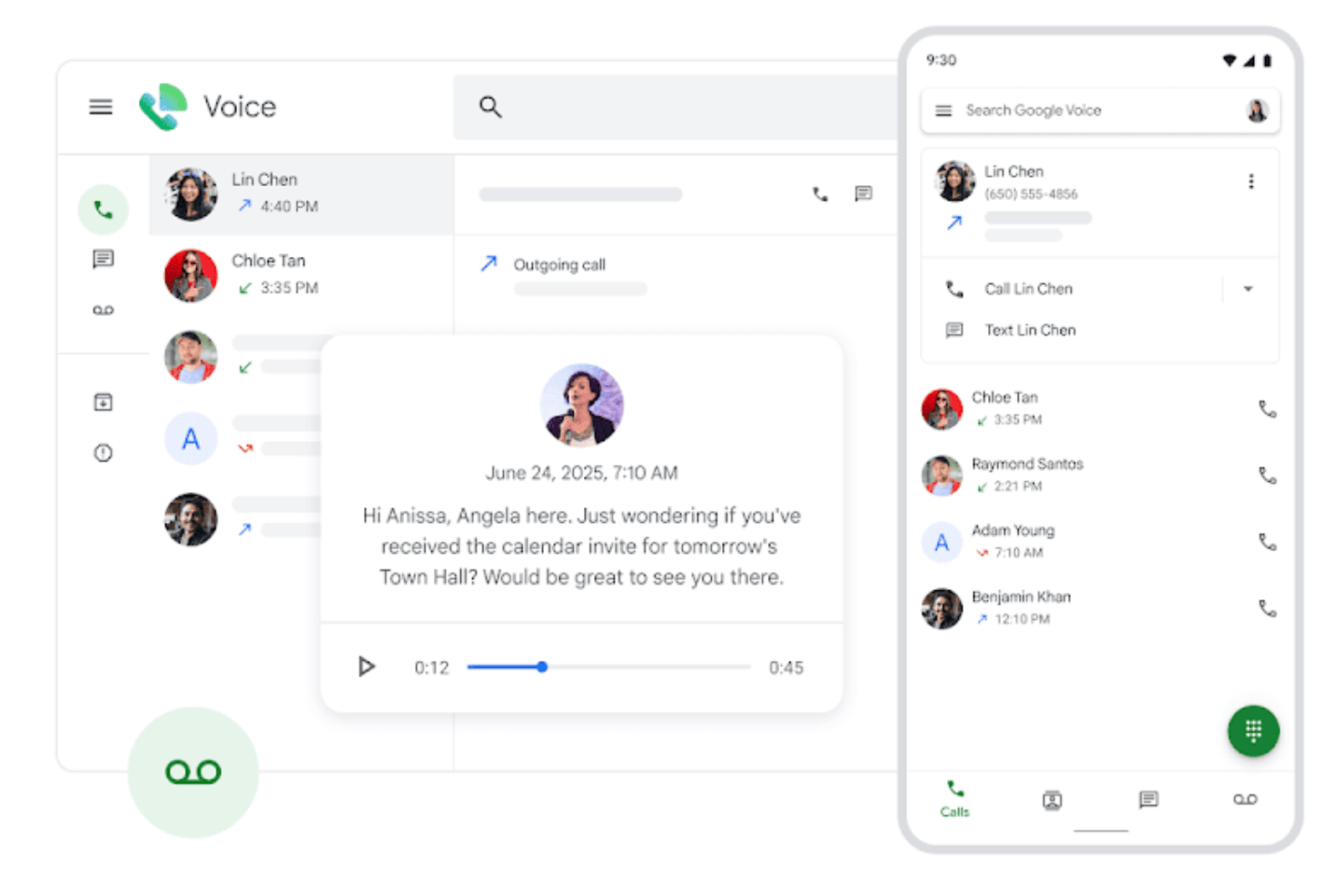
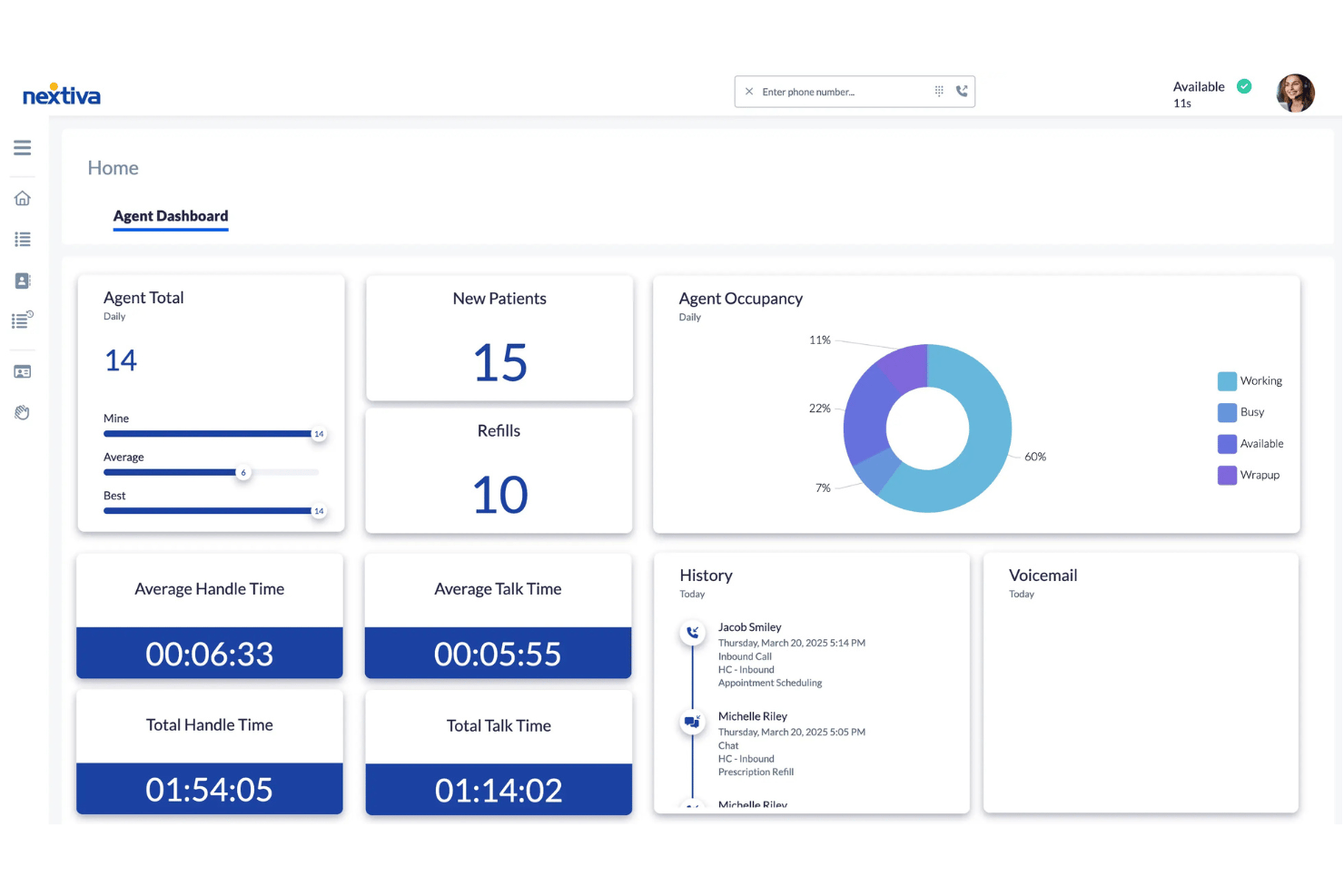
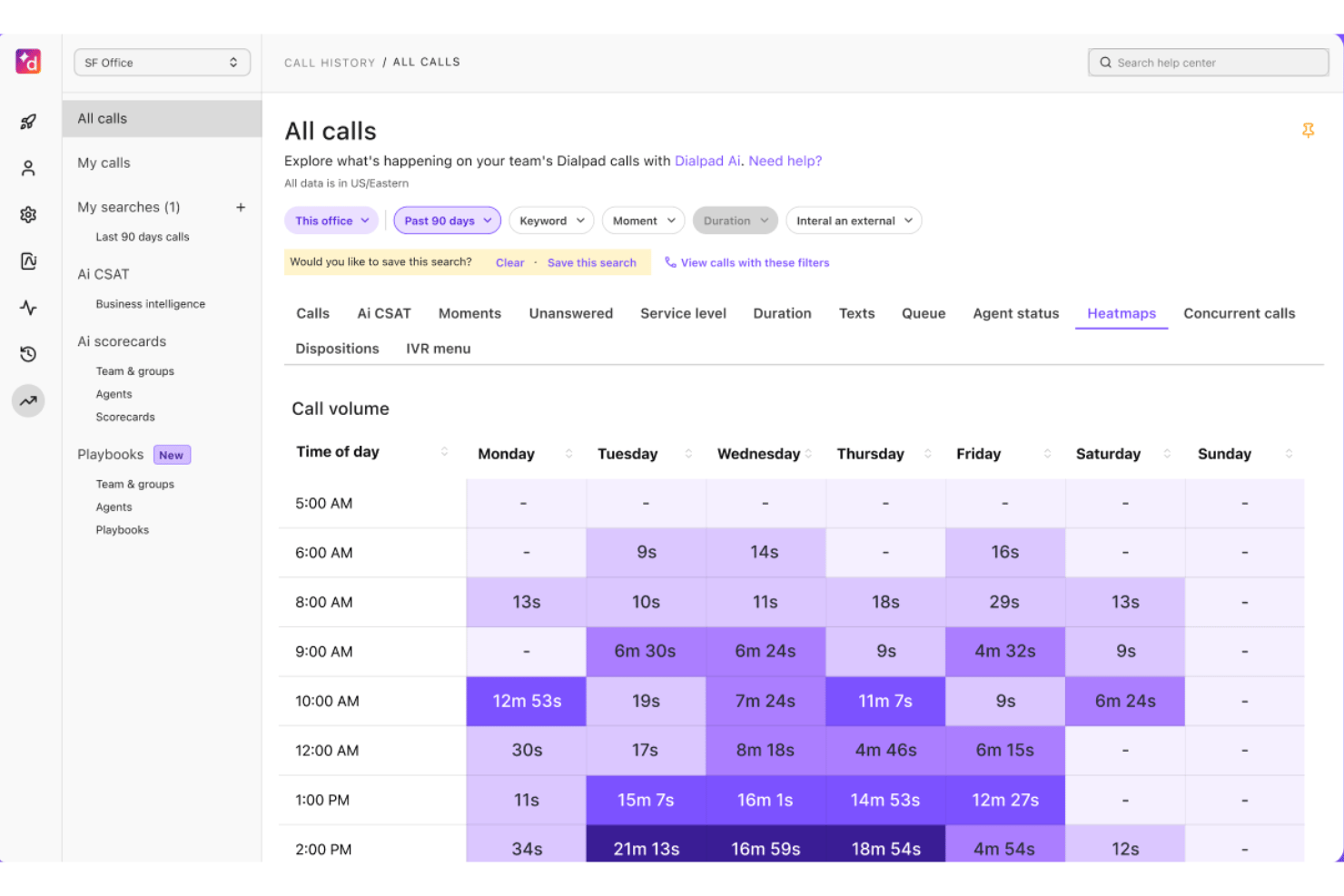
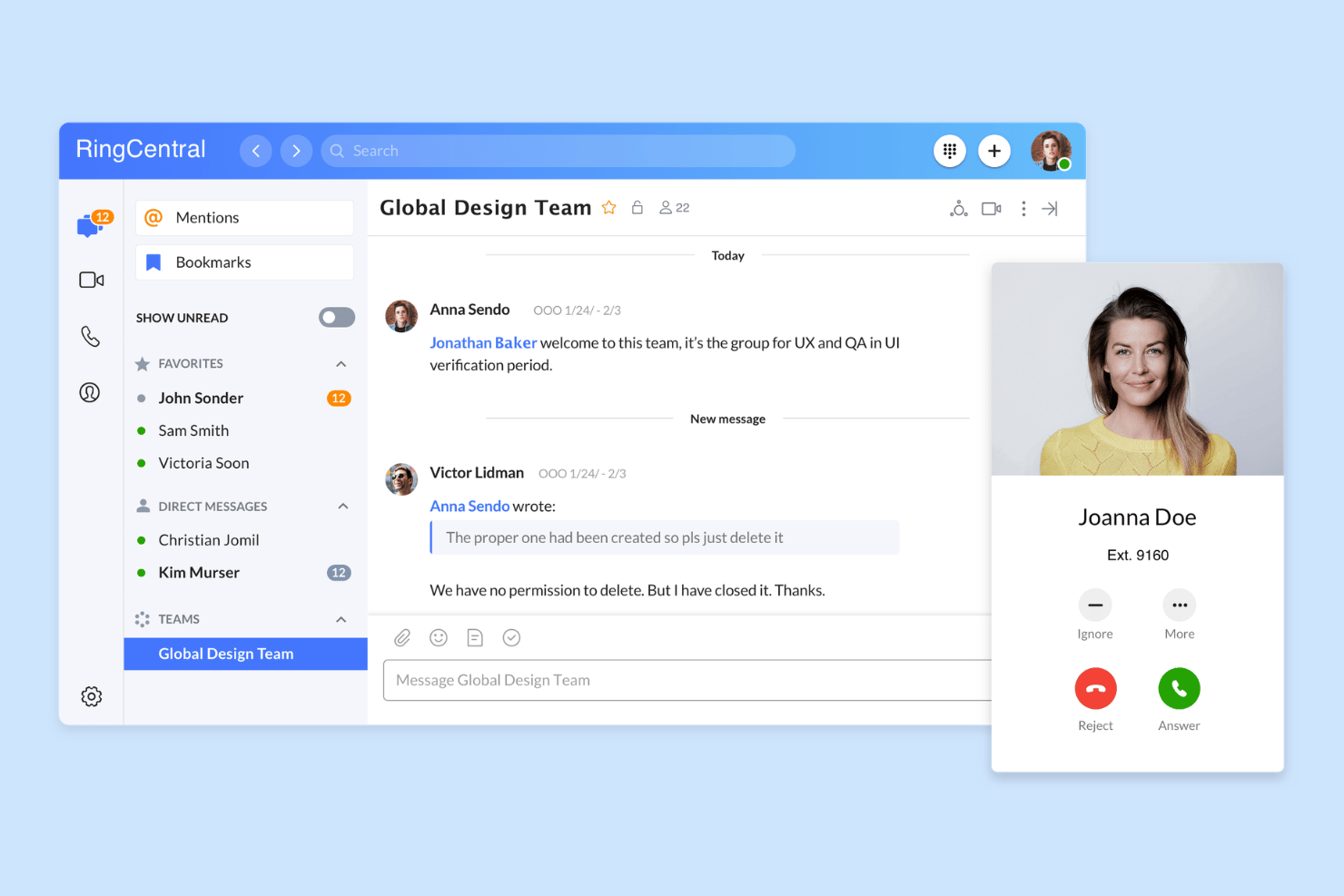
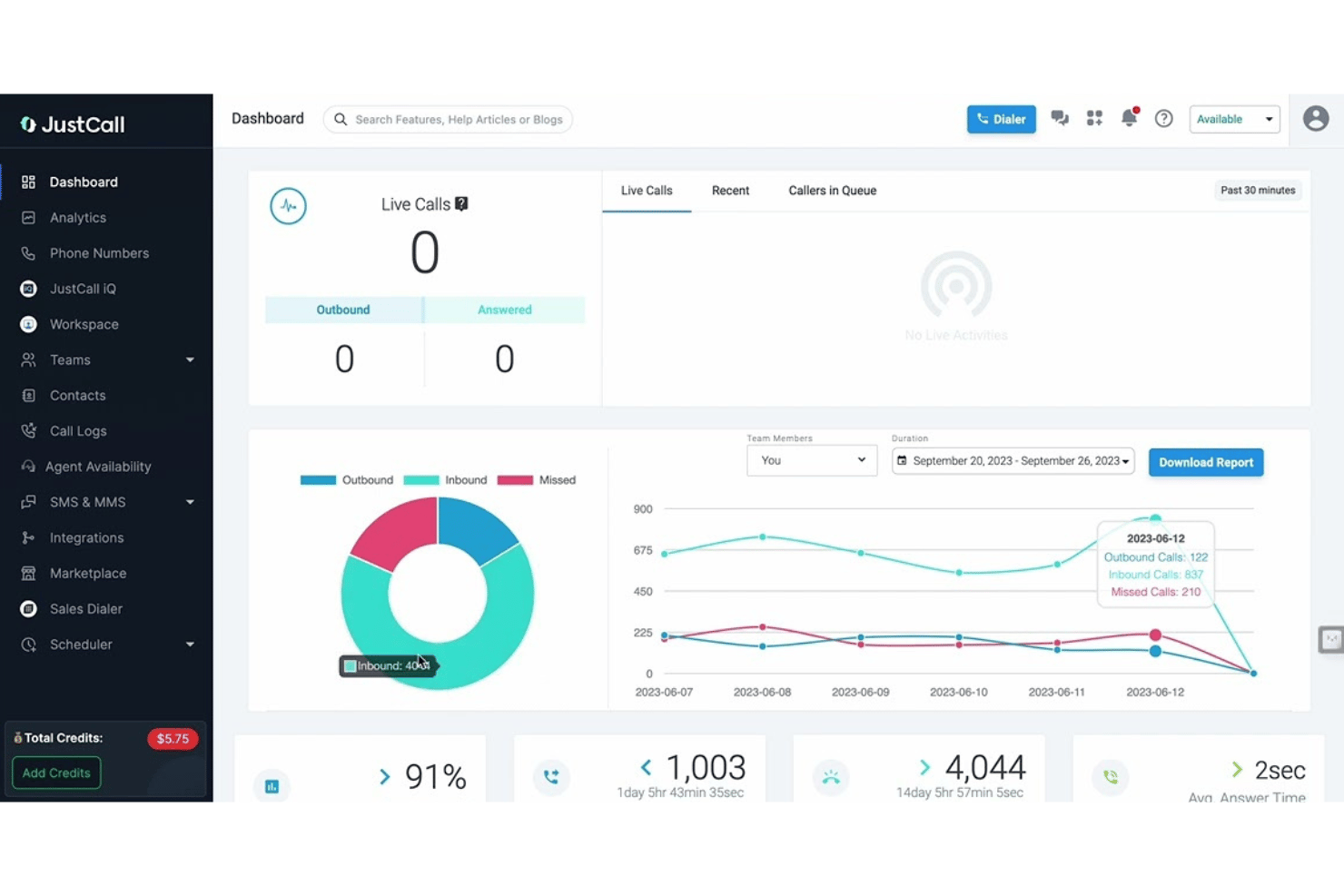
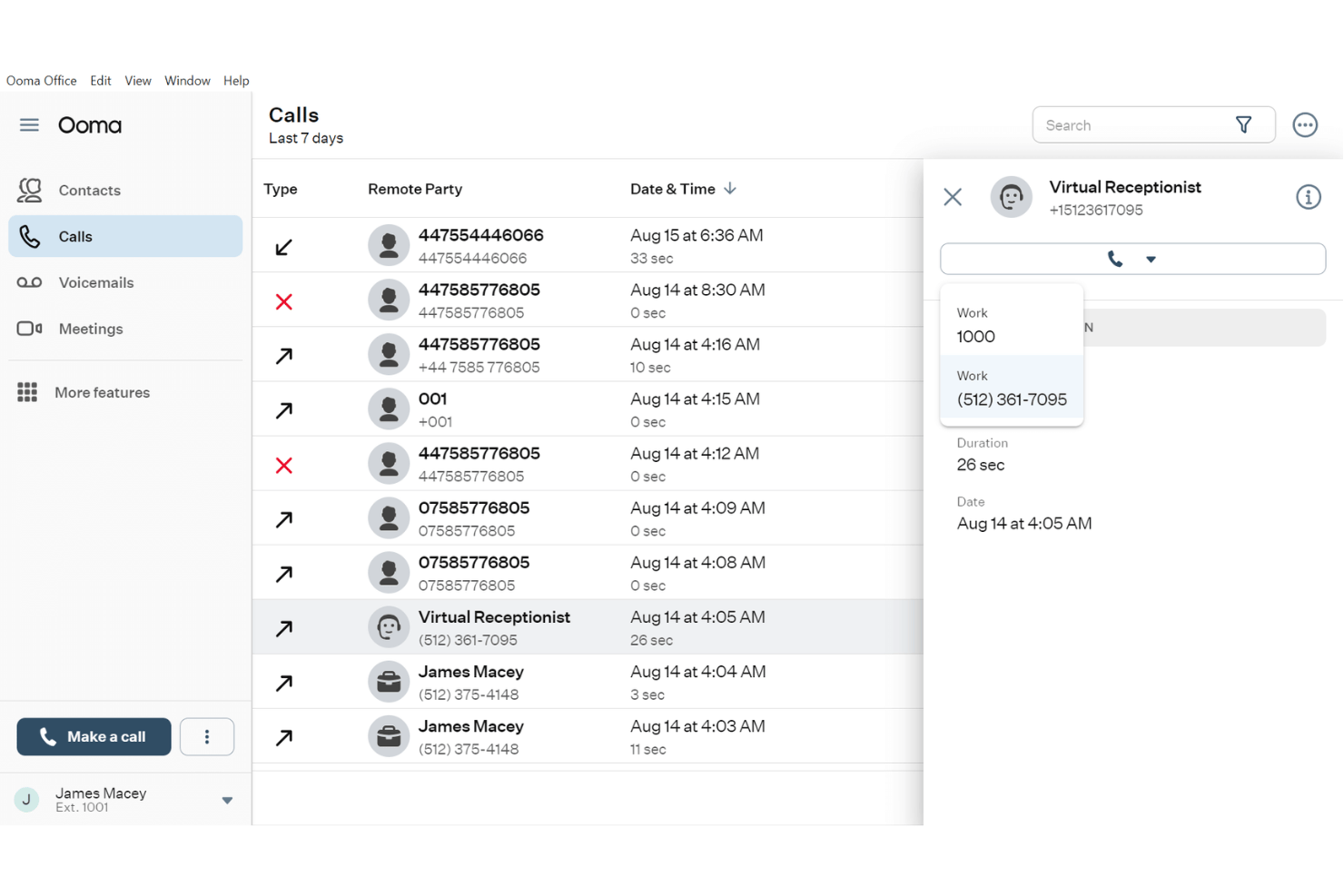
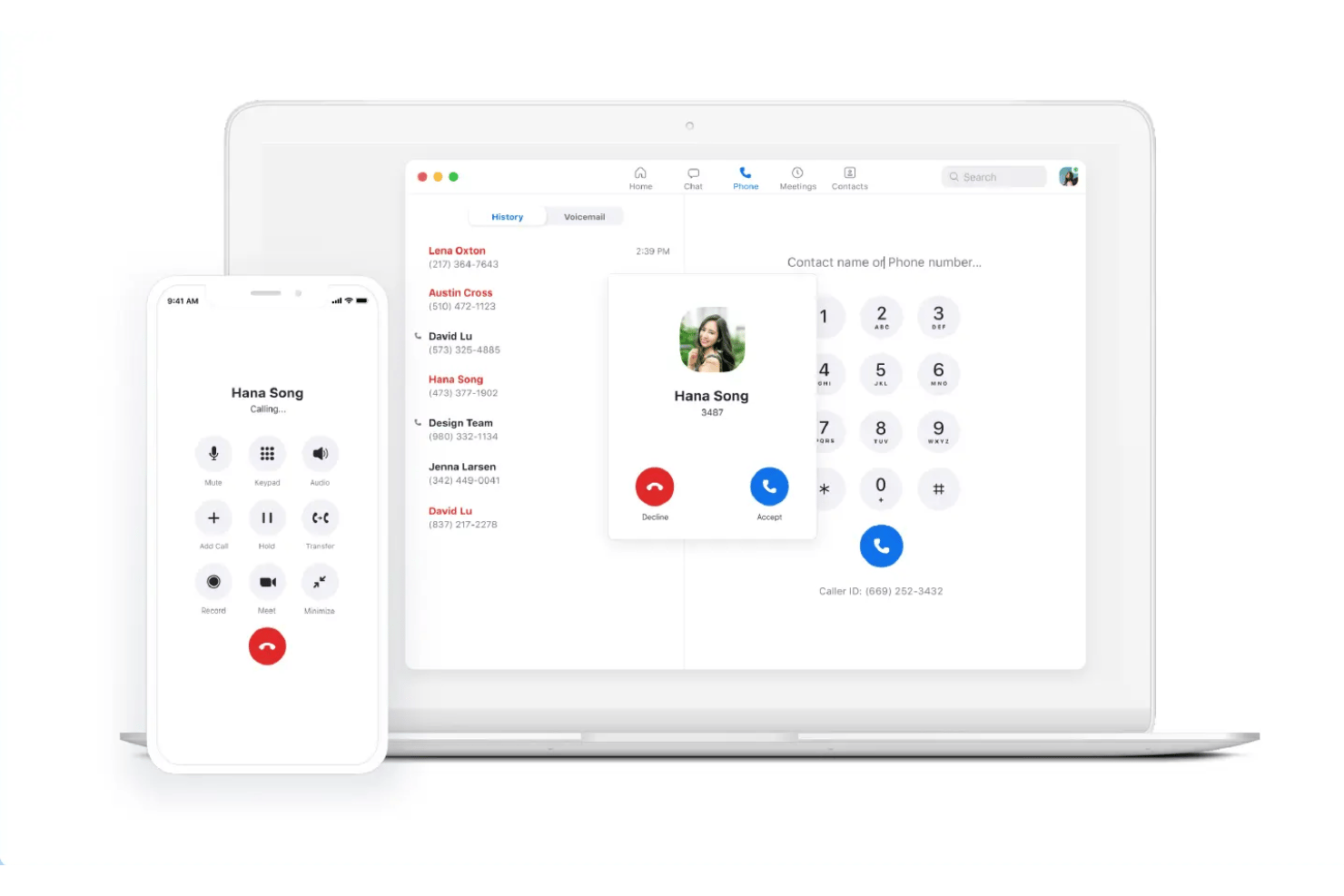
Best for international calling analytics CloudTalk is a cloud-based VoIP softphone platform combining AI-powered dialers, global calling across 160+ countries, CRM integrations, real-time call analytics, and multi-channel messaging in a single interface. CloudTalk suits growing sales and support teams that manage high call volumes across multiple countries and need detailed agent performance visibility. I've included CloudTalk in my top picks because its real-time analytics go deeper than most softphones when calls span multiple countries. The custom dashboards break down call volume, duration, and agent activity by region, queue, or time period, all without manual exports. The AI Conversation Intelligence layer adds sentiment scoring and searchable transcripts on top, so I can review how specific agents are performing across different international markets. CloudTalk offers 100+ native integrations, including Salesforce, HubSpot, Zendesk, Pipedrive, Intercom, Zoho CRM, Freshdesk, Gorgias, Slack, Microsoft Teams, and Zapier. An API is available for custom integrations. Pros: Cons: Best for global virtual phone numbers CallHippo is a cloud telephony platform with softphone apps for web, desktop, and mobile. It offers virtual phone numbers in 150+ countries alongside AI-powered calling, omnichannel messaging, and contact center routing. It's a strong fit for small to mid-sized sales and support teams that need local phone presence across multiple countries without complex infrastructure. I've included CallHippo in my top picks because the depth of its global number coverage sets it apart from most softphone apps. You can provision local, toll-free, or mobile numbers in 150+ countries within minutes, and Smart DID Routing automatically presents the correct local caller ID based on the destination country. I also like the AI Global Connect feature, which detects a contact's local time zone before dialing to prevent calls landing outside business hours. CallHippo offers native integrations with Salesforce, HubSpot, Zoho CRM, Zendesk, Freshdesk, Pipedrive, Intercom, Shopify, Slack, and Microsoft Teams. An API is available for custom integrations. Pros: Cons: Best for Freshworks-based call routing Freshcaller is a cloud-based VoIP contact center solution that lets agents place and receive calls via browser, mobile app, or SIP handset, with multi-level IVR, call routing, recording, and real-time analytics built in. Freshcaller is a strong fit for support teams already using the Freshworks ecosystem who need a tightly connected call center and helpdesk setup. I've included Freshcaller in my top picks because its call routing is purpose-built for teams running on Freshworks. Inbound calls can be routed using conditions tied directly to Freshdesk or Freshsales data, so the right agent gets the right call based on CRM context. I also rely on its smart escalation rules and live call barging, which let supervisors step into active calls and coach agents in real time without disrupting the customer. Freshcaller offers native integrations with Freshdesk, Freshsales, Salesforce, HubSpot, and Slack. An API is available for custom integrations. Pros: Cons: Google Voice is a cloud-based VoIP softphone built into the Google Workspace ecosystem, offering calling, video calls, SMS, voicemail transcription, and AI-powered spam filtering across mobile, desktop, and desk phones. Google Voice is a natural fit for small businesses and distributed teams already running on Google Workspace who need a lightweight business phone system without added infrastructure. I've included Google Voice in my top picks because it's the only VoIP softphone that's fully native to Google Workspace. Calls route directly through Gmail, voicemails transcribe automatically into your inbox, and the multi-level auto attendant handles call routing without any separate admin platform. My team uses the Vault integration to keep call records in the same discovery and retention system as email. Google Voice offers native integrations with Google Workspace apps, including Google Meet and Google Calendar, and provides an API for custom integrations. Pros: Cons: Best for customer-facing team communications Nextiva is a cloud-based VoIP and unified communications platform that combines softphone calling, SMS, video meetings, team chat, and AI-powered call management across desktop and mobile apps. Nextiva is a strong fit for customer support and contact center teams that need a single platform for voice, messaging, and AI-assisted call handling. I picked Nextiva as one of the best because the NextivaONE app keeps my whole customer-facing team on voice, SMS, and chat without switching between tools. The AI Voice Agent handles inbound calls 24/7, routing inquiries and answering FAQs before a live agent picks up. I also rely on AI call transcription and summary to review customer interactions quickly, without replaying full recordings. Nextiva offers native integrations with Salesforce, HubSpot, Microsoft Teams, Google Workspace, Outlook, and Microsoft Dynamics, and provides an API for custom integrations. Pros: Cons: Best for AI-powered call notes Dialpad is an AI-native cloud communications platform that unifies voice calling, SMS, messaging, and video meetings in a single softphone app built on its own proprietary large language model, DialpadGPT. Dialpad suits small to midsize customer support and sales teams—particularly those running on Google Workspace—who need a cloud phone system with built-in AI call documentation. Dialpad earns its spot on my shortlist because its AI Recaps feature automatically generates structured call summaries and action items after every conversation, powered by its proprietary DialpadGPT model. Real-time transcription runs live during calls, so nothing gets missed even in fast-moving support interactions. I also like that AI CSAT scoring runs automatically on 91% of calls, giving my team consistent post-call performance data without any manual review process. Dialpad offers native integrations with Salesforce, HubSpot, Zendesk, Google Workspace, Microsoft 365, ServiceNow, Zoho CRM, Okta, Bullhorn, and Clio. An API is available for custom integrations. Pros: Cons: Best for multi-device business communications RingCentral is a cloud-based UCaaS platform that combines VoIP calling, video meetings, business SMS, and team messaging into a single softphone app across desktop, mobile, and web. It's a strong fit for mid-sized businesses with distributed or remote teams that need a single platform for managing voice communications across multiple devices and locations. RingCentral earns its spot on my shortlist because of how consistently it handles voice across every device in my setup. I particularly like the call flip feature, which lets you transfer a live call from your desktop softphone to your mobile app mid-conversation without any interruption. Presence status also syncs in real time across desktop, mobile, and web, so my team always sees accurate availability no matter which device someone is working from. RingCentral offers native integrations with Salesforce, HubSpot, Zendesk, Microsoft Teams, Google Workspace, Slack, and ServiceNow, and provides an API for custom integrations. Pros: Cons: Best for sales dialers and SMS workflows JustCall is a cloud-based VoIP softphone platform combining voice calling, SMS and MMS messaging, AI conversation intelligence, and multi-line auto-dialer capabilities across desktop, mobile, and web. JustCall is a strong fit for outbound sales teams and SMB-to-mid-market customer support operations that need voice, SMS, and dialer tools in one place. I picked JustCall as one of the best because its multi-line predictive dialer (up to 10 simultaneous lines) and Dynamic Dialer genuinely set it apart from most softphone apps that only offer basic click-to-dial. I also like how SMS workflows and bots run natively inside the same platform, so my team can trigger automated follow-up sequences without switching tools. The local presence dialing feature, which displays a number matching the prospect's area code, adds a layer of functionality that most standalone softphone apps skip entirely. JustCall offers 100+ native integrations, including Salesforce, HubSpot, Zoho CRM, Pipedrive, Zendesk, Freshdesk, Intercom, Help Scout, Slack, and Microsoft Teams. An API is available for custom integrations. Pros: Cons: Best for small-business calling and desk phones Ooma Office is a cloud-based VoIP phone system for small businesses that combines a desktop and mobile softphone, call management controls, SMS, videoconferencing, and CRM integrations in one platform. Ooma Office is a strong fit for small and mid-sized businesses that want a full-featured phone system without the complexity or cost of enterprise VoIP platforms. I picked Ooma Office as one of the best because it genuinely bridges desk phones and softphone apps in a way few SMB-focused platforms do. Call Flip lets me transfer an active call from my desk phone to the mobile softphone mid-conversation without dropping it. Simultaneous ring means incoming calls hit both the desk phone and the softphone app at once, so my team never misses a call when moving between spaces. Ooma Office offers native integrations with Salesforce, HubSpot, Zendesk, Zoho, Pipedrive, Microsoft Dynamics 365, SugarCRM, and Google and Microsoft 365. It also connects with Zapier and provides an API for custom integrations. Pros: Cons: Zoom Phone is a cloud-based VoIP softphone that brings together inbound and outbound PSTN calling, SMS/MMS, voicemail transcription, call routing, and AI-powered call summaries across desktop, mobile, and desk phone clients. It's a natural fit for teams already running on Zoom Workplace who want voice calling built into the same platform as their meetings and chat. Zoom Phone earns its spot as one of the best on my shortlist because of how tightly it plugs into the rest of the Zoom Workplace suite. I like that my team can flip an active call from desktop to mobile without dropping it, which matters on days when someone needs to step away from their desk mid-conversation. The AI Companion adds real value too, generating post-call summaries and pulling action items directly from recorded calls. Zoom Phone offers native integrations with Salesforce, HubSpot, Zendesk, Microsoft Teams, Google Workspace, Slack, ServiceNow, and Okta, and provides an API for custom integrations. Pros: Cons: 
Who Is CloudTalk Best For?
Why I Picked CloudTalk
CloudTalk Key Features
CloudTalk Integrations
Pros and Cons

Who Is CallHippo Best For?
Why I Picked CallHippo
CallHippo Key Features
CallHippo Integrations
Pros and Cons

Who Is Freshcaller Best For?
Why I Picked Freshcaller
Freshcaller Key Features
Freshcaller Integrations
Pros and Cons

Who Is Google Voice Best For?
Why I Picked Google Voice
Google Voice Key Features
Google Voice Integrations
Pros and Cons

Nextiva
Who Is Nextiva Best For?
Why I Picked Nextiva
Nextiva Key Features
Nextiva Integrations
Pros and Cons

Dialpad
Who Is Dialpad Best For?
Why I Picked Dialpad
Dialpad Key Features
Dialpad Integrations
Pros and Cons

Who Is RingCentral Best For?
Why I Picked RingCentral
RingCentral Key Features
RingCentral Integrations
Pros and Cons

JustCall
Who Is JustCall Best For?
Why I Picked JustCall
JustCall Key Features
JustCall Integrations
Pros and Cons

Who Is Ooma Office Best For?
Why I Picked Ooma Office
Ooma Office Key Features
Ooma Office Integrations
Pros and Cons

Who Is Zoom Phone Best For?
Why I Picked Zoom Phone
Zoom Phone Key Features
Zoom Phone Integrations
Pros and Cons
Otras aplicaciones de teléfono VoIP
Aquí tienes algunas aplicaciones adicionales de teléfono VoIP que no llegaron a mi lista, pero que aun así merece la pena considerar:
- 3CX
For self-hosted business phone systems
- Aircall
For CRM-integrated sales calling
- Five9
For outbound contact center campaigns
- Talkdesk
For AI contact center automation
- CloudCall
For CRM-based sales calling
- Genesys Cloud CX
For enterprise experience orchestration
- 8x8 Contact Center
For secure omnichannel contact centers
- Vonage Contact Center
For Salesforce contact center workflows


Cómo evalúo las aplicaciones de teléfono VoIP
Divido mi evaluación en requisitos imprescindibles, como las llamadas entre dispositivos y las integraciones con CRM, y factores diferenciadores que separan un marcador básico de una herramienta en la que los agentes realmente confiarán.
Funcionalidad principal (requisitos básicos para esta lista)
Cuando selecciono herramientas para mi lista, califico cada una en una escala de 0 (no ofrece la funcionalidad) a 5 (sobresale en esta área) para cada funcionalidad principal que se indica a continuación. Después calculo la puntuación total de la herramienta como un porcentaje, usando el 65% como referencia para ayudar a evaluar su adecuación general para la lista.
- Llamadas VoIP: Compruebo si los agentes pueden realizar y recibir llamadas en alta definición desde ordenadores de escritorio, dispositivos móviles y la web, para que los equipos remotos no estén atados a un solo dispositivo.
- Controles de gestión de llamadas: La espera, la transferencia atendida, las conferencias y el cambio de dispositivo durante una llamada son importantes. Evalúo con qué fluidez pueden los agentes redirigir o escalar una llamada en plena conversación.
- Integraciones con CRM/mesa de ayuda: Las conexiones nativas con plataformas como Salesforce o Zendesk deberían mostrar ventanas emergentes en pantalla y registrar automáticamente la actividad sin introducir datos manualmente.
- Grabación de llamadas y buzón de voz: Busco grabación automática con almacenamiento en el que se puedan realizar búsquedas, ya que las revisiones de control de calidad y las sesiones de capacitación dependen de poder recuperar fácilmente las llamadas anteriores.
- Presencia y disponibilidad: Los indicadores de estado en tiempo real ayudan a dirigir las llamadas a los agentes disponibles. Compruebo si la presencia se sincroniza entre los equipos y se actualiza automáticamente.
- Análisis y generación de informes de llamadas: Los paneles deberían incluir el volumen de llamadas, las llamadas perdidas y las métricas por agente, para que los responsables de equipo puedan detectar tendencias y abordar las carencias de rendimiento.
Una vez que tengo una lista de herramientas que cumplen los criterios, considero qué distingue a cada plataforma.
Factores diferenciadores (lo que distingue a los proveedores)
Así es como comparo y contrasto diferentes proveedores:
Funciones destacadas
La transcripción de llamadas mediante inteligencia artificial evita que los agentes tengan que tomar notas manualmente y proporciona a los supervisores resúmenes de las llamadas posteriores que se pueden buscar y consultar durante las revisiones de control de calidad. También evalúo herramientas de capacitación como la escucha susurrada y la incorporación a la llamada, que permiten a los responsables de equipo guiar a los agentes durante las llamadas en directo sin que el cliente los escuche. Las ventanas emergentes del CRM son otro factor diferenciador: cuando el historial de un cliente aparece en el momento en que se conecta una llamada, los agentes se saltan por completo el repetitivo paso de verificación.
Más allá de las funciones
La calidad de voz importa más de lo que la mayoría de los compradores cree. Por ejemplo, compruebo la compatibilidad con códecs de alta definición y las opciones de conmutación por error, porque una llamada de soporte interrumpida puede erosionar rápidamente la confianza del cliente. Más allá de la calidad de las llamadas, la seguridad es otro factor clave. Busco cifrado TLS/SRTP y certificaciones de cumplimiento como HIPAA o SOC 2. Por último, comparo los modelos de precios, porque algunos proveedores cobran por usuario, mientras que otros conceden licencias según el número de llamadas simultáneas.
Cómo elegir aplicaciones de teléfono VoIP
¿Intentas decidir qué aplicación de teléfono VoIP ofrecerá valor a tu equipo? Empieza por considerar cuáles son tus necesidades prioritarias de comunicación, integración o supervisión:
| Si tu prioridad es... | Da prioridad a... |
|---|---|
| Reducir la toma manual de notas | Transcripción de llamadas basada en IA |
| Integrar las llamadas con tu CRM | Conectores nativos para CRM y ventanas emergentes en pantalla |
| Flexibilidad de los agentes en varios dispositivos | Multiplataforma (ordenador, web y móvil) |
| Supervisión de agentes en tiempo real | Funciones para supervisores (susurro, incorporación) |
| Seguridad y cumplimiento normativo | Cifrado de extremo a extremo, SOC 2, HIPAA |
Cómo evaluar tu lista de opciones
- Solicita una demostración de transcripción con IA: Pide una muestra o realiza tu propia transcripción en directo para comprobar la precisión comparando al menos 2 llamadas reales de agentes durante una semana.
- Conecta tu CRM durante la prueba: Utiliza el entorno de pruebas de tu sistema para comprobar las funciones de ventana emergente en pantalla y registro automático antes de implementarlo con datos reales de clientes.
- Prueba los flujos de transferencia de llamadas: Realiza ejercicios de agentes en paralelo (cambio de llamada, transferencia asistida y conferencia) y documenta los tiempos de espera en distintos dispositivos.
- Solicita documentación escrita sobre el cumplimiento: Pide a los equipos de seguridad del proveedor documentación sobre el cifrado TLS/SRTP y pruebas de certificaciones como SOC 2 o HIPAA.
- Compromiso para filtrar tu lista: Decide si la flexibilidad (multiplataforma, BYOD) es más importante para tu equipo que los análisis y los informes avanzados; pocas opciones destacan en ambas áreas.
¿Qué son las aplicaciones de teléfono virtual VoIP?
Las aplicaciones de teléfono virtual VoIP te permiten realizar y recibir llamadas telefónicas a través de internet desde un ordenador de escritorio, un navegador web o un dispositivo móvil. Como resultado, los equipos pueden realizar llamadas empresariales sin depender de teléfonos de escritorio físicos. Estas aplicaciones también ofrecen funciones como controles de llamadas, buzón de voz e integraciones con CRM o servicios de asistencia. Esto permite que los agentes accedan al contexto del cliente mientras gestionan conversaciones desde distintas ubicaciones.
Características de las aplicaciones de teléfono virtual VoIP
Al seleccionar aplicaciones de teléfono virtual VoIP, presta atención a las siguientes características clave:
- Llamadas VoIP: Realiza y recibe llamadas a través de internet desde cualquier ordenador de escritorio o dispositivo móvil, eliminando la necesidad de un teléfono físico.
- Controles de gestión de llamadas: Accede a funciones esenciales como poner en espera, silenciar, transferir, desviar y realizar conferencias para gestionar sin problemas cada conversación entrante o saliente.
- Integración con CRM: Conéctate con sistemas CRM para mostrar los datos de la persona que llama, registrar automáticamente la actividad y proporcionar a los agentes contexto inmediato durante cada interacción.
- Grabación de llamadas y buzón de voz: Archiva llamadas y mensajes de voz para la formación, el control de calidad y el cumplimiento normativo, con opciones sencillas de recuperación y reproducción.
- Presencia y disponibilidad: Muestra el estado del agente en tiempo real, como disponible, ocupado o en una llamada, para dirigir los contactos entrantes de forma más eficaz y evitar transferencias interrumpidas.
- Mensajería de equipo: Permite el chat y la mensajería directa dentro de la aplicación para que los agentes y supervisores puedan coordinarse rápidamente sin salir del entorno del teléfono virtual.
- Análisis e informes de llamadas: Realiza un seguimiento de métricas como el volumen de llamadas, los tiempos de espera y las llamadas perdidas mediante paneles e informes, para que los responsables puedan supervisar el rendimiento del equipo.
- Seguridad y cifrado: Protege los datos de voz durante la transmisión y cuando están almacenados mediante el cifrado TLS o SRTP, lo que contribuye a cumplir los requisitos del sector para las comunicaciones confidenciales.
- Compatibilidad con varios dispositivos: Permite a los usuarios cambiar fácilmente entre el ordenador de escritorio, el móvil y la web, ofreciendo una experiencia flexible para equipos remotos e híbridos.
- Controles para supervisores: Ofrece funciones como supervisión de llamadas, susurro y entrada en llamada para que los responsables de equipo puedan orientar a los agentes o intervenir durante las llamadas en curso sin que el cliente lo sepa.
Beneficios de las aplicaciones de teléfono virtual VoIP
La implementación de aplicaciones de teléfono virtual VoIP ofrece varios beneficios para tu equipo y tu empresa. Estos son algunos de los que puedes esperar:
- Mayor flexibilidad: Los agentes pueden responder llamadas desde cualquier lugar mediante un ordenador de escritorio, un dispositivo móvil o un navegador, lo que hace posible la asistencia remota e híbrida.
- Comunicaciones consolidadas: Gestiona la voz, el buzón de voz y el chat del equipo en una sola plataforma, para que los agentes no tengan que alternar entre distintas herramientas.
- Mayor contexto del cliente: Las integraciones con plataformas CRM y de asistencia muestran al instante los datos de la persona que llama, lo que permite a los agentes ofrecer un servicio personalizado desde el primer momento.
- Mejor formación y control de calidad: Las funciones integradas de grabación, supervisión y susurro de llamadas permiten a los supervisores revisar las llamadas y orientar a los agentes en tiempo real.
- Mayor visibilidad: Los paneles y análisis en directo ofrecen a los responsables información sobre el estado de los agentes, las colas de llamadas y el rendimiento del equipo, todo en un mismo lugar.
- Seguridad de datos mejorada: El cifrado TLS/SRTP y las funciones que ayudan a cumplir la normativa contribuyen a proteger las llamadas confidenciales y los datos de los clientes.
- Ahorro en costes y hardware: Las aplicaciones de teléfono virtual eliminan la necesidad de teléfonos de escritorio y costosos sistemas PBX, reduciendo los costes iniciales y recurrentes.
Costes y precios de las aplicaciones de teléfono virtual VoIP
Seleccionar aplicaciones de teléfono virtual VoIP requiere comprender los distintos modelos de precios y planes disponibles. Los costes varían según las funciones, el tamaño del equipo, los complementos y otros factores. La tabla siguiente resume los planes habituales, sus precios medios y las funciones que suelen incluir las soluciones de aplicaciones de teléfono virtual VoIP:
Tabla comparativa de planes para aplicaciones de telefonía VoIP
| Tipo de plan | Precio promedio | Funciones habituales |
|---|---|---|
| Plan gratuito | $0 | Admite llamadas básicas, ofrece buzón de voz y proporciona mensajería instantánea limitada para equipos. |
| Plan personal | $5-$15/usuario/mes | Añade compatibilidad con aplicaciones móviles y de escritorio, gestión sencilla de llamadas e integración básica con CRM. |
| Plan empresarial | $15-$35/usuario/mes | Incluye grabación de llamadas, integraciones nativas, paneles de análisis y controles de presencia del equipo. |
| Plan para empresas | $35-$60/usuario/mes | Ofrece seguridad avanzada, controles para supervisores, acceso a API abierta y certificaciones de cumplimiento normativo. |
Preguntas frecuentes sobre las aplicaciones de telefonía VoIP
Estas son algunas respuestas a preguntas frecuentes sobre las aplicaciones de telefonía VoIP:
¿Se pueden utilizar aplicaciones de telefonía VoIP en cualquier dispositivo?
Sí, la mayoría de las aplicaciones de telefonía VoIP son compatibles con Windows, macOS, iOS y Android, y ofrecen acceso desde el navegador con notificaciones push para las llamadas entrantes. Esto permite a los agentes y supervisores realizar y recibir llamadas desde ordenadores de sobremesa, portátiles, tabletas o teléfonos inteligentes sin hardware adicional.
¿Son suficientemente seguras las aplicaciones de telefonía VoIP para datos confidenciales?
Sí, las soluciones líderes utilizan protocolos de cifrado como TLS y SRTP para proteger las llamadas y los mensajes. Para los sectores con estrictos requisitos de cumplimiento, busca certificaciones como HIPAA, SOC 2 o compatibilidad con el RGPD.
¿Cómo se integran las aplicaciones de telefonía VoIP con las herramientas de CRM o de asistencia técnica?
La mayoría de las aplicaciones ofrecen integraciones prediseñadas o API abiertas para los CRM y las plataformas de asistencia técnica más populares. Esto permite sincronizar automáticamente los datos de los clientes y la actividad de las llamadas, de modo que los agentes puedan consultar el historial del interlocutor y registrar cada conversación.
¿Qué velocidad de Internet se necesita para realizar llamadas VoIP fiables?
Por lo general, se necesita una conexión de banda ancha estable con al menos 100 kbps por llamada simultánea. Las velocidades más bajas o las redes poco fiables pueden provocar cortes de llamadas, audio entrecortado o problemas de latencia.
¿Pueden las aplicaciones de telefonía VoIP sustituir a los teléfonos de escritorio tradicionales?
Sí, están diseñadas exactamente para eso y permiten a los equipos gestionar digitalmente todas las llamadas entrantes y salientes. Esto reduce los costes de hardware y ofrece a los equipos mayor flexibilidad para el trabajo remoto o híbrido.