

Reseña de Olark: Ventajas, desventajas, características y precios
Olark destaca por su interfaz fácil de usar y sus precios competitivos, lo que lo convierte en una opción inteligente para los equipos que buscan mejorar las interacciones con los clientes.

Revisamos las herramientas de manera independiente, y las comisiones ayudan a financiar nuestras pruebas. Consulta nuestra política de transparencia, nuestra metodología o sugiere una herramienta.
Olark is a chatbot software built for small to mid-sized support teams that need live chat and basic automation directly on their website. I'd recommend it if you want something simpler and more affordable than Intercom, without giving up the core chat and visitor targeting features your team relies on daily.
Olark Evaluation Summary
4.4/5
- From $29/user/month
- 14-day free trial
Por qué confiar en nuestras recomendaciones de software
6,700+
Reviews
20
Industry experts
16+
Evaluation factors
14
Years
Nuestro equipo lleva probando y evaluando software desde 2012. Como líderes de CX, sabemos lo difícil —y lo importante— que es elegir el software adecuado.
Para esta guía, evaluamos las herramientas mediante pruebas prácticas e investigación independiente, puntuando las herramientas según nuestros criterios de selección.
Nuestras reseñas reflejan nuestro criterio editorial humano, no un discurso de ventas.
 Gui DrusinaCreative Director
 Tim FisherVP of AI
Olark Overview
In my opinion, Olark is a solid choice for teams seeking a straightforward and affordable chatbot solution. Its ease of use stands out, making it accessible even for those new to chat software.
The platform offers a decent range of core and standout features, but it might not satisfy users looking for advanced functionalities. While Olark provides good customer support, the onboarding process could be smoother compared to some competitors. It's best suited for small to medium-sized businesses that prioritize user-friendly interfaces over an extensive list of features.
In short, if you're looking for a reliable, cost-effective option, Olark is worth considering, especially if your team values simplicity and efficient customer interaction.
Pros
- You can easily customize your chat widget to match your brand.
- Your team will appreciate the real-time chat monitoring feature.
- You can use automated messages to engage visitors effectively.
Cons
- You might find the reporting tools a bit limited.
- Your team may experience occasional delays in message delivery.
- You won't find as many advanced features as some competitors offer.
Is Olark Right For Your Needs?
Who Would be a Good Fit for Olark?
Olark is ideal for small to medium-sized businesses needing live chat support to enhance customer interaction. It's particularly useful for e-commerce sites that require immediate customer assistance, helping to make sure potential sales aren't lost. Olark's straightforward integration with existing systems and real-time chat monitoring make it a valuable tool for teams focused on improving customer service and boosting sales.
- E-commerceOlark helps you quickly address customer queries, reducing cart abandonment.
- Customer Support TeamsYour team can provide instant help, improving customer satisfaction.
- Small BusinessesYou get easy setup and cost-effective chat solutions.
- Sales TeamsOlark lets you engage with potential leads, increasing conversion rates.
- Marketing DepartmentsUse chat to gather customer insights and feedback.
- Healthcare ProvidersProvide patients with immediate support and information through chat.
Who Would be a Bad Fit for Olark?
Olark might not suit businesses that need deep data analytics or extensive CRM integrations. For example, if your team relies on detailed customer insights or advanced reporting, Olark's limited analytics might hold you back. Industries that rely on robust data platforms for decision-making, like finance or large-scale retailers,could find Olark's capabilities insufficient. And if your customer service department requires complex automation or AI-driven interactions, it’s worth exploring Olark alternatives, as Olark on its own might not meet all of your needs.
- Large EnterprisesIf you're in a large enterprise, Olark might not scale well due to its limited feature set.
- Financial ServicesIn financial services, the need for advanced security and compliance features could make Olark a poor choice.
- Data-Driven TeamsTeams needing in-depth analytics may find Olark's basic reporting insufficient.
- Retail GiantsRetail giants requiring extensive CRM integrations might struggle with Olark's limited options.
- AI-Centric DepartmentsAI-centric departments looking for sophisticated chatbots will miss advanced functionalities in Olark.
- Tech-Savvy StartupsTech-savvy startups seeking cutting-edge technology might find Olark lacking in innovation and features.
Core Features
Customization
You can easily customize chat boxes to match your brand, improving customer interaction and satisfaction. This feature lets your chat interface reflect your brand's identity, making conversations more personalized.
Automation
Implement automated greetings and messages based on visitor behavior. This helps your team engage customers promptly without manual intervention, saving time and lots of effort.
Real-Time Engagement
Facilitate immediate conversations with website visitors to increase lead generation and customer satisfaction. Engaging customers in real-time helps your team address queries promptly and optimize conversion rates.
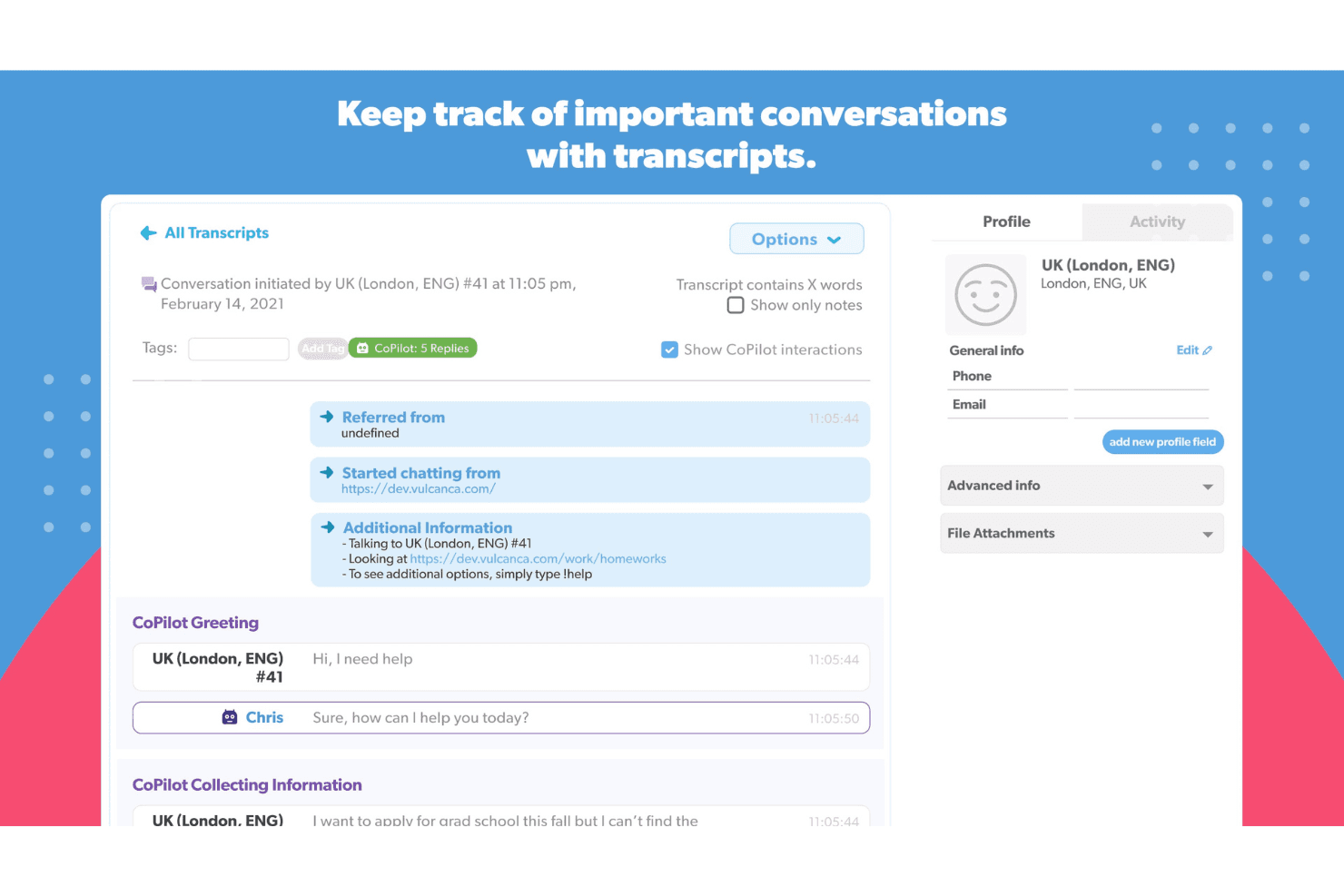
Searchable Transcripts
Quickly retrieve data from chat transcripts for better insights and follow-ups. This feature allows you to analyze past interactions and improve service strategies based on customer feedback.
Custom Forms
Create customized forms to gather specific information from customers. These forms provide your team with valuable context for sales and support, enhancing overall customer experience.
Team Management
Efficiently manage team interactions and performance. With this feature, you can monitor agent activities and maintain consistent service quality.

Ease of Use
Olark’s user interface is straightforward and intuitive, making it easy for your team to get started without a steep learning curve. Users appreciate its clean interface and simple navigation, which allow for quick access to essential features. Setting up chat boxes and customizing them to fit your website's style is a breeze, providing you with flexibility while maintaining ease of use. While some chat tools can overwhelm with complexity, Olark keeps things simple, letting you focus on engaging with your customers effectively.

Integrations
Olark integrates with Salesforce, HubSpot, Mailchimp, Slack, Shopify, WordPress, Desk, SugarCRM, Nutshell, Drupal, Google Analytics, Zendesk, and WooCommerce. Olark also provides an API and connects with third-party integration tools like Zapier, allowing users to create custom solutions and automate workflows.

Olark Specs
- API: Yes
- Batch Permissions & Access: No
- Call Logging: No
- Call Monitoring: No
- Chat: Yes
- Click-to-Dial: No
- Contact Management: Yes
- Customer Management: Yes
- Customer Service: No
- Dashboard: Yes
- Data Export: Yes
- Data Import: No
- Email Integration: No
- Escalation Management: No
- External Integrations: Yes
- Feedback Management: No
- Google Apps Integration: No
- Instant Chat Integration: No
- Knowledge Base: No
- Lead Management: Yes
- Lead Scoring: No
- Marketing Automation: No
- Multi-User: Yes
- Notifications: Yes
- Self-service Portal: No
- Workflow Management: No


