

Il miglior software per sondaggi aziendali aiuta le grandi organizzazioni ad affrontare sfide come il feedback frammentato, la scarsa visibilità sulle risposte e la complessità della gestione di programmi di sondaggi sicuri e rivolti a più team su larga scala. Questi strumenti semplificano la raccolta dei dati, rafforzano la governance e supportano cicli di feedback affidabili nei diversi punti di contatto con clienti e dipendenti.
Grazie alla mia esperienza con le piattaforme tecnologiche e di CX, ho testato questi strumenti valutandone la flessibilità nella progettazione dei sondaggi, la sicurezza, la profondità delle analisi, le integrazioni e l'usabilità. In questa guida analizzo i migliori software per sondaggi aziendali, ciò che li distingue e come scegliere quello più adatto alle dimensioni della tua organizzazione, al tuo stack tecnologico e alla tua strategia di raccolta del feedback.
Che cos'è il software per sondaggi aziendali?
Il software per sondaggi aziendali è una piattaforma che consente alle grandi organizzazioni di raccogliere, gestire e analizzare il feedback su larga scala, supportando sia gli approfondimenti sui clienti sia quelli sui dipendenti. Svolge un ruolo fondamentale nei programmi di voce del cliente (VoC), poiché raccoglie input strutturati nei diversi punti di contatto e li trasforma in dati utilizzabili dai team di CX, risorse umane e operazioni.
Perché fidarsi dei nostri consigli sui software
6,700+
Reviews
20
Industry experts
16+
Evaluation factors
14
Years
Il nostro team testa e recensisce software dal 2012. In quanto leader CX noi stessi, sappiamo quanto sia difficile — e importante — scegliere il software giusto.
Per questa guida, abbiamo valutato gli strumenti attraverso test pratici e ricerche indipendenti, assegnando un punteggio agli strumenti in base ai nostri criteri di selezione.
Le nostre recensioni riflettono il nostro giudizio editoriale umano, non un discorso di vendita.
 Gui DrusinaCreative Director
 Tim FisherVP of AI
Tabella comparativa dei software per sondaggi aziendali
Questa tabella comparativa riassume i dettagli di base di ciascuna delle mie migliori selezioni di software per sondaggi aziendali.
| Tool | Best For | Trial Info | Price | ||
|---|---|---|---|---|---|
| 1 | Ideale per l'analisi dei feedback basata su intelligenza artificiale | Prova gratuita di 14 giorni + demo gratuita disponibile | Prezzo su richiesta | Website | |
| 2 | Ideale per cicli di feedback ricorrenti | Prova gratuita di 14 giorni | Da $19/mese (fatturato annualmente) | Website | |
| 3 | Ideale per la gestione della reputazione su più sedi | Demo gratuita disponibile | Prezzi su richiesta | Website | |
| 4 | Ideale per raccogliere insight dei clienti lungo tutto il percorso | Prova di 10 giorni | Da $56/mese | Website | |
| 5 | Ideale per la personalizzazione di sondaggi open-source | Piano gratuito disponibile | A partire da $74/mese | Website | |
| 6 | Ideale per sondaggi ottimizzati per dispositivi mobili | Piano gratuito disponibile | Da $19/mese | Website | |
| 7 | Ideale per un'implementazione rapida di livello aziendale | Prova gratuita di 7 giorni + demo gratuita disponibile | A partire da $55/utente/mese | Website | |
| 8 | Ideale per comprendere l’esperienza utente sul sito web di un’azienda | Piano gratuito disponibile | A partire da $25/mese (fatturazione annuale) | Website | |
| 9 | Ideale per feedback collaborativi provenienti dalla community | Demo gratuita disponibile | Prezzo su richiesta | Website | |
| 10 | Ideale per il processo decisionale basato sui dati | Prova gratuita di 30 giorni + piano gratuito disponibile | Prezzi su richiesta | Website |


Panoramica dei 10 migliori software per sondaggi aziendali
Di seguito troverai i miei riepiloghi approfonditi delle 10 migliori soluzioni software per sondaggi aziendali oggi disponibili. Ogni recensione include una panoramica delle funzionalità essenziali della piattaforma e una spiegazione del motivo per cui è stata selezionata.
Vedrai anche schermate per una panoramica visiva e informazioni su prove gratuite e prezzi, tutto riassunto in un pratico grafico comparativo. Inoltre, alla fine ho aggiunto altre opzioni extra per chi desidera prendere in considerazione una gamma più ampia di alternative.
Ecco la mia prospettiva su ciascuno dei migliori software per sondaggi aziendali:
 Ideale per l'analisi dei feedback basata su intelligenza artificiale
- Prova gratuita di 14 giorni + demo gratuita disponibile
- Prezzo su richiesta
Visit WebsiteCustomer Rating:4.7/5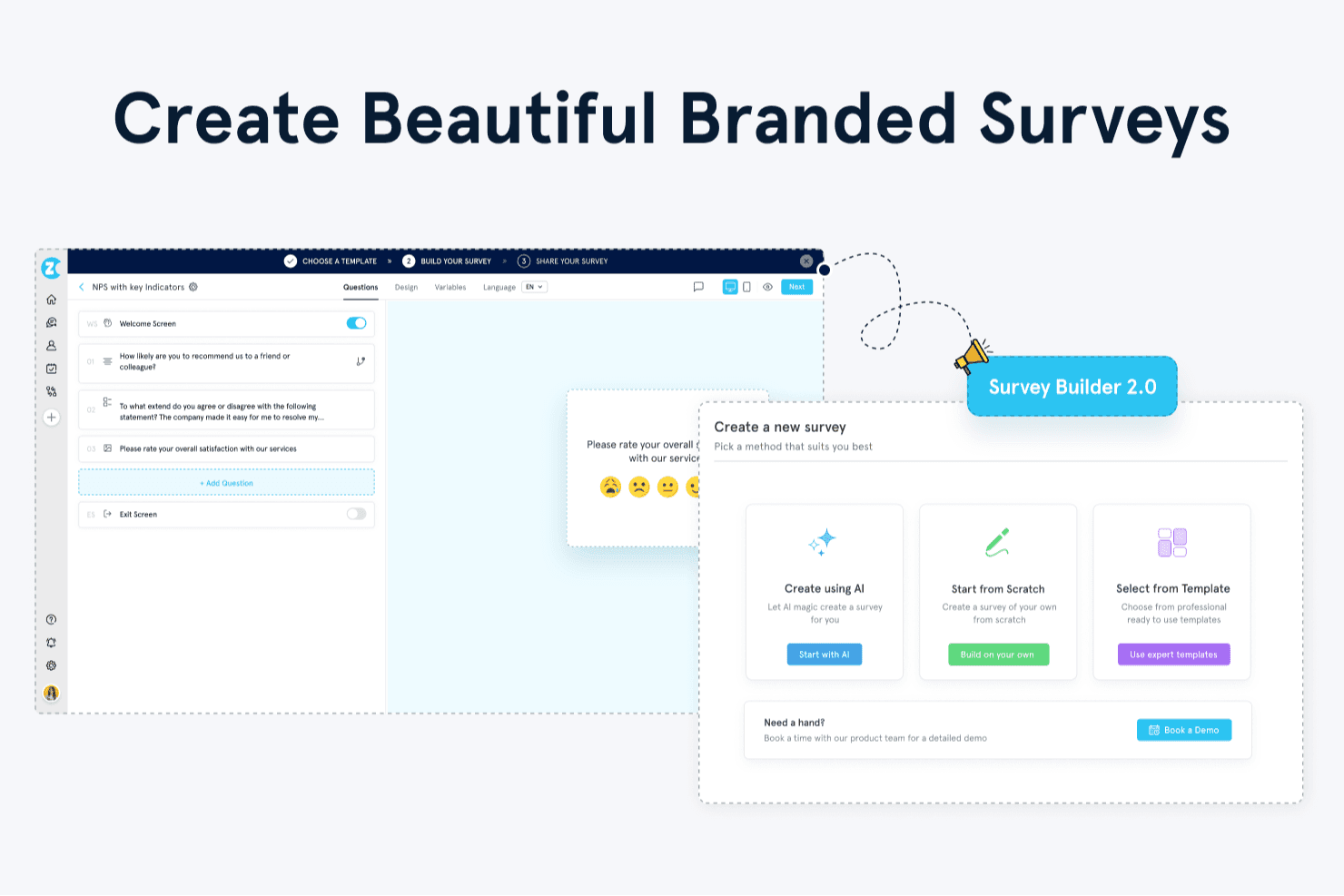
Zonka Feedback offre un Survey Builder 2.0 con opzioni per creare sondaggi utilizzando IA, partire da zero o selezionare template professionali. Zonka Feedback è una piattaforma omnicanale per feedback e sondaggi che unisce la distribuzione di sondaggi su più canali, il monitoraggio delle metriche CX (NPS, CSAT, CES), l'automazione dei workflow a circuito chiuso e l'intelligenza artificiale per l'analisi dei feedback in un unico sistema.
Per chi è ideale Zonka Feedback?
È particolarmente adatto a team di CX e VoC nei settori retail, sanitario e fintech che hanno bisogno di unificare i feedback attraverso touchpoint fisici e digitali.
Perché ho scelto Zonka Feedback
Zonka Feedback si è guadagnato un posto nella mia shortlist grazie al modo in cui gestisce i feedback non strutturati su larga scala. Adoro la funzione AI Impact Analysis, che collega automaticamente i temi ricorrenti delle risposte aperte ai punteggi NPS, CSAT e CES, così posso vedere esattamente quali problemi stanno influenzando i punteggi. Il co-pilota Ask AI mi permette di interrogare in modo conversazionale i dati dei feedback, ottenendo insight da sondaggi, ticket di supporto e recensioni senza dover creare manualmente alcun report.
Caratteristiche principali di Zonka Feedback
- Distribuzione omnicanale dei sondaggi: Crea e condividi sondaggi tramite email, SMS, WhatsApp, web, in-app, totem e canali offline.
- Dashboard basate sui ruoli: Assegna dashboard personalizzate con permessi per i leader CX, i responsabili di reparto e i team operativi.
- Gestione avanzata dei casi: Instrada le segnalazioni, assegna ticket e gestisci workflow a circuito chiuso a partire dalle risposte ai sondaggi in un unico sistema.
- Controlli sulla residenza dei dati: Scegli la regione di hosting dati tra USA, UE, Australia o India per conformità e governance.
Integrazioni di Zonka Feedback
Zonka Feedback offre oltre 50 integrazioni native, tra cui Salesforce, HubSpot, Zendesk, Intercom, Freshdesk, Jira, Slack, Microsoft Teams, Google Sheets e Mailchimp. Zapier e un'API aperta sono disponibili per integrazioni personalizzate.
Pros and Cons
Pros:
- Analisi dei feedback testuali potenziata dall'IA
- Gestione avanzata dei casi e notifiche
- Monitora NPS, CSAT e CES all'interno della piattaforma
Cons:
- Manca un sistema A/B testing integrato per i sondaggi
- I piani più bassi limitano il volume delle risposte
Learn more about Zonka Feedback: Ideale per cicli di feedback ricorrenti
- Prova gratuita di 14 giorni
- Da $19/mese (fatturato annualmente)
Visit WebsiteCustomer Rating:4.4/5
SurveySparrow fornisce grafici a colori per interpretare i dati. SurveySparrow è nella mia lista perché eccelle nella raccolta di dati su più canali. Questo ti consente di raccogliere feedback attraverso diversi mezzi come email, web, mobile e persino social media. La sua versatilità nella distribuzione lo rende una scelta ideale per le aziende che desiderano raccogliere feedback diversificati.
Perché ho scelto SurveySparrow: Mi piace il modo in cui questo strumento è specializzato nel facilitare cicli di feedback ricorrenti, così puoi programmare e inviare sondaggi a intervalli regolari. È perfetto per le aziende interessate al miglioramento continuo. Grazie alle sue capacità di raccolta multi-canale, SurveySparrow ti aiuta a monitorare le variazioni nel tempo, rendendolo eccezionale per meccanismi di feedback continuo e studi longitudinali.
Funzionalità di rilievo e integrazioni di SurveySparrow:
Funzionalità di rilievo includono un'interfaccia amichevole e conversazionale, che rende l'esperienza piacevole per i rispondenti. SurveySparrow offre anche strumenti di reportistica solidi, inclusa la rilevazione NPS e analisi in tempo reale per aiutarti a comprendere il feedback. Puoi anche personalizzare SurveySparrow con white-label, adattando l'aspetto dei sondaggi alla tua identità aziendale.
Integrazioni disponibili con software popolari come Slack, Stripe, Google Sheets e Rybbon. Il software supporta anche l'integrazione con strumenti di automazione marketing come Mailchimp e Facebook Pixel, permettendo la distribuzione automatizzata dei sondaggi e la possibilità di incorporare facilmente i sondaggi. SurveySparrow offre anche supporto API e webhook, offrendo la versatilità di creare integrazioni personalizzate che inseriscano questo strumento nella tua infrastruttura tecnologica.
Pros and Cons
Pros:
- Segmentazione dell'audience
- Logica condizionale
- Supporto per studi longitudinali
Cons:
- Nessuna analisi del sentiment integrata
- Nessuna app mobile nativa
Learn more about SurveySparrow: Ideale per la gestione della reputazione su più sedi
- Demo gratuita disponibile
- Prezzi su richiesta
Visit WebsiteCustomer Rating:4.8/5
Il software offre strumenti di analisi AI per aiutarti a ottenere informazioni dettagliate dalle risposte ai tuoi sondaggi. Birdeye è un software progettato per aiutare le aziende con più sedi a gestire la loro reputazione online. Dispone di strumenti per monitorare le recensioni online del tuo marchio, le liste, i referral e altro ancora, oltre a funzionalità per i sondaggi clienti che consentono di raccogliere e analizzare feedback.
Perché ho scelto Birdeye: Una delle funzionalità principali della piattaforma sono i sondaggi per i clienti, che possono essere utilizzati per raccogliere e analizzare i feedback dei clienti da utilizzare come guida per la strategia di customer experience (CX), marketing e sviluppo prodotto. I sondaggi possono essere preimpostati, automatizzati, aggiunti alle campagne e inviati tramite diversi canali. Inoltre, strumenti analitici basati su AI ti aiutano a interpretare i risultati.
Ma oltre agli strumenti per i sondaggi, la piattaforma offre ampie capacità di gestione della reputazione. Puoi tenere sotto controllo le recensioni online della tua azienda su diversi siti, monitorare le tendenze sui social media rilevanti per il tuo business e gestire tutte le comunicazioni con i clienti in un unico luogo. Questo è ottimo per le aziende di grandi dimensioni che vogliono semplificare la complessità degli strumenti CX.
Caratteristiche principali & integrazioni di Birdeye
Caratteristiche principali includono gli standard di sicurezza della piattaforma. Il software è classificato come Enterprise-Ready dal programma Skyhigh Networks CloudTrust™, il che significa che soddisfa i requisiti più severi della Cloud Security Alliance (CSA) per la protezione dei dati, la verifica dell'identità, la sicurezza del servizio, le pratiche commerciali e la tutela legale.
Inoltre, i data center dell'azienda operano su Amazon Web Services e soddisfano quindi diversi standard e regolamenti di sicurezza, tra cui HIPAA; SOC I, II e III; ISO 27001; e altri.
Le integrazioni includono QuickBooks, Square, Zoho CRM, Zoho Books, Zoho Invoice, Pipedrive, Thryv, Keap, HubSpot, Lightspeed e centinaia di altri strumenti SaaS.
Pros and Cons
Pros:
- Sondaggi e richieste di recensioni personalizzabili
- Benchmark della concorrenza incluso
- Analisi e reportistica basate su AI
Cons:
- Capacità API limitate
- Opzioni di personalizzazione limitate
 Ideale per raccogliere insight dei clienti lungo tutto il percorso
- Prova di 10 giorni
- Da $56/mese
Visit WebsiteCustomer Rating:4.6/5
Survicate ti offre il pieno controllo sulla logica dei sondaggi. Survicate è uno strumento eccellente per la mappatura del percorso del cliente, con strumenti specializzati progettati per aiutarti a tracciare e analizzare le interazioni dei clienti. Di conseguenza, è una scelta ideale per le aziende che vogliono migliorare l'esperienza del cliente, dal primo contatto fino al coinvolgimento post-acquisto.
Perché ho scelto Survicate: Questo strumento eccelle nella raccolta di insight sui clienti all'interno dell'app. Puoi raccogliere feedback in tempo reale direttamente in qualsiasi app, cogliendo l'esperienza dell'utente nel suo contesto. Di conseguenza, i marketer digitali e gli sviluppatori di app ottengono una comprensione più profonda delle preferenze, dei comportamenti e dei punti dolenti degli utenti — tutto ciò senza interrompere il percorso del cliente.
Caratteristiche distintive e integrazioni di Survicate:
Le caratteristiche distintive comprendono una vasta gamma di metodi di distribuzione dei sondaggi, tra cui condivisione di link, email e moduli incorporati. Inoltre, Survicate offre una logica di ramificazione delle domande che aiuta a creare un'esperienza di sondaggio personalizzata e mirata.
Il software include anche un Feedback Hub dove tutti i feedback raccolti possono essere visualizzati in un unico luogo, facilitando l'analisi dei dati e la definizione di conclusioni operative da parte dei membri del team.
Le integrazioni includono ActiveCampaign, Amplitude, Drip, FullStory, Intercom, Klaviyo, Microsoft Teams e Zendesk. Sono disponibili numerose integrazioni native, che facilitano la connessione con qualsiasi piattaforma tecnologica che stai già utilizzando. Le grandi aziende che utilizzano data warehouse possono apprezzare l'integrazione con Google BigQuery e Redshift.
Pros and Cons
Pros:
- Diversi metodi di distribuzione
- Logica di ramificazione delle domande
- Design dei sondaggi personalizzabili
Cons:
- Manca l'analisi del sentiment
- Collaborazione multi-utente limitata
Learn more about Survicate: Ideale per la personalizzazione di sondaggi open-source
- Piano gratuito disponibile
- A partire da $74/mese
Visit WebsiteCustomer Rating:5/5
Formbricks offre ai team pieno controllo sulla personalizzazione e distribuzione dei sondaggi. Formbricks è una piattaforma open-source per sondaggi aziendali che consente di distribuire sondaggi in-app, su siti web, tramite link ed email, offrendo pieno accesso al codice sorgente per una configurazione e un'integrazione personalizzate.
Per chi è ideale Formbricks?
Formbricks è particolarmente adatto per organizzazioni in crescita e imprese che necessitano di un maggiore controllo sull'infrastruttura dei sondaggi, sui dati dei clienti e sull'ambiente di distribuzione.
Perché ho scelto Formbricks
Ho scelto Formbricks come uno dei migliori perché il suo codice open-source AGPLv3 offre ai team accesso diretto alla piattaforma di sondaggi per una personalizzazione avanzata. Al contrario degli strumenti per sondaggi closed-source, puoi ospitare autonomamente la soluzione, esaminare il codice e adattare le parti dell'esperienza di sondaggio alle esigenze dei tuoi flussi di lavoro. Apprezzo anche che l'hosting autonomo basato su Docker fornisca alle organizzazioni maggior controllo sulla posizione e la gestione dei dati di sondaggio.
Funzionalità principali di Formbricks
- Distribuzione multi-canale dei sondaggi: Esegui sondaggi tramite canali in-app, siti web, link ed email da un'unica piattaforma.
- Logica condizionale: Mostra o nascondi domande in base alle risposte precedenti per creare percorsi di sondaggio ramificati.
- Targeting utenti basato su attributi: Attiva sondaggi per segmenti specifici di utenti sulla base di attributi o comportamenti personalizzati.
- Dashboard analitica con intelligenza artificiale: Riassumi i feedback in testo libero e identifica schemi tra le risposte utilizzando le funzionalità AI integrate.
Integrazioni di Formbricks
Formbricks si integra con strumenti come Airtable, Google Sheets, Notion, Slack e WordPress e supporta l'automazione dei processi tramite piattaforme come Activepieces, Make, n8n e Zapier. Offre inoltre webhook e un'API per creare integrazioni personalizzate.
Pros and Cons
Pros:
- Pieno accesso a self-hosting e codice sorgente
- Targeting dei sondaggi in-app basato su eventi
- Soluzione cloud certificata SOC 2 Type II
Cons:
- Richiede competenze tecniche per il self-hosting
- Sviluppato principalmente per sondaggi su esperienza e feedback di prodotto
Learn more about Formbricks: Ideale per sondaggi ottimizzati per dispositivi mobili
- Piano gratuito disponibile
- Da $19/mese
Visit WebsiteCustomer Rating:4.5/5
SurveyLegend ti permette di trascinare e rilasciare una moltitudine di tipologie di domande in un modello accattivante. SurveyLegend è una piattaforma basata sul web progettata per creare, distribuire e analizzare sondaggi, moduli e questionari. I suoi sondaggi ottimizzati per dispositivi mobili sono una caratteristica chiave, garantendo che i questionari siano facilmente accessibili e intuitivi su qualsiasi dispositivo mobile.
Perché ho scelto SurveyLegend:Con SurveyLegend, puoi personalizzare i tuoi sondaggi per rispecchiare il branding della tua azienda cambiando tema, colori, font e sfondi. I flussi logici rendono i questionari più interattivi, permettendo al sistema di identificare i rispondenti più rilevanti e migliorare la qualità dei dati. La piattaforma offre inoltre una funzione di salvataggio automatico che archivia le modifiche mentre lavori, così non devi preoccuparti di perdere i tuoi progressi e puoi concentrarti sulla creazione di sondaggi efficaci.
Caratteristiche distintive e integrazioni di SurveyLegend:
Caratteristiche distintive includono la possibilità di creare sondaggi personalizzati su diversi dispositivi attraverso un'interfaccia intuitiva. Permette anche logiche e ramificazioni, creando un percorso personalizzato che migliora il coinvolgimento dei partecipanti. Per ottimizzare la leggibilità su diversi schermi, SurveyLegend offre una selezione di temi professionali per design dei sondaggi accattivanti.
Integrazioni includono Google Drive, Dropbox, Mailchimp e Salesforce, oltre a piattaforme social come Facebook e Twitter per la condivisione dei sondaggi.
Pros and Cons
Pros:
- Protezione contro i bot spam
- Ottimizzato per dispositivi mobili
- Supporta oltre 50 lingue
Cons:
- Nessuna integrazione gratuita
- Nessuna chat dal vivo nel piano gratuito
Learn more about SurveyLegend: Ideale per un'implementazione rapida di livello aziendale
- Prova gratuita di 7 giorni + demo gratuita disponibile
- A partire da $55/utente/mese
Visit WebsiteCustomer Rating:4.4/5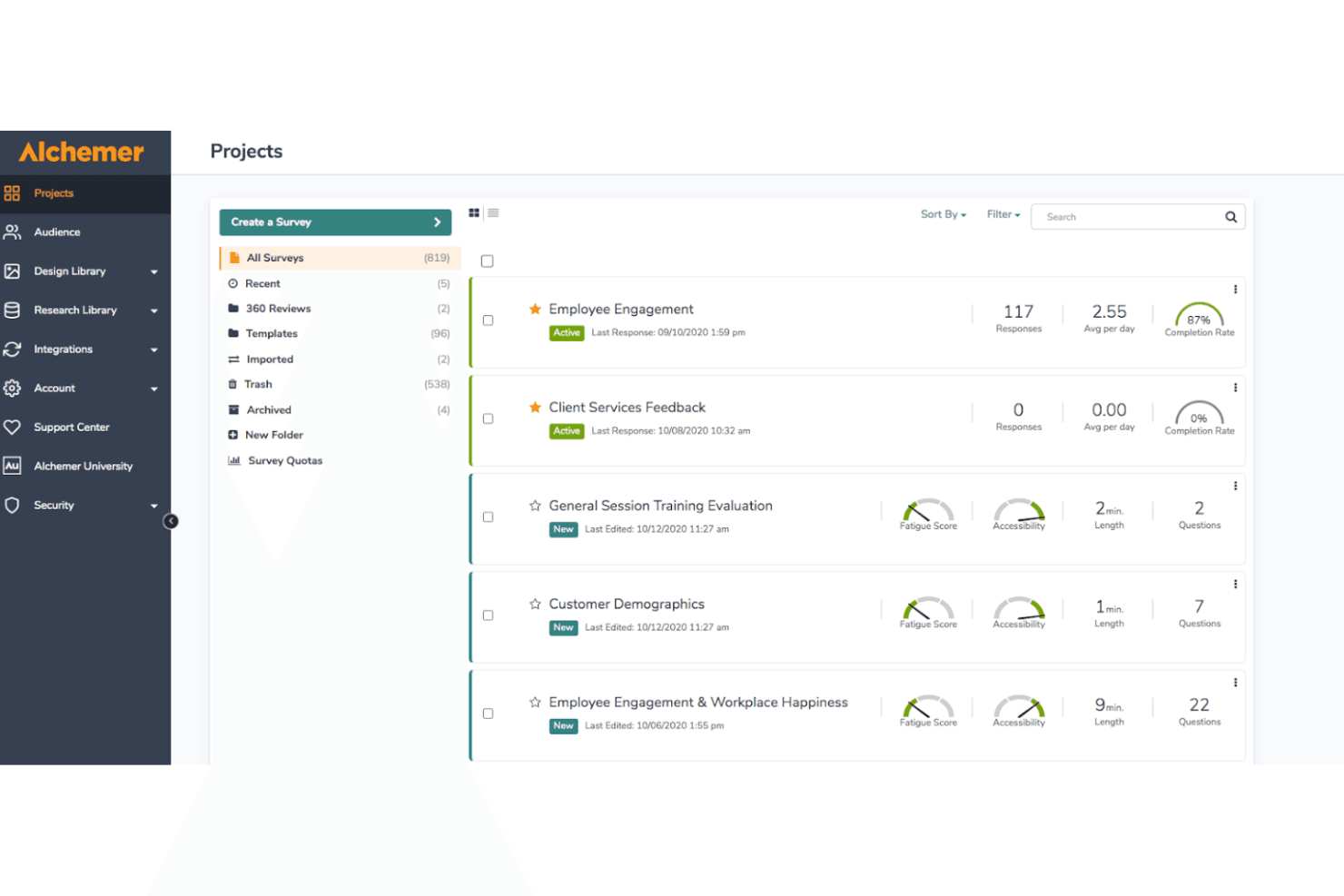
Alchemer aiuta le aziende a gestire più progetti di sondaggio monitorando le risposte, i tassi di completamento, l'accessibilità e la complessità dei sondaggi. Alchemer è una piattaforma aziendale per sondaggi e VoC che combina la raccolta di feedback omnicanale, una logica avanzata per i sondaggi, analisi basate sull'IA e l'automazione dei flussi di lavoro a ciclo chiuso lungo l'intero percorso del cliente.
Per chi è più adatto Alchemer?
Alchemer è adatto ai team di medie e grandi aziende che necessitano di funzionalità VoC sofisticate senza i lunghi tempi di implementazione tipici delle piattaforme più grandi.
Perché ho scelto Alchemer
Alchemer si è guadagnato un posto tra i migliori della mia lista perché la maggior parte delle piattaforme aziendali richiede mesi per l'implementazione, mentre Alchemer consente ai team di iniziare a raccogliere e utilizzare i feedback nel giro di pochi giorni. Apprezzo in particolare il rilevamento dei temi e del sentiment basato sull'IA, che individua schemi nelle risposte a testo libero su larga scala senza dover ricorrere alla codifica manuale. Il suo motore di logica condizionale (ramificazione, inserimento dinamico, randomizzazione) consente inoltre al mio team di creare programmi VoC sofisticati su più punti di contatto senza dipendere dai servizi professionali.
Funzionalità principali di Alchemer
- Distribuzione omnicanale: Distribuisce i sondaggi tramite e-mail, SMS, web, applicazioni, codici QR e altro ancora, per raggiungere un pubblico ampio.
- Strutture personalizzabili per le metriche CX: Supporta modelli nativi per NPS, CSAT, CES e per il calcolo configurabile di punteggi compositi.
- Cruscotti analitici basati sui ruoli: Offre cruscotti segmentati e in tempo reale con autorizzazioni specifiche per ruolo e opzioni di filtraggio.
- Conformità e sicurezza di livello aziendale: Offre SOC 2, GDPR, HIPAA, ISO 27001, SSO e controlli granulari degli accessi.
Integrazioni di Alchemer
Alchemer offre oltre 400 integrazioni native, tra cui Salesforce, HubSpot, Microsoft Teams, Google Sheets, Slack, Tableau, Zendesk, Microsoft Dynamics 365 e ServiceNow. È inoltre disponibile un'API aperta per le integrazioni personalizzate.
Pros and Cons
Pros:
- Implementazione rapida con modelli CX predefiniti
- Logica condizionale efficace per sondaggi complessi
- Analisi del sentiment basata sull'IA per le risposte aperte
Cons:
- La personalizzazione dei cruscotti è limitata senza il supporto tecnico
- La precisione dell'analisi testuale varia nei settori di nicchia
Learn more about Alchemer: Ideale per comprendere l’esperienza utente sul sito web di un’azienda
- Piano gratuito disponibile
- A partire da $25/mese (fatturazione annuale)
Visit WebsiteCustomer Rating:4.7/5
Mouseflow ti permette di raccogliere feedback dagli utenti del tuo sito web sulla base di trigger basati su eventi. Mouseflow è uno strumento completo di analisi dei siti web progettato per offrire approfondimenti dettagliati sul comportamento e le interazioni degli utenti. Grazie a funzionalità avanzate come heatmap, registrazioni delle sessioni e strumenti di feedback, Mouseflow permette alle aziende di comprendere nel dettaglio come i visitatori interagiscono con i loro siti internet.
Perché ho scelto Mouseflow: Sebbene non offra le capacità di sondaggio approfondite delle piattaforme dedicate, il suo punto di forza è il feedback contestuale collegato al reale comportamento degli utenti. Le aziende che desiderano valutare l’efficacia dei contenuti del sito e il percorso utente troveranno Mouseflow particolarmente utile. La possibilità di attivare sondaggi in base a specifiche azioni garantisce che il feedback sia rilevante e tempestivo, offrendo una comprensione più profonda dell’esperienza utente rispetto ai metodi tradizionali.
Caratteristiche distintive e integrazioni di Mouseflow:
Le caratteristiche distintive includono heatmap che forniscono una rappresentazione visiva delle interazioni degli utenti, mettendo in evidenza le aree di maggiore coinvolgimento e i possibili punti critici. Offre anche la replay delle sessioni che consente alle aziende di guardare registrazioni in tempo reale delle sessioni utente, fornendo informazioni utili sul comportamento degli utenti e sulle prestazioni del sito. Inoltre, la funzione di analisi dei funnel aiuta le aziende a seguire il percorso utente e individuare i punti di abbandono.
Le integrazioni includono BigCommerce, WooCommerce, Google Analytics, Google Tag Manager, Zendesk, Omniconvert, Adobe Target, Shopify, Intercom, WordPress, HubSpot, AB Tasty, Convert Experiences e altri.
Pros and Cons
Pros:
- Fornisce approfondimenti dettagliati su come gli utenti interagiscono con i siti web
- Raccolta di feedback utile e tempestiva
- Analisi dei moduli per ottimizzare la generazione di lead
Cons:
- Alcuni utenti potrebbero trovare difficile comprendere i dati presentati
- Beneficerebbe di opzioni di filtro più avanzate
Learn more about Mouseflow: Ideale per feedback collaborativi provenienti dalla community
- Demo gratuita disponibile
- Prezzo su richiesta
Visit WebsiteCustomer Rating:4.7/5
ThoughtExchange offre temi generati dall’IA. ThoughtExchange è uno strumento innovativo progettato per raccogliere idee tramite il crowdsourcing, permettendo di attingere all’intelligenza collettiva attraverso discussioni su larga scala e interattive. È un’ottima soluzione per le aziende che desiderano promuovere il coinvolgimento di clienti o dipendenti e ottenere feedback approfonditi.
Perché ho scelto ThoughtExchange: Questo strumento ha attirato la mia attenzione grazie alle sue impostazioni di privacy personalizzabili, che consentono contributi anonimi e favoriscono feedback sinceri e aperti. Il software è anche scalabile, quindi è adatto sia per discussioni in piccoli gruppi che per grandi progetti di comunità. Inoltre, ho apprezzato il fatto che ThoughtExchange sia applicabile in diversi contesti, dalle valutazioni interne dei team alle consultazioni con gli stakeholder.
Caratteristiche distintive e integrazioni di ThoughtExchange:
Tra le funzionalità principali c’è un sistema che permette ai partecipanti di valutare le idee, così da individuare facilmente gli spunti chiave. Altre caratteristiche degne di nota sono le mappe di calore e l’analisi del sentiment. ThoughtExchange consente anche il caricamento di immagini e video per arricchire le discussioni. Inoltre, la dashboard offre opzioni avanzate di filtraggio, che permettono di esplorare i dati e identificare i temi più rilevanti.
Le integrazioni includono Google Calendar, Microsoft Teams, Outlook Calendar e Slack. Per le organizzazioni che utilizzano sistemi di gestione dell’apprendimento (Learning Management Systems), ThoughtExchange rappresenta un’ottima scelta. Le integrazioni con piattaforme come Moodle facilitano le discussioni in contesti formativi o accademici.
Pros and Cons
Pros:
- Supporta contenuti multimediali
- Funzionalità di interazione dinamica
- Favorisce processi decisionali democratici
Cons:
- Tipologie di domande limitate
- Non consente la raccolta dati offline
Learn more about Thoughtexchange: Ideale per il processo decisionale basato sui dati
- Prova gratuita di 30 giorni + piano gratuito disponibile
- Prezzi su richiesta

Qualtrics CoreXM ti aiuta a monitorare le metriche più importanti dei sondaggi. Ho scelto Qualtrics CoreXM per la sua attenzione alla gestione delle esperienze. La piattaforma va oltre i sondaggi per coprire le esperienze di dipendenti, clienti, prodotti e marchi. Grazie alla sua piattaforma XM e ai moduli specializzati, è un'ottima scelta per le aziende che cercano una comprensione a 360 gradi dei feedback.
Perché ho scelto Qualtrics CoreXM: Questo strumento è una solida piattaforma di gestione delle esperienze per misurare e migliorare le esperienze degli stakeholder. Qualtrics CoreXM offre una piattaforma unica e centralizzata per raccogliere, analizzare e utilizzare dati importanti.
Le analisi e gli approfondimenti sofisticati rendono Qualtrics la piattaforma di riferimento per le aziende in crescita che si concentrano sul processo decisionale basato sui dati. Questo la rende perfetta per le aziende che devono sia raccogliere dati sia comprenderne il contesto.
Caratteristiche distintive e integrazioni di Qualtrics CoreXM:
Le caratteristiche distintive includono l'analisi del sentiment e l'analisi avanzata del testo, che aiutano ad approfondire le risposte aperte. Qualtrics supporta inoltre funzioni avanzate per i sondaggi, come la logica di salto e i percorsi condizionali, creando sondaggi più pertinenti e personalizzati per i partecipanti.
Qualtrics offre una serie di librerie di domande e modelli predefiniti conformi alle migliori pratiche del settore. Questo aiuta a risparmiare tempo e a creare facilmente sondaggi di alta qualità.
Le integrazioni includono connessioni con molti sistemi CRM, tra cui Salesforce, insieme a strumenti di visualizzazione dei dati come Tableau. Se desideri combinare i dati dei sondaggi con altre metriche, sarai felice di sapere che Qualtrics si integra con piattaforme web come Google Analytics e Adobe Analytics.
Puoi anche creare integrazioni personalizzate tramite l'API. Questo ti offre la flessibilità di collegare Qualtrics alle soluzioni aziendali esistenti, garantendo un approccio unificato ai dati.
Pros and Cons
Pros:
- Piattaforma XM completa
- Analisi avanzata del testo
- Supporto per i percorsi condizionali
Cons:
- Richiede formazione per un utilizzo completo
- Personalizzazione limitata nei report
Learn more about Qualtrics CoreXM:
Altre opzioni
Durante la mia ricerca ho anche selezionato diversi altri strumenti. Sebbene non siano rientrati nella mia selezione dei 10 migliori software per sondaggi aziendali, vale comunque la pena esaminarli, poiché potrebbero adattarsi meglio alle tue esigenze:
- 11SurveyMonkey Enterprise Ideale per il deployment di sondaggi su larga scala
- 12Typeform EnterpriseIdeale per un'esperienza utente conversazionale
- 13Zoho SurveyIdeale per la scalabilità a livello aziendale
- 14AttestIdeale per agilità nella ricerca di mercato
- 15Suzy InsightsIdeale per insight sui consumatori in tempo reale
- 16JotformIdeale per sondaggi con elevata sicurezza dei dati
- 17SogolyticsIdeale per la personalizzazione di sondaggi a livello aziendale
Come valuto i software per sondaggi aziendali
Valuto questi strumenti su due livelli: le funzionalità di base richieste da un programma VoC e i fattori di differenziazione che distinguono le migliori piattaforme dai semplici costruttori di sondaggi.
Funzionalità chiave (Requisiti Minimi per questa Lista)
Quando seleziono gli strumenti per la mia lista, valuto ciascuno su una scala da 0 (non offre la funzionalità) a 5 (eccelle in quest'area) per ogni funzionalità chiave elencata di seguito. Poi, calcolo il punteggio totale dello strumento in percentuale. Ogni strumento deve raggiungere un punteggio minimo totale del 65% per essere preso in considerazione.
- Distribuzione multicanale dei sondaggi: Controllo su quanti canali una piattaforma consente di inviare sondaggi—email, SMS, web intercept, in-app, codici QR—e se gestisce volumi aziendali senza limitazioni.
- Framework metrici CX integrati: Le piattaforme dovrebbero offrire modelli nativi NPS, CSAT e CES con la logica di punteggio già configurata, così il tuo team non dovrà costruire i calcoli delle metriche da zero.
- Logica avanzata e progettazione dei sondaggi: Valuto branching, piping, logica di salto e supporto multilingue—elementi che servono quando si eseguono sondaggi post-acquisto su diverse regioni e segmenti di clientela.
- Analisi in tempo reale e dashboard: Qui sono importanti dashboard basate sui ruoli. Un responsabile del programma VoC e un responsabile operativo regionale necessitano di visualizzazioni diverse degli stessi dati, con filtri e monitoraggio delle tendenze inclusi.
- Automazione dei workflow a ciclo chiuso: Cerco la capacità di attivare avvisi, assegnare compiti di follow-up e instradare casi quando arriva una risposta da un detrattore—passando dall’insight all’azione all’interno della piattaforma.
- Integrazioni e sicurezza enterprise: La piattaforma dovrebbe collegarsi a CRM, CDP e stack BI tramite connettori predefiniti o API aperti, garantendo allo stesso tempo la conformità a standard come SOC 2 e GDPR.
Dopo aver individuato gli strumenti che soddisfano questi requisiti, considero ciò che distingue ogni piattaforma.
Fattori di differenziazione (Cosa distingue i fornitori)
Ecco come confronto e metto a confronto vari fornitori:
Funzionalità distintive
L'analisi testuale guidata dall'intelligenza artificiale è un importante elemento di differenziazione—valuto se una piattaforma può categorizzare automaticamente migliaia di risposte aperte in temi azionabili senza etichettatura manuale. È rilevante anche l'orchestrazione del feedback basata sui percorsi. Le piattaforme più solide consentono di mappare i sondaggi su touchpoint specifici e di regolare la frequenza, evitando che un cliente riceva tre sondaggi in una settimana. Cerco anche il benchmarking di settore che permetta di confrontare i tuoi punteggi NPS o CSAT con quelli di aziende simili nel tuo settore.
Oltre le funzionalità
La profondità di integrazione è uno dei primi aspetti che verifico—la tua piattaforma per sondaggi deve poter inviare dati a Salesforce, Genesys o qualsiasi stack di CRM e contact center utilizzi, non solo esportare file CSV. La conformità è altrettanto importante, soprattutto se il tuo programma VoC raccoglie feedback da settori regolamentati dove sono richieste certificazioni come HIPAA o SOC 2 Type II. Valuto anche la trasparenza dei prezzi, dato che i contratti per sondaggi aziendali variano sensibilmente tra modelli pay-per-response, per utente e illimitati che influenzano il costo totale quando il programma cresce.
Caratteristiche principali del software per sondaggi aziendali
Per soddisfare i requisiti fondamentali descritti sopra, queste sono le principali caratteristiche che ritengo indispensabili per un software per sondaggi di livello aziendale:
- Personalizzazione delle domande: Deve consentire di personalizzare le domande del sondaggio e i tipi di risposta, permettendo di ottenere riscontri più precisi.
- Logica e ramificazione del sondaggio: la logica condizionale avanzata consente di creare flussi personalizzati, migliorando l'esperienza dei partecipanti e garantendo la pertinenza dei dati.
- Analisi dei dati e reportistica: il software dovrebbe offrire solidi strumenti di analisi per interpretare i risultati dei sondaggi e generare report dettagliati.
- Monitoraggio delle risposte in tempo reale: i pannelli di controllo in tempo reale aiutano i team aziendali a monitorare l'andamento dei sondaggi mentre si svolgono, una soluzione ideale per i flussi di lavoro agili di risposta o di escalation.
- Distribuzione multicanale: ogni buon software per sondaggi dovrebbe consentire di distribuirli su più piattaforme, come web, e-mail, SMS e social network.
- Ottimizzazione per dispositivi mobili: anche nei contesti B2B, una parte significativa dei sondaggi viene completata su dispositivi mobili. Un'esperienza mobile nativa aumenta i tassi di risposta e riduce gli ostacoli.
- Sicurezza e conformità: la sicurezza dei dati è fondamentale per le grandi aziende, quindi il software deve rispettare gli standard di conformità pertinenti.
- Controllo degli accessi basato sui ruoli: team diversi, ad esempio risorse umane, marketing e prodotto, potrebbero necessitare di livelli di accesso differenti. Questa funzione garantisce la sicurezza e la governance dei dati, consentendo agli amministratori di controllare chi può visualizzare, modificare o distribuire sondaggi e report.
- Flussi di lavoro automatizzati: lo strumento dovrebbe includere funzioni che attivano azioni in base alle risposte ai sondaggi, come l'aggiornamento di un record cliente o l'invio di un'e-mail di seguito.
- Integrazioni aziendali: la comoda integrazione con altre soluzioni, come CRM, piattaforme di commercio elettronico e servizi di assistenza, è un requisito essenziale.
Usabilità
Nel compilare il mio elenco, ho preferito le piattaforme facili da utilizzare e in grado di offrire anche una buona esperienza utente. Naturalmente, acquisire dimestichezza con un nuovo software richiede sempre un certo periodo di apprendimento. Tuttavia, il team responsabile dell'esperienza del cliente non dovrebbe perdere tempo per imparare a usare le funzioni di base.
Ho scelto strumenti con interfacce moderne e intuitive e menu e opzioni progettati con cura. I professionisti CX del tuo team dovrebbero riuscire a trovare e utilizzare le funzioni senza difficoltà.
Analisi
Mi sono concentrato su strumenti software con funzioni dettagliate di analisi e reportistica. In particolare, ho cercato strumenti in grado sia di raccogliere dati sia di trasformarli in informazioni utili. Di conseguenza, i tuoi manager possono prendere decisioni basate sui dati, individuare le tendenze emergenti e valutare i cambiamenti nella percezione dei clienti.
Integrazioni software
Tutti gli strumenti del mio elenco offrono integrazioni con le piattaforme aziendali più diffuse. A livello aziendale, è essenziale che ogni componente software interagisca senza problemi con il resto dell'infrastruttura tecnologica. La maggior parte degli strumenti di livello aziendale include anche l'accesso alle API per integrazioni specializzate.
Prezzi
Il costo è sempre un fattore importante, soprattutto quando si opera su larga scala. Gli strumenti software presenti in questo elenco spaziano da soluzioni più economiche con buone funzionalità a soluzioni di fascia alta che offrono funzioni avanzate e ampie possibilità di personalizzazione. Questi strumenti solitamente prevedono prezzi a livelli oppure forniscono servizi alle aziende sulla base di preventivi personalizzati. Il software di livello aziendale generalmente non offre una versione gratuita né un'opzione gratuita per i sondaggi online, ma alcuni strumenti offrono periodi di prova.
Tendenze del software per sondaggi aziendali
Il software per sondaggi aziendali si è evoluto ben oltre i semplici strumenti per la creazione di moduli. Oggi, le principali piattaforme integrano tecnologie all'avanguardia e strategie CX per offrire informazioni più approfondite, risposte più rapide e un'automazione più intelligente. Ecco alcune delle principali tendenze che stanno trasformando questo settore:
1. Analisi testuale basata sull'IA
Poiché le risposte a testo libero stanno diventando sempre più comuni e preziose, l'IA interviene per renderle gestibili su larga scala. Le piattaforme più recenti utilizzano ora l'elaborazione del linguaggio naturale (NLP) e l'apprendimento automatico per:
- Rilevare il sentiment nei commenti dei clienti o dei dipendenti
- Categorizzare automaticamente le risposte in base ai temi
- Far emergere in tempo reale i problemi emergenti o le tendenze nei riscontri sui prodotti. Questo consente di risparmiare tempo e garantisce che i riscontri non strutturati non vadano persi nel rumore di fondo.
2. Pannelli di controllo e avvisi in tempo reale
Gli strumenti aziendali moderni danno priorità alla visibilità in tempo reale. I pannelli di controllo si aggiornano man mano che arrivano le risposte e i team possono configurare avvisi immediati basati su determinate parole chiave, punteggi bassi, come l'NPS, o riscontri ad alta priorità, consentendo attività di seguito più rapide e strategie di risposta più agili.
3. Integrazioni fluide nell'intero stack tecnologico
Oggi gli utenti aziendali si aspettano che il software per sondaggi si integri direttamente con CRM, strumenti di analisi, servizi di assistenza e piattaforme di marketing. Molti fornitori offrono ora integrazioni native e API aperte per garantire che i dati dei sondaggi possano attivare flussi di lavoro, alimentare report e arricchire automaticamente i profili dei clienti.
4. Sondaggi integrati e contestuali
Anziché affidarsi esclusivamente a campagne email o a link generici ai sondaggi, le piattaforme supportano ora sondaggi nell'app, finestre pop-up e richieste di feedback contestuali che compaiono nei momenti chiave del percorso del cliente. Questo porta a tassi di risposta più elevati e a feedback più pertinenti.
5. Maggiore attenzione alla privacy e alla governance dei dati
Con l'inasprimento delle normative sulla privacy (GDPR, CCPA, HIPAA, ecc.), gli strumenti per sondaggi aziendali stanno investendo massicciamente in funzionalità di conformità, monitoraggio del consenso degli utenti, crittografia e controlli degli accessi basati sui ruoli. Le piattaforme che non riescono a dimostrare un solido livello di conformità vengono sempre più spesso escluse dalle selezioni aziendali.
6. Logica avanzata dei sondaggi e personalizzazione
Gli strumenti di livello aziendale offrono ora percorsi adattivi delle domande, logica di salto e flussi di sondaggio personalizzati in base ai dati del CRM o alle risposte precedenti. Questo migliora la qualità delle risposte e riduce l'affaticamento da sondaggi, un aspetto fondamentale quando si intervistano clienti di alto valore o team interni molto impegnati.
Domande frequenti sul software per sondaggi aziendali
Stai ancora cercando di capire come il software per sondaggi aziendali possa migliorare la gestione dell’esperienza cliente? Ecco alcune risposte alle domande frequenti che dovrebbero aiutarti a chiarire ogni dubbio:
Perché i sondaggi sulla soddisfazione dei clienti sono importanti?
\u003cspan style=\u0022font-weight: 400;\u0022\u003eI sondaggi sulla soddisfazione dei clienti\u003c/span\u003e\u003cspan style=\u0022font-weight: 400;\u0022\u003e rappresentano\u003c/span\u003e\u003cspan style=\u0022font-weight: 400;\u0022\u003e uno strumento importante per comprendere la voce del cliente. Possono offrire una grande quantità di informazioni utili a prendere decisioni aziendali migliori. I sondaggi forniscono \u003c/span\u003e\u003cspan style=\u0022font-weight: 400;\u0022\u003e informazioni utili e utilizzabili\u003c/span\u003e\u003cspan style=\u0022font-weight: 400;\u0022\u003e che aiutano le organizzazioni a offrire un servizio migliore a tutti i loro stakeholder. \u003c/span\u003e\r\n\r\n\u003cspan style=\u0022font-weight: 400;\u0022\u003eQueste informazioni possono essere utilizzate per guidare lo sviluppo di prodotti migliori, perfezionare le strategie di marketing e migliorare le esperienze.\u003c/span\u003e
Che tipo di feedback dovresti chiedere ai tuoi clienti?
Quando progetti il sondaggio, è una buona idea includere una combinazione di domande qualitative e quantitative. Le domande qualitative sono generalmente aperte e consentono di approfondire motivazioni, opinioni ed esperienze dei clienti. Le domande quantitative possono essere a scelta multipla o basate su una scala. Il loro obiettivo è fornire dati statistici facili da analizzare e comprendere.
Combinando entrambi i tipi di domande, puoi ottenere una comprensione completa di ciò che pensa il tuo pubblico target e di come si sente. In questo modo è più semplice individuare miglioramenti efficaci.
Qual è la differenza tra un sondaggio NPS e uno CES?
Punteggio del promotore netto (NPS) e punteggio dello sforzo del cliente (CES) sono entrambi indicatori utili, ma vengono utilizzati in modi molto diversi. I sondaggi NPS mirano a misurare la fedeltà dei clienti attraverso una singola domanda, ad esempio: “Quanto è probabile che tu raccomandi il nostro prodotto/servizio a un amico o collega?\u0022
Solitamente misurate su una scala da 0 a 10, queste risposte possono fornire una chiara indicazione dell’opinione dei clienti sul tuo marchio. Possono inoltre aiutare a prevedere il potenziale di crescita.
I sondaggi CES, invece, si concentrano generalmente sulla facilità di interazione con il prodotto o il servizio. Possono includere domande come “Quanto è stato facile risolvere il tuo problema utilizzando il nostro servizio?\u0022 In questo caso, l’obiettivo è raccogliere feedback che identifichi i punti di attrito durante l’esperienza cliente, così da poterli eliminare in futuro.
Qual è la differenza tra il software per sondaggi aziendali e gli strumenti di base per sondaggi?
\u003cp class=\u0022\u0022 data-start=\u0022238\u0022 data-end=\u0022556\u0022\u003eIl software per sondaggi aziendali si distingue dagli strumenti standard per sondaggi sia per dimensioni sia per sofisticazione. Mentre le piattaforme di base possono essere adatte alla semplice raccolta di feedback, le soluzioni di livello aziendale sono progettate per organizzazioni che necessitano di analisi avanzate, automazione, governance dei dati e integrazione tra reparti.\u003c/p\u003e
\u003cp class=\u0022\u0022 data-start=\u0022558\u0022 data-end=\u0022582\u0022\u003eLe differenze principali includono:\u003c/p\u003e
\u003cul data-start=\u0022583\u0022 data-end=\u0022985\u0022\u003e
\t\u003cli class=\u0022\u0022 data-start=\u0022583\u0022 data-end=\u0022653\u0022\u003e
\u003cp class=\u0022\u0022 data-start=\u0022585\u0022 data-end=\u0022653\u0022\u003e\u003cstrong data-start=\u0022585\u0022 data-end=\u0022617\u0022\u003eLogica e ramificazione avanzate\u003c/strong\u003e per esperienze di sondaggio personalizzate\u003c/p\u003e
\u003c/li\u003e
\t\u003cli class=\u0022\u0022 data-start=\u0022654\u0022 data-end=\u0022725\u0022\u003e
\u003cp class=\u0022\u0022 data-start=\u0022656\u0022 data-end=\u0022725\u0022\u003e\u003cstrong data-start=\u0022656\u0022 data-end=\u0022686\u0022\u003eControlli di accesso basati sui ruoli\u003c/strong\u003e per supportare in sicurezza la collaborazione del team\u003c/p\u003e
\u003c/li\u003e
\t\u003cli class=\u0022\u0022 data-start=\u0022726\u0022 data-end=\u0022804\u0022\u003e
\u003cp class=\u0022\u0022 data-start=\u0022728\u0022 data-end=\u0022804\u0022\u003e\u003cstrong data-start=\u0022728\u0022 data-end=\u0022760\u0022\u003eFunzionalità di conformità integrate\u003c/strong\u003e per GDPR, HIPAA e altre normative sui dati\u003c/p\u003e
\u003c/li\u003e
\t\u003cli class=\u0022\u0022 data-start=\u0022805\u0022 data-end=\u0022890\u0022\u003e
\u003cp class=\u0022\u0022 data-start=\u0022807\u0022 data-end=\u0022890\u0022\u003e\u003cstrong data-start=\u0022807\u0022 data-end=\u0022847\u0022\u003eStrumenti di analisi e reportistica più approfonditi\u003c/strong\u003e per ottenere informazioni utili, non solo per raccogliere dati\u003c/p\u003e
\u003c/li\u003e
\t\u003cli class=\u0022\u0022 data-start=\u0022891\u0022 data-end=\u0022985\u0022\u003e
\u003cp class=\u0022\u0022 data-start=\u0022893\u0022 data-end=\u0022985\u0022\u003e\u003cstrong data-start=\u0022893\u0022 data-end=\u0022921\u0022\u003eFunzionalità di integrazione\u003c/strong\u003e che collegano i dati dei sondaggi a CRM, ERP e piattaforme di analisi\u003c/p\u003e
\u003c/li\u003e
\u003c/ul\u003e
\u003cp class=\u0022\u0022 data-start=\u0022987\u0022 data-end=\u00221198\u0022\u003eIn definitiva, il software per sondaggi aziendali è progettato per servire organizzazioni di grandi dimensioni con esigenze complesse, garantendo che il feedback possa essere raccolto su larga scala, segmentato in modo significativo e trasformato in azioni in tutta l’azienda.\u003c/p\u003e
In che modo le integrazioni migliorano le funzionalità del software per sondaggi aziendali?
Come puoi migliorare i tassi di risposta ai sondaggi aziendali?
Quali sono le metriche chiave per misurare l'efficacia dei sondaggi?
Altre recensioni di software per sondaggi
Ora che hai già in mente i software per sondaggi, ecco alcuni ulteriori tipi di software per sondaggi che potrebbero interessarti:
- Migliori software per sondaggi online
- Migliori software per il Net Promoter Score e strumenti per sondaggi NPS
- Migliori strumenti per creare sondaggi e raccogliere il feedback dei clienti
- Migliori software per l'analisi dei sondaggi
- Migliori software per l'analisi dei dati qualitativi
- Migliori strumenti gratuiti per sondaggi