

10 migliori alternative a Typeform per i sondaggi ai clienti nel 2026

Elenco delle alternative a Typeform


Le migliori alternative a Typeform offrono strumenti intuitivi per la creazione di moduli, personalizzazione flessibile e raccolta affidabile dei dati, senza le limitazioni dei prezzi o delle funzionalità di Typeform. Se stai cercando un nuovo strumento per creare moduli, probabilmente hai bisogno di soluzioni che supportino un numero maggiore di risposte, logiche avanzate o integrazioni più approfondite, senza rinunciare alla facilità d'uso.
Scegliere l'alternativa giusta può aiutare il tuo team a raccogliere il feedback dei clienti, accogliere nuovi utenti o gestire i sondaggi in modo più efficiente.
In questa guida troverai un elenco selezionato delle migliori alternative a Typeform, con confronti chiari che ti aiuteranno a scegliere quella più adatta al tuo flusso di lavoro e alle esigenze della tua attività.
Che cos'è Typeform?
Typeform è uno strumento online per la creazione di moduli che consente di creare moduli interattivi, sondaggi e quiz con un design conversazionale. Viene utilizzato dai team per raccogliere feedback, acquisire contatti e automatizzare la raccolta dei dati.
Typeform si distingue per la sua interfaccia intuitiva e i suoi moduli visivamente coinvolgenti. Tuttavia, alcuni utenti cercano alternative per accedere a funzionalità più avanzate, prezzi migliori o integrazioni specifiche che Typeform potrebbe non offrire.
Tabella di confronto delle alternative a Typeform
Questa tabella di confronto riassume i dettagli sui prezzi delle mie migliori alternative a Typeform:
| Tool | Best For | Trial Info | Price | ||
|---|---|---|---|---|---|
| 1 | Ideale per la raccolta di feedback multicanale | Prova gratuita di 14 giorni | Da $19/mese (fatturazione annuale) | Website | |
| 2 | Ideale per la personalizzazione del brand | Prova gratuita di 7 giorni + piano gratuito disponibile | Da $24/mese (fatturato annualmente) | Website | |
| 3 | Ideale per reportistica avanzata dei dati | Piano gratuito disponibile | Da $30/utente/mese (fatturazione annuale) | Website | |
| 4 | Ideale per logiche avanzate nei sondaggi | Demo gratuita disponibile | Prezzi su richiesta | Website | |
| 5 | Ideale per l'integrazione nativa con Salesforce | Prova gratuita di 14 giorni + demo gratuita disponibile | Da $83/mese (fatturato annualmente) | Website | |
| 6 | Ideale per la raccolta dati sicura e complessa | Prova gratuita di 14 giorni disponibile | Da $21/mese (fatturazione annuale) | Website | |
| 7 | Ideale per accesso offline | Piano gratuito disponibile + demo gratuita disponibile | Da $10/mese (fatturazione annuale) | Website | |
| 8 | Ideale per la collaborazione in Google Workspace | Piano gratuito disponibile | Piano gratuito disponibile; da $7/utente/mese (fatturato annualmente) per Google Workspace | Website | |
| 9 | Ideale per la compatibilità con Microsoft 365 | Prova gratuita di 30 giorni | Da $9,99/utente/mese (Microsoft 365 Business Basic o incluso nei piani Microsoft 365) | Website | |
| 10 | Ideale per moduli e invii illimitati | Prova gratuita di 7 giorni | Da ₹7,931/3mesi + 18% IVA | Website |
Perché fidarsi dei nostri consigli sui software
Il nostro team testa e recensisce software dal 2012. In quanto leader CX noi stessi, sappiamo quanto sia difficile — e importante — scegliere il software giusto.
Per questa guida, abbiamo valutato gli strumenti attraverso test pratici e ricerche indipendenti, assegnando un punteggio agli strumenti in base ai nostri criteri di selezione.
Le nostre recensioni riflettono il nostro giudizio editoriale umano, non un discorso di vendita.
Recensioni delle alternative a Typeform
Di seguito sono riportati i miei riepiloghi dettagliati delle alternative a Typeform incluse nel mio elenco. Le mie recensioni offrono un’analisi approfondita delle funzionalità, delle integrazioni e dei casi d’uso migliori di ogni strumento per la creazione di moduli, per aiutarti a trovare quello più adatto a te.

Ideale per la raccolta di feedback multicanale
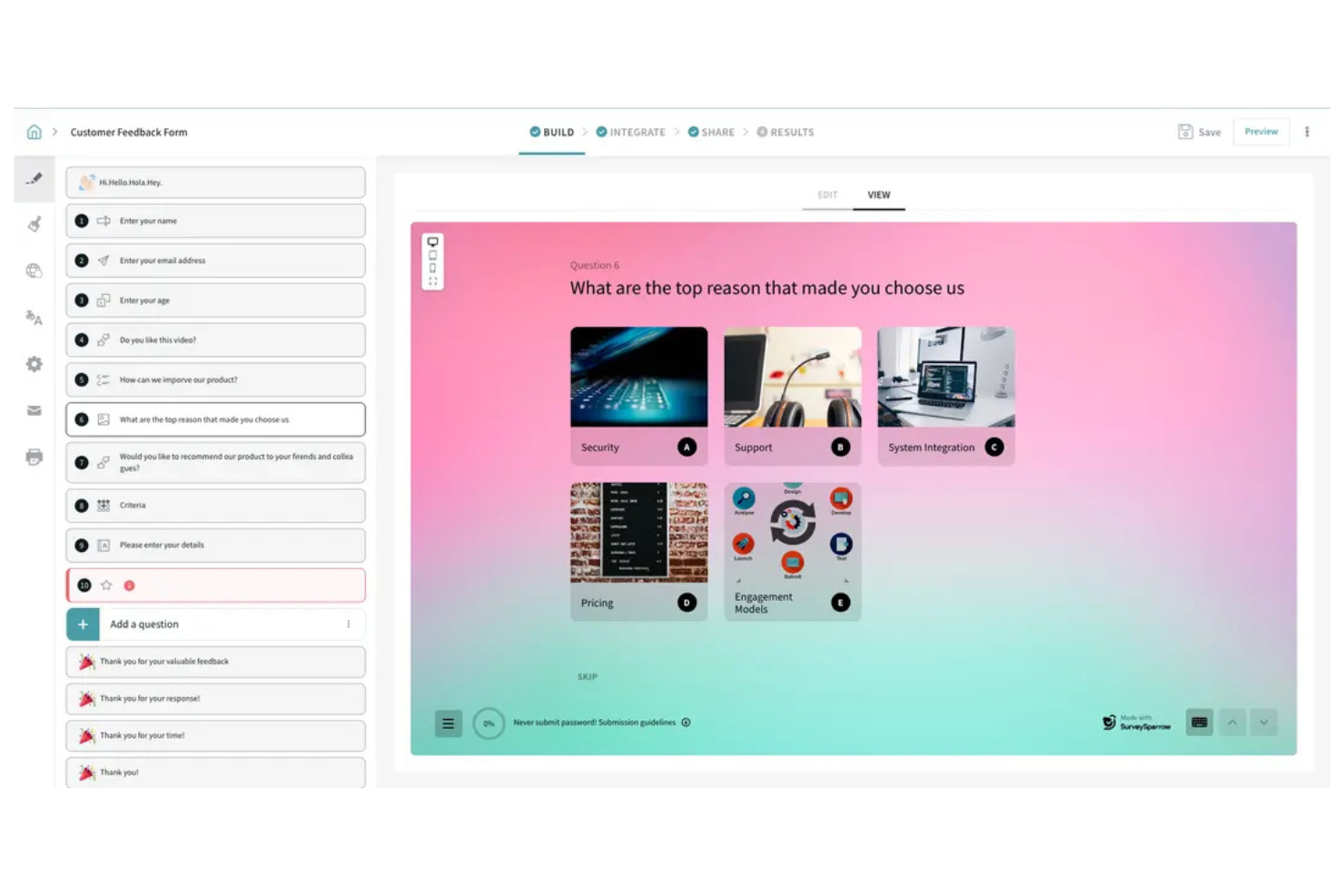
SurveySparrow offre un approccio conversazionale a sondaggi e moduli, rendendolo interessante per i team che vogliono aumentare i tassi di risposta. È una buona soluzione per aziende e organizzazioni che hanno bisogno di raccogliere feedback attraverso diversi canali, come web, mobile e chat. Se cerchi uno strumento flessibile che si adatti a varie esigenze di raccolta feedback, SurveySparrow vale la pena di essere considerato.
Per chi è ideale SurveySparrow?
SurveySparrow è una scelta efficace per i team dedicati all’esperienza cliente e per i marketer che hanno la necessità di raccogliere feedback su diversi canali digitali.
Perché SurveySparrow è una valida alternativa a Typeform
Ciò che distingue SurveySparrow da altri strumenti popolari è la capacità di raccogliere feedback su web, mobile, email, chat e persino offline. L’ho scelto per i team che hanno bisogno di raggiungere i rispondenti ovunque si trovino, senza essere limitati a una sola piattaforma. L’automazione dei sondaggi ricorrenti di SurveySparrow e l’interfaccia dei sondaggi simile a una chat rendono facile coinvolgere gli utenti in contesti diversi. Queste funzionalità permettono di raccogliere feedback più diversificati e utili rispetto ai classici form builder.
Funzionalità principali di SurveySparrow
Altre funzionalità di rilievo per i team che valutano SurveySparrow includono:
- Logica condizionale: Crea moduli dinamici che mostrano o nascondono domande in base alle risposte precedenti.
- White labeling: Personalizza i sondaggi con branding, logo e dominio della tua azienda.
- Template NPS e CSAT: Accedi a modelli già pronti per misurare la soddisfazione e la lealtà del cliente.
- Collaborazione tra team: Assegna ruoli, condividi i sondaggi e gestisci autorizzazioni all’interno del tuo team.
Integrazioni SurveySparrow
Le integrazioni includono Salesforce, HubSpot, Shopify, Mailchimp, Google Analytics, Tableau, Slack e altri ancora.
Pros and Cons
Pros:
- Supporta la programmazione ricorrente e automatica dei sondaggi
- Distribuzione multicanale che copre web, email, chat
- Template integrati per sondaggi NPS e CSAT
Cons:
- Dashboard di reportistica di base
- Modalità sondaggio offline disponibile solo nei piani superiori

Ideale per la personalizzazione del brand
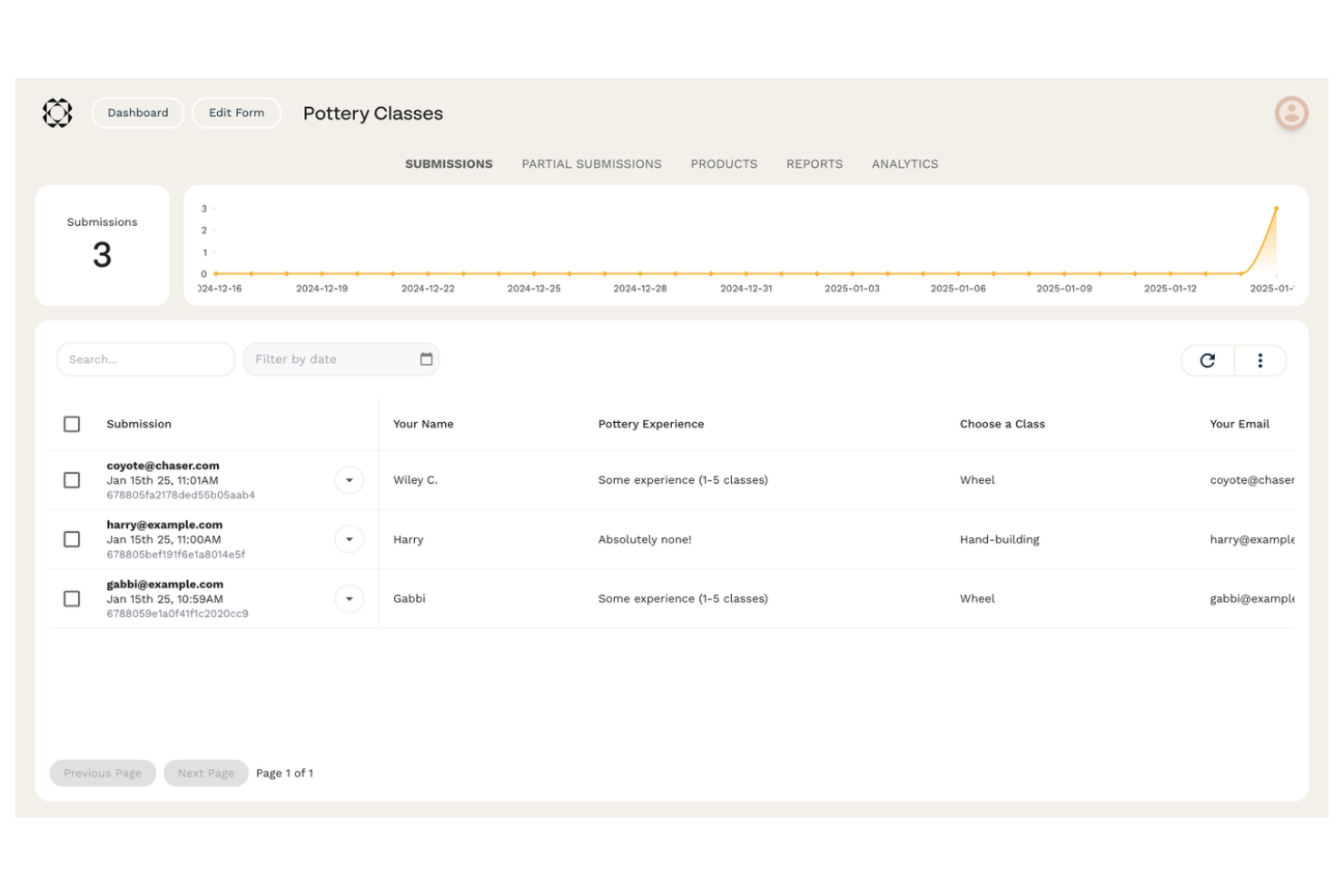
Se desideri un generatore di moduli che assomigli più a una tela bianca, Paperform merita di essere preso in considerazione. È pensato per team e aziende che vogliono creare moduli che rispecchino l'aspetto e lo stile del loro marchio. Paperform ti aiuta a creare moduli interattivi, landing page e pagine prodotto che vanno oltre i semplici strumenti per sondaggi.
Per chi è ideale Paperform?
Paperform è particolarmente adatto a team di marketing, agenzie e piccole imprese che vogliono realizzare moduli e landing page altamente personalizzate e interattive, in linea con il loro brand.
Perché Paperform è una valida alternativa a Typeform
Ciò che distingue Paperform da Typeform e da altri generatori di moduli è la sua profonda attenzione alla personalizzazione grafica. L'ho scelto per i team che desiderano controllare ogni dettaglio visivo, dai font e colori personalizzati alle immagini di sfondo e ai media incorporati. Paperform ti permette di progettare moduli che sembrano vere e proprie landing page di marca, e non semplici sondaggi standard. Questo livello di libertà creativa è ideale se hai bisogno di moduli che riflettano pienamente l'identità visiva del tuo brand o delle tue campagne di marketing.
Funzionalità principali di Paperform
Altre funzionalità che ho trovato utili per la creazione di moduli includono:
- Logica condizionale: Mostra o nascondi domande, sezioni o pagine in base alle risposte precedenti, per creare moduli dinamici e personalizzati.
- Integrazione dei pagamenti: Ricevi pagamenti direttamente tramite i moduli utilizzando Stripe, PayPal o Square.
- Workflow automatizzati: Attiva in automatico email, notifiche o integrazioni quando un modulo viene inviato.
- Caricamento file: Permetti ai rispondenti di caricare file, immagini o documenti come parte delle loro risposte al modulo.
Integrazioni Paperform
Le integrazioni includono Google Sheets, Mailchimp, ActiveCampaign, Trello, Slack, HubSpot, Asana, Monday.com, Dropbox e altre ancora.
Pros and Cons
Pros:
- Editor in stile documento a testo libero
- Gestione inventario e SKU integrata
- Campi integrati per appuntamenti e prenotazioni
Cons:
- Nessuna applicazione mobile nativa
- Nessuna analisi di abbandono a livello di domanda

Ideale per reportistica avanzata dei dati
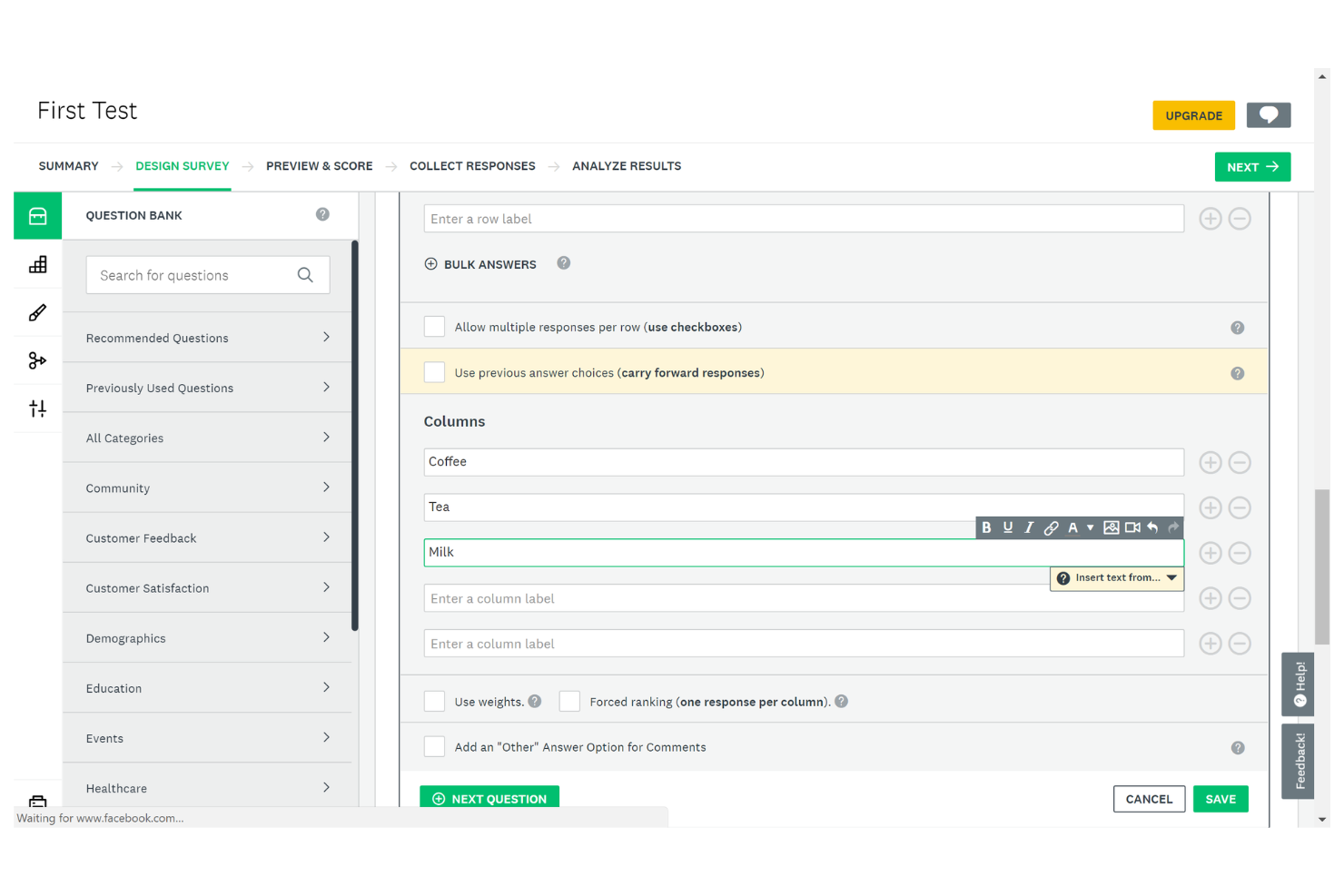
Se hai bisogno di un generatore di moduli con analisi avanzate e personalizzazione dei sondaggi, SurveyMonkey è una scelta da prendere in considerazione. È progettato per team e professionisti che vogliono approfondire l'analisi dei dati dei sondaggi e la reportistica. SurveyMonkey ti aiuta a raccogliere feedback dettagliati e a trasformarli in approfondimenti azionabili, risultando una scelta solida per ricerche di mercato, risorse umane e team dedicati all'esperienza del cliente.
Per chi è consigliato SurveyMonkey?
SurveyMonkey è ideale per team di ricerca, dipartimenti HR e professionisti dell'esperienza cliente che necessitano di analisi e reportistica approfondita dei sondaggi.
Perché SurveyMonkey è una buona alternativa a Typeform
SurveyMonkey si distingue per le sue funzionalità avanzate di reportistica dei dati, che vanno oltre quanto offerto dalla maggior parte dei generatori di moduli. L'ho selezionato come alternativa a Typeform perché fornisce dashboard analitiche dettagliate e strumenti di reportistica personalizzata che permettono di esaminare a fondo i risultati dei sondaggi. Puoi segmentare le risposte, applicare filtri ed esportare i dati in più formati per un'analisi più approfondita. Queste funzionalità rendono SurveyMonkey particolarmente utile se il tuo team deve trasformare le risposte dei moduli in approfondimenti azionabili.
Funzionalità principali di SurveyMonkey
Altre funzionalità che rendono SurveyMonkey una solida opzione per la creazione di moduli includono:
- Question Bank: Accesso a una libreria di domande predefinite per creare rapidamente sondaggi su misura per le tue esigenze.
- Logica del sondaggio: Usa logica di salto e ramificazioni per creare percorsi personalizzati nei sondaggi in base alle risposte dei partecipanti.
- Strumenti di collaborazione: Invita i membri del team a modificare, revisionare e commentare i sondaggi direttamente sulla piattaforma.
- Personalizzazione del brand: Applica il branding aziendale, inclusi loghi e palette di colori, per mantenere un aspetto coerente.
Integrazioni SurveyMonkey
Le integrazioni includono Salesforce, HubSpot, Mailchimp, Slack, Microsoft Teams, monday.com, Zoom e altre ancora.
Pros and Cons
Pros:
- Analisi avanzata dei dati delle risposte ai sondaggi
- Ampia gamma di tipi di domande disponibili
- Potenti funzionalità di logica e ramificazione
Cons:
- Flessibilità di design limitata per i moduli
- Limiti di risposte nei piani a prezzo inferiore

Ideale per logiche avanzate nei sondaggi

Se hai bisogno di un creatore di moduli che gestisca requisiti complessi per i sondaggi, Qualtrics merita considerazione. È progettato per team di ricerca, grandi aziende e organizzazioni che necessitano di una raccolta e analisi avanzata dei dati. Qualtrics ti aiuta a gestire progetti di feedback su larga scala e ad approfondire la comprensione di clienti o dipendenti.
Per chi è più indicato Qualtrics?
Qualtrics è un’ottima scelta per i team di ricerca e le aziende che hanno bisogno di logiche avanzate per i sondaggi e analisi approfondite.
Perché Qualtrics è una valida alternativa a Typeform
Quando hai bisogno di una logica avanzata per i sondaggi che vada oltre il semplice branching, Qualtrics si distingue. L’ho scelto per i team che richiedono funzionalità come logiche di salto complesse, dati incorporati e percorsi di domande multilivello.
Qualtrics ti permette di progettare sondaggi che si adattano dinamicamente a ogni rispondente, supportando ricerche e raccolte di feedback sofisticate. Questo livello di controllo è ideale per le organizzazioni che devono raccogliere dati sfumati ed eseguire analisi dettagliate.
Funzionalità principali di Qualtrics
Altre funzionalità che rendono Qualtrics utile per la creazione di moduli includono:
- Randomizzazione delle domande: Randomizza l’ordine delle domande per ridurre i bias nelle risposte.
- Supporto multilingua: Crea e distribuisci sondaggi in più lingue per una portata globale.
- Distribuzione automatizzata dei sondaggi: Pianifica e automatizza la consegna dei sondaggi tramite email, SMS e canali web.
- Strumenti avanzati di reportistica: Accedi a dashboard personalizzabili ed esporta report dettagliati per un’analisi più approfondita.
Integrazioni di Qualtrics
Le integrazioni includono SAP Customer Experience, Awardco, Tango Card, Respondent, Salesforce, Slack, Zendesk e altre ancora.
Pros and Cons
Pros:
- Supporta logiche di branching altamente complesse
- Gestisce esigenze di distribuzione di sondaggi su larga scala
- Include funzionalità per sondaggi multilingua
Cons:
- L'interfaccia può sembrare opprimente per i principianti
- La configurazione di logiche avanzate richiede formazione
Ideale per l'integrazione nativa con Salesforce
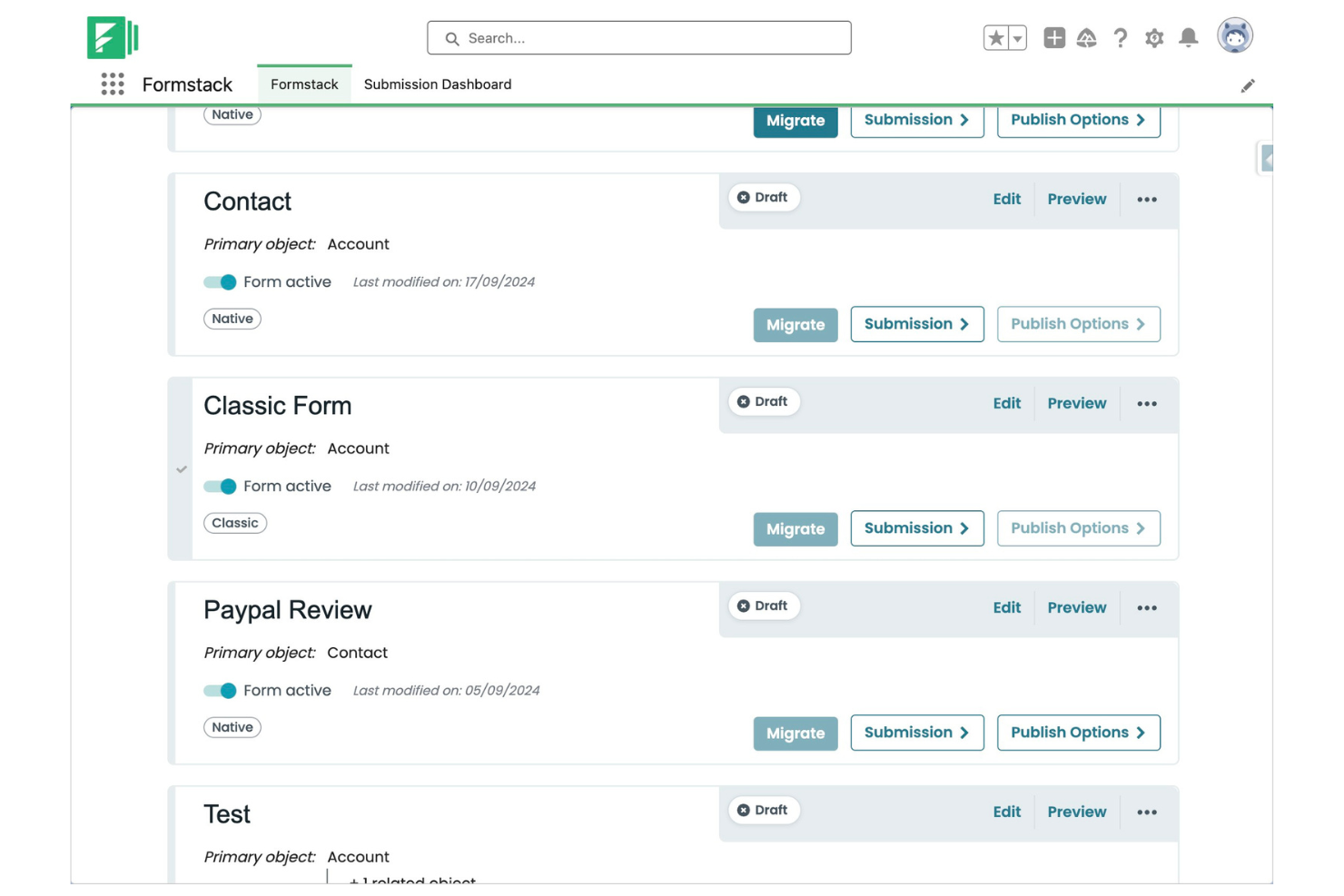
Formstack è un generatore di moduli progettato per le aziende che necessitano di una raccolta dati sicura, flessibile e dell'automazione dei flussi di lavoro. Si rivolge a team nei settori sanitario, finanziario e aziendale che richiedono avanzate norme di conformità e controlli sui processi. Se cerchi una soluzione che vada oltre i semplici sondaggi, Formstack ti aiuta ad automatizzare le approvazioni, raccogliere firme elettroniche e gestire informazioni sensibili.
A chi è più indicato Formstack?
Formstack è una scelta valida per organizzazioni di medie e grandi dimensioni in settori regolamentati che necessitano di flussi di lavoro dati sicuri e automatizzati.
Perché Formstack è una valida alternativa a Typeform
Ho scelto Formstack per i team che necessitano di una profonda integrazione nativa con Salesforce — qualcosa che Typeform non offre. Con Formstack, puoi mappare i campi dei moduli direttamente agli oggetti Salesforce e automatizzare la creazione o l'aggiornamento dei record senza connettori di terze parti. Questo è particolarmente prezioso per le organizzazioni che fanno affidamento su Salesforce per le vendite, il servizio o i flussi operativi. Se la tua azienda dipende dalla sincronizzazione dei dati dei clienti con Salesforce, l'integrazione diretta di Formstack fa risparmiare tempo e riduce gli errori manuali.
Funzionalità principali di Formstack
Altre funzionalità che distinguono Formstack includono:
- Generatore di moduli drag-and-drop: Crea moduli in modo visivo con elementi come menu a discesa, senza necessità di programmazione o competenze tecniche.
- Logica condizionale: Mostra o nascondi campi, sezioni o pagine in base alle risposte degli utenti per creare moduli dinamici.
- Raccolta firme elettroniche: Raccogli firme elettroniche legalmente vincolanti direttamente nei tuoi moduli.
- Conformità HIPAA: Abilita funzioni avanzate di sicurezza e conformità per le organizzazioni che gestiscono dati sanitari sensibili.
Integrazioni di Formstack
Le integrazioni includono Salesforce, HubSpot, Google Sheets, PayPal, Stripe, Dropbox, Airtable, Microsoft OneDrive e altro ancora.
Pros and Cons
Pros:
- Integrazione nativa con Salesforce per sincronizzazione dati diretta
- Conformità HIPAA disponibile per uso sanitario
- Raccolta firme elettroniche integrata nei moduli
Cons:
- Nessun layout a una domanda alla volta
- Prezzo di partenza superiore rispetto alla maggior parte delle alternative


Formsite è un generatore di moduli progettato per organizzazioni che necessitano di funzionalità avanzate di raccolta dati e sicurezza. È particolarmente adatto per i settori sanitario, educativo e per team enterprise che gestiscono informazioni sensibili o soggette a regolamentazione. Se cerchi un controllo maggiore sulla logica dei moduli e sulla privacy dei dati rispetto alla maggior parte delle alternative a Typeform, Formsite merita sicuramente attenzione.
A chi è più adatto Formsite?
Formsite è ideale per team nei settori sanitario, educativo e aziendale che hanno bisogno di raccolta dati sicura e conforme.
Perché Formsite è una valida alternativa a Typeform
Quando la raccolta sicura e complessa di dati è una priorità, Formsite si distingue tra le alternative a Typeform. L'ho scelto perché offre funzionalità come crittografia avanzata, protezione tramite password e opzioni di conformità che aiutano le organizzazioni a soddisfare requisiti stringenti di privacy. Formsite supporta inoltre logiche complesse nei moduli, caricamento di file e moduli multi-pagina, rendendolo adatto a raccolte dati dettagliate. Queste capacità lo rendono una scelta eccellente per team che non possono scendere a compromessi sulla sicurezza o che devono gestire informazioni sensibili.
Funzionalità principali di Formsite
Altre funzionalità che distinguono Formsite nell'ambito della creazione di moduli includono:
- Generatore di moduli drag-and-drop: Crea moduli in modo rapido utilizzando un editor visivo con oltre 40 tipi di domande.
- Sottodomini personalizzati: Ospita i tuoi moduli su un sottodominio brandizzato per un aspetto più professionale.
- Logica condizionale per le notifiche: Imposta notifiche e-mail che si attivano in base a specifiche risposte del modulo.
- Opzioni di esportazione dati: Esporta i dati raccolti su Excel, CSV, PDF o integra con provider di cloud storage.
Integrazioni Formsite
Le integrazioni comprendono Salesforce, Google Sheets, Microsoft Excel, Mailchimp, Dropbox, Box, Constant Contact e altri.
Pros and Cons
Pros:
- Supporta upload di file e archiviazione criptata
- Opzioni per sottodomini e brand personalizzati
- Diversi formati di esportazione, inclusi PDF ed Excel
Cons:
- Modelli di design moderni limitati
- Analisi integrate limitate

Zoho Forms è un generatore di moduli progettato per i team che necessitano di raccogliere dati in modo flessibile su diversi dispositivi e luoghi. È una scelta valida per il settore dei servizi sul campo, vendita al dettaglio e team distribuiti che non sempre possono fare affidamento su una connessione Internet stabile. Se cerchi un'alternativa a Typeform che supporti flussi di lavoro mobili e ampia personalizzazione, Zoho Forms è da prendere in considerazione.
A chi è più adatto Zoho Forms?
Zoho Forms è ideale per team operativi sul campo e organizzazioni che devono raccogliere dati in ambienti remoti o offline.
Perché Zoho Forms è una valida alternativa a Typeform
Ciò che distingue Zoho Forms da Typeform e da molti altri generatori di moduli è la possibilità di accesso offline anche nei piani di base. L'ho scelto perché puoi creare moduli che funzionano su dispositivi mobili anche quando non c'è connessione Internet. L'app mobile consente agli utenti di raccogliere risposte sul campo e sincronizzare automaticamente i dati una volta tornati online. Questo rende Zoho Forms particolarmente prezioso per i team che lavorano in luoghi remoti o settori dove la connettività è inaffidabile.
Funzionalità principali di Zoho Forms
Altre funzionalità che rendono Zoho Forms un punto di riferimento per i team che si occupano della creazione di moduli includono:
- Flussi di approvazione personalizzabili: Instrada l'invio dei moduli per revisione e approvazione all'interno della tua organizzazione.
- Generatore drag-and-drop di moduli: Crea rapidamente moduli grazie a un editor visuale con una vasta gamma di tipi di campo.
- Notifiche email automatizzate: Imposta avvisi istantanei per l'invio di moduli o risposte specifiche.
- Integrazione con le app Zoho: Collega i moduli direttamente con Zoho CRM, Zoho Desk e altri prodotti Zoho per la gestione dei dati.
Integrazioni di Zoho Forms
Le integrazioni includono Zoho CRM, Zoho Desk, Zoho Projects, Zoho Campaigns, Zoho Flow, Google Sheets, Google Drive, Salesforce, Mailchimp e altro ancora.
Pros and Cons
Pros:
- Accesso e invio dei moduli in offline supportati
- Integrazione nativa nell'ecosistema Zoho
- Flussi di approvazione personalizzabili per l'invio dei moduli
Cons:
- Layout di moduli moderni o conversazionali limitati
- Meno opzioni per la personalizzazione grafica
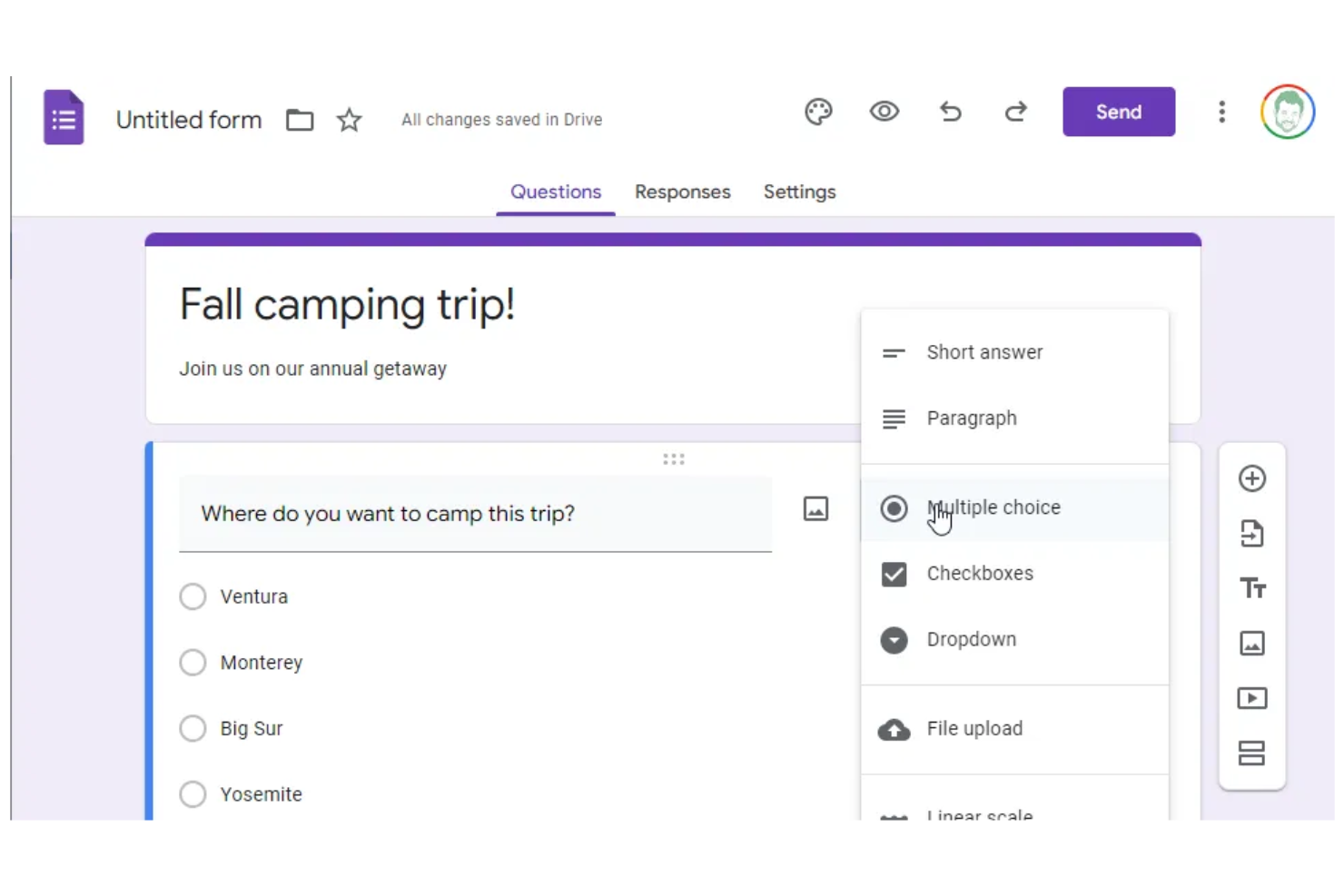
Se il tuo team utilizza già Google Workspace, Google Forms offre un generatore di moduli gratuito che ti consente di raccogliere e organizzare informazioni in modo semplice. È particolarmente utile per aziende e insegnanti che necessitano di moduli rapidi e condivisibili, integrati con Google Drive e Sheets. Puoi creare sondaggi, moduli di contatto o registrazioni per eventi e collaborare istantaneamente con i colleghi in tempo reale.
Per chi è ideale Google Forms?
Google Forms è perfetto per team e insegnanti in organizzazioni che già usano Google Workspace e che hanno bisogno di una creazione di moduli semplice e collaborativa.
Perché Google Forms è una buona alternativa a Typeform
Ho scelto Google Forms per i team che necessitano di collaborazione in tempo reale all'interno di Google Workspace. A differenza di Typeform, Google Forms permette a più utenti di creare, modificare e analizzare moduli insieme, facilitando la coordinazione su sondaggi o raccolte dati.
Puoi condividere i moduli immediatamente con i colleghi, gestire notifiche popup per le risposte e vedere i dati aggiornarsi in tempo reale su Google Sheets. Questo livello di collaborazione è particolarmente prezioso per le organizzazioni che si affidano già agli strumenti di produttività di Google.
Funzionalità principali di Google Forms
Altre funzionalità che rendono Google Forms utile per la creazione di moduli includono:
- Ramificazione delle domande: Crea moduli dinamici che mostrano o nascondono domande in base alle risposte precedenti.
- Campo di caricamento file: Consenti ai rispondenti di caricare file direttamente tramite il modulo.
- Validazione delle risposte: Imposta regole per le risposte accettabili per garantire la qualità dei dati.
- Galleria di modelli: Accedi a una libreria di modelli di modulo predefiniti per casi d'uso comuni.
Integrazioni di Google Forms
Le integrazioni includono Google Sheets, Google Drive, Gmail, Google Calendar, Google Docs, Google Slides, Google Sites, Google Chat, Google Meet e altro.
Pros and Cons
Pros:
- Collaborazione in tempo reale con più editor
- Integrazione diretta con Google Sheets
- Condivisione semplice e controlli di accesso
Cons:
- Opzioni di design e personalizzazione del modulo limitate
- Mancano funzionalità avanzate di logica condizionale

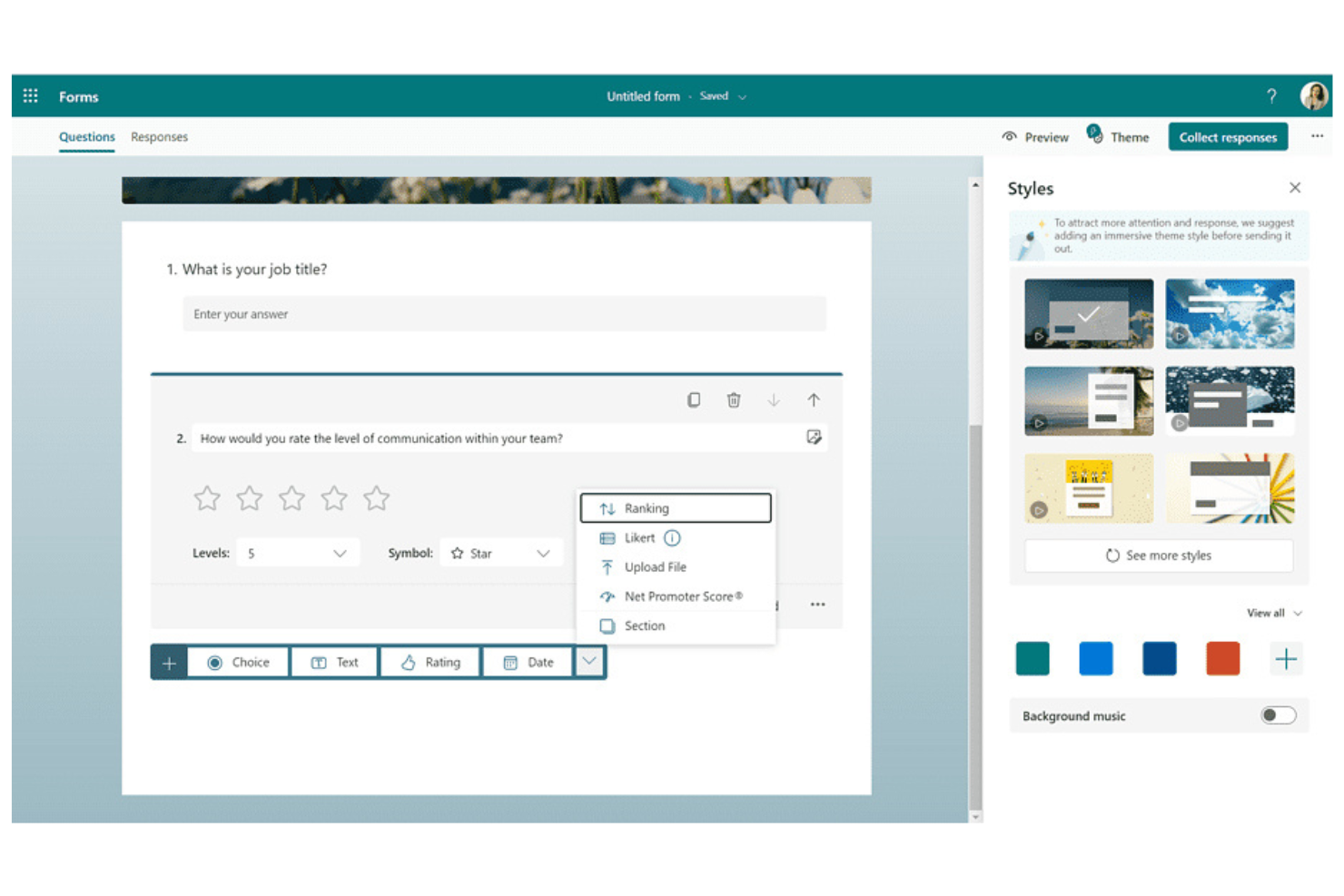
Se il tuo team utilizza già Microsoft 365, Microsoft Forms offre un modo familiare per creare sondaggi, quiz e questionari. È la soluzione ideale per le organizzazioni che desiderano mantenere dati e flussi di lavoro all'interno dell'ecosistema Microsoft. Puoi raccogliere rapidamente feedback, condurre valutazioni interne o raccogliere iscrizioni senza abbandonare gli strumenti già in uso.
Per chi è ideale Microsoft Forms?
Microsoft Forms è particolarmente adatto per organizzazioni e team che già utilizzano Microsoft 365 e desiderano mantenere i dati dei moduli e i flussi di lavoro nello stesso ecosistema.
Perché Microsoft Forms è una valida alternativa a Typeform
Ciò che rende Microsoft Forms una valida alternativa a Typeform è la sua profonda compatibilità con le app di Microsoft 365. L'ho scelto per i team che desiderano creare moduli, quiz e sondaggi direttamente con strumenti familiari come Outlook, Teams e SharePoint.
Puoi memorizzare automaticamente le risposte in Excel e attivare flussi di lavoro in Power Automate, mantenendo tutto collegato nel tuo ambiente esistente. Questa stretta integrazione aiuta le organizzazioni a centralizzare la raccolta dati e i processi senza dover uscire dall'ecosistema Microsoft.
Caratteristiche principali di Microsoft Forms
Altre funzionalità che rendono Microsoft Forms utile per i team che costruiscono moduli includono:
- Logica ramificata: crea moduli dinamici che mostrano o nascondono domande in base alle risposte precedenti.
- Analisi delle risposte in tempo reale: visualizza grafici e riepiloghi delle risposte man mano che arrivano.
- Strumenti per la creazione di quiz: crea quiz valutati con correzione automatica e feedback.
- Supporto multilingue: offri moduli in più lingue per raggiungere un pubblico più ampio.
Integrazioni di Microsoft Forms
Le integrazioni includono Microsoft Excel, Microsoft Teams, Microsoft SharePoint, Microsoft Power Automate e altro ancora.
Pros and Cons
Pros:
- Si integra nativamente con tutte le app di Microsoft 365
- Esporta automaticamente le risposte su Excel
- Offre modelli integrati per quiz e sondaggi
Cons:
- Mancano funzioni di raccolta pagamenti e firma elettronica
- I moduli non possono essere incorporati su tutte le piattaforme web

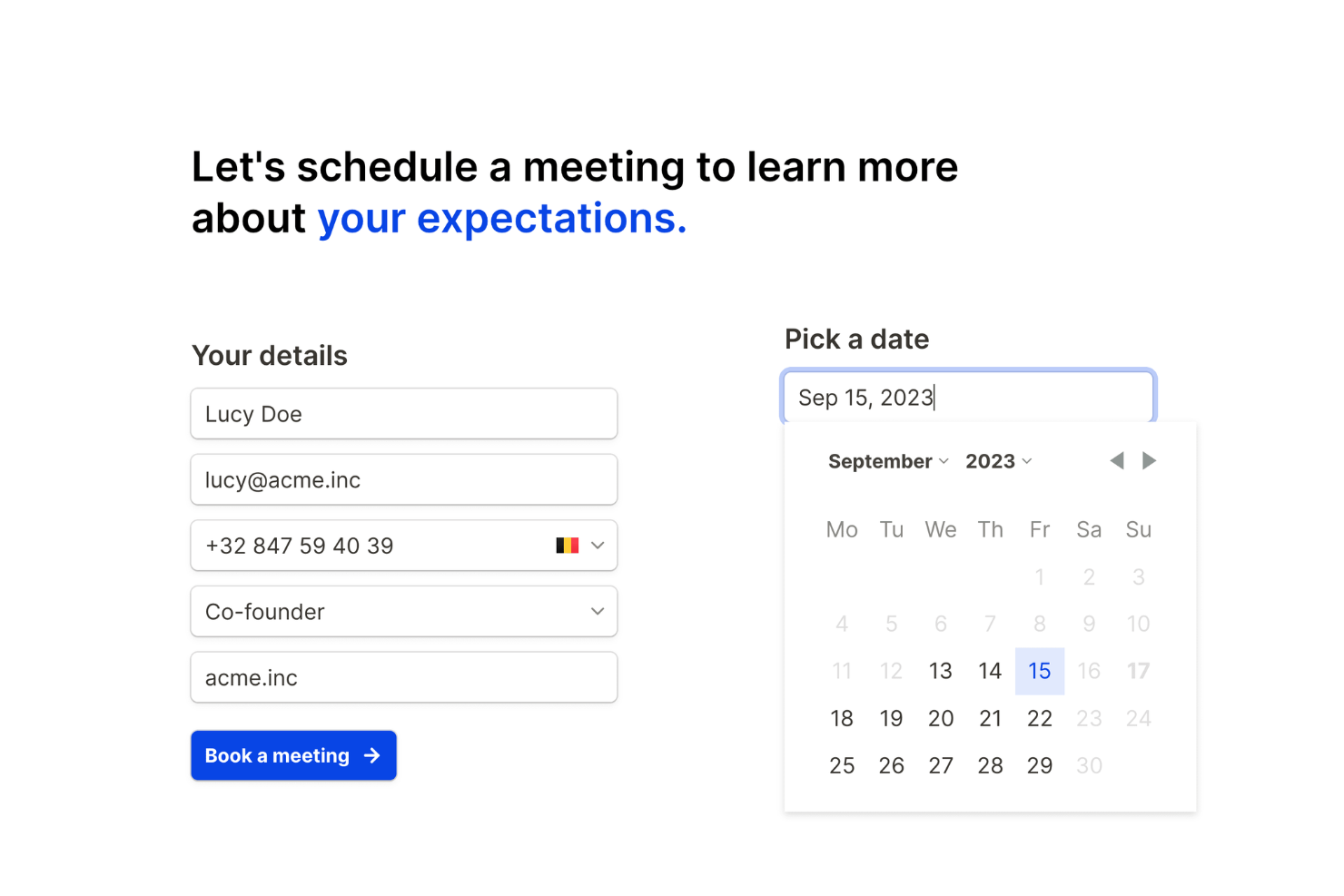
Se cerchi un generatore di moduli flessibile che non limiti la tua crescita, Tally merita attenzione. È pensato per creatori, startup e piccole imprese che desiderano raccogliere dati senza preoccuparsi di quote o limitazioni nascoste. Tally ti aiuta a lanciare moduli rapidamente e gestire risposte su qualsiasi scala.
Per chi è ideale Tally?
Tally è una scelta solida per startup, creatori e piccole imprese che necessitano di moduli e invii illimitati senza costi aggiuntivi.
Perché Tally è una valida alternativa a Typeform
Tally si distingue perché ti consente di creare moduli illimitati e raccogliere risposte illimitate, anche nel piano gratuito. L'ho selezionato come alternativa a Typeform per i team che non vogliono preoccuparsi di raggiungere limiti d'uso o pagare extra man mano che crescono le proprie esigenze. Tally include anche funzionalità come la logica condizionale e la raccolta di pagamenti senza limitare il numero di moduli che puoi pubblicare. Questo lo rende particolarmente interessante se gestisci più progetti o campagne e hai bisogno di una soluzione realmente scalabile.
Funzionalità principali di Tally
Altre funzionalità utili che ho trovato per la creazione di moduli includono:
- Domini personalizzati: Pubblica moduli utilizzando il tuo dominio personalizzato per un aspetto più professionale.
- Answer piping: Inserisci dinamicamente le risposte precedenti nelle domande successive per personalizzare l'esperienza utente.
- Caricamento di file: Consenti ai rispondenti di caricare file direttamente tramite i tuoi moduli per una raccolta dati più ricca.
- Campi nascosti: Inserisci dati nei moduli tramite parametri URL per tracciare le fonti o precompilare le informazioni.
Integrazioni Tally
Le integrazioni includono Notion, Google Sheets, Airtable, Slack, Webhooks, Coda, Google Analytics, Meta Pixel, Make e altro ancora.
Pros and Cons
Pros:
- Moduli e invii illimitati in tutti i piani
- Supporta la raccolta di pagamenti
- Logica condizionale e answer piping inclusi
Cons:
- Opzioni di personalizzazione del design limitate
- Nessuna funzionalità integrata per la valutazione dei quiz
Altre alternative a Typeform
Ecco alcune alternative aggiuntive a Typeform che non sono state incluse nel mio elenco, ma che vale comunque la pena esaminare:
- Jotform
Ideale per una vasta libreria di modelli
- Alchemer
Ideale per logica ramificata e salto domande
- ClickUp Forms
Ideale per integrare i moduli nei flussi di lavoro dei progetti


Come valuto le alternative a Typeform
Considero due livelli per questi strumenti: i criteri di base che un generatore di moduli deve soddisfare e gli elementi distintivi che mi indicano se è adatto a un programma VoC o a un flusso di sondaggi post-assistenza.
Funzionalità principali (requisiti fondamentali per questo elenco)
Quando seleziono gli strumenti per il mio elenco, assegno a ciascuno un punteggio su una scala da 0 (non offre la funzionalità) a 5 (eccelle in quest'area) per ogni funzionalità principale elencata di seguito. Poi converto il punteggio totale dello strumento in una percentuale. Ogni strumento deve raggiungere un punteggio totale minimo del 65% per essere preso in considerazione.
- Creazione di moduli conversazionali: cerco un generatore senza codice che supporti un flusso con una domanda alla volta, simile al modo in cui Typeform presenta i propri moduli ai rispondenti.
- Modelli di sondaggi CX: in questo caso sono importanti i modelli predefiniti per i sondaggi NPS, CSAT e CES: verifico se uno strumento consente di avviare un sondaggio post-assistenza in pochi minuti.
- Distribuzione multicanale: ogni strumento dovrebbe supportare incorporamenti web, posta elettronica, collegamenti condivisibili e, idealmente, la distribuzione tramite applicazioni o codici QR per raggiungere i clienti nel punto di contatto giusto.
- Logica e personalizzazione: considero la ramificazione, la logica di salto, l'inserimento dinamico delle risposte e i campi nascosti: queste funzioni consentono di adattare un flusso di riscontri in base al modo in cui risponde un cliente.
- Analisi e report delle risposte: valuto se lo strumento offre pannelli di controllo in tempo reale, segmentazione delle risposte e opzioni di esportazione oltre al semplice scaricamento di un foglio di calcolo.
- Integrazioni con gli strumenti CX: lo strumento dovrebbe connettersi a CRM e sistemi di assistenza come Salesforce, HubSpot o Zendesk, così che le risposte ai sondaggi confluiscano direttamente nei flussi di lavoro esistenti.
Una volta ottenuto un elenco di strumenti che soddisfano questi criteri, considero ciò che distingue ogni piattaforma.
Fattori distintivi (ciò che differenzia i fornitori)
Ecco come confronto i diversi fornitori:
Funzionalità distintive
L'analisi del sentimento e dei testi è un importante elemento distintivo. Quando raccogli migliaia di risposte aperte dopo il lancio di un prodotto, etichettare manualmente i temi non è realistico: cerco strumenti che evidenzino automaticamente gli argomenti ricorrenti e i punteggi del sentimento. Anche l'automazione del ciclo chiuso è importante. Gli strumenti che attivano avvisi o creano richieste nel sistema di assistenza quando arriva il punteggio di un detrattore possono far risparmiare al team ore di gestione manuale. Per i programmi CX globali, verifico se una piattaforma supporta sondaggi multilingue con traduzioni integrate, così da mantenere coerenti i riscontri tra le diverse aree geografiche.
Oltre le funzionalità
La struttura dei prezzi è molto importante in questo caso. Alcune piattaforme applicano un costo per risposta, che può aumentare rapidamente quando si eseguono sondaggi CSAT sempre attivi su più punti di contatto. Verifico se i prezzi aumentano in base al volume delle risposte secondo una logica adeguata per i programmi CX ad alto traffico. La sicurezza dei dati è un'altra considerazione fondamentale: se i sondaggi raccolgono dati personali identificabili dei clienti, sono necessari almeno la conformità al GDPR, la crittografia e il supporto SSO. Valuto anche l'esperienza dei rispondenti, poiché un sondaggio che si carica lentamente o non è ottimizzato per i dispositivi mobili farà crollare i tassi di completamento prima ancora di raccogliere riscontri utili.
Perché cercare un'alternativa a Typeform?
Sebbene Typeform sia una buona scelta tra gli strumenti per la creazione di moduli, ci sono diversi motivi per cui alcuni utenti cercano soluzioni alternative. Potresti cercare un'alternativa a Typeform perché…
- Hai bisogno di opzioni di logica condizionale più avanzate
- Vuoi integrazioni più approfondite con gli strumenti che già utilizzi
- Hai bisogno di controlli più flessibili per il branding e il design
- Hai bisogno di funzionalità integrate per la raccolta dei pagamenti o la firma elettronica
- Stai cercando una soluzione più conveniente
- Hai bisogno di un supporto migliore per la sicurezza e la conformità a livello aziendale
Se una di queste situazioni ti è familiare, sei nel posto giusto. Il mio elenco contiene diverse opzioni di strumenti per la creazione di moduli più adatte ai team che affrontano queste difficoltà con Typeform e cercano soluzioni alternative.
Funzionalità principali di Typeform
Ecco alcune delle principali funzionalità offerte da Typeform, per aiutarti a mettere a confronto ciò che offrono le soluzioni alternative:
- Moduli conversazionali: Typeform presenta le domande una alla volta, creando un'esperienza simile a una chat, più personale e coinvolgente per i rispondenti.
- Logica condizionale: Crea moduli dinamici che si adattano alle risposte degli utenti, mostrando o nascondendo le domande in base alle risposte precedenti per creare esperienze personalizzate.
- Temi personalizzati: Progetta moduli con colori, caratteri e sfondi personalizzati per adattarli al tuo marchio e creare sondaggi visivamente accattivanti.
- Campi per il caricamento di file: Consenti ai rispondenti di allegare file, immagini o documenti direttamente nel modulo, supportando un'ampia gamma di esigenze di raccolta dati.
- Integrazioni: Collega Typeform a strumenti come Google Sheets, Slack, HubSpot e Mailchimp per automatizzare i flussi di lavoro e sincronizzare i dati tra le piattaforme.
- Strumenti per quiz e valutazione: Crea quiz interattivi con valutazione automatica, feedback e schermate dei risultati per scopi educativi o di generazione di contatti.
- Dashboard analitica: Accedi ad analisi in tempo reale e report visivi per monitorare i tassi di completamento, i punti di abbandono e le tendenze delle risposte.
- Supporto multilingue: Offri moduli in più lingue per raggiungere un pubblico globale e migliorare l'accessibilità.
- Raccolta dei pagamenti: Raccogli pagamenti o donazioni direttamente tramite i moduli utilizzando integrazioni con Stripe e altri processori di pagamento.
- Funzionalità di collaborazione: Invita i membri del team a creare, modificare e gestire i moduli insieme, semplificando il lavoro di squadra e i processi di revisione.