

Mit VoIP-Softphone-Apps können Sie geschäftliche Anrufe direkt von Ihrem Computer oder Mobilgerät aus über ein Headset tätigen und entgegennehmen und so jeden Bildschirm in Ihre geschäftliche Telefonleitung verwandeln. Für Führungskräfte im Support und im Bereich Kundenerlebnis bedeutet dies eine flexible und kostengünstige Kommunikation, ohne dass Sie sich mit Hardware oder komplizierten Einrichtungsvorgängen auseinandersetzen müssen.
Wenn Sie nach den besten Lösungen suchen, um Kundengespräche zu verbessern, Ihr Team verbunden zu halten und sich an die Entwicklung Ihres Unternehmens anzupassen, hilft Ihnen dieser Leitfaden dabei, die besten Optionen zu vergleichen und sicher das richtige Tool auszuwählen.
Warum Sie unseren Software-Empfehlungen vertrauen können
6,700+
Reviews
20
Industry experts
16+
Evaluation factors
14
Years
Unser Team testet und bewertet Software seit 2012. Als CX-Führungskräfte selbst wissen wir, wie schwierig – und wichtig – es ist, die richtige Software auszuwählen.
Für diesen Leitfaden haben wir Tools mithilfe von praktischen Tests und unabhängiger Recherche bewertet und dabei unsere Bewertungskriterien angewendet.
Unsere Bewertungen spiegeln unser menschliches redaktionelles Urteilsvermögen wider, keine Verkaufsstrategie.
 Gui DrusinaCreative Director
 Tim FisherVP of AI
Vergleichstabelle für VoIP-Softphone-Apps
| Tool | Best For | Trial Info | Price | ||
|---|---|---|---|---|---|
| 1 | Am besten für Analysen internationaler Anrufe | 14-tägige kostenlose Testversion | Ab €19/Benutzer/Monat (jährlich abgerechnet) | Website | |
| 2 | Am besten für globale virtuelle Telefonnummern geeignet | Kostenlose 10-Tage-Testversion | Ab $18/Nutzer/Monat (jährliche Abrechnung) | Website | |
| 3 | Am besten für die Anrufweiterleitung auf Basis von Freshworks | 14-tägige kostenlose Testversion | Ab $15/Benutzer/Monat (jährlich abgerechnet) | Website | |
| 4 | Am besten für geschäftliche Telefonie mit Google Workspace geeignet | Kostenloser Tarif verfügbar | Ab $10/Benutzer/Monat | Website | |
| 5 | Am besten für die Kommunikation kundennaher Teams geeignet | Kostenlose Demo verfügbar | Ab $15/Nutzer/Monat (jährlich abgerechnet) | Website | |
| 6 | Am besten für KI-gestützte Gesprächsnotizen | 14-tägige kostenlose Testversion | Ab 15 $/Benutzer/Monat (jährliche Abrechnung) | Website | |
| 7 | Am besten für geschäftliche Kommunikation über mehrere Geräte | Kostenlose Demo verfügbar | Preis auf Anfrage | Website | |
| 8 | Am besten für Vertriebswähler und SMS-Workflows geeignet | 14-tägige kostenlose Testversion | Ab $29/Benutzer/Monat (jährlich abgerechnet) | Website | |
| 9 | Am besten für Anrufe in kleinen Unternehmen und Tischtelefone geeignet | Nicht verfügbar | Ab $19.95/Benutzer/Monat | Website | |
| 10 | Am besten für geschäftliche Anrufe über Zoom geeignet | Kostenlose Demo verfügbar | Ab $10.50/Benutzer/Monat | Website |


Bewertungen von VoIP-Softphone-Apps
Im Folgenden finden Sie meine detaillierten Zusammenfassungen der besten VoIP-Softphone-Apps, die es in meine Auswahlliste geschafft haben. Meine Bewertungen bieten einen ausführlichen Überblick über die Funktionen, Integrationen und besten Einsatzmöglichkeiten jeder Plattform, damit Sie die beste Lösung für Ihre Anforderungen finden.
 Am besten für Analysen internationaler Anrufe
- 14-tägige kostenlose Testversion
- Ab €19/Benutzer/Monat (jährlich abgerechnet)
Visit WebsiteCustomer Rating:4.4/5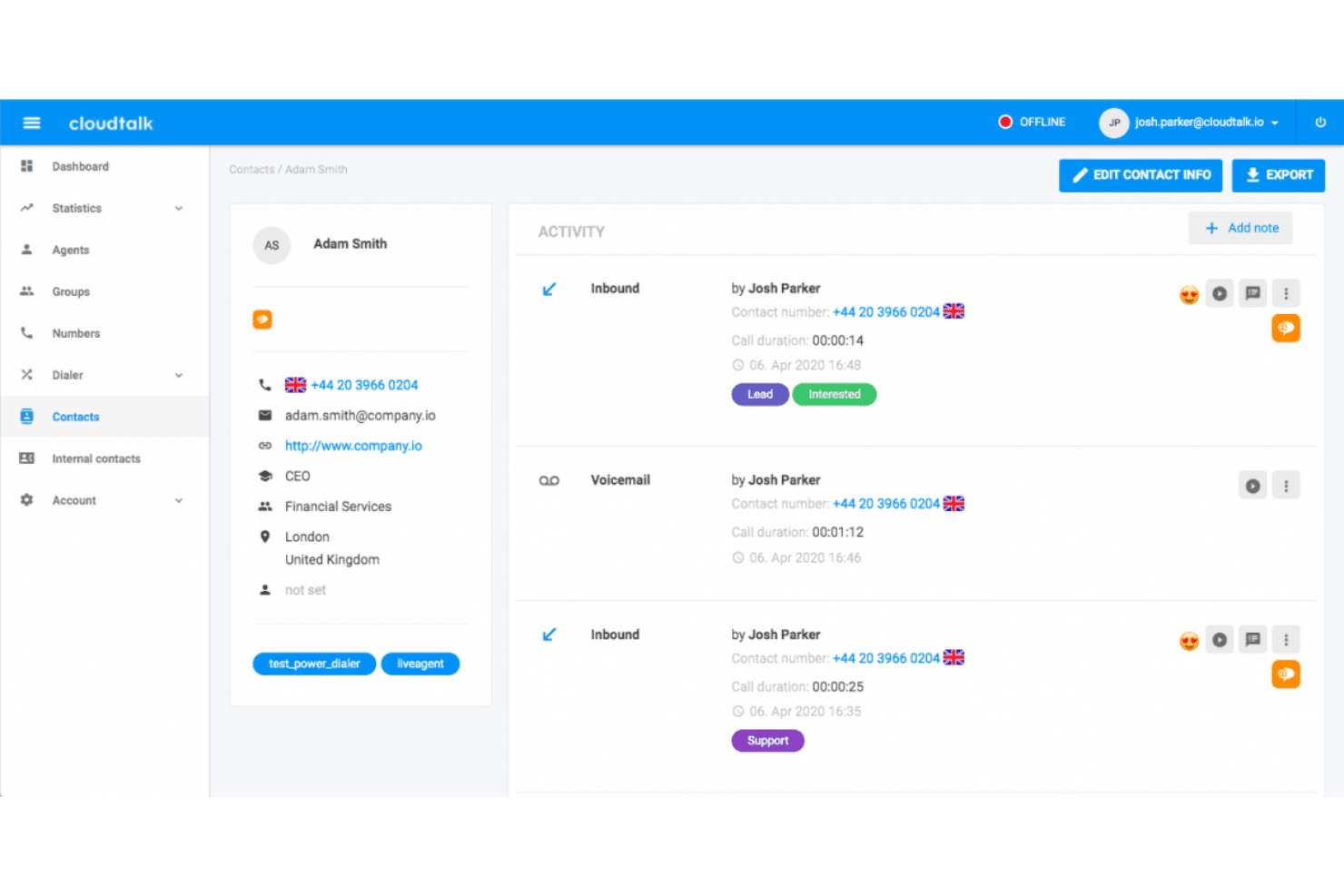
CloudTalk zeigt ein detailliertes Kontaktprofil mit Anrufaktivitätsverlauf, Tags, Sprachmailbox-Protokollen und Aufzeichnungen der Agenteninteraktionen. CloudTalk ist eine cloudbasierte VoIP-Telefonieplattform, die KI-gestützte Wählfunktionen, weltweite Anrufe in über 160 Ländern, CRM-Integrationen, Echtzeitanalysen von Anrufen und kanalübergreifendes Messaging in einer einzigen Oberfläche kombiniert.
Für wen ist CloudTalk am besten geeignet?
CloudTalk eignet sich für wachsende Vertriebs- und Supportteams, die ein hohes Anrufaufkommen in mehreren Ländern verwalten und detaillierte Einblicke in die Leistung ihrer Agenten benötigen.
Warum ich CloudTalk ausgewählt habe
Ich habe CloudTalk in meine Top-Auswahl aufgenommen, weil die Echtzeitanalysen tiefer gehen als bei den meisten softwarebasierten Telefonen, wenn sich Anrufe über mehrere Länder erstrecken. Die benutzerdefinierten Dashboards schlüsseln Anrufvolumen, Dauer und Agentenaktivität nach Region, Warteschlange oder Zeitraum auf – und das alles ohne manuelle Exporte. Die Ebene für KI-gestützte Gesprächsintelligenz ergänzt dies um eine Stimmungsbewertung und durchsuchbare Transkripte, sodass ich überprüfen kann, wie bestimmte Agenten in verschiedenen internationalen Märkten abschneiden.
Wichtige Funktionen von CloudTalk
- Intelligente Wählfunktion: Mehrere Anrufe aus Listen und Kontakten in eine Warteschlange einreihen, um Abläufe für ausgehende Anrufe zu automatisieren.
- Fähigkeitsbasierte Weiterleitung: Eingehende Anrufe anhand von Fachkenntnissen oder Sprachkriterien verfügbaren Agenten zuweisen.
- Designer für IVR-Anrufabläufe: Mehrstufige interaktive Menüs mit Ziehen-und-Ablegen-Steuerelementen für Selbstbedienung oder Weiterleitung erstellen.
- Telefonanwendungen für alle Geräte: Über Mac, Windows, Browser, iOS und Android auf das Softwaretelefon zugreifen, ohne zusätzliche Hardware.
CloudTalk-Integrationen
CloudTalk bietet über 100 native Integrationen, darunter Salesforce, HubSpot, Zendesk, Pipedrive, Intercom, Zoho CRM, Freshdesk, Gorgias, Slack, Microsoft Teams und Zapier. Für benutzerdefinierte Integrationen ist eine API verfügbar.
Pros and Cons
Pros:
- Detaillierte Analysen über internationale Anrufwarteschlangen hinweg
- KI-Transkription in allen kostenpflichtigen Tarifen verfügbar
- Hohe Verfügbarkeit durch globale Redundanz bei den Netzbetreibern
Cons:
- Die mobile App ist weniger zuverlässig als die Desktopversion
- Die Anrufqualität nimmt bei schlechten Netzwerkverbindungen ab
 Am besten für globale virtuelle Telefonnummern geeignet
- Kostenlose 10-Tage-Testversion
- Ab $18/Nutzer/Monat (jährliche Abrechnung)
Visit WebsiteCustomer Rating:4.4/5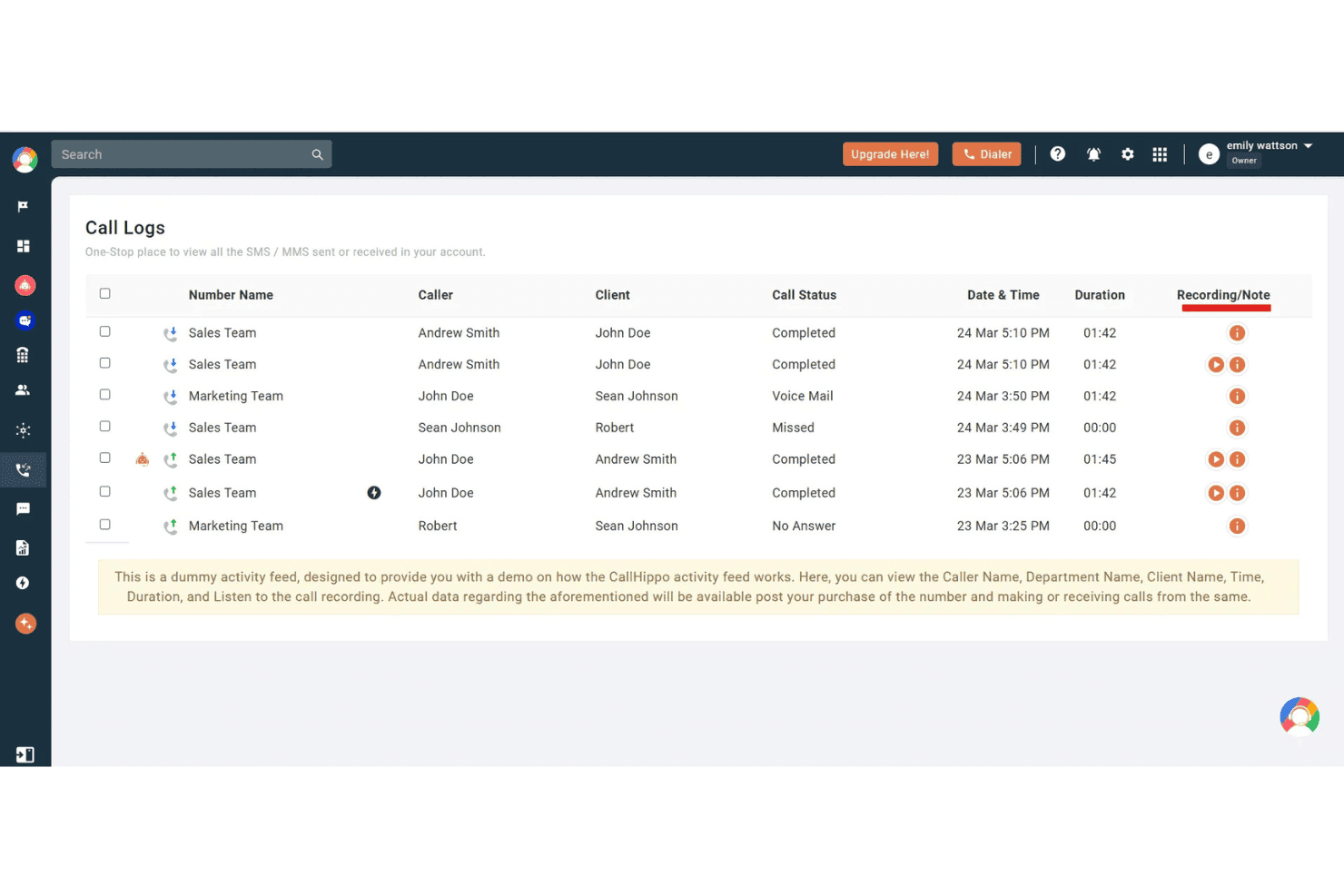
CallHippo zeigt ein Dashboard für Anrufprotokolle mit Anruferdetails, Anrufstatus, Dauer und Aufzeichnungsoptionen für die Teamaktivität. CallHippo ist eine Cloud-Telefonieplattform mit Softphone-Anwendungen für Web, Desktop und Mobilgeräte. Sie bietet virtuelle Telefonnummern in über 150 Ländern sowie KI-gestützte Telefonie, kanalübergreifende Nachrichten und Anrufweiterleitung für Contactcenter.
Für wen ist CallHippo am besten geeignet?
Die Lösung eignet sich besonders gut für kleine bis mittelgroße Vertriebs- und Supportteams, die in mehreren Ländern eine lokale Telefonpräsenz benötigen, ohne auf komplexe Infrastruktur angewiesen zu sein.
Warum ich CallHippo ausgewählt habe
Ich habe CallHippo in meine Top-Auswahl aufgenommen, weil die umfassende globale Abdeckung bei Telefonnummern die Lösung von den meisten Softphone-Anwendungen abhebt. Sie können innerhalb weniger Minuten lokale, gebührenfreie oder mobile Nummern in über 150 Ländern einrichten, und das intelligente DID-Routing zeigt automatisch die richtige lokale Anrufer-ID auf Grundlage des Ziellandes an. Außerdem gefällt mir die Funktion AI Global Connect, die vor dem Wählen die lokale Zeitzone eines Kontakts erkennt und so verhindert, dass Anrufe außerhalb der Geschäftszeiten eingehen.
Wichtige Funktionen von CallHippo
- Kanalübergreifender Posteingang: Verwalten Sie Anrufe, SMS, WhatsApp-, Telegram-, E-Mail- und Chatnachrichten über ein einheitliches Dashboard.
- Contactcenter-Steuerung: Nutzen Sie IVR-Menüs, intelligente Anrufweiterleitung, Anrufwarteschlangen, Aufschalten, Flüstern und Überwachung für das Live-Coaching von Mitarbeitenden.
- Integrationen für CRM und Helpdesk: Verbinden Sie Salesforce, HubSpot, Zoho, Zendesk, Freshdesk und weitere Systeme direkt, um Anrufaktivitäten zu protokollieren.
- Echtzeit-Analyse-Dashboards: Überwachen Sie Team- und Mitarbeiterkennzahlen zu Anrufen, Leistungs-KPIs und historische Trends in einem anpassbaren Dashboard.
Integrationen von CallHippo
CallHippo bietet direkte Integrationen mit Salesforce, HubSpot, Zoho CRM, Zendesk, Freshdesk, Pipedrive, Intercom, Shopify, Slack und Microsoft Teams. Für individuelle Integrationen steht eine API zur Verfügung.
Pros and Cons
Pros:
- Virtuelle Nummern in über 150 Ländern verfügbar
- KI-Transkription und Zusammenfassungen nach dem Anruf enthalten
- Live-Anrufüberwachung mit Flüstern und Aufschalten
Cons:
- Probleme mit der Anrufqualität bei geringer Bandbreite
- Mobile App weniger stabil als der Webclient
 Am besten für die Anrufweiterleitung auf Basis von Freshworks
- 14-tägige kostenlose Testversion
- Ab $15/Benutzer/Monat (jährlich abgerechnet)
Visit WebsiteCustomer Rating:4.1/5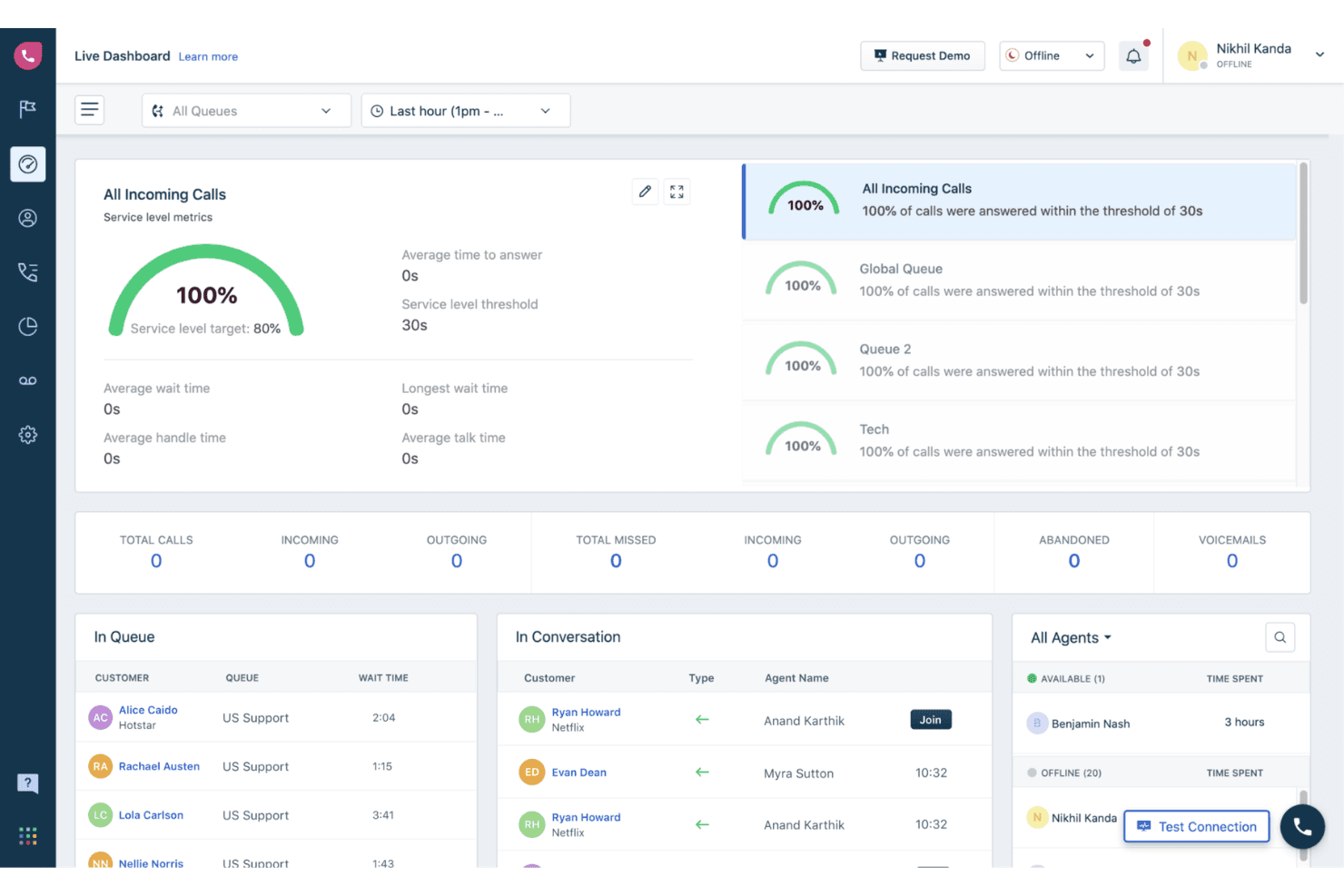
Freshcaller bietet ein Live-Dashboard mit Echtzeitkennzahlen, darunter die Überwachung des Servicelevels, Anrufwarteschlangen, den Agentenstatus und aktive Gespräche. Freshcaller ist eine cloudbasierte VoIP-Kontaktcenter-Lösung, mit der Agenten über einen Browser, eine mobile App oder ein SIP-Telefon Anrufe tätigen und entgegennehmen können. Mehrstufige IVR, Anrufweiterleitung, Aufzeichnung und Echtzeitanalysen sind integriert.
Für wen eignet sich Freshcaller am besten?
Freshcaller eignet sich besonders für Supportteams, die bereits das Freshworks-Ökosystem nutzen und eine eng verknüpfte Einrichtung aus Callcenter und Helpdesk benötigen.
Warum ich Freshcaller ausgewählt habe
Ich habe Freshcaller in meine Top-Auswahl aufgenommen, weil die Anrufweiterleitung speziell für Teams konzipiert ist, die mit Freshworks arbeiten. Eingehende Anrufe können anhand von Bedingungen weitergeleitet werden, die direkt mit Daten aus Freshdesk oder Freshsales verknüpft sind. So erhält der richtige Agent den passenden Anruf auf Grundlage des CRM-Kontexts. Außerdem nutze ich die intelligenten Eskalationsregeln und das Live-Aufschalten bei Anrufen, mit denen sich Vorgesetzte in laufende Gespräche einschalten und Agenten in Echtzeit coachen können, ohne den Kunden zu stören.
Die wichtigsten Funktionen von Freshcaller
- Mehrstufiges IVR-System: Erstellen Sie individuelle Anrufmenüs mit verschachtelten Optionen, um Anrufer an die richtige Stelle weiterzuleiten.
- Anrufaufzeichnung mit Speicherung: Zeichnen Sie Anrufe automatisch auf und greifen Sie direkt über das Anrufprotokoll auf die Aufzeichnungen zu.
- Echtzeitstatus der Agenten: Sehen Sie die aktuelle Verfügbarkeit der Agenten, einschließlich verfügbar, beschäftigt und nicht stören, um Anrufe effektiver weiterzuleiten.
- Globale Abdeckung bei Telefonnummern: Nutzen Sie lokale und gebührenfreie Nummern aus mehr als 90 Ländern für eine internationale Präsenz.
Freshcaller-Integrationen
Freshcaller bietet native Integrationen mit Freshdesk, Freshsales, Salesforce, HubSpot und Slack. Für individuelle Integrationen steht eine API zur Verfügung.
Pros and Cons
Pros:
- Für die IVR-Weiterleitung ist keine Programmierung erforderlich
- Aufschalten und Flüstern bei aktiven Anrufen
- Echtzeitverfügbarkeit der Agenten teamübergreifend sichtbar
Cons:
- Berichtsdashboards bieten nur eingeschränkte Anpassungsmöglichkeiten
- Weniger geeignet für Technologie-Stacks ohne Freshworks
Learn more about Freshcaller: Am besten für geschäftliche Telefonie mit Google Workspace geeignet
- Kostenloser Tarif verfügbar
- Ab $10/Benutzer/Monat
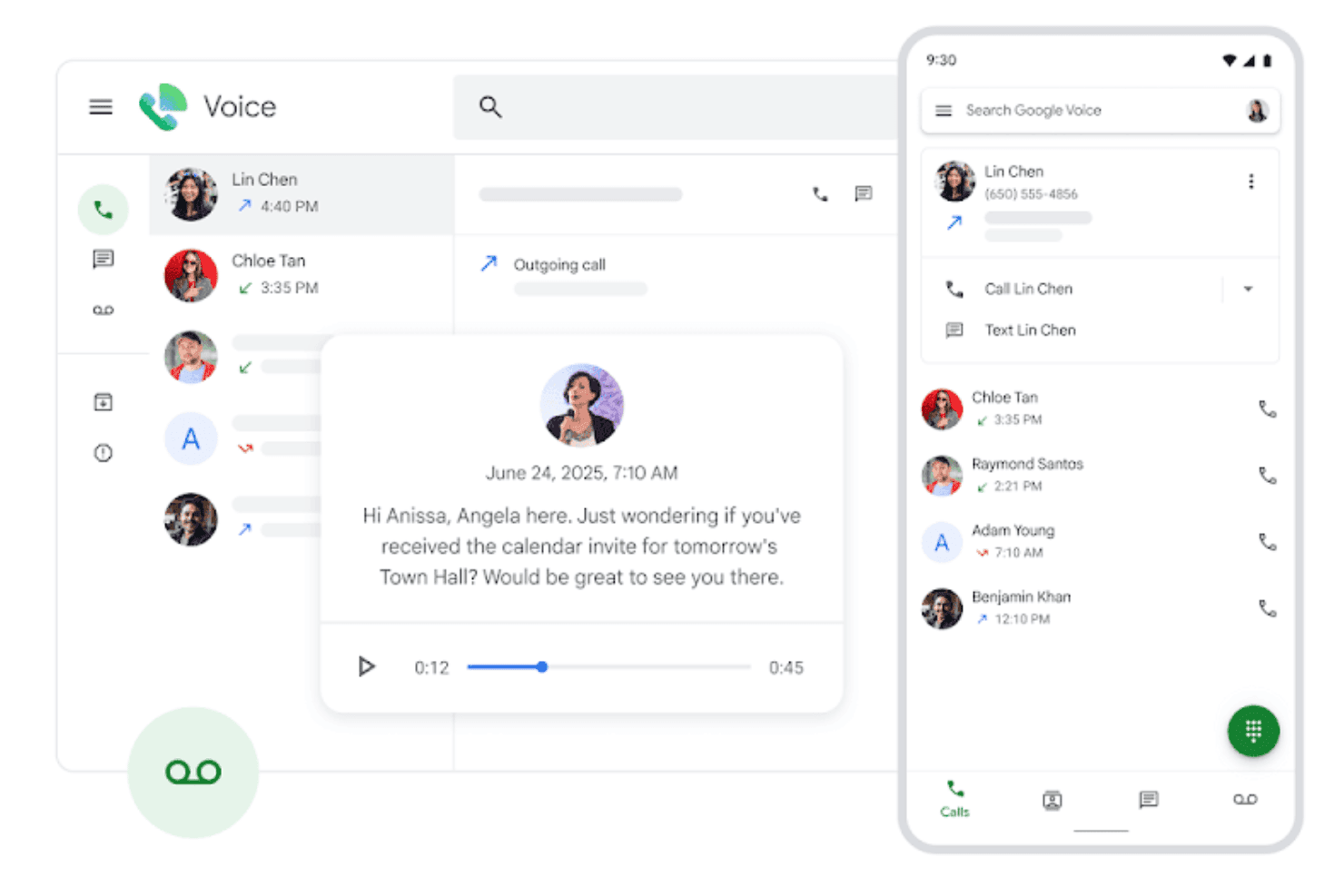
Google Voice zeigt eine einheitliche Oberfläche zur Verwaltung von Anrufen, Sprachnachrichten und Kontaktinteraktionen in Desktop- und Mobilansichten. Google Voice ist eine cloudbasierte VoIP-Telefoniesoftware, die in das Google-Workspace-Ökosystem integriert ist und Telefonie, Videoanrufe, SMS, die Transkription von Sprachnachrichten sowie eine KI-gestützte Spamfilterung auf Mobilgeräten, Desktop-Computern und Tischtelefonen bietet.
Für wen ist Google Voice am besten geeignet?
Google Voice eignet sich besonders für kleine Unternehmen und verteilte Teams, die bereits Google Workspace nutzen und ein unkompliziertes Telefonsystem für Unternehmen ohne zusätzliche Infrastruktur benötigen.
Warum ich Google Voice ausgewählt habe
Ich habe Google Voice in meine Top-Auswahl aufgenommen, weil es die einzige VoIP-Telefoniesoftware ist, die vollständig nativ in Google Workspace integriert ist. Anrufe werden direkt über Gmail geführt, Sprachnachrichten werden automatisch in Ihrem Posteingang transkribiert, und die mehrstufige automatische Vermittlung übernimmt die Anrufweiterleitung ohne separate Administrationsplattform. Mein Team nutzt die Vault-Integration, um Anrufaufzeichnungen im selben System für elektronische Beweiserhebung und Aufbewahrung wie E-Mails zu speichern.
Die wichtigsten Funktionen von Google Voice
- Anrufe auf mehreren Geräten: Tätigen und empfangen Sie Anrufe mit einer einzigen Nummer über Mobilgeräte, Laptops oder unterstützte Tischtelefone.
- Blockierung von Spam-Anrufen: Nutzt Google-KI, um Spam-Anrufer zu erkennen und zu blockieren, bevor das Telefon klingelt.
- SIP-Link-Integration: Verbinden Sie bestehende PSTN-Dienste und Tischtelefone über zertifizierte Sitzungsgrenzcontroller mit Google Voice.
- Weiterleitung nach Google Kalender: Leitet eingehende Anrufe entsprechend den Einstellungen für Ihre Arbeitszeiten in Google Kalender weiter.
Integrationen von Google Voice
Google Voice bietet native Integrationen mit Google-Workspace-Apps, darunter Google Meet und Google Kalender, sowie eine API für benutzerdefinierte Integrationen.
Pros and Cons
Pros:
- Native Synchronisierung mit Google Workspace in allen Apps
- KI-gestützte Transkription von Sprachnachrichten inklusive
- Funktioniert auf Mobilgeräten, Desktop-Computern und Tischtelefonen
Cons:
- Eingeschränkte Anrufanalysen für Teams in Kontaktzentren
- Keine integrierte Anrufaufzeichnung im Starter-Tarif
Learn more about Google Voice: Am besten für die Kommunikation kundennaher Teams geeignet
- Kostenlose Demo verfügbar
- Ab $15/Nutzer/Monat (jährlich abgerechnet)
Visit WebsiteCustomer Rating:4.5/5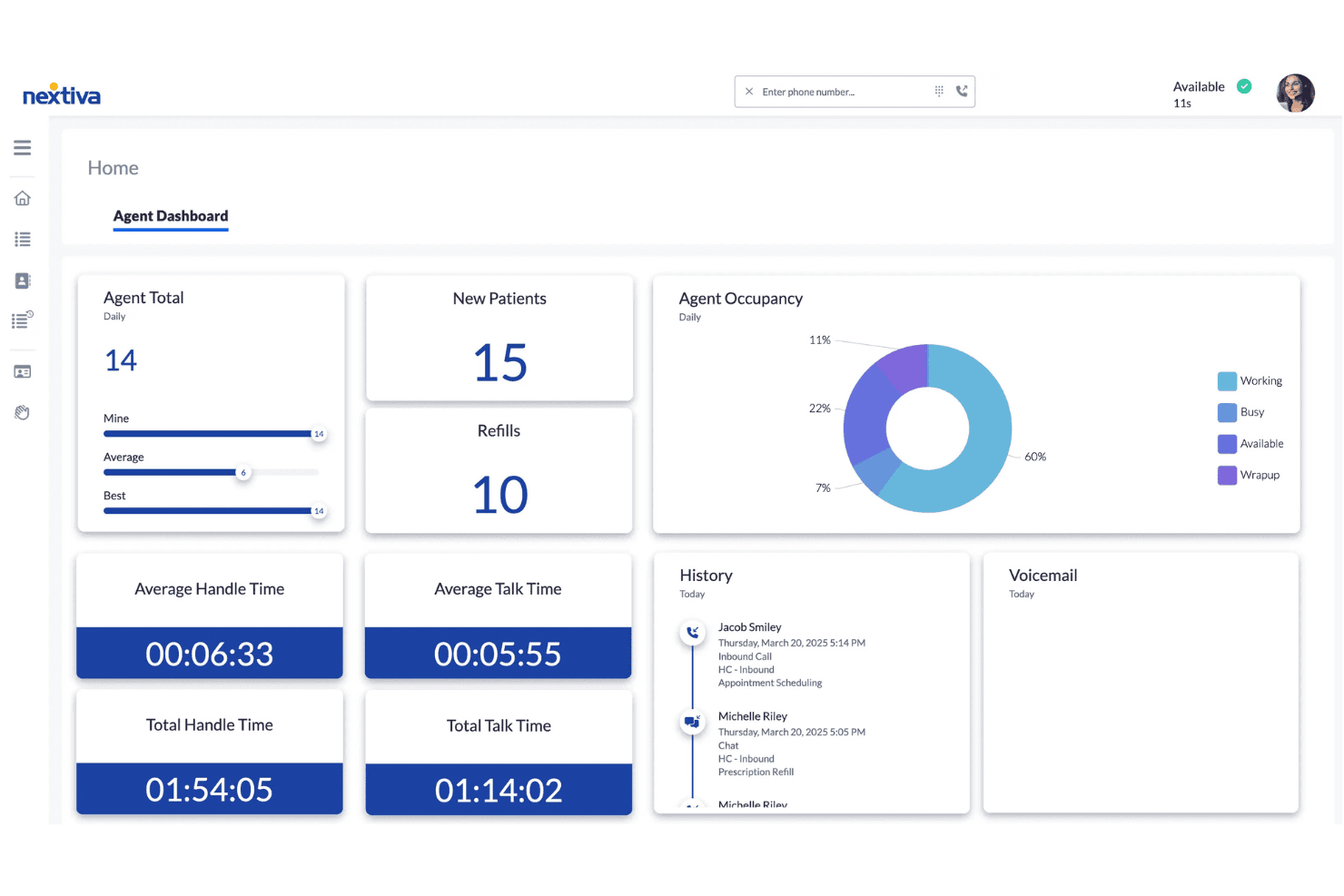
Die Agentenübersicht von Nextiva zeigt Echtzeit-Anrufkennzahlen, Auslastungsdiagramme, Gesprächszeiten und den Interaktionsverlauf für Kontaktcenter-Agenten. Nextiva ist eine cloudbasierte VoIP-Plattform für vereinheitlichte Kommunikation, die Internettelefonie, SMS, Videokonferenzen, Team-Chat und KI-gestütztes Anrufmanagement in Desktop- und mobilen Apps kombiniert.
Für wen ist Nextiva am besten geeignet?
Nextiva eignet sich besonders für Kundensupport- und Kontaktcenter-Teams, die eine einzige Plattform für Sprachkommunikation, Nachrichten und KI-gestützte Anrufbearbeitung benötigen.
Warum ich mich für Nextiva entschieden habe
Ich habe Nextiva als eine der besten Lösungen ausgewählt, weil die NextivaONE-App mein gesamtes kundennahes Team bei Sprachkommunikation, SMS und Chat hält, ohne zwischen verschiedenen Tools wechseln zu müssen. Der KI-Sprachagent bearbeitet eingehende Anrufe rund um die Uhr, leitet Anfragen weiter und beantwortet häufig gestellte Fragen, bevor ein Mitarbeiter den Anruf übernimmt. Außerdem nutze ich die KI-gestützte Anruftranskription und Zusammenfassung, um Kundeninteraktionen schnell zu überprüfen, ohne vollständige Aufzeichnungen erneut abspielen zu müssen.
Die wichtigsten Funktionen von Nextiva
- Mehrstufige automatische Vermittlung: Richten Sie erweiterte Anrufweiterleitungsmenüs für verschiedene Abteilungen oder Zeitpläne ein.
- Team-Präsenz und Status: Sehen Sie die Verfügbarkeit von Kollegen in Echtzeit, um Anrufweiterleitungen und die Koordination zu erleichtern.
- Analysen für Kontaktcenter: Greifen Sie auf Übersichten mit Live- und historischen Kennzahlen zur Agentenleistung und Anrufaktivität zu.
- Anwendungen für Internettelefonie im Browser und auf Mobilgeräten: Tätigen und empfangen Sie Anrufe über Webbrowser sowie auf Windows-, macOS-, iOS- und Android-Geräten.
Nextiva-Integrationen
Nextiva bietet native Integrationen mit Salesforce, HubSpot, Microsoft Teams, Google Workspace, Outlook und Microsoft Dynamics sowie eine API für individuelle Integrationen.
Pros and Cons
Pros:
- KI-gestützte Anrufzusammenfassungen reduzieren die manuelle Dokumentation nach Anrufen
- Vereinte Sprachkommunikation, SMS und Chat in einer App
- Zuverlässige HD-Audioqualität auf Desktop- und Mobilgeräten
Cons:
- Die mobile App beendet bei schlechter Verbindung gelegentlich Anrufe
- Die Berichtsübersichten erfordern anfangs eine intensive Einarbeitung
 Am besten für KI-gestützte Gesprächsnotizen
- 14-tägige kostenlose Testversion
- Ab 15 $/Benutzer/Monat (jährliche Abrechnung)
Visit WebsiteCustomer Rating:4.3/5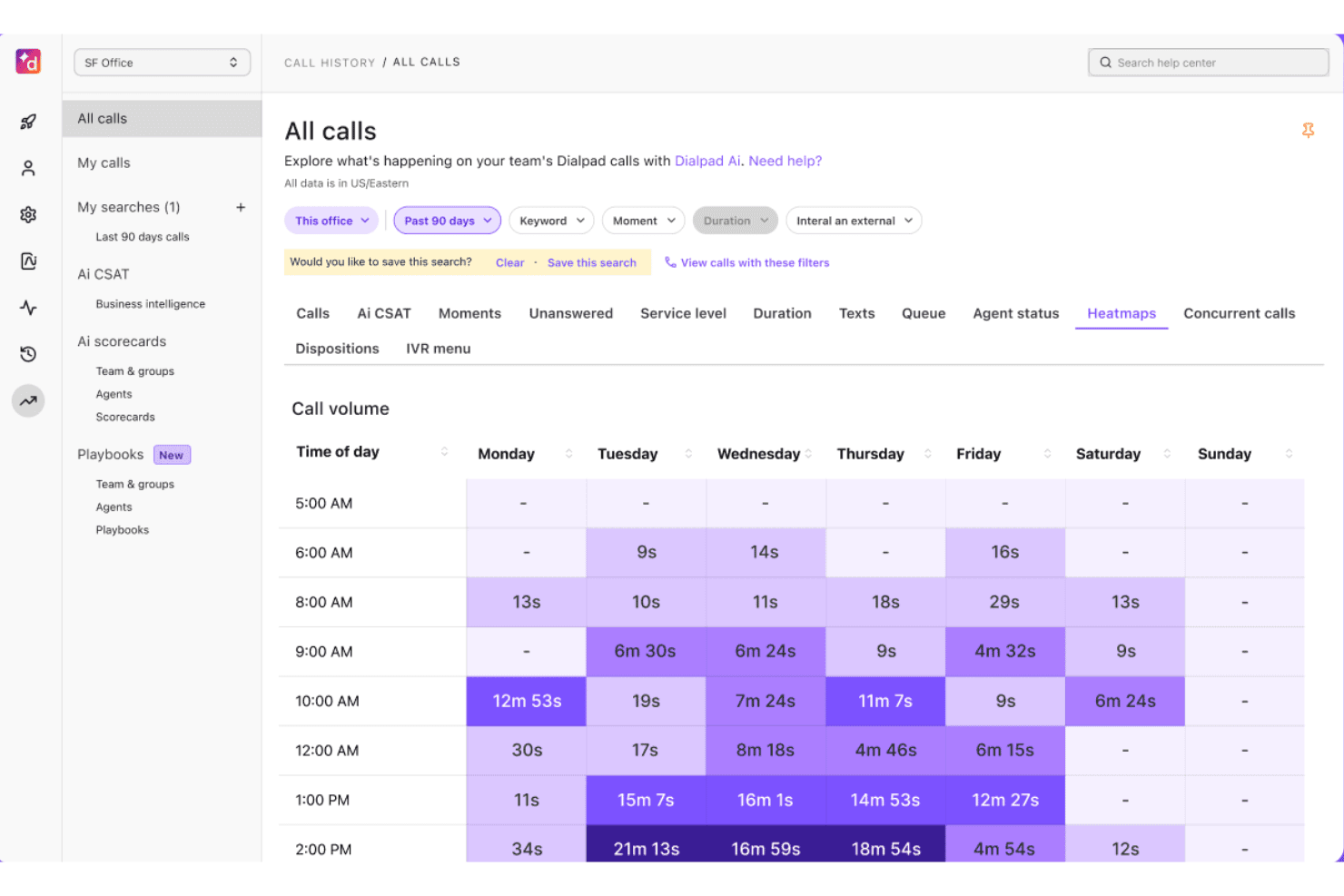
Dialpad bietet eine Heatmap-Ansicht des Anrufvolumens, die die Anrufdauer nach Tag und Tageszeit über einen Zeitraum von 90 Tagen darstellt. Dialpad ist eine cloudbasierte Kommunikationsplattform mit nativer KI, die Sprachanrufe, SMS, Nachrichten und Videokonferenzen in einer einzigen Softphone-App vereint, die auf dem proprietären großen Sprachmodell DialpadGPT basiert.
Für wen eignet sich Dialpad am besten?
Dialpad eignet sich für kleine bis mittelgroße Kundensupport- und Vertriebsteams – insbesondere für Teams, die Google Workspace verwenden und ein Cloud-Telefonsystem mit integrierter KI-Anrufdokumentation benötigen.
Warum ich mich für Dialpad entschieden habe
Dialpad gehört zu meiner engeren Auswahl, weil die Funktion AI Recaps nach jedem Gespräch automatisch strukturierte Gesprächszusammenfassungen und Aufgaben erstellt, die vom proprietären DialpadGPT-Modell unterstützt werden. Die Echtzeit-Transkription läuft während der Anrufe live, sodass selbst bei schnelllebigen Supportinteraktionen nichts übersehen wird. Außerdem gefällt mir, dass die KI-CSAT-Bewertung automatisch bei 91 % der Anrufe durchgeführt wird und meinem Team konsistente Leistungsdaten nach dem Gespräch liefert, ohne dass ein manueller Prüfprozess erforderlich ist.
Wichtige Funktionen von Dialpad
- Softphone für mehrere Geräte: Anrufe auf Desktop-Computern, Mobilgeräten, Tablets oder im Web tätigen und annehmen.
- Team-Messaging an einem Ort: Im selben App-Bereich wie die Anrufe mit Kollegen chatten und Dateien teilen.
- Native CRM-Integrationen: Direkte Verbindung mit Plattformen wie Salesforce, HubSpot und Zendesk.
- Echtzeit-Präsenz: Die Verfügbarkeit und den Status von Agenten sofort sehen, um Anrufweiterleitung und Zusammenarbeit zu optimieren.
Dialpad-Integrationen
Dialpad bietet native Integrationen mit Salesforce, HubSpot, Zendesk, Google Workspace, Microsoft 365, ServiceNow, Zoho CRM, Okta, Bullhorn und Clio. Für benutzerdefinierte Integrationen ist eine API verfügbar.
Pros and Cons
Pros:
- KI-generierte Gesprächszusammenfassungen nach jedem Gespräch
- Echtzeit-Transkription läuft während Live-Anrufen
- Funktioniert auf Desktop-Computern, Mobilgeräten und in Webbrowsern
Cons:
- KI-Funktionen sind höheren Tarifen vorbehalten
- Die Anrufqualität kann bei schwachen Verbindungen abnehmen
 Am besten für geschäftliche Kommunikation über mehrere Geräte
- Kostenlose Demo verfügbar
- Preis auf Anfrage
Visit WebsiteCustomer Rating:4.2/5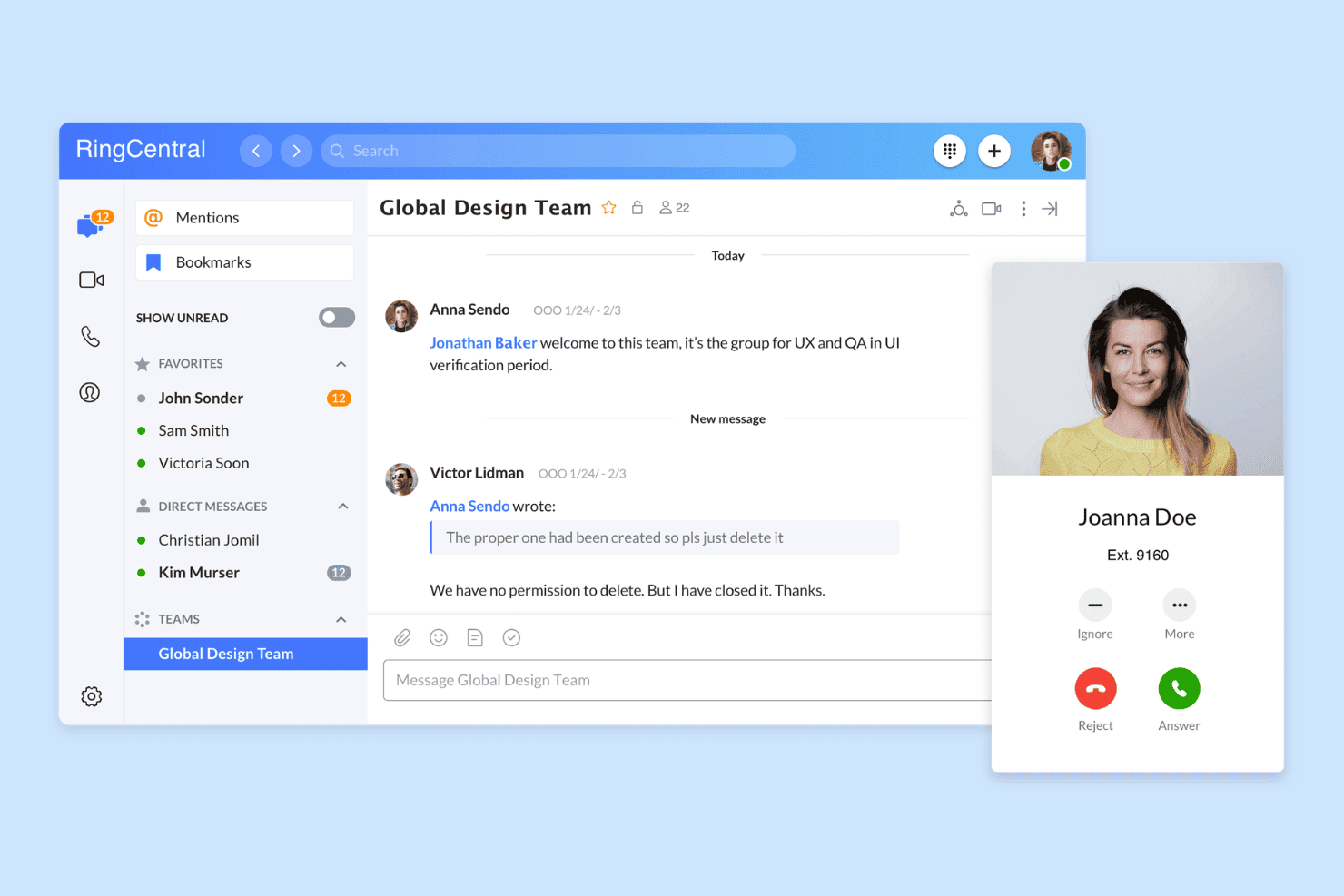
RingCentral bietet eine einheitliche Oberfläche für Nachrichten und Anrufe mit Teamchat, Direktnachrichten und Benachrichtigungen über eingehende Anrufe auf einer Plattform. RingCentral ist eine cloudbasierte UCaaS-Plattform, die VoIP-Anrufe, Videokonferenzen, geschäftliche SMS und Teamnachrichten in einer einzigen Software-Telefonanwendung für Desktop, Mobilgeräte und Web kombiniert.
Für wen ist RingCentral am besten geeignet?
Die Plattform eignet sich besonders für mittelständische Unternehmen mit verteilten oder im Homeoffice arbeitenden Teams, die eine zentrale Plattform zur Verwaltung der Sprachkommunikation über mehrere Geräte und Standorte hinweg benötigen.
Warum ich RingCentral ausgewählt habe
RingCentral hat sich einen Platz auf meiner Auswahlliste verdient, weil die Sprachkommunikation auf jedem Gerät in meiner Konfiguration zuverlässig funktioniert. Besonders gefällt mir die Funktion zum Übertragen eines Anrufs, mit der sich ein laufendes Gespräch während der Unterhaltung ohne Unterbrechung vom Desktop-Software-Telefon auf die mobile Anwendung übertragen lässt. Auch der Anwesenheitsstatus wird in Echtzeit zwischen Desktop, Mobilgeräten und Web synchronisiert, sodass mein Team immer die korrekte Verfügbarkeit sieht, unabhängig davon, von welchem Gerät aus jemand arbeitet.
Wichtige Funktionen von RingCentral
- KI-gestützte Anrufzusammenfassungen: Erstellt automatisch durchsuchbare, KI-generierte Zusammenfassungen für jeden Anruf, um Überprüfung und Qualitätssicherung zu beschleunigen.
- Integrierte Teamnachrichten: Bietet integrierte Chats und Gruppennachrichten direkt neben den Anruffunktionen in der Software-Telefonanwendung.
- Kanalübergreifendes Kontaktzentrum: Unterstützt Sprache, SMS, Webchat und soziale Nachrichten in einer Übersicht für CX-Teams.
- Direkte CRM-Integrationen: Verbindet sich mit Salesforce, HubSpot und Zendesk, um Kundendatensätze aufzurufen und Aktivitäten automatisch zu protokollieren.
RingCentral-Integrationen
RingCentral bietet direkte Integrationen mit Salesforce, HubSpot, Zendesk, Microsoft Teams, Google Workspace, Slack und ServiceNow sowie eine API für benutzerdefinierte Integrationen.
Pros and Cons
Pros:
- Die Anrufübertragung funktioniert während des laufenden Gesprächs
- Echtzeit-Anwesenheit über alle Plattformen hinweg synchronisiert
- KI-Transkription deckt jeden aufgezeichneten Anruf ab
Cons:
- Die mobile Anwendung entlädt den Akku häufig schneller
- Die Oberfläche wirkt für Nutzer, die nur telefonieren möchten, überladen
Learn more about RingCentral: Am besten für Vertriebswähler und SMS-Workflows geeignet
- 14-tägige kostenlose Testversion
- Ab $29/Benutzer/Monat (jährlich abgerechnet)
Visit WebsiteCustomer Rating:4.1/5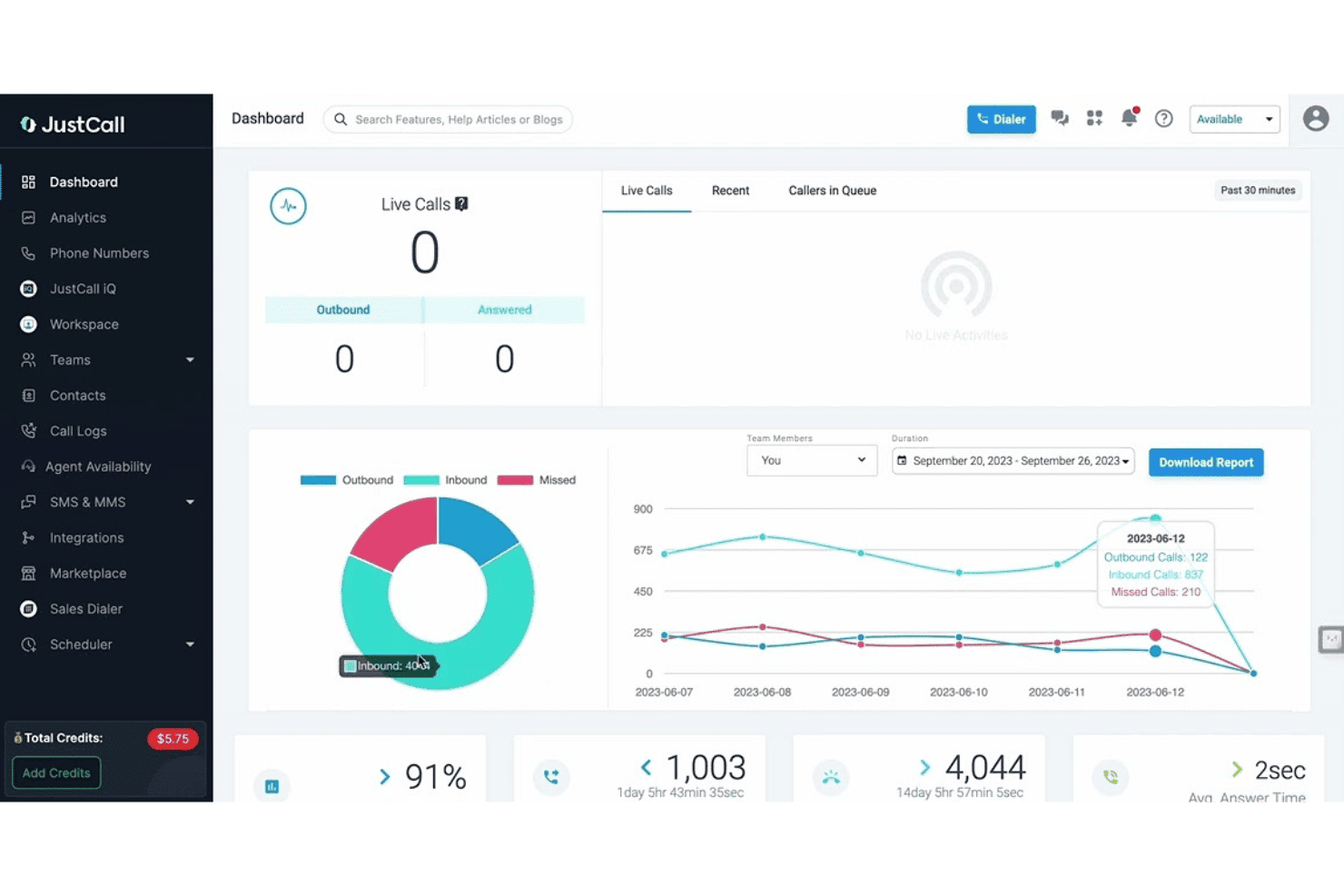
JustCall bietet eine Echtzeit-Übersicht mit laufender Anrufüberwachung, Diagrammen zur Anrufanalyse und Leistungskennzahlen des Teams, einschließlich einer Aufschlüsselung eingehender, ausgehender und verpasster Anrufe. JustCall ist eine cloudbasierte VoIP-Softphone-Plattform, die Sprachanrufe, SMS- und MMS-Nachrichten, KI-gestützte Gesprächsintelligenz und Funktionen für automatische Mehrleitungswählgeräte auf Desktop, Mobilgeräten und im Web kombiniert.
Für wen ist JustCall am besten geeignet?
JustCall eignet sich besonders für ausgehende Vertriebsteams sowie für Kundensupport-Teams in kleinen und mittleren Unternehmen bis hin zum gehobenen Mittelstand, die Sprach-, SMS- und Wählfunktionen an einem Ort benötigen.
Warum ich JustCall ausgewählt habe
Ich habe JustCall als eine der besten Lösungen ausgewählt, weil sich der prädiktive Mehrleitungswähler mit bis zu 10 gleichzeitigen Leitungen und die dynamische Wählfunktion deutlich von den meisten Softphone-Apps abheben, die nur einfaches Klicken zum Wählen anbieten. Außerdem gefällt mir, dass SMS-Workflows und Bots nativ innerhalb derselben Plattform ausgeführt werden, sodass mein Team automatisierte Nachfasssequenzen auslösen kann, ohne zwischen verschiedenen Tools wechseln zu müssen. Die Funktion für Wählen mit lokaler Präsenz, bei der eine Nummer angezeigt wird, die der Ortsvorwahl des Interessenten entspricht, bietet zusätzliche Funktionen, auf die die meisten eigenständigen Softphone-Apps vollständig verzichten.
Die wichtigsten Funktionen von JustCall
- Echtzeit-Präsenz der Agenten: Zeigt den Verfügbarkeitsstatus der Agenten im Web, auf dem Desktop und auf Mobilgeräten an und ermöglicht so eine effiziente Weiterleitung.
- Native CRM-Integrationen: Verbindet sich nativ mit Salesforce, HubSpot, Zoho und Zendesk für das Klicken zum Wählen und die automatische Anrufprotokollierung.
- Automatische Anrufaufzeichnung: Zeichnet jeden Anruf auf und speichert ihn für eine einfache Wiedergabe und Qualitätssicherung.
- Live-Anrufüberwachung: Ermöglicht Vorgesetzten, laufende Anrufe mitzuhören, den Agenten unbemerkt zu unterstützen oder sich in Gespräche einzuschalten, um Coaching und Kontrolle zu gewährleisten.
JustCall-Integrationen
JustCall bietet mehr als 100 native Integrationen, darunter Salesforce, HubSpot, Zoho CRM, Pipedrive, Zendesk, Freshdesk, Intercom, Help Scout, Slack und Microsoft Teams. Für benutzerdefinierte Integrationen ist eine API verfügbar.
Pros and Cons
Pros:
- Prädiktiver Wähler unterstützt bis zu 10 Leitungen
- SMS-Workflows und Bots werden nativ ausgeführt
- KI-Transkription für jeden aufgezeichneten Anruf
Cons:
- Die Anrufqualität der mobilen App kann uneinheitlich sein
- Die Berichtsdashboards bieten nur begrenzte Anpassungsmöglichkeiten
 Am besten für Anrufe in kleinen Unternehmen und Tischtelefone geeignet
- Nicht verfügbar
- Ab $19.95/Benutzer/Monat
Visit WebsiteCustomer Rating:3/5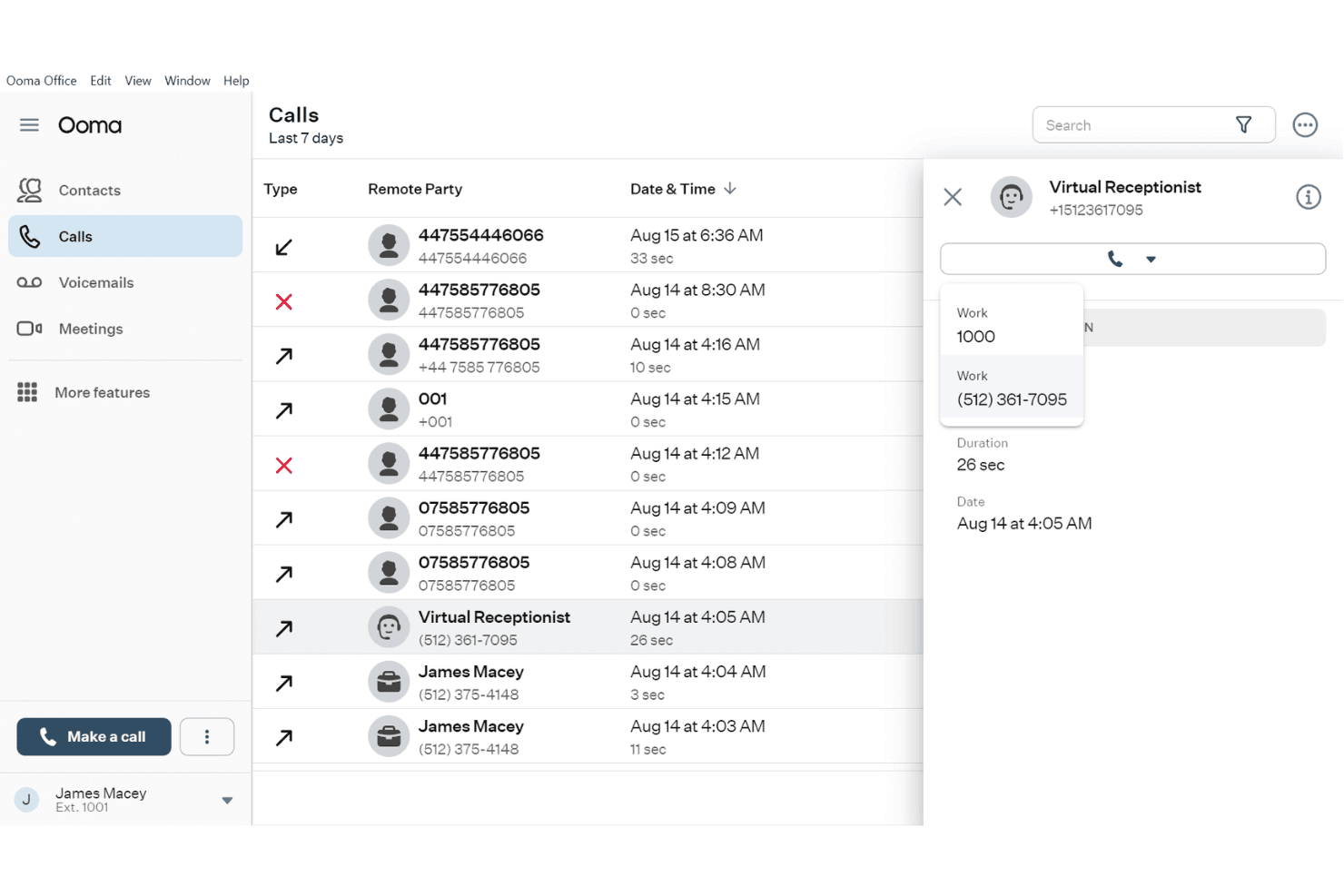
Ooma Office zeigt ein detailliertes Anrufprotokoll mit Kontaktdaten und Gesprächsdauer sowie ein Dropdown-Fenster der virtuellen Rezeption. Ooma Office ist eine cloudbasierte VoIP-Telefonanlage für kleine Unternehmen, die ein Desktop- und mobiles Softwaretelefon, Anrufverwaltungsfunktionen, SMS, Videokonferenzen und CRM-Integrationen in einer Plattform vereint.
Für wen eignet sich Ooma Office am besten?
Ooma Office eignet sich besonders für kleine und mittelständische Unternehmen, die eine funktionsreiche Telefonanlage ohne die Komplexität oder Kosten unternehmensorientierter VoIP-Plattformen wünschen.
Warum ich Ooma Office ausgewählt habe
Ich habe Ooma Office als eine der besten Lösungen ausgewählt, weil die Plattform Tischtelefone und Softwaretelefon-Apps auf eine Weise miteinander verbindet, wie es nur wenige auf kleine und mittelständische Unternehmen ausgerichtete Plattformen tun. Mit der Anrufübergabe kann ich ein aktives Gespräch während des Gesprächs von meinem Tischtelefon auf das mobile Softwaretelefon übertragen, ohne dass die Verbindung abbricht. Durch das gleichzeitige Klingeln gehen eingehende Anrufe sowohl auf dem Tischtelefon als auch in der Softwaretelefon-App ein, sodass mein Team beim Wechsel zwischen verschiedenen Bereichen keinen Anruf verpasst.
Wichtige Funktionen von Ooma Office
- KI-Anruftranskription und Zusammenfassungen: KI-gestützte Transkriptionen und automatische Anrufzusammenfassungen in den Pro-Plus-Tarifen.
- CRM-Integration: Verbindet sich mit Plattformen wie Salesforce, HubSpot und Zoho, um Kontakte und Anrufprotokolle zu synchronisieren.
- Team-Chat und Anwesenheitsstatus: Integrierte Teamnachrichten und Echtzeit-Anwesenheitsanzeigen für eine bessere Zusammenarbeit.
- Dashboard für Anrufanalysen: Detaillierte Anrufkennzahlen und Ranglisten helfen Ihnen, die Aktivitäten von Mitarbeitenden und Teams zu verfolgen.
Integrationen von Ooma Office
Ooma Office bietet native Integrationen mit Salesforce, HubSpot, Zendesk, Zoho, Pipedrive, Microsoft Dynamics 365, SugarCRM sowie Google und Microsoft 365. Außerdem lässt sich die Plattform mit Zapier verbinden und bietet eine API für individuelle Integrationen.
Pros and Cons
Pros:
- Unterstützt physische Tischtelefone neben Softwaretelefonen
- Die Anrufübergabe verschiebt laufende Gespräche zwischen Geräten
- Integrierte Videokonferenzen auf Mobilgeräten
Cons:
- Die Stabilität der mobilen App hat einige Nutzer frustriert
- Die KI-Transkription erfordert den teureren Pro-Plus-Tarif
Learn more about Ooma Office: Am besten für geschäftliche Anrufe über Zoom geeignet
- Kostenlose Demo verfügbar
- Ab $10.50/Benutzer/Monat
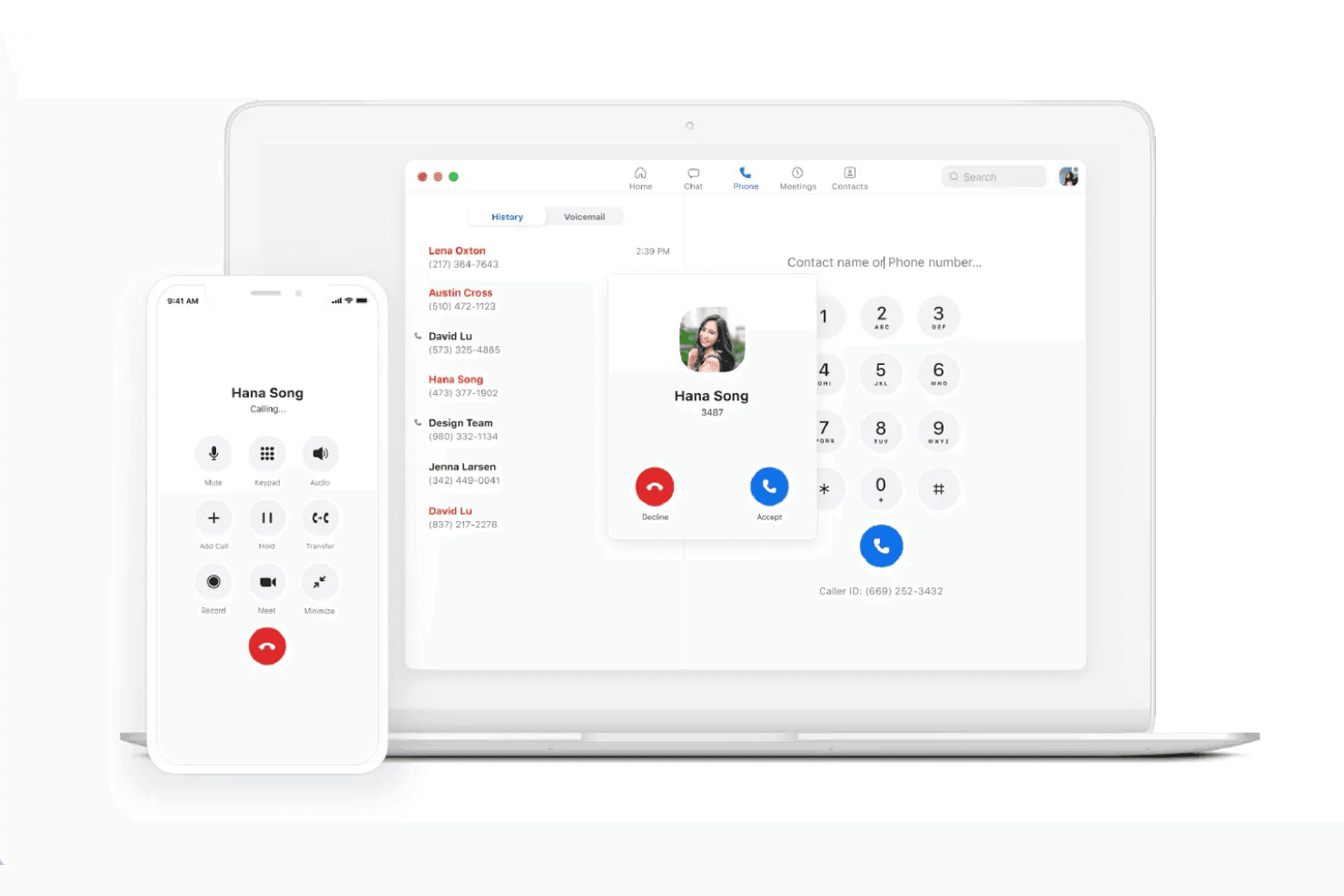
Zoom Phone zeigt eine Oberfläche für eingehende Anrufe von Hana Song sowohl in der Desktop- als auch in der mobilen App, wobei die Anrufhistorie, ein Wählfeld und Anrufsteuerungen sichtbar sind. Zoom Phone ist eine cloudbasierte VoIP-Softphone-Anwendung, die eingehende und ausgehende PSTN-Anrufe, SMS/MMS, die Transkription von Sprachnachrichten, Anrufweiterleitung und KI-gestützte Anrufzusammenfassungen über Desktop-, Mobil- und Tischtelefon-Clients hinweg vereint.
Für wen ist Zoom Phone am besten geeignet?
Es eignet sich besonders für Teams, die bereits Zoom Workplace nutzen und Sprachanrufe auf derselben Plattform wie ihre Meetings und Chats integrieren möchten.
Warum ich Zoom Phone ausgewählt habe
Zoom Phone gehört zu den besten Lösungen auf meiner Auswahlliste, weil es sich so nahtlos in die übrige Zoom-Workplace-Suite einfügt. Ich finde es praktisch, dass mein Team einen laufenden Anruf vom Desktop auf das Mobilgerät übertragen kann, ohne dass die Verbindung abbricht. Das ist besonders hilfreich, wenn jemand während eines Gesprächs seinen Schreibtisch verlassen muss. Auch der AI Companion bietet einen echten Mehrwert, da er nach dem Anruf Zusammenfassungen erstellt und direkt aus aufgezeichneten Gesprächen Aufgaben ableitet.
Wichtige Funktionen von Zoom Phone
- CRM- und Helpdesk-Integrationen: Stellt native Verbindungen zu Salesforce, HubSpot, Zendesk und Microsoft Teams für das Wählen per Mausklick und die automatische Protokollierung von Anrufaktivitäten her.
- Präsenz und Team-Messaging: Echtzeit-Präsenzstatus und direkte Chats ermöglichen eine nahtlose Teamkoordination innerhalb der Zoom-App.
- Verwaltung von Anrufwarteschlangen: Administratoren können Anrufwarteschlangen und Weiterleitungsregeln einrichten, um eingehende Anrufe auf Agenten oder Abteilungen zu verteilen.
- Automatische Anrufaufzeichnung: Zeichnet Anrufe auf und speichert sie zur Qualitätsprüfung, für Compliance-Zwecke oder zur Leistungsverwaltung.
Integrationen von Zoom Phone
Zoom Phone bietet native Integrationen mit Salesforce, HubSpot, Zendesk, Microsoft Teams, Google Workspace, Slack, ServiceNow und Okta sowie eine API für benutzerdefinierte Integrationen.
Pros and Cons
Pros:
- Anrufübertragung vom Desktop auf das Mobilgerät
- KI-Anrufzusammenfassungen nativ enthalten
- Mit Zoom-Meetings und -Chats vereinheitlicht
Cons:
- Erfordert einen bestehenden Zoom-Workplace-Plan
- Eingeschränkte Überwachung durch Vorgesetzte ohne Contact-Center-Erweiterung
Learn more about Zoom Phone:
Weitere VoIP-Softphone-Apps
Hier sind einige zusätzliche VoIP-Softphone-Apps, die es nicht in meine Auswahlliste geschafft haben, aber dennoch eine Überlegung wert sind:
- 113CXAm besten für selbst gehostete Geschäftstelefonsysteme geeignet
- 12AircallAm besten für CRM-integrierte Verkaufsgespräche geeignet
- 13Five9Am besten für Kampagnen in ausgehenden Kontaktcentern
- 14TalkdeskAm besten für die Automatisierung von KI-Kontaktzentren
- 15CloudCallIdeal für CRM-basierte Verkaufsgespräche
- 16Genesys Cloud CXAm besten für die Orchestrierung von Unternehmenserlebnissen
- 178x8 Contact CenterAm besten für sichere Omnichannel-Kontaktzentren
- 18Vonage Contact CenterAm besten für Salesforce-Kontaktcenter-Arbeitsabläufe geeignet
Wie ich VoIP-Softphone-Apps bewerte
Ich unterteile meine Bewertung in zentrale unverzichtbare Funktionen – wie geräteübergreifendes Telefonieren und CRM-Integrationen – sowie unterscheidende Faktoren, die ein einfaches Wählprogramm von einem Tool abheben, auf das sich Mitarbeitende tatsächlich verlassen werden.
Kernfunktionen (Grundvoraussetzungen für diese Liste)
Bei der Auswahl der Tools für meine Liste bewerte ich jedes einzelne für die unten aufgeführten Kernfunktionen auf einer Skala von 0 (bietet die Funktion nicht) bis 5 (zeichnet sich in diesem Bereich aus). Anschließend rechne ich die Gesamtpunktzahl des Tools in einen Prozentsatz um und verwende 65 % als Richtwert, um die allgemeine Eignung für die Liste zu beurteilen.
- VoIP-Telefonie: Ich prüfe, ob Mitarbeitende HD-Anrufe über Desktop, Mobilgeräte und das Web tätigen und empfangen können, damit Remote-Teams nicht an ein einziges Gerät gebunden sind.
- Steuerung der Anrufbearbeitung: Halten, angekündigte Weiterleitung, Konferenzen und Anrufübergabe sind gleichermaßen wichtig. Ich bewerte, wie reibungslos Mitarbeitende Anrufe während eines Gesprächs umleiten oder eskalieren können.
- CRM-/Helpdesk-Integrationen: Native Verbindungen zu Plattformen wie Salesforce oder Zendesk sollten Bildschirmanzeigen mit Kundendaten einblenden und Aktivitäten automatisch protokollieren, ohne dass eine manuelle Eingabe erforderlich ist.
- Anrufaufzeichnung & Sprachnachrichten: Ich achte auf automatische Aufzeichnungen mit durchsuchbarem Speicher, da Qualitätssicherungsprüfungen und Coachingsitzungen von einem einfachen Zugriff auf vergangene Anrufe abhängen.
- Präsenz & Verfügbarkeit: Echtzeit-Statusanzeigen helfen dabei, Anrufe an verfügbare Mitarbeitende weiterzuleiten. Ich prüfe, ob die Präsenz teamübergreifend synchronisiert und automatisch aktualisiert wird.
- Anrufanalyse & Berichterstattung: Dashboards sollten Anrufvolumen, verpasste Anrufe und Kennzahlen auf Mitarbeitendenebene abdecken, damit Teamleitungen Trends erkennen und Leistungslücken beheben können.
Sobald ich eine Liste von Tools zusammengestellt habe, die die Kriterien erfüllen, prüfe ich, wodurch sich die einzelnen Plattformen voneinander unterscheiden.
Unterscheidungsmerkmale (Wodurch sich Anbieter abheben)
So vergleiche ich die verschiedenen Anbieter:
Hervorstechende Funktionen
Die Transkription von Anrufen durch KI erspart Mitarbeitenden das manuelle Anfertigen von Notizen und liefert Vorgesetzten durchsuchbare Zusammenfassungen nach dem Anruf, auf die sie während Qualitätssicherungsprüfungen zurückgreifen können. Außerdem bewerte ich Coaching-Tools wie Zuflüstern und Aufschalten, mit denen Teamleitungen Mitarbeitende während laufender Anrufe anleiten können, ohne dass der Kunde dies hört. CRM-Bildschirmanzeigen mit Kundendaten sind ein weiterer Unterscheidungsfaktor: Wenn die Kundenhistorie genau in dem Moment erscheint, in dem ein Anruf verbunden wird, entfällt für Mitarbeitende der sich wiederholende Verifizierungsschritt vollständig.
Über die Funktionen hinaus
Die Sprachqualität ist wichtiger, als die meisten Käufer erkennen. Beispielsweise prüfe ich die Unterstützung von HD-Codecs und Ausfallsicherheitsoptionen, da ein abgebrochenes Supportgespräch das Vertrauen der Kunden schnell beeinträchtigen kann. Neben der Gesprächsqualität ist die Sicherheit ein weiterer wichtiger Faktor. Ich achte auf TLS/SRTP-Verschlüsselung und Compliance-Zertifizierungen wie HIPAA oder SOC 2. Schließlich vergleiche ich die Preismodelle, da einige Anbieter pro Benutzer abrechnen, während andere Lizenzen nach der Anzahl gleichzeitig geführter Anrufe vergeben.
So wählen Sie VoIP-Softphone-Apps aus
Sie möchten entscheiden, welche VoIP-Softphone-App Ihrem Team den größten Nutzen bringt? Überlegen Sie zunächst, welche Kommunikations-, Integrations- oder Überwachungsanforderungen für Sie höchste Priorität haben:
| Wenn Ihre Priorität ... ist | Priorisieren Sie ... |
|---|---|
| Wenn Ihre Priorität ... istManuelle Notizen reduzieren | Priorisieren Sie ...KI-gestützte Anruftranskription |
| Wenn Ihre Priorität ... istAnrufe in Ihr CRM integrieren | Priorisieren Sie ...Integrierte CRM-Schnittstellen und Bildschirm-Pop-ups |
| Wenn Ihre Priorität ... istFlexibilität der Mitarbeitenden über mehrere Geräte | Priorisieren Sie ...Plattformübergreifende Nutzung (Computer, Web, Mobilgerät) |
| Wenn Ihre Priorität ... istEchtzeitüberwachung der Mitarbeitenden | Priorisieren Sie ...Funktionen für Vorgesetzte (Mithören, Aufschalten) |
| Wenn Ihre Priorität ... istSicherheit und Compliance | Priorisieren Sie ...Ende-zu-Ende-Verschlüsselung, SOC 2, HIPAA |
So prüfen Sie Ihre Auswahlliste
- Fordern Sie eine Demo der KI-Transkription an: Bitten Sie um ein Beispiel oder führen Sie selbst eine Live-Transkription durch, um die Genauigkeit zu prüfen, indem Sie innerhalb einer Woche mindestens zwei echte Anrufe von Mitarbeitenden vergleichen.
- Verbinden Sie Ihr CRM während der Testphase: Nutzen Sie die Testumgebung Ihres Systems, um Bildschirm-Pop-ups und Funktionen zur automatischen Protokollierung zu überprüfen, bevor Sie die Lösung mit Live-Kundendaten einsetzen.
- Testen Sie Anrufweiterleitungsabläufe: Führen Sie parallele Übungen mit Mitarbeitenden durch (Anrufübergabe, angekündigte Weiterleitung, Konferenz) und dokumentieren Sie die Haltezeiten auf verschiedenen Geräten.
- Fordern Sie schriftliche Compliance-Nachweise an: Fordern Sie von den Sicherheitsteams der Anbieter eine Dokumentation der TLS/SRTP-Verschlüsselung sowie Nachweise über Zertifizierungen wie SOC 2 oder HIPAA an.
- Nutzen Sie die Abwägungen, um Ihre Liste zu filtern: Entscheiden Sie, ob Flexibilität (plattformübergreifend, BYOD) für Ihr Team wichtiger ist als fortschrittliche Analysen und Berichte – nur wenige Lösungen sind in beidem gleichermaßen hervorragend.
Was sind VoIP-Apps für Internettelefonie?
VoIP-Apps für Internettelefonie ermöglichen es Ihnen, über das Internet von einem Desktop-Computer, Webbrowser oder Mobilgerät aus Telefonate zu führen und anzunehmen. Dadurch können Teams geschäftliche Anrufe tätigen, ohne auf physische Tischtelefone angewiesen zu sein. Diese Apps bieten außerdem Funktionen wie Anrufsteuerung, Voicemail sowie Integrationen mit CRM- oder Helpdesk-Systemen. So erhalten Mitarbeitende während der Bearbeitung von Gesprächen von verschiedenen Standorten aus Zugriff auf den Kundenkontext.
Funktionen von VoIP-Apps für Internettelefonie
Achten Sie bei der Auswahl von VoIP-Apps für Internettelefonie auf die folgenden wichtigen Funktionen:
- VoIP-Telefonie: Führen Sie von jedem Desktop-Computer oder Mobilgerät aus über das Internet Anrufe und nehmen Sie diese an, sodass kein physisches Telefon erforderlich ist.
- Anrufsteuerung: Greifen Sie auf wichtige Funktionen wie Halten, Stummschalten, Weiterleiten, Umleiten und Konferenzschaltungen zu, um jedes eingehende oder ausgehende Gespräch reibungslos zu verwalten.
- CRM-Integration: Verbinden Sie sich mit CRM-Systemen, um Anruferdetails anzuzeigen, Aktivitäten automatisch zu protokollieren und Mitarbeitenden während jeder Interaktion sofort den nötigen Kontext bereitzustellen.
- Anrufaufzeichnung und Voicemail: Archivieren Sie Anrufe und Voicemails für Schulungen, Qualitätssicherung und Compliance – mit einfachen Möglichkeiten zum Abrufen und Abspielen.
- Präsenz und Verfügbarkeit: Zeigen Sie den Status der Mitarbeitenden in Echtzeit an, beispielsweise verfügbar, beschäftigt oder in einem Gespräch, um eingehende Kontakte effektiver weiterzuleiten und abgebrochene Übergaben zu vermeiden.
- Teamnachrichten: Ermöglichen Sie Chats und Direktnachrichten innerhalb der App, damit Mitarbeitende und Vorgesetzte sich schnell abstimmen können, ohne die Umgebung der Telefonie-App zu verlassen.
- Anrufanalysen und Berichte: Verfolgen Sie Kennzahlen wie Anrufvolumen, Wartezeiten und verpasste Anrufe über Dashboards und Berichte, damit Führungskräfte die Teamleistung überwachen können.
- Sicherheit und Verschlüsselung: Schützen Sie Sprachdaten während der Übertragung und im Ruhezustand durch TLS- oder SRTP-Verschlüsselung und unterstützen Sie damit Branchenanforderungen für die Compliance bei sensibler Kommunikation.
- Unterstützung mehrerer Geräte: Ermöglichen Sie es Benutzern, problemlos zwischen Desktop-Computer, Mobilgerät und Web zu wechseln, und schaffen Sie so eine flexible Erfahrung für Remote- und hybride Teams.
- Steuerung durch Vorgesetzte: Bieten Sie Funktionen wie Anrufüberwachung, Flüstern und Aufschalten an, damit Teamleitungen während laufender Gespräche coachen oder eingreifen können, ohne dass der Kunde davon erfährt.
Vorteile von VoIP-Apps für Internettelefonie
Die Einführung von VoIP-Apps für Internettelefonie bietet Ihrem Team und Ihrem Unternehmen mehrere Vorteile. Hier sind einige davon:
- Mehr Flexibilität: Mitarbeitende können Anrufe von überall aus über einen Desktop-Computer, ein Mobilgerät oder einen Browser annehmen, wodurch Remote- und hybrider Support möglich wird.
- Gebündelte Kommunikation: Verwalten Sie Sprachkommunikation, Voicemail und Teamchat auf einer einzigen Plattform, sodass Mitarbeitende nicht zwischen verschiedenen Tools wechseln müssen.
- Besserer Kundenkontext: Integrationen mit CRM- und Helpdesk-Plattformen zeigen Anruferdetails sofort an und ermöglichen es Mitarbeitenden, vom ersten Moment an personalisierten Service zu bieten.
- Besseres Coaching und bessere Qualitätssicherung: Integrierte Funktionen zur Anrufaufzeichnung, Überwachung und zum Flüstern ermöglichen es Vorgesetzten, Anrufe zu überprüfen und Mitarbeitende in Echtzeit zu coachen.
- Bessere Übersicht: Live-Dashboards und Analysen geben Führungskräften an einem Ort Einblick in den Status der Mitarbeitenden, Anrufwarteschlangen und die Teamleistung.
- Verbesserte Datensicherheit: TLS/SRTP-Verschlüsselung und Compliance unterstützende Funktionen tragen dazu bei, sensible Anrufe und Kundendaten zu schützen.
- Kosten- und Hardwareeinsparungen: Telefonie-Apps machen Tischtelefone und teure PBX-Systeme überflüssig und senken die einmaligen sowie laufenden Kosten.
Kosten und Preise von VoIP-Apps für Internettelefonie
Bei der Auswahl von VoIP-Softphone-Anwendungen ist ein Verständnis der verschiedenen verfügbaren Preismodelle und Tarife erforderlich. Die Kosten variieren je nach Funktionen, Teamgröße, Zusatzoptionen und weiteren Faktoren. Die folgende Tabelle fasst gängige Tarife, ihre durchschnittlichen Preise und typische in Lösungen für VoIP-Softphone-Anwendungen enthaltene Funktionen zusammen:
Vergleichstabelle der Tarife für VoIP-Softphone-Anwendungen
| Tarifart | Durchschnittlicher Preis | Übliche Funktionen |
|---|---|---|
| TarifartKostenloser Tarif | Durchschnittlicher Preis$0 | Übliche FunktionenUnterstützt grundlegende Anrufe, bietet Voicemail und ermöglicht eingeschränktes Instant Messaging im Team. |
| TarifartPersönlicher Tarif | Durchschnittlicher Preis$5-$15/Benutzer/Monat | Übliche FunktionenFügt Unterstützung für mobile und Desktop-Apps, einfache Anrufverwaltung und grundlegende CRM-Integration hinzu. |
| TarifartGeschäftstarif | Durchschnittlicher Preis$15-$35/Benutzer/Monat | Übliche FunktionenUmfasst Anrufaufzeichnung, native Integrationen, Analyse-Dashboards und Steuerelemente für die Team-Erreichbarkeit. |
| TarifartUnternehmenstarif | Durchschnittlicher Preis$35-$60/Benutzer/Monat | Übliche FunktionenBietet erweiterte Sicherheit, Supervisor-Steuerelemente, Zugriff auf eine offene API und Compliance-Zertifizierungen. |
Häufig gestellte Fragen zu VoIP-Softphone-Apps
Hier finden Sie Antworten auf häufige Fragen zu VoIP-Softphone-Apps:
Können VoIP-Softphone-Apps auf jedem Gerät verwendet werden?
Ja, die meisten VoIP-Softphone-Apps unterstützen Windows, macOS, iOS, Android und den browserbasierten Zugriff mit Push-Benachrichtigungen für eingehende Anrufe. So können Agenten und Vorgesetzte Anrufe von Desktop-Computern, Laptops, Tablets oder Smartphones aus tätigen und entgegennehmen, ohne zusätzliche Hardware zu benötigen.
Sind VoIP-Softphone-Apps sicher genug für sensible Daten?
Ja, führende Lösungen verwenden Verschlüsselungsprotokolle wie TLS und SRTP, um Anrufe und Nachrichten zu schützen. Für Branchen mit strengen Compliance-Anforderungen sollten Sie auf Zertifizierungen wie HIPAA, SOC 2 oder die Unterstützung der DSGVO achten.
Wie lassen sich VoIP-Softphone-Apps in CRM- oder Helpdesk-Tools integrieren?
Die meisten Apps bieten vorgefertigte Integrationen oder offene APIs für beliebte CRM- und Helpdesk-Plattformen. Dadurch können Kundendaten und Anrufaktivitäten automatisch synchronisiert werden, sodass Agenten die Anruferhistorie sehen und jedes Gespräch protokollieren können.
Welche Internetgeschwindigkeit ist für zuverlässige VoIP-Anrufe erforderlich?
In der Regel ist eine stabile Breitbandverbindung mit mindestens 100 kbit/s pro gleichzeitigem Anruf erforderlich. Geringere Geschwindigkeiten oder unzuverlässige Netzwerke können zu Gesprächsabbrüchen, abgehackter Audioübertragung oder Latenzproblemen führen.
Können VoIP-Softphone-Apps herkömmliche Tischtelefone ersetzen?
Ja, sie wurden genau dafür entwickelt und ermöglichen es Teams, alle eingehenden und ausgehenden Anrufe digital zu verwalten. Dadurch sinken die Hardwarekosten, und Teams erhalten mehr Flexibilität für die Arbeit im Homeoffice oder in hybriden Arbeitsmodellen.