

Die Zukunft der Warteschlangen: 10 führende Warteschlangenverwaltungssysteme des Jahres 2026

Beste Systeme zur Warteschlangenverwaltung – Auswahl


Die Welt der Warteschlangenverwaltungssysteme kann überwältigend sein. Ich war selbst in Ihrer Situation und habe nach dem besten Tool gesucht, um Warteschlangen zu optimieren und das Kundenerlebnis zu verbessern. Ein Warteschlangenverwaltungssystem koordiniert effektiv die Reihenfolge und den reibungslosen Ablauf des Kundenflusses.
Mit einem solchen System können Unternehmen Wartezeiten drastisch verkürzen und eine angenehmere Umgebung für Kunden schaffen. Ich kenne die Belastung durch lange Schlangen und unzufriedene Kunden. Diese Tools wurden entwickelt, um genau diese Herausforderungen zu bewältigen. Sehen Sie sich die Optionen an; ich bin überzeugt, dass Sie die perfekte Lösung für Ihre Anforderungen finden werden.
Warum Sie unseren Software-Empfehlungen vertrauen können
Unser Team testet und bewertet Software seit 2012. Als CX-Führungskräfte selbst wissen wir, wie schwierig – und wichtig – es ist, die richtige Software auszuwählen.
Für diesen Leitfaden haben wir Tools mithilfe von praktischen Tests und unabhängiger Recherche bewertet und dabei unsere Bewertungskriterien angewendet.
Unsere Bewertungen spiegeln unser menschliches redaktionelles Urteilsvermögen wider, keine Verkaufsstrategie.
Zusammenfassung der besten Systeme zur Warteschlangenverwaltung
| Tool | Best For | Trial Info | Price | ||
|---|---|---|---|---|---|
| 1 | Am besten geeignet für öffentliche Einrichtungen | Not available | Preise auf Anfrage | Website | |
| 2 | Am besten geeignet zur Organisation von Multikanal-Support-Warteschlangen | Kostenlose Testversion verfügbar | Ab $25/Nutzer/Monat (jährliche Abrechnung) | Website | |
| 3 | Am besten für intelligente Anrufweiterleitung und Ablaufsteuerung | 14-tägige kostenlose Testphase verfügbar | Ab $25/Nutzer/Monat (jährliche Abrechnung) | Website | |
| 4 | Am besten für Terminplanungsbedürfnisse | Eingeschränkter kostenloser Plan verfügbar | Ab $25/Nutzer/Monat (jährlich abgerechnet) | Website | |
| 5 | Am besten geeignet für Erkenntnisse über den Kundenservice | 14-tägige kostenlose Testphase | Ab $30/Nutzer/Monat (jährliche Abrechnung) | Website | |
| 6 | Am besten geeignet für die Kontrolle von Online-Traffic | Not available | Ab $25/Nutzer/Monat (jährlich abgerechnet) | Website | |
| 7 | Am besten geeignet für KI-gesteuerte Ticketweiterleitung | Kostenlose Testversion verfügbar | Ab $26/Sitzplatz/Monat (mindestens 3 Sitzplätze) | Website | |
| 8 | Ideal für Termin- und Warteschlangenmanagement in einer Lösung | Kostenlose Demo verfügbar | Preise auf Anfrage | Website | |
| 9 | Am besten geeignet für plattformübergreifendes Warteschlangenmanagement | 14-tägige kostenlose Testphase | Preise auf Anfrage | Website | |
| 10 | Am besten für Integrationsflexibilität geeignet | Not available | Ab $15/Nutzer/Monat (jährliche Abrechnung) | Website |
Bewertungen der besten Systeme zur Warteschlangenverwaltung

WaitWell
Am besten geeignet für öffentliche Einrichtungen
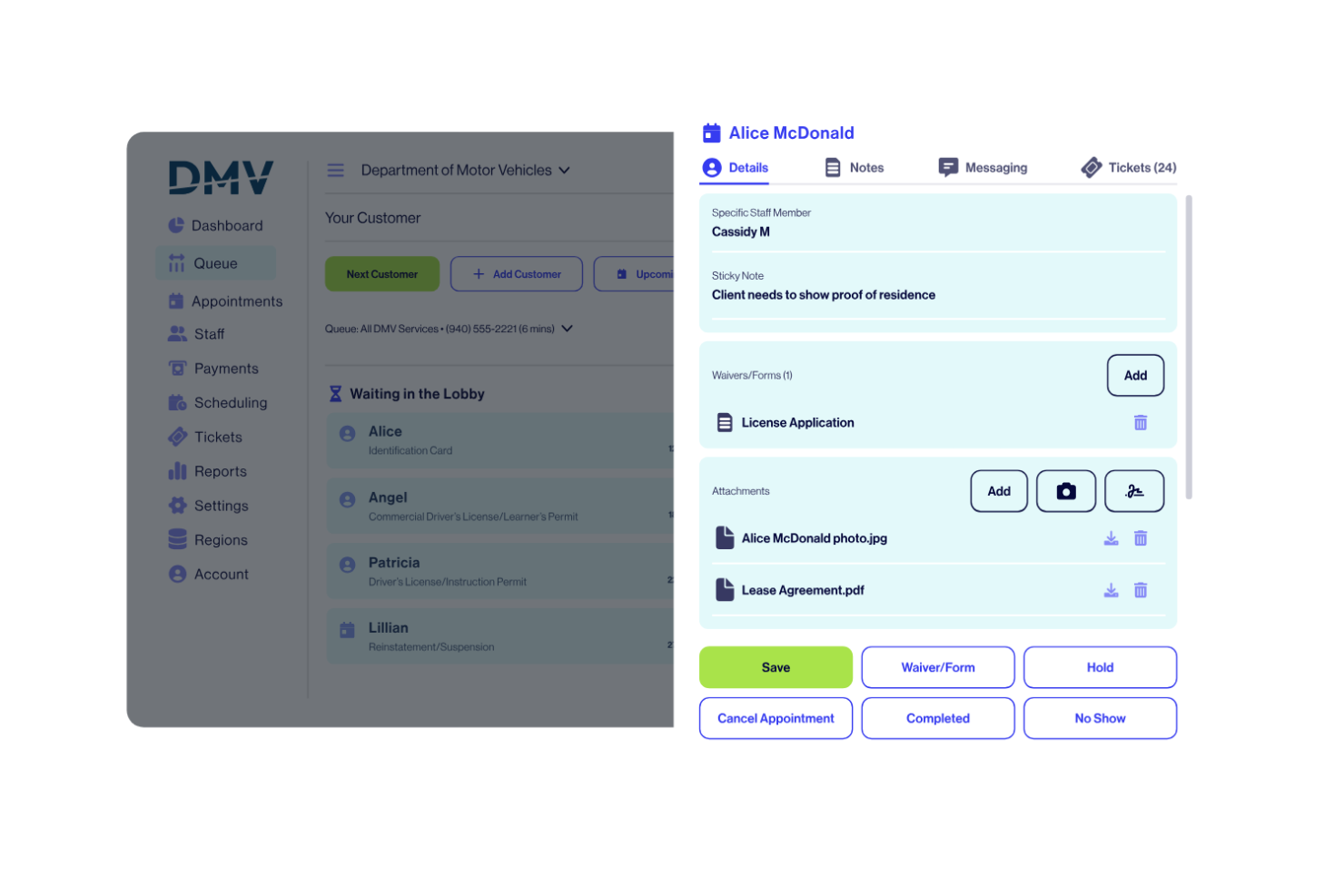
WaitWell ist eine Warteschlangenmanagement-Plattform, die entwickelt wurde, um zu koordinieren, wie Menschen Zugang zu Dienstleistungen erhalten und sich durch diese bewegen. Sie ersetzt physische Warteschlangen durch digitale Queues und unterstützt dabei Termine, Check-ins und die Weiterleitung von Services über persönliche, virtuelle und telefonbasierte Interaktionen hinweg. Das Warteschlangenmanagement steht im Zentrum des Systems, wobei Laufkundschaft und Termine gemeinsam verwaltet werden, anstatt sie über separate Tools zu splitten.
Warum ich WaitWell gewählt habe: Ich habe WaitWell ausgewählt, weil es auf die Realitäten der öffentlichen Dienstleistung ausgerichtet ist. Anstatt Termine und Laufkundschaft als getrennte Abläufe zu behandeln, bietet es Ihnen eine einzige Übersicht über Nachfrage und Servicefluss standort- und abteilungsübergreifend. Dieser Fokus erleichtert es öffentlichen Behörden, geplante und ungeplante Besuche auszubalancieren, ohne dabei Übersicht oder Kontrolle zu verlieren.
Herausragende Funktionen & Integrationen:
Funktionen umfassen virtuelle Warteschlangen, Terminplanung, Kiosk- und Mobile-Check-ins sowie automatisierte SMS- und E-Mail-Benachrichtigungen. Sie können die Weiterleitung von Services so konfigurieren, dass Besucher mit der richtigen Abteilung oder dem passenden Mitarbeiter verbunden werden, während operative Dashboards Wartezeiten, Serviceaufkommen, Personalperformance und Trends im Zeitverlauf anzeigen. Die Plattform unterstützt außerdem Personaleinsatzplanung, Zahlungserfassung und Service-Lokalisierungskarten zur Orientierung der Besucher vor ihrer Ankunft.
Integrationen umfassen Microsoft Teams, Zoom, Salesforce, Google Kalender, Outlook Kalender, Slack, Zapier, Twilio und HubSpot. WaitWell lässt sich zudem mit CRM-Systemen, EMR und klinischen Systemen, Suchdatenbanken, Tools zur Versicherungsverifizierung und Messaging-Services integrieren. Für tiefere Anpassungen und interne Systemanbindungen steht eine API zur Verfügung.
Pros and Cons
Pros:
- Gute Integration mit anderer Public-Sector-Software
- Effiziente Bewältigung großer Menschenmengen möglich
- Speziell für öffentliche Einrichtungen entwickelt
Cons:
- Mögliche Überabhängigkeit von Drittanbieter-Integrationen
- Eventuell weniger geeignet für Unternehmen aus dem Privatsektor

Am besten geeignet zur Organisation von Multikanal-Support-Warteschlangen
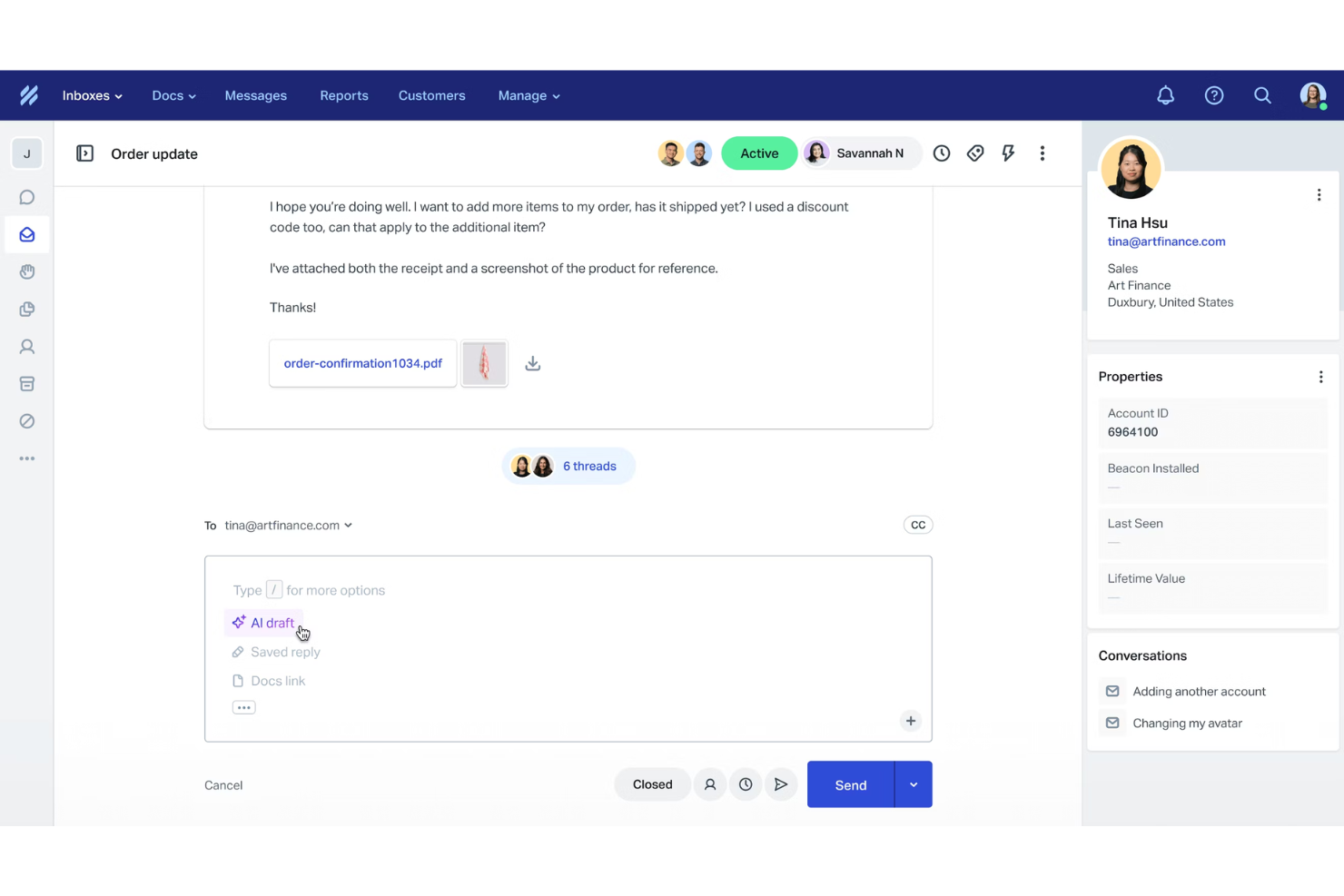
Help Scout ist eine Kundenservice-Plattform, die als Warteschlangenmanagement-System fungiert, weil sie eingehende Anfragen zentralisiert, das Routing automatisiert und Ihrem Team Tools zur effizienten Steuerung des Kundenflusses bietet. Sie vereint E-Mail, Chat und Self-Service an einem Ort, sodass Sie die Warteschlangen organisiert halten und gleichzeitig schnelle Reaktionszeiten gewährleisten können. Die Kombination aus KI-Unterstützung, Multikanal-Support und Leistungsüberwachung macht Help Scout zu einer starken Lösung für Teams, die mehr Transparenz in Bezug auf Support-Volumen und Arbeitslasten benötigen.
Warum ich Help Scout gewählt habe: Ich habe Help Scout wegen seiner Fähigkeit ausgewählt, große Mengen an Kundenanfragen mit minimalem Aufwand zu organisieren. Sie können Nachrichten aus mehreren Kanälen zentralisieren und dann Workflows und automatisierte Zuweisungen nutzen, um sicherzustellen, dass Gespräche beim richtigen Teammitglied landen. Das hilft dabei, Engpässe zu vermeiden, wenn Warteschlangen voll werden. Mir gefällt auch, dass Help Scout proaktive Nachrichten und Zufriedenheitsumfragen beinhaltet, sodass Sie erkennen können, wie gut Ihr Team mit Wartezeiten und Servicequalität umgeht. Für Organisationen, die den Kundensupport als einen von Warteschlangen gesteuerten Prozess betrachten, bietet Help Scout eine ausgewogene Mischung aus Automatisierung und menschenzentrierten Werkzeugen.
Herausragende Funktionen und Integrationen:
Funktionen sind unter anderem ein gemeinsamer Posteingang, der alle Kundenanfragen zusammenfasst, KI-Unterstützung, die Gespräche lösen oder zusammenfassen kann, sowie benutzerdefinierte Ansichten, die zusammengehörende Anfragen gruppieren, damit Ihr Team sich auf vorrangige Warteschlangen konzentrieren kann. Sie können außerdem Beacon, ein einbettbares Hilfs-Widget, nutzen, um Self-Service-Optionen anzubieten und so die Belastung durch Warteschlangen zu verringern. Echtzeit-Analysen helfen Ihnen dabei, Reaktionszeiten, Teamleistung und Trends bei der Kundenzufriedenheit nachzuverfolgen.
Integrationen umfassen Salesforce, Zapier, Shopify, Slack, HubSpot, Asana, Google Apps, Mailchimp, Intercom, Trello, Pipedrive und WooCommerce.
Pros and Cons
Pros:
- Einfache Zusammenführung von Nachrichten aus mehreren Kanälen
- Umfassende Berichte und Analysen
- Integrierte KI-Tools für schnellere Antworten
Cons:
- Einige fortgeschrittene Funktionen nur in höheren Plänen
- Begrenzte Anpassungsmöglichkeiten in niedrigeren Tarifen
New Product Updates from Help Scout

Help Scout Adds Automatic Conversation Reassignment
Help Scout can now automatically unassign conversations when the assigned teammate has been away long enough, keeping replies moving so others can pick them up. For more information, visit Help Scout's official site.
 .
.
Am besten für intelligente Anrufweiterleitung und Ablaufsteuerung
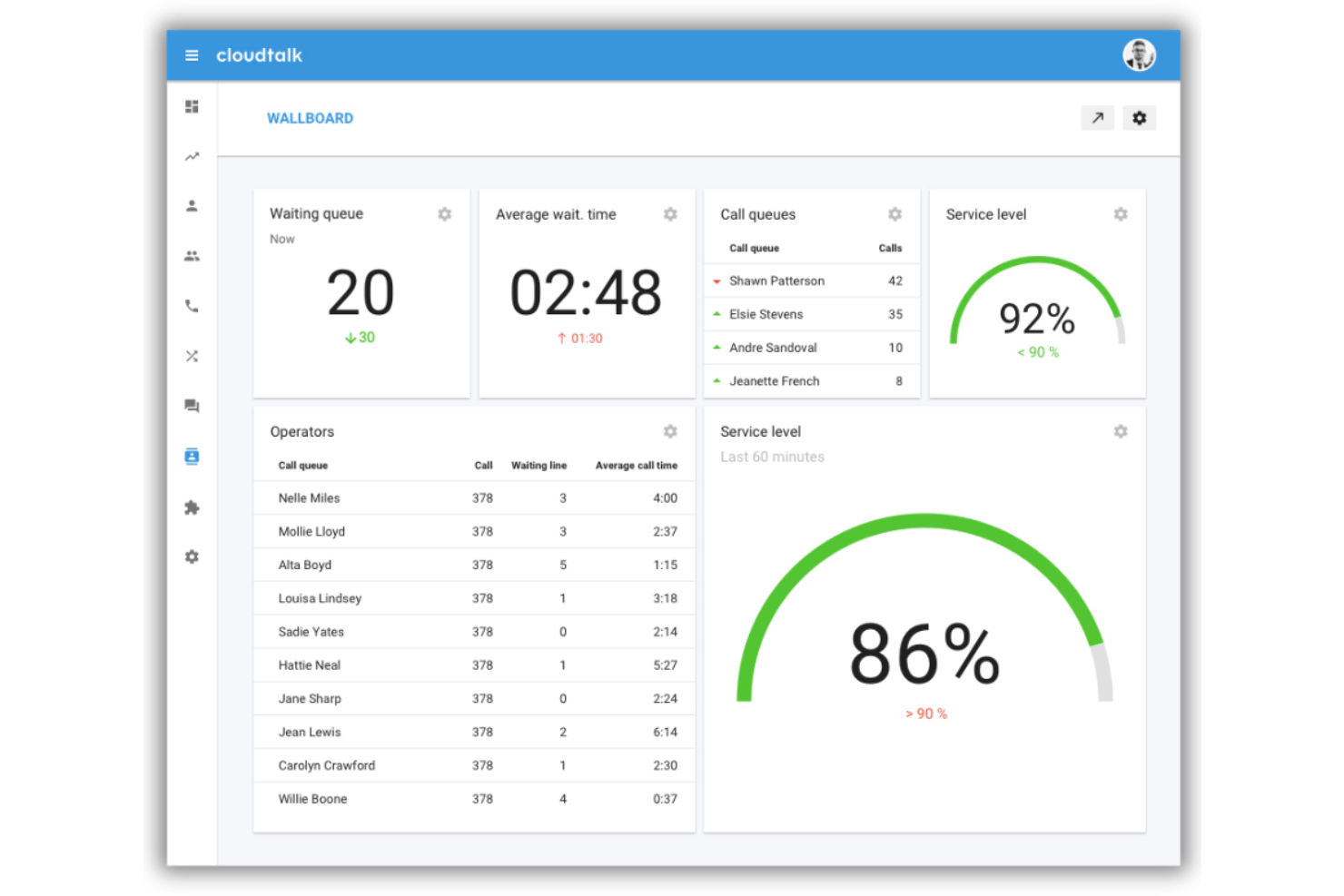
CloudTalk ist eine cloudbasierte Callcenter-Plattform, die KI-gestützte Anrufweiterleitung, visuelles Design von Anrufabläufen, IVR, skillbasierte Warteschlangenverwaltung und Echtzeitüberwachung in einem einzigen System für Support- und Vertriebsteams vereint.
Für wen ist CloudTalk am besten geeignet?
CloudTalk eignet sich besonders gut für wachsende KMU, die Inbound-Support oder Outbound-Vertriebsteams betreiben und eine strukturierte Anrufweiterleitung ohne die Komplexität von Großunternehmenslösungen benötigen.
Warum ich CloudTalk ausgewählt habe
CloudTalk verdient seinen Platz auf meiner Auswahlliste, weil es Ihnen so viel Kontrolle über die Anrufweiterleitungslogik gibt, ohne dass Sie einen Entwickler zur Einrichtung benötigen. Mir gefällt der visuelle Call Flow Designer: Sie können IVR-Bäume mit mehreren Verzweigungen bauen, Bedingungen für Geschäftszeiten konfigurieren und VIP-Prio-Warteschlangen auf einer Drag-and-Drop-Oberfläche erstellen. Skillbasierte Weiterleitung sorgt dafür, dass Anrufer beim bestgeeigneten Agenten landen und nicht nur beim nächstfreien.
CloudTalk Hauptfunktionen
- Live-Anrufüberwachung: Supervisoren können laufende Anrufe abhören, Anweisungen geben (Flüstern) oder zum Eskalieren in Gespräche eingreifen.
- KI-Konversationsintelligenz: Anrufe werden automatisch transkribiert und mit Stimmungsanalysen und intelligenter Themenverschlagwortung versehen.
- Echtzeit-Analysen und Wallboards: Überwachen Sie Warteschlangen-Performance, Agentenstatus und verpasste Anrufe mit anpassbaren Dashboards.
- Internationale SMS/MMS-Unterstützung: Senden und empfangen Sie Nachrichten weltweit, einschließlich WhatsApp- und Fax-Funktionalität.
CloudTalk Integrationen
CloudTalk bietet über 95 native Integrationen, darunter Salesforce, HubSpot, Pipedrive, Slack, Microsoft Teams, Zendesk, Intercom, Freshdesk und Zoho CRM, sowie eine API für eigene Integrationen.
Pros and Cons
Pros:
- Drag-and-Drop-IVR-Builder mit erweiterter Logik
- Warteschlangen-Priorisierung auf Basis der Fähigkeiten der Agenten
- Bietet Echtzeit-Anrufüberwachung und Supervisor-Tools
Cons:
- Gelegentliche Verzögerungen bei der Audioverbindung von Anrufen
- Eingeschränkte Unterstützung für lokale Telefonhardware

Am besten für Terminplanungsbedürfnisse
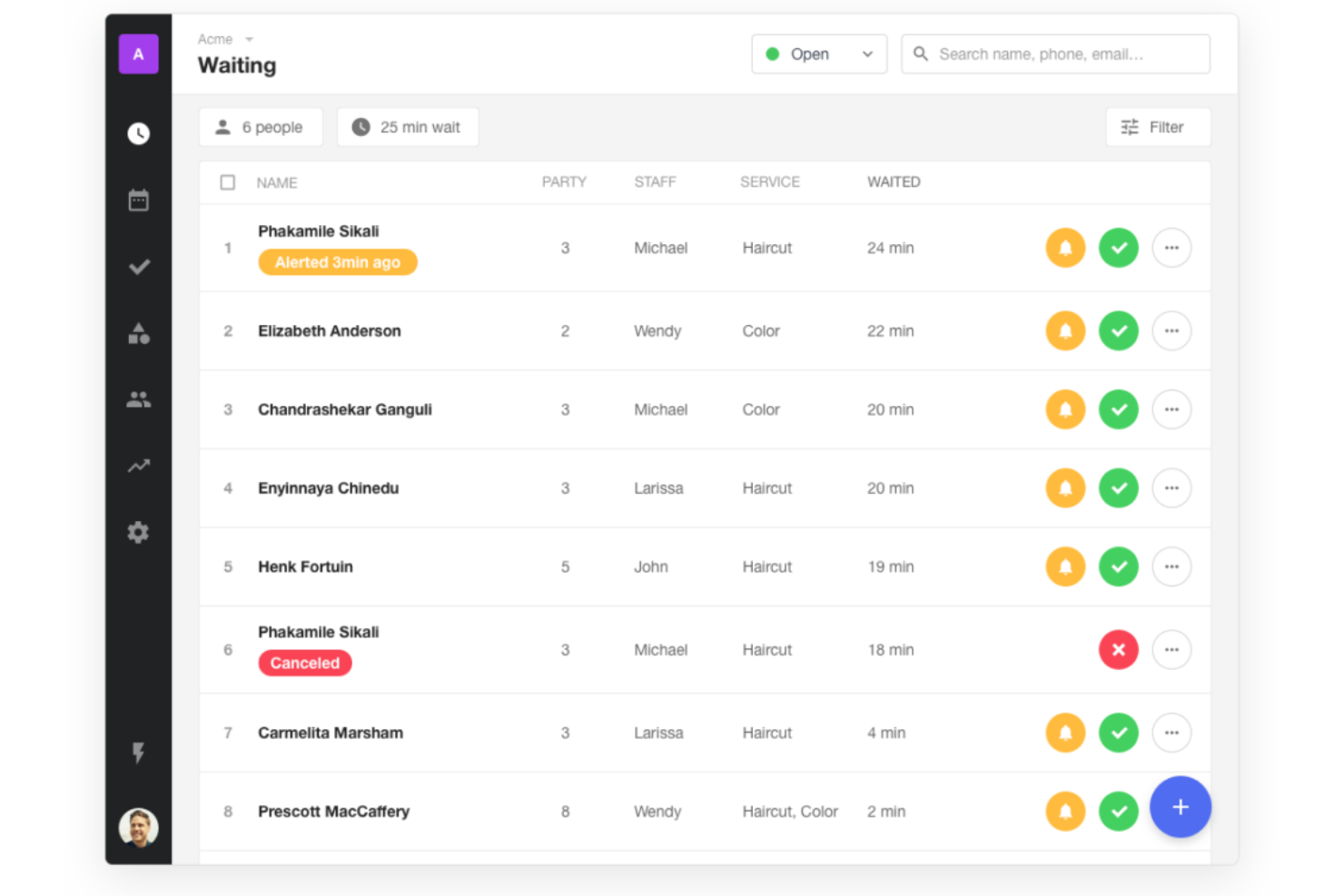
Waitwhile ist ein Warteschlangenmanagement-System, mit dem Sie virtuelle Wartelisten einrichten, Kunden-Check-ins verwalten, Benachrichtigungen automatisieren und Terminvereinbarungen über eine einzige Plattform abwickeln können.
Für wen ist Waitwhile am besten geeignet?
Waitwhile ist ideal für dienstleistungsorientierte Unternehmen wie Einzelhandel, Gesundheitswesen und Behörden, die sowohl Laufkundenschlangen als auch Terminvereinbarungen managen müssen.
Warum ich Waitwhile ausgewählt habe
Ich habe Waitwhile als eines der besten ausgewählt, weil die Terminverwaltungsfunktionen weit über einfache Buchungen hinausgehen. Mir gefällt, wie Sie individuelle Buchungsseiten mit dienstleistungsspezifischen Zeitfenstern, Mitarbeitendenzuordnungen und Standortlenkung einrichten können – so landen Kunden immer bei der richtigen Person. Waitwhile ermöglicht es außerdem, Pufferzeiten zwischen den Terminen einzustellen und automatisierte SMS- oder E-Mail-Erinnerungen zu senden, was die Zahl der Nichterscheinenden ohne manuellen Aufwand reduziert.
Wichtige Funktionen von Waitwhile
- LineSync: Vereint Wartelisten für Laufkundschaft und geplante Termine in einem Kundenstrom, sodass Ihr Team beides aus einer Ansicht verwalten kann.
- WaitIQ KI-Wartezeitprognose: Nutzt maschinelles Lernen, um Wartezeiten auf Basis von Echtzeit- und historischen Daten vorherzusagen.
- Belegungsüberwachung: Überwacht in Echtzeit, wie viele Besucher sich an Ihrem Standort aufhalten und gleicht dies mit Ihrer festgelegten Kapazität ab.
- Selbstanmeldung und Check-in-Kiosk: Ermöglicht es Kunden, sich eigenständig auf einem Kioskgerät in die Warteliste einzutragen oder ihre Ankunft zu registrieren – ganz ohne Personalaufwand.
Waitwhile-Integrationen
Waitwhile bietet native Integrationen mit Google Kalender, Outlook, Square, Shopify und Salesforce. Es verbindet sich außerdem mit Zapier und stellt eine API für individuelle Integrationen bereit.
Pros and Cons
Pros:
- Echtzeit-Einblicke für ein besseres Warteschlangenmanagement
- Umfassende Integrationen mit beliebten Plattformen
- Benutzerfreundliche Oberfläche vereinfacht die Terminvergabe
Cons:
- Für sehr kleine Betriebe womöglich zu umfangreich
- Jährliche Abrechnung ist nicht für alle Unternehmen geeignet

Qminder
Am besten geeignet für Erkenntnisse über den Kundenservice
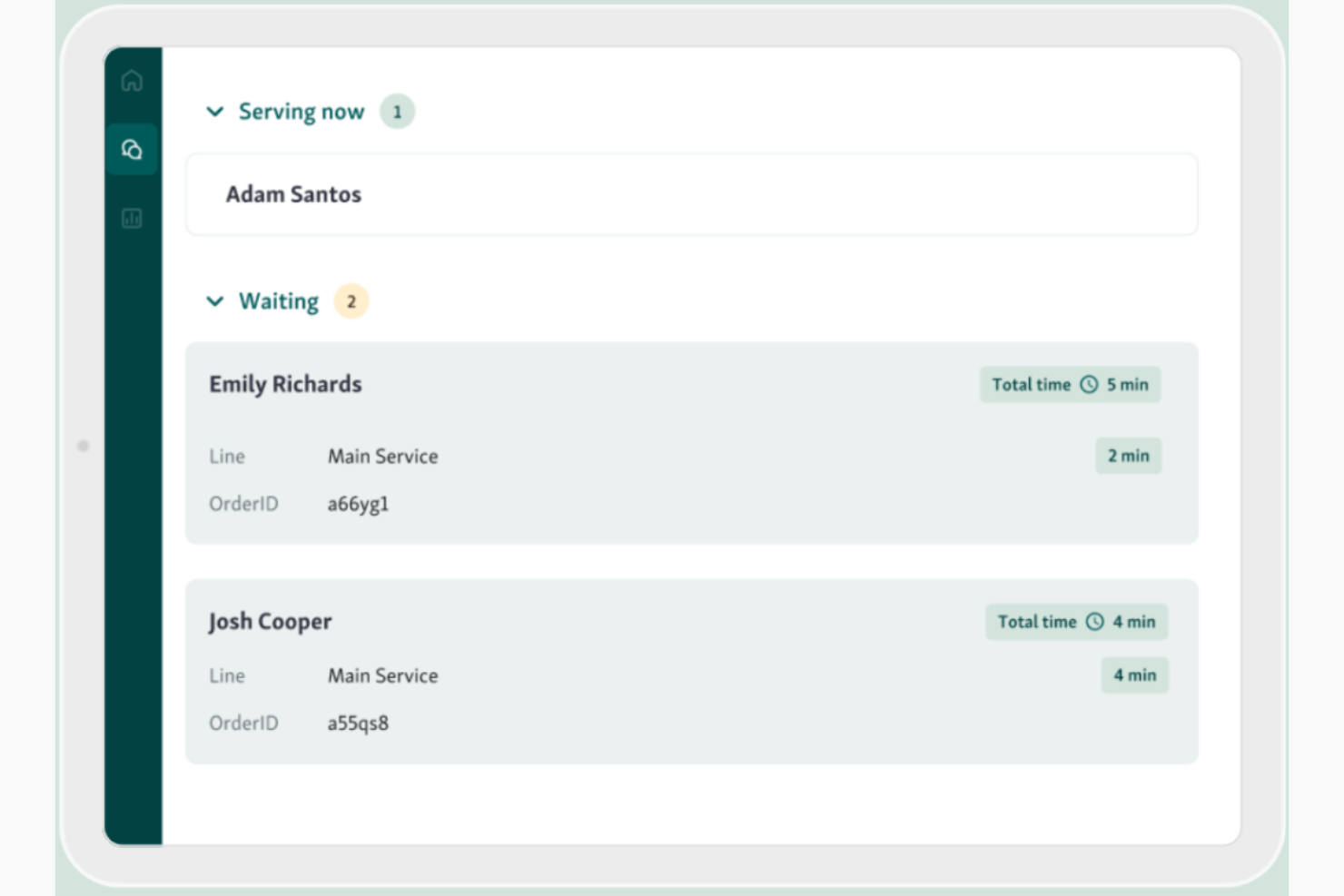
Qminder ist ein leistungsstarkes Warteschlangenmanagement-System, das besonders großen Wert darauf legt, Erkenntnisse über Kundenerfahrungen im Service zu gewinnen. Es wurde speziell entwickelt, um Unternehmen dabei zu unterstützen, ihre Kunden besser zu verstehen und die Servicequalität durch datengestütztes Feedback insgesamt zu verbessern.
Warum ich Qminder gewählt habe: Bei der Prüfung mehrerer Tools habe ich mich vor allem wegen des starken Fokus auf die Gewinnung von Einsichten in den Kundenservice für Qminder entschieden. Die intuitive Benutzeroberfläche und die ausgefeilten Analysefunktionen heben es von anderen Warteschlangensystemen ab. Unternehmen, die Wert darauf legen, ihre Kundenbedürfnisse zu verstehen und verwertbare Daten zur Verbesserung ihrer Dienstleistungen wünschen, werden Qminder als unverzichtbar empfinden.
Herausragende Funktionen & Integrationen:
Funktionen umfassen digitale Check-in-Optionen, Echtzeitverfolgung der Wartezeiten und Berichterstattung zur Serviceleistung. Sie können zudem eine detaillierte Kundenhistorie einsehen, was Ihrem Personal hilft, einen individuelleren Service zu bieten. Das System erleichtert es, Muster zu erkennen und Ressourcen gezielt dort einzusetzen, wo sie am meisten gebraucht werden.
Integrationen gibt es mit Salesforce, Zapier, Slack, Twilio, Microsoft Teams, Google Workspace, HubSpot und Zendesk.
Pros and Cons
Pros:
- Benutzerfreundliche Oberfläche, auch für weniger technikaffine Personen zugänglich
- Einfache Integration mit verschiedenen CRM- und Feedback-Tools
- Umfassende Analysen zu Kundenerfahrungen im Service
Cons:
- Für Unternehmen mit wenig Kundenkontakt womöglich zu umfangreich
- Könnte für kleine Unternehmen oder Startups als teuer angesehen werden

Queue-it
Am besten geeignet für die Kontrolle von Online-Traffic
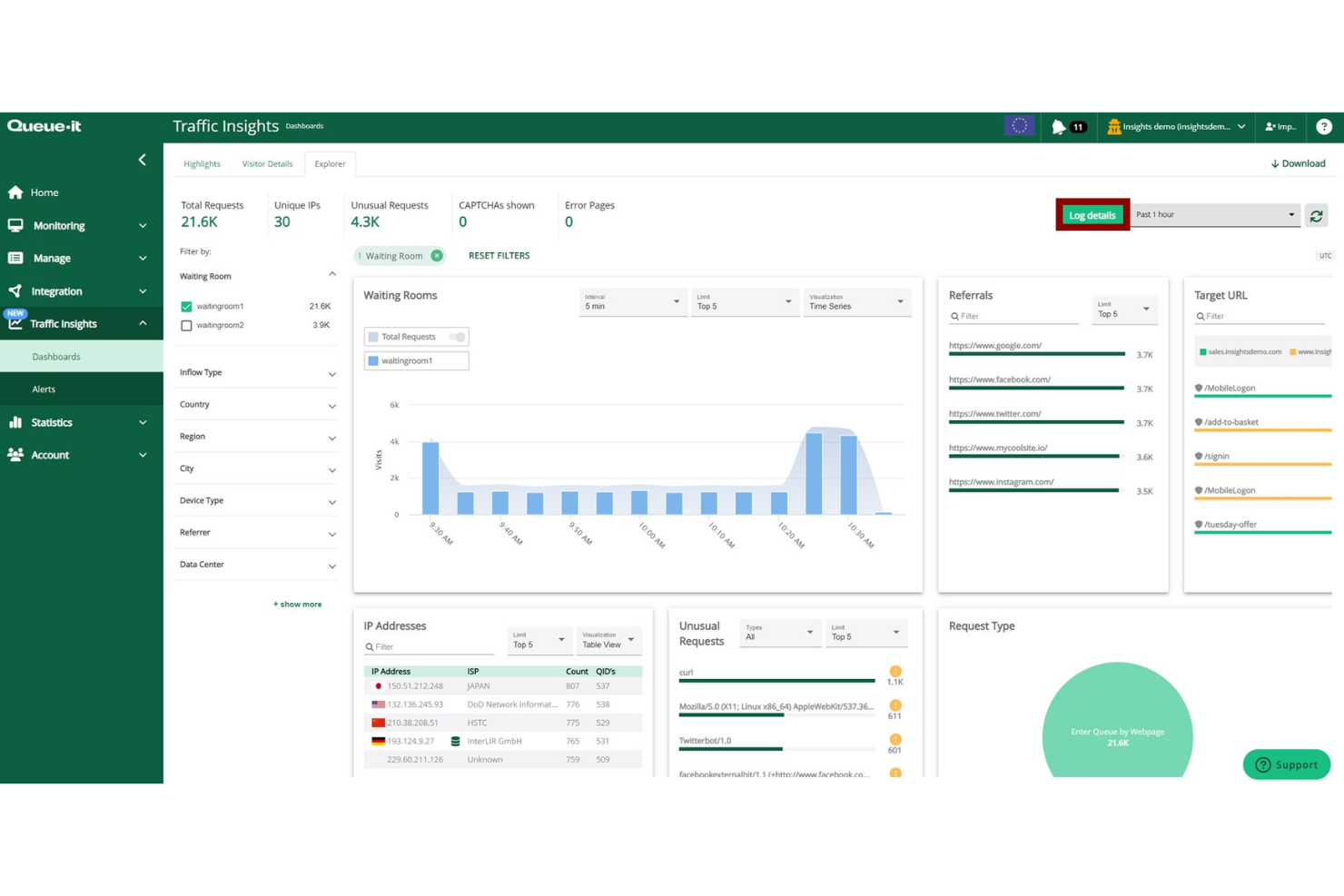
Queue-it ist eine Online-Warteschlangenplattform, die Unternehmen dabei unterstützt, große Besucherzahlen auf ihren Websites oder Apps zu steuern. Sie wird von Teams eingesetzt, die den digitalen Traffic regulieren, Systeme während Nachfragespitzen stabil halten und das Kundenerlebnis schützen müssen. Das Tool eignet sich besonders für veranstaltungsbasierte Verkäufe, Online-Anmeldungen und Produkteinführungen, bei denen häufig Traffic-Spitzen auftreten.
Warum ich Queue-it gewählt habe: Ich habe Queue-it ausgewählt, weil es Ihre digitalen Dienste schützt, wenn die Nachfrage plötzlich ansteigt. Der virtuelle Warteraum ermöglicht eine faire Zugriffskontrolle, damit Ihre Systeme nicht abstürzen und Ihre Nutzer nicht frustriert sind. Sie können Traffic-Grenzwerte festlegen, den Besucherstrom steuern und den Warteraum individuell an Ihr Branding anpassen. Das System bietet Ihnen außerdem Echtzeitüberwachung und Analysen, damit Sie den Live-Traffic jederzeit im Blick behalten.
Herausragende Funktionen & Integrationen:
Funktionen sind unter anderem virtuelle Warteräume zur Steuerung plötzlicher Nachfrageschübe, Traffic-Drosselung mit konfigurierbaren Schwellwerten zum Schutz der Performance sowie Analysen, die das aktuelle Besucherverhalten transparent machen. Diese Features sorgen gemeinsam dafür, dass Ihre digitalen Dienste stabil und fair bleiben.
Integrationen sind unter anderem Shopify, Salesforce, SAP, Adobe Commerce, BigCommerce, Optimizely, WordPress, Google Analytics, Sitecore und Oracle.
Pros and Cons
Pros:
- Bewältigt plötzliche Online-Traffic-Spitzen
- Individuell anpassbares Warteraum-Branding
- Faire Warteschlange für alle Besucher
Cons:
- Ersteinrichtung kann anfangs komplex wirken
- Erfordert eine klare Traffic-Planung
Am besten geeignet für KI-gesteuerte Ticketweiterleitung
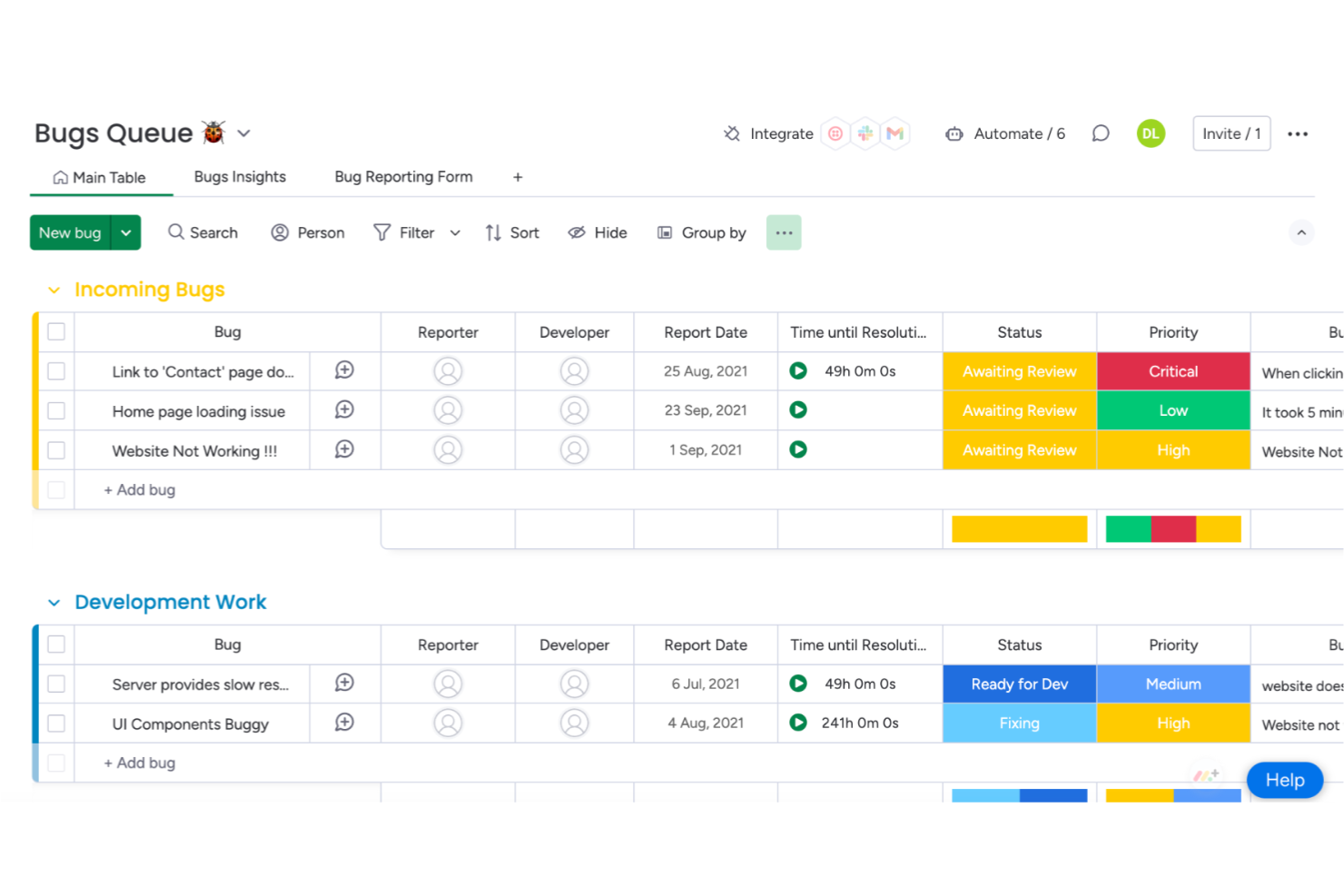
monday service ist eine dynamische Plattform für Warteschlangenmanagement, die darauf ausgelegt ist, Teams die Bearbeitung von Anfragen, Tickets und Serviceoperationen zu erleichtern. Sie hilft IT-, Personal- und Kundensupport-Teams dabei, Aufgaben zu organisieren, Probleme zu priorisieren und Services effizienter in Unternehmen jeder Größe bereitzustellen.
Warum ich mich für monday service entschieden habe: Im Vergleich verschiedener Warteschlangenmanagementsysteme hat sich monday service durch seine KI-gestützte Ticketkategorisierung und Echtzeit-Warteschlangenanalytik hervorgehoben. Die Fähigkeit, Tickets automatisch zu sortieren, zu priorisieren und weiterzuleiten, sorgt für schnellere Reaktionszeiten und einen besser organisierten Service-Workflow. Die No-Code-Anpassung der Plattform ermöglicht es Teams außerdem, Prozesse ohne technische Hürden flexibel anzupassen und die betriebliche Agilität zu erhöhen.
Herausragende Funktionen & Integrationen:
Funktionen umfassen KI-gestützte Ticketweiterleitung, anpassbare Workflows und Echtzeit-Leistungsdashboards. Sie können außerdem Automatisierungsregeln festlegen, die manuelle Arbeit reduzieren, und SLAs nachverfolgen, um eine schnellere Problemlösung zu gewährleisten. Das System passt sich Teams jeder Größe an und skaliert mit wachsenden Serviceanforderungen.
Integrationen umfassen Salesforce, Zendesk, Slack, Microsoft Teams, Google Workspace, HubSpot, Jira, GitHub, Dropbox und Zoom.
Pros and Cons
Pros:
- Flexible Anpassungsmöglichkeiten für Workflows und Dashboards
- Integration mit verschiedenen Drittanbieter-Anwendungen
- Visuelle Boards ermöglichen es Nutzern, den Projektfortschritt einfach zu verfolgen
Cons:
- Kosten können höher als bei anderen Tools sein
- Fehlen einiger erweiterter Berichtsoptionen

Ideal für Termin- und Warteschlangenmanagement in einer Lösung
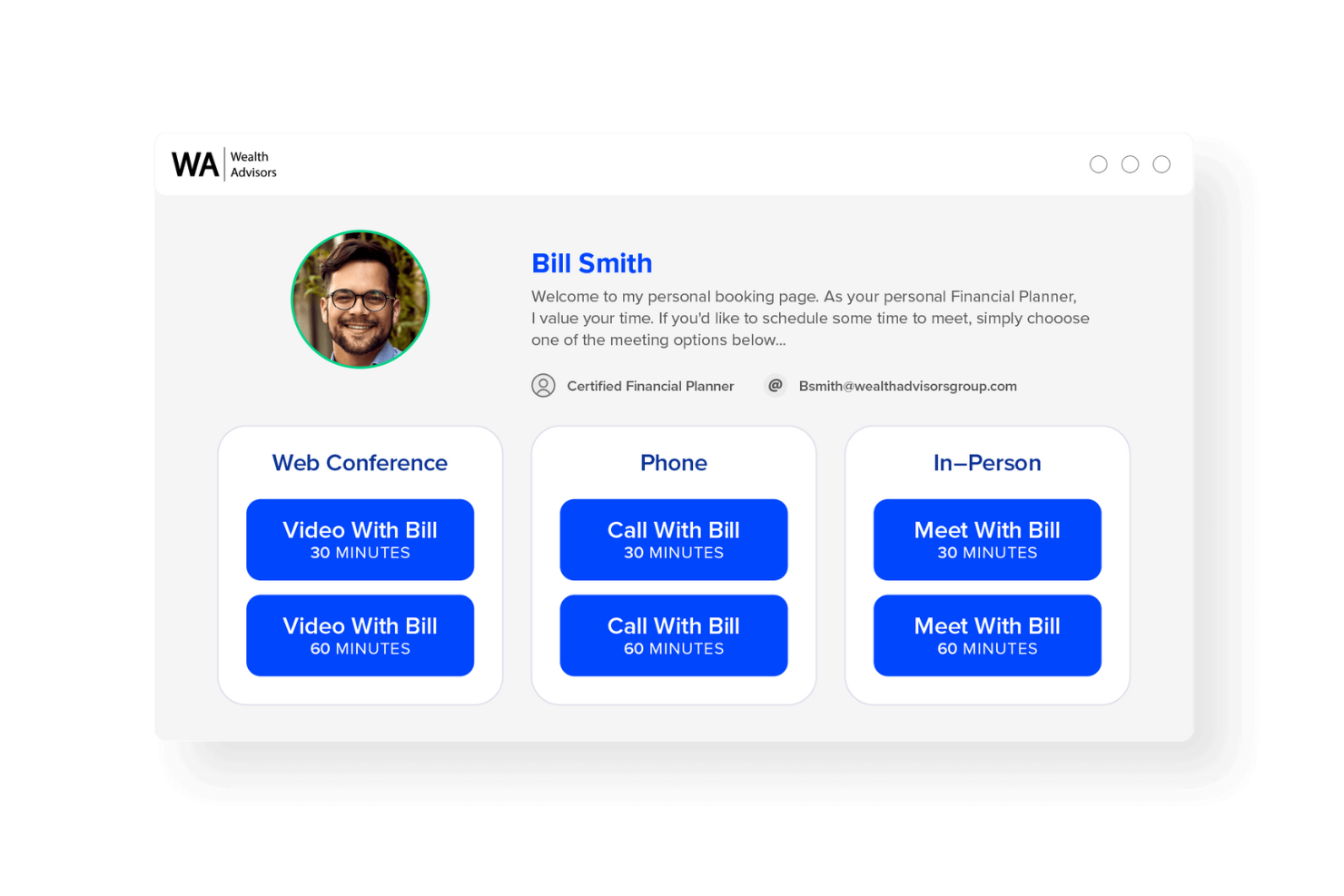
Engageware bietet einen zweigleisigen Ansatz für Terminplanung und Warteschlangenmanagement, sodass Unternehmen ihre Kunden effizienter bedienen und die Wartezeiten verkürzen können. Besonders wertvoll ist, wie Terminvereinbarung und Echtzeit-Warteschlangenverfolgung auf einer Plattform vereint werden – ideal für Organisationen, die beides ausbalancieren müssen.
Warum ich Engageware gewählt habe: Ich habe Engageware als mein Warteschlangenmanagementsystem ausgewählt, weil es zwei zentrale Funktionen – Terminplanung und Warteschlangensteuerung – in einer Lösung verbindet. So kann Ihr Team sowohl Laufkundschaft als auch geplante Termine stressfrei und ohne lange Wartezeiten koordinieren. Engageware bietet zudem Echtzeitüberwachung der Wartezeiten und eine Auslastungssteuerung für das Personal, wodurch Kunden von reibungsloseren Abläufen profitieren. Die automatischen Benachrichtigungen und Erinnerungen halten Kunden auf dem Laufenden und minimieren Ausfälle.
Herausragende Funktionen & Integrationen:
Funktionen umfassen digitale Check-in-Optionen, durch die sich Kunden vor Ort an Kiosken, über mobile Endgeräte oder online registrieren können. Dazu kommen Werkzeuge zur Warteschlangenüberwachung für die Echtzeiterfassung der Nachfrage, um das Personal entsprechend anzupassen. Eine weitere Funktion ist die personalisierte Kommunikation: Kunden erhalten SMS-Benachrichtigungen und Updates zu ihrem Platz in der Warteschlange.
Integrationen umfassen Salesforce, Microsoft Dynamics 365, Oracle, Zoom, Adobe, HubSpot, Marketo, Slack und Google Kalender.
Pros and Cons
Pros:
- Vereint Terminvereinbarung und Warteschlangenmanagement an einem Ort
- Verkürzt die Wartezeiten für Laufkundschaft
- Verbessert die Verteilung der Arbeitslast im Team
Cons:
- Die Einrichtung kann bei großen Teams zeitaufwändig sein
- Schulung für Erstnutzer erforderlich
- Stark von Internetzuverlässigkeit abhängig

Qwaiting
Am besten geeignet für plattformübergreifendes Warteschlangenmanagement
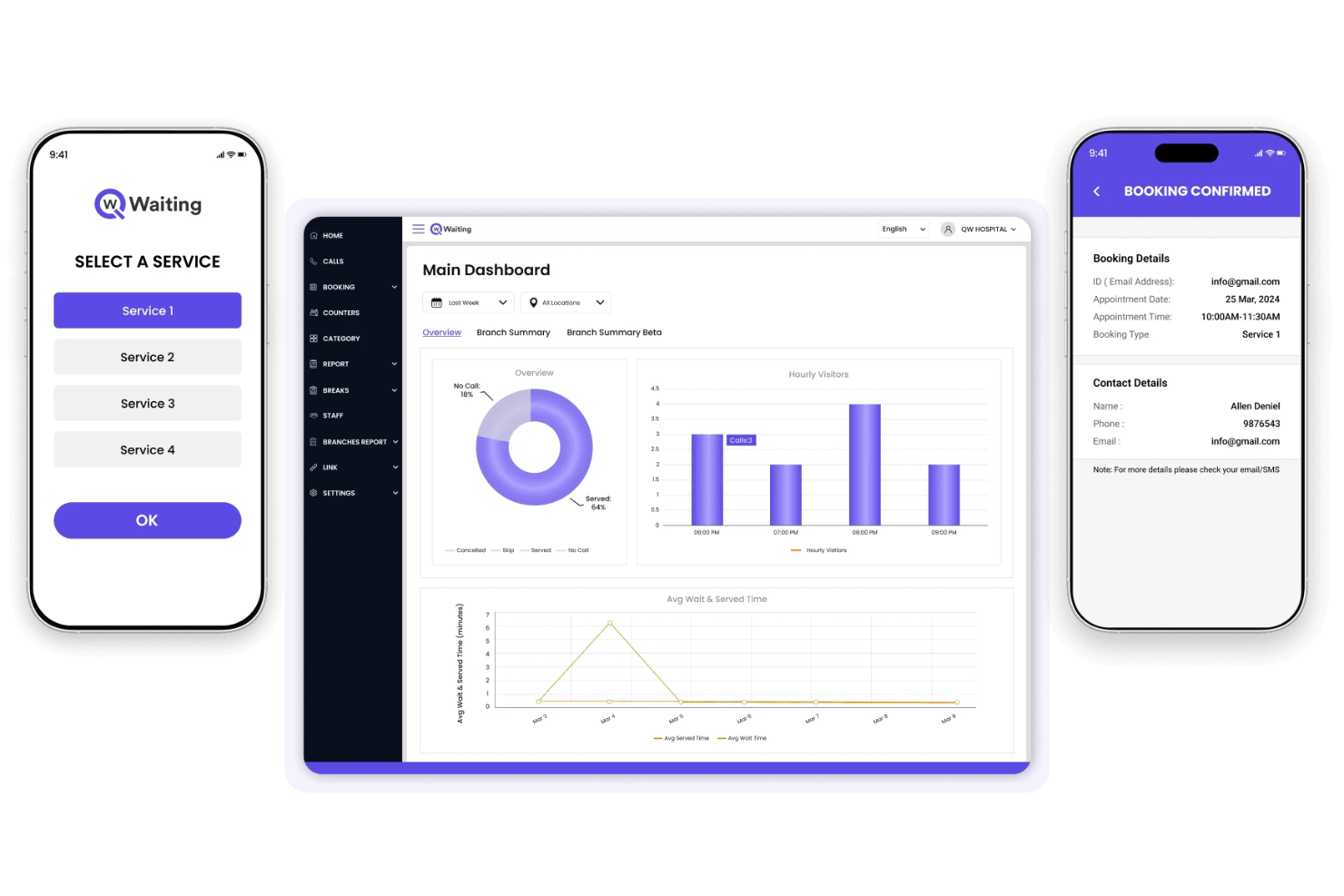
Qwaiting ist eine Lösung, die entwickelt wurde, um den Kundenfluss über mehrere Kanäle hinweg zu steuern, von Online-Buchungen bis hin zu persönlichen Besuchen. Sie richtet sich an Organisationen, die die Verwaltung von Wartezeiten und Kundenerfahrungen an verschiedenen Servicestellen vereinfachen möchten. Die Plattform unterstützt Unternehmen im Gesundheitswesen, Einzelhandel, öffentlichen Sektor und darüber hinaus.
Warum ich Qwaiting gewählt habe: Ich habe Qwaiting ausgewählt, weil es die Verwaltung von Warteschlangen über verschiedene Plattformen hinweg erleichtert. Sie können Termine, Laufkundschaft und Serviceanfragen zentral steuern. Mit den Berichtswerkzeugen erhält Ihr Team Einblick in die Leistung, und die Flexibilität ermöglicht eine einfache Anpassung an verschiedene Branchen.
Hervorstechende Funktionen & Integrationen:
Funktionen bieten Kunden die Möglichkeit, sich online oder vor Ort in Warteschlangen einzureihen, Echtzeit-Performance-Tracking für Mitarbeitende sowie detaillierte Berichte über Serviceaktivitäten. Außerdem gibt es Werkzeuge für die Terminbuchung, die parallel zur Verwaltung von Laufkundschaft genutzt werden können – für mehr Effizienz im Team.
Integrationen umfassen Salesforce, HubSpot, Microsoft Teams, Slack, Twilio, Shopify, Zoom, WhatsApp, Stripe und Google Kalender.
Pros and Cons
Pros:
- Funktioniert über mehrere Servicekanäle hinweg
- Anpassbar für verschiedene Branchen
- Unterstützt sowohl Laufkundschaft als auch Terminbuchung
Cons:
- Erweiterte Einrichtung erfordert eventuell Schulung
- Berichtsoptionen können überwältigen

Am besten für Integrationsflexibilität geeignet
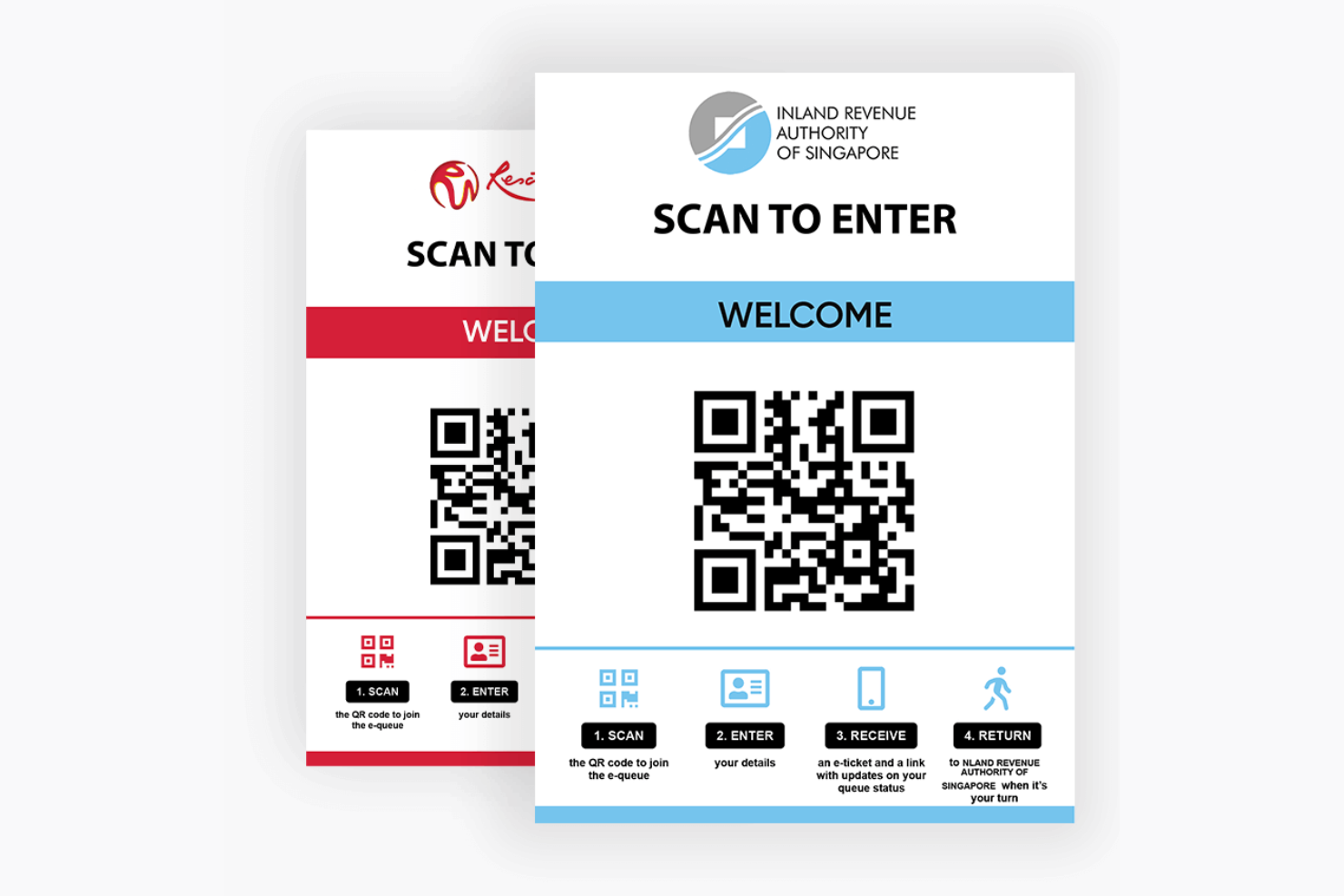
Das Queue Management System von Awebstar bietet einen ganzheitlichen Ansatz zur Warteschlangenverwaltung und legt den Fokus auf die Verbesserung des Kundenflusses und der Warteerfahrung. Was es wirklich auszeichnet, sind seine tiefgreifenden Integrationsmöglichkeiten, wodurch es zur idealen Wahl für Unternehmen wird, die Wert auf System-Synchronisierung legen.
Warum ich mich für das Awebstar Queue Management System entschieden habe: Ich habe mich für Awebstar als mein Warteschlangenmanagement-System aufgrund seiner außergewöhnlichen Integrationsmöglichkeiten entschieden. Die Vielseitigkeit und Anpassungsfähigkeit erlauben eine nahtlose Integration in unterschiedlichste Unternehmensumgebungen, wodurch es sich von anderen Tools unterscheidet, die nur in bestimmten Bereichen herausragend sind. Awebstars Flexibilität bei der Integration ist besonders vorteilhaft für Unternehmen, die auf das reibungslose Zusammenspiel mehrerer Systeme angewiesen sind.
Herausragende Funktionen & Integrationen:
Funktionen umfassen virtuelle Warteschlangen, Kioskanmeldungen und Echtzeit-Leistungsberichte. Das System bietet zudem SMS-Benachrichtigungen sowie WhatsApp-Updates, damit Kunden über ihren Platz in der Warteschlange informiert bleiben. Die Plattform kann auch genutzt werden, um Personalressourcen zu optimieren und Wartezeiten zu verringern.
Integrationen umfassen Salesforce, Microsoft Dynamics, HubSpot, Oracle, Zoho CRM, Google Workspace, Slack und Twilio.
Pros and Cons
Pros:
- Umfassende Integrationsmöglichkeiten
- Leistungsstarke Funktionen für virtuelle Warteschlangen
- Cloud-basiertes System mit leichter Zugänglichkeit
Cons:
- Setzt technisches Grundwissen für die vollständige Nutzung voraus
- Kann für kleine Unternehmen überwältigend sein
Weitere erwähnenswerte Systeme zur Warteschlangenverwaltung
Nachfolgend finden Sie eine Liste weiterer Systeme zur Warteschlangenverwaltung, die ich in die engere Auswahl genommen habe, die es aber nicht unter die Top 15 geschafft haben. Es lohnt sich auf jeden Fall, sie sich anzusehen.
- QLess
Am besten geeignet zur Reduzierung physischer Warteschlangen
- Skiplino
Am besten geeignet für digitale und persönliche Warteschlangen
- Wavetec
Am besten für virtuelles Warteschlangenmanagement geeignet
- NEMO-Q
Am besten geeignet für branchenübergreifende Anpassungsfähigkeit
- Qsome
Am besten für unkomplizierte Warteschlangeneinrichtungen geeignet
- Q-flow
Am besten geeignet für Patienten- und Kundenreisen
- Tensator
Am besten für die Verwaltung physischer Räume
- Advantech Queue Management System
Gut für intelligente Analysen
- Aurionpro
Geeignet für Banken- und Finanzsektor


Wie ich Warteschlangenmanagement-Systeme bewerte
Meine Bewertung teilt sich in zwei Ebenen: Die Basisfunktionen, die ein Tool erfüllen muss (Echtzeit-Warteschlangen, Mitarbeiterzuweisung, Benachrichtigungen für Kunden) und die Differenzierungsmerkmale, die es für ein Krankenhaus, eine Bank oder den Einzelhandel passend machen.
Kernfunktionen (Grundvoraussetzungen für diese Liste)
Diese Kernfunktionen dienen als Akzeptanzkriterien für die Aufnahme in meine Liste der Warteschlangenmanagement-Systeme:
- Virtuelles Warten & Check-In: Ich bewerte, welche Check-In-Kanäle jede Plattform unterstützt (z. B. QR-Codes, mobile Links, Kiosks, SMS) und ob Kunden sich bereits vor Ort digital in die Warteschlange einreihen können.
- Echtzeit-Warteschlangenüberwachung: Live-Dashboards für Personal und Kunden sind hier entscheidend. Ich achte auf geschätzte Wartezeiten, Positionsverfolgung und die Möglichkeit, mehrere Standorte im Blick zu behalten.
- Kundenbenachrichtigungen & -warnungen: Ich prüfe, ob die Plattform automatisierte SMS-, E-Mail- oder Push-Benachrichtigungen zu Schlüsselmomenten sendet, z. B. wenn die Kundenwarteschlange sich nähert oder ein Schalter frei wird.
- Service- & Mitarbeiterzuweisung: Die Routing-Logik trennt Basis- von nützlichen Tools. Ich achte auf regelbasierte Zuweisung nach Servicetyp, Mitarbeiterkompetenz, Prioritätsstufe oder Verfügbarkeit am Schalter.
- Integration von Terminplanung: Spontanbesuche und vorab gebuchte Termine müssen in einer Warteschlange koexistieren. Ich bewerte, wie jedes Tool geplante Termine mit laufendem Publikumsverkehr verbindet.
- Analytics & Reporting Dashboard: Metriken wie durchschnittliche Wartezeit, Service-Dauer und Mitarbeiter-Durchsatz sollten ohne manuellen Export verfügbar sein. Ich suche nach filterbaren, Echtzeit-Dashboards.
Ich bewerte jeden Anbieter auf einer Skala von 0 (bietet die Funktion nicht) bis 5 (übertrifft in diesem Bereich) für jedes Kriterium.
Anbieter müssen einen Mindestpunktedurchschnitt erreichen, um für meine Liste in Betracht gezogen zu werden. Von dort aus betrachte ich, was jede Plattform einzigartig macht.
Differenzierungsmerkmale (Was Anbieter unterscheidet)
Nachdem ich meine Liste erstellt habe, vergleiche ich die verschiedenen Anbieter im Bereich Warteschlangenmanagement folgendermaßen:
Herausragende Funktionen
Integration von digitaler Beschilderung kann einen großen Unterschied machen, wenn Teams Kunden einbinden und Warteschlangen in Echtzeit effizient bewegen möchten. Die Verwaltung mehrerer Standorte ist unerlässlich, wenn man Warteschlangen an verschiedenen Filialen oder Servicezentren über ein zentrales Dashboard steuern will. Ich berücksichtige zudem, wie mobile Mitarbeiter-Apps dem Personal vor Ort helfen, Warteschlangen zu managen, ohne an einen festen Arbeitsplatz gebunden zu sein, und ob die Plattform KI einsetzt, um Wartezeiten vorherzusagen. Dies kann die Personalplanung und operative Entscheidungen in Stoßzeiten erheblich unterstützen.
Mehr als nur Funktionen
Sicherheit und Compliance sind besonders im Gesundheits- und Behördenbereich von Bedeutung. Daher prüfe ich HIPAA-Tauglichkeit, DSGVO-Konformität und rollenbasierte Zugriffskontrollen. Das Integrationsökosystem ist ebenso wichtig: Ein Warteschlangensystem, das sich mit Ihrem CRM, EHR oder POS verbindet, lässt Kundendaten ohne manuelle Eingaben fließen. Ich bewerte zudem die Flexibilität beim Deployment, da einige Organisationen cloudbasierte SaaS-Lösungen benötigen, andere hingegen eine lokale Installation gemäß interner IT-Richtlinien verlangen.
So wählen Sie ein Warteschlangenverwaltungssystem aus
Bei langen Funktionslisten und komplexen Preisstrukturen verliert man leicht den Überblick. Damit Sie sich bei der individuellen Auswahl Ihrer Software auf das Wesentliche konzentrieren können, finden Sie hier eine Checkliste mit Faktoren, die Sie berücksichtigen sollten:
| Faktor | Was ist zu beachten? |
|---|---|
| Skalierbarkeit | Kann das System mit Ihrem Wachstum weitere Standorte, Mitarbeiter oder Kunden bewältigen? Vermeiden Sie Tools mit starren Begrenzungen oder hohen Gebühren pro Benutzer, die sich schnell summieren. |
| Integrationen | Verbindet es sich mit Ihrem CRM-, Kassensystem- oder Kalender-Tool? Manuelle Umgehungslösungen kosten viel Zeit. Prüfen Sie, ob vorgefertigte Integrationen oder Optionen auf API-Basis verfügbar sind. |
| Anpassbarkeit | Können Sie Warteschlangenabläufe, Branding oder kundenorientierte Bildschirme ohne Unterstützung durch Entwickler anpassen? Bei manchen Tools sind Sie an die Standardeinstellungen gebunden. |
| Benutzerfreundlichkeit | Können Mitarbeiter im direkten Kundenkontakt das System mit wenig Schulung bedienen? Achten Sie auf Werkzeuge mit Drag-and-drop-Funktion, klare Beschriftungen und mobilfreundliche Layouts. |
| Implementierung und Einführung | Wie lange dauert die Einrichtung und wer muss daran beteiligt sein? Fragen Sie, ob Vorlagen, Unterstützung bei der Datenmigration oder Hilfe bei der Einführung angeboten werden. |
| Kosten | Was ist in den einzelnen Tarifen enthalten? Achten Sie auf Begrenzungen bei Warteschlangen, Benutzern oder Support. Fragen Sie, ob sich die Preise je nach Volumen oder Datenverkehr ändern. |
| Sicherheitsvorkehrungen | Bietet das System rollenbasierten Zugriff, Verschlüsselung und Prüfprotokolle? Wenn Sie Kundendaten erfassen, sollten Sie die Angaben zur Einhaltung von Vorschriften genau prüfen. |
| Verfügbarkeit des Supports | Können Sie während der Stoßzeiten jemanden erreichen? Fragen Sie nach Supportkanälen, Reaktionszeiten und ob Unterstützung bei der Einführung enthalten ist. |
Was ist ein Warteschlangenverwaltungssystem?
Ein Warteschlangenverwaltungssystem ist eine Sammlung von Tools und Prozessen, die dazu entwickelt wurden, den Strom von Kunden oder Klienten zu steuern und zu organisieren, die physisch oder virtuell anstehen. Verschiedene Branchen, darunter der Einzelhandel, das Gesundheitswesen, Banken und Behörden, nutzen diese Systeme, um Abläufe zu optimieren, Wartezeiten zu verkürzen und das Kundenerlebnis zu verbessern.
Durch den Einsatz solcher Systeme möchten Organisationen den Warteprozess für Dienstleister und die wartenden Personen effizienter, transparenter und komfortabler gestalten.
Funktionen von Warteschlangenverwaltungssystemen
Achten Sie bei der Auswahl eines Warteschlangenverwaltungssystems auf die folgenden wichtigen Funktionen:
- Integrationen von Drittanbietern: Verbindet sich mit CRM-, POS- oder Messaging-Plattformen, um Arbeitsabläufe zu optimieren und Datensilos zu reduzieren.
- Virtuelles Anstehen: Ermöglicht es Kunden, sich per Mobilgerät, Web oder Kiosk aus der Ferne in eine Warteschlange einzureihen, um Menschenansammlungen zu reduzieren und die Transparenz der Wartezeit zu verbessern.
- Echtzeitbenachrichtigungen: Sendet SMS- oder App-Benachrichtigungen, damit Kunden über ihre Position in der Warteschlange und die voraussichtliche Wartezeit informiert bleiben.
- Terminplanung: Ermöglicht es Kunden, im Voraus Zeitfenster zu buchen, um den Kundenfluss zu steuern und Wartezeiten für unangemeldete Besucher zu reduzieren.
- Warteschlangenanalysen und Berichte: Erfasst Wartezeiten, Bedienungsdauer und Mitarbeiterleistung, um Engpässe zu erkennen und Abläufe zu verbessern.
- Zugang über mehrere Kanäle: Unterstützt die Anmeldung von Kunden über verschiedene Kanäle wie Kioske im Geschäft, Websites oder mobile Apps und sorgt so für zusätzlichen Komfort.
- Dashboard zur Mitarbeiterverwaltung: Bietet Teammitgliedern Werkzeuge zur Verwaltung von Warteschlangen, Zuweisung von Aufgaben und Überwachung von Servicemesswerten in Echtzeit.
- Erfassung von Kundenfeedback: Ermöglicht Umfragen oder Bewertungen nach der Bedienung, um Erkenntnisse über Zufriedenheit und Servicequalität zu gewinnen.
- Mehrsprachige Unterstützung: Berücksichtigt Kunden mit unterschiedlichen Sprachen, um die Zugänglichkeit für verschiedene Bevölkerungsgruppen sicherzustellen.
- Anpassbare Benutzeroberfläche: Ermöglicht Änderungen an Branding und Layout, damit Erscheinungsbild und Gestaltung mit Ihrer Strategie für das Kundenerlebnis übereinstimmen.
Vorteile von Warteschlangenverwaltungssystemen
Die Einführung eines Warteschlangenverwaltungssystems bietet Ihrem Team und Ihrem Unternehmen mehrere Vorteile. Hier sind einige Vorteile, auf die Sie sich freuen können:
- Einfachere Nachverfolgung von Feedback: Integrierte Umfragetools ermöglichen es Ihnen, direkt nach der Bedienung Kundenfeedback einzuholen, solange die Erfahrung noch frisch ist.
- Kürzere Wartezeiten: Virtuelles Anstehen und Terminbuchungen helfen, Menschenansammlungen zu reduzieren und den Ablauf in der Warteschlange aufrechtzuerhalten.
- Besseres Kundenerlebnis: Aktualisierungen in Echtzeit und flexible Anmeldeoptionen machen das Warten weniger frustrierend.
- Effizientere Mitarbeiter: Dashboards und Einblicke in den Service ermöglichen es den Mitarbeitern, Warteschlangen und Aufgaben mit weniger Rätselraten zu verwalten.
- Weniger Nichterscheinen: Erinnerungshinweise und digitale Anmeldungen helfen Kunden, ihre Termine einzuhalten.
- Fundiertere Entscheidungen: Berichtstools liefern Daten zu Bedienungszeiten und Besuchertrends, sodass Sie Personalbesetzung und Öffnungszeiten anpassen können.
- Einheitlicher Service: Standardisierte Warteschlangenprozesse reduzieren Verwirrung und helfen den Mitarbeitern, jedes Mal dasselbe Erlebnis zu bieten.
Kosten und Preise von Warteschlangenverwaltungssystemen
Bei der Auswahl von Warteschlangenverwaltungssystemen ist es wichtig, die verschiedenen verfügbaren Preismodelle und Tarife zu verstehen. Die Kosten variieren je nach Funktionen, Teamgröße, Zusatzoptionen und weiteren Faktoren. Die folgende Tabelle fasst gängige Tarife, ihre Durchschnittspreise und typische in Warteschlangenverwaltungssystemen enthaltene Funktionen zusammen:
Vergleichstabelle der Tarife für Warteschlangenverwaltungssysteme
| Tarifart | Durchschnittlicher Preis | Häufige Funktionen |
|---|---|---|
| Kostenloser Tarif | $0 | Umfasst grundlegende Warteschlangenverfolgung, eingeschränkte Kundenbenachrichtigungen und einen Standort. |
| Persönlicher Tarif | $10–$25/user/month | Umfasst virtuelles Anstehen, Terminbuchung, grundlegende Analysen und E-Mail-Support. |
| Geschäftstarif | $30–$60/user/month | Umfasst Unterstützung für mehrere Standorte, SMS-Benachrichtigungen, erweiterte Berichte und Integrationen. |
| Unternehmenstarif | $75–$150/user/month | Umfasst individuelle Arbeitsabläufe, rollenbasierte Berechtigungen, API-Zugriff und dedizierten Support. |
Häufig gestellte Fragen zu Warteschlangen-Managementsystemen
Hier finden Sie Antworten auf häufige Fragen zu Warteschlangen-Managementsystemen:
Wie funktionieren Warteschlangen-Managementsysteme mit der Terminplanung?
Die meisten Systeme ermöglichen sowohl Warteschlangen für spontane Besuche als auch geplante Termine. Kunden können Zeitfenster online oder über eine mobile App buchen. Das System fügt sie automatisch der Warteschlange hinzu, sobald ihre Terminzeit näher rückt. So können Sie vorab gebuchte Besuche mit der Nachfrage in Echtzeit in Einklang bringen.
Können Warteschlangen-Managementsysteme in meine bestehende Software integriert werden?
Ja, viele Systeme lassen sich in Werkzeuge wie CRM-Systeme, Kassensysteme, Kalender und Nachrichtendienste integrieren. Einige bieten sofort einsatzbereite Optionen, während andere eine API-Einrichtung erfordern. Prüfen Sie, ob Ihre aktuellen Werkzeuge unterstützt werden oder ob Sie eine individuelle Integrationslösung benötigen.
Wie lange dauert die Einrichtung eines Warteschlangen-Managementsystems?
Die Einrichtungsdauer hängt vom jeweiligen Werkzeug und Ihren internen Ressourcen ab. Einige Systeme können mit vorgefertigten Vorlagen innerhalb weniger Tage betriebsbereit sein. Andere benötigen möglicherweise Wochen, wenn Sie Arbeitsabläufe anpassen, Drittanbieter-Apps anbinden oder das System an mehreren Standorten einführen. Fragen Sie Anbieter, welche Unterstützung sie bei der Einführung anbieten.
Welche typische Preisspanne gilt für diese Systeme?
Die Preise können bei nur $10 pro Monat für grundlegende Lösungen für kleine Unternehmen beginnen und bis zu $1,000 oder mehr pro Monat für Lösungen auf Unternehmensebene mit umfassenden Funktionen reichen.
Sind Warteschlangen-Managementsysteme für kleine Unternehmen geeignet?
Ja, zahlreiche Systeme bieten kostenlose oder kostengünstige Tarife für Teams an einem einzigen Standort. Achten Sie auf Werkzeuge mit grundlegender Warteschlangenverfolgung, mobiler Anmeldung und einfachen Übersichten. Stellen Sie außerdem sicher, dass Sie nicht an langfristige Verträge oder kostspielige Zusatzfunktionen gebunden sind, die Sie nicht nutzen werden.
Gibt es kostenlose Optionen für Warteschlangen-Managementsysteme?
Einige Werkzeuge bieten kostenlose Versionen an, die häufig als “Freemium”-Modelle bezeichnet werden. Diese verfügen normalerweise über grundlegende Funktionen; Unternehmen können ein Upgrade durchführen, um weitere fortgeschrittene Funktionen freizuschalten. Es ist wichtig, die kostenlose Version zu prüfen und sicherzustellen, dass sie Ihren spezifischen Anforderungen entspricht, bevor Sie sie in Ihre Abläufe integrieren.
Welche Hardware benötige ich für ein Warteschlangen-Managementsystem?
Das hängt davon ab, wie sich Kunden anmelden sollen. Einige Teams verwenden am Eingang Tablets oder Selbstbedienungsterminals, während andere auf QR-Codes, SMS oder mobile Apps setzen. Die meisten Plattformen sind cloudbasiert, sodass Sie keine Server benötigen – lediglich Geräte, die eine Verbindung zum Internet herstellen können.
Was denken Sie?
Ich habe mich bemüht, auf Grundlage meiner Erfahrungen und Recherchen eine umfassende Liste zusammenzustellen, aber die Technologielandschaft ist weitläufig und entwickelt sich ständig weiter. Wenn Sie auf ein Warteschlangen-Managementsystem gestoßen sind, das für Sie von unschätzbarem Wert war und nicht auf dieser Liste steht, würde ich gerne davon erfahren.
Wenn Sie schon hier sind, abonnieren Sie unseren Newsletter mit den neuesten Einblicken in das Kundenerlebnis, Anleitungen, Strategien und Ressourcen von führenden Experten auf dem Gebiet des Kundenerlebnisses.