
22 Meilleures alternatives à osTicket évaluées en 2026

10 Meilleures alternatives en bref
Voici ma sélection des meilleures alternatives à osTicket :


Gérer les demandes clients peut vite devenir un casse-tête, surtout lorsque votre système de ticketing ne répond pas à vos attentes. Si vous constatez qu’osTicket ne répond plus à vos besoins, vous n’êtes pas seul. De nombreux responsables de l’expérience client recherchent des solutions offrant de meilleures fonctionnalités ou mieux adaptées à leurs besoins spécifiques.
D’après mon expérience, choisir le bon système de ticketing client peut considérablement alléger la charge de votre équipe et améliorer les délais de réponse. J’ai passé en revue et testé plusieurs alternatives à osTicket pour vous aider à trouver celle qui vous conviendra le mieux.
Qu'est-ce que osTicket ?
osTicket est un système de gestion de tickets clients conçu pour gérer et suivre les demandes et problèmes clients. Il est généralement utilisé par les équipes d’assistance, les services informatiques et les départements de services qui ont besoin de traiter efficacement les demandes des clients. Des fonctionnalités comme la gestion des tickets, les flux de travail automatisés et les capacités de reporting aident votre équipe à rester organisée et à améliorer le temps de réponse. osTicket propose une solution simple pour centraliser les interactions clients et optimiser l’efficacité de votre équipe.
Pourquoi chercher une alternative à osTicket ?
Bien qu’osTicket soit un bon choix pour un système de ticketing client basé sur le cloud, il existe de nombreuses raisons pour lesquelles des utilisateurs choisissent des solutions alternatives. Vous pourriez chercher une alternative à osTicket parce que…
- Il manque d’options avancées d’intégration.
- Votre équipe a besoin de plus de fonctionnalités de personnalisation.
- Outils de reporting et d’analyse limités.
- Vous rencontrez des problèmes de montée en charge à mesure que votre équipe grandit.
- Vous avez besoin d’un meilleur support mobile pour le travail à distance.
- Les exigences locales de conformité des données ne sont pas respectées.
Si certains de ces points vous correspondent, vous êtes au bon endroit. Ma liste propose plusieurs solutions de ticketing client, mieux adaptées aux équipes confrontées à ces limites avec osTicket et à la recherche d’alternatives.
Pourquoi faire confiance à nos avis sur les logiciels
Nous testons et analysons les logiciels d’expérience client depuis 2020. En tant que managers de l’expérience client nous-mêmes, nous savons à quel point il est crucial – et parfois complexe – de faire le bon choix lors de la sélection d’un outil. Nous investissons dans une recherche approfondie pour aider notre audience à prendre de meilleures décisions d’achat logiciel.
Nous avons testé plus de 2 000 outils pour différents cas d’usage de l’expérience client et rédigé plus de 1 000 tests logiciels complets. Découvrez comment nous garantissons la transparence et consultez notre méthodologie d’évaluation des logiciels.
Résumé des meilleures alternatives à osTicket
Ce tableau comparatif résume les détails tarifaires de mes meilleures alternatives à osTicket pour vous aider à trouver celle qui correspond à votre budget et à vos besoins métier.
| Tool | Best For | Trial Info | Price | ||
|---|---|---|---|---|---|
| 1 | Best for IT ticket prioritization | 30-day free trial available | From $17/user/month | Website | |
| 2 | Best for ITIL-certified processes | 7-day free trial | From $20/user/month (billed annually) | Website | |
| 3 | Best for omnichannel ticket creation | Free trial available | From $478/user/annually | Website | |
| 4 | Best for customer support ticketing | Free 14-day trial + free demo available | From $19/user/month (billed annually) | Website | |
| 5 | Best for customer privacy and data security | Free trial + free demo available | From $7/user/month (billed annually) | Website | |
| 6 | Best for IT service management | 14-day free trial + free demo available | From $320/license/year (unlimited end users) | Website | |
| 7 | Best for free and simple use | Free plan + free demo available | From $29.99/10 users/month (billed annually) | Website | |
| 8 | Best for quick ticket response | Free demo available | From $39/user/month | Website | |
| 9 | Best for team collaboration | 14-day free trial | From $13/user/month | Website | |
| 10 | Best for customer distress index | Free demo available | From $45/month (billed annually) | Website |

-

SupportYourApp
Visit WebsiteThis is an aggregated rating for this tool including ratings from Crozdesk users and ratings from other sites.4.7 -
Freshdesk
Visit WebsiteThis is an aggregated rating for this tool including ratings from Crozdesk users and ratings from other sites.4.4 -
Zendesk
Visit WebsiteThis is an aggregated rating for this tool including ratings from Crozdesk users and ratings from other sites.4.3





Avis sur les meilleures alternatives à osTicket
Voici mes synthèses détaillées des meilleures alternatives à osTicket retenues dans ma sélection. Mes avis proposent un aperçu complet des principales fonctionnalités, avantages & inconvénients, intégrations, et cas d’usage idéaux pour chaque outil afin de vous aider à choisir le plus adapté.


InvGate Service Management is an IT service management (ITSM) solution designed to help organizations enhance their service delivery processes.
Why InvGate Service Management is a good osTicket alternative: I picked InvGate Service Management as a solid osTicket alternative because of its structured ticket management and strong reporting tools. You can sort and prioritize tickets based on urgency and SLAs, and even resolve some with one click, which helps your team stay focused and efficient. It also stands out with its analytics tools—you can build and share custom dashboards and drill into over 150 metrics to monitor performance and improve service delivery. These features give you more control and visibility, especially if you’re managing a high volume of support requests.
Standout features & integrations:
Features include a self-service portal that encourages users to find solutions independently, reducing the workload on your support team. The platform's automation capabilities also allow you to streamline support processes by automating repetitive tasks and workflows.
Integrations include FileWave, Lansweeper, Microsoft Teams, Microsoft Active Directory, Azure DevOps, Okta, Office 365, OpenAI, Outlook, and Jira.
Pros and Cons
Pros:
- Provides a robust platform for incident management
- Incorporates AI and low-code automation
- Rule-based SLA configuration for tracking performance metrics
Cons:
- No social media ticket support
- Could offer more native integrations
New Product Updates from InvGate Service Management
InvGate Service Management Enhances Workflows and Usability
InvGate Service Management introduces VSA access from the AI Hub, Microsoft Teams workflow task completion, expanded Okta workflow actions, and custom labels for workflow steps. These updates improve usability and streamline workflow execution across platforms. For more information, visit InvGate Service Management's official site.
 .
.
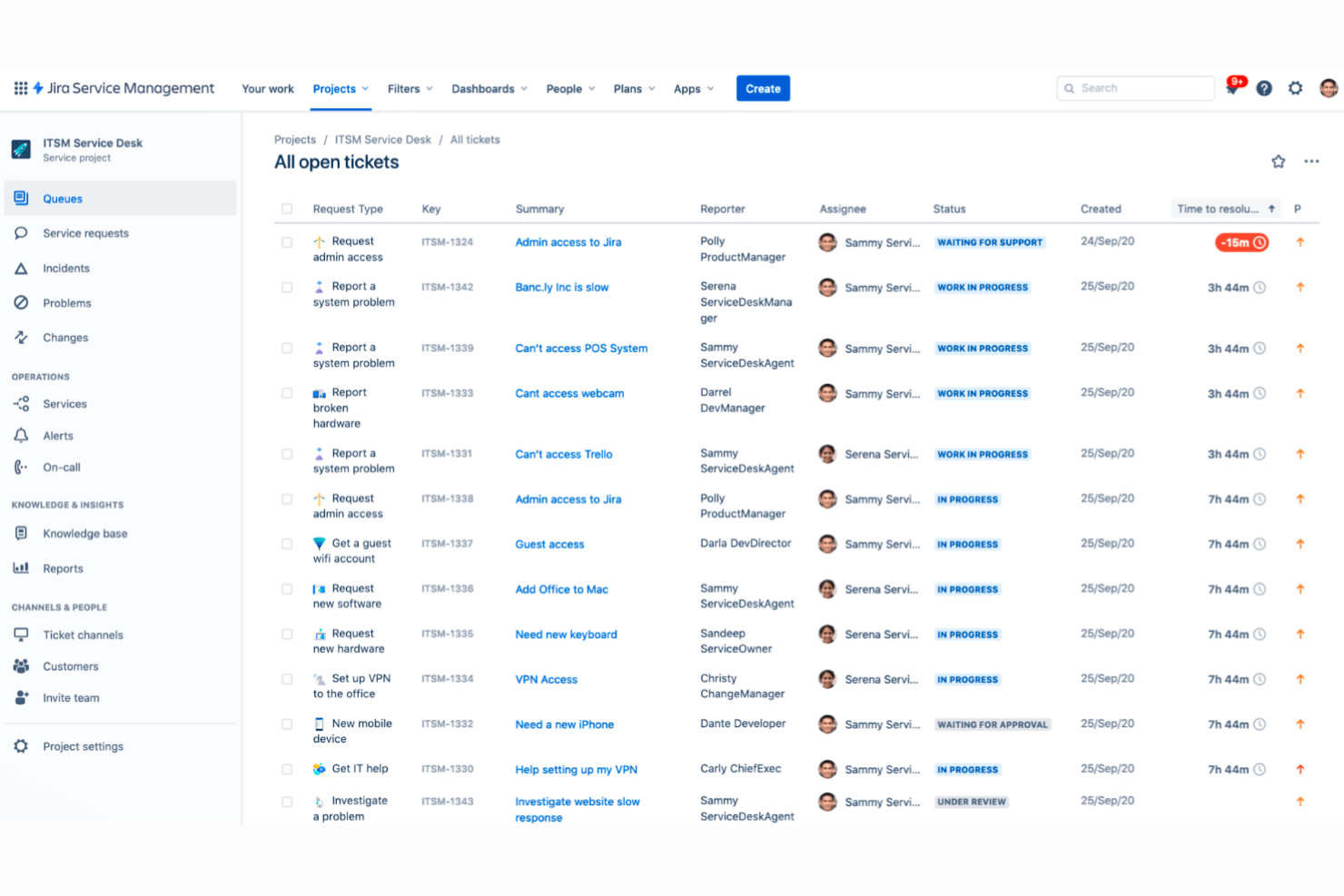
Jira Service Management is an IT service management software designed for IT teams to efficiently manage service requests and incidents. It serves businesses looking to improve their IT operations with structured workflows and automation.
Why Jira Service Management is a good osTicket alternative: Jira Service Management offers ITIL-certified processes that help your team adhere to industry best practices. Its change management features allow you to handle updates and modifications effectively, reducing downtime. The software's automation capabilities streamline repetitive tasks, freeing up your team's time for more critical issues.
Standout features & integrations:
Features include incident management, problem management, and a self-service portal. Your team can handle incidents promptly with streamlined workflows. The self-service portal empowers users to find solutions on their own, reducing the burden on support staff.
Integrations include Slack, Microsoft Teams, Salesforce, Google Workspace, Zoom, Trello, GitHub, Zendesk, ServiceNow, and AWS.
Pros and Cons
Pros:
- Strong automation features
- Effective change management
- ITIL-certified processes
Cons:
- May not suit small teams
- Steep learning curve as it requires technical expertise

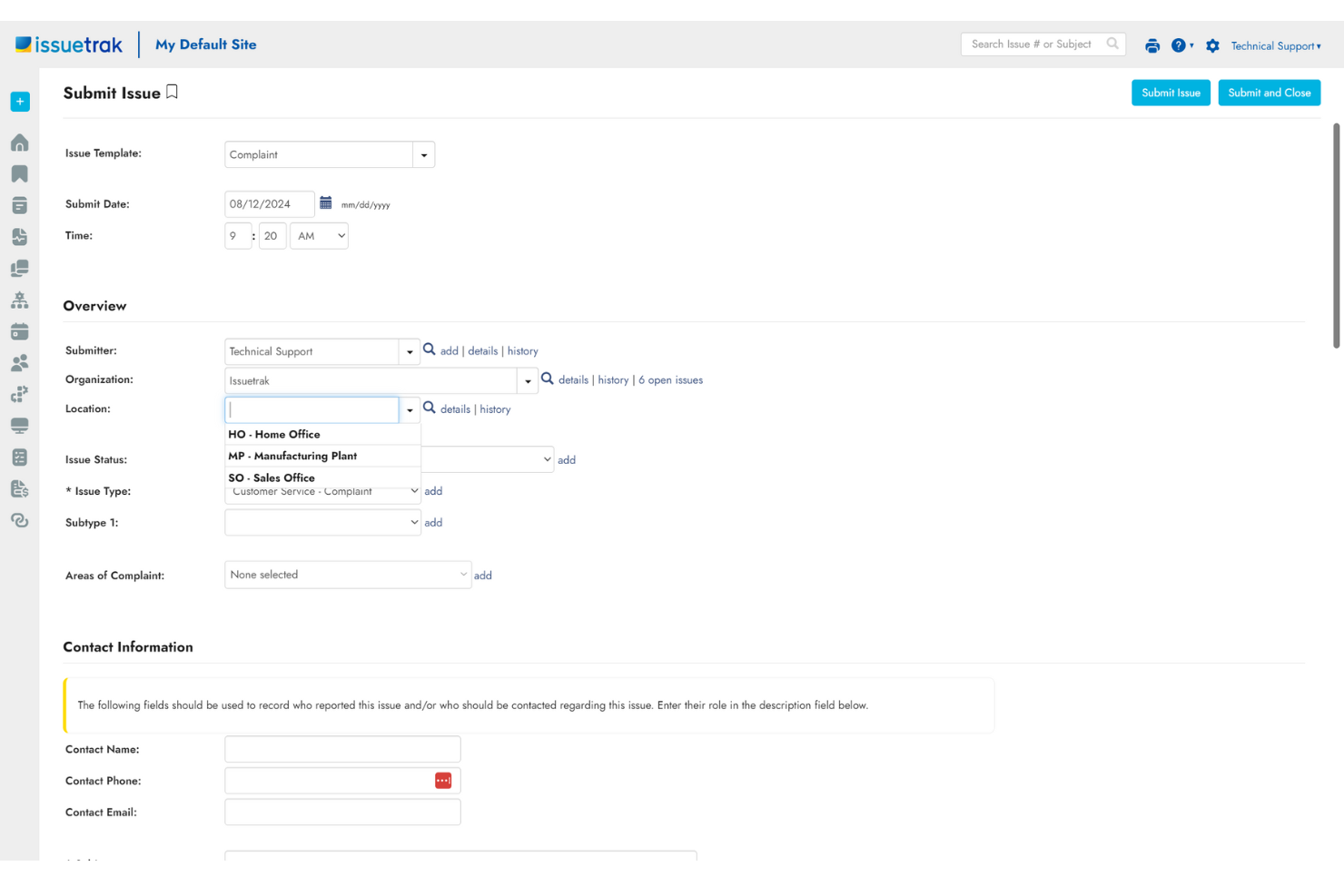
Issuetrak is a help desk solution designed for customer support teams to manage and track issues efficiently. It helps your team perform key functions like ticket management and workflow automation.
Why Issuetrak is a good osTicket alternative: Issuetrak offers features that focus on omnichannel ticket creation, allowing you to handle customer interactions across multiple channels with ease. This capability ensures that all customer inquiries are captured and managed effectively. The system's automated workflows and task-assignment features help your team stay organized and improve response times. With its user-friendly interface, you can quickly adapt to the software without a steep learning curve.
Standout features & integrations:
Features include customizable ticket forms, automated task assignments, and a knowledge base for self-service support. Your team can benefit from the ability to create custom fields to capture specific data, making it easier to tailor the system to your needs. The built-in reporting tools allow you to track performance metrics and identify areas for improvement.
Integrations include Microsoft 365, Google Analytics, Gmail, Salesforce, Power BI, and thousands more through Zapier. You can also access the Issuetrak API for even more connections.
Pros and Cons
Pros:
- Effective omnichannel support
- Strong reporting tools
- Easy-to-customize fields
Cons:
- Limited third-party integrations
- Lacks advanced analytics


Zendesk is a customer service ticketing system designed to help businesses manage customer inquiries and support requests efficiently. It caters to a wide range of industries, providing tools to enhance customer service operations.
Why Zendesk is a good osTicket alternative: Zendesk offers a comprehensive ticketing system that helps your team manage customer interactions seamlessly. Its automation features streamline repetitive tasks, allowing your team to focus on more complex issues. The software's reporting capabilities provide insights into customer service performance, helping you make data-driven decisions. With its focus on improving customer service, Zendesk offers a robust solution for businesses looking to enhance their support operations.
Standout features & integrations:
Features include customizable ticket forms, automated workflows, and performance analytics. Your team can tailor ticket forms to capture the information you need from customers. Automated workflows ensure that tickets are routed efficiently to the right team members.
Integrations include Slack, Salesforce, Shopify, Mailchimp, HubSpot, Trello, Google Workspace, Microsoft Teams, Zoom, and Jira.
Pros and Cons
Pros:
- Wide range of industry applications
- Efficient ticket routing
- Strong automation features
Cons:
- Limited customization options
- Complex initial setup with steep learning curve


Zoho Desk is an omnichannel ticketing system designed to help support teams manage customer interactions across multiple channels. It caters to businesses looking for a secure and efficient way to handle customer inquiries and support requests.
Why Zoho Desk is a good osTicket alternative: Zoho Desk prioritizes customer privacy and data security, offering features that help your team manage sensitive information securely. Its advanced security settings and compliance features ensure that your customer data is protected. The software also provides a unified view of customer interactions, enabling your team to deliver personalized support solution. With its focus on security and privacy, Zoho Desk is well-suited for businesses that handle sensitive customer information.
Standout features & integrations:
Features include ticket management, AI-powered assistance, and customizable dashboards. Your team can manage tickets efficiently with automated workflows and prioritization. The AI-powered assistance helps agents find solutions quickly, improving response times.
Integrations include Slack, Microsoft Teams, Salesforce, Shopify, Zapier, Trello, Microsoft 365, Google Workspace, Zendesk, and HubSpot.
Pros and Cons
Pros:
- Omnichannel support
- Efficient ticket management
- Strong data security features
Cons:
- Basic reporting features
- Complex initial setup and steep learning curve for new users


SolarWinds offers Web Help Desk, a web-based help desk ticketing and IT asset management software designed for IT professionals and support teams. It streamlines ticketing processes and centralizes asset management to enhance IT service delivery.
Why SolarWinds Web Help Desk is a good osTicket alternative: Web Help Desk provides a comprehensive IT service management solution with features like automated ticketing, incident tracking, and SLA management. Its asset management capabilities allow your team to associate tickets with specific hardware or software assets, ensuring efficient issue tracking and resolution. Additionally, SolarWinds integrates seamlessly with Active Directory and LDAP, facilitating user authentication and role-based access control.
Standout features & integrations:
Features include a built-in knowledge base that empowers users with self-service options, reducing the need for direct IT support. The software also offers change management capabilities to oversee and document modifications in your IT environment, ensuring compliance and stability. Additionally, automated IT asset discovery helps track hardware and software inventory, improving visibility and resource allocation.
Integrations include Dameware Remote Support, Microsoft SCCM, Spiceworks, Lansweeper, Nagios, Zenoss, BMC Remedy, ServiceNow, and ManageEngine.
Pros and Cons
Pros:
- Supports unlimited end users
- Provides customizable ticketing workflows
- Offers both cloud and on-premises deployment
Cons:
- End-user layout can be confusing
- Reporting functionality is limited


Hesk is a help desk software tailored for small businesses and startups looking for an easy-to-use ticketing system. It helps manage customer support inquiries by organizing tickets and tracking their progress.
Why Hesk is a good osTicket alternative: Hesk provides a free and straightforward solution for managing support tickets, making it an attractive option for businesses with limited budgets. Its simple interface allows your team to quickly set up and start managing customer inquiries. The software's ticket management features ensure that customer issues are organized and tracked efficiently. With Hesk, you can prioritize tasks without the complexity of more advanced systems.
Standout features & integrations:
Features include customizable ticket fields, email notifications, and a knowledge base for self-service support. Your team can customize ticket fields to gather the information you need from customers. The email notifications keep everyone informed about ticket updates and changes.
Integrations include Slack, Microsoft Teams, Google Workspace, Zendesk, Freshdesk, JIRA, Trello, Salesforce, HubSpot, and Mailchimp.
Pros and Cons
Pros:
- Easy ticket prioritization
- Cost-effective for small teams
- Simple setup process
Cons:
- No mobile app support
- Limited advanced features


HappyFox is a help desk software designed for customer support teams to manage and resolve tickets efficiently. It serves businesses across various industries by providing key functions like ticket management, automation, and reporting.
Why HappyFox is a good osTicket alternative: HappyFox offers quick ticket response capabilities, allowing your team to handle customer queries swiftly. Its automated ticket assignment and escalation features ensure that issues are directed to the right team members without delay. Its focus on speed and efficiency makes it a strong choice for teams needing to improve response times.
Standout features & integrations:
Features include a customizable ticketing system, a self-service knowledge base, and advanced reporting tools. Your team can benefit from the ability to tailor ticket fields to capture the information you need. The built-in knowledge base allows customers to find answers on their own, reducing the ticket volume.
Integrations include Slack, Microsoft Teams, Salesforce, Shopify, Jira, QuickBooks, FreshBooks, Google Workspace, Zapier, and Twilio.
Pros and Cons
Pros:
- Automated ticket escalation
- Customizable ticket fields
- Fast ticket resolution
Cons:
- Limited mobile app functionality
- Limited reporting customization


SupportBee is a help desk software designed to facilitate efficient customer support by managing and organizing customer inquiries. It caters primarily to small to medium-sized businesses that need a straightforward ticketing system to enhance team collaboration and communication.
Why SupportBee is a good osTicket alternative: SupportBee's focus on team collaboration makes it a compelling choice for businesses looking to enhance internal communication. The shared inbox feature allows your team to work together on tickets seamlessly, ensuring quick and efficient resolution. Its simple interface and easy setup mean that your team can get started without a steep learning curve. The ability to organize tickets with tags and filters helps your team prioritize tasks effectively.
Standout features & integrations:
Features include customizable ticket views, email integration, and a powerful search function. Your team can tailor ticket views to suit their workflow, making it easier to manage tasks. The email integration ensures that all customer communications are captured directly into the system.
Integrations include Slack, Trello, GitHub, JIRA, Basecamp, Google Workspace, Zapier, FreshBooks, Harvest, and Pipedrive.
Pros and Cons
Pros:
- Efficient email integration
- Easy ticket organization
- Simple setup process with strong collaboration features
Cons:
- Limited scalability for large teams
- No mobile app support


TeamSupport is a customer support software designed for B2B companies to manage customer relationships and support tickets effectively. It focuses on enhancing collaboration among support teams and improving customer satisfaction.
Why TeamSupport is a good osTicket alternative: TeamSupport introduces the customer distress index, which helps your team prioritize tickets based on customer satisfaction levels. This feature ensures that your team addresses high-priority issues promptly. The software also offers collaborative tools that allow your team to work together efficiently on customer issues. With a focus on B2B support, TeamSupport provides functionalities tailored to the needs of business customers.
Standout features & integrations:
Features include ticket automation, customer management, and a self-service portal. Your team can automate repetitive tasks, freeing up time for more important issues. The customer management feature helps you keep track of customer interactions and history.
Integrations include Salesforce, Microsoft Teams, Slack, JIRA, Google Workspace, Dropbox, QuickBooks, Mailchimp, HubSpot, and Zapier.
Pros and Cons
Pros:
- Comprehensive customer management
- Automates repetitive tasks
- Effective customer distress index
Cons:
- May not suit smaller teams
- Complex setup process
Autres alternatives à osTicket
Voici quelques alternatives à osTicket supplémentaires qui n’ont pas été retenues dans ma sélection principale mais qui méritent tout de même d’être considérées :
- HelpDesk
For GDPR compliance
- Hiver
For AI-driven automated triage
- Freshdesk
For multichannel support
- Front
For collaborative ticketing
- Intercom
For live chat support
- Supportbench
For custom reporting
- Vision Helpdesk
For satellite help desks
- Salesforce Service Cloud
For CRM integration
- ConnectWise
For IT service management
- Jitbit
For email-based ticketing
- NinjaOne
For remote monitoring
- Track-It
For asset management


Critères de sélection : Alternatives à osTicket
Pour sélectionner les meilleures alternatives à osTicket dans cette liste, j’ai pris en compte les besoins courants des acheteurs et les difficultés rencontrées avec les systèmes de gestion de tickets client, comme la gestion d’un volume élevé de tickets et l’assurance d’une réponse rapide. J’ai également appliqué le cadre d’analyse suivant pour garantir une évaluation structurée et équitable :
Fonctionnalités de base (25 % de la note globale)
Pour figurer dans cette sélection, chaque solution devait répondre à ces cas d’usage courants :
- Gestion des tickets
- Flux de travail automatisés
- Reporting et analyses
- Support multi-canal
- Collecte de feedback client
Fonctionnalités différenciantes (25 % de la note globale)
Pour affiner la sélection, j’ai également recherché des fonctionnalités uniques telles que :
- Analyses et insights basés sur l’IA
- Tableaux de bord personnalisables
- Intégration avec des outils CRM
- Fonctionnalités de sécurité avancées
- Application mobile
Facilité d’utilisation (10 % de la note globale)
Pour évaluer l’ergonomie de chaque système, j’ai pris en compte :
- Interface intuitive
- Navigation simple
- Options de personnalisation
- Vitesse et performances
- Fonctionnalités d’accessibilité
Onboarding (10 % de la note globale)
Pour l’expérience d’onboarding, j’ai pris en compte :
- Disponibilité de vidéos de formation
- Tours produits interactifs
- Accès à des modèles prêts à l’emploi
- Assistance par chatbot
- Webinaires et ateliers
Support client (10 % de la note globale)
Pour évaluer le support proposé par chaque éditeur, j’ai regardé :
- Disponibilité 24/7
- Support multi-canal
- Délai de réponse
- Accès à une base de connaissances
- Responsable client dédié
Rapport qualité/prix (10 % de la note globale)
Pour apprécier le rapport qualité/prix de chaque solution, j’ai observé :
- Tarification concurrentielle
- Richesse des fonctionnalités
- Capacité de montée en charge
- Période d’essai gratuite
- Satisfaction client sur la tarification
Retours clients (10 % de la note globale)
Pour évaluer la satisfaction générale, j’ai considéré lors de la lecture des avis clients :
- Note globale de satisfaction
- Retours sur la qualité du support
- Facilité d’utilisation
- Demandes d’évolution et mises à jour
- Perception du rapport qualité/prix
Principales fonctionnalités des alternatives à osTicket
Voici quelques-unes des principales fonctionnalités d’osTicket pour vous aider à comparer ce que proposent les solutions alternatives :
- Gestion des tickets : Votre équipe peut facilement organiser et suivre les demandes clients de bout en bout.
- Automatisation des workflows : Automatisez les tâches répétitives pour gagner du temps et limiter les erreurs manuelles.
- Champs personnalisables : Personnalisez les formulaires de ticket pour recueillir les informations spécifiques à votre équipe.
- Support multi-canal : Centralisez les interactions issues des emails, formulaires web, etc., au même endroit.
- Outils de reporting : Générez des rapports détaillés pour analyser la performance de votre équipe.
- Base de connaissances : Offrez aux clients une option en libre-service pour qu’ils trouvent rapidement leurs réponses.
- Intégration email : Centralisez toutes les communications clients directement dans le système.
- Gestion des priorités : Attribuez des niveaux de priorité aux tickets pour traiter les demandes les plus urgentes rapidement.
- Interface conviviale : Navigation intuitive, réduisant la courbe d’apprentissage pour vos équipes.
- Fonctionnalités de sécurité : Protégez les données sensibles des clients grâce à des mesures de sécurité intégrées. Il semble que votre message ait été coupé. Pouvez-vous me donner plus de détails ou m’indiquer comment je peux vous aider ?
Et maintenant ?
Abonnez-vous à notre newsletter pour recevoir les dernières actualités CX, des guides pratiques, des stratégies et des ressources d’experts dans le domaine de l’expérience client.