
20 Best Zoho Desk Alternatives Reviewed In 2026

Best Zoho Desk Alternatives Shortlist
Here's my pick of the 10 best software from the 20 tools reviewed.


Managing customer support can be a real headache, especially when your tools don't quite fit your needs. If you're finding Zoho Desk isn't cutting it for your team, you're not alone. Many customer experience managers face similar challenges, seeking alternatives that better address their unique business needs.
I've independently tested and reviewed various customer service software, focusing on what truly matters to you and your team. In this article, I'll share my top picks for Zoho Desk alternatives, offering an unbiased and well-researched perspective.
What Is Zoho Desk?
Zoho Desk is a customer service software designed to help your team manage support tickets and improve customer interactions. It's commonly used by support agents, managers, and customer experience professionals who need a reliable tool to handle inquiries efficiently. Automation, multi-channel support, and reporting features help with organizing tasks, communicating with customers, and tracking performance. Overall, Zoho Desk can enhance your team's ability to provide timely and effective customer support.
Best Zoho Desk Alternatives Summary
This comparison chart summarizes pricing details for my top Zoho Desk alternative selections to help you find the best one for your budget and business needs.
| Tool | Best For | Trial Info | Price | ||
|---|---|---|---|---|---|
| 1 | Best for managing high volumes of inquiries | Free plan + free trial available | From $25/user/month (billed annually) | Website | |
| 2 | Best for AI-assisted multilingual support | 14-day free trial available | From $19/user/month (billed annually) | Website | |
| 3 | Best for ecommerce inbox management | 14-day free trial | From $39/agent/month | Website | |
| 4 | Best with guest access for external collaboration | 30-day free trial + free plan available + free demo available | From $14/user/month (billed annually) | Website | |
| 5 | Best for smart ticket management | Free trial + free plan available | From $24.17/month (billed annually) | Website | |
| 6 | Best for Microsoft Teams integration | 21-day free trial + free plan + free demo available | From $12/agent/month (billed annually) | Website | |
| 7 | Best for an AI copilot assistant | 14-day free trial available | From $16/user/month (billed annually) | Website | |
| 8 | Best for growing businesses | Free 30-day trial available | From $24/user/month (billed annually) | Website | |
| 9 | Best for IT integrations | 14-day free trial | From $24/agent/month (billed annually) | Website | |
| 10 | Best for AI-first service | 14-day free trial available | From $29/user/month (billed annually) | Website |

Why Trust Our Software Reviews
We’ve been testing and reviewing customer experience software since 2020. As customer experience managers ourselves, we know how critical and difficult it is to make the right decision when selecting software. We invest in deep research to help our audience make better software purchasing decisions.
We’ve tested more than 2,000 tools for different customer experience use cases and written over 1,000 comprehensive software reviews. Learn how we stay transparent & check out our software review methodology.
-

SupportYourApp
Visit WebsiteThis is an aggregated rating for this tool including ratings from Crozdesk users and ratings from other sites.4.7 -
Hiver
Visit WebsiteThis is an aggregated rating for this tool including ratings from Crozdesk users and ratings from other sites.4.7 -
Freshdesk
Visit WebsiteThis is an aggregated rating for this tool including ratings from Crozdesk users and ratings from other sites.4.4


Best Zoho Desk Alternatives Reviews
Below are my detailed summaries of the best Zoho Desk alternatives that made it onto my shortlist. My reviews offer a detailed look at the key features, pros & cons, integrations, and ideal use cases of each tool to help you find the best one for you.


Help Scout is a customer service platform designed for teams that prioritize personal and humanized customer support. It is used by businesses that want an intuitive help desk solution for managing email, chat, and knowledge base requests while keeping interactions warm and personable.
Why Help Scout is a good Zoho Desk Alternative: Help Scout provides a shared inbox that helps teams collaborate efficiently, making it easier to manage high volumes of customer inquiries without losing that personal touch. Its workflow automation helps reduce repetitive tasks, giving your team more time to focus on nuanced customer conversations. The platform also offers proactive messaging and a clean, easy interface, which can benefit teams that prefer a simpler environment compared to Zoho Desk's more complex omnichannel layout. Additionally, Help Scout includes feedback tools and AI assistance that support meaningful customer insights and consistent service quality.
Standout features and integrations:
Features include a shared inbox for organized email management, a knowledge base that empowers customers to self-serve, and live chat for real-time support. Help Scout also offers automation workflows that simplify repetitive processes and reporting tools that provide insight into response times, conversation volume, and customer satisfaction.
Integrations include Slack, Salesforce, Shopify, Zapier, Asana, HubSpot, Mailchimp, Stripe, Trello, Google Sheets, Typeform, and Pipedrive.
Pros and Cons
Pros:
- Provides clear reporting insights
- Encourages organized team collaboration
- Supports self service knowledge base
Cons:
- Limited CRM style functionality
- Lacks native social channels
New Product Updates from Help Scout

Help Scout Enhances Support Management With AI and Integrations
Help Scout introduces smarter routing, WhatsApp and Aircall integrations, and new AI enhancements to help teams manage conversations, automate workflows, and support customers across more channels. For more information, visit Help Scout’s official site.
 .
.
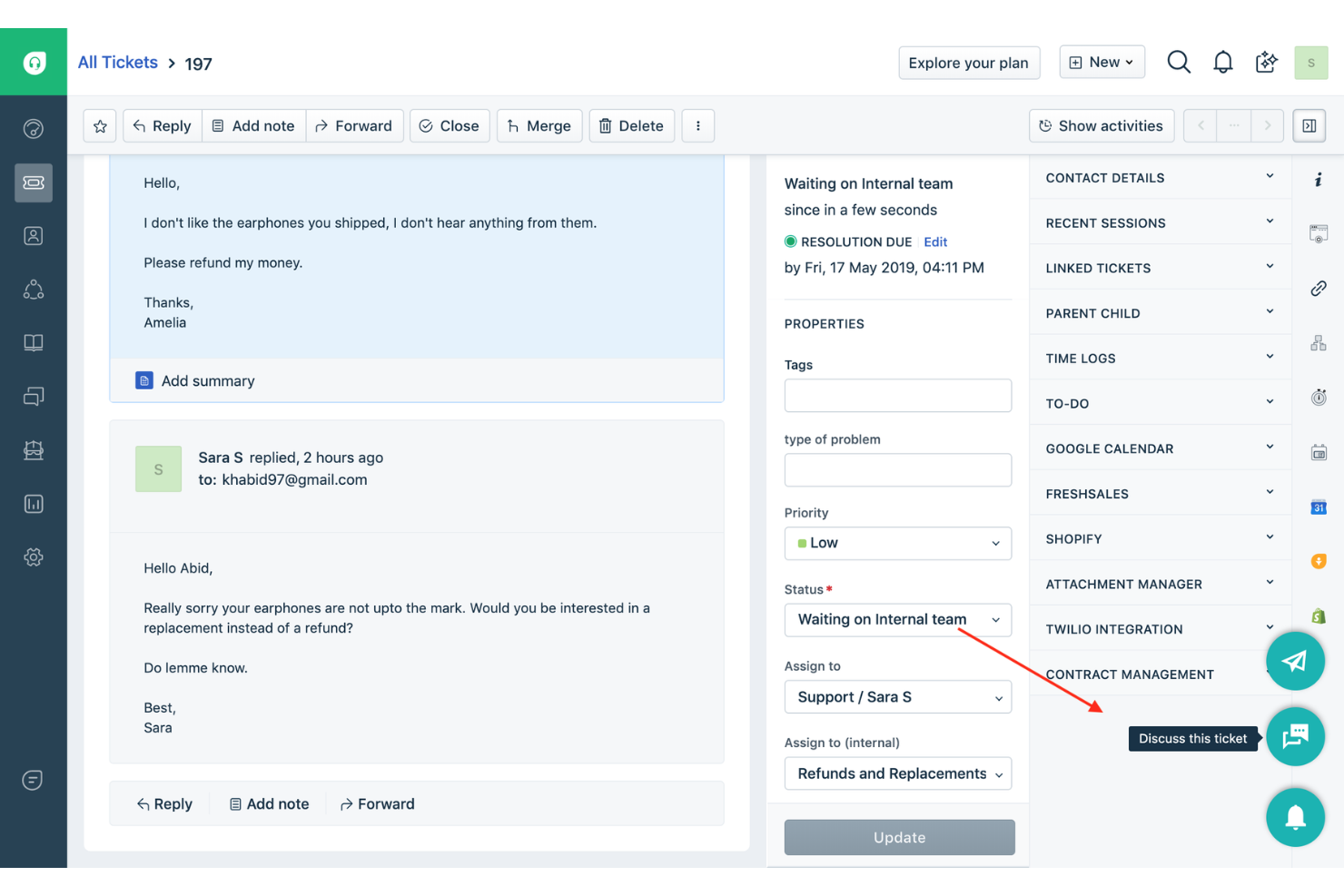
Tailored for companies aiming to enhance their support efficiency, Freshdesk offers a centralized workspace that allows your team to focus on fostering customer relationships rather than getting bogged down in complex tasks. By integrating AI capabilities such as Freddy AI Copilot and Freddy AI Insights, Freshdesk helps to automate routine queries and provides proactive insights, making it an appealing choice for industries ranging from retail to technology that require robust customer interaction management.
Why I Picked Freshdesk
I picked Freshdesk as an alternative to Zoho Desk for its advanced AI-driven features that streamline customer support tasks. The Freddy AI Copilot is particularly noteworthy, as it aids agents by offering live translations and reply suggestions, which are crucial for businesses dealing with diverse customer bases.
Additionally, Freshdesk's centralized workspace is designed to unify customer interactions across multiple channels, ensuring your team has all the necessary information to resolve issues promptly. These features directly address the need for efficient and effective customer support, making Freshdesk a suitable choice for businesses looking to enhance their service capabilities.
Freshdesk Key Features
In addition to its AI-driven functionalities, Freshdesk offers several other features that make it a strong contender as a Zoho Desk alternative:
- Self-Service Support: Freshdesk allows you to create branded portals for knowledge base articles. AI email bots can also answer common questions.
- Automated Workflows: With the ability to set up automated workflows, your team can reduce the manual effort involved in repetitive tasks, ensuring a smoother operation.
- Customizable Dashboards: Freshdesk provides customizable dashboards that give you a real-time view of your support metrics, helping you make data-driven decisions.
- Collaborative Ticketing: The platform supports collaborative ticketing, enabling multiple team members to work on a ticket simultaneously, ensuring faster resolution times.
Freshdesk Integrations
Integrations include Slack, Microsoft Teams, Shopify, Google Workspace, Jira, Freshservice, HubSpot, Salesforce, Zapier, and WhatsApp Business.
Pros and Cons
Pros:
- Customizable dashboards provide real-time support metrics.
- Omnichannel support integrates various communication platforms.
- AI automation improves response times and reduces workload.
Cons:
- Emphasis on AI may not fit everyone's workflow style.
- Lacks integrated calling solutions, requiring separate tools.
New Product Updates from Freshdesk

Freshdesk Adds Voice AI Agents in Freshcaller
Freshdesk introduces Voice AI Agents available through Freshcaller Marketplace apps to handle routine calls and reduce queues. This feature enables automated call handling with real-time, conversational support. For more information, visit Freshdesk's official site.

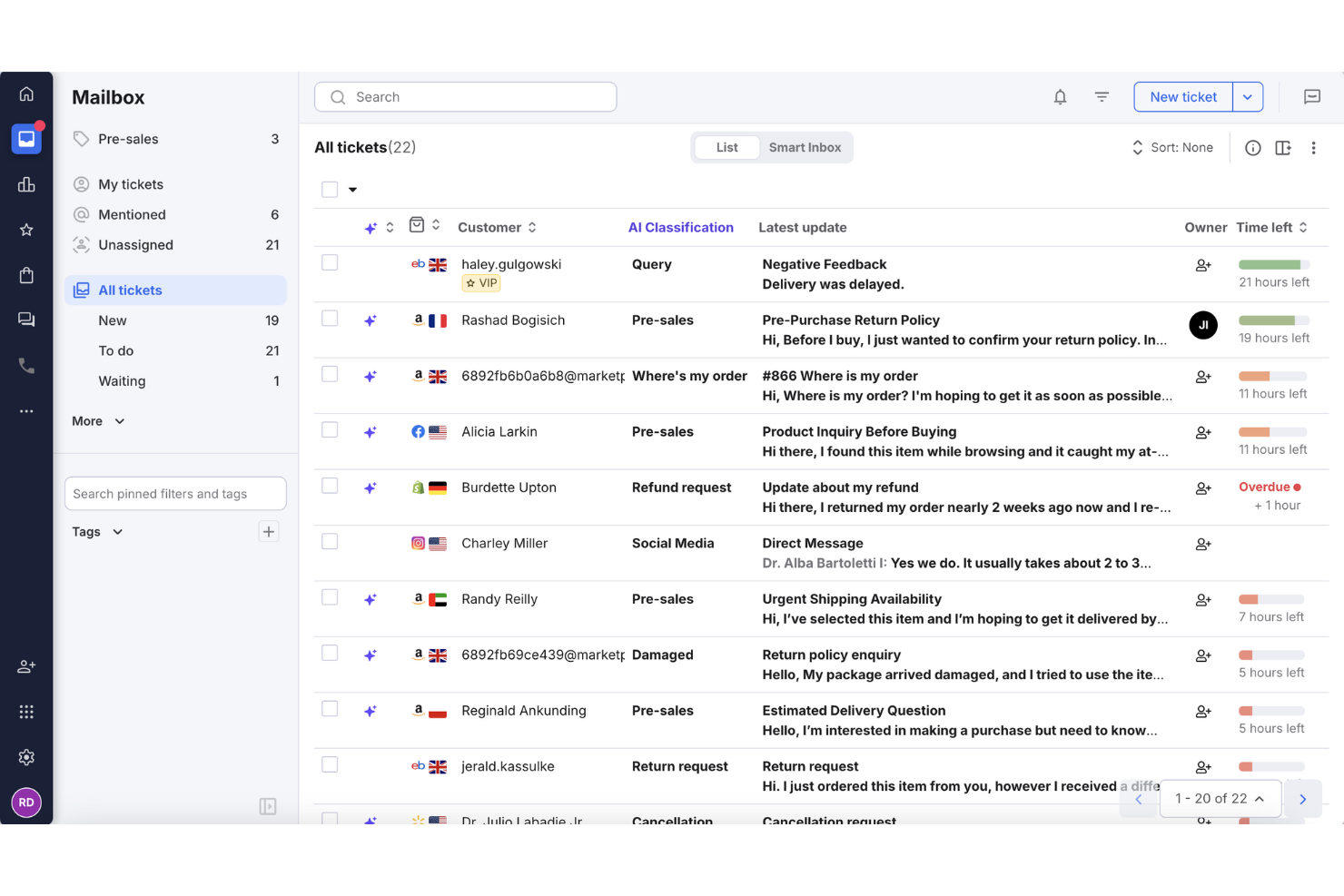
eDesk supports ecommerce inbox management for businesses handling customer support across multiple sales channels. Built for online retailers, it helps reduce the complexity of managing customer conversations by providing a unified inbox and support automation features. This makes eDesk a practical option for ecommerce teams that want to improve response handling and maintain consistent customer support workflows.
Why I Picked eDesk
I picked eDesk for its ecommerce inbox management capabilities, which make it easier to handle customer messages from multiple sales channels when looking for a Zoho Desk alternative. Its automation tools handle routine support tasks, allowing teams to focus on more complex customer issues. With integrations across more than 300 platforms, including marketplaces like Amazon and eBay, eDesk keeps customer conversations organized and connected to relevant order data.
eDesk Key Features
In addition to ecommerce inbox management, eDesk offers:
- Unified Inbox: Centralizes all customer messages from various platforms into a single interface, simplifying communication.
- Real-time Reporting: Offers insights and analytics to help you track support performance and make data-driven decisions.
- 24/7 Chatbot Support: Provides instant assistance to customers through AI-driven chatbots, improving customer satisfaction.
- Selective Review Requests: Allows you to request reviews from satisfied customers, helping to build and maintain a positive online reputation.
eDesk Integrations
Integrations include Amazon, eBay, Walmart, Shopify, Magento, Facebook, WhatsApp, Shipstation, Veeqo, and Shippingbo.
Pros and Cons
Pros:
- Automation and templates reduce repetitive support tasks
- Centralizes customer messages from marketplaces and stores
- Organized ticket views improve daily workflow efficiency
Cons:
- Primarily built for ecommerce, less flexible for other industries
- Reporting and analytics, while present, can be less customizable than more enterprise dashboards

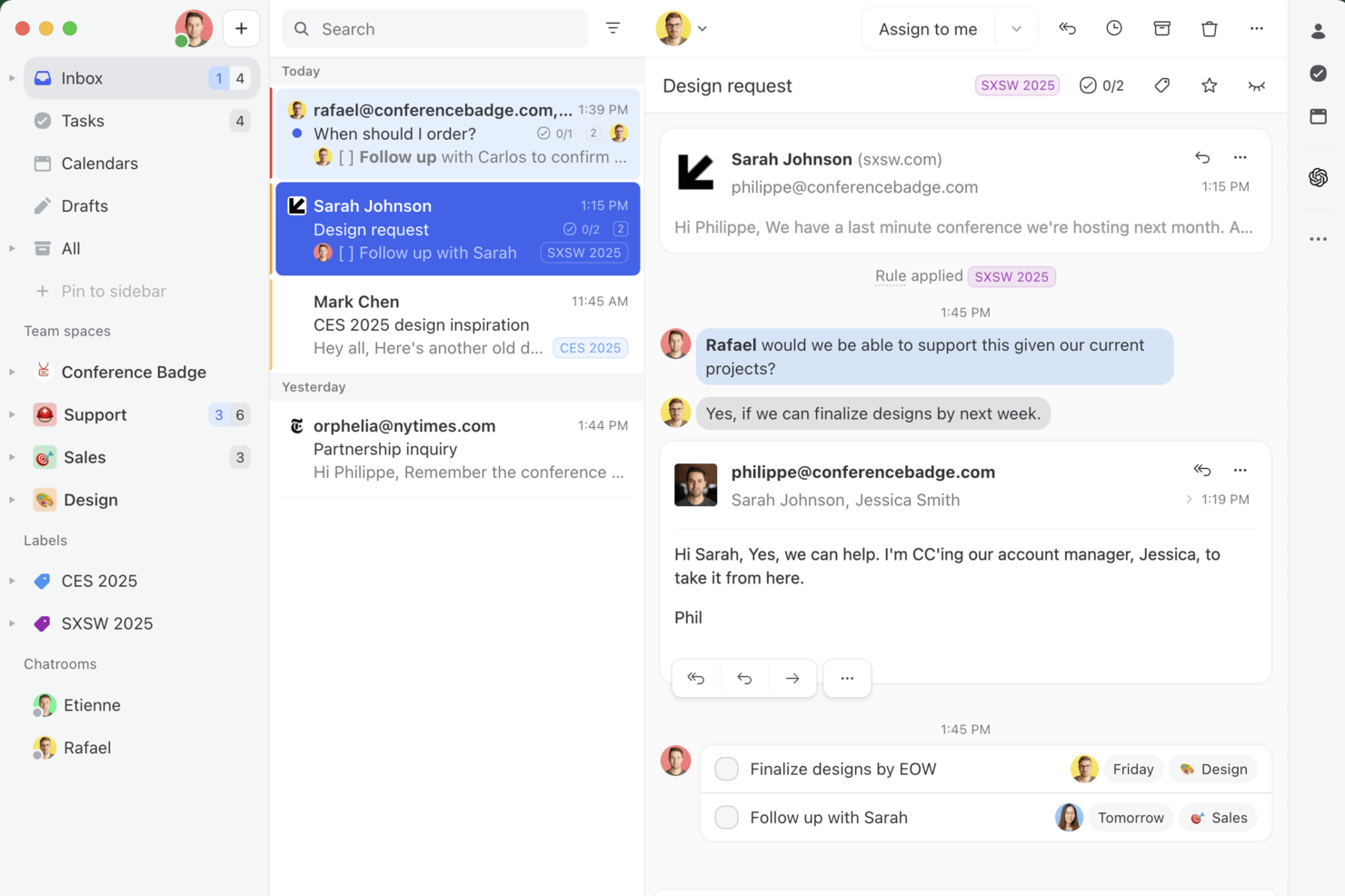
Missive is a shared inbox and team communication platform designed for businesses that need to manage customer conversations across email, chat, and social channels. If you’re looking for a Zoho Desk alternative that brings collaborative messaging and workflow tools into one place, Missive is worth a look.
Who Is Missive Best For?
Customer support and client-facing teams that need to collaborate with external partners or clients in real time.
Why Missive Is a Good zoho desk alternative
I picked Missive because it allows teams to invite external partners or clients as guests directly into shared inboxes. This enables collaboration on customer conversations without switching tools or losing context. Guest access permissions are granular, giving teams control over what each external participant can view or modify. This structure supports faster resolution of complex issues by centralizing communication within a single thread.
Missive Key Features
- Shared inbox management: Assign, archive, and organize conversations across multiple channels in one place.
- Internal chat and comments: Collaborate with teammates directly inside email threads using chat and comments.
- Rules and workflow automation: Set up custom rules to automate message assignment, tagging, and archiving.
- Multiple account support: Connect and manage several email and messaging accounts from a single dashboard.
Missive Integrations
Integrations include Google Workspace, Office 365, iCloud, Gmail, Outlook.com, WhatsApp, Instagram, Facebook Messenger, Slack, and Trello.
Pros and Cons
Pros:
- Manage multiple organizations from one account
- Clear audit trail for team accountability
- Guest access for external partners or clients
Cons:
- No native telephony or voice integration
- No built-in knowledge base or help center
New Product Updates from Missive

Missive Adds Activity Feed, AI Inbox Analysis, and ClickUp Integration
Missive introduces an activity feed, AI inbox analysis, ClickUp integration, and jump to source navigation. These updates improve visibility, streamline workflows, and enhance how users manage conversations. For more information, visit Missive’s official site.
 .
.

Tidio is an AI-powered customer support platform that combines live chat, automation, and help desk tools to help businesses manage customer interactions.
Why Tidio is a good Zoho Desk Alternative: Tidio's smart help desk system is designed to handle customer queries efficiently by turning live chats, emails, and social media messages into tickets. You can assign, prioritize, and tag these tickets, making it easier to manage and resolve issues. The system also allows you to set up custom filters and views, helping your team stay organized and focused on what matters most. I also like that Tidio has an AI support agent, Lyro, that can help answer routine inquiries across different channels and in multiple languages.
Standout features & integrations:
Features include a visual automation builder called Flows, which lets you create custom workflows without coding. For example, you can use this tool to help automate responses and actions based on customer behavior. Tidio also offers a multichannel shared inbox, allowing you to manage messages from live chat, email, and social media in one place.
Integrations include Shopify, WordPress, Squarespace, WIX, Adobe Commerce, BigCommerce, WooCommerce, Google Analytics, Mailchimp, HubSpot, and Zendesk.
Pros and Cons
Pros:
- Multichannel support, including for chats, emails, and social media
- Lyro AI handles a significant portion of customer inquiries
- Provides insights into team performance and customer satisfaction
Cons:
- Many automation features limited to higher tier plans
- Limitations when integrating with certain third-party tools
New Product Updates from Tidio

Tidio Expands Lyro AI Across Email and Chat
Tidio expands Lyro AI to email ticketing and enhances its chatbot with Claude 3.0 integration. These updates improve automation across support channels and enhance AI-driven interactions. For more information, visit Tidio’s official site.
 .
.
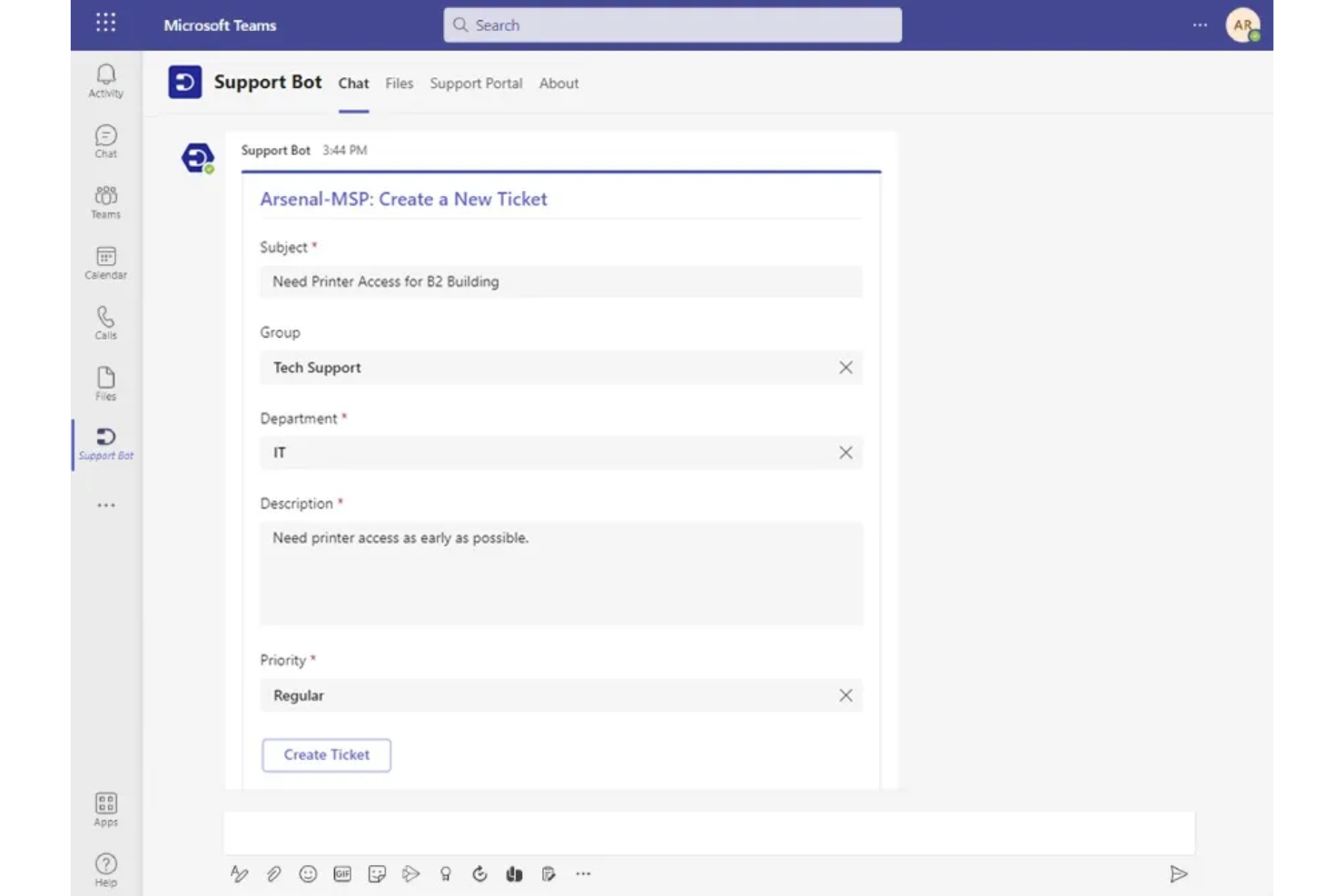
For teams seeking a Zoho Desk alternative that integrates with Microsoft Teams, Desk365 offers a compelling solution. It caters to businesses across industries, including e-commerce, healthcare, and finance, to enhance productivity and customer service. Desk365 stands out with its AI-driven capabilities, allowing your team to automate repetitive tasks, manage customer inquiries, and provide self-service options through a customizable knowledge base. This platform is designed to address the complexities of multi-channel support, making it an ideal choice for organizations looking to improve their customer service operations.
Why I Picked Desk365
I picked Desk365 for its unique integration with Microsoft Teams, which is particularly beneficial for organizations already using Microsoft's suite of tools. The platform's AI-powered ticketing system allows your team to handle inquiries from multiple channels, such as email, web forms, and support portals, all within a unified inbox. Additionally, the platform's automation features, such as SLA monitoring and round-robin ticket assignment, help ensure your team can focus on providing timely support without being bogged down by manual processes.
Desk365 Key Features
Aside from its standout integration with Microsoft Teams, Desk365 offers:
- Knowledge Base: This feature allows your team to create and manage a repository of information that customers can access for self-service, reducing the volume of incoming tickets.
- Instant Notifications: Keep your team informed with real-time alerts about ticket updates and customer inquiries, ensuring prompt responses.
- Customizable Workflows: Tailor the ticketing process to fit your organization's unique needs by setting up specific rules and automation triggers.
- Mobile Accessibility: Access the platform on-the-go with mobile-friendly interfaces for both agents and customers, providing flexibility for remote or traveling team members.
Desk365 Integrations
Integrations include Microsoft Teams, Microsoft 365, Azure Active Directory, Power Automate, and Microsoft Outlook. Desk365 also supports custom integrations through APIs and webhooks.
Pros and Cons
Pros:
- Integrations with Microsoft 365 tools support internal help desk workflows
- Native Microsoft Teams integration enables ticket management directly within Teams
- Customizable ticket workflows support different operational support processes
Cons:
- Reporting capabilities may be limited for teams needing advanced analytics
- Admin portal theme customization options are limited


SparrowDesk is an AI-driven customer service platform designed for businesses wanting to enhance their customer support capabilities with intelligent automation. If you're in an industry where managing customer interactions efficiently is crucial, SparrowDesk's AI-powered tools could be the answer to reducing response times and improving customer satisfaction.
Why I Picked SparrowDesk
I picked SparrowDesk as a compelling Zoho Desk alternative because of its innovative use of AI in customer service. The platform's AI Agents can handle a majority of customer interactions, freeing your team to tackle more pressing issues. Additionally, the AI Copilot offers real-time support to agents by providing conversation summaries and smart replies, which enhances the overall efficiency of your support team. These features align closely with the needs of businesses that prioritize quick, effective customer service without compromising on quality.
SparrowDesk Key Features
In addition to its AI capabilities, SparrowDesk offers several other features that make it a strong contender in the customer service software space.
- Omnichannel Inbox: Streamlines communication by consolidating customer interactions from various channels into one unified platform.
- Service Level Agreements (SLA): Allows you to set response and resolution targets, ensuring consistent and timely customer support.
- Interactive Analytics: Provides real-time insights into team performance and customer trends, helping you make data-driven decisions.
- Multi-Brand/Product Support: Enables the management of multiple brands or products within a single platform, simplifying operations for complex businesses.
SparrowDesk Integrations
Native integrations are not currently listed by SparrowDesk.
Pros and Cons
Pros:
- Interactive analytics offer valuable insights for decision-making
- Copilot features summarize long conversations inside the agent inbox
- AI agents automate routine tasks, enhancing efficiency
Cons:
- Channels currently focus on email and live chat, not voice or social
- Limited information on native integrations, which may restrict connectivity


Groove is a customer support software designed for small to medium-sized businesses aiming to improve their customer service operations. It's used by teams that want an easy-to-use platform to manage customer inquiries and enhance customer satisfaction.
Why Groove is a good Zoho Desk Alternative: Groove offers a straightforward interface that makes it easy for your team to get started without a steep learning curve. Its shared inbox feature ensures all customer interactions are centralized, helping your team stay organized. With customizable ticketing, your team can tailor workflows to match specific business needs. Additionally, Groove's reporting tools provide insights into customer support performance, aiding in strategic decision-making.
Standout features & integrations:
Features include a knowledge base for customer self-service, live chat for real-time support, and customer satisfaction surveys for valuable feedback. These tools help reduce support requests, enhance interactions, and improve service quality.
Integrations include Slack, Shopify, Mailchimp, Trello, Google Workspace, Microsoft Teams, Salesforce, Zapier, Jira, and HubSpot.
Pros and Cons
Pros:
- Responsive customer support
- Integrated knowledge base
- Efficient email ticket organization
Cons:
- Performance issues with extensive automation
- Limited social media integration


HappyFox is a help desk software designed for businesses that require efficient ticket management and customer support operations. It's used by teams looking to streamline their IT support processes and enhance service delivery.
Why HappyFox is a good Zoho Desk Alternative: HappyFox offers a comprehensive ticketing system that simplifies the handling of customer inquiries, making it a strong choice for IT teams. Its automation capabilities reduce the workload by automating routine tasks, allowing your team to focus on complex issues. The self-service portal empowers customers to find solutions independently, minimizing support requests.
Standout features & integrations:
Features include a knowledge base for customer self-service, reducing reliance on support agents. SLA management prioritizes tickets for timely responses, while a community forum fosters engagement, enabling users to share insights and collaborate on solutions.
Integrations include Slack, Salesforce, Shopify, Microsoft Teams, Google Workspace, Trello, Mailchimp, QuickBooks, Jira, and Zapier.
Pros and Cons
Pros:
- Supports customer self-service
- Reduces workload with automation
- Efficient ticket management
Cons:
- Mobile app limitations
- Performance issues with extensive automation


Intercom is a customer communication platform designed for businesses looking to enhance their customer interactions using AI. It's used by teams that want to automate support and provide personalized customer experiences.
Why Intercom is a good Zoho Desk Alternative: Intercom offers AI-powered chatbots that automate routine inquiries, freeing up the customer support team for more complex tasks. Its customer data platform helps your team deliver personalized experiences by providing insights into customer behavior.
The live chat features the ease of use of real-time interaction, ensuring quick responses to customer queries. Additionally, Intercom's proactive messaging helps your team engage with customers at the right moments, improving satisfaction.
Standout features & integrations:
Features include a help center that enables self-service, allowing customers to find answers independently. Product tours guide users through features, improving onboarding and user adoption. Additionally, targeted messaging helps engage specific customer segments at the right time, enhancing personalized interactions and overall satisfaction.
Integrations include Slack, Salesforce, HubSpot, Mailchimp, Shopify, Google Workspace, Microsoft Teams, Trello, Jira, and Zendesk.
Pros and Cons
Pros:
- Proactive messaging
- Real-time interaction
- Provides customer behavior insights
Cons:
- Complexity in ticket routing and automation
- Occasional delays in message delivery
Other Zoho Desk Alternatives
Here are some additional Zoho Desk alternatives that didn’t make it onto my shortlist, but are still worth checking out:
- HubSpot Service Hub
For all-in-one support
- Kayako
For automating tasks
- SysAid
For IT service management
- Freshdesk
For small teams
- Salesforce Service Cloud
For AI-driven service
- Zendesk
For large enterprises
- Help Scout
For personal touch support
- Hiver
For AI tagging
- LiveAgent
For omnichannel support
- TeamSupport
For B2B SaaS support


Zoho Desk Alternatives Selection Criteria
When selecting the best Zoho Desk alternatives to include in this list, I considered common buyer needs and pain points related to customer service software products, like customization options and ease of integration. I also used the following framework to keep my evaluation structured and fair:
Core Functionality (25% of total score)
To be considered for inclusion in this list, each solution had to fulfill these common use cases:
- Ticket management
- Multi-channel support
- Reporting and analytics
- Customer database management
- Automation of routine tasks
Additional Standout Features (25% of total score)
To help further narrow down the competition, I also looked for unique features, such as:
- AI-driven insights
- Advanced workflow automation
- Customizable dashboards
- Proactive customer engagement
- Real-time collaboration tools
Usability (10% of total score)
To get a sense of the usability of each system, I considered the following:
- Intuitive interface
- Short learning curve
- Accessibility across devices
- Customization options
- User feedback and adaptation
Onboarding (10% of total score)
To evaluate the onboarding experience for each platform, I considered the following:
- Availability of training videos
- Interactive product tours
- Onboarding webinars
- Access to templates
- Support from chatbots
Customer Support (10% of total score)
To assess each software provider’s customer support services, I considered the following:
- 24/7 support availability
- Multiple support channels
- Responsiveness to inquiries
- Quality of support resources
- Availability of dedicated account managers
Value For Money (10% of total score)
To evaluate the value for money of each platform, I considered the following:
- Pricing transparency
- Features included in base plans
- Cost relative to competitors
- Discounts for annual billing
- Flexibility in pricing plans
Customer Reviews (10% of total score)
To get a sense of overall customer satisfaction, I considered the following when reading customer reviews:
- Overall satisfaction ratings
- Commonly mentioned pros and cons
- Feedback on customer service
- User recommendations
- Reported ROI and benefits
Why Look for a Zoho Desk Alternative?
While Zoho Desk is a good choice of customer service software, there are several reasons why some users seek out alternative solutions. You might be looking for a Zoho Desk alternative because of…
- Limited integration options with other tools
- Complexity in setup for small teams
- Lack of advanced reporting features
- Restrictions in customization for unique workflows
- Limited support for certain global regions
If any of these sound like you, you’ve come to the right place. My list contains several customer service software options that are better suited for teams facing these challenges with Zoho Desk and looking for alternative solutions.
Zoho Desk Key Features
Here are some of the key features of Zoho Desk, to help you contrast and compare what alternative solutions offer:
- Omnichannel support: Streamlines customer interactions across multiple platforms, including social media and live chat, to ensure your team can engage with customers wherever they are.
- AI integration: Zia, the AI assistant, provides contextual support, auto-tags tickets, performs sentiment analysis, and offers generative AI for response customization, helping your team manage inquiries efficiently.
- Self-service options: Customers can access guided conversations and a knowledge base for quick answers, reducing the workload on your team.
- Agent productivity tools: Features like work modes, reply efficiency, and mobility enhance collaboration and ticket management, allowing your team to work more effectively.
- Automation: Automates repetitive tasks, ticket assignments, and notifications to improve efficiency, freeing your team to focus on complex issues.
- Extensibility: Integrates with other software and allows for custom functions and modules, tailoring the help desk to meet your specific business needs.
- Insights and analytics: Provides reports and dashboards for performance monitoring and time tracking, giving your team valuable insights to improve service.
- Customization: Offers extensive options for branding, templates, and layouts to fit your organization's needs.
- Security: Ensures data protection with role-based access, GDPR compliance, and audit logs, so your team can handle customer data securely.
What's Next?
Subscribe to our newsletter for the latest CX insights, how-to guides, strategies, and resources from top experts in the CX field.