Les logiciels de centre d’appels aident les équipes d’assistance à gérer d’importants volumes d’interactions vocales avec davantage de rapidité, de structure et de contrôle. Ils sont conçus pour réduire les temps d’attente, améliorer le routage des appels et fournir aux agents les outils dont ils ont besoin pour résoudre rapidement les problèmes.
Fort de mon expérience approfondie dans l’évaluation des outils CX en matière de fonctionnalités, d’ergonomie et de retour sur investissement, j’ai identifié les meilleurs logiciels de centre d’appels pour gérer les appels entrants et sortants de manière cohérente et à grande échelle. Cela vous aidera à trouver le logiciel de centre d’appels adapté à votre équipe, afin de fournir un meilleur service client sans ajouter de complexité.
Pourquoi faire confiance à nos recommandations de logiciels
6,700+
Reviews
20
Industry experts
16+
Evaluation factors
14
Years
Notre équipe teste et évalue des logiciels depuis 2012. En tant que leaders CX nous-mêmes, nous savons à quel point il est difficile — et important — de choisir le bon logiciel.
Pour ce guide, nous avons évalué les outils grâce à des tests pratiques et une recherche indépendante, en notant les outils selon nos critères de sélection.
Nos avis reflètent notre jugement éditorial humain, et non un argumentaire de vente.
 Gui DrusinaCreative Director
 Tim FisherVP of AI
Tableau comparatif des logiciels de centre d’appels
Ce tableau comparatif récapitule les détails tarifaires de ma sélection des meilleurs logiciels de centre d’appels :
| Tool | Best For | Trial Info | Price | ||
|---|---|---|---|---|---|
| 1 | Idéal pour le support client par téléphone, SMS, vidéo et e-mail | Démo gratuite disponible | À partir de 15 $/utilisateur/mois (facturé annuellement) | Website | |
| 2 | Idéal pour les fonctionnalités de supervision des appels | Essai gratuit de 7 jours | À partir de 30$/utilisateur/mois (facturé annuellement) | Website | |
| 3 | Idéal pour les processus pilotés par l’automatisation | Démo gratuite disponible | À partir de $30/utilisateur/mois (facturé annuellement) | Website | |
| 4 | Idéal pour les centres d'appels internationaux | Essai gratuit de 14 jours disponible | À partir de 19 $/mois (facturation annuelle) | Website | |
| 5 | Idéal pour une solution évolutive et polyvalente | Démo gratuite disponible | À partir de $15/utilisateur/mois (facturé annuellement) | Website | |
| 6 | Le meilleur choix pour une sécurité et une conformité de niveau entreprise | Démonstration gratuite disponible | À partir de $110/utilisateur/mois | Website | |
| 7 | Idéal pour gérer de gros volumes d'appels | Démo gratuite disponible | À partir de $119/utilisateur/mois | Website | |
| 8 | Idéal pour une gestion unifiée des parcours | Démo gratuite disponible | À partir de $75/utilisateur/mois (facturé annuellement) | Website | |
| 9 | Idéal pour un déploiement et une administration simples | Démo gratuite | Tarifs sur demande | Website | |
| 10 | Idéal pour les intégrations CRM approfondies | Démo gratuite disponible | Tarification sur demande | Website |


Avis sur les meilleurs logiciels de centre d’appels
J’ai fourni des résumés détaillés de mes meilleurs choix de logiciels de centre d’appels et expliqué pourquoi j’ai inclus chaque système dans cette liste.
 Idéal pour le support client par téléphone, SMS, vidéo et e-mail
- Démo gratuite disponible
- À partir de 15 $/utilisateur/mois (facturé annuellement)
Visit WebsiteCustomer Rating:4.5/5
Suivez, gérez et priorisez les tickets clients dans le logiciel de support de Nextiva. Si votre équipe a besoin d’une plateforme unifiée pour la voix, la vidéo et les opérations de centre d’appels, Nextiva rassemble ces canaux au même endroit. C’est une solution idéale pour les entreprises en croissance qui souhaitent gérer les appels clients, la messagerie d’équipe et la collaboration depuis un tableau de bord unique. Nextiva vous aide à centraliser les communications et à simplifier les interactions avec les clients sans avoir à jongler avec plusieurs outils.
À qui s’adresse Nextiva ?
Nextiva soutient les responsables de l’expérience client et des systèmes d’information dans les petites et moyennes entreprises qui souhaitent gérer la téléphonie, les SMS, la vidéo et le support par e-mail dans un seul système. Il convient aux organisations axées sur le service opérant dans tous les États-Unis qui ont besoin d’une plateforme de communication unifiée pour des équipes réparties.
Pourquoi j’ai choisi Nextiva
Nextiva se distingue par son approche de communication unifiée, particulièrement précieuse pour les entreprises désirant centraliser toutes les interactions clients. La plateforme regroupe la voix, la vidéo, les SMS et le chat d’équipe, permettant ainsi à vos agents de passer d’un canal à l’autre sans perdre le contexte. J’apprécie le tableau de bord de centre d’appels de Nextiva, qui centralise le routage des appels, la gestion des files d’attente et la surveillance en temps réel. Cette configuration aide les équipes à traiter un volume important de demandes tout en favorisant une collaboration interne fluide.
Principales fonctionnalités de Nextiva
Parmi les autres fonctionnalités particulièrement utiles pour les équipes de centres d’appels :
- Serveur vocal interactif (SVI) : Configurez des messages d’accueil automatisés et le routage des appels entrants.
- Enregistrement des appels : Enregistrez et stockez les appels pour l’assurance qualité et la formation.
- Analyses et rapports : Accédez à des métriques détaillées sur les appels et à des tableaux de bord de performance.
- Intégration CRM : Connectez les données clients de votre CRM directement à l’interface du centre d’appels.
Intégrations Nextiva
Les intégrations ne sont pas publiquement listées.
Pros and Cons
Pros:
- Transcription des messages vocaux disponible pour les appels manqués
- Messagerie d’équipe et visioconférences intégrées
- Concepteur visuel de flux d'appels pour la configuration de l'IVR
Cons:
- Les tarifs d’appels internationaux peuvent être imprévisibles
- L’enregistrement des appels est limité à la formule Entreprise
 Idéal pour les fonctionnalités de supervision des appels
- Essai gratuit de 7 jours
- À partir de 30$/utilisateur/mois (facturé annuellement)
Visit WebsiteCustomer Rating:4.3/5
Suivez la performance des appels en temps réel via le tableau de bord analytique d’Aircall. Si vous avez besoin d'une plateforme de centre d'appels qui se connecte rapidement à vos outils CRM et helpdesk existants, Aircall mérite d'être considérée. Elle a été conçue pour les équipes de vente et de support réactives qui souhaitent lancer de nouvelles lignes téléphoniques et intégrations sans délais informatiques. Aircall vous aide à centraliser les conversations clients et à automatiser la journalisation des appels, afin que votre équipe puisse se concentrer sur la prochaine interaction.
Pour qui Aircall est-il le mieux adapté ?
Responsables du support client, responsables de centres de contact et équipes opérations commerciales de petites à moyennes entreprises ayant besoin de supervision et de coaching d'appels en direct au sein de leur système téléphonique. Il convient aux entreprises avec des équipes de support ou commerciales réparties, nécessitant une visibilité centralisée de l'activité des appels et une supervision en temps réel sur plusieurs canaux.
Pourquoi j'ai choisi Aircall
Ce qui distingue Aircall, c'est la rapidité avec laquelle vous pouvez mettre en place un nouveau centre d'appels, même si votre équipe est dispersée ou à distance. Le processus de mise en route rapide de la plateforme permet de créer de nouveaux numéros et d'intégrer les agents en quelques minutes, ce qui est idéal pour les entreprises qui doivent évoluer ou s'adapter rapidement. J'apprécie la profondeur des intégrations CRM d'Aircall qui synchronisent automatiquement les données et notes d'appels, afin que votre équipe dispose toujours des dernières informations clients à portée de main. Ces fonctionnalités font d'Aircall un excellent choix pour les équipes souhaitant minimiser les interruptions et garder un historique client unifié sur tous les canaux.
Fonctionnalités clés d'Aircall
Parmi les autres fonctionnalités particulièrement utiles pour les équipes de centres d'appels :
- Chuchotement d'appel : Les superviseurs peuvent écouter et guider les agents pendant les appels en direct sans que le client ne l'entende.
- Boîte de réception partagée : Les équipes peuvent consulter, attribuer et gérer les appels manqués et messages vocaux depuis un tableau de bord centralisé.
- Composeur automatique : Lance automatiquement les appels sur des listes de numéros pour accélérer les campagnes sortantes.
- Transfert assisté : Les agents peuvent s'entretenir avec un collègue avant de transférer un appel, pour garantir des transitions plus fluides.
Intégrations Aircall
Les intégrations comprennent Salesforce, HubSpot, Intercom, Zendesk, Pipedrive, Microsoft Dynamics, Slack, Shopify, Freshdesk et Zoho CRM.
Pros and Cons
Pros:
- Excellent support client
- Accessible sur plusieurs appareils
- Analyses de communication poussées
Cons:
- Fonctionnalité haut-parleur imprévisible
- Pas d’outils de gestion des effectifs intégrés
 Idéal pour les processus pilotés par l’automatisation
- Démo gratuite disponible
- À partir de $30/utilisateur/mois (facturé annuellement)
Visit WebsiteCustomer Rating:5/5
Visualisez la performance du centre d’appels sur un tableau de bord centralisé. RingCentral Contact Center propose une plateforme cloud qui intègre des analyses pilotées par l’IA et l’automatisation pour améliorer les interactions clients. Elle séduit des secteurs allant du commerce de détail aux soins de santé, où l’efficacité du service client est primordiale. En offrant un support omnicanal sur la voix, la messagerie et les réseaux sociaux, RingCentral aide les entreprises à rationaliser la communication et à optimiser les performances des agents, répondant ainsi à des défis tels que la gestion de gros volumes d’appels et l’amélioration de la satisfaction client.
Pour qui RingCentral Contact Center est-il le mieux adapté ?
Responsables du service client, directeurs de centre de contact et équipes opérationnelles dans des entreprises de taille moyenne à grande ayant besoin d’une plateforme unifiée pour gérer les interactions clients omnicanales avec automatisation, routage et analyses. Convient aux entreprises gérant d’importants volumes d’activités de support ou de ventes entrants et sortants et nécessitant une supervision centralisée de la performance, de la gestion du personnel et des flux de travail intégrés au CRM.
Pourquoi j’ai choisi RingCentral Contact Center
J’ai choisi RingCentral Contact Center pour sa forte orientation vers les processus automatisés, essentielle à toute exploitation moderne de centre d’appels. Grâce à des fonctionnalités telles que la réponse vocale interactive (IVR) et les agents virtuels intelligents (IVA), vous pouvez automatiser les interactions clients de routine, réduire les temps d’attente et permettre à votre équipe de se concentrer sur des problématiques plus complexes. Cela améliore non seulement la satisfaction client, mais optimise également l’efficacité opérationnelle, assurant le bon fonctionnement de votre centre d’appels. De plus, l’utilisation d’une intelligence conversationnelle pilotée par l’IA fournit des analyses en temps réel, aidant vos agents à offrir un support personnalisé et à améliorer la qualité globale du service.
Principales fonctionnalités de RingCentral Contact Center
En plus de ses processus d’automatisation, RingCentral Contact Center propose de nombreuses fonctionnalités clés qui renforcent son utilité comme logiciel de centre d’appels.
- Support omnicanal : Interagissez avec les clients sur plusieurs canaux incluant la voix, le chat, l’e-mail et les réseaux sociaux, pour garantir une expérience client fluide.
- Gestion de la main-d’œuvre : Optimisez les plannings de votre équipe et surveillez les performances avec des outils conçus pour accroître la productivité et la qualité de service.
- Analyses et rapports : Bénéficiez d’analyses détaillées pour suivre les performances de votre centre d’appels, vous aidant à prendre des décisions éclairées.
- Sécurité et conformité : Protégez les données sensibles et assurez-vous de la conformité avec les réglementations du secteur grâce à des fonctionnalités de sécurité avancées.
Intégrations de RingCentral Contact Center
Les intégrations incluent Salesforce, HubSpot, Zendesk, Slack, Microsoft Teams, Google Workspace, ServiceNow, Microsoft Dynamics 365, Oracle et SugarCRM.
Pros and Cons
Pros:
- Routage piloté par l’IA pour des parcours clients complexes
- Support omnicanal en voix, chat et réseaux sociaux
- Outils intégrés de gestion des effectifs et de la qualité
Cons:
- Assistance limitée pour les téléphones Polycom
- La personnalisation initiale demande des efforts et des ressources importants
Learn more about RingCentral Contact Center: Idéal pour les centres d'appels internationaux
- Essai gratuit de 14 jours disponible
- À partir de 19 $/mois (facturation annuelle)
Visit WebsiteCustomer Rating:4.4/5
Surveillez l'activité des représentants du service client depuis le tableau de bord CloudTalk. CloudTalk est conçu pour les équipes ayant besoin d'un routage d'appels avancé et d'analyses poussées sur plusieurs sites ou en télétravail. C'est une excellente option pour les entreprises qui gèrent des équipes de support ou de vente réparties et souhaitent suivre les performances et optimiser les flux de travail. La plateforme vous aide à gérer un grand volume d'appels tout en gardant chaque interaction organisée et mesurable.
Pour qui CloudTalk est-il le mieux adapté ?
CloudTalk s'adresse aux responsables des opérations et aux équipes informatiques des organisations de taille moyenne à grande, exploitant des centres d'appels internationaux. La solution convient particulièrement aux entreprises ayant des équipes de vente et de support disséminées, nécessitant une gestion centralisée des appels à travers plusieurs pays et régions.
Pourquoi j'ai choisi CloudTalk
J'ai choisi CloudTalk car son routage d'appels avancé et ses analyses sont particulièrement utiles pour les équipes réparties sur différents sites ou fuseaux horaires. La plateforme propose le routage basé sur les compétences, pour que les appels parviennent au bon agent selon son expertise, ainsi que des tableaux de bord analytiques en temps réel permettant de surveiller l'activité téléphonique au fur et à mesure. J'apprécie aussi la possibilité de configurer des scénarios d'appels personnalisés adaptés à la structure de votre équipe, ce qui favorise le bon fonctionnement des opérations dispersées. Ces fonctionnalités font de CloudTalk une option solide pour les entreprises ayant besoin de coordonner et de mesurer la performance de centres d'appels distants ou multi-sites.
Fonctionnalités clés de CloudTalk
D'autres fonctionnalités notables pour les équipes de centres d'appels incluent :
- Laisser un message vocal : Les agents peuvent déposer des messages vocaux préenregistrés en un clic, ce qui fait gagner du temps sur les relances répétitives.
- Enregistrement d'appels : Enregistrez automatiquement les appels pour l'assurance qualité, la formation et la conformité.
- Serveur vocal interactif (IVR) : Créez des menus IVR à plusieurs niveaux pour orienter les appelants vers le bon service ou la bonne information.
- Click-to-Call : Lancez des appels directement depuis votre CRM ou votre service d'assistance en un seul clic, ce qui réduit les erreurs de numérotation manuelle.
Intégrations CloudTalk
Les intégrations incluent Salesforce, HubSpot, Zendesk, Pipedrive, Zoho CRM, Intercom, Freshdesk, Microsoft Teams, Monday et Shopify.
Pros and Cons
Pros:
- Qualité d'appel stable
- Interface intuitive
- Gestion simple des agents
Cons:
- Nécessite un meilleur support API
- Les mises à jour peuvent causer des problèmes
 Idéal pour une solution évolutive et polyvalente
- Démo gratuite disponible
- À partir de $15/utilisateur/mois (facturé annuellement)
Visit WebsiteCustomer Rating:4.8/5
Gardez une trace du temps et des tâches de votre équipe pour garantir que votre centre d'appels fonctionne aussi efficacement que possible grâce au système. Si votre équipe doit gérer des appels et des messages internationaux à partir d'une seule plateforme, Squaretalk est fait pour vous. Ce logiciel de centre d'appels basé sur le cloud est particulièrement utile pour les entreprises ayant des agents à distance ou répartis qui ont besoin de numéros locaux et de flux de travail automatisés dans plusieurs pays. Squaretalk aide à simplifier la communication et la conformité à l'international pour les équipes d'assistance et de vente opérant à grande échelle.
À qui s'adresse Squaretalk ?
Squaretalk convient aux équipes de support client et de vente des entreprises en croissance de petite à moyenne taille qui recherchent une plateforme de communication évolutive. Il s'adapte particulièrement bien aux organisations opérant dans plusieurs régions et nécessitant une infrastructure vocale flexible ainsi qu'une gestion centralisée d'équipes réparties.
Pourquoi ai-je choisi Squaretalk
Squaretalk a retenu mon attention car il est conçu pour les équipes ayant besoin de capacités de voix et de messagerie à l'échelle mondiale depuis une seule plateforme. Je l'ai sélectionné pour cette liste car il propose des numéros de téléphone locaux dans plus de 100 pays et prend en charge la distribution automatisée des appels, ce qui est essentiel pour gérer des agents distants ou répartis. L'infrastructure téléphonique basée sur le cloud aide les entreprises à simplifier les appels internationaux et à rester en conformité avec les réglementations locales. Si votre centre d'appels doit joindre des clients dans le monde entier sans jongler avec plusieurs systèmes, l'approche unifiée de Squaretalk est une excellente option.
Fonctionnalités clés de Squaretalk
J'ai également relevé plusieurs autres fonctionnalités qui soutiennent les opérations des centres d'appels :
- Composeur intelligent : Compose automatiquement les numéros à partir des listes d'appels et passe les appels occupés ou sans réponse afin que les agents restent concentrés sur les conversations actives.
- Enregistrement des appels : Enregistre les appels entrants et sortants à des fins d'assurance qualité et de conformité.
- Concepteur de SVI : Permet de créer des menus de réponse vocale interactive personnalisés via une interface glisser-déposer.
- Tableau de bord analytique en temps réel : Affiche les indicateurs d'appels en direct et les données de performance des agents afin que les superviseurs puissent surveiller l'activité.
Intégrations Squaretalk
Les intégrations incluent Zoho, Salesforce, Freshworks, Pipedrive, Lynx, Programmable Messaging, Programmable Voice Access et le widget Call Me Back.
Pros and Cons
Pros:
- Normes de sécurité élevées
- Fonctionnalités avancées de reporting et d'analyse
- Interface conviviale et intuitive
Cons:
- Options de personnalisation limitées
- Pas d'application mobile
Learn more about Squaretalk: Le meilleur choix pour une sécurité et une conformité de niveau entreprise
- Démonstration gratuite disponible
- À partir de $110/utilisateur/mois
Visit WebsiteCustomer Rating:4.3/5
NiCE CXone propose un espace de travail d'agent alimenté par l'IA avec des résumés de chat en temps réel, un suivi des sentiments et des notes de contact automatisées afin de fluidifier les interactions avec les clients. NiCE CXone est une plateforme de centre de contacts cloud alimentée par l'IA qui unifie la voix entrante et sortante, les canaux numériques, la gestion de l'engagement des effectifs et l'analyse des interactions sur une seule plateforme.
À qui NiCE CXone convient-il le mieux ?
Il convient particulièrement aux centres de contacts d'entreprise dans des secteurs réglementés comme la santé, la banque, l'assurance et le gouvernement, qui ont besoin d'une conformité rigoureuse intégrée à leur plateforme.
Pourquoi j'ai choisi NiCE CXone
NiCE CXone mérite sa place parmi les meilleurs de ma sélection en raison de la profondeur avec laquelle la conformité est intégrée à la plateforme elle-même. J'apprécie le fait que les outils d'enregistrement et de conformité ne soient pas des modules complémentaires ici : ils sont inclus dans tous les niveaux tarifaires, ce qui est important dans les secteurs réglementés où les pistes d'audit sont non négociables. Des fonctionnalités comme la couverture complète de l'enregistrement de Teams et une infrastructure prête pour la conformité HIPAA signifient que je n'ai pas à assembler une solution de conformité à partir d'outils tiers.
Principales fonctionnalités de NiCE CXone
- Bureau d'agent omnicanal : Gérez la voix, le chat, les e-mails, les SMS et les messages sur les réseaux sociaux dans une interface unifiée.
- IVR alimenté par l'IA : Déployez des parcours d'IVR conversationnels grâce à la compréhension du langage naturel et à l'automatisation.
- Gestion de l'engagement des effectifs : Prévisionnez, planifiez, enregistrez et gérez les performances des agents sur une seule plateforme cloud.
- Tableau de bord d'analyse en temps réel : Surveillez l'activité des files d'attente en direct, le statut des agents et les indicateurs clés de performance du centre de contacts grâce à des outils de création de rapports personnalisés.
Intégrations de NiCE CXone
NiCE CXone propose des intégrations natives avec Salesforce, Zendesk, Microsoft Dynamics 365, ServiceNow, Microsoft Teams, Oracle Service Cloud et Zoom. Une API est disponible pour les intégrations personnalisées.
Pros and Cons
Pros:
- Routage alimenté par l'IA sur tous les canaux numériques
- Outils intégrés de gestion des effectifs et de planification
- Nombreuses certifications pour les secteurs réglementés
Cons:
- La mise en œuvre complexe nécessite l'intervention du service informatique
- La personnalisation des rapports nécessite une expertise technique
Learn more about NiCE CXone: Idéal pour gérer de gros volumes d'appels
- Démo gratuite disponible
- À partir de $119/utilisateur/mois
Visit WebsiteCustomer Rating:4.1/5
Créez des parcours d'appels personnalisés depuis le tableau de bord administrateur. Five9 propose une plateforme de centre de contact basée sur le cloud, conçue pour les organisations souhaitant combiner l'automatisation par IA avec le support d'agents humains. C'est un excellent choix pour les équipes qui veulent unifier la voix, le chat, l'e-mail et les réseaux sociaux tout en utilisant l'analytique pour optimiser les performances. Five9 aide les entreprises à automatiser les interactions de routine et à offrir un service plus personnalisé à grande échelle.
À qui s'adresse Five9 ?
Five9 s'adresse aux responsables de centres de contact et d'opérations des entreprises de taille moyenne à grande qui gèrent un volume élevé d'appels entrants et sortants. Il convient aux sociétés des secteurs réglementés et orientés service, qui nécessitent une supervision centralisée et une gestion des effectifs à l'échelle régionale ou mondiale.
Pourquoi j'ai choisi Five9
Ce qui m'a attiré chez Five9, c'est son approche axée sur la combinaison de l'automatisation alimentée par l'IA avec une analytique poussée pour les centres de contact. Les agents virtuels intelligents de la plateforme prennent en charge les demandes clients courantes, ce qui libère les agents humains pour les problèmes plus complexes. J'apprécie également que la suite analytique de Five9 fournisse des analyses en temps réel et historiques sur les performances des agents et les interactions clients. Cette approche aide les équipes à améliorer continuellement la qualité et l'efficacité du service tout en gérant de gros volumes sur plusieurs canaux.
Principales fonctionnalités de Five9
Parmi les autres fonctionnalités qui font de Five9 une option solide pour les équipes de centres d'appel, citons :
- Composeur prédictif : Compose automatiquement les numéros et connecte les appels répondus aux agents disponibles.
- Routage omnicanal : Dirige les interactions clients provenant de la voix, du chat, des e-mails et des réseaux sociaux vers l'agent adéquat.
- Intégrations CRM : Se connecte nativement à Salesforce, ServiceNow, Microsoft Dynamics et d'autres CRM leaders du marché.
- Enregistrement et supervision des appels : Enregistre les appels et permet aux superviseurs de contrôler en direct les interactions pour l'assurance qualité.
Intégrations Five9
Les intégrations comprennent Salesforce, ServiceNow, Microsoft Dynamics 365, Oracle, Zendesk, Oracle NetSuite, Zoom, Microsoft Teams, Slack et Mitel.
Pros and Cons
Pros:
- Inclut la gamification pour renforcer la performance des agents
- Documentation très complète
- Le composeur prédictif améliore l'efficacité des appels sortants
Cons:
- Les options supplémentaires peuvent être coûteuses
- Les analyses d'intégration sont limitées à l'offre premium
Learn more about Five9: Idéal pour une gestion unifiée des parcours
- Démo gratuite disponible
- À partir de $75/utilisateur/mois (facturé annuellement)
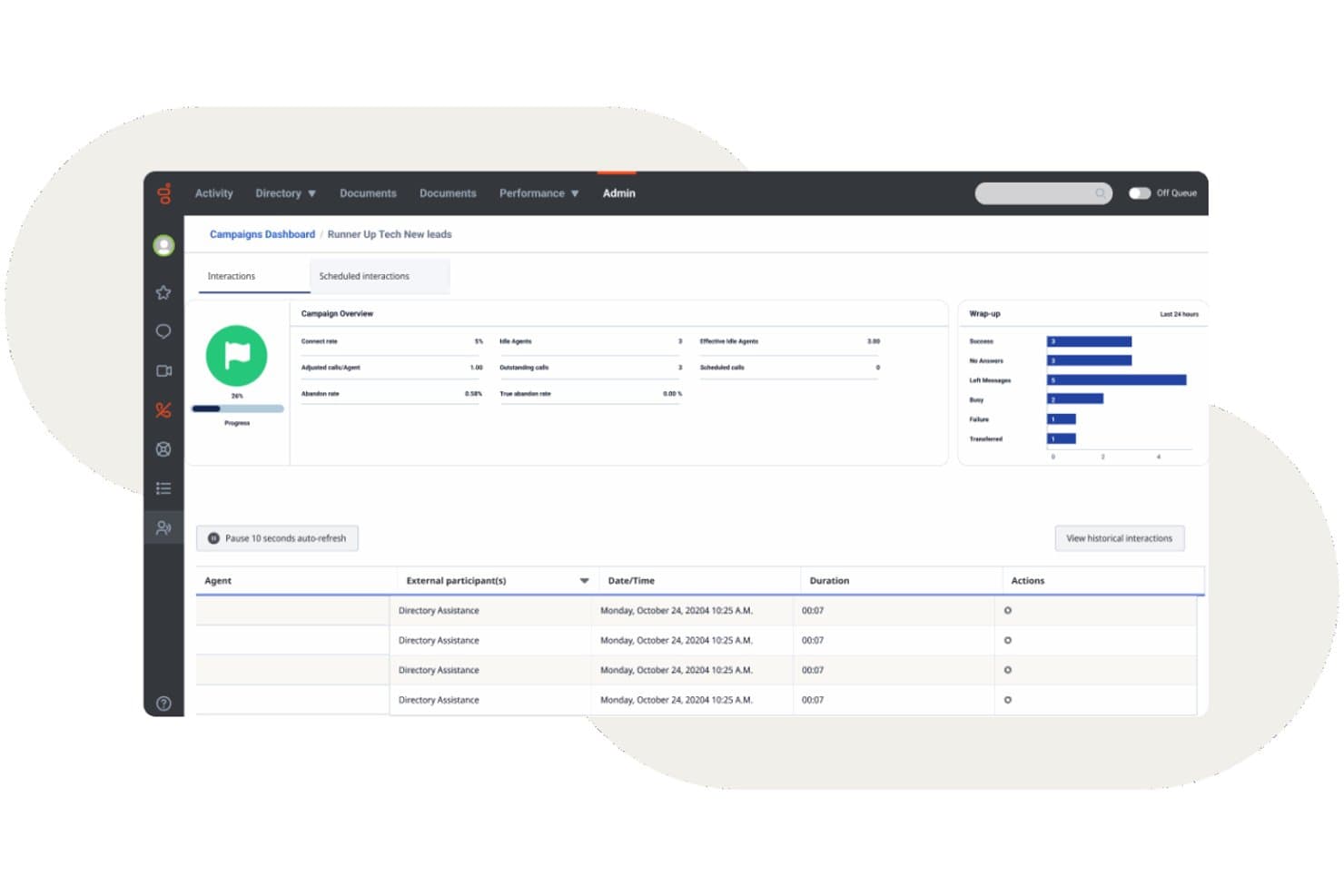
Genesys Cloud CX propose un tableau de bord des campagnes sortantes avec un suivi des interactions en temps réel, des indicateurs de clôture et des journaux d'activité des agents. Genesys Cloud CX est une plateforme de centre de contact cloud native qui combine le routage omnicanal, le SVI alimenté par l'IA, la numérotation sortante, la gestion de l'engagement des collaborateurs et l'analyse en temps réel sur les canaux vocaux et numériques.
À qui Genesys Cloud CX convient-il le mieux ?
Genesys Cloud CX convient particulièrement aux centres de contact de taille moyenne à grande qui ont besoin d'une plateforme unique pour gérer des volumes élevés d'interactions sur les canaux vocaux et numériques.
Pourquoi j'ai choisi Genesys Cloud CX
J'ai inclus Genesys Cloud CX dans ma sélection principale, car ses fonctionnalités de gestion des parcours vont au-delà du routage standard. Les flux de parcours de la plateforme me fournissent une carte visuelle en temps réel de la manière dont les clients passent par chaque point de contact, ce qui me permet de repérer les points d'abandon et de réacheminer les interactions avant leur escalade. Associée à l'engagement prédictif, cette fonctionnalité identifie activement les clients à risque au cours de leur session sur le site web et déclenche une conversation proactive ou un rappel avant qu'ils n'abandonnent.
Principales fonctionnalités de Genesys Cloud CX
- Routage omnicanal : Acheminez les interactions vocales, les conversations, les e-mails, les SMS et les interactions sur les réseaux sociaux vers les agents dans un espace de travail unique.
- Gestion de l'engagement des collaborateurs : Gérez les prévisions, la planification et les congés grâce à des outils de gestion de l'engagement des collaborateurs alimentés par l'IA.
- Analyse de la parole et des sentiments : Analysez les transcriptions, les mots-clés et les sentiments pour 100 % des conversations entre agents et clients.
- Écosystème d'intégrations CRM : Connectez nativement Salesforce, ServiceNow, Microsoft Dynamics et des centaines d'autres outils professionnels.
Intégrations de Genesys Cloud CX
Genesys Cloud CX propose des intégrations natives avec Salesforce, ServiceNow, Zendesk, Microsoft Teams, Microsoft Dynamics 365, Zoom, Jira, Slack, Active Directory et Google Workspace. Une API est disponible pour les intégrations personnalisées.
Pros and Cons
Pros:
- Routage prédictif alimenté par l'IA sur tous les canaux
- Gestion des effectifs intégrée avec prévisions natives
- L'analyse de la parole évalue 100 % des interactions téléphoniques
Cons:
- La configuration initiale nécessite souvent l'aide de professionnels
- Les rapports avancés nécessitent un temps de configuration important
Learn more about Genesys Cloud CX: Idéal pour un déploiement et une administration simples
- Démo gratuite
- Tarifs sur demande

GoTo Connect propose une interface unifiée qui combine la messagerie, la messagerie vocale, l’aperçu de la caméra et les fonctionnalités de participation aux réunions pour les agents du centre d’appels. GoTo Connect est un centre de contacts et un système téléphonique basés sur le cloud qui combinent les appels VoIP, l’engagement client omnicanal, le routage intelligent des appels et le suivi des agents en temps réel au sein d’une plateforme unique.
À qui GoTo Connect convient-il le mieux ?
GoTo Connect convient particulièrement aux petites et moyennes entreprises qui ont besoin d’un centre de contacts complet sans disposer d’une grande équipe informatique pour le gérer.
Pourquoi ai-je choisi GoTo Connect ?
GoTo Connect figure sur ma liste restreinte en raison de la rapidité avec laquelle une équipe peut passer de l’inscription aux appels opérationnels. Le centre d’administration unifié me permet de gérer les utilisateurs, les plans de numérotation et les files d’attente d’appels depuis une interface unique, tandis que le générateur visuel de plans de numérotation me permet de configurer des flux d’appels complexes sans écrire une seule ligne de code. J’ai également constaté que GoPilot pour les administrateurs est réellement utile pour signaler les problèmes de configuration avant qu’ils n’atteignent les appelants.
Fonctionnalités clés de GoTo Connect
- Plateforme omnicanale : échangez avec vos clients par téléphone, SMS, messagerie instantanée, e-mail, WhatsApp et réseaux sociaux depuis un tableau de bord unique.
- Analyses en temps réel : surveillez les files d’attente d’appels, l’activité des agents et les données de performance grâce à des tableaux de bord en direct configurables.
- Qualification des appels et clôture : attribuez des résultats aux appels et gérez les notes requises après l’appel directement depuis l’interface de l’agent.
- Résumés d’appels alimentés par l’IA : générez automatiquement des résumés des interactions et une analyse des sentiments après les appels des clients.
Intégrations de GoTo Connect
GoTo Connect propose des intégrations natives avec Salesforce, Zendesk, ServiceNow, Microsoft Teams, Miro et Gmail. Une API est disponible pour les intégrations personnalisées.
Pros and Cons
Pros:
- Configuration rapide sans assistance informatique dédiée
- L’éditeur visuel de plans de numérotation simplifie le routage des appels
- Le centre d’administration unifié gère les utilisateurs et les files d’attente
Cons:
- Numéroteur prédictif limité pour les campagnes sortantes
- Les rapports sont moins personnalisables que ceux des plateformes d’entreprise
Learn more about GoTo Connect: Idéal pour les intégrations CRM approfondies
- Démo gratuite disponible
- Tarification sur demande

Vonage Contact Center propose un poste de travail omnicanal pour les agents, avec des réponses suggérées par l’IA, des recommandations de la meilleure action suivante et des indicateurs d’interaction en temps réel pour la voix et le chat. Vonage Contact Center est une plateforme de centre de contacts basée sur le cloud qui combine les appels entrants et sortants, le SVI, le routage fondé sur les compétences, l’enregistrement des appels, la prise en charge omnicanale et les analyses en temps réel avec des intégrations CRM natives.
À qui Vonage Contact Center convient-il le mieux ?
Les équipes de taille intermédiaire à grande entreprise qui ont déjà standardisé leur activité sur Salesforce, ServiceNow ou Microsoft Dynamics 365 et qui ont besoin d’un centre de contacts se connectant directement à leur CRM.
Pourquoi j’ai choisi Vonage Contact Center
Vonage Contact Center figure dans ma sélection parce qu’il s’intègre en profondeur à Salesforce, ServiceNow et Microsoft Dynamics 365. J’apprécie le fait que, lorsqu’un agent prend un appel, l’historique du client s’affiche instantanément grâce aux fiches contextuelles, tandis que la synchronisation CRM bidirectionnelle enregistre automatiquement l’interaction. Vonage a même rejoint le programme pilote BYOC de Salesforce pour le CCaaS, ce qui signifie que ses capacités omnicanales et d’IA s’exécutent nativement dans Service Cloud Voice.
Fonctionnalités clés de Vonage Contact Center
- Routage fondé sur les compétences : Acheminez les appels entrants vers les agents en fonction de leurs compétences, de leur disponibilité ou de règles de priorité.
- Reprise après sinistre et routage des appels d’urgence : Réacheminez automatiquement les appels en cas de panne ou d’urgence afin d’assurer la continuité des activités.
- Engagement omnicanal : Gérez la voix, le chat web, les SMS et bien plus encore depuis une interface unique pour tous les agents.
- Module complémentaire d’analyse vocale : Obtenez des informations grâce aux transcriptions d’appels, à la détection de mots-clés et à l’analyse des sentiments sur l’ensemble des interactions.
Intégrations de Vonage Contact Center
Vonage Contact Center propose des intégrations natives avec Salesforce, ServiceNow, Microsoft Dynamics 365, Zendesk et Microsoft Teams. Une API est disponible pour les intégrations personnalisées.
Pros and Cons
Pros:
- Intégration native approfondie de Salesforce pour les agents
- Les files d’attente omnicanales unifient les canaux vocaux et numériques
- Les fiches contextuelles en temps réel affichent toutes les informations sur l’appelant
Cons:
- Les rapports historiques offrent des options de personnalisation limitées
- La configuration initiale complexe nécessite l’assistance de services professionnels
Learn more about Vonage Contact Center:
Autres logiciels de centre d’appels
Voici quelques autres options qui ne figurent pas dans la liste des meilleurs logiciels de centre d’appels :
- 11TalkRouteIdéal pour gérer plusieurs appels
- 12Bright PatternIdéal pour la communication omnicanale
- 13TalkdeskIdéal pour répondre aux questions des clients
- 14TwilioIdéal pour les centres de contacts hautement personnalisables
- 15DialpadMeilleure solution multicanale dotée de fonctionnalités avancées d’IA
- 16Zoho VoiceIdéal pour la téléphonie intégrée au CRM
- 17CallHippoIdéal pour des interactions client boostées par l'IA
- 18Freshdesk Contact CenterIdéal pour un centre de contacts virtuel économique
- 19Webex Contact CenterIdéal avec le coaching et les analyses intégrés des agents par l'IA
- 20Creatio CRMIdéal pour personnaliser la communication
- 21LiveAgentIdéal pour les outils intégrés de helpdesk et de gestion de tickets
- 22ZendeskIdéal pour unifier les canaux de communication
- 238x8Idéal pour la communication omnicanale
- 24Avaya Idéal pour renforcer les résultats commerciaux
- 25Intermedia UniteIdéal pour les centres de contact cloud tout-en-un
- 26Aspect SoftwareIdéal pour les centres de contact à haute performance
Comment j'évalue les logiciels de centre d'appels
J'évalue chaque plateforme selon un socle commun — distribution des appels basée sur les compétences, SVI, enregistrement des appels, supervision en direct — avant de prendre en compte les différenciateurs qui déterminent si un outil convient à votre opération.
Fonctionnalités essentielles (critères de base pour cette liste)
Lorsque je sélectionne les outils pour ma liste, j'attribue à chacun une note de 0 (fonctionnalité non offerte) à 5 (excellent dans ce domaine) pour chaque fonctionnalité clé listée ci-dessous. Ensuite, je convertis le score total de l'outil en pourcentage. Chaque outil doit obtenir un score total minimum de 75% pour être pris en compte.
- Distribution automatique des appels : Je vérifie si la plateforme prend en charge le routage par compétences et par priorité, car une simple file d'attente en rond ne suffit pas lorsqu'il faut gérer l'assistance technique et la facturation sur le même numéro.
- Système SVI : Un bon SVI permet aux appelants de s'auto-dépanner pour suivre une commande ou consulter un solde avant même d'atteindre un agent, donc je recherche des menus à plusieurs niveaux avec un éditeur visuel de flux d'appels.
- Appels entrants & sortants : J'évalue si la plateforme gère naturellement les deux sens – les équipes qui gèrent des campagnes de renouvellement et répondent à des appels support ont besoin de files d'attente mixtes, pas de deux outils distincts.
- Enregistrement & supervision des appels : Les superviseurs ont besoin de plus qu'une simple écoute différée ; je recherche l'écoute en temps réel, le coaching chuchoté et la prise de contrôle pour que les responsables puissent coacher les agents en direct lors d'appels difficiles.
- Analyses en temps réel & historiques : Les tableaux de bord qui affichent la profondeur de file, les temps d'attente et le statut des agents en temps réel sont aussi importants que les rapports historiques SLA et CSAT pour les bilans post-quart.
- Intégration CRM & outils métiers : J'évalue si la plateforme se connecte à des systèmes comme Salesforce, HubSpot ou Zendesk afin d'afficher le contexte de l'appelant via des pop-ups et d'enregistrer automatiquement les interactions.
Une fois que j'ai une liste d'outils répondant à ces critères, j'examine ce qui distingue chaque plateforme.
Facteurs différenciants (ce qui démarque les fournisseurs)
Voici comment je compare et différencie les fournisseurs :
Fonctionnalités remarquables
L'assistance agent par IA est un élément clé. Je recherche des plateformes qui mettent à disposition des articles de connaissance et suggèrent des réponses en cours d'appel, ce qui réduit le temps de traitement lors de résolutions complexes. La gestion des effectifs compte tout autant pour les équipes qui jonglent avec des pics saisonniers : la prévision intégrée et le suivi de l'adhérence remplacent le hasard des tableurs. Les analyses de la parole et du ressenti complètent le tableau — le scoring automatisé de toutes les interactions donne aux responsables qualité une vision bien plus complète qu'un échantillon aléatoire d'appels.
Au-delà des fonctionnalités
La conformité et la sécurité sont prioritaires — je vérifie la présence de certifications PCI DSS et SOC 2, surtout lorsque les agents traitent des paiements par téléphone. La transparence tarifaire est aussi déterminante, car des frais téléphoniques cachés ou des dépassements peuvent exploser le budget après le lancement. J'évalue également les engagements de disponibilité (SLA) et la redondance des opérateurs, car même une courte panne aux heures de pointe se traduit par des appels manqués et une perte de recettes. Enfin, les délais de mise en œuvre varient fortement selon les fournisseurs, et un passage rapide à la valeur ajoutée constitue un véritable avantage pour les équipes migrantes d'un ancien système.
Comment choisir un logiciel de centre d’appels
Vous essayez de choisir le logiciel de centre d’appels adapté ? Commencez par faire correspondre vos principales priorités CX aux fonctionnalités qui répondent aux défis réels des centres de contact :
| Si votre priorité est... | Recherchez... |
|---|---|
| Si votre priorité est...Une réponse omnicanale rapide | Recherchez...Une boîte de réception unifiée couvrant le téléphone, le chat et les e-mails |
| Si votre priorité est...Un routage précis pour les problèmes complexes | Recherchez...Une distribution basée sur les compétences et pilotée par les données |
| Si votre priorité est...Une visibilité sur les performances des agents | Recherchez...Des tableaux de bord en temps réel et une surveillance détaillée |
| Si votre priorité est...Un accès flexible aux données clients | Recherchez...Des intégrations approfondies avec le CRM et les outils professionnels |
| Si votre priorité est...Des opérations internationales ou réglementées | Recherchez...Une conformité intégrée aux normes PCI DSS, RGPD et HIPAA |
Comment évaluer votre sélection
- Tester les véritables promesses omnicanales : Effectuez un essai d’une journée en acheminant trois types de tickets (téléphone, chat, e-mail) afin de vérifier que les agents disposent à chaque fois de tout le contexte nécessaire.
- Valider la profondeur de l’intégration : Planifiez une démonstration en direct présentant les fenêtres contextuelles de Salesforce ou HubSpot ainsi que la synchronisation bidirectionnelle — demandez un enregistrement vidéo à examiner ultérieurement.
- Évaluer la précision des analyses : Exportez un rapport du tableau de bord couvrant 48 heures et comparez ses indicateurs aux résultats de votre ancienne plateforme pour le volume d’appels, le sentiment et le temps de traitement.
- Confirmer la couverture en matière de conformité : Demandez au fournisseur les attestations PCI DSS, HIPAA et GDPR à jour, ou sa documentation de sécurité.
- Choisir entre flexibilité et dépendance propriétaire : Déterminez si des fonctionnalités préconfigurées approfondies (personnalisation limitée) ou des API ouvertes (intégration à réaliser en interne, davantage d’efforts) correspondent mieux aux compétences et aux besoins de votre équipe.
Qu’est-ce qu’un logiciel de centre d’appels ?
Un logiciel de centre d’appels est une plateforme numérique qui gère les communications avec les clients par téléphone, chat, e-mail et d’autres canaux au sein d’une même interface. Il aide les équipes à gérer les interactions entrantes et sortantes, à acheminer les conversations vers les bons agents et à contrôler la qualité du service. Ces plateformes intègrent souvent des outils de distribution des appels, de réponse vocale interactive (IVR), d’enregistrement des appels, d’analyse et d’intégration aux systèmes CRM afin de favoriser des expériences client efficaces et cohérentes.
Logiciel de centre d’appels ou de centre de contacts : quelle différence ?
D’après mon expérience, le choix entre ces deux systèmes dépend de la question de savoir si vous gérez une équipe principalement axée sur le téléphone ou si vous unifiez les parcours client multicanaux afin d’éviter les silos de données.
- Logiciel de centre d’appels : se concentre principalement sur les communications vocales (appels entrants et sortants, VoIP, IVR, acheminement des appels, assistance téléphonique). Il convient le mieux aux équipes qui s’appuient sur la voix comme canal principal et qui ont besoin d’une qualité audio élevée.
- Logiciel de centre de contacts (CCaaS) : fournit une plateforme unique qui réunit l’assistance téléphonique et les canaux numériques tels que le chat en direct, l’e-mail, les SMS, les applications de messagerie et les réseaux sociaux. Il convient le mieux aux entreprises SaaS en croissance qui souhaitent centraliser les historiques d’interactions multicanaux et la planification des agents.
Dans cette analyse, je présente à la fois des systèmes de centre d’appels axés sur la voix et des plateformes de centre de contacts destinées aux entreprises, afin de vous proposer des options quelle que soit l’ampleur de vos opérations.
Types de logiciels de centre d’appels
- Logiciel de centre d’appels basé sur le cloud : fonctionne sur une infrastructure cloud hébergée par le fournisseur et prend en charge les équipes distantes ou réparties, avec de faibles coûts initiaux.
- Logiciel de centre d’appels sur site : fonctionne sur du matériel physique installé dans vos locaux, offrant un contrôle dédié de la sécurité des serveurs et du stockage des données.
- Logiciel de centre d’appels entrants : gère les demandes entrantes des clients à l’aide de menus de réponse vocale interactive, de la distribution automatique des appels et de règles d’acheminement fondées sur les compétences.
- Logiciel de centre d’appels sortants : soutient les campagnes de prospection commerciale et les suivis de comptes grâce à des composeurs automatiques prédictifs, puissants et progressifs.
- Logiciel de centre d’appels mixte : réunit les files d’attente entrantes et les composeurs sortants dans une seule interface, en réaffectant dynamiquement les agents selon le volume d’appels en temps réel.
- Logiciel de centre de contacts omnicanal : centralise les appels vocaux, les chats en direct, les SMS et les échanges par e-mail au sein d’une seule chronologie client continue.
Tendances des logiciels de centre d’appels
- IA agentique et flux de travail automatisés : Les fournisseurs de logiciels dépassent les simples robots conversationnels pour déployer des agents d’IA autonomes. Ces systèmes évaluent le contexte, exécutent des tâches en plusieurs étapes, mettent à jour les dossiers CRM et accomplissent des flux de travail courants sans intervention humaine.
- Assistance des agents en temps réel : Les applications logicielles écoutent les appels en direct pour transcrire l’audio, analyser le sentiment des clients et extraire instantanément des articles de la base de connaissances. Ces conseils en temps réel aident les agents à résoudre plus rapidement les problèmes complexes des clients.
- Assurance qualité automatisée : Les plateformes utilisent désormais des modèles d’apprentissage automatique pour analyser 100 pour cent des interactions avec les clients. L’évaluation automatique du respect des scripts, des règles de conformité et du ton remplace l’échantillonnage manuel utilisé pour l’accompagnement des responsables.
- Personnalisation sans code : Les outils proposent des éditeurs glisser-déposer pour les flux d’appels, les règles de routage et les intégrations. Les équipes opérationnelles peuvent modifier rapidement les règles de file d’attente et les automatisations sans l’aide de développeurs.
- Couches de données unifiées : Les systèmes réunissent les historiques vocaux, les conversations, les SMS et les e-mails au sein d’une seule chronologie client. Cette structure unifiée offre aux équipes d’assistance hybrides et à distance une visibilité complète sur tous les points de contact.
- Omnicanal et prêt pour le travail à distance par défaut : À mesure que les attentes des clients évoluent, les plateformes de centres d’appels continuent d’unifier la voix, les conversations, les e-mails et les réseaux sociaux dans une seule interface, tout en offrant un accès complet à distance, une fiabilité cloud et des outils intégrés de gestion des effectifs.
Fonctionnalités des logiciels de centre d’appels
Lorsque vous choisissez un logiciel de centre d’appels, prêtez attention aux principales fonctionnalités suivantes :
- Distribution automatique des appels : Achemine les appels entrants vers l’agent ou le service le plus approprié, ce qui réduit les temps d’attente des appelants et améliore la productivité des agents.
- Réponse vocale interactive : Permet aux appelants d’interagir avec un menu en libre-service à l’aide de leur voix ou du clavier téléphonique, afin d’accéder rapidement au bon service ou de résoudre des demandes simples sans faire intervenir un agent.
- Enregistrement des appels : Enregistre automatiquement les appels à des fins de formation, de contrôle qualité et de résolution des litiges, afin que vous puissiez examiner les interactions, accompagner les agents et garantir la conformité.
- Rapports et analyses en temps réel : Fournit des tableaux de bord et des rapports détaillés sur des indicateurs clés tels que le volume d’appels, les performances des agents et la satisfaction client, ce qui facilite l’amélioration de vos opérations.
- Assistance omnicanale : Permet aux clients de vous contacter par téléphone, e-mail, conversation ou réseaux sociaux, afin que votre équipe puisse gérer toutes les conversations au même endroit et fournir une assistance cohérente.
- Intégration CRM : Se connecte à vos outils de gestion de la relation client, ce qui permet aux agents d’accéder aux informations et à l’historique importants des clients pendant les appels pour offrir une assistance plus personnalisée.
- Supervision des appels : Permet aux superviseurs d’écouter les appels en direct, de transmettre discrètement des conseils aux agents ou de prendre le relais si nécessaire, ce qui est idéal pour l’accompagnement et l’assurance qualité.
- Mise en file d’attente des appels : Place les appelants dans des files virtuelles avec des estimations et des mises à jour du temps d’attente, réduisant ainsi la frustration et fluidifiant les périodes de forte activité.
- Gestion des effectifs : Vous aide à planifier les horaires, à prévoir la demande et à suivre la disponibilité des agents afin de maintenir des effectifs adaptés au volume d’appels.
- Appels sortants automatisés : Automatise des tâches telles que les relances, les enquêtes ou les appels commerciaux, afin que les agents passent moins de temps à composer des numéros et davantage de temps à parler aux clients.
Fonctionnalités courantes d’IA des logiciels de centre d’appels
Au-delà des fonctionnalités standard des logiciels de centre d’appels mentionnées ci-dessus, nombre de ces solutions intègrent l’IA avec des fonctionnalités telles que :
- Assistance des agents par l’IA : Affiche des suggestions en temps réel, des articles de la base de connaissances et les meilleures actions à effectuer pendant les appels en direct, afin d’aider les agents à répondre plus rapidement et plus précisément aux questions des clients.
- Analyse de la parole et du sentiment : Utilise l’IA pour analyser les enregistrements d’appels et les conversations en direct afin d’en évaluer le ton, les émotions et les mots-clés, offrant aux superviseurs des informations sur la satisfaction des clients et les tendances en matière de performances des agents.
- Routage prédictif des appels : Exploite l’IA pour mettre les appelants en relation avec le meilleur agent disponible en fonction des résultats historiques, des compétences et des profils clients, dans le but d’améliorer les taux de résolution au premier appel.
- Assurance qualité automatisée : Applique l’IA pour examiner et évaluer les appels en fonction de la conformité, du respect des scripts et des compétences relationnelles, réduisant ainsi le besoin d’échantillonnage manuel pour l’assurance qualité et accélérant les cycles de retour d’information.
- Agents virtuels et robots conversationnels : Gèrent les demandes et les tâches courantes à l’aide de l’IA conversationnelle, libérant les agents humains pour les problèmes plus complexes et fournissant une assistance 24 h/24 et 7 j/7 sur tous les canaux.
Avantages des logiciels de centre d’appels
La mise en œuvre d’un logiciel de centre d’appels offre plusieurs avantages à votre équipe et à votre entreprise. Voici quelques-uns de ceux dont vous pouvez bénéficier :
- Satisfaction client améliorée : Un routage efficace des appels et une assistance omnicanale garantissent que les clients sont rapidement mis en relation avec le bon agent.
- Productivité accrue de l’équipe : Les informations fournies par l’IA, les fonctionnalités telles que les composeurs intelligents ou l’appel en un clic, ainsi que la gestion avancée des effectifs aident votre équipe à se concentrer sur les tâches prioritaires et à optimiser son flux de travail.
- Meilleure gestion des données : L’intégration aux outils existants permet de garder les informations clients organisées et accessibles, réduisant ainsi les erreurs de traitement des données.
- Flexibilité accrue : Les fonctionnalités de travail à distance permettent à votre équipe d’assurer un service cohérent depuis n’importe quel lieu et de s’adapter à l’évolution des environnements de travail.
- Informations exploitables : Les analyses en temps réel et les tableaux de bord personnalisables fournissent des données précieuses pour orienter la prise de décision et améliorer les opérations.
- Réduction des coûts : La planification automatisée et l’allocation efficace des ressources contribuent à réduire les coûts opérationnels tout en maintenant la qualité du service.
- Sécurité des données renforcée : Les mesures de protection de la sécurité protègent les informations sensibles des clients, garantissant le respect des réglementations et renforçant la confiance.
Coûts et tarifs des logiciels de centre d’appels
Le choix d’un logiciel de centre d’appels nécessite de comprendre les différents modèles tarifaires et forfaits disponibles. Les coûts varient en fonction des fonctionnalités, de la taille de l’équipe, des modules complémentaires et d’autres facteurs. Le tableau ci-dessous récapitule les forfaits courants, leurs prix moyens et les fonctionnalités généralement incluses dans les solutions logicielles de centre d’appels :
Tableau comparatif des forfaits de logiciels de centre d’appels
| Type de forfait | Prix moyen | Fonctionnalités courantes |
|---|---|---|
| Type de forfaitForfait gratuit | Prix moyen$0-$15/user/month | Fonctionnalités courantesComprend le routage de base des appels, des options IVR limitées, des rapports de base et une intégration CRM simple. |
| Type de forfaitForfait personnel | Prix moyen$15-$35/user/month | Fonctionnalités courantesAjoute les appels illimités, l’enregistrement des appels, des tableaux de bord analytiques améliorés et des intégrations avec les CRM populaires. |
| Type de forfaitForfait professionnel | Prix moyen$35-$70/user/month | Fonctionnalités courantesPropose un IVR avancé, un routage en fonction des compétences, une assistance des agents par l’IA, la surveillance des appels, des rapports personnalisés et une messagerie omnicanale. |
| Type de forfaitForfait entreprise | Prix moyen$70-$150/user/month | Fonctionnalités courantesFournit une gestion des effectifs, des analyses prédictives, une assistance 24 h/24 et 7 j/7, des contrôles stricts de conformité et des accords de niveau de service personnalisés. |
FAQ sur les logiciels de centre d’appels
Voici quelques réponses aux questions fréquentes sur les logiciels de centre d’appels :
Quels sont les coûts récurrents des logiciels de centre d’appels ?
Les coûts récurrents d’un centre de contacts dans le cloud ou d’un système téléphonique VoIP dépendent de la taille et des besoins de l’équipe. Les dépenses comprennent les abonnements, les licences d’agents et les modules complémentaires comme la gestion des effectifs, l’enregistrement des appels, la gestion des performances, l’analyse vocale et la gestion de la qualité. La prise en compte des rapports et analyses, de la gestion des files d’attente, des mises à jour et de l’assistance garantit la sécurité de votre centre d’appels sortants au fil du temps.
Les logiciels de centre d’appels peuvent-ils prendre en charge les équipes de centres d’appels à distance ou réparties ?
Les plateformes modernes de logiciels de centre d’appels basés sur le cloud et de centre de contacts en tant que service (CCaaS) offrent aux équipes réparties un accès sécurisé grâce aux communications unifiées. Idéales pour un centre d’appels virtuel, ces solutions améliorent la productivité des agents grâce au routage intelligent, à la mise en file d’attente des appels, à la supervision des appels et aux transferts accompagnés. La gestion de l’engagement des effectifs intégrée aide les responsables à accompagner les agents où qu’ils se trouvent.
Comment intégrer un logiciel de centre d’appels à mon CRM ou à mon service d’assistance existant ?
Vous pouvez généralement intégrer un logiciel de centre d’appels à votre CRM ou à votre service d’assistance à l’aide de connecteurs intégrés, d’API ou de plateformes d’intégration tierces comme Zapier. Commencez par vérifier si votre solution de centre d’appels propose des intégrations directes avec des CRM populaires comme Salesforce, monday CRM ou HubSpot. Si ce n’est pas le cas, recherchez une documentation d’API ou des solutions intergicielles. L’intégration permet de synchroniser automatiquement les données clients et les tickets d’assistance, offrant ainsi à vos agents un contexte plus riche et réduisant la saisie manuelle des données.
Comment un logiciel de centre d’appels peut-il améliorer la résolution au premier appel (FCR) de mon équipe ?
Les logiciels de centre d’appels améliorent la résolution au premier appel en donnant aux agents un accès en temps réel à l’historique client, aux bases de connaissances et aux scripts d’appel. Des fonctionnalités comme le routage intelligent des appels ou le routage en fonction des compétences orientent les appelants vers l’agent disponible le plus compétent. Les outils de supervision permettent de repérer les problèmes fréquents et les lacunes en matière de connaissances afin de former votre équipe. Utilisez la création automatisée de tickets, la prise de notes et même des suggestions fondées sur l’IA pour aider les agents à résoudre les problèmes dès le premier appel.
Quelle est la différence entre un logiciel de centre d’appels omnicanal et multicanal ?
Les logiciels de centre d’appels omnicanal connectent tous vos canaux de communication — téléphone, e-mail, chat et réseaux sociaux — afin que vos agents disposent de l’historique complet du client au même endroit. Les solutions multicanales vous permettent de proposer une assistance sur différents canaux, mais de gérer chacun séparément. Avec l’omnicanal, les clients bénéficient d’une expérience plus fluide et les agents peuvent passer d’un canal à l’autre sans perdre le contexte. Cela permet d’offrir une assistance plus rapide et personnalisée.
Quels indicateurs clés de performance (KPI) de supervision et d’analyse des appels dois-je suivre ?
Concentrez-vous sur les indicateurs qui relient l’efficacité opérationnelle au ressenti des clients. Les principaux KPI comprennent les scores de sentiment fondés sur l’IA, la résolution au premier contact (FCR), les taux de prise en charge par le libre-service et le coût par interaction. Le suivi de ces indicateurs garantit une qualité de service élevée tout en démontrant un retour sur investissement clair à votre comité de direction.
Comment les solutions de logiciels de centre d’appels gèrent-elles la sécurité et la confidentialité des données ?
Les solutions modernes sécurisent les données de l’entreprise grâce au chiffrement de bout en bout, à la suppression automatisée des données personnelles et des données PCI dans les enregistrements et les transcriptions, ainsi qu’à des contrôles d’accès stricts fondés sur les rôles. Les principales plateformes maintiennent également des certifications de conformité rigoureuses, notamment SOC 2 Type II, ISO 27001, RGPD et HIPAA.