

10 meilleurs logiciels de centre d’assistance de 2026 : évalués et comparés

10 Sélection des meilleurs logiciels de centre d'assistance


Les logiciels de centre d'assistance fournissent aux équipes de support les outils nécessaires pour gérer efficacement les problèmes des clients, de leur réception à leur résolution, par e-mail, chat et autres canaux clés. Que vous traitiez quelques dizaines de tickets par jour ou que vous coordonniez une opération de support à l'échelle mondiale, le bon outil de centre d'assistance peut rationaliser les flux de travail, améliorer la productivité de l'équipe, réduire les délais de réponse et rehausser l'expérience client.
J'ai testé et évalué ces solutions afin de vous proposer un guide impartial des meilleurs outils de centre d'assistance disponibles. Dans cet article, je vais présenter mes meilleurs choix en expliquant comment chacun peut aider votre équipe à fournir un service exceptionnel.
Pourquoi faire confiance à nos recommandations de logiciels
Notre équipe teste et évalue des logiciels depuis 2012. En tant que leaders CX nous-mêmes, nous savons à quel point il est difficile — et important — de choisir le bon logiciel.
Pour ce guide, nous avons évalué les outils grâce à des tests pratiques et une recherche indépendante, en notant les outils selon nos critères de sélection.
Nos avis reflètent notre jugement éditorial humain, et non un argumentaire de vente.
Tableau comparatif des logiciels de centre d'assistance
Ce tableau comparatif résume les détails tarifaires de ma sélection des meilleurs logiciels de centre d’assistance :
| Tool | Best For | Trial Info | Price | ||
|---|---|---|---|---|---|
| 1 | Idéal pour un portail d’auto-assistance client avancé | Démo gratuite + essai gratuit de 14 jours disponible | À partir de $19/utilisateur/mois (facturation annuelle) | Website | |
| 2 | Idéal pour automatiser les demandes informatiques répétitives | Essai gratuit de 30 jours disponible | À partir de 209$/mois/technicien (facturé annuellement) | Website | |
| 3 | Idéal pour la gestion des services informatiques basée sur l’IA | Essai gratuit de 14 jours disponible | À partir de 19 $/utilisateur/mois (facturé annuellement) | Website | |
| 4 | Le meilleur logiciel de support client pour créer des automatisations sans coder | Version d’essai gratuite disponible | À partir de 25 $/utilisateur/mois (facturé annuellement) | Website | |
| 5 | Idéal pour la gestion du help desk informatique | Essai gratuit de 14 jours | À partir de 89$/utilisateur/mois (facturation annuelle) | Website | |
| 6 | Idéal pour la gestion de tickets pilotée par l’IA | Essai gratuit de 15 jours + offre gratuite | À partir de 7$/utilisateur/mois (facturé annuellement) | Website | |
| 7 | Idéal pour son mélange de support en direct et de chatbots | Essai gratuit de 7 jours + offre gratuite disponible | À partir de $25/utilisateur/mois | Website | |
| 8 | Meilleur pour la gestion de boîte de réception ecommerce alimentée par l'IA | Essai gratuit de 14 jours | À partir de $39/agent/mois | Website | |
| 9 | Idéal avec de nombreuses intégrations tierces | Aucune version d'essai gratuite disponible | À partir de 29$/mois | Website | |
| 10 | Meilleure solution combinant support client et base de connaissances | Essai gratuit de 30 jours disponible | À partir de 15 $/utilisateur/mois (facturé annuellement) | Website |


Avis sur les meilleurs logiciels de centre d'assistance
Pour vous aider à trouver le meilleur logiciel de centre d’assistance, j’ai fourni des résumés détaillés de mes 10 meilleurs choix et expliqué pourquoi j’ai inclus chaque système dans cette liste.
J’ai également inclus ci-dessous des options supplémentaires adaptées à différents cas d’utilisation, afin de vous aider à trouver le logiciel de centre d’assistance qui vous convient.

Idéal pour un portail d’auto-assistance client avancé
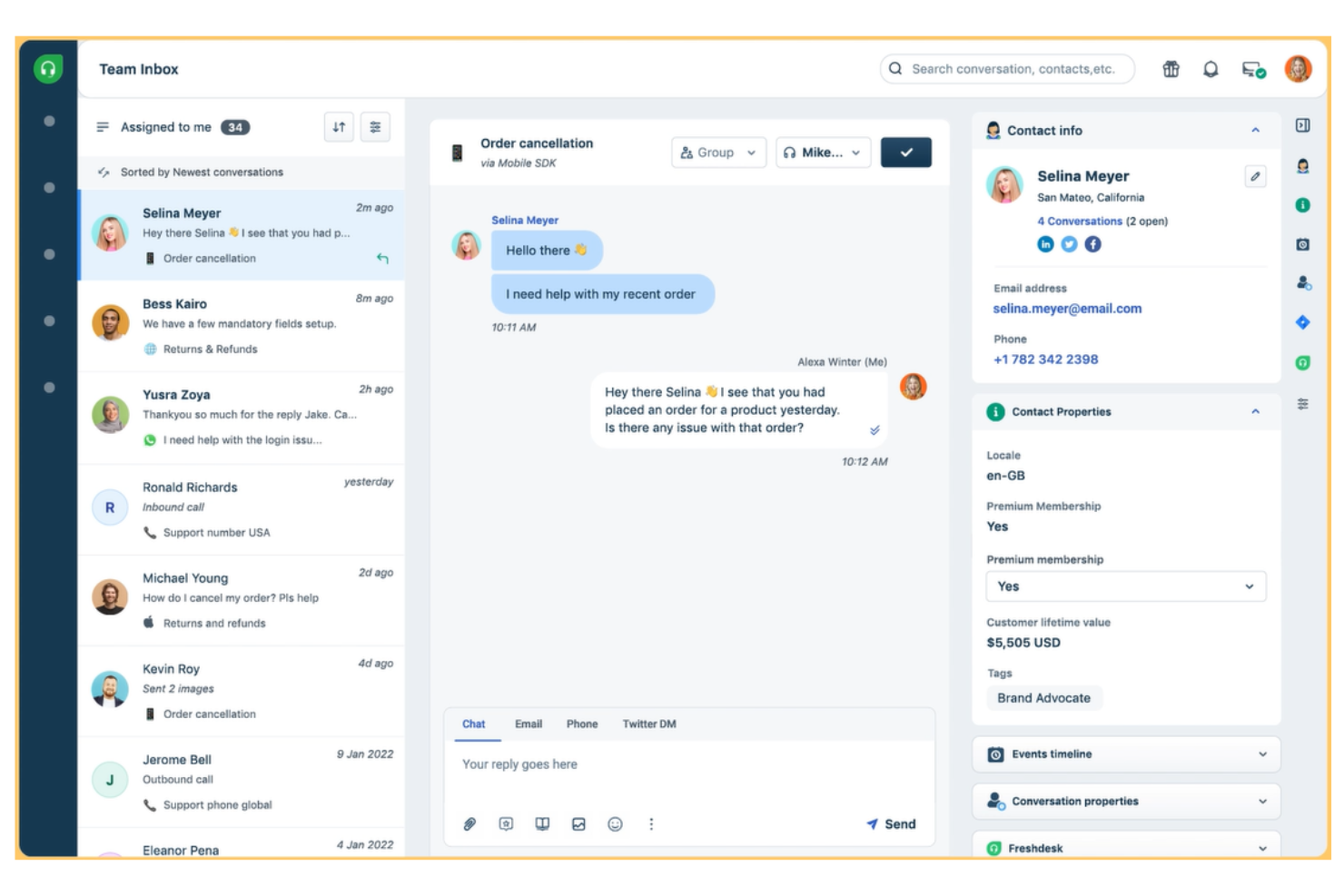
Freshdesk (un produit de Freshworks Inc.) est une plateforme de service client qui comprend des outils de support technique conçus pour faciliter la gestion des tickets, l’auto-assistance et la collaboration en équipe. La plateforme permet aux équipes de configurer des éléments tels que les portails de support, les formulaires de ticket et les rôles d’agent, aidant ainsi les organisations à adapter les flux de travail à leurs exigences internes.
Pourquoi j’ai choisi Freshdesk : J’ai choisi Freshdesk pour la richesse de ses fonctionnalités d’auto-assistance client. La plateforme inclut une base de connaissances intégrée ainsi que des forums clients permettant à ces derniers de rechercher des réponses de manière autonome, ce qui peut aider à réduire le volume de tickets entrants. Freddy AI est disponible au sein de la plateforme pour prendre en charge les interactions basées sur un chatbot et aider à traiter les questions courantes dans le cadre de ces flux d’auto-assistance. Freshdesk propose aussi des widgets d’aide intégrables pouvant être ajoutés aux sites web ou applications mobiles, rendant ainsi les ressources de support plus faciles d’accès pour les clients.
Freshdesk prend en charge plusieurs langues, ce qui peut être utile pour les équipes qui gèrent le support client dans différentes régions. Les agents peuvent travailler sur le même système tout en traitant des demandes dans plusieurs langues si nécessaire.
Fonctionnalités remarquables et intégrations de Freshdesk :
Parmi les fonctionnalités remarquables figurent des outils de collaboration permettant la propriété partagée des tickets, le rattachement de tickets liés ou parents/enfants, les échanges d’équipe (team huddles) et les discussions internes. Ces outils aident les agents à coordonner les demandes complexes tout en conservant une visibilité sur le statut des tickets. Parmi les autres fonctionnalités : la détection de collision entre agents, la messagerie d’équipe et l’utilisation de tags pour faciliter la coordination au sein des équipes support.
Freshdesk prend en charge la communication via plusieurs canaux, notamment l’email, le chat sur site web, le téléphone et les plateformes de messagerie sociale. Les fonctionnalités d’appels intégrées permettent aux équipes de gérer les appels téléphoniques entrants et sortants parallèlement aux autres canaux de support.
Les intégrations sont disponibles via la place de marché Freshdesk, avec des options fréquemment utilisées comme Mailchimp, Microsoft Teams, Salesforce, Shopify, Slack et WhatsApp.
Pros and Cons
Pros:
- Autorise les réponses enregistrées afin d’offrir des réponses cohérentes aux questions fréquentes
- Comprend un outil de détection de remerciements qui empêche la réouverture des tickets lorsque le client dit "merci"
- Prend en charge la gestion des SLA
Cons:
- Les fonctionnalités multilingues ne sont disponibles que dans les formules Pro ou Enterprise
- Les fonctionnalités intelligentes basées sur l’IA et les chatbots sont limitées à leur offre la plus avancée (Enterprise)
New Product Updates from Freshdesk

Freshdesk Adds Voice AI Agents in Freshcaller
Freshdesk introduces Voice AI Agents available through Freshcaller Marketplace apps to handle routine calls and reduce queues. This feature enables automated call handling with real-time, conversational support. For more information, visit Freshdesk's official site.

Idéal pour automatiser les demandes informatiques répétitives

Robin Autonomous IT est l'agent de service piloté par l'IA d'Atera qui prend en charge les demandes informatiques de l’enregistrement à la résolution, gérant de manière autonome les actions sur les appareils, les workflows cloud et l’administration des tickets.
À qui Robin Autonomous IT convient-il le mieux ?
Robin est particulièrement adapté aux équipes informatiques et aux fournisseurs de services managés qui utilisent la plateforme Atera et doivent gérer un grand volume de tickets avec une petite équipe de techniciens.
Pourquoi j’ai choisi Robin Autonomous IT
J’ai sélectionné Robin parmi les meilleurs pour sa gestion des demandes répétitives et à fort volume, qui saturent la plupart des files d’attente du support. Pensez aux réinitialisations de mots de passe, installations d’applications, réinitialisations d’adaptateurs réseau et nettoyages de disque : Robin effectue ces actions directement sur les appareils et dans le cloud sans intervention technique humaine. J’apprécie tout particulièrement l’automatisation de workflows basée sur des playbooks : dès qu’une condition de déclenchement est remplie, Robin exécute automatiquement une séquence prédéfinie d’étapes, de l’ouverture à la clôture du ticket.
Fonctionnalités clés de Robin Autonomous IT
- Prise en charge multi-canal des demandes : Robin reçoit les requêtes informatiques provenant de Slack, Microsoft Teams et email, les achemine et les traite sans tri manuel.
- Vérification de l'identité de l'utilisateur : Avant toute action, Robin confirme l'identité du demandeur et recueille le contexte de l'appareil pour valider le problème.
- Étiquetage des tickets par IA : Robin catégorise et étiquette automatiquement les tickets entrants pour organiser les files d’attente sans intervention humaine.
- Escalade automatique aux techniciens : Lorsqu’il ne peut pas résoudre un problème de façon autonome, Robin transmet le ticket au technicien approprié, avec tout le contexte de diagnostic déjà fourni.
Intégrations de Robin Autonomous IT
Robin Autonomous IT fait partie de la plateforme Atera et se connecte à des fournisseurs d’identité comme Okta, Azure AD et Google Workspace pour la vérification des utilisateurs. Il reçoit des requêtes issues de Microsoft Teams, Slack et email, et s’intègre à des outils ITSM tiers. La plateforme Atera inclut des intégrations natives avec Acronis, Bitdefender, Splashtop, AnyDesk, ScreenConnect, TeamViewer, IT Glue, QuickBooks et Xero, ainsi qu’une connexion à Zapier. Une API est disponible pour les intégrations personnalisées, et Robin prend en charge les connexions basées sur MCP pour exécuter dynamiquement des actions cloud via API vers les systèmes internes.
Pros and Cons
Pros:
- Résout les tickets de bout en bout sans intervention humaine
- Compatible avec plusieurs solutions d’accès à distance
- L’IA génère des scripts à partir d’instructions en langage naturel
Cons:
- Les fonctionnalités IA nécessitent un module payant supplémentaire
- La gestion des appareils Mac accuse un retard par rapport à Windows
Idéal pour la gestion des services informatiques basée sur l’IA
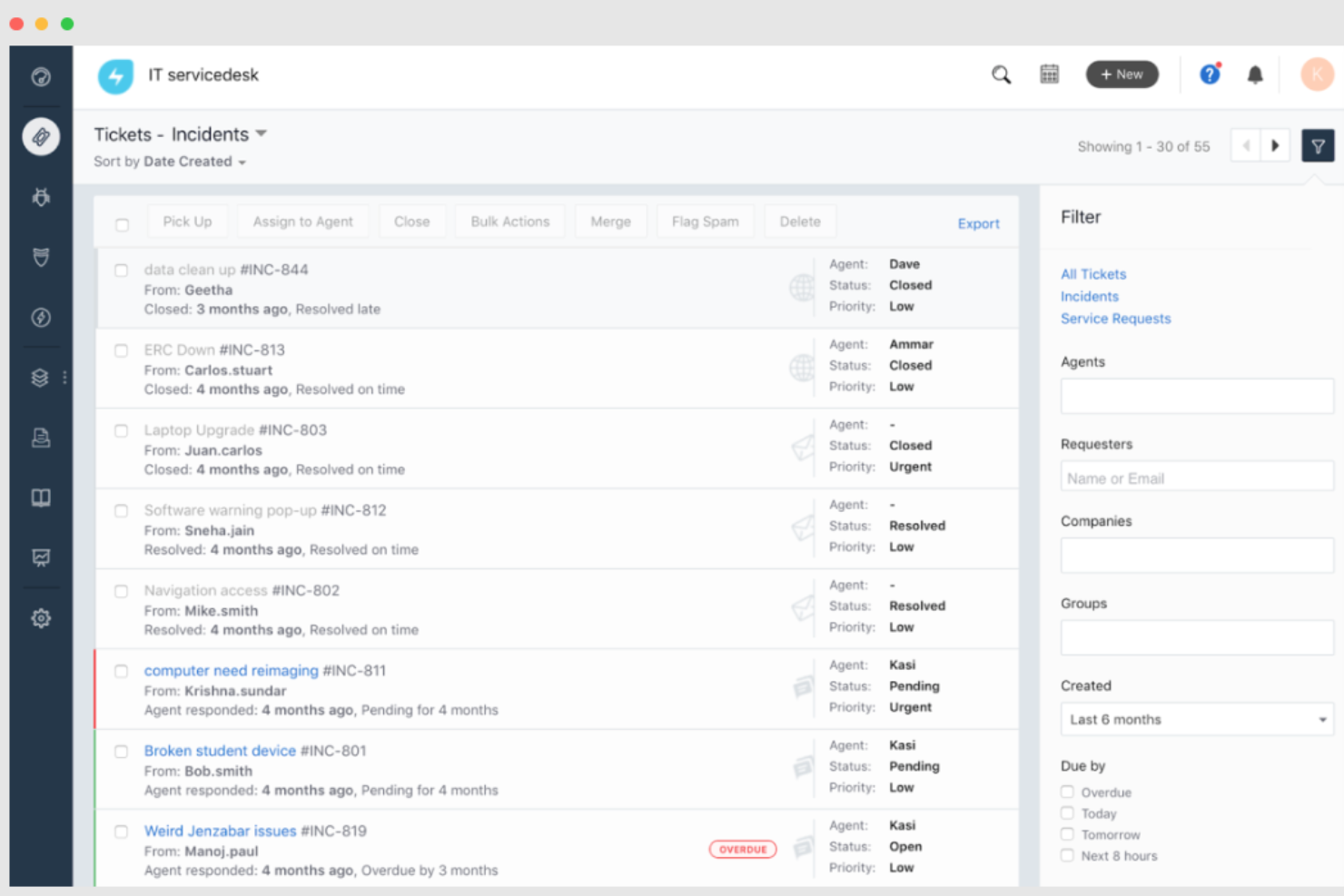
Si vous recherchez un logiciel de service d'assistance qui allie simplicité et technologie de pointe, Freshservice pourrait être votre choix idéal. Conçu pour les entreprises de toutes tailles, il exploite l'intelligence artificielle pour rationaliser la gestion des services informatiques, améliorant à la fois l'efficacité et la satisfaction des employés. Grâce à des fonctionnalités telles que le suivi des actifs et l'automatisation intelligente, Freshservice répond aux complexités de la prestation de services, ce qui en fait un choix remarquable pour ceux qui souhaitent augmenter leur productivité sans les tracas habituels.
Pourquoi j'ai choisi Freshservice
J'ai choisi Freshservice pour ses capacités exceptionnelles de gestion des services informatiques pilotées par l'IA, qui répondent directement à la complexité des opérations des services d'assistance. Avec Freddy AI, vous pouvez automatiser la gestion des tickets, réduisant les temps de résolution de 34 % et détournant 53 % des tickets entrants, ce qui allège considérablement la charge de travail de votre équipe. La capacité de l'IA à fournir une assistance personnalisée via des plateformes comme Slack et MS Teams permet à vos employés d'obtenir une aide instantanée, améliorant ainsi la productivité globale. De plus, la surveillance proactive des tendances du service desk par Freddy AI vous assure de prendre des décisions éclairées rapidement, en traitant les problèmes avant qu'ils ne s'aggravent.
Fonctionnalités clés de Freshservice
En plus de sa gestion des services informatiques par IA, Freshservice propose de nombreuses fonctionnalités répondant à divers besoins en matière de service d'assistance :
- Gestion des incidents : Automatise l’orientation et le suivi des incidents pour garantir des résolutions plus rapides et une meilleure qualité de service.
- Catalogue de services : Rationalise les demandes de service grâce à un catalogue unifié et un portail en libre-service, permettant aux utilisateurs d’accéder facilement aux services dont ils ont besoin.
- Gestion des connaissances : Centralise toutes les connaissances organisationnelles, réduisant la charge sur vos agents et améliorant la qualité des contenus disponibles pour les utilisateurs.
- Gestion des actifs informatiques : Offre une visibilité complète sur les actifs informatiques et automatise la prestation de services, avec des fonctionnalités telles que la découverte automatique et la gestion des actifs logiciels.
Intégrations Freshservice
Les intégrations incluent Microsoft Teams, Slack, Jira, TeamViewer, Azure Active Directory, Dropbox, Google Workspace, Trello, Salesforce et DocuSign.
Pros and Cons
Pros:
- Capacités d'automatisation robustes
- Fonctionnalités de gestion des actifs
- Prend en charge les outils en libre-service et les annuaires d’experts pour une résolution efficace des problèmes
Cons:
- Les capacités de reporting sont un peu limitées
- Freddy copilot est un module payant supplémentaire
New Product Updates from Freshservice
 Experience)
Freshservice Introduces a Reimagined IT Asset Management (ITAM) Experience
Freshservice introduces a reimagined IT Asset Management (ITAM) experience with continuous infrastructure discovery, dependency mapping, IPAM, and Software License Management. This update helps teams improve asset visibility and manage connected IT environments more effectively. For more information, visit Freshservice’s official site.

Le meilleur logiciel de support client pour créer des automatisations sans coder
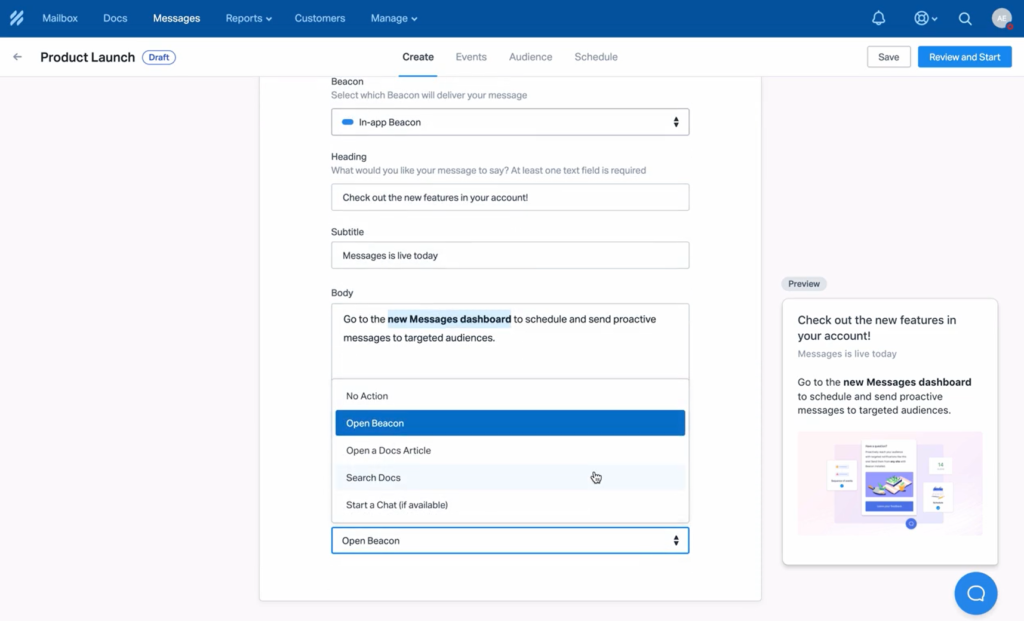
Help Scout est un logiciel de support client conçu pour la gestion des emails et du chat en direct. Tous les contacts sont regroupés dans une boîte de réception partagée, offrant de nombreuses fonctionnalités telles que la messagerie privée, la gestion des tickets et la possibilité pour les responsables d’assigner des tâches. Les agents peuvent accéder aux données clients directement depuis la boîte de réception, y compris des informations provenant d’autres applications. Par exemple, vous pouvez connecter Shopify pour consulter l’historique d’achats du client.
Pourquoi j’ai choisi Help Scout : Cette plateforme a été incluse dans cette sélection grâce à sa capacité à créer des automatisations via un créateur visuel simple de type 'si/alors', sans besoin de coder. Il suffit de choisir une action qui servira de déclencheur, puis de sélectionner ce qui se passe quand elle se produit. Par exemple, vous pouvez faire en sorte que tous les messages contenant le mot-clé « démo produit » soient automatiquement dirigés vers un membre de votre équipe commerciale.
Fonctionnalités et intégrations de Help Scout :
Une fonctionnalité remarquable à souligner est le puissant widget de chat en ligne de Help Scout. Cela permet aux clients de contacter votre équipe de support directement depuis la page web qu’ils consultent. Vous pouvez également ajouter des informations complémentaires dans le widget, comme des documents d’assistance ou une barre de recherche de base de connaissances. Les clients peuvent alors accéder aux informations dont ils ont besoin sans contacter l’équipe de support, ce qui réduit le volume de demandes entrantes. Il est aussi possible d’apporter une aide pertinente en envoyant de manière proactive des messages automatisés aux utilisateurs qui naviguent sur votre site.
Les intégrations sont disponibles avec plus de 100 outils d’entreprise populaires, dont Aircall, Constant Contact, Google Apps, Gravity Forms, HubSpot, Jira, Intercom, Mailchimp, Salesforce, Slack, SurveyMonkey et Trello. D’autres intégrations sont possibles en connectant Help Scout à un compte Zapier payant.
Pros and Cons
Pros:
- Interface intuitive et conviviale
- Bonne couverture fonctionnelle dès l’offre la plus abordable
- Inclut des applications mobiles pour appareils iOS et Android
Cons:
- Les fonctionnalités de sécurité avancée et de conformité HIPPA ne sont disponibles qu’en option
- Des frais supplémentaires s’appliquent pour envoyer des messages proactifs engageant les clients
New Product Updates from Help Scout

Help Scout Adds Automatic Conversation Reassignment
Help Scout can now automatically unassign conversations when the assigned teammate has been away long enough, keeping replies moving so others can pick them up. For more information, visit Help Scout's official site.
 .
.
SuperOps
Idéal pour la gestion du help desk informatique

SuperOps est un logiciel PSA-RMM conçu pour les fournisseurs de services gérés (MSP). Il vise à regrouper toutes les tâches liées à l'informatique sur une seule plateforme, depuis la surveillance du réseau et la gestion des actifs jusqu'à la gestion des tickets et l'automatisation des flux de travail. Cette approche tout-en-un permet aux techniciens MSP d'accéder à tous les outils et informations pertinents sans avoir à passer d'une plateforme à l'autre, ce qui peut aider à améliorer les délais de résolution des tickets et l'expérience globale du support client.
Pourquoi j'ai choisi SuperOps : J'apprécie le fait que SuperOps se concentre spécifiquement sur la fourniture d'une solution de help desk informatique pour les MSP. Il propose un système de gestion des tickets robuste qui facilite la communication client et l'engagement contextuel, garantissant que toutes les informations nécessaires sont accessibles aux techniciens dès qu'ils consultent un ticket. La plateforme améliore également l'efficacité grâce à de puissantes capacités d'automatisation, incluant des déclencheurs basés sur les événements, le suivi automatique du temps, l'attribution des tickets et la planification. De plus, SuperOps simplifie les opérations financières grâce à ses fonctions de facturation automatique, garantissant une facturation précise et rapide des services rendus.
Fonctionnalités phares et intégrations de SuperOps
Les fonctionnalités phares comprennent des outils de collaboration directement intégrés à la plateforme, permettant aux techniciens de communiquer entre eux et de collaborer sur des tickets complexes pour trouver des solutions. La plateforme prend également en charge la priorisation des tickets et propose une vue Kanban pour visualiser les charges de travail. Au-delà de ses capacités de help desk, SuperOps offre une suite complète de fonctions PSA et RMM, incluant la gestion des contrats, la planification des événements, ainsi que la gestion du réseau, des correctifs, des politiques et des actifs.
Les intégrations incluent Xero, QuickBooks, Stripe, Webroot, SentinelOne, Splashtop, TeamViewer, Bitdefender, Guardz, Hudu, Emsisoft et Microsoft Azure.
Pros and Cons
Pros:
- Fonctionnalités RMM et PSA tout-en-un
- Bonnes capacités d'automatisation
- Interface conviviale
Cons:
- Support limité pour d'autres langues
- Le portail client pourrait être amélioré
New Product Updates from SuperOps

SuperOps Improves Ticket Visibility, Dynamic Forms, and Dashboard Views
SuperOps introduces improvements to ticket visibility, dynamic forms, and dashboard visualizations. These updates help technicians manage customer conversations, simplify ticket creation, and keep dashboard views consistent across teams. For more information, visit SuperOps' official site.
 .
.
Idéal pour la gestion de tickets pilotée par l’IA

Zoho Desk est un logiciel de service client conçu pour renforcer les capacités d’assistance de votre équipe. Il propose une large gamme de fonctionnalités adaptées à divers secteurs et tailles d’entreprise, ce qui en fait une solution polyvalente pour améliorer les interactions client.
Pourquoi j’ai choisi Zoho Desk :
J’ai choisi Zoho Desk notamment pour son intelligence artificielle Zia, qui agit comme un assistant intelligent afin d’aider à gérer les tickets et analyser le ressenti des clients. Cela offre à votre équipe des informations exploitables permettant de résoudre les problèmes de façon plus efficace. De plus, Zoho Desk propose une assistance omnicanale, vous permettant d’échanger avec les clients via e-mail, chat, réseaux sociaux et téléphone au même endroit, afin qu’aucune interaction ne soit négligée.
Une autre fonctionnalité remarquable est l’offre d’options en libre-service, comme la base de connaissances et les forums communautaires, qui permettent à vos clients de trouver des solutions eux-mêmes. Les outils d’automatisation de Zoho Desk facilitent également la gestion des tâches répétitives telles que l’attribution des tickets et les notifications, libérant ainsi du temps à votre équipe pour se concentrer sur des questions plus complexes. Toutes ces fonctionnalités font de Zoho Desk une solution de support très complète.
Fonctionnalités et intégrations phares :
Fonctionnalités : de nombreuses options de personnalisation vous permettent d’adapter le logiciel aux besoins spécifiques de votre équipe, des vues personnalisées des tickets jusqu’aux workflows sur mesure. Les outils détaillés de rapport et d’analyse permettent de suivre les indicateurs de performance et de comprendre le ressenti des clients, ce qui peut orienter votre stratégie. Par ailleurs, Zoho Desk est entièrement mobile, vous permettant de gérer les interactions clients à distance grâce à ses applications Android et iOS, garantissant flexibilité et accessibilité.
Intégrations : Google Workspace, Slack, MailChimp, Zapier, CRM Plus, Service Plus, Marketing Plus, Assist, Books, Inventory, Invoice et Mail.
Pros and Cons
Pros:
- Outils d’automatisation efficaces qui renforcent la productivité
- Outils de gestion de tickets complets
- Bonnes fonctionnalités de rapport et d’analyse pour le suivi des performances
Cons:
- Flexibilité limitée dans la personnalisation des règles
- Expérience mobile moins aboutie

Tidio
Idéal pour son mélange de support en direct et de chatbots
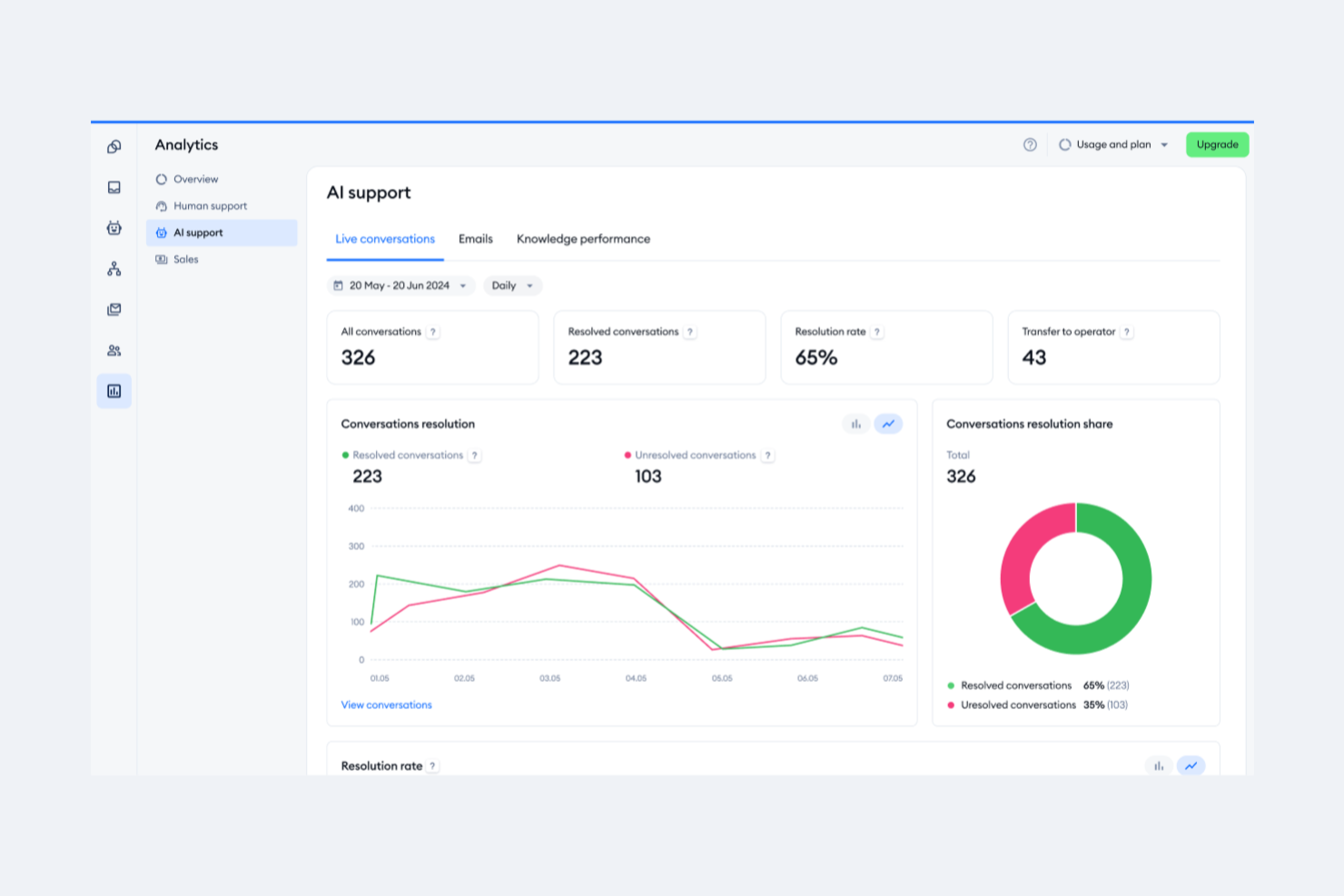
Tidio est un logiciel de support client qui aide les entreprises à rationaliser leur service client. Il centralise toutes les demandes des clients au même endroit, ce qui permet aux entreprises de répondre aux clients rapidement et efficacement.
Pourquoi j'ai choisi Tidio : Une base de connaissances est un excellent moyen d'offrir un support en libre-service à vos clients. Avec Tidio, vous pouvez créer une base de connaissances facilement consultable qui comprend des articles pertinents, des FAQ et des ressources, afin que les clients puissent trouver rapidement et aisément des réponses à leurs questions courantes. Vous pouvez également suivre les tickets de support client pour voir l'évolution de chaque problème et savoir qui s'en occupe.
Fonctionnalités et intégrations remarquables de Tidio :
La fonctionnalité la plus notable de Tidio est son module de chat en direct, qui permet aux utilisateurs d'offrir un support par chat 24h/24 et 7j/7. De plus, le chat en direct vous permet de collecter des données sur les préférences et comportements des clients. Enfin, Tidio permet de suivre des indicateurs clés tels que le temps de première réponse, le temps de résolution et les taux de satisfaction.
Intégrations disponibles avec plus de 25 applications, notamment des fournisseurs d’e-mail, ce qui est utile pour gérer plusieurs boîtes de réception e-mail. Les intégrations principales à noter incluent Active Campaign, Google Analytics, Klaviyo, Magento, Mailchimp, Omnisend, OpenCart, Pipedrive, Wix et Zendesk. Vous pouvez également accéder à des milliers d'autres intégrations via Zapier ou créer vos propres intégrations personnalisées grâce à leur API ouverte.
Pros and Cons
Pros:
- Les forfaits Free et Starter offrent une large gamme de fonctionnalités
- Les fonctionnalités multilingues sont incluses dans tous les forfaits
- Inclut la possibilité de configurer de 2 000 à 40 000 déclencheurs de chatbot
Cons:
- Le support par chat en direct est limité à 24h/5 et non disponible dans la formule gratuite
- Les options de personnalisation sont limitées uniquement à leur formule la plus avancée

eDesk
Meilleur pour la gestion de boîte de réception ecommerce alimentée par l'IA
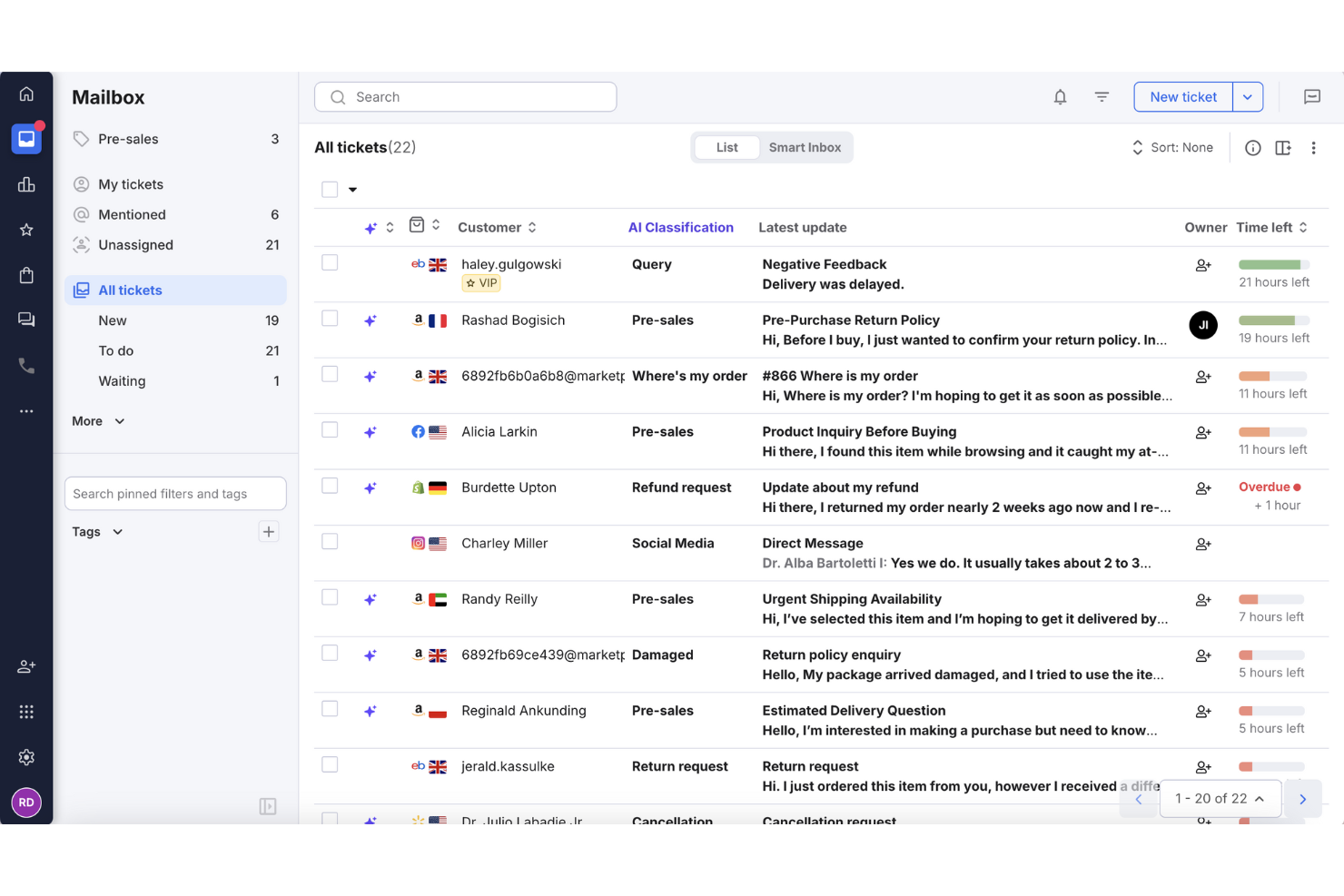
Si vous êtes une entreprise de commerce électronique souhaitant améliorer les flux de travail du support client, eDesk propose un logiciel de service client conçu pour la gestion de boîtes de réception ecommerce optimisée par l’IA. Il offre une boîte de réception unifiée et peut automatiser jusqu'à 65 % des tâches de support routinières, permettant ainsi à vos équipes de consacrer plus de temps aux problématiques clients complexes. Grâce à plus de 300 intégrations, y compris les places de marché comme Amazon et eBay, eDesk aide les équipes ecommerce à gérer la communication client plus efficacement.
Pourquoi j'ai choisi eDesk
J'ai choisi eDesk pour la gestion de boîte de réception ecommerce propulsée par l’IA, qui permet aux équipes support de traiter les messages clients issus de multiples canaux de vente de façon plus organisée. La boîte de réception unifiée réduit le besoin de passer d'une plateforme à l'autre, facilitant ainsi la gestion du support au quotidien. Son chatbot disponible 24h/24 et 7j/7 gère aussi les questions courantes en dehors des heures ouvrées, assurant ainsi des temps de réponse constants. Ensemble, ces fonctionnalités favorisent une meilleure communication avec les clients et permettent aux équipes ecommerce de gérer une demande croissante en support.
Principales fonctionnalités de eDesk
En plus de la gestion de boîte de réception ecommerce alimentée par l’IA, eDesk propose :
- Demandes d’avis intelligentes : Cette fonctionnalité automatise les demandes d’avis clients, améliorant ainsi votre réputation en ligne.
- Priorisation des opportunités de vente : Permet à votre équipe d’identifier et de se concentrer sur les prospects potentiels, augmentant ainsi le taux de conversion.
- Rapports automatisés : Offre des analyses et des informations en temps réel pour vous aider à évaluer et à améliorer vos opérations de support.
- Base de connaissances : Propose une option en libre-service pour les clients, réduisant le nombre de requêtes et libérant du temps pour vos équipes.
Intégrations eDesk
Les intégrations incluent Amazon, eBay, Walmart, Shopify, WooCommerce, BigCommerce, Magento, WhatsApp, Facebook et Instagram.
Pros and Cons
Pros:
- Les automatisations IA réduisent les tâches de support répétitives
- Les vues organisées des tickets améliorent l'efficacité du flux de travail quotidien
- Centralise les messages clients provenant des places de marché et des boutiques
Cons:
- Les rapports et analyses, bien que présents, sont parfois moins personnalisables que les tableaux de bord d'entreprises plus avancés
- Principalement conçu pour le ecommerce, moins flexible pour d’autres secteurs
New Product Updates from eDesk
eDesk Adds Galeria and Kaufland Support in Spain and Netherlands
eDesk adds support for Galeria, Kaufland Spain, and Kaufland Netherlands marketplaces. These integrations bring more European buyer messages into eDesk with routing, templates, AI insights, and automated translation. For more information, visit eDesk’s official site.
 .
.
Idéal avec de nombreuses intégrations tierces
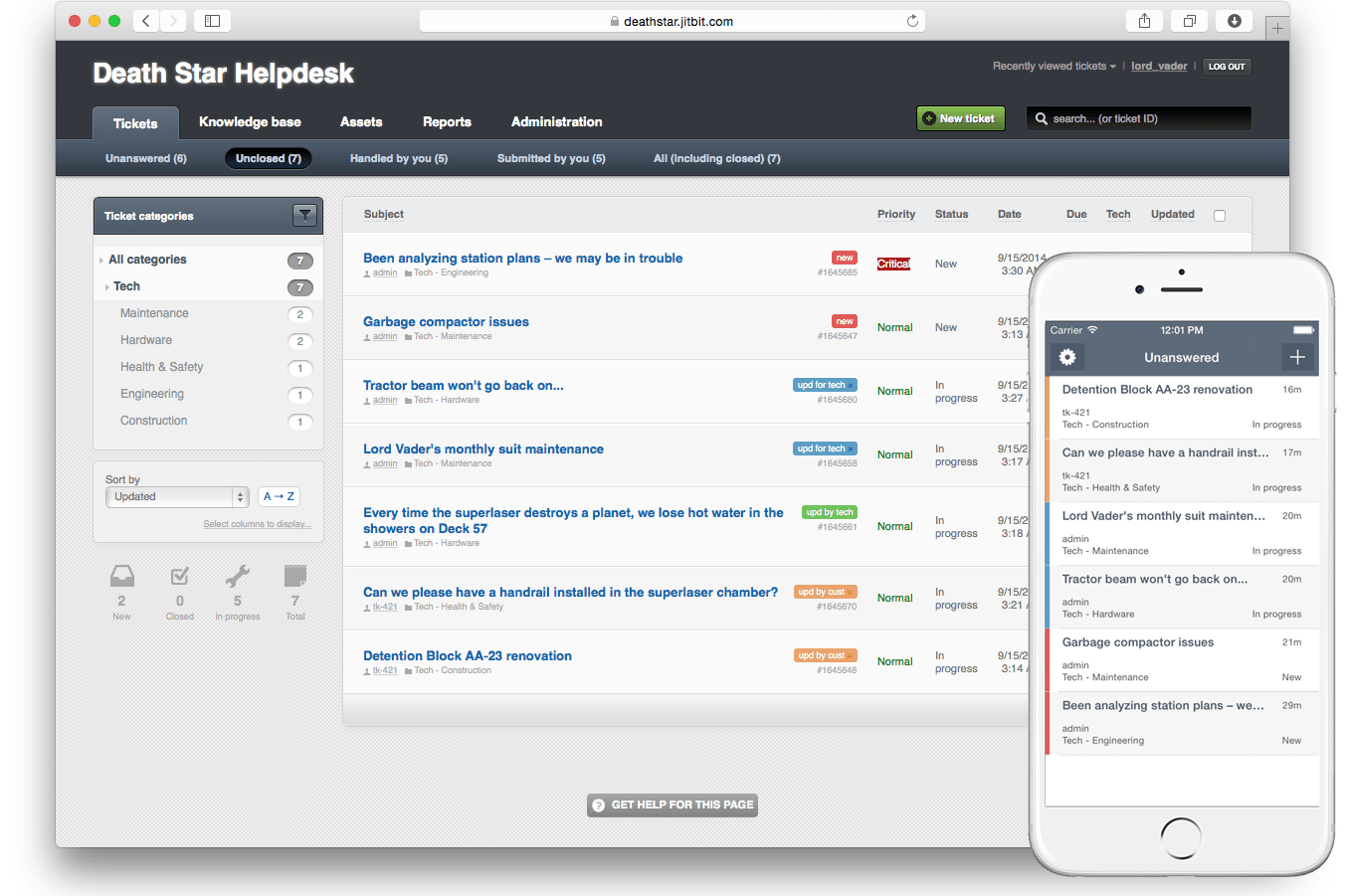
Jitbit Helpdesk est une plateforme de gestion des tickets et de support permettant de gérer les demandes clients, d'automatiser les flux de travail, de créer une base de connaissances et de se connecter à des outils tiers via un déploiement cloud ou sur site.
À qui s'adresse Jitbit Helpdesk ?
Aux équipes informatiques et services clients des petites et moyennes entreprises qui ont besoin d'options de déploiement et d'intégration flexibles.
Pourquoi j'ai choisi Jitbit Helpdesk
J'ai choisi Jitbit Helpdesk parmi les meilleurs car il peut se connecter à une large gamme d'outils tiers, de Slack et Microsoft Teams à Active Directory et Zapier. Mon équipe utilise ces intégrations pour automatiser la création de tickets à partir d'e-mails et de messages de chat, et nous synchronisons les données utilisateurs directement depuis notre annuaire. Concrètement, cela signifie que nous pouvons garder nos processus d'assistance étroitement connectés au reste de notre écosystème technologique.
Principales fonctionnalités de Jitbit Helpdesk
- Champs de ticket personnalisés : Ajoutez et configurez des champs personnalisés pour collecter exactement les informations dont votre équipe a besoin sur chaque ticket.
- Base de connaissances : Créez et maintenez une bibliothèque d'articles consultable pour les agents comme pour les utilisateurs finaux.
- Attribution automatique des tickets : Mettez en place des règles pour diriger automatiquement les tickets vers l'agent ou l'équipe appropriée en fonction de la catégorie ou de la priorité.
- Gestion des SLA : Définissez et suivez les accords de niveau de service afin de surveiller les temps de réponse et de résolution.
Intégrations de Jitbit Helpdesk
Jitbit Helpdesk propose des intégrations natives avec Slack, Jira, GitHub, Dropbox, Google Drive, Asana, Harvest, Visual Studio Online, Microsoft Teams, TeamViewer, Google Calendar, Basecamp, ChatGPT, OneDrive et WhatsApp. Il se connecte également à Zapier et offre une API et des webhooks pour des intégrations personnalisées.
Pros and Cons
Pros:
- Intégrations natives avec Slack, Jira et Teams
- Champs de ticket personnalisés pour des flux adaptés
- Base de connaissances intégrée pour l'auto-assistance
Cons:
- Options d'automatisation limitées pour les flux complexes
- La gestion des SLA manque d'options de configuration avancées

LiveAgent
Meilleure solution combinant support client et base de connaissances
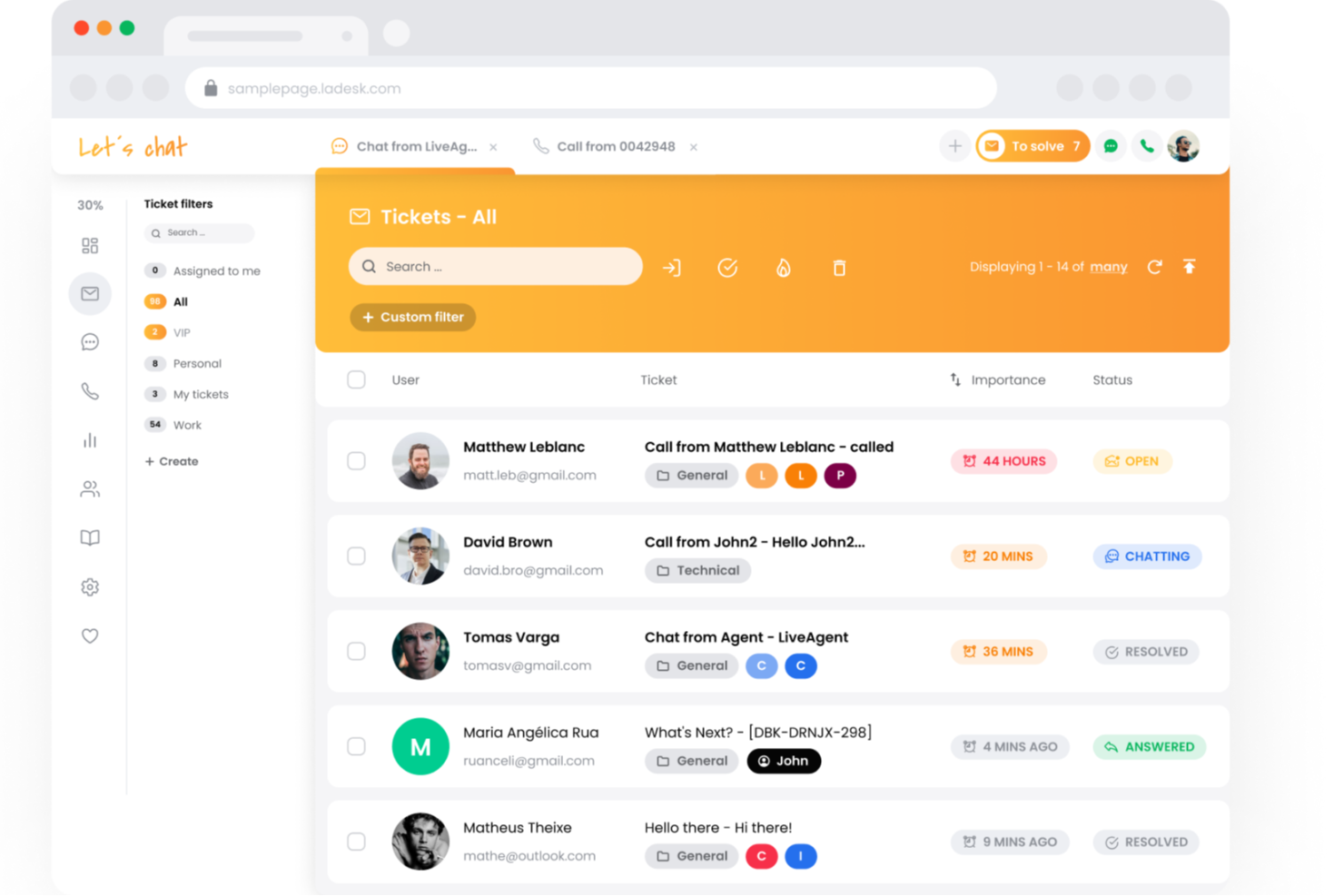
LiveAgent est un logiciel de support client multicanal avec une boîte de réception unifiée pour gérer l'assistance client par e-mail, chat, téléphone et réseaux sociaux.
Pourquoi j'ai choisi LiveAgent : J'ai inclus LiveAgent dans cette liste car il est conçu pour rendre le support client plus rapide et plus efficace. La plateforme combine la gestion des tickets, le chat en direct, les outils de centre d'appels et même un chatbot alimenté par l'IA au sein d'un même système, ce qui réduit le besoin de basculer entre plusieurs applications. Elle est également reconnue pour son intégration rapide, son excellent support client 24h/24 et 7j/7, et ses services de migration sur-mesure si vous passez depuis une autre solution. Pour les équipes souhaitant équilibrer la productivité des agents et la satisfaction client, les outils d'automatisation de LiveAgent—comme le routage des tickets, les scripts de suivi et le filtrage anti-spam—permettent de simplifier les tâches répétitives afin que les agents puissent se concentrer sur des problèmes plus complexes.
Fonctionnalités clés et intégrations de LiveAgent :
Fonctionnalités clés : workflows automatisés, un chatbot IA pour traiter les demandes courantes et des ressources en libre-service telles que des thèmes de base de connaissances personnalisables, des forums et des boutons de retour d'information.
Intégrations disponibles avec plus de 200 outils SaaS, dont ActiveCampaign, BigCommerce, Clockify, Gmail, HubSpot, Jira, Pipedrive, Shopify, Slack et Trello.
Pros and Cons
Pros:
- Inclut la possibilité de fusionner ou de scinder des tickets selon les besoins
- Services d'implémentation premium
- De nombreuses intégrations tierces sont proposées
Cons:
- Des frais additionnels s'appliquent si vous souhaitez héberger plus d'une base de connaissances (fonction multi-bases de connaissances)
- Certaines intégrations avec les réseaux sociaux nécessitent des frais supplémentaires
Autres logiciels de centre d'assistance
Voici quelques autres options intéressantes pour la gestion d’un centre d’assistance. Même si elles ne figurent pas parmi mes 20 meilleures sélections, elles méritent d’être examinées si vous avez besoin de davantage de choix :
- Zendesk
Meilleure solution de service client alimentée par l'IA pour les entreprises de toutes tailles
- Agentforce Service (formerly Service Cloud)
Idéal pour créer des expériences personnalisées grâce à l'IA
- Missive
Idéal pour les services d'assistance collaboratifs basés sur l'e-mail
- Desk365
Idéal pour la gestion des tickets alimentée par l’IA
- 3CX
Idéal pour gérer plusieurs canaux de communication
- Front
Idéal pour supprimer les silos grâce à une boîte de réception partagée
- monday service
Idéal pour la personnalisation sans code
- Intercom
Meilleur widget de chat pour assistance sur sites web et applications
- Issuetrak
Idéal pour la soumission de tickets omnicanale
- InvGate Service Management
Idéal pour le routage intelligent des tickets
- Jira Service Management
Meilleur logiciel de support interne pour les départements internes
- SysAid
Meilleur logiciel de support technique pour les services informatiques
- Gladly
Idéal pour des fonctionnalités téléphoniques avancées
- NinjaOne
Idéal pour la gestion des terminaux et l'alerte
- Hiver
Idéal pour la collaboration d'équipe sur Gmail
- SAAS First
Idéal pour les chatbots alimentés par l’IA
- SolarWinds IT Service Desk Software
Idéal pour une CMDB complète
- 14.ai
Idéal pour les réponses sensibles à l’intention
- Applied Labs AI
Idéal pour automatiser les tickets d’assistance
- Creatio CRM
Idéal pour le support omnicanal
- TeamSupport
Idéal pour l'analyse en temps réel des sentiments
- HelpDesk
Idéal pour la collaboration sur les tickets
- Zoho Assist
Idéal pour fournir une assistance à distance
- SparrowDesk
Idéal pour le support client piloté par l’IA


Comment j'évalue les logiciels de service d'assistance
Je divise mon évaluation en deux niveaux : les capacités de base dont tout service d'assistance a besoin—comme la gestion des tickets et le respect des SLA—et les éléments qui différencient les outils pour des équipes CX spécifiques.
Fonctionnalités de base (indispensables pour cette liste)
Lorsque je sélectionne des outils pour ma liste, j'attribue à chacun une note de 0 (la fonctionnalité n'existe pas) à 5 (l'outil excelle dans ce domaine) pour chaque fonctionnalité de base ci-dessous. Ensuite, je calcule le score total de l'outil en pourcentage. Chaque outil doit atteindre un score total minimum de 75 % pour être pris en considération.
- Système de gestion des tickets : J'examine le cycle de vie complet du ticket—création, attribution, priorisation, étiquetage et résolution—ainsi que la possibilité pour les agents de fusionner, diviser ou lier des tickets liés.
- Support multicanal : Chaque outil devrait regrouper les demandes e-mail, chat, téléphone, réseaux sociaux et formulaires web dans une seule boîte de réception afin que les agents n'aient pas à jongler entre plusieurs files d'attente.
- Automatisation et workflows : J'évalue si les règles de routage, les déclencheurs d’escalade et les macros peuvent gérer des situations réelles, comme l'assignation automatique des tickets de facturation à une équipe spécialisée.
- Base de connaissances et libre-service : Un centre d'aide intégré avec recherche, catégorisation et publication publique est essentiel—surtout pour désengorger les tickets courants de type « comment réinitialiser mon mot de passe ».
- Rapports et analyses : Les tableaux de bord doivent couvrir les indicateurs clés comme le délai de première réponse, le taux de résolution et le CSAT, avec des filtres par agent, équipe ou catégorie de ticket.
- Gestion des SLA : Je vérifie la possibilité de mettre en place des politiques SLA avec des règles d’horaires ouvrés et des alertes d’escalade, comme le signalement des tickets proches d’un dépassement de seuil.
Une fois que j'ai une liste d'outils répondant aux critères, j'étudie ce qui distingue chaque plateforme.
Facteurs de différenciation (ce qui distingue les éditeurs)
Voici comment je compare et distingue les différents éditeurs :
Fonctionnalités remarquables
Les fonctions alimentées par l’IA sont un élément différenciateur majeur. Je vérifie si un outil peut suggérer des réponses, résumer de longues discussions ou proposer des articles pertinents de la base de connaissances en cours de conversation. Un panneau de contexte client compte aussi : des agents qui peuvent voir les tickets précédents, les détails du compte et l’historique d’achat en même temps que la demande active offrent un support plus personnalisé. Les outils de collaboration intégrés comme les conversations secondaires et les @mentions facilitent l’implication des équipes produit ou technique sans quitter le ticket.
Au-delà des fonctionnalités
Les intégrations déterminent la capacité d’un service d’assistance à s’intégrer à votre système existant. J'évalue si l’outil se connecte nativement avec des CRM comme Salesforce ou HubSpot, des plateformes e-commerce comme Shopify, et des outils collaboratifs tels que Slack. La structure tarifaire est aussi importante : un modèle par agent peut vite s’avérer coûteux pour des équipes en croissance, alors je vérifie si des options au volume ou par paliers sont proposées. La rapidité de déploiement est un autre facteur que je prends en compte, notamment les outils de migration permettant d’importer tickets et workflows depuis une plateforme précédente sans tout recommencer de zéro.
Comment choisir un logiciel de centre d'assistance
Il est facile de se perdre dans les fonctionnalités complètes des centres d'assistance et les structures tarifaires complexes. Pour vous aider à rester concentré tout au long de votre processus unique de sélection d'un logiciel, voici une liste de contrôle expliquant comment choisir un logiciel de centre d'assistance pour votre entreprise ou votre équipe :
| Facteur | Points à prendre en compte |
|---|---|
| Évolutivité | Assurez-vous que le logiciel peut évoluer avec votre équipe. Recherchez des solutions qui permettent d'ajouter des utilisateurs ou des fonctionnalités à mesure que votre entreprise se développe. |
| Intégrations | Vérifiez qu'il se connecte à vos outils actuels, tels que les systèmes CRM ou les plateformes d'e-mail, afin de rationaliser le flux de travail. |
| Personnalisation | Choisissez un logiciel qui vous permet d'adapter les flux de travail et les interfaces aux besoins spécifiques de votre équipe. |
| Facilité d'utilisation | Optez pour des interfaces conviviales qui réduisent le temps de formation et permettent à votre équipe d'être rapidement opérationnelle. |
| Budget | Prenez en compte les coûts initiaux et les dépenses récurrentes. Assurez-vous que la solution s'inscrit durablement dans votre plan financier. |
| Mesures de sécurité | Recherchez des fonctionnalités de sécurité robustes, telles que le chiffrement des données et l'authentification des utilisateurs, afin de protéger les informations sensibles. |
| Support client | Évaluez le niveau de support proposé, comme un service disponible 24 h/24 et 7 j/7 ou des responsables de compte dédiés, pour vous aider en cas de problème. |
| Outils de reporting | Assurez-vous que le logiciel propose des fonctionnalités d'analyse et de reporting pour suivre les performances et identifier les points à améliorer. |
Tendances des logiciels de service d’assistance
Dans le cadre de mes recherches, j’ai recueilli d’innombrables mises à jour de produits, communiqués de presse et journaux de versions provenant de différents fournisseurs de logiciels de service d’assistance. Voici quelques-unes des tendances émergentes que je surveille :
- Informations fondées sur l’IA : Les logiciels de service d’assistance basés sur l’IA utilisent l’IA pour fournir des informations plus approfondies sur les interactions avec les clients. Cela peut aider les entreprises à anticiper les besoins des clients et à automatiser les réponses, améliorant ainsi leur efficacité. L’intégration de Zoho avec ChatGPT améliore son chatbot IA Zia en proposant des suggestions de contenu intelligentes.
- Assistance omnicanale : proposer une assistance sur plusieurs canaux, comme le chat, les e-mails et le téléphone, devient la norme. Cette tendance permet aux entreprises d’aller à la rencontre de leurs clients là où ils se trouvent, en veillant à ce qu’aucune interaction ne passe entre les mailles du filet. De nombreuses plateformes facilitent désormais l’intégration de ces canaux dans une interface unifiée.
- Portails en libre-service : de plus en plus de solutions de service d’assistance intègrent des options en libre-service permettant aux clients de trouver des réponses et des solutions sans intervention humaine directe. Cela réduit la charge de travail du personnel d’assistance et permet aux utilisateurs de résoudre eux-mêmes leurs problèmes. Certains fournisseurs intègrent des forums communautaires afin de faciliter l’entraide entre utilisateurs.
- Personnalisation fondée sur les données : les outils de service d’assistance exploitent les données clients pour adapter les expériences d’assistance. En analysant les interactions et les préférences passées, les équipes d’assistance peuvent proposer une aide plus personnalisée, ce qui améliore la satisfaction client. Cette tendance est particulièrement marquée sur les plateformes qui proposent des intégrations CRM.
- Évolutivité pour les entreprises en croissance : à mesure que les entreprises se développent, elles ont besoin de solutions de service d’assistance capables d’évoluer avec elles. Les fournisseurs se concentrent sur la création de formules tarifaires évolutives et de fonctionnalités flexibles pouvant répondre aux besoins des petites équipes comme des grandes entreprises. Cela garantit que les entreprises de toutes tailles peuvent bénéficier du même niveau de fonctionnalités d’assistance.
Qu’est-ce qu’un logiciel de service d’assistance ?
Un logiciel de service d’assistance est une plateforme qui aide les entreprises à gérer, suivre et résoudre les demandes d’assistance des clients ou des employés. Il centralise les communications, automatise les flux de travail des tickets et permet aux équipes d’assistance de répondre efficacement sur plusieurs canaux.
Fonctionnalités des logiciels de service d’assistance
Lorsque vous choisissez un logiciel de service d’assistance, prêtez attention aux fonctionnalités clés suivantes :
- Gestion des tickets : Cette fonctionnalité vous permet de recueillir, suivre et organiser toutes les demandes des clients sous forme de tickets. Vous pouvez les attribuer aux membres de l’équipe, définir des priorités et suivre leur progression afin que rien ne passe entre les mailles du filet.
- Assistance multicanale : communiquez avec vos clients par e-mail, chat, téléphone et même sur les réseaux sociaux, le tout au même endroit. Vous n’avez ainsi pas besoin de jongler entre différents outils pour maintenir les conversations.
- Base de connaissances : créez une bibliothèque consultable de FAQ, de guides pratiques et de conseils de dépannage. Cela permet à vos utilisateurs de résoudre eux-mêmes les problèmes courants et allège la charge de travail de votre équipe d’assistance.
- Outils d’automatisation : utilisez des flux de travail, des déclencheurs et des réponses automatiques pour gérer les tâches répétitives. Vous pouvez par exemple attribuer automatiquement des tickets ou envoyer des e-mails d’accusé de réception, afin d’accélérer les opérations et de réduire le travail manuel.
- Gestion des accords de niveau de service (SLA) : définissez et suivez les délais de réponse et de résolution, ce qui facilite le respect de vos engagements envers les clients et l’identification des goulots d’étranglement à corriger.
- Rapports et analyses : obtenez des informations sur des indicateurs tels que le volume de tickets, les délais de réponse et la satisfaction client. Cela vous aide à identifier les tendances et à améliorer continuellement votre service.
- Capacités d’intégration : connectez votre logiciel de service d’assistance aux systèmes CRM, aux outils de gestion de projet ou aux autres applications que vous utilisez. Vos flux de travail restent ainsi fluides et tout le monde dispose des mêmes informations.
- Flux de travail personnalisables : adaptez le logiciel à vos processus spécifiques, qu’il s’agisse de configurer des champs de ticket, des statuts ou des étapes d’approbation personnalisés.
- Contrôles d’accès des utilisateurs : déterminez qui peut voir et faire quoi dans le système, afin de protéger les informations sensibles et de permettre à chacun de se concentrer sur les bonnes tâches.
- Portail client : offrez à vos utilisateurs un espace en libre-service où ils peuvent envoyer des tickets, suivre leur progression et trouver des solutions, tout en maintenant votre assistance ouverte 24 heures sur 24 et 7 jours sur 7.
Fonctionnalités courantes d’IA des logiciels de service d’assistance
Au-delà des fonctionnalités standard des logiciels de service d’assistance présentées ci-dessus, nombre de ces solutions intègrent l’IA avec des fonctionnalités telles que :
- Routage des tickets alimenté par l’IA : Attribuez automatiquement les tickets à l’agent le plus approprié en fonction du type de problème, de son urgence ou des compétences de l’agent. Cela permet de résoudre les problèmes plus rapidement et d’améliorer la satisfaction des clients.
- Chatbots intelligents : Utilisez des robots alimentés par l’IA pour traiter instantanément les demandes courantes, 24 h/24 et 7 j/7. Votre équipe d’assistance dispose de plus de temps pour les problèmes complexes, tandis que les utilisateurs obtiennent rapidement des réponses à toute heure.
- Suggestions de réponses automatisées : Le logiciel peut suggérer des réponses aux tickets entrants en s’appuyant sur les articles de la base de connaissances ou sur des solutions précédentes, ce qui accélère les délais de réponse et garantit des réponses cohérentes.
- Analyse des sentiments : L’IA analyse le ton et le degré d’urgence des messages, ce qui vous aide à donner la priorité aux tickets nécessitant éventuellement l’intervention immédiate d’un humain.
- Analyse prédictive : L’IA anticipe les problèmes courants ou les pics du volume de tickets, vous permettant d’être prévenu à l’avance afin de préparer vos ressources d’assistance.
Avantages des logiciels de centre d’assistance
La mise en œuvre d’un logiciel de centre d’assistance présente plusieurs avantages pour votre équipe et votre entreprise. Voici quelques avantages que vous pouvez attendre d’un système de centre d’assistance :
- Amélioration de l’assistance client : Les logiciels de centre d’assistance permettent de gérer efficacement les tickets, en veillant à ce que les problèmes des clients soient traités rapidement et de manière systématique.
- Gestion centralisée des informations : Comme toutes les interactions et les données des clients sont regroupées au même endroit, les équipes peuvent accéder rapidement aux informations nécessaires, réduire les délais de réponse et améliorer la qualité du service.
- Amélioration de la collaboration au sein de l’équipe : Des fonctionnalités telles que les vues partagées des tickets et les notes internes aident les membres de l’équipe à travailler efficacement ensemble, ce qui permet de mieux résoudre les problèmes.
- Informations fondées sur les données : Les solutions de centre d’assistance proposent des outils de création de rapports qui fournissent des informations précieuses sur les interactions avec les clients et les performances de l’équipe, contribuant ainsi à identifier les points à améliorer.
- Intégration avec d’autres outils : De nombreux systèmes de centre d’assistance s’intègrent aux outils de gestion de la relation client et à d’autres outils professionnels, ce qui simplifie les flux de travail et garantit leur cohérence sur toutes les plateformes.
Coûts et tarifs des logiciels de centre d’assistance
Le choix d’un logiciel de centre d’assistance nécessite de comprendre les différents modèles tarifaires et forfaits disponibles. Les coûts varient en fonction des fonctionnalités, de la taille de l’équipe, des modules complémentaires et d’autres éléments. Le tableau ci-dessous présente un résumé des forfaits courants, de leurs prix moyens et des fonctionnalités généralement incluses dans les solutions de centre d’assistance :
Tableau comparatif des forfaits de logiciels de centre d’assistance
| Type de forfait | Prix moyen | Fonctionnalités courantes |
|---|---|---|
| Forfait gratuit | $0 | Système de gestion des tickets de base, assistance client limitée et accès au forum communautaire. |
| Forfait personnel | $5-$25/user/month | Assistance par e-mail, rapports de base, accès à l’application mobile et intégrations limitées. |
| Forfait professionnel | $30-$60/user/month | Rapports avancés, intégrations multiples, options de personnalisation et automatisation. |
| Forfait entreprise | $80-$150/user/month | Responsable de compte dédié, fonctionnalités de sécurité personnalisées, analyses avancées et assistance premium. |
Logiciel de centre d’assistance : questions fréquemment posées
Vous avez des questions générales sur les fonctionnalités offertes par les logiciels de centre d’assistance ou sur la manière de choisir la meilleure option pour votre organisation ? Ces réponses aux questions fréquemment posées devraient vous orienter dans la bonne direction :
Quels éléments dois-je prendre en compte lors de la migration vers un nouveau logiciel de centre d’assistance ?
Lors de la migration vers un nouveau logiciel de centre d’assistance, prévoyez un transfert propre des données, les besoins d’intégration et la formation de l’équipe. Vérifiez que votre nouvel outil prend en charge l’importation des tickets, des données utilisateur et des champs personnalisés depuis votre ancien système. Testez les intégrations avec vos principales plateformes, comme le CRM, la messagerie instantanée ou les e-mails, avant de procéder au changement. Établissez un calendrier de déploiement et de formation afin de limiter les interruptions de service.
Comment un logiciel de centre d’assistance peut-il améliorer le délai de réponse et la satisfaction client ?
Un logiciel de centre d’assistance accélère le délai de réponse en automatisant l’attribution des tickets, en donnant la priorité aux demandes urgentes et en proposant des réponses types. Des fonctionnalités telles que les SLA et les notes internes permettent à votre équipe de rester organisée et responsable. Vous constaterez une satisfaction client accrue en clôturant les tickets plus rapidement et en fournissant un service plus homogène.
Quelles intégrations de centre d’assistance sont les plus utiles pour les équipes de support client ?
Les intégrations avec les e-mails, la messagerie instantanée, les CRM et les bases de connaissances sont des choix prioritaires pour les équipes de support. L’intégration à votre CRM permet aux agents de consulter l’historique client sans changer d’onglet. Les applications de chat et de messagerie facilitent les réponses multicanales. L’intégration d’une base de connaissances contribue à automatiser le libre-service et à réduire le volume de tickets.
Comment mesurer les performances de mon équipe de support avec un logiciel de centre d’assistance ?
La plupart des plateformes de centre d’assistance suivent des indicateurs tels que le délai de première réponse, le délai de résolution, le volume de tickets et les scores de satisfaction client. Configurez des tableaux de bord avec ces KPI afin de repérer les tendances et d’accompagner votre équipe. De nombreux outils permettent également de programmer des rapports et de partager les résultats avec les parties prenantes.
Quelle est la différence entre un logiciel de centre d’assistance et un logiciel de service client ?
Les logiciels de centre d’assistance se concentrent sur la gestion et la résolution des problèmes clients au moyen de tickets. Les logiciels de service client peuvent inclure des outils de centre d’assistance, mais couvrent également des fonctionnalités plus larges telles que la messagerie instantanée, les enquêtes de satisfaction et le support multicanal. Les solutions de centre d’assistance sont les plus adaptées lorsque le principal besoin de votre équipe est de centraliser la gestion des tickets.
Quels sont les différents types de logiciels de centre d’assistance disponibles ?
Voici différents types de logiciels de centre d’assistance que vous pouvez explorer si vous recherchez une solution adaptée à des besoins spécifiques ou à la taille de votre organisation :
- Logiciel de centre d’assistance pour petites entreprises : Conçu pour les petites équipes, ce logiciel est abordable, facile à utiliser et permet de gérer efficacement les demandes des clients.
- Logiciel de centre d’assistance par e-mail : Se concentre sur l’organisation des demandes clients envoyées par e-mail en les transformant en tickets faciles à gérer.
- Logiciel de centre d’assistance interne : Aide les employés à obtenir un support informatique ou RH au sein de l’entreprise en suivant et en résolvant leurs demandes.
- Logiciel de centre d’assistance pour entreprises : Conçu pour les grandes organisations, il gère d’importants volumes de tickets et prend en charge des flux de travail complexes.
- Bases de connaissances de centre d’assistance pour le service client : Fournit une bibliothèque centrale d’articles et de guides pour aider les clients et les agents à résoudre plus rapidement les problèmes.
- Logiciel de centre d’assistance simple : Offre des outils de base avec une interface facile à utiliser, idéale pour les équipes qui débutent avec les centres d’assistance.
- Logiciel de centre d’assistance en ligne : Accessible depuis n’importe quel navigateur, cet outil aide les équipes à gérer les demandes clients à distance.
- Logiciel de centre d’assistance cloud : Hébergé en ligne, il permet aux entreprises de gérer le support client sans installer de logiciel sur leurs appareils.
Comment les logiciels de centre d’assistance utilisent-ils l’automatisation et l’IA ?
Les logiciels de centre d’assistance utilisent l’automatisation pour simplifier le flux de travail de votre équipe en orientant automatiquement les tickets vers les services appropriés, en catégorisant et en hiérarchisant les demandes, en envoyant des mises à jour de statut et en déclenchant des rappels pour les problèmes non résolus. Les fonctionnalités d’IA peuvent suggérer aux clients des articles d’aide pertinents, compléter automatiquement les réponses des agents et analyser le sentiment exprimé dans les tickets afin de repérer les cas urgents. Ces fonctions permettent à votre équipe de se concentrer sur les demandes complexes tandis que les tâches simples s’exécutent en arrière-plan, ce qui améliore la rapidité et la satisfaction des clients.
Que signifient la conformité ITIL et ITSM dans les centres d’assistance ?
La conformité ITIL (bibliothèque d’infrastructure des technologies de l’information) et ITSM (gestion des services informatiques) signifie que votre logiciel de centre d’assistance est conçu pour suivre les bonnes pratiques internationales en matière de fourniture de support informatique. Cela couvre des processus structurés de suivi des incidents, des flux de travail de gestion des changements, de remontée des problèmes et de gestion des actifs. Pour les responsables d’équipes de support, la conformité ITIL/ITSM garantit une plus grande cohérence, une meilleure qualité de service et des audits simplifiés, en particulier si vous devez respecter des exigences réglementaires ou d’entreprise strictes.
Quelles fonctionnalités de sécurité les logiciels de centre d’assistance possèdent-ils ?
Voici une liste des fonctionnalités de sécurité courantes des logiciels de centre d’assistance :
- Contrôle d’accès basé sur les rôles (RBAC) : garantit que les utilisateurs n’accèdent qu’aux informations et aux outils correspondant à leur rôle.
- Chiffrement des données : protège les données sensibles pendant leur transmission et leur stockage au moyen de protocoles de chiffrement.
- Journaux d’audit : conserve des enregistrements détaillés des actions effectuées dans le système afin de suivre les modifications et de détecter les activités non autorisées.
- Authentification à deux facteurs (2FA) : ajoute un niveau de sécurité supplémentaire en exigeant une seconde étape de vérification lors de la connexion des utilisateurs.
- Intégrations d’API sécurisées : garantit que les connexions tierces respectent les normes de sécurité afin d’éviter les fuites ou les violations de données.
- Mises à jour de sécurité régulières : fournit des correctifs et des mises à jour fréquents pour corriger les vulnérabilités et améliorer la protection.
- Liste blanche d’adresses IP : limite l’accès au système de centre d’assistance à des adresses IP précises et approuvées afin de renforcer le contrôle.
Que faut-il rechercher en matière de personnalisation et d’interface utilisateur d’un centre d’assistance ?
Lors de l’évaluation de la personnalisation et de l’interface utilisateur d’un centre d’assistance, tenez compte des fonctionnalités clés suivantes :
- Flux de travail personnalisables : possibilité d’adapter les processus de gestion des tickets et de support aux besoins spécifiques de votre équipe.
- Interface utilisateur aux couleurs de votre marque : options permettant de personnaliser le portail avec le logo, les couleurs et l’identité visuelle de votre entreprise.
- Outils de glisser-déposer : simplifient l’ajustement de la mise en page des tableaux de bord et des rapports sans programmation.
- Champs dynamiques : permettent d’adapter les formulaires et les tickets avec des champs pertinents pour des demandes ou des problèmes spécifiques.
- Langues et localisation : prise en charge de plusieurs langues et des paramètres régionaux pour les équipes et les clients internationaux.
- Tableaux de bord adaptés aux rôles : vues personnalisées selon le rôle de l’utilisateur, comme agent, responsable ou client.
- Facilité de navigation : conception intuitive avec des menus clairs, des boutons d’accès rapide et un minimum d’éléments superflus.