

Les meilleurs chatbots IA pour le service client automatisent l’assistance à grande échelle : ils répondent aux questions fréquentes, réduisent le volume de tickets et libèrent les agents pour les problèmes complexes. Vous voulez qu’un chatbot vous aide à fournir des réponses rapides et cohérentes aux questions simples des clients, mais vous devez déterminer quelle option offre de meilleurs résultats pour vos clients et vos agents.
Dans cet article, je m’appuie sur mon expérience de l’expérience client pour évaluer et sélectionner les meilleurs chatbots IA afin d’aider les équipes du service client à travailler plus efficacement et à offrir une assistance client disponible 24 heures sur 24.
Pourquoi faire confiance à nos recommandations de logiciels
6,700+
Reviews
20
Industry experts
16+
Evaluation factors
14
Years
Notre équipe teste et évalue des logiciels depuis 2012. En tant que leaders CX nous-mêmes, nous savons à quel point il est difficile — et important — de choisir le bon logiciel.
Pour ce guide, nous avons évalué les outils grâce à des tests pratiques et une recherche indépendante, en notant les outils selon nos critères de sélection.
Nos avis reflètent notre jugement éditorial humain, et non un argumentaire de vente.
 Gui DrusinaCreative Director
 Tim FisherVP of AI
Tableau comparatif : chatbots IA pour le service client
Ce tableau comparatif résume ma sélection des meilleurs chatbots IA pour le service client :
| Tool | Best For | Trial Info | Price | ||
|---|---|---|---|---|---|
| 1 | Idéal pour l’assistance aux agents alimentée par l’IA | Démo gratuite disponible | Tarification sur demande | Website | |
| 2 | Idéal pour le triage des tickets assisté par IA | Démo gratuite + essai gratuit de 14 jours disponible | À partir de $19/utilisateur/mois (facturé annuellement) | Website | |
| 3 | Idéal pour la résolution automatique sur plusieurs canaux | Essai gratuit de 14 jours disponible | À partir de $16/utilisateur/mois (facturé annuellement) | Website | |
| 4 | Idéal pour une IA agentique qui automatise les workflows | Formule gratuite disponible | Tarification sur demande | Website | |
| 5 | Idéal pour l'intégration aux principales places de marché | Essai gratuit de 14 jours | À partir de $39/agent/mois | Website | |
| 6 | Idéal pour une conformité stricte aux exigences de sécurité des entreprises | Non disponible | Tarification sur demande | Website | |
| 7 | Idéal pour le support e-commerce des marques utilisant Shopify | Essai gratuit de 30 jours + démo gratuite disponible | À partir de $40/mois | Website | |
| 8 | Idéal pour un contrôle des agents IA de niveau entreprise | Démo gratuite disponible | Tarification sur demande | Website | |
| 9 | Idéal pour la voix et la transcription des appels optimisées par l’IA | Essai gratuit disponible | À partir de $30/licence/mois (facturé annuellement) | Website | |
| 10 | Idéal pour un déploiement rapide | Essai gratuit de 30 jours | À partir de 199 $/mois | Website |


Avis sur les meilleurs chatbots IA pour le service client
Voici mes avis détaillés sur les 20 meilleurs chatbots IA pour le service client qui ont été retenus dans ma sélection.
 Idéal pour l’assistance aux agents alimentée par l’IA
- Démo gratuite disponible
- Tarification sur demande
Visit WebsiteCustomer Rating:5/5
Cresta utilise l’IA pour automatiser le support et améliorer les interactions avec les clients. Cresta est une plateforme de service client alimentée par l’IA qui combine des agents d’IA autonomes, une assistance en temps réel pour les agents et l’intelligence conversationnelle afin d’aider les organisations à automatiser le support et à améliorer les interactions avec les clients sur les canaux vocaux, de discussion, SMS et numériques.
À qui Cresta convient-elle le mieux ?
Cresta convient particulièrement aux centres de contact d’entreprises et aux entreprises de taille intermédiaire dans des secteurs tels que les services financiers, l’assurance, les télécommunications et la vente au détail, qui gèrent d’importants volumes de conversations avec leurs clients et souhaitent améliorer à la fois l’automatisation et les performances des agents.
Pourquoi ai-je choisi Cresta ?
J’ai choisi Cresta parce qu’elle comble le fossé entre l’automatisation par l’IA et l’assistance humaine. Bien que ses agents d’IA puissent traiter de manière autonome les demandes courantes des clients, la plateforme fournit également des conseils en temps réel aux agents pendant les conversations en direct. Cela permet aux organisations d’automatiser les demandes répétitives tout en aidant les agents humains à fournir un service plus cohérent et plus précis lorsque des problèmes complexes surviennent. J’apprécie également le fait que Cresta combine l’intelligence conversationnelle, la gestion de la qualité et l’automatisation des flux de travail au sein d’une seule plateforme, plutôt que d’exiger plusieurs solutions spécialisées.
Principales fonctionnalités de Cresta
- Agent d’IA : Automatise les interactions avec les clients sur les canaux vocaux, de discussion et de messagerie tout en traitant les demandes courantes sans intervention d’un agent.
- Résumé automatique : Génère automatiquement des résumés et des notes de conversation, réduisant ainsi le travail après appel et les tâches administratives.
- Gestion de la qualité : Évalue les interactions avec les clients selon des critères prédéfinis et fournit à grande échelle des informations issues d’une notation automatisée.
- Moteur d’orchestration Opera : Permet aux équipes de créer, gérer et optimiser des flux de travail d’IA et des parcours conversationnels au moyen d’une interface sans code.
Intégrations de Cresta
Cresta s’intègre à Salesforce, ServiceNow, Microsoft Dynamics 365, Zendesk, Amazon Connect, Twilio, Five9, Genesys, NICE, HubSpot, Marketo et Databricks. Elle fournit également un accès à une API pour les intégrations personnalisées et l’automatisation des flux de travail d’entreprise.
Pros and Cons
Pros:
- Les agents d’IA automatisent les interactions avec les clients
- Les conseils en temps réel améliorent les performances des agents
- Gestion automatisée de la qualité à grande échelle
Cons:
- Convient surtout aux grandes organisations
- Les recommandations de l’IA peuvent nécessiter une supervision humaine
Learn more about Cresta: Idéal pour le triage des tickets assisté par IA
- Démo gratuite + essai gratuit de 14 jours disponible
- À partir de $19/utilisateur/mois (facturé annuellement)
Visit WebsiteCustomer Rating:4.4/5
Freshservice fournit un référentiel centralisé d’informations et de solutions pour les problèmes informatiques courants. Freshdesk (un produit de Freshworks Inc.) est une plateforme de service client conçue pour aider les équipes à gérer les interactions clients sur plusieurs canaux de communication. Elle prend en charge les demandes par e-mail, chat, téléphone et réseaux sociaux au sein d’un seul système, permettant aux équipes de traiter les demandes courantes comme les questions plus complexes de façon organisée.
Pourquoi j'ai choisi Freshdesk
J'ai choisi Freshdesk pour sa gestion du triage des tickets dans les flux de travail du service client. La plateforme inclut Freddy AI, qui peut aider à classer les tickets entrants en suggérant des champs tels que la priorité, le groupe ou le statut selon le contenu du ticket. Cela aide à réduire la classification manuelle et favorise un routage plus cohérent des demandes, permettant ainsi aux agents de se concentrer sur les problèmes nécessitant une attention particulière.
Fonctionnalités clés de Freshdesk
En plus de la gestion des tickets et de l'automatisation, Freshdesk propose des fonctionnalités qui soutiennent les opérations quotidiennes du service client :
- Chatbots et automatisation : Prend en charge les réponses automatisées pour les demandes fréquentes, avec la possibilité de transférer la conversation à un agent si nécessaire.
- Support multilingue : Permet aux équipes de répondre aux clients dans plusieurs langues.
- Outils de personnalisation : Permet aux équipes d’ajuster les flux de travail et les interfaces selon leurs processus internes.
- Outils de collaboration : Facilite les discussions internes et le transfert entre agents.
Intégrations Freshdesk
Les intégrations incluent Slack, MS Teams, Shopify, WhatsApp, Jira, Salesforce, Google Workspace, Trello, Asana et Mailchimp.
Pros and Cons
Pros:
- Fonctionnalités de gestion des actifs
- Fonctionnalités d'automatisation avancées pour réduire les tâches manuelles
- Dispose d’un créateur de chatbot conversationnel sans code pour un déploiement facile
Cons:
- Freddy AI est une option payante
- Certaines fonctions avancées de reporting sont jugées complexes
Learn more about Freshdesk: Idéal pour la résolution automatique sur plusieurs canaux
- Essai gratuit de 14 jours disponible
- À partir de $16/utilisateur/mois (facturé annuellement)
Visit WebsiteCustomer Rating:4.6/5
Le chatbot de SparrowDesk guide les utilisateurs avec des réponses automatiques et conviviales. SparrowDesk est conçu pour les entreprises souhaitant transformer leurs opérations de service client grâce à l'efficacité de l'IA. L'automatisation des interactions et la résolution d'une part importante des requêtes réduisent à la fois les délais de réponse et la charge de travail des agents. Cela rend SparrowDesk particulièrement attrayant pour les équipes de service client cherchant à améliorer l'expérience utilisateur et à rationaliser les processus de communication.
Pourquoi j'ai choisi SparrowDesk
J'ai choisi SparrowDesk pour sa capacité à résoudre automatiquement une grande partie des demandes clients grâce à son IA Luna, ce qui allège la charge de votre équipe de support. Cette fonctionnalité permet à vos agents de se concentrer sur des problèmes plus complexes, améliorant ainsi la qualité globale du service. De plus, la boîte de réception unifiée de la plateforme assure une communication sans faille sur tous les canaux, offrant aux clients une expérience d'assistance cohérente.
Fonctionnalités clés de SparrowDesk
En plus de ses capacités d'auto-résolution, SparrowDesk propose plusieurs fonctionnalités qui renforcent son utilité en tant que chatbot IA pour le service client :
- Accords de niveau de service (SLA) : Définissez des objectifs de réponse et de résolution pour garantir une assistance rapide.
- Macros d'action rapide : Automatisez les tâches répétitives avec des macros pré-définis pour augmenter l'efficacité.
- Analytique interactive : Accédez à des tableaux de bord en temps réel pour une vision du rendement des équipes et des tendances clients.
- Plateforme multilingue : Offrez un support dans de multiples langues pour satisfaire une audience internationale.
Intégrations SparrowDesk
Aucune intégration native n'est actuellement mentionnée par SparrowDesk.
Pros and Cons
Pros:
- L'IA Copilot assiste les agents avec des suggestions intelligentes de réponses.
- Le support multilingue répond aux besoins d'une audience internationale.
- La boîte de réception omnicanal centralise la communication entre les plateformes.
Cons:
- La dépendance à l'IA peut ne pas convenir à tous les styles de service client.
- Intégrations natives limitées qui peuvent freiner la connectivité.
Learn more about SparrowDesk: Idéal pour une IA agentique qui automatise les workflows
- Formule gratuite disponible
- Tarification sur demande
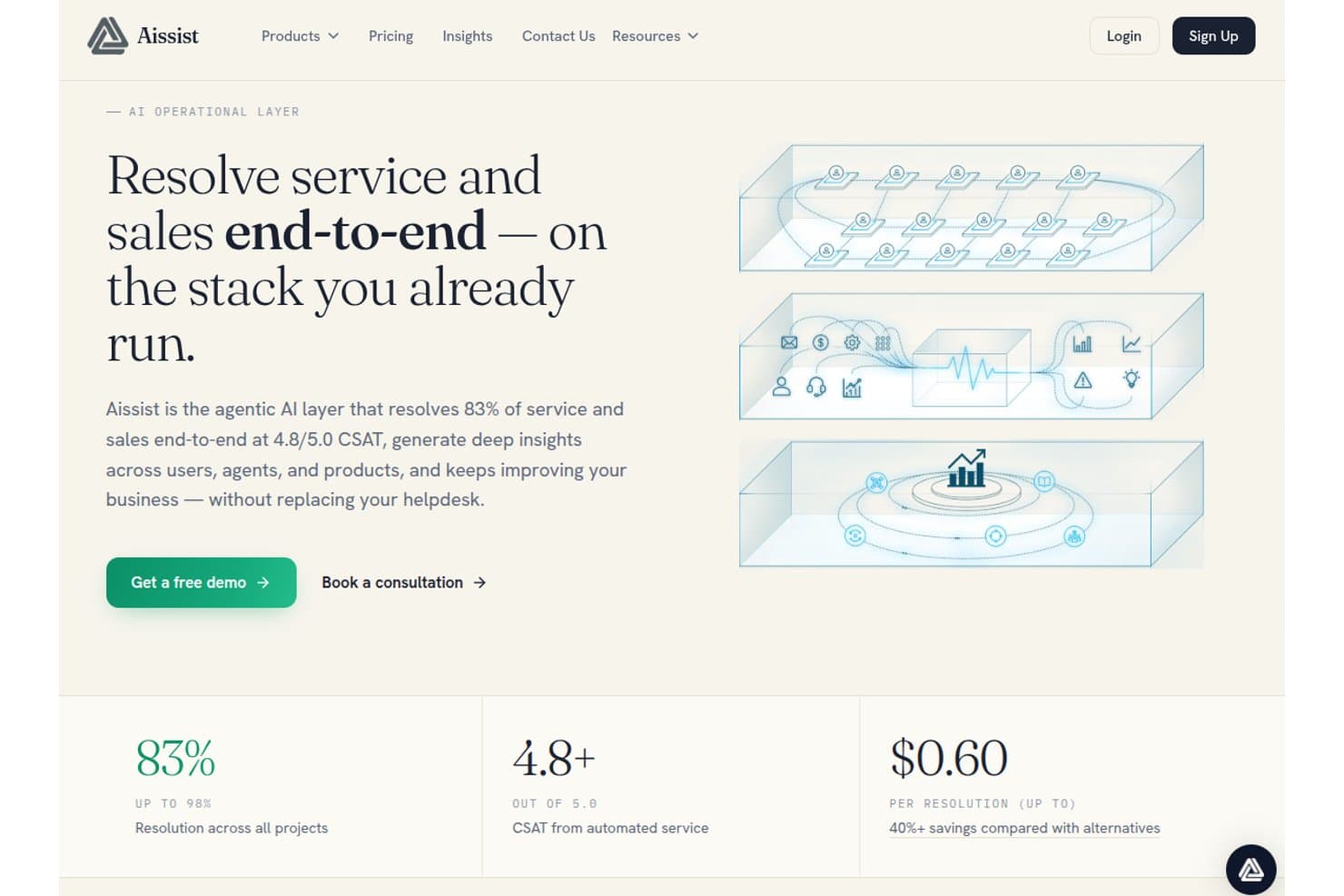
Aissist propose une couche d'IA agentique qui résout 83 % des cas service et vente de bout en bout avec un score CSAT de 4,8/5,0 pour 0,60 $ par résolution. Aissist est une plateforme d'IA multi-agents pour les équipes de service client qui déploie des agents numériques pour gérer les conversations, automatiser les flux de traitement des tickets et agir sur les helpdesks, CRM et canaux de messagerie.
À qui s'adresse Aissist ?
Aissist convient aux équipes support des entreprises en croissance qui doivent automatiser un volume élevé de tickets sans remplacer leur pile helpdesk existante.
Pourquoi j'ai choisi Aissist
J'ai sélectionné Aissist parmi les meilleurs grâce à son architecture multi-agents AgentMesh, qui va plus loin que les chatbots classiques. Là où la plupart des bots répondent à une question puis clôturent la demande, les agents numériques d'Aissist taguent les tickets, mettent à jour les dossiers et escaladent les cas dans un seul cycle automatisé. J'apprécie particulièrement le module Evolve, qui détecte les tendances dans les conversations en direct et ajuste en continu le comportement de l'IA sans intervention manuelle.
Fonctionnalités clés d'Aissist
- Analyse et rapports Pulse : Suivi des indicateurs de performance clés, des tendances et de la qualité des agents sur toutes les interactions client.
- Support multilingue : Détecte et répond automatiquement dans plus de 65 langues pour une couverture mondiale.
- Gestion omnicanale des conversations : Gère les dialogues clients par chat, email, WhatsApp, SMS et réseaux sociaux sur une seule plateforme.
- Moteur d'ingestion de connaissances : Ingère les documents d'entreprise, anciens tickets et contenus support pour des réponses d'IA contextualisées et conformes à la marque.
Intégrations Aissist
Aissist propose des intégrations natives avec Zendesk, Intercom, Salesforce, Freshdesk, Gorgias, HubSpot, Kustomer, Front, Shopify, WooCommerce et Magento, et offre une API pour des intégrations personnalisées.
Pros and Cons
Pros:
- AgentMesh gère de manière autonome les workflows en plusieurs étapes
- Auto-ajustement continu à partir des schémas de conversation en direct
- Déploiement simultané sur messagerie, email et chat
Cons:
- Le tableau de bord analytique manque de profondeur pour les grandes entreprises
- La complexité de configuration augmente avec des architectures d'agent plus importantes
Learn more about Aissist: Idéal pour l'intégration aux principales places de marché
- Essai gratuit de 14 jours
- À partir de $39/agent/mois
Visit WebsiteCustomer Rating:4.4/5
Le widget de chat eDesk permet aux clients de démarrer des conversations et d'accéder facilement à des liens d'aide. Pour les entreprises de commerce en ligne cherchant un chatbot IA pour le service client, eDesk propose une solution avec une intégration aux principales places de marché et des outils qui automatisent les tâches de support routinières tout en fournissant une assistance 24h/24 et 7j/7. Elle est conçue pour aider à gérer les conversations clients plus efficacement, améliorer le traitement des réponses et soutenir la productivité des vendeurs en ligne. En se connectant à de nombreuses plateformes, y compris les principales places de marché, eDesk aide les équipes à maintenir un support client cohérent sur plusieurs canaux.
Pourquoi j'ai choisi eDesk
J'ai choisi eDesk pour ses intégrations majeures avec les places de marché, qui aident les équipes e-commerce à gérer les conversations clients sur tous les canaux regroupés au même endroit. La plateforme automatise également les tâches courantes du service client, permettant aux équipes de traiter le support plus efficacement. Sa boîte de réception unifiée garde les messages clients organisés, tandis que l'agent IA aide à orienter les tickets et à analyser les sentiments, afin que les équipes puissent se concentrer sur les problèmes clients plus complexes.
Fonctionnalités clés d'eDesk
En plus de l'intégration avec les principales places de marché, eDesk propose :
- Chatbot 24h/24 : Fournit une assistance en temps réel sur votre boutique en ligne, garantissant que vos clients reçoivent de l'aide à tout moment.
- Informations en temps réel : Offre des analyses et des rapports pour vous aider à comprendre et à améliorer vos opérations de support.
- Outils de support avant-vente : Conçus pour engager les clients potentiels et stimuler les ventes grâce à une communication efficace.
- Gestion des retours clients : Vous aide à recueillir et analyser les retours clients pour prendre des décisions éclairées pour votre entreprise.
Intégrations eDesk
Les intégrations comprennent Amazon, eBay, WhatsApp, Facebook, Shopify, WooCommerce, Magento, BigCommerce, Linnworks et ChannelAdvisor.
Pros and Cons
Pros:
- Conçu pour traiter de gros volumes de demandes e-commerce
- Des automatisations basées sur l'IA améliorent l'efficacité des réponses
- Intègre des données de commande enrichies pour un meilleur service client
Cons:
- Principalement conçu pour l'e-commerce, moins flexible pour d'autres secteurs
- Personnalisation des rapports limitée pour des analyses complexes
Learn more about eDesk: Idéal pour une conformité stricte aux exigences de sécurité des entreprises
- Non disponible
- Tarification sur demande
Visit WebsiteCustomer Rating:4.8/5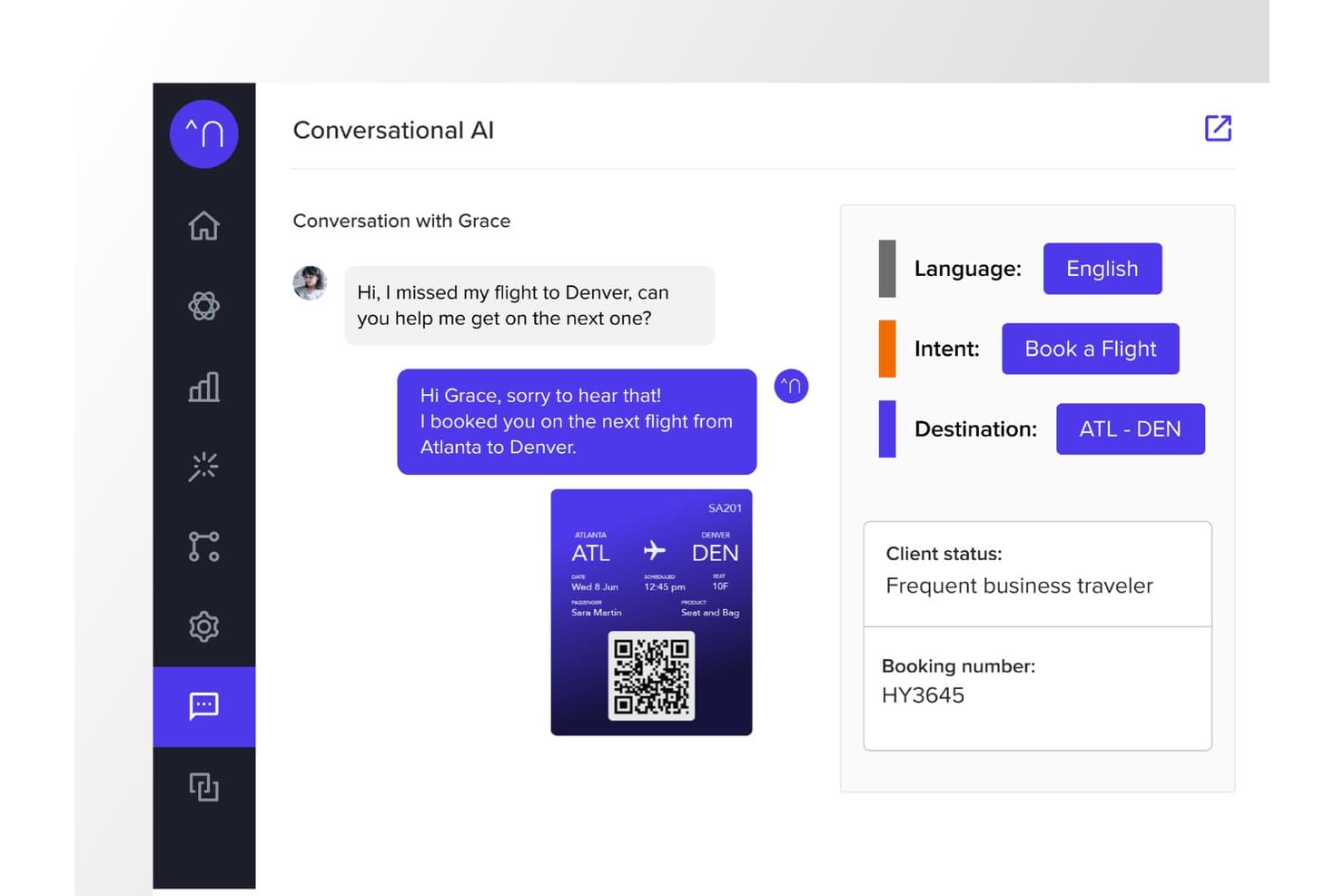
Netomi propose une interface conversationnelle alimentée par l’IA qui détecte automatiquement l’intention, la langue et la destination du client afin de réserver à nouveau, en temps réel, les vols manqués. Netomi est une plateforme d’IA agentique d’entreprise pour le service client qui associe des agents d’IA autonomes, une assistance de copilote pour les agents humains et un déploiement omnicanal sur les canaux de discussion, les e-mails, la voix, les SMS et les applications de messagerie.
À qui Netomi convient-il le mieux ?
Netomi convient particulièrement aux grandes entreprises des secteurs réglementés tels que les services financiers, les voyages, l’assurance et les télécommunications, qui gèrent des volumes élevés d’interactions.
Pourquoi j’ai choisi Netomi
J’ai choisi Netomi comme l’une des meilleures solutions parce que ses garanties de conformité en matière de sécurité vont bien au-delà d’une simple case à cocher. La plateforme détient les certifications SOC 2 Type II, ISO 27001, HIPAA et PCI DSS, avec des contrôles de gouvernance directement intégrés à l’architecture. J’apprécie particulièrement son approche de l'IA générative encadrée' : les garde-fous thématiques, les protections contre l’injection d’instructions et les contrôles de devoir de vigilance sont exécutés avant chaque action de l’IA, et non ajoutés après coup à un modèle de langage standard.
Fonctionnalités clés de Netomi
- Ingestion des connaissances en temps réel depuis plusieurs sources : Ingère et synthétise automatiquement le contenu de documents, d’URL, de fichiers et de bases de connaissances.
- Déploiement omnicanal : Fournit une assistance client sur les sites web, les applications mobiles, les e-mails, les SMS et les principaux canaux de messagerie.
- Intégrations natives avec les services d’assistance : Se connecte directement à Zendesk, Salesforce, Kustomer, ServiceNow, Genesys, NICE et à d’autres plateformes d’expérience client.
- Évaluation du niveau de confiance avec logique de repli : Attribue des niveaux de confiance aux réponses et déclenche des flux de travail de repli personnalisables lorsque les seuils de certitude ne sont pas atteints.
Intégrations de Netomi
Netomi propose des intégrations natives avec Zendesk, Salesforce, Kustomer, ServiceNow, Genesys, NICE, Five9, Amazon Connect, Cisco et LivePerson. Une API est disponible pour les intégrations personnalisées.
Pros and Cons
Pros:
- Conformité à plusieurs certifications, notamment HIPAA et PCI DSS
- Les agents d’IA autonomes gèrent les résolutions complexes en plusieurs étapes
- Les garde-fous thématiques intégrés empêchent les réponses de l’IA qui ne respectent pas la marque
Cons:
- La complexité de la mise en œuvre pose des difficultés aux petites équipes et aux équipes de taille moyenne
- Intégration autonome limitée sans assistance de niveau entreprise
Learn more about Netomi: Idéal pour le support e-commerce des marques utilisant Shopify
- Essai gratuit de 30 jours + démo gratuite disponible
- À partir de $40/mois
Visit WebsiteCustomer Rating:4.6/5
Gorgias propose une boîte de réception de support client avec les détails du ticket, le profil du client et des réponses assistées par l’IA dans une interface de service d’assistance unifiée. Gorgias est une plateforme de chatbot IA et de service d’assistance axée sur le commerce électronique, qui combine un agent conversationnel IA, une boîte de réception omnicanale et des actions de gestion des commandes pour gérer le support client sur les canaux de chat, d’e-mail, des réseaux sociaux, des SMS et de WhatsApp.
À qui Gorgias convient-il le mieux ?
Gorgias convient particulièrement aux marques de commerce électronique de taille intermédiaire utilisant Shopify, BigCommerce ou Magento, qui ont besoin d’un support client alimenté par l’IA et s’appuyant sur les données de leur boutique.
Pourquoi j’ai choisi Gorgias
Gorgias figure dans ma sélection parce que son agent IA est spécialement entraîné sur des conversations liées au commerce électronique, et non sur des données de support génériques. J’apprécie particulièrement le fait qu’il puisse annuler des commandes, appliquer des codes de réduction et gérer des abonnements directement dans un fil de discussion, sans avoir à changer d’onglet pour accéder à un outil d’administration distinct. L’assistant d’achat interagit également de manière proactive avec les acheteurs en leur proposant des recommandations de produits personnalisées, transformant ainsi une interaction de support en véritable opportunité de vente.
Fonctionnalités clés de Gorgias
- Boîte de réception omnicanale : Gérez le support par e-mail, chat, réseaux sociaux, SMS et WhatsApp depuis un espace de travail unifié.
- Intégrations natives avec les plateformes de commerce électronique : Connectez directement Shopify, BigCommerce, Magento et WooCommerce pour accéder en temps réel aux données relatives aux commandes et aux clients.
- Rapports d’attribution des revenus : Suivez les ventes générées par les interactions avec le service client et les conversations avec les agents.
- Routage automatisé des tickets : Utilisez l’intention et des règles pour attribuer automatiquement les tickets au bon agent ou au parcours d’escalade approprié.
Intégrations de Gorgias
Gorgias propose plus de 300 intégrations natives, notamment avec Shopify, BigCommerce, Magento, WooCommerce, Klaviyo, Yotpo, Attentive, Recharge et Loop Returns. Une API est disponible pour les intégrations personnalisées.
Pros and Cons
Pros:
- L’agent IA résout les tickets sans intervention humaine
- Gère les actions liées aux commandes directement dans le chat
- L’assistant d’achat proactif transforme le support en ventes
Cons:
- Valeur limitée en dehors des cas d’utilisation liés au commerce électronique
- Les rapports manquent de profondeur pour les indicateurs autres que les revenus
Learn more about Gorgias: 8Idéal pour un contrôle des agents IA de niveau entreprise
Ada
- Démo gratuite disponible
- Tarification sur demande
Visit WebsiteCustomer Rating:4.7/5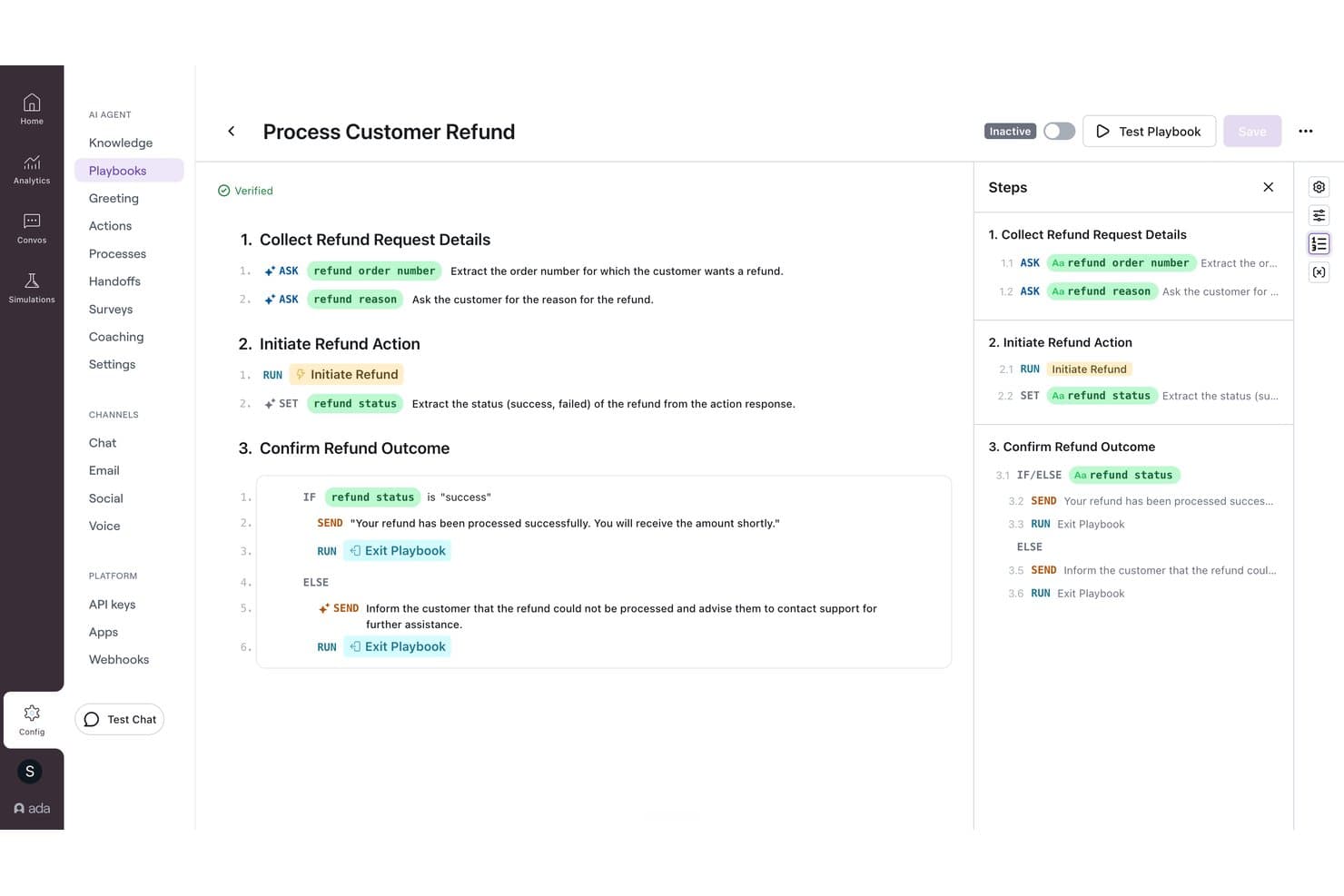
Ada propose un générateur visuel de guides qui automatise les processus de remboursement des clients grâce à une logique conditionnelle et à des actions pilotées par l’IA, étape par étape. Ada est une plateforme de service client basée sur l’IA pour les entreprises, qui déploie des agents IA sur les canaux vocaux, de chat, d’e-mail et de messagerie grâce à un moteur de raisonnement multi-LLM, avec des intégrations natives aux centres d’assistance et des fonctionnalités intégrées de transfert vers des agents humains.
À qui Ada convient-elle le mieux ?
Ada convient particulièrement aux grandes entreprises qui gèrent chaque année des centaines de milliers d’interactions avec leurs clients sur plusieurs canaux d’assistance.
Pourquoi j’ai choisi Ada
Ada figure sur ma liste restreinte en raison du niveau de contrôle qu’elle offre aux équipes CX sur le comportement de l’agent IA. J’apprécie particulièrement le système de guides opérationnels, qui permet aux responsables d’affiner les réponses de l’IA en examinant les conversations peu performantes et en appliquant des retours sans toucher au moindre code. Le moteur de raisonnement d’Ada orchestre également des modèles d’OpenAI, d’Anthropic et d’Amazon Bedrock, avec des accords de conservation nulle des données auprès de tous les fournisseurs, ce qui est essentiel lors du traitement de données clients sensibles à grande échelle.
Principales fonctionnalités d’Ada
- Déploiement omnicanal : Configurez des agents IA sur les canaux vocaux, de chat, d’e-mail, de SMS, WhatsApp, Messenger et intégrés aux applications depuis une plateforme unique.
- Ingestion via l’API de connaissances : Intégrez vos propres systèmes de documentation à l’aide de l’API de connaissances pour récupérer des réponses dynamiques.
- Conformité aux exigences des entreprises : Inclut les certifications SOC 2, GDPR, HIPAA et PCI DSS pour accompagner les secteurs réglementés.
- Contrôles d’accès basés sur les rôles : Gérez les autorisations des agents, administrateurs et réviseurs afin d’assurer une gestion sécurisée et évolutive des équipes.
Intégrations d’Ada
Ada propose des intégrations natives avec Zendesk, Salesforce, ServiceNow, Freshworks, Genesys, Dixa, Gladly, Kustomer, NICE CXone, Twilio Flex et Amazon Connect. Une API est disponible pour les intégrations personnalisées.
Pros and Cons
Pros:
- Contrôle précis du comportement de l’IA grâce aux guides opérationnels
- Moteur multi-LLM avec conservation nulle des données
- Déploiement omnicanal sur les canaux vocaux et de messagerie
Cons:
- Configuration initiale complexe pour les petites équipes d’assistance
- La granularité des rapports est en retrait par rapport à certains concurrents
Learn more about Ada: Idéal pour la voix et la transcription des appels optimisées par l’IA
- Essai gratuit disponible
- À partir de $30/licence/mois (facturé annuellement)
Visit WebsiteCustomer Rating:4.3/5
Aircall propose une boîte de réception unifiée avec gestion des appels en temps réel, fiches d’informations CRM et résumés de conversations optimisés par l’IA pour les équipes de support. Aircall est une plateforme de centre d’appels basée sur le cloud qui combine des agents vocaux IA, des agents de messagerie IA pour les SMS et WhatsApp, la transcription des appels et l’analyse intelligente des conversations en temps réel pour les équipes de service client.
À qui Aircall convient-il le mieux ?
Aircall convient particulièrement aux équipes de centres de contacts et aux opérations de support client où la voix est le principal canal de service.
Pourquoi j’ai choisi Aircall
Aircall figure dans ma sélection parce que son IA gère les conversations vocales de bout en bout. J’apprécie le fait que la transcription des appels atteigne au moins 85 % de précision et qu’AI Assist fasse automatiquement ressortir les sujets clés, le sentiment et les ratios parole-écoute après chaque appel, sans nécessiter de vérification manuelle. Les agents vocaux IA peuvent résoudre de manière autonome les questions entrantes fréquentes et transférer les appelants à un agent en direct, avec le contexte complet de la conversation déjà capturé.
Principales fonctionnalités d’Aircall
- Routage intelligent des appels : dirige les appels vers les agents en fonction de leurs compétences, de leur disponibilité ou de l’historique client au sein d’équipes réparties.
- Intégration de Salesforce Service Cloud Voice : intègre la voix, la transcription et les résumés d’appels générés par l’IA dans la console Salesforce.
- Analytics+ : offre un historique illimité des appels, un filtrage avancé et une surveillance des appels en direct pour les responsables.
- Applications de téléphonie logicielle : fournit des applications pour ordinateur, le web, Android et iOS afin que les agents puissent gérer les appels depuis n’importe quel appareil.
Intégrations d’Aircall
Aircall propose plus de 250 intégrations natives, notamment avec Salesforce, HubSpot, Zendesk, Intercom, Freshdesk, Microsoft Teams, Shopify, Slack, Pipedrive et Zoho CRM, ainsi qu’une API pour les intégrations personnalisées.
Pros and Cons
Pros:
- La précision de la transcription IA atteint régulièrement 85 %
- Les agents vocaux IA résolvent de manière autonome les appels entrants
- La détection du sentiment en temps réel signale les appelants présentant un risque
Cons:
- IA limitée pour le chat web et la messagerie
- Ne constitue pas un chatbot autonome pour le libre-service
 10Idéal pour un déploiement rapide
My AskAI
- Essai gratuit de 30 jours
- À partir de 199 $/mois
Visit WebsiteCustomer Rating:4.5/5
My AskAI propose une fonctionnalité d’auto-apprentissage qui génère automatiquement des articles avec l’IA et permet aux utilisateurs de contrôler le ton et le statut de publication depuis un seul panneau de paramètres. My AskAI est un agent de service client basé sur l’IA qui se superpose à votre centre d’assistance existant, en intégrant les connaissances provenant de documents, d’URL et d’anciens tickets afin de traiter et de gérer automatiquement les conversations entrantes du support.
À qui My AskAI convient-il le mieux ?
C’est une solution particulièrement adaptée aux équipes de support de petites et moyennes entreprises SaaS et de commerce électronique qui souhaitent réduire le volume de tickets grâce à l’IA sans remplacer leur centre d’assistance actuel.
Pourquoi ai-je choisi My AskAI ?
My AskAI figure sur ma liste restreinte principalement parce qu’il est réellement très rapide à mettre en service. Je le connecte à un compte Zendesk ou Intercom existant, je l’oriente vers l’URL d’un centre d’aide, et il rédige déjà de véritables réponses aux tickets en moins d’une heure, sans aucun travail de développement. Ce que j’apprécie particulièrement, c’est le mode de brouillon de réponse, qui permet à l’IA de suggérer des réponses que les agents vérifient avant leur envoi. Les équipes peuvent ainsi gagner progressivement en confiance avant de passer à des réponses entièrement autonomes.
Fonctionnalités clés de My AskAI
- Intégration de la base de connaissances : Se connecte aux centres d’aide, à Google Drive, à Notion et aux URL afin d’appuyer les réponses sur le contenu vérifié de l’entreprise.
- Déploiement multicanal : Fonctionne sur les widgets web, par e-mail et sur Shopify, et s’intègre directement aux principales plateformes de centres d’assistance.
- Améliorations par auto-apprentissage : Analyse les tickets transmis à un agent et les réponses humaines afin d’ajuster automatiquement les réponses futures.
- Analyse des conversations : Met en évidence, dans le tableau de bord, des informations sur la réduction du volume de tickets, les questions fréquentes et les indicateurs de performance.
Intégrations de My AskAI
My AskAI propose des intégrations natives avec Zendesk, Intercom, Gorgias, Freshdesk, HubSpot et Freshchat.
Pros and Cons
Pros:
- Documentation d’assistance détaillée pour la prise en main
- Le mode de brouillon de réponse permet de gagner progressivement la confiance des agents
- Met en évidence les questions sans réponse afin d’analyser les lacunes de connaissances
Cons:
- Fonctionnalités limitées de création de robots pour les parcours conversationnels complexes
- La profondeur des analyses est inférieure à celle des concurrents destinés aux grandes entreprises
Learn more about My AskAI:
Autres chatbots IA pour le service client
Voici d’autres plateformes d’IA conversationnelle qui n’ont pas été retenues dans ma sélection des meilleurs logiciels de chatbot, mais qui méritent tout de même un examen plus approfondi :
- 11Comm100Idéal pour l’automatisation par IA dans les secteurs réglementés
- 12ChatbaseIdéal pour les agents IA entraînés sur vos propres données
- 13Gradient LabsIdéal pour connecter des chatbots à des données privées
- 14CrafterQIdéal pour la gestion des réponses basée sur le ressenti
- 15WeavIdéal pour intégrer des chatbots dans des applications mobiles
- 16Robin Autonomous ITIdéal pour automatiser les flux de résolution des tickets
- 17StonlyIdéal pour le partage personnalisé des connaissances
- 18HiverIdéal pour l'automatisation pilotée par l'IA
- 19ZendeskMeilleur outil avec automatisation de flux de travail sans code
- 20HoratioIdéal pour l’assistance client multilingue
- 21Zoho DeskIdéal pour des interactions clients pilotées par l'IA
- 22Zoho SalesIQIdéal pour des analyses approfondies du suivi des visiteurs
- 23TidioIdéal pour automatiser les demandes clients
- 24ConversicaIdéal pour la résolution immédiate des problèmes clients
- 25FrontIdéal avec assurance qualité automatisée
- 26monday serviceIdéal pour des tableaux de bord de service personnalisables
- 27IntercomIdéal pour les demandes clients avancées traitées par l'IA
- 28KommunicateIdéal pour la prise en charge multilingue
- 29CoSupport AIIdéal pour automatiser les demandes clients
- 30ChatfuelLe meilleur outil pour la qualification des prospects axée sur WhatsApp
- 31Assembled AIIdéal pour le routage intelligent des cas
- 32DriftIdéal pour l'engagement client en temps réel
- 33ForethoughtIdéal pour la gestion des demandes clients
- 34GuruIdéal pour un accès aux connaissances piloté par l’IA
- 35IBM Watson AssistantIdéal pour comprendre le contexte conversationnel
- 36UshurIdéal pour des interactions clients en temps réel
- 37QuidgetIdéal pour automatiser les demandes récurrentes
- 38SAAS FirstIdéal pour un support client IA disponible 24h/24
- 39CompassIdéal pour l'assistance chat IA en temps réel
- 40EvlyIdéal pour la configuration personnalisée de la voix de marque
Avis sur les logiciels d’expérience client associés
Si vous n’avez toujours pas trouvé ce que vous cherchez ici, consultez ces outils associés de gestion de l’expérience client que nous avons testés et évalués.
- Logiciels de service client
- Logiciels de centre d’assistance
- Logiciels de centre d’appels
- Plateformes de messagerie client
- Plateformes d’expérience numérique
- Outils d’analyse des sentiments
Qu’est-ce qu’un chatbot IA pour le service client ?
Un chatbot IA pour le service client est un logiciel qui utilise le traitement automatique du langage naturel et les grands modèles de langage pour automatiser l’assistance sur les chats web, les applications mobiles et les canaux de messagerie. Ces systèmes se connectent directement aux bases de données principales et aux outils de gestion de la relation client afin de comprendre l’intention des utilisateurs et de répondre aux questions en plusieurs étapes.
Contrairement aux outils traditionnels fondés sur des règles, les agents IA modernes analysent le contexte pour gérer des flux de travail tels que la vérification de l’état des comptes ou le traitement des changements de forfait. Lorsqu’une demande dépasse les paramètres définis, le logiciel transfère l’historique complet de la conversation directement à votre équipe d’assistance.
Comment choisir un chatbot IA pour le service client
Pour choisir un chatbot IA, il faut évaluer la capacité du logiciel à se connecter à votre environnement technologique et à gérer les opérations d’assistance. Concentrez-vous sur les fonctionnalités qui influent sur la rapidité de résolution et l’efficacité de l’équipe.
| Facteurs clés | Éléments à prendre en compte |
|---|---|
| Facteurs clésObjectifs commerciaux | Éléments à prendre en compteRéponses rapides : Choisissez un logiciel doté de synchronisations directes avec la base de connaissances, qui intègrent les documents d’aide afin de répondre aux FAQ répétitives. Exécution de tâches complexes : Sélectionnez des outils dotés de connexions webhook capables de mettre à jour les fiches des comptes, de traiter les remboursements ou de modifier les formules d’abonnement. Assistance aux utilisateurs du monde entier : Choisissez des plateformes proposant la traduction automatique, le routage multifuseau horaire et une couverture des échanges par chat et par e-mail. |
| Facteurs clésIntégrations et importation de la base de connaissances | Éléments à prendre en compteVérifiez les connexions directes à votre CRM, à vos outils de gestion des tickets et à vos bases de données internes. Le robot doit intégrer les articles d’aide et les journaux d’API afin d’exécuter des actions telles que les mises à jour de formule. |
| Facteurs clésConfiguration et maintenance | Éléments à prendre en compteÉvaluez les efforts nécessaires pour entraîner les règles du modèle, mettre à jour les sources de connaissances et gérer les performances continues sans ressources d’ingénierie. |
| Facteurs clésRoutage des conversations | Éléments à prendre en compteVérifiez comment le système traite les demandes complexes. Lors des escalades, le robot doit transmettre l’intégralité du contexte de la conversation aux agents du support en direct. |
| Facteurs clésSécurité et conformité | Éléments à prendre en compteAssurez-vous que la plateforme respecte des normes telles que SOC 2 et le RGPD. Vous devez protéger les données des clients lors des interactions automatisées. |
Cómo evalúo los asistentes de programación con IA
Cualquier herramienta puede sugerir una fecha de vencimiento; yo busco IA que reprograme las dependencias cuando un plazo se retrasa y redistribuya las cargas de trabajo sin esfuerzo manual. Divido mi evaluación en dos capas: la funcionalidad básica que una herramienta necesita para calificar y los factores diferenciadores que distinguen las mejores opciones.
Funcionalidad Básica (Requisitos Imprescindibles Para Esta Lista)
Al seleccionar las herramientas para mi lista, califico cada una en una escala del 0 (no ofrece la funcionalidad) al 5 (destaca en esta área) para cada funcionalidad básica enumerada a continuación. Luego, calculo la puntuación total de la herramienta en un porcentaje. Cada herramienta debe alcanzar una puntuación total mínima del 65% para ser considerada para inclusión.
- Programación automática impulsada por IA: Busco herramientas que coloquen tareas y reuniones en el calendario de manera autónoma, considerando prioridades, fechas límite y dependencias en lugar de solo sugerir un horario.
- Reprogramación dinámica: Cuando una tarea predecesora se retrasa, verifico si el trabajo y las reuniones posteriores se ajustan en cascada automáticamente o si un PM debe arrastrar manualmente cada elemento.
- Inteligencia sobre Carga de Trabajo y Capacidad: Evalúo qué tan bien la herramienta detecta la sobreasignación —como señalar cuando un desarrollador está reservado al 140% antes de una fecha de entrega de sprint— y si sugiere reasignaciones.
- Integraciones con Calendario y Herramientas de Gestión de Proyectos: Aquí importa la sincronización bidireccional con Google Calendar, Outlook y plataformas como Jira o Asana. Busco flujo de datos en tiempo real, no sincronizaciones nocturnas por lotes.
- Pronóstico predictivo de fechas límite: Verifico si la IA proyecta fechas de finalización realistas usando velocidad y patrones históricos, y si identifica hitos en riesgo con suficiente antelación para actuar.
- Ingreso de tareas en lenguaje natural: Evalúo si puedes teclear o decir algo como "programar una revisión de diseño con el equipo frontend el próximo martes" y obtener una tarea utilizable con el responsable y la fecha correctos.
Una vez tengo la lista de herramientas que cumplen los criterios, considero qué distingue a cada plataforma.
Factores diferenciadores (Qué destaca a cada proveedor)
Así es como comparo y contrasto a los diferentes proveedores:
Características resaltantes
La simulación de escenarios es un gran diferenciador; busco herramientas que te permitan modelar una entrega retrasada o alcance agregado y previsualizar cómo cambia el resto del cronograma antes de comprometerte. La priorización entre proyectos también es importante cuando los PMs gestionan múltiples flujos de trabajo. Las mejores herramientas destacan qué debe abordar cada persona a continuación en todos los proyectos activos, no solo en uno. La protección del tiempo de concentración completa esto permitiendo que la IA bloquee espacios de trabajo profundo alrededor de entregables clave y rechace automáticamente la acumulación excesiva de reuniones.
Más allá de las funcionalidades
La confianza y la explicabilidad de la IA son muy importantes aquí: quiero ver por qué la herramienta reprogramó una tarea o reasignó trabajo, no solo que lo hizo. La privacidad de los datos es igualmente relevante, ya que estas herramientas procesan datos de calendario, tareas y reuniones. Reviso si los proveedores ofrecen políticas claras sobre la posibilidad de no entrenar modelos y opciones sobre la residencia de datos. El tiempo hasta obtener valor también influye en mi evaluación. Una herramienta que necesita semanas de datos históricos antes de que su IA ofrezca sugerencias útiles es más difícil de recomendar que una que agrega valor en pocos días tras conectar tus tableros de proyecto.
Tendances des chatbots IA pour le service client
Les dernières tendances en matière de technologie des chatbots IA sont motivées par la nécessité de résoudre des problèmes spécifiques dans les opérations de service client. Ci-dessous, j’examine les principales tendances qui façonnent l’avenir des chatbots IA.
- Réponses émotionnellement intelligentes : Les capacités avancées de traitement automatique du langage naturel (NLP) permettent aux chatbots de comprendre le ton émotionnel des demandes des clients et d’y répondre. Cette évolution répond au besoin d’interactions avec les clients plus empathiques et adaptées au contexte, ce qui entraîne des taux de satisfaction plus élevés.
- Interfaces conversationnelles compatibles avec la voix : L’intégration de la reconnaissance vocale permet aux utilisateurs d’interagir avec les chatbots en utilisant le langage naturel, rendant la technologie plus accessible et en accord avec l’utilisation des appareils à commande vocale.
- Éthique de l’IA et atténuation des biais : Les pratiques éthiques en matière d’IA peuvent contrebalancer les biais dans les interactions avec les chatbots. Cela reflète une prise de conscience croissante des implications éthiques de l’IA et une volonté d’y répondre, afin de garantir que les chatbots traitent tous les utilisateurs de manière équitable et sans préjugés.
- Hyperautomatisation des processus de service client : Au-delà des simples demandes, les chatbots IA sont utilisés pour automatiser des flux de travail complexes du service client. Cela inclut l’intégration aux systèmes principaux afin d’effectuer des tâches telles que le traitement des commandes, la planification des rendez-vous et la résolution des problèmes sans intervention humaine.
- Apprentissage et adaptation continus : Les chatbots capables d’apprendre de chaque interaction et d’adapter leurs réponses au fil du temps sont très demandés. Cette fonctionnalité garantit que le service fourni par les chatbots devient plus précis et plus efficace, répondant ainsi au besoin d’amélioration continue de la qualité du service client.
Fonctionnalités des chatbots IA pour le service client
Lorsque vous choisissez un chatbot IA pour le service client, surveillez les principales fonctionnalités suivantes :
- Disponibilité 24 h/24 et 7 j/7 : Répondez aux demandes des clients à toute heure du jour ou de la nuit, afin qu’ils bénéficient toujours d’une assistance, même pendant les jours fériés ou en dehors des heures d’ouverture.
- Assistance omnicanale : Interagissez avec les utilisateurs sur plusieurs plateformes telles que les sites web, les réseaux sociaux et les applications de messagerie, afin de rejoindre les clients là où ils préfèrent échanger.
- Temps de réponse instantané : Fournissez des réponses rapides en temps réel aux questions courantes, en aidant les clients à résoudre leurs problèmes sans les faire attendre comme auparavant.
- Escalade fluide : Transférez facilement les conversations à des agents humains lorsque les situations se compliquent, afin que les clients ne se sentent jamais bloqués à parler à un robot lorsqu’ils ont besoin d’une personne réelle.
- Flux de travail personnalisables : Adaptez les parcours conversationnels aux services uniques de votre entreprise, afin de personnaliser l’approche du chatbot et d’améliorer l’expérience utilisateur.
- Interface conviviale : Offrez à votre équipe comme à vos clients une expérience intuitive et facile à utiliser, qui ne nécessite pas un doctorat en technologie.
- Gestion sécurisée des données : Protégez les données des clients grâce à des fonctionnalités de sécurité intégrées telles que le chiffrement et le respect des normes de confidentialité, afin de préserver les informations de chacun.
- Analyses détaillées : Suivez des indicateurs clés tels que les temps de réponse, les scores de satisfaction client et les volumes de conversations, afin d’améliorer continuellement votre service.
Fonctionnalités courantes des chatbots IA pour le service client
Au-delà des fonctionnalités standard des chatbots IA pour le service client mentionnées ci-dessus, bon nombre de ces solutions intègrent l’IA avec des fonctionnalités telles que :
- Traitement du langage naturel : Comprendre le langage conversationnel afin que le chatbot puisse interpréter les questions des clients, même lorsqu’elles sont formulées de manière originale ou inattendue.
- Analyse des sentiments : Détecter les émotions des clients en temps réel, afin que le chatbot puisse adapter son ton ou faire remonter les problèmes en fonction de leur état d’esprit.
- Suggestions prédictives : Anticiper les besoins des clients en fonction de leur comportement et de leurs conversations précédentes, en leur fournissant une assistance pertinente sans qu’ils aient à la demander.
- Apprentissage et amélioration automatisés : Apprendre en continu de chaque interaction afin que le chatbot devienne plus intelligent et plus efficace pour répondre aux questions au fil du temps.
- Conservation du contexte : Se souvenir des détails des interactions précédentes afin que les clients n’aient pas à se répéter et puissent reprendre les conversations là où ils les avaient laissées.
Avantages des chatbots basés sur l’IA pour le service client
En automatisant les interactions et en fournissant des réponses rapides et intelligentes, les chatbots basés sur l’IA ont transformé la manière dont les entreprises abordent le service client, ainsi que la façon dont les clients interagissent avec elles. Voici cinq avantages principaux de la mise en œuvre de cette technologie :
- Réponse instantanée : Ils fournissent des réponses en temps réel aux demandes des clients, réduisant considérablement le temps d’attente avant d’obtenir une réponse et améliorant la satisfaction globale.
- Évolutivité : Les chatbots basés sur l’IA peuvent traiter un nombre croissant de demandes sans nécessiter de ressources supplémentaires, permettant aux entreprises de gérer efficacement les pics de sollicitations du service client.
- Rentabilité : En automatisant les demandes courantes, les chatbots réduisent la charge de travail des agents humains et diminuent les coûts opérationnels liés à l’assistance client.
- Expériences personnalisées : Les chatbots basés sur l’IA peuvent adapter les conversations en fonction des données des clients, en proposant des recommandations et une assistance personnalisées qui améliorent leur parcours.
- Réduction des erreurs humaines : L’automatisation des réponses aux questions fréquemment posées et aux demandes courantes accélère non seulement le service, mais réduit également le risque de transmettre des informations incorrectes aux clients.
Les chatbots basés sur l’IA pour le service client représentent une avancée majeure vers la création d’opérations commerciales plus dynamiques, plus efficaces et davantage centrées sur le client. Grâce à leur capacité à s’adapter, à apprendre et à apporter de la valeur à chaque point de contact, ces chatbots ne sont pas une simple tendance, mais un élément fondamental des stratégies modernes de service client.
Coûts et tarifs des chatbots basés sur l’IA pour le service client
Le marché des chatbots basés sur l’IA pour le service client propose différentes formules afin de répondre aux besoins et aux budgets variés des entreprises. Nous présentons ici les formules courantes ainsi que leurs tarifs pour vous aider à prendre une décision éclairée.
| Type de formule | Prix moyen | Fonctionnalités courantes |
|---|---|---|
| Type de formuleGratuite | Prix moyen$0 | Fonctionnalités courantesFonctionnalités de chatbot de base, Interactions limitées par mois, Assistance communautaire, Analyses de base |
| Type de formuleDébutant | Prix moyen$20 - $50/ mois | Fonctionnalités courantesFonctionnalités de base plus : modèles de chatbot personnalisables, davantage d’interactions par mois, assistance par e-mail |
| Type de formuleProfessionnelle | Prix moyen$100 - $500/ mois | Fonctionnalités courantesFonctionnalités de la formule Débutant plus : possibilités d’intégration, analyses avancées, assistance prioritaire |
| Type de formuleEntreprise | Prix moyen$1000+/mois | Fonctionnalités courantesFonctionnalités de la formule Professionnelle plus : options de développement personnalisées, entraînement du modèle d’IA, assistance 24 h/24 et 7 j/7, interactions illimitées |
Chaque formule répond à différentes étapes de la croissance d’une entreprise, de celles qui découvrent les solutions de chatbot basées sur l’IA aux grandes entreprises nécessitant des fonctionnalités sophistiquées et conçues sur mesure. Lors du choix d’une formule, tenez compte non seulement des besoins actuels de votre entreprise, mais aussi de sa croissance future, afin de vous assurer que la solution retenue puisse évoluer à mesure que les exigences de votre service client changent.
FAQ sur le chatbot IA pour le service client
Voici les réponses aux questions que je reçois le plus souvent sur l’IA, les meilleurs chatbots IA et le service client en général.
Comment choisir le chatbot IA adapté à mes canaux d’assistance ?
Commencez par répertorier vos canaux d’assistance actuels (chat, e-mail, réseaux sociaux) et les types de demandes reçues. Recherchez des chatbots IA compatibles avec vos canaux et capables de s’intégrer à votre CRM ou à votre service d’assistance. Évaluez les SLA des fournisseurs, la prise en charge multilingue et la flexibilité du générateur de flux. Demandez des études de cas sectorielles plutôt que des démonstrations génériques, et vérifiez la conformité à des normes comme le GDPR et la loi HIPAA afin de protéger les données des clients.
Quelles intégrations dois-je rechercher dans les chatbots de service client ?
Donnez la priorité aux intégrations d’API avec votre CRM, votre service d’assistance, votre chat en direct et votre base de connaissances. Vérifiez également la présence d’une boîte de réception partagée, d’un agenda, d’un système de gestion des tickets et de connexions avec les plateformes de commerce électronique. Une intégration fluide permet à vos agents IA de suivre une demande de suivi de commande, de personnaliser les interactions et d’automatiser efficacement les flux de travail sans difficulté supplémentaire pour votre équipe.
Comment m’assurer que mon chatbot IA offre des expériences client personnalisées ?
Entraînez vos chatbots dotés d’IA à l’aide des données et des retours de votre CRM. Créez des bibliothèques d’intentions détaillées avec la compréhension du langage naturel (NLU) et le traitement automatique du langage naturel afin d’établir des recommandations de produits en fonction de l’historique des achats. Examinez régulièrement les transcriptions des conversations avec le robot pour affiner les réponses. L’IA conversationnelle avancée reconnaît les clients récurrents sur les applications de messagerie afin d’adapter les salutations et de proposer une assistance pertinente.
Combien de temps faut-il pour mettre en œuvre un chatbot IA dans un environnement de service client classique ?
La plupart des mises en œuvre de chatbots IA prennent de 2 à 8 semaines, selon le volume de demandes d’assistance et les besoins d’intégration. Les robots de FAQ simples peuvent être mis en service en quelques jours, tandis que les déploiements complexes et multicanaux peuvent nécessiter des tests et une phase d’entraînement. Impliquez vos équipes CX et informatiques dès le début pour accélérer l’intégration et réduire les imprévus.
En quoi les chatbots fondés sur l’IA et l’apprentissage automatique diffèrent-ils des chatbots basés sur des règles ?
Les chatbots IA utilisent le traitement automatique du langage naturel et l’apprentissage automatique pour comprendre les demandes des clients et y répondre, même lorsque les questions sont formulées de nouvelles manières. Les robots basés sur des règles suivent des arbres de décision prédéfinis et ne reconnaissent que des mots-clés ou des expressions spécifiques. Pour les responsables de l’expérience client, les chatbots IA gèrent mieux la variété, tandis que les robots basés sur des règles sont plus simples, mais moins flexibles.
Comment mesurer le ROI de l’utilisation d’un chatbot fondé sur l’IA pour le service client ?
Mesurez le ROI en suivant la réduction du volume de tickets d’assistance, la diminution des délais de réponse et la charge de travail des agents avant et après le déploiement du chatbot. Mesurez également la satisfaction client et les scores NPS. Utilisez les économies réalisées (moins d’agents, temps de traitement réduit) et l’amélioration de la fidélisation comme principaux indicateurs financiers pour étayer votre analyse de rentabilité.
Comment créer un chatbot pour le service client ?
Pour créer un chatbot de service client destiné aux grandes entreprises, commencez par connecter votre CRM et vos bases de connaissances à une plateforme d’IA conversationnelle de niveau entreprise. Cartographiez ensuite les flux de travail correspondant aux intentions client à fort volume et définissez des règles de secours strictes pour orienter les demandes complexes vers des agents. Enfin, testez la précision des réponses par rapport aux intentions, établissez des paramètres de sécurité pour la confidentialité des données et déployez le chatbot sur vos principaux canaux numériques.
Puis-je utiliser ChatGPT pour le service client ?
Oui, vous pouvez utiliser l’API OpenAI ou des instances LLM d’entreprise pour alimenter votre environnement de service client, à condition de les connecter à vos données métier propriétaires grâce à la génération augmentée par récupération (RAG). Toutefois, la version grand public de ChatGPT ne dispose pas d’intégrations en temps réel avec vos bases de données et vos systèmes de gestion des tickets, ce qui crée des risques pour la sécurité des données. Sans garde-fous de sécurité stricts, les sorties non contrôlées des LLM peuvent également générer des hallucinations, entraîner des informations de compte inexactes et nuire à la confiance envers la marque.
Comment les chatbots IA sont-ils utilisés dans le service client ?
Les équipes CX déploient des chatbots IA pour résoudre les tickets courants de niveau 1, traiter les demandes concernant le solde des comptes et guider les clients dans le dépannage en libre-service, 24 heures sur 24. Les mises en œuvre avancées utilisent l’analyse des sentiments pour détecter les clients mécontents et transférer immédiatement les comptes prioritaires vers des agents en direct. Ces systèmes résument également le contexte des tickets précédents pour les représentants humains, réduisant ainsi le temps moyen de traitement dans les centres de contact omnicanaux.