

Le 10 migliori alternative a OpenPhone per piccoli team nel 2026

Elenco delle alternative a OpenPhone


Le migliori alternative a OpenPhone (ora Quo) offrono un sistema telefonico virtuale affidabile, integrazioni flessibili e una gestione semplice dei numeri per supportare le tue soluzioni di comunicazione. Se stai cercando alternative a OpenPhone, come Grasshopper o Google Voice, probabilmente hai bisogno di un servizio VoIP adatto al tuo flusso di lavoro, in grado di crescere insieme al tuo team e di offrire strumenti che potrebbero mancare in OpenPhone. Scegliere il software giusto può aiutarti a gestire elevati volumi di chiamate, a connetterti con i clienti attraverso diversi canali e a mantenere operative le tue attività senza intoppi. In questa guida troverai un elenco accuratamente selezionato delle migliori alternative, con confronti chiari che ti aiuteranno a prendere una decisione consapevole per la tua azienda nel 2026.
Che cos'è OpenPhone?
OpenPhone è una soluzione software VoIP intuitiva che offre numeri di telefono aziendali, funzioni di gestione delle chiamate e messaggistica tramite una piattaforma basata sul cloud. Consente ai team di effettuare e ricevere chiamate, inviare messaggi di testo e gestire i contatti da qualsiasi dispositivo. OpenPhone è progettato per le aziende che necessitano di un servizio telefonico flessibile, di una configurazione semplice e dell'integrazione con altri software aziendali. È apprezzato da imprenditori, professionisti autonomi e team da remoto alla ricerca di funzionalità moderne.
Tabella di confronto delle alternative a OpenPhone
Questa tabella di confronto riassume i dettagli dei prezzi delle mie migliori alternative a OpenPhone:
| Tool | Best For | Trial Info | Price | ||
|---|---|---|---|---|---|
| 1 | Ideale per strumenti di analisi e reportistica | Demo gratuita disponibile | Da $15/utente/mese (fatturato annualmente) | Website | |
| 2 | Ideale per i team di assistenza Shopify su un unico hub telefonico | Prova gratuita disponibile | A partire da $60/mese | Website | |
| 3 | Ideal para llamadas empresariales y colaboración | Demostración gratuita disponible | Desde $15/usuario/mes (facturado anualmente) | Website | |
| 4 | Ideale per la disponibilità di numeri internazionali | Prova gratuita di 7 giorni + demo gratuita disponibile | Da $15/utente/mese (fatturazione annuale) | Website | |
| 5 | Ideale per la trascrizione automatica delle chiamate con intelligenza artificiale | Prova gratuita di 14 giorni + demo gratuita | Da $80/utente/mese (fatturazione annuale) | Website | |
| 6 | Ideale per scalabilità di livello aziendale | Demo gratuita E prova gratuita di 14 giorni | Da $54/organizer/mese (fatturato annualmente) | Website | |
| 7 | Ideale per automazione SMS e voce | Prova gratuita di 14 giorni + demo gratuita | Da $29/utente/mese (fatturazione annuale) | Website | |
| 8 | Ideale per la gestione unificata dello spazio di lavoro | Demo gratuita disponibile | Da $15/utente/mese | Website | |
| 9 | Ideale per il supporto ticketing omnicanale | Prova gratuita di 14 giorni disponibile | Da $19/agente/mese (fatturazione annuale) | Website | |
| 10 | Ideale per approfondimenti sulle conversazioni tramite IA | Non disponibile | Da $59.99/mese | Website |
Perché fidarsi dei nostri consigli sui software
Il nostro team testa e recensisce software dal 2012. In quanto leader CX noi stessi, sappiamo quanto sia difficile — e importante — scegliere il software giusto.
Per questa guida, abbiamo valutato gli strumenti attraverso test pratici e ricerche indipendenti, assegnando un punteggio agli strumenti in base ai nostri criteri di selezione.
Le nostre recensioni riflettono il nostro giudizio editoriale umano, non un discorso di vendita.
Recensioni delle alternative a OpenPhone
Di seguito sono riportati i miei riepiloghi dettagliati delle migliori alternative a OpenPhone incluse nel mio elenco. Le mie recensioni offrono una panoramica dettagliata delle funzionalità, delle integrazioni e dei casi d’uso migliori di ciascun software, per aiutarti a trovare quello più adatto a te.

Nextiva
Ideale per strumenti di analisi e reportistica
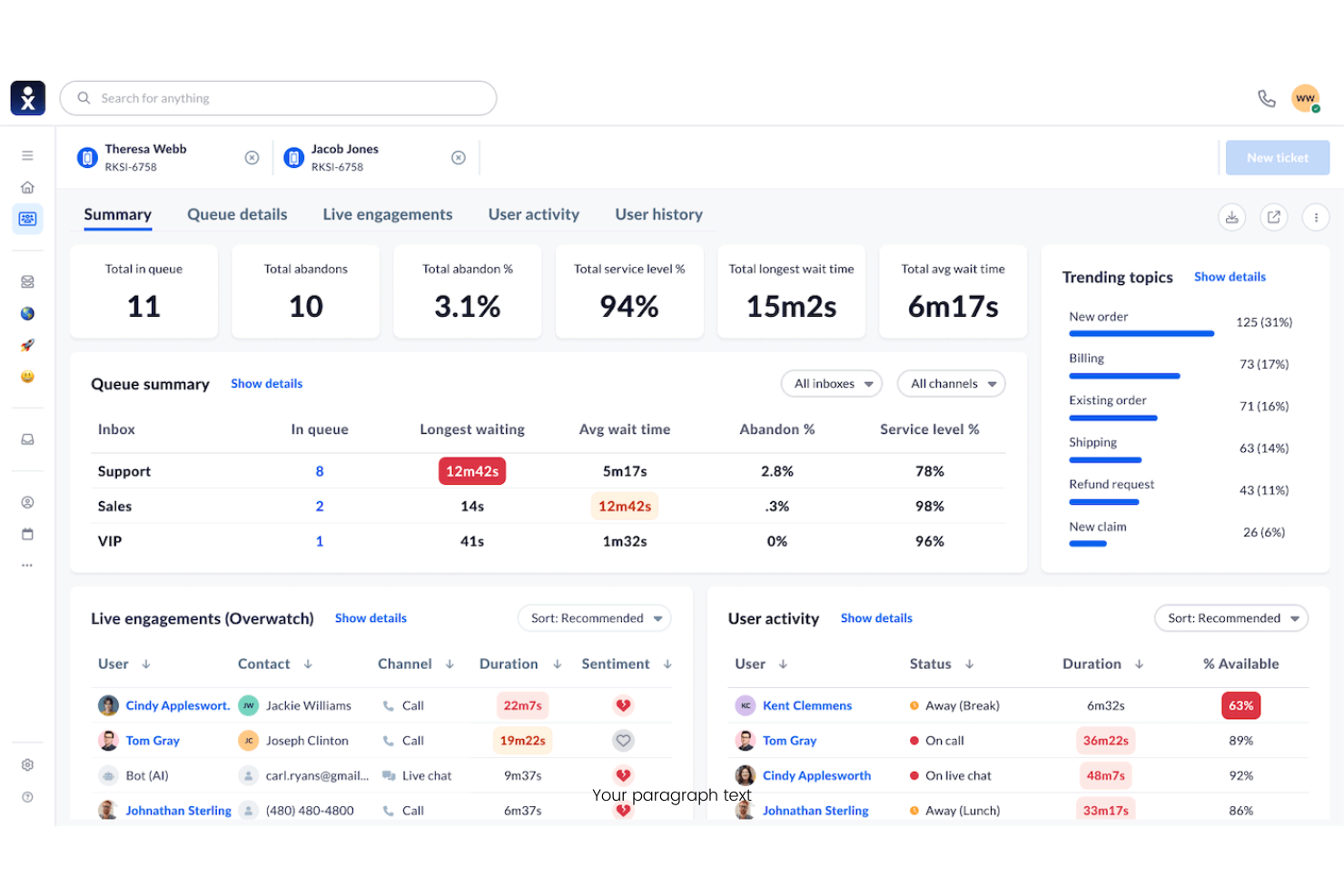
Nextiva è una piattaforma VoIP basata sul cloud creata per le aziende che necessitano di strumenti avanzati per la comunicazione e la collaborazione. È una scelta solida per i team che cercano funzionalità unificate di chiamata, messaggistica e coinvolgimento del cliente in un'unica soluzione.
Per chi è ideale Nextiva?
Aziende di medie e grandi dimensioni che hanno bisogno di una gestione avanzata delle chiamate e di analisi dettagliate su più sedi o dipartimenti.
Perché Nextiva è una valida alternativa a OpenPhone
Ho scelto Nextiva per la profondità dei suoi strumenti di analisi e reportistica, che vanno ben oltre quanto offerto dalla maggior parte delle soluzioni VoIP. Utilizzo il pannello di controllo analitico integrato per monitorare in tempo reale il volume delle chiamate, le prestazioni degli operatori e i tempi di risposta tra i dipartimenti. Il mio team si affida anche alla funzione di tracciamento del percorso cliente per visualizzare come i contatti si spostano tra i diversi punti di comunicazione. In pratica, ciò significa che possiamo prendere decisioni supportate dai dati su organico, instradamento e qualità del servizio senza dover estrarre report da uno strumento separato.
Funzionalità principali di Nextiva
- Risponditore automatico: Accoglie i chiamanti in entrata e li indirizza alla persona o al reparto giusto senza la necessità di un centralinista.
- Voicemail-to-email: Invia i messaggi vocali direttamente alla casella email dell'utente come file audio per una facile consultazione.
- Code di attesa per le chiamate: Mette i chiamanti in una linea d'attesa e li collega al prossimo operatore disponibile.
- Fax online: Invia e riceve fax digitalmente senza hardware fisico, utilizzando la stessa piattaforma di chiamate e messaggi.
Integrazioni Nextiva
Le integrazioni includono Salesforce, HubSpot, Zendesk, Microsoft Teams, Google Workspace, Zoho, Oracle NetSuite, ServiceNow, Microsoft Outlook e Bullhorn.
Pros and Cons
Pros:
- Strumenti di chat di squadra integrati
- Eccellente videoconferenza
- Ottimi telefoni da scrivania hardware
Cons:
- Costoso per team piccoli
- Casella SMS condivisa debole

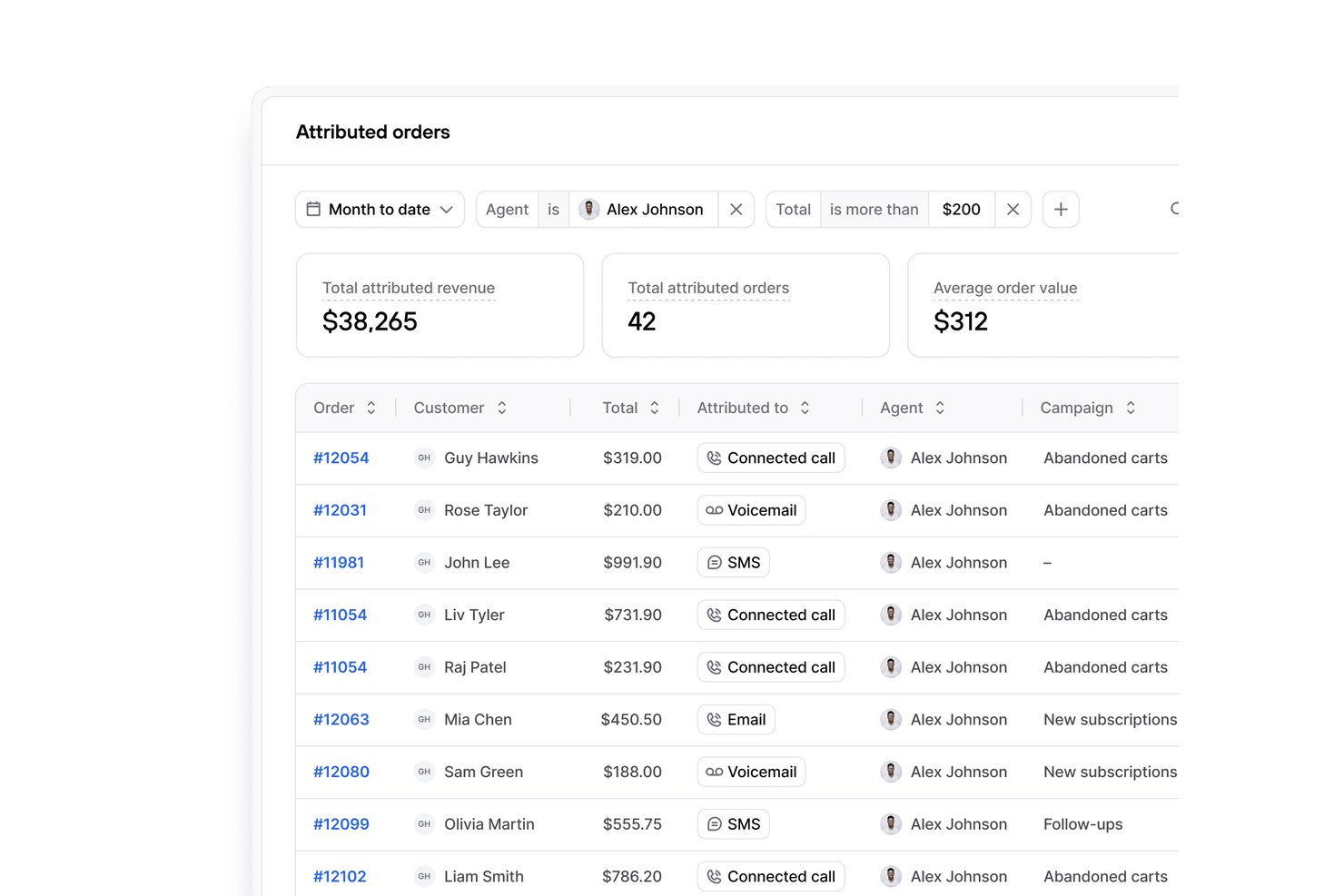
Per i commercianti Shopify, Consio AI è un sistema telefonico aziendale che riunisce le chiamate dei clienti, i flussi di assistenza e la comunicazione del team in un unico hub condiviso, aiutando i team e-commerce a gestire le richieste senza dover utilizzare strumenti separati.
Per chi è più adatto Consio AI?
Consio AI è adatto ai team del servizio clienti Shopify che desiderano una copertura telefonica condivisa e un'assistenza coordinata senza dover gestire strumenti di comunicazione separati.
Perché Consio AI è una buona alternativa a OpenPhone
Ho scelto Consio AI perché offre ai team di assistenza Shopify un unico hub telefonico per le chiamate dei clienti, i flussi di assistenza e la comunicazione del team. Il mio team può gestire le richieste e-commerce in uno spazio di lavoro condiviso invece di distribuire la copertura tra strumenti di comunicazione separati. Questa configurazione condivisa ci aiuta a coordinare le risposte quando diversi operatori gestiscono lo stesso problema di un cliente.
Funzionalità principali di Consio AI
- Agente vocale AI: Risponde alle domande in entrata su ordini, resi e politiche relative ai prodotti.
- Registrazione delle chiamate: Salva registrazioni, trascrizioni, riepiloghi ed etichette degli interlocutori.
- Sincronizzazione dei dati Shopify: Mostra profili dei clienti, prodotti, carrelli e cronologia degli ordini.
- Integrazioni con i sistemi di assistenza: Collega i record delle chiamate a Gorgias, Zendesk, Kustomer e Richpanel.
Integrazioni di Consio AI
Consio AI si integra con Shopify e con piattaforme di assistenza tra cui Gorgias, Zendesk, Kustomer e Richpanel.
Pros and Cons
Pros:
- Contesto degli ordini nativo di Shopify durante le chiamate
- L'IA gestisce in modo naturale le domande di routine
- Visibilità chiara sulle chiamate di tutto il team
Cons:
- La configurazione del flusso delle chiamate richiede una configurazione iniziale
- La profondità dei report potrebbe limitare i team con esigenze complesse

Ideal para llamadas empresariales y colaboración
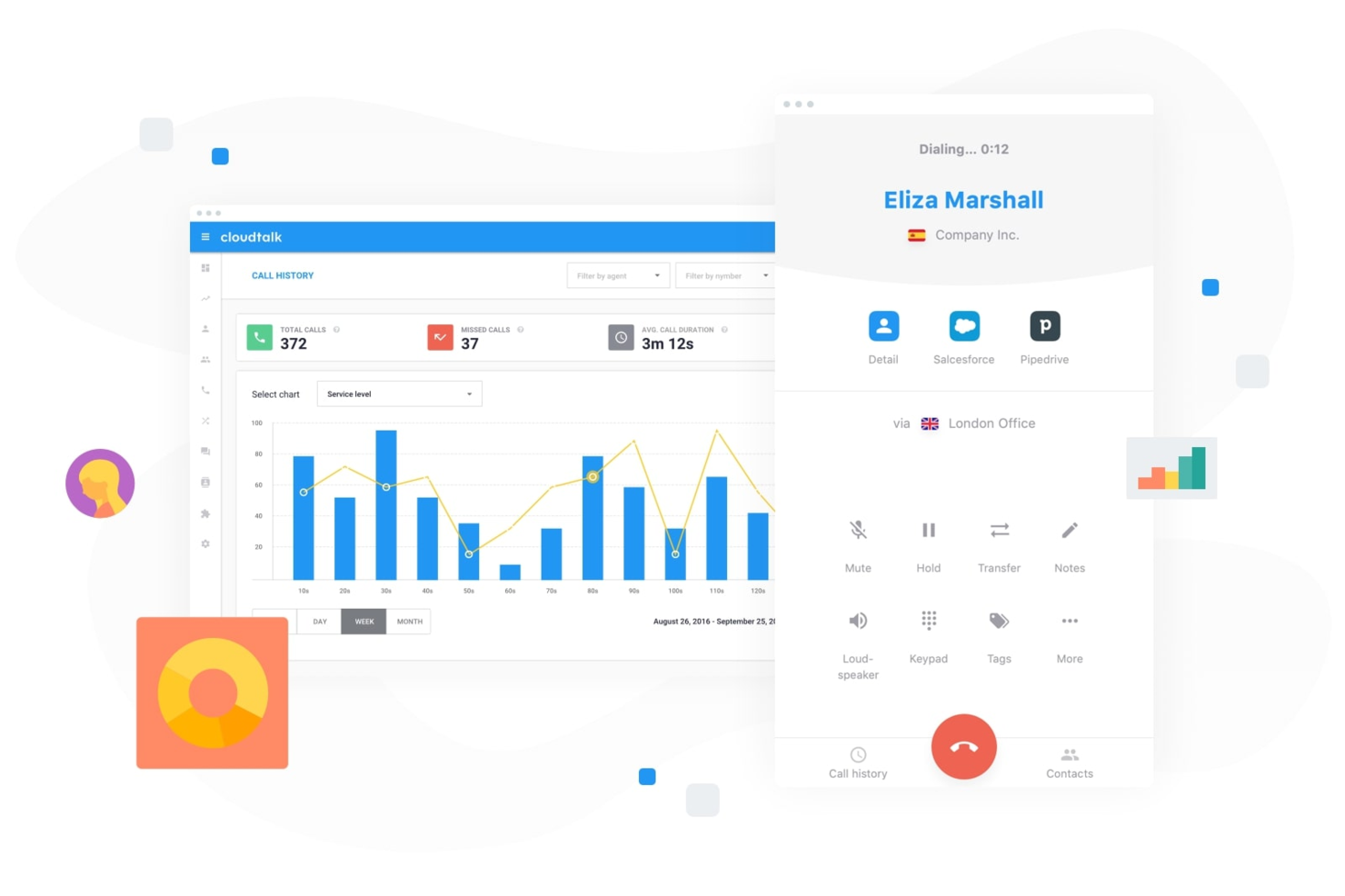
Nextiva es un sistema telefónico empresarial en la nube diseñado para equipos que desean unificar llamadas, mensajería y video en una sola plataforma. Considero que es una opción sólida para pequeñas y medianas empresas que buscan simplificar las comunicaciones y gestionar las interacciones con los clientes desde cualquier lugar.
¿Para quién es mejor Nextiva?
Pequeñas y medianas empresas que desean llamadas, mensajería y video unificados en una sola plataforma.
Por qué Nextiva es una buena alternativa a Kixie
Elegí Nextiva porque reúne llamadas, mensajería de equipo y reuniones por video en una sola aplicación, así mi equipo no tiene que alternar entre diferentes herramientas para la comunicación interna y con clientes. Me gusta especialmente la función Call Pop, que muestra los datos del cliente en pantalla en el momento en que entra una llamada, dando a los agentes contexto antes incluso de contestar. El sistema de operadora automática de Nextiva también me permite configurar reglas de enrutamiento de llamadas sin necesidad de soporte de TI, lo cual es fundamental cuando la estructura de mi equipo cambia con frecuencia. Para las empresas que quieren una única plataforma que gestione tanto la colaboración interna como las llamadas de atención al cliente, Nextiva cubre bien ambas necesidades.
Características clave de Nextiva
- Correo de voz a email: Entrega las grabaciones de correo de voz directamente en tu bandeja de entrada para que los agentes puedan revisarlas y responder sin iniciar sesión en un sistema separado.
- Colas de llamadas: Mantiene a las personas que llaman en línea y las dirige al siguiente agente disponible cuando tu equipo está al máximo de capacidad.
- Presencia en tiempo real: Muestra qué miembros del equipo están disponibles, en llamada o ausentes, para que los agentes puedan transferir llamadas o colaborar sin adivinar.
- Fax en línea: Envía y recibe faxes a través de la plataforma sin ningún hardware, manteniendo todas las comunicaciones del negocio en un solo lugar.
Integraciones de Nextiva
Las integraciones incluyen Salesforce, HubSpot, Microsoft Teams, Zendesk, Google Workspace, Oracle NetSuite, Microsoft Dynamics, ServiceNow, Zoho y más.
Pros and Cons
Pros:
- Call Pop muestra la información del llamante antes de contestar
- El correo de voz a email mantiene los mensajes accesibles desde cualquier lugar
- La presencia en tiempo real facilita la coordinación del equipo
Cons:
- La grabación de llamadas no está disponible en todos los planes
- Las tarifas de llamadas internacionales pueden ser altas
New Product Updates from CloudTalk
CloudTalk Adds Campaign Statistics to MCP
CloudTalk adds campaign statistics to MCP with funnel, call, conversion, disposition, and duration metrics. This helps reporting assistants review campaign performance using read-only aggregate data. For more information, visit CloudTalk’s official site.
 .
.
Ringover
Ideale per la disponibilità di numeri internazionali
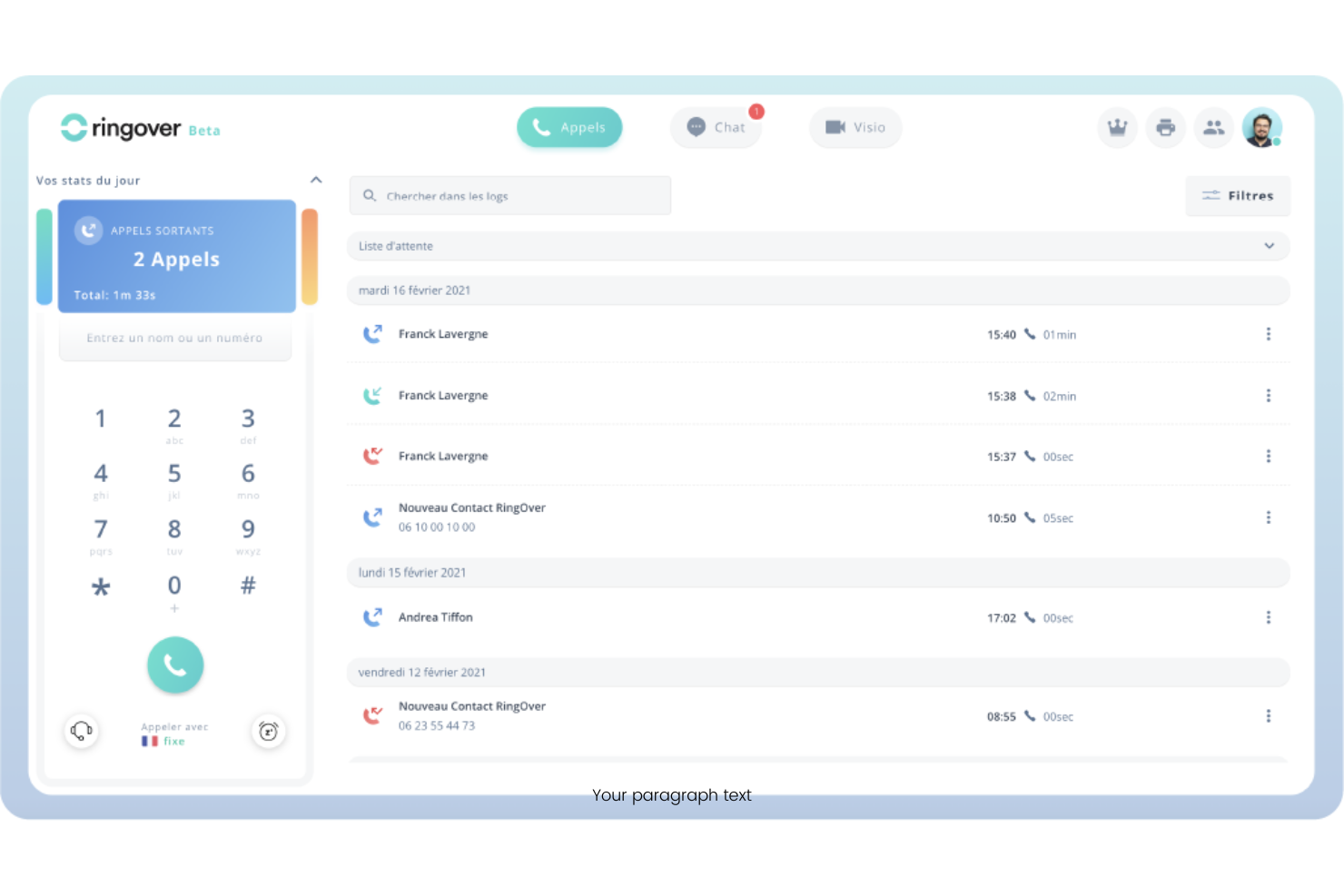
Ringover è una piattaforma VoIP basata su cloud progettata per le aziende che necessitano di funzionalità di chiamata flessibili e una gestione semplice delle comunicazioni globali. È ideale per i team che cercano controlli di chiamata avanzati, analisi e integrazioni per supportare forze lavoro distribuite o da remoto.
Per chi è più indicato Ringover?
Ringover è adatto a team multinazionali o aziende che devono gestire e scalare numeri di telefono in più paesi da un’unica piattaforma.
Perché Ringover è una valida alternativa a OpenPhone
Ho scelto Ringover soprattutto per la disponibilità di numeri internazionali—offre numeri locali in oltre 65 paesi, il che significa che il mio team può stabilire una presenza locale in nuovi mercati senza aprire uffici fisici. La funzione di geo-routing è qualcosa su cui faccio molto affidamento: indirizza automaticamente le chiamate in entrata all’agente giusto in base alla posizione del chiamante. Apprezzo anche le chiamate illimitate verso oltre 110 destinazioni incluse nel piano base, che elimina l’imprevedibilità della fatturazione a minuti quando il mio team gestisce grandi volumi di chiamate internazionali.
Funzionalità principali di Ringover
- Power dialer: Esegue campagne di chiamate in uscita automatizzate, permettendo agli agenti di vendita di scorrere le liste di contatti senza comporre manualmente ogni numero.
- Call whisper: Consente ai supervisori di parlare con gli agenti durante le chiamate in diretta senza che il cliente li senta, utile per il coaching in tempo reale.
- Voicemail drop: Lascia automaticamente un messaggio pre-registrato quando una chiamata in uscita non riceve risposta durante le campagne.
- CTI screen pop: Visualizza a schermo le informazioni del chiamante e la cronologia CRM non appena una chiamata in entrata si connette.
Integrazioni di Ringover
Le integrazioni includono Salesforce, HubSpot, Pipedrive, Bullhorn, Zoho, Zendesk, Microsoft Dynamics, Freshdesk, Slack e Google Workspace.
Pros and Cons
Pros:
- Centralino virtuale avanzato
- Facili pop-up CRM a schermo
- Videoconferenze integrate
Cons:
- Interfaccia molto affollata
- Pensato per grandi call center

Dialpad
Ideale per la trascrizione automatica delle chiamate con intelligenza artificiale
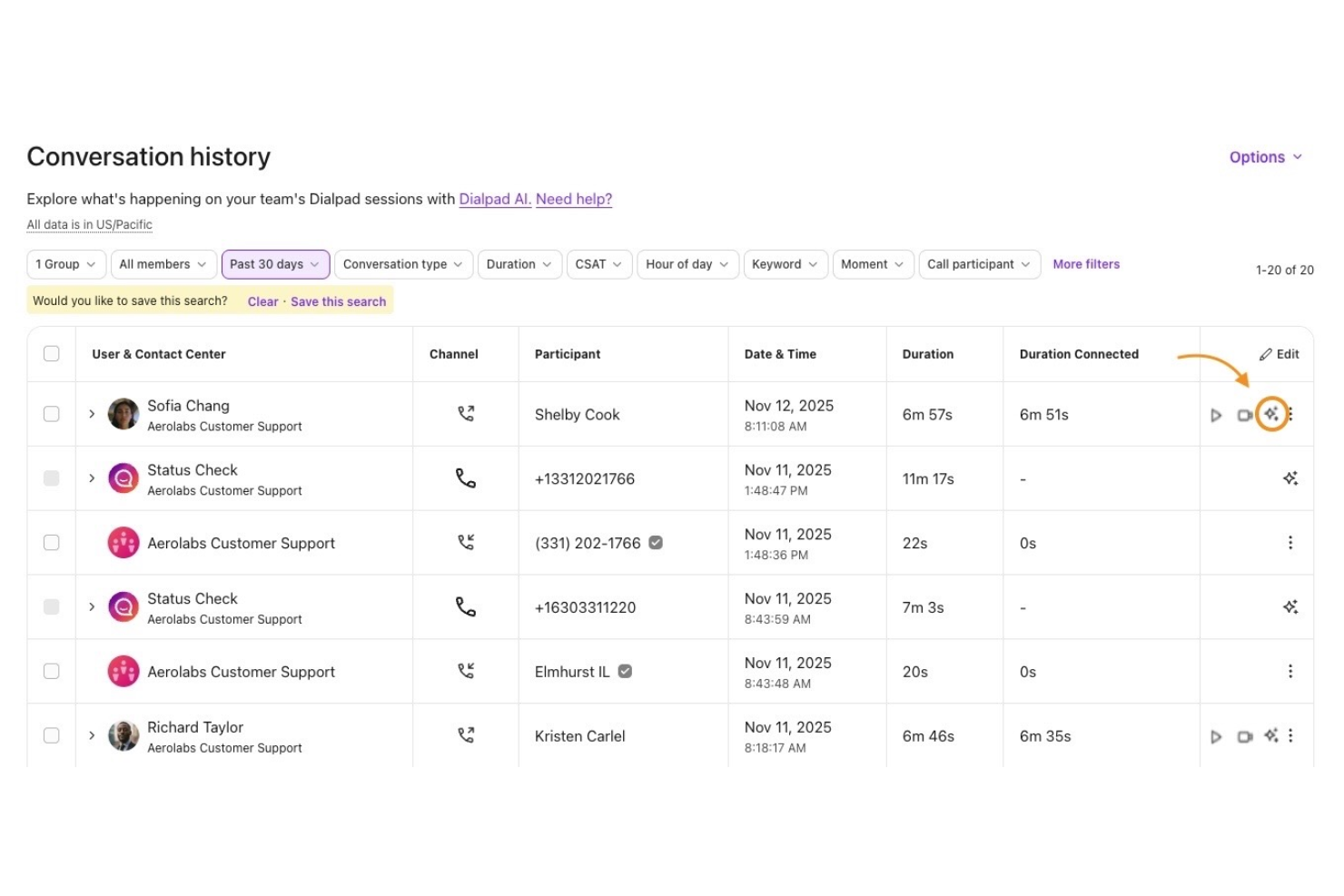
Dialpad è una piattaforma VoIP basata su cloud progettata per i team che desiderano funzionalità moderne di chiamata, messaggistica e video in un unico posto. È una soluzione ideale per le aziende che cercano strumenti di comunicazione flessibili con intelligenza artificiale integrata per aiutare a gestire le conversazioni e semplificare i flussi di lavoro.
Per chi è ideale Dialpad?
Dialpad si adatta a piccole e medie imprese e a team remoti che necessitano di voce, video e messaggistica unificati in una sola piattaforma.
Perché Dialpad è una buona alternativa a OpenPhone
Ho scelto Dialpad per questa lista grazie alla sua trascrizione AI integrata, che cattura automaticamente le note delle chiamate in tempo reale senza bisogno di strumenti di terze parti. Apprezzo come l’IA di Dialpad evidenzia anche le azioni da compiere e i momenti chiave delle chiamate, così il mio team può rivedere le conversazioni senza dover ascoltare tutte le registrazioni. In pratica, significa che il mio team può concentrarsi sulla conversazione stessa invece di prendere appunti manualmente. Per i team che gestiscono un elevato volume di chiamate, questo fa davvero la differenza nella velocità di follow-up con i clienti.
Funzionalità principali di Dialpad
- Messaggistica aziendale: Invia e ricevi SMS e MMS direttamente all’interno dell’app Dialpad insieme alle chiamate.
- IVR (risposta vocale interattiva): Imposta menu automatici di instradamento delle chiamate per indirizzare i chiamanti al team o al reparto giusto.
- Registrazione delle chiamate: Registra le chiamate in entrata e in uscita per revisione della qualità, conformità o formazione del team.
- Trascrizione della segreteria telefonica: Converte automaticamente i messaggi vocali in testo in modo che il tuo team possa leggere e rispondere senza dover ascoltare le registrazioni.
Integrazioni di Dialpad
Le integrazioni includono Salesforce, Zendesk, Microsoft Teams, Google Workspace e Slack.
Pros and Cons
Pros:
- Eccellenti strumenti di instradamento delle chiamate
- Più integrazioni aziendali
- Qualità delle chiamate altamente affidabile
Cons:
- L’interfaccia utente è meno adatta a startup
- La messaggistica non è il focus principale

Ideale per scalabilità di livello aziendale
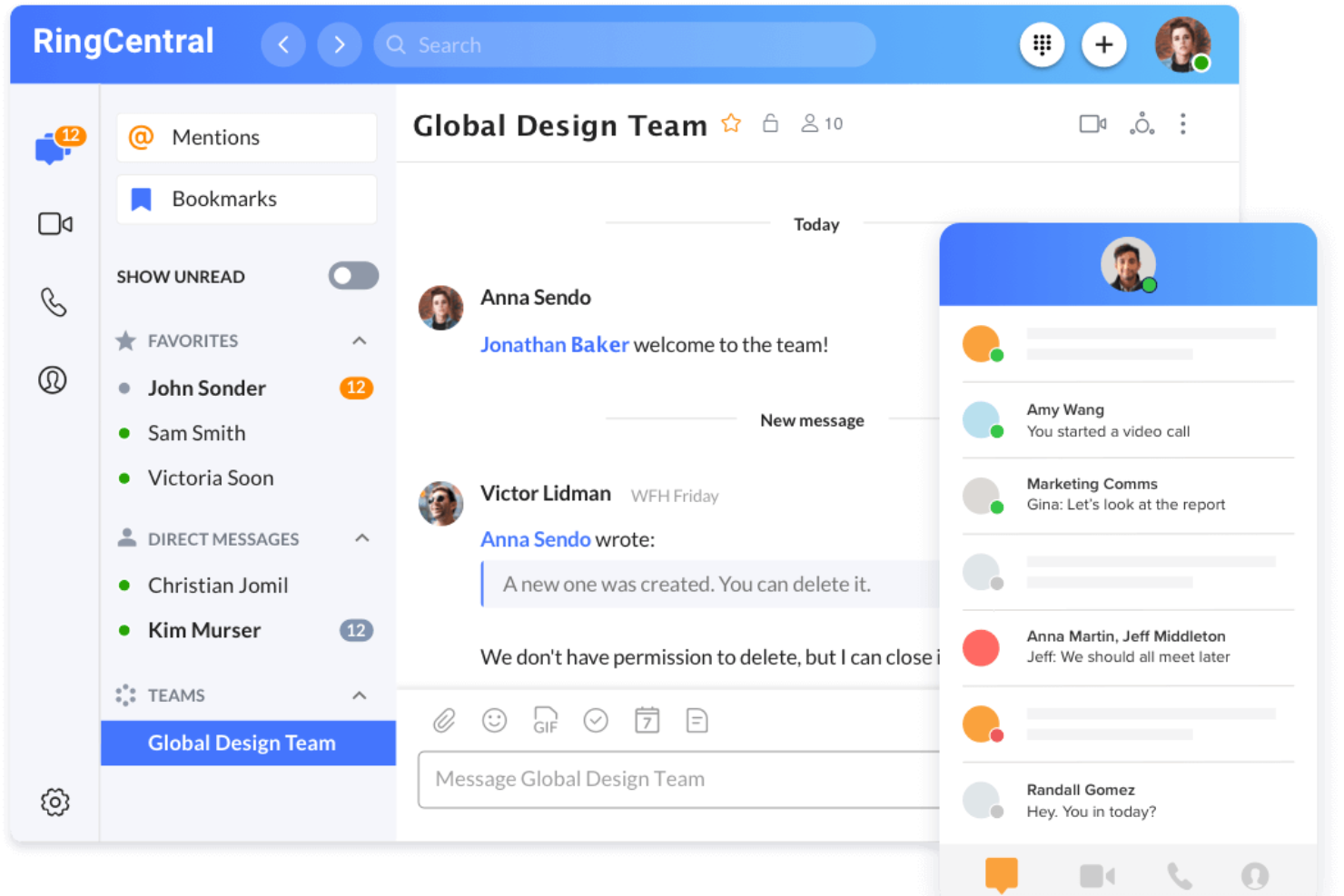
RingCentral è una piattaforma di comunicazione unificata progettata per le aziende che necessitano di funzionalità avanzate di chiamata, messaggistica e video in un unico posto. È particolarmente adatta per organizzazioni con team distribuiti o esigenze di comunicazione complesse che cercano un software VoIP affidabile e completo.
Per chi è più indicato RingCentral?
Grandi organizzazioni e imprese con team distribuiti che necessitano di comunicazioni sicure e scalabili tra più sedi o reparti.
Perché RingCentral è una buona alternativa a OpenPhone
Ho scelto RingCentral per la sua scalabilità di livello aziendale, che rende semplice aggiungere utenti, numeri di telefono e sedi senza dover ricostruire la configurazione da zero. Il mio team utilizza la funzione di gestione multi-sede per configurare in modo indipendente l'instradamento delle chiamate, gli orari e i menu IVR per ogni sede. Mi affido inoltre alle regole avanzate di gestione delle chiamate di RingCentral per indirizzare automaticamente le chiamate in base all'orario, al caller ID o al dipartimento—una funzione difficile da replicare negli strumenti VoIP più semplici. In pratica, ciò significa che il mio team può sostenere la crescita in diverse regioni senza dover cambiare piattaforma.
Caratteristiche principali di RingCentral
- Segreteria visiva: Mostra i messaggi vocali come anteprime di testo, così puoi leggerli e dare la priorità senza doverli ascoltare.
- Monitoraggio live delle code di chiamata: Monitora le performance delle code e degli operatori tramite dashboard personalizzabili in tempo reale.
- Cancellazione del rumore di fondo: Rimuove automaticamente i rumori indesiderati durante le chiamate e le riunioni video.
- Risponditore automatico SMS: Invia risposte automatiche ai messaggi di testo in entrata fuori orario, durante le vacanze o per domande frequenti.
Integrazioni RingCentral
Le integrazioni includono Salesforce, Zendesk, Microsoft Teams, Google Workspace e ServiceNow.
Pros and Cons
Pros:
- Fax digitale integrato
- Strumenti avanzati per la gestione delle code
- Stabilità delle chiamate eccezionale
Cons:
- Difficile gestione degli SMS condivisi
- Processo di onboarding pessimo

JustCall
Ideale per automazione SMS e voce
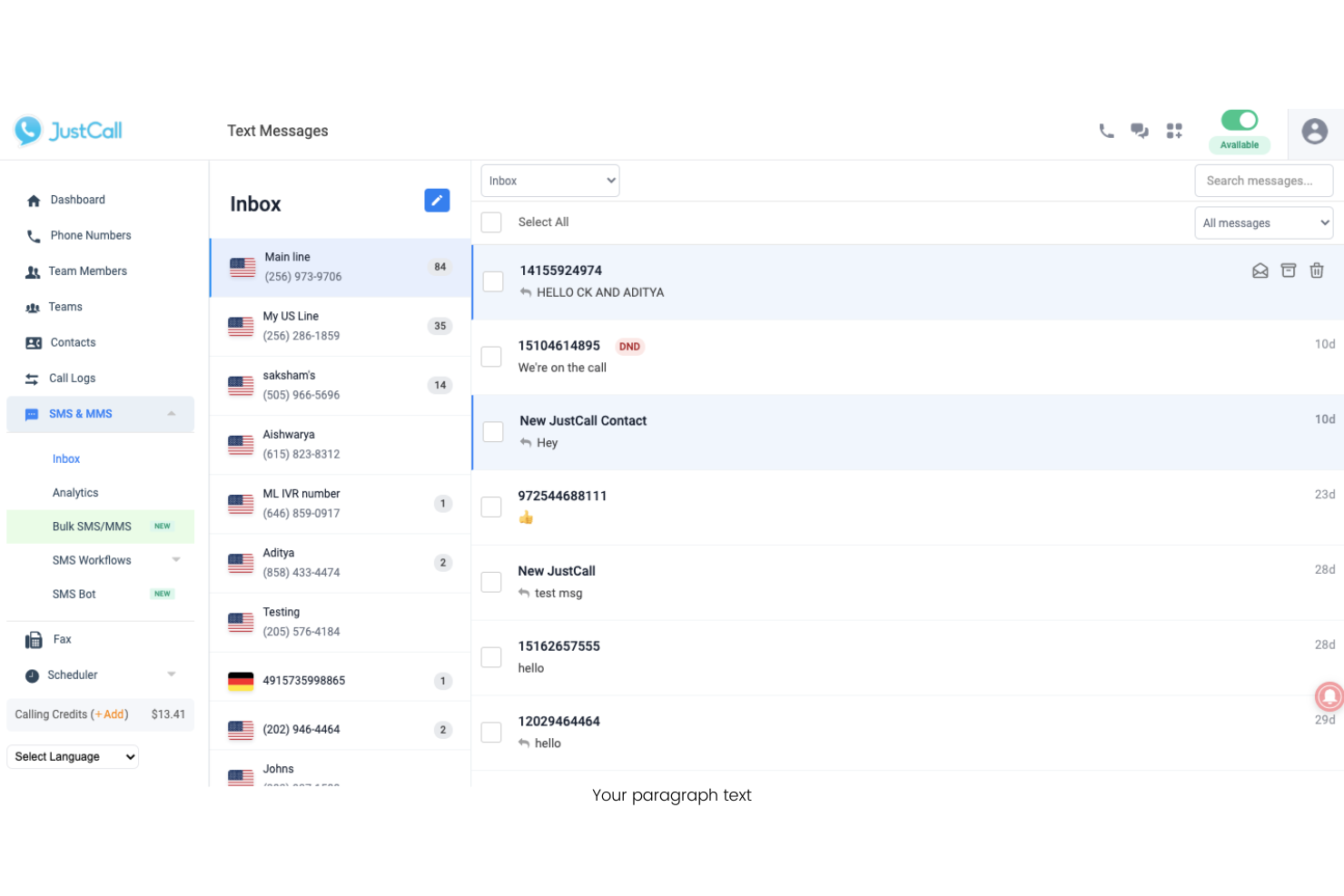
JustCall è un sistema telefonico basato su cloud progettato per i team che desiderano gestire chiamate e messaggi da un'unica piattaforma. È particolarmente adatto per i team di supporto clienti e di vendita che cercano di automatizzare i flussi di lavoro di comunicazione e centralizzare le interazioni.
Per chi è più adatto JustCall?
JustCall è perfetto per team di vendita e supporto distribuiti che necessitano di automatizzare le comunicazioni sia SMS che vocali su più canali.
Perché JustCall è una buona alternativa a OpenPhone
Ho scelto JustCall specificamente per la funzione dei flussi di lavoro SMS, che consente di inviare messaggi di testo automatici basati su condizioni come chiamate perse, invio di moduli o esiti delle chiamate. Per un team di supporto con un alto volume di chiamate in entrata, questo significa che un cliente che trova la linea occupata può ricevere automaticamente un messaggio di risposta—senza intervento manuale. Apprezzo anche i bot SMS, che gestiscono automaticamente le richieste di testo in entrata 24/7 utilizzando risposte automatiche basate su regole. OpenPhone non offre lo stesso livello di automazione SMS, rendendo JustCall una scelta migliore per i team che si affidano molto alla comunicazione con i clienti tramite messaggi di testo.
Funzionalità principali di JustCall
- Trascrizione delle chiamate: L'IA genera riepiloghi e trascrizioni delle chiamate completate per la revisione successiva e la presa di appunti.
- IVR / menu di chiamata: Configura un menu vocale interattivo che indirizza i chiamanti tra le opzioni prima di collegarli a un agente.
- Sondaggio post-chiamata: Invia automaticamente ai clienti un sondaggio dopo la fine della chiamata per raccogliere feedback sulle prestazioni dell'agente.
- Compositore predittivo: Chiama più numeri contemporaneamente e collega gli agenti solo alle chiamate risposte, riducendo i tempi morti tra le connessioni.
Integrazioni di JustCall
Le integrazioni includono Salesforce, HubSpot, Pipedrive, ActiveCampaign, Slack, Intercom, Help Scout, Freshdesk, Zendesk e Zoho CRM.
Pros and Cons
Pros:
- Trigger avanzati per i flussi di lavoro nel CRM
- Integrazione facilitata con WhatsApp
- Buone funzionalità di invio SMS massivi
Cons:
- Costo base dell'abbonamento più elevato
- Applicazione mobile poco intuitiva

Ideale per la gestione unificata dello spazio di lavoro
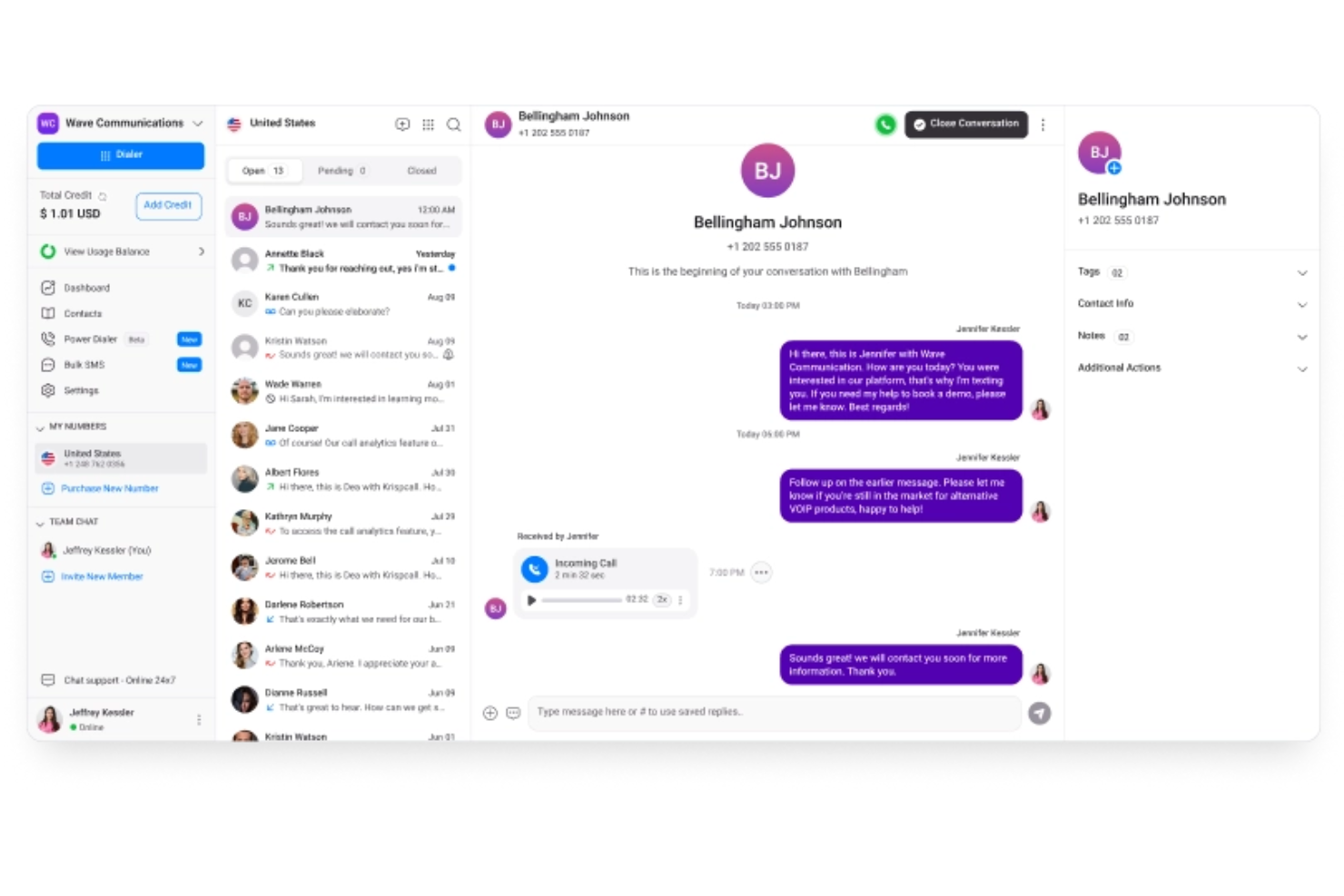
KrispCall offre un sistema telefonico basato su cloud progettato per i team che necessitano di una gestione avanzata delle chiamate e collaborazione in un unico luogo. È particolarmente indicato per le aziende che desiderano un controllo centralizzato su più numeri, utenti e canali di comunicazione.
Per chi è più adatto KrispCall?
Piccole e medie imprese che devono gestire più numeri di telefono e utenti tra team distribuiti.
Perché KrispCall è una valida alternativa a OpenPhone
Ho scelto KrispCall perché il suo spazio di lavoro unificato riunisce chiamate, messaggi e attività dei contatti in un’unica interfaccia invece di disperderli tra diversi strumenti. Il mio team utilizza la funzione di numero condiviso per gestire più linee da una sola dashboard, facilitando l’assegnazione dei numeri a specifici agenti o dipartimenti. Faccio anche affidamento sulle note di chiamata e sul feed delle attività per mantenere il contesto di ogni interazione con il cliente senza dover passare tra diverse app. In pratica, ciò significa che il mio team rimane coordinato tra diversi fusi orari senza perdere traccia delle conversazioni.
Funzionalità principali di KrispCall
- IVR (albero telefonico): Instrada le chiamate in arrivo attraverso un menu multilivello per indirizzarle all’agente o al dipartimento giusto.
- Registrazione delle chiamate: Registra le chiamate in entrata e in uscita per documentazione, controllo qualità e analisi delle performance degli agenti.
- SMS di massa: Invia messaggi di testo a grandi liste di contatti dal tuo numero VoIP con una sola azione.
- Squillo simultaneo: Fa squillare più agenti contemporaneamente così che le chiamate in arrivo vengano risposte il più rapidamente possibile.
Integrazioni di KrispCall
Le integrazioni includono HubSpot, Pipedrive, Zendesk, ActiveCampaign e Keap.
Pros and Cons
Pros:
- Prezzi accessibili per startup
- Layout di spazio di lavoro condiviso
- Monitoraggio semplice delle chiamate
Cons:
- Assistenza clienti più lenta
- Problemi di recapito SMS

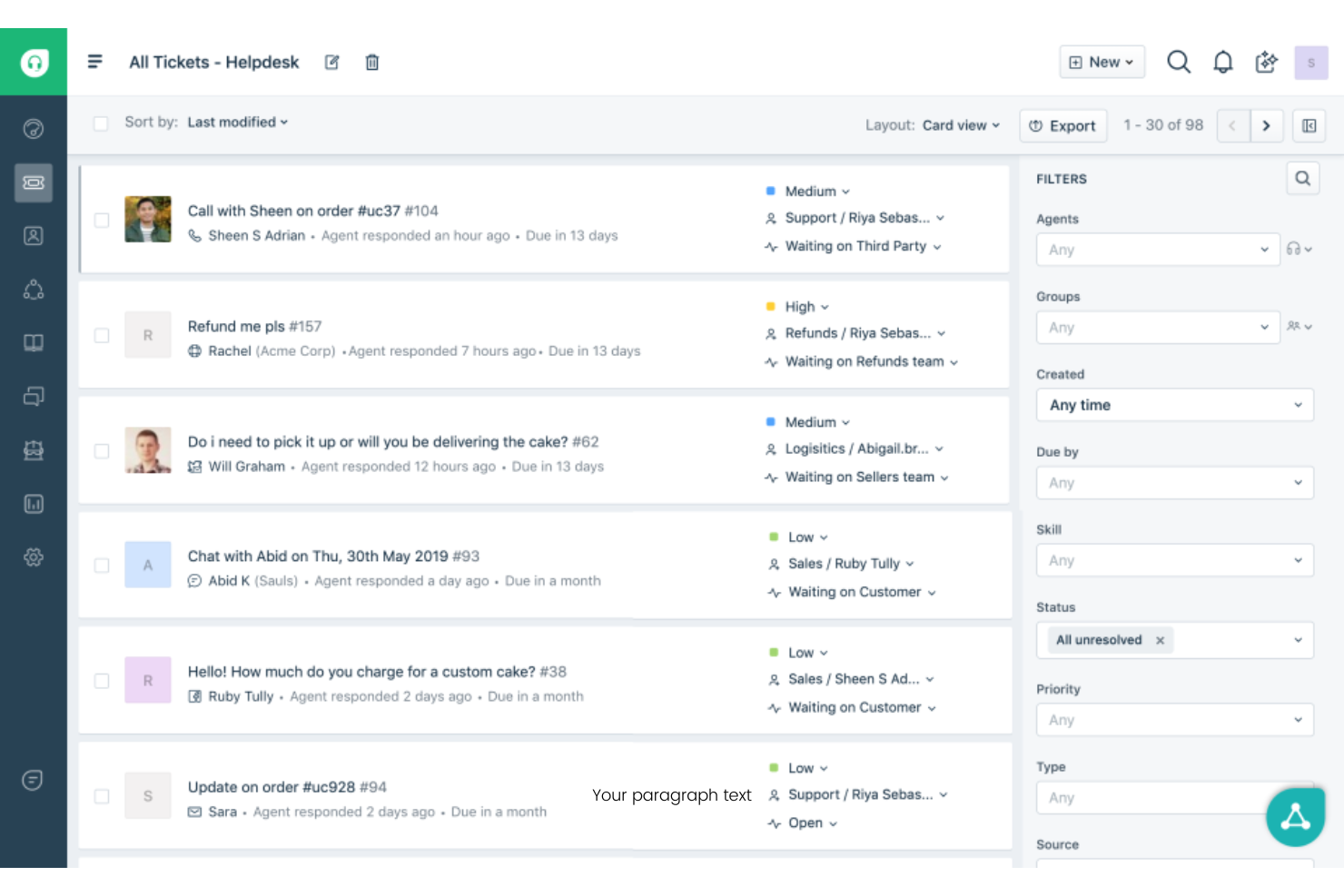
Freshdesk è una piattaforma di supporto clienti basata su cloud progettata per i team che devono gestire conversazioni su più canali da un unico luogo. È una scelta solida per le aziende che vogliono unificare email, chat, telefono e assistenza tramite social mantenendo la gestione dei ticket organizzata.
Per chi è migliore Freshdesk?
Freshdesk è adatto ai team di supporto clienti nelle aziende in crescita che hanno bisogno di centralizzare e tracciare i ticket provenienti da molteplici canali di comunicazione.
Perché Freshdesk è una buona alternativa a OpenPhone
Ho scelto Freshdesk perché va ben oltre il semplice supporto telefonico centralizzando i ticket provenienti da email, chat, telefono e social in uno spazio di lavoro unico per gli agenti. Quello che trovo più utile è l’assegnazione dei ticket basata sulle competenze, che indirizza i ticket in arrivo agli agenti secondo la loro specifica esperienza—così una domanda di fatturazione non arriva mai a uno specialista tecnico. Mi affido anche alla funzione di politiche SLA multiple, che consente al mio team di impostare regole diverse sui tempi di risposta in base al segmento di clientela o al tipo di richiesta. Per i team che escono dalla logica di uno strumento solo voce come OpenPhone, Freshdesk colma il divario offrendo un supporto strutturato e tracciabile su tutti i canali.
Funzionalità principali di Freshdesk
- Freddy AI copilot: Assiste gli agenti in tempo reale suggerendo risposte e riassumendo la cronologia dei ticket durante le conversazioni attive.
- Assegnazione round-robin ed equilibrata: Distribuisce i ticket in arrivo in modo uniforme tra gli agenti disponibili per evitare squilibri nel carico di lavoro.
- Forum della community: Consente ai clienti di pubblicare domande e trovare risposte fornite dai pari attraverso uno spazio di discussione pubblico personalizzato.
- Log di controllo: Registra uno storico con data e ora di tutta l’attività dell’account, inclusi cambiamenti a impostazioni, ticket e permessi degli agenti.
Integrazioni di Freshdesk
Le integrazioni includono Salesforce, Jira, Slack, Shopify e Mailchimp.
Pros and Cons
Pros:
- Base di conoscenza incorporata
- Integrazione e-mail senza interruzioni
- Robusti strumenti di tracciamento SLA
Cons:
- Pessimo per i messaggi occasionali
- Interfaccia helpdesk pesante

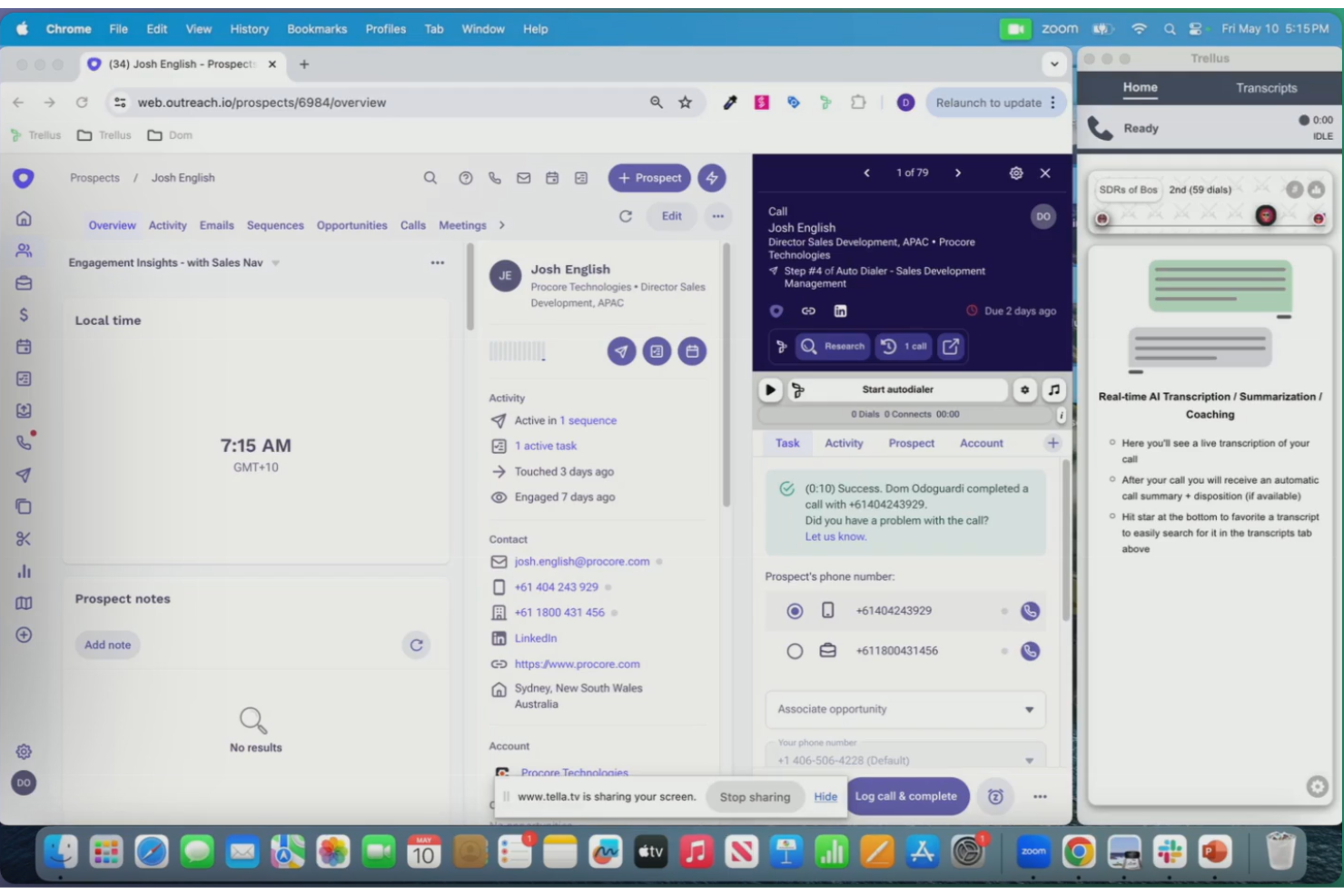
Trellus utilizza l’IA per analizzare e riassumere le conversazioni con i clienti, risultando una scelta ideale per i team che desiderano approfondimenti più dettagliati dalle loro chiamate. È particolarmente utile per i responsabili delle vendite, dell’assistenza e del servizio che hanno bisogno di identificare rapidamente tendenze e argomenti rilevanti da un grande volume di interazioni.
Per chi è più indicato Trellus?
Responsabili delle vendite e del supporto in aziende di medie o grandi dimensioni che necessitano di un’analisi delle trascrizioni delle chiamate e delle tendenze, supportata dall’AI.
Perché Trellus è una valida alternativa a OpenPhone
Ho scelto Trellus perché va oltre la semplice registrazione delle chiamate, permettendo di evidenziare effettivamente ciò che accade nelle conversazioni. L’IA genera automaticamente i riassunti delle chiamate e mette in risalto argomenti chiave, obiezioni e punti di azione da ogni interazione—così il mio team non deve riascoltare manualmente le registrazioni per trovare ciò che conta. Mi affido anche alla funzione di coaching in tempo reale, che suggerisce spunti e guide durante le chiamate in base a ciò che dice il cliente. In pratica, significa che i miei operatori ricevono indicazioni immediate senza la necessità di avere un manager sulla linea.
Funzionalità chiave di Trellus
- Chiamata parallela: Effettua chiamate fino a cinque linee simultaneamente direttamente dalla tua piattaforma di coinvolgimento vendite.
- Messaggio in segreteria automatizzato: Lascia automaticamente messaggi preregistrati quando una chiamata non riceve risposta.
- Monitoraggio integrità numeri: Esegue controlli automatici sullo stato dei numeri e li ruota per evitare che vengano segnalati come spam.
- Sales floor virtuale: Crea un ambiente di chiamata condiviso dove i team remoti possono ascoltare le chiamate e collaborare in tempo reale.
Integrazioni Trellus
Le integrazioni includono HubSpot, Salesforce, Salesloft, Outreach e Apollo.io.
Pros and Cons
Pros:
- Analisi approfondita delle conversazioni
- Ottima per il primo contatto a freddo
- Composizione automatica senza interruzioni
Cons:
- Nessuna casella condivisa leggera
- Prezzi elevati per startup
Altre alternative a OpenPhone
Ecco alcune ulteriori alternative a OpenPhone che non sono state incluse nel mio elenco, ma che vale comunque la pena prendere in considerazione:
- Beside
Ideale per note di chiamata collaborative
- Aircall
Ideale per opzioni di integrazione con CRM
- Vonage
Ideale per integrazioni API avanzate per sviluppatori
- Cisco Webex
Il migliore con funzionalità di sicurezza di livello aziendale


Come valuto le alternative a OpenPhone
La mia valutazione prevede due livelli: i requisiti di base che uno strumento deve soddisfare per essere preso in considerazione e i fattori differenzianti che diventano rilevanti quando il tuo team di supporto ha bisogno di caselle di posta condivise, sincronizzazione con il CRM e un vero instradamento delle chiamate.
Funzionalità di base (Requisiti minimi per questa lista)
Quando seleziono gli strumenti per la mia lista, valuto ciascuno su una scala da 0 (non offre la funzionalità) a 5 (eccelle in quest'area) per ogni funzionalità di base elencata qui sotto. Poi, calcolo il punteggio totale dello strumento in percentuale. Ogni strumento deve raggiungere un punteggio totale minimo del 65% per essere preso in considerazione.
- Chiamate VoIP aziendali: Verifico se la piattaforma supporta numeri locali, verdi e internazionali, così il tuo team può servire i clienti senza dover gestire diversi operatori.
- Caselle di posta condivise per il team: I team di supporto devono collaborare su chiamate e messaggi dai numeri condivisi, quindi verifico la presenza di assegnazione, discussioni interne e visibilità in tempo reale.
- SMS/MMS aziendali: Valuto se gli operatori possono inviare e ricevere messaggi dagli stessi numeri usati per le chiamate, inclusa la disponibilità di modelli e risposte rapide per le risposte comuni.
- Instradamento chiamate e IVR: Gruppi di squillo, regole per gli orari di lavoro e menu multilivello determinano quanto velocemente un cliente raggiunge l’agente giusto, quindi analizzo la profondità delle opzioni di flusso delle chiamate.
- Integrazioni con CRM/Helpdesk: Strumenti come HubSpot, Salesforce e Zendesk sono centrali per la maggior parte delle piattaforme CX, quindi verifico l’integrazione nativa che sincronizza i contatti e registra automaticamente le chiamate.
- Monitoraggio chiamate e analisi: Cerco funzionalità di registrazione, trascrizione e reportistica a livello di agente, utili ai team leader per rivedere le conversazioni e monitorare metriche come il tasso di chiamate perse.
Una volta ottenuta la lista di strumenti che rispettano questi criteri, considero ciò che rende unica ciascuna piattaforma.
Fattori differenzianti (Cosa distingue i fornitori)
Ecco come confronto e metto a confronto i diversi fornitori:
Funzionalità distintive
I riepiloghi delle chiamate con intelligenza artificiale fanno davvero la differenza quando gli operatori gestiscono decine di conversazioni al giorno: note automatiche post-chiamata e punti d’azione riducono il tempo dedicato alla documentazione e velocizzano i passaggi di consegna tra i turni. Cerco anche automazioni di flusso di lavoro che attivano messaggi di follow-up o etichettano le conversazioni in base all’esito della chiamata, riducendo il lavoro manuale ripetitivo. Per i team che assistono clienti in diverse regioni, la possibilità di attivare numeri internazionali è un fattore importante, così da offrire presenza locale senza dover usare diversi operatori.
Oltre le funzionalità
La trasparenza dei prezzi è essenziale perché i team di supporto crescono in fretta: verifico se i costi per utente rimangono prevedibili quando si aggiungono operatori e numeri. Anche la conformità è un aspetto che controllo con attenzione, soprattutto i controlli sul consenso alle registrazioni delle chiamate e le impostazioni di conservazione dei dati necessarie ai team che operano in settori regolamentati. Infine, non può mancare l’affidabilità: esamino gli impegni pubblici in termini di uptime e la qualità delle chiamate di livello carrier, perché una chiamata interrotta durante un’assistenza live erode immediatamente la fiducia del cliente.
Perché cercare un'alternativa a OpenPhone?
Sebbene OpenPhone sia una buona scelta come software VoIP, esistono diversi motivi per cui alcuni utenti cercano soluzioni alternative. Potresti cercare un'alternativa a OpenPhone perché…
- Hai bisogno di un instradamento avanzato delle chiamate per più reparti
- La tua organizzazione richiede funzionalità di sicurezza di livello aziendale
- Vuoi la videoconferenza integrata oltre alle chiamate
- Hai bisogno del supporto per numeri di telefono e utenti internazionali
- Il tuo team ha superato le funzionalità di base per SMS e segreteria telefonica
Se ti riconosci in una di queste situazioni, sei nel posto giusto. Il mio elenco contiene diverse opzioni software VoIP più adatte ai team che affrontano queste difficoltà con OpenPhone e cercano soluzioni alternative.
Funzionalità principali di OpenPhone
Ecco alcune delle principali funzionalità di OpenPhone, per aiutarti a confrontare ciò che offrono le soluzioni alternative:
- Posta in arrivo condivisa: consente a più membri della squadra di gestire chiamate, messaggi e messaggi vocali da un unico numero aziendale, facilitando la collaborazione e risposte rapide.
- Numeri aziendali dedicati: assegna numeri di telefono univoci a singoli utenti o squadre, mantenendo separate le comunicazioni personali e aziendali.
- Registrazione delle chiamate: registra automaticamente le chiamate in entrata e in uscita, consentendo di rivedere le conversazioni per il controllo della qualità o la formazione.
- Trascrizione dei messaggi vocali: converte i messaggi vocali in testo, così puoi leggere i messaggi a colpo d'occhio e stabilire le priorità per i successivi contatti.
- Gestione dei contatti: centralizza nell'app le informazioni sui clienti e sui contatti, facilitando la consultazione dei dettagli durante le chiamate o i messaggi.
- Risposte automatiche: invia risposte automatiche tramite messaggio alle chiamate o ai messaggi persi, assicurando che i clienti ricevano aggiornamenti tempestivi anche quando non sei disponibile.
- Integrazioni con strumenti CRM: si connette a piattaforme come HubSpot e Salesforce per sincronizzare l'attività delle chiamate e i dati dei contatti, migliorando l'allineamento dei flussi di lavoro.
- Portabilità dei numeri: consente di trasferire i numeri aziendali esistenti in OpenPhone, evitando di perdere la continuità quando si cambia fornitore.
- Chiamate internazionali: supporta le chiamate da e verso numeri internazionali, ampliando la tua portata oltre i mercati locali.
- Rubriche della squadra: fornisce un elenco ricercabile dei membri della squadra e dei relativi interni, rendendo le comunicazioni interne più rapide e organizzate.