

How The Comm100 AI Flywheel Connects Every Stage of the Support Cycle


Most support teams have invested in AI somewhere along their workflow. A chatbot handles
front-line queries, a knowledge base gives agents something to reference, a supervisor samples a few dozen conversations each week for QA, and a reporting dashboard tells managers what happened last month. Each tool does its job well enough on its own, but a majority of them don’t talk to each other in any meaningful way.
The chatbot doesn't know what their QA process flagged last week. There’s no insight into which articles are out of date or misleading customers in the knowledge base. And the reporting layer can tell you CSAT dipped, but it can't explain why.
For support operations in regulated industries like higher education, banking, healthcare, and
iGaming, this disconnect carries real weight. Compliance requirements are strict, volume is high, and the cost of a wrong answer goes well beyond a frustrated customer.
The Comm100 AI Suite was designed around the idea that these tools shouldn't operate in silos. Six AI products, each built for a specific stage of the service cycle, all feed into one another in what Comm100 calls the AI Flywheel.
 was designed around the idea that these tools shouldn't operate in silos. Six AI products, each built for a specific stage of the service cycle, all feed into one another in what Comm100 calls the AI Flywheel.
What is the Comm100 AI Flywheel?
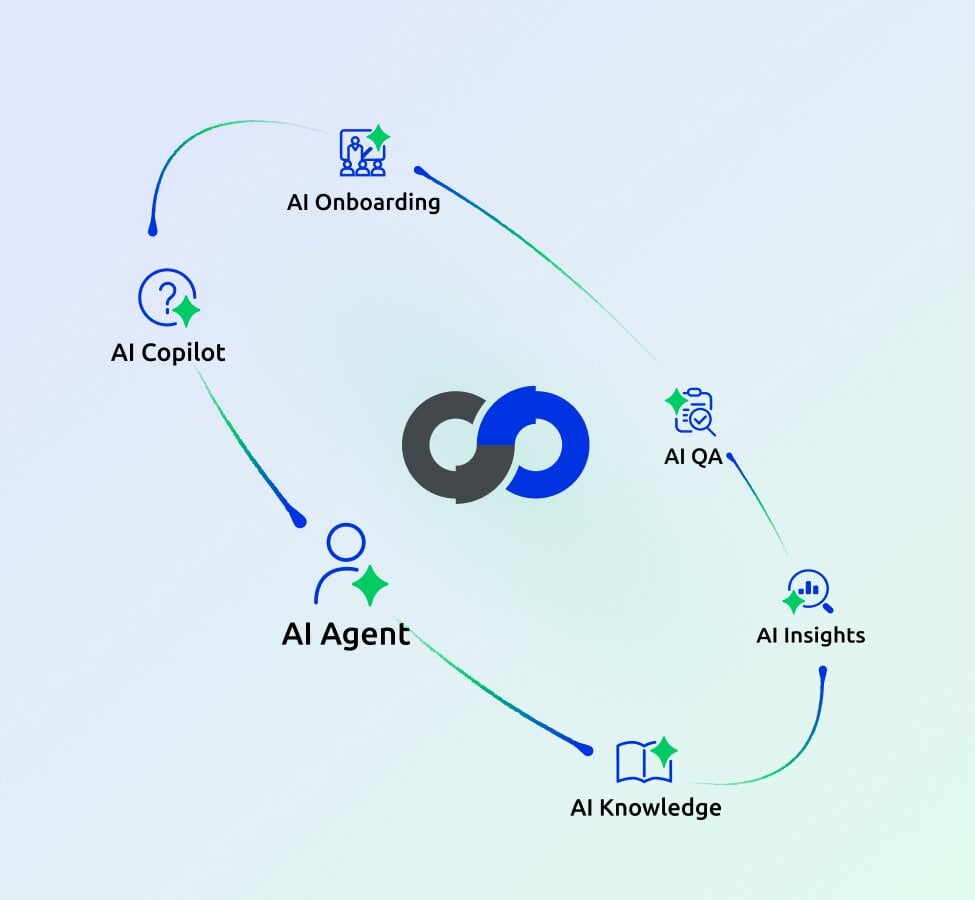
Support requests follow a predictable path. A customer asks a question, an agent (human or AI) resolves it, the interaction is closed, and then someone evaluates the interaction and applies whatever lessons come out of it.
That last step rarely happens in most organizations. Evaluations are shallow, lessons rarely make it back into training or documentation, and the cycle restarts without any real improvement baked in.
The Comm100 AI Flywheel was built on decades of research into support operations and treats this entire cycle as a closed loop where every stage generates data that improves the next one.
AI handles conversations, evaluates them, extracts insights from them, updates knowledge based on what it finds, trains agents using real scenarios, and feeds all of that back into the next interaction.
The system gets measurably better over time because improvement is wired into how the
platform operates, not because someone remembered to schedule a quarterly review.
Stage 1: Resolving Customer Queries with AI Agent
The most obvious bottleneck in any support operation is the front door, where customers arrive with questions and someone must answer them. In higher education, that might look like a flood of financial aid questions every September.
In the fast-moving world of iGaming, its account verification queries spiking after a new market launch. The pattern varies by industry, but the underlying pressure is always the same: too many repetitive questions consuming too much agent capacity.
The Comm100 AI Agent handles those routine, predictable conversations that don't require human judgment, things like password resets, account status checks, and policy questions with clear answers.
What separates it from a standard chatbot is how it generates responses: from verified, approved sources rather than open-ended language models. In industries where a wrong answer can trigger a compliance issue, that grounding makes a real difference.
When AI Agent doesn't know an answer, it says so and escalates to a human rather than
improvising something that sounds confident but isn't accurate.
For support teams dealing with seasonality (major sporting events like the Super Bowl, open
enrollment windows, product launches), AI Agent also solves the scaling problem that has
traditionally required hiring and training temporary staff.
The AI absorbs volume increases without any ramp-up time, which matters enormously when a three-month surge would otherwise require weeks of onboarding for agents who may not stay past the busy season.
Stage 2: Helping Agents Work Faster with AI Copilot
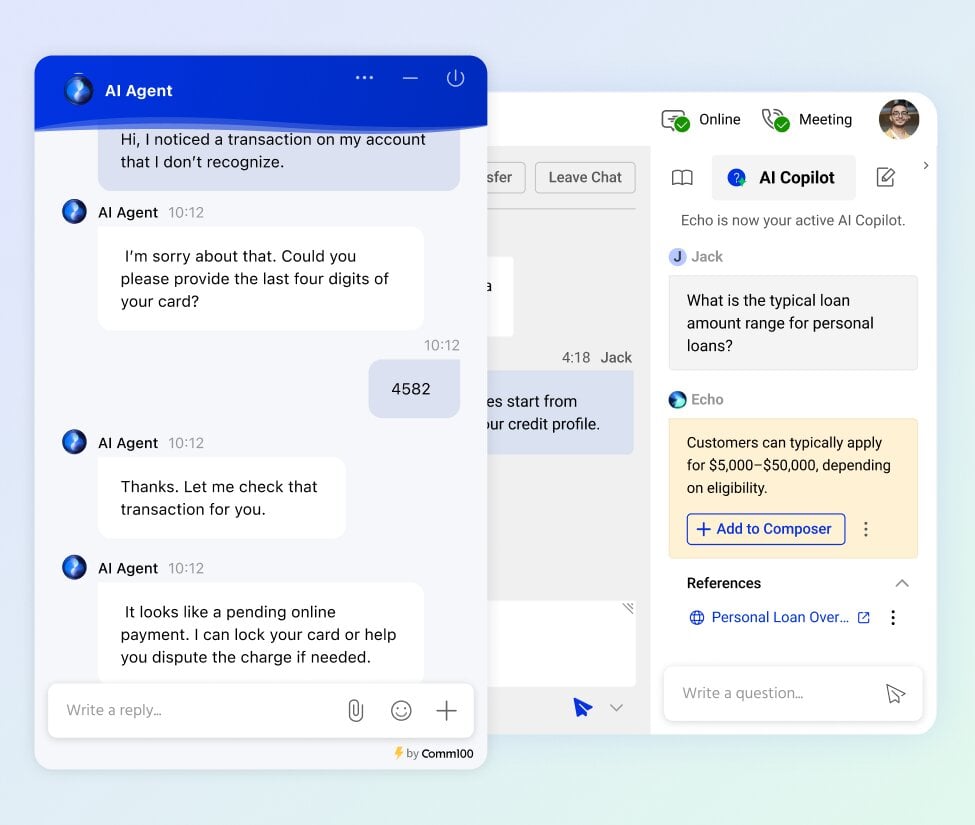
The Comm100 AI Copilot works alongside agents in real time, surfacing relevant knowledge,
suggesting responses, and handling post-conversation tasks like summarization and tagging.
It also addresses one of the quieter productivity drains in support: wrap-up work. Categorizing
conversations, writing summaries, and populating CRM fields don't show up in customer-facingmetrics, but they eat into the time agents could spend on actual conversations with customers who are waiting.
Complex issues, edge cases, and situations that require human judgment still make up a
significant portion of support volume, and these conversations land with agents who need to
respond quickly and accurately.
Agents in regulated industries often spend a surprising amount of time digging through dense
policy documents before they can even begin drafting a response, and that search time adds up fast when you're handling multiple chats simultaneously.
Within the flywheel, AI Copilot pulls from the same knowledge sources as AI Agent, which
means agents and the AI are always working from identical information. You can also add
internal docs as the knowledge source for AI Copilot, which gives it more context in day-to-day conversations than AI Agent. When AI Knowledge (more on that below) updates an article, both the AI and human agents see the change immediately, with no lag and no version mismatch.
Stage 3: Reading Every Conversation with AI Insights
Comm realized the importance of not just building solutions, but adding a monitoring layer on
top that actually provided useful metrics. Managers in most support organizations sit on more
data than they can realistically process.
They have volume numbers, CSAT scores, response times, and resolution rates, but very little
clarity about what's driving those numbers up or down. The underlying causes usually live inside conversation transcripts, and nobody has time to read thousands of every month.
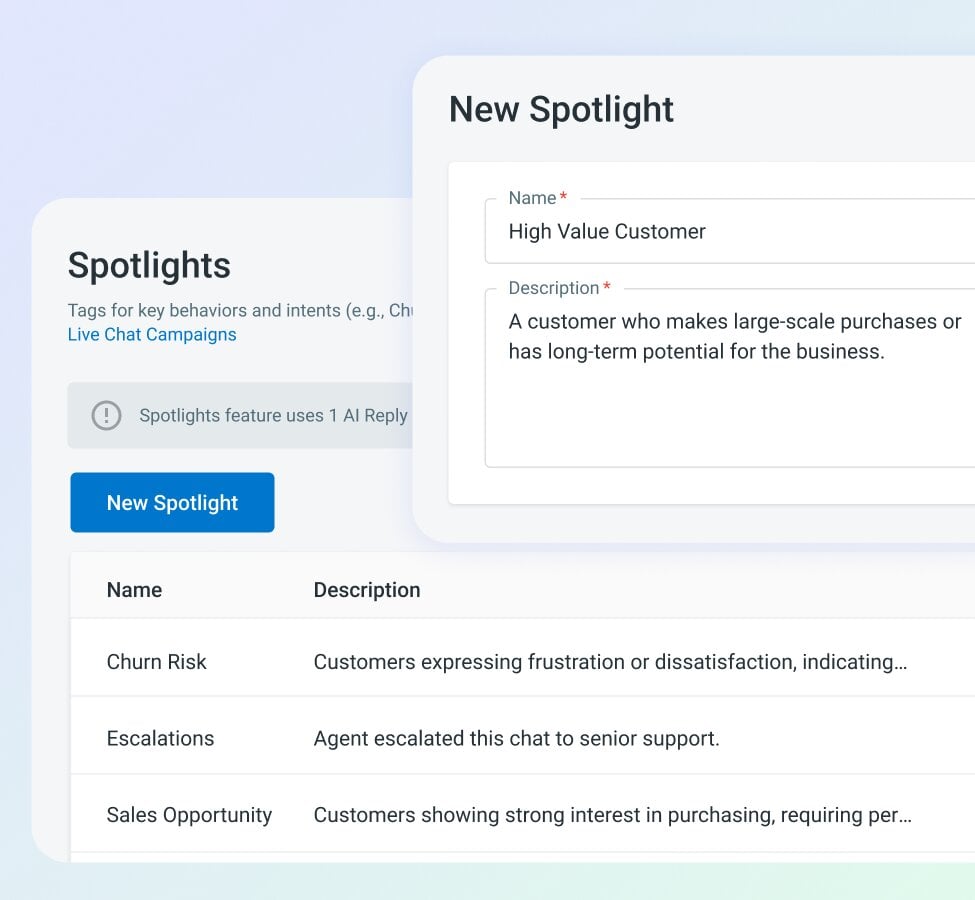
Comm100 AI Insights reads every conversation rather than sampling a handful, tracking sentiment in real time and identifying which topics are generating the most friction. One of its most practical features is Spotlights, which lets managers define exactly what they want to track using natural language.
A banking team might create a Spotlight for any conversation mentioning unauthorized
transactions, while a university might track mentions of a specific registration deadline. The AI
surfaces those interactions automatically, turning vague concerns into specific evidence that
managers can act on the same day.
Within the flywheel, Insights data feeds directly into the other tools. If sentiment analysis reveals that customers are consistently confused about a particular policy, managers can use that as a signal to update their knowledge base using AI Knowledge.
If certain topics are generating a high volume of escalations, that data informs how AI Agent
should be configured to handle them going forward.
The biggest benefit of this tool is how easy it makes it for managers to better understand
performance for each member. Using natural language, they can identify patterns, friction points, or areas of improvement for each agent, and use this information for better coaching through another one of Comm100’s tools.
Stage 4: Keeping Knowledge Accurate with AI Knowledge
While Comm100 also offers a dynamic knowledge base, their AI-powered knowledge management layer is a fantastic tool which really reflects the company’s pedigree in the support space.
Every knowledge base has a half-life. The day an article is published, it starts drifting from
reality as products change, policies update, and new questions emerge that nobody anticipated when the original content was written.
Traditionally, companies carry out periodic audits where someone goes through articles and
updates what's stale, but in practice those audits never really get actioned on time. To fix that, the company developed Comm100 AI Knowledge.
It continuously monitors content quality, flags issues like typos, outdated references, or missing
steps, and mines real conversations to identify questions the knowledge base doesn't cover yet.
When it finds a gap, it drafts a solution. When it finds an inaccuracy, it proposes a revision.
Managers control the scope of every audit and can track every change through an Analysis
Dashboard, so nothing gets published without human review. Instead of having to go through
knowledge base articles manually, teams can just let AI update it for them.
This is where the flywheel loop becomes most visible. Conversations analyzed by AI Insights
reveal knowledge gaps, AI Knowledge fills those gaps, AI Agent and AI Copilot immediately
use the updated content in their next interactions, and future conversations improve as a result.
The next round of analysis confirms whether the improvement landed, and the cycle continues.
Stage 5: Evaluating Quality Across 100% of Interactions with AI QA
Quality assurance in most support organizations means a supervisor reviews a handful of
conversations each week and hopes that sample represents what's really happening across
thousands of interactions.
The math alone makes this approach unreliable, and in industries like gaming or banking where regulatory compliance is non-negotiable, discovering a compliance gap weeks after it started affecting customers is a serious problem.
Comm100 AI Quality Assurance evaluates every interaction, both human and AI, against
customizable criteria. It scores conversations on dimensions like accuracy, tone, compliance
adherence, and resolution completeness, and it flags issues as they happen rather than surfacing them in a monthly report that's already stale by the time anyone reads it.
Teams can also configure their own sampling rate, choosing to review every conversation or a
defined percentage, so QA coverage scales with their volume without burning through AI credits unnecessarily.
Within the flywheel, QA scores can be fed in two directions. They can be used to inform AI
Insights, giving managers concrete data about where their team is excelling and where coaching is needed.
And they connect to AI Training, ensuring that new agents are specifically trained on the areas
where the team has the most room to improve.
Stage 6: Onboarding Agents Faster with AI Training
Comm100 AI Training creates realistic simulations using actual conversation data, so new agents practice handling scenarios they'll genuinely face on the job and receive immediate AI feedback on their performance.
This approach can reduce ramp time significantly while building higher confidence levels
because agents have already navigated realistic versions of their toughest interactions before they ever go live.
Agent onboarding in regulated industries is notoriously slow. A new hire at a credit union might spend weeks learning compliance protocols before they're cleared to handle a live conversation, and in higher education, training on the specifics of financial aid, registrar processes, and academic advising can take just as long. Traditional onboarding relies heavily on classroom instruction and scripted role-plays that don't reflect the actual complexity of real customer conversations.
AI Training closes the flywheel loop by drawing from every other tool in the suite. QA identifies
where agents struggle, Insights reveals which topics generate the most friction, and Knowledge provides the source material for training scenarios.
When a newly trained agent starts handling real conversations, their interactions feed right back into the system, creating a continuous cycle of improvement that compounds over time.
Why the Connections Between Tools Matter
The individual capabilities of each Comm100 AI product are valuable on their own, and any one of them could improve a support operation in isolation. But the compounding effect of running them together is where the real gains show up.
When AI Knowledge identifies an out-of-date article and updates it, the AI Agent will
automatically start delivering more relevant responses. The same information will be provided to human agents via the AI Copilot.
AI Quality Assurance confirms whether the new approach is working, and AI Training uses the
scenario to prepare the next wave of agents.
That entire sequence can happen with minimal intervention at each handoff, without waiting for a quarterly review, and without hoping that one team's discovery somehow makes it to another team's workflow.
For organizations running Comm100 Live Chat and the broader omnichannel platform, the flywheel means every conversation, whether handled by AI or a human agent, contributes to making the next one better.
In regulated industries where accuracy, compliance, and consistency aren't optional, a connected AI system that improves itself is the difference between a support operation that scales gracefully and one that just gets louder as it grows.

