Insights from Hiver's Head of AI
Most people assume building AI features for a customer service platform is just about planning, execution, and shipping.
But if you talk to the people behind the scenes, you'd know how different the reality truly is.
Anurag Maherchandani, Head of AI at Hiver, is one of those people. At Hiver, an AI-powered customer service platform used by over 10,000 support teams to handle customer conversations at scale, the pressure to "add AI" hit early and hit hard. Every inbox, every ticket, every customer interaction felt like a natural candidate for automation.
Anurag leads all of Hiver's AI initiatives, which means he's responsible for figuring out what to build, how to build it, and why it should matter to customers. Here's his take on what it really takes to build AI features that work.
Start With the Outcome, Not the Model
The core principle behind every AI decision at Hiver: AI is not the product. The outcome is the product.
In practice, this means the starting point for any AI feature is never "what can this model do?" It's "where are humans spending time on decisions they shouldn't have to make?"
That distinction shapes everything that follows, from problem selection to how the feature is surfaced in the UI.
"When teams say they're 'building an AI product,' they usually mean they've integrated a model, exposed it through a UI, and hit strong accuracy numbers. But none of that guarantees value. Users don't buy intelligence. They buy relief: from repetitive work, from uncertainty, from operational friction," says Anurag.
Even if a model looks great in testing, the true litmus test is whether or not it impacts the way users work.
Want to learn more about Hiver?
Inference or Rules: Pick the Right Tool First
Before any problem reaches the stage of model selection or data evaluation, there's a more fundamental question: Does this actually require inference?
Inference means the system needs to generalize from patterns it hasn't explicitly seen, making judgments that can't be fully captured in advance.
Rules mean the logic can be written explicitly: if X, then Y. The two are not interchangeable, and reaching for inference when rules would suffice adds cost, latency, and unpredictability for no gain.
When the team at Hiver needed to set up routing for emails from specific customer segments like VIP accounts, certain industries, or specific domains, the instinct was to build an AI model that could identify them automatically.
Instead, Hiver built configurable rule objects. These use explicit logic based on domains, keywords, and metadata. The result is predictable, easy to debug, and configurable by end users without involving Hiver’s AI team.
For example, if a company wants all emails from @enterprise.com or messages containing the word “contract” to go to a priority inbox, they can set up a rule in minutes. This needs no AI, and there’s no ambiguity in how emails are handled.
As Anurag puts it: "If you can write the rules, write the rules. Save AI for problems where the rules would be impossible to enumerate, where you need the system to generalize from patterns it hasn't explicitly seen."
Evaluating Problems That Do Need Inference
Once a problem genuinely requires inference, Hiver evaluates it against four criteria before committing to build:
- Frequency. AI has real overhead: inference cost, added latency, and unpredictable failure modes. That overhead only makes sense when the task is frequent enough for automation to compound. A task that happens a few times a week rarely justifies the complexity. A task agents do hundreds of times a day does.
- Predictability. Some classifications depend on information that's present in the input (email content, subject line, metadata) rather than learning from available data. Others depend on context the model simply doesn't have: customer tier, internal escalation policies, agent judgment built up over time. Before committing to build, the team runs feasibility checks on historical data to determine whether a prediction is even possible at a useful confidence level. If the signal isn't there, no architecture decision changes that.
- Customer pull. Is this solving a problem customers have named, or one the team has assumed they have? The former has a much higher probability of adoption. The latter tends to produce features that work well but get ignored when it comes to adoption.
- Stakes and reversibility. What happens when the model is wrong? A misclassified tag that an agent corrects with one click carries a very different risk profile than a misfired reply sent to a customer or a missed escalation. Low-stakes, easily reversible predictions are strong candidates for automation. High-stakes decisions need either human review or significantly higher confidence thresholds before they trigger.
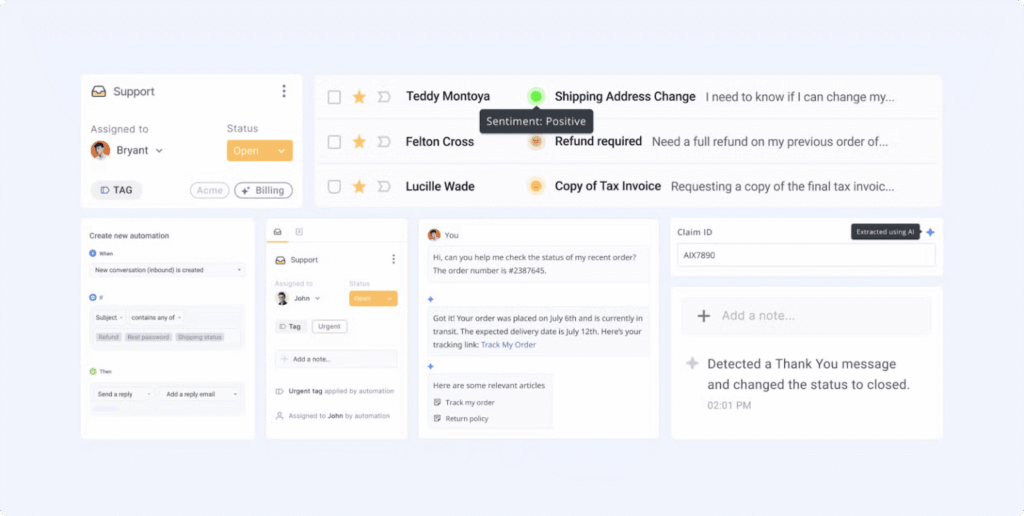
The auto-tagging feature by Hiver works because it meets all four criteria. It uses a model to infer the most relevant tag for an incoming conversation. Agents do not have to manually categorize every ticket.
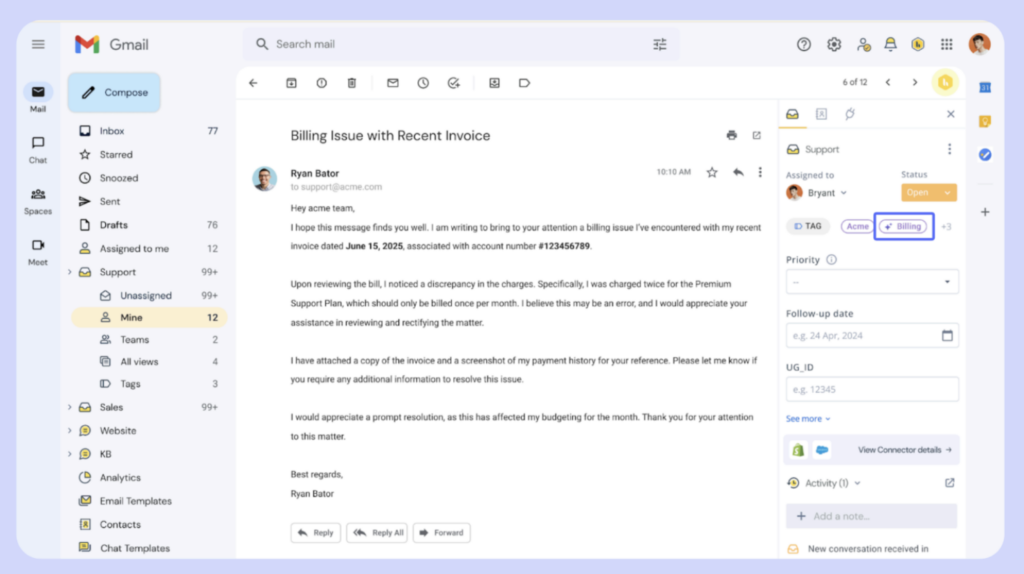
Teams define a set of tags in the admin panel, such as “Billing” or “Technical Support.” These act as the prediction targets. The model learns patterns from the email content, subject line, and metadata. Only tags with clear signals are included.
Agents perform this task on almost every conversation, which makes it high frequency. The signal is present in the email content for the included tags, which makes it predictable. Hiver’s clients have explicitly asked to reduce manual triage, which drives adoption. When the model is wrong, the tag can be corrected in a click, which keeps the stakes low and reversible.
Sentiment analysis follows the same pattern. It analyzes the tone of each conversation to identify whether a customer is frustrated, neutral, or positive. Teams see this across every conversation, so it is high frequency. Tone is present in the text, which makes it predictable.
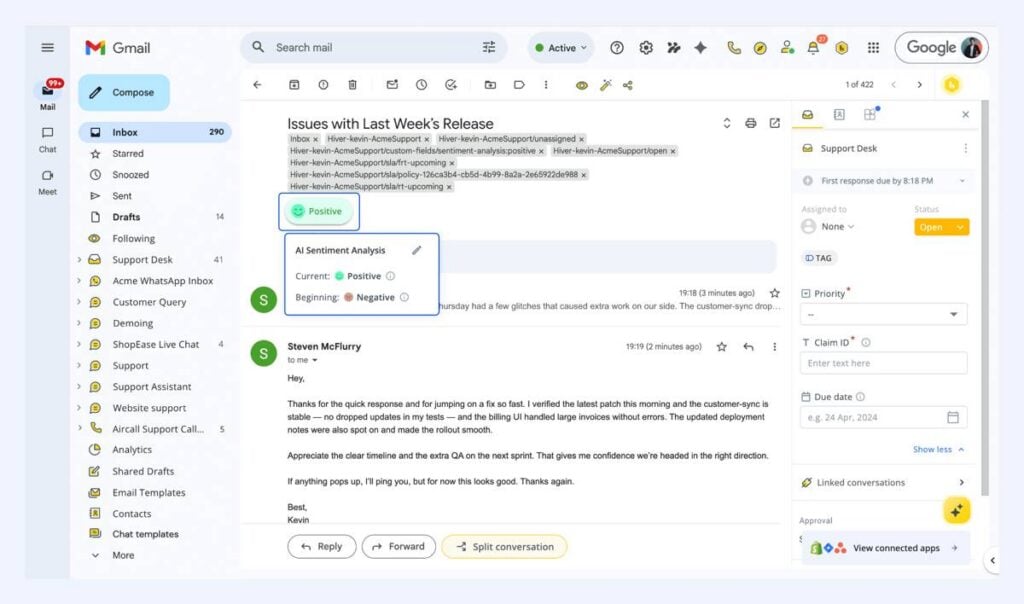
Teams want early visibility into frustrated customers, which creates clear demand. If the model is wrong, agents can override it without affecting the outcome, which keeps it low risk.
Feasibility Testing Before Building
One of the more discipline-intensive parts of Hiver's process: running accuracy feasibility tests before writing any production code.
The tag suggestion feature is an instructive example. For example, if an email says, “I was charged twice,” the model should pick “Billing.” But it was also trying to choose tags like “VIP Customer” or “Escalate to Manager,” which cannot be inferred from the email itself. Precision was poor, and agents stopped trusting the output.
The underlying problem was a failure to distinguish between predictable and unpredictable tag types. Category tags like "Billing," "Technical Support," and "Returns" map to linguistic patterns in email content. They're learnable.
Operational tags like "VIP Customer," "Waiting on Legal," and "Escalate to Manager" depend on context outside the input: account history, internal business rules, inter-team coordination. No model trained on customer emails will reliably predict them.
The fix was structural: before any tag type is included as a prediction target, it goes through a feasibility check. Does historical data support reliable prediction of this outcome? If not, it's excluded from the model's scope, regardless of how useful automation of that tag would theoretically be.
"The discipline of saying 'this tag type is not a good candidate for automation' was harder than building the model. But it meant we only shipped predictions agents could trust."
Embedding AI in the Workflow, Not on Top of It
Where AI sits in the product matters as much as what it does.
A feature that makes users stop, type a prompt, and check the output before taking action has added a step to the workflow, not removed one. That's net negative even when the AI is accurate. Users who are moving fast, handling ticket after ticket, will route around anything that interrupts that rhythm.
The design direction that works: AI that acts before the user needs to think about it. With Hiver:
- Emails are tagged before agents open them.
- Sentiment is calculated and flagged before an agent opens the conversation: a frustrated customer has already surfaced at the top of the queue.
- Queue ordering reflects priority signals without agents configuring anything.
- Reply drafts appear inline as suggestions.
- Cases where the model's confidence falls below a threshold surface for human review rather than any action being taken automatically.
The interface is not built around asking AI for help. Agents do not need to trigger it. Emails are tagged and prioritized before they open them. The AI removes effort before the agent has to think about it.
The internal measure of whether this is working: "If users notice the AI, you probably built it wrong."
When it's working, users stop mentioning the AI feature. They mention faster resolution times, lower backlog, easier onboarding for new agents. The AI has moved from being visible to being structural.
| 📌 Customer Snapshot: How This Plays Out in Practice |
|---|
| 📌 Customer Snapshot: How This Plays Out in PracticeAt ITS Logistics, teams were managing customer conversations across scattered inboxes, manually routing requests, and often stepping on each other’s toes with duplicate replies or missed follow-ups. After moving to Hiver, that changed quickly. Within just three weeks, quote turnaround time dropped by 61%, and most incoming requests were automatically routed to the right person. More importantly, every conversation had clear ownership, and managers finally had visibility into how work was progressing. The result was a system that could handle growing demand without adding complexity or headcount, because the work itself became more structured and predictable. “Hiver turned scattered queries into a structured customer service system. Every request is tracked, owned, and resolved faster.” — Alejandro Arboleda, Operations Director, ITS Logistics. |
Accuracy and Trust Are Different Problems
A system can hit 95% accuracy and still fail in production if users don't have a reliable mental model of when it will be wrong.
Trust comes from predictability and control. Users need to understand the system's behavior well enough to know when to rely on it and when to override it. If they can't develop that model, they'll either stop using the feature or stop checking its output, both of which are failure modes.
Hiver’s approach is to make correction a core part of the design rather than a fallback for errors. Agents can override any prediction with a single click. The system captures edits as feedback signals. Confidence-based thresholds determine what gets applied automatically versus surfaced for review.
In Anurag’s words, "Instead of treating overrides as failures, we built them as features. That keeps agents in control and creates a learning loop without us ever training on customer data. The system gets better by observing outcomes."
This also solves a data problem. Because corrections flow back as feedback signals, the model improves through observed outcomes rather than requiring access to raw customer data.
The privacy boundary stays intact while the system gets more accurate over time.
Two Questions Before Any AI Feature Ships
Before greenlighting any new AI feature, two questions:
"If this feature were removed tomorrow, would users complain?"
If the answer is no, the feature is additive but not essential. It has not yet changed how people work. That's the bar worth building toward.
"Does this feature reduce a decision, or create a new one?"
If users have to decide whether to trust the AI, configure it, or interpret its output before they can act, the AI has added cognitive load rather than removed it.
That's a failure regardless of technical performance.
The Real Work Behind AI Features
Building AI that works in production is less about model selection and more about problem selection, feasibility testing, and designing for how people actually work. The AI itself is the smallest part of the problem.
"The product was never classification, sentiment analysis, drafting, or summarization. The product was fewer decisions per agent, faster outcomes, reduced cognitive load, scalable operations. AI was the mechanism, and a mechanism only works when it's applied to the right problem, with data that actually supports the solution."
If you're thinking about where AI fits into your support operations, talk to us at Hiver. We'll show you how we can empower you to deliver empathetic support.