



Hiver vs. Front: Comparison & Expert Reviews For 2026



If you're comparing Hiver and Front for your next customer service solution, you're likely trying to sort out which one fits your team’s workflow, complexity, and channel needs. In this breakdown, you'll see how the tools differ, where they’re similar, and what that means for your work so you can choose the one that actually makes your day easier. I’ll walk through pricing structure, features, integrations, security, usability, and more, so you know exactly what to expect and how each tool might align with your current workflow.
Hiver vs. Front: An Overview
Hiver
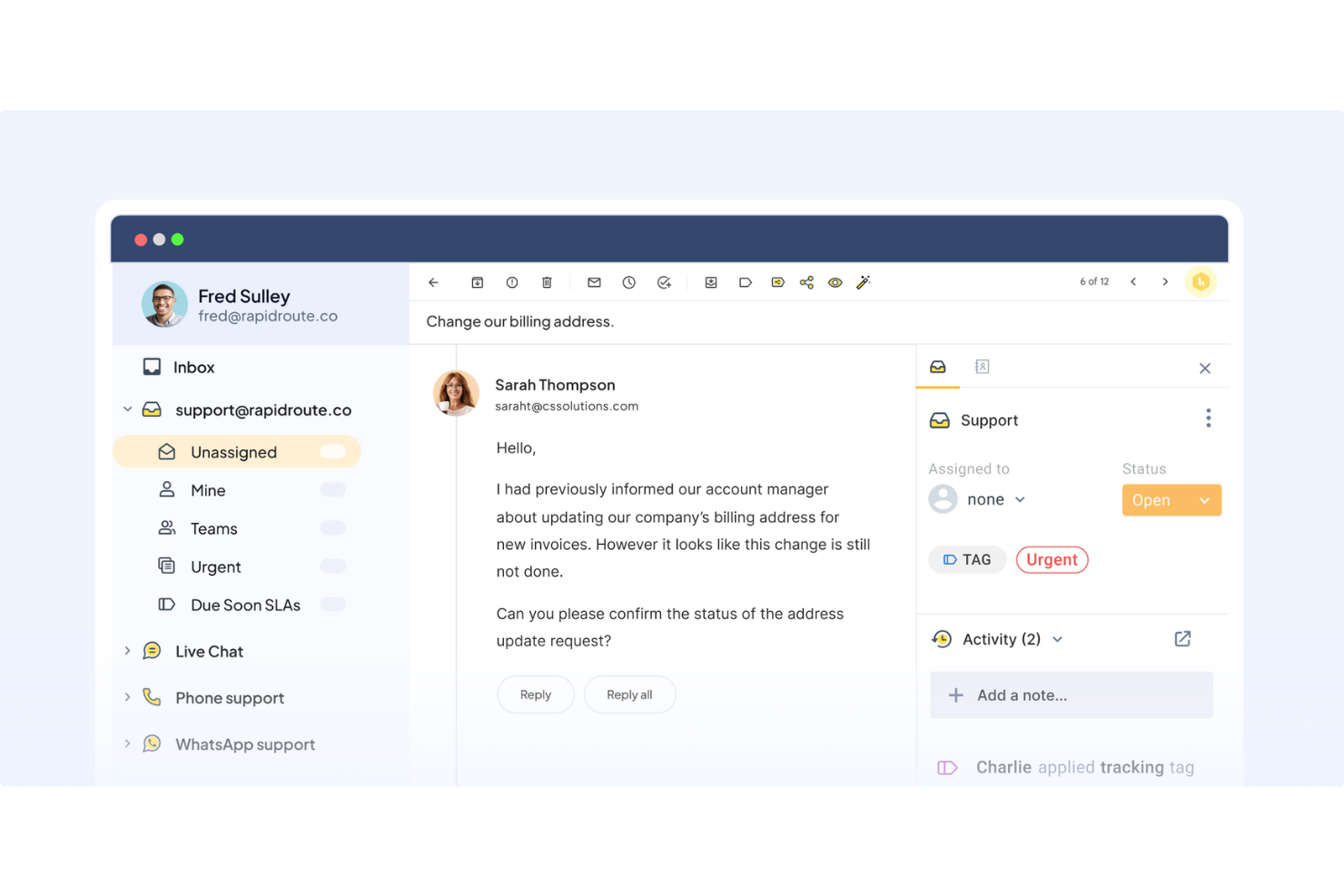
Front


Why Trust Our Software Recommendations
Our team has been testing and reviewing software since 2012. As CX leaders ourselves, we know how difficult—and important—it is to choose the right software.
For this guide, we evaluated tools using hands-on testing and independent research, scoring tools using our selection criteria.
Our reviews reflect our human editorial judgment, not a sales pitch.
Hiver vs. Front Pricing Comparison
| Hiver | Front | |
|---|---|---|
| Free Trial | Free plan available | 14-day free trial |
| Pricing | From $35/user/month | From $25/user/month (billed annually) |
Hiver vs. Front Pricing & Hidden Costs
Hiver’s pricing model is structured around tiered plans (with a free forever plan available). Teams that need higher usage limits will likely need to scale faster. Front’s pricing follows a similar tiered model that adds costs for AI-powered upgrades, workflow limits, and certain communication channels.
To choose the right fit, you should look at how each tool scales with your volume, which add-ons your team will actually use, and which vendor’s structure makes it easier to forecast long-term costs for your support operations.
Hiver vs. Front Feature Comparison
Hiver’s AI Copilot and modern workspace make it easy to manage heavy workloads when your team needs quick, human-like replies without switching tools, especially in contexts like logistics or e-commerce. Front’s omnichannel workspace and flexible workflows shine when your team handles complex customer journeys across SMS, chat, email, and more, giving you structure for high-volume, multi-channel operations. Both tools support different needs depending on how your team works day to day.
| Hiver | Front | |
|---|---|---|
| API | ||
| Analytics | ||
| Batch Permissions & Access | ||
| CRM Integration | ||
| Call Integration | ||
| Chat | ||
| Contact Management | ||
| Contact Sharing | ||
| Customer Management | ||
| Customer Service | ||
| Dashboard | ||
| Data Export | ||
| Data Import | ||
| Data Visualization | ||
| Email Integration | ||
| Escalation Management | ||
| External Integrations | ||
| Instant Chat Integration | ||
| Knowledge Base | ||
| Lead Management | ||
| Lead Scoring | ||
| Multi-User | ||
| Notifications | ||
| Real-time Alerts | ||
| Scheduling | ||
| Self-service Portal | ||
| Social Media Integration | ||
| Support Forum | ||
| Third-Party Plugins/Add-Ons | ||
| Ticket Management | ||
| Workflow Management |
Hiver vs. Front Integrations
| Integration | Hiver | Front |
| Salesforce | ✅ | ✅ |
| HubSpot | ✅ | ✅ |
| Shopify | ✅ | ✅ |
| Jira | ✅ | ✅ |
| Asana | ✅ | ✅ |
| Monday.com | ✅ | ✅ |
| Zoho CRM | ✅ | ✅ |
| QuickBooks | ✅ | ❌ |
| API | ✅ | ✅ |
| Zapier | ✅ | ❌ |
Hiver’s integration ecosystem works well when you want to pull customer or order context into your inbox and keep workflows lightweight and simple across CRM, billing, and collaboration tools. Front’s broader integration library fits teams that rely on project management systems, sales platforms, and more complex workflows that span multiple departments. Both tools support a range of team types depending on whether you value depth across operational systems or tighter connections to service and CRM data.
Hiver vs. Front Security, Compliance & Reliability
| Factor | Hiver | Front |
| Data Encryption | Encrypts data in transit and at rest using strong TLS and AWS standards. | Uses AES-256 for data at rest and TLS for data in transit. |
| Compliance | Meets ISO 27001, SOC 2 Type II, GDPR, and CCPA requirements. | Holds SOC 2 Type II and ISO 27001 certifications, supporting GDPR compliance. |
| Infrastructure | Hosted on AWS with controlled access, backups, and restricted data permissions. | Hosted on AWS with daily backups and isolated environments for organizations. |
| Authentication | Supports SSO, OAuth, and strict access controls. | Offers SSO, SCIM, and secure authentication policies. |
| Data Privacy | Clear data retention rules with strict access boundaries. | Emphasizes privacy rights with strong data protection standards. |
Front leans toward enterprise-grade scalability, while Hiver offers strong compliance and data-handling transparency that fits teams needing clarity and control. To evaluate security in-depth, you should review each vendor’s security documentation, confirm certifications, and test how well each tool supports your internal governance rules.
Hiver vs. Front Ease of Use
| Factor | Hiver | Front |
| Interface | Modern UI that feels intuitive, helping teams move fast. | Modern, unified workspace with more advanced layouts. |
| Setup | Quick setup with minimal configuration needed. | Guided setup with more complexity for omnichannel workflows. |
| Onboarding | Intuitive onboarding thanks to a modern interface, robust help center, support, and weekly onboarding sessions. | Includes guided setup, customer support, and a community forum. |
| Learning Curve | Low, thanks to its modern and intuitive AI-powered interface. | Moderate, due to advanced features and workspace structure. |
| Support | 24/7 support with strong onboarding resources. | In-depth documentation and training for multi-team operations. |
I think Hiver is easier for teams that want something familiar and straightforward, while Front feels requires more time to learn. Hiver works when you want to move fast without heavy training, and Front makes sense if your team relies on complex workflows across many channels.
Hiver vs Front: Pros & Cons
Hiver
- You deliver human-like, personalized responses without switching tabs or sounding robotic.
- Your team stays aligned with shared drafts, notes, collision alerts, and clear ownership.
- Hiver AI reduces manual effort by drafting responses, auto-tagging conversations, and summarizing threads in seconds.
- Complex enterprise workflows may require more customization than Hiver currently offers.
- No advanced help desk forecasting, capacity planning, or predictive SLA breach modeling.
- Teams with support channels outside of chat, email, and call (like social channels), may find the platform lacks features.
Front
- You can manage all your team’s communications in one place.
- Your team will appreciate the intuitive and user-friendly interface.
- You can easily collaborate with your team using workspaces and shared inboxes.
- Your team might encounter a learning curve initially.
- You could find the mobile app lacking in some advanced features.
- Some users report occasional lag in syncing emails.
Best Use Cases for Hiver and Front
Hiver
- E-commerce Teams You can pull order context, draft responses faster, and handle customer issues without switching tools.
- IT & Internal Support Workflows, SLAs, and collision alerts help your team respond quickly and stay aligned.
- AI-Forward Support Teams Hiver AI handles repetitive tasks so your team focuses on high-value problems.
- Travel & Hospitality Personalized responses and fast collaboration help you improve customer experience.
- Logistics & Operations Shared inboxes, tags, and workflows give you visibility and control over high-volume communication.
- Small Support Teams Hiver is easy to learn and helps your team start resolving issues within hours.
Front
- Customer Support Front excels for customer support teams by centralizing communication channels, enabling faster and more cohesive responses.
- Small Businesses Front is great for businesses with small teams as it provides an affordable solution to manage customer interactions without complex setup.
- Remote Teams Front supports remote teams with its cloud-based platform, allowing seamless collaboration and team management from anywhere.
- Sales Teams Sales teams benefit from Front's integration capabilities with CRM systems, ensuring customer interactions are tracked and managed efficiently.
- E-commerce E-commerce companies can use Front to manage customer inquiries from multiple platforms, ensuring a consistent customer experience.
- Tech Startups Tech startups will find Front useful for its scalability and ability to integrate with various tools, supporting rapid growth, efficient project management and dynamic needs.
Who Should Use Hiver, and Who Should Use Front?
Hiver fits teams that want a simple, centralized platform with strong AI, fast onboarding, and a familiar feel for email, chat, and voice channels. Front, in my opinion, suits teams managing complex omnichannel operations where workflows, routing, and deep collaboration matter more. Overall, Hiver is ideal for customer service leaders who want quick adoption, while Front is better if your team needs highly structured processes and advanced automation. Both tools support solid service operations, but the right one depends on how your team actually works every day.
Differences Between Hiver and Front
| Hiver | Front | |
|---|---|---|
| Collaboration | Collaboration happens with simple notes, @mentions, shared drafts, and collision alerts. | Collaboration is deeper, tying together internal chat, team spaces, and cross-functional workflows. |
| Customization | More straightforward, with less configuration needed. | Highly customizable workflows and workspace setups. |
| Omnichannel Support | Supports email, chat, voice, WhatsApp, and portal. | Covers email, SMS, WhatsApp, chat, and social channels. |
| User Interface | Modern, intuitive workspace focused on simplicity. | Unified workspace designed for multi-channel complexity. |
| Workflow Automation | Rule-based automations with AI tagging and routing. | Advanced routing, macros, and unlimited automation options. |
| Visit HiverOpens new window | Read Front ReviewOpens new window |
Similarities Between Hiver and Front
| Artificial Intelligence | Each platform uses AI to speed up replies, automate tasks, and surface insights, helping your team stay efficient. |
|---|---|
| Knowledge Base | Each platform includes knowledge base tools that help you deflect tickets and support customers with self-service. |
| Mobile Usability | Both offer mobile apps so your team can handle urgent issues or monitor queues on the go. |
| Reporting & Analytics | Both offer dashboards and insights to help you track service metrics, team performance, and improvements over time. |
| SLA Management | Each platform gives you SLA settings and tracking so you can keep response and resolution times consistent across your team. |
| Visit HiverOpens new window Read Front ReviewOpens new window | |