


Hiver vs. Salesforce Service Cloud: Comparison & Expert Reviews For 2026


If you're stuck juggling growing ticket volumes, slow response times, or tools that feel too clunky for your team’s daily work, you’re not alone. Many customer service leaders reach a point where their current setup can’t keep up, and they start looking for something simpler, faster, or more flexible. If you’re in the market for a new customer service solution, you may come across Hiver and Salesforce Service Cloud (now Agentforce Service)—two very different but popular options.
In this guide, I’ll walk through how these two customer service software solutions compare so you can understand where they’re similar, where they differ, and which one fits the way you and your team work.
Hiver vs. Salesforce Service Cloud: An Overview
Hiver


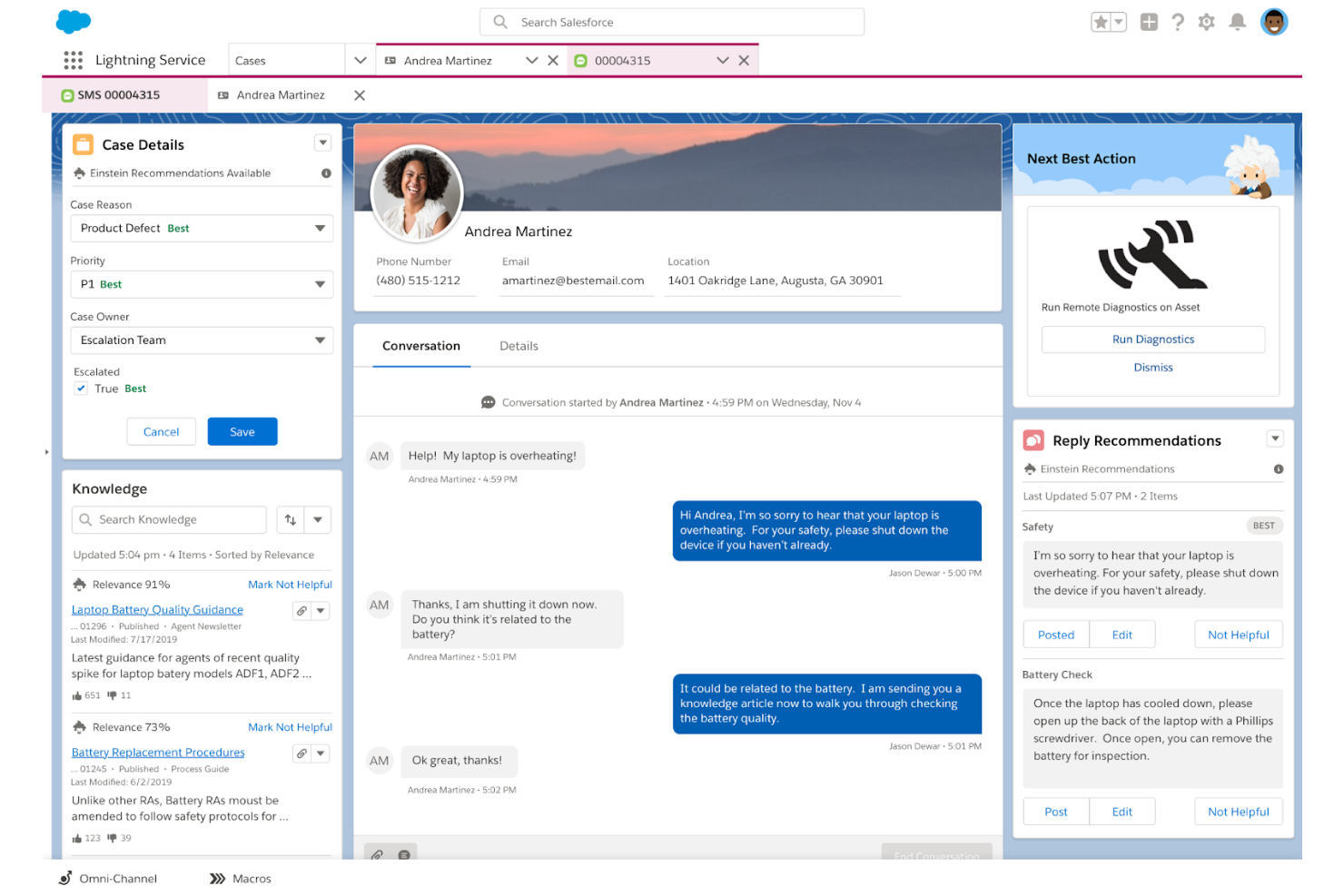
Salesforce Service Cloud


Why Trust Our Software Reviews
We’ve been testing and reviewing software since 2020. As CX leaders ourselves, we know how critical and difficult it is to make the right decision when selecting software.
We invest in deep research to help our audience make better software purchasing decisions. We’ve tested more than 2,000 tools for different CX use cases and written over 1,000 comprehensive software reviews. Learn how we stay transparent & our software review methodology.
Hiver vs. Salesforce Service Cloud Pricing Comparison
| Hiver | Salesforce Service Cloud | |
|---|---|---|
| Free Trial | 7-day free trial + free demo + free plan available | Free trial + free demo available |
| Pricing | From $25/user/month (billed annually) | From $25/user/month (billed annually) |
Hiver vs. Salesforce Service Cloud Pricing & Hidden Costs
Hiver pricing is structured in tiers that scale with your team size and feature needs, with potential costs tied to advanced functionalities. Salesforce Service Cloud pricing follows a multi-edition model with required annual contracts at higher tiers, plus possible add-on fees for AI, automation, integrations, and additional products across the Salesforce ecosystem.
When making your decision, look beyond monthly seat costs and examine how each vendor handles add-ons, contract commitments, implementation effort, and long-term scalability for your team’s workflow.
Hiver vs. Salesforce Service Cloud Feature Comparison
Hiver’s AI-powered inbox lets you manage email, chat, and voice-heavy support work smoothly, especially when you need quick collaboration and clear ownership on fast-moving customer conversations. Salesforce Service Cloud’s unified console is great for complex operations where you want deep case management, AI-driven guidance, and a structured workspace to handle large, multi-team workflows. Each one supports your day-to-day work differently, depending on whether you need simplicity and speed or enterprise-level control.
| Hiver | Salesforce Service Cloud | |
|---|---|---|
| API | ||
| Analytics | ||
| Batch Permissions & Access | ||
| CRM Integration | ||
| Call Integration | ||
| Chat | ||
| Contact Management | ||
| Contact Sharing | ||
| Customer Management | ||
| Customer Service | ||
| Dashboard | ||
| Data Export | ||
| Data Import | ||
| Data Visualization | ||
| Email Integration | ||
| Escalation Management | ||
| External Integrations | ||
| Instant Chat Integration | ||
| Knowledge Base | ||
| Lead Management | ||
| Lead Scoring | ||
| Multi-User | ||
| Notifications | ||
| Real-time Alerts | ||
| Scheduling | ||
| Self-service Portal | ||
| Social Media Integration | ||
| Support Forum | ||
| Third-Party Plugins/Add-Ons | ||
| Ticket Management | ||
| Workflow Management |
Hiver vs. Salesforce Service Cloud Integrations
| Integration | Hiver | Salesforce Service Cloud |
| Salesforce | ✅ | ✅ |
| HubSpot | ✅ | ✅ |
| Shopify | ✅ | ✅ |
| Netsuite | ✅ | ✅ |
| Asana | ✅ | ✅ |
| Jira | ✅ | ✅ |
| Pipedrive | ✅ | ✅ |
| Aircall | ✅ | ✅ |
| Slack | ✅ | ✅ |
| Microsoft Teams | ❌ | ✅ |
| API | ✅ | ✅ |
| Zapier | ✅ | ✅ |
Both Hiver and Salesforce Service Cloud offer wide integration options designed to bring customer data, workflow tools, and external systems into your daily service work. They each support connections that help you streamline tasks, reduce tab-switching, and keep important context close at hand. To weigh your options, think about which integrations your team relies on most today and which platform aligns better with the systems you plan to use as your service operations grow.
Hiver vs. Salesforce Service Cloud Security, Compliance & Reliability
| Factor | Hiver | Salesforce Service Cloud |
| Data Privacy | Uses strict access controls, stores data securely in AWS, and limits employee access based on job necessity. | Follows a trust-first model with dedicated privacy controls, customer data segregation, and documented security governance. |
| Regulatory Compliance | Complies with ISO 27001, SOC 2 Type II, GDPR, CCPA, and offers HIPAA support on higher tiers. | Supports extensive global compliance standards including ISO, SOC, GDPR, CCPA, and industry-specific certifications across its cloud services. |
| Encryption | Encrypts data in transit with TLS/SSL and keeps stored data encrypted across AWS infrastructure. | Uses encryption for data in transit and at rest across its platform with advanced controls built into its multitenant architecture. |
| Reliability | Runs on AWS with automated backups, redundancy, and uptime protections built into its cloud environment. | Runs on Salesforce’s global infrastructure with high availability, real-time monitoring, and built-in redundancy across regions. |
| Access Controls | Supports SSO, OAuth-based authentication, and granular roles for permission management. | Offers SSO, MFA, granular permission sets, and detailed admin controls across all Salesforce apps. |
Hiver and Salesforce Service Cloud both take security and compliance seriously, offering strong protections, certifications, and controls for handling customer data. To choose the right fit, look closely at which compliance requirements matter for your industry and how each platform’s access controls, hosting model, and governance approach match your team's standards.
Hiver vs. Salesforce Service Cloud Ease of Use
| Factor | Hiver | Salesforce Service Cloud |
| Interface | Uses a modern workspace that feels intuitive for teams moving fastl. | Uses a structured console designed for complex case management and multi-step workflows. |
| Onboarding | Quick setup with minimal training since most actions mirror daily email habits. | Longer onboarding curve due to its depth, customization options, and broader CRM connections. |
| Setup | Simple configuration with straightforward channel setup and rules. | More involved setup that often requires admin guidance or support from Salesforce specialists. |
| Support | Offers 24/7 chat and email support plus a detailed help center. | Provides a multi-tier success model with different support plans and guided resources. |
| Daily Workflow | Easy for small, fast-moving teams to adopt and manage. | Built for larger teams that need structured workflows, visibility, and enterprise controls. |
In my opinion, Hiver is easier to adopt if you want a familiar interface that keeps things simple for your team, while Salesforce Service Cloud offers more control but demands a steeper learning curve. In the end, the right choice depends on whether you want speed and simplicity or deeper configuration and structure in your daily work.
Hiver vs Salesforce Service Cloud: Pros & Cons
Hiver
- You deliver human-like, personalized responses without switching tabs or sounding robotic.
- Your team stays aligned with shared drafts, notes, collision alerts, and clear ownership.
- Hiver AI reduces manual effort by drafting responses, auto-tagging conversations, and summarizing threads in seconds.
- Complex enterprise workflows may require more customization than Hiver currently offers.
- No advanced help desk forecasting, capacity planning, or predictive SLA breach modeling.
- Teams with support channels outside of chat, email, and call (like social channels), may find the platform lacks features.
Salesforce Service Cloud
- Omnichannel support across chat, phone, email, and social
- Deep customization for complex workflows and reporting
- Advanced automation and AI-powered case routing features
- Customer support responsiveness can be inconsistent
- Interface complexity requires dedicated admin resources
- High total cost of ownership for licenses and setup
Best Use Cases for Hiver and Salesforce Service Cloud
Hiver
- E-commerce Teams You can pull order context, draft responses faster, and handle customer issues without switching tools.
- IT & Internal Support Workflows, SLAs, and collision alerts help your team respond quickly and stay aligned.
- AI-Forward Support Teams Hiver AI handles repetitive tasks so your team focuses on high-value problems.
- Travel & Hospitality Personalized responses and fast collaboration help you improve customer experience.
- Logistics & Operations Shared inboxes, tags, and workflows give you visibility and control over high-volume communication.
- Small Support Teams Hiver is easy to learn and helps your team start resolving issues within hours.
Salesforce Service Cloud
- Global Operations Offers multilingual support and advanced reporting for distributed teams.
- IT Help Desks Automates ticket routing and integrates with asset management tools.
- Retail and Ecommerce Connects service, sales, and marketing for a unified customer experience.
- Healthcare Providers Manages sensitive data and multi-channel patient communications securely.
- Financial Services Supports strict compliance and security requirements with robust controls.
- Enterprise Customer Support Handles high ticket volumes and complex workflows with automation and AI.
Who Should Use Hiver, and Who Should Use Salesforce Service Cloud?
Hiver is a great fit if you want a simple, fast tool that helps your team respond quickly without overwhelming them with configuration. Salesforce Service Cloud is better suited for larger organizations that need a deeply structured system with advanced case management, automations, and CRM-level visibility. Overall, I think Hiver works best when your team values ease of use, quick adoption, and AI, while Salesforce Service Cloud shines when you need enterprise control, scale, and end-to-end customer data in one platform. Think about how your team works today and what level of structure you want to manage over time.
Differences Between Hiver and Salesforce Service Cloud
| Hiver | Salesforce Service Cloud | |
|---|---|---|
| Artificial Intelligence | Hiver AI for drafting responses, tagging, summarizing, and sentiment detection. | AI layered across the entire platform with guidance, next best actions, and automated case handling. |
| Automation | Simple rule-based automations for routing, tagging, and handling tasks. | Advanced automation across cases, incidents, workflows, and enterprise processes. |
| Scalability | Best for small to mid-sized teams that need speed and clarity. | Built for enterprise operations with multi-team, multi-channel complexity. |
| Setup Complexity | Minimal setup with fast onboarding. | Requires more configuration, admin support, and ongoing management. |
| User Interface | Modern interface built for quick, multi-channel support. | Unified service console built for structured case workflows. |
| Visit HiverOpens new window | Read Salesforce Service Cloud ReviewOpens new window |
Similarities Between Hiver and Salesforce Service Cloud
| Collaboration | Both systems support collaboration so your team can work together on customer issues more efficiently. |
|---|---|
| Core Focus | Both platforms are built to help your team deliver faster, more reliable customer service by centralizing conversations, improving response quality, and keeping support work organized across channels. |
| Knowledge Base | Both offer ways to create or manage knowledge resources that support faster answers for teams and customers. |
| Omnichannel Support | Both tools bring multiple channels together so you can handle customer questions across email, chat, voice, and more. |
| Reporting | Both solutions give you dashboards and analytics to track performance, understand trends, and make decisions that improve your service operations. |
| Visit HiverOpens new window Read Salesforce Service Cloud ReviewOpens new window | |