


ServiceNow vs. Jira Service Management: Comparison and Expert Reviews for 2026

We review tools independently, and commissions help fund our testing. See our transparency policy, our methodology, or suggest a tool.
Choosing between ServiceNow and Jira Service Management for customer service software often comes down to whether you need ServiceNow’s deep process automation or Jira’s agile ticket management—both offer distinct advantages, but which one truly fits your team’s workflow headaches?
In this article, you’ll get a side-by-side look at how each platform tackles real-world support challenges, plus expert insights to help you confidently select the right customer service software for your goals.
ServiceNow

4.4/5
- Free demo available
- Pricing upon request
Jira Service Management
4/5
- Free plan + 14-day free trial available
- From $25/user/month
Why Trust Our Software Recommendations
6,700+
Reviews
20
Industry experts
16+
Evaluation factors
14
Years
Our team has been testing and reviewing software since 2012. As CX leaders ourselves, we know how difficult—and important—it is to choose the right software.
For this guide, we evaluated tools using hands-on testing and independent research, scoring tools using our selection criteria.
Our reviews reflect our human editorial judgment, not a sales pitch.
 Gui DrusinaCreative Director
 Tim FisherVP of AI
| ServiceNow | Jira Service Management | |
|---|---|---|
| Free Trial | Free demo available | Free plan + 14-day free trial available |
| Pricing | Pricing upon request | From $25/user/month |
ServiceNow vs. Jira Service Management Pricing & Hidden Costs
ServiceNow uses a custom-quote pricing model, which means you’ll need to contact their sales team for a tailored package based on your organization’s size, needs, and required modules. This approach often includes additional costs for advanced features, integrations, and implementation support.
Jira, on the other hand, offers transparent tiered pricing based on the number of users and feature sets, with add-ons and marketplace apps available for extra functionality. Both platforms may introduce hidden costs through premium support, customizations, or third-party integrations.
To select the right vendor, start by mapping your must-have features and estimating your user count and growth plans. Ask each vendor for a detailed breakdown of what’s included, what’s extra, and what implementation or support services you’ll need. Reviewing contract terms, upgrade paths, and integration requirements will help you avoid surprises and ensure the solution you choose fits your long-term service goals.
ServiceNow and Jira Service Management have roots in IT service management (ITSM), but they both support broader customer service operations use cases, with overlapping features like omnichannel ticketing, workflow automation, self-service portals, knowledge bases, SLA tracking, and reporting. They can both handle external customer inquiries as well as internal service requests, making them adaptable for support teams that need structured case management and scalable workflows.
Where they diverge is in their specialization and depth. ServiceNow stands out for its enterprise-grade scalability, powerful CMDB (configuration management database), and AI-driven automation that can extend service workflows across departments like HR and finance. Jira Service Management, by contrast, shines through its native connection to Atlassian tools like Jira Software and Confluence, making it especially strong for support teams that need tight collaboration with engineering and product teams.
| ServiceNow | Jira Service Management | |
|---|---|---|
| Analytics | Yes | Yes |
| API | Yes | Yes |
| Batch Permissions & Access | Yes | Yes |
| Call Integration | Yes | Yes |
| Chat | Yes | Yes |
| Contact Management | Yes | Yes |
| CRM Integration | Yes | Yes |
| Customer Management | Yes | Yes |
| Data Export | Yes | Yes |
| Data Import | Yes | Yes |
| Email Integration | Yes | Yes |
| Escalation Management | Yes | Yes |
| External Integrations | Yes | Yes |
| Instant Chat Integration | Yes | Yes |
| Knowledge Base | Yes | Yes |
| Multi-User | Yes | Yes |
| Notifications | Yes | Yes |
| Real-time Alerts | Yes | Yes |
| Self-service Portal | Yes | Yes |
| Social Media Integration | Yes | Yes |
| Support Forum | Yes | Yes |
| Ticket Management | Yes | Yes |
| Workflow Management | Yes | Yes |
| Integration | ServiceNow | Jira Service Management |
| Salesforce | ✅ | ✅ |
| Microsoft Teams | ✅ | ✅ |
| Slack | ✅ | ✅ |
| Zoom | ✅ | ✅ |
| SAP | ✅ | ❌ |
| Workday | ✅ | ❌ |
| GitHub | ❌ | ✅ |
| Confluence | ❌ | ✅ |
| API | ✅ | ✅ |
| Zapier | ❌ | ✅ |
Both platforms cover the most popular integrations for customer service teams, but ServiceNow stands out with deeper enterprise connections like SAP and Workday, while Jira Service Management excels with developer-focused tools like GitHub and Confluence, plus Zapier for broader automation. If your team relies on specialized enterprise systems or needs flexible workflow automation, these integration differences could tip the scales.
| Factor | ServiceNow | Jira Service Management |
| Data Privacy | Offers advanced data segregation, role-based access, and regional data hosting. | Provides granular permissions, data residency options, and user authentication controls. |
| Regulatory Compliance | Supports HIPAA, GDPR, FedRAMP, and more with built-in compliance tools. | Meets GDPR, SOC 2, and ISO 27001 standards with regular audits. |
| Encryption | Uses end-to-end encryption for data at rest and in transit. | Encrypts data in transit and at rest, with additional security add-ons. |
| Uptime & Reliability | High uptime SLA and global redundancy. | Delivers high uptime SLA with robust cloud infrastructure. |
| Incident Response | Provides automated incident management and real-time monitoring. | Offers incident tracking, audit logs, and integration with security tools. |
ServiceNow edges ahead with broader compliance certifications and enterprise-grade uptime, while Jira Service Management delivers strong security controls and reliable performance for most organizations. ServiceNow’s strengths lie in its advanced compliance and monitoring, while Jira stands out for its transparent security features and dependable cloud reliability.
| Factor | ServiceNow | Jira Service Management |
| User Interface | Supports advanced workflow automation, but setup can be time-consuming. | Features a clean, intuitive interface with drag-and-drop ticketing. |
| Onboarding | Requires guided onboarding and training due to its depth and flexibility. | Provides quick setup and helpful tutorials for fast team adoption. |
| Workflow Setup | Offers a large knowledge base and an active user community. | Allows easy workflow customization with templates and visual tools. |
| Customer Support | Includes extensive documentation and dedicated support options. | Offers a large knowledge base and active user community. |
| Navigation | Navigation is powerful but may overwhelm smaller teams. | Simple navigation makes it easy to find and manage requests. |
Jira Service Management is generally more user-friendly to pick up and use day-to-day, while ServiceNow’s depth and customization come with a steeper learning curve. ServiceNow shines for teams needing advanced workflows and enterprise support, but Jira’s approachable design and quick onboarding make it a favorite for fast-moving teams.
ServiceNow
- Powerful automation tools to streamline your team's workflow.
- Customization options for tailoring solutions to specific needs.
- Excellent reporting features for tracking and analyzing performance.
- User interface can be complex, making it hard to navigate.
- Onboarding can be time-consuming, impacting initial productivity.
- It may require extensive training to fully utilize all features.
Jira Service Management
- You can customize workflows to fit your team's processes.
- It offers strong project tracking and issue resolution capabilities.
- The software enhances collaboration with clear communication channels.
- The interface might seem a bit complex at first.
- It could take some time to fully learn all the features.
- You may encounter occasional performance lags with large data sets.
ServiceNow
- IT DepartmentsServiceNow excels in automating IT service management, reducing manual tasks for your team through incident management and service requests. The platform helps IT teams troubleshoot issues effectively with in-depth analytics.
- Healthcare OrganizationsIt ensures efficient patient service management through its customizable workflows and reporting tools. Healthcare organizations benefit from change management and compliance features that help manage the lifecycle of patient services.
- Finance CompaniesYour finance team can streamline complex operations with ServiceNow's automation features and asset management capabilities for regulatory compliance.
- Large EnterprisesServiceNow's scalability suits large organizations needing comprehensive service management through the Now Platform with multiple modules for different departments.
- Customer Support TeamsIts robust features help your support team manage customer interactions and improve service quality through help desk functionality and service request management.
- Operations DepartmentsServiceNow supports your IT operations with detailed analytics and efficient workflow automation for managing complex workflows across the organization.
Jira Service Management
- IT DepartmentsJira Service Management's customizable workflows and strong issue tracking make it perfect for handling IT service requests.
- Technology StartupsIf you're in a startup, its agile project management features will help your team stay ahead in a fast-paced environment.
- Software Development TeamsThe software's robust project tracking capabilities support complex development cycles.
- Customer Support CentersEnhance your team's efficiency with its clear communication channels and streamlined processes.
- Agile TeamsYou'll appreciate its flexibility in managing projects and adapting to changes quickly.
- Project Management OfficesIts capabilities for workflow customization and project tracking are ideal for overseeing multiple projects efficiently.
Who Should Use ServiceNow, and Who Should Use Jira Service Management?
ServiceNow is best suited for large enterprises or organizations with complex service operations that span multiple departments. It’s ideal for teams that need deep customization, advanced automation, and a centralized platform to manage workflows across IT, customer service, HR, and beyond. These organizations typically have the resources to handle the implementation complexity and want a scalable, all-in-one service management ecosystem.
Jira Service Management is a better fit for small to mid-sized teams or companies that prioritize speed, simplicity, and collaboration—especially those already using Atlassian tools. It works particularly well for DevOps-driven organizations that need tight alignment between support, engineering, and product teams, along with faster setup and lower overhead. This makes it a strong choice for teams that want flexible service management without the weight of a full enterprise platform.
| ServiceNow | Jira Service Management | |
|---|---|---|
| Automation | ServiceNow ServiceNow offers advanced workflow automation capabilities for complex, multi-step processes. | Jira Service Management Jira Service Management offers simple automation rules and triggers for ticket management. |
| CMDB & Asset Management | ServiceNow Advanced, native CMDB with deep configuration and dependency mapping. | Jira Service Management More lightweight asset and configuration management capabilities. |
| Platform Scope | ServiceNow An enterprise-wide platform that extends beyond IT into HR, finance, and customer service. | Jira Service Management Primarily ITSM + service desk tool with extensions through Atlassian ecosystem. |
| Pricing Model | ServiceNow Custom-qouted, tailored to enterprise needs and scale. | Jira Service Management Transparent, tiered pricing based on users and features. |
| Target Audience | ServiceNow Built primarily for large enterprises with complex, multi-department workflows. | Jira Service Management Best suited for small to mid-sized teams and DevOps-focused organizations. |
| API Access | Both solutions provide APIs for custom integrations, allowing you to connect with other tools and automate processes unique to your business. |
|---|---|
| Cloud Availability | ServiceNow and Jira both offer secure, scalable cloud-based deployments, making them accessible from anywhere and easy to update. |
| Knowledge Base | Each platform includes a knowledge base feature to help teams document solutions and empower customers with self-service resources. |
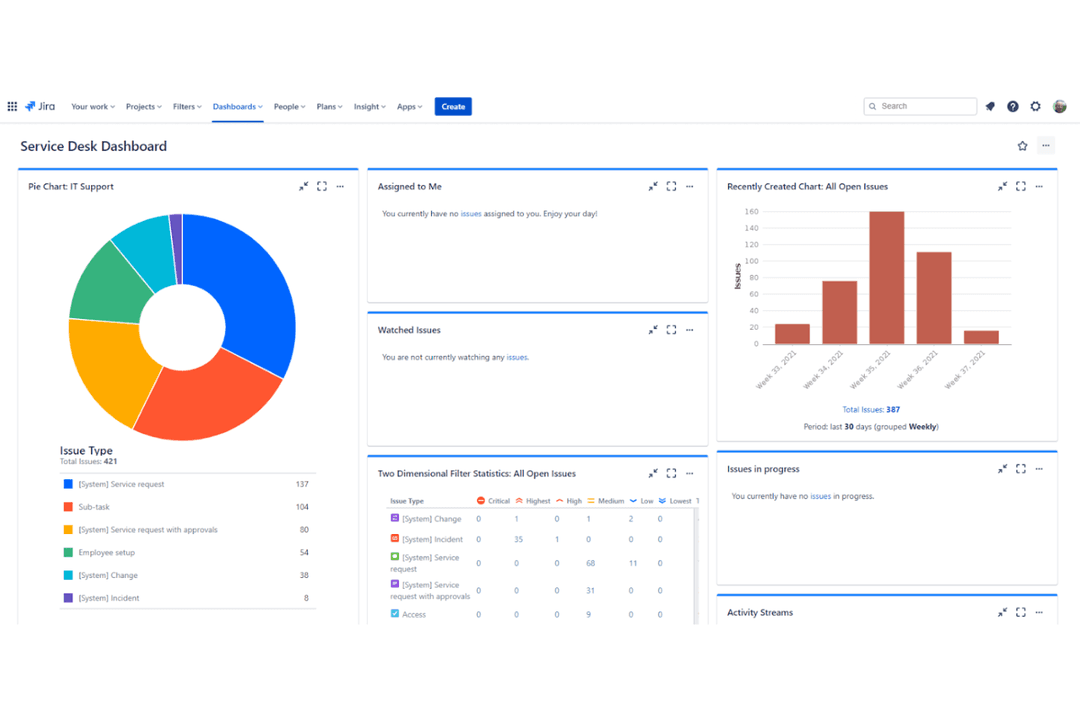
| Reporting & Analytics | Each tool provides built-in dashboards and reporting features to monitor team performance and service metrics, supporting data-driven decisions. |
| Ticket Management | Both platforms offer robust ticketing systems that let you track, assign, and resolve customer requests efficiently, with customizable fields and workflows. |