

10 opciones gratuitas de software para centros de llamadas para 2026

Lista de software gratuito para centros de llamadas


El software gratuito para centros de llamadas proporciona a tu equipo acceso a funciones esenciales de gestión, enrutamiento y generación de informes de llamadas sin costes iniciales, ya sea mediante un plan gratuito o una prueba gratuita por tiempo limitado. Si buscas formas de gestionar grandes volúmenes de llamadas, ofrecer asistencia a clientes a través de distintos canales o probar nuevos flujos de trabajo sin comprometer el presupuesto, estas soluciones te permiten evaluar sus capacidades principales sin riesgos.
En esta lista encontrarás opciones fiables de software gratuito para centros de llamadas para 2026, con detalles sobre lo que ofrece cada plataforma y cómo se adapta a las necesidades de distintos equipos.
Por qué confiar en nuestras recomendaciones de software
Nuestro equipo lleva probando y evaluando software desde 2012. Como líderes de CX, sabemos lo difícil —y lo importante— que es elegir el software adecuado.
Para esta guía, evaluamos las herramientas mediante pruebas prácticas e investigación independiente, puntuando las herramientas según nuestros criterios de selección.
Nuestras reseñas reflejan nuestro criterio editorial humano, no un discurso de ventas.
Resumen del mejor software gratuito para centros de llamadas
Esta tabla comparativa resume los detalles de precios de mi selección del mejor software gratuito para centros de llamadas para ayudarte a encontrar la opción más adecuada para tu presupuesto y las necesidades de tu empresa.
| Tool | Best For | Trial Info | Price | ||
|---|---|---|---|---|---|
| 1 | Mejor para análisis avanzados de llamadas | Prueba gratuita de 14 días | Desde $25/usuario/mes (facturado anualmente) | Website | |
| 2 | Ideal para equipos de llamadas salientes de alto volumen | De uso gratuito | Gratis para descargar/usar | Website | |
| 3 | Ideal para una rápida configuración en la nube | Prueba gratuita de 14 días + plan gratis + demo gratuita disponible | Desde $15/agente/mes (facturado anualmente) | Website | |
| 4 | Mejor para soluciones personalizadas de telefonía | Gratis para siempre | Gratis para siempre | Website | |
| 5 | Ideal para el control del sistema de código abierto | Gratis para siempre (código abierto) | Gratis para siempre (código abierto) | Website | |
| 6 | Ideal para la gestión de tickets multicanal | Demo gratuita + prueba de 30 días disponible | Desde 7 €/usuario/mes (facturación anual) | Website | |
| 7 | Ideal para necesidades de marcado predictivo | Gratis para siempre | Gratis para siempre | Website | |
| 8 | Ideal para funciones de comunicaciones unificadas | Gratis para descargar | Desde $29/licencia | Website | |
| 9 | Mejor para integración CRM incorporada | Plan gratuito + prueba gratis de 15 días disponible | Desde $49/mes (facturado anualmente) | Website | |
| 10 | El mejor con soporte de chat en tiempo real | Prueba gratuita de 30 días + demo gratis disponible | Desde $15/mes (facturado anualmente) | Website |
Reseñas del software gratuito para centros de llamadas
A continuación se muestran mis resúmenes detallados del mejor software gratuito para centros de llamadas que llegó a mi lista. Mis reseñas ofrecen un análisis detallado de las funciones, los casos de uso más adecuados y las integraciones de cada plataforma para ayudarte a encontrar la opción más adecuada para ti.

Mejor para análisis avanzados de llamadas
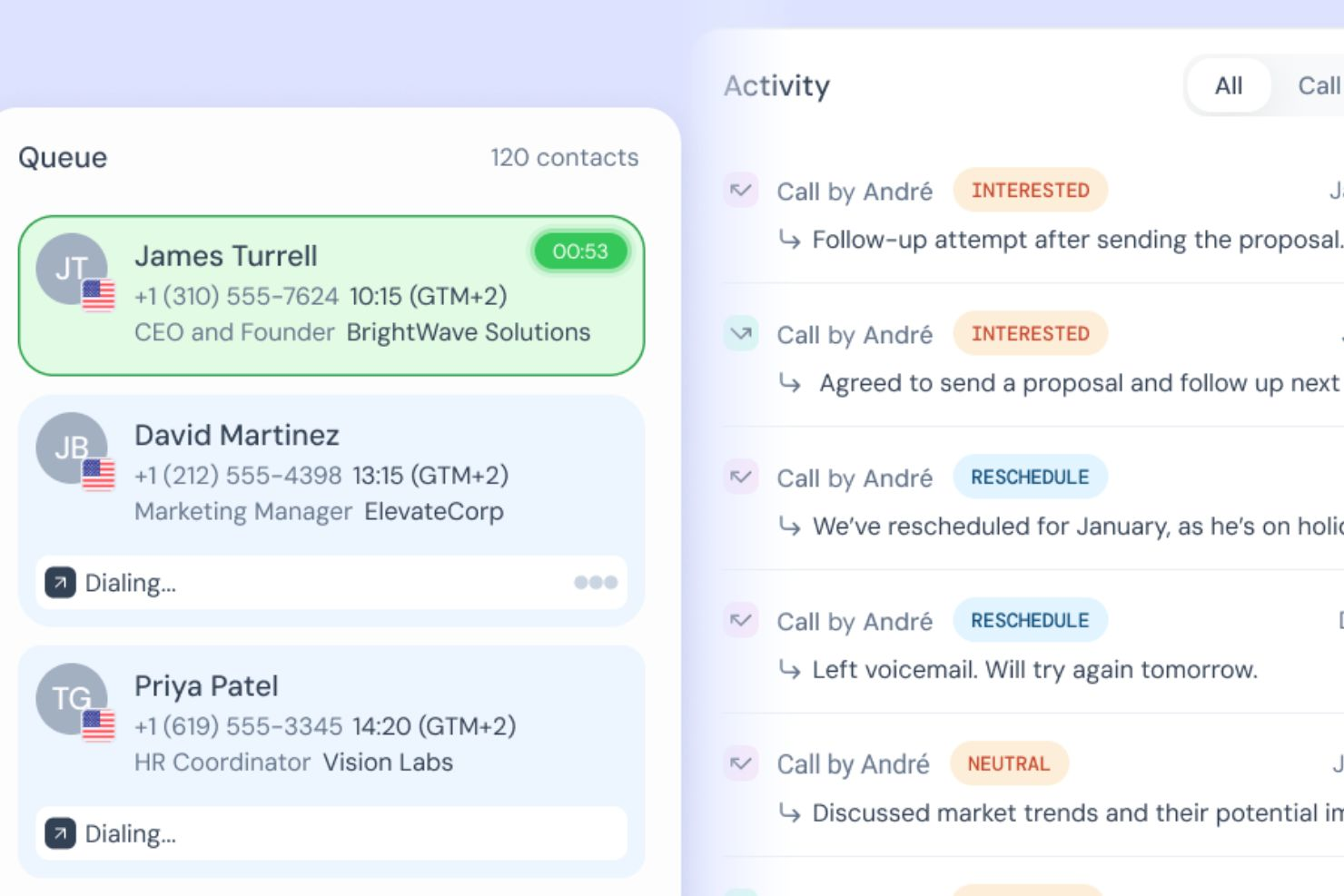
CloudTalk es una plataforma de centro de llamadas basada en la nube que combina llamadas entrantes y salientes, IVR, enrutamiento de llamadas, análisis en tiempo real, inteligencia conversacional impulsada por IA y automatización de flujos de trabajo en canales de voz y SMS.
¿Para quién es mejor CloudTalk?
CloudTalk es una excelente opción para equipos de ventas y soporte de tamaño mediano que gestionan grandes volúmenes de llamadas en varias regiones o países.
Por qué elegí CloudTalk
Incluí CloudTalk en mis selecciones principales porque su análisis va mucho más allá de los informes básicos de llamadas. El panel de control en tiempo real rastrea KPIs en vivo como tiempos de espera, tasas de abandono y ocupación de agentes, mientras que la Inteligencia Conversacional con IA añade análisis de sentimientos y extracción de temas. Así no solo puedo ver cuántas llamadas atendió un agente, sino también cómo se sintieron los clientes durante esas interacciones, lo que hace que las conversaciones de coaching sean mucho más precisas.
Funciones clave de CloudTalk
- Sistema IVR: Crea menús de respuesta de voz interactiva multinivel para dirigir a los llamantes al equipo o agente correcto sin intervención manual.
- Grabación de llamadas: Graba automáticamente las llamadas entrantes y salientes y almacénalas para aseguramiento de calidad y revisión de los agentes.
- Marcador automático: Ejecuta campañas de llamadas salientes marcando automáticamente el siguiente contacto de una lista cuando un agente termina una llamada.
- Enrutamiento basado en habilidades: Dirige las llamadas entrantes a los agentes según idioma, experiencia o asignación de equipo.
Integraciones de CloudTalk
Las integraciones incluyen Salesforce, Zendesk, HubSpot, Pipedrive, Zoho CRM, Gong, Zapier, Freshdesk, Help Scout e Intercom.
¿Qué es gratis?
CloudTalk no ofrece un plan gratuito para siempre, pero sí una prueba gratuita de 14 días sin necesidad de tarjeta de crédito. Los planes de pago comienzan en $19 por usuario al mes con facturación anual, con un mínimo de un usuario en la mayoría de los planes.
Pros and Cons
Pros:
- Monitorea el sentimiento en tiempo real de llamadas en vivo
- Detecta tendencias mediante extracción de temas por IA
- Identifica cuellos de botella con paneles personalizados
Cons:
- Soporte telefónico limitado a planes superiores
- Sin videoconferencia incorporada

VICIdial
Ideal para equipos de llamadas salientes de alto volumen
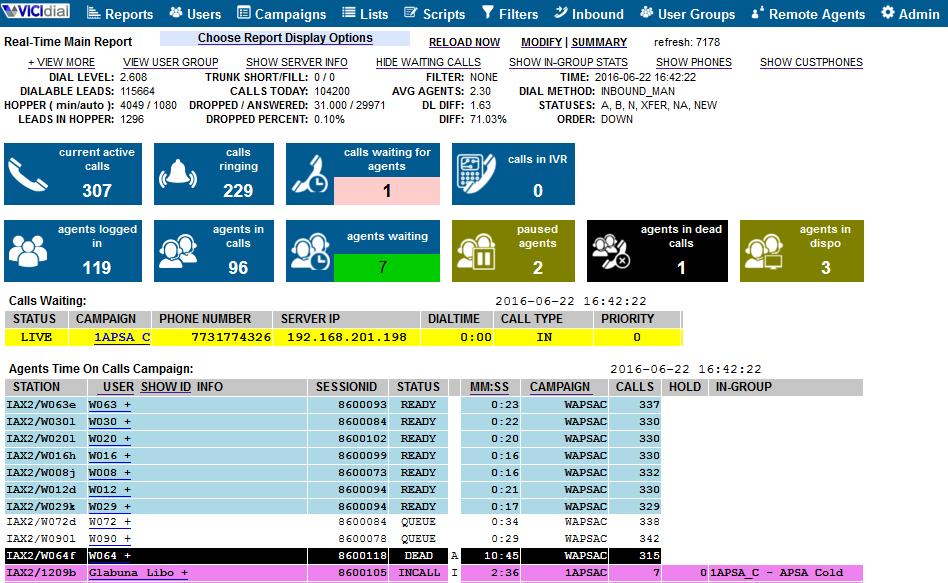
VICIdial es una plataforma de centro de llamadas de código abierto diseñada para equipos que gestionan grandes volúmenes de llamadas salientes. Es una excelente opción para organizaciones de ventas, agencias de telemercadeo y centros de soporte que necesiten marcación avanzada y gestión de campañas sin costes iniciales. Si tu equipo requiere marcación saliente flexible y monitoreo en tiempo real, VICIdial ofrece un conjunto de funciones difícil de igualar dentro del software gratuito.
Por qué elegí VICIdial
Elegí VICIdial porque está diseñado para satisfacer las exigencias de equipos de llamadas salientes de alto volumen. La plataforma soporta marcación predictiva, lo que ayuda a maximizar el tiempo de conversación de los agentes y las tasas de contacto—necesidades clave para grupos de ventas y telemercadeo.
También me gusta que VICIdial ofrezca monitoreo y reportes de campañas en tiempo real, para que los supervisores puedan seguir el rendimiento y hacer ajustes rápidos. Estas funciones lo convierten en una opción sólida para equipos que necesitan gestionar campañas salientes a gran escala sin pagar por una solución comercial.
Funciones clave de VICIdial
Otras funciones de VICIdial ayudan a los equipos a gestionar llamadas y la actividad de los agentes de manera más eficiente:
- Gestión de llamadas entrantes: Dirige las llamadas entrantes a los agentes disponibles utilizando reglas y colas personalizables.
- Grabación de llamadas: Graba las llamadas automáticamente para control de calidad, formación o requisitos de cumplimiento.
- Interfaz web para agentes: Permite que los agentes inicien sesión y gestionen llamadas desde cualquier navegador, sin instalar software adicional.
- Gestión multicampaña: Ejecuta y monitorea múltiples campañas salientes y entrantes simultáneamente desde un solo panel de control.
Integraciones de VICIdial
Las integraciones no se encuentran listadas públicamente.
¿Qué es gratis?
VICIdial es un software de código abierto que es gratuito para descargar y usar sin límites de usuarios o campañas. Deberás proporcionar tu propio alojamiento de servidores y configuración técnica, y el soporte es gestionado por la comunidad a menos que adquieras servicios de pago.
Pros and Cons
Pros:
- Código abierto sin costes de licenciamiento
- Soporta agentes y campañas ilimitadas
- Incluye opciones de marcación predictiva y manual
Cons:
- Interfaz de usuario desactualizada
- Características de ticketing integradas limitadas

Ideal para una rápida configuración en la nube
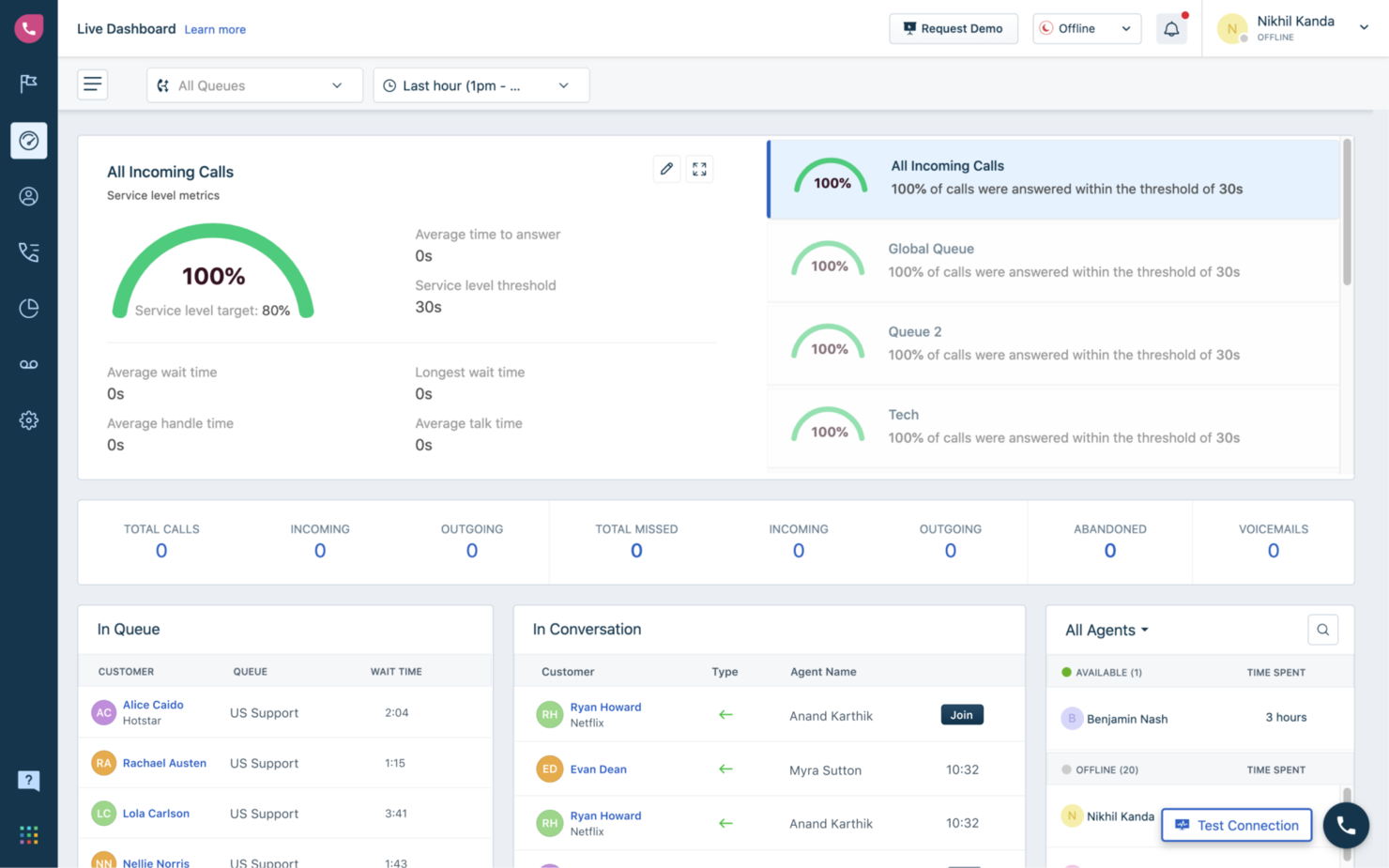
Freshcaller es una plataforma de centro de llamadas en la nube diseñada para equipos que desean una configuración rápida sin hardware complejo ni largos procesos de incorporación. Es ideal para pequeñas empresas y startups que quieren lanzar soporte telefónico rápidamente, con funciones esenciales de centro de llamadas listas para usar.
Por qué elegí Freshcaller
Para los equipos que quieren comenzar a realizar llamadas en la nube de inmediato, Freshcaller destaca por su configuración rápida y mínimos requisitos técnicos. Elegí Freshcaller porque su interfaz fácil de usar te permite lanzar un centro de llamadas virtual en minutos sin necesidad de líneas telefónicas físicas.
La plataforma ofrece llamadas desde el navegador y te permite comprar o portar números desde el mismo panel, lo que facilita el manejo de llamadas casi de inmediato. Esto la convierte en una excelente opción para pequeñas empresas o equipos remotos que necesitan una solución rápida y flexible para soporte entrante y saliente.
Características clave de Freshcaller
Otras funciones en Freshcaller ayudan a los equipos a gestionar y optimizar sus operaciones de centro de llamadas:
- Enmascaramiento de llamadas: Protege la privacidad de los agentes y clientes ocultando los números durante las llamadas.
- Flujos de llamadas personalizados: Diseña y automatiza rutas de llamadas con un editor visual de arrastrar y soltar.
- Grabación de llamadas: Graba y almacena llamadas para monitoreo de calidad y formación.
- Enrutamiento por días festivos: Ajusta automáticamente las reglas de atención según festivos o fechas especiales.
Integraciones de Freshcaller
Las integraciones incluyen Freshdesk, Freshsales, Freshchat, Freshservice, Slack, Microsoft Teams, Shopify, Zapier, HubSpot y más.
¿Qué es gratis?
Freshcaller ofrece un plan gratuito para siempre para agentes ilimitados. La versión gratuita incluye gestión básica de llamadas entrantes pero limita funciones como grabación de llamadas, análisis avanzados y la mayoría de integraciones con terceros.
Pros and Cons
Pros:
- Diseñador visual de flujos de llamada incluido
- Enmascaramiento de llamadas para protección de privacidad
- Opciones de enrutamiento por días festivos y fuera de horario
Cons:
- Funciones limitadas de reportes y análisis
- No incluye marcador saliente en el plan gratuito

Asterisk es una plataforma de telefonía de código abierto diseñada para equipos que desean construir soluciones personalizadas de centro de llamadas desde cero. Es una excelente opción para profesionales de TI y empresas con necesidades de comunicación VOIP únicas que no pueden satisfacerse con software genérico. Si tu equipo necesita control total sobre el enrutamiento de llamadas, IVR o integración con otros sistemas, Asterisk te brinda la flexibilidad para diseñar exactamente lo que necesitas.
Por qué elegí Asterisk
Lo que distingue a Asterisk es su flexibilidad para construir soluciones telefónicas personalizadas que van mucho más allá del software estándar de centros de llamadas. Elegí Asterisk porque te permite diseñar tus propios flujos de llamadas, menús IVR impulsados por IA y lógica de enrutamiento, lo cual es ideal para equipos con requisitos únicos o flujos de trabajo complejos. El marco de código abierto significa que puedes modificar y ampliar el sistema para adaptarlo a casi cualquier proceso empresarial o necesidad de integración. Para organizaciones con recursos técnicos, Asterisk ofrece un nivel de personalización y control que es difícil de encontrar en otras plataformas gratuitas para centros de llamadas.
Características clave de Asterisk
Otras funciones de Asterisk ayudan a los equipos a crear un entorno de centro de llamadas a medida:
- Grabación de llamadas: Graba llamadas entrantes y salientes para control de calidad, formación o requisitos de cumplimiento.
- Gestión de buzón de voz: Configura buzones de voz personalizables y notificaciones para llamadas perdidas.
- Colas de llamadas: Coloca a los llamantes en colas con música, anuncios u opción de devolución de llamada hasta que un agente esté disponible.
- Llamadas en conferencia: Organiza llamadas de conferencia multiparte directamente a través del sistema.
Integraciones de Asterisk
Las integraciones no se publican de forma oficial.
¿Qué es gratis?
Asterisk es un software de código abierto que es gratuito para descargar y usar sin límites de usuarios o funciones. Tendrás que aportar tu propio servidor y encargarte de la configuración, el mantenimiento y el soporte por tu cuenta.
Pros and Cons
Pros:
- Soporta telefonía SIP, PRI y analógica
- Documentación extensa y gran comunidad de usuarios
- Enrutamiento de llamadas e IVR altamente personalizables
Cons:
- No incluye interfaz ni panel de agente integrados
- Requiere conocimientos técnicos avanzados para su implementación


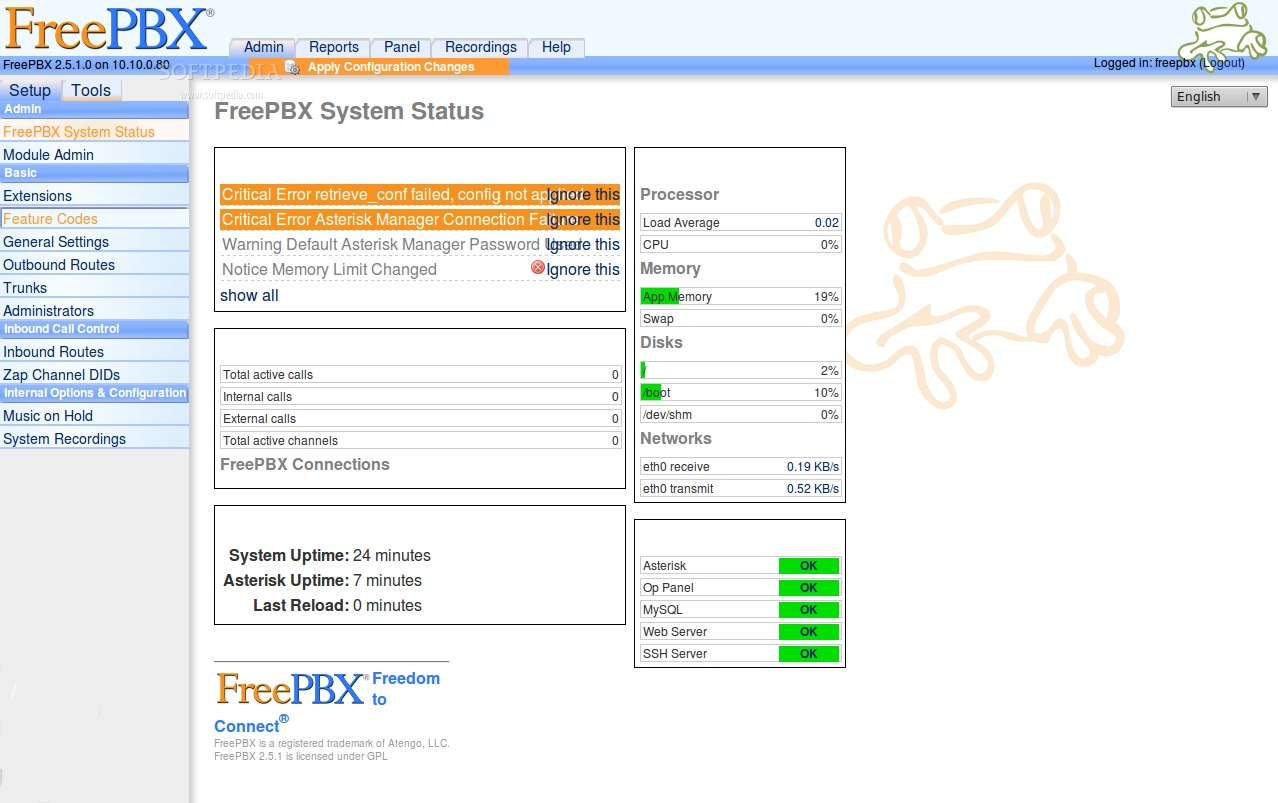
FreePBX es una plataforma de sistema telefónico de código abierto diseñada para equipos que desean un control minucioso sobre la configuración de su centro de llamadas. Es una opción sólida para profesionales de TI y empresas que necesitan personalizar el manejo de llamadas, extensiones y el comportamiento del sistema. Si buscas una solución que te permita gestionar cada aspecto de tu entorno telefónico, FreePBX te proporciona las herramientas para hacerlo.
Por Qué Elegí FreePBX
Lo que me atrajo de FreePBX es el nivel de control sobre el sistema que ofrece en comparación con otras soluciones de centro de llamadas gratuitas. Con FreePBX, puedes gestionar el enrutamiento de llamadas, la configuración de extensiones y los menús IVR a través de una interfaz web, lo que te da supervisión directa sobre tu entorno telefónico.
Me gusta que está desarrollado para equipos que desean personalizar cada detalle, desde las colas de llamadas hasta la configuración del buzón de voz, sin estar limitados por las restricciones de un proveedor. Esto hace que FreePBX sea una excelente opción para equipos de TI o empresas que necesiten adaptar su centro de llamadas a medida que evolucionan sus necesidades.
Funciones Clave de FreePBX
Otras funciones adicionales de FreePBX ayudan a los equipos a construir un entorno de centro de llamadas más flexible y capaz:
- Grabación de llamadas: Graba llamadas entrantes y salientes para monitoreo de calidad o cumplimiento.
- Buzón de voz a correo electrónico: Envía automáticamente los mensajes de voz como archivos de audio a direcciones de correo electrónico designadas.
- Estacionamiento de llamadas: Coloca llamadas en espera en un 'parqueo' compartido para que sean recogidas desde cualquier extensión.
- Puente de conferencia: Organiza llamadas de conferencia multiparte directamente desde el sistema.
Integraciones de FreePBX
Las integraciones no se encuentran listadas públicamente.
¿Qué es Gratis?
FreePBX es un software de código abierto que se puede descargar y usar de forma gratuita sin límites de usuarios ni de funcionalidades. Deberás proporcionar tu propio servidor y encargarte tú mismo de la instalación, el mantenimiento y el soporte.
Pros and Cons
Pros:
- Interfaz de administración basada en web para la gestión del sistema
- Funciones de cola de llamadas y grupos de timbrado integradas
- Sin tarifas de licencia por usuario ni por extensión
Cons:
- Requiere hardware separado o alojamiento en la nube
- Las funciones avanzadas requieren módulos de pago

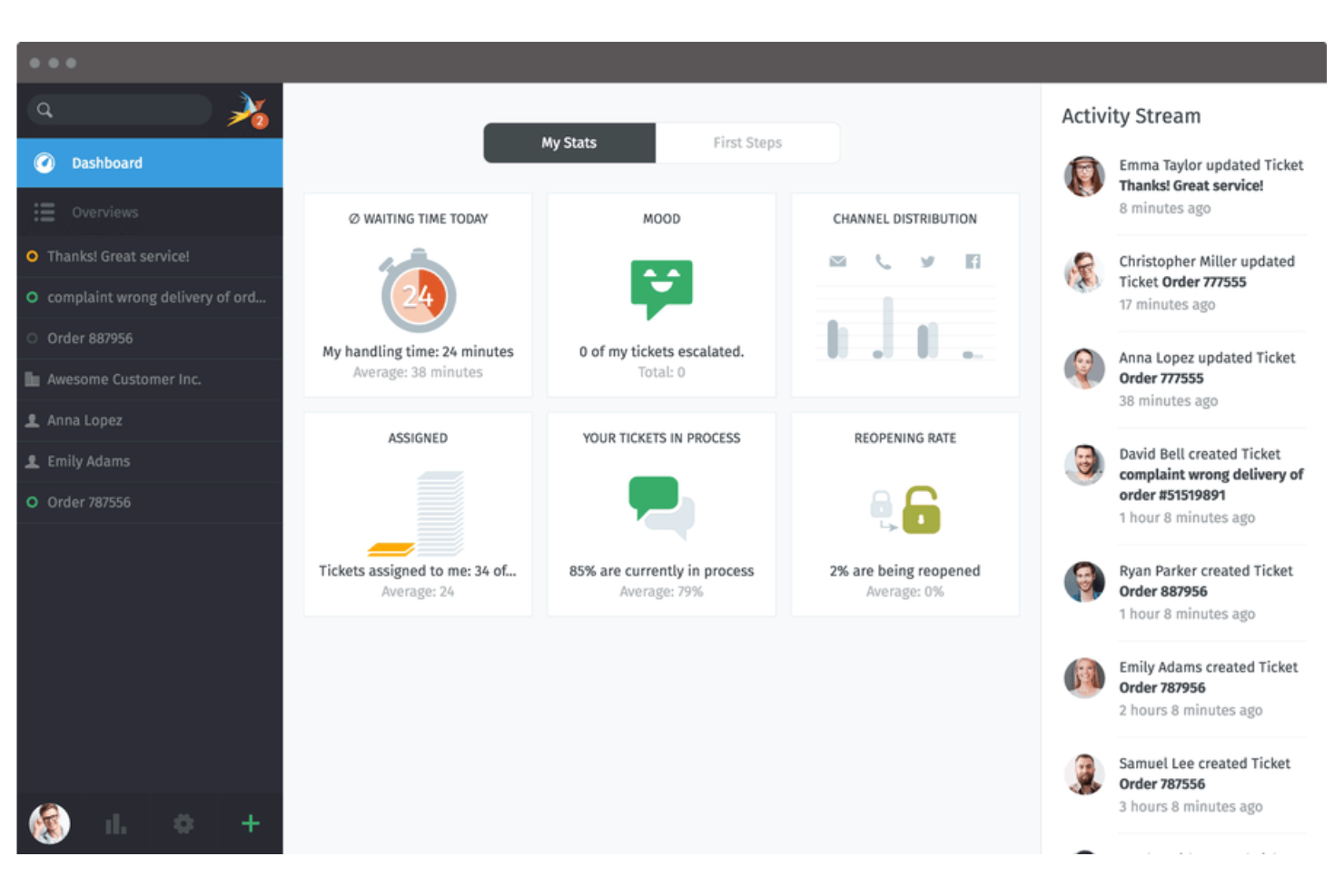
Zammad es un software de mesa de ayuda y centro de llamadas diseñado para equipos que necesitan gestionar conversaciones con clientes a través de múltiples canales. Es una opción sólida para equipos de soporte en organizaciones que gestionan consultas por correo electrónico, teléfono, chat y redes sociales. Si buscas una plataforma flexible para centralizar y organizar las interacciones con los clientes, Zammad ofrece un espacio de trabajo unificado para mantener todo sincronizado.
Por qué elegí Zammad
Elegí Zammad porque su gestión de tickets multicanal destaca para equipos que manejan solicitudes de clientes desde varias fuentes. La plataforma te permite reunir mensajes de teléfono, correo electrónico, chat y redes sociales en un único sistema de tickets, para que nada se pierda.
Aprecio cómo Zammad vincula automáticamente las conversaciones relacionadas y actualiza los tickets en tiempo real a medida que llegan nuevos mensajes. Esto facilita mucho a los equipos de soporte el seguimiento, la priorización y la resolución de incidencias sin cambiar entre diferentes herramientas.
Funcionalidades clave de Zammad
Otras características que hacen útil a Zammad para equipos de call center incluyen:
- Permisos basados en roles: Establece controles de acceso granulares para agentes, supervisores y administradores para gestionar datos sensibles de clientes.
- Campos personalizados de tickets: Añade y configura campos personalizados para recopilar la información que tu equipo necesita para cada ticket.
- Integración de base de conocimiento: Vincula una base de conocimientos de autoservicio para que agentes y clientes encuentren respuestas rápidamente.
- Registro de auditoría: Haz un seguimiento de cada cambio realizado en los tickets y cuentas de usuario para control y cumplimiento.
Integraciones de Zammad
Las integraciones incluyen GitHub, GitLab, Checkmk, Clearbit y más.
¿Qué es gratis?
Zammad ofrece una versión open-source gratuita para siempre que puedes alojar en tu propio servidor. Esta versión incluye las funciones principales de gestión de tickets y multicanal, pero algunas funcionalidades avanzadas y el soporte oficial sólo están disponibles en los planes de pago en la nube.
Pros and Cons
Pros:
- Base de conocimientos incorporada para soporte a agentes
- Actualizaciones de tickets en tiempo real y herramientas de colaboración
- Permisos basados en roles para control de acceso granular
Cons:
- Menos integraciones CRM nativas
- Las funciones avanzadas de automatización requieren planes de pago

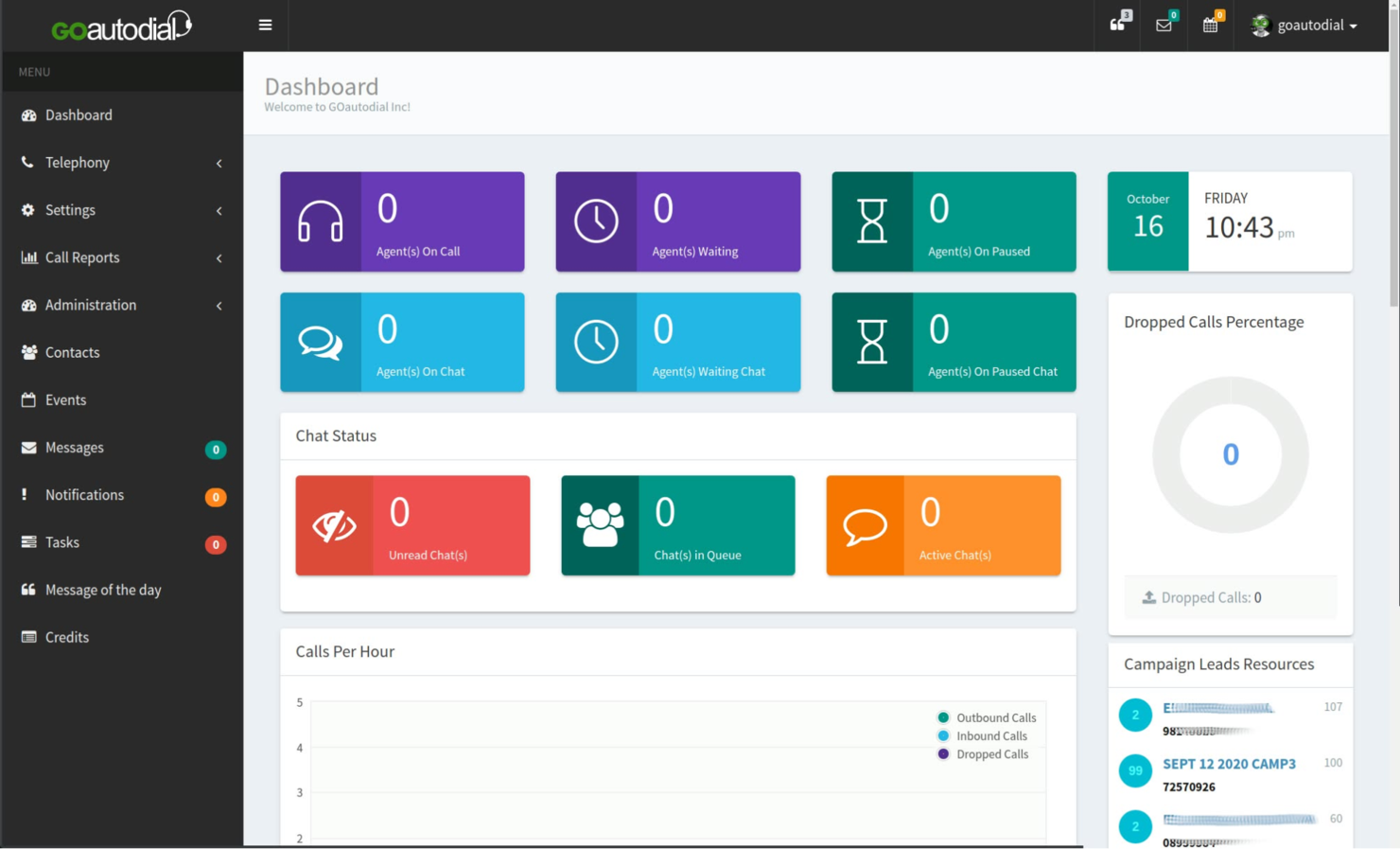
GOautodial es una plataforma de centro de llamadas de código abierto diseñada para equipos que necesitan capacidades de marcado predictivo. Es ideal para equipos de ventas salientes, agencias de telemarketing y centros de soporte que buscan automatizar llamadas de alto volumen. Si desea maximizar el tiempo de conversación de los agentes y reducir el marcado manual, GOautodial ofrece funciones adaptadas a esas necesidades.
Por qué elegí GOautodial
Lo que diferencia a GOautodial de otros programas gratuitos para centros de llamadas es su motor de marcado predictivo, que ayuda a los equipos a automatizar las llamadas salientes y conectar a los agentes con prospectos en vivo de manera más eficiente. Elegí GOautodial porque permite configurar campañas que marcan automáticamente varios números, detectan buzones de voz y enrutan las llamadas contestadas a los agentes disponibles.
La plataforma también incluye herramientas de monitoreo en tiempo real, por lo que los supervisores pueden rastrear el rendimiento de los agentes y el avance de las campañas mientras se realizan las llamadas. Para los equipos enfocados en campañas salientes y en maximizar la productividad de los agentes, las funciones de marcado predictivo de GOautodial son una excelente opción.
Funciones clave de GOautodial
Otras funciones de GOautodial ayudan a los equipos a gestionar las operaciones del centro de llamadas de manera más eficiente:
- Enrutamiento de llamadas entrantes: Dirige las llamadas que ingresan al agente o cola correcta según reglas establecidas.
- Grabación de llamadas: Graba y almacena llamadas con transcripción automática para control de calidad y formación.
- Panel de agente basado en la web: Los agentes pueden acceder a todos los controles e información de llamadas desde una interfaz en el navegador.
- Monitoreo de llamadas en vivo: Los supervisores pueden escuchar las llamadas en tiempo real para formación o cumplimiento.
Integraciones de GOautodial
Las integraciones están disponibles a través de la API REST.
¿Qué es gratis?
GOautodial ofrece una versión gratuita y de código abierto para siempre que puede descargar y usar sin límites de usuarios. Deberá alojar y mantener el software por su cuenta, y algunas características avanzadas o integraciones pueden requerir configuración manual o módulos adicionales.
Pros and Cons
Pros:
- Marcador predictivo incluido sin costo
- Admite campañas entrantes y salientes
- Monitoreo e informes de llamadas en tiempo real
Cons:
- Requiere configuración manual del servidor
- Documentación limitada para nuevos usuarios

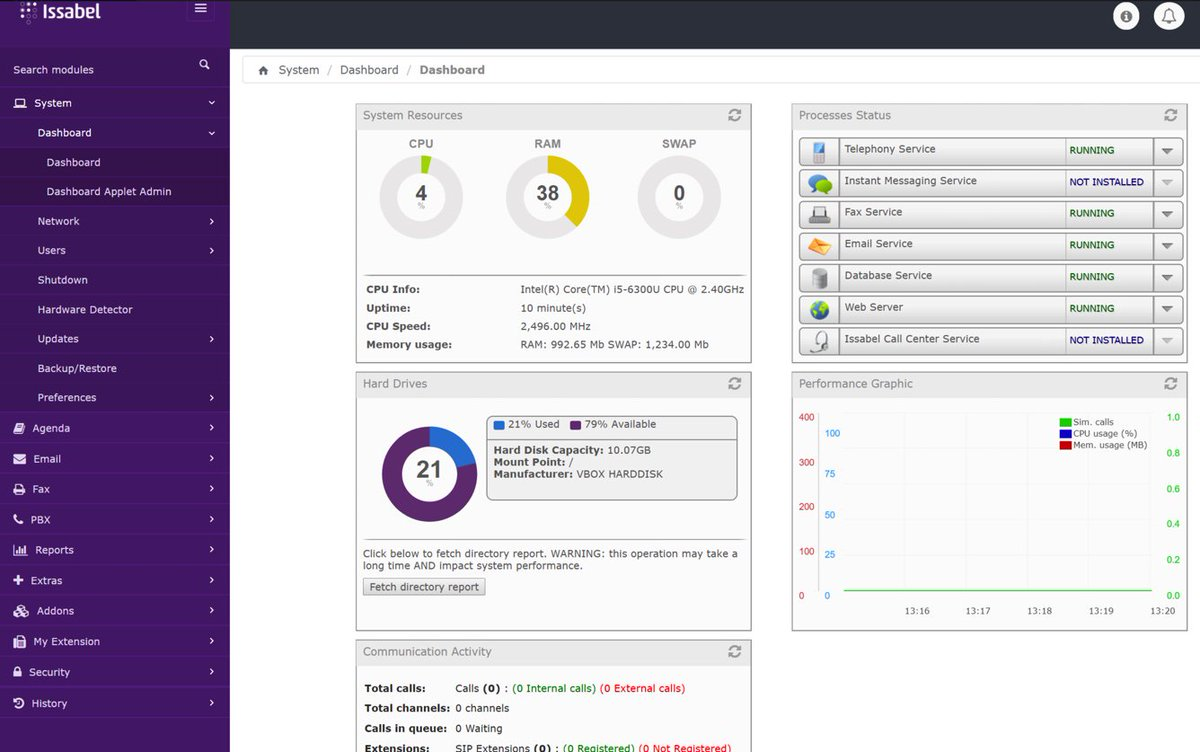
Issabel es una plataforma de centro de contacto de código abierto que combina voz, video, chat y correo electrónico en un solo sistema. Es adecuada para equipos que buscan software gratuito con funciones de comunicaciones unificadas, administradas desde una única interfaz. Issabel apoya a organizaciones que gestionan interacciones con clientes en múltiples canales sin depender de herramientas separadas.
Por qué elegí Issabel
Lo que me llamó la atención de Issabel para software gratuito de call center es su enfoque de comunicaciones unificadas, que va más allá de solo llamadas de voz. Issabel integra llamadas de voz, videoconferencias, mensajería instantánea y correo electrónico en una sola plataforma, para que tu equipo pueda gestionar todas las interacciones con clientes en un solo lugar.
Me gusta que puedas configurar colas de llamadas, menús IVR e incluso videollamadas sin necesidad de herramientas separadas. Para los equipos que desean centralizar las comunicaciones y reducir la molestia de manejar varios sistemas, el diseño todo-en-uno de Issabel es una gran opción.
Principales características de Issabel
Otras funciones de Issabel ayudan a los equipos a gestionar las operaciones del centro de llamadas con mayor eficiencia:
- Grabación de llamadas: Graba y almacena llamadas para aseguramiento de calidad y capacitación.
- Informes de detalle de llamadas: Accede a registros detallados y análisis de cada llamada gestionada por tu equipo.
- Gestión de agentes: Asigna agentes a colas, monitoriza su estado y administra permisos desde un panel central.
- Correo de voz a email: Envía automáticamente los mensajes de voz al correo electrónico de los agentes para un seguimiento rápido.
Integraciones de Issabel
Las integraciones están disponibles mediante REST API.
¿Qué es gratis?
Issabel es una plataforma gratuita para siempre y de código abierto, sin límites de usuarios. Deberás encargarte de tu propio alojamiento y la configuración, y algunas funciones avanzadas o integraciones pueden requerir configuración manual.
Pros and Cons
Pros:
- Panel unificado para voz, video y chat
- Soporta IVR personalizado y colas de llamadas
- Actualizaciones y recursos guiados por la comunidad
Cons:
- La documentación puede ser inconsistente
- Las funciones de marcación saliente son limitadas
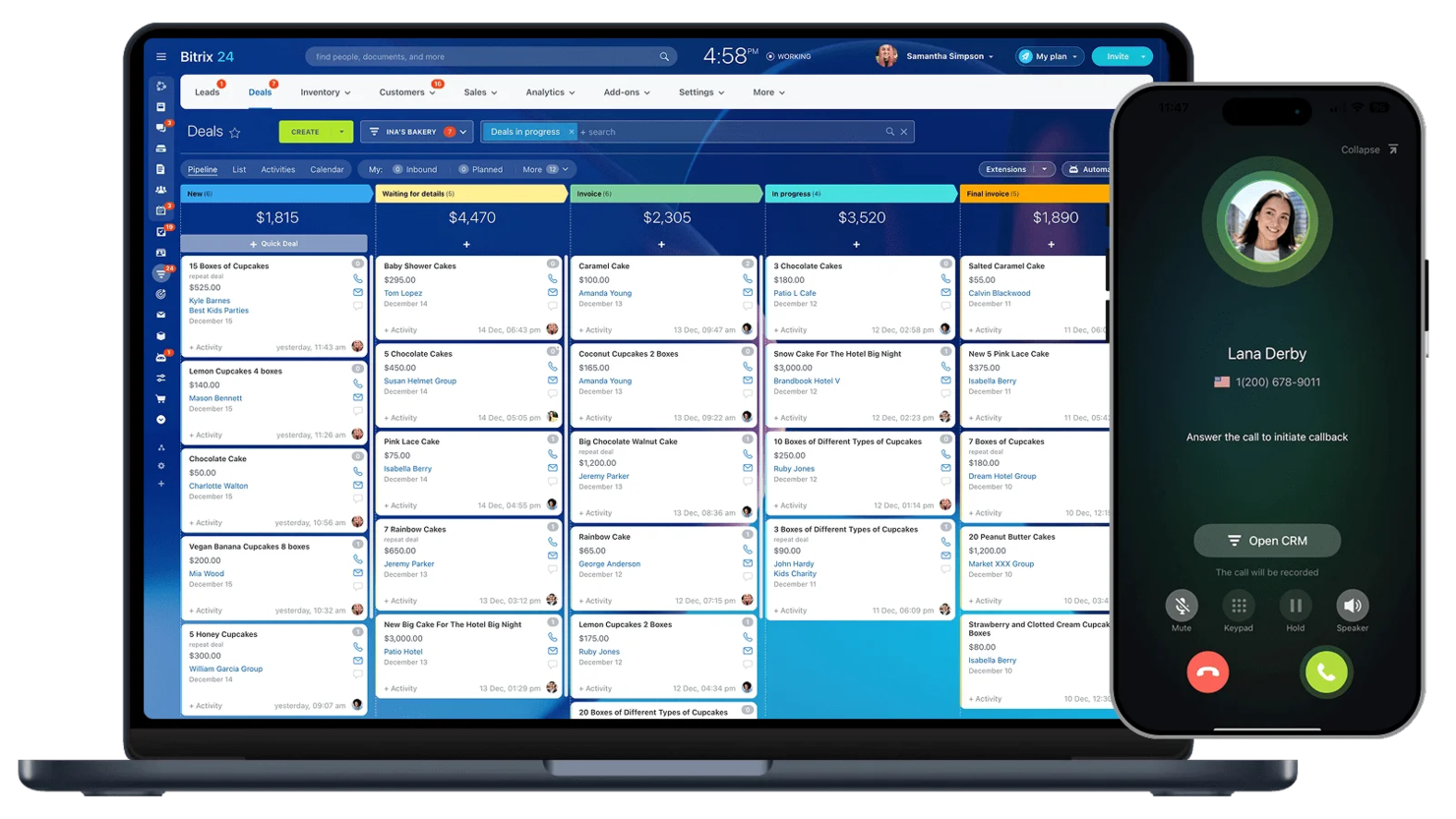
Bitrix24 está diseñado para equipos que desean un software de centro de llamadas gratuito con funciones de CRM integradas. La plataforma ayuda a gestionar las comunicaciones con clientes y los embudos de ventas en un solo lugar. Es ideal para pequeñas empresas y equipos de atención que necesitan rastrear llamadas, contactos y seguimientos sin cambiar entre múltiples herramientas.
Por qué elegí Bitrix24
Lo que hace destacar a Bitrix24 como software gratuito de centro de llamadas es su integración CRM incorporada, que permite a tu equipo gestionar interacciones y actividades de ventas de clientes en un mismo lugar. Elegí Bitrix24 porque puedes registrar llamadas automáticamente, vincularlas a contactos y dar seguimiento a las actividades directamente desde el mismo panel.
Las funciones CRM gratuitas incluyen registro de llamadas, gestión de clientes potenciales e historial de clientes, así siempre tienes contexto durante las conversaciones. Para equipos que desean conectar la actividad del centro de llamadas con los flujos de trabajo de ventas y soporte, Bitrix24 ofrece un enfoque unificado que es difícil encontrar en otras opciones gratuitas.
Funciones clave de Bitrix24
Otras funciones en Bitrix24 ayudan a los equipos a gestionar las operaciones del centro de llamadas de manera más eficiente:
- Enrutamiento de llamadas: Dirige automáticamente las llamadas entrantes al agente o departamento correcto según reglas establecidas.
- Teléfono web: Realiza y recibe llamadas con un identificador de llamada personalizado directamente desde el navegador sin hardware adicional.
- Grabación de llamadas: Graba y almacena llamadas para monitoreo de calidad o propósitos de capacitación.
- Chat de equipo: Comunícate en tiempo real con colegas usando canales de chat integrados.
Integraciones de Bitrix24
Las integraciones incluyen Gmail, Xero, Dropbox, Box, Mailchimp y más.
¿Qué es gratis?
Bitrix24 ofrece un plan gratuito para siempre. Este incluye funciones básicas de centro de llamadas, CRM, chat y video, pero limita el almacenamiento en la nube a 5GB y restringe algunas opciones avanzadas de telefonía e integraciones.
Pros and Cons
Pros:
- CRM integrado con funciones de registro de llamadas
- Incluye chat y videollamadas de equipo
- Grabación de llamadas disponible
Cons:
- El plan gratuito limita el almacenamiento en la nube a 5GB
- La analítica del centro de llamadas es básica

LiveAgent
El mejor con soporte de chat en tiempo real
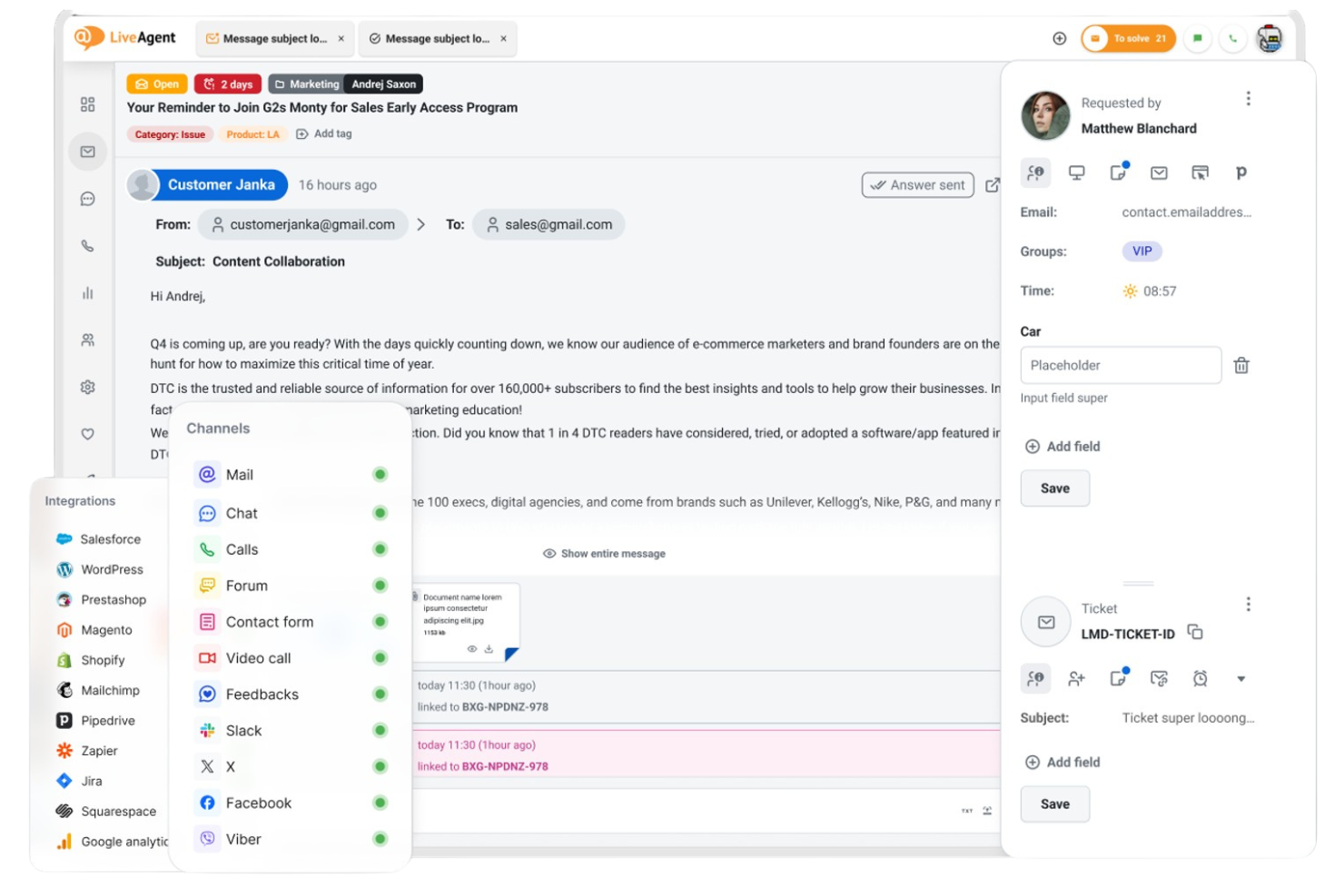
Si buscas una plataforma de centro de llamadas que reúna múltiples canales de soporte, LiveAgent merece tu atención. Está diseñada para equipos que quieren gestionar llamadas, correos electrónicos y chats desde un solo panel. LiveAgent puede ayudar a pequeñas empresas y equipos de soporte a manejar altos volúmenes de consultas de clientes sin perder conversaciones importantes.
Por qué elegí LiveAgent
Elegí LiveAgent porque su soporte de chat en tiempo real destaca para equipos que necesitan responder rápidamente a las consultas de los clientes. El widget de chat en vivo de la plataforma permite a los agentes interactuar al instante con los visitantes del sitio web, lo cual es esencial para los centros de llamadas que desean reducir los tiempos de espera y aumentar la satisfacción.
También valoro que LiveAgent combine el chat con la gestión de llamadas y tickets en una sola interfaz, para que los agentes puedan alternar entre canales sin perder el contexto. Esto lo convierte en una opción práctica para los equipos de soporte que priorizan una comunicación ágil y multicanal.
Características clave de LiveAgent
Otras funciones que hacen útil a LiveAgent para los equipos de centros de llamadas incluyen:
- Enrutamiento de llamadas e IVR: Dirige las llamadas entrantes al agente o departamento adecuado utilizando menús de respuesta de voz interactiva personalizables.
- Unificación y división de tickets: Combina tickets relacionados o divide incidencias complejas en tickets separados para un mejor seguimiento y resolución.
- Chat interno para agentes: Permite que los agentes que usan el marcador automático se comuniquen entre sí para coordinar las respuestas.
- Portal de cliente: Ofrece a los clientes un portal de autoservicio donde pueden seguir el estado de sus tickets y acceder a recursos de soporte.
Integraciones de LiveAgent
Las integraciones incluyen ActiveCampaign, ClickUp, Drupal, Jira, Klaviyo y más.
¿Qué es gratis?
LiveAgent ofrece un plan gratuito permanente con funciones básicas de tickets y chat en vivo. El plan gratuito está limitado a un solo agente e incluye acceso restringido a integraciones y funciones avanzadas de centro de llamadas.
Pros and Cons
Pros:
- Gestión en tiempo real de chats y llamadas incluida
- Chat interno para la colaboración de agentes
- Portal de cliente para el seguimiento autoservicio de tickets
- Sin función de marcador predictivo para llamadas salientes
Cons:
- El plan gratis limita la cantidad de agentes
- 3CX
Ideal para llamadas basadas en navegador


Cómo evalúo el software gratuito de centro de llamadas
Me fijo en dos cosas: si una herramienta realmente ofrece los fundamentos gratuitos de un centro de llamadas—llamadas VoIP, IVR, colas de agentes—y qué diferencia a las mejores opciones de meras pruebas gratuitas glorificadas.
Funcionalidad principal (Lo imprescindible para esta lista)
Al seleccionar herramientas para mi lista, califico a cada una en una escala de 0 (no ofrece la funcionalidad) a 5 (sobresale en esta área) por cada funcionalidad principal detallada a continuación. Después, calculo la puntuación total de la herramienta en porcentaje. Cada herramienta necesita alcanzar una puntuación mínima total del 65% para ser considerada para la inclusión.
- Disponibilidad de plan gratuito: Verifico si el proveedor ofrece un nivel realmente gratuito que soporte la operación continua, no solo una prueba de 14 días que te bloquea a mitad del sprint.
- Llamadas entrantes y salientes: Ambas direcciones son importantes—evalúo si los agentes pueden recibir llamadas de clientes y realizar seguimientos salientes desde un softphone o navegador.
- Enrutamiento de llamadas e IVR: Un plan gratuito que envía todas las llamadas a una sola cola no es útil, así que busco al menos ACD básico o un menú IVR sencillo para dirigir a los llamantes.
- Gestión de agentes y colas: Considero cuántos agentes pueden iniciar sesión, si los supervisores pueden monitorear colas y cómo la herramienta gestiona interacciones simultáneas.
- Grabación y registro de llamadas: Los equipos necesitan poder revisar interacciones pasadas para capacitación o disputas, así que los registros de llamadas con búsqueda y el acceso a grabaciones pesan mucho aquí.
- Informes y analítica: Incluso en un plan gratuito, busco paneles que muestren métricas clave como volumen de llamadas, tiempo promedio de espera y desglose de actividad de los agentes.
Una vez que tengo una lista de herramientas que cumplen con estos criterios, considero qué hace que cada plataforma destaque.
Factores diferenciadores (Qué distingue a los proveedores)
Así es como comparo y contrasto los distintos proveedores:
Características destacadas
La integración con CRM es un gran diferenciador—cuando la actividad de llamadas y los registros de contacto se sincronizan automáticamente, los agentes no tienen que cambiar de pestaña durante las llamadas en vivo. También evalúo si una plataforma admite canales más allá de la voz, como chat en vivo, SMS o mensajería social, para que los clientes puedan contactar a tu equipo como prefieran. Las funciones de IA como transcripción en tiempo real y resúmenes de llamadas también valen la pena destacarse, ya que reducen el tiempo de cierre posllamada y brindan a los supervisores acceso más rápido al contexto de la interacción.
Más allá de las características
La transparencia sobre el plan gratuito es clave aquí. Verifico si el proveedor divulga claramente los límites de uso—como el límite de asientos o de minutos de llamada—para que no te tome por sorpresa a mitad de mes. La escalabilidad está directamente relacionada: examino si al actualizar puedes conservar tus configuraciones, números y datos existentes. La velocidad de implementación también es importante. Una herramienta gratuita que requiere semanas de configuración pierde su propósito, por lo que prefiero plataformas donde un equipo pequeño puede aprovisionar números y comenzar a recibir llamadas el mismo día usando un proceso de incorporación autodirigido.
Cómo elegir un software gratuito para centros de llamadas
Es fácil perderse entre largas listas de funciones y estructuras de precios complejas. Para ayudarte a mantener la atención mientras avanzas en tu proceso específico de selección de software, aquí tienes una lista de factores que debes tener en cuenta:
| Factor | Qué debes considerar |
|---|---|
| Escalabilidad | ¿Puede el software gestionar el volumen de llamadas previsto y el crecimiento del número de agentes sin obligarte a contratar una actualización de pago? |
| Integraciones | ¿Se conecta de forma nativa con tu sistema CRM, mesa de ayuda u otras herramientas principales que ya utilizas? |
| Personalización | ¿Puedes ajustar los flujos de llamadas, el enrutamiento y las funciones de los agentes para adaptarlos a los procesos de tu equipo? |
| Facilidad de uso | ¿Podrán los agentes y supervisores aprender a utilizar el sistema rápidamente con una formación mínima? |
| Implementación e incorporación | ¿Cuánto tiempo llevará ponerlo en marcha y qué recursos o asistencia están disponibles para ayudarte? |
| Coste | ¿Existen costes ocultos, como cargos por números de teléfono, minutos o complementos esenciales? |
| Medidas de seguridad | ¿Ofrece la plataforma enmascaramiento de llamadas, cifrado de datos y controles de acceso para proteger la información? |
| Disponibilidad de asistencia | ¿Qué canales de asistencia están disponibles en el plan gratuito y los tiempos de respuesta son aceptables para tus necesidades? |
¿Qué es el software gratuito para centros de llamadas?
El software gratuito para centros de llamadas es una plataforma en la nube o local que permite a los equipos gestionar llamadas entrantes y salientes de clientes sin pagar tarifas iniciales de licencia. Estas soluciones suelen incluir funciones principales como el enrutamiento de llamadas, la gestión de agentes y la generación de informes básicos.
Los planes gratuitos suelen tener limitaciones de usuarios, funciones o integraciones, por lo que son más adecuados para equipos pequeños, empresas emergentes u organizaciones que están probando las capacidades de un centro de llamadas antes de contratar una solución de pago.
Funciones
Repasemos las funciones que suelen encontrarse en el software para centros de llamadas y cuáles suelen estar incluidas en los planes gratuitos frente a los de pago.
Funciones que suelen incluirse gratis en el software para centros de llamadas
- Enrutamiento de llamadas entrantes: Dirige las llamadas entrantes a los agentes disponibles según reglas preestablecidas, lo que ayuda al centro de contacto a gestionar el flujo de llamadas y reducir los tiempos de espera.
- Gestión de agentes: Permite añadir, eliminar y asignar agentes a colas o departamentos, para que puedas organizar tu equipo según sea necesario.
- Colas de llamadas: Coloca a las personas que llaman en una línea virtual cuando todos los agentes están ocupados, lo que garantiza que no se pierda ninguna llamada y que los clientes sepan cuál es su posición en la cola.
- Registros básicos de llamadas: Registra los datos esenciales de cada llamada, como la hora, la duración y el agente involucrado, para facilitar el seguimiento y las acciones posteriores.
- Llamadas desde el navegador: Permite a los agentes realizar y recibir llamadas directamente desde su navegador web, eliminando la necesidad de teléfonos físicos.
- Menús IVR sencillos: Ofrece menús básicos de respuesta de voz interactiva para ayudar a dirigir a las personas que llaman al departamento o agente adecuado.
- Transferencia de llamadas: Permite a los agentes transferir llamadas activas a otro agente o departamento sin desconectar al cliente.
- Informes básicos: Proporciona métricas sencillas, como el total de llamadas, las llamadas perdidas y los tiempos de espera promedio, para ayudar a supervisar el rendimiento.
Funciones que suelen ser de pago en el software para centros de llamadas
- Análisis e informes avanzados: Ofrece información detallada sobre las tendencias de las llamadas, el rendimiento de los agentes y la satisfacción del cliente, lo que respalda la toma de decisiones basada en datos.
- Grabación de llamadas: Graba automáticamente las llamadas para garantizar la calidad, capacitar al personal y cumplir con las normativas, con opciones de almacenamiento y recuperación seguras.
- Compatibilidad omnicanal: Integra la voz con canales como SMS, correo electrónico, chat y redes sociales, lo que permite a los agentes gestionar todas las interacciones desde un solo lugar.
- Marcación saliente automatizada: Utiliza marcadores predictivos o automáticos para automatizar campañas de centros de llamadas salientes y aumentar la productividad de los agentes.
- Diseñador personalizado de flujos de llamadas: Proporciona una interfaz visual para crear rutas complejas de enrutamiento de llamadas, incluida la lógica condicional y la IVR multinivel.
- Integraciones con software de CRM y mesas de ayuda: Se conecta con sistemas de gestión de relaciones con los clientes o de emisión de tickets para proporcionar contexto a los agentes y centralizar los flujos de trabajo.
- Supervisión y susurro de llamadas: Permite a los supervisores escuchar llamadas en directo y orientar a los agentes en tiempo real sin que el cliente los escuche.
- Permisos basados en roles: Permite controlar de forma granular lo que los distintos usuarios pueden consultar o modificar dentro del sistema, respaldando la seguridad y el cumplimiento normativo.
- Acceso a la API: Ofrece herramientas para desarrolladores destinadas a integraciones y automatizaciones personalizadas, lo que permite a los equipos adaptar la plataforma a sus necesidades.
Beneficios
Implementar software gratuito para centros de llamadas proporciona varios beneficios para tu equipo y tu empresa. Estos son algunos de los que puedes esperar:
- Sin costes iniciales: Empieza a gestionar las llamadas de los clientes sin pagar licencias ni suscripciones, lo que lo hace accesible para equipos pequeños y empresas emergentes.
- Implementación rápida: Configura las llamadas basadas en la nube y la gestión de agentes en cuestión de minutos, para que tu equipo pueda empezar a atender llamadas de inmediato.
- Gestión de agentes escalable: Añade o elimina agentes a medida que cambien tus necesidades, sin preocuparte por tarifas por usuario ni contratos complejos.
- Funciones esenciales para gestionar llamadas: Accede a herramientas fundamentales como el enrutamiento de llamadas, las colas y los informes básicos para respaldar las operaciones diarias y el servicio de atención al cliente.
- Evaluación de bajo riesgo: Prueba los flujos de trabajo, las integraciones y la facilidad de uso antes de comprometerte con una solución de pago, lo que te ayudará a tomar decisiones fundamentadas.
- Compatibilidad con el trabajo remoto: Permite que los agentes trabajen desde cualquier lugar mediante llamadas desde el navegador y herramientas sencillas de incorporación.
- Medidas de seguridad básicas: Benefíciate de funciones como el enmascaramiento de llamadas y los controles de acceso para ayudar a proteger la información confidencial de los clientes.
Costes y precios
Entiendo que has llegado a este artículo buscando las mejores opciones de software para centros de llamadas disponibles de forma gratuita. Sin embargo, como los planes gratuitos solo ofrecen funciones limitadas, es muy probable que necesites ampliar tu plan en el futuro.
La tabla a continuación resume los planes más comunes, sus precios promedio y las funciones habituales incluidas en el software para centros de llamadas:
Tabla comparativa de planes de software para centros de llamadas
| Tipo de plan | Precio promedio | Funciones comunes |
|---|---|---|
| Plan gratuito | $0 | Enrutamiento básico de llamadas entrantes, gestión de agentes y proyectos, cola de llamadas, IVR sencillo e informes básicos. |
| Plan personal | $5-$25/usuario/mes | Todas las funciones gratuitas, grabación de llamadas, análisis limitados, integraciones básicas y llamadas salientes sencillas. |
| Plan empresarial | $25-$60/usuario/mes | Todas las funciones del plan personal, análisis avanzados, integraciones con CRM, supervisión de llamadas y flujos de llamadas personalizados. |
| Plan corporativo | $60-$120/usuario/mes | Todas las funciones del plan empresarial, asistencia omnicanal, acceso a la API, seguridad avanzada y asistencia especializada. |
Preguntas frecuentes sobre el software gratuito para centros de llamadas
Estas son algunas respuestas a preguntas frecuentes sobre el software gratuito para centros de llamadas:
¿El software gratuito para centros de llamadas puede gestionar llamadas entrantes y salientes?
Sí, la mayoría de los programas gratuitos para centros de llamadas admiten llamadas entrantes y salientes. Sin embargo, las funciones de llamadas salientes pueden ser limitadas o requerir marcación manual, y algunas plataformas restringen el número de minutos o campañas salientes en los planes gratuitos.
¿Hay límites en el número de agentes o usuarios del software gratuito para centros de llamadas?
Sí, los planes gratuitos suelen limitar el número de agentes o usuarios que puedes añadir. Algunas soluciones permiten un número ilimitado de agentes, pero restringen el acceso a funciones avanzadas, mientras que otras establecen un límite fijo de usuarios para fomentar las actualizaciones.
¿Qué ocurre con mis datos si cambio de un plan gratuito a uno de pago?
Cambiar de un plan gratuito a uno de pago normalmente conserva los datos existentes, incluidos los registros de llamadas, la configuración de los agentes y los flujos de trabajo. Es recomendable confirmar las políticas de migración de datos con el proveedor antes de actualizar para evitar sorpresas.
¿Puedo integrar el software gratuito para centros de llamadas con mi CRM o mis herramientas de asistencia técnica?
Algunos programas gratuitos para centros de llamadas ofrecen integraciones básicas con CRM o plataformas de asistencia técnica populares, pero muchos reservan las integraciones avanzadas o personalizadas para los planes de pago. Comprueba siempre las opciones de integración antes de comprometerte con una solución gratuita.
¿Es suficientemente seguro el software gratuito para centros de llamadas para gestionar información confidencial de los clientes?
El software gratuito para centros de llamadas suele incluir funciones de seguridad básicas, como enmascaramiento de llamadas y controles de acceso. Para gestionar datos confidenciales o regulados, revisa la documentación de seguridad del proveedor y considera si los planes de pago ofrecen medidas de protección adicionales que puedas necesitar.
Qué hacer a continuación:
Si estás investigando software gratuito para centros de llamadas, contacta gratis con un asesor de SoftwareSelect para recibir recomendaciones.
Rellenas un formulario y mantienes una breve conversación en la que detallan tus necesidades. Después recibirás una lista breve de programas para revisar. Incluso te apoyarán durante todo el proceso de compra, incluidas las negociaciones de precios.