

Avis sur Shelf : avantages, inconvénients, fonctionnalités et tarifs
Shelf se distingue par sa conception intuitive et ses fonctionnalités basées sur l’IA, ce qui en fait un choix de premier plan pour les équipes à la recherche d’une gestion efficace de leur base de connaissances.

Nous évaluons les outils indépendamment ; les commissions aident à financer nos tests. Consultez notre politique de transparence et notre méthodologie.
Shelf is a helpdesk knowledge base built for support teams that need agents to find accurate answers fast during live customer interactions. I'd choose it over something like Confluence if your priority is giving frontline agents quick, search-driven access to verified content, rather than managing a general documentation wiki that wasn't designed around support workflows in the first place.
Shelf Evaluation Summary

4.7/5
- Pricing upon request
- Free demo available
Pourquoi faire confiance à nos recommandations de logiciels
6,700+
Reviews
20
Industry experts
16+
Evaluation factors
14
Years
Notre équipe teste et évalue des logiciels depuis 2012. En tant que leaders CX nous-mêmes, nous savons à quel point il est difficile — et important — de choisir le bon logiciel.
Pour ce guide, nous avons évalué les outils grâce à des tests pratiques et une recherche indépendante, en notant les outils selon nos critères de sélection.
Nos avis reflètent notre jugement éditorial humain, et non un argumentaire de vente.
 Gui DrusinaCreative Director
 Tim FisherVP of AI
Shelf Overview
In my opinion, Shelf is a solid choice for teams that need an intuitive helpdesk knowledge base. It excels in key features and ease of use, making it a good fit for tech-savvy teams in fast-paced environments. While its onboarding could be smoother, its standout features like AI-driven search make up for it. Compared to competitors like Guru or Zendesk, Shelf offers better user satisfaction according to user reviews and feature utilization, but might not be the best for those on a tight budget. If you're looking for a tool that balances functionality and support team, Shelf is worth considering.
Pros
- Quickly find answers with Shelf's powerful search function capabilities.
- Intuitive, user-friendly interface.
- Version control features for access to the latest, most accurate content.
Cons
- Setup process for advanced permissions may be a bit time-consuming.
- Sharp learning curve with its advanced features, such as deep categorization rules.
- Occasional issues with content archiving and management.
Is Shelf Right For Your Needs?
Who Would be a Good Fit for Shelf?
Shelf is great for tech-savvy teams in fast-paced industries like SaaS and retail, where quick access to information is paramount. Your customer support department will find its machine learning driven search invaluable for reducing response times. Teams that appreciate customization will also benefit from Shelf's flexible setup, which you can tailor to fit your specific workflows. Its intuitive interface makes it easy for your team to navigate, even in high-pressure environments.
- Tech StartupsShelf helps your startup manage rapid growth by organizing information efficiently and ensuring smooth knowledge sharing between new and existing team members.
- Retail Support TeamsYour team can quickly find product details, handle seasonal surges, and respond to customer queries, enhancing service and customer satisfaction.
- Large EnterprisesShelf scales well, meeting the needs of large organizations with its robust content management system.
- Customer Service DepartmentsYour department benefits from quick information retrieval. Its real-time search capabilities provide immediate agent assistance, drastically cutting average handle time (AHT) in a high-volume call center environment, thereby improving customer satisfaction.
- IT HelpdesksShelf's AI-driven search aids your support team in resolving technical issues faster by instantly presenting accurate solutions from technical docs and wikis like Confluence.
- Knowledge Management RolesShelf's customization options let you structure knowledge bases to fit specific organizational needs, centralizing multiple sources (including Dropbox and Microsoft SharePoint files) into a single location.
Who Would be a Bad Fit for Shelf?
Shelf might not suit small businesses or teams with limited tech skills, as its advanced features could be overwhelming. If your team lacks the IT resources for a detailed onboarding process, you might struggle with Shelf's initial setup. Industries that require minimal customization might find Shelf's options excessive and not cost-effective. Additionally, if your customer support relies on immediate assistance, Shelf's occasional delays in support response might not meet your needs.
- Small BusinessesShelf's advanced features might be too complex for your small team to manage effectively, particularly if you lack dedicated IT resources. Organizations with fewer than 10 employees may find the platform over-engineered for their simple documentation needs.
- Non-Tech IndustriesIf your industry isn't tech-oriented and your team lacks digital literacy, Shelf's features could overwhelm your team despite its user-friendly design. Traditional industries with paper-based processes may face significant challenges when implementing a sophisticated cloud-based knowledge management platform.
- Low-Tech TeamsYour team might find Shelf's features and AI-powered capabilities challenging without strong technical skills or dedicated IT support for troubleshooting. Organizations with no experience in using cloud-based platforms will need to invest heavily in training personnel in handling complex document management systems such as Shelf.
- Budget-Conscious DepartmentsIf you're looking to cut costs, Shelf's pricing model and implementation requirements might not align with your financial goals.
- Simple OperationsFor operations that don't need extensive customization, complex workflows, or advanced AI features, Shelf's capabilities may be unnecessary.
- Immediate Support NeedsIf your team needs quick support responses, Shelf's occasional delays might hinder your efficiency.
Comment nous testons et évaluons les outils
Nous avons passé des années à bâtir, affiner et améliorer notre système de test et de notation des logiciels. Notre grille d’évaluation est conçue pour saisir les subtilités des sélections logicielles et ce qui fait qu’un outil est efficace, en se concentrant sur les éléments essentiels du processus de décision. Vous trouverez ci-dessous le détail de notre méthodologie d’évaluation et de notation selon sept critères. Cela nous permet de fournir une évaluation impartiale des logiciels basée sur les fonctionnalités principales, les options uniques, la facilité d’utilisation, l’intégration, la prise en main, l’assistance, les avis clients et le rapport qualité/prix.
Fonctionnalité principale (25% de la note totale)
Le point de départ de notre évaluation concerne toujours la fonctionnalité principale de l’outil. Possède-t-il les fonctions que l’on attend normalement, et ces fonctions sont-elles accessibles pour toutes les offres ? Nous attendons qu’un outil soit au niveau des capacités minimales de ses concurrents.
Fonctionnalités différenciantes (25% de la note totale)
Nous évaluons ici les fonctionnalités qui se distinguent de la fonction de base habituellement présente dans ce type de logiciel. Un score élevé récompense des fonctions spécialisées qui rendent le produit plus efficace ou unique et offrent une valeur ajoutée à l’utilisateur. Nous évaluons également la capacité à s’intégrer facilement avec d’autres solutions courantes, ce qui accroît l’intérêt et l’utilité de l’outil. Les logiciels qui proposent de nombreuses intégrations natives, des connexions tierces ou une API pour les intégrations personnalisées obtiennent une meilleure note.
Facilité d’utilisation (10% de la note totale)
Nous mesurons la rapidité et la simplicité pour effectuer les tâches clés avec l’outil. On valorise le design intuitif, les applications mobiles, les templates préconçus et la capacité à simplifier les tâches complexes.
Accompagnement à la prise en main (10% de la note totale)
L’adoption rapide est essentielle. Nous examinons donc la facilité pour un nouvel utilisateur à prendre l’outil en main avec peu de formation. Nous vérifions la rapidité d’installation et d’utilisation sans expérience préalable. Les meilleurs logiciels exigent peu ou pas de support pour démarrer.
Assistance (10% de la note totale)
Nous évaluons la réactivité et la facilité d’obtenir de l’aide par téléphone, chat ou base de connaissances. Les outils offrant un support humain en temps réel ont le meilleur score ; les chatbots sont moins bien valorisés.
Avis clients (10% de la note totale)
En plus de notre expertises, nous prenons en compte le score NPS (Net Promoter Score) accordé par les utilisateurs actuels et passés. Nous analysons la probabilité qu’ils réutilisent l’outil. Les outils à score élevé possèdent un excellent NPS utilisateur.
Rapport qualité/prix (10% de la note totale)
Après examen des autres critères, nous considérons le prix moyen des offres principales par rapport aux fonctionnalités essentielles évaluées. Les solutions offrant plus pour un prix inférieur obtiennent un meilleur score.
Core Features
AI-Driven Search: This feature helps your team find information quickly by using artificial intelligence and machine learning to deliver relevant results through real-time processing. It stands out by leveraging natural language queries for intuitive discovery, reducing the time spent looking for answers.
Customizable Knowledge Base: You can tailor the knowledge base to fit the end user’s specific needs with flexible permissions, workflows, and categorization, offering flexibility in organization and presentation. This customization enhances how your team accesses and manages information.
User-Friendly Interface: Shelf's intuitive design makes it easy for your team to navigate and use daily with minimal training. You'll appreciate how straightforward it is to train new team members and maintain consistency across your organization.
Content Management: Easily organize, update, and manage your content to keep it current and useful through document management and version control. This feature ensures your team always has access to the latest information, with archiving for historical records and compliance.
Collaboration Tools: Your team can collaborate seamlessly on content creation and updates through real-time editing and notifications, improving teamwork and consistency. It helps maintain a cohesive knowledge base with built-in approval workflows and templates for standardization.
Analytics and Reporting: Gain insights into how your knowledge base is used with built-in analytics and metrics tracking. This data helps you optimize content and improve your team's efficiency.
Ease of Use
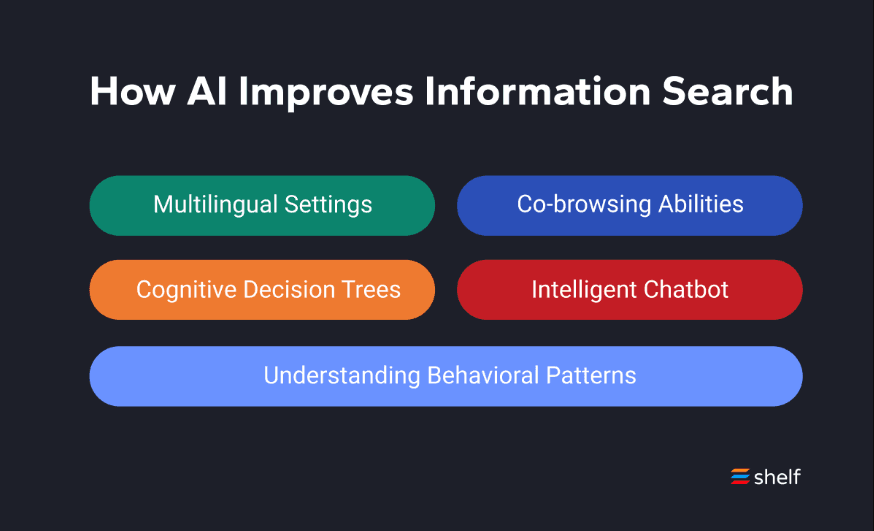
Shelf is user-friendly, thanks to its intuitive interface that makes navigation a breeze for your team. The straightforward design ensures that even new users can quickly get up to speed with minimal training. Compared to other software like Zandesk and Confluence, Shelf offers a smoother experience with its cloud-based architecture, though some users might find the initial setup slightly challenging without proper onboarding support and templates. The AI-driven search function further enhances usability by delivering quick and relevant results with real-time processing, saving your team time and effort. Overall, it balances powerful features with an accessible design, making it a strong choice for organizations prioritizing ease of use and user experience.

Integrations
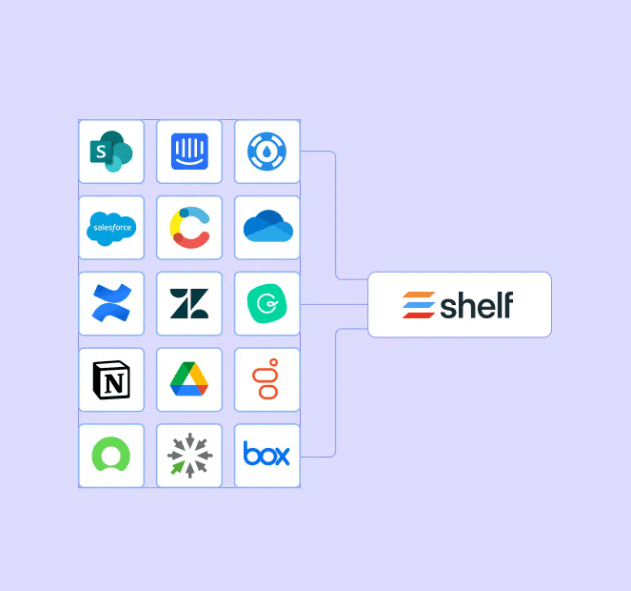
Shelf integrates with SharePoint, Salesforce, Confluence, Slack, Notion, ServiceNow, Intercom, Contentful, Zendesk, Google Drive, Dropbox, Microsoft OneDrive, and Box, providing comprehensive connectivity with enterprise tools.
Shelf also offers an API and connects with third-party integration tools, providing flexibility for custom solutions and seamless integration with existing workflows and CRM systems.
Shelf Specs
- API: Yes
- Chat: No
- Contact Management: No
- Contact Sharing: No
- Data Export: Yes
- Data Import: Yes
- Document Comparison: No
- Email Integration: Yes
- External Integrations: Yes
- File Sharing: Yes
- File Transfer: No
- History/Version Control: No
- Multi-User: Yes
- Notifications: Yes
- Project Management: No


