
Avis sur monday CRM : avantages, inconvénients, fonctionnalités et tarifs
monday CRM offre une interface flexible et intuitive qui permet à votre équipe de gérer les relations clients plus efficacement que de nombreux outils CRM traditionnels.

Nous évaluons les outils indépendamment ; les commissions aident à financer nos tests. Consultez notre politique de transparence et notre méthodologie.
monday CRM is a customer relationship management (CRM) software that helps teams manage contacts, pipelines, and customer touchpoints in one place. It’s best suited for customer-facing teams in service, success, or account management roles, especially in fast-moving SaaS, tech, or B2B environments. Its biggest value is helping your team stay on top of follow-ups, handoffs, and ongoing customer relationships.
In this review, I’ll walk through monday CRM's key features, pros and cons, best and worst use cases, pricing, and more. Whether you're looking to improve your team's productivity or better understand customer needs, this review has the insights you need.
monday CRM Evaluation Summary

4.6/5
- From $18/user/month
- 14-day free trial; Free demo available
Pourquoi faire confiance à nos recommandations de logiciels
6,700+
Reviews
20
Industry experts
16+
Evaluation factors
14
Years
Notre équipe teste et évalue des logiciels depuis 2012. En tant que leaders CX nous-mêmes, nous savons à quel point il est difficile — et important — de choisir le bon logiciel.
Pour ce guide, nous avons évalué les outils grâce à des tests pratiques et une recherche indépendante, en notant les outils selon nos critères de sélection.
Nos avis reflètent notre jugement éditorial humain, et non un argumentaire de vente.
 Gui DrusinaCreative Director
 Tim FisherVP of AI
monday CRM Overview
Pros
- You can build and adjust pipelines without needing technical help.
- It’s easy to track tasks, emails, and contact history in one place.
- Automation features save your team time on repetitive tasks and streamline daily work.
Cons
- It can feel overwhelming with too many features for new users.
- Reporting feels limited if your team needs deeper performance or trend analysis.
- You can't manage complex sales territories or multi-layered account hierarchies.
Is monday CRM Right For Your Needs?
Who Would be a Good Fit for monday CRM?
\u003cspan style=\u0022font-weight: 400;\u0022\u003eSi votre équipe travaille dans un environnement dynamique, en contact direct avec les clients, et qu’elle a besoin d’un outil simple, visuel et personnalisable, monday CRM est un excellent choix. Il convient parfaitement aux équipes de services, de vente ou de gestion de comptes qui souhaitent suivre les contacts, les conversations et les relances sans devoir surmonter une courbe d’apprentissage abrupte. Vous en tirerez rapidement de la valeur sans avoir besoin d’un administrateur à temps plein pour gérer le système, et les modèles prêts à l’emploi rendent la configuration encore plus facile.\u003c/span\u003e
\u003ch3\u003e\u003cb\u003eMeilleurs cas d’utilisation de monday CRM\u003c/b\u003e\u003c/h3\u003e
- Customer Support TeamsYou can track tickets, manage handoffs, and log follow-ups all in one easy-to-navigate board.
- Sales Operations TeamsYou can build lightweight sales pipelines and reporting without relying on complex CRM tools.
- Small BusinessesSetup is quick, and you won’t need IT to change your workflows or customize fields.
- Account ManagementIt helps your team stay on top of renewals, upsells, and check-ins without switching tools.
- SaaS CompaniesYou can manage leads, onboard customers, and monitor ongoing relationships without bloated features.
- Marketing AgenciesIt’s easy to track client requests, campaign status, and deliverables across multiple accounts.
Who Would be a Bad Fit for monday CRM?
\u003cspan style=\u0022font-weight: 400;\u0022\u003eSi votre équipe a besoin de rapports complexes, de prévisions détaillées ou de fonctionnalités avancées de gestion des opérations commerciales, monday CRM ne sera pas suffisamment complet. Il n’est pas conçu pour les grandes équipes commerciales d’entreprise, les secteurs réglementés ou les entreprises qui s’appuient sur un suivi des affaires à plusieurs niveaux. Vous vous sentirez limité si vos flux de travail dépendent de modèles de revenus personnalisés, de la gestion des territoires ou d’intégrations approfondies avec des systèmes existants.\u003c/span\u003e
\u003ch3\u003e\u003cb\u003ePires cas d’utilisation de monday CRM\u003c/b\u003e\u003c/h3\u003e
- Enterprise Sales TeamsIt doesn’t support layered pipelines, custom quote logic, or robust forecasting out of the box.
- Financial Services FirmsYou can’t enforce the strict compliance controls needed for sensitive customer data.
- Call CentersThere’s no native telephony, queueing, or call activity tracking built in.
- Healthcare ProvidersIt lacks HIPAA compliance and patient-specific tracking features.
- Franchise OperationsYou can’t segment and report across multiple locations or sales territories easily.
- Manufacturing FirmsIts features aren't tailored for supply chain and production management.
Comment nous testons et évaluons les outils
Nous avons passé des années à bâtir, affiner et améliorer notre système de test et de notation des logiciels. Notre grille d’évaluation est conçue pour saisir les subtilités des sélections logicielles et ce qui fait qu’un outil est efficace, en se concentrant sur les éléments essentiels du processus de décision. Vous trouverez ci-dessous le détail de notre méthodologie d’évaluation et de notation selon sept critères. Cela nous permet de fournir une évaluation impartiale des logiciels basée sur les fonctionnalités principales, les options uniques, la facilité d’utilisation, l’intégration, la prise en main, l’assistance, les avis clients et le rapport qualité/prix.
Fonctionnalité principale (25% de la note totale)
Le point de départ de notre évaluation concerne toujours la fonctionnalité principale de l’outil. Possède-t-il les fonctions que l’on attend normalement, et ces fonctions sont-elles accessibles pour toutes les offres ? Nous attendons qu’un outil soit au niveau des capacités minimales de ses concurrents.
Fonctionnalités différenciantes (25% de la note totale)
Nous évaluons ici les fonctionnalités qui se distinguent de la fonction de base habituellement présente dans ce type de logiciel. Un score élevé récompense des fonctions spécialisées qui rendent le produit plus efficace ou unique et offrent une valeur ajoutée à l’utilisateur. Nous évaluons également la capacité à s’intégrer facilement avec d’autres solutions courantes, ce qui accroît l’intérêt et l’utilité de l’outil. Les logiciels qui proposent de nombreuses intégrations natives, des connexions tierces ou une API pour les intégrations personnalisées obtiennent une meilleure note.
Facilité d’utilisation (10% de la note totale)
Nous mesurons la rapidité et la simplicité pour effectuer les tâches clés avec l’outil. On valorise le design intuitif, les applications mobiles, les templates préconçus et la capacité à simplifier les tâches complexes.
Accompagnement à la prise en main (10% de la note totale)
L’adoption rapide est essentielle. Nous examinons donc la facilité pour un nouvel utilisateur à prendre l’outil en main avec peu de formation. Nous vérifions la rapidité d’installation et d’utilisation sans expérience préalable. Les meilleurs logiciels exigent peu ou pas de support pour démarrer.
Assistance (10% de la note totale)
Nous évaluons la réactivité et la facilité d’obtenir de l’aide par téléphone, chat ou base de connaissances. Les outils offrant un support humain en temps réel ont le meilleur score ; les chatbots sont moins bien valorisés.
Avis clients (10% de la note totale)
En plus de notre expertises, nous prenons en compte le score NPS (Net Promoter Score) accordé par les utilisateurs actuels et passés. Nous analysons la probabilité qu’ils réutilisent l’outil. Les outils à score élevé possèdent un excellent NPS utilisateur.
Rapport qualité/prix (10% de la note totale)
Après examen des autres critères, nous considérons le prix moyen des offres principales par rapport aux fonctionnalités essentielles évaluées. Les solutions offrant plus pour un prix inférieur obtiennent un meilleur score.
Core Features
Contact Management: You can store and manage all your customer information in one place, making it easy to access and update. This feature helps your team keep track of interactions and build better customer relationships.
Pipeline Management: Track your sales process with visual pipelines that show where each deal stands. This helps your team prioritize tasks and focus on closing deals efficiently.
Task Management: Assign and manage tasks within your team to ensure everyone knows what needs doing and when. It keeps your projects on track and ensures accountability.
Automation: Automate repetitive tasks like follow-up emails and reminders, saving your team time for more important work. This feature boosts productivity and reduces errors.
Reporting and Analytics: Generate reports to analyze your team's performance and make data-driven decisions. It helps you understand your sales trends and improve strategies.
Customizable Dashboards: Create dashboards that fit your team's specific needs, displaying relevant data at a glance. This enhances your team's ability to monitor and react to key metrics quickly.

Standout Features
Visual Workflow Builder: Design and customize workflows with an intuitive drag-and-drop interface. This allows your team to create processes that fit your unique business needs without any coding.
Time Tracking: Monitor how much time your team spends on different tasks and projects. This feature helps you understand productivity levels and manage resources effectively.
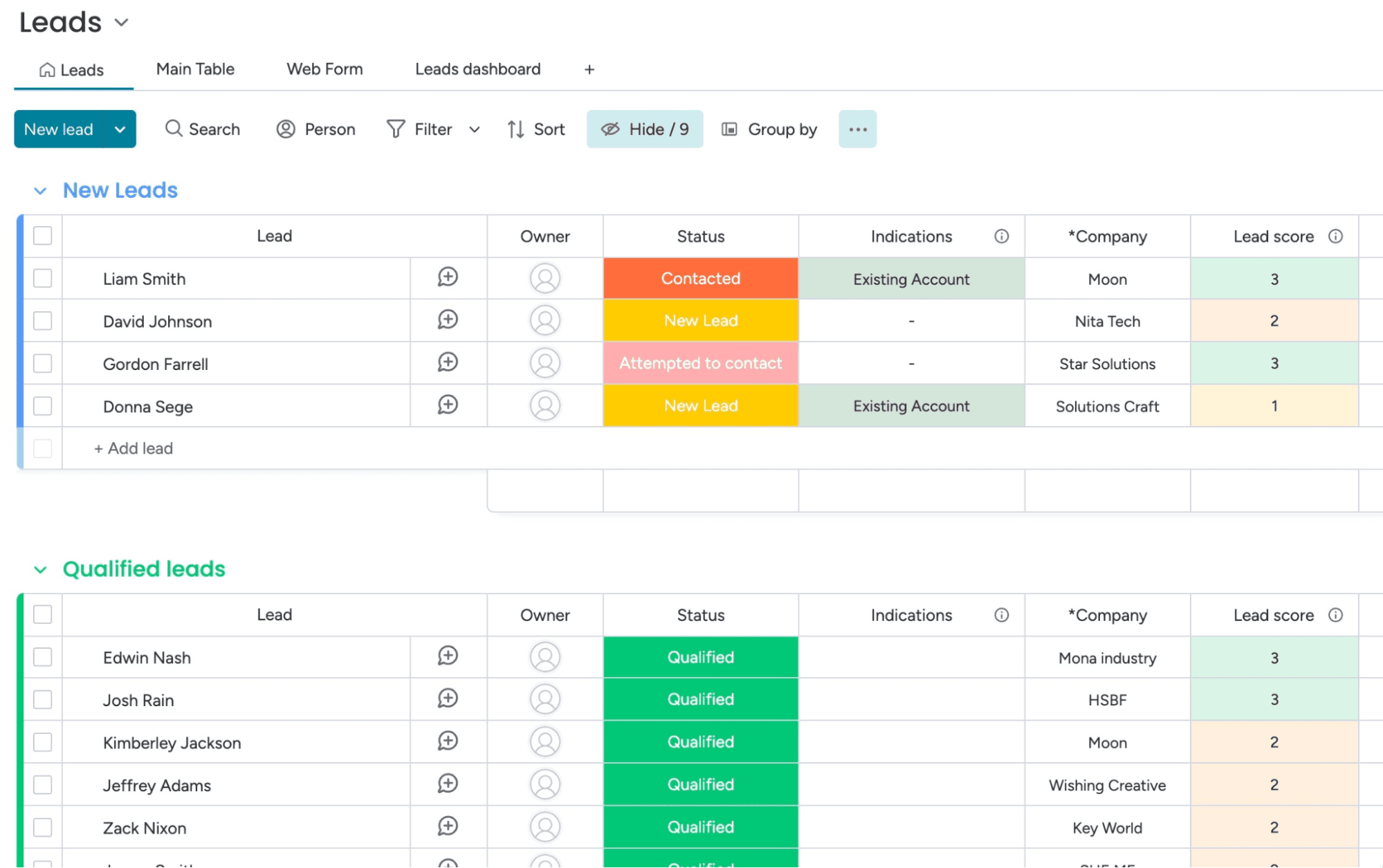
Ease of Use
monday CRM is known for its intuitive and user-friendly interface, making it easy for your team to get started without extensive training. The visual layout and drag-and-drop workflow builder simplify complex processes, allowing you to customize your workspace effortlessly.
Its responsive design ensures a smooth experience across devices, so your team can manage tasks on the go. Users often appreciate the straightforward navigation and clear organization of features, which enhances productivity and reduces the learning curve.

Onboarding
monday CRM offers a straightforward onboarding process, with guided tutorials and helpful resources that make it easy for your team to get started. The platform provides a wealth of documentation and video guides that walk you through setting up your workspace.
Users often find value in the responsive support team, which is available to assist with any questions or issues. While some users may find the initial setup a bit complex, the available resources help smooth the transition and ensure a quicker time to value.

Customer Support
monday CRM provides a range of support options that help your team resolve issues quickly. Users appreciate the responsive email and chat support, which often addresses questions efficiently.
The platform also offers a comprehensive help center with articles and FAQs that guide you through common challenges. While some users feel response times could be faster, the quality of support and available resources generally meet the needs of most teams, ensuring you can keep your work on track. Plus, monday.com has an active community for those who like to find their own answers or get tips from power-users.

Integrations
monday CRM integrates natively with Slack, Google Workspace, Gmail, Microsoft Teams, Zoom, Outlook, Zoom, HubSpot, LinkedIn, Stripe, PandaDoc, Trello, and Salesforce. monday CRM also offers an API and connects with third-party integration tools like Zapier.
Value for Money
monday CRM pricing offers strong value, especially if your team wants something easy to use without sacrificing flexibility. Although there is no free plan, monday CRM does offer a 14-day free trial.
You get a lot at the lower tiers, including automation and reporting tools that work well for small to midsize teams. Higher plans add more control, but smaller teams won’t need Enterprise to get full use out of it.
- Basic Plan: Contact management, boards, and limited automations
- Standard Plan: Activity tracking, custom pipelines, and calendar view
- Pro Plan: Sales forecasting, advanced reporting, and higher automation limits
- Enterprise Plan: Admin controls, multi-level permissions, and enterprise-grade security features

New Product Updates from monday CRM
 Opens new window
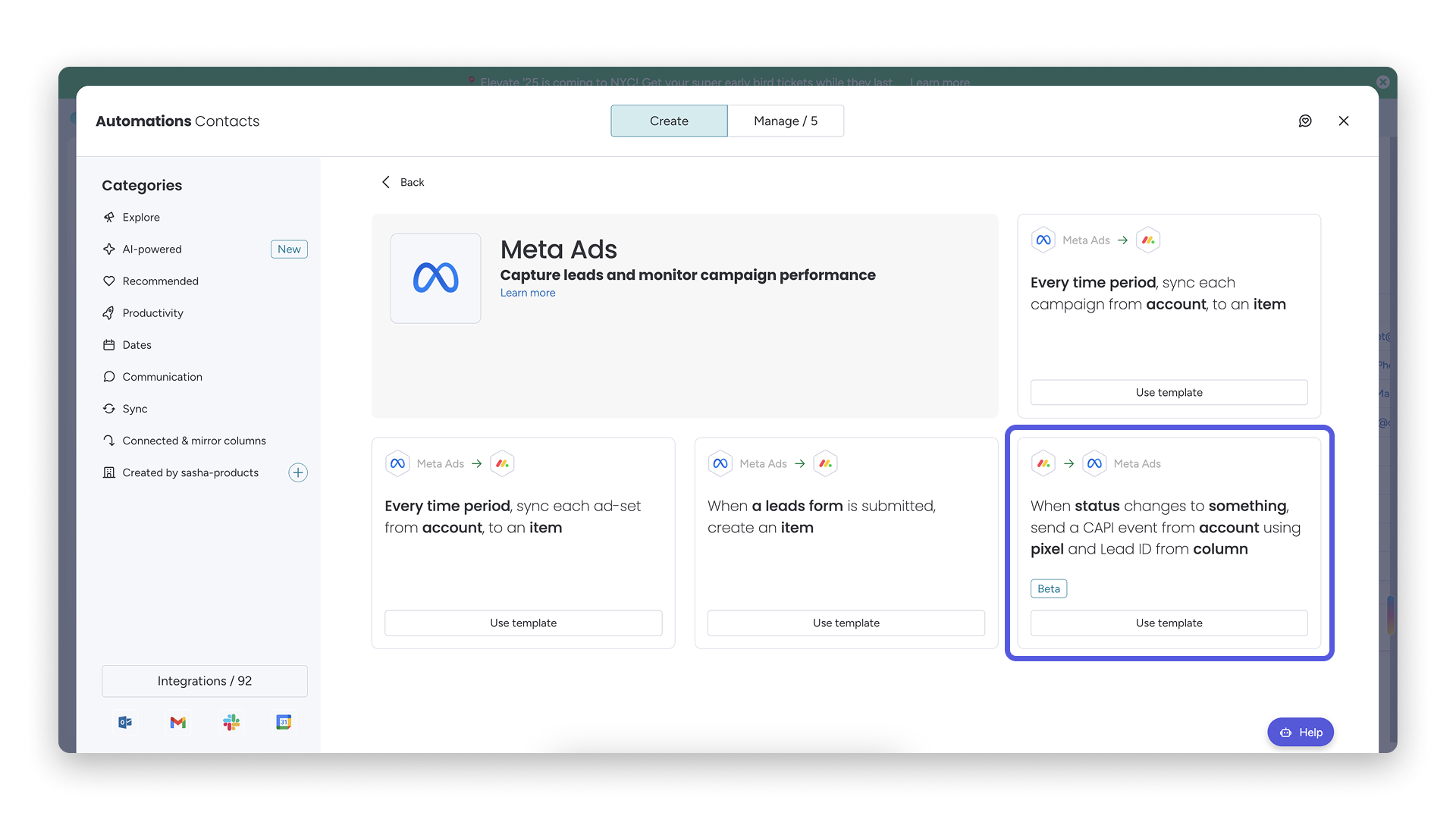
monday CRM Adds Meta Conversions API Integration
monday CRM has added an easier way to connect Meta Conversions API so you can sync lead status back to Meta. This helps you improve targeting and conversion performance with minimal setup effort. Highlights include:
- Meta Conversions API Integration: Connect monday CRM with Meta to share lead status updates automatically.
- Lead Status Sync: Send CRM lead status changes back to Meta to improve campaign targeting and conversion tracking.
- Automation Recipe: Configure the integration quickly using the new built-in Meta automation recipe.
Visit monday CRM's official site for more details.
monday CRM Specs
- 2-Factor Authentication: No
- API: Yes
- Calendar Management: Yes
- Call Tracking: No
- Campaign Management: No
- Click-to-Dial: No
- Contact Management: Yes
- Contact Sharing: No
- Custom Data Forms: Yes
- Customer Management: Yes
- Dashboard: Yes
- Data Export: Yes
- Data Import: Yes
- Data Visualization: Yes
- Email Integration: Yes
- External Integrations: Yes
- File Sharing: Yes
- File Transfer: Yes
- Google Apps Integration: Yes
- Lead Management: Yes
- Lead Scoring: Yes
- Marketing Automation: Yes
- Mobile App: No
- Multi-User: Yes
- Notifications: Yes
- Pipeline Management: Yes
- Sales Automation: Yes
- Scheduling: Yes
- Social-Media Integration: Yes
- Task Scheduling/Tracking: Yes
- Third-Party Plugins/Add-Ons: Yes
monday CRM FAQs
monday CRM Company Overview & History
monday.com, founded by Roy Mann, Eran Zinman, and Eran Kampf, is headquartered in Tel Aviv, Israel. It operates monday work management (for project management), monday CRM, monday service (a help desk and service management tool), and monday dev (for product development and engineering teams).
Founded in 2012, it went public on Nasdaq in June 2021, rapidly grew to over 1,850 employees, and surpassed US $1 billion in ARR by 2024. The company is known for its customizable no-code tools and supports more than 225,000 customers worldwide.
monday CRM Major Milestones
- 2012: Founded as dapulse in Tel Aviv after spinning off from Wix.
- 2014: Platform launched to the public.
- 2017: Rebranded from dapulse to monday.com
- 2019: Raised US $150 million in Series D funding; valued at US $1.9 billion. Achieved unicorn status.
- 2021: Became publicly traded on Nasdaq.
- 2022: Launch of monday Sales CRM, offering fully customizable no-code CRM workflows.
- 2023: Released monday CRM integration in Microsoft Teams for in-app pipeline access
- 2024: monday.com reached over $1 billion in annual recurring revenue.
Quelle est la prochaine étape ?
Abonnez-vous à notre newsletter pour recevoir les dernières informations sur l’expérience client, des guides pratiques, des stratégies et des ressources proposées par les meilleurs experts du domaine de l’expérience client.