

As a customer experience manager, you face the daily challenge of keeping your team efficient while ensuring customer satisfaction. Mobile help desk software can be a game-changer, allowing your team to respond quickly and effectively, no matter where they are.
In my experience testing and reviewing software, I've seen how the right tool can make all the difference. I've independently reviewed and evaluated various options to bring you the best. And in this article, I'll present my top picks, offering unbiased insights to help you find the perfect fit for your needs.
Why Trust Our Software Recommendations
6,700+
Reviews
20
Industry experts
16+
Evaluation factors
14
Years
Our team has been testing and reviewing software since 2012. As CX leaders ourselves, we know how difficult—and important—it is to choose the right software.
For this guide, we evaluated tools using hands-on testing and independent research, scoring tools using our selection criteria.
Our reviews reflect our human editorial judgment, not a sales pitch.
 Gui DrusinaCreative Director
 Tim FisherVP of AI
Best Mobile Help Desk Software Comparison Table
This comparison table summarizes pricing details for my top mobile help desk software selections.
Score legend (out of 5)
- Excellent4.5–5
- Good4–4.4
- Average3–3.9
- Below average2–2.9
- Poor1–1.9
Sorted by: Default
| Tool | Starting Price | Website | |||||||
|---|---|---|---|---|---|---|---|---|---|
Best for turning emails into tasks | 2.5 out of 5 | 2 | 1 | 4 | 4 | 2 | 2 | $14/user/month 30-day free trial available | Website |
Best for creating custom AI chatbots | Not rated | Not rated | 1 | 2 | 4 | Not rated | 1 | $32/month 7-day free trial + demo available | Website |
Best for drafting replies without a connection | 3.3 out of 5 | 3 | 1 | 4 | 5 | 3 | 4 | $25/user/month 14-day free trial + free demo available | Website |
Best for mobile AI reply drafting | Not rated | Not rated | 2 | 3 | 5 | 4 | 4 | $99/month 15-day free trial + free demo available | Website |
Best for customer cases tied to field service | Not rated | Not rated | 2 | 4 | 4 | 3 | 4 | Pricing upon request Free demo available | Website |
Best for after-hours incident escalation | 3.3 out of 5 | 2 | 3 | 4 | 4 | 4 | 3 | $21.50/user/month Free plan + 14-day trial available | Website |
Best for barcode-based asset lookup | Not rated | Not rated | 2 | 3 | 4 | 3 | 3 | £66/user/month 30-day free trial + free demo available | Website |
Best for engaging shoppers as they browse | Not rated | Not rated | 1 | 4 | 4 | 2 | 4 | $24.17/month Free plan available; 7-day free trial | Website |
Best for linking tickets to scanned assets | Not rated | Not rated | 2 | 3 | 4 | 3 | 4 | Pricing upon request Free trial + free demo available | Website |
Best for billing ticket-to-project work | Not rated | Not rated | 1 | 4 | 4 | 2 | 4 | $12.99/user/month Free trial available | Website |


Best Mobile Help Desk Software Review
Below are my detailed summaries of the best mobile help desk software that made it onto my shortlist. My reviews offer a detailed look at the key features, pros & cons, integrations, and ideal use cases of each tool to help you find the best one for you.
 Best for turning emails into tasks
- 30-day free trial available
- From $14/user/month (billed annually)
Visit WebsiteCustomer Rating:4.8/5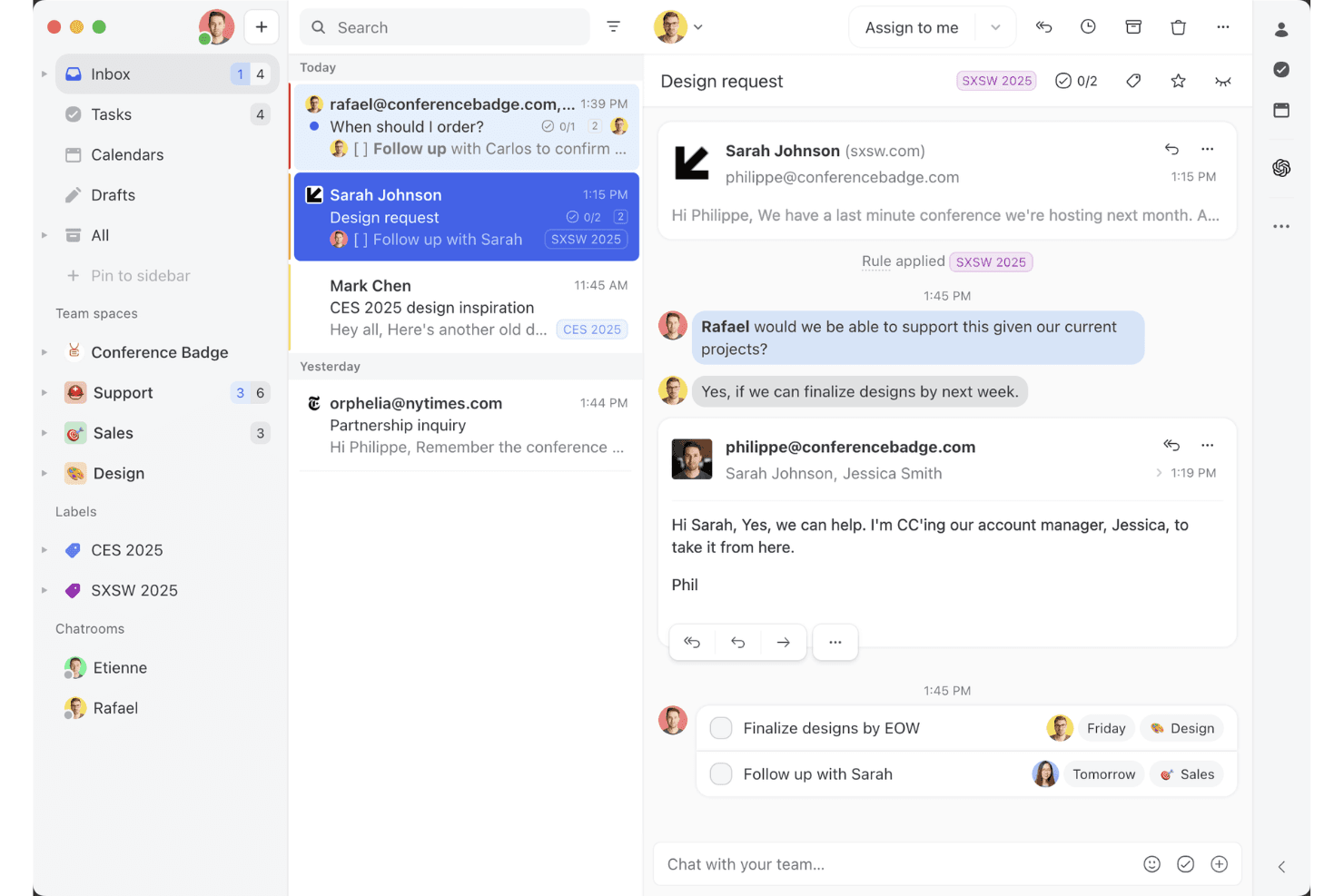
Missive’s shared inbox view shows how teams can collaborate on email threads, assign tasks, and manage client conversations in one workspace. Missive is a collaborative inbox and mobile help desk tool that unifies email, WhatsApp, SMS, Instagram, and live chat into a single interface, with built-in task creation, assignment rules, and team communication features.
Who Is Missive Best For?
Missive is a strong fit for remote and distributed customer service teams that need to manage email, WhatsApp, and social conversations from a single mobile inbox.
Why I Picked Missive
I picked Missive as one of the best because it genuinely turns your inbox into a task engine. When an email lands, you can instantly convert it into an assigned task with a due date, loop in teammates via internal comments, and route it through auto-assignment rules, all from the mobile app. I also love that it pulls email, WhatsApp Business, Instagram, and SMS into one unified mobile inbox, so nothing slips through when your team is working remotely.
Missive Key Features
- Multi-channel unified inbox: Consolidates email, WhatsApp Business, Instagram, Facebook Messenger, SMS, and live chat into a single mobile interface.
- Missive MCP Server: Connect external AI apps (like Claude or ChatGPT) to mcp.missiveapp.com to query your mobile inbox, check schedules, and draft responses—keeping human review required before sending.
- Auto-assignment rules: Automatically routes incoming conversations to agents using round-robin, least-busy, or sender-based logic.
- Configurable push notifications: Lets you set notification preferences per mailbox and event type, withtime-of-day snoozing for off-hours coverage.
- SLA reminders and escalation rules: Triggers automated alerts and escalations when conversations go unreplied past a set threshold.
Missive Integrations
Missive integrates with HubSpot, Salesforce, Pipedrive, Aircall, Dialpad, Asana, ClickUp, Trello, Twilio, and WhatsApp Business. It also offers a REST API, webhooks, Zapier, and its new MCP Server (mcp.missiveapp.com) for connecting external AI clients (available on Productive and Business plans, enabled by an admin).
Pros and Cons
Pros:
- Push notifications include SLA reminders and escalations
- Instantly turns emails into actionable tasks
- True omnichannel mobile inbox for all channels
Cons:
- Limited offline access and sync on mobile
- No native knowledge base for agents
Learn more about Missive: Best for creating custom AI chatbots
- 7-day free trial + demo available
- From $32/month (billed annually)
Visit WebsiteCustomer Rating:4.4/5
Chatbase offers a mobile Playground interface where agents can be monitored for training status, last trained time, and model size. Chatbase is a no-code AI chatbot builder that lets you create custom AI agents trained on your own data—documents, URLs, and text—and deploy them across web and mobile customer support surfaces.
Who Is Chatbase Best For?
Chatbase is a good fit for small to mid-sized businesses and developers who want to add AI-powered support to their product without building a chatbot from scratch.
Why I Picked Chatbase
I picked Chatbase as one of the best because it gives you a complete no-code environment for building a custom AI support agent trained on your own business data. I especially like the model comparison feature, which lets you test different LLM configurations to find what works best for your specific support use case. The natural language instruction setup for escalation rules also means I can define when the AI hands off to a human without writing a single line of code.
Chatbase Key Features
- Omnichannel deployment: Deploy your AI agent across website chat, WhatsApp, Slack, and email from a single platform.
- Real-time data sync: Connect your agent to CRMs, order management tools, and helpdesk platforms to pull live customer data during conversations.
- Advanced reporting: Track agent performance with detailed analytics on customer interactions, resolution rates, and engagement data.
- Multilingual support: Detect and respond in 80+ languages automatically using built-in language detection and generative AI translation.
Chatbase Integrations
Chatbase offers native integrations with WhatsApp, Slack, Instagram, Facebook Messenger, Zendesk, Salesforce, Shopify, Stripe, Notion, Calendly, and Cal.com. It connects with Zapier and Make, and has an API for custom integrations.
Pros and Cons
Pros:
- Multiple AI model choices available
- Supports 80+ languages natively
- Deploys a trained agent in minutes
Cons:
- Credit-based messaging can spike costs
- No visual conversation flow builder
Learn more about Chatbase: Best for drafting replies without a connection
- 14-day free trial + free demo available
- From $25/user/month (billed annually)
Visit WebsiteCustomer Rating:4.6/5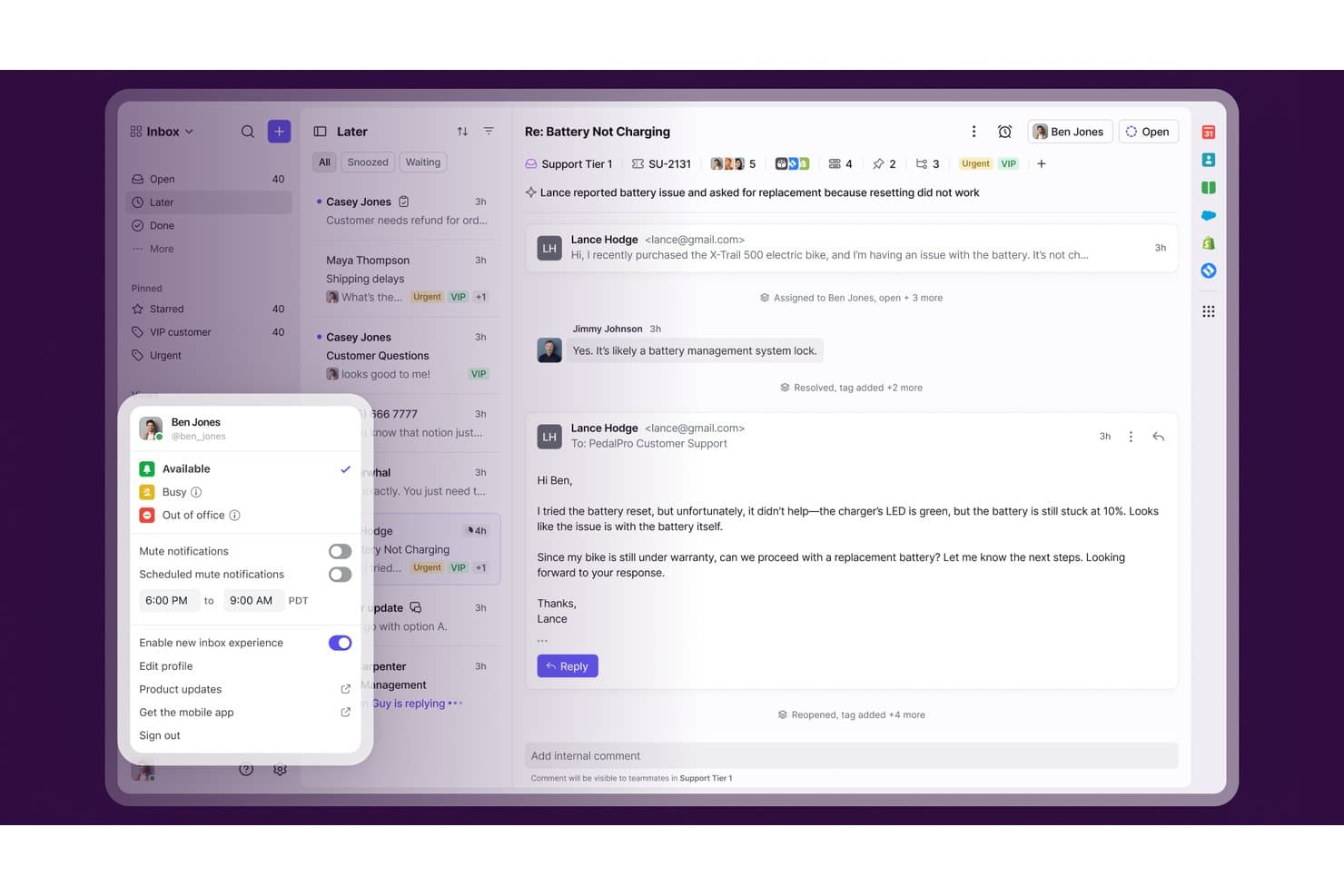
Front lets users toggle the new inbox experience from their profile menu. Front is a customer service platform that brings email, chat, SMS, social, and voice into a shared inbox with built-in ticketing, workflow automation, and mobile apps for iOS and Android.
Who Is Front Best For?
Front is a strong fit for customer support teams that need to manage shared inboxes and collaborate on conversations from both desktop and mobile.
Why I Picked Front
I've included Front in my top picks because it's the only tool on this list that lets agents draft replies when they're completely offline. The app downloads up to 30 days of open conversations to your device, so your team can keep working through patchy connections, and any drafts queued up send automatically once you're back online. I also like that mobile collaboration stays intact even without a connection, with tagging, assignment, and internal comments all available on iOS and Android.
Front Key Features
- Shared inbox management: Teams can view, assign, and reply to conversations from a shared inbox on iOS and Android.
- Multi-channel ticket intake: Front consolidates email, chat, SMS, social media, WhatsApp, and voice into a single queue.
- Push notifications with quick actions: Mobile alerts let agents comment, mark as read, or archive conversations directly from the notification.
- SLA tracking: Front lets you set SLA timers with rules and monitor breaches through the analytics dashboard.
Front Integrations
Front offers 160+ integrations, including Salesforce, HubSpot, Jira, Asana, Aircall, and Dialpad. Its REST API and MCP server support custom connections and AI tool integrations.
Pros and Cons
Pros:
- Multiple support channels share one mobile inbox
- Mobile assignment, tagging, and internal comments
- Offline reply drafts send after reconnection
Cons:
- Notification rules require desktop setup
- Mobile analytics aren’t available
Learn more about Front: Best for mobile AI reply drafting
- 15-day free trial + free demo available
- From $99/month (billed annually)
Visit WebsiteCustomer Rating:4.6/5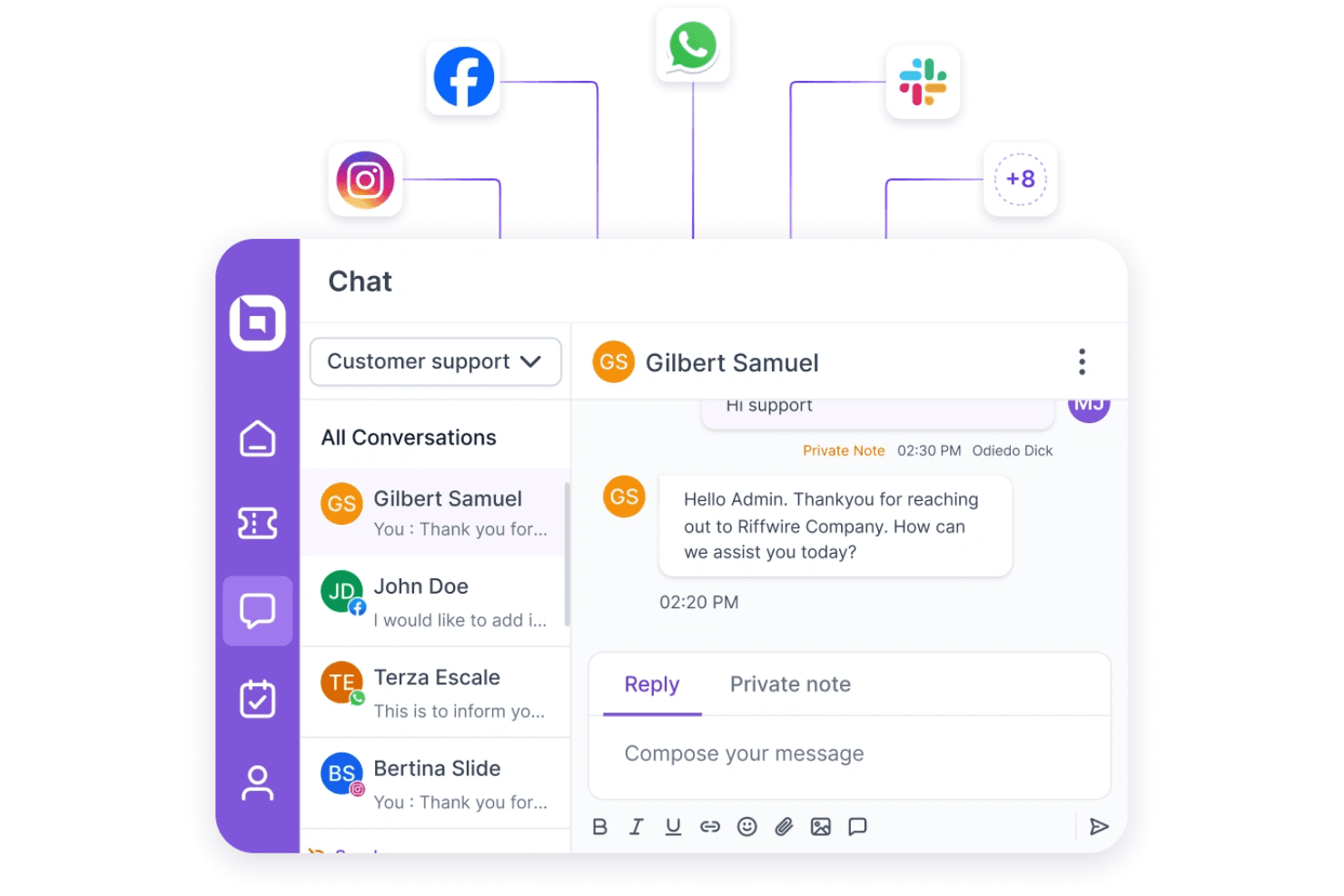
BoldDesk provides scalable, flexible help desk solutions for businesses of all sizes. BoldDesk is an AI-native help desk platform that brings together ticketing, omnichannel inbox management, live chat, workflow automation, and a native mobile agent app for iOS and Android.
Who Is BoldDesk Best For?
BoldDesk is a strong fit for customer support managers who need a full-featured mobile agent experience backed by AI reply assistance and omnichannel ticket management.
Why I Picked BoldDesk
I picked BoldDesk as one of the best because its AI reply drafting on mobile is genuinely useful in a real support shift. The Assist Agent generates, rewrites, and summarizes replies directly inside the mobile ticket editor, so agents aren't composing responses from scratch on a small screen. Pair that with full ticket lifecycle management on iOS and Android, and agents can triage, assign, split, and resolve tickets without touching a desktop.
BoldDesk Key Features
- Mobile push notifications: Agents receive configurable alerts for ticket assignments, replies, notes, and SLA reminders directly on their device.
- Omnichannel inbox: Email, live chat, WhatsApp, social media, SMS, and voice conversations feed into one unified inbox accessible from the mobile app.
- Mobile ticket splitting: Agents can split complex tickets into separate requests directly from the mobile app without switching to a desktop.
- SLA alerts: The mobile app flags tickets at risk of missing response or resolution targets before a breach occurs.
BoldDesk Integrations
BoldDesk offers marketplace integrations with Jira, Salesforce, HubSpot, Slack, Microsoft Teams, PagerDuty, AWS CloudWatch, Twilio, and WhatsApp. It also provides REST APIs, webhooks, MCP, mobile SDKs, and Zapier for custom integrations.
Pros and Cons
Pros:
- Configurable push alerts include SLA reminders
- Omnichannel tickets stay accessible on mobile
- Mobile AI drafts reduce typing
Cons:
- Mobile browser agent portal has limitations
- Offline ticket access isn’t supported
Learn more about BoldDesk: Best for customer cases tied to field service
- Free demo available
- Pricing upon request
Visit WebsiteCustomer Rating:4.4/5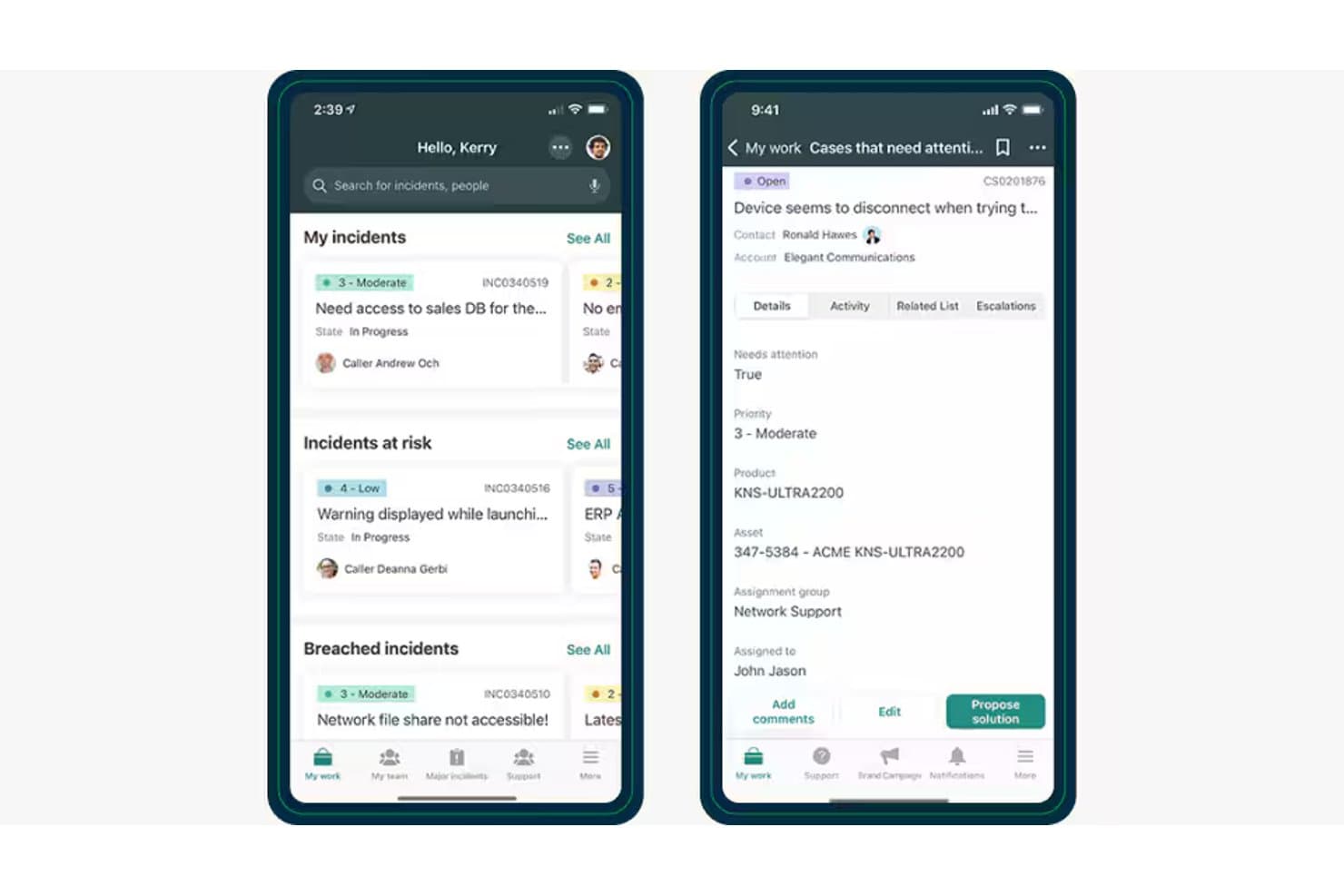
ServiceNow's mobile agent app shows incidents at risk, breached tickets and case details for help desk staff. ServiceNow Customer Service Management is an enterprise-grade mobile help desk platform that connects case management, omnichannel intake, AI-assisted triage, and field service dispatch into a unified workflow.
Who Is ServiceNow Best For?
ServiceNow Customer Service Management is a strong fit for enterprise customer service teams that need to coordinate case resolution across both agents and field technicians.
Why I Picked ServiceNow
I've included ServiceNow in my top picks because it's the only tool here that directly connects a customer case to a field service dispatch within the same workflow. When a warranty claim comes in, for example, ServiceNow can confirm coverage, trigger a technician dispatch, and ship a replacement part, all tied to the original case. I also like that the mobile app lets agents accept, reassign, and escalate cases on the go, while managers can approve change requests and escalations from the same interface.
ServiceNow Key Features
- Omnichannel case intake: Agents can receive and manage customer cases from phone, text, chat, and self-service portals within a single workspace.
- AI-assisted case triage: The CRM Case Management AI Specialist automatically assigns and triages incoming cases, then builds a resolution action plan.
- Role-based push notifications: The mobile app delivers targeted alerts for case assignments, comments, escalations, and change requests to agents and managers separately.
- Playbook-guided resolution: Step-by-step playbooks walk agents and customers through the structured actions required to resolve a case.
ServiceNow Integrations
ServiceNow integrates with Genesys and Five9 to bring voice and digital interactions into the CSM workspace. Its broader platform supports REST, SOAP, and webhooks for custom integrations.
Pros and Cons
Pros:
- Reviewers praise centralized case and SLA tracking
- Case-linked dispatch keeps field work connected
- Mobile agents can reassign and update cases
Cons:
- Mobile SLA visibility lacks performance dashboards
- No documented offline access or sync
Learn more about ServiceNow: Best for after-hours incident escalation
- Free plan + 14-day trial available
- From $21.50/user/month
Visit WebsiteCustomer Rating:4/5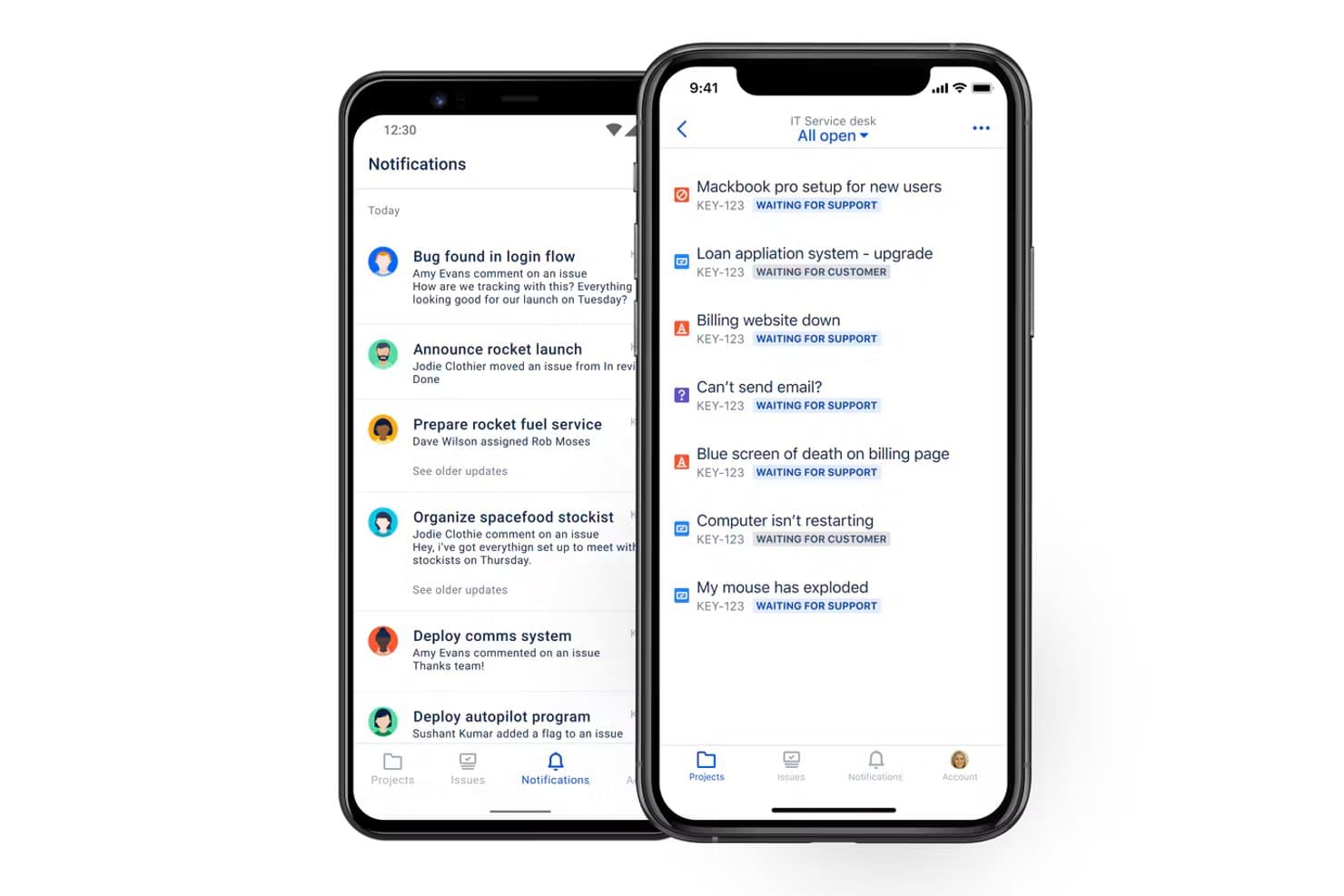
Jira Service Management's mobile app shows an IT service desk queue with open requests and their waiting statuses. Jira Service Management is Atlassian's ITSM platform that handles service requests, incident management, and on-call alerting with multi-channel ticket intake, SLA tracking, and mobile access via the Jira Cloud app.
Who Is Jira Service Management Best For?
Jira Service Management is a strong fit for IT and support teams already working in the Atlassian ecosystem who need reliable on-call alerting and incident escalation around the clock.
Why I Picked Jira Service Management
I've included Jira Service Management in my top picks because its on-call alerting and escalation setup is genuinely built for teams that can't afford to miss a critical incident after hours. Alert notifications reach agents via push, SMS, voice call, and email in a configurable sequence, so if one method doesn't land, the next fires automatically. I also like that agents can assign, transition, and comment on tickets directly from the Jira Cloud mobile app, keeping incident response moving even when no one's at a desk.
Jira Service Management Key Features
- Multi-channel ticket intake: Customers and employees can submit requests through a portal, email, Slack, Microsoft Teams, or an embedded widget, all routed into one unified queue.
- On-call scheduling and escalation policies: Teams can configure on-call schedules and escalation rules so incoming alerts reach the right person automatically.
- SLA tracking per ticket: Agents can view SLA status directly on each request in the mobile app to monitor response and resolution deadlines.
- Workflow automation rules: Teams can build automation rules to handle repetitive actions like ticket assignment, status updates, and notifications without manual input.
Jira Service Management Integrations
Jira Service Management has a native Jira integration, plus integrations with Slack, Microsoft Teams, Bitbucket Pipelines, Jenkins, and GitLab. Atlassian Marketplace offers 1,000+ apps and integrations, and a REST API supports custom connections.
Pros and Cons
Pros:
- SLAs remain visible within mobile requests
- Configurable alerts escalate across multiple channels
- Mobile agents reassign and update tickets
Cons:
- Offline ticket drafting and sync aren’t documented
- Mobile dashboards omit team-level performance trends
Learn more about Jira Service Management: Best for barcode-based asset lookup
- 30-day free trial + free demo available
- From £66/user/month (billed annually)
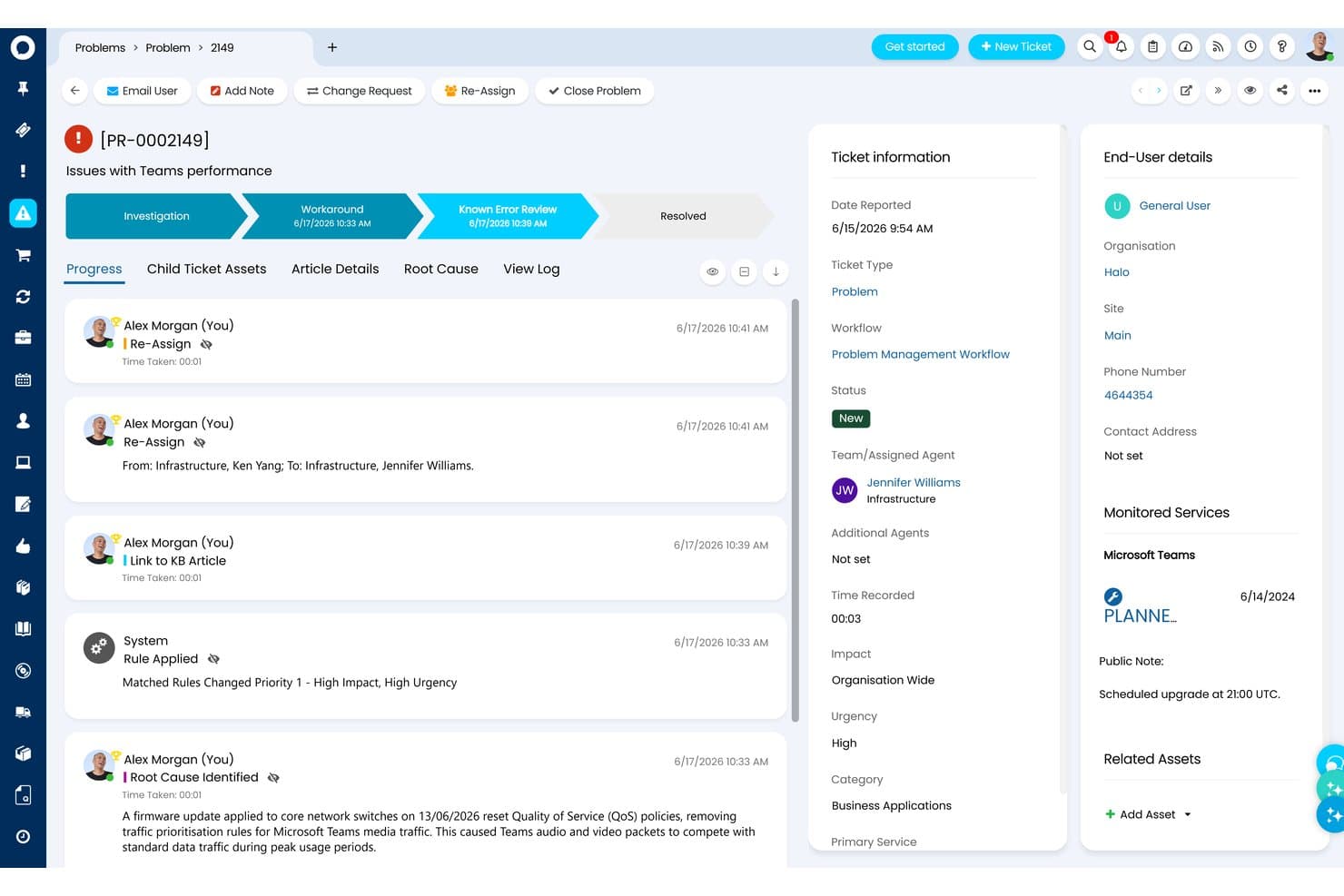
HaloITSM Problem Management view tracking a Teams performance issue from investigation through known error review. HaloITSM is a full-featured ITSM platform that handles incident management, service requests, change and problem management, asset tracking, and mobile ticket access for IT help desk teams.
Who Is HaloITSM Best For?
HaloITSM is a strong fit for IT help desk leads who need a structured, process-driven ITSM platform with deep incident, change, and asset management capabilities.
Why I Picked HaloITSM
I've included HaloITSM in my top picks because its mobile app lets agents scan asset barcodes with their phone's camera to pull up full asset records instantly, which is a real advantage when you're troubleshooting hardware in the field. Ticket screens in the app also display SLA response and resolution targets alongside full ticket history, so agents stay on top of deadlines without switching to a desktop. I also like that asset records link directly to open incidents, changes, and contracts, giving technicians the full picture from a single screen.
HaloITSM Key Features
- Multi-channel ticket intake: Agents can receive tickets logged via email, Microsoft Teams, the self-service portal, phone, API, and monitoring alerts in one unified queue.
- SLA and OLA tracking: Teams can configure service and operational level agreements with automated escalation warnings when targets are approaching or breached.
- Push notifications: The mobile app sends push notifications to agents so they can stay on top of new and updated tickets without actively checking the app.
- Change Advisory Board workflows: Change requests can be routed to CAB members for review, with votes and decisions recorded directly against the change record.
HaloITSM Integrations
HaloITSM offers native integrations with Microsoft Teams, Datadog, Azure Monitor, AWS, and Azure DevOps. It also provides a REST API for custom integrations.
Pros and Cons
Pros:
- Reviewers found open tickets easy to locate
- Ticket screens show history and SLA targets
- Barcode scans surface asset records
Cons:
- Mobile app lacks advanced triage tools
- New-ticket logging defaults to the browser
Learn more about HaloITSM: Best for engaging shoppers as they browse
- Free plan available; 7-day free trial
- From $24.17/month
Visit WebsiteCustomer Rating:4.7/5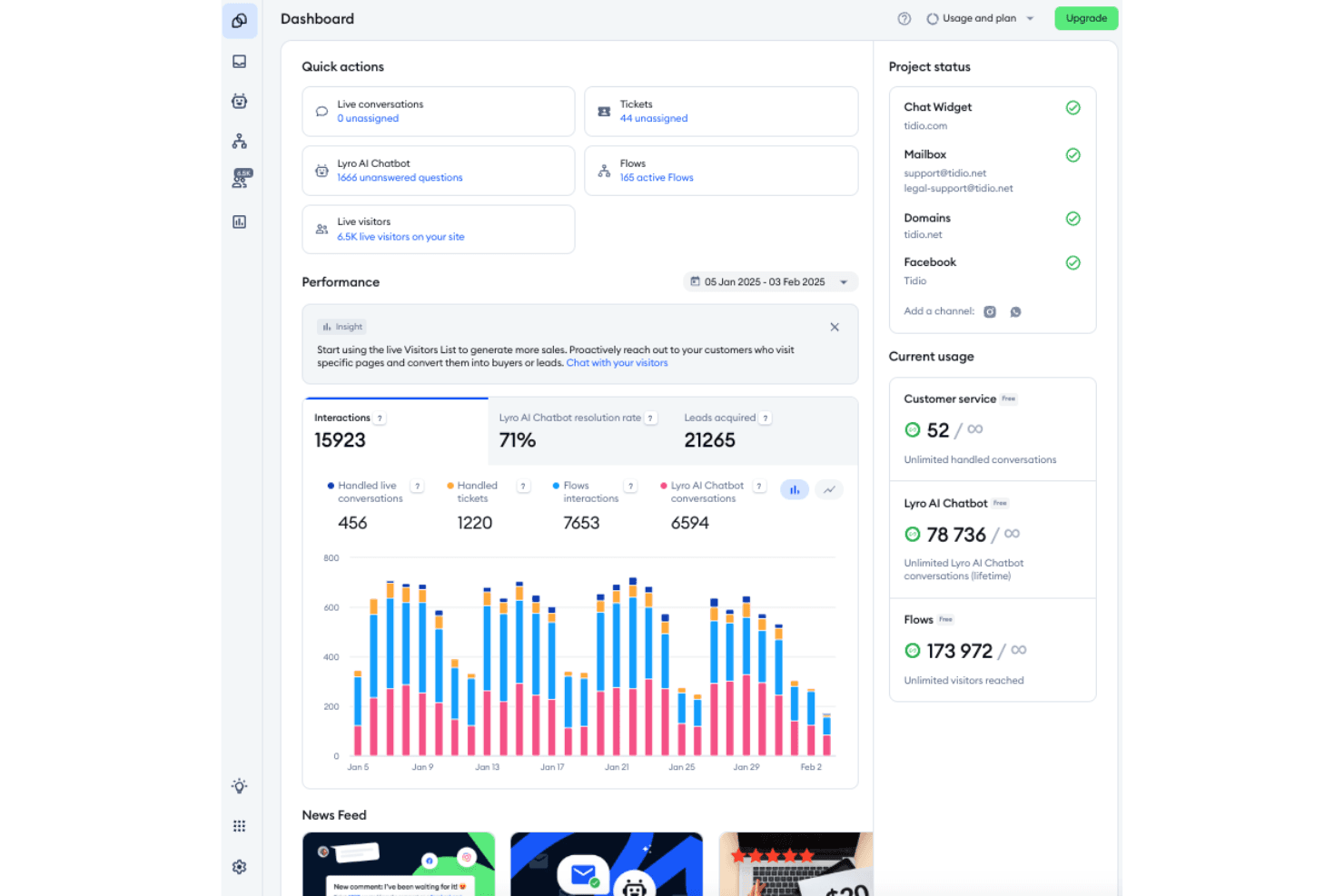
Tidio dashboard showing real-time chats and AI-powered automation tools that help teams manage customer support on mobile devices. Tidio is a live chat and help desk platform that consolidates customer conversations from email, live chat, WhatsApp, Instagram, and Messenger into a single inbox, with ticketing, AI-assisted responses, and mobile app access for managing support on the go.
Who Is Tidio Best For?
Tidio suits small business owners and ecommerce support teams who need to manage live chat, email, and social conversations from a single inbox without a complex setup.
Why I Picked Tidio
I picked Tidio as one of the best because I love how it's built around catching shoppers at the exact moment they're most likely to convert. The live visitors list shows which product pages someone is browsing in real time, so agents can start a proactive chat before a customer even thinks to ask a question. I also like the Shopify inbox integration, which lets agents view carts and process refunds or cancellations directly from the conversation, all from the mobile app.
Tidio Key Features
- Multi-channel ticket intake: Converts emails, live chats, WhatsApp messages, Instagram DMs, and Messenger conversations into tickets in a single inbox.
- Internal notes on tickets: Agents can add private notes directly to tickets for team context without the customer seeing them.
- Custom ticket fields: Teams can create fields like order number or request type, which agents can fill from the mobile app.
- Live visitors list: Shows which pages current website visitors are browsing, including their country and browser, available on Starter and above.
Tidio Integrations
Tidio integrates with Shopify, WhatsApp, Instagram, Messenger, Zendesk, and WordPress. It supports custom connections through OpenAPI and is available on Zapier.
Pros and Cons
Pros:
- Visitor list supports proactive shopper outreach
- One inbox unifies chat, email, and social
- Mobile tickets support replies, notes, and reassignment
Cons:
- Delayed email alerts replace real-time push notifications
- No documented offline ticket access
Learn more about Tidio: Best for linking tickets to scanned assets
- Free trial + free demo available
- Pricing upon request
Visit WebsiteCustomer Rating:4.2/5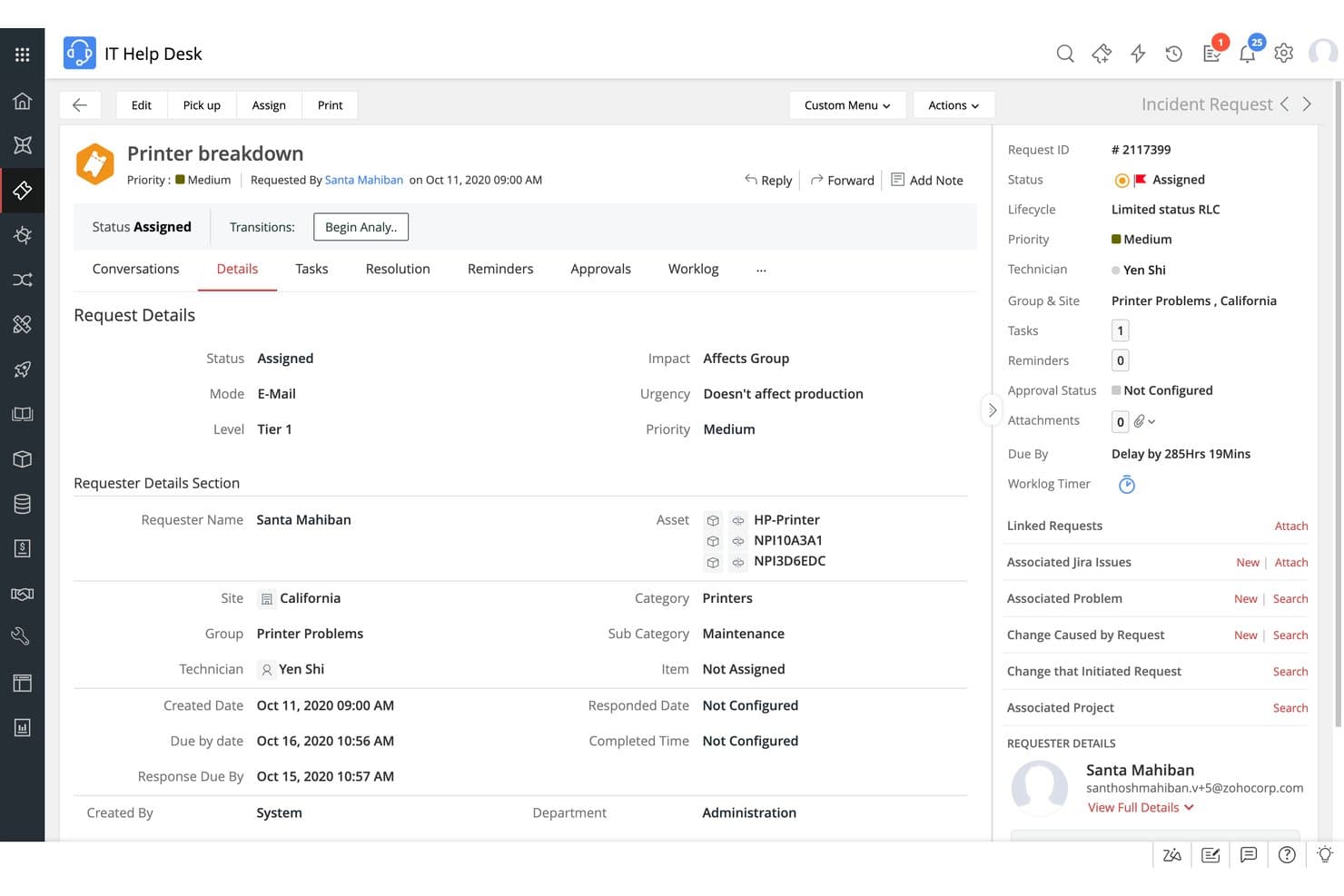
ServiceDesk Plus incident request with status, due dates, and linked assets. ManageEngine ServiceDesk Plus is a full-stack IT service management platform combining incident ticketing, asset management, CMDB, and enterprise service management, with native iOS and Android apps that bring ticket handling and barcode-based asset auditing to mobile technicians.
Who Is ManageEngine ServiceDesk Plus Best For?
ServiceDesk Plus is a strong fit for IT help desk leads and support managers at mid-to-large organizations who need a full-stack ITSM platform that connects ticketing directly to asset tracking and inventory management.
Why I Picked ManageEngine ServiceDesk Plus
I picked ServiceDesk Plus as one of the best because the mobile app's barcode and QR code scanning lets technicians pull up asset records and update inventory on the spot, directly linking what's in the field to what's in the ticket. That connection between physical assets and open requests is something most mobile help desk apps simply don't offer. The iOS app also supports RFID scanning with compatible readers, so a technician walking a server room can audit dozens of items and tie discrepancies to tickets without returning to a desk.
ManageEngine ServiceDesk Plus Key Features
- Push notifications: Receive real-time alerts on iOS or Android for ticket assignments, requester replies, and pending approvals.
- Multi-channel ticket intake: Captures incoming requests from email, live chat, WhatsApp, Microsoft Teams, and Slack into a single queue.
- Mobile approvals: Review and approve service requests, change requests, and purchase orders directly from the app.
- Enterprise service requests: Employees can submit and track requests across IT, HR, facilities, and finance departments from their mobile device.
ManageEngine ServiceDesk Plus Integrations
ManageEngine ServiceDesk Plus offers native integrations with Microsoft Teams, Slack, WhatsApp, Jira, Microsoft Intune, Lansweeper, Power BI, Zoho Survey, and Endpoint Central. It also supports REST APIs, webhooks, and Zapier for custom integrations.
Pros and Cons
Pros:
- Get assignment, reply, and approval alerts
- Handle ticket triage and replies on mobile
- Scan assets and connect records to tickets
Cons:
- Mobile tools trail desktop; solutions aren’t editable
- No documented offline ticket access or sync
Learn more about ManageEngine ServiceDesk Plus: 10Best for billing ticket-to-project work
OneDesk
- Free trial available
- From $12.99/user/month (billed annually)
Visit WebsiteCustomer Rating:4.3/5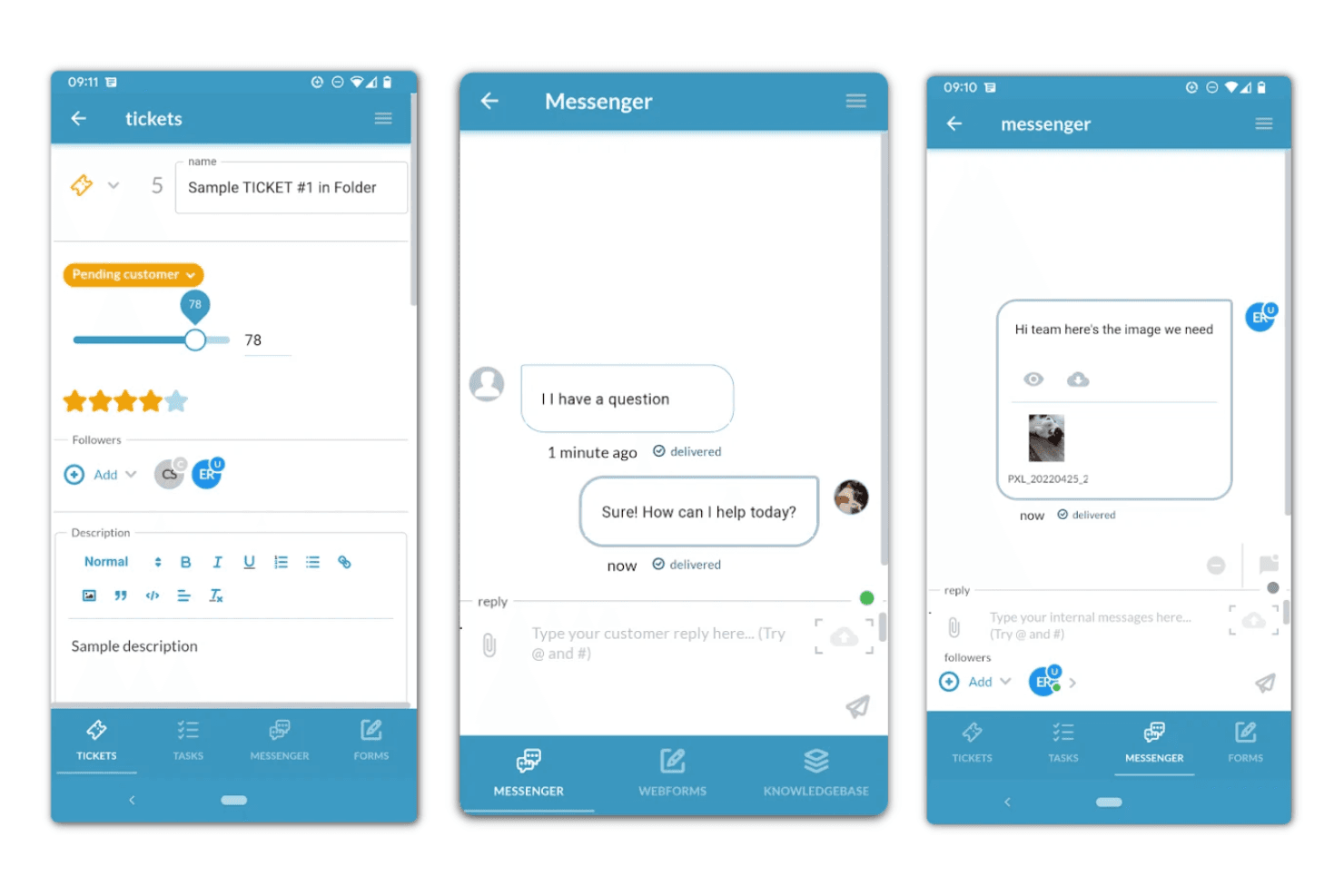
OneDesk combines help desk and project management for seamless task and support integration. OneDesk is a combined help desk and project management platform that lets teams handle multi-channel support tickets, manage tasks and projects, track time, and bill clients—all from a web or mobile app.
Who Is OneDesk Best For?
OneDesk suits small service teams that handle both customer support tickets and project delivery in one place, especially when billing clients for that work.
Why I Picked OneDesk
I picked OneDesk as one of the best because it's the only tool on this list that lets your team take a support ticket all the way through to a billable client invoice, entirely from one platform. On mobile, agents can update ticket status, log time, and reply to customers mid-project without switching apps. The Financials add-on ties tracked hours directly to invoices, so a ticket resolved on the go doesn't fall through the billing cracks.
OneDesk Key Features
- Multi-channel ticket intake: Captures support requests from email, live chat, request forms, phone, and connected apps into a single queue accessible on mobile.
- Mobile time tracking: Agents can start and stop timers or enter timesheets directly from the mobile app while working on tickets or tasks.
- SLA policies: Supports multiple SLA configurations for different clients or service types to keep response and resolution commitments on track.
- Team messaging and mentions: The mobile messenger lets agents send messages, use @ mentions, and share attachments with teammates directly from the app.
OneDesk Integrations
OneDesk documents dozens of native integrations, including Microsoft 365, Microsoft Teams, Gmail, Google Calendar, Google Drive, and QuickBooks Online. It also offers a REST API and Zapier connectivity.
Pros and Cons
Pros:
- Mobile updates sync with browser work
- Replies and time logs travel together
- Handles ticket-to-project handoffs on mobile
Cons:
- Mobile SLA and KPI visibility remains limited
- No confirmed offline ticket access
Learn more about OneDesk:
Other Mobile Help Desk Software
Here are some additional mobile help desk software options that didn’t make it onto my shortlist, but are still worth checking out:
- 11ZendeskBest for photo-backed ticket replies
- 12FreshserviceBest for approving employee requests on the go
- 13LiveAgentBest for after-hours support coverage
- 14Help ScoutBest for mobile replies with customer context
- 15Zoho DeskBest for real-time SLA oversight
- 16FreshdeskBest for tracking billable support time
How I Evaluate Mobile Help Desk Software
I split my evaluation into three parts, giving the most weight to core needs: manage and resolve tickets on mobile, and get timely ticket and SLA alerts. Next, I consider standout features such as voice-to-ticket capture. Finally, I weigh factors beyond features, including mobile onboarding, support, and pricing.
Core Functionality (Table Stakes For This List)
When I'm selecting tools for my list, I score each one on a scale from 0 (does not offer the functionality) to 5 (excels in this area) for each core functionality listed below. I then convert the total into a percentage to help assess each tool's overall fit, with extra weight on any functionalities I’ve deemed essential.
- Mobile Ticket Management (Essential): I look for mobile access to create, assign, update, respond to, and resolve tickets when an agent is away from a desk.
- Push Alerts (Essential): I check whether agents can receive timely, actionable alerts for new tickets, updates, and approaching or breached SLAs.
- Multi-Channel Intake: I assess whether requests from channels such as email, chat, and phone appear in one mobile-accessible ticket queue.
- Offline Access and Sync: I look for ticket viewing and response drafting offline, with changes syncing after a field agent reconnects.
- Agent Collaboration: I check whether agents can add internal notes, reassign tickets, and update statuses from their mobile devices.
- Mobile Reporting and SLAs: I assess whether managers can view SLA status and core performance metrics while away from their desks.
Once I have a list of tools that meet the criteria, I consider what sets each platform apart.
Differentiating Factors (What Sets Vendors Apart)
Here's how I compare and contrast different vendors:
Standout Features
Voice-to-ticket capture is a big deal for field technicians who can't stop to type while troubleshooting equipment. I check whether dictated notes are accurately transcribed and attached to the right ticket. Barcode and QR scanning is equally useful on-site—linking a scanned asset tag directly to a ticket eliminates manual data entry errors. I also evaluate AI-powered ticket triage, since auto-categorization and suggested responses let mobile agents handle higher volumes without switching to a desktop.
Beyond Features
I check whether mobile access is bundled into standard plans or sold as a paid add-on, since that gap changes total cost fast for growing teams. Integration depth matters too—native connectors to tools like Slack, Jira, or your CRM mean agents aren't toggling between apps mid-ticket. I also evaluate onboarding resources, specifically mobile-focused training docs, because field staff who rarely use a desktop need guidance tailored to the small screen.
How to Choose a Mobile Help Desk Software
It’s easy to get bogged down in long feature lists and complex pricing structures. To help you stay focused as you work through your unique software selection process, here’s a checklist of factors to keep in mind:
| Factor | What to Consider |
| Scalability | Ensure the software can grow with your business. Can it handle increased ticket volume as your team expands? |
| Integrations | Check if it connects with tools your team already uses, like CRM systems or messaging apps. |
| Customizability | Look for options to tailor workflows and dashboards to fit your specific needs and processes. |
| Ease of Use | Evaluate the interface. Is it intuitive for your team to navigate without extensive training? |
| Budget | Assess if the pricing aligns with your financial plan. Are there hidden costs or premium features? |
| Security Safeguards | Verify data protection measures are in place. Does it comply with regulations like GDPR? |
| Support Options | Consider the level of customer support available. Is there 24/7 support or dedicated assistance? |
| Mobile Functionality | Ensure the mobile app offers full functionality. Can your team manage tasks effectively on the go? |
Trends in Mobile Help Desk Software
In my research, I sourced countless product updates, press releases, and release logs from different mobile help desk software vendors. Here are some of the emerging trends I’m keeping an eye on:
- AI-Powered Insights: AI helpdesk tools are being used to analyze customer interactions and provide actionable insights. This helps teams anticipate needs and improve response times. Some vendors are incorporating AI to offer predictive analytics and sentiment analysis.
- Voice Recognition: Voice commands are becoming more common, allowing support teams to interact with help desk software hands-free. This trend is valuable for field agents who need quick access to information without typing.
- Augmented Reality (AR): AR is being integrated to assist in support processes, particularly in technical fields. Support teams can use AR to guide customers through complex troubleshooting by overlaying instructions on real-world views.
- Omnichannel Support: More vendors are offering true omnichannel support, integrating social media, chat, SMS, and email in one platform. This ensures a consistent customer experience across all communication channels.
- Self-Service Portals: Enhanced self-service options are gaining traction, enabling customers to solve issues on their own. Vendors are expanding knowledge bases and incorporating chatbots to guide users through common problems.
What Is a Mobile Help Desk Software?
Mobile help desk software is a tool that allows support teams to manage customer inquiries and issues on mobile devices. These tools are commonly used by customer service representatives, IT professionals, and support teams who need to resolve customer issues efficiently while on the go. Ticket management, real-time notifications, and mobile access help with quick response times and effective communication. Overall, these tools enable businesses to maintain high levels of customer satisfaction by providing timely and accessible support services.
Features of Mobile Help Desk Software
When selecting mobile help desk software, keep an eye out for the following key features:
- Ticket management: Organizes and tracks customer inquiries, allowing support teams to resolve issues efficiently.
- Real-time notifications: Alerts your team to new tickets and updates, ensuring quick responses.
- Mobile access: Enables support teams to manage tasks from anywhere, enhancing flexibility and responsiveness.
- AI-powered insights: Provides analytics and predictions to help improve customer service strategies.
- Voice recognition: Allows hands-free operation, useful for support agents in the field.
- Augmented reality: Assists with complex troubleshooting by overlaying instructions on real-world views.
- Omnichannel support: Integrates multiple communication channels to provide a consistent customer experience.
- Self-service portals: Empowers customers to solve issues independently, reducing the workload on support teams.
- Customizable workflows: Let teams tailor processes to fit their specific needs and improve efficiency.
- Security safeguards: Protects sensitive customer data and ensures compliance with regulations.
Benefits of Mobile Help Desk Software
Implementing mobile help desk software provides several benefits for your team and your business. Here are a few you can look forward to:
- Improved response time: Real-time notifications and mobile access ensure your team can quickly address customer inquiries.
- Increased customer satisfaction: Omnichannel support and self-service portals offer customers multiple ways to get help, enhancing their experience.
- Enhanced flexibility: Mobile access allows your team to work from anywhere, accommodating different work styles and needs.
- Better resource allocation: AI-powered insights help your team focus on areas that need the most attention, optimizing resource use.
- Higher efficiency: Customizable workflows and automation reduce manual tasks, allowing your team to manage more tickets effectively.
- Greater data security: Security safeguards protect customer information and ensure compliance with privacy regulations.
- Reduced workload: Self-service portals empower customers to resolve issues on their own, lightening the load on your support team.
Costs and Pricing of Mobile Help Desk Software
Selecting mobile help desk software requires an understanding of the various pricing models and plans available. Costs vary based on features, team size, add-ons, and more. The table below summarizes common plans, their average prices, and typical features included in mobile help desk software solutions:
Plan Comparison Table for Mobile Help Desk Software
| Plan Type | Average Price | Common Features |
| Free Plan | $0 | Basic ticket management, limited support channels, and essential reporting. |
| Personal Plan | $5-$25/ user/month | Ticket management, mobile access, basic integrations, and standard reporting. |
| Business Plan | $30-$60/ user/month | Advanced ticketing features, automation, custom workflows, and analytics. |
| Enterprise Plan | $70-$100/ user/month | Full customization, priority support, AI insights, and comprehensive security. |
Mobile Help Desk Software FAQs
Here are some answers to common questions about mobile help desk software:
What is the difference between software support and a help desk?
Software support typically deals with more complex technical issues and requires specialized expertise, while a help desk handles basic customer queries and troubleshooting. If your team often deals with in-depth software problems, you might need both services to ensure comprehensive support.
What is the most common IT help desk problem?
Common issues include email-related problems, hardware malfunctions, and access issues to shared resources. These challenges can slow down your team’s efficiency, so having reliable help desk software that prioritizes and tracks these problems can be crucial in maintaining productivity.
How does a help desk software work?
Help desk software allows your team to accept, track, and respond to support requests systematically. It often includes features like knowledge bases, self-service portals, and reporting tools to streamline the support process. Understanding your specific needs will help you choose the right software.
What is the best helpdesk software?
The best helpdesk software depends on your organization’s requirements. Consider factors like ticket management, ease of use, and integration capabilities. Popular options include Help Scout for customer service and Zendesk for large businesses, each offering unique strengths.
How can a mobile help desk software improve team efficiency?
Mobile help desk software enhances efficiency by allowing your team to manage support tasks on the go. Features like real-time notifications and mobile access ensure quick responses, while automation reduces manual workload, helping your team focus on more critical tasks.
Can a help desk software integrate with other business tools?
Yes, most help desk software solutions offer integrations with other business tools like CRMs, collaboration apps, and project management software. This connectivity helps your team maintain a unified workflow and ensures that customer data is consistent across platforms.