


Freshdesk vs. Zendesk: Detailed Comparison and Expert Reviews for 2026


If you’re feeling overwhelmed by stacks of unresolved tickets, disjointed communication channels, and the pressure to deliver faster, more consistent customer support, you’re not alone. Choosing the right help desk platform can make the difference between delighting your customers and watching frustration grow.
In this guide, you’ll get a side-by-side comparison of Freshdesk and Zendesk’s core features, pricing, and use cases to help you confidently select the customer service software that fits your team’s needs and growth plans.
Freshdesk vs. Zendesk: An Overview
Freshdesk


Zendesk


Why Trust Our Software Reviews
We’ve been testing and reviewing software since 2020. As CX leaders ourselves, we know how critical and difficult it is to make the right decision when selecting software.
We invest in deep research to help our audience make better software purchasing decisions. We’ve tested more than 2,000 tools for different CX use cases and written over 1,000 comprehensive software reviews. Learn how we stay transparent & our software review methodology.
Freshdesk vs. Zendesk Pricing Comparison
| Freshdesk | Zendesk | |
|---|---|---|
| Free Trial | 14-day free trial available | 14-day free trial + free demo available |
| Pricing | From $19/user/month (billed annually) | From $19/agent/month (billed annually) |
Freshdesk vs. Zendesk Pricing & Hidden Costs
Freshdesk uses a tiered pricing model with a free plan for small teams and paid plans that unlock more features as you move up. Zendesk also offers tiered plans, but its advanced features and integrations often require higher-tier subscriptions or add-ons. Both platforms may charge extra for certain automation, reporting, or integration capabilities, and you might encounter additional costs for onboarding, premium support, or exceeding usage limits.
To choose the right pricing model, map out your must-have features and estimate your team’s growth over the next year or two. Ask each vendor for a detailed breakdown of what’s included at each tier, and clarify any potential add-on fees or usage caps.
Freshdesk vs. Zendesk Feature Comparison
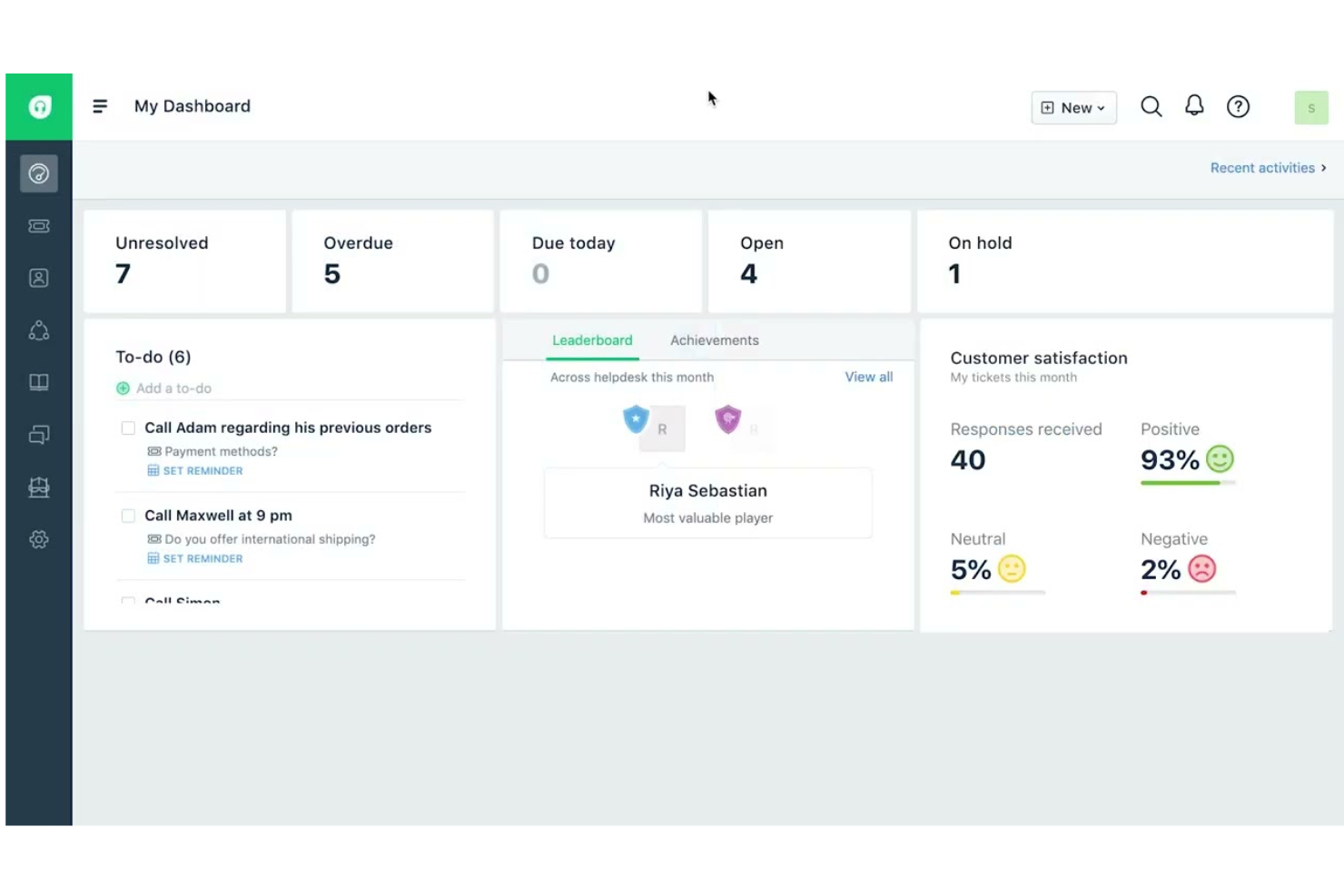
Freshdesk stands out for its AI-first, people-centric approach to customer service. Its unified workspace and Freshdesk Command Center bring every conversation, workflow, and insight into one place, while the Freddy AI suite—AI Agents, Copilot, and Insights—automates repetitive tasks, streamlines queues, and speeds up resolutions without added complexity. With omnichannel support, advanced ticketing, and built-in collaboration tools, it’s designed to deliver fast time to value right out of the box.
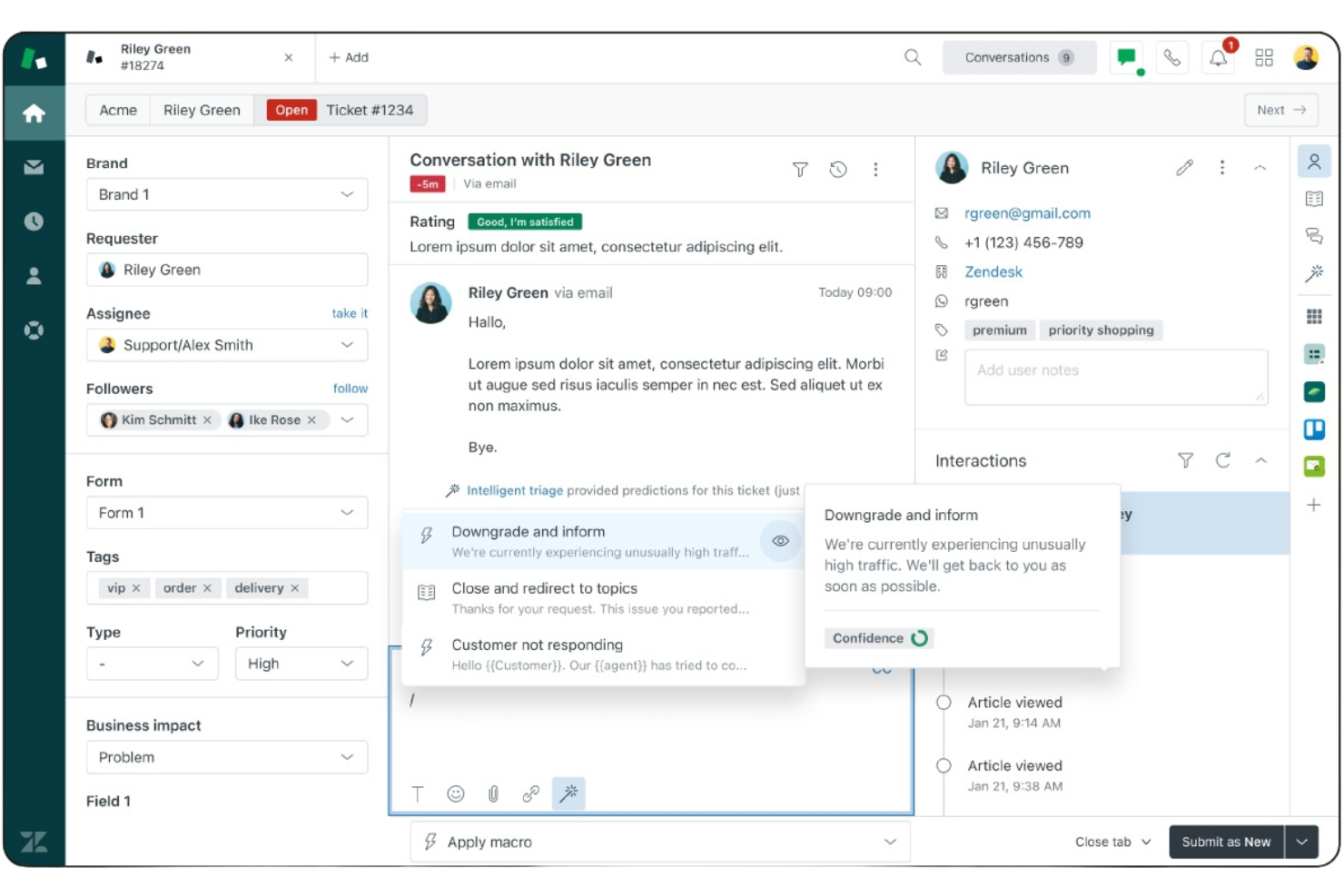
Zendesk, by contrast, is known for its highly customizable, enterprise-ready ecosystem. You get a powerful omnichannel agent workspace, deep automation capabilities, advanced analytics with Zendesk Explore, and an extensive integration marketplace. If you need granular reporting, flexible workflows, and scalability for complex or global operations, Zendesk offers the configurability and depth to support that growth.
| Freshdesk | Zendesk | |
|---|---|---|
| API | ||
| Analytics | ||
| Batch Permissions & Access | ||
| CRM Integration | ||
| Call Integration | ||
| Chat | ||
| Contact Management | ||
| Contact Sharing | ||
| Customer Management | ||
| Customer Service | ||
| Dashboard | ||
| Data Export | ||
| Data Import | ||
| Data Visualization | ||
| Email Integration | ||
| Escalation Management | ||
| External Integrations | ||
| Instant Chat Integration | ||
| Knowledge Base | ||
| Lead Management | ||
| Lead Scoring | ||
| Multi-User | ||
| Notifications | ||
| Real-time Alerts | ||
| Scheduling | ||
| Self-service Portal | ||
| Social Media Integration | ||
| Support Forum | ||
| Third-Party Plugins/Add-Ons | ||
| Ticket Management | ||
| Workflow Management |
Freshdesk vs. Zendesk Integrations
| Integration | Freshdesk | Zendesk |
| Slack | ✅ | ✅ |
| Salesforce | ✅ | ✅ |
| Microsoft Teams | ✅ | ✅ |
| Shopify | ✅ | ✅ |
| HubSpot | ✅ | ✅ |
| Jira | ✅ | ✅ |
| Mailchimp | ✅ | ✅ |
| Trello | ✅ | ✅ |
| WhatsApp Business | ✅ | ✅ |
| Google Analytics | ✅ | ✅ |
| API | ✅ | ✅ |
| Zapier | ✅ | ✅ |
Both Freshdesk and Zendesk cover the most popular integrations, including Slack, Salesforce, HubSpot, Google Analytics, and Trello, through their marketplaces and third-party connectors. Neither platform has a clear advantage in core integrations, as both offer extensive app ecosystems along with API and Zapier access. In practice, either solution can connect to nearly any tool your team relies on, making them equally strong choices for integration flexibility.
Freshdesk vs. Zendesk Security, Compliance & Reliability
| Factor | Freshdesk | Zendesk |
| Data Encryption | Encrypts data in transit (TLS 1.2+) and at rest (AES-256) using secure cloud infrastructure. | Encrypts data in transit and at rest using industry-standard protocols; offers advanced encryption and customer-managed key options on eligible plans. |
| Regulatory Compliance | Maintains certifications including SOC 2 Type II, ISO 27001, ISO 27701, PCI DSS, and supports GDPR and CCPA compliance. | Maintains certifications including SOC 2 Type II, ISO 27001/27017/27018/27701, and supports GDPR, CCPA, HIPAA (via add-on and BAA), and other global privacy standards. |
| Uptime Guarantee | Publishes real-time system status and incident history; formal SLA details depend on plan. | Offers service level commitments (commonly 99.9% uptime on eligible plans) and provides transparent system status reporting. |
| Access Controls | Provides role-based access control, SSO, multi-factor authentication, and audit logs. | Offers advanced role-based permissions, SSO, MFA, and granular access controls, particularly on higher-tier plans. |
| Incident Response | 24/7 monitoring, dedicated security team, regular third-party penetration testing, and formal incident response processes. | 24/7 monitoring, structured incident response framework, documented breach notification procedures, and third-party security audits. |
When it comes to protecting your customer data, you can feel confident that both Freshdesk and Zendesk offer strong security foundations, robust compliance certifications, and reliable infrastructure.
If you need broad enterprise-grade controls, advanced encryption options, and extensive global compliance coverage, Zendesk may give you the added flexibility you’re looking for. If you want solid, standards-based security with built-in protections and straightforward administration, Freshdesk delivers dependable coverage without unnecessary complexity.
Freshdesk vs. Zendesk Ease of Use
| Factor | Freshdesk | Zendesk |
| User Interface | Clean, intuitive layout with minimal clutter and easy navigation. | Modern interface with more customization options but a steeper learning curve. |
| Onboarding | Guided setup and helpful tooltips make it quick for new users to get started. | Offers detailed tutorials and documentation, but setup can feel complex for beginners. |
| Customization | Simple drag-and-drop tools for customizing workflows and ticket views. | Advanced customization for workflows and dashboards, best for experienced admins. |
| Support Resources | Responsive live chat and a searchable knowledge base for quick answers. | Extensive help center, community forums, and 24/7 support on premium plans. |
| Mobile Experience | User-friendly mobile app for managing tickets on the go. | Robust mobile app with advanced features for remote support teams. |
If you want a platform your team can adopt quickly with minimal friction, you’ll likely appreciate Freshdesk’s intuitive design and faster onboarding. If you need deeper configurability, granular workflow control, and a system that can scale across complex teams or global operations, Zendesk gives you more advanced tools—though it may require a steeper learning investment upfront.
Freshdesk vs Zendesk: Pros & Cons
Freshdesk
- Easy-to-use interface with minimal training required.
- AI tools assist agents with suggestions and insights.
- Omnichannel ticketing includes email, chat, phone, and social.
- Most AI features are limited to higher-tier plans.
- Mobile app lacks features available on desktop.
- Reporting dashboards offer limited customization options.
Zendesk
- Advanced automation for ticket routing and workflows.
- Omnichannel support across email, chat, voice, and social.
- Detailed analytics and customizable reporting dashboards.
- Pricing increases quickly as teams grow.
- Advanced setup can be difficult for new users.
- Customer support response times can be inconsistent.
Best Use Cases for Freshdesk and Zendesk
Freshdesk
- Ecommerce Support Teams Freshdesk’s omnichannel ticketing helps manage inquiries from multiple sales channels, marketplaces, and order-related customer requests efficiently.
- SaaS Startups Affordable plans (including a free one), AI tools, and easy setup suit fast-growing, resource-limited teams needing scalable customer support infrastructure.
- Retail Customer Service Phone, chat, and messaging integrations through the Freshworks platform support high-volume customer requests across multiple locations.
- Managed Service Providers (MSPs) MSPs can track client issues, prioritize requests, and automate routing across different technical support teams.
- IT Help Desks Automated ticket routing, SLAs, and knowledge base features streamline internal service requests and improve resolution times.
- Travel and Hospitality Support Teams Hotels, airlines, and travel agencies can manage booking questions, cancellations, and service requests across multiple communication channels.
Zendesk
- Telecom Customer Care Handles high call and chat volumes with robust routing tools.
- IT Help Desks Manages complex internal requests with advanced workflow automation.
- Healthcare Support Teams Enables HIPAA-compliant workflows and sensitive data handling.
- Financial Services Supports compliance, audit trails, and secure customer communications.
- SaaS Customer Success Offers automation and analytics for proactive customer engagement.
- Enterprise Retail Handles large ticket volumes and omnichannel support for global customers.
Who Should Use Freshdesk, And Who Should Use Zendesk?
If you want a help desk platform that’s easy to implement, quick for your team to learn, and strong out of the box with AI-driven automation, Freshdesk is a great fit—especially if you’re a small to mid-sized business, a fast-growing startup, or a team that values simplicity and fast time to value.
On the other hand, if you’re running a larger organization, managing complex workflows across multiple departments or regions, or need deep customization, advanced analytics, and enterprise-grade scalability, Zendesk is likely the better choice. Ultimately, Freshdesk works well when you want power without heavy configuration, while Zendesk makes sense when you need maximum flexibility and control as you scale.
Differences Between Freshdesk and Zendesk
| Freshdesk | Zendesk | |
|---|---|---|
| Automation | Offers robust automation and AI features. | Provides deeper enterprise-grade workflow customization and trigger control. |
| Customization | Drag-and-drop customization for ticket views and workflows. | Deep customization for dashboards, workflows, and reporting. |
| Pricing Model | Offers a free plan and lower entry-level tiers. | Focuses on premium plans with advanced features at higher tiers. |
| Target Audience | Geared toward small to mid-sized businesses and budget-focused teams. | Designed for mid-market to enterprise needs with deep scalability. |
| User Interface | Simple, clean, and easy for new users to navigate. | Modern, highly customizable, but can be overwhelming at first. |
| Visit FreshdeskOpens new window | Read Zendesk ReviewOpens new window |
Similarities Between Freshdesk and Zendesk
| Integration Options | Each offers a wide range of integrations with popular tools like Slack, Salesforce, HubSpot, and Zapier. |
|---|---|
| Knowledge Base | Both provide built-in knowledge base features for self-service and internal documentation. |
| Mobile Accessibility | Each has a robust mobile app for agents to manage tickets and communicate with customers on the go. |
| Omnichannel Support | Both platforms let you manage email, chat, phone, and social media conversations from a unified inbox. |
| Reporting & Analytics | Both offer customizable reports and dashboards to track team performance and customer satisfaction metrics. |
| Visit FreshdeskOpens new window Read Zendesk ReviewOpens new window | |