
14 Kunden-Health-Score-Software-Optionen, die Sie 2026 in Betracht ziehen sollten

Kunden-Health-Score Software Shortlist
Here's my pick of the 10 best software from the 14 tools reviewed.


Kunden-Health-Score Software verfolgt und analysiert die Kundenbindung, Produktnutzung und Zufriedenheit, damit Ihr Team Risiken erkennen und neue Wachstumschancen identifizieren kann. Wenn Sie nach der besten Kunden-Health-Score Software suchen, möchten Sie wahrscheinlich die Abwanderung vorhersagen, Ihre Aktivitäten priorisieren und proaktiven Support bieten, ohne auf Vermutungen oder verstreute Daten angewiesen zu sein.
Diese Liste hilft Ihnen dabei, führende Tools zu vergleichen, deren einzigartige Funktionen zu verstehen und die richtige Lösung auszuwählen, um das Wohlergehen Ihrer Kunden zu überwachen und die Kundenbindung im Jahr 2026 zu steigern.
Why Trust Our Software Reviews
We’ve been testing and reviewing software since 2020. As CX leaders ourselves, we know how critical and difficult it is to make the right decision when selecting software.
We invest in deep research to help our audience make better software purchasing decisions. We’ve tested more than 2,000 tools for different CX use cases and written over 1,000 comprehensive software reviews. Learn how we stay transparent & our software review methodology.
Kunden-Health-Score Software Zusammenfassung
Diese Vergleichstabelle fasst die Preisinformationen meiner Top-Auswahl an Kunden-Health-Score Software zusammen, damit Sie die beste Lösung für Ihr Budget und Ihre geschäftlichen Anforderungen finden.
| Tool | Best For | Trial Info | Price | ||
|---|---|---|---|---|---|
| 1 | Best for automated risk alerts | Free demo available | Pricing upon request | Website | |
| 2 | Best for real-time account monitoring | Free demo available | Pricing upon request | Website | |
| 3 | Best for multi-source data aggregation | Free demo available | Pricing upon request | Website | |
| 4 | Best for early-stage churn detection | Free demo available | From $59/seat/month (min. 3 seats, billed annually) | Website | |
| 5 | Best for SaaS workflow integrations | Free demo available | Pricing upon request | Website | |
| 6 | Best for customizable health metrics | Free demo available | Pricing upon request | Website | |
| 7 | Best for renewal forecasting features | Free demo available | Pricing upon request | Website | |
| 8 | Best for small business adoption | 14-day free trial | From $49/month | Website | |
| 9 | Best for key account management teams | Free demo available | Pricing upon request | Website | |
| 10 | Best for AI-driven relationship insights | Free demo available | Pricing upon request | Website |
-

SupportYourApp
Visit WebsiteThis is an aggregated rating for this tool including ratings from Crozdesk users and ratings from other sites.4.7 -
Hiver
Visit WebsiteThis is an aggregated rating for this tool including ratings from Crozdesk users and ratings from other sites.4.7 -
Freshdesk
Visit WebsiteThis is an aggregated rating for this tool including ratings from Crozdesk users and ratings from other sites.4.4





Kunden-Health-Score Software Bewertungen
Nachfolgend finden Sie meine ausführlichen Zusammenfassungen der Kunden-Health-Score Software, die es auf meine Shortlist geschafft haben. Meine Bewertungen bieten einen detaillierten Einblick in die Funktionen, besten Anwendungsfälle und Integrationen jeder Plattform, damit Sie die beste Lösung für sich finden.

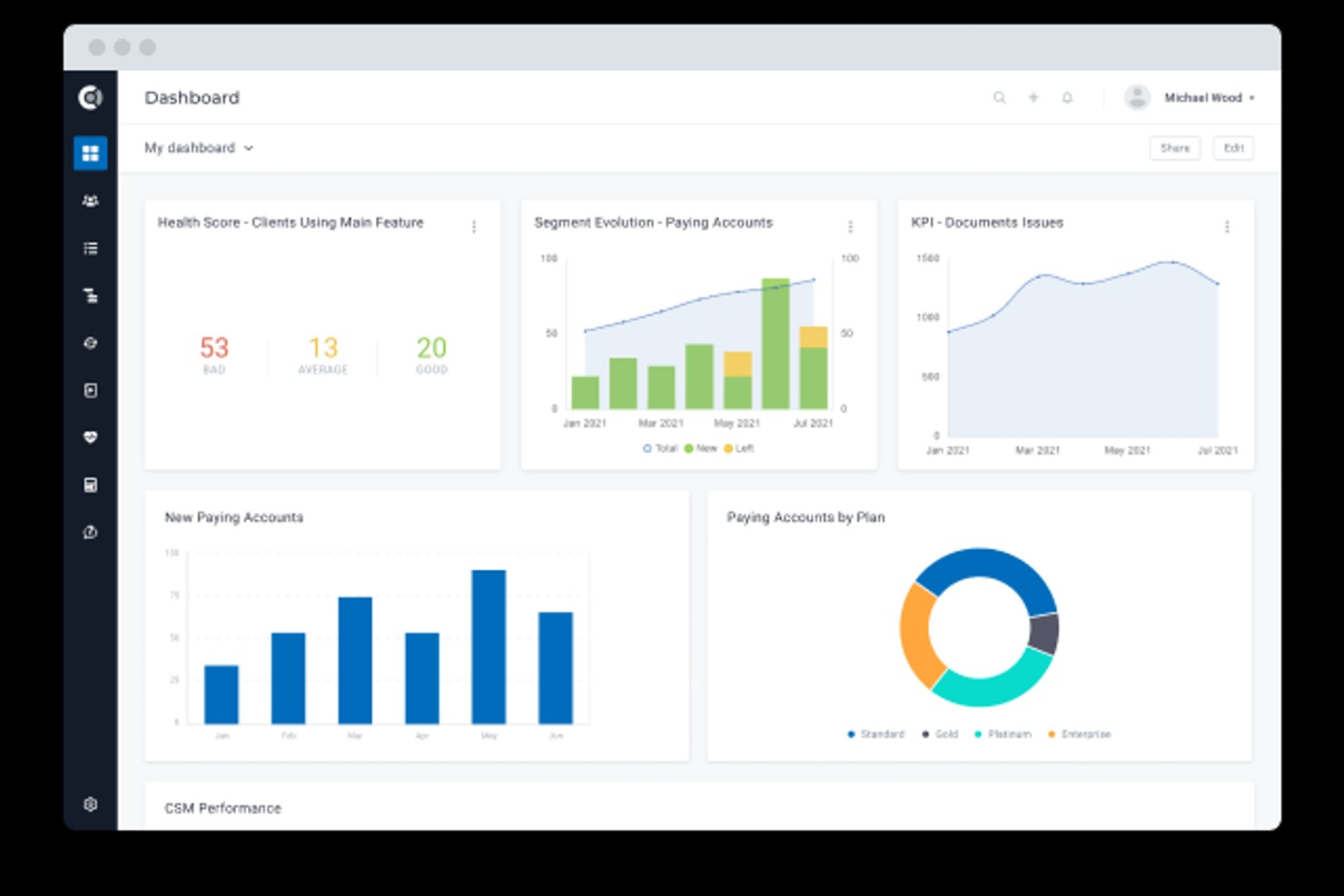
Custify is a customer success platform designed for SaaS businesses that want to monitor and improve customer health. It appeals to teams looking for automated insights and proactive management of customer relationships. With Custify, you can centralize customer data and identify risks before they impact retention.
Who Is Custify Best For?
Customer success and account managers in small to mid-sized SaaS businesses in North America and Europe automating risk alerts and engagement tracking.
Why I Picked Custify
What stands out about Custify is its focus on automated risk alerts that help customer success teams act before issues escalate. I picked Custify because it lets you set up custom health score triggers that automatically notify your team when a customer’s behavior signals churn risk or declining engagement. The platform also provides a timeline of risk events and recommended actions, so you can quickly prioritize outreach. This approach is especially useful for SaaS businesses that need to manage large portfolios and can’t afford to miss early warning signs.
Custify Key Features
Some other features in Custify that support customer health scoring include:
- Custom health score modeling: Build and adjust health score formulas using your own data points and logic.
- Customer segmentation: Group customers by lifecycle stage, usage patterns, or risk level for targeted actions.
- Playbook automation: Set up automated workflows for onboarding, renewals, and upsell opportunities.
- 360-degree customer profiles: View all customer interactions, product usage, and account history in one place.
Custify Integrations
Integrations include Salesforce, HubSpot, Zendesk, Intercom, Slack, Jira Service Management, Mixpanel, Pendo, Snowflake, and more.
Pros and Cons
Pros:
- Visual customer journey mapping tools included
- Aggregates data from multiple business systems
- Custom health score formulas for complex needs
Cons:
- Some integrations require manual configuration
- Limited customization for reporting dashboards

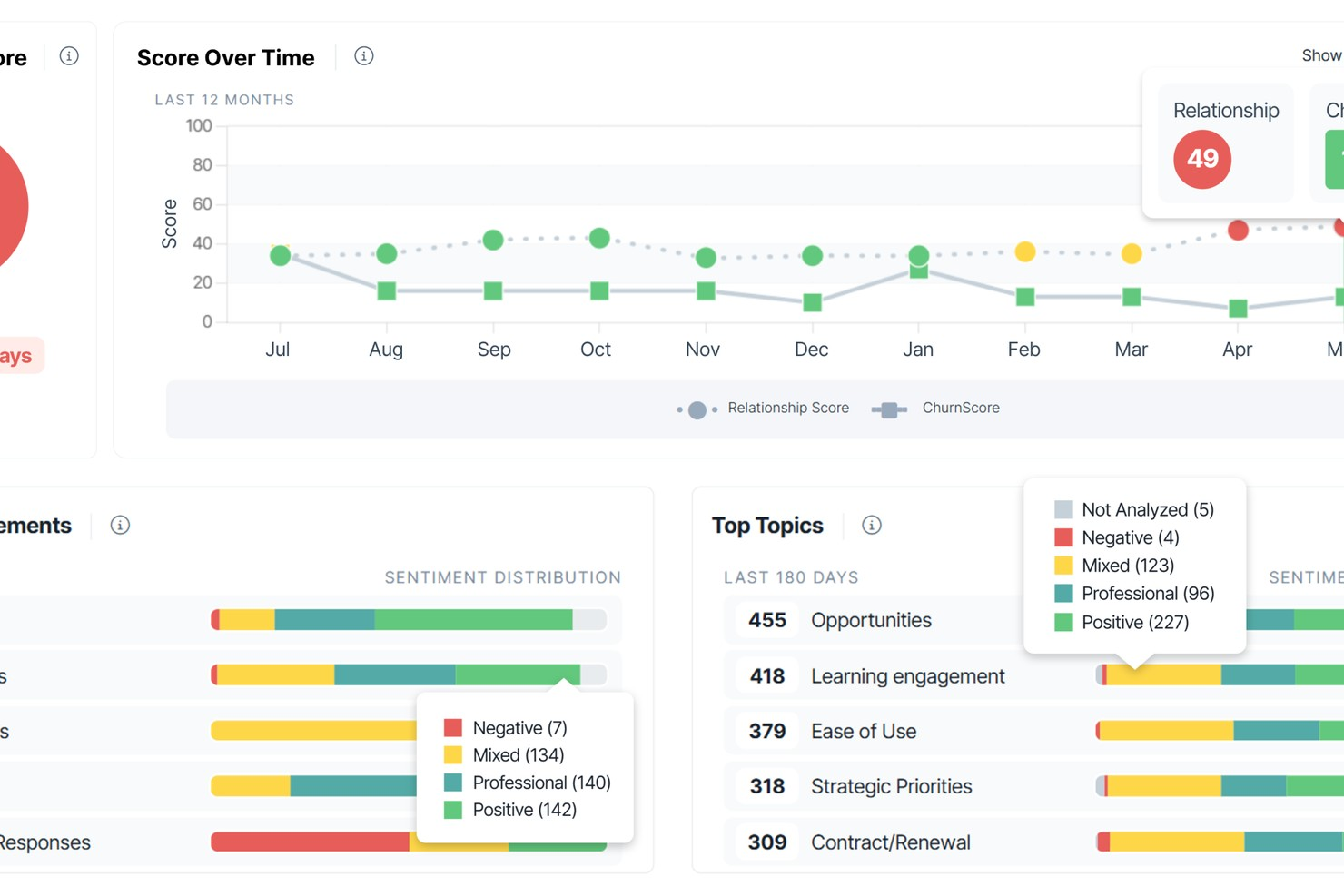
ChurnZero gives customer success teams a way to track account health using live data and engagement signals. It’s a strong fit for SaaS businesses and subscription-based companies that need to monitor customer activity and intervene quickly. Teams looking to centralize customer insights and automate health scoring will find ChurnZero’s approach especially relevant.
Who Is ChurnZero Best For?
Customer success managers and account teams in mid-sized to large SaaS companies in North America and Europe monitoring real-time account activity and engagement.
Why I Picked ChurnZero
I picked ChurnZero because its real-time account monitoring stands out for teams that need to act quickly on customer health changes. The platform updates health scores instantly as customer behaviors shift, so you can catch early warning signs before they become bigger issues. I also appreciate how ChurnZero surfaces engagement data and usage trends directly in the dashboard, making it easy to spot at-risk accounts. Automated alerts and playbooks help teams respond to changes in customer health without missing a beat.
ChurnZero Key Features
Some other features in ChurnZero that support customer health tracking include:
- Custom health score models: Build and adjust scoring formulas based on your own customer data and business rules.
- Customer journey mapping: Visualize each account’s progress through onboarding, adoption, and renewal stages.
- Segmented reporting: Filter and analyze health scores by customer segment, product line, or account owner.
- In-app messaging: Send targeted messages to users directly within your product based on their health status.
ChurnZero Integrations
Integrations include Salesforce, HubSpot, Slack, Microsoft Teams, Zendesk, Intercom, Pendo, QuickBooks, Zoom, and more.
Pros and Cons
Pros:
- Detailed segmentation for customer cohorts
- Real-time alerts for account health changes
- Highly customizable health score models
Cons:
- Limited dashboard edits in the Pro version
- Journeys lack project management depth

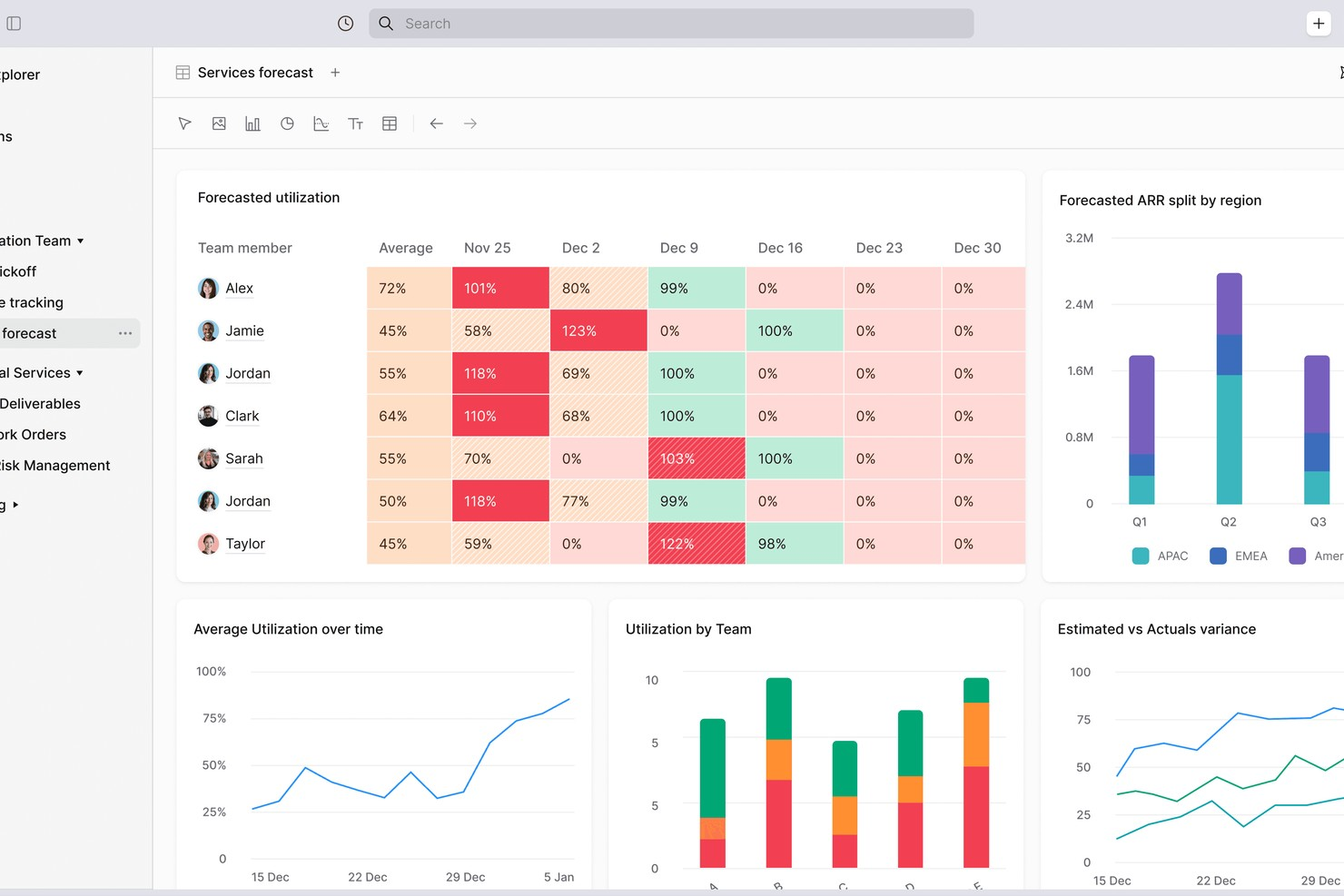
Planhat is a customer platform designed for teams that need to track and manage customer health across complex data sources. It’s a strong fit for organizations with multiple products, regions, or data systems that want a unified view of customer engagement. Customer success leaders and operations teams use Planhat to bring together usage, support, and financial data for more informed decision-making.
Who Is Planhat Best For?
Customer success and account management teams in mid-sized SaaS companies globally aggregating data from multiple sources to monitor accounts.
Why I Picked Planhat
I chose Planhat because it brings together customer data from a wide range of sources, making it easier to build accurate and actionable health scores. Planhat’s platform lets you combine product usage, support tickets, financial metrics, and custom data streams into a single customer profile. This level of aggregation is especially valuable for companies with complex data environments or multiple business units. With Planhat, I can see a holistic view of customer health that goes beyond surface-level metrics.
Planhat Key Features
Some other features in Planhat that support customer health scoring include:
- Custom health score modeling: Build and adjust health score formulas using your own logic and data fields.
- Customer journey mapping: Visualize and track customer progress through different lifecycle stages.
- Automated alerts and notifications: Set up rules to notify your team when customer health scores change or reach certain thresholds.
- Role-based dashboards: Give different teams or users tailored dashboard views based on their function or focus.
Planhat Integrations
Integrations include Salesforce, HubSpot, Zendesk, Intercom, Slack, Jira, Mixpanel, Pendo, Snowflake, and more.
Pros and Cons
Pros:
- Visual customer journey mapping tools included
- Aggregates data from multiple business systems
- Custom health score formulas for complex needs
Cons:
- Permission logic can be restrictive
- SFDC sync requires technical effort
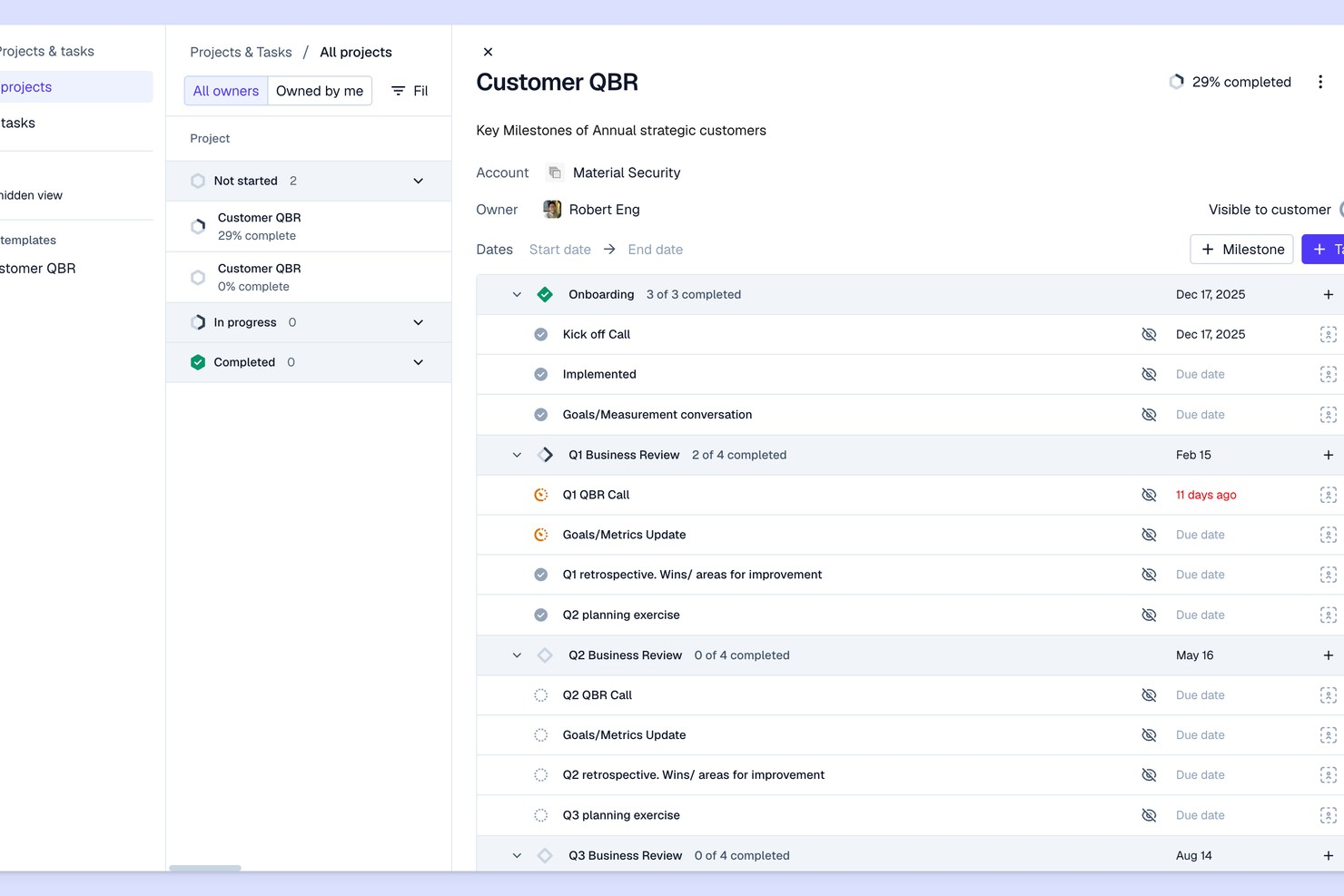
Pylon offers customer health scoring designed for SaaS teams that want to spot churn risks early. The platform appeals to customer success managers and operations leaders who need actionable signals from product usage and support data. Its focus on early warning insights helps teams intervene before accounts become at risk.
Who Is Pylon Best For?
Customer success and analytics teams in early-stage SaaS companies in North America and Europe detecting early churn signals.
Why I Picked Pylon
What drew me to Pylon is how it’s purpose-built for surfacing early churn risks, which is a challenge many SaaS teams face. The platform analyzes product usage patterns and support interactions to flag accounts that may be trending toward disengagement. I like that Pylon provides automated health scoring based on real-time signals, so teams can act before issues escalate. This focus on proactive detection makes it a strong choice for companies that want to reduce churn before it becomes a bigger problem.
Pylon Key Features
Some other features in Pylon that stand out for customer health scoring include:
- Custom health score configuration: Adjust scoring models to reflect your team’s unique risk signals and account milestones.
- Automated alerting: Receive notifications when account health drops below set thresholds.
- Customer timeline view: Track all key events, interactions, and changes in account status in a single timeline.
- Team collaboration tools: Assign owners, add notes, and coordinate follow-up actions directly within the platform.
Pylon Integrations
Integrations include Slack, Microsoft Teams, Discord, Salesforce, HubSpot, Attio, Pipedrive, PagerDuty, Opsgenie, and more.
Pros and Cons
Pros:
- Detailed customer activity timeline tracking
- Customizable health scoring models for SaaS
- Real-time alerts for at-risk accounts
Cons:
- Reporting relies heavily on manual tags
- Strongly dependent on Slack/Teams
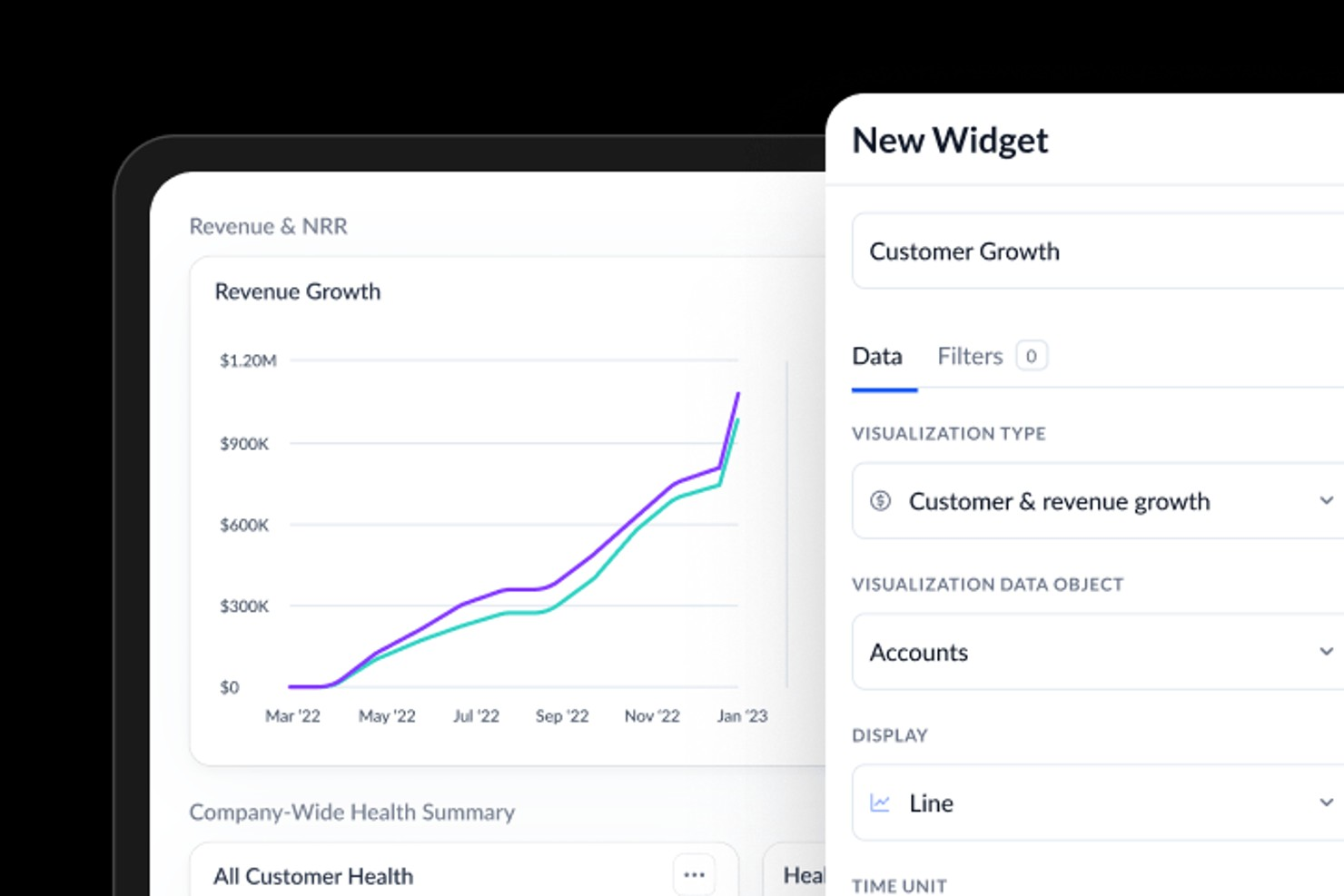
Vitally is a customer success platform designed for SaaS teams that want to unify customer data and workflows. It appeals to organizations looking to connect health scoring with daily operations and collaboration. Teams can use Vitally to centralize insights, automate processes, and keep customer health visible across departments.
Who Is Vitally Best For?
Customer success and product teams in small to mid-sized SaaS organizations worldwide integrating workflows across multiple customer-facing systems.
Why I Picked Vitally
I picked Vitally because it connects customer health scoring directly with the SaaS tools teams already use every day. Vitally’s workflow integrations let you trigger tasks, alerts, and playbooks in tools like Slack, Jira, and Salesforce based on real-time health changes. This means customer success managers can act on health insights without switching platforms or losing context. For SaaS companies that rely on tight collaboration and fast response, this level of integration makes health scoring much more actionable.
Vitally Key Features
Some other features in Vitally that support customer health scoring include:
- Custom health score builder: Create and adjust health score formulas using your own data sources and logic.
- Account and user segmentation: Group customers by lifecycle stage, product usage, or custom attributes for targeted monitoring.
- Automated playbooks: Set up rule-based workflows that trigger actions or communications based on health score changes.
- Customer timeline activity feed: View a chronological record of all customer interactions, product usage, and health score updates in one place.
Vitally Integrations
Integrations include Salesforce, HubSpot, Zendesk, Intercom, Slack, Jira, Gmail, Outlook, Mixpanel, and Stripe.
Pros and Cons
Pros:
- Automated playbooks for health-based workflows
- Native integrations with major SaaS platforms
- Customizable health score formulas for SaaS
Cons:
- No mobile app for on-the-go access
- No built-in customer survey feature

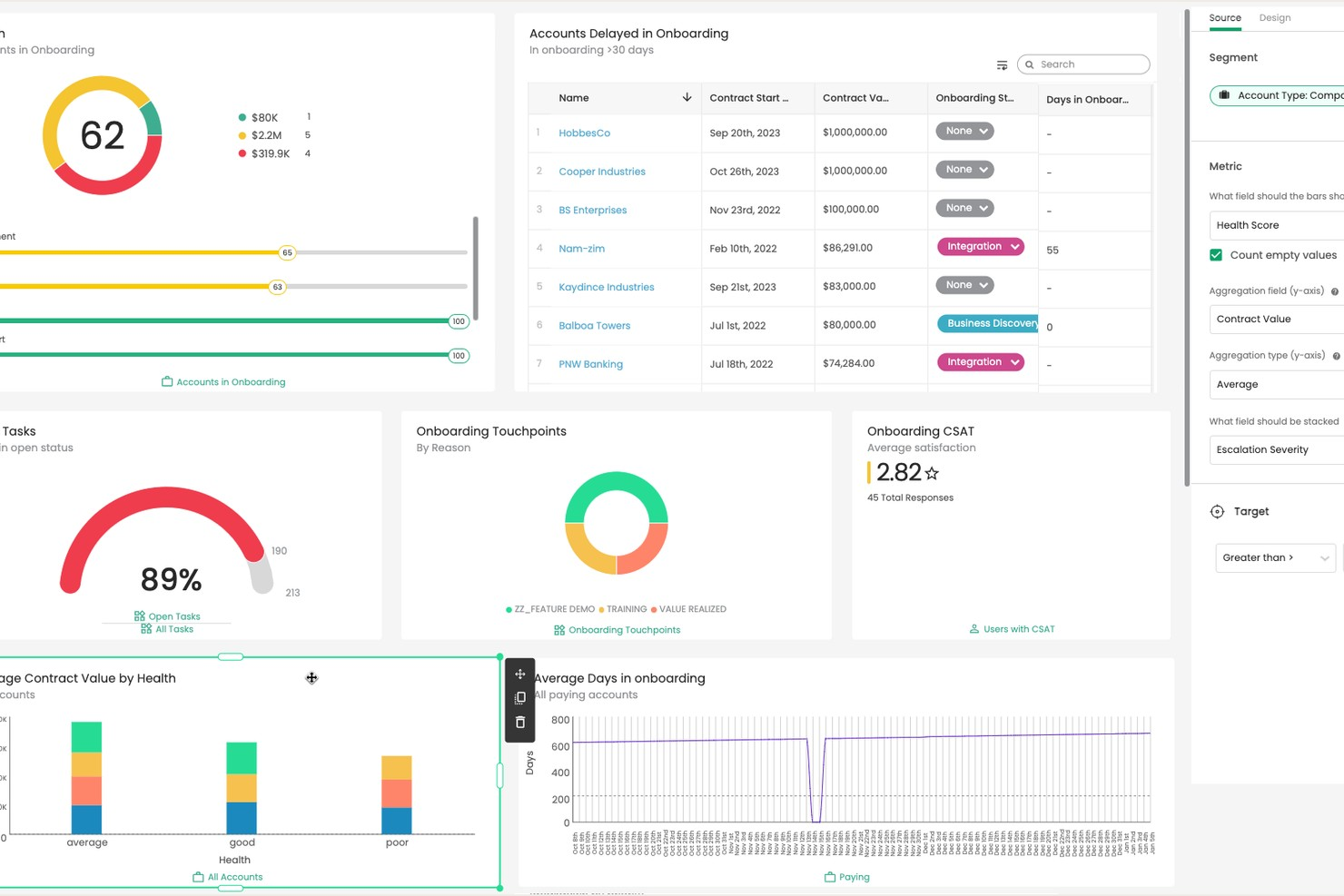
Totango gives customer success teams a way to design and track health metrics that fit their unique business needs. It’s a strong choice for organizations that want flexibility in defining what customer health means for their products or services. Teams looking to align health scoring with specific workflows and customer journeys may find Totango especially useful.
Who Is Totango Best For?
Customer success and operations teams in mid-sized to large organizations globally tracking customizable health metrics and KPIs.
Why I Picked Totango
I chose Totango because it gives teams full control over how they define and measure customer health. You can create custom health scorecards using any combination of metrics, from product usage to support interactions, and adjust them as your business evolves. I also like that Totango lets you set up different health models for different customer segments, so you’re not locked into a one-size-fits-all approach. This flexibility is especially valuable for organizations with complex customer journeys or multiple product lines.
Totango Key Features
Some other features in Totango that support customer health tracking include:
- SuccessBLOCs library: Access pre-built modules for common customer success workflows, including onboarding, adoption, and renewal.
- Automated task assignment: Assign follow-up actions to team members based on customer health changes or milestones.
- Customer journey mapping: Visualize each account’s progress through defined lifecycle stages and trigger actions at key points.
- Real-time alerts: Receive instant notifications when customer health scores drop or important events occur.
Totango Integrations
Integrations include Salesforce, Zendesk, HubSpot, Slack, Microsoft Outlook, Gmail, and more.
Pros and Cons
Pros:
- Automated alerts for health score changes
- Pre-built SuccessBLOCs for rapid deployment
- Custom health models for different segments
Cons:
- Reporting options are less flexi
- Limited customization for dashboard visualizations
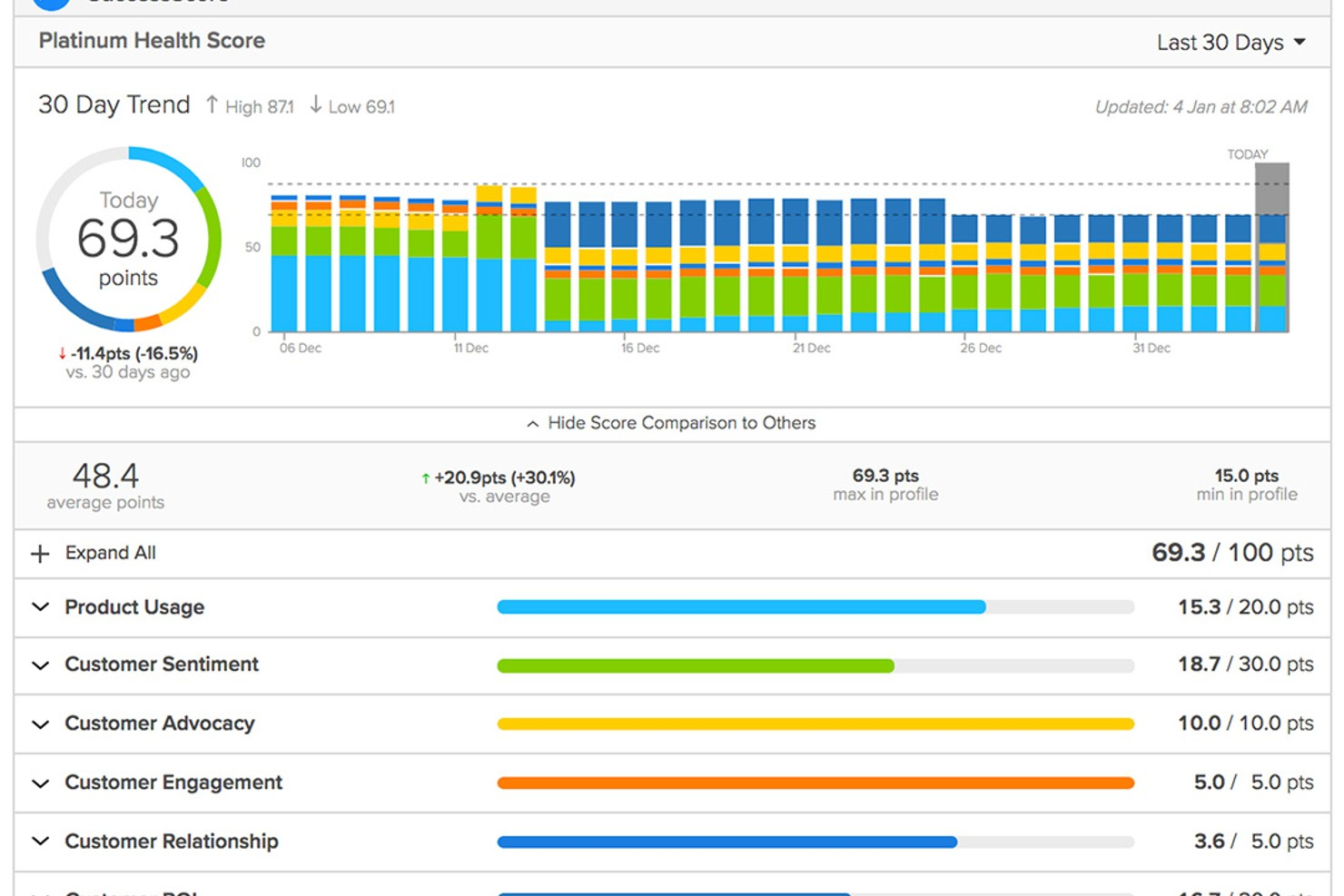
ClientSuccess is a customer success platform designed for teams that want to manage account health and retention in one place. It’s a strong fit for SaaS companies and customer success managers who need clear visibility into customer relationships and engagement. The platform helps you track customer sentiment, monitor account activity, and coordinate renewal efforts across your team.
Who Is ClientSuccess Best For?
Renewal and account management teams in mid-sized SaaS organizations globally forecasting renewals and monitoring account health.
Why I Picked ClientSuccess
What stands out about ClientSuccess is how it brings renewal forecasting into the core of customer health management. The platform lets you track renewal dates, forecast renewal likelihood, and visualize renewal pipelines alongside customer health scores. I appreciate that you can set up custom health metrics and tie them directly to renewal risk, making it easier to prioritize accounts that need attention. This focus on renewal forecasting makes ClientSuccess a strong choice for teams that want to reduce churn and improve retention outcomes.
ClientSuccess Key Features
Some other features in ClientSuccess that support customer health scoring and management include:
- Customer pulse surveys: Collect and track customer sentiment directly within the platform to inform health scores.
- Success cycle management: Map and monitor customer journeys with customizable lifecycle stages.
- Task and activity tracking: Assign, schedule, and monitor follow-up actions for each account.
- Automated alerts and notifications: Get notified about changes in customer health or key account milestones.
ClientSuccess Integrations
Integrations include Salesforce, HubSpot, Slack, Microsoft Teams, Zendesk, Jira, Gmail, Intercom, Pendo, and more.
Pros and Cons
Pros:
- Detailed customer activity timeline tracking
- Real-time alerts for at-risk accounts
- Customizable health scoring models for SaaS
Cons:
- Analytics can be slow with large amounts of data
- SmartCS AI features require premium
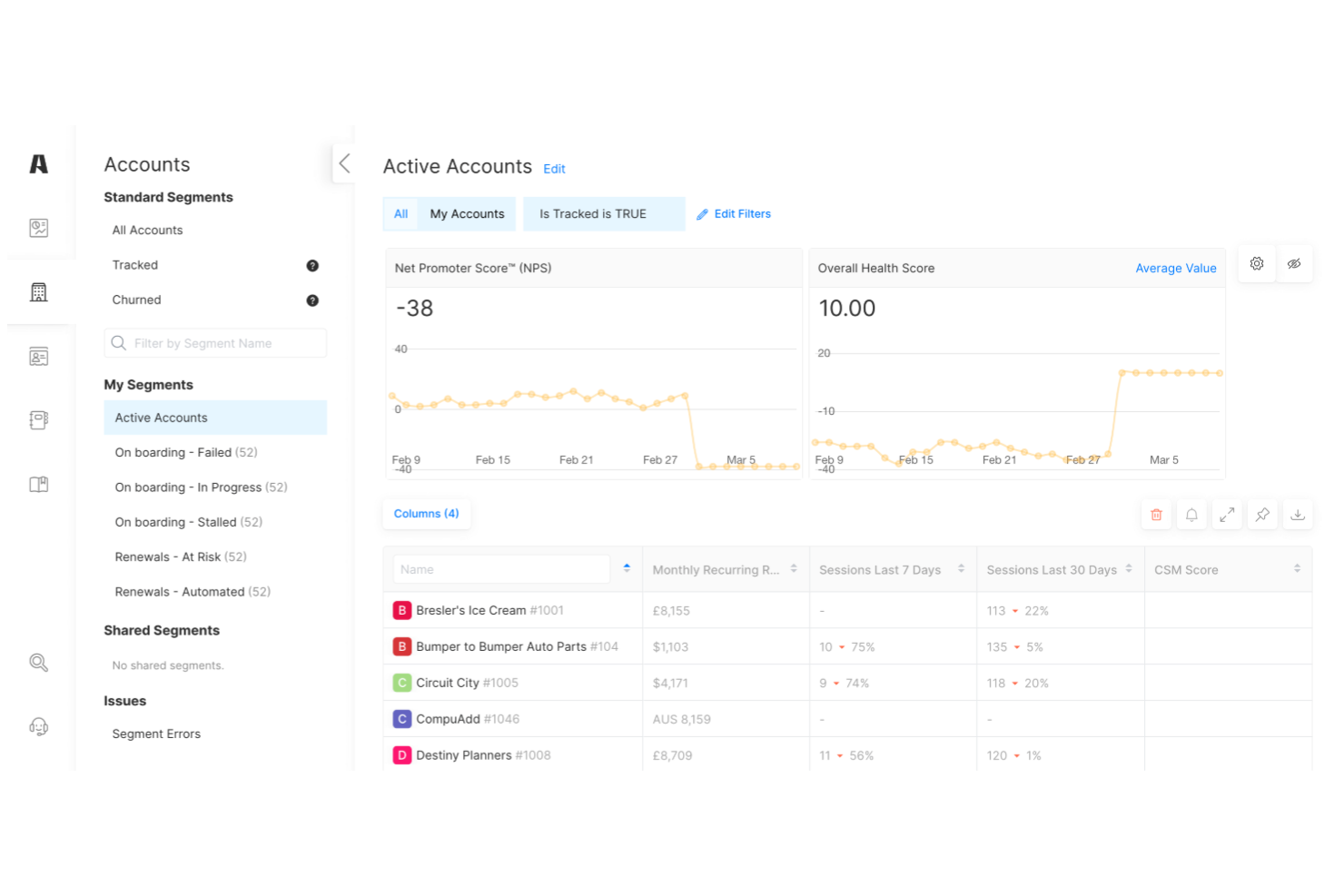
Akita offers customer health score software designed with small and midsize businesses in mind. The platform helps teams monitor customer engagement, identify churn risks, and prioritize outreach. Its straightforward setup and focus on actionable insights make it appealing for businesses looking to improve retention without complex enterprise tools.
Who Is Akita Best For?
Small business customer success teams in North America and Europe adopting lightweight tools to track account health and engagement.
Why I Picked Akita
What drew me to Akita is how it tailors customer health scoring for small business needs, rather than overwhelming users with enterprise-level complexity. The platform lets you build custom health score models using data from your CRM, support tickets, and product usage, so you can track what matters most to your business. I also like that Akita provides clear, actionable dashboards that help smaller teams quickly spot at-risk accounts and prioritize follow-up. For businesses that want a focused, manageable approach to customer health scoring, Akita stands out as a practical choice.
Akita Key Features
Some other features in Akita that support customer health scoring include:
- Automated playbooks: Trigger specific workflows or tasks based on changes in customer health scores.
- Churn risk alerts: Receive notifications when customers show early signs of disengagement or risk.
- Customer timeline view: Track all customer interactions and milestones in a single, chronological feed.
- Segmented reporting: Analyze health scores and trends by customer segment, product, or team.
Akita Integrations
Integrations include Salesforce, HubSpot, Intercom, Zendesk, Slack, QuickBooks, Mailchimp, Freshdesk, Pipedrive, and more.
Pros and Cons
Pros:
- Churn risk alerts based on real-time data
- Custom health scoring models for small teams
- Automated playbooks for customer engagement
Cons:
- Does not support in-app messaging
- Limited advanced analytics and reporting options
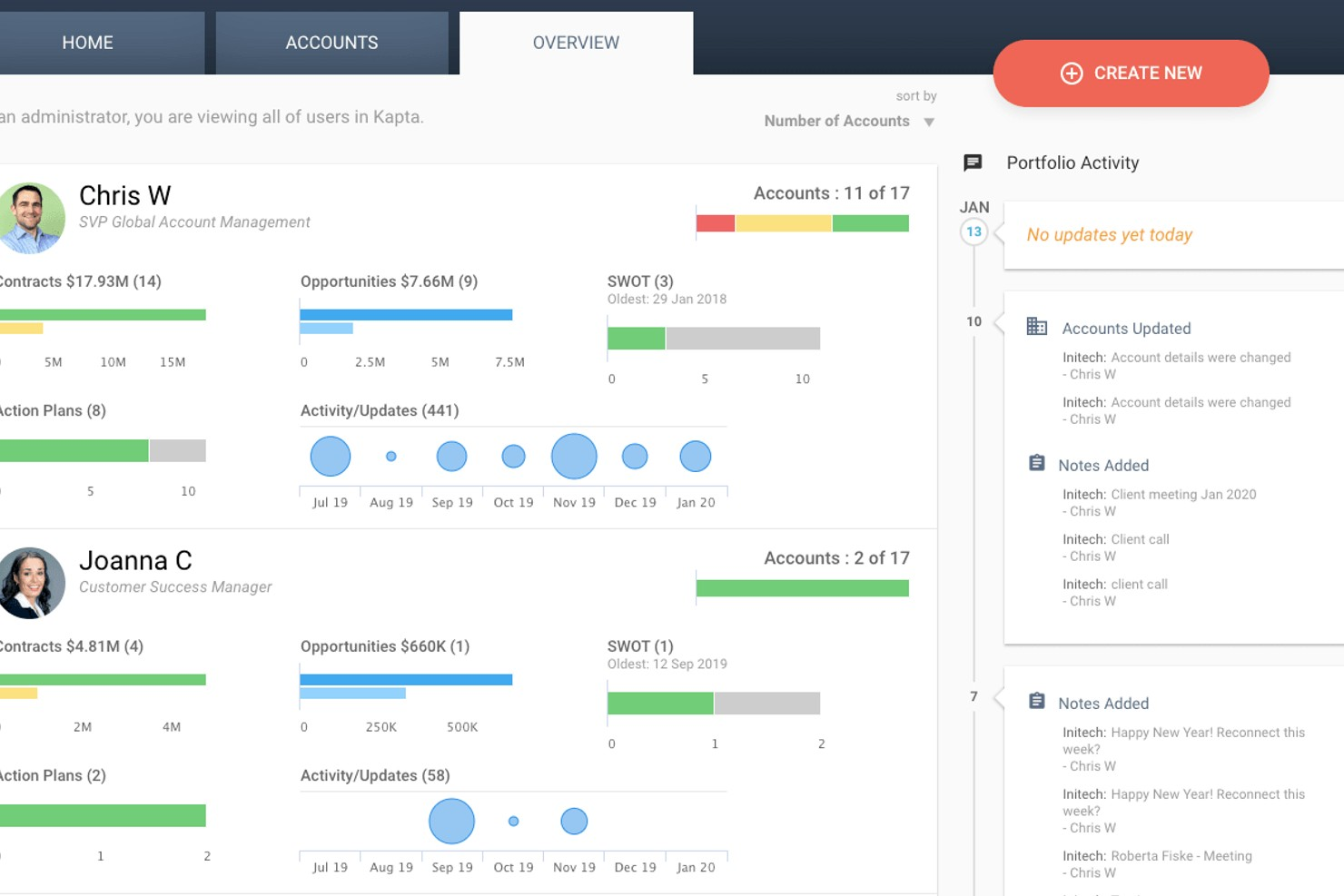
Kapta offers customer health scoring designed for teams managing strategic client relationships. The platform appeals to account managers and customer success professionals who need to track key account health and engagement. Its focus on actionable insights helps teams identify risks and opportunities within their most important accounts.
Who Is Kapta Best For?
Key account managers in mid-sized organizations globally managing enterprise-level client relationships and strategic accounts.
Why I Picked Kapta
What sets Kapta apart for me is how it’s built specifically for key account management teams that need to monitor and act on customer health at a strategic level. The platform lets you define custom health score criteria based on account plans, relationship milestones, and stakeholder engagement, which is essential for managing complex B2B relationships. I also appreciate that Kapta ties health scores directly to account action plans, so teams can quickly align on next steps when risks or opportunities surface. This focus on actionable, account-level insights makes Kapta a strong fit for organizations that treat key accounts as a core part of their business strategy.
Kapta Key Features
Some other features in Kapta that support customer health scoring include:
- Automated task tracking: Assign and monitor tasks linked to account health initiatives directly within the platform.
- Voice of customer surveys: Collect structured feedback from key stakeholders to inform health scores.
- Executive dashboard: View real-time account health metrics and trends across your portfolio.
- Integration with CRM systems: Sync account data and updates with Salesforce and other leading CRM platforms.
Kapta Integrations
Integrations include Salesforce, HubSpot, Microsoft Dynamics, Microsoft Teams, Zoho, Slack, Mailchimp, and more.
Pros and Cons
Pros:
- Account planning linked to health metrics
- Automated reminders for follow-up actions
- Customizable health scoring for key accounts
Cons:
- Rigid workflow for non-B2B models
- Heavy focus on manual KAM entry
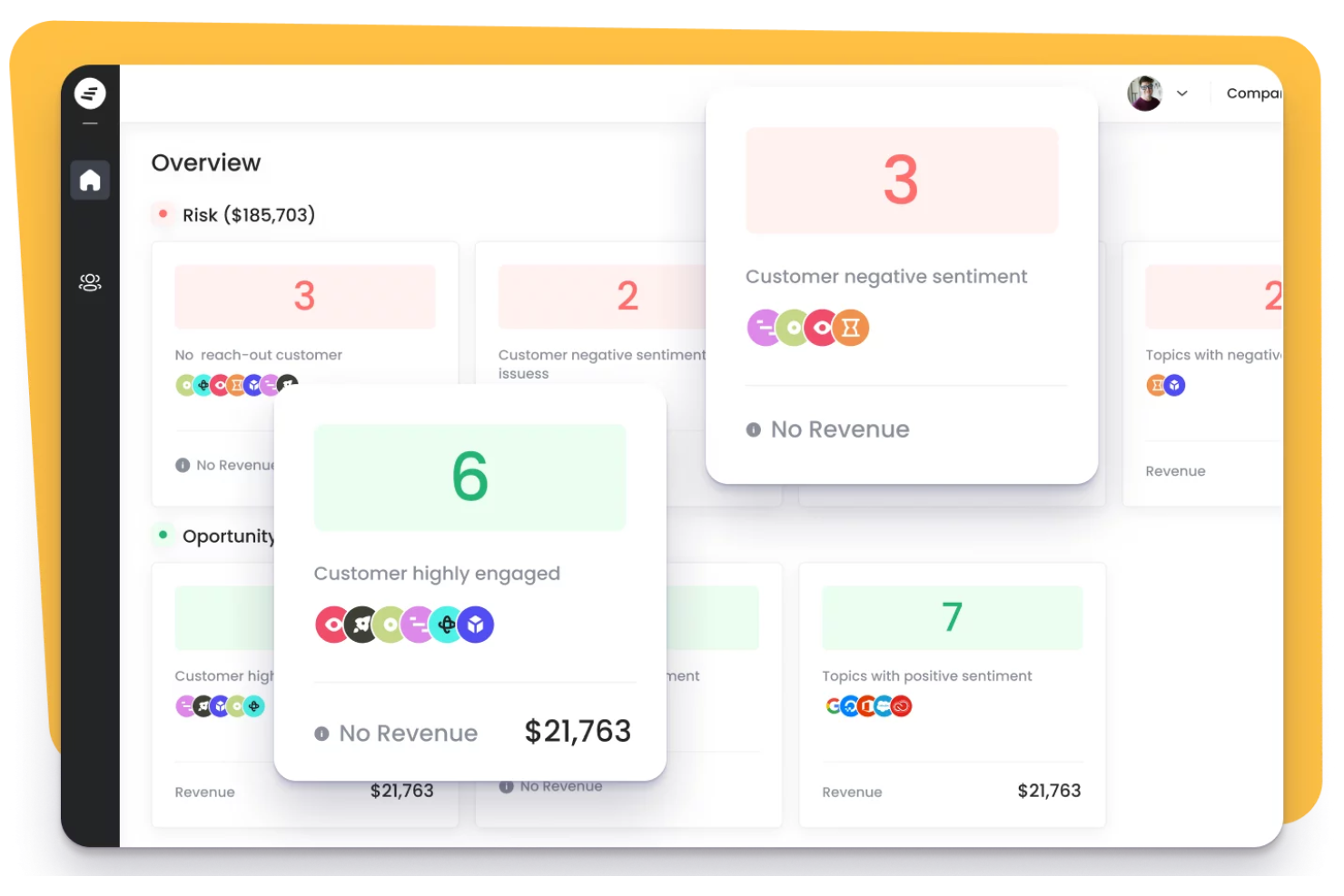
Staircase AI by Gainsight uses AI to analyze customer conversations and relationships across digital channels. It’s a strong fit for customer success teams in SaaS and tech companies that want deeper insight into customer sentiment and engagement patterns. The platform helps you identify risks and opportunities that traditional health scoring methods might miss.
Who Is Staircase AI by Gainsight Best For?
Customer success and account management teams in mid-sized to large SaaS companies worldwide leveraging AI-driven insights for relationship management.
Why I Picked Staircase AI by Gainsight
What stands out about Staircase AI by Gainsight is its ability to use AI to analyze real customer conversations and digital interactions, not just product usage data. This approach gives you a more nuanced view of relationship health by surfacing sentiment, engagement trends, and communication gaps that traditional scoring models often miss. I appreciate how the platform automatically identifies at-risk accounts based on changes in tone or frequency of interactions, so you can intervene before issues escalate. For teams that want to move beyond basic activity metrics and understand the true quality of their customer relationships, Staircase AI offers a unique and valuable perspective.
Staircase AI by Gainsight Key Features
Some other features in Staircase AI by Gainsight that support customer health scoring include:
- Automated health scoring models: The platform generates health scores using multiple data sources and customizable logic.
- Relationship mapping: Visualize key contacts, influencers, and engagement levels within each account.
- Integration with CRM and communication tools: Connects directly to Salesforce, Microsoft Teams, and Slack for unified data.
- Customizable alerts and notifications: Set up real-time alerts for changes in customer health or engagement patterns.
Staircase AI Integrations
Integrations include Salesforce, Slack, Microsoft Teams, Gmail, Outlook, Zoom, Gong, HubSpot, Zendesk, and more.
Pros and Cons
Pros:
- Visualizes account relationships and key contacts
- Detects relationship risks from communication patterns
- AI analyzes sentiment in customer conversations
Cons:
- Does not offer a mobile app
- High dependence on email volume for AI
Weitere Kunden-Health-Score Software
Hier sind weitere Kunden-Health-Score Software-Optionen, die es zwar nicht auf meine Shortlist geschafft haben, aber dennoch einen Blick wert sind:
- Skalin
For B2B customer segmentation
- Velaris
For unified customer journey views
- Pendo
For product usage analytics integration
- Customer Catalyst
For customer feedback-driven scoring


Kriterien für die Auswahl von Kunden-Health-Score Software
Bei der Auswahl der besten Kunden-Health-Score Software für diese Liste habe ich gängige Bedürfnisse und Herausforderungen berücksichtigt, etwa das Erkennen von Trends in der Kundenbindung und das Identifizieren gefährdeter Kundenkonten. Zusätzlich habe ich das folgende Rahmenwerk verwendet, um bei der Bewertung strukturiert und fair vorzugehen:
Kernfunktionen (25% der Gesamtbewertung)
Um in diese Liste aufgenommen zu werden, musste jede Lösung die folgenden typischen Anwendungsfälle abdecken:
- Kunden-Health-Scores über die Zeit verfolgen
- Daten aus mehreren Quellen zusammenführen
- Teams über Veränderungen im Kundenstatus informieren
- Kunden-Health in Dashboards visualisieren
- Kunden nach Health Score segmentieren
Zusätzliche herausragende Funktionen (25% der Gesamtbewertung)
Um die Auswahl weiter einzugrenzen, habe ich auch nach besonderen Merkmalen gesucht, wie zum Beispiel:
- KI-basierte Vorhersagen von Health Scores
- Anpassbare Playbooks für das Lifecycle-Management
- Stimmungsanalyse aus Kundenkommunikation
- Automatisierte Workflow-Auslöser bei Veränderungen des Health Scores
- Tiefe Integrationen mit CRM- und Support-Tools
Benutzerfreundlichkeit (10% der Gesamtbewertung)
Um einen Eindruck von der Benutzerfreundlichkeit jedes Systems zu bekommen, habe ich Folgendes berücksichtigt:
- Saubere und intuitive Benutzeroberfläche
- Einfache Navigation zwischen den Modulen
- Anpassbare Dashboards und Berichte
- Minimale Klicks, um zentrale Aufgaben abzuschließen
- Responsives Design für verschiedene Geräte
Onboarding (10 % der Gesamtbewertung)
Um das Onboarding-Erlebnis jeder Plattform zu bewerten, habe ich Folgendes berücksichtigt:
- Schritt-für-Schritt-Produkttouren für neue Benutzer
- Verfügbarkeit von Schulungsvideos und Dokumentationen
- Vorgefertigte Vorlagen für die schnelle Einrichtung
- Zugang zu Onboarding-Webinaren oder Workshops
- In-App-Chatbots für Echtzeit-Anleitungen
Kundensupport (10 % der Gesamtbewertung)
Um die Supportleistungen jedes Softwareanbieters zu bewerten, habe ich Folgendes berücksichtigt:
- Schnelle Reaktionszeiten auf Supportanfragen
- Mehrere verfügbare Supportkanäle
- Zugang zu einem dedizierten Customer Success Manager
- Umfassendes Online-Hilfezentrum
- Community-Foren für Unterstützung durch andere Nutzer
Preis-Leistungs-Verhältnis (10 % der Gesamtbewertung)
Um das Preis-Leistungs-Verhältnis jeder Plattform zu bewerten, habe ich Folgendes berücksichtigt:
- Transparente und vorhersehbare Preisstruktur
- Flexible Tarife für verschiedene Teamgrößen
- Keine versteckten Kosten oder unerwarteten Gebühren
- Enthaltene Funktionen in jeder Preiskategorie
- Verfügbarkeit von kostenloser Testversion oder Demo
Kundenbewertungen (10 % der Gesamtbewertung)
Um einen Eindruck von der allgemeinen Kundenzufriedenheit zu gewinnen, habe ich beim Lesen von Kundenbewertungen Folgendes beachtet:
- Positive Rückmeldungen zur Kernfunktionalität
- Berichte über zuverlässige Systemleistung
- Kommentare zur leichten Einrichtung und Nutzung
- Erfahrungen mit der Qualität des Kundensupports
- Wahrnehmung des Mehrwerts im Vergleich zur Konkurrenz
So wählen Sie Customer Health Score Software aus
Es ist leicht, sich in langen Funktionslisten und komplexen Preisstrukturen zu verlieren. Damit Sie bei der Auswahl Ihrer individuellen Software den Fokus behalten, finden Sie hier eine Checkliste mit Faktoren, die Sie bedenken sollten:
| Faktor | Was Sie beachten sollten |
|---|---|
| Skalierbarkeit | Kann die Software Ihr aktuelles und erwartetes Kundenvolumen abdecken? Prüfen Sie, ob mehrere Teams, Regionen oder Unternehmenseinheiten unterstützt werden. |
| Integrationen | Gibt es direkte Anbindungen an Ihr CRM-, Support- und Analysetools? Prüfen Sie, ob Sie manuelle Dateneingaben oder Drittanbieter vermeiden können. |
| Anpassbarkeit | Können Sie Health-Score-Formeln, Segmente und Benachrichtigungen an Ihr Geschäftsmodell anpassen? Achten Sie auf flexible Regeldefinition und Feldzuweisung. |
| Benutzerfreundlichkeit | Wird Ihr Team es schnell annehmen? Prüfen Sie die Oberfläche, Navigation und wie viel Schulungsaufwand für die tägliche Nutzung erforderlich ist. |
| Implementierung und Onboarding | Wie lange dauert die Einrichtung und welche Ressourcen sind nötig? Fragen Sie nach Support bei der Migration, Onboarding-Services und verfügbaren Schulungsmaterialien. |
| Kosten | Sind die Preiskategorien klar und vorhersehbar? Berücksichtigen Sie Nutzerlimits, Zusatzkosten und ob der Wert Ihrem Budget sowie dem erwarteten ROI entspricht. |
| Sicherheitsvorkehrungen | Entspricht der Anbieter Ihren Datenschutz- und Sicherheitsstandards? Prüfen Sie die Einhaltung von Vorschriften wie der DSGVO und informieren Sie sich über die Richtlinien zum Datenumgang. |
| Support-Verfügbarkeit | Welche Supportkanäle werden angeboten und zu welchen Zeiten? Überlegen Sie, ob Sie 24/7-Support, dediziertes Account-Management oder Self-Service-Ressourcen benötigen. |
Was ist Customer Health Score Software?
Customer Health Score Software ist ein Tool, das den Gesamtstatus von Kundenkonten mithilfe von Daten aus verschiedenen Quellen verfolgt, berechnet und visualisiert. Teams können so die Kundenbindung überwachen, gefährdete Kunden erkennen und den Kontakt basierend auf aktuellen Gesundheitsindikatoren priorisieren.
Durch die Zentralisierung dieser Erkenntnisse unterstützt die Software ein proaktives Kundenmanagement und stärkt die Bindungsstrategien in Support-, Success- und Serviceteams.
Funktionen
Wenn Sie Customer Health Score Software auswählen, achten Sie auf folgende zentrale Funktionen:
- Berechnung des Gesundheits-Scores: Kombiniert mehrere Datenpunkte – wie Produktnutzung, Support-Tickets und Umfrageantworten – zu einer einzigen, nachverfolgbaren Kennzahl, die den Status des Kunden widerspiegelt.
- Individuelle Segmentierung: Ermöglicht es Ihnen, Kunden nach Branche, Lebenszyklusphase oder anderen Kriterien zu gruppieren, um Gesundheitstrends zu überwachen und Engagement-Strategien anzupassen.
- Automatisierte Benachrichtigungen: Informiert Ihr Team, wenn der Gesundheits-Score eines Kunden sinkt oder bestimmte Schwellenwerte erreicht, damit Sie schnell handeln und Abwanderung verhindern können.
- Datenintegration: Verbindet sich mit Ihrem CRM, Support- und Analyse-Tools, um relevante Kundendaten einzubringen und eine genauere Bewertung des Gesundheits-Scores zu ermöglichen.
- Dashboards und Berichte: Bietet Visualisierungen und Berichte, die es einfach machen, Gesundheits-Scores zu verfolgen, Trends zu erkennen und Erkenntnisse mit Stakeholdern zu teilen.
- Chronologische Nachverfolgung: Zeichnet wichtige Kundeninteraktionen und Ereignisse in einer zeitlichen Übersicht auf, sodass Teams den Verlauf jedes Kontos nachvollziehen können.
- Automatisierung von Playbooks: Ermöglicht das Auslösen bestimmter Workflows oder Aufgaben basierend auf Veränderungen der Kundengesundheit, wie z. B. dem Versenden von Folge-E-Mails oder dem Planen von Check-ins.
- Rollenbasierter Zugriff: Erlaubt es Ihnen, zu steuern, wer Gesundheits-Scores und zugehörige Daten einsehen oder bearbeiten kann, wodurch Zusammenarbeit ermöglicht und Datensicherheit gewährleistet wird.
Gemeinsame KI-Funktionen von Kundengesundheits-Score-Software
Über die oben aufgeführten Standardfunktionen von Kundengesundheits-Score-Software hinaus integrieren viele dieser Lösungen KI mit folgenden Merkmalen:
- Prädiktives Abwanderungsmodell: Verwendet maschinelles Lernen, um historische Daten zu analysieren und vorherzusagen, welche Kunden mit hoher Wahrscheinlichkeit abwandern, damit Teams frühzeitig eingreifen können.
- Automatisierte Risikoerkennung: Überwacht kontinuierlich Verhaltensmuster der Kunden und markiert subtile Anzeichen von Unzufriedenheit oder schwindender Bindung, die bei manueller Überwachung übersehen werden könnten.
- Stimmungsanalyse: Analysiert Kundenkommunikation – wie E-Mails, Chatprotokolle und Umfrageantworten –, um positive oder negative Stimmung zu erkennen und die Gesundheits-Scores entsprechend anzupassen.
- Empfehlungen für die nächste beste Aktion: Macht KI-gestützte Vorschläge für personalisierte Schritte oder Kontaktstrategien für jedes Konto auf Basis der Analyse von Kundendaten und Engagement-Historie.
- Anomalieerkennung: Identifiziert ungewöhnliche Veränderungen in der Kundenaktivität oder den Gesundheits-Scores und benachrichtigt Teams, damit sie potenziellen Problemen frühzeitig auf den Grund gehen können.
Vorteile
Die Einführung einer Kundengesundheits-Score-Software bietet Ihrem Team und Ihrem Unternehmen zahlreiche Vorteile. Hier einige, auf die Sie sich freuen können:
- Proaktives Risikomanagement: Automatisierte Benachrichtigungen und prädiktive Analysen helfen Ihrem Team, gefährdete Konten frühzeitig zu erkennen und anzugehen, bevor Probleme eskalieren.
- Verbesserte Kundenbindung: Mit Echtzeit-Gesundheits-Scores und Segmentierung wird gezielte Ansprache möglich, was die Chancen erhöht, wertvolle Kunden zu halten.
- Datenbasierte Entscheidungsfindung: Zentrale Dashboards und Berichte bieten umsetzbare Erkenntnisse und unterstützen fundierte Strategien in Service- und Erfolgsteams.
- Optimierte Arbeitsabläufe: Playbook-Automatisierung und die Integration mit bestehenden Tools reduzieren manuellen Aufwand und ermöglichen zeitnahe Reaktionen auf Kundenbedürfnisse.
- Mehr Zusammenarbeit: Rollenbasierter Zugriff und gemeinsame Zeitachsen bieten allen Beteiligten eine einheitliche Sicht auf den Status und die Historie der Kunden.
- Personalisierte Ansprache: Individuelle Segmentierung und KI-gestützte Empfehlungen ermöglichen es, Kommunikation und Maßnahmen auf die jeweilige Kundenlage abzustimmen.
- Schnellere Einführung und Mehrwertrealisierung: Geführte Einrichtung, Vorlagen und Schulungsressourcen helfen Teams, die Software schnell zu nutzen und rasch von den Vorteilen zu profitieren.
Kosten und Preise
Die Auswahl einer Kundengesundheits-Score-Software erfordert ein Verständnis der verschiedenen verfügbaren Preismodelle und Tarife. Die Kosten variieren je nach Funktionsumfang, Teamgröße, Zusatzoptionen und mehr. Die folgende Tabelle fasst gängige Tarife, deren durchschnittliche Preise und typische Funktionen, die in Kundengesundheits-Score-Softwarelösungen enthalten sind, zusammen:
Tarifvergleichstabelle für Kundengesundheits-Score-Software
| Tarifart | Durchschnittlicher Preis | Häufige Funktionen |
|---|---|---|
| Kostenloser Tarif | $0 | Grundlegende Verfolgung des Gesundheitswerts, eingeschränkte Integrationen, einfache Dashboards und E-Mail-Support. |
| Persönlicher Tarif | $49-500/Monat | Individuelle Segmentierung, automatisierte Benachrichtigungen, grundlegende Berichte und Zugriff für Einzelbenutzer. |
| Business-Tarif | $1,000 – $2,500/Monat | Erweiterte Integrationen, Teamkollaborationstools, Workflow-Automatisierung, verbesserte Dashboards und bevorzugter Support. |
| Enterprise-Tarif | $1,500 – $12,000+/Monat | Individuelle Gesundheitsmodelle, persönliche Einführung, erweiterte Sicherheit, API-Zugang und dediziertes Account-Management. |
FAQs zur Customer Health Score Software
Hier finden Sie Antworten auf häufig gestellte Fragen zur Customer Health Score Software:
Wie werden Customer Health Scores berechnet?
Customer Health Scores werden berechnet, indem Daten aus Quellen wie Produktnutzung, Support-Tickets, Umfrageergebnissen und Zahlungshistorie kombiniert werden. Jeder Datenpunkt wird entsprechend seiner Bedeutung für Ihr Unternehmen gewichtet. Die Software generiert daraus einen einzigen Wert, der den Gesamtstatus jedes Kunden widerspiegelt.
Kann ich die Formel zur Berechnung des Health Scores an mein Unternehmen anpassen?
Ja, die meisten Customer Health Score Softwares erlauben Ihnen, die Formel individuell anzupassen. Sie können wählen, welche Datenquellen einbezogen werden, jedem Faktor ein anderes Gewicht zuweisen und Schwellenwerte festlegen, was als gesund, gefährdet oder kritisch gilt.
Welche Datentypen können in Customer Health Score Software integriert werden?
In der Regel können Sie CRM-Daten, Support-Ticket-Systeme, Produktanalysen, Abrechnungsplattformen und Tools für Kundenfeedback integrieren. Dadurch kann die Software eine breite Palette an Signalen für eine genauere und ganzheitlichere Bewertung heranziehen.
Wie schnell kann ein Team Customer Health Score Software nach dem Kauf einsetzen?
Die meisten Teams können innerhalb weniger Tage bis Wochen loslegen – abhängig von der Komplexität der Daten und Integrationen. Viele Plattformen bieten Ressourcen wie Produkttouren, Vorlagen und Schulungsvideos, um die Einführung zu erleichtern.
Worauf sollte ich bei der Sicherheit von Customer Health Score Software achten?
Achten Sie auf Funktionen wie Datenverschlüsselung, rollenbasierte Zugriffskontrolle, Audit-Logs sowie die Einhaltung von Standards wie der DSGVO. Fragen Sie Anbieter nach ihren Richtlinien zur Datenverarbeitung und nach externen Sicherheitszertifizierungen.